

Page 1

ULTRA COMPACT
WIRELESS STEREO
SPEAKERS WITH
EXPLOSIVE
PREMIUM SOUND
Page 2

TOKK™ REACTOR are
compact speakers that
let you enjoy true stereo
music on the go.
Equally at home on your desk, the beach, camping
or just hanging out. TOKK™ REACTOR brings you
wireless ‘explosive’ sound, in a pocket-sized form. With
hours of uninterrupted Bluetooth streaming from your
smart device, it can even take a call or communicate
with Siri, Google Now or other smart assistants. Each
speaker is equipped with magnets, so you can attach
them to your refrigerator, car, or any other metal
surface. The halves of TOKK™ REACTOR magnetically
attach to one another for convenient carrying.
Page 3
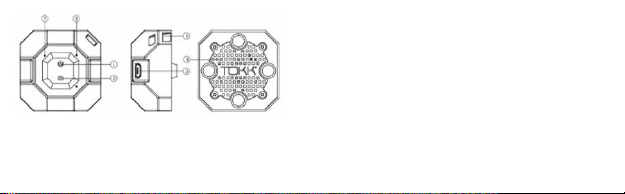
1. Power On/Off
2. Remote Shutter
3. USB Port
4. Speaker
5. Lanyard hole
6. LED Light
7. MIC
PAIRING
• Press and Hold the Power Button (1) on both speakers until you
hear the start-up chime and then “Bluetooth connected”. A Blue
LED light will be flashing on the left speaker and a Red LED
light will be flashing on the right speaker.
• Switch on your Bluetooth® smart-device/phone and wait until
‘TOKK REACTORS’ shows up on your screen. When ‘TOKK REACTORS’ appears on your device, select and pair with the speaker.
• When the pairing is complete, you will hear a message
“Bluetooth connected” and the Red and Blue LED light will flash
slowly Note: Some mobile phones or other devices may pair
automatically when re-started.
Page 4

For Mobiles, Tablets devices and PC follow above instructions.
For Apple laptops and Desktops devices please follow the following instructions: Power only one TOKK REACTOR speaker (the one
with the fine print on the bottom of it). Open your Apple Bluetooth
manager and select TOKK REACTORS, you will hear “Bluetooth
Connected”, once this is done power on the other TOKK REACTOR
speaker, both Speakers will sync together and you will hear
“Bluetooth Connected” and automatically to play in Stereo.
EASY OPERATION
1. Power Button: Power On/Off /Play/Pause/Answer Calls
• Power On: Press and hold the Power Button on both cubes
to power On
• Power Off: Press the Power Button on either of the speakers
and hold
• Short Press the button to Pause when music is playing.
• Press the button to answer incoming calls when the device is
paired with a phone. Press again to end call
Page 5

2. Remote Shutter Button
• Open your mobile phone’s camera, point it at what you want
to take a picture of, Press the Remote Shutter Button (2) to
take pictures. You can also use it to start your video camera.
It’s ideal for selfies that you want to take a long-distance
picture from. Place your phone across the room and use either
of TOKK Reactors to snap a photo.
Note: Ensure Bluetooth® is connected. Can be activated whilst
music is playing.
• To access Siri or Google Now, press and hold (2) to activate
voice assistant feature. Wait for sound and ask anything.
3. Micro USB Port (Power Input)
4. Speaker
5. Lanyard Hole
6. Bluetooth® Indicator Light and Charge Indicator Light
• Rapid Flashing (2/s) Blue LED light indicates that the
speaker is in Bluetooth® Searching and Pairing Mode with
one another
• Slow Flashing (2/s) Blue and Red LED light one after another
indicates that the speaker is in Bluetooth® Searching and
Pairing Mode with a device
Page 6

• Slow Flashing (1 /s) Red and Blue LED light indicates that
the phone/device is successfully paired
•Red LED flashing indicates the right speaker and Blue LED
indicates the left speaker
• Constant Red LED light whilst the device is charging
• Slow Flashing (1 /s) Red and Blue light switch on when
fully charged
7. Microphone
POWER ON/OFF
Press and Hold the Power Button (1) on both speakers until you
hear the start-up chime and then “Bluetooth connected”. A Blue
LED light will be flashing on the left speaker and a Red LED light
will be flashing on the right speaker.
To turn OFF: Power Off: Press the Power Button on either of the
speakers and hold. Note: It is strongly recommended that you turn
off the speakers whilst not in use.
Page 7

CHARGING
• It is recommended to fully charge the speakers prior to first use
• Plug the Dual Micro USB cable into the USB ports.
• The Red LED light will turn on to indicate the device is charging.
• Slow Flashing (1 /s) Red and Blue light switch on when fully
charged
PRECAUTIONS
• Do not submerge the product in water.
• Keep speakers away from water and moisture - do not get
them wet.
• Keep speakers away from any heat source.
• Adjust volume to avoid damaging your hearing.
• Store and use in normal environments. Exposure to extreme
elements such as fire, water, or other extreme elements may
damage the units. Do not handle with wet hands.
• Keep debris or other items from blocking the speakers or from
entering any of the ports.
Page 8

• Charge the battery in an isolated area and keep away from
flammable material.
• Do not attempt to open or take apart these speakers. The
speakers will be damaged during that process.
• If the speaker quality deteriorates, or a slight ‘popping noise’ is
heard, it may be due to low battery. Recharge the speakers.
• Only use a computer USB or the DC 5V power matching the
Micro USB Cable (included) to charge.
• Do not attempt to open or take apart these speakers. These
units have no user serviceable parts.
• Do not put any foreign objects in the USB port.
• Do not expose product to direct sunlight as it may result in a
risk of battery exploding, overheating, or igniting.
• Do not disassemble, modify, short circuit or heat the battery.
• Do not place it in fire or leave in a hot place.
• Only charge the battery with the specified USB cable.
• In the unlikely event of leakage or explosion, use sand or a
chemical fire extinguisher to extinguish.
• LiPo Battery must be recycled or disposed of properly.
• The Micro USB cable is tailor-made for the LiPo rechargeable
battery used in your TOKK™ REACTOR. Do not use it to charge
any item other than the TOKK™ REACTOR.
Page 9
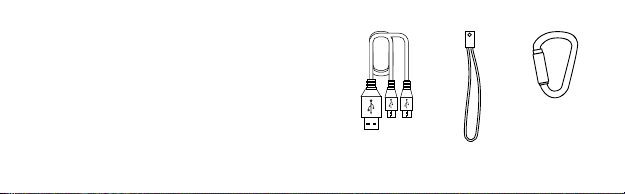
CONTENTS
1 × TOKK™ REACTOR paired speakers
1 × Micro USB 2-in-1 Cable
1 × Lanyards
1 × Carabiner
1 × User Manual
Micro USB Cable
2-in-1
Lanyard
Carabiner
Page 10

SPECIFICATIONS
• Plays in Stereo: Rated Power: PO=2x2W
• Frequency Response: 180HZ-16KHZ
• Distortion Factor: THD<1%
• Signal to Noise Ratio: S/N≥90DB
• Separation: ≥55DB
• Speaker: 23mm; 4Ω 2W
• Battery: Rechargeable Lithium-Polymer 3.7V/500 mAh
• Apple iOS, Android compatible
• Bluetooth® Smart 4.2
TROUBLESHOOTING
No Sound:
• Make sure that the music
player is working and that the
speakers are charged.
• Make sure Bluetooth®
is paired with the correct
speakers.
Not Charging:
• Check to make sure that you
are using the correct cable and
that it is fully plugged into both
the device and the USB port
that you are charging from.
Also check to make sure the
source is turned on.
Not Playing in Stereo:
• Make sure that both speakers
are charged and have power
on, and make sure to follow
the correct step by step Pairing
procedure.
Page 11

NOTE
This equipment has been
tested and found to comply
with the limits for a class B
digital device, pursuant to
part 15 of the FCC rules. These
limits are designed to provide
reasonable protection against
harmful interference in a
residential installation. This
equipment generates, uses and
can radiate radio frequency
energy and, if not installed
and used in accordance with
the instructions, may cause
harmful interference to radio
communications.
However, there is no guarantee
that interference will not occur
in a particular Installation.
If this equipment does cause
harmful interference to radio or
television reception, which can
be determined by turning the
equipment off and on, the user
is encouraged to try and correct
the interference by one or more
of the following measures:
• Reorient or relocate the
receiving antenna
• Increase the separation
between the equipment and
receiver
• Connect the equipment into
an outlet on a circuit different
from that to which the receiver
is connected
• Consult the dealer or
experienced radio/TV technician
for help
This Device complies with Part
15 of the FCC Rules. Operation
is subject to the following two
conditions:
Page 12

(1) This device may not cause
harmful interference, and
(2) This device must accept any
interference received, including
interference that may cause
undesired operation.
This device complies with Industry Canada License-exempt
RSS-210. Operation is subject
to the following two conditions:
(1) This device may not cause
interference, and
(2) This device must accept any
interference, including interference that may cause undesired
operation of the device.
CAUTION: Changes or modifications not expressly approved
by the party responsible for
compliance could void the
user’s authority to operate the
equipment.
For these purposes, the party
responsible is:
Pred Technologies USA Inc.
7855 Prospect Street, Suite
310, La Jolla, CA 92037
1- 858-999-2114
WARNING! This equipment may
experience difficulty and/or
memory loss when subjected
to any electrostatic discharge,
radio frequency interference, or
sudden power surge/interruption. The user is encouraged to
reset the equipment should any
of these occur.
Manufactured and distributed
by Pred Technologies USA Inc.
Product names, designations,
and logos are trademarks or
Page 13

registered trademarks of Pred
Technologies USA Inc. All
rights reserved.
Customer Service Website:
www.predtechnologies.com
We recommend that you
retain our address for future
reference. Product and colors
may vary. Packaging designed
in San Diego and printed
in China.
MADE IN CHINA.
Manufactured and distributed
by Pred Technologies USA Inc.
All Rights Reserved.
Pred Technologies USA Inc.
7855 Prospect Street Suite 310
La Jolla, CA 92037
Customer Service: www.
predtechnologies.com
Assortment No: R3001
 Loading...