

Page 1
TOKISTAR LIGHTING
INSTRUCTION MANUAL
Micro Spotlight Series
Fixture Type: MSP- - - -
General Description
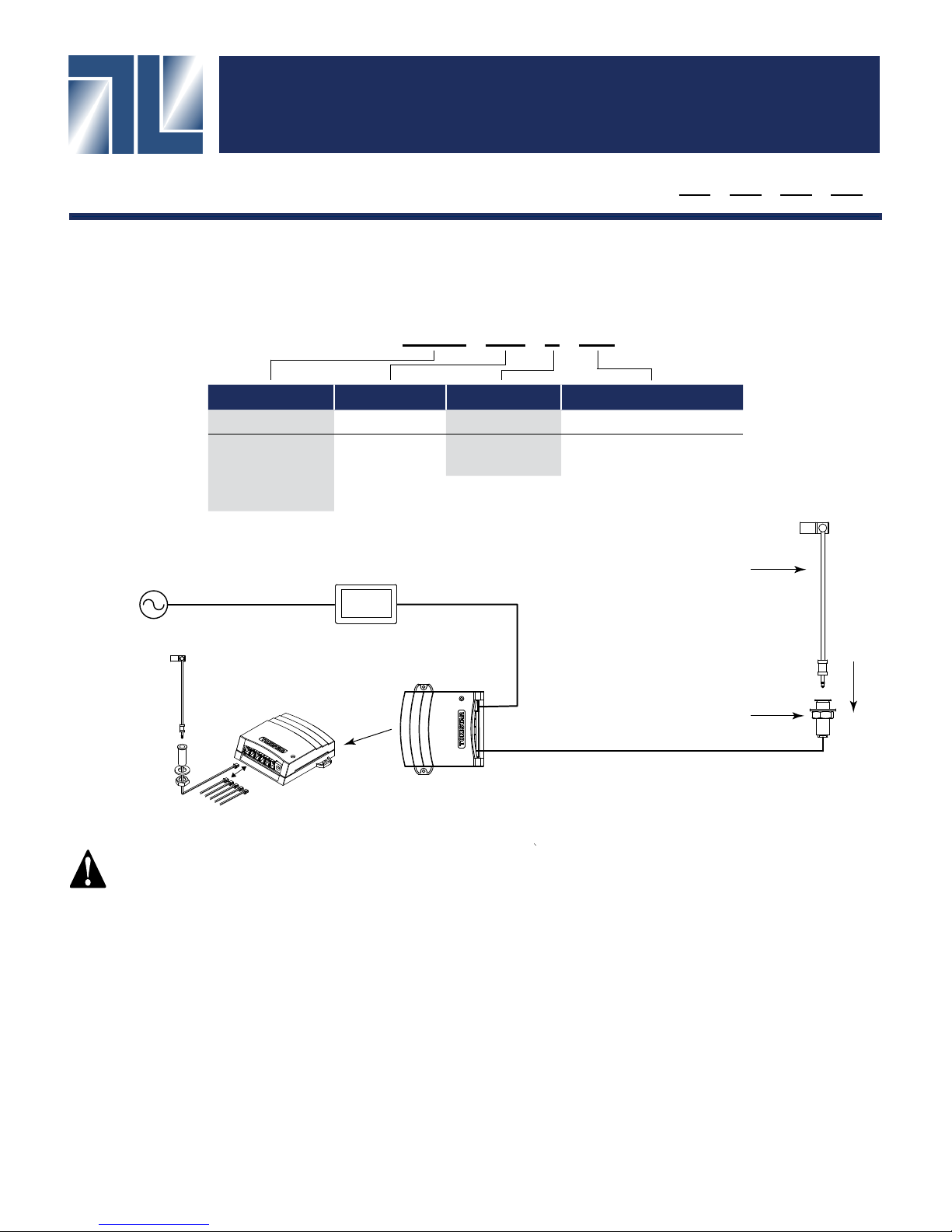
Tokistar’s Micro Spotlight Series is a low-voltage lighting system. The system operates at 5 VDC from Class II Listed
Power Supplies. Fixtures are labeled with wattage and operating voltage.
MSP - 3000K - 30D - S - 150
LED Color Lens Style Fixture Color Fixture Length
Color Code Code Style Code Color Code Length (mm)
2700
3000
4000
5000
120 VAC / 60 Hz
2700K
3000K
4000K
5000K
16
24
30
AC Adapter
16˚
24˚
30˚
S
B
Silver
Black30150
250
30 mm
150 mm
250 mm
Micro Spotlight
Fixture
LPS-350-6CH
or LPSDM-350-CH
Distribution Box
Socket
MSP-SKT-(B or S)
Lead Wire with Connector
Up to 6 Micro Spotlight fixtures may
be connected to 1 Power Supply.
PRECAUTIONS
1. Read all instructions completely before beginning installation.
2. Turn off electricity before beginning installation.
3. All wiring is to be performed by a qualied electrician.
4. Installation must comply with the National Electrical Code, and all applicable codes.
5. Turn main supply to Power Supply on only after all connections are made and tested.
6. Use only Class II Power Supplies provided by Tokistar with the system.
7. Not for use with phase control dimmers.
email: [email protected] Website: tokistar.com
TOKISTAR LIGHTING
1015 E. Discovery Lane
Anaheim, CA 92801
TEL: 714 772 7005 FAX: 714 772 7014
Version 1.2
Page 2
Micro Spotlight Instructions Page 2
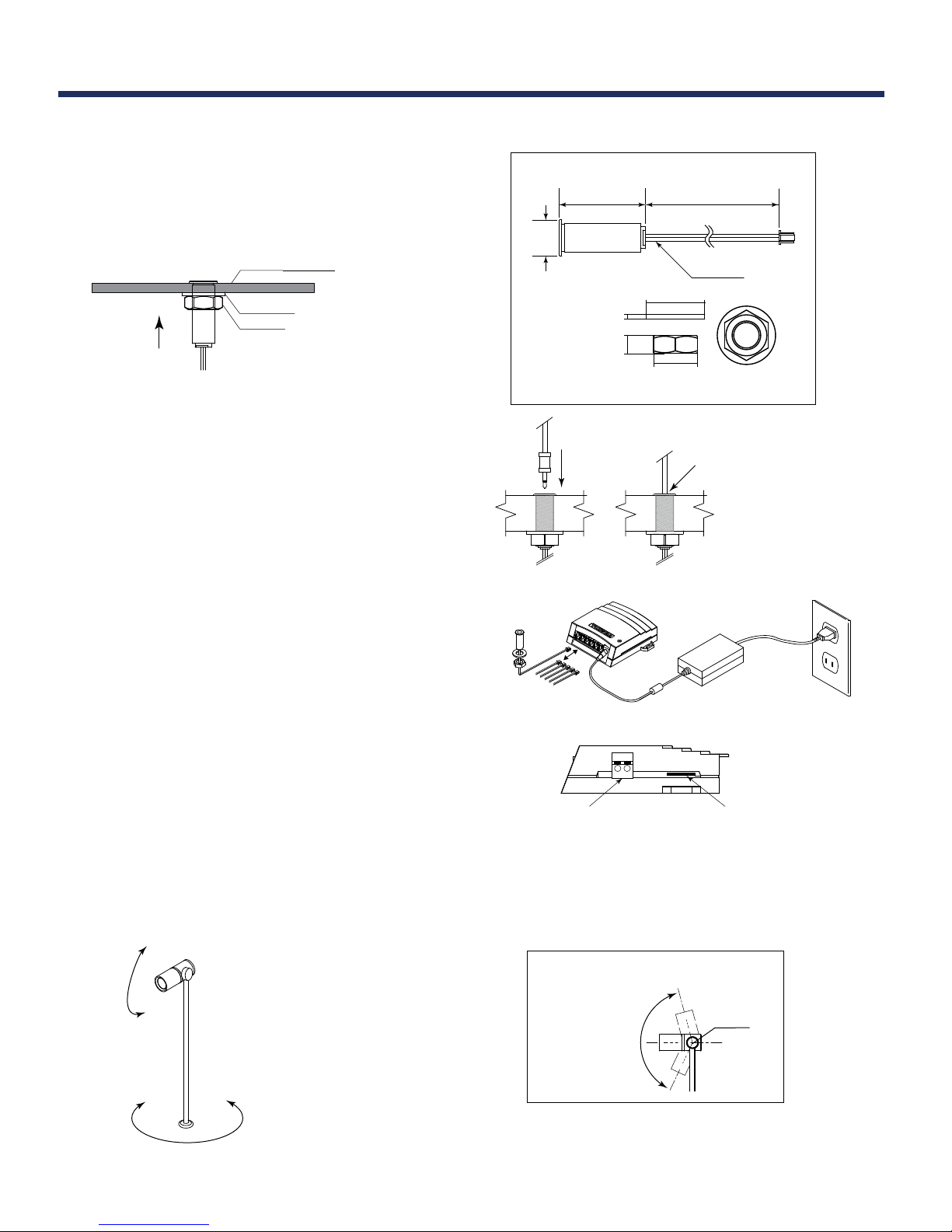
Micro Spotlight Series includes Fixtures, Socket Assemblies and Power Supplies.
Mounting Socket Assembly
Provide a 5/8" diameter hole in the mounting surface. Insert
the socket assembly through the hole and secure with the
nut and washer provided.
mounting surface
washer
nut
Suggested panel thickness for installation
is .078"- 1.22". For use on at surfaces only.
Fixture Assembly
Insert xture into socket assembly until base of xture is
ush with top of socket assembly.
Power Supply/AC Adaptor
Connect up to 6 xtures to the LPS-350-6CH Distribution
Box. Next plug AC Adaptor into the LPS-350-6CH, and
then into wall outlet.
Socket - Part#: MSP-SKT-S/B
1.88"
78"ø
.
1.26"ø
washer
.
102"
nut
.394"
.945"
Accessories: nut, washer, cover
LPS-350-6CH
78"
lead wire
The base of the xture
must be ush with the top
of the socket assembly.
AC Adaptor
Dimming (Optional)
An LPSDM-350-6CH Distribution Box may have been
supplied with the Micro Spotlight xtures. This unit can
be used with 0/1-10VDC Dimming, or it may be dimmed
using the Self-Dimming Dial.
Position Fixture
Do not bend the shaft or rotate the xture head
beyond the indicated range.
To adjust the light
direction, the shaft
can be rotated 360˚.
360˚
Up to 6 Micro Spot fixtures may be connected to 1 Power Supply.
0/1-10VDC
Dimming Input
LPSDM-350-6CH Dimming Distribution
Fixture Head rotation
(side view)
Self-Dimming
Dial
Axis
135˚
Do Not Rotate the Fixture Head
Beyond 135˚
Page 3
Micro Spotlight Instructions Page 3
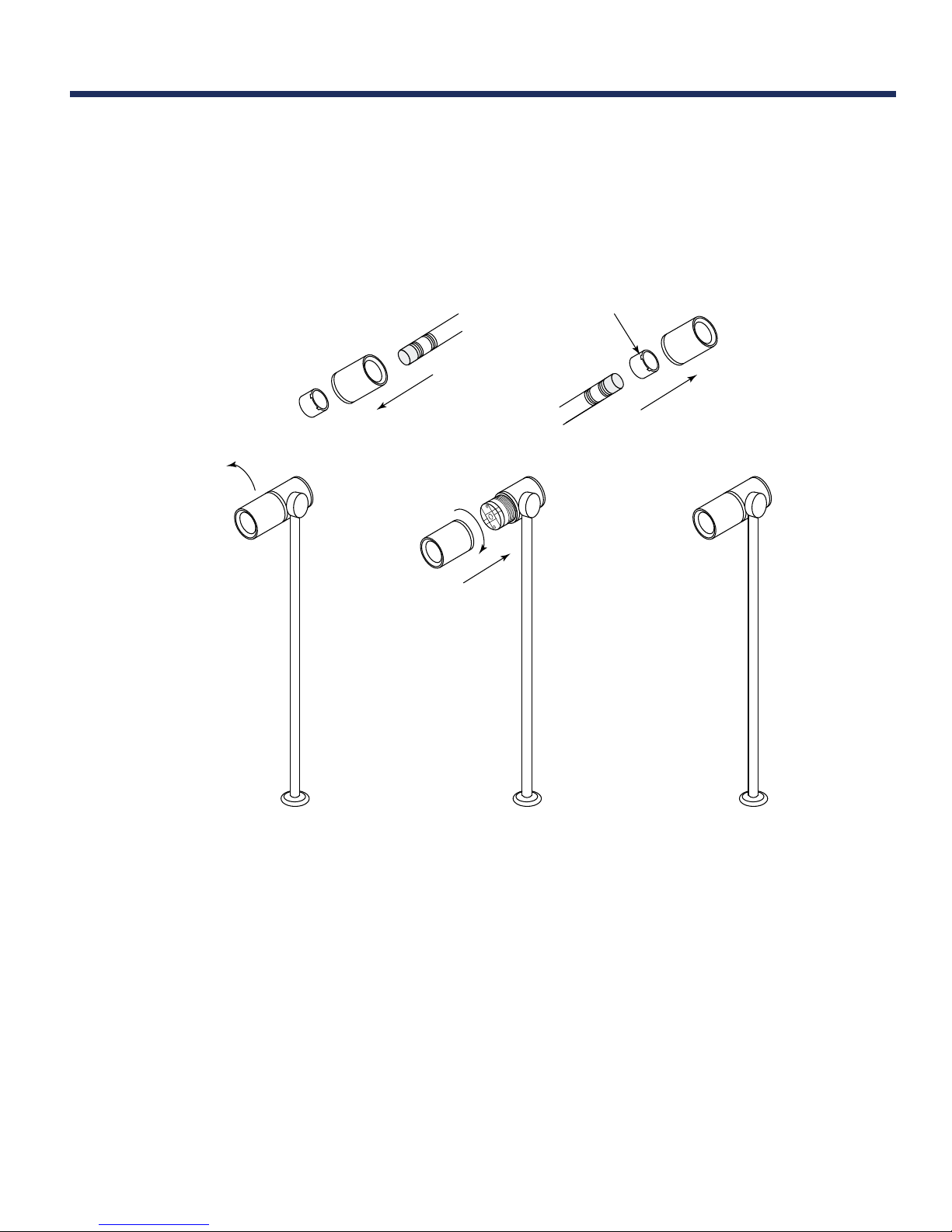
Lens Replacement
Step 1: Rotate Fixture Head counterclockwise to remove.
Step 2: Using a soft tool, apply pressure to remove lens.
Step 3: Insert the new lens using the soft tool.
Step 4: Reinsert Fixture Head using a clockwise motion.
reinsert lens with plastic
facing outwards
Step 2) Step 3)
Step 1)
counterclockwise
Step 4)
clockwise
Version 1.2
 Loading...