

Page 1
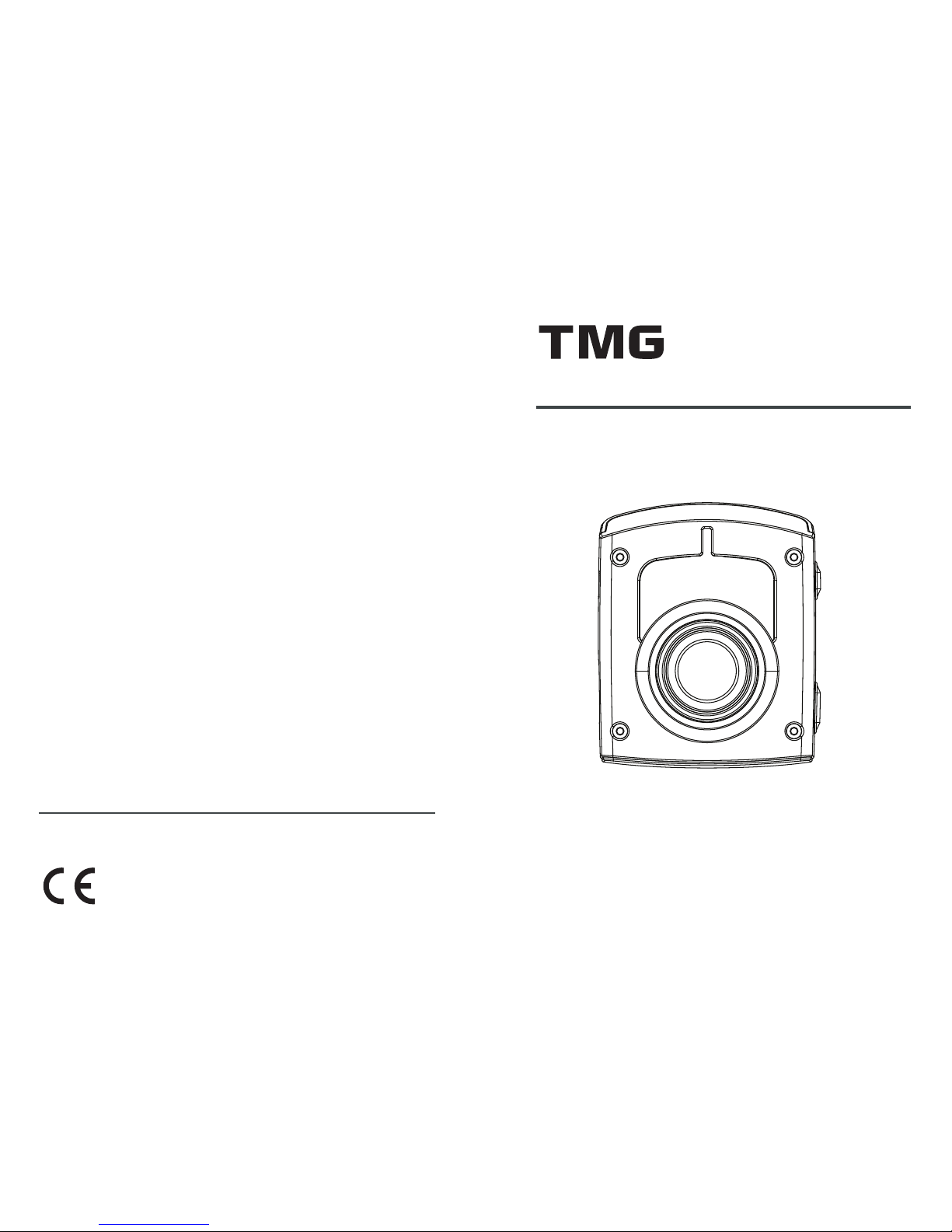
DR-2
FullHD GPS DRIVING RECORDER
Operation Manual
www.TMG-FACETS.com
Facets Product Design & Development Ltd.
Taiwan Microwave Group
www.TMG-FACETS.com
TMG, the TMG logo, and other TMG marks are owned by TMG and may be registered.
All other trademarks are the property of their respective owners.
Page 2

Table of Content
Introduction
Thank you for purchasing DR-2 GPS DRIVING
RECORDER, one of the most innovative and sophisticated road safety monitoring systems available today.
Please be sure to read this manual to familiarize yourself
with the features and operation of this product. Enjoy the
trip with TMG and drive safely.
! Caution
Motorists are expected to exercise all due caution while using this
product, and to obey all applicable traffic laws. To prevent theft,
always conceal this product before you leave the vehicle.
Installation .........................................................
Profile ................................................................
Specifications .....................................................
Features ..............................................................
Operation ............................................................
Firmware Update ................................................
Report to Us ........................................................
Trouble Shooting .................................................
Warranty ..............................................................
3
7
9
11
13
15
17
18
19
Page 3
4
Installation
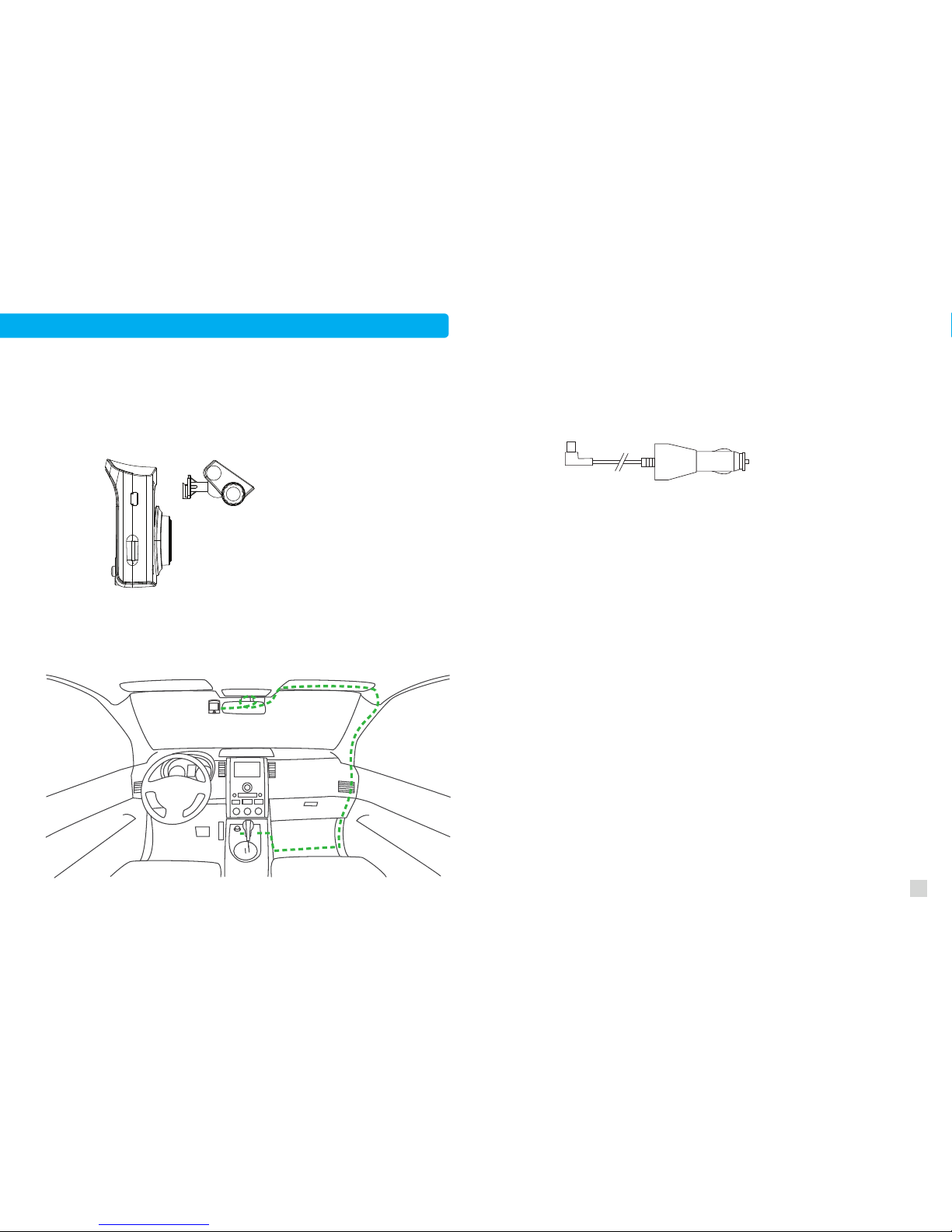
1. Wipe windshield with cleaner.
2. Remove sticker cover and press the hook against windshield.
3. Hang DR-2 on the bracket. Try to insert the hook all the way
to the end. Adjust angle and fasten the screw.
4. Organize wire as shown below.
DC12~24V
5. Plug in cigeratte lighter plug. It can accomodate a
12~24V power source.
Tuck in Trim of A Pillar
Hide behind Sun Shield
Wrap around Mirror Neck
Hide under Carpet
Page 4

6
Installation- Wireless Radar Detector(Optional)
RED +
BLACK -
Only DR-2 with built-in RF receiver works for wireless radar
detector. Please make sure to acquire correct model.
1. Install it with screws, cable ties or double-sided tape be tween grille or under the bumper.
2. Make sure there is no metal parts blocking the front of
radar detector.
3. Connect black wire to “-” and red wire to “+” on the
battery.
4. Organize cable by cable ties.
5. Radar detector works better for some types of radars when
it is installed vertically. Please consult local dealer for best
solution in your region.
!
Warning
Even though it is easy to install the unit, we
still recommand you to find a professional
to help if you don’t feel comfortable doing it
by yourself.
Page 5
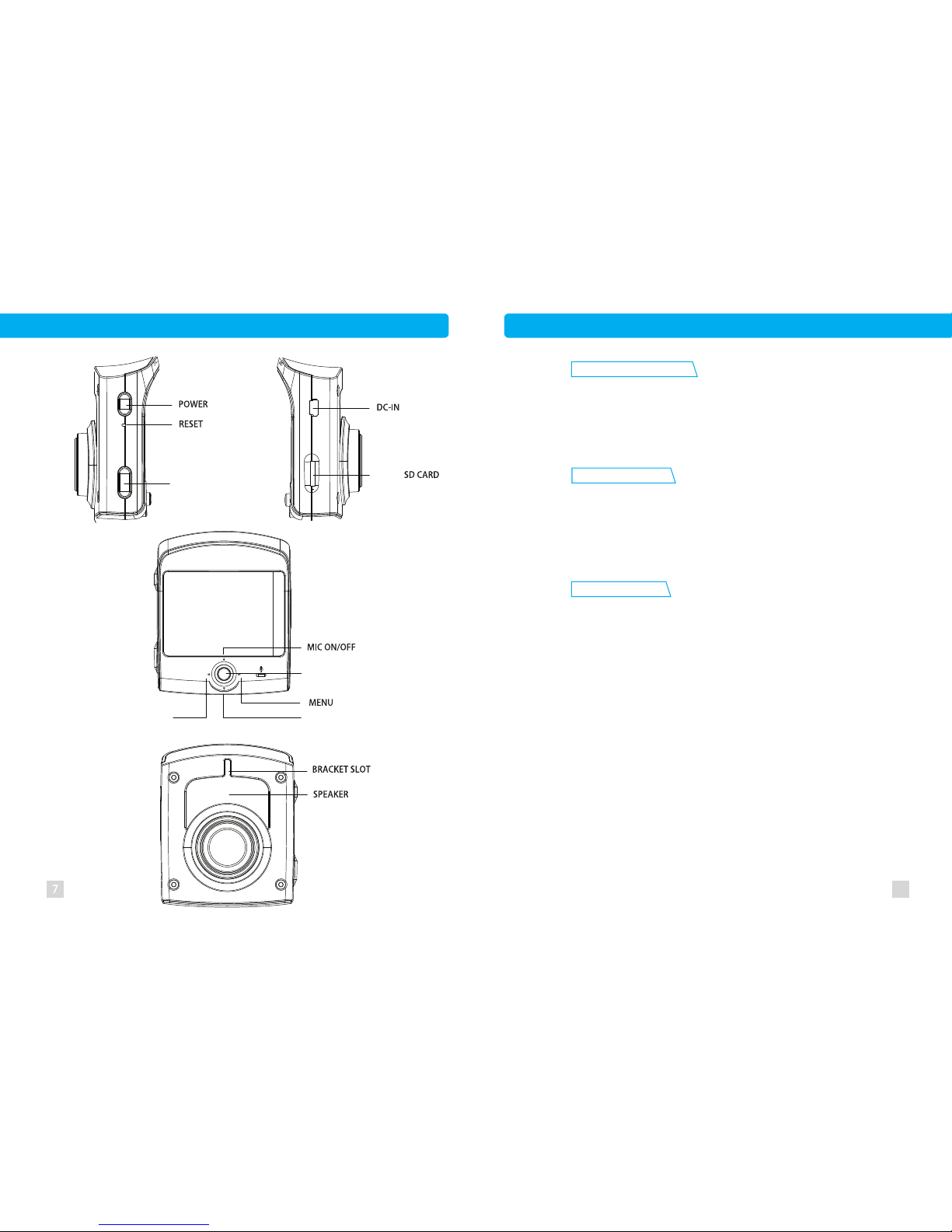
Profile
MICRO
Enhanced Night View
GPS POI Warning
Event Recording
With professional optical lens, high quality night view
is promised. Surroundings are well covered by 140°
viewing angle.
Click LOCK button to save video without being overwritten.
G-sensor detects 3D【X、Y、Z axis】 G-force simul-
taneously, and locks video clip when G-force exceeds
threshold limit.
files are limited to 10 . Old files will still be
replaced by new ones once the number exceeds 10.
8
Main Features
GPS warns you POI based speed cameras. Radar
detector is optional for mobile radar detection.
/ EXIT MENU
BACK
PLAYBACK
LOCK
Locked
MUTE ONCE
Page 6
10
Specifications of Video Camera
1. Lens: F/2.8
2. View angle: 140°
3. Built-in lithium battery
4. 2.5”TFT LCD display
5. Compression format: H.264
6. Resolution: 1920*1080@30fps
8. Media: Micro SD, Class10, up to 32G.
9. Lock button
10. 3 axes G-sensor
11. Language: 11 language supported
12. GPS: Latest GPS module
13. Speed camera warning
14. Free database update
15. Working temperature: -20~+75°C
16. Input: DC12~24V
17. Dimension: 70*65*22mm
18. Weight: 97g
19. Material: PC/ABS
20. Product origin: Taiwan
Specifications of Radar Detector(Optional)
Input: DC 12V
X band: 10.525 GHz ± 50 MHz
K band: 24.150 GHz ± 100 MHz
New K band: 24.125 GHz ± 100 MHz
Ka band: 33.4 ~ 36.0 GHz
(Coverage can be adjusted in some regions.)
LASER: 904nm
Operation Temperature: - 25 oC ~ + 85 oC
This device complies with part 15 of FCC rules: Operation is
subject to the following two conditions: (1) this device may not
cause harmful interference, and (2) this device must accept any
interference received, including interference that may cause
undesired operation.
9
7. WDR(Wide Dynamic Range) technology
Page 7

Radar/ Laser Detection(Optional)
Emergency Vehicle Warnings(Optional)
DR-2’s optional radar detector reacts to SWS (Safety Alert®
Traffic Warning System).
DR-2’s optional radar detector detects X, K, New K, Super
Wide Ka bands and laser. Please refer to the Specifications
for more information.
STS (Signal Tracking System, Optional)
Radar signals with increasing intensity will be tracked by
DR-2’s optional radar detector, and the alert will not be interrupted by temporary interference to hold user’s awareness of
a true threat.
Built-in Speed Limit Map
DR-2 shows current local speed limit on the upper right corner
of its display and activates its optional radar detector only
when you exceed the speed limit under Adaptive Threshold
Mode.
Fixed Pole Speed/ Red Light Camera Alerts
Other POI based Warnings
A voice alert is activated while you are approaching a
camera spot whose coordination data is stored in the database.
To minimize driver distraction, DR-2 only reacts to
cameras targeting the traffic flow you are in. The display will
start to count down the distance to the spot, and a speeding
alert will be activated if current speed is beyond the local
speed limit in the case of approaching a speed camera spot.
Speeding alert will change from “You are speeding.” to
“Please slow down!” if a radar signal is detected in a camera
warning zone to raise additonal awareness of a true threat, if
you have the optional radar detector installed. You will hear
a chime when the countdown reaches zero. The higher the
speed limit is, the longer the countdown distance becomes.
A voice alert is activated when you are approaching a mobile
speed camera spot, railway crossing, school zone and dangerous
zone whose coordination data is stored in the database.
Features
11 12
Page 8
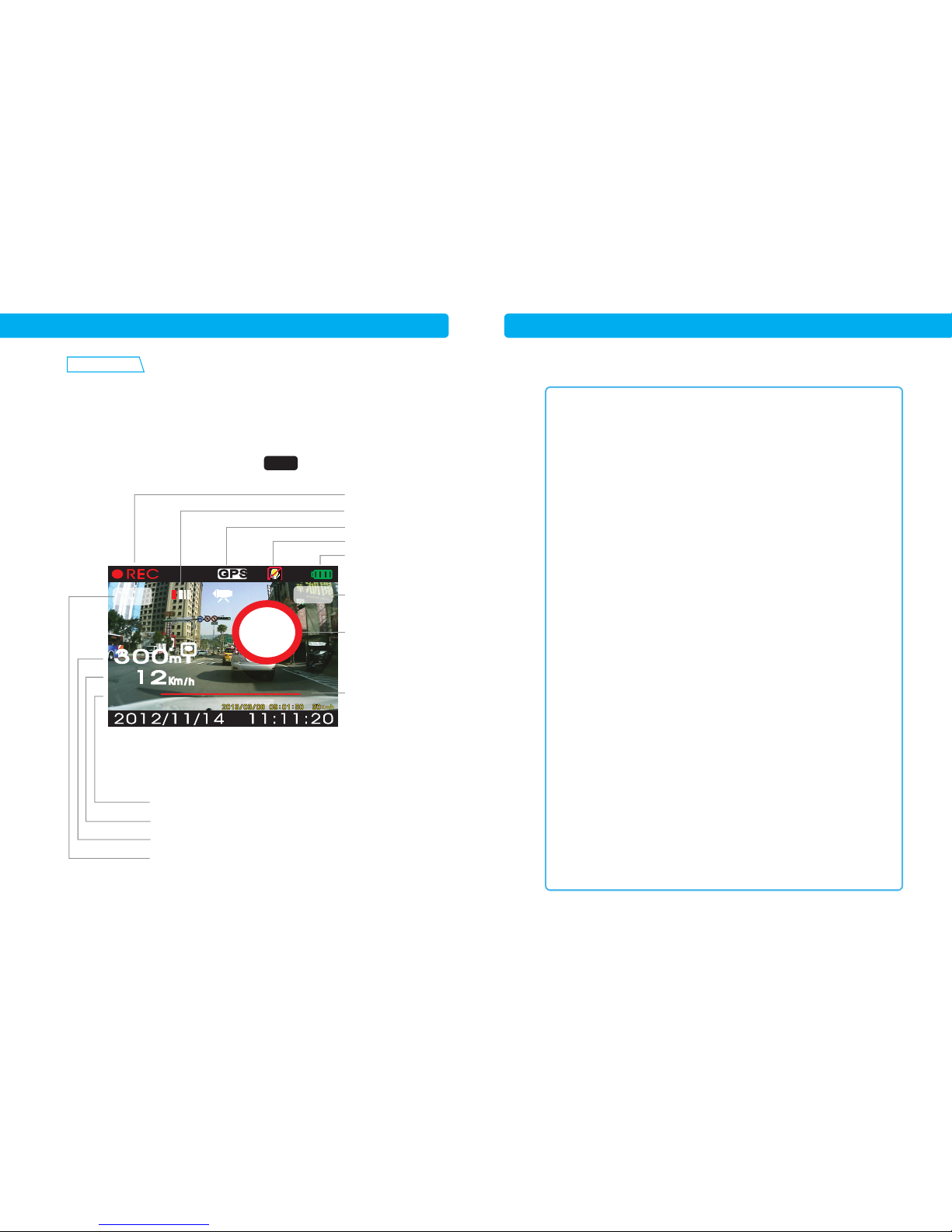
Getting Start
1. Insert a Class10 SD card(maximum 32G) into DR-2.
2. Format the SD card by selecting Formatting from
main menu.
3. ●REC blinks while recording.
4. After satellites are connected, GPS stops blinking.
Redar Signals
Satellite Connection
MIC On/OFF
Battery
Date/Time
Vehicle Speed
POI Distance Count down
Speed Limit
Getting Start / Display Main Menu
Push central stick to the right to enter menu, click it to confirm and
push it to the left to go back to previous menu. Click LOCK to exit menu.
KA
Record
50
Align to hook edge.
NW
200
50
Local Speed Limit
/Threshold Speed
Compass
Overspeed Warning
G-sensor Lock Off
Low
Medium
High
Shake-on Off
Low
Medium
High
Values G-x
G-y
G-z
GPS Options Warning Types All Types
All Cameras
Fixed Cameras Only
Warning Distance Full Range
Half Range
Off
Overspeed Warning Speed Limit(40~250)
Tolerance(0~20)
Radar Options Threshold No Threshold
Adaptive Threshold
Fixed Threshold
Bands X Band(On/Off)
K Band(On/Off)
KA Band(On/Off)
KU Band(On/Off)
Laser(On/Off)
Threshold Speed Speed Limit(40~130)
Tolerance(0~20)
Firmware Update Yes
Cancel
Sound MIC On/Off
Beep On/Off
Volume 0~5
Page 9
Playback and Firmware Update
Database and Firmware Update
3. Choose FW Update and Yes.
4. It will take a few minutes to update the firmware.
1615
Playback
1. Hold joy stick and the device stops recording.
2. Select video clip by pushing joy stick up and down.
3. Click joy stick to play or stop.
4. Click LOCK to exit.
Sound MIC On/Off
Beep On/Off
Volume 0~5
Exposure EV-2~+2
Power Frequency 50Hz
60Hz
Auto
Date & Time 01/09/2014 10:25
Language Russian
English
Format Card Yes
Cancel
Reset Yes
Cancel
Firmware Version APP: 02.03.01
DB: DR55142
Insert SD card in DR-2.
1. Download the latest firmware file and FW_NAME from
our web site.
2. Drag and drop these two files in SD card.
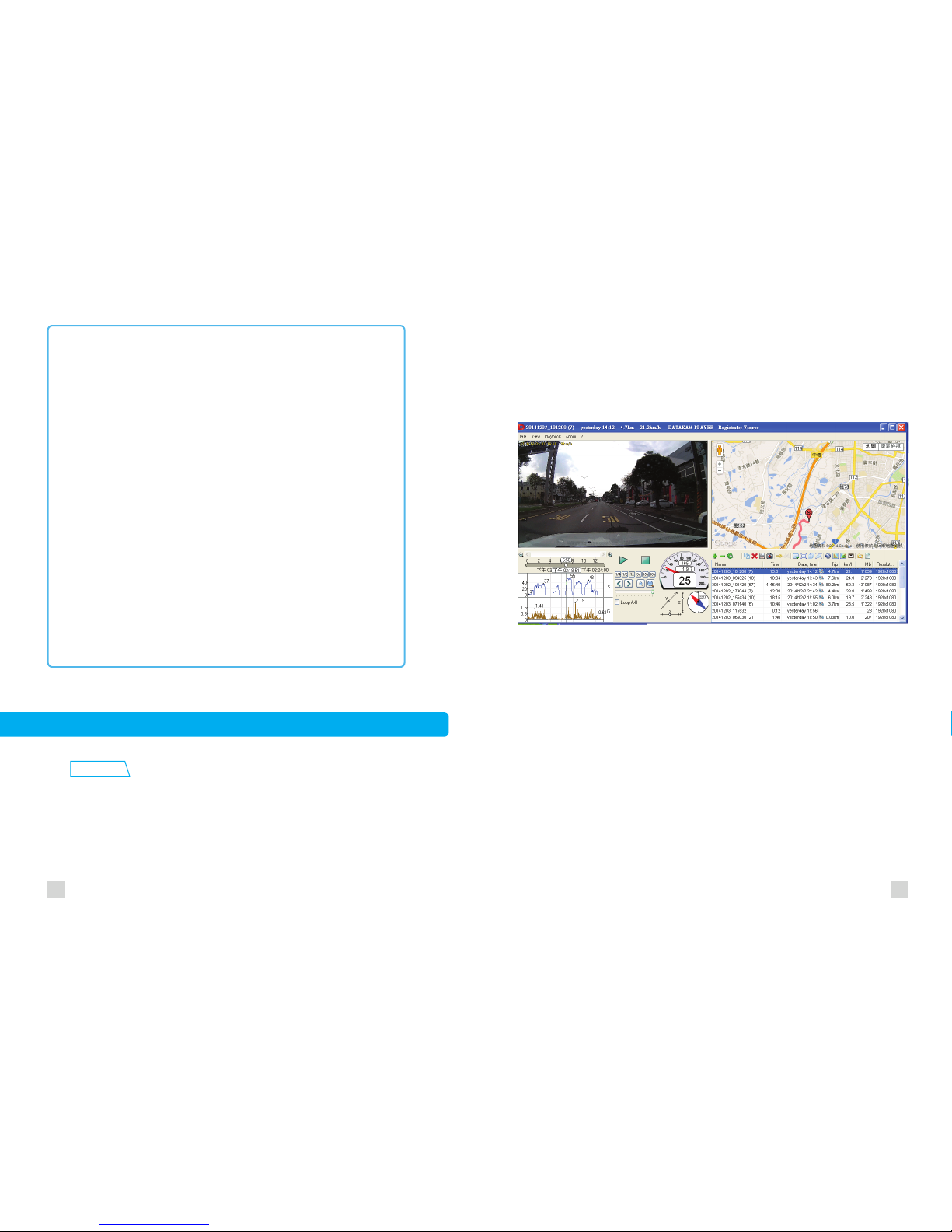
Please use Registrator Viewer to play video on a computer.
It is free to download from http://www.registratorviewer.com/.
Insert your SD card from DR-2 first, launch Registrator Viewer
then you can see map and all recored information on its interface.
Registrator Viewer Creater Vadim Andreevich Kozlov
Page 10
18
Report to Us
Please report new cameras or wrong database spots to us. We will
update our database usually with-in 48 hours.
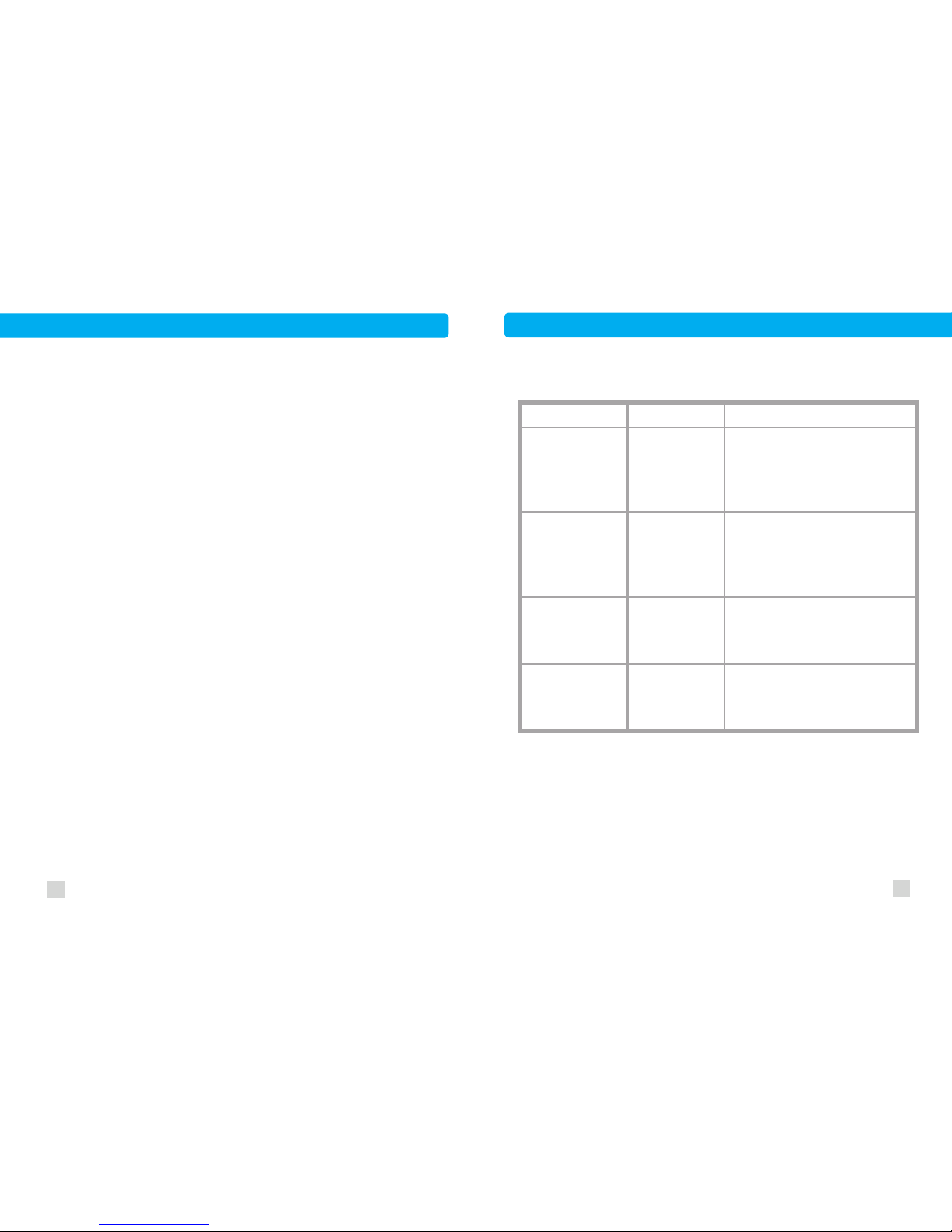
Trouble Shooting
Problem
No sound
No connection
to satellites
Satellites signals are
blocked by tint film.
Change tint film as non-metallic type
or use a GPS repeater in the vehicle.
System doesn’t
proceed.
System error
Re-start the device, or push the reset
switch by a pin.
Missing fixed
cameras
1. Update firmware.
2. Report to us.
Cameras not in
the database
Volume off
Switch on sound by pushing central
stick to the right, then selecting
volume to set up.
Possible Cause Solution
17
Page 11

20
Warranty & License Agreement
19
One Year Limited Warranty
For period of one year from the date of first consumer
purchase, Facets Product Design and Development Limited
will, without charge, repair or replace, at its option, defective
TMG products upon delivery to Facets Service Department
or an authorized Facets Service Agent, accompanied by
proof of the date of first consumer purchase from an authorized
dealer, such as a duplicated copy of a sales receipt.
The customer has to pay shipping charge to deliver the
product for service. The return charge will be at our expense,
if the product is proven to be under warranty. For efficiency
reason, be sure to talk to one of our service representatives
first, either through phone, e-mail or forum, before shipping
the product for service. From our experience, most problems
can be solved by our representative’s instructions. Our
authorized dealers and service agents can be found on our
website at www.TMG-FACETS.com
This limited warranty does not apply:
1. To any product damaged by accident;
2. In the event of misuse or abuse of the product or as a
result of unauthorized alterations or repairs;
3. If the serial number has been altered, defaced or
removed.
All implied warranties, including warranties of merchantability
and fitness for a particular purpose are limited in duration to
the length of this warranty. Facets shall not be liable for any
incidental, consequential or other damages; including,
without limitation, damages resulting from loss of use or cost
of installation.
It is the user’s responsibility to use the product prudently and
responsibly. This product is intended to be used only as a
travel aid and must not be used for a precise measurement
of direction or distance.
License Agreement
TMG products are made by Facets Product Design and
Development Ltd. in Taiwan. Facets and its licensors grant to
the purchaser a non-transferable, non-exclusive license to
use the software and data installed on Facets’ products and
the related documentation solely for personal use only on
such Facets products.
The purchaser should not copy, reverse engineer, translate,
port, modify or make derivative works of the software and
data. The purchaser should not loan, rent, disclose, publish,
sell, assign, lease, sublicense, market or otherwise transfer
the software and data or use it in any manner not expressly
authorized by this agreement.
By using this product, the purchaser agrees to be bound by
the terms and conditions of this license agreement.
Page 12

22
Facets and its licensors shall retain all copyright, trade
secret, patent and other proprietary ownership rights in the
software and data. The software and data is copyrighted and
may not be copied, even if modified or merged with other
products. The purchaser shall not alter or remove any
copyright notice or proprietary legend contained in or on the
software and data.
The purchaser may transfer all of his/her license rights in the
software, data, the related documentation and a copy of this
License Agreement to another party, provided that the party
reads and agrees to accept the terms and conditions of this
License Agreement.
The software and data are provided to the purchaser “AS IS”.
Facets and its licensors make and you receive no warranty
for the software and data, whether express or implied, and all
warranties of merchantability and fitness for any particular
purpose for the software and data are expressly excluded.
The software and data is complex. Facets and its licensors
intend to provide their customers the most complete and
accurate information available at a reasonable cost from
government and private data sources. However, all data
sources have limitations and some have inaccuracies or are
incomplete in some degree. As such, Facets and its licensors
do not make any warranty regarding the accuracy or
21
completeness of data used by this product and shall not be
liable to the user for any incidental, consequential, special,
indirect or exemplary damages including any fine, civil or
criminal penalties arising from the use of the product.
 Loading...