

Page 1
Titley Scientic Australia
PO Box 133
Lawnton QLD 4501
+61 07 3881 5577
[email protected]
Titley Scientic USA
601 Business Loop 70, Suite 110
Columbia, Missouri, 65203-2546
+1573 442 8745
[email protected]
Titley Scientic UK
Llanmaes Estate Office
St Fagans, Cardiff, CF5 6DU
+44 2920 022 099
[email protected]
LED TORCH - with photo and video
INSTRUCTION
Your Flashlight is a premium device designed out of aircraft quality
standard aluminum, O-ringed sealed and IPX4 level of waterproof.
Light output reaches 200 Lumens.
Unlike typical conventional light sources, this Flashlight uses brighter,
energy efcient, and long lasting.
LED light sources have a life expectancy of 100,000 hours.
OPERATION
INSTRUCTION
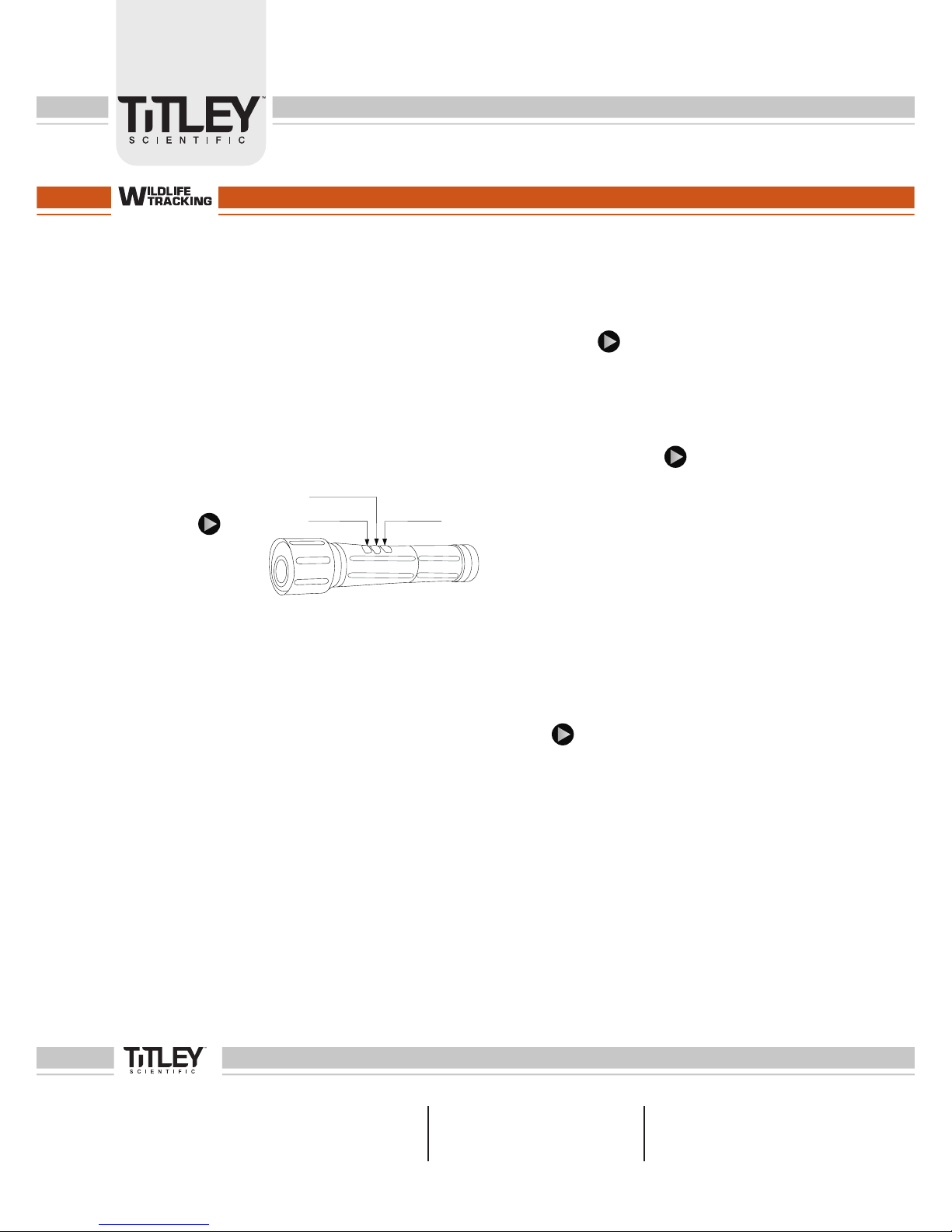
Button Function
Buttons from
the ashlight bulb:
Button 1 -- Take Picture (PIC)
Button 2 -- Lights (Lt.)
Button 3 -- Video Recording (REC.)
Reaction time is 0.5s.
Note that less than 0.5s will be regarded as malfunction.
Picture Button:
Press the “PIC” button. The respective LED ashes 3 times before a
picture is taken. Pictures are stored in the ashlight internal memory.
Lt. Button:
Strong light>Dim light>SOS mode>OFF (In circles)
REC. Button
Press the “REC.” button to start recording.
Press the “REC” button a second time to stop recording.
The ashlight stores the le into its internal memory.
While downloading les from your ashlight to your computer,
LED will ash.
LOw POwER:
When not enough power, the system will shutdown automatically.
All LEDs will switch off.
ChANgE BATTERy:
Once Battery replaced:
1. Press the PIC button (LED switches ON);
2. Keep pressing the REC. button: system initialized and
ON (PIC & REC. buttons light indicators ash and off).
PC-CAM ANd USB fUNCTION:
When connected to your PC through USB, LEDs ash for 5s.
While ashing, press the REC.button.
You can now access your ashlight internal les from
your computer.
TIME SET:
•Connect your ashlight to a PC.
•Go on your ashlight drive.
•Open the GetSysTime le and run the le called GetSysTime.exe.
•Click on the Get System Time button.
•Conrm and exit.
Your ashlight time has now been synchronized to the PC time.
You can record a video and upload to PC, play and see if the time
is correct or not.
fEATURES:
LED (cool white light): ON in modes Strong, Dim, and SOS.
Light Output: 200 Lumens (Strong mode)
Battery: Rechargeable Lithium battery,1400mA/h, 3.7V
View Angle: 60°
Video Format: 640*480 (VGA)
Picture: 1.3 Megapixel, High-ISO
Memory: Flash with 4G
Time Set: Built-in software update when connect to PC.
Accessories: 220V - 110V charger; Vehicle charger; USB wire.
Waterproof: IPX4
Lt.
PIC
REC
NOR-LEDTORC-PM01
Page 2

Titley Scientic Australia
PO Box 133
Lawnton QLD 4501
+61 07 3881 5577
[email protected]
Titley Scientic USA
601 Business Loop 70, Suite 110
Columbia, Missouri, 65203-2546
+1573 442 8745
[email protected]
Titley Scientic UK
Llanmaes Estate Office
St Fagans, Cardiff, CF5 6DU
+44 2920 022 099
[email protected]
LED TORCH - with photo and video
wARNINg
Because of its a high light output ashlight, it can reach
high temperatures.
Keep away from children. Use Caution when handling.
MAINTENANCE
Gently blow away any dust or debris on the lens (or use a soft lens
brush). To remove dirt or ngerprints, clean with a soft cotton cloth,
rubbing in a circular motion. Use of a coarse cloth or unnecessary
rubbing may scratch the surface and eventually cause permanent
damages. For a more thorough cleaning, photographic lens tissue
and photographic-type lens cleaning uid or isopropyl alcohol may
be used. Always apply the uid to the cleaning cloth - never directly
on the lens.
Remove the batteries if the ashlight is being stored for
longer than two months. Never dismantle ashlight head part or
any other inside components, for this will not be covered by
the warranty.
wARRANTy
Your ashlight is warranted to be free of defects in materials and
workmanship for one year after the date of purchase. In the event
of a defect under this warranty, we will, at our option, repair or
replace the product. This warranty does not cover damages caused
by misuse,improper handling, installation, or maintenance- provided
by someone other than an authorized Service Department.
Refer to Titley Scientic terms & conditions.
www.titley-scientic.com
NOR-LEDTORC-PM01
 Loading...