

Page 1
Quick Start Guide
TimoLabs AMOY I,
Model# TM-SS2020BT
Soundbase/Sound Stand SYSTEM
with BLUETOOTH
Page 2
GETTING STARTED
Your TimoLabs AMOY I TV sound system is designed
to t under televisions with screens up to 42”. It
delivers Bluetooth capability and superb acoustic
performances that will greatly enhance your TV
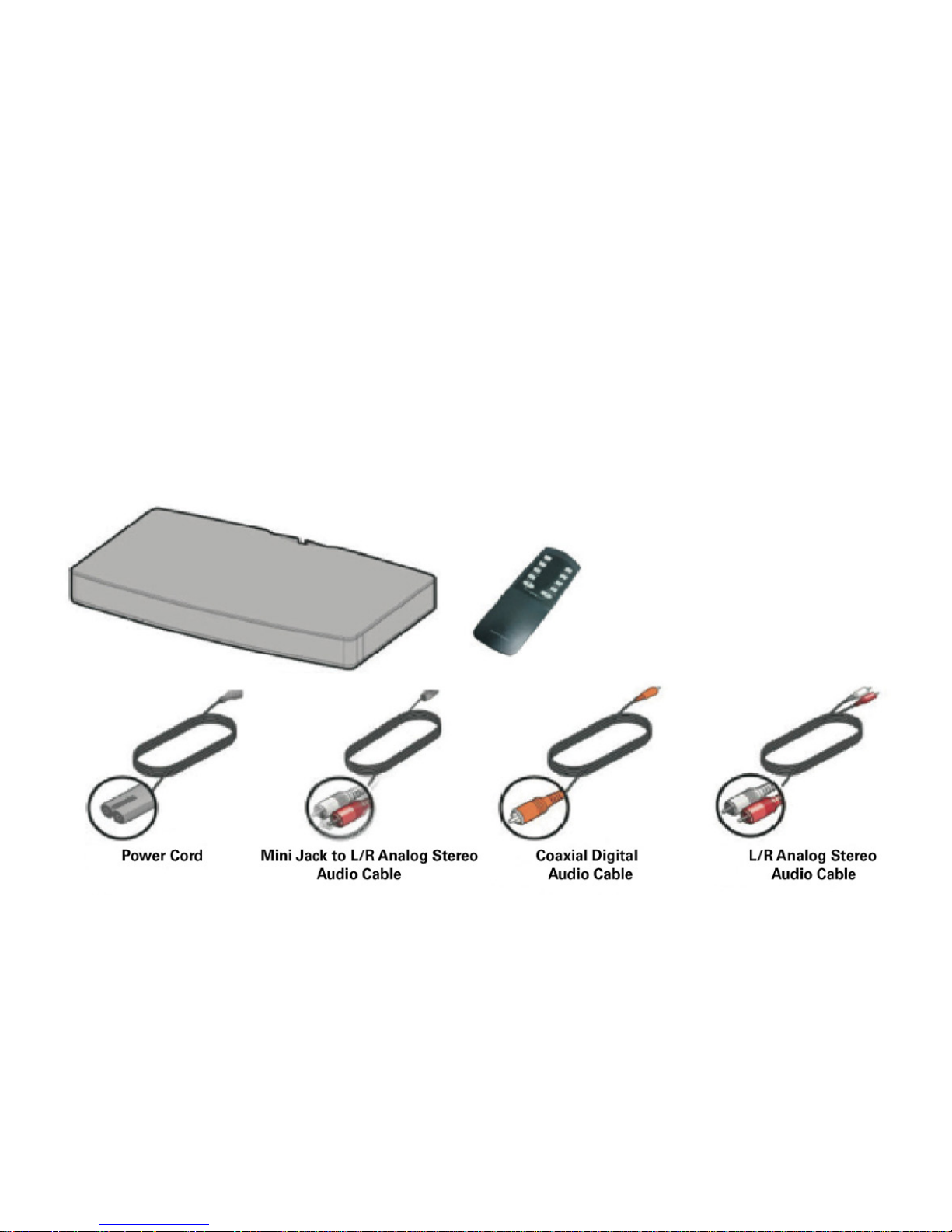
viewing experience. Carefully unpack the carton and
conrm that you have all the parts shown here. If any
of these parts is missing or damaged please contact
TimoLabs directly.
Important
Carefully read the set-up instructions on page 4 and safety guidelines on page 11 before
you set-up and use your AMOY I soundbase/sound stand sound system.To download the
specications for your sound system please visit www.timolabs.com/support.html
Page 3

SETUP SOUND STAND SYSTEM
The AMOY I soundbase/sound stand system is designed for TVs or Monitors that weigh no more
than 40lb (18kg) and have bases no wider than 20”
(508mm) and no deeper than 10 1/4” (260mm). Most
42” TVs and smaller meet these requirements.
NOTE: Do NOT place a CRT type TV on this system, it is not designed for use with this type of TV
Placement Guidelines
The base of your TV should be centered on top of the
system and must not hang over the sides. Allowing
the base of your TV to hang over any edge of this
speaker system increases the risk of tipping, which
may result in injury.
CAUTION:
If your TV comes with an anti-tip device, install it according to the manufacturer’s
instructions and adjust the tether as instructed after placing the TV on top of the system.
Installing an anti-tip device is recommended when using a TV with this product. If your
TV did not come with an anti-tip device, you can get one from most retail suppliers.
Page 4

SETUP SOUND STAND SYSTEM
If the TV base is too large
to t on top of the system, place the sound system
in another location such as an open shelf under the
TV, but keep it close to your TV so the audio cable
will reach. You also could mount your TV on the wall
above the system.
If placing the sound system backed up to a wall
make sure there is at least one-inch of space between
the wall and the rear of the system.
If placing the sound system in a cabinet
or on a shelf, position the front of the system as
close as possible to the front edge of the shelf for
optimum audio performance.
CAUTION:
With any placement of this product, make sure the ventilation openings on the rear
panel are not blocked.
Page 5

SETUP SOUND STAND SYSTEM
Connect one of the audio cables to your TV
Most TVs today have three types of audio outputs
(shown on the following page). For the best audio
performance, always use the highest quality output
available; optical being the rst choice, coaxial second and analog third.
NOTE:
If you are using an optical cable, be sure to remove the protective
plug cover. When inserting the plug into the connector, you may
sense a slight resistance and additional pressure may be needed
to get it to click securely in place.
Setup Bluetooth Connection
Switch on your AMOY I by pushing the Power button
on the remote. Then push the Bluetooth button on
the remote. The red LED display on the AMOY I will
display ‘BL’ indicating that the speaker is ready for
pairing. Choose “SS2020BT” in your mobile device
for connection. (If a password is required, please
enter 0000). Once connected, the red LED display will
blink and you can start using your AMOY I wirelessly.
Page 6

SETUP SOUND STAND SYSTEM
Page 7

SETUP SOUND STAND SYSTEM
Plug the other end of your selected audio cable into the corresponding audio input on your
sound system.
If you wish, you may slide the cable into the built in
cable clip.
Page 8
SETUP SOUND STAND SYSTEM
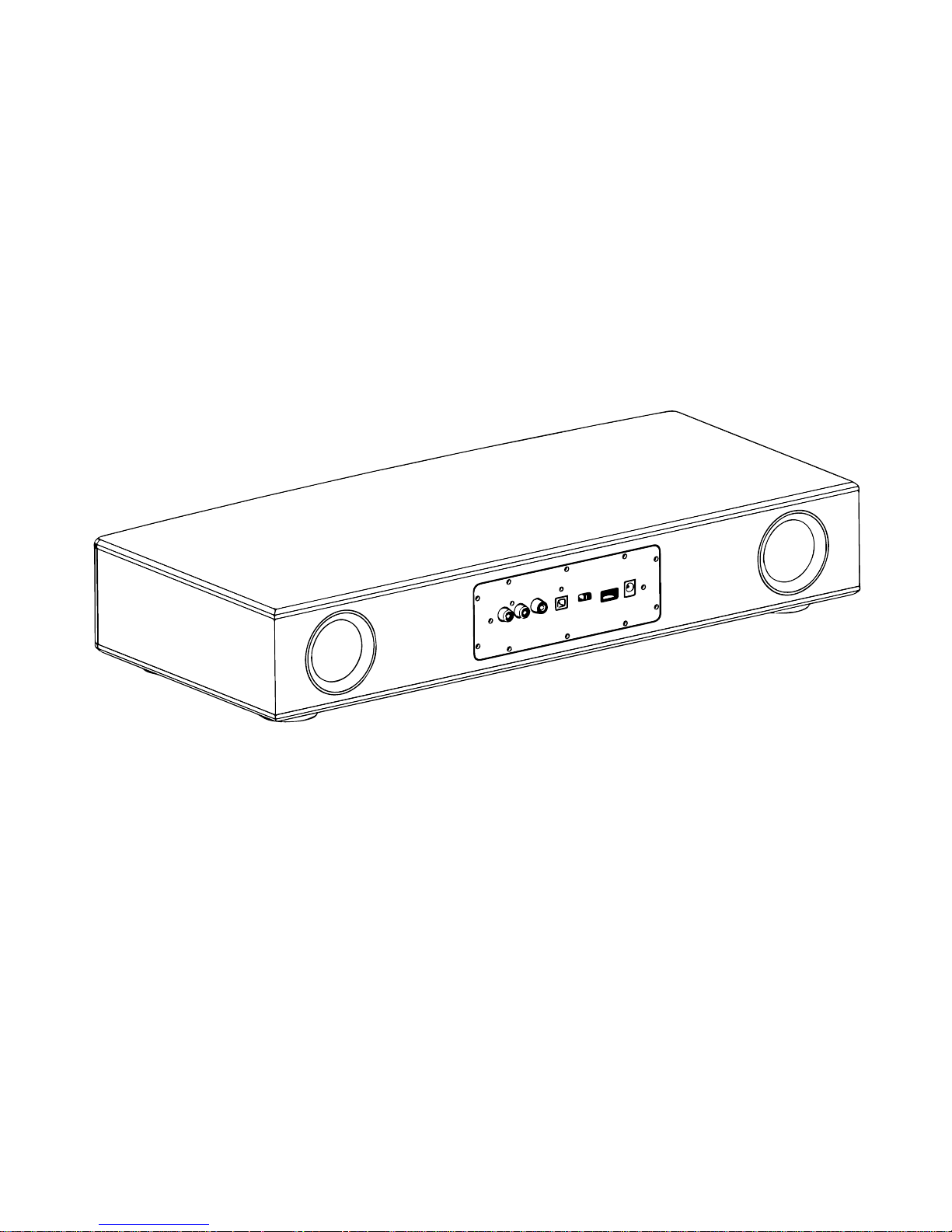
Plug one end of the included power cord into the
DC input connector and the other end into a wall
outlet. A moment fter turning the system on, the
system emits two tones indicating that it is ready
to use.
Page 9

TURN SYSTEM ON
1. Press the power button you your remote
2. Turn on your TV
3. Turn off your TV’s built-in speakers
To enjoy the full benet of hearing TV Audio through
your SS2020BT, the internal speakers on your TV
should be turned off. Newer TV’s usually have a
set-up menu item for turning off speakers. Older TVs
may have a speaker on/off switch on the read panel
near the audio output connectors.
If you have a TV with a set-up menu, use the remote
that came with your television to locate the menu
item and set the TV speakers to off. If your TV does
not have a menu setting for turning off the internal
speakers, exit the audio menu and reduce the TV
volume to its lowest setting.
If the rear panel of your TV has a speaker on/off
switch on the rear panel, set it to the off position
and adjust the volume to about 80% of the highest
volume.
NOTE:
To conrm your TV speakers are off, press the Mute button on your SS2020BT and check
that no sound is coming from the TV.
Page 10

CARE AND SAFETY
Important Safety Instructions
1. Read these instructions
2. Keep these instructions
3. Heed all warnings
4. Follow all instructions
5. Do not use this apparatus near water
6. Clean only with a dry cloth
7. Do not block any ventilation openings
8. Install in accordance with the manufacturer’s instructions
9. Do not install near any heat sources such as radiators, heat
registers, stoves or other apparatus (including ampliers) that
produce heat
10. Protect the power cord from being walked on or pinched
particularly at plugs, convenience receptacles and the point
where they exit from the apparatus
11. Only use attachments / accessories specied by the
manufacturer
12. Unplug this apparatus during lighting storms or when unused
for long periods of time.
13. Refer all servicing to qualied personnel. Servicing is required
when the apparatus has been damaged in a way, such as
power supply cord or plug is damaged, liquid has been spilled
or objects fallen into the apparatus, the apparatus has been
exposed to rain or moisture, does not operate normally, or has
been dropped.
Page 11

CARE AND SAFETY
FCC Notice
This equipment has been tested and found to comply with the limits for a Class B digital device, pursuant to Part 15 of the FCC rules.
These limits are designed to provide reasonable protection against
harmful interference in a residential installation. This equipment
generates, uses and can radiate audio frequency energy and if
not installed and used in accordance with the instructions, may
cause harmful interference to radio communications. However,
there is no guarantee that interference will occur in a particular
installation. If this equipment does cause harmful interference to
radio or television reception, which can be determined by turning
the equipment off and on, you are encouraged to try to correct the
interference by one or more of the following measures:
• Reorient or relocate the receiving antenna
• Increase the separation between the equipment and receiver
• Connect the equipment to an outlet on a different circuit than the
one to which the receiver is connected.
• Consult the dealer or an experienced radio/TV technician for
help.
Page 12
CARE AND SAFETY
Please read this guide
Please take the time to follow the instructions in this
owner’s guide carefully. It will help you set-up and
operate your system properly and enjoy its advanced
features. Save this guide for future reference. All
TimoLabs products must be used in accordance with
local, state and federal regulations.
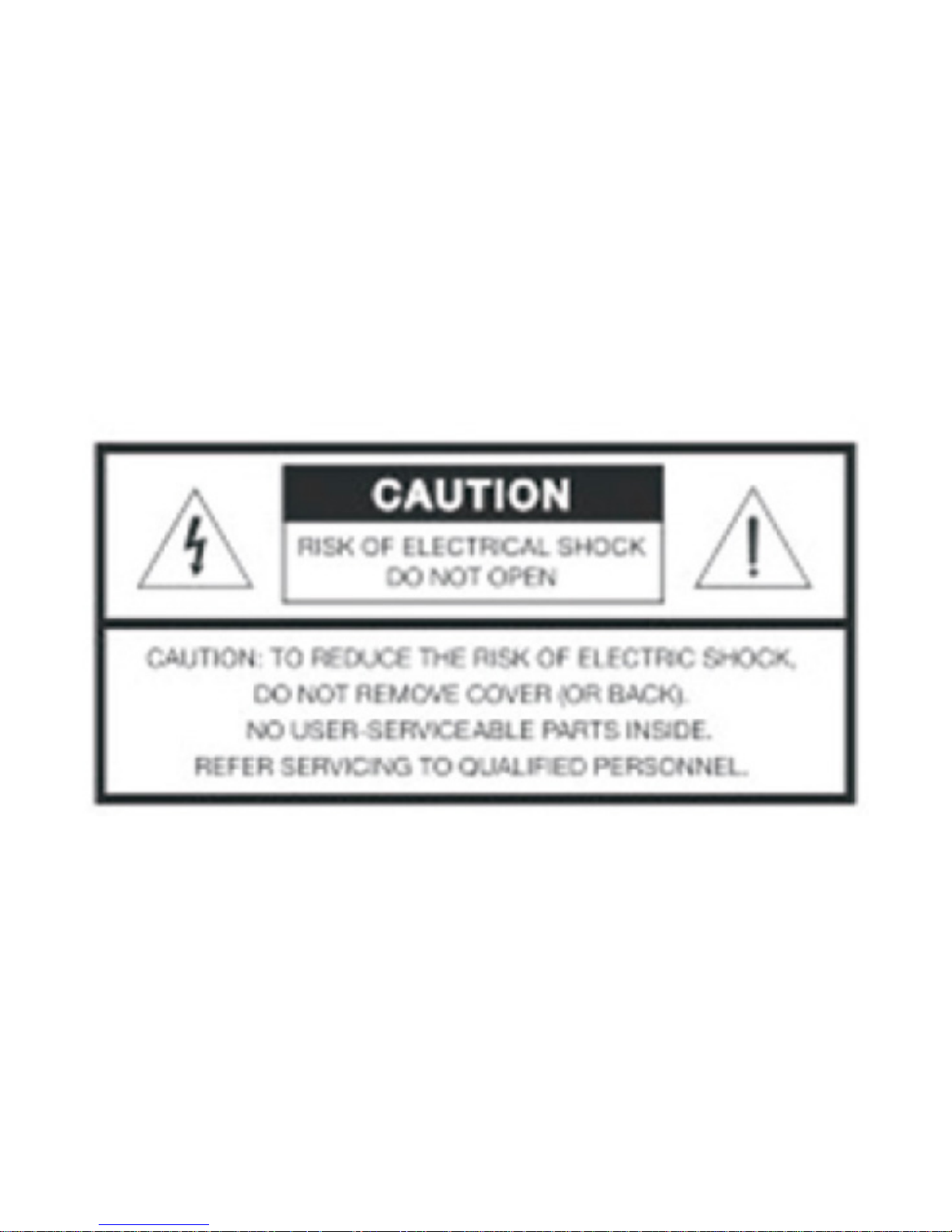
The lighting ash with arrowhead symbol within an equilateral
triangle alerts the user to the presence of uninsulated, dangerous
voltage within the system enclosure that may be of sufcient magnitude to constitute a risk of electric shock.
The exclamation point within an equilateral triangle, as marked on
the system, is intended to alert the user to the presence of important operating and maintenance instructions in this owner’s guide.
Page 13

CARE AND SAFETY
WARNING:
This product contains magnets which can be harmful to pacemaker wearers.
WARNING:
Contains small parts which may be a choking hazard. Not suitable
for children under age 3.
WARNING:
Never place the equipment in an unstable location, it may fall,
causing serious personal injury or death. May injuries, particularly
to children can be avoided by taking simple precautions such as:
• Using cabinets or stands recommended by the manufacturer
• Only using furniture that can safely support the equipment
• Not placing the equipment on tall furniture (for example,
cupboards or bookcases) without anchoring both the furniture
and the equipment to suitable support.
• Educating children about the dangers of climbing furniture to
reach equipment or its controls.
If you doubt your ability to safely mount your television or set up
this product, contact a professional installer for help.
WARNING:
Allowing children to push, pull or climb on a television connected
to this equipment may cause it to tip over, possibly resulting in
personal injury or death. For added safety and stability, be sure to
secure the television using an anti-tip device.
Page 14

CARE AND SAFETY
WARNING:
• To reduce the risk of re or electrical shock, do not expose the
product to rain or moisture.
• Do not expose this apparatus to dripping or splashing and do
not place objects lled with liquids, such as vases, on or near the
apparatus. As with any electronic products, use care not to spill
liquids into any part of the system. Liquids can cause a failure
and/or re hazard.
• Do not place any naked ame sources, such as lighted candles,
on or near the apparatus.
WARNING:
• Keep the remote control battery away from children. It may cause
a re or chemical burn if mishandled. Do not recharge,
disassemble, heat above 100C (212F) or incinerate. Dispose of
used batteries promptly. Replace only with a battery of the
correct type and model number.
• Danger of explosion is possible if battery is incorrectly replaced.
Replace only with an agency-approved (eg. UL) CR2032 or
DL3032 3-volt lithium battery.
WARNING:
Make no modications to the system or accessories. Unauthorized
alterations may compromise safety, regulatory compliance and
system performance, and may void the warranty.
Page 15
CARE AND SAFETY
NOTE:
• The product must be used indoors. It is neither designed nor
tested for use outdoors, in recreational vehicles, or on boats.
• The product label is located on the bottom or back of the product.
• Please dispose of used batteries properly, following any local
regulations. Do not incinerate.
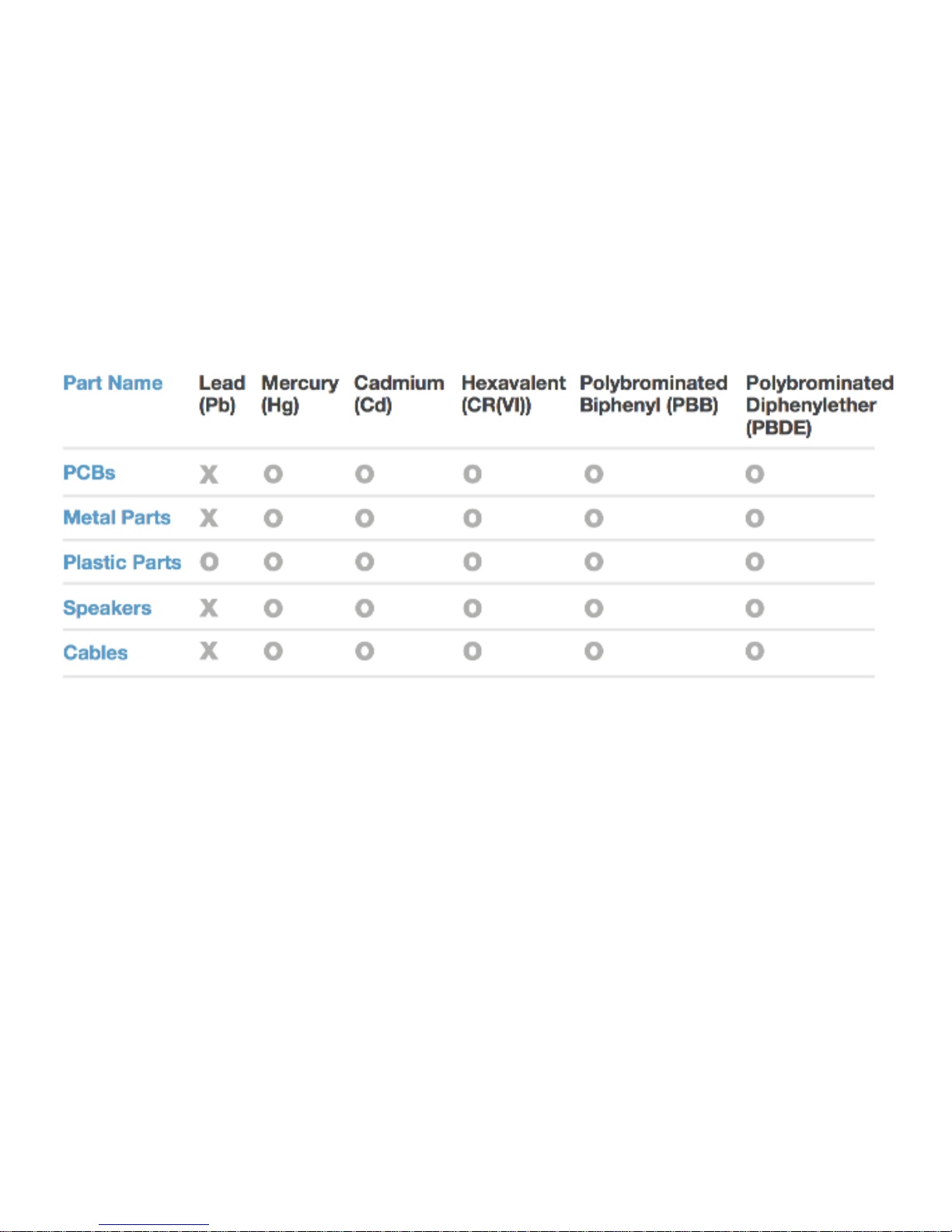
Names and Contents of Toxic or Hazardous Substances or Elements:
O: Indicates that this toxic or hazardous substance contained in
all of the homogeneous materials for this part is below the limit
requirement in SJ/T 11363-2006
X: Indicates that this toxic or hazardous substance contained in at
least one of the homogeneous materials for this part is above the
limit requirement in SJ/T 11363-2006
Page 16

TROUBLESHOOTING
TV Base is too large to place on the system
• Place the sound system in another location such as an open shelf
under the TV.
• If possible mount your TV on the wall above the sound system
No Sound
• Make sure the sound system is turned on and the power
indicator is on (solid green)
• Make sure the sound system is not muted.
• Increase the volume
• Make sure the audio cable connection is correct and secure on
the sound system and the TV.
• Make sure the TV is on and set to the correct input.
• If you are using a digital audio connection check that the TV’s
digital audio output is enabled. See your TV Owner’s guide for
more information.
• If a digital audio connection is not possible, use an analog stereo
audio connection.
• If the sound system is connected to a TV output labeled
VARIABLE (VAR) make sure the TV’s internal speakers are turned
off, the TV volume is turned up, and the TV is not muted.
Sound but no picture or sound and picture do not
match
• Make sure the TV is turned on
• Make sure that the audio output on the TV is connected to the
audio input on the sound system.
Page 17

TROUBLESHOOTING
Remote control is inconsistent or does not work
• Check the battery to be sure it is installed properly or if it needs
to be replaced. See “Replacing the remote battery”.
• Point the remote control at the sound system when you press a
button.
• Check that the power indicator on the sound system ashes
when you press the remote volume or mute button.
Sound is distorted
• Make sure cable connections are secure on the sound system
and TV.
• If the sound system is connected to a TV output labeled
VARIABLE (VAR) reduce the TV volume.
Sound is coming from the TV
• Turn off your TV’s internal speakers, or
• Turn the TV volume all the way down.
Red power indicator
• System error. Contact TimoLabs customer service.
Page 18
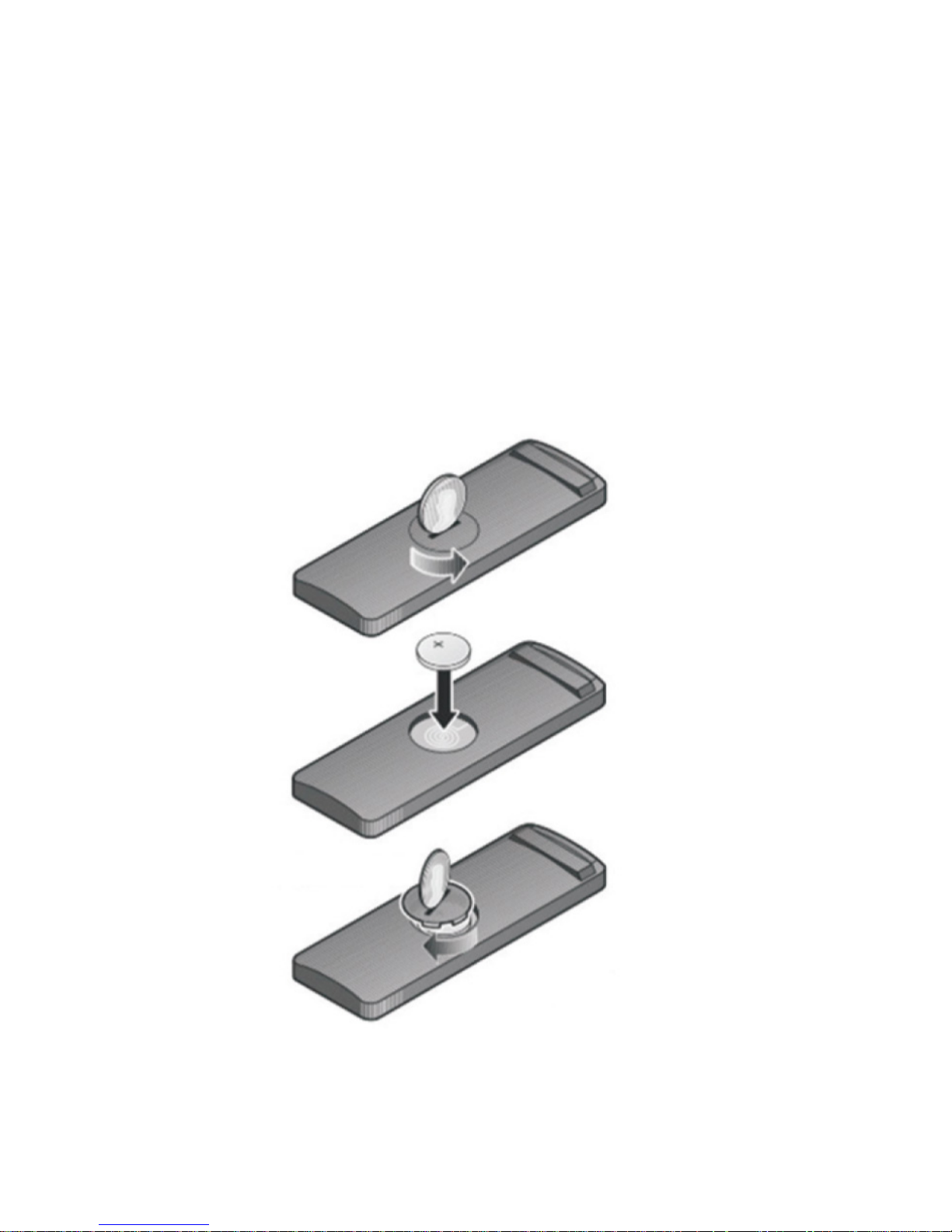
REPLACING THE REMOTE BATTERY
When the remote stops operating or its range
seems reduced, it is time to change the remote
battery.
1. Using a coin, turn the battery cover slightly counter-clockwise.
2. Remove the cover and insert the new battery (CR2032 or
DL2032) at side up, with the plus (+) symbol in view.
3. Re-seat the cover and turn it clockwise to lock in place.
Page 19

CLEANING
• You may clean the surface of the speaker with a soft, dry cloth.
• Do not use any sprays near the speaker. Do not use any solvents,
chemicals or cleaning solutions containing alcohol, ammonia or
abrasives.
• Do not allow liquids to spill into any openings.
• The speaker grille requires no special care, although you may
carefully vacuum it with a brush attachment if necessary.
TECHINICAL INFORMATION
Power Rating
AC: 90-240V - 50/60Hz 50W
DC: 15V
Dimensions
L580 x W250 x H80 (mm)
L20 x W9.84 x H3.15 (inch)
Weight
10.1 lb
4.6 kg
Page 20

WARRANTY
For TM-SS2020BT
Including those Sold within North America
TimoLabs warrants this product to be free from
defects in material and workmanship for a period of
TWELVE MONTHS after the original date of consumer purchase. During this period, TimoLabs will, at its
option, either repair the defective product with new
or rebuilt parts, or replace it with a new or rebuilt
product at no charge except as *stated below. The
parts or products that are replaced become the property of TimoLabs. In the USA to obtain service under
this limited warranty, contact [email protected]
for the name of the Authorized Service Center (ASC).
Deliver the product freight pre-paid, along with the
dated proof of purchase, to the TimoLabs ASC.
• Pack it in its original shipping container (or equivalent)
• Insure it (or assume the risk of loss/damage during shipment)
• Include proof of purchase
• Pay all shipping charges
Page 21

TimoLabs is not responsible for damage to inbound
product that was not properly packaged. TimoLabs
will pay for the return shipment charges within the
USA, but is NOT responsible for any costs shipping
across international borders. If the unit is found not
to be defective, the unit will be shipped back at the
owner’s expense. In the USA or Canada, please contact TimoLabs customer service at support@timolabs.com. This limited warranty does not cover any
losses or damages that occur as a result of:
• Shipping or improper installation or maintenance
• Misuse
• Neglect
• Adjustment by non-authorized sources
• Any cause other than ordinary usage
• Repair, modication, installation of options or parts by anyone
other than an TimoLabs ASC
• Improper environment
• Excessive or inadequate heating or air conditioning or electrical
power failures, surges, or irregularities
WARRANTY
This one year warranty does not cover any of the products rmware or hardware that
you or any third party have modied or altered; you bear the sole responsibility and
liability for any such modication or alteration.
Page 22

WARRANTY
ALL EXPRESSED AND IMPLIED WARRANTIES FOR THIS PRODUCT
(INCLUDING THE WARRANTIES OF MERCHANTABILITY AND FITNESS FOR A PARTICULAR PURPOSE) ARE LIMITED IN DURAION
TO A PERIOD OF ONE (1) YEARS FOR PARTS AND LABOR FROM
THE ORIGINAL DATE OF CONSUMER PURCHASE. NO WARRANTIES (EITHER EXPRESSED OR IMPLIED) APPLY AFTER THIS
PERIOD. IN THE UNITED STATES OF AMERICA, SOME STATES DO
NOT ALLOW LIMITATIONS ON HOW LONG AN IMPLIED WARRANTY LASTS, SO THE ABOVE LIMITATIONS MAY NOT APPLY TO YOU.
TIMOLABS OBLIGATIONS AND YOUR REMEDIES HEREUNDER
ARE SOLELY AND EXCLUSIVELY AS STATES HERE. TimoLabs
LIABILITY, WHETHER BASED ON CONTRACT, TORT, WARRANTY,
STRICT LIABILITY, OR OTHER THEORY, SHALL NOT EXCEED THE
PRICE OF THE INDIVIDUAL UNIT WHOSE DEFECT OR DAMAGE
IS THE BASIS OF THE CLAIM. IN NO EVENT SHALL TimoLabs BE
LIABLE FOR ANY LOSS OF PROFITS, LOSS OF USE OR FACILITIES
OR EQUIPMENT OR OTHER INDIRECT, INCIDENTAL, OR CONSEQUENTIAL DAMAGE. IN THE UNITED STATES OF AMERICA,
SOME STATES DO NOT ALLOW THE EXCLUSION OR LIMITATION
OF INCIDENTAL OR CONSEQUNTIAL DAMAGES, SO THE ABOVE
LIMITATION MAY NOT APPLY TO YOU. ALTHOUGH THIS LIMITED
WARRANTY GIVES YOU SPECIFIC LEGAL RIGHTS. YOU MAY HAVE
OTHER RIGHTS WHICH MAY VARY FROM STATE TO STATE.
For Customer Service, please contact [email protected]
or visit www.timolabs.com
 Loading...