

Page 1
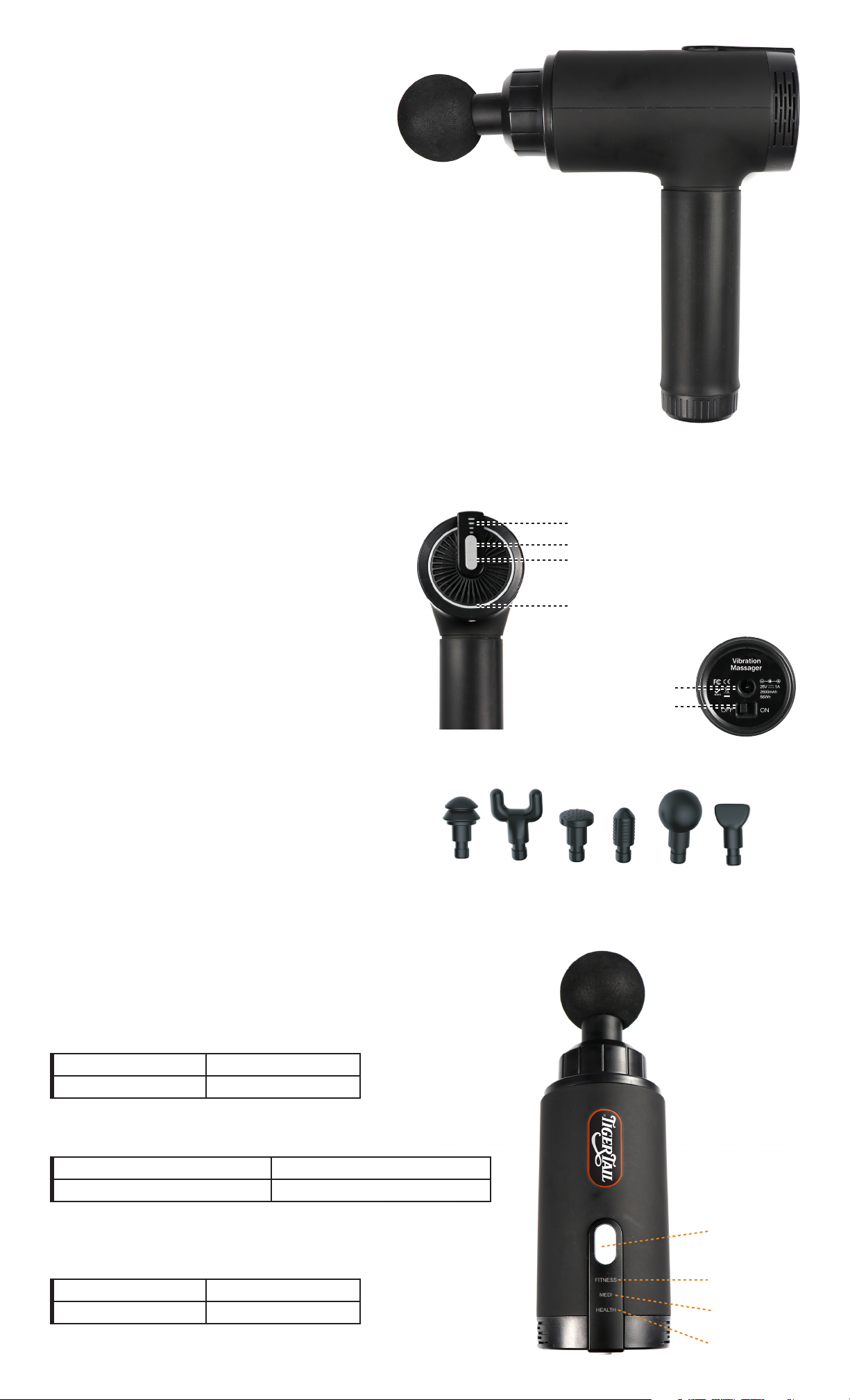
T-1000
Vibration Massager
User Manual
The T-1000 is perfect for:
• Myofascial Release
• Muscle Knot Release
• Trigger Point Therapy
• Self-Help Massage Therapy
• Tension and Stress Relief
• Tight Muscle Relief
• Sore Muscle Relief
• Minor Muscle Cramping Relief
Product Features
• Powerful high-torque motor featuring
TigerPRR™ Quiet Technology
• Four (4) speed settings deliver up to
3200 percussions per minute
• Rechargeable lithium-ion battery
(Up to 3 hours of use per charge)
• Six (6) interchangeable head attachments
• Lightweight (2.5 lbs), ergonomic design
Gear Indicator
Increase Speed
Reduce Speed
Battery Indicator
AC Interface
ON/OFF Power Switch
Introduction
The T-1000 Vibration Massager is a state-of-the-art, cordless
massage device designed to help reduce sore muscles,
relieve knots, trigger points, muscle cramps and soreness in
the muscles.
Three Massage Modes
Fitness Mode: Speed remains constant and features the highest speed
and torque with four (4) speed levels.
Level 1 – 2000 RPM Level 3 – 2800 RPM
Level 2 – 2400 RPM Level 4 – 3200 RPM
Medi Mode:
Four (4) levels featuring 3-second repeating graduated speed cycle
Level 1 – 1600 RPM to 2000 RPM Level 3 – 2400 RPM to 2800 RPM
Level 2 – 2000 RPM to 2400 RPM Level 4 – 2800 RPM to 3200 RPM
Six (6) Massage Head Accessories:
Knuckle Fork Flat Thumb Ball Wedge
Health Mode:
Speed remains constant and features the lowest speed and torque with
four (4) speed levels.
Level 1 – 1000 RPM Level 3 – 1800 RPM
Level 2 – 1400 RPM Level 4 – 2200 RPM
Mode Change
Button
Fitness Mode
Medi Mode
Health Mode
Page 2

Before Using Your Device:
1. Fully charge the battery for six hours before the first use.
a. Using your device without fully charging will diminish the battery life.
b. NOTE: Do not operate the T-1000 during charge mode.
c. Only use the charger supplied with your device. Other
chargers may be harmful to your device.
2. Read the entire T-1000 User Guide for important information.
3. Register your product purchase and product serial number at www.
TigerTailUSA.com/warranty within 30 days of purchase to activate your
warranty.
Charging
• Fully charge the battery for six hours before the first use.
o Using your device the first time without fully charging will
diminish battery life.
o NOTE: You cannot operate the T-1000 during charge mode.
o After first full 6-hour charge, the battery can be recharged at
any time and at any battery level.
• Only use the charger supplied with your device. Chargers not specific
to the T-1000 may harm your device.
• To charge your device, put the power switch on the bottom of the
handle into the ON position.
• Plug the charger (DC end) into the device, and plug the wall plug
(AC end) into a wall outlet.
• The LED blue lights around the Gear Indicator and Product Fan will flash
to indicate battery level, and will flash indicating the device is actively
charging.
• The device is fully charged when the LED lights stop flashing and remains
fully lit.
• The average run-time for this device is about three (3) hours depending
on speed level and pressure applied during use.
Maintenance, Cleaning & Storage
1. Your device is a state-of-the-art piece of technology. Care for your device
as you would your laptop or mobile phone.
2. Never submerge or expose your device to water. Exposure to water will
cause permanent damage to your device and will void product warranty.
3. Do not drop your device. Accidental drops are not covered by your
product warranty.
4. Use a slightly damp towel or antibacterial wipe to clean your device.
Dry with a soft cloth.
5. Store your device in a dry environment in the case provided.
Device Operations
1. The On/O switch is located on the bottom of the handle of your device.
2. Move the switch to the “on” position to power on your device. Move the
switch to the “o” position to turn the power o.
3. When your device is turned on, you may toggle between the three
Mode settings (Fitness, Medi and Health). The Fitness Mode is the
default setting.
4. The RPM Control button is located on the end opposite of the Massage
Head. When your device is turned on, press “+” to increase the RPM
speed. Press “-“ to decrease RPM speed.
5. With each Massage Mode, there are four RPM Levels you can toggle
between, based on your desired results.
6. If you change your Massage Mode during operation, your device will
stop first. Press the Massage Mode button to change modes. Press the
RPM Control button for your device to begin operating at your desired
RPM Level.
7. To change the Massage Head, power o your device. Remove Massage
Head by pulling it out of the device gently but firmly. It is a snug fit design.
8. Replace massage head by pushing the selected head gently but firmly.
Massage Application Suggestions
1. Use only on a clean surface of the body. Use over clothing is
recommended.
2. With the device powered on to your desired Massage Mode and RPM
Level, apply the Massage Head to your muscle group needing massage.
3. Lightly apply pressure and move across the body and muscle areas
for approximately three (3) sets of 30 seconds per muscle area. Apply
additional massage applications to your muscle areas as needed.
4. Use the device only on muscle groups. Avoid using over bones or
sensitive tendons.
5. You are the best judge of how much pressure you should apply and
length of massage applications.
6. You are the best judge of which Massage Mode and RPM Level you
should use.
Travel
Your device is travel friendly with the TSA for carry-on luggage
or checked baggage.
Warnings & Cautions
If your device is exposed to any of the following activities
or incidents, your warranty will be void.
1. Never charge your device unattended.
2. Never leave your device plugged into the Charging Adapter and
your power outlet after your device comes to full charge.
3. For adult use only.
4. Prior to use, consult with your doctor or health care professional.
5. Do not submerge or expose your device to water.
6. Do not allow water or moisture to enter the Ventilation Ports.
7. Keep your device away from heat sources.
8. Keep Ventilation Ports free from dust and debris and never attempt
to place any object, liquid or spray of any kind into the Ventilation Ports
of your device.
9. Do not remove screws and never attempt to disassemble or
dismantle the device.
10. Do not operate continuously for more than one hour. Allow the device
to cool down and rest for 30 minutes before reusing.
11. Unplug the Charging Adapter from the device after charging
or prior to use.
DANGER! To reduce risks of electrical shock, fire and
personal injury, this product must be used with the
following instructions.
12. Do not drop or misuse the device.
13. Only use the Charging Adapter supplied with your device.
14. Carefully examine your device before each use for unknown damage.
15. Never let your device operate while unattended by an adult.
16. Do not use if injured or if you are not comfortable doing so.
17. Keep fingers, hair and/or any other body part away from the shaft of
the moving Massage Head during operation. Pinching/entanglement
may occur.
18. Bruising may occur regardless of RPM Level chosen.
19. Check treated areas frequently and immediately stop if you become
uncomfortable or there is a sign of unusual or unexpected pain or
discomfort.
20. Do not use on your head/skull.
 Loading...