

Page 1

TBX-440 Instruction Manual
Dec 2015
Ensitech Pty Ltd
www.tigbrush.com
Stainless Steel Weld Cleaning System
TBX- 440
™
Operation, Safety and
Maintenance Manual
Page 2

Page 3

3
TBX-440 Instruction Manual
Dec 2015
Ensitech Pty Ltd
www.tigbrush.com
STOP!
Online warranty activation
required before rst use
www.tigbrush.com/warranty
Page 4

4
TBX-440 Instruction Manual
Dec 2015
This manual is a very important tool! Keep it
with the machine at all times.
The purpose of this manual is to provide users
with the necessary operating procedures and
precautions, essential for the safe and proper
operation of the TIG Brush.
Due to continuous improvements, Ensitech
Pty Ltd reserves the right to make specification
changes.
© 2015 Ensitech Pty Ltd
FOREWORD
FOREWORD
Page 5
5
TBX-440 Instruction Manual
Dec 2015
Ensitech Pty Ltd
www.tigbrush.com
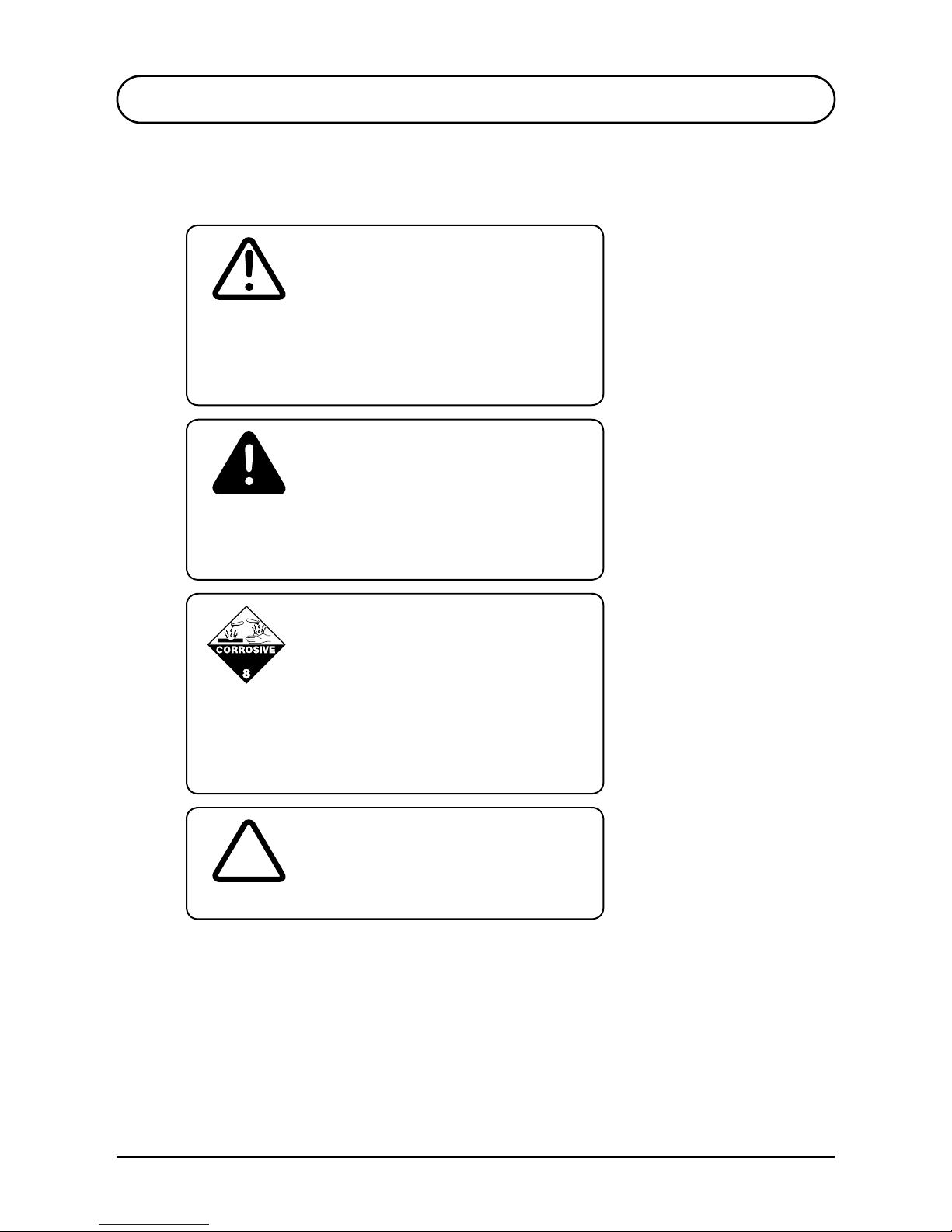
THIS IS THE SAFETY ALERT SYMBOL. IT IS USED TO ALERT
YOU TO THE POTENTIAL PERSONAL INJURY HAZARDS. OBEY
ALL SAFETY MESSAGES THAT FOLLOW THIS SYMBOL TO
AVOID POSSIBLE INJURY.
WARNING
SYMBOL FOR “VOID WARRANTY” OR “DAMAGED WORK”
V
INDICATES AN IMMEDIATELY HAZARDOUS SITUATION. IF NOT
AVOIDED, MAY RESULT IN MINOR OR MODERATE INJURY. IT
MAY ALSO ALERT AGAINST UNSAFE PRACTICES.
CAUTION
FOREWORD
THIS SYMBOL INDICATES A HAZARDOUS SUBSTANCE WHICH
MAY CAUSE MINOR OR MODERATE INJURY. SOME TIGBRUSH
KITS MAY SHIP WITH HAZARDOUS FLUIDS. CHECK SAFETY
DATA SHEETS CAREFULLY.
SAFETY ALERT SYMBOLS AND SAFETY SIGNAL WORDS
Page 6

6
TBX-440 Instruction Manual
Dec 2015
FOREWORD
CONTACT
FOR:
• Accident reporting
• Product safety publications
• Current owner updates
• Questions regarding product safety
• Standards and regulations compliance information
• Questions regarding special product applications
• Questions regarding product modifications
Ensitech Pty Ltd
Unit 1/144 Old Bathurst Road
Emu Plains NSW 2750
Australia
Phone: +61 2 4735 7700
Email: [email protected]
Your local TIG Brush distributor.
www.tigbrush.com
Page 7

7
TBX-440 Instruction Manual
Dec 2015
Ensitech Pty Ltd
www.tigbrush.com
REVISIONS LOG
REVISIONS LOG
Original Issue of Manual: December 2015
Page 8

8
TBX-440 Instruction Manual
Dec 2015
INTRODUCTION
SAFETY PRECAUTIONS
DESCRIPTION OF APPARATUS
OPERATION
4.1 Preparation
4.2 Assembly
4.3 Cleaning Fluid
4.4 Operation
POWER AND GRADE SETTING
5.1 Power Settings
5.2 Mode Settings
MAINTENANCE
CONSUMABLES
7.1 Brushes
7.2 Insulating Shroud
7.3 Fluids
• Pre-Weld Cleaning Fluids
• Cleaning Fluids
• Neutralising Fluids
• Finishing Fluid
• Marking Fluids
• Etching Fluids
TROUBLESHOOTING
8.1 Front Panel Power Light Not Illuminated
8.2 Front Panel Power Light Illuminated & Unit Not Operating
WARRANTY
9
10
12
14
14
14
14
16
17
17
17
18
19
19
19
19
19
19
19
19
19
20
20
21
22
CONTENTS
S1
S2
S3
S4
S5
S6
S7
S8
S9
Page 9

9
TBX-440 Instruction Manual
Dec 2015
Ensitech Pty Ltd
www.tigbrush.com
S1 INTRODUCTION
The TIG Brush is a metal cleaner/polisher. It uses the action
of an electric current along with a fluid to remove heat marks
and other surface imperfections from metal surfaces. This
model has been specifically designed to clean heat tint and
contaminants caused by TIG welding stainless steel; and also
remove surface impurities from aluminium and brass.
Several cleaning solutions are available, each suited to
different applications. Contact Ensitech for more information,
or visit our website www.tigbrush.com
INTRODUCTION
Page 10

10
TBX-440 Instruction Manual
Dec 2015
S2 SAFETY PRECAUTIONS
Protect yourself and others by observing all safety
information, warnings and cautions. Failure to comply with
instructions could result in personal injury and/or damage to
the product or property.
Read this documentation carefully before operating the
equipment. Please retain these instructions for future
reference.
Before using the TIG Brush, make sure the work environment
is well ventilated and away from any combustible
substances. Ensure that all required equipment is available.
Do not use the TIG Brush for any purpose other than that
described in this manual. Failure to observe this warning
may result in permanent damage to the TIG Brush, cause
damage to the workpiece, cause injury to the operator and
void the warranty.
The TIG Brush is one of the safest appliances in its class.
However some precautions must be taken with the use of
the TIG Brush, as with any electro-cleaner.
• The TIG Brush uses mild acids; gloves should be used to
avoid prolonged contact with any of the fluids.
• Goggles should be worn to prevent fluid being splashed
in the eyes.
SAFETY PRECAUTIONS
SAFETY INFORMATION
WARNING
Page 11

11
TBX-440 Instruction Manual
Dec 2015
Ensitech Pty Ltd
www.tigbrush.com
S2 SAFETY PRECAUTIONS
CAUTION
• Fluid spilled on the skin should be washed off as soon
as practical.
• Safety Data Sheet is available for all fluids and should
be read before use.
• The brush gets extremely hot, in excess of 200°C
degrees centigrade. Be very careful touching the brush.
Do not place the brush near any flammable materials.
• The TIG Brush produces an electric current which may
generate small sparks between the brush and the metal
being cleaned.
• Hydrogen gas may also be generated (which is an
invisible but explosive gas). Always use the apparatus
in a well ventilated area. Do not use near flammable
substances, or in areas where dense flammable gases
(such as petrol vapour) may accumulate.
• The TIG Brush TBX-440 uses 240V AC only. Do not use
with any other voltage. If the power cord is damaged
or if the TIG Brush has been dropped from a height and
damaged, do not use the unit. Contact your TIG Brush
supplier to have the TIG Brush inspected
and repaired.
• Do not short out the terminals, or use the TIG Brush with
a damaged wand or cables. Doing so may permanently
damage the TIG Brush and cause damage to the
workpiece being cleaned. The high currents involved
may also cause intense heating of the shorted or
damaged part, which could result in burns to
the operator.
• Ensure that the TIG Brush is located where it cannot
easily fall and cause injury. Ensure that the cables do
not present a trip hazard.
Page 12
12
TBX-440 Instruction Manual
Dec 2015
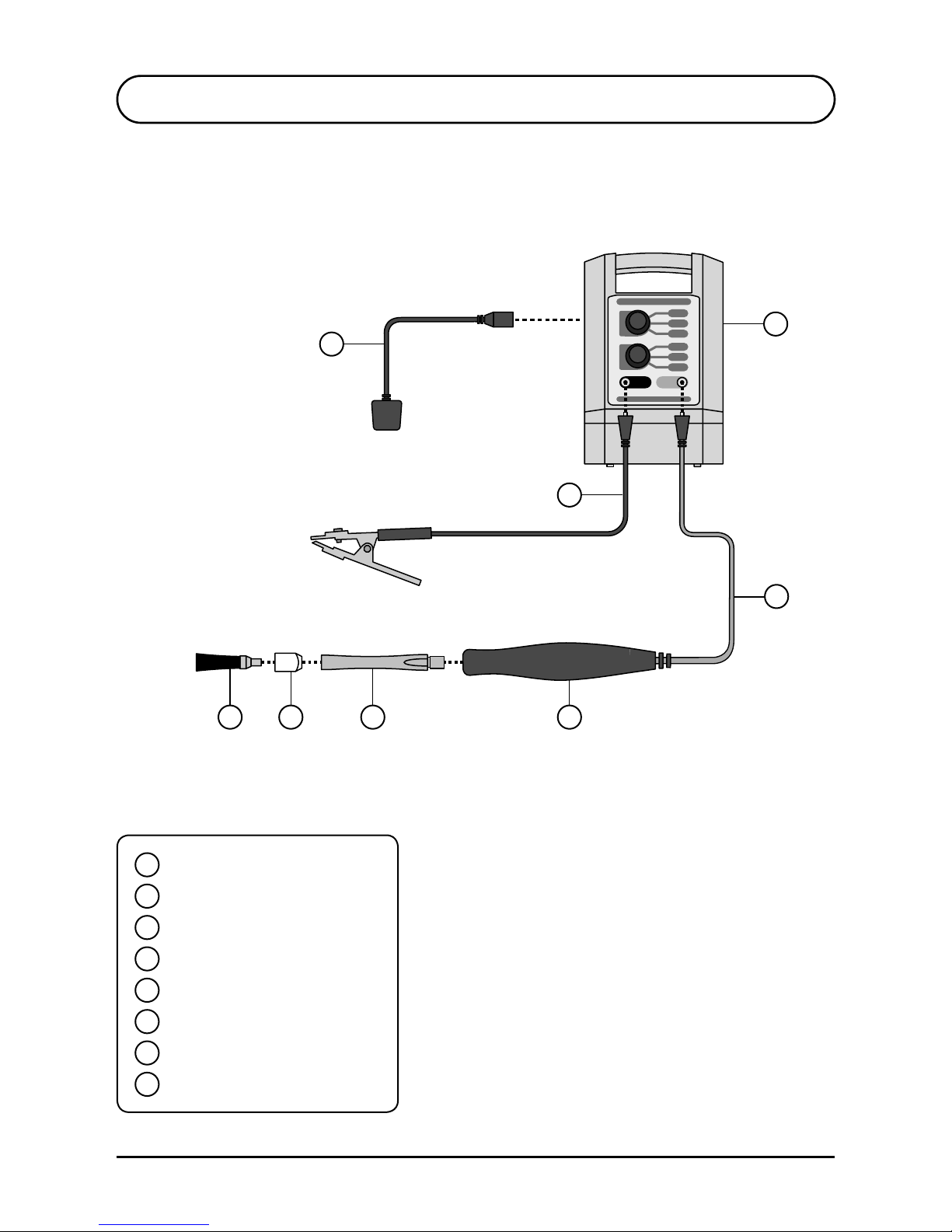
1
S3 DESCRIPTION OF BASIC APPARATUS
2
4567
8
3
1
2
3
4
5
6
7
8
TIG Brush Control Unit
Clamp Cable
Handle Cable
Handle
Wand
Shroud
Brush *
Power Cord
* Single brush may be replaced by a
dual brush adaptor and shroud.
Page 13
13
TBX-440 Instruction Manual
Dec 2015
Ensitech Pty Ltd
www.tigbrush.com
PROPEL
TORCH
EARTH
LEAD
SLEEP
SINGLE
BRUSH
WIDE
TURBO
CLEAN
ETCH
POLISH
MARK
TBX
-
440
PROPEL
-
-
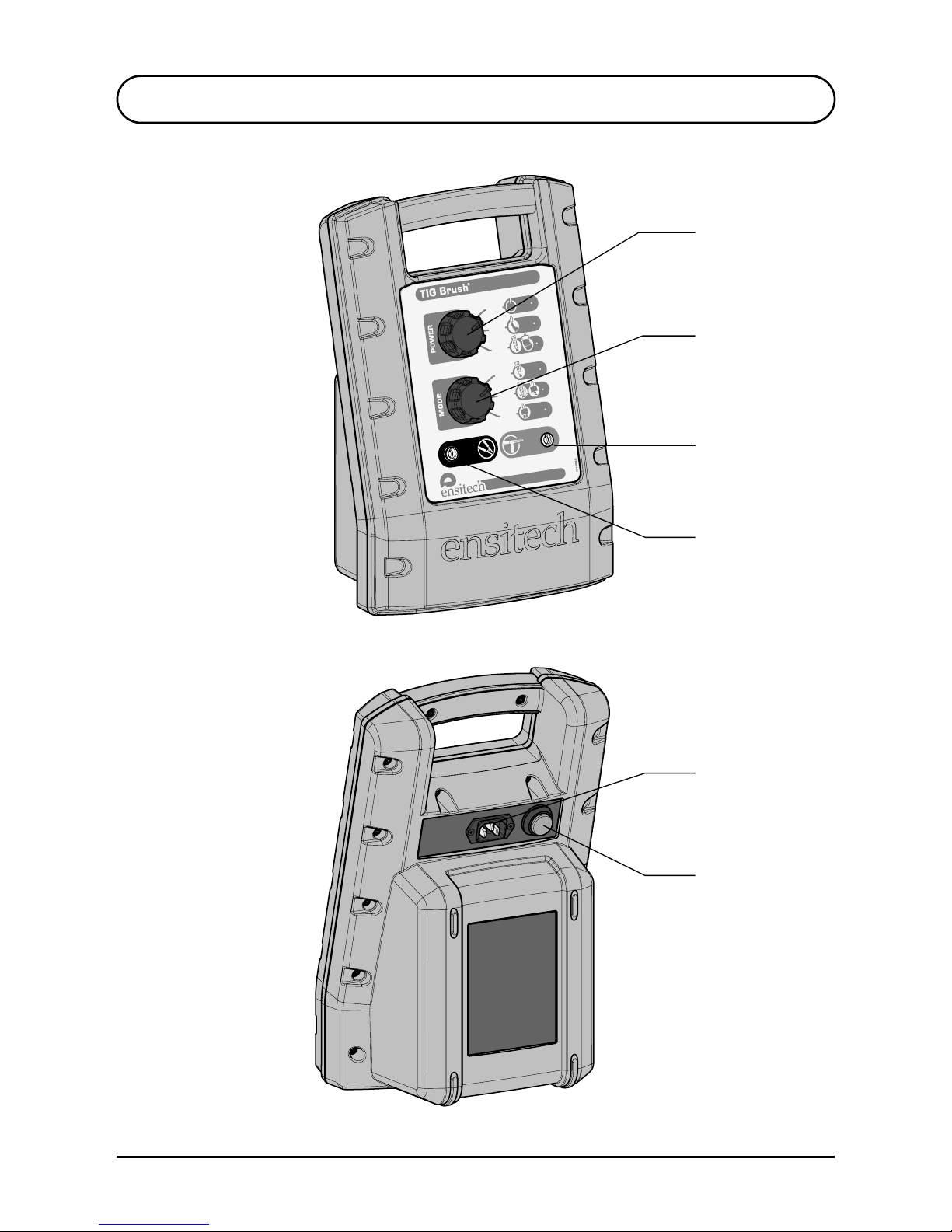
S3 DESCRIPTION OF BASIC APPARATUS
Power Control
Mode Control
Handle Cable
Socket
Clamp Cable
Socket
On/Off Switch
Mains Socket
Page 14

14
TBX-440 Instruction Manual
Dec 2015
S4 OPERATION
PREPARATION
ASSEMBLY
4.1
4.2
4.3
1. Inspect unit and all cables for damage before use.
2. Ensure the unit is dry.
3. Ensure the work environment is well ventilated and
away from any combustible substances.
4. Ensure that cables do not present a trip hazard.
5. If the items to be cleaned are small, place the parts in a
plastic container that can hold acidic fluids safely.
6. Parts will need to be sprayed with the recommended
Ensitech neutraliser or washed down with water after
cleaning. Ensure there is ready access to water and a
suitable place for washing.
7. Wear suitable personal protective equipment as
recommended in the SDS. The minimum requirement is
for gloves to protect hands from the fluid, and goggles
to prevent fluid splashing into the eyes.
CLEANING FLUID
Pour a small quantity of the Cleaning Fluid into a shallow
bowl. Place the container close to the work because the tip
will be dipped into the fluid regularly during operation.
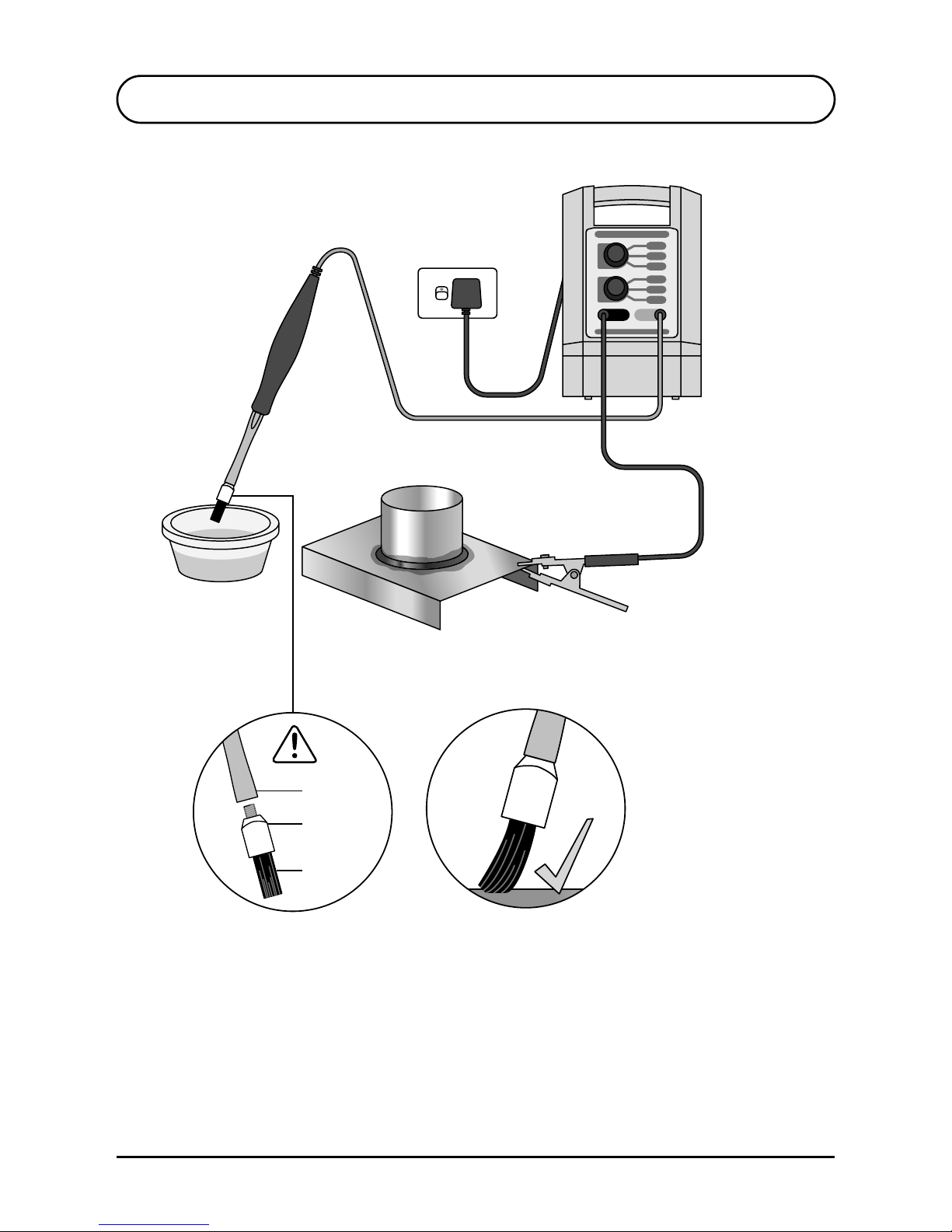
Refer to illustration on page 12.
1. Attach red handle cable plug to Handle cable socket of
TIG Brush™ Control Unit.
2. Screw wand into handle.
3. Place shroud on brush and screw into wand.
4. Attach black clamp cable plug to Clamp cable socket of
TIG Brush™ Control Unit.
5. Set POWER switch to “OFF”.
6. Attach power cord to mains outlet and TIG Brush Unit.
7. Attach clamp to workpiece.
Page 15
15
TBX-440 Instruction Manual
Dec 2015
Ensitech Pty Ltd
www.tigbrush.com
S4 OPERATION
Workpiece
For best performance
use tip of brush only
Wand
Brush
Shroud
Insulating shroud
must be used
Page 16

16
TBX-440 Instruction Manual
Dec 2015
Refer to illustrations on pages 15 and 17.
1. Set POWER control to STANDBY. Always use this setting
when connecting the clamp or changing the tip.
2. Ensure the power cord is connected to a suitable 240V
AC power outlet and connected to the TIG Brush power
socket.
3. Turn the On/Off switch to ON. The switch should be
illuminated red.
4. Make sure the brush tip has its insulating shroud and the
insulation on the wand is undamaged.
5. Ensure the TIG Brush is switched on and all equipment is
correctly connected as described above in section 4.2.
6. Select power level and operating mode using the rotary
switches. See section 5 below for details.
7. Dip brush in cleaning fluid and apply brush tip to weld
area to be cleaned. Use only recommended cleaning
fluids, see S7.2.
8. Ensure brush and work area remain wet with the fluid
during cleaning.
9. Apply brush only for as long as necessary to remove
discolouration. Prolonged application may affect
surface quality.
10. Some light sparking may occur where brush tip contacts
workpiece, particularly on higher power settings, and this
is normal. Excessive sparking for a prolonged time in one
area may cause surface pitting.
11. When desired surface finish is achieved, turn the TIG
Brush Power Control to OFF.
12. After use put the brush down on a non-flammable
surface as it may be very hot.
13. Be careful touching the work as it may be hot.
14. Rinse thoroughly with clean water to remove all traces of
cleaning fluid. To ensure acidic residue is removed, use
the recommended Ensitech neutralising fluid, see S7.3.
S4 OPERATION
OPERATION4.4
Page 17
17
TBX-440 Instruction Manual
Dec 2015
Ensitech Pty Ltd
www.tigbrush.com
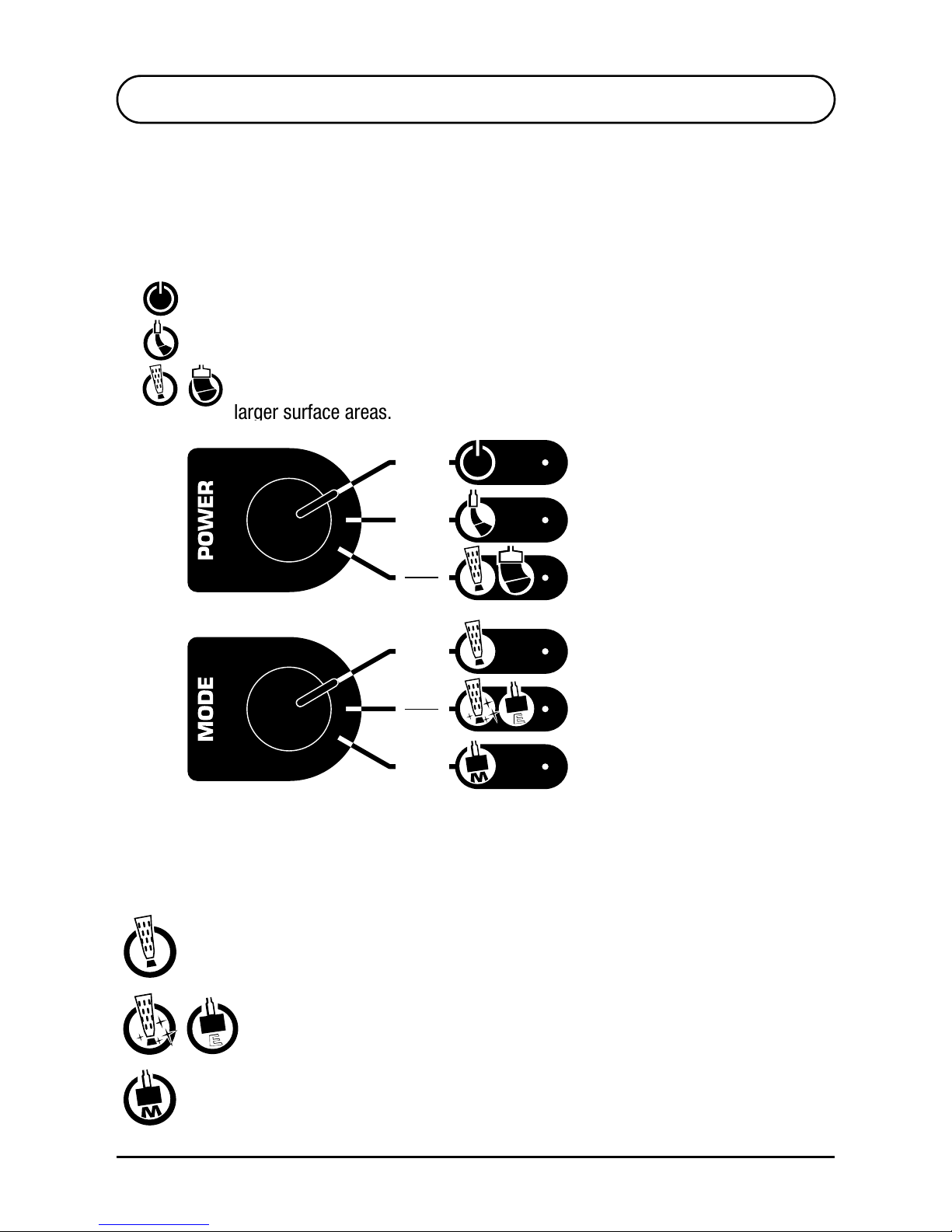
S5 POWER AND GRADE SETTINGS
MODE SETTINGS5.2
POWER SETTINGS5.1
Choose the cleaning intensity required by selecting the
appropriate setting using the Power Control.
SLEEP - Power is not transmitted to the brush.
SINGLE BRUSH - Use for light work and thin metals.
PROPEL / WIDE BRUSH - Use for ultimate control and speed, or covering
larger surface areas.
Choose the action to be performed by selecting the applicable mode with the MODE
switch.
TURBO CLEAN - This mode provides the fastest cleaning at each power setting,
but with prolonged use, may cause the surface to appear milky. Use POLISH / ETCH
mode to rectify.
POLISH / ETCH -
This mode provides metal polishing (rectify milky surface)
as well as etching when used with the appropriate fluid and “Marking Head”.
MARK - This mode provides surface marking when used with the appropriate fluid
in conjunction with the “Marking Head”.
SLEEP
MARK
SINGLE
BRUSH
TURBO
CLEAN
PROPEL
WIDE
POLISH
ETCH
Page 18
18
TBX-440 Instruction Manual
Dec 2015
S6 MAINTENANCE
MAINTENANCE
• When not in use, ensure the On/Off switch is OFF. This
is confirmed when neither the LED in the switch on
the back, nor the Standby LED in the front panel are
illuminated.
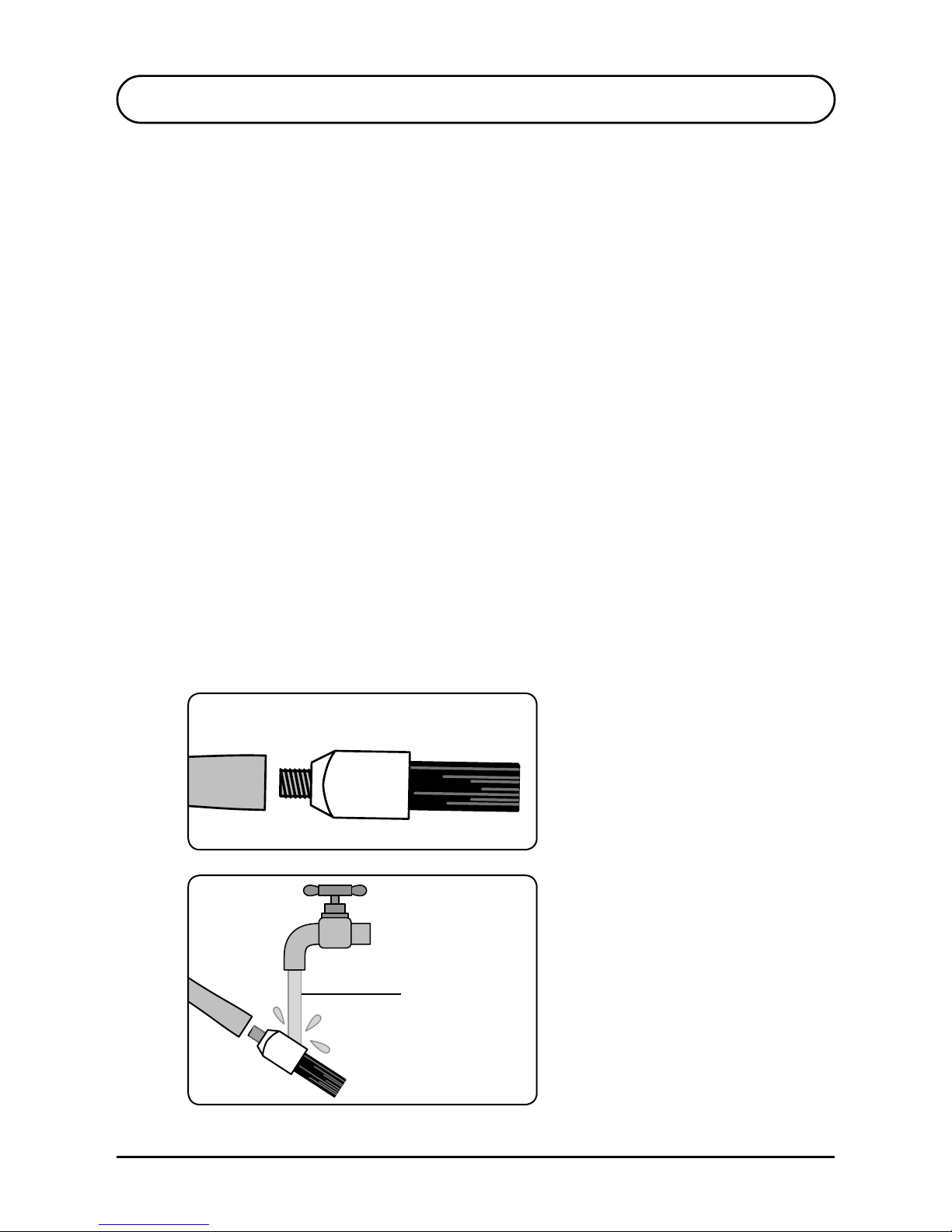
• Rinse brush with water to remove excess cleaning fluid.
• At completion of a work shift, unscrew brush from
wand. Remove the brush from the insulating shroud
and rinse brush, shroud and end of wand with water to
remove cleaning solution. Allow to dry before
re-assembling.
• Rinse clamp with water to remove solution and
prevent corrosion.
• Use a wet cloth to wipe fluid splashes off the TIG Brush
control unit. After some time splashes and marks may
accumulate and become difficult to remove.
Rinse brush
components
after use
Wand Brush
Remove brush from Wand
6.1
Page 19

19
TBX-440 Instruction Manual
Dec 2015
Ensitech Pty Ltd
www.tigbrush.com
S7 CONSUMABLES
BRUSHES
INSULATING SHROUD
FLUIDS
7.1
7.2
7.3
The brush will wear down with use and should be
replaced when the bristles reach approximately 12mm
in length.
Consumable supplies are available from authorised TIG
Brush distributors.
The insulating shroud may become damaged or heataffected. If this happens, replacement shrouds should be
purchased.
A range of genuine Ensitech fluids is available. Please check
with your local TIG Brush distributor for details of fluids available
in your region.
Types of fluids include:
• Pre-Weld Cleaning Fluids: to remove dirt and oil prior to
welding to minimise contamination during welding.
• Weld Cleaning Fluids: for cleaning and, optionally,
polishing. (Biodegradable and neutral fluids are available.)
• Neutralising Fluids: to ensure removal of all cleaning fluid
residue.
• Finishing Fluid: to provide a clean, mark-free finish.
• Marking Fluids: can be used with custom stencils to
indelibly mark metals.
• Etching Fluids: also used with the same stencils to give a
deep custom etch to the metal surface.
Brushes Shrouds
Fluids
Page 20

20
TBX-440 Instruction Manual
Dec 2015
S8 TROUBLESHOOTING
FRONT PANEL POWER LIGHT NOT ILLUMINATED
• Ensure the On/Off switch on the back is ON. The red
LED in the switch button should be on.
• Ensure the power cable is pushed completely into the
socket on the back of the TIG Brush.
• Ensure power is present at the power point (possibly by
plugging in another appliance, such as an
inspection light).
8.1
If the TIG Brush is not operating correctly, please refer to the
following trouble shooting guide before contacting your TIG
Brush distributor.
Page 21

21
TBX-440 Instruction Manual
Dec 2015
Ensitech Pty Ltd
www.tigbrush.com
FRONT PANEL POWER LIGHT
ILLUMINATED BUT UNIT NOT OPERATING
• Ensure the Power Control is not set to STANDBY.
• Ensure the cables are securely plugged into the front of
the TIG Brush.
• Ensure the clamp is gripping the work securely.
Sometimes the clamp position may need adjusting to
make a good contact. If dirt or debris has built up on the
clamp, clean it as this may prevent a good contact
being made.
• Ensure the brush is wet with fluid.
• Ensure that the work is conductive. If the metal has a
plastic film or a thick layer of oxide, the current cannot
flow through the work. A mechanical or chemical
method may need to be used to remove any insulating
film before the TIG Brush can be used.
• Examine all cables for damage and ensure they are
properly connected.
• Ensure the brush is securely screwed into the wand.
NOTE: Be careful when checking, as a loose connection
may be extremely hot.
• Check screw threads on the handle, wand and brush for
dirt and contamination and clean if required.
Contact your TIG Brush distributor or visit the website for
more help www.tigbrush.com
S8 TROUBLESHOOTING
8.2
Page 22

22
TBX-440 Instruction Manual
Dec 2015
S9 WARRANTY
WARRANTY
This warranty is given by Ensitech Pty Ltd of Unit 1, 144, Old Bathurst Road, Emu Plains NSW 2750, Australia,
Tel: +61 2 4735 7700, Email: [email protected] The benefits given by each warranty set out in this
document are in addition to any other rights and remedies you may have under a law in relation to the
services or goods to which the warranty relates. Our goods come with guarantees that cannot be excluded
under the Australian Consumer Law. You are entitled to a replacement or refund for a major failure and for
compensation for any other reasonably foreseeable loss or damage. You are also entitled to have the goods
repaired or replaced if the goods fail to be of acceptable quality and the failure does not amount to a major
failure. Unless otherwise stated you will bear the cost of claiming the warranty.
What this warranty covers
This warranty applies to any defects in the goods that appears within 24 months from the date of delivery
of the goods to you. To claim under this warranty, the defects must be notified to Ensitech and the goods
returned to Ensitech within two weeks of their appearance. Ensitech will, at its option, replace or repair
the goods within a reasonable time of receiving a valid warranty claim. Ensitech will pay for the repair or
replacement but you must pay all other costs including all transport costs of returning the defective goods to
Ensitech and Ensitech delivering the repaired or replacement part back to you.
How to make a claim
If you want to make a claim under your warranty, please contact Ensitech Pty Ltd in writing by sending a pre-
paid letter to Ensitech Pty Ltd, PO Box 179, Springwood NSW 2777, Australia, or email to [email protected].
au. You must include your full name, address and contact telephone number and the details of the defect in
relation to which you make your claim. Ensitech will tell you whether you need to return the goods to Ensitech
Pty Ltd or the approved local distributor. You will need to return the goods together with all accessories and
parts for a full assessment and report.
Additional limitations, exclusions and requirements
This warranty does not extend to:
• consumables such as the brush, insulating shroud and wand;
• any defect caused by normal wear and tear or incidental or inconsequential damage;
• any defect caused by misuse, negligence or other abuse of the goods;
• any defect caused by accidents or alterations;
• goods that have not been cleaned and maintained in accordance with the user’s manual supplied with the
goods;
• loss or damage, including consequential loss or damage, to your work or facilities arising out of or in
connection with the use of the TIG Brush; or
• unless otherwise expressly stated, any right to be reimbursed or compensated for physical or financial
injury, loss, damage, expense, time or inconvenience (whether direct or indirect) arising out of the
occurrence of the defect in the product or your inability to use the product.
WARRANTY
This warranty is given by Ensitech Pty Ltd of Unit 1, 144, Old Bathurst Road, Emu Plains NSW 2750, Australia,
Tel: +61 2 4735 7700, Email: [email protected] The benefi ts given by each warranty set out in this
document are in addition to any other rights and remedies you may have under a law in relation to the
services or goods to which the warranty relates. Our goods come with guarantees that cannot be excluded
under the Australian Consumer Law. You are entitled to a replacement or refund for a major failure and for
compensation for any other reasonably foreseeable loss or damage. You are also entitled to have the goods
repaired or replaced if the goods fail to be of acceptable quality and the failure does not amount to a major
failure. Unless otherwise stated you will bear the cost of claiming the warranty.
What this warranty covers
This warranty applies to any defects in the goods that appears within 24 months from the date of delivery
of the goods to you. To claim under this warranty, the defects must be notifi ed to Ensitech and the goods
returned to Ensitech within two weeks of their appearance. Ensitech will, at its option, replace or repair
the goods within a reasonable time of receiving a valid warranty claim. Ensitech will pay for the repair or
replacement but you must pay all other costs including all transport costs of returning the defective goods to
Ensitech and Ensitech delivering the repaired or replacement part back to you
.
How to make a claim
If you want to make a claim under your warranty, please contact Ensitech Pty Ltd in writing by sending a pre-
paid letter to Ensitech Pty Ltd, PO Box 179, Springwood NSW 2777, Australia, or email to [email protected].
au. You must include your full name, address and contact telephone number and the details of the defect in
relation to which you make your claim. Ensitech will tell you whether you need to return the goods to Ensitech
Pty Ltd or the approved local distributor. You will need to return the goods together with all accessories and
parts for a full assessment and report.
Additional limitations, exclusions and requirements
This warranty does not extend to:
• consumables such as the brush, insulating shroud and wand;
• any defect caused by normal wear and tear or incidental or inconsequential damage;
• any defect caused by misuse, negligence or other abuse of the goods;
• any defect caused by accidents or alterations;
• goods that have not been cleaned and maintained in accordance with the user’s manual supplied with the
goods;
• loss or damage, including consequential loss or damage, to your work or facilities arising out of or in
connection with the use of the TIG Brush; or
• unless otherwise expressly stated, any right to be reimbursed or compensated for physical or fi nancial
injury, loss, damage, expense, time or inconvenience (whether direct or indirect) arising out of the
occurrence of the defect in the product or your inability to use the product.
Stainless Steel Weld Cleaning System
Operation, Safety and
Maintenance Manual
WARRANT Y AGAINST DEFECTS
This product comes with Ensitech Pty Ltd’s (we/Ensitech)
warranty against defects that are a result of faulty manufacturer
workmanship or materials. The details and conditions of this
warranty are set out below.
PERIOD OF WARRANTY
You may claim on this warranty if you notify Ensitech of the
defect in the manner set out below and if you comply with the
other procedures and conditions of this warranty, within:
• in the case of the TIG Brush™ control unit, two years; or
• in the case of clamp cables or handle cables, three months, of
the date of purchase of the product by you.
WHO CAN CLAIM UNDER THIS WARRANTY?
This warranty applies to and can be exercised by the
original purchaser of the product only. This warranty is
not transferrable to any other person or party under any
circumstances.
THINGS YOU MUST DO BEFORE A CL AIM IS MADE
Before making a claim under this warranty you must:
• register your purchase of this product on-line within 60 days
of purchase date by following the instructions and prompts at
www.tigbrush.com/warranty and
• follow the trouble-shooting procedure by contacting Ensitech
by email, by letter or by phone at the contact points noted
below. We will advise you of the procedures that need to
be followed to check the product. If, having followed that
procedure, the product is still considered defective, you may
make a claim under this warranty
WHAT THIS WARR ANT Y DOES NOT COVER
If Ensitech reasonably considers that any of the following
situations are present, this warranty does not apply. The
situations to which this warranty does not apply are:
• normal wear and tear;
•
any cosmetic damage, such as scratches to paint work etc;
• damage to consumable products, such as brushes, insulating
shroud and wand;
• damage caused by the use of consumables or accessories
not manufactured by Ensitech or its authorised contract
manufacturers, whether or not purchased from an Ensitech
distributor or reseller;
• to a product that has been altered or repaired by a person
other than Ensitech or its authorised repairers;
• any product where the product’s serial number is no longer
present or visible;
•
loss or damage caused by factors beyond Ensitech’s control
including, but not limited to, damage or failure due to power
fluctuations, overload, excessive heat, dust, water immersion or
contact with water or humidity;
• damage or defects caused to the product due to unusual,
abnormal, non-recommended or negligent use of the product;
•
damage due to dropping, collision, impact or other accident;
• any product which has not been kept clean or has not been
maintained or stored according to any care or operating
instructions provided with the product; or
• consumables which are past their use by date.
PROCEDURE FOR MAKING A CLAIM
If you have followed the trouble shooting procedure noted
above and still consider the product to be defective, you may
make a claim made by contacting Ensitech by email or by
letter at the address noted below. With that notice you must
also provide us with the following information in writing:
• Your name or company name (if applicable);
• Your address;
• Your email address;
• Your telephone number;
• Contact name;
• Machine type, model number and serial number;
• Proof of your purchase of this product, such as your receipt or
supplier’s invoice; and
• A detailed description of the defect you believe the product to
have.
Ensitech will advise whether you must send the faulty product to
Ensitech or its authorised repairer, or to your distributor or reseller.
Please note that if you have the Product repaired by someone
other than Ensitech or its authorised repairer, you cannot
claim under this warranty.
You must bear the cost of transporting the product to Ensitech, the
distributor/reseller or its authorised repairer and all other costs of
exercising your rights under this warranty.
WHAT WE WILL DO TO HONOUR THIS WARRANTY
Upon delivery to us we will assess the product to determine if the
fault or problem is covered by this warranty. We will advise you by
email or letter whether the fault is covered by this warranty. If the
warranty applies, at our option, we or our authorised repairer will
repair or replace the product with a new product or a product of the
approximate age of your product. We will do these things within
a reasonable period after receipt of the product and all required
information from you.
YOUR OTHER RIGHTS AND REMEDIES
This warranty against defects is provided in addition to other rights
or remedies you, as a consumer, may have under a law in relation
to this product.
If you purchased this product in Australia: Our goods come
with guarantees that cannot be excluded under the Australian
Consumer Law. You are entitled to a replacement or refund for a
major failure and for compensation for any reasonably foreseeable
loss or damage. You are also entitled to have the goods repaired or
replaced if the goods fail to be of acceptable quality and the failure
does not amount to a major failure.
WARRANTY AGAINST MANUFACTURING AND MATERIAL DEFECTS
Page 23

Stainless Steel Weld Cleaning System
TBE-250
Operation, Safety and
Maintenance Manual
Page 24

Ensitech Pty Ltd Unit 1/144 Old Bathurst Road, Emu Plains NSW 2750, Australia
Phone: +61 2 4735 7700 Email: [email protected]
TIG Brush TBX-440 Instruction Manual Dec 2015
Model: TBX-440 Serial No.
Purchased from:
Date of Purchase:
 Loading...