

Page 1
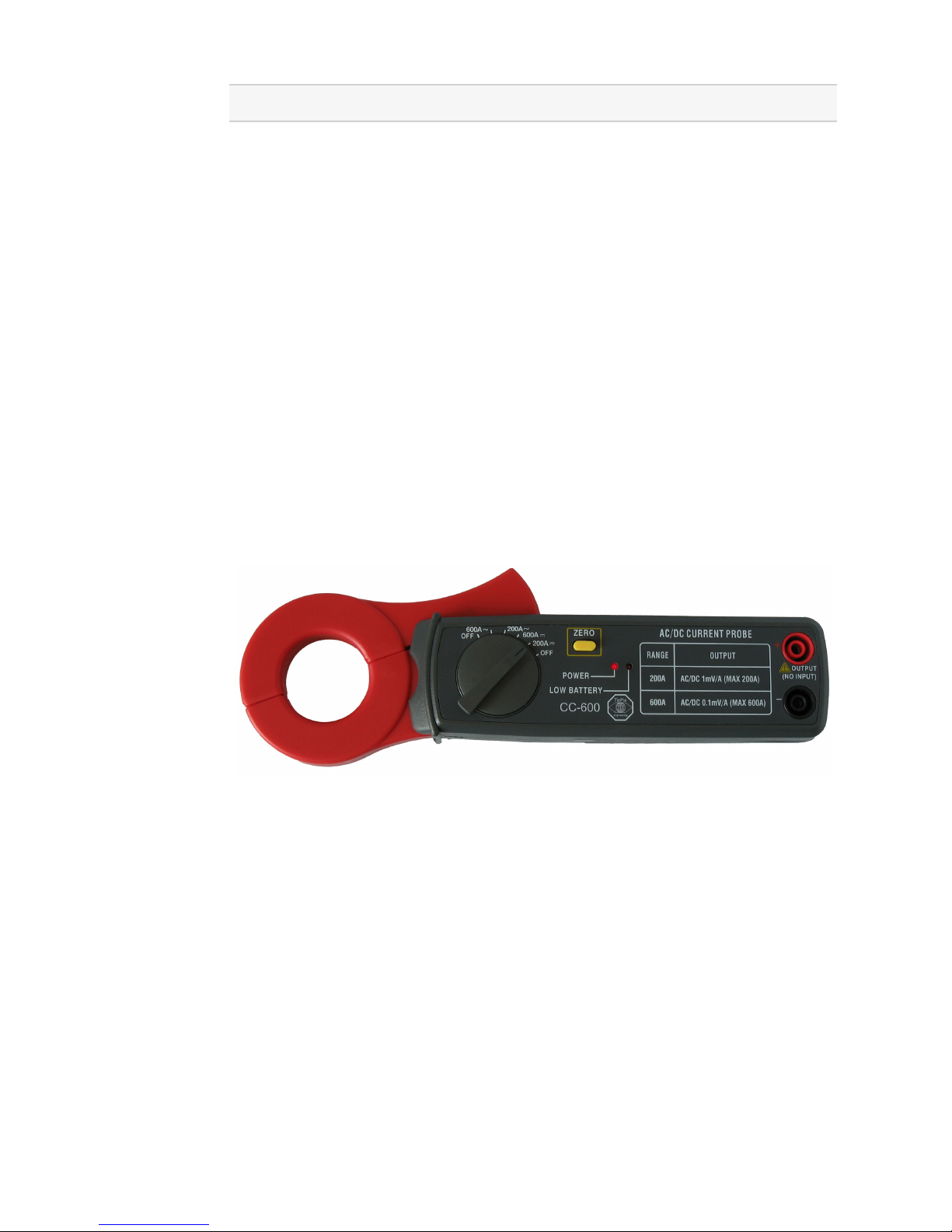
Current Clamp TP-CC600
User’s manual
Revision 1.2
Page 2

Safety
When working with electricity, no instrument can guarantee complete safety. It is the responsibility of the person
who works with the instrument to operate it in a safe way.
Maximum security is achieved by selecting the proper instruments and following safe working procedures. Safe
working tips are given below:
• Always work according (local) regulations.
• Work on installations with voltages higher than 25 V AC or
60 V DC should only be performed by qualified personnel.
• Avoid working alone.
• Observe all indications on the Current Clamp TP-CC600 be-
fore connecting any wiring
• The Current Clamp TP-CC600 complies with class II, over-
voltage CAT II - 600 V of the EN 61010-1 and EN 61010-2-032
standards. Do not clamp around conductors with voltages
equal to or exceeding 300 V DC or 240 Vrms AC.
• To avoid physical injury, measurements on bare conductors
or conductors with damaged insulation are not allowed
• Check the Current Clamp TP-CC600 and test leads for dam-
ages. Do not use them if they are damaged
• Take care when measuring at voltages higher than 25V AC
or 60 V DC.
• Do not operate the equipment in an explosive atmosphere or
in the presence of flammable gases or fumes.
• The Current Clamp TP-CC600 is designed for indoor use
only
• Do not use the Current Clamp TP-CC600 if it does not op-
erate properly. Have the equipment inspected by qualified
service personal. If necessary, return the Current Clamp TPCC600 to TiePie engineering for service and repair to ensure
that safety features are maintained.
• If the Current Clamp TP-CC600 is used in a manner not
specified, the protection provided by the instrument may be
impaired.
2 Current Clamp TP-CC600
Page 3

Declaration of confirmity
TiePie engineering
Koperslagersstraat 37
8601 WL Sneek
The Netherlands
EC Declaration of confirmity
We declare, on our own responsibility, that the product
Current Clamp TP-CC600
for which this declaration is valid, is in compliance with
EN 55011:2009/A1:2010 EN 61000-6-1:2007
EN 55022:2006/A1:2007 EN 61000-6-3:2007
according the conditions of the EMC standard 2004/108/EC,
also with
Canada: ICES-001:2004 Australia/New
Zealand: AS/NZS
and
IEC 61010-1:2001/EN USA: UL61010-1: 2004
and is categorized as CAT II - 600 V.
Sneek, 1 March 2009
ir. A.P.W.M. Poelsma
Current Clamp TP-CC600 3
Page 4
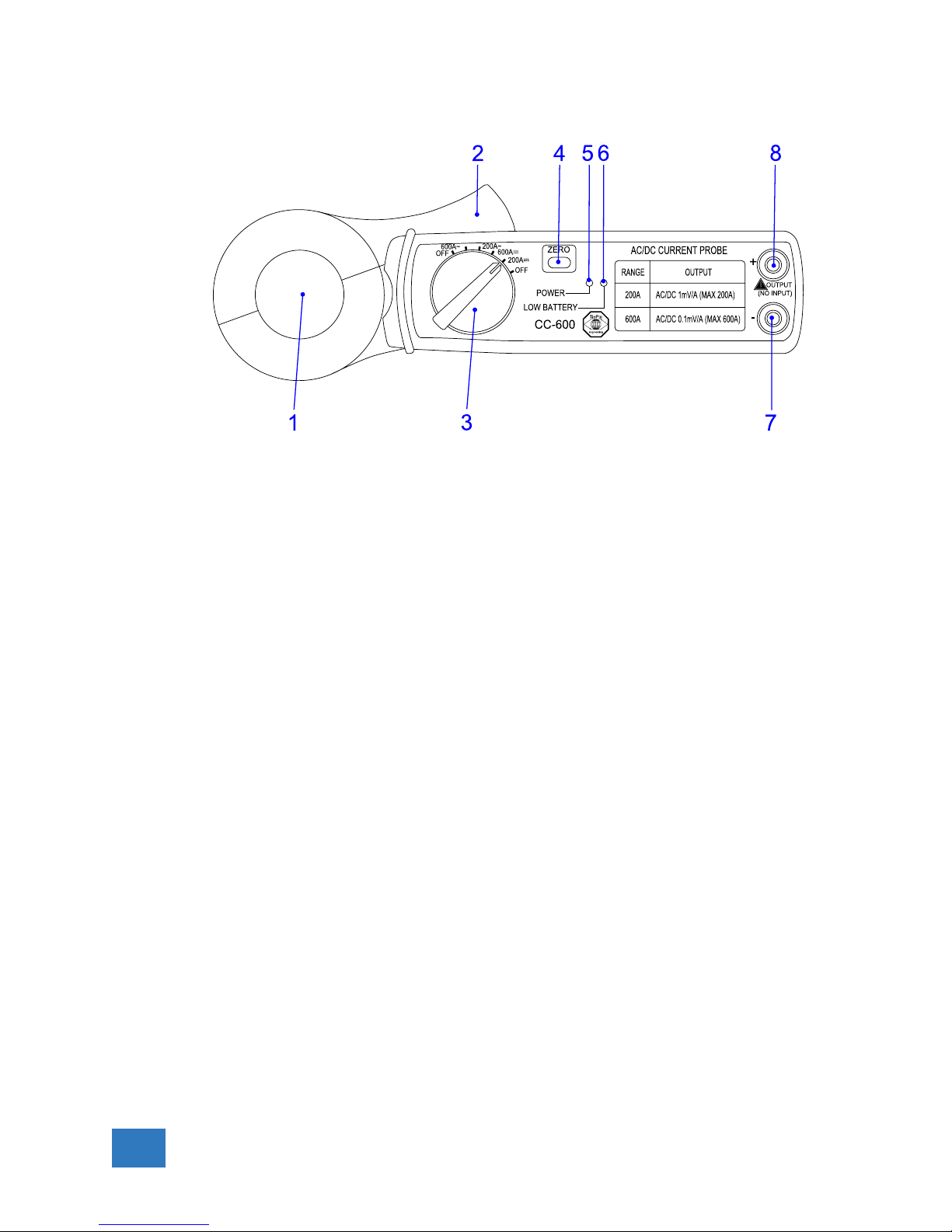
Description
1. Transformer jaw
Used to pick up the current signal. To measure current, the
jaw must be firmly closed, leaving no air gap.
2. Transformer trigger
Used to open the jaw.
3. Range selector switch
Used to select the input range or switch the unit off.
4. Zero button
This buton sets the current readout to zero. This function
is also used when measuring DC current to remove an offset
value caused by residual magnetism in the core of the jaw.
5. Power ON/OFF led.
6. Low battery incidator
When the indicator lights, the battery should be replaced
7. Output terminal – (black)
This terminal is used as output for DCA – polarity and ACA.
8. Output terminal + (red)
This terminal is used as output for DCA + polarity and ACA.
4 Current Clamp TP-CC600
Page 5

Operating instructions
DC current measurements
1. Set the rotary switch to 200 A DC or 600 A DC
2. Connect the negative output of the Current Clamp TP-CC600
(black) to the negative side of the input of the measuring instrument. Connect the positive output of the Current Clamp
TP-CC600 (red) to the positive side of the input of the measuring instrument.
3. Switch the measuring instrument on and set it to 200 mV
DC, 400 mV DC or 2 V DC full scale input range.
4. With firmly closed jaw, press the zero button until the instruments reads zero.
5. Open the jaw and fully enclose the current-carrying conductor(s) and close the jaw again, no air gap is allowed between
the two halves. The output voltage is positive when the current flows from the underside to the upside of the clamp.
6. Read the measured voltage value and convert it to the corresponding current value:
200 A range: 1 mV equals 1 A
600 A range: 1 mV equals 10 A.
AC current measurements
1. Set the rotary switch to 200 A AC or 600 A AC
2. Connect the negative output of the Current Clamp TP-CC600
(black) to the negative side of the input of the measuring instrument. Connect the positive output of the Current Clamp
TP-CC600 (red) to the positive side of the input of the measuring instrument.
3. Switch the measuring instrument on and set it to 200 mV
AC, 400 mV AC or 2 V AC full scale input range.
4. Open the jaw and fully enclose the current-carrying conductor(s) and close the jaw again, no air gap is allowed between
the two halves.
5. Read the measured voltage value and convert it to the corresponding current value:
200 A range: 1 mV equals 1 A
600 A range: 1 mV equals 10 A.
Current Clamp TP-CC600 5
Page 6
Battery replacement
When the low battery LED is lit, replace the old battery with a
new one:
1. Turn the power off and disconnect the test leads from the
Current Clamp TP-CC600.
2. Remove the screw from the battery compartment at the back
of the Current Clamp TP-CC600.
3. Remove the old battery.
4. Insert a new 9 V NEDA 1604, IEC 6F22 battery.
5. Restore the battery compartment cover and tighten the screw.
6. Dispose of the old battery properly
6 Current Clamp TP-CC600
Page 7

Specifications
General
Capture conductor diameter 30 mm maximum
Dimensions
Height 209 mm
Width 43 mm
Thickness 30 mm
Weight 270 g
Connection 2 x 4 mm banana socket
Power supply 9V NEDA 1604, 6F22 006P battery
Operating environment 0◦C to +50◦C, 70% RH
Storage environment -20◦C to +60◦C, 80% RH
Compliances
CE Yes
ROHS Yes
Accuracy
At 22◦C – 28◦C, <70% RH, maximum
DC 200 A range ±(3.0% + 0.6 A)
DC 600 A range ±(3.5% + 3 A)
AC 200 A range, 50 to 400 Hz ±(3.5% + 0.4 A)
AC 600 A range, 50 to 400 Hz ±(4.0% + 4 A)
Current Clamp TP-CC600 7
Page 8

TiePie engineering
Koperslagersstraat 37
8601 WL Sneek
The Netherlands
Tel.: +31 515 415 416
Fax: +31 515 418 819
E-mail: [email protected]
www.tiepie.com
This information is subject to change without notice. Copyrightc 2017 TiePie engineering. All rights
reserved. Revision 1.2, November, 2017.
 Loading...