

Page 1

INSTRUCTION MANUAL
Page 2

INSTRUCTION MANUAL – G0404
CHRONOGRAPH MOVEMENT
Page 3
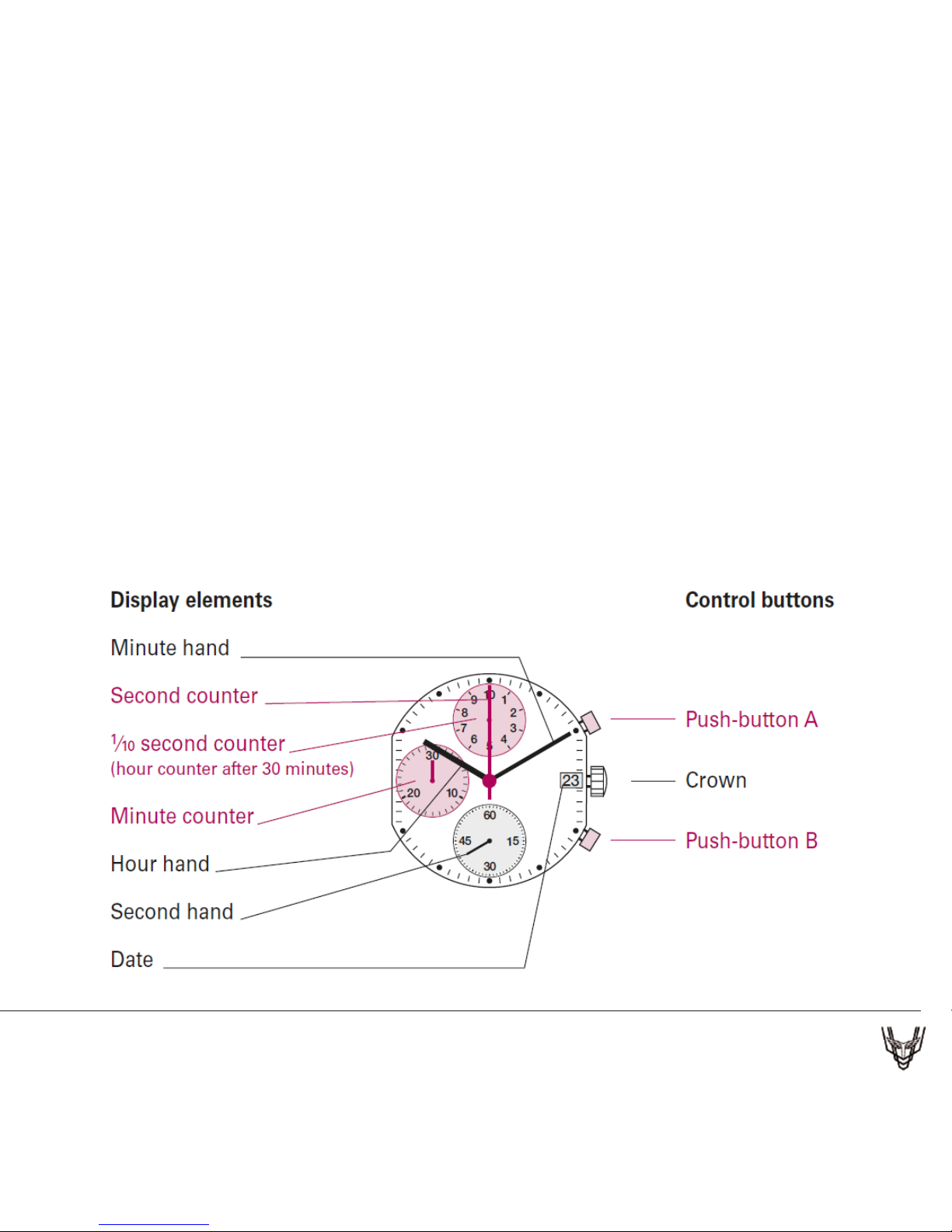
Describe:Stainless Steel Case And Bezel Plating In Ip Gold,Mineral Glass,
Ip Gold Crown, Black Dial Applied With Gold Roman Indexes , Black
Leather Strap, 6 Hands, Ronda 3540.D Mov’t, 5Atm
WATCH DISPLAY & TIME SETTING
Page 4
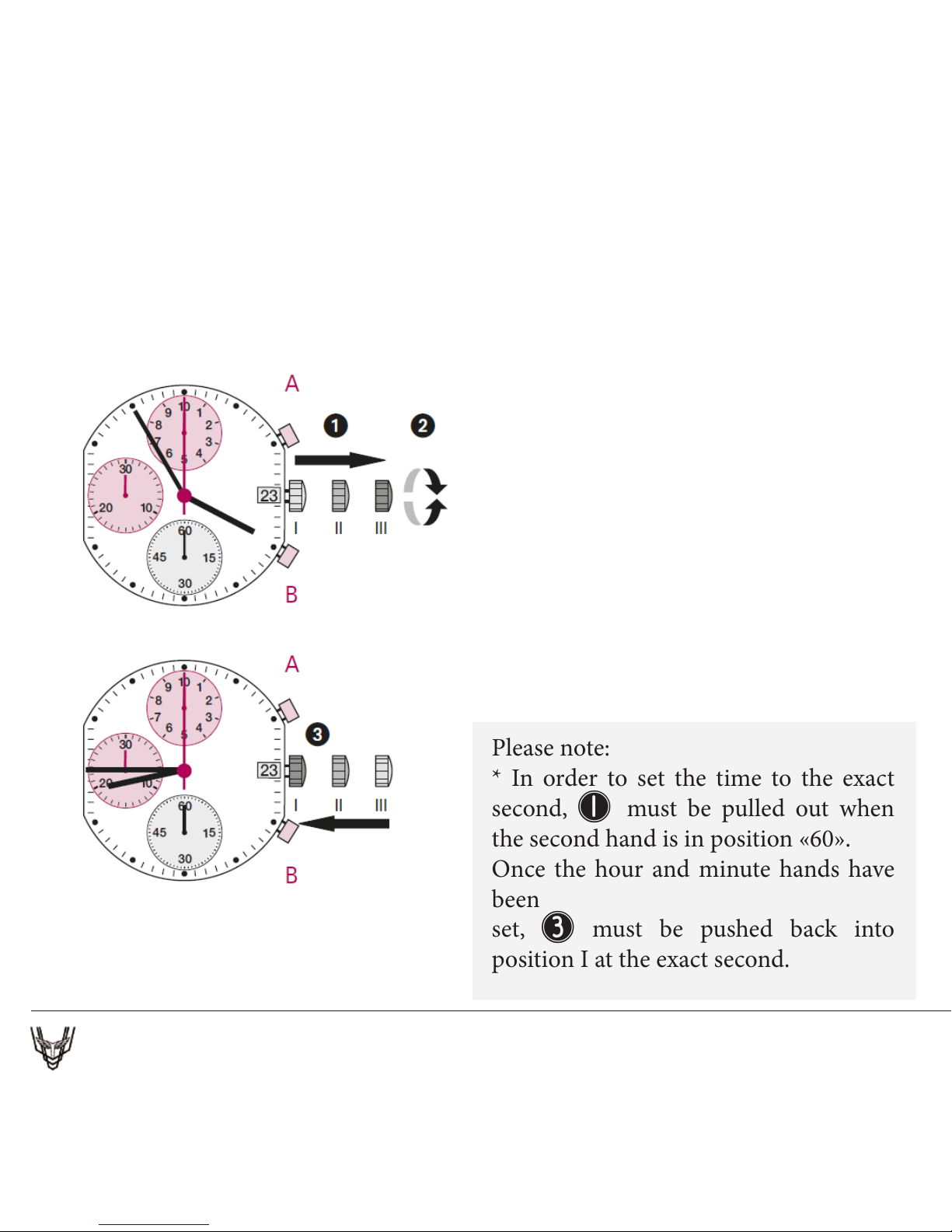
1 Pull out the crown to position III
(the watch stops).
2 Turn the crown until you reach the
correcttime 8:45.
3 Push the crown back into position I.
Please note:
* In order to set the time to the exact
second, 1 must be pulled out when
the second hand is in position «60».
Once the hour and minute hands have
been
set, 3 must be pushed back into
position I at the exact second.
SETTING THE TIME
Page 5
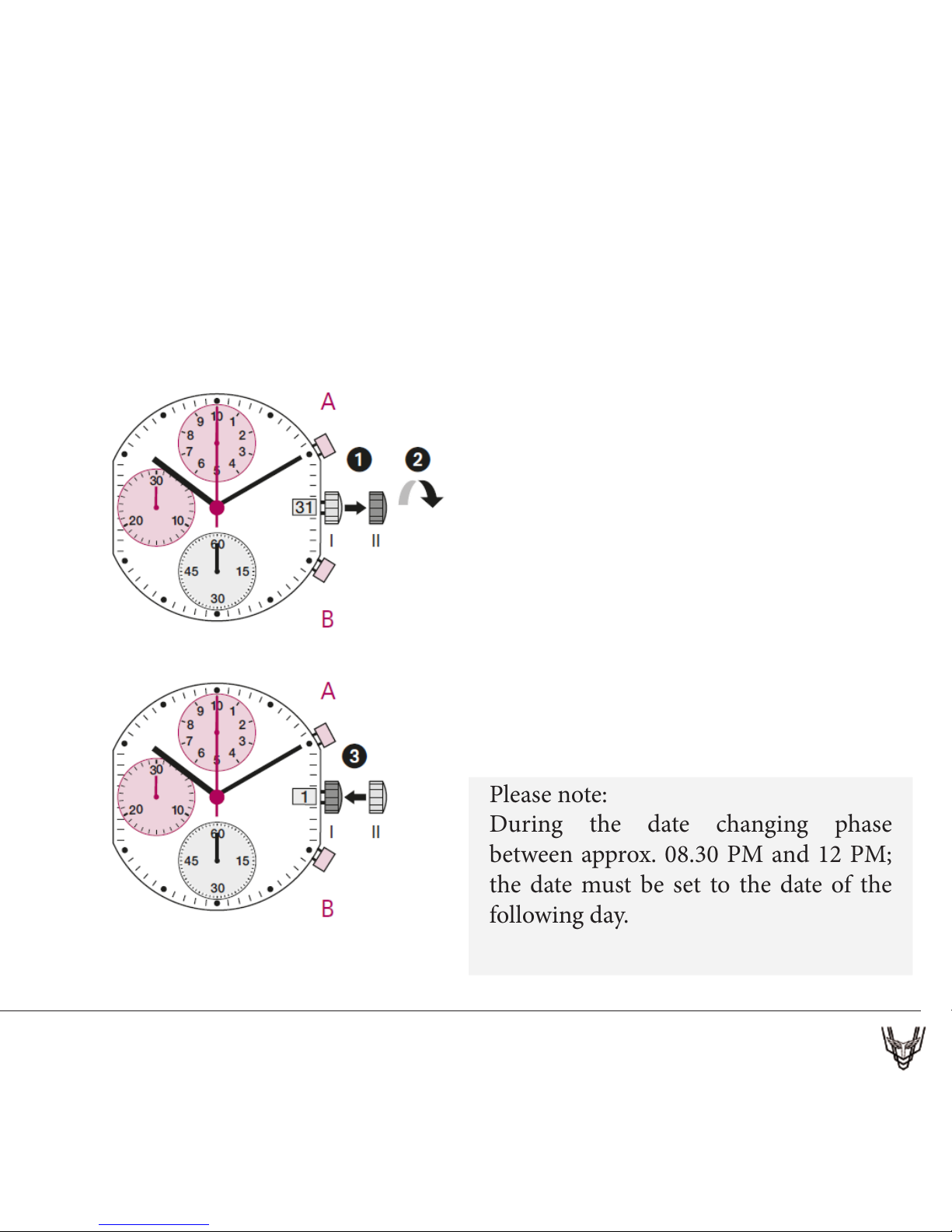
1 Pull out the crown to position II
(the watch continues to run).
2 Tur n the crown anticlockwise until
the correct date 1 appears.
3 Push the crown back into position I.
SETTING THE DATE
Quick Mode
Please note:
During the date changing phase
between approx. 08.30 PM and 12 PM;
the date must be set to the date of the
following day.
Page 6
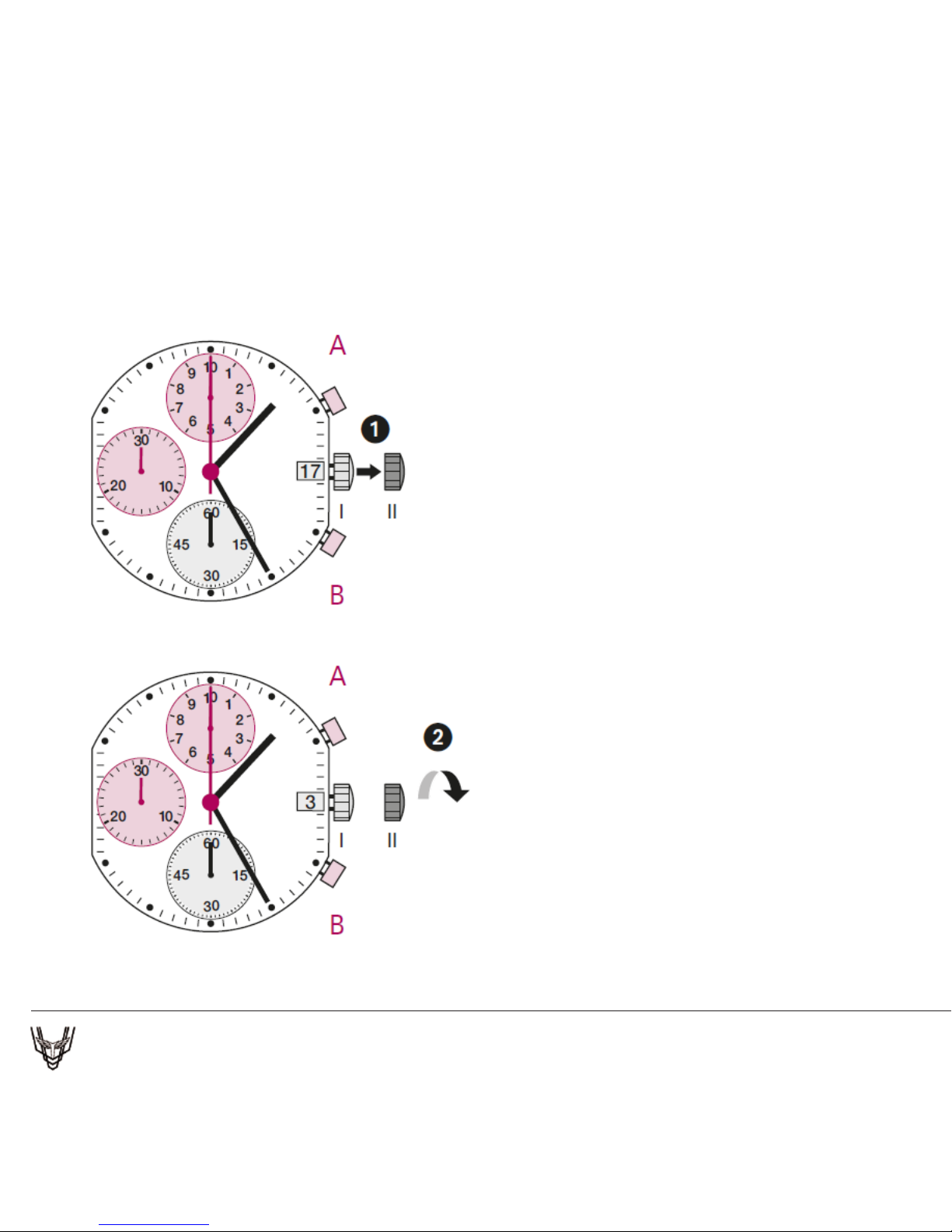
SETTING THE DATE/TIME
Example:
– Date / time on the watch: 17 / 1:25 AM
– Present date / time: 4 / 8:30 PM
1 Pull out the crown to position II
(the watch continues to run).
2 Turn the crown anticlockwise until
yesterday’s date appears 3 .
Page 7
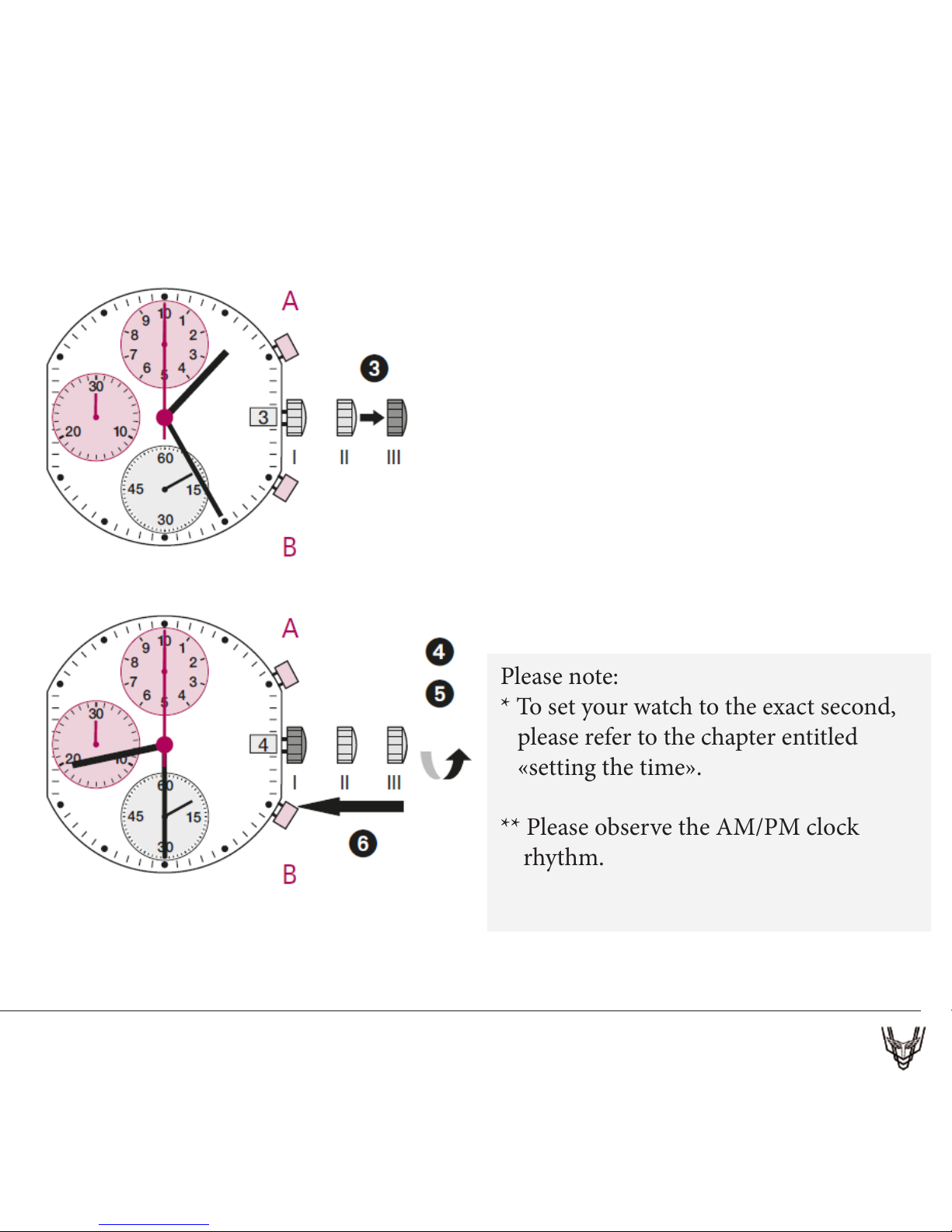
3* Pull out the crown to position III
(the watch stops).
4 Turn the crown until the correct
date 4 appears.
5 ** Continue to turn the crown until
the correct time 8:30 PM appears.
6 Push the crown back into position I.
Please note:
* To set your watch to the exact second,
please refer to the chapter entitled
«setting the time».
** Please observe the AM/PM clock
rhythm.
Page 8
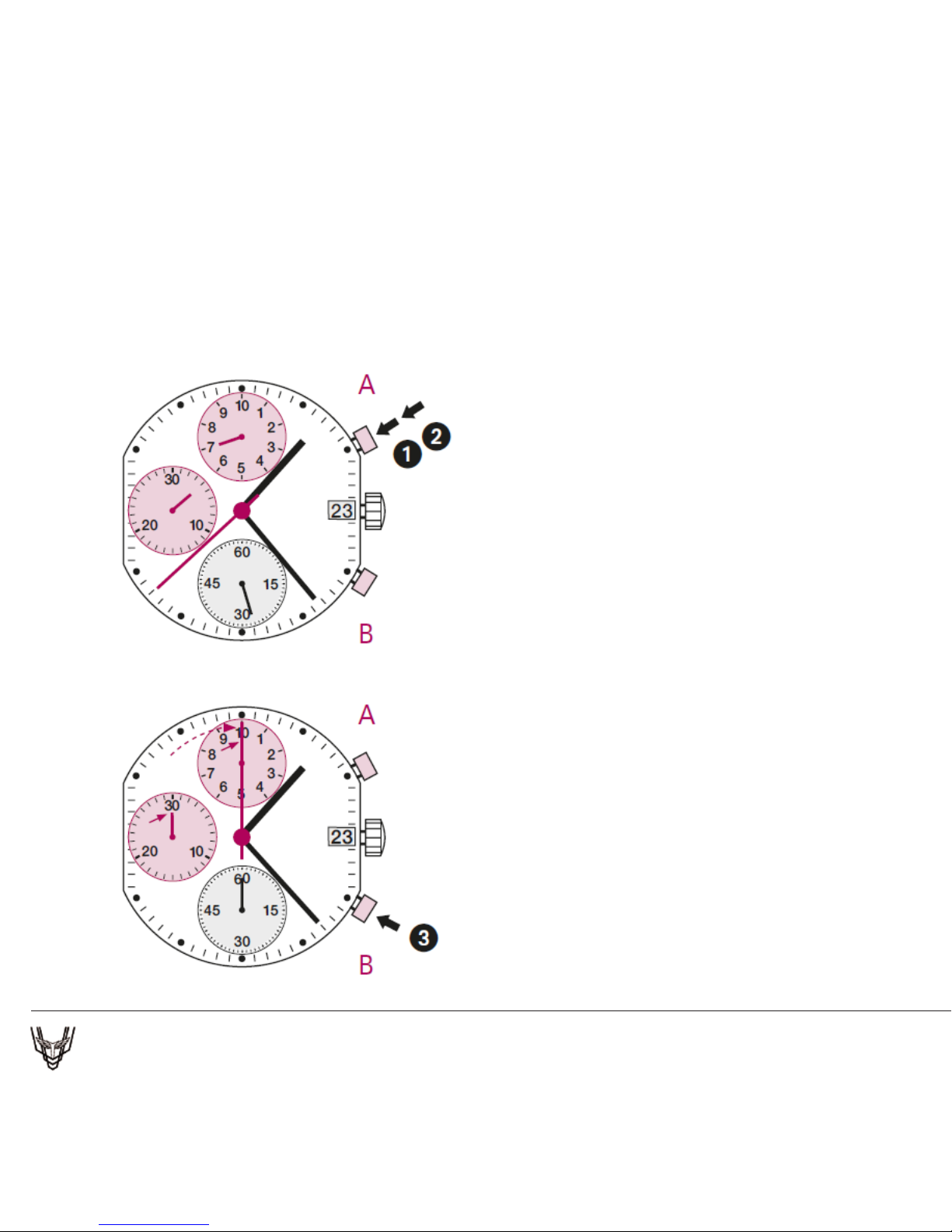
Example:
1 Start: Press push-button A.
2 Stop: to stop the timing, press
push-button A once more and read
the chronograph counters:
4 min / 38 sek / 7⁄10 sec
3 Zero positioning:
Press push-button B.
(e chronograph hands will be
reset to their zero positions.)
CHRONOGRAPH: BASIC FUNCTION
(Start / Stop / Reset)
Page 9
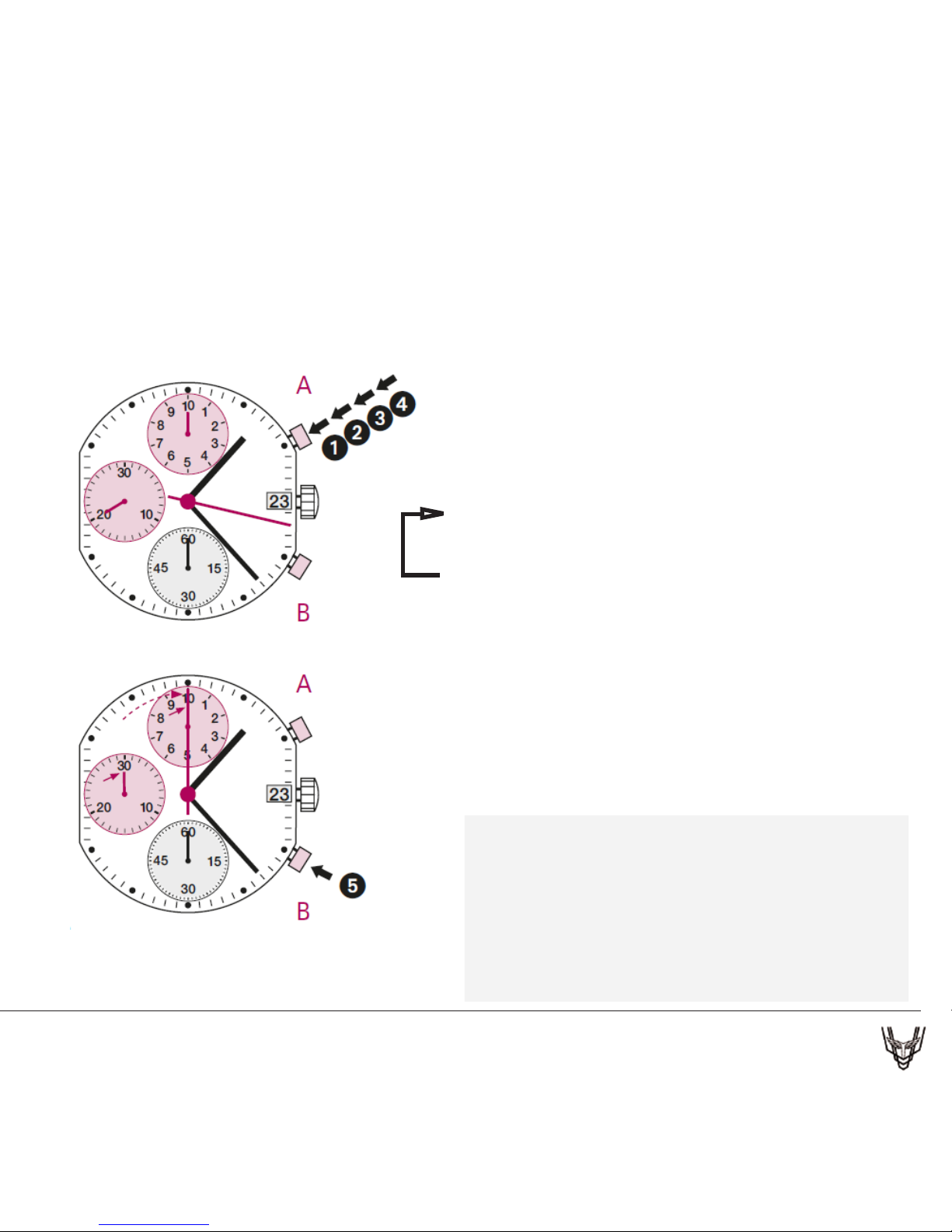
Example:
1 Start: (start timing)
2 Stop: (e.g. 15 min 5 sec following 1)
3 Restart: (timing is resumed)
4 * Stop: (e.g. 5 min 12 sec following 3)
= 20 min 17 sec
(e accumulated measured time is shown)
5 Reset:
e chronograph hands are returned to
their zero positions.
Please note:
* Following 4, the accumulation of the
timing can be continued by pressing
push-button A
(Restart / Stop, Restart / Stop, …).
CHRONOGRAPH: ACCUMULATED TIMING
(Start / Stop / Reset)
Page 10
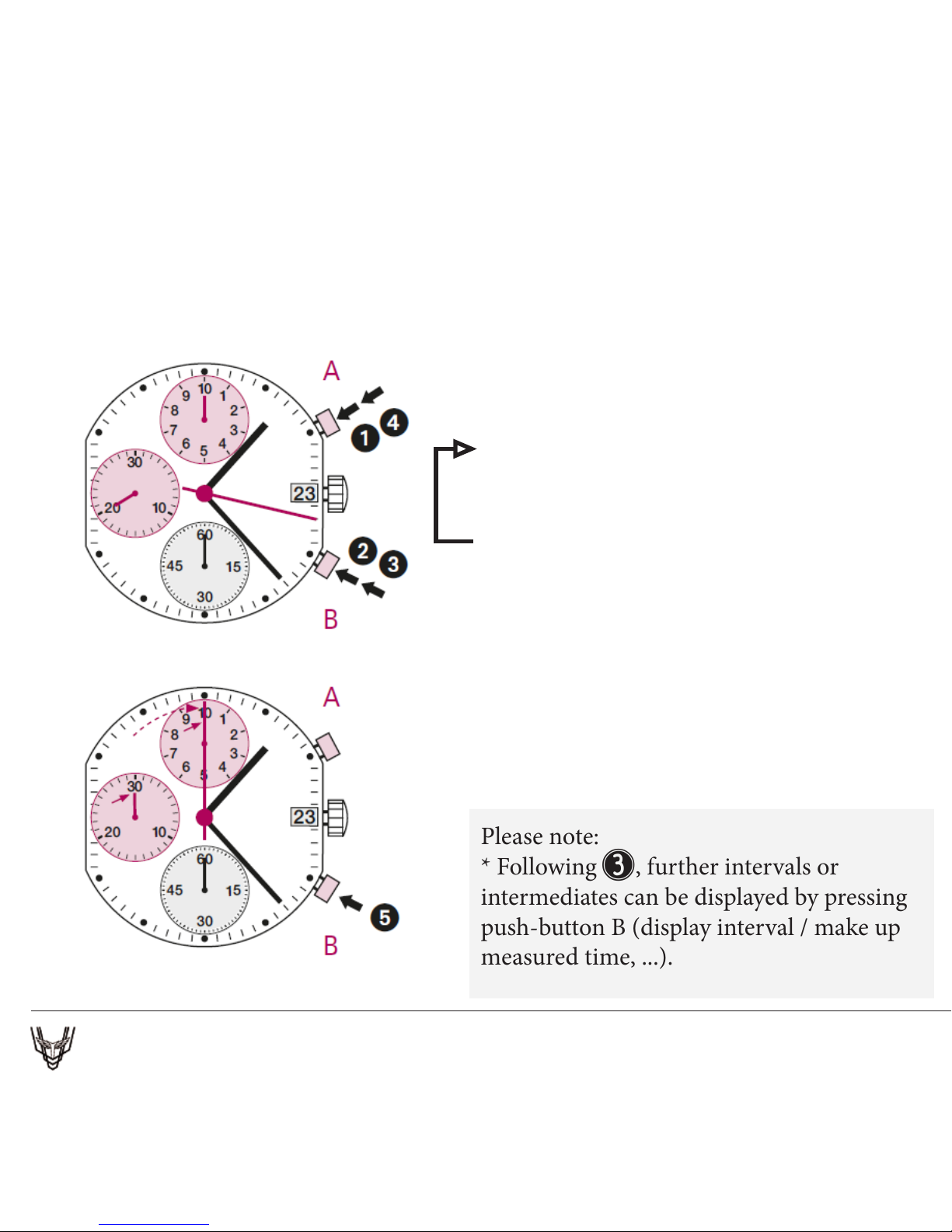
Example:
1 Start: (start timing)
2 Display interval: e.g. 20 minutes 17
seconds (timing continues in the background)
3 Making up the measured time:
(the chronograph hands are quickly
advanced to the ongoing measured time.)
4 Stop: (Final time is displayed)
5 Reset:
e chronograph hands are returned to
their zero position
Please note:
* Following 3, further intervals or
intermediates can be displayed by pressing
push-button B (display interval / make up
measured time, ...).
CHRONOGRAPH: INTERMEDIATE OR INTERVAL TIMING
Page 11
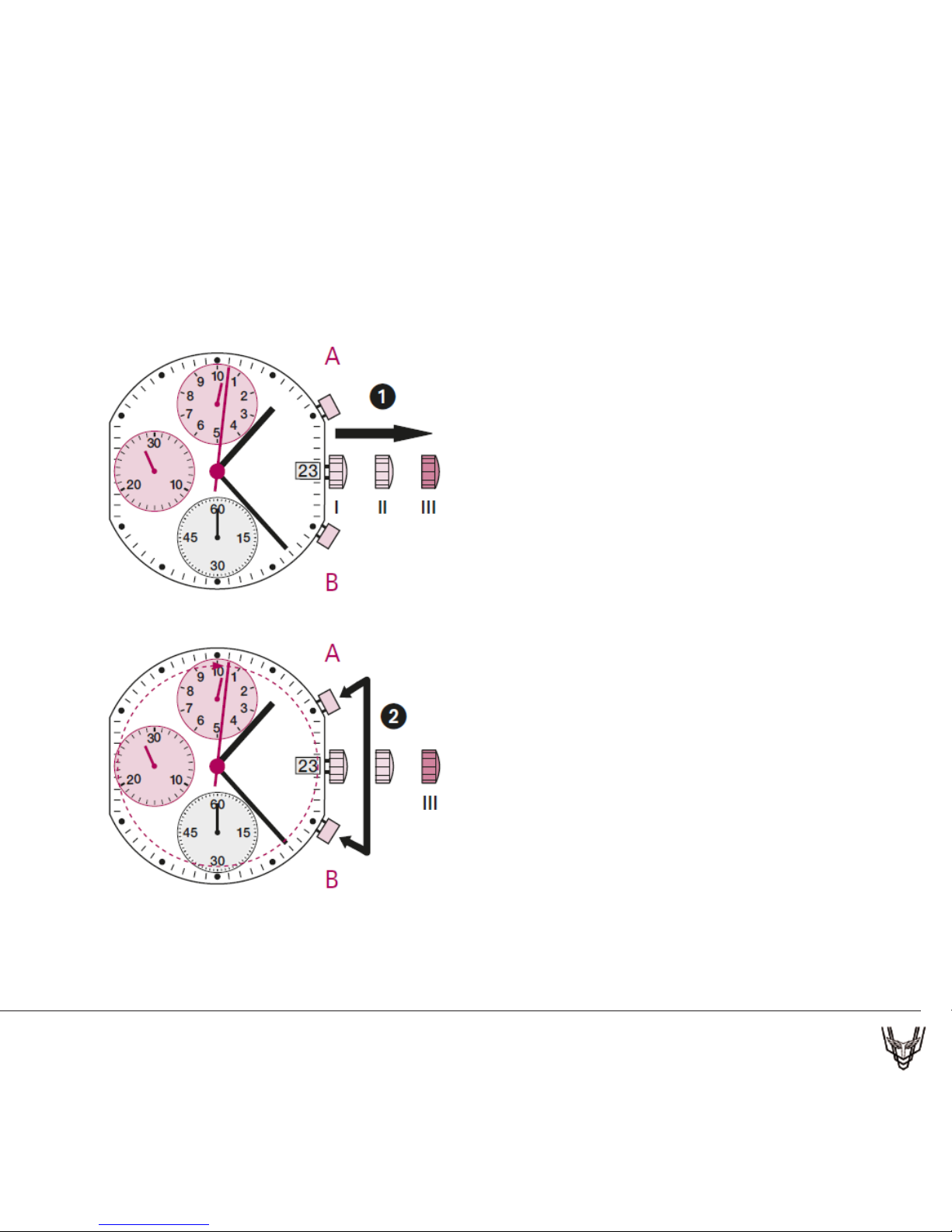
Example:
One or several chronograph hands are
not in their correct zero positions and
have to be adjusted (e.g. following a
battery change).
1 Pull out the crown to position III
(all chronog raph hands are in their
corrector incorrect zero position.)
2 Keep push-buttons A and B
depressed simultaneously for at
least 2 seconds(the second counter
hand rotates by 360° corr ective
mode is activated.)
ADJUSTING THE CHRONOGRAPH HANDS TO ZERO POSITION
Page 12
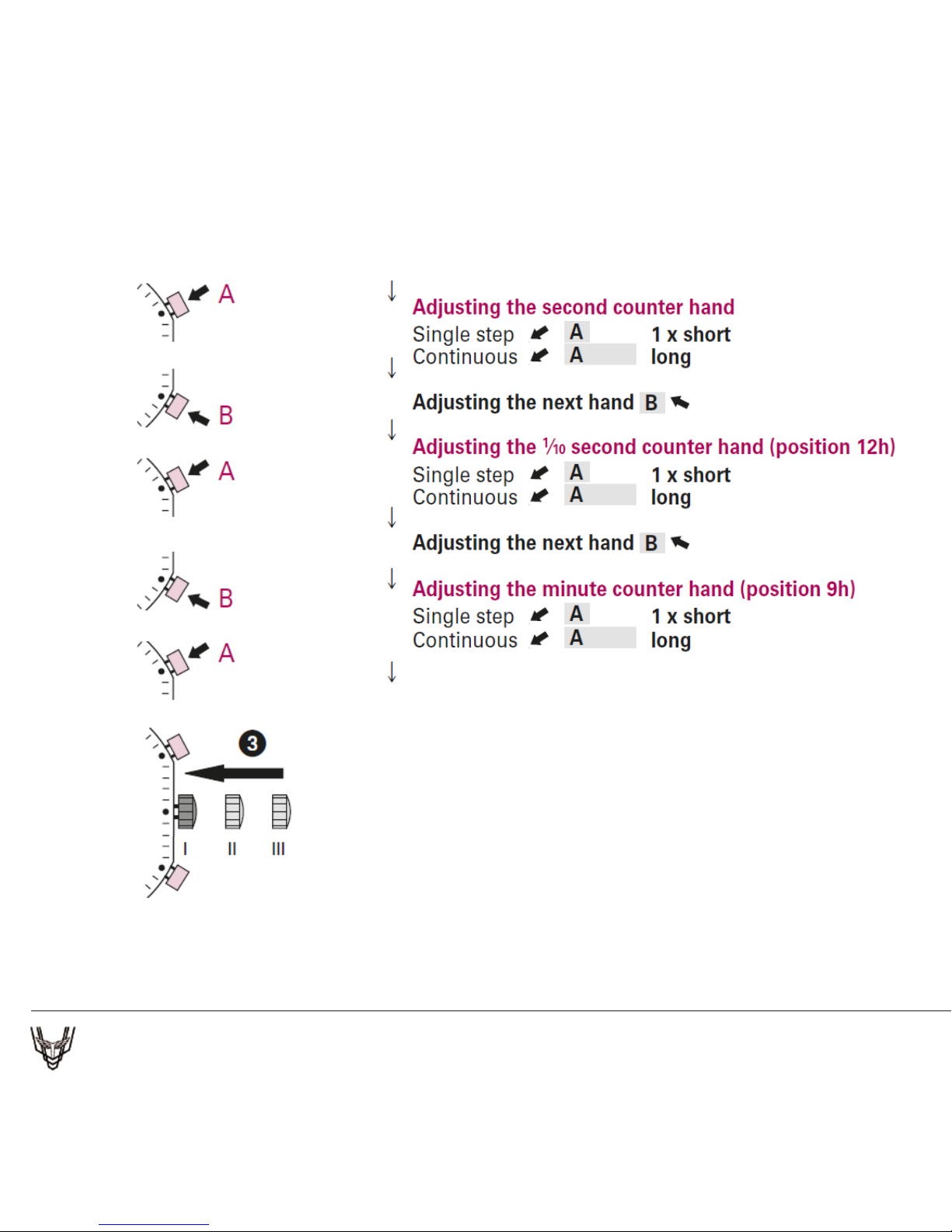
3 Returning the crown to position I
Termination of the chronograph hands
adjustment (can be carried out at any
time).
Battery type: 384 (diameter 7.9 mm x 3.6 mm / SR 41 SW)
Accuracy: +20 / -10 seconds per month
Page 13

INSTRUCTION MANUAL – G0404
QUARTZ MOVEMENT
Page 14
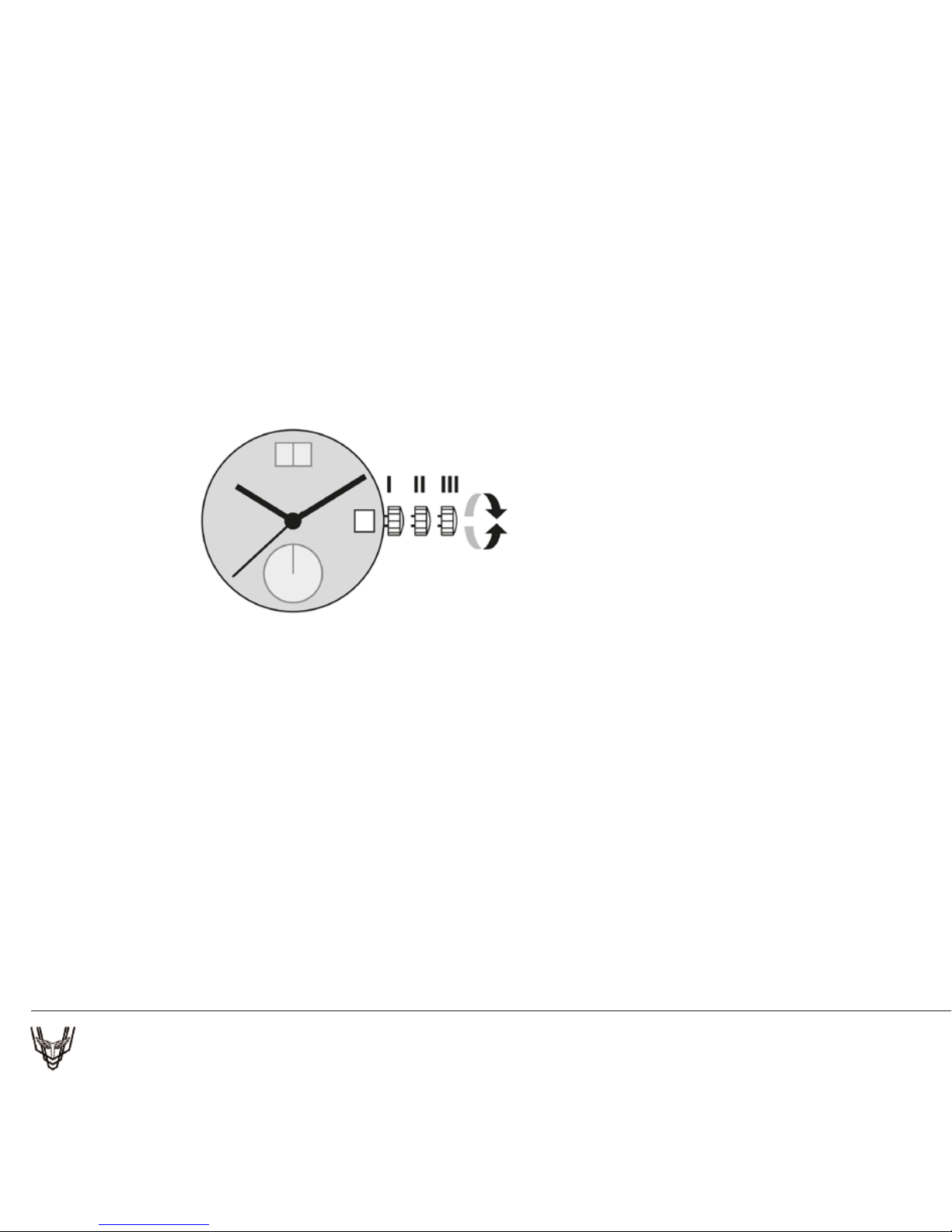
Describe:stainless Steel Case And Bezel Plating In Ip Gold,Mineral Glass,
Ip Gold Crown, Black Dial Applied With Gold Roman Indexes , S/S
Metal Band Plating In Ip Gold, 3 Hands, Ronda 715 Mov’t, 5Atm
Pos. I Position of rest (watch running)
Pos. II Quick-change correction for date
Blocking time for the quick-change day correction
is from approx. 9.30 pm and midnight.
– Pull the crown out to position II (watch still running).
– Turn the crown until the current date appears.
– Push the crown back into position I.
Pos. III Setting the time
– Pull the crown out to position III (watch stopped).
– Turn the crown, until the current time is displayed
(remember the 24-hour cycle).
– Push the crown back into position I.
WATCH DISPLAY & TIME SETTING
Page 15

* Your Tibaldi Watch is a water-resistant Watch.
Check the Marking on the back of the watch, nd below
the relevant usage recommendation.
* Water Resistant 3ATM or 30 METERS (100 Feet)
Shall withstand splashes of water while washing the
hand. But should not be worn while swimming or
diving.
* Water Resistant 5ATM or 50 METERS (165 Feet)
Suitable for showering or swimming in shallow water.
* Water Resistant 10ATM or 100 METERS (330 Feet)
Suitable for swimming, snorkeling, but should not be
worn while scuba diving.
WATER RESISTANT
Page 16

DO NOT OPERATE ANY BUTTONS WHEN THE WATCH IS WET
OR IN WATER
DO NOT WEAR THE WATCH IN A HOT SHOWER OR SAUNA
EXTREME HEAT CAN DAMAGE THE WATCH
AFTER USE IN SALT WATER OR CONTACT WITH SAND OR MUD,
RINSE THE WATCH IN A STREAM OF FRESH WATER AND DRY IT
WITH SOFT COLTH.
EATHER STRAPS ARE MORE EASILY DAMAGED BY FREQUENT
EXPOSURE TO WATER. AFTER EVERY USE IN WATER, WIPE THE
STRAP WITH A SOFT CLOTH, TO IMPROVE THE LIFE OF THE
STRAP.
GENERAL CARE FOR A
WATER RESISTANT WATCH
Page 17

Page 18

www.tibaldi.com
 Loading...