

Page 1

Welcome to Thync
Shift Your State of Mind
Page 2
Contents
Overview 8
Power & Pairing 16
Strips 18
Placement & Fit 22
Select a Vibe 28
Tuning a Vibe 30
Important Info 32
2
Page 3

Before You Get Started,
Please Read the
Following Warnings
For more information and assistance with the contents of
this document o r the use of your Thy nc mod ule, pl ease contact:
[email protected]. Additional precautions and warnings are
listed on page 38.
4
Do not us e this device if yo u
have a card iac pa cemake r,
implanted defibrillator, or other
implanted metallic or electronic
device. Doing s o could cause
elec tric sh ock, b urns, elec trical
interference or death.
Do not use during pregnancy or
if you are breast feeding. If yo u
are in the care of a phys ician,
consul t your physician before
using this devi ce.
Do not us e this device if
you have e pilep sy or a histor y
of seizures.
Do not us e this device if yo u
have a Temporomandibular
Joint Di sorde r, Bell’s Palsy,
impaired cranial nerve
function, or facial pain.
Do not pl ace Thy nc Strips on
body in locations oth er than
those directed.
Do not us e this device while
driving, operating machinery,
or during any activity in which
electrical stimulation can put
you at ris k for inju ry.
Do not us e the dev ice whi le in
a shower, bat h, poo l, or oth er
body of water.
Do not place Thync Strips
over ope n wound s, sores or
rashes , or over s wollen, red,
infect ed, or inflame d areas
or skin e ruptions. If you expe rience an adverse reaction,
discontinue use.
Do not us e device if the ho using
has been damaged.
Do not us e device in the
presence of strong electromagnetic fields.
Do not us e this device on
children unde r the age of 18.
Do not pl ace thi s device across
your chest. Th e introduct ion
of an elec trical current to
the chest may ca use rhy thm
disturbances to your h eart,
which could be lethal.
Do not place device over
the carot id sinus nerves, th e
front of th e neck, or aroun d
the mouth.
Page 4
What to Expect from
your First Vibe
How lon g will th is take?
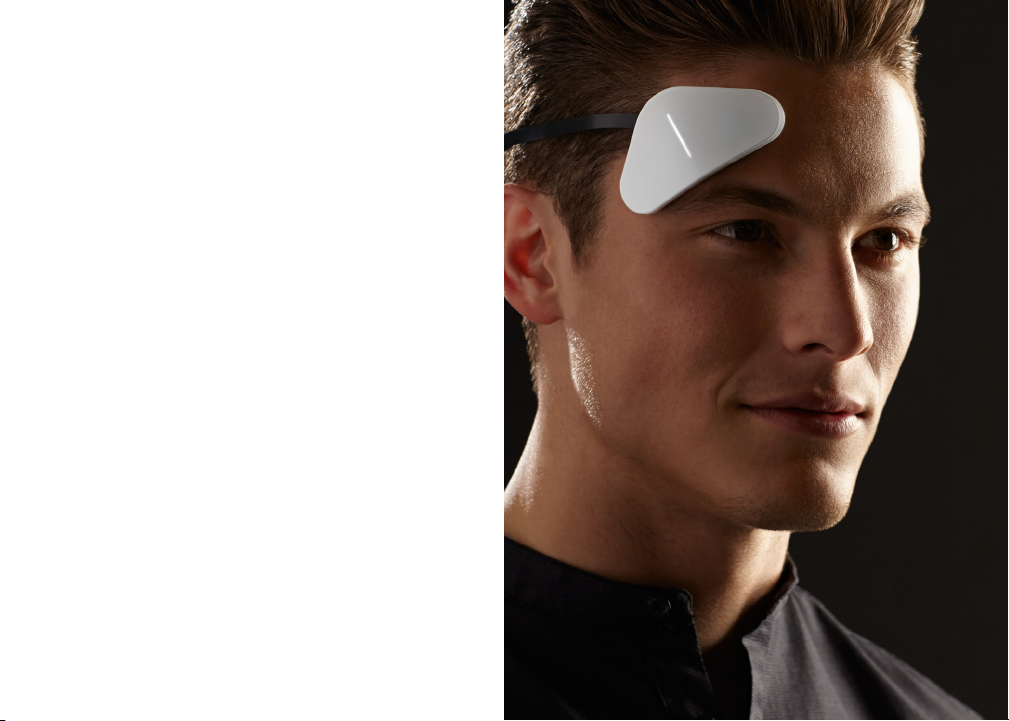
Your first Vibe will las t 5 – 10 minu tes wit h an opti on to extend
your vibe.
What do es it feel like?
You may feel s ome tingling, itchiness, or vibrations in the beginning
of your Vibe, but m any of the se sensatio ns will subsid e after 1-2
minute s. It is ve ry important to use t hese sensat ions to tune your
Vibes to achiev e the best experien ce.
When wi ll I feel a shift in my state of mind ?
You should b egin to fe el a shi ft wit hin a few mi nutes of s tarting
the Vib e that will grad ually build. The fir st tim e you run a V ibe,
you shou ld focus on find ing the best tu ner settings for your V ibe.
Then, e xten d the Vibe or run t he Vib e again to feel a si gnifi cant
effec t. As you discover the b est tuner set ting s for your V ibes , you
will fee l the ef fect s much more quic kly.
For more i nforma tion an d assistance with th e content s of this
document or the use of your Thync M odule, plea se conta ct:
[email protected] or visit Thync.com
6
Page 5
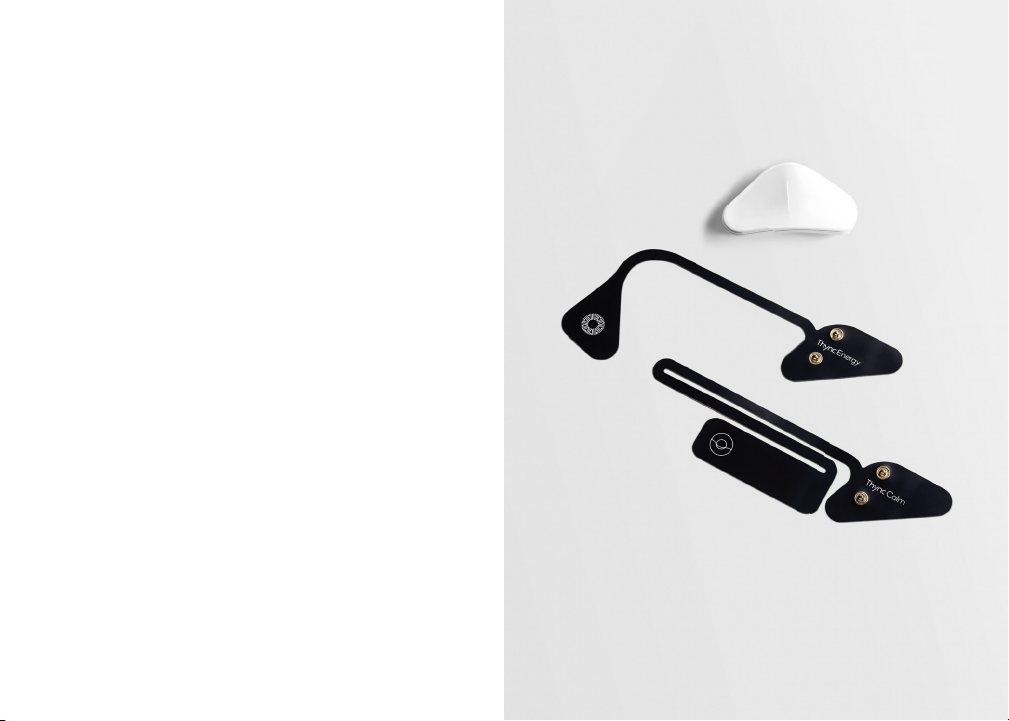
Your Thync System
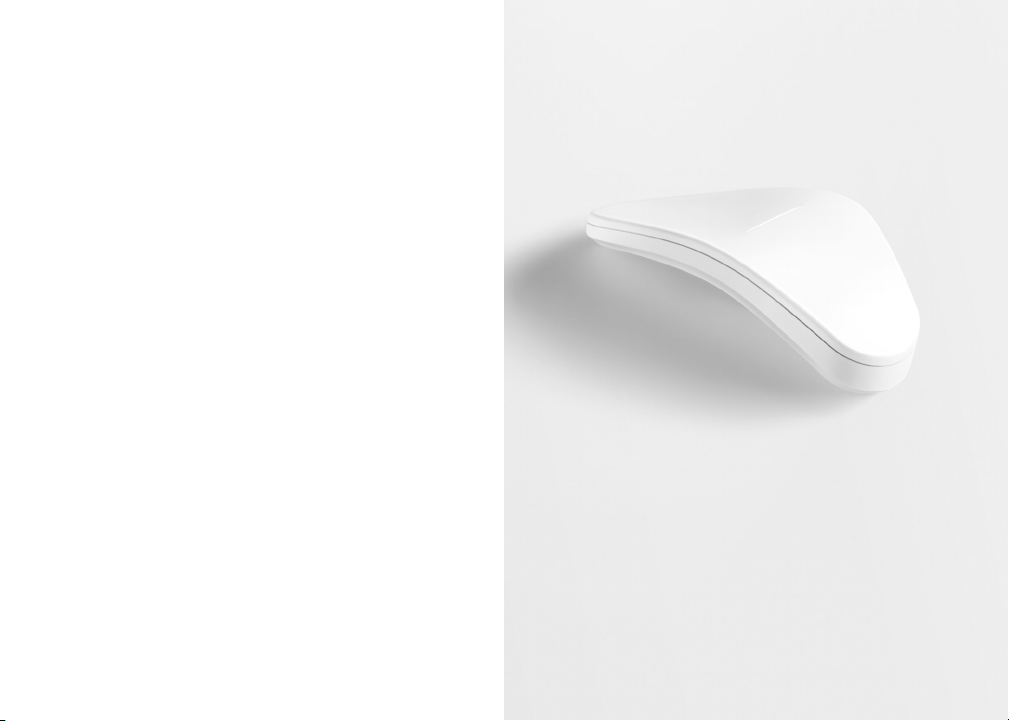
Thync Module
The Module at taches to conducti ve Thyn c Strips a nd is cont rolle d
by the Thy nc App to s ignal speci fic nerves o n your face u sing low
levels of elec trical energy; enabling yo u to shif t your s tate of mind.
Energy Strips
Energy St rips at tach to the
Module and are uniquely de-
signed and shaped to comfort-
ably de liver t he Energy Vibe.
USB Cable
A micro USB cable is includ ed for ch arging your Thy nc Module.
Conne ct to you r computer or a US B chargi ng blo ck.
8
Calm Strips
Calm Strips attach to the
Module and are uniquely de-
signed and shaped to comfort-
ably de liver t he Calm V ibe.
Page 6
Quick Overview —
It’s Easy to Start
your Vibe
Power & Pair
Charge and power up your Thync Module. Pair with your iOS 8
device via Bluetooth.
1 / Snap
Choose the Thync Strip for the Vibe effect you desire – Energy
or Calm. Snap the Strip to your Thync Module.
2 / Stick
Remove adhesive backing – stick the Thync Module on your right
temple – stick the Thync Strip as indicated either behind your ear or
on the back of your neck depending on the Vibe you selected.
3 / Shift
Open the Thync app on your iOS 8 device, select and start the Vibe
you want, tune the Vibe to a comfortable level. Enjoy the shift in
your state of mind to the Vibe effect you have chosen!
10
Page 7
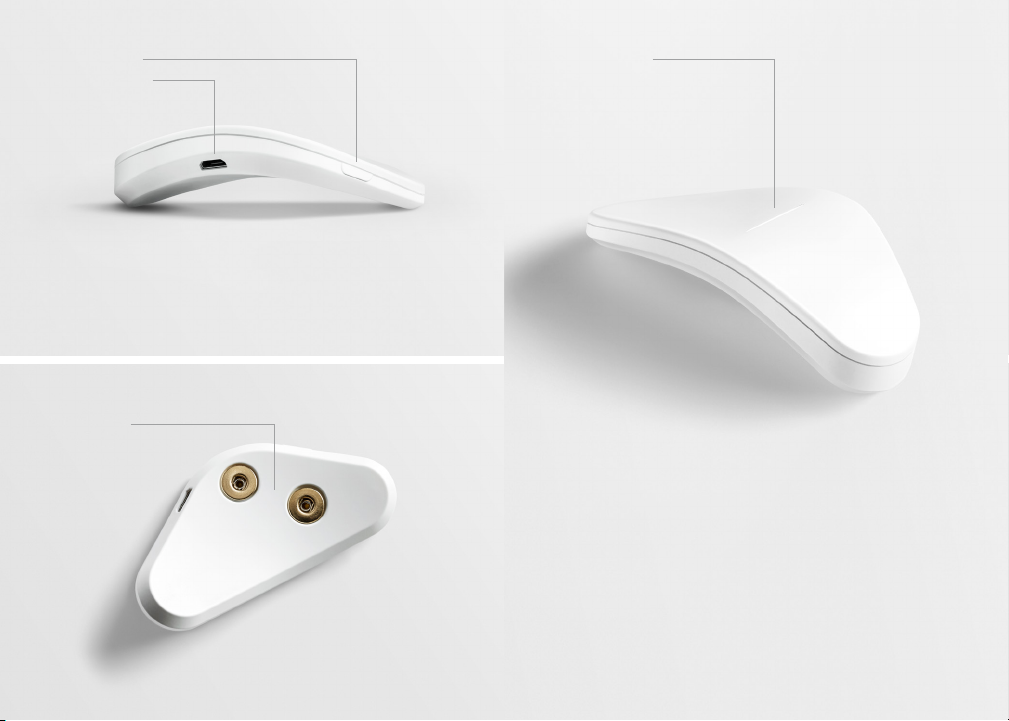
Micro US B Port
Strip Snaps
Light IndicatorPower Button
12
Page 8
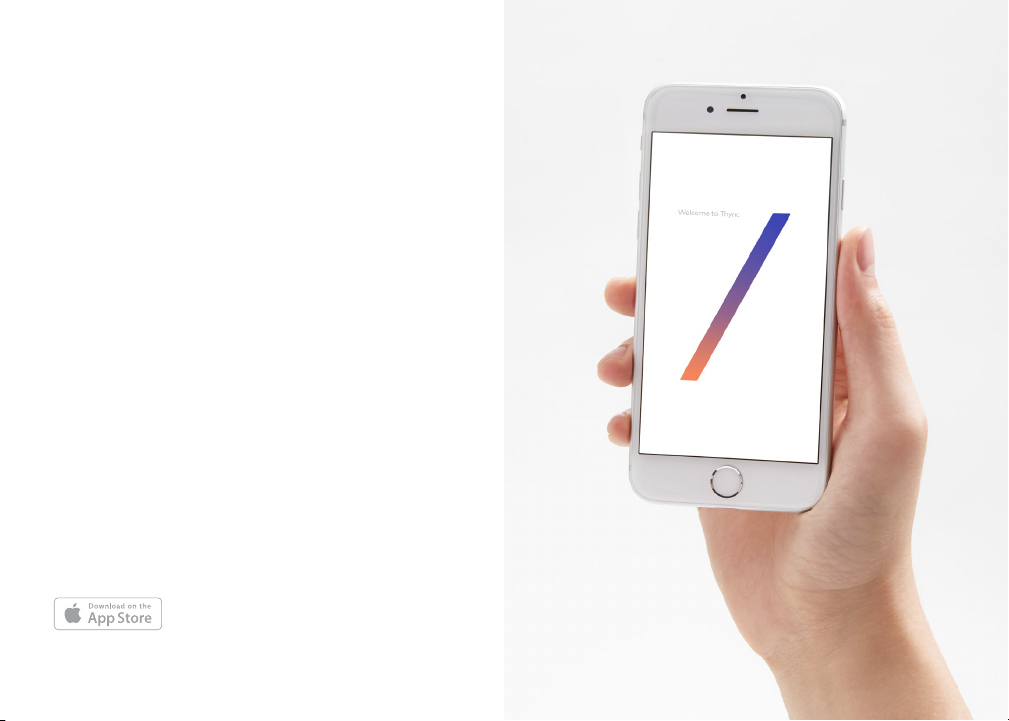
Get the Thync App
and Sign In
Download
Go to Thyn c.com /app to
download the Thync App
on your iO S 8 device
(iPhone/iPod).
14
Sign In
Launch t he App a nd sign i n
with th e credentials you used
when purchasi ng your T hync
system on thync.com .
If you would like to us e
diffe rent credentia ls, you can
create a new account.
Page 9
Power and Pair
to your iOS 8 Device
via Bluetooth
Charge
Your Thync M odule ships fu lly
charge d. The A pp will i ndica te
if charging is ne cessa ry. Use
the included m icro USB cable
to charge your Module.
When th e Thync M odul e is
plugged in, the LED indicator
will blink white. A full re charg e
takes 2 hou rs.
A fully ch arged T hync Module
will power approximately one
hour of Vi bes.
16
Power & Pai r
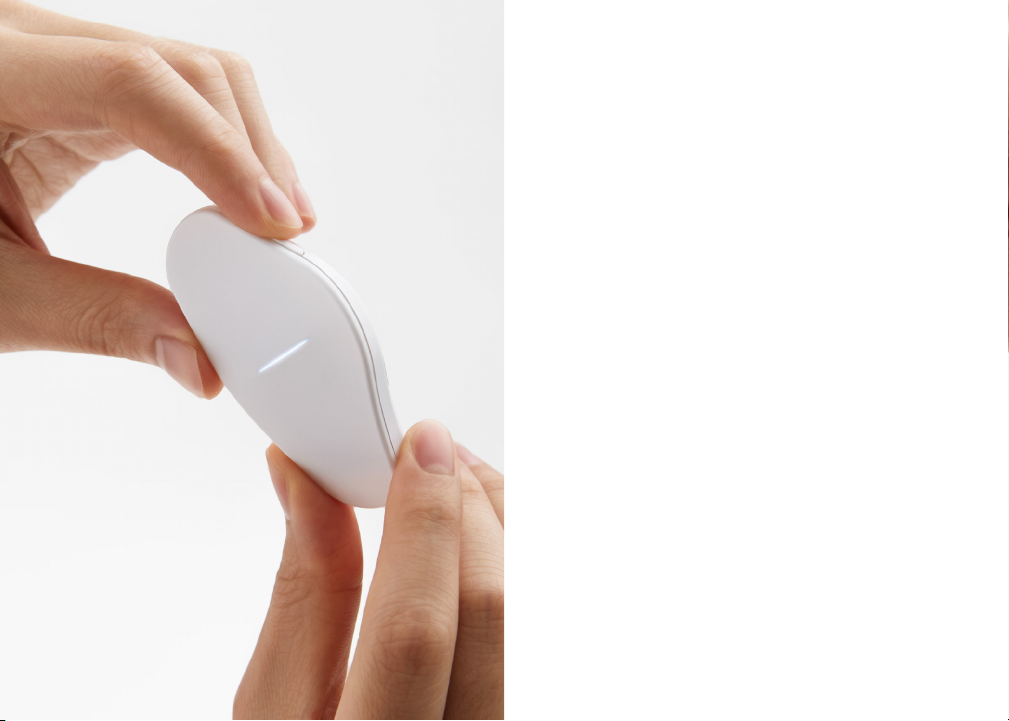
Press th e POWER button on
your Thy nc Module – sol id white
light confirms p ower ON . Turn
on BLUE TOOTH on your iOS 8
device. Launch the Thync APP
on your iO S 8 device.
Follow s creen p rompt s to PAIR
your Thy nc Module to your
device.
The whi te light w ill pul se and
becom e SOLI D WHIT E when
successfull y paired. After
initial pairing, the app will
rememb er your d evice. If not,
try restar ting the app and
Thync Module.
Page 10
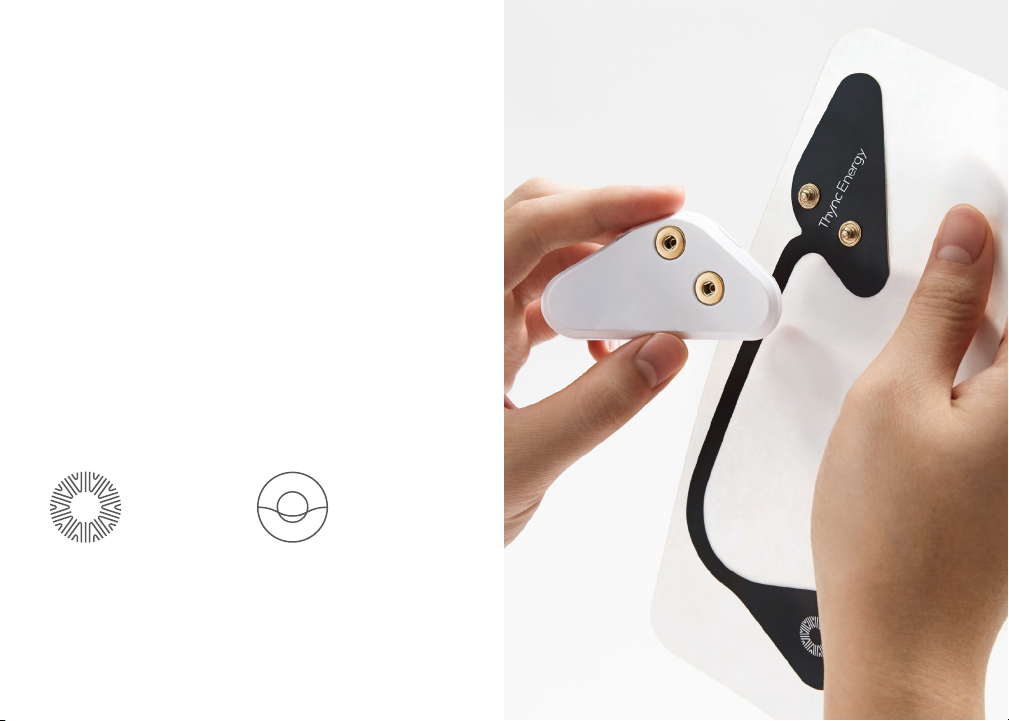
1 / Snap
Attaching the Thync Strip
to the Module
Thync Strips connect to the Mo dule to give you ei ther an
energy or calm ef fect. Plea se note that dif ferent strip s are
used for Energy and Calm V ibes . First select the T hync Str ip
for the ef fect you desi re:
Energy
Improve your leve ls of
motivation, alertness,
and energy.
18
Calm
Helps yo u relax , de-stres s,
decompress, and focus.
Page 11
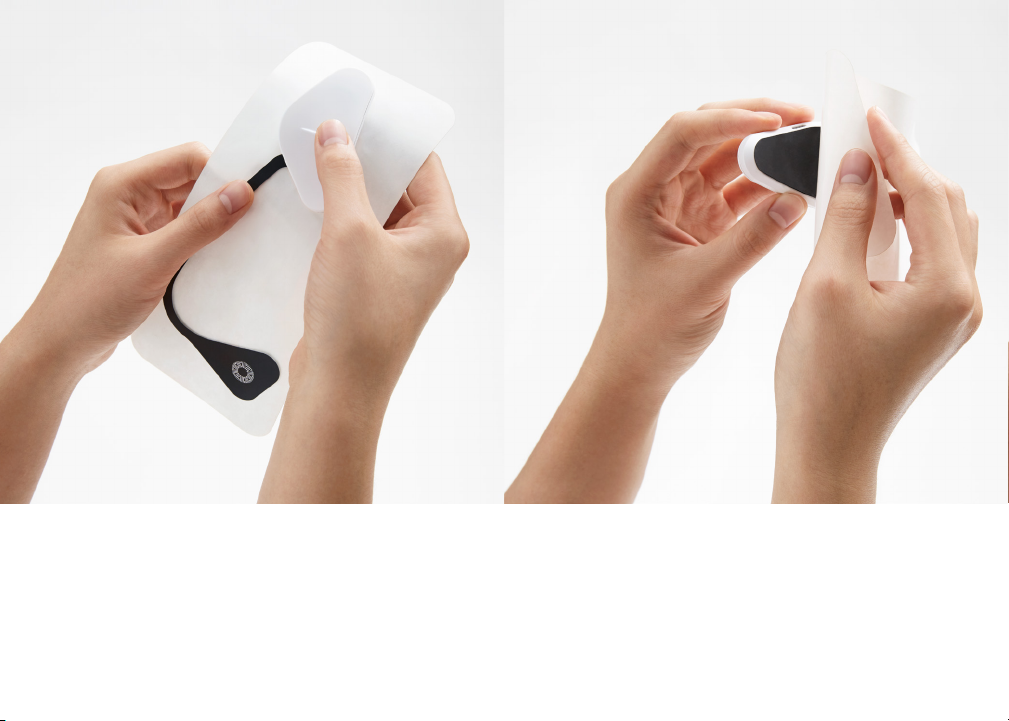
Press fi rmly to m ake sure t he snap s are sec urely a ttached.
20
Remove the adhesive backing from BOTH ends of the
Thync St rip. Sa ve this b ackin g for later use. Thync Strips
are guaranteed for a single application.
Page 12
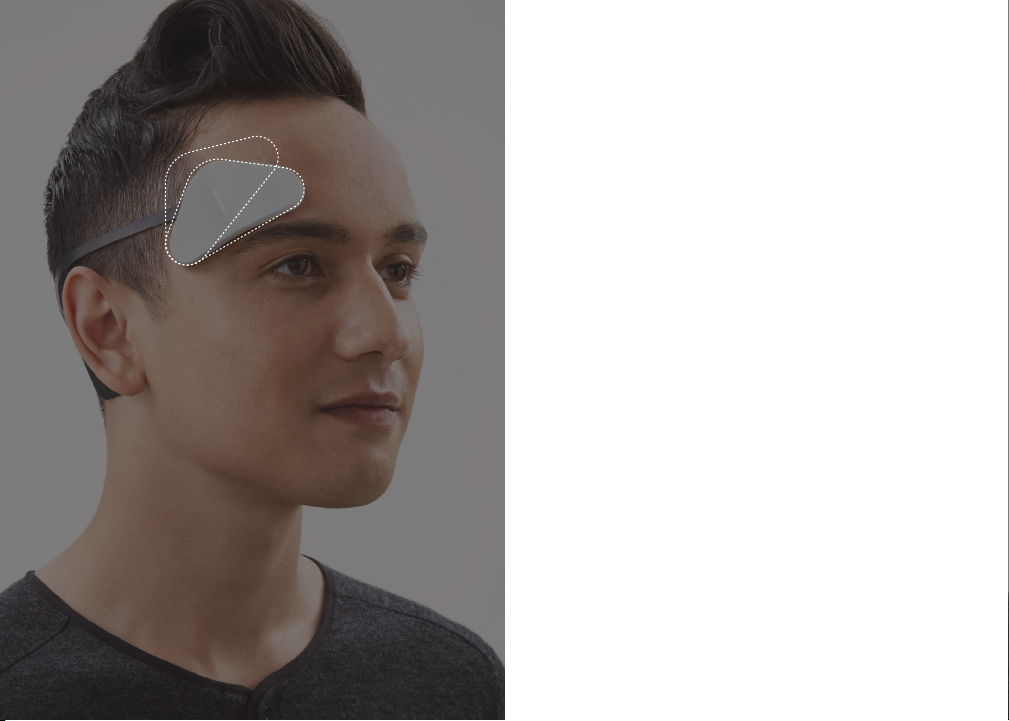
Proper Positioning, Fit,
and Comfort of your
B
A
22
Thync Module
The Thy nc module is contoure d to fit yo ur righ t templ e and fore-
head area. You may need to m ove it around unti l it feels just ri ght.
Place th e corne r of the Mo dule in the nar row area b etween your
eyebrow and hairline and posit ion it to fo llow th e curvature of yo ur
eyebrow as shown in the dia gram (see p ositi on A).
The Module sh ould rest FLUSH a gains t your skin. If it is not flush,
angle the other corner of the Mo dule upwards unt il you find the
correc t posi tion (see posit ion B).
Proper placement of the Thync Module is crucial for achieving the
best Vibe results and comfort. When properly placed and adhered,
runnin g Vibe s should resul t in a feeling of mil d, but co mfortable
pressu re to the fo rehea d area as V ibes increas e in intensity. If you
experience a s trong t ingli ng or burning sensat ion, S TOP or pa use
the Vib e. Remove the Mo dule an d adjus t the po sition verticall y or
horizontally until it fits FLUSH against the skin.
Page 13
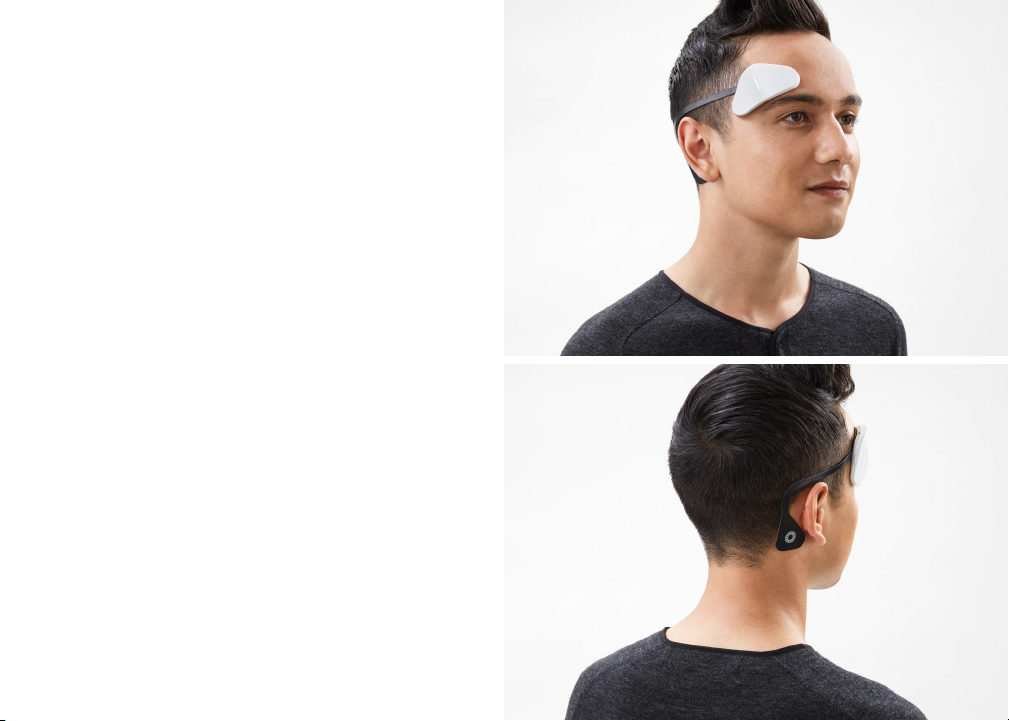
2 / Stick
Placement and Fit
Energy
Module Placement
Position the Thync Mo dule on
your right temple/forehead
area above your ri ght eyebrow
as shown.
Press firmly f or seve ral sec-
onds to S TICK t he Mod ule on
your forehead. Please ENSU RE
that th e Thync Strip and mod-
ule fit FLUSH whe re applied.
Poor points of contact can lead
to discomfort during Vibes.
Note: T hync Mo dule and Strip s may not a dhere p roper ly if
excessive oils , lotions, ma keup or su nscre ens are us ed, resulting
in less effec tive results and pos sible discomfort.
24
Energy Strip Placement
Position the backend of the
Energy Strip on the bone
directly behind your ear, cen-
tered on t he lower part of this
bone. Take care that th e Strip
does not cover a sig nificant
amount of hair.
Press firmly f or seve ral sec-
onds to S TICK t he backend of
the Thync Ener gy Stri p in the
speci fied p osition to en sure a
good connection.
Page 14
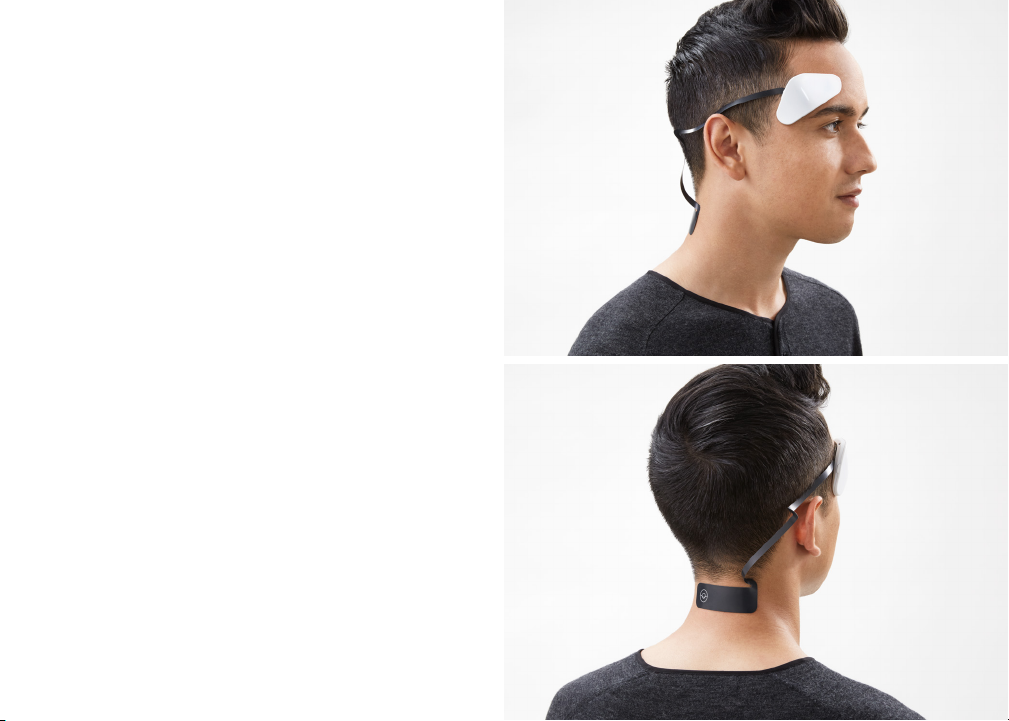
2 / Stick
Placement and Fit
Calm
Module Placement
Position the Thync Mo dule on
your right temple/forehead
area above your ri ght eyebrow
as shown.
Press firmly f or seve ral sec-
onds to S TICK t he Mod ule on
your forehead. Please ENSU RE
that th e Thync Strip and mod-
ule fit FLUSH whe re applied.
Poor points of contact can lead
to discomfort during Vibes.
Note: T hync Mo dule and Strip s may not a dhere p roper ly if
excessive oils , lotions, ma keup or su nscre ens are us ed, resulting
in less effec tive results and pos sible discomfort.
26
Calm Strip Placement
Position the backend of t he
Calm Strip horizo ntally a nd
centere d on the back of your
neck jus t below your hairline.
Press firmly f or seve ral
secon ds to ST ICK the B end
of the Thync Cal m Strip in the
speci fied p osition to en sure a
good connection.
Page 15
3 / Shift
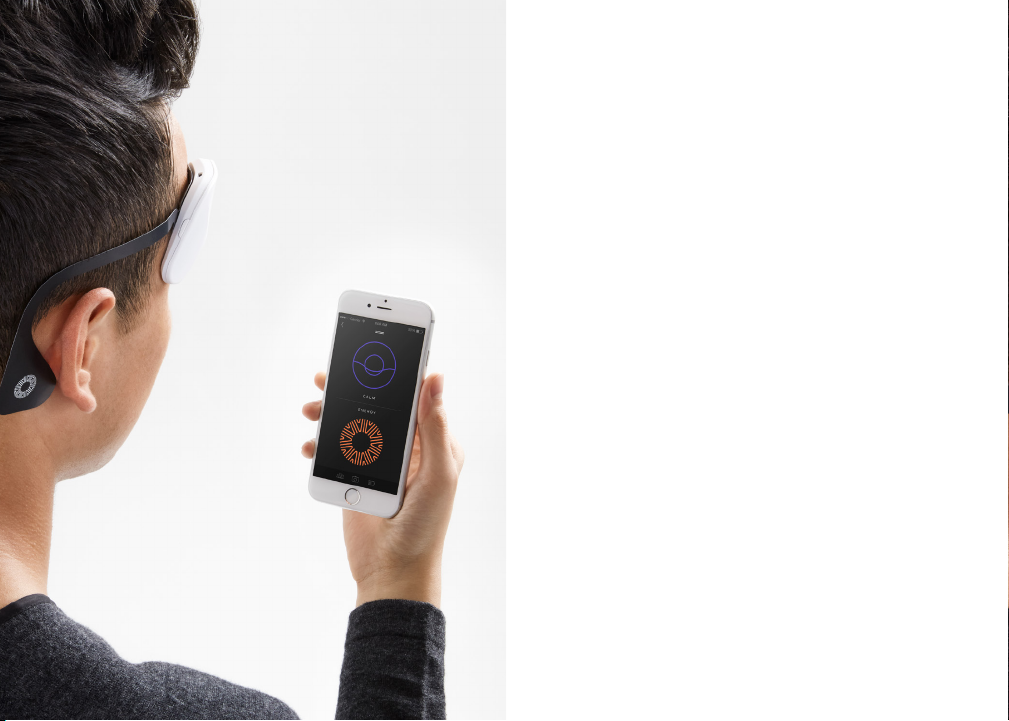
Select your Vibe
Launch t he Thync App on your iOS 8 d evice, a nd select th e typ e
of Vibe that corresponds to the Strip you have selected.
Tap the arrow to START yo ur Vib e.
Important: You should N OT remove any par t of the Str ip duri ng
an active Vib e. If you desire to discontinue us e, press the STOP
28
or paus e button and allow the V ibe pro gram to s top befo re
removing the Strip.
Page 16
3 / Shift
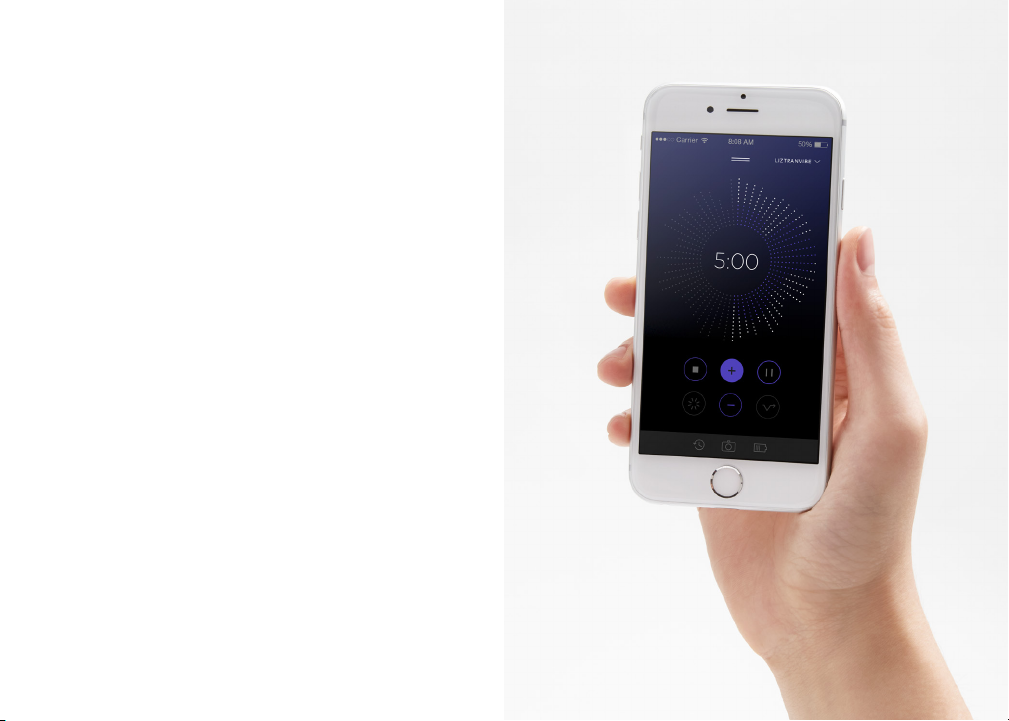
Tune your Vibe
Adjust the intensity of your Vibe using the onscreen Tuner control.
For a strong effect, use the + and – but tons to tu ne the Vibe to
your phys iolo gy. Most us ers start any where from 30 to 1 00%
depending on their physiology and the level of skin sensations they
find comfortable.
Skin se nsations are n ormal a nd indicate the effec tiveness of nerve
modulation including feelings of tingling or vibration.
Tune the Cal m Vibe to a level that is comfortable; the skin
sensations should be noticeable but not overly distracting.
Tune the Ene rgy Vi be at the highest level that is comfortable;
the skin sensations should be VERY noticeable.
As the V ibe pro gress es and yo u get accu stomed to the sensat ions,
you will likely need to increase the Tuner so t hat it remains proper ly
calibra ted. Enjoy the SHIFT i n your st ate of min d to Calm or Energy !
30
Page 17

Important Information
Usage
The inte nded use of the Thync Sys tem is to deliver pulse d
neurostimulation waveforms to modulate psychophysiological
arousal for lifesty le or wel lness a pplication s.
The Thy nc System is not intended to treat o r diagnose any
disease or medical condition. For detailed usage instructions and
warnings, please consult: Thync.com
Disclaimer
Thync does not approve or endorse any changes or modifications
to this system , which m ay alte r its performance c harac teristic s.
Any such change s void war ranty a nd authorit y for use.
Adverse Reactions
If you exp erience adve rse reactions, s top using the system a nd
consul t with your physi cian. Users with sen sitiv e skin ma y expe -
rience s kin irritati on in the area where the T hync Str ip is app lied.
You may experience a headache and other painful sensations
during or following the application of electrical stimulation.
32
Precautions
Use caut ion if T hync Str ip is pla ced over areas of skin tha t lack
normal sensation.
Clean an d dry t he area of skin to wh ich the T hync Strip will be
applied before applying it.
Use of acce ssor ies not approved by the manufacturer may cause
harm or injury.
Do not disassemble the Module.
Thync St rips sh ould only be ap plied to normal, intact, he althy skin
over location s as directed.
Keep dr y. Clean by wi ping wi th dr y cloth. Do not immerse.
Opera tion in close proximity to short wave or microwave th erapy
equipment may produce instabilit y in the Module output .
Keep thi s system out of re ach of children .
Page 18

Page 19
Thync, Inc. 140 West Main Street, 2nd Fl oor, Los Gatos, CA 9 5030
© 2015 Thync . “Thync”, the Thync l ogo, the product an d packaging are trad emarks of Thync, In c. or
its subsi diaries in the U nited States or ot her countrie s. Other trad emarks and tr ade names are th ose
or their respective owners. Unauthorized reproduction of this material is prohibited. Apple, the Apple
logo, iPad , and iPhone are trade marks of Apple Inc ., registered in the U .S. and other countr ies. App
Store is a ser vice mark of Appl e Inc.
 Loading...