

Page 1
Page 2
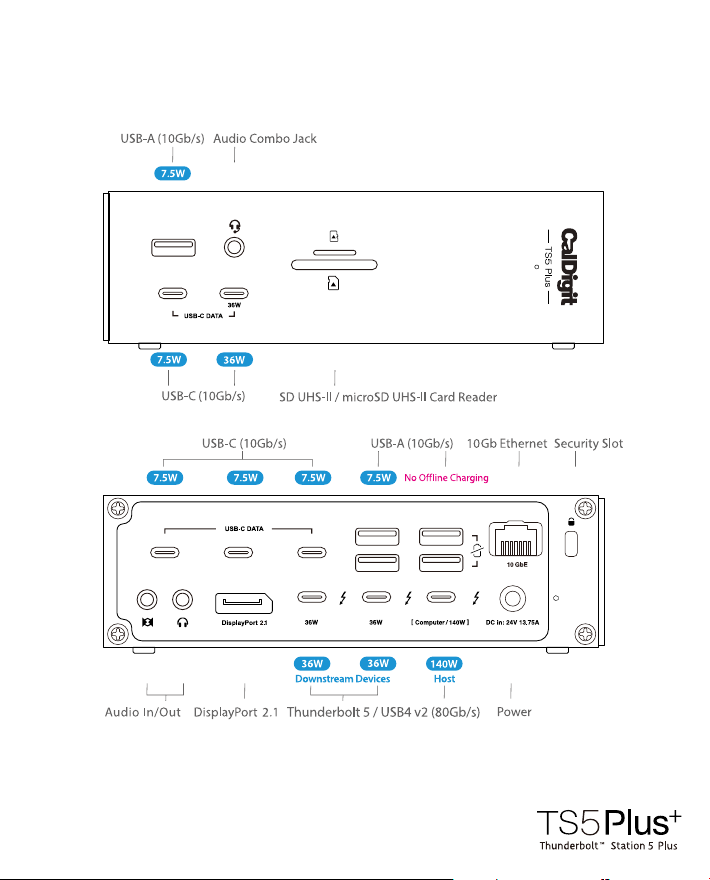
20 ports
Page 3
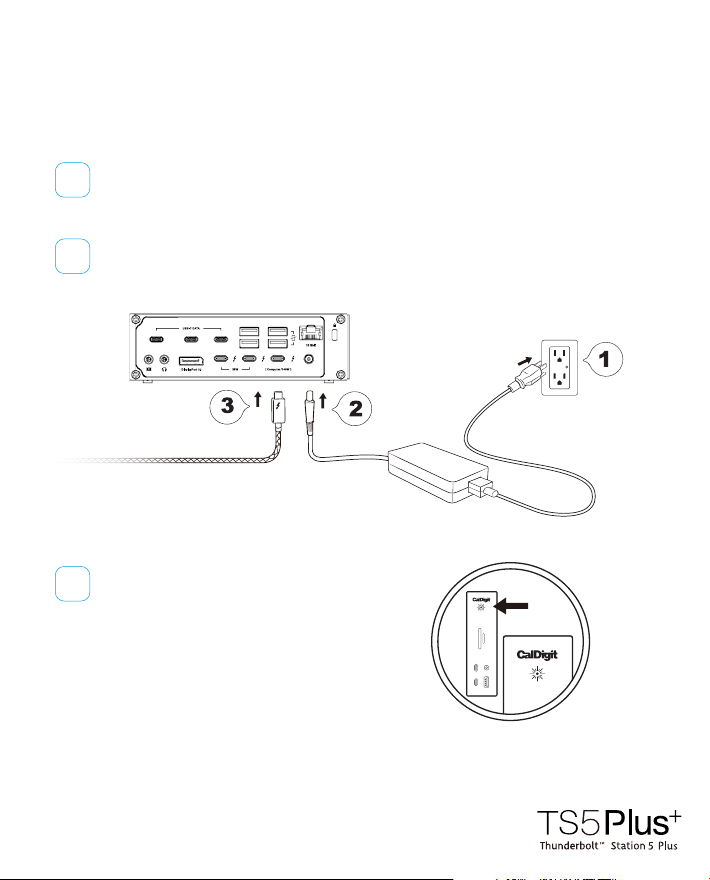
Connecting the TS5 Plus
to your computer
Connect the AC power cord to your wall outlet, and connect the other
1
end of the power cord (IEC320-C5) into the TS5 Plus power supply.
Connect the barrel connector to the [ DC in: ] port on the TS5 Plus.
2
Connect the supplied Thunderbolt 5
3
cable to the port labelled [ Computer ]
on the TS5 Plus.
The TS5 Plus is equipped with an LED
indicator, which will display a WHITE
light if the unit is powered on and
connected to your computer.
Page 4
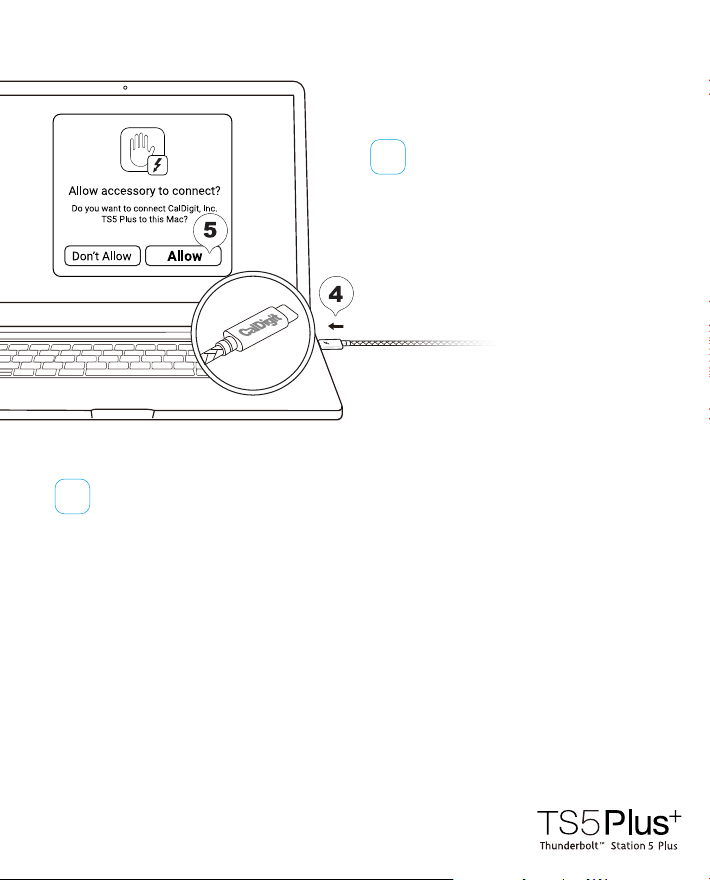
4
Connect the supplied Thunderbolt 5
cable to your computer’s
Thunderbolt 5/4/3, or
When you rst connect a Thunderbolt/USB device to a macOS or Windows
5
computer, you will need to approve the device on the pop-up window or
in the settings. After you approved it, the TS5 Plus will be ready for use.
Reminder
Only use the supplied Thunderbolt 5 cable or Thunderbolt 5 cables that oer full 80Gb/s performance. Windows laptops with
proprietary charging or ports without power delivery will not charge. If using CPU or GPU intensive applications, we
recommend connecting your laptop charger directly to your laptop for increased power.
USB4 port.
Page 5
Compatibility &
Performance
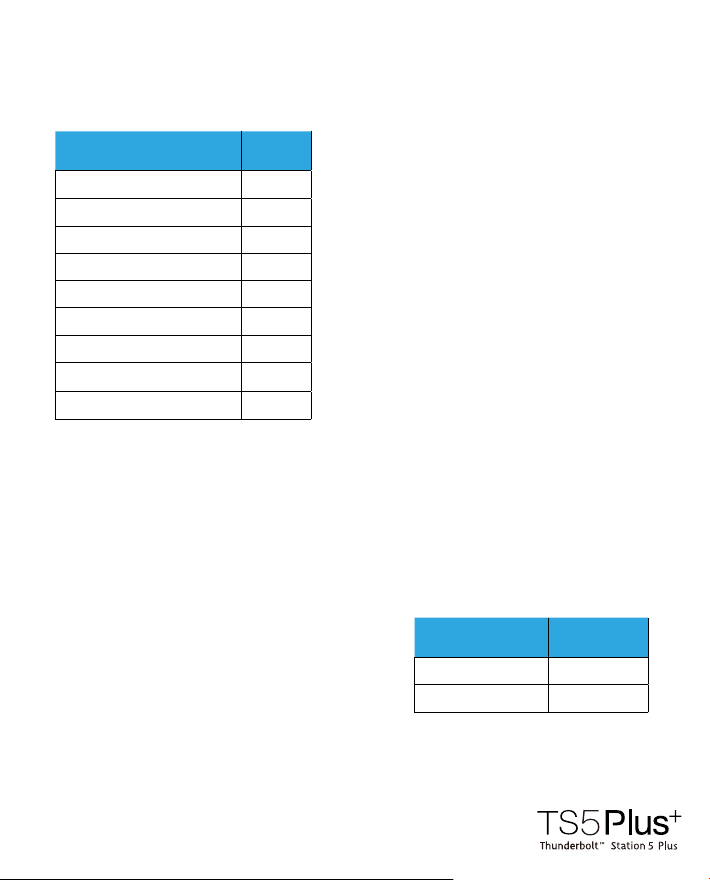
The TS5 Plus is compatible with Thunderbolt 5,
Thunderbolt 4, and USB4 host devices. It is also
compatible with Thunderbolt 3 Macs but not
Thunderbolt 3 PCs.
Users on Thunderbolt 4 (40Gb/s) or lower will
see reduced functionality.
Thund
erbolt 3 Windows PCs are not supported.
Thunderbolt 5 Mac
Thunderbolt 5 PC
Thunderbolt 4 Mac
Thunderbolt 4 PC
Thunderbolt 3 Mac
USB4 v2 PC
USB4 PC
iPad (Thunderbolt)
Windows Tablet (Thunderbolt)
CompatibleHost
✓
✓
✓
✓
✓
✓
✓
✓
✓
Bandwidth
Boost
The TS5 Plus features Bandwidth Boost which will allocate up to 120Gb/s
performance when bandwidth intensive monitors are connected. This is in order to
provide higher resolutions and refresh rates.
When Bandwidth Boost is active the rest of the
TS5 Plus will provide up to 40Gb/s performance
for the remaining devices connected to the hub.
Bandwidth Boost
Active
Not Active
Bandwidth Left
for Data
40Gb/s
80Gb/s
Page 6
Monitor
Compatibility
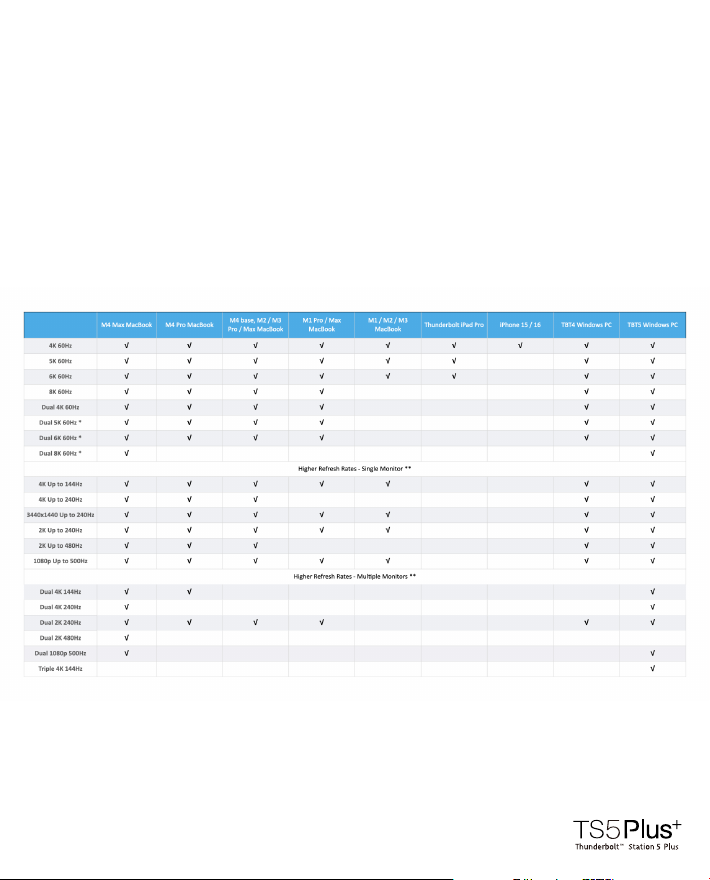
You can connect up to 3 external displays to the TS5 Plus on Windows Thunderbolt
5 PCs that support up to 3 displays, or up to 2 displays on Macs and PCs that
support dual displays.
To connect external displays to the TS5 Plus you can either connect Thunderbolt or
USB-C monitors directly to the spare Thunderbolt 5 ports, or use USB-C to HDMI or
DisplayPort Adapters (sold separately) to the spare Thunderbolt 5 ports.
* 5K monitors must be a Thunderbolt 4 monitor or an Apple Studio Display. Does not support dual LG UltraFine 5K. 6K monitors can be a Thunderbolt 4 monitor or an Apple Pro
Display XDR.
** Higher refresh-rates (above 60Hz) may require DSC (Display Stream Compression) support on the monitors and host GPU. The bit/color depth may vary in order to support
higher refresh-rates.
*** Some M3 MacBooks such as the MacBook Air can support dual external monitors up to 5K and 6K when the laptop lid is closed (clamshell mode).
**** Currently M1/2/3/4 Macs can only support up to HDMI 2.0b over its Thunderbolt ports. As such, resolutions will be limited to 4K 60Hz when using an HDMI adapter. If a
higher refresh-rate is required, please use a USB-C to USB-C or USB-C to DisplayPort or DisplayPort to DisplayPort connection. For more information about a Mac’s external display
support please visit https://support.apple.com/en-us/101571 and https://www.caldigit.com/macbook-multiple-monitor-support-with-caldigit-thunderbolt-docks/
***** Results may vary due to OS updates. For external display compatibility over a single Thunderbolt connection on dierent Windows computers, please refer to the
manufacturer's website.
Page 7

Technical
Specications
Interface
1 x Thunderbolt 5 Host Port
(Up to 120Gb/s)
2 x Thunderbolt 5 Downstream Ports
(80Gb/s)
5 x USB-C (10Gb/s)
5 x USB-A (10Gb/s)
1 x DisplayPort 2.1
1 x SD 4.0 (UHS-II)
1 x microSD 4.0 (UHS-II)
1 x 10 Gigabit Ethernet
1 x Front Combo Audio In/Out (3.5mm)
1 x Rear Audio Out (3.5mm)
1 x Rear Audio In (3.5mm)
1 x DC In (24V 13.75A)
Minimum System Requirements
macOS 15 or above
Windows 11 or above
iPadOS
Thunderbolt 5 Computer
Thunderbolt 4 Computer
Thunderbolt 3 Mac
USB4 or USB4 v2 Computer
Thunderbolt/USB4 iPad
Power Delivery
Thunderbolt 5/USB4
Host Port: Up to 140W
Each Downstream
Thunderbolt 4/USB4 Port: 36W
Front 36W USB-C Port: 36W
Remaining USB-C Ports: 7.5W
USB-A Ports: 7.5W
Size & Weight
Height: 6.10” (155.0mm)
Width: 1.85” (47.0mm)
Length: 5.03” (127.9mm)
Weight: 1.98 lbs (0.90kg)
In the Box
1 x CalDigit TS5 Plus
1 x Thunderbolt 5 Braided Cable (1.0m)
2 x Rubber Feet Strips
1 x Power Cord
1 x Power Supply (330W)
Warranty
2 Years
Page 8

General
Use Warnings
Please read the TS5 Plus manual thoroughly and familiarize yourself with the
•
product before use.
Avoid using the TS5 Plus in extremely hot and cold environments. A safe
•
temperature range is between 50° to 95° F (10° to 35° C).
Avoid using the TS5 Plus in humid environments. Moisture and condensation can
•
accumulate in the device and cause damage to the electrical components.
Only use the power adapter that has been supplied with the TS5 Plus. An excessive
•
or inadequate power supply can result in unstable performance or device failure.
Safety
Warnings
Keep the TS5 Plus away from liquids and moisture. Exposure to liquids can result in
•
damaging the unit, electric shock, and result in a re hazard.
If your TS5 Plus gets wet while it is still o, do not turn it on. In the case of any issue
•
with the device, do not attempt to repair or open the device yourself. Doing so can
result in personal injury, damage the device, and will void the warranty.
If you have any issues, please contact CalDigit Technical Support.
• Email (US): [email protected]
• Email (UK/EU): [email protected]
• Phone (US): (714) 572-6668
• Phone (UK/EU): +44 (0) 1993 700 972
• Website: https://www.caldigit.com/support
 Loading...