

Page 1
User Manual
Manuel d’utilisation
Connected Armt Blood Pressure Monitor /
Tensiomètre bras connecté
Modèle: LS808-B
THOMSON Réf: TLS808
FRANCAIS
DESCRIPTION DU PRODUIT ET RECOMMENDATIONS
Ce tensiomètre bras est un appareil électronique, conçu pour mesurer la
pression artérielle et le nombre de pulsations cardiaques à la minute d’une
personne adulte
Pour obtenir des mesures fiables, prendre sa tension au même moment
dans la journée de façon fréquente et régulière, et éviter de manger, se
baigner, fumer, avoir une activité physique, ingérer de la caféine ou de
l’alcool dans les 30 minutes précédent la mesure
Rester assis et relaxez vous au moins 5 minutes avant la mesure.
Positionner son tensiomètre à hauteur du coeur pour prendre la mesure.
Pour effectuer des mesures régulières, l’intervalle de repos entre deux
mesures ne doit pas être inférieur à 30 secondes.
Consulter toujours votre médecin pour l’interprétation de vos mesures et
suivre toujours ses prescriptions.
Ce tensiomètre peut être utilisé avec l’applicatio n Thomson Healthcare
téléchargeable sur Apple store et Play store, application compatible avec
l’application Santé d’Apple.
CONSEILS POUR LA MESURE
Les mesures peuvent être faussées si elles sont réalisées dans les conditions
suivantes:
Avoir bu ou mangé moin s d’une heure avant d’effectuer la mesure
Immédiatemment après avoir bu un café, un thé ou fumé une cigarette
Dans les 20 minutes q ui suivent la prise d’un bain
En parlant ou en bougeant
Dans un environnement très froid
SECURITE
Ce tensiomètre ne doit être utilisé que pour l’usage qui est prévu da ns ce
manuel d’utilisation.
Consulter un médecin avant d’effectuer des mesures à votre domicile pour
déterminer votre niveau de santé et de pression artérielle.
Ne pas démarrer l’app areil si votre brassard n’est pas correctement fermé.
Si votre brassard vous procure une quelconque gêne durant la mesure,
éteindre votre appareil immédiatement en appuyant sur le bouton «USER »
Enlever le velcro pour retirer le brassard si sa pression est supérieure à
300mmHg sans un rapide vidage automatique de l’air .
Si vous rencontrez un problème de fonctionnement avec cet appareil, ne
tentez pas de le réparer vous-même en le démontant.
ENTRETIEN
Nettoyer l’appareil avec un ling e légèrement humidifié par de l’eau puis
essuyer le.
Tenez le tensiom ètre éloigné de l’eau et de toute source trop proche de
chaleur, y compris l’exposition au soleil.
Retirez les pil es du tensiomètre si vous ne l’utilisez pas pendant une
longue période.
Eviter les vibrations et les chutes
Ne pas essayer de netto yer le brassard sous l’eau, ne jamais l’immerger
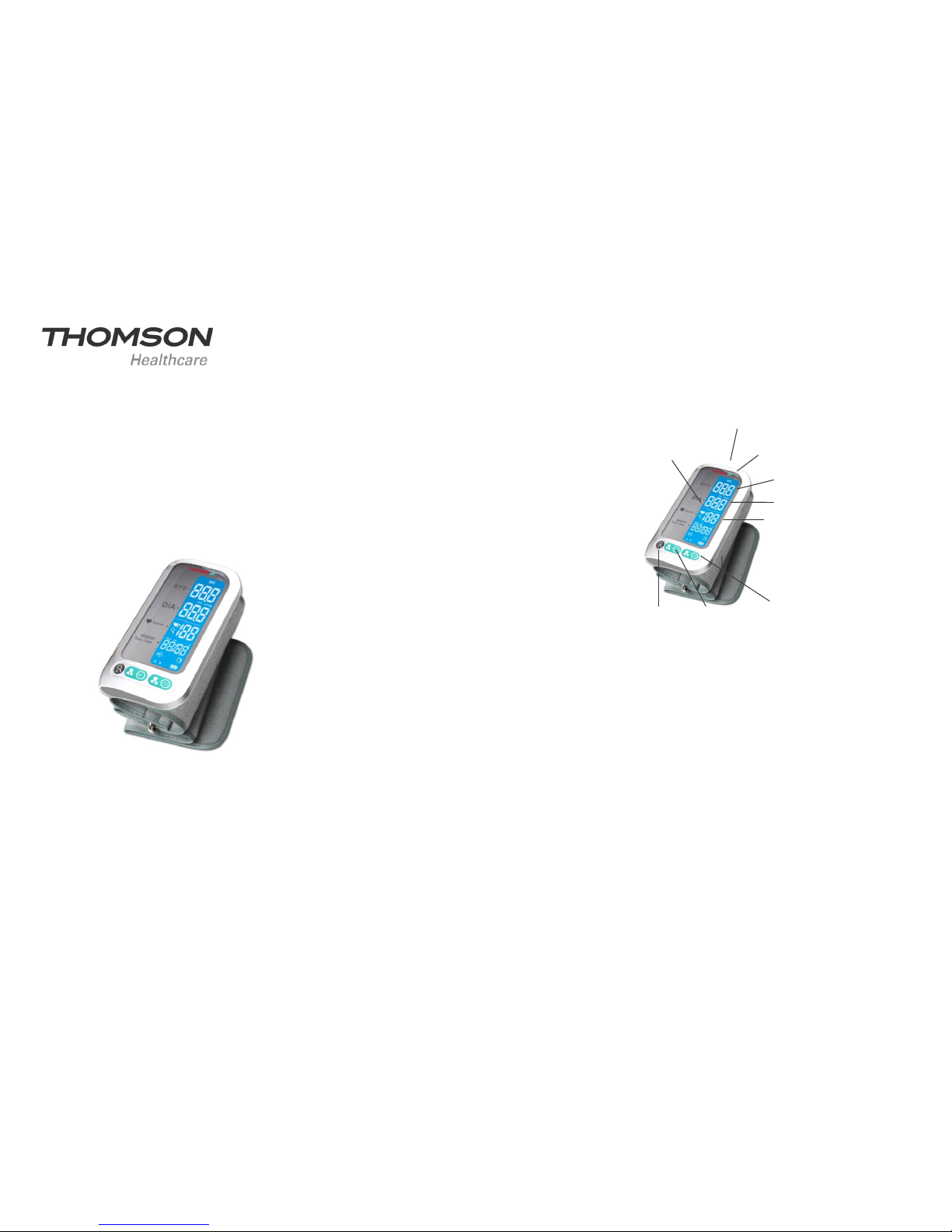
APERÇU
PREMIÈRE UTILISATION
Utiliser l’adaptate ur en le branchant à une prise secte ur et en le connectant
à la prise qui se trouve sur le dessus du tensiomètre afin de recharger la
batterie Li-ion Polymère.
Avant toute utilisation de l’a ppareil, assurez v ous que le bouton
marche/arrêt (ON/OFF) qui se trouve sur le dessus du tensiomètre est bien
en position ON.
Programmer la date, l’h eure et l’unité de mesure
1. Appuyer sur l e bouton „user 1” pendant 3 s jusqu’à ce que l’heure situé sur
l’afficheur du tensiomètre clignote.
2. Appuyez ensuite sur le bouton de gauche „mode” pour régler l’ heure, chaque
appui faisant avancer celle ci de façon séquentielle
3. Afin de mémoriser l’he ure choisie, appuyez à nouveau sur „user 1”, ce qui
déclenche également le mode de définition des minutes, qui se mettent à
clignoter sur l’afficheur du tensiomètre.
4. Repeter l’étape 2 pour régler l es minutes, appu yez sur „user 1” pour
confirmer les minutes.
5. Répeter les étapes 2 et 3 pour ajuster le mois,les jours, l’année.
6. Répeter les étapes 2 et 3 pour confirmer l’unité de mesure.
Aprés la sélection et la mémorisation de l’unité de mesure, le LCD affichera
„dOnE et l’appareil s’éteindra. Il est alors prêt à prendre des me sures.
SYSTOLIQUE
DIASTOLIQUE
FREQUENCE
CARDIAQUE
BOUTON
UTILISATEUR 2
BOUTON
UTILISATEUR 1
BOUTON
REQUETE
SYMBOLE
TRANSMISSION
DONNNEES
DPI (détection
pulsation irrégulière)
BOUTON Marche / Arrêt
Page 2

APPAIREZ VOTRE TENSIOMÈTRE
1. Activez le Bluetooth de votre sm artphone/tablette et ouv rez l’application
Thomson Healthcare. Assurez vous que ces deux éléments fonctionnent
lorsque l’appairage est en cours.
2. Démarrer l’application Thom son Healthcare sur votre smartphone/tablette
pour lancer l’appareillage avec le tensiomètre. Pour plus d’informations sur
l’utilisation de l’application, rendez-vous sur www.thomson-hc.eu
3. Lorsque le tensiomèt re e st éteint , m aintenez le bouton „user 2” (en bas à
droite sur le tensiomètre) pendant 2 sec pou r lancer l’appairage. Les
symboles ci dessous apparaissent sur l’écran LCD de façon simultanées, ce
qui indique que l’appairage est en cours.
Sur l’écran LCD, il apparaitra ensuite un des symboles suiv ant si:
L’appairage a fonctionné
L’appairage a échoué
Le tensiomètre s’éteint ensuite automatiquement.
POUR PRENDRE UNE MESURE
1- Retirez tous vos accessoires (collier, bracelet, etc.) de votre biceps
gauche. Si votre médecin vous a diagnostiqué une circulation faible dans le
bras gauche, utilisez votre bras droit.
2- Enroulez ou relevez votre man che afin d’exposer la peau à même le
brassard.
3- Placez le bracelet gonflant à votre biceps à environ 2-3cm du coude, avec
votre paume vers le haut.
4- Fixer le bracel et autour de votre biceps, en ne laissant pas d’espace entre
le bracelet et la peau. Si le bracelet est trop lâche, la mesure ne sera pas
précise.
5- Reposez vous 5 minutes avant de prendre la mesure.
6- Attendez au moins 3 minutes entre chaque mesure
7- Pour une comparaison significative, essayez de reproduire les mêmes
conditions de mesure. Par exemple, prendre la mesure à peu près à la
même heure, au même biceps ou avec l’assistance d’un m édecin.
PRISE DE MESURE
Une fois le brassard enfilé autour du biceps, appuyez sur un des deux
boutons „user” en fonction de l’utilisateur sélectionné.
Le processus de prise de mesure se fera automatiquement.
Cet appareil procèdera automatiquement à la transmission des données vers
votre sma rtphone/tablette à l’issue des mesures. Le symbole „transmissi on”
situé en haut de l’écran LCD clignote.
MÉMORISATION DES ENREGISTREMENTS
Appuyez sur la touche „Quer y” pour accéd er à la mémoire puis sél ectionner
l’utilisateur dont vous souhaitez retrover les mesures stockées (User 1 ou
User 2).
Appuyez à nouveau sur le bou ton „query” pour visualiser l’une après l’autre
l’ensemble des mesures. Le tensiomètre peut stocker jusqu’à 60 mesur es
pour chaque utilsateur.
SUPRESSION DES ENREGISTREMENTS
Pour supprimer u n enregistrement de mesure, appuyez sur la touche „query”
durant 3 secondes. Lorsque le m essage „dEL ALL” ap parait sur l’écran LCD,
appuyez à nouveau sur le bouton „Query”.
RÉSOLUTION DES PROBLÈMES
L’écran s’obscurci ou ne s’allume pas: Vérifiez que les piles ne sont pas
déchargées ou sont correctement installées. Si les piles sont vides,
remplacez les 2 piles en même temps par de nouvelles piles.
La transmission de données a échoué: Assurez vous que la fonction
Bluetooth de votre téléphone est allumée et que le téléphone soit à bonne
distance du tensiomètre.
E1 : Le gonflement est lent ou le brassard n’est pas c orrectement
positionné
Positionnez à nouveau le brassard puis procédez à une nouvelle mesure
E2 : Le brassard est trop serré
Desserrez le brassard puis reprenez la mesure
E3 : La pression du brassard est excessive
Positionnez à nouveau le brassard puis procédez à une nouvelle mesure
E5 /E6 : Une erreur système est survenue
Procédez à une nouvelle mesure. Si le problème persiste, contactez le
détaillant ou notre service client afin d’obtenir de l’aide
E10 / E11 : L’appareil à détecté un mouvement lors de la mesure
Les mouvements peuvent influer sur la mesure. Relaxez-vous puis
recommencez la mesure
E20 : Le pouls n’a pas été détecté lors de la prise de mes ure
Desserrez le vêtement sur votre bras puis recommencez la mesure
E21 : Mesure incorrecte
Relaxez-vous un instant et recommencez la mesure
Ce tensiomètre est conforme aux normes de fabrication :
EN/ISO 14971:2007, EN 15223:2012, EN 1014:2008, EN 60601-1-11:2010,
EN 1060-1:1995+A2:2009, EN 1060-3:1997+A2:2009, EN 1060-4:2004, EN
60601-1-2:2007/ac/2010? En 62304/2006:AC:2008, EN 60601-1-6:2010.
Représentant européen: MDSS – Medical Device Safety Service GmbH
Schiffgraben 41, 30175 Hanover, Germany.
Fabriquant: Guangdong Transtek Medical Electronics Co.,Ltd.,
Adresse: Zone A, No.105, Dongli Road,Torch Development
District,Zhongshan,528437,Guangdong,China
Importateur: Thomson HC – STAB –XTOM, Parc Lumière, 46 avenue des
Frères Lumière, 78190 Trappes – France
Cet appareil est garanti 24 mois à partir de la date d’achat pour les vices de
fabrication et sous condition d’utilisation normale
Apple, le Apple logo & iPhone sont des marques déposées de Apple Inc.
Apple Store est une marque de service de Apple Inc.
Android une marque de service Google Inc.
The Bluetooth word mark and logos are registered trademarks owned by
Bluetooth SIG, Inc.
Other trademark and trade names are those of their respective owners
.
Page 3
NEDERLANDS
PRODUCTOMSCHRIJVING EN AANBEVELINGEN
Deze bloeddrukmonitor is een elektronisch apparaat dat is bedoeld voor het
meten van bloeddruk en hartslag aan de arm van volwassen mensen.
Voor het verkrijgen van betrouwbare metingen is het van belang
de bloeddrukmeting elke dag op dezelfde tijd uit te voeren en 30
minuten voor aanvang van de meting niet te eten, in bad te gaan,
te roken, aan lichaamsbeweging te doen en geen cafeïne en
alcohol te nuttigen.
Ga zitten en ontspan minstens 5 minuten voor aanvang van de
meting
Zorg dat de band voor de meting op hartniveau zit
Bij het uitvoeren van herhaalde metingen mag de tijd tussen
metingen niet minder zijn dan 3 minuten.
Neem contact op met uw artsen voor de beoordeling van de
bloeddrukmeting en volg hun aanwijzingen op.
Deze bloeddrukmeter kan worden gebruikt met de Thomson
healthcare app die in de Apple store en Play store kan worden
gedownload. De app is ook geschikt voor de Apple Health Kit.
TIPS VOOR METEN
In de volgende omstandigheden kan de meting onnauwkeurig zijn:
Binnen 1 uur na eten of drinken
Direct na gebruiken van thee of koffie of na roken
Binnen 20 minuten na het nemen van een bad
Als u spreekt of uw vingers beweegt
In een zeer koude omgeving
Als u moet plassen
VEILIGHEID
Deze arm bloeddrukmeter kan alleen worden gebruikt waarvoor
hij is ontworpen, zoals uitgelegd in de gebruikershandleiding
Neem contact op met uw arts voor de status van uw gezondheid
en bereik van uw bloeddruk voordat u thuis metingen met dit
apparaat uitvoert.
Druk niet op de aan/uit-knop als de band niet goed is aangebracht
Als de band tijdens de meting niet prettig voelt, druk dan op de
aan/uit knop om het apparaat direct uit te zetten.
Trek de klittenband los om de band los te maken wanneer de
banddruk hoger is dan 300mmHg zonder automatische
ontluchting
Voer zelf geen reparaties uit aan dit apparaat en probeer het zelf
niet aan te passen
ONDERHOUD
Maak uw apparaat schoon met een zachte droge doek, poets met
een vochtige katoenen doek en veeg hem droog.
Sla het apparaat niet op in direct zonlicht en houd het uit de buurt
van water
Als u het apparaat langere tijd niet gebruikt, verwijder dan de
batterijen
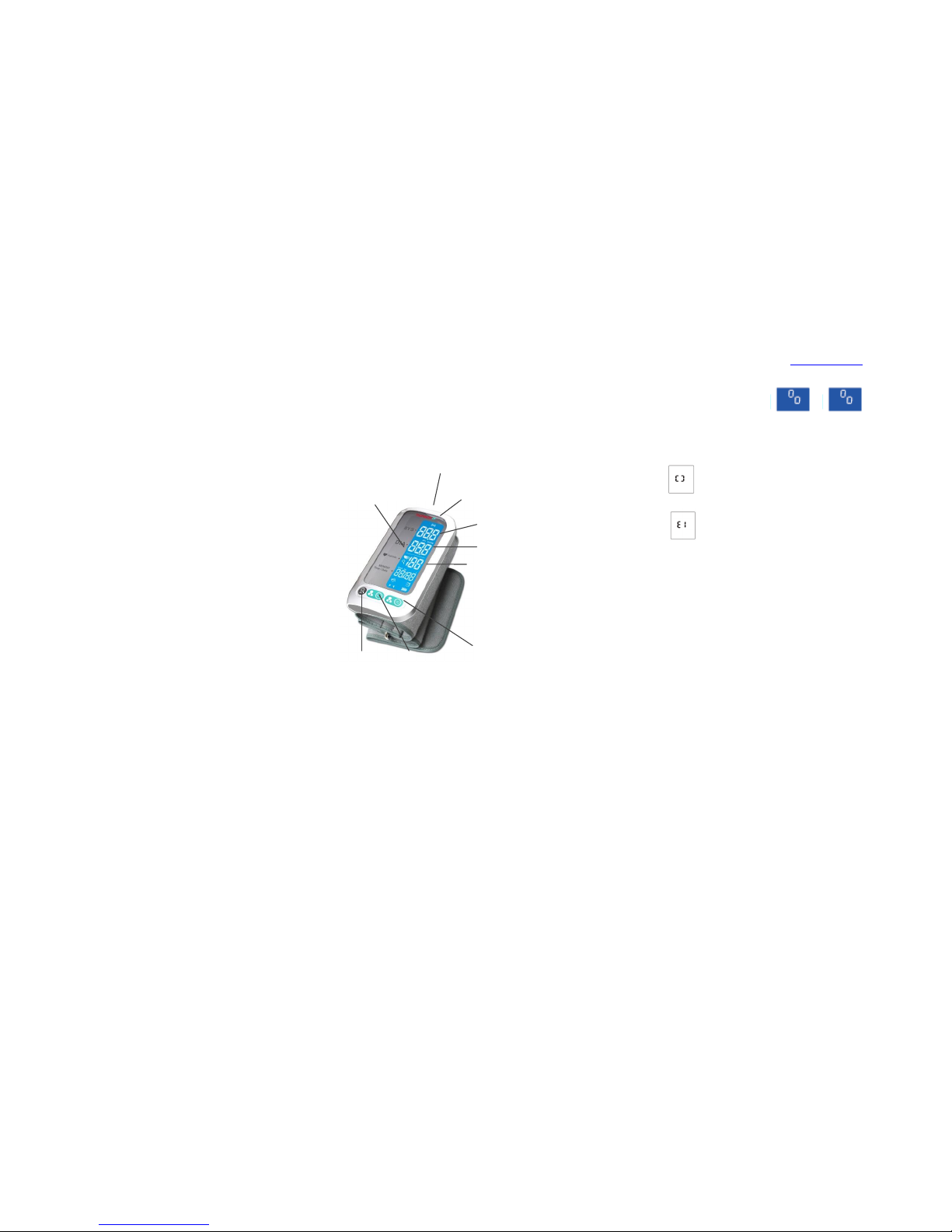
OVERZICHT
EERSTE OPSTART
Gebruik de AC-voedingadapter door de bloeddrukmonitor aan te
sluiten op de oplaadbare Li-polymeer batterij
Zorg dat de aan/uit-knop op ON staat voordat u het apparaat
gebruikt.
Datum, tijd en meeteenheden instellen
Druk 3 seconden op de knop USER 1 totdat de uuraanduiding
aan de linkerkant begint te knipperen.
Druk op de linker knop “query” om de uren in te stellen. Met elke
druk wordt de tijd met één uur verhoogd.
Druk op de knop USER 1 voor bevestiging. Daarna begint de de
minutenaanduiding te knipperen.
Herhaal de vorige stappen om de tijd in te stellen.
Herhaal de vorige stappen om de maand, dag en het jaar in te
stellen.
Herhaal de vorige stappen om de meeteenheden stellen.
Na bevestiging van de meeteenheden, zal de LCD-di splay „Done”
aangeven en sluit de monitor automatisch af
Hij is nu klaar om te meten.
KOPPEL DE BPM AAN UW APPARAAT
Zet de Bluetooth en de Thomson Healthcare app aan. Controleer dat ze
beide werken.
Start de app om de koppeling te starten. Bezoek voor meer informatie over
de Thomson Healthcare app onze website: www.thomson-hc.eu
Als de monitor UIT is, druk dan ongeveer 2 seconden op de START-knop om
de koppeling te starten. De symbolen en verschijnen
op de display, wat betekent dat de koppeling gaande is.
Daarna verschijnt één van de twee volgende symbolen:
Indien gelukt
Indien mislukt
OM EEN METING TE DOEN
1- Verwijder alle accessoires (horloge, armband, etc.) van uw linker arm. Als
u volgens uw arts slechte bloedcirculatie in uw linker arm hebt, gebruik dan
uw rechter arm
2- Rol of stroop uw mouw op zodat de blote huid zichtbaar is
3- Breng de band aan op uw linker arm met uw handpalm naar boven gericht
4- Plaats de rand van de band ca. 2-3 cm vanaf de elleboog met uw
handpalm naar boven.
5- Maak de band vast rond uw arm, zodanig dat er geen extra ruimte zit
tussen de band en uw huid. Als de band te los zit is de meting niet
nauwkeurig
6- 5 minuten rusten voor de volgende meting
7- Wacht tenminste 3 minuten tussen metingen
8- Probeer voor een goede vergelijking onder gelijke omstandigheden te
meten. Bijvoorbeeld, voer de meting dagelijks om dezelfde tijd uit, op
dezelfde arm, of zoals aangegeven door een arts
START DE METING
Druk op de geselecteerde gebruikersknop om de monitor aan te zetten. De
meting wordt automatisch afgerond. Dit apparaat verzendt de gegevens
automatisch wanneer de meting is afgerond. Het draadloos-symbool
verschijnt om de gegevens te verzenden.
RAPPORTEN OPHALEN
Druk op de knop „QUERY” voor toegang tot het geheuge n van de
geselecteerde gebruiker als de BPM uit is
Druk nogmaals op “QUERY” om alle metingen een voor e en te laten zien. De
bloeddrukmonitor kan 60 metingen door de gebruiker opslaan.
Aan/uit-knop
IPD
(onregelmatige
pols-detectie)
GEGEVENSOVERD
RACHT SYMBOOL
SYSTOLISCH
DIASTOLISCH
HARTSLAG
GEBRUIKER
2-KNOP
GEBRUIKER
1-KNOP
QUERYKNOP
Page 4

RAPPORTEN VERWIJDEREN
Druk om een rapport te verwijderen op de knop QUERY voor ca. 3 seconden
als hij in de geheugenmodus staat. Als het bericht “DEL AL L” op de display
verschijnt, druk dan nogmaals op de knop QUERY.
PROBLEEMOPLOSSINGEN
De display is zwak of niet verlicht
Controleer of de batterij leeg is. Als deze leeg ist laad hem dan op.
E1 : Gegevenscommunicatie mislukt
Zorg dat de Bluetooth van de telefoon aan staat en dat hij binnen bereik is
E2 : De armband is te strak
Maak de armband losser en start een nieuwe meting
E3 : Opblazen duurt lang of de armband is niet vast
Doe de armband opnieuw vast en start een nieuwe meting
E5 /E6 : Er is een systeemfout opgetreden
Start een nieuwe meting. Als de melding zich blijft voordoen, neem dan
contact op met uw klantenservice voor hulp
E10 / E11 : De monitor detecteerde beweging tijdens de meting
Beweging kan de meting beïnvloeden. Neem een tijdje rust en start een
nieuwe meting
E20 : Het meetproces detecteert geen pols
Maak de kleding op de arm losser en start een nieuwe meting
E21 : Meting incorrect
Neem een tijdje rust en start een nieuwe meting
CLASSIFICATIE STANDAARD BLOEDDRUK
De classificatie van de bloeddruk zoals in 1999 gepubliceerd door de Wereld
Gezondheidsorganisatie (WHO) en International Society of Hypertension
(ISH) is als volgt:
ONREGELMATIGE HARTSLAG-DETECTOR
Deze bloeddrukmonitor is uitgerust met de intelligente functie Onregelmatige
Hartslag-detector (IHB). Tijdens elke meting houdt het apparaat de hartslag
bij en berekent de standaard afwijking. Als de berekende waarde kleiner of
gelijk is aan 15, zal het IHB-symbool op de display oplichten als de
meetresultaten worden weergegeven.
COMPLIANCE
De bloeddrukmonitor voldoet aan de Europese certificatie:
EN/ISO 14971:2007, EN 15223:2012, EN 1014:2008, EN 60601-1-11:2010,
EN 1060-1:1995+A2:2009, EN 1060-3:1997+A2:2009, EN 1060-4:2004, EN
60601-1-2:2007/ac/2010? En 62304/2006:AC:2008, EN 60601-1-6:2010.
Europese vertegenwoordiger: MDSS – Medical Device Safety
Service GmbH Schiffgraben 41, 30175 Hanover, Duitsland.
Fabrikant: Guangdong Transtek Medical Electronics Co.,Ltd.,
Adres: Zone A, No.105, Dongli Road,Torch Development
District,Zhongshan,528437,Guangdong,China
Importeur: Thomson HC – STAB –XTOM, Parc Lumière, 46
avenue des Frères Lumière, 78190 Trappes – Frankrijk
Apple, het Apple logo en iphone zijn handelsmerken van Apple Inc.,
geregistreerd in de V.S. en andere landen. Appstore is een dienstmerk van
Apple Inc.
Android is een handelsmerk van Google Inc.
Het Bluetooth woordmerk en logo's zijn geregistreerde handelsmerken van
Bluetooth SIG, Inc.
Andere handelsmerken en dienstmerken zijn van hun respectieve eigenaars.
GARANTIE
Dit apparaat heeft een garantietermijn van 24 maanden vanaf de datum van
aankoop. Deze garantie heeft betrekking fabricagefouten bij normaal gebruik
Page 5
ENGLISH
PRODUCT DESCRIPTION AND RECOMMENDATION
This arm blood pressure monitor is an electronic device intended to make
human blood pressure and pulse rate at arm of adult population.
In order to get reliable measurements, keep taking and recording blood
pressure measurement at the same time every day and avoid eating,
bathing, smoking, exercising, ingest caffeine or alcohol at least 30 minutes
prior to take measurement.
Be seated and relax for at least 5 minutes before measuring
Make sure the cuff is at heart level for taking measurement
To make repeated measurements, the rest interval between measurements
shall not be less than 3 minutes.
Consult your physicians for interpretation of blood pressure measurement
and follow their direction.
This blood pressure monitor could be used with Thomson healthcare app
downloadable on Apple Store and Play Store. The app is also suitable with
Apple Health Kit.
TIPS FOR MEASUREMENT
It can cause inaccuracy if the measurement is taken in the following
circumstances:
Within 1 hour after dinner or drinking
Immediate measurement after tea, coffee, smoking
Within 20 minutes after taking a bath
When talking or moving your fingers
In a very cold environment
When you want to discharge urine
SECURITY
This arm blood pressure monitor can be only used for which it has been
designed as explained in the instruction booklet
Consult your physician for health status and blood pressure range before
taking measurement at home with this device
Do not press the power button if the cuff has not been properly wrapped
If the cuff causes you any discomfort during measurement, press the power
button to turn off the device immediately
Pull off the Velcro strap to detach the cuff if the cuff pressure exceeds
300mmHg without an automatic exhaust
Do not modify or try to repair this device by yourself
MAINTENANCE
Clean your device with a soft dry cloth, lens with a cotton swab
moistened with water then wipe it dry
Do not store the device with direct sunlight and keep it away water
Remove batteries from your device if you don’t use for a long time
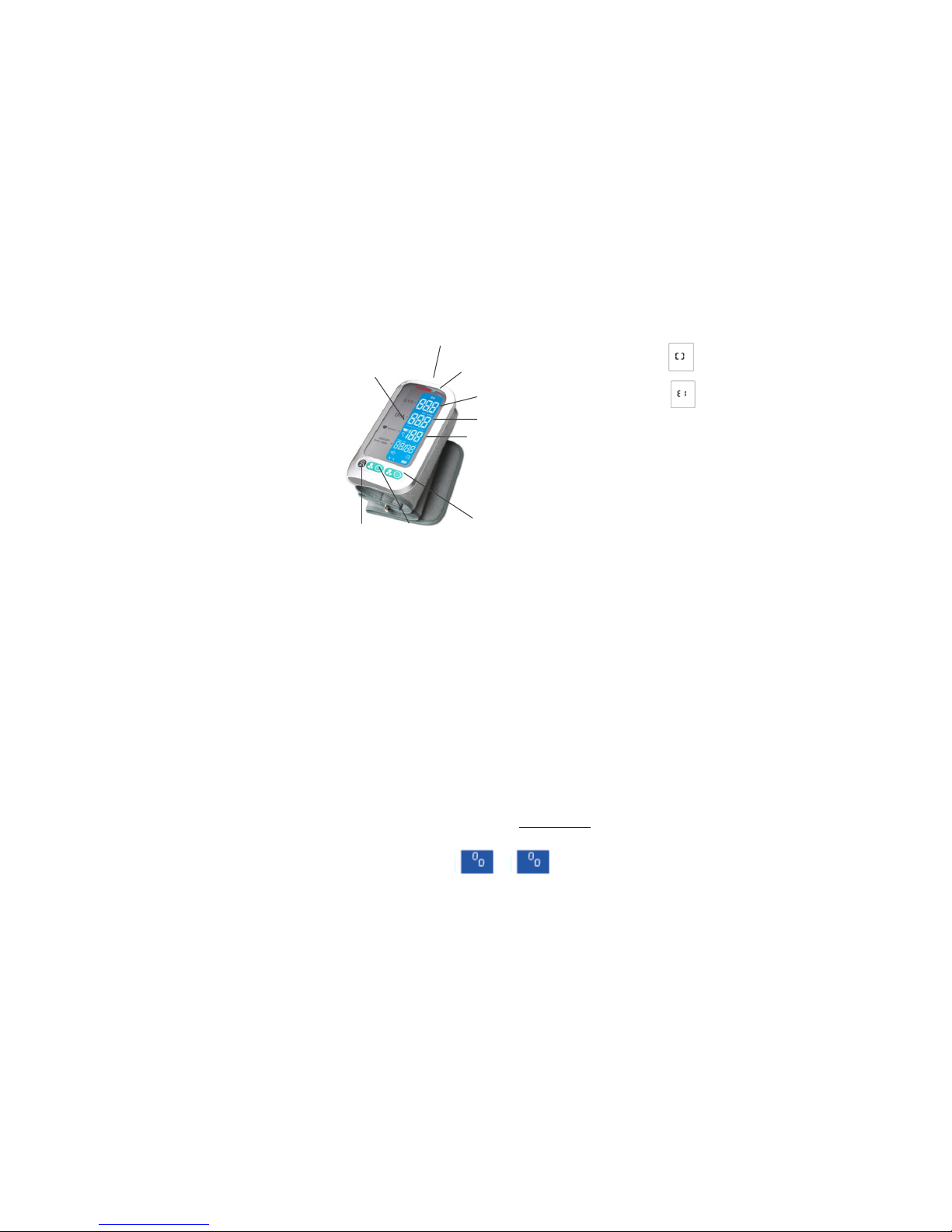
OVERVIEW
INITIAL START-UP
Use the AC power adaptor by connecting to the blood pressure monitor to
reload the Li-polymer battery.
Before using the device, please make sure that the ON/OFF BUTTON is
ON.
Setting Date, Time and Measurement Unit
Press the USER 1 BUTTON during 3 seconds until the hour on the left of
the screen display starts to flash.
Press the left button “ query” to set the hour. Each press is increasing the
number of hour.
To confirm the hour, press the USER 1 BUTTON then the numeral
representing minute starts to blink.
Repeat the previous steps to set the time.
Repeat the previous steps to set the month, day, year.
Repeat the previous steps to set the measurement unit.
After confirming measurement unit, the LCD will display „dONE” and the
monitor will shut off automatically
It’s ready to take measurements.
PAIR-UP THE BPM WITH YOUR DEVICE
Turn on Bluetooth and the Thomson Healthcare app. Please make sure that
both are working.
Launch the app to start the pair-up. For more informations about using the
Thomson Healthcare app, please visit our website: www.thomson-hc.eu
When the monitor is OFF, press and hold the START button for about 2 sec
to start the pair-up. The symbols and appear on the
display which means the pair-up is in progress.
Then, one of the two following symbols will appear :
If succeed
If fail
TO TAKE A MEASUREMENT
1- Remove all accessories (watch, bracelet, etc) from your left arm. If your
physician has diagnosed you with poor circulation in your left arm, use your
right arm
2- Roll or push up your sleeve to expose the skin
3- Apply the cuff to your left arm with your palm facing up
4- Position the edge of the cuff about 2-3 cm of the elbow with your palm up.
5- Fasten the arm cuff around your arm, leaving no extra room between the
cuff and your skin. If the cuff is too loose, the measurement will not be
accurate
6- Resting for 5 minutes before measuring
7- Wait at least 3 minutes between measurements
8- For a meaningful comparison, try to measure under similar conditions. For
example, take daily measurement at approximately the same time, on the
same arm, or as directed by a physician
START THE MEASUREMENT
Press your selected user button to turn on the monitor, it will complete the
measurement process automatically.This device will proceed to data
transmission automatically after measurement. The wireless symbol appears
to transmit the data.
RECALLING THE RECORDS
Press „QUERY” button to access to memory of the selected user when the
BPM is off
Press “QUERY” again to visualize one by one all the measurements. The
blood pressure monitor can store 60 measurements by user.
DELETING THE RECORDS
To delete a record, press the QUERY BUTTON about 3 seconds when it’s in
the memory mode. When the message “dEL ALL” displa y on the screen,
press QUERY BUTTON again.
TROUBLE SHOOTING
The display is dim or is not lighting up
Check out if the battery is exhausted, if it's exhausted, please charge the
power in time.
E1 : Data communication has failed
Make sure that phone’s Bluetooth is on or within the distance range
E3 : Inflation is slow or the cuff is not secure
Refasten the cuff and then measure again
E10 / E11 : The monitor detected motion while measuring
ON/OFF BUTTON
IPD (irregular
pulse detection)
DATA
TRANSMISSION
SYMBOL
SYSTOLIC
DIASTOLIC
PULSE RATE
USER 2
BUTTON
USER 1
BUTTON
QUERY
BUTTON
Page 6
Movement can affect the measurement. Relax for a moment and then
measure again
E20 : The measurement process does not detect the pulse signal
Loosen the clothing on the arm and then measure again
E21 : Measure incorrectly
Relax for a moment and then measure again
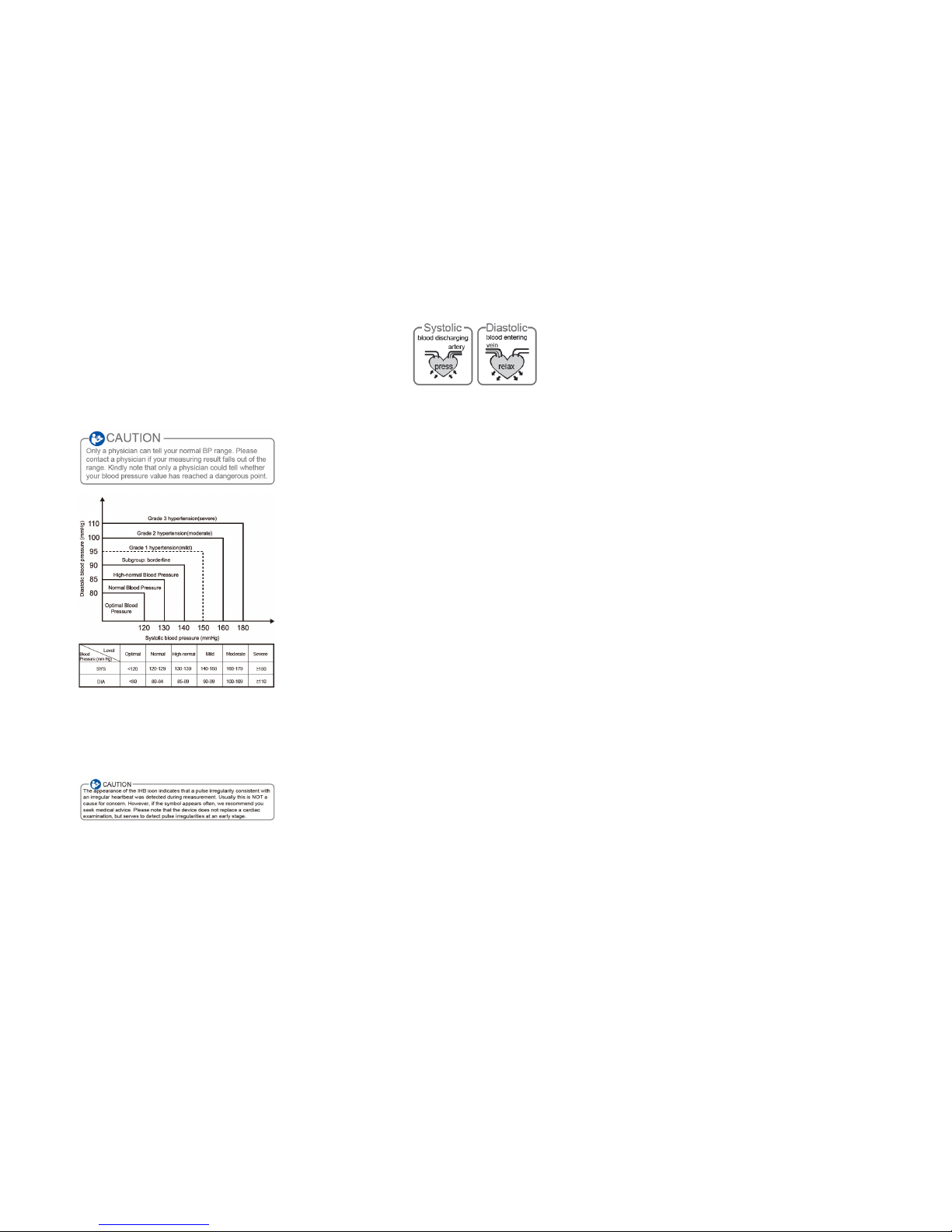
STANDARD BLOOD PRESSURE CLASSIFICATION
The blood pressure classification published by World Health Organization
(WHO) and International Society of Hypertension (ISH) in 1999 is as follows:
IRREGULAR HEART BEAT DETECTOR
This Blood Pressure Monitor is equipped with an intelligent function of
Irregular Heartbeat (IHB) Detector. During each measurement, this
equipment records the heart beat intervals and works out the standard
deviation. If the calculated value is larger than or equal to 15, this equipment
will light up the IHB symbol on the screen when displaying the measuring
result.
What are systolic pressure and diastolic pressure?
When ventricles contract and pump blood out of the heart, the blood pressure
reaches its maximum value in the cycle, which is called systolic pressure.
When the ventricles relax, the blood pressure reaches its minimum value in
the cycle, which is called diastolic pressure.
Why does my blood pressure fluctuate throughout the day?
1. Individual blood pressure varies every in one day, it is also affected by the
way you tie your cuff and the your measurement position, so please take the
measurement at the same condition.
2. The varies of the pressure is greater if the person take medicine.
3. Waiting at least 3 minutes for another measurement
Why the blood pressure I get from the hospital is different from home?
The blood pressure is different even during 24 hour because of the weather,
emotion, exercise etc, specially the “white coat” in hospital which makes the
results are higher than the ones at home.
The attention need to pay when you measure your blood pressure at home:
If the cuff is tie properly.
If the cuff is too tight or too loose.
If the cuff is tied on the upper arm.
If you feel anxious pressured.
You had better take deep breath 2-3 times before beginning.
Advice: adjust yourself for 4-5 minutes until you calm down.
If the result is the same if measuring on the right arm?
It is ok for both arms, but there will be some different results for different arm,
so suggest you measure the same arm every time.
Page 7
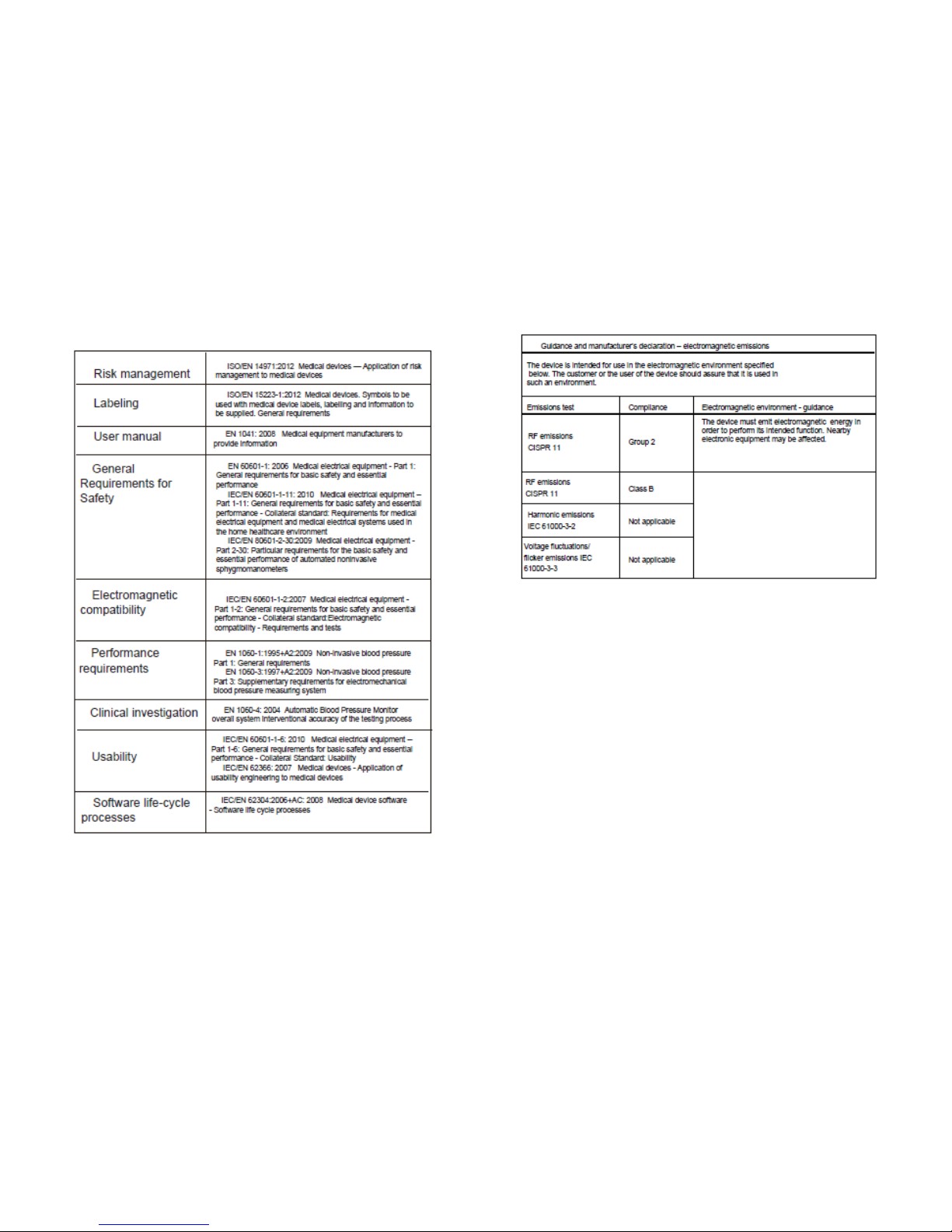
COMPLIED EUROPEAN STANDARDS LIST
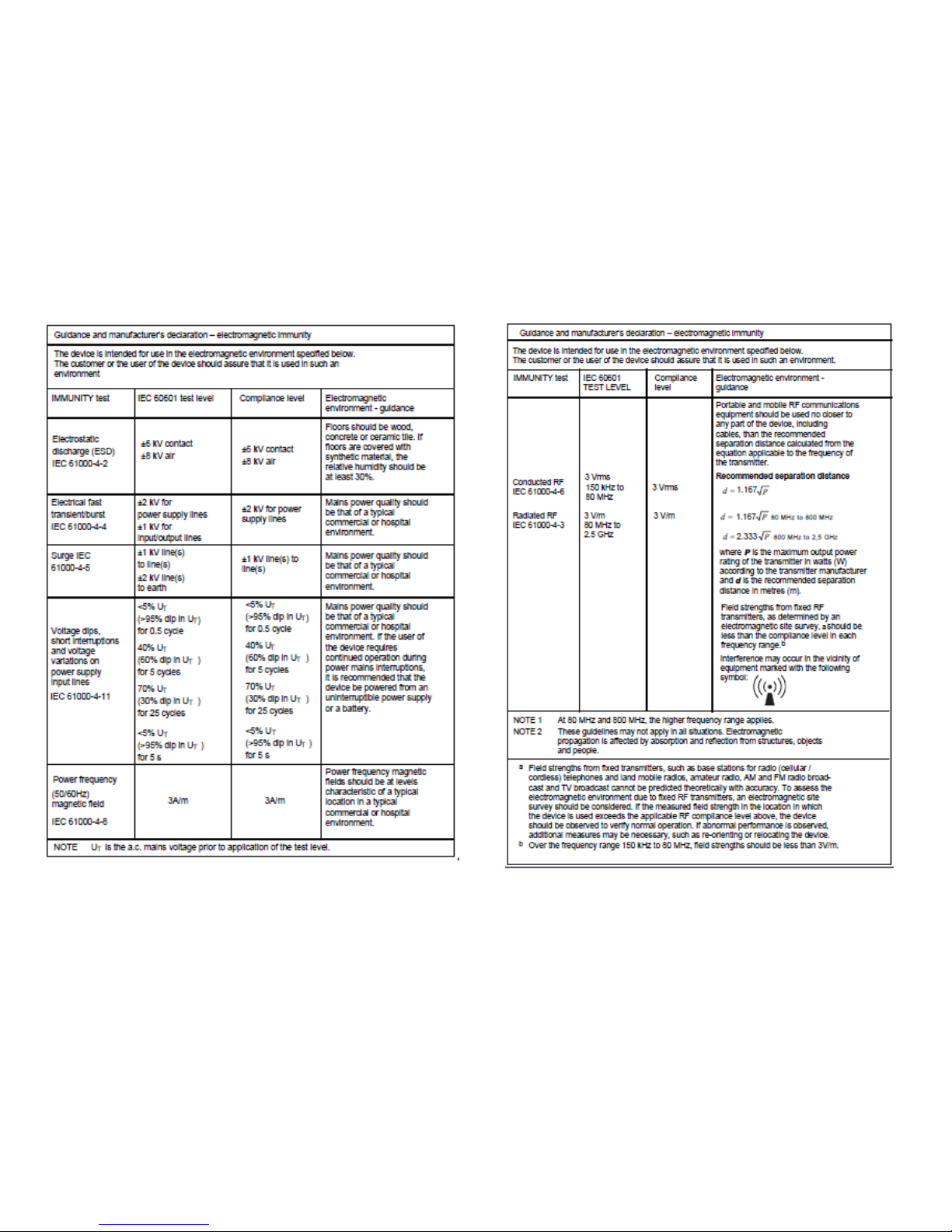
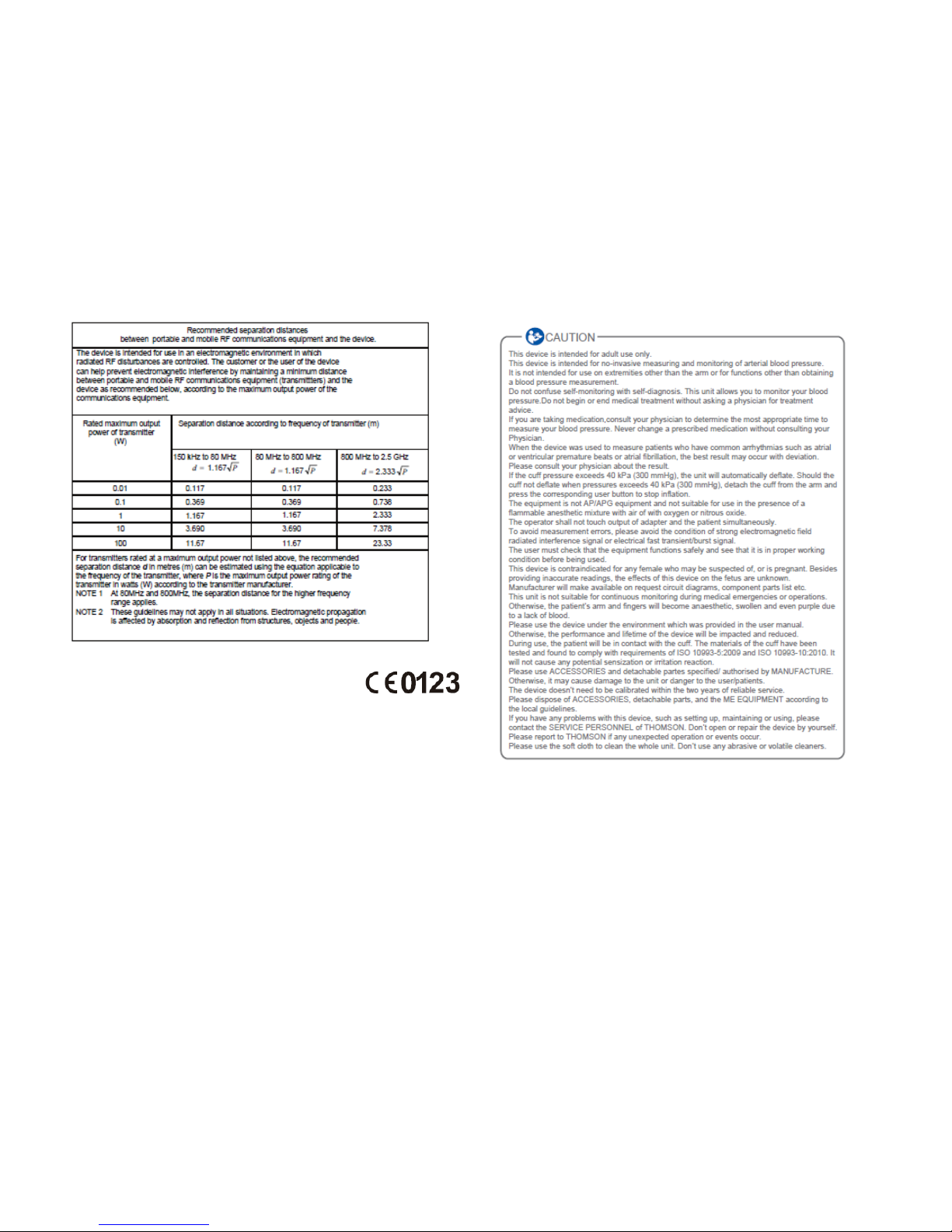
EMC GUIDANCE
Page 8
Page 9
COMPLIANCE
This blood pressure monitor is compliant with European certification:
EN/ISO 14971:2007, EN 15223:2012, EN 1014:2008, EN 60601-1-11:2010, EN 1060-1:1995+A2:2009, EN 10603:1997+A2:2009, EN 1060-4:2004, EN 60601-1-2:2007/ac/2010? En 62304/2006:AC:2008, EN 60601-1-6:2010.
European representative: MDSS – Medical Device Safety Service GmbH Schiffgraben 41, 30175 Hanover,
Germany.
Manufacturer: Guangdong Transtek Medical Electronics Co.,Ltd.,
Address: Zone A, No.105, Dongli Road,Torch Development District,Zhongshan,528437,Guangdong,China
Importer : Thomson HC – STAB –XTOM, Parc Lumière, 46 avenue des Frères Lumière, 78190 Trappes –
France
Apple, the Apple logo and iphone are trademarks of Apple Inc., registered in the US and other countries.App store is a
service mark of Apple Inc.
Android is a trademark of Google Inc.
The Bluetooth word mark and logos are registered trademarks owned by Bluetooth SIG, Inc.
Other trademark and trade names are those of their respective owners.
WARRANTY
This device is guaranteed for 24 months from the date of purchase against manufacturer defect under normal use
Page 10
 Loading...