

Page 1

Miniray
PA system
user manual
Page 2

Musikhaus Thomann e.K.
Treppendorf 30
96138 Burgebrach
Germany
Telephone: +49 (0) 9546 9223-0
E-mail: [email protected]
Internet: www.thomann.de
25.11.2014, ID: 341326
Page 3

Table of contents
1 General information................................................................................................................................. 4
1.1 Further information........................................................................................................................... 5
1.2 Notational conventions.................................................................................................................... 6
1.3 Symbols and signal words............................................................................................................... 6
2 Safety instructions..................................................................................................................................... 9
3 Features....................................................................................................................................................... 13
4 Installation.................................................................................................................................................. 14
4.1 Tips on handling speakers............................................................................................................ 17
5 Connections and operating elements........................................................................................... 18
6 Technical specifications....................................................................................................................... 24
7 Plug and connection assignment.................................................................................................... 25
8 Protecting the environment.............................................................................................................. 29
Table of contents
Miniray
3
Page 4

1 General information
This manual contains important instructions for the safe operation of the unit. Read and follow
the safety instructions and all other instructions. Keep the manual for future reference. Make
sure that it is available to all those using the device. If you sell the unit please make sure that
the buyer also receives this manual.
Our products are subject to a process of continuous development. Thus, they are subject to
change.
General information
PA system
4
Page 5
1.1 Further information
On our website (www.thomann.de) you will find lots of further information and details on the
following points:
Download This manual is also available as PDF file for you to download.
Keyword search
Use the search function in the electronic version to find the topics of
interest for you quickly.
Online guides
Our online guides provide detailed information on technical basics
and terms.
Personal consultation For personal consultation please contact our technical hotline.
Service
If you have any problems with the device the
customer service will gladly assist you.
General information
Miniray
5
Page 6

1.2 Notational conventions
This manual uses the following notational conventions:
The letterings for connectors and controls are marked by square brackets and italics.
Examples: [VOLUME] control, [Mono] button.
1.3 Symbols and signal words
In this section you will find an overview of the meaning of symbols and signal words that are
used in this manual.
Letterings
General information
PA system
6
Page 7
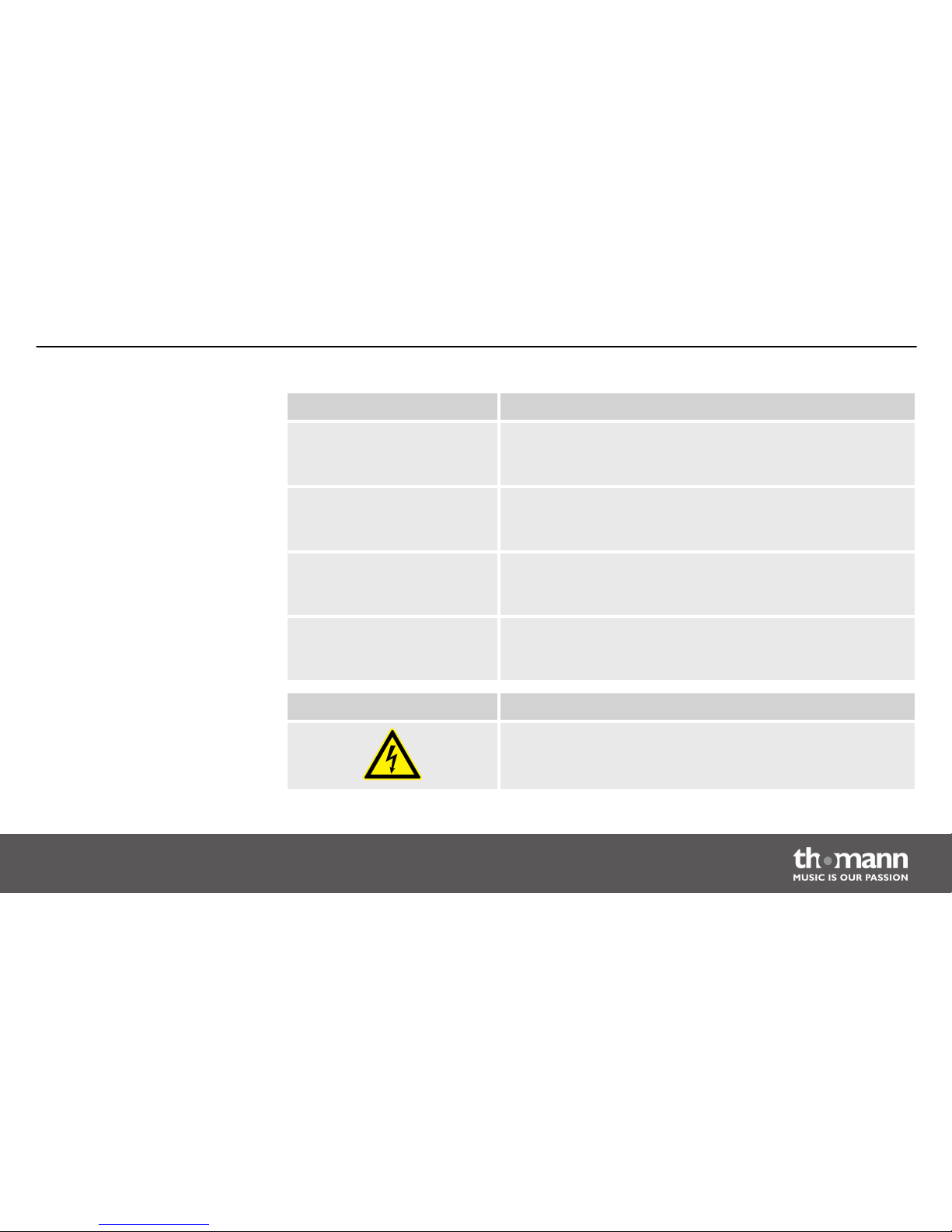
Signal word Meaning
DANGER! This combination of symbol and signal word indicates an
immediate dangerous situation that will result in death or
serious injury if it is not avoided.
WARNING! This combination of symbol and signal word indicates a pos‐
sible dangerous situation that can result in death or serious
injury if it is not avoided.
CAUTION! This combination of symbol and signal word indicates a pos‐
sible dangerous situation that can result in minor injury if it
is not avoided.
NOTICE! This combination of symbol and signal word indicates a pos‐
sible dangerous situation that can result in material and
environmental damage if it is not avoided.
Warning signs Type of danger
Warning – high-voltage.
General information
Miniray
7
Page 8
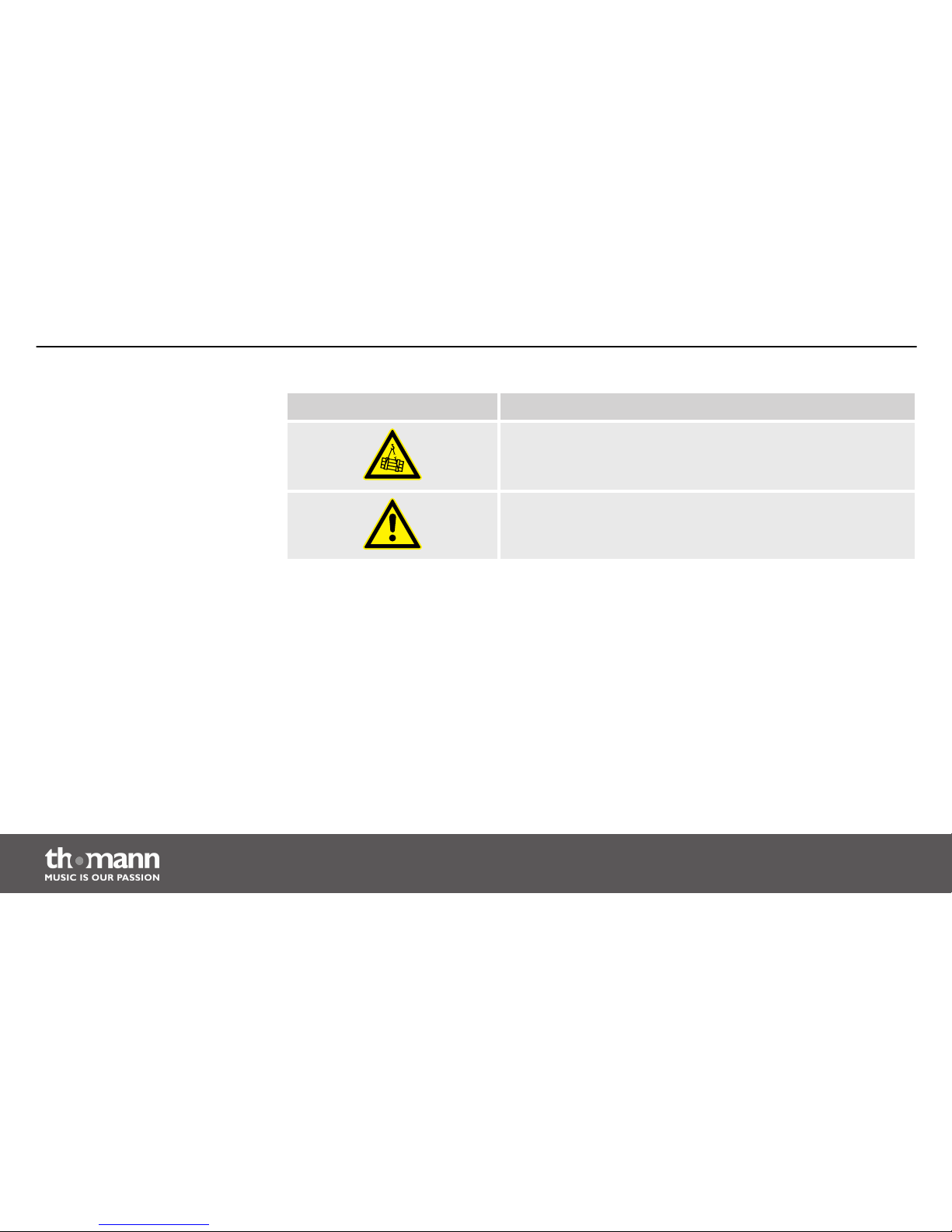
Warning signs Type of danger
Warning – suspended load.
Warning – danger zone.
General information
PA system
8
Page 9
2 Safety instructions
This device is intended to be used in a sound reinforcement system. Use the device only as
described in this user manual. Any other use or use under other operating conditions is consid‐
ered to be improper and may result in personal injury or property damage. No liability will be
assumed for damages resulting from improper use.
This device may be used only by persons with sufficient physical, sensorial, and intellectual
abilities and having corresponding knowledge and experience. Other persons may use this
device only if they are supervised or instructed by a person who is responsible for their safety.
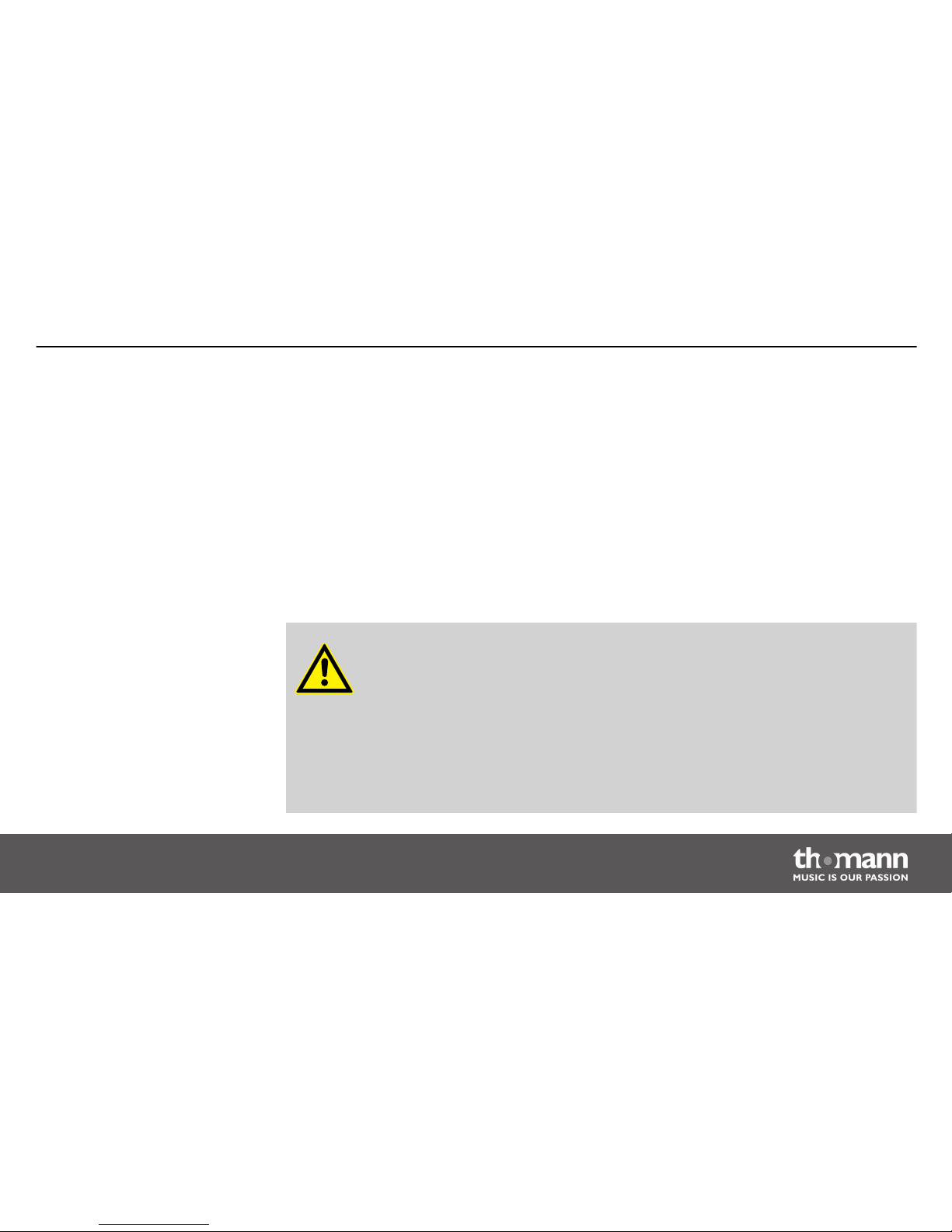
DANGER!
Danger for children
Ensure that plastic bags, packaging, etc. are disposed of properly and are not
within reach of babies and young children. Choking hazard!
Ensure that children do not detach any small parts (e.g. knobs or the like) from
the unit. They could swallow the pieces and choke!
Never let children unattended use electrical devices.
Intended use
Safety
Safety instructions
Miniray
9
Page 10
DANGER!
Electric shock caused by high voltages inside
Within the device there are areas where high voltages may be present. Never
remove any covers.
There are no user-serviceable parts inside.
DANGER!
Electric shock caused by short-circuit
Always use proper ready-made insulated mains cabling (power cord). Do not
modify the mains cable. Failure to do so could result in electric shock/death or
fire. If in doubt, seek advice from a registered electrician.
Safety instructions
PA system
10
Page 11
CAUTION!
Possible hearing damage
The device can produce volume levels that may cause temporary or permanent
hearing impairment. Over an extended period of time, even levels that seem to
be uncritical can cause hearing damage.
Decrease the volume level immediately if you experience ringing in your ears or
hearing impairment. If this is not possible, keep a greater distance or use suffi‐
cient ear protectors.
NOTICE!
Risk of fire
Do not cover the device nor any ventilation slots. Do not place the device near
any direct heat source. Keep the device away from naked flames.
Safety instructions
Miniray
11
Page 12
NOTICE!
Operating conditions
This device has been designed for indoor use only. To prevent damage, never
expose the device to any liquid or moisture. Avoid direct sunlight, heavy dirt, and
strong vibrations.
NOTICE!
Power supply
Before connecting the device, ensure that the input voltage (AC outlet) matches
the voltage rating of the device and that the AC outlet is protected by a residual
current circuit breaker. Failure to do so could result in damage to the device and
possibly injure the user.
Unplug the device before electrical storms occur and when it is unused for long
periods of time to reduce the risk of electric shock or fire.
Safety instructions
PA system
12
Page 13

3 Features
Complete PA system with very high efficiency at very small dimensions:
n 2 × top, 1 × sub
n Power output subwoofer: 400 W (RMS), 800 W (Peak)
n Power handling satellites: 2 × 200 W (RMS), 400 W (Peak)
Features
Miniray
13
Page 14

4 Installation
Unpack and carefully check that there is no transportation damage before using the unit. Keep
the equipment packaging. To fully protect the device against vibration, dust and moisture
during transportation or storage use the original packaging or your own packaging material
suitable for transport or storage, respectively.
Establish all connections as long as the unit is switched off. Use the shortest possible highquality cables for all connections.
DANGER!
Electric shock caused by high voltages at the power amplifier output
The output voltages of modern high-performance amplifiers may result in death
or serious injury.
Never touch the bare ends of loudspeaker cables when the amplifier is on.
Installation
PA system
14
Page 15
WARNING!
Risk of injury caused by falling objects
Make sure that the installation complies with the standards and rules that apply
in your country. Always secure the device with a secondary safety attachment,
such as a safety cable or a safety chain.
NOTICE!
Possible property damage by magnetic fields
Loudspeakers produce a static magnetic field. Therefore, maintain an appropriate
distance to devices that can be adversely affected or damaged by an external
magnetic field.
Installation
Miniray
15
Page 16

NOTICE!
Use of stands
When mounting the device onto a stand, ensure that the stand is in a safe and
stable position and that the weight of the device does not exceed the maximum
permissible load capacity of the stand.
Installation
PA system
16
Page 17

4.1 Tips on handling speakers
We recommend you to set up the speakers in a way, that the sound signals can reach the audi‐
ence unobstructedly. It will often be helpful to mount the speakers on tripods. Thus, the sound
will be evenly spread with maximum range throughout the audience area.
Always use high grade cable to connect your equipment. Otherwise you won't reach max‐
imum sound quality.
For optimum results both impedance and power handling of the speakers must match the
requirements of the amplifier. Always follow the technical specifications of the speakers! The
overall impedance of the connected loudspeakers must not deceed the minimum output
impedance of the amp. The amps max. RMS output power should be 50 % above the power
handling capacity of the connected speakers.
If you notice distortion during operation, either the amp or the speaker is overloaded. This may
permanently damage the amp or the speaker. Always reduce the volume when you hear dis‐
tortion.
Installation
Miniray
17
Page 18
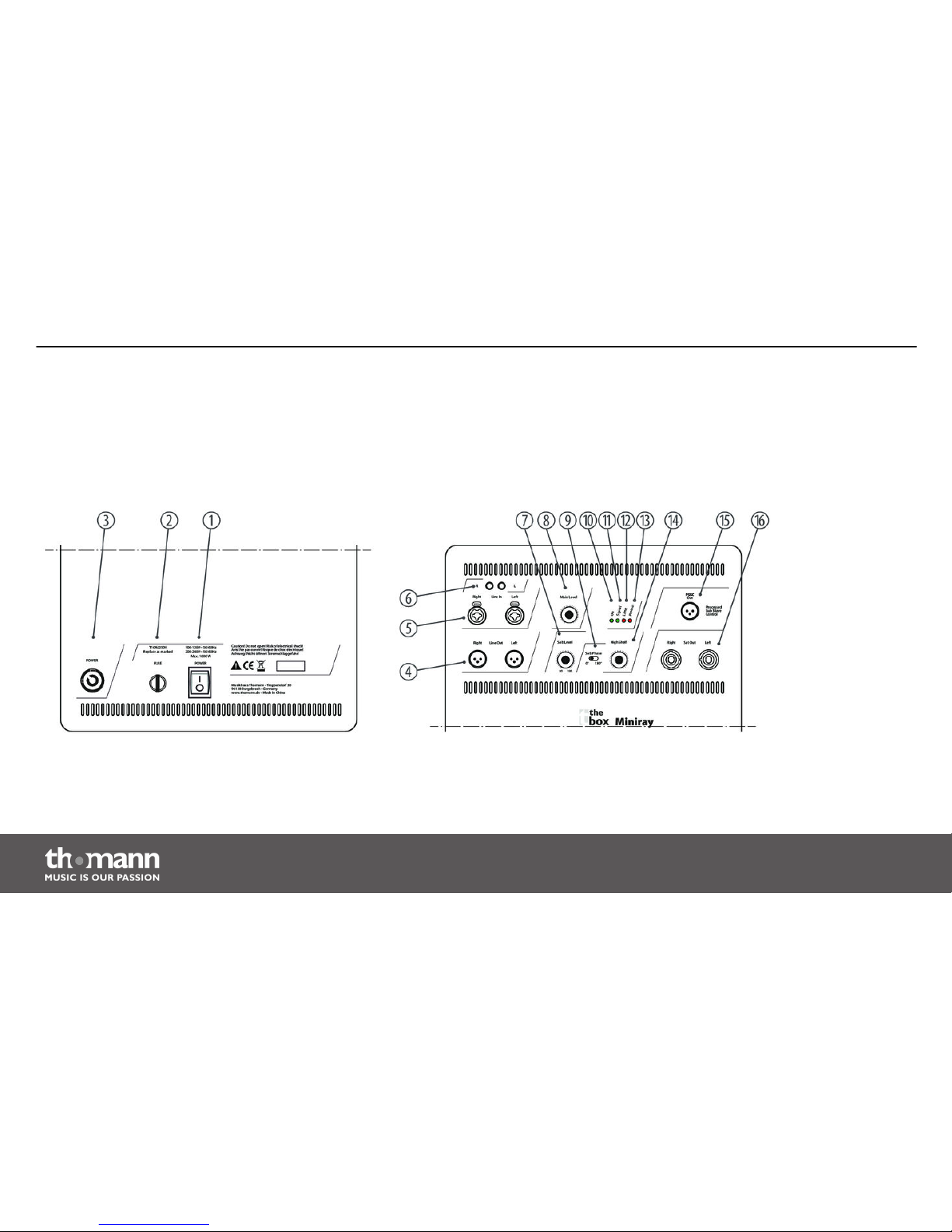
5 Connections and operating elements
Rear panel Miniray subwoofer
Connections and operating elements
PA system
18
Page 19

1 [Power]
Mains switch to turn the device on and off.
2 [Fuse]
Fuse holder for the power supply.
If the fuse blows, replace it with a new fuse of the same type. You must first disconnect the device from the power
supply.
3 [Power]
Blue lockable powerCON input socket (NAC3FA).
4 [Right – Line Out – Left]
Line signal ouputs, designed as XLR chassis sockets.
5 [Right – Line In – Left]
Line signal inputs, designed as XLR / 1/4" chassis combo sockets.
Connections and operating elements
Miniray
19
Page 20
6 [Right – Line In – Left]
Line signal inputs, designed as RCA sockets.
7 [Sub Level]
Control to adjust the subwoofer volume.
8 [Main Level]
Overall volume control.
9 [Sub Phase]
This slide switch can be used to reverse the phasing (0 ° / 180 °). This avoids unwanted cancellation effects in combi‐
nation with other speakers.
10 LED [On]
This LED indicates that the device is switched on and operational.
11 LED [Signal]
This LED shows that a signal is present.
12 LED [Limit]
Indicates overload. If the LED flickers or is lit, the input signal level is too high.
Connections and operating elements
PA system
20
Page 21
13 LED [Protect]
This LED lights up red when the unit switches to protection mode. In this case, check the cables for short circuit or
bad connection. If this LED lights constantly, please contact our service centre. Contact details can be found at
www.thomann.de.
14 [High Shelf]
Control for adjusting the high pass filter in a range of 0 to +6.
15 [PSSC Out]
DSP-controlled XLR output for an additional active subwoofer.
16 [Right – Sat Out – Left]
Top outputs for connecting satellite speakers, designed as NL4 chassis plug.
Connections and operating elements
Miniray
21
Page 22
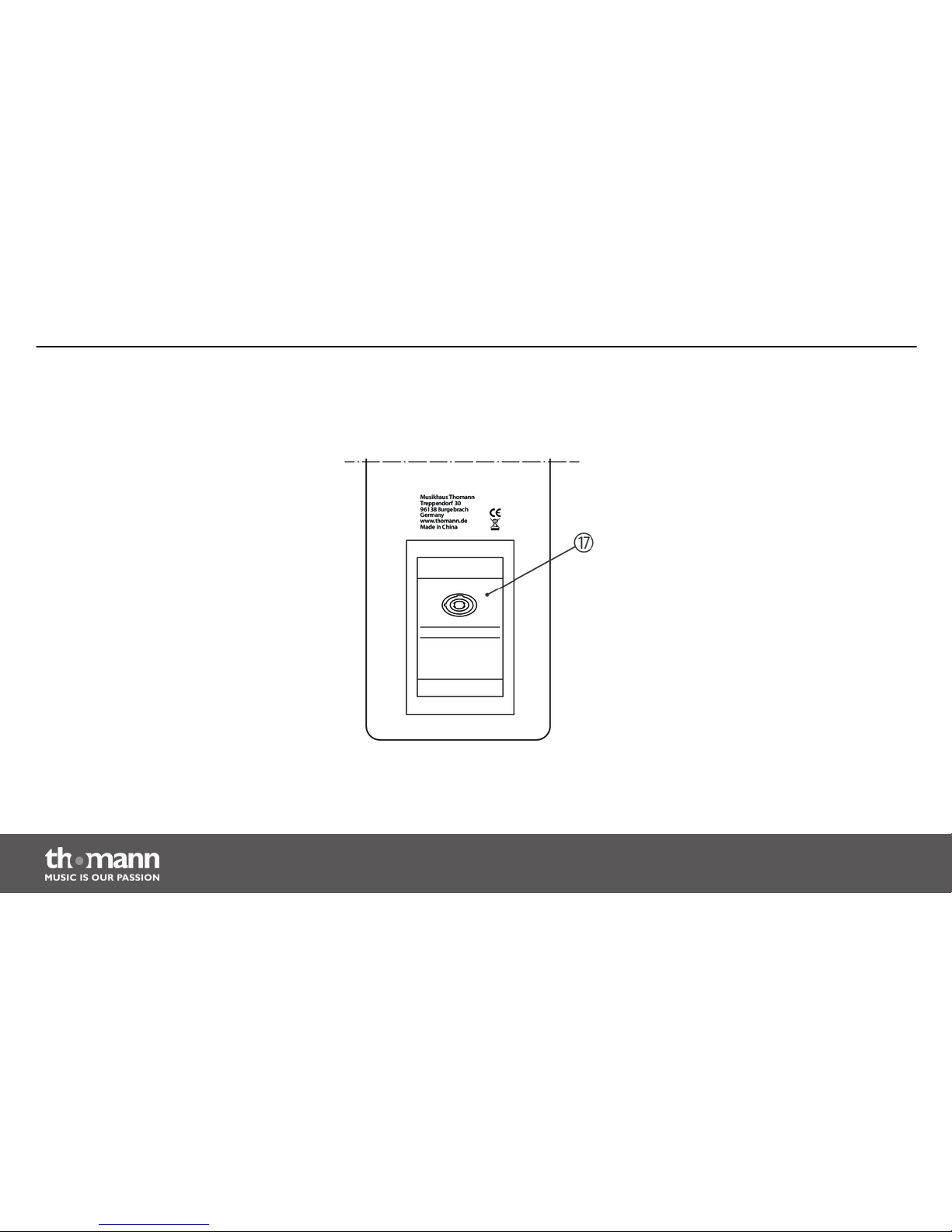
Rear panel Miniray satellite
speakers
Connections and operating elements
PA system
22
Page 23
17 NL4 chassis plug to connect to the Miniray subwoofer.
Connections and operating elements
Miniray
23
Page 24
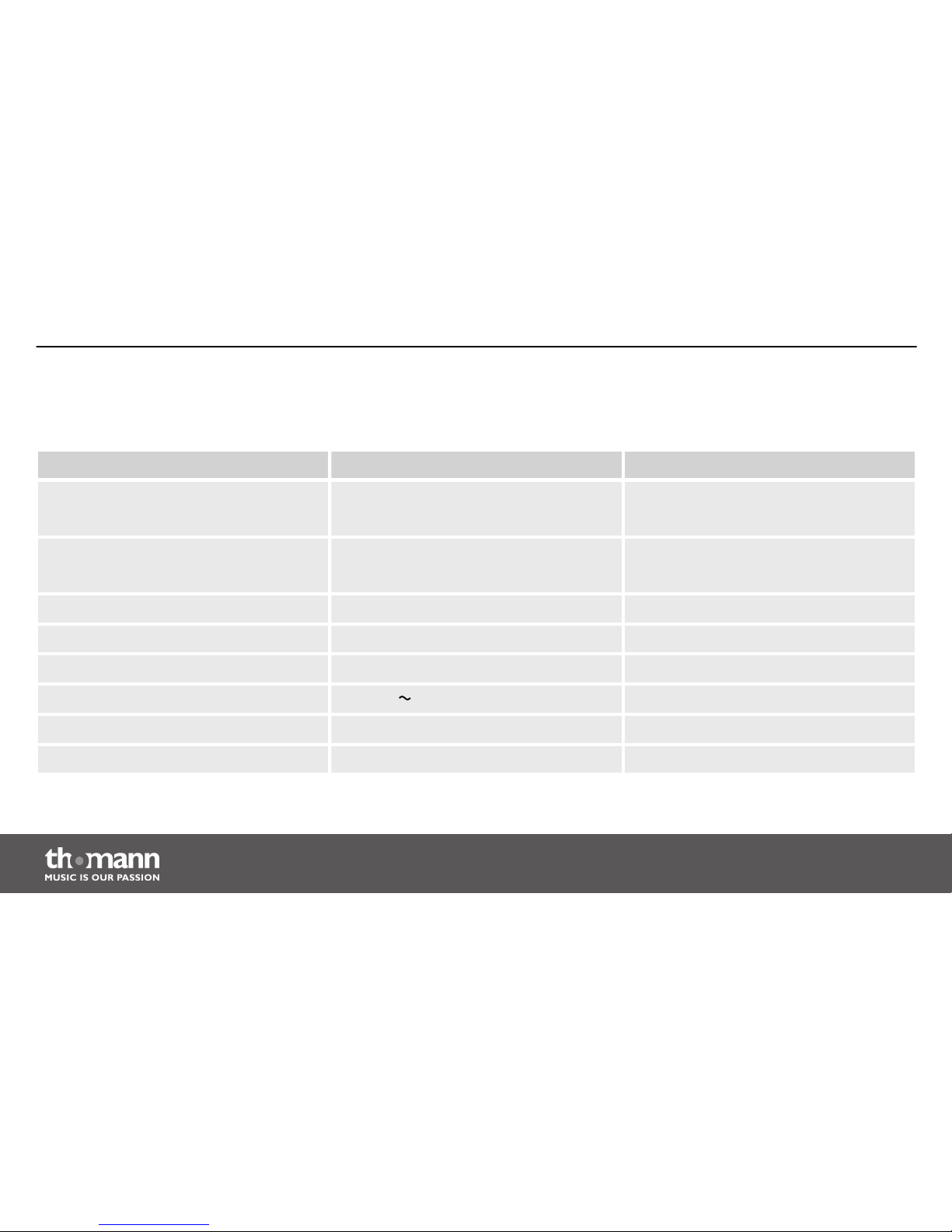
6 Technical specifications
Miniray subwoofer Miniray satellite speakers
Output power 400 W (RMS),
800 W (Peak)
---
Power handling --- 2 × 200 W (RMS)
400 W (Peak)
Impedance --- 4 Ω
Frequency response 48 Hz to 140 Hz 140 Hz to 19 kHz
Sound pressure level 96 dB (122 dB max.) 98 dB (121 dB max.)
Operating supply voltage
AC 230 V , 50/60 Hz
---
Dimensions (W × H × D) 345 mm × 490 mm × 470 mm 115 mm × 485 mm × 150 mm
Weight 19 kg 3 kg
Technical specifications
PA system
24
Page 25

7 Plug and connection assignment
This chapter will help you select the right cables and plugs to connect your valuable equip‐
ment in such a way that a perfect sound experience is ensured.
Please note these advices, because especially in ‘Sound & Light’ caution is indicated: Even if a
plug fits into the socket, an incorrect connection may result in a destroyed power amp, a short
circuit or ‘just’ in poor transmission quality!
Unbalanced transmission is mainly used in semi-professional environment and in hifi use.
Instrument cables with two conductors (one core plus shielding) are typical representatives of
the unbalanced transmission. One conductor is ground and shielding while the signal is trans‐
mitted through the core.
Unbalanced transmission is susceptible to electromagnetic interference, especially at low
levels, such as microphone signals and when using long cables.
In a professional environment, therefore, the balanced transmission is preferred, because this
enables an undisturbed transmission of signals over long distances. In addition to the conduc‐
tors ‘Ground’ and ‘Signal’, in a balanced transmission a second core is added. This also transfers
the signal, but phase-shifted by 180°.
Introduction
Balanced and unbalanced trans‐
mission
Plug and connection assignment
Miniray
25
Page 26
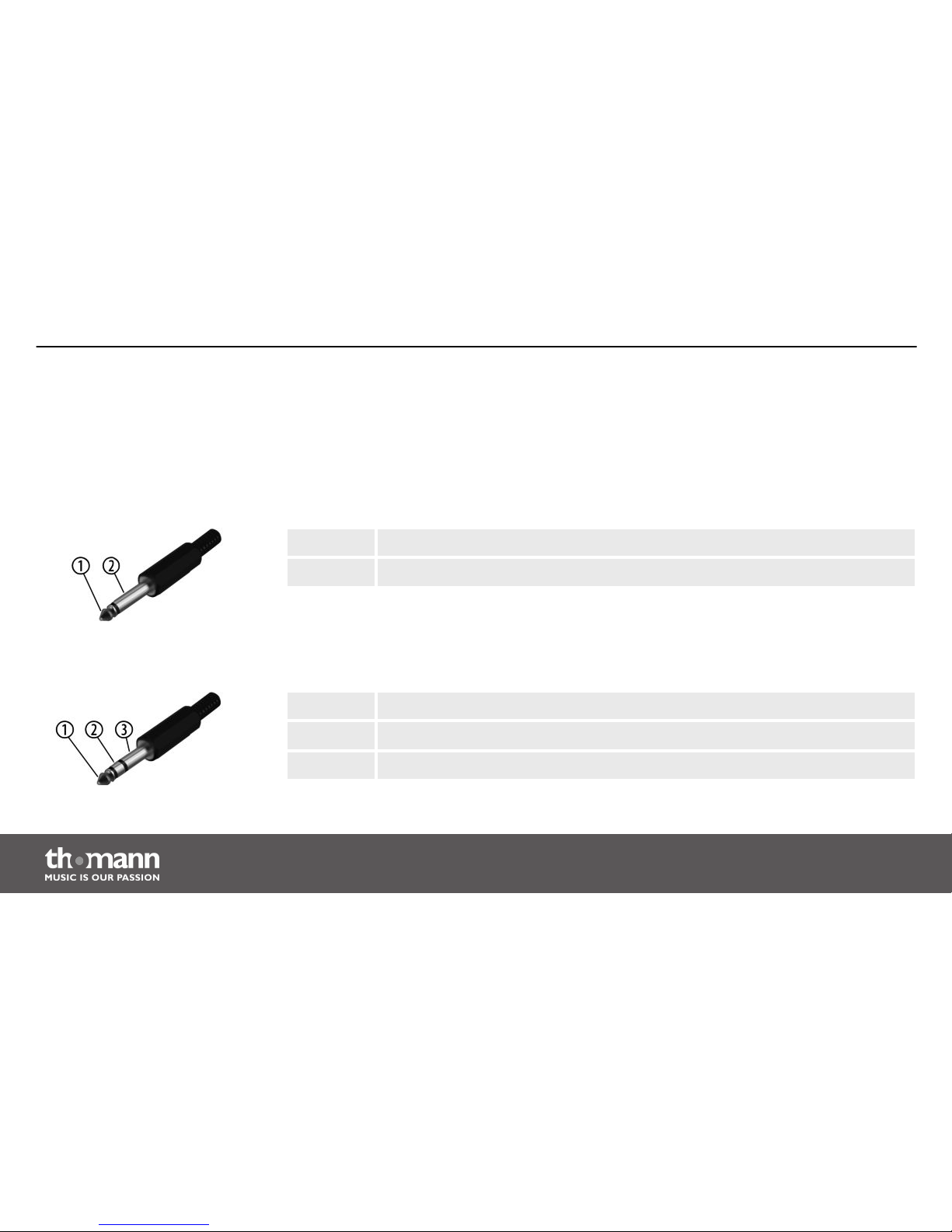
Since the interference affects both cores equally, by subtracting the phase-shifted signals, the
interfering signal is completely neutralized. The result is a pure signal without any noise inter‐
ference.
1 Signal
2 Ground, shielding
1 Signal (in phase, +)
2 Signal (out of phase, –)
3 Ground
1/4" TS phone plug (mono,
unbalanced)
1/4" TRS phone plug (mono, bal‐
anced)
Plug and connection assignment
PA system
26
Page 27
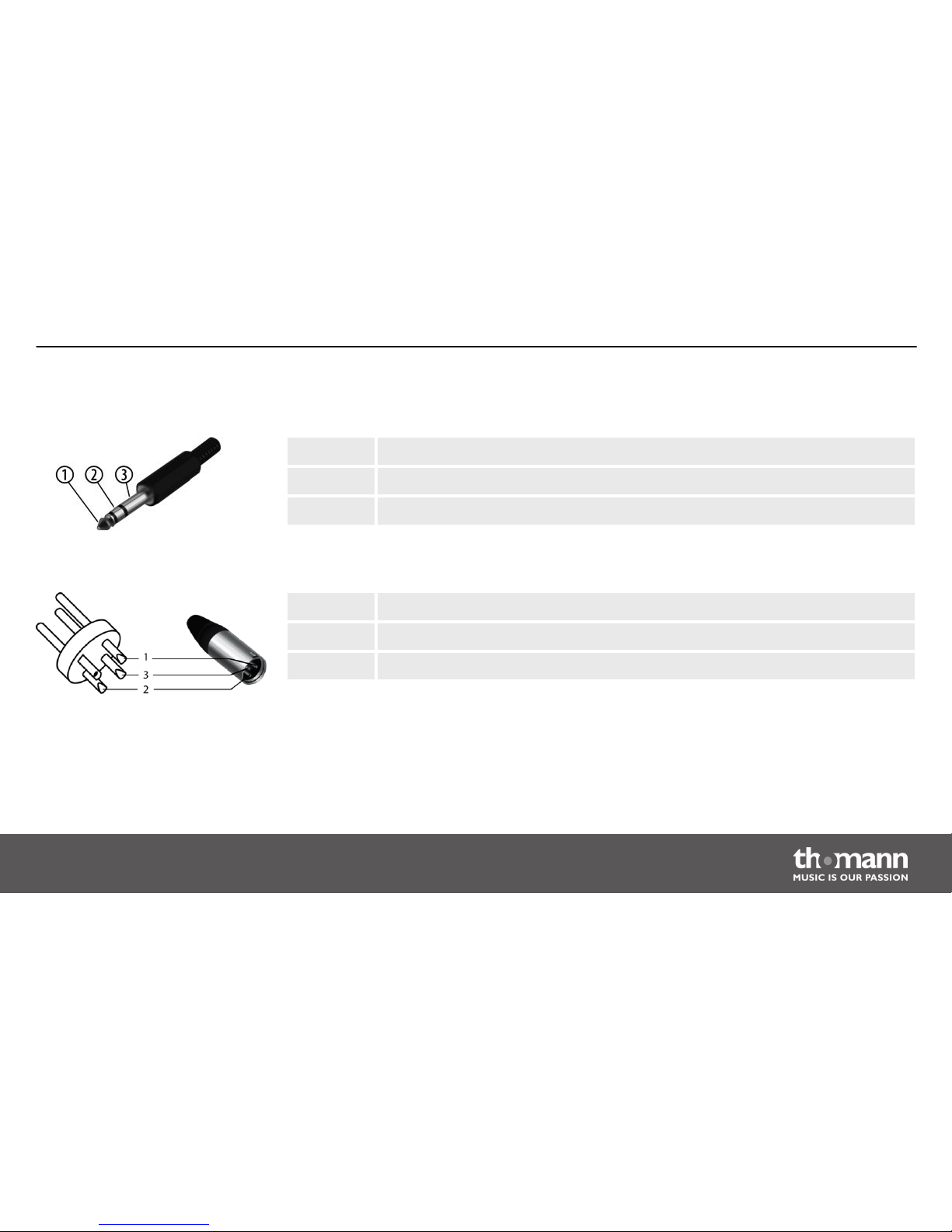
1 Signal (left)
2 Signal (right)
3 Ground
1 Ground, shielding
2 Signal (in phase, +)
3 Signal (out of phase, –)
1/4" TRS phone plug (stereo,
unbalanced)
XLR plug (balanced)
Plug and connection assignment
Miniray
27
Page 28
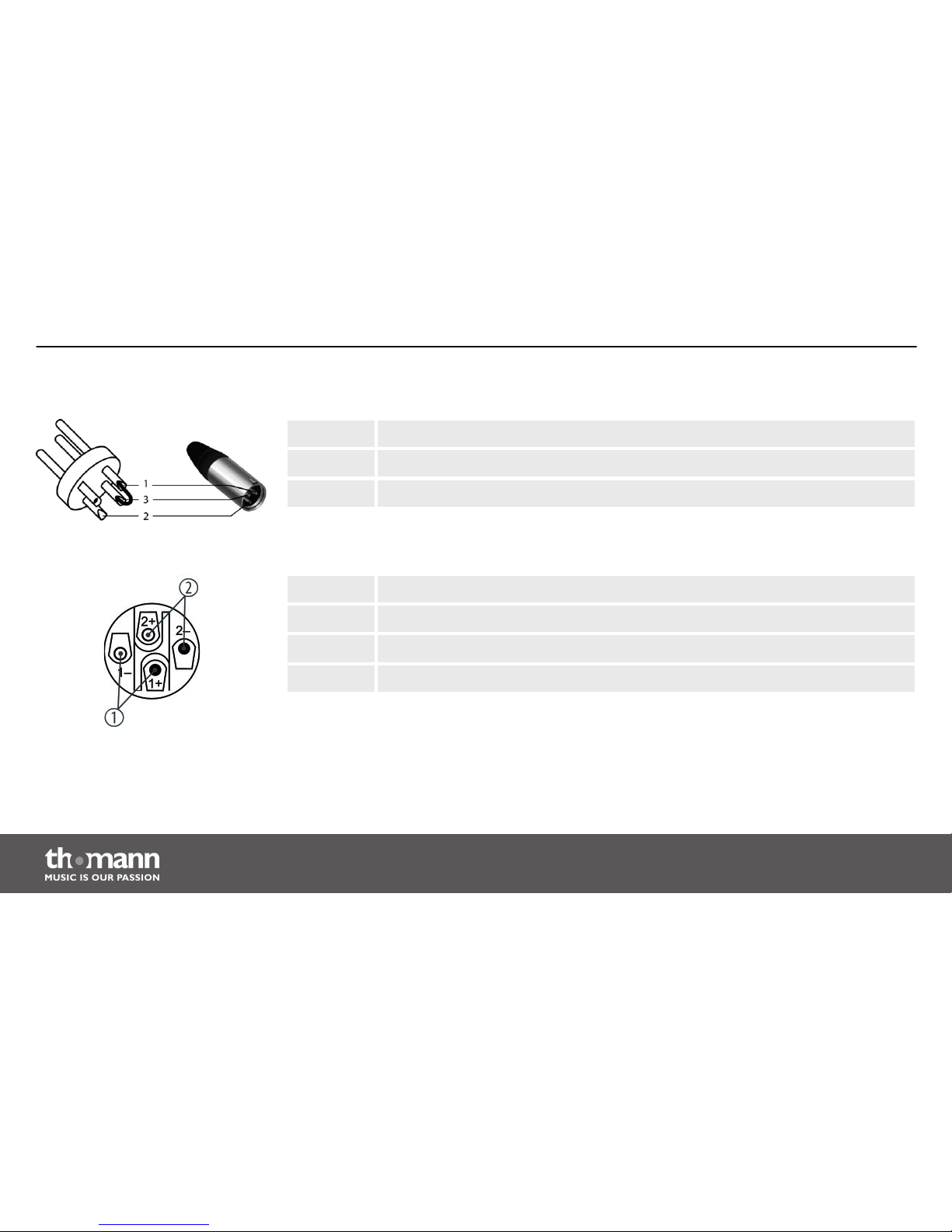
1 Ground, shielding
2 Signal
3 Bridged to pin 1
1, + Signal 1 (in phase)
1, – Signal 1 (180 degree phase shift)
2, + Signal 2 (in phase)
2, – Signal 2 (180 degree phase shift)
XLR plug (unbalanced)
NL4 mounting connectors
Plug and connection assignment
PA system
28
Page 29
8 Protecting the environment
For the transport and protective packaging, environmentally friendly materials have been
chosen that can be supplied to normal recycling.
Ensure that plastic bags, packaging, etc. are properly disposed of.
Do not just dispose of these materials with your normal household waste, but make sure that
they are collected for recycling. Please follow the notes and markings on the packaging.
This product is subject to the European Waste Electrical and Electronic Equipment Directive
(WEEE). Do not dispose with your normal household waste.
Dispose of this device through an approved waste disposal firm or through your local waste
facility. When discarding the device, comply with the rules and regulations that apply in your
country. If in doubt, consult your local waste disposal facility.
Disposal of the packaging mate‐
rial
Disposal of your old device
Protecting the environment
Miniray
29
Page 30

Notes
PA system
30
Page 31

Page 32

Musikhaus Thomann e.K. · Treppendorf 30 · 96138 Burgebrach · Germany · www.thomann.de
 Loading...