

Page 1
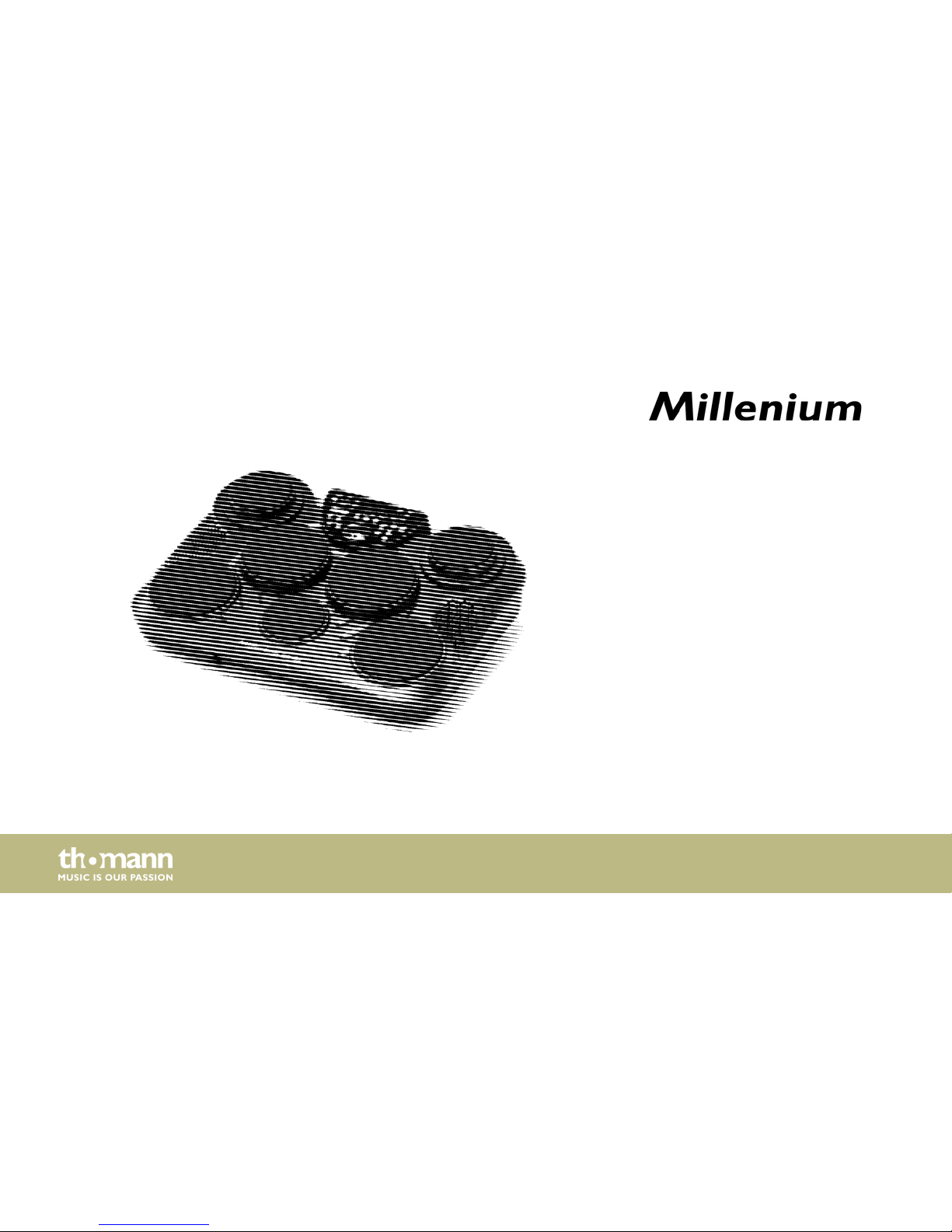
MD-90
mobile drum
user manual
Page 2

Musikhaus Thomann
Thomann GmbH
Hans-Thomann-Straße 1
96138 Burgebrach
Germany
Telephone: +49 (0) 9546 9223-0
E-mail: [email protected]
Internet: www.thomann.de
20.07.2015, ID: 275219
Page 3
Table of contents
1 General notes............................................................................................................................................... 5
2 Safety instructions..................................................................................................................................... 7
3 Features....................................................................................................................................................... 11
4 Installation.................................................................................................................................................. 12
5 Operating elements............................................................................................................................... 13
6 Functions..................................................................................................................................................... 19
7 In and outputs........................................................................................................................................... 30
8 Technical specifications....................................................................................................................... 32
9 Cleaning....................................................................................................................................................... 34
10 Protecting the environment.............................................................................................................. 35
11 Appendix..................................................................................................................................................... 37
11.1 Voice list............................................................................................................................................ 37
11.2 Kit list.................................................................................................................................................. 47
11.3 Song list............................................................................................................................................. 48
Table of contents
MD-90
3
Page 4
11.4 MIDI implementation................................................................................................................... 54
Table of contents
mobile drum
4
Page 5
1 General notes
This user manual contains important information on safe operation of the device. Read and
follow all safety notes and all instructions. Save this manual for future reference. Make sure
that it is available to all persons using this device. If you sell the device to other users, be sure
that they also receive this manual.
Our products are subject to a process of continuous development. We therefore reserve the
right to make changes without notice.
This section provides an overview of the symbols and signal words used in this user manual.Symbols and signal words
General notes
MD-90
5
Page 6
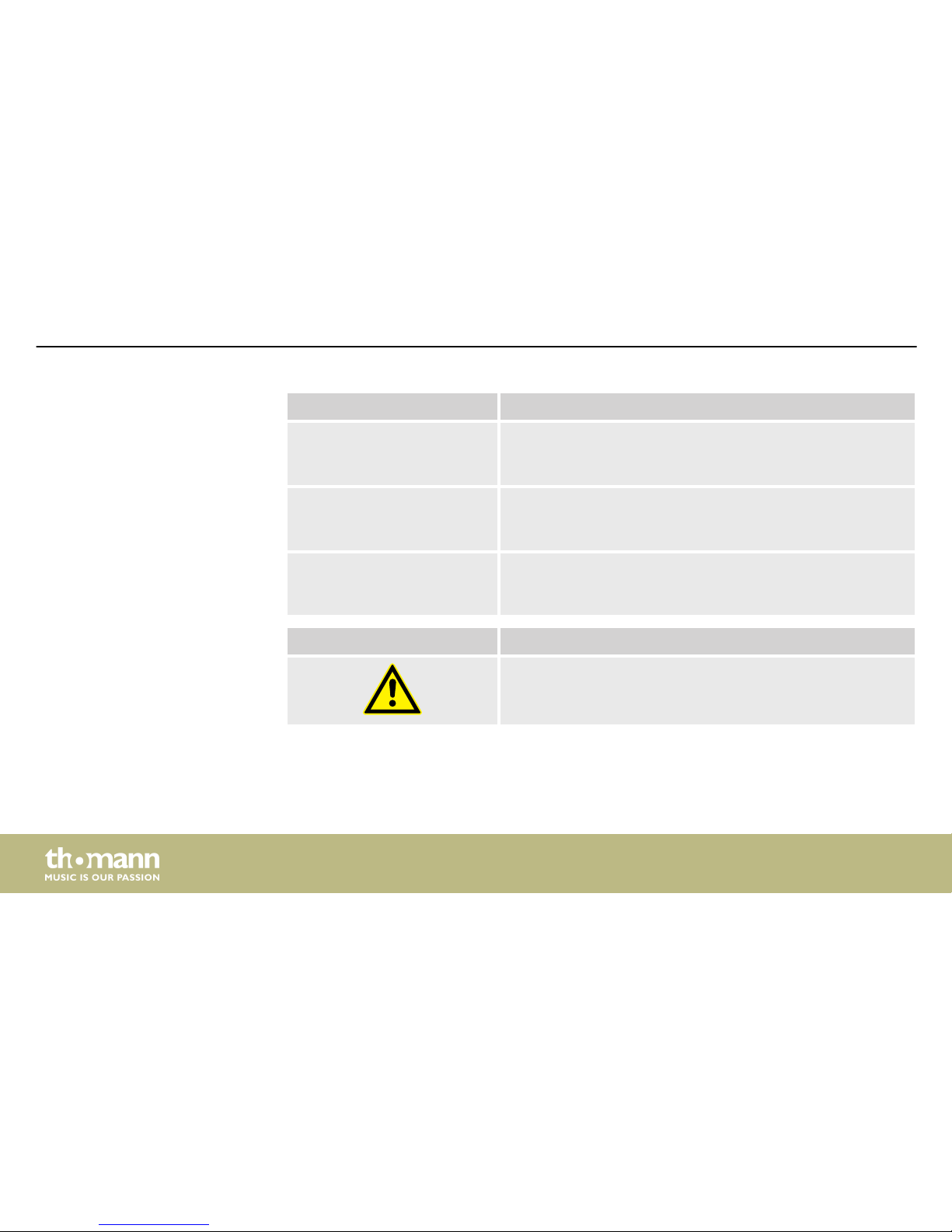
Signal word Meaning
DANGER! This combination of symbol and signal word indicates an
immediate dangerous situation that will result in death or
serious injury if it is not avoided.
CAUTION! This combination of symbol and signal word indicates a pos‐
sible dangerous situation that can result in minor injury if it
is not avoided.
NOTICE! This combination of symbol and signal word indicates a pos‐
sible dangerous situation that can result in material and
environmental damage if it is not avoided.
Warning signs Type of danger
Warning – danger zone.
General notes
mobile drum
6
Page 7
2 Safety instructions
Use the device only as described in this user manual. Any other use or use under other oper‐
ating conditions is considered to be improper and may result in personal injury or property
damage. No liability will be assumed for damages resulting from improper use.
This device may be used only by persons with sufficient physical, sensorial, and intellectual
abilities and having corresponding knowledge and experience. Other persons may use this
device only if they are supervised or instructed by a person who is responsible for their safety.
DANGER!
Danger for children
Ensure that plastic bags, packaging, etc. are disposed of properly and are not
within reach of babies and young children. Choking hazard!
Ensure that children do not detach any small parts (e.g. knobs or the like) from
the unit. They could swallow the pieces and choke!
Never let children unattended use electrical devices.
Intended use
Safety
Safety instructions
MD-90
7
Page 8
CAUTION!
Possible hearing damage
With loudspeakers or headphones connected, the device can produce volume
levels that may cause temporary or permanent hearing impairment.
Do not operate the device permanently at a high volume level. Decrease the
volume level immediately if you experience ringing in your ears or hearing
impairment.
NOTICE!
Operating conditions
This device has been designed for indoor use only. To prevent damage, never
expose the device to any liquid or moisture. Avoid direct sunlight, heavy dirt, and
strong vibrations.
Safety instructions
mobile drum
8
Page 9
NOTICE!
External power supply
The device is powered by an external power supply. Before connecting the
external power supply, ensure that the input voltage (AC outlet) matches the
voltage rating of the device and that the AC outlet is protected by a residual cur‐
rent circuit breaker. Failure to do so could result in damage to the device and pos‐
sibly the user.
Unplug the external power supply before electrical storms occur and when the
device is unused for long periods of time to reduce the risk of electric shock or
fire.
NOTICE!
Risk of fire due to incorrect polarity
Incorrectly inserted batteries may destroy the device or the batteries.
Ensure that proper polarity is observed when inserting batteries.
Safety instructions
MD-90
9
Page 10
NOTICE!
Possible damage by leaking batteries
Leaking batteries can cause permanent damage to the device.
Take batteries out of the device if it is not going to be used for a longer period.
Safety instructions
mobile drum
10
Page 11
3 Features
n 7 pressure-sensitive drum pads, connectors for kick and hi-hat pedals
n Three-digit LED display
n Headphones (1/4" socket) and USB connection (MIDI IN/OUT)
n 25 predefined drum kits, 5 user drum kits
n 215 percussion voices, 128 GM voices, 8 MB voice data
n 100 songs (80 styles, 20 songs)
n 1 demo song
n Recording track
Features
MD-90
11
Page 12
4 Installation
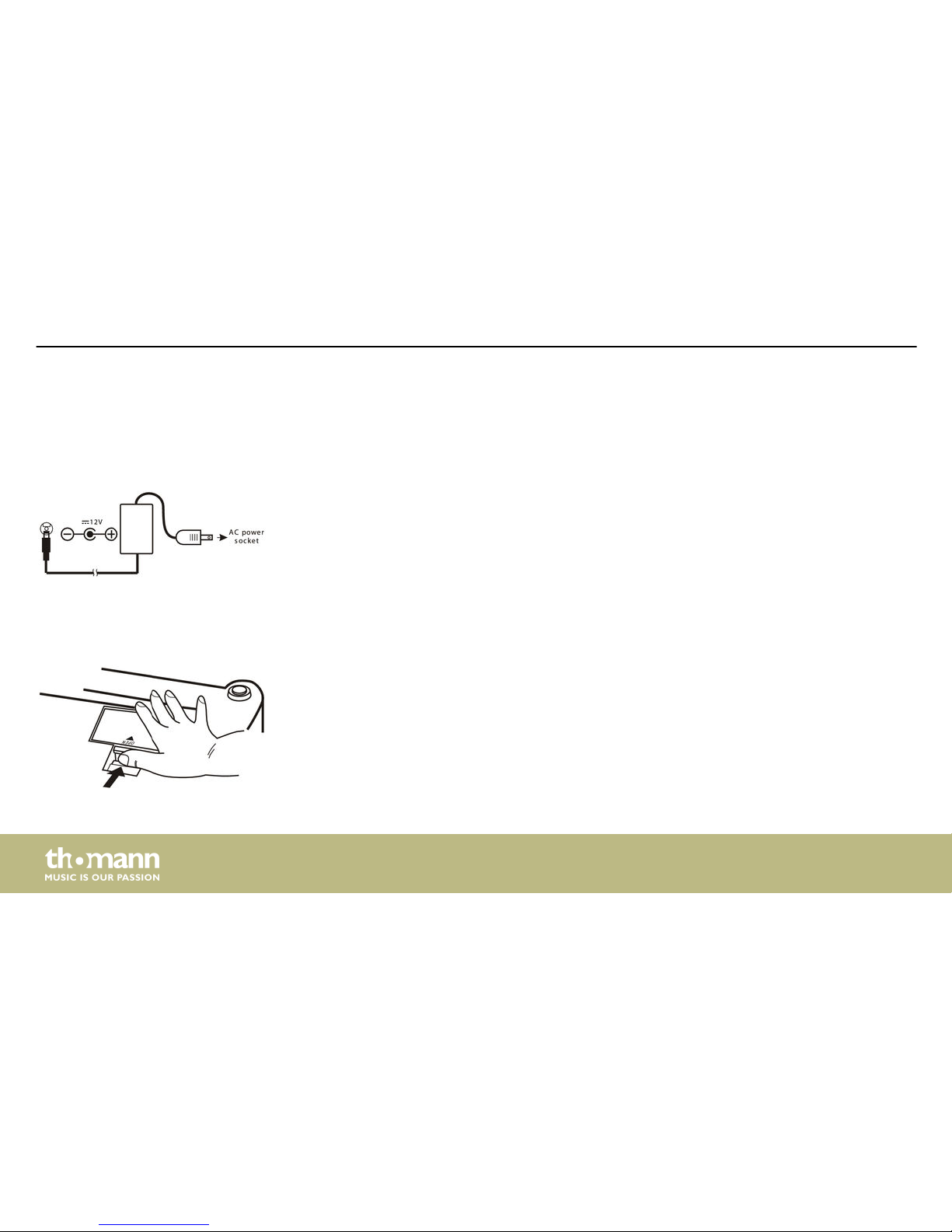
Connect the power adaptor to the 12 V input of the device and then insert the mains plug into
a wall outlet.
To insert or replace the batteries flip over the device, press lightly on the battery compartment
cover and slide it in arrow direction. Take off the lid. Replace or insert the batteries observing
the pole marking and slide the cover back into its original position until it clicks into place.
Connecting the power adaptor
Changing the batteries
Installation
mobile drum
12
Page 13
5 Operating elements
Front panel
Operating elements
MD-90
13
Page 14
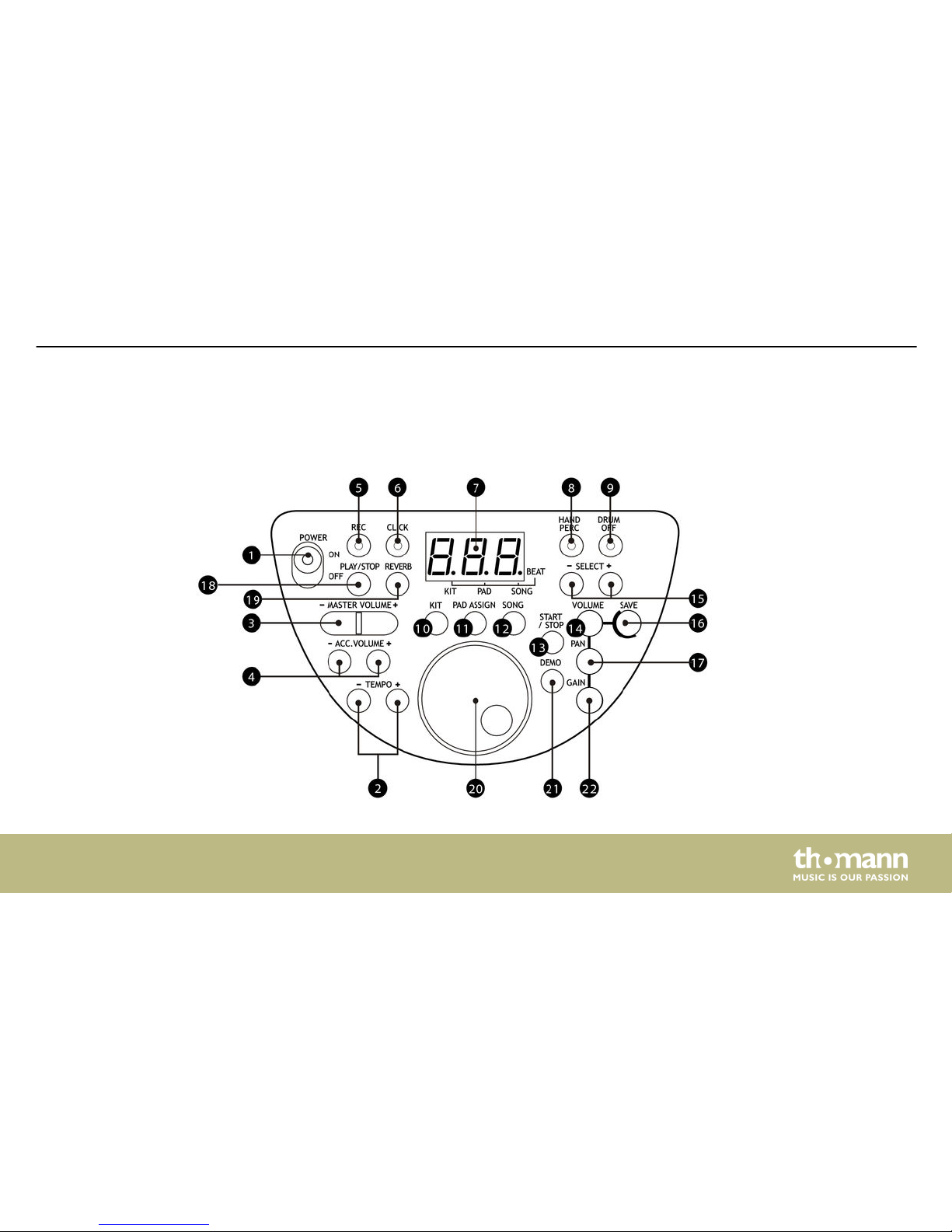
1 [POWER] switch
To switch the device on or off.
2 [TEMPO –/+] buttons
To adjust the playback speed.
3 [MASTER VOLUME –/+] buttons
To adjust the overall volume.
4 [ACC.VOLUME –/+] buttons
To adjust the volume of the accompaniment tracks.
5 [REC] button with LED indicator
To start or stop the recording function.
6 [CLICK] button with LED indicator
To switch the metronome function on or off.
Operating elements
mobile drum
14
Page 15
7 Three-digit LED display
The display shows all parameters of the respectively opened menu.
8 [HAND PERC] button with LED indicator
To switch to the ‘Hand Percussion’ mode.
9 [DRUM OFF] button with LED indicator
To mute the drum track.
10 [KIT] button
To open the ‘KIT’ menu.
11 [PAD ASSIGN] button
To open the ‘VOICE’ and ‘VOLUME’ menu.
12 [SONG] button
To open the ‘SONG’ menu.
13 [START/STOP] button
Playback function for demo songs.
Operating elements
MD-90
15
Page 16
14 [VOLUME] button
To adjust the pad volume.
15 [SELECT –/+] buttons
To set the desired values (kit no., voice no., song no., …).
16 [SAVE] button
To save the current settings as a user kit.
17 [PAN] button
To customize the PAN assignment of each pad.
18 [PLAY/STOP] button
Playback function for recording tracks.
19 [REVERB] button
To adjust the reverb level.
20 Jog wheel
To adjust the desired values (kit no., voice no., song no., …).
Operating elements
mobile drum
16
Page 17
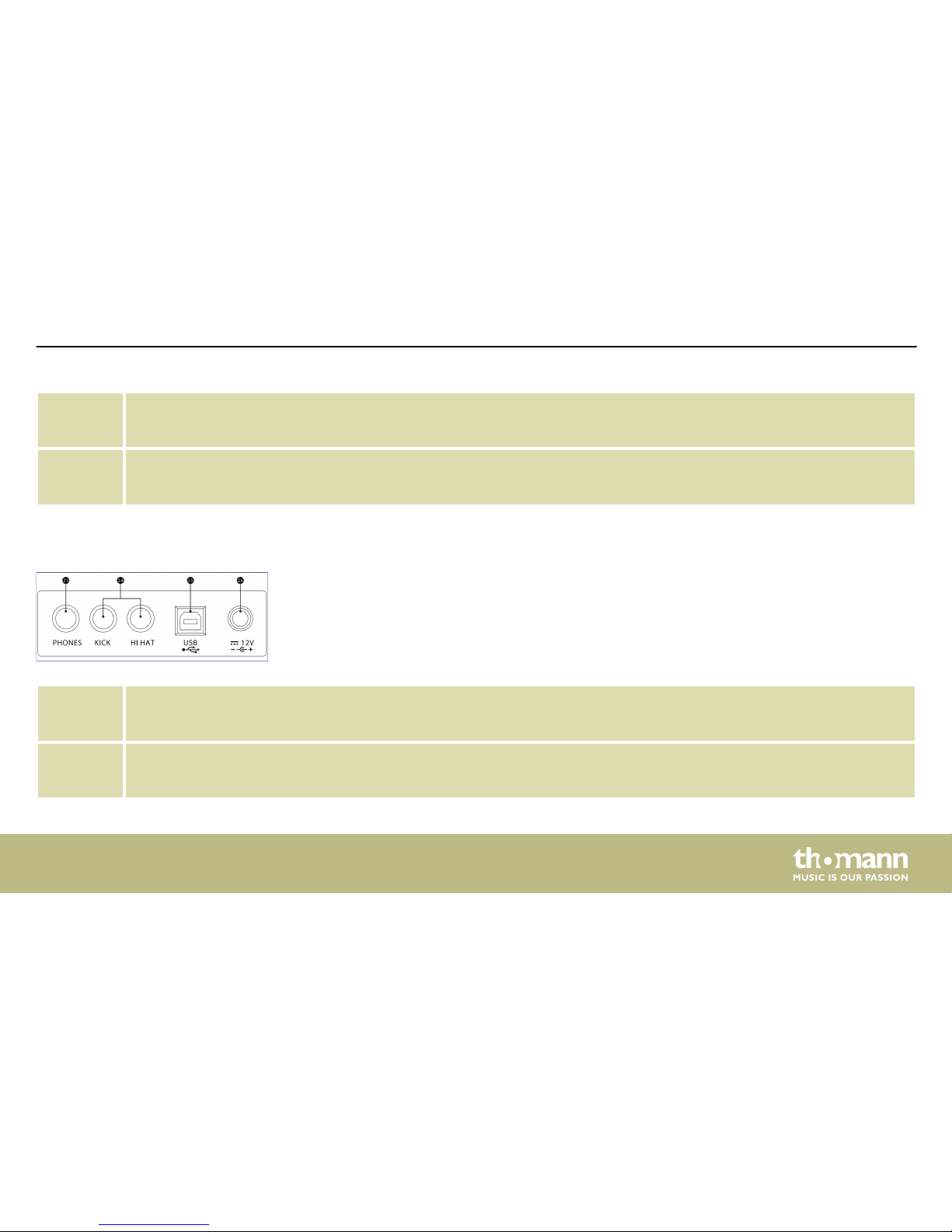
21 [DEMO] button
Playback function for demo songs.
22 [GAIN] button
To adjust the pad gain.
23 PHONES socket
For the connection of headphones.
24 KICK and HI HAT sockets
For the connection of the kick and hi-hat pedals.
Rear panel
Operating elements
MD-90
17
Page 18
25 USB connector
To connect external devices.
26 12V connector for operating voltage supply.
Connect the power adaptor here.
Operating elements
mobile drum
18
Page 19
6 Functions
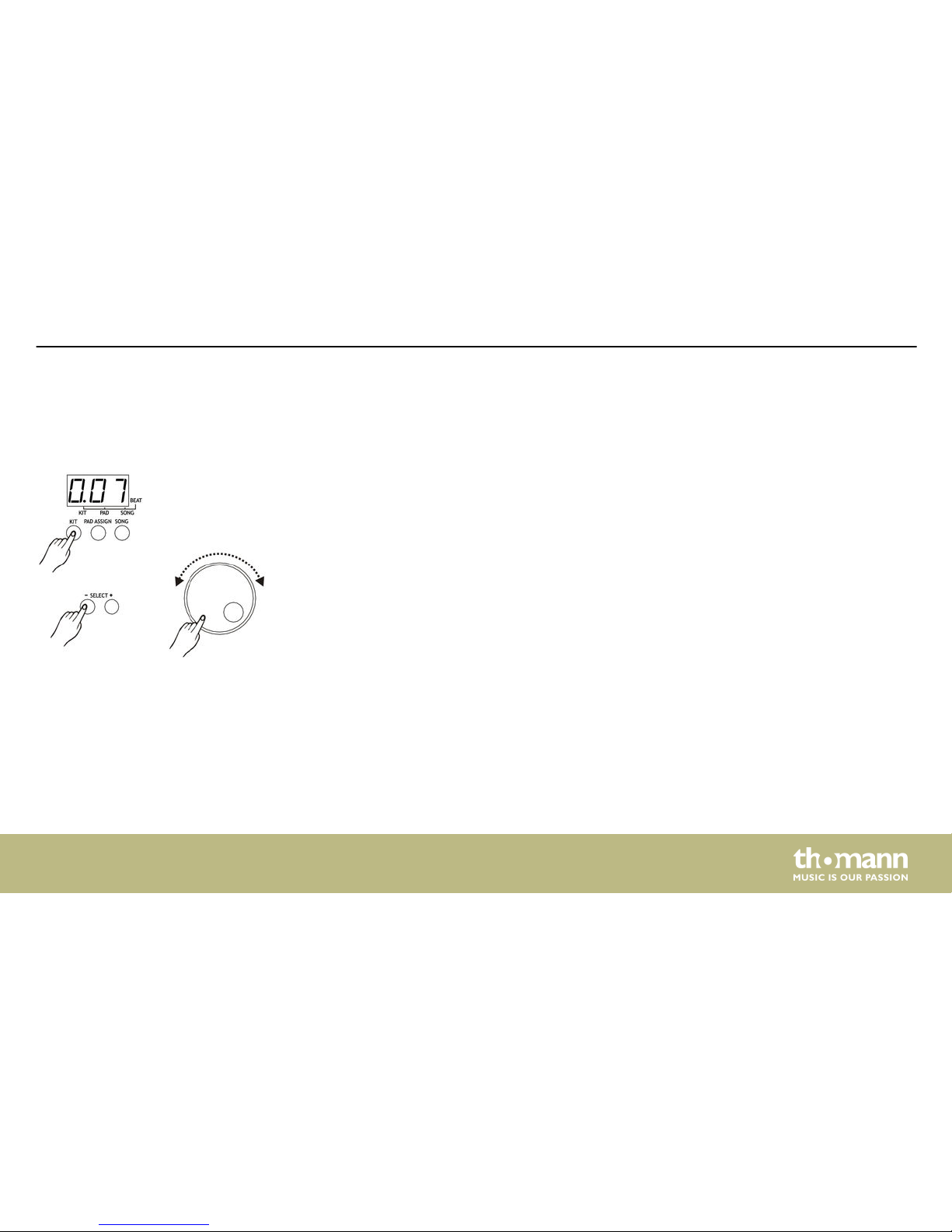
Upon switching on, the device activates the ‘KIT’ menu by default. The default value is ‘001’ .
Press the [KIT] button to open the ‘KIT’ menu. The control LED of the button lights up and the
three-digit LED display shows the current kit number. Then you can select the desired kit (1…
30, loop) using the jog wheel or the [SELECT –/+] buttons.
Selecting a drum kit
Functions
MD-90
19
Page 20
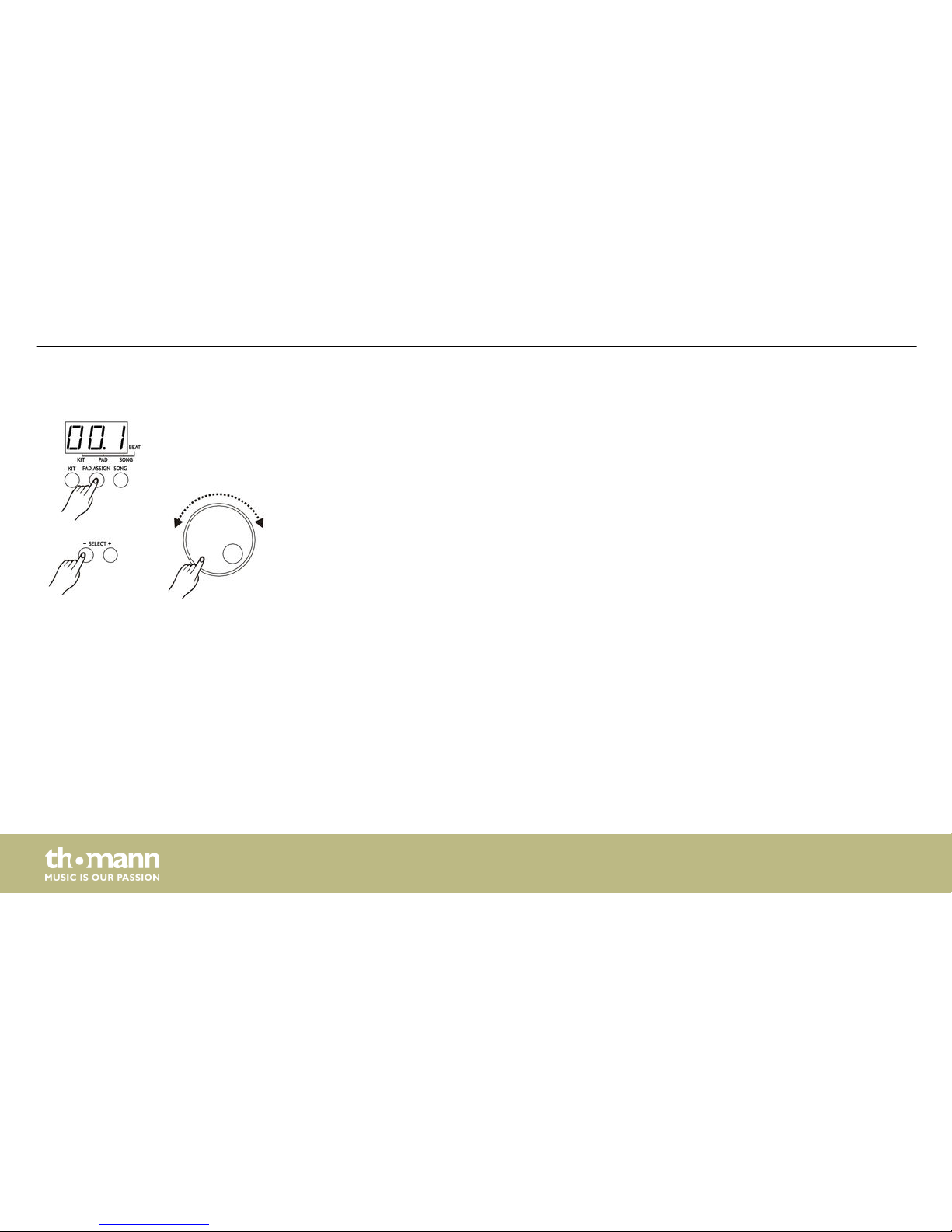
Press the [PAD ASSIGN] button to open the PAD ASSIGN menu. The default value corresponds
to the voice number that is assigned to the crash pad in the respective kit, e.g. ‘96’ in kit ‘001’.
The control LED of the button lights up and the three-digit LED display shows the voice
number that is assigned to the activated pad (activation by pressing a button or hitting the
pad). Then you can select the desired voice (1…215, loop) using the jog wheel or the
[SELECT –/+] buttons.
Selecting a pad voice
Functions
mobile drum
20
Page 21
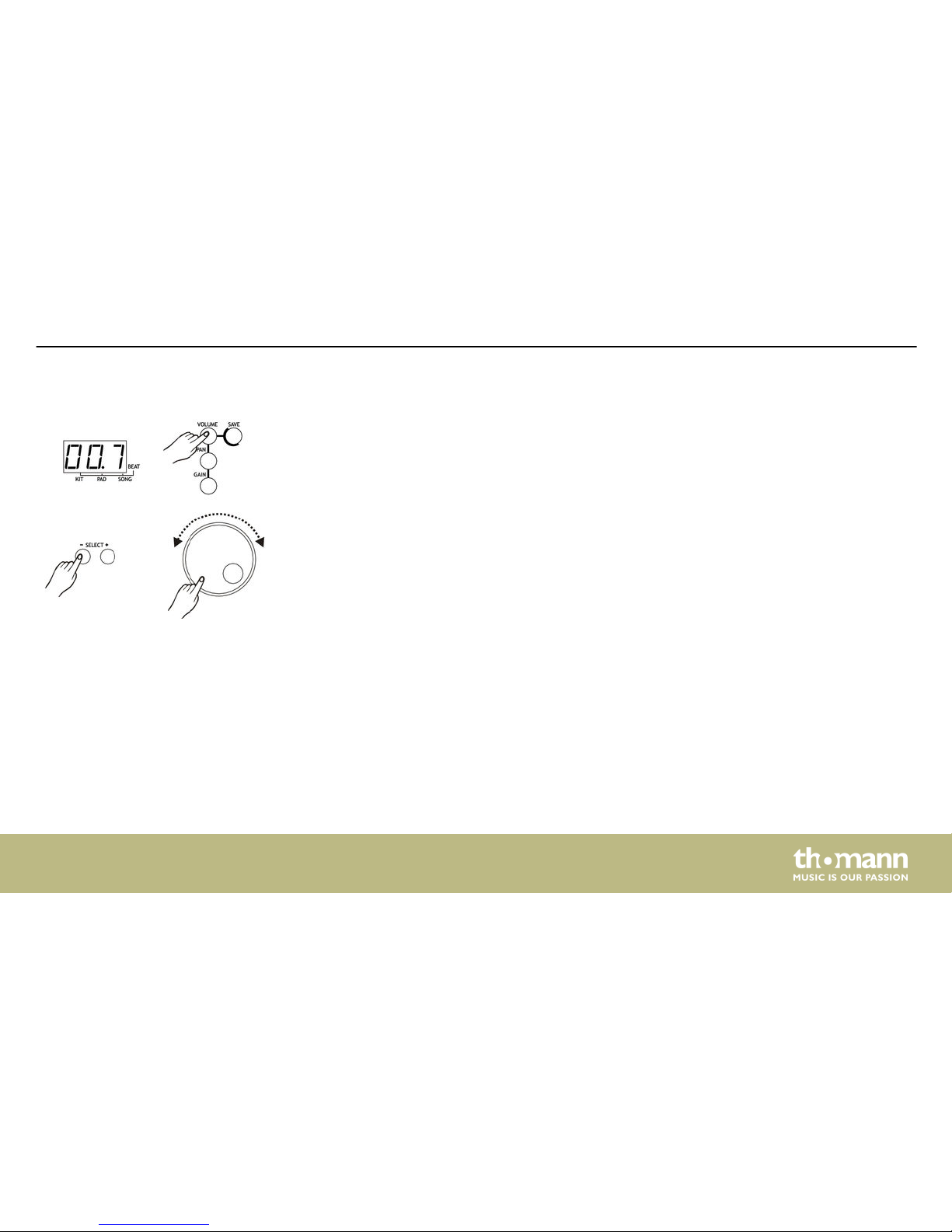
Press the [VOLUME] button to open the PAD ASSIGN menu.
The control LED of the button lights up and the three-digit LED display shows the volume
value of the activated pad (activation by pressing a button or hitting the pad). Then you can
adjust the pad volume (0…9, loop) using the jog wheel or the [SELECT –/+] buttons.
Selecting the pad volume
Functions
MD-90
21
Page 22
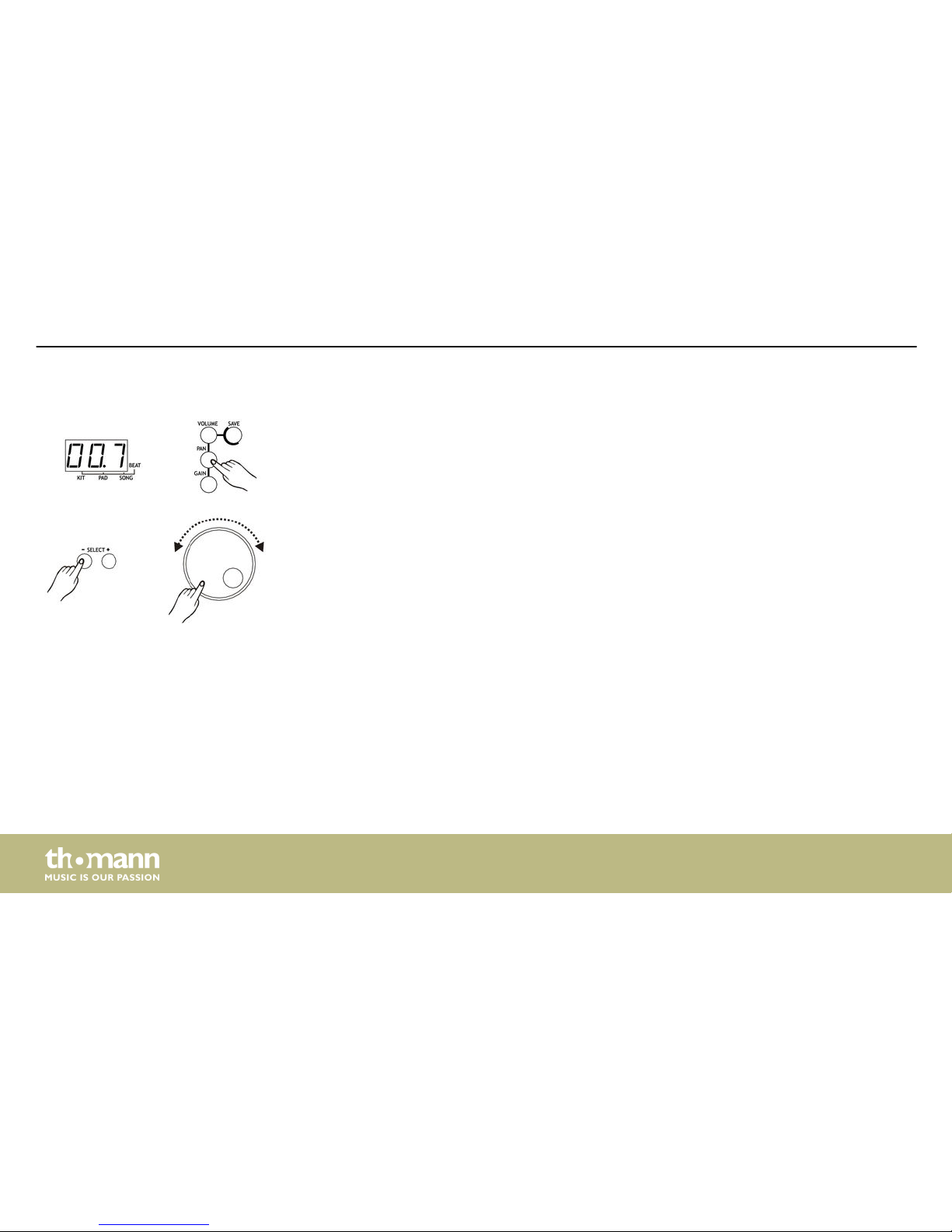
Press the [PAN] button to open the PAD ASSIGN menu.
The control LED of the button lights up and the three-digit LED display shows the assignment
of the activated pad (activation by pressing a button or hitting the pad). Then you can adjust
the position of the pad within the stereo panorama using the jog wheel or the [SELECT –/+]
buttons (0…9, loop).
Panorama assignment
Functions
mobile drum
22
Page 23
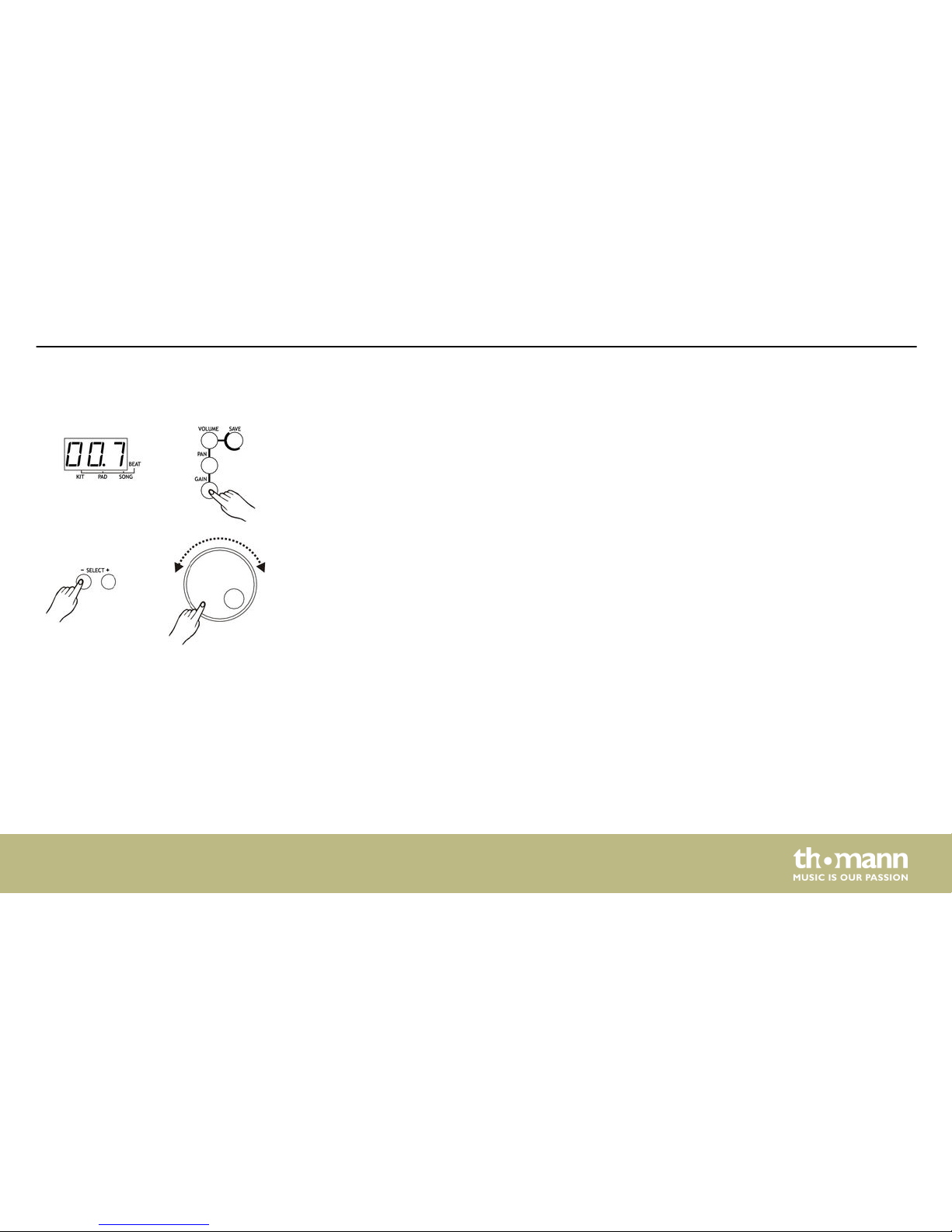
Press the [GAIN] button to open the PAD ASSIGN menu.
The control LED of the button lights up and the three-digit LED display shows the gain of the
activated pad (activation by pressing a button or hitting the pad). Then you can set the desired
gain (0…9, loop) using the jog wheel or the [SELECT –/+] buttons.
Setting the pad gain
Functions
MD-90
23
Page 24
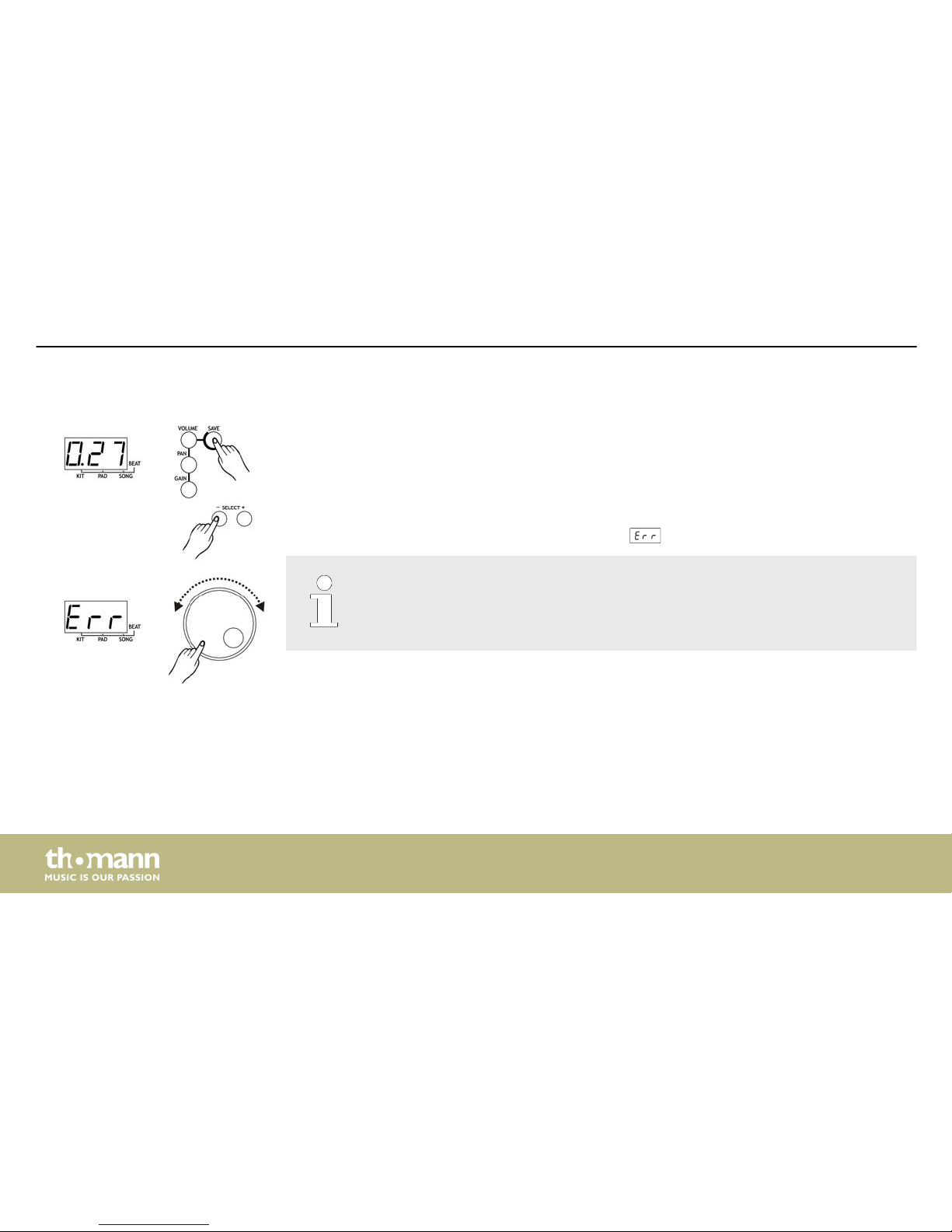
Press the [SAVE] button to open the SAVE menu. You can now assign the current settings to a
user kit number using the jog wheel or the [SELECT –/+] buttons (26…30, loop). During this
process the display value flashes on the three-digit LED display.
Press the [SAVE] button again to store the setting. When this is finished successfully, the user
kit is automatically activated via the kit menu.
If an error occurs, the three-digit LED display shows .
Any unsaved changes will be discarded by the selection of another kit.
Saving a kit
Functions
mobile drum
24
Page 25
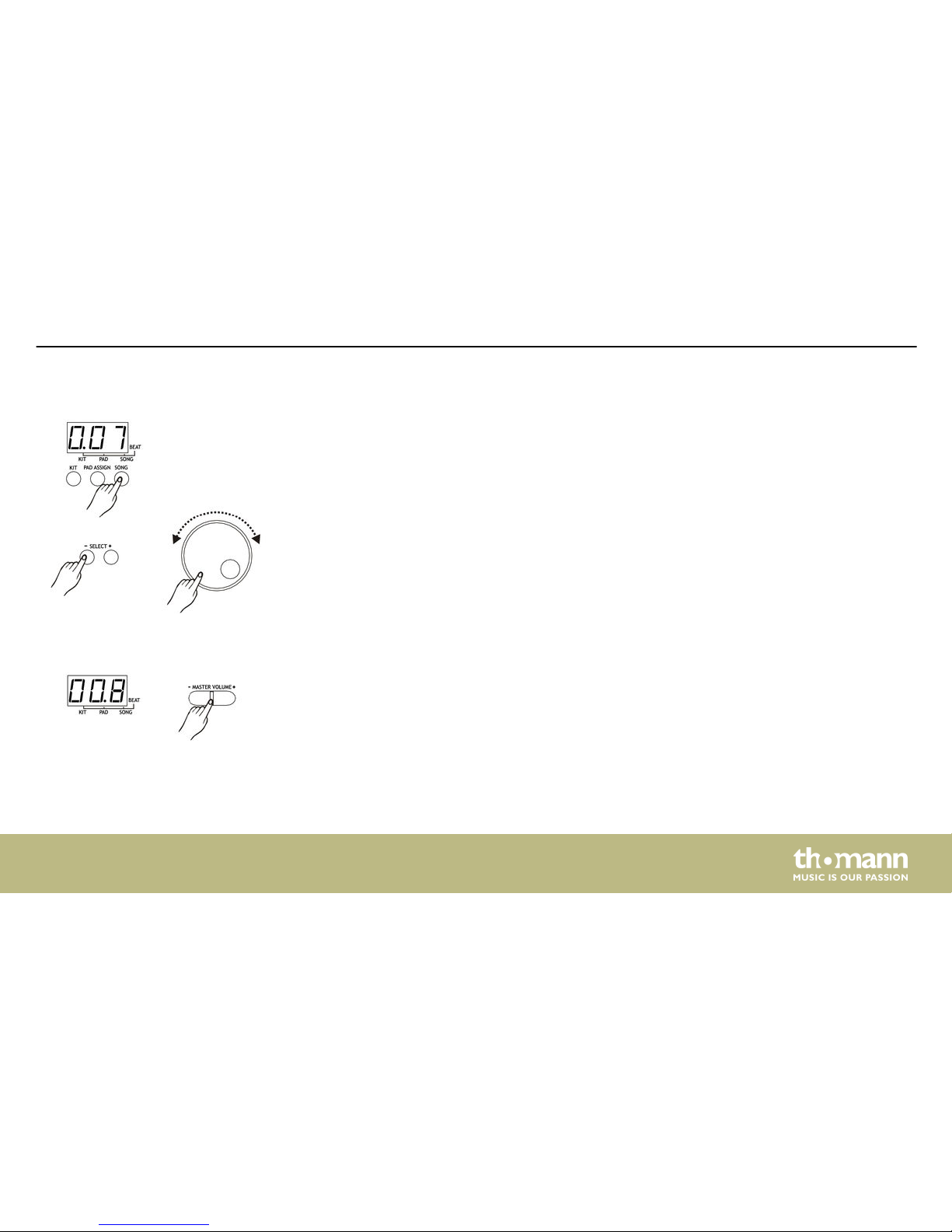
Press the [SONG] button to open the SONG menu. The default value is ‘001’ .
The control LED of the button lights up and the three-digit LED display shows the current song
number. Then you can select the desired song (1…100, loop) using the jog wheel or the
[SELECT –/+] buttons.
The first 80 songs can be played as a loop. Use the [START] and [STOP] buttons to start or pause
playback. If you skip during playback to the beginning of the following song, the current bar of
the current song will be completed first.
For each song, the parameters ‘tempo’ and ‘drum kit’ are stored in the system. The corre‐
sponding values ??are loaded automatically when you play the song.
In the main menu, the three-digit LED display shows the main volume in ‘Lxx’ format. Using
the [MASTER VOLUME –/+] buttons you can adjust the volume stepwise from 0…9.
The selected value is automatically saved.
Song playback
Main volume
Functions
MD-90
25
Page 26
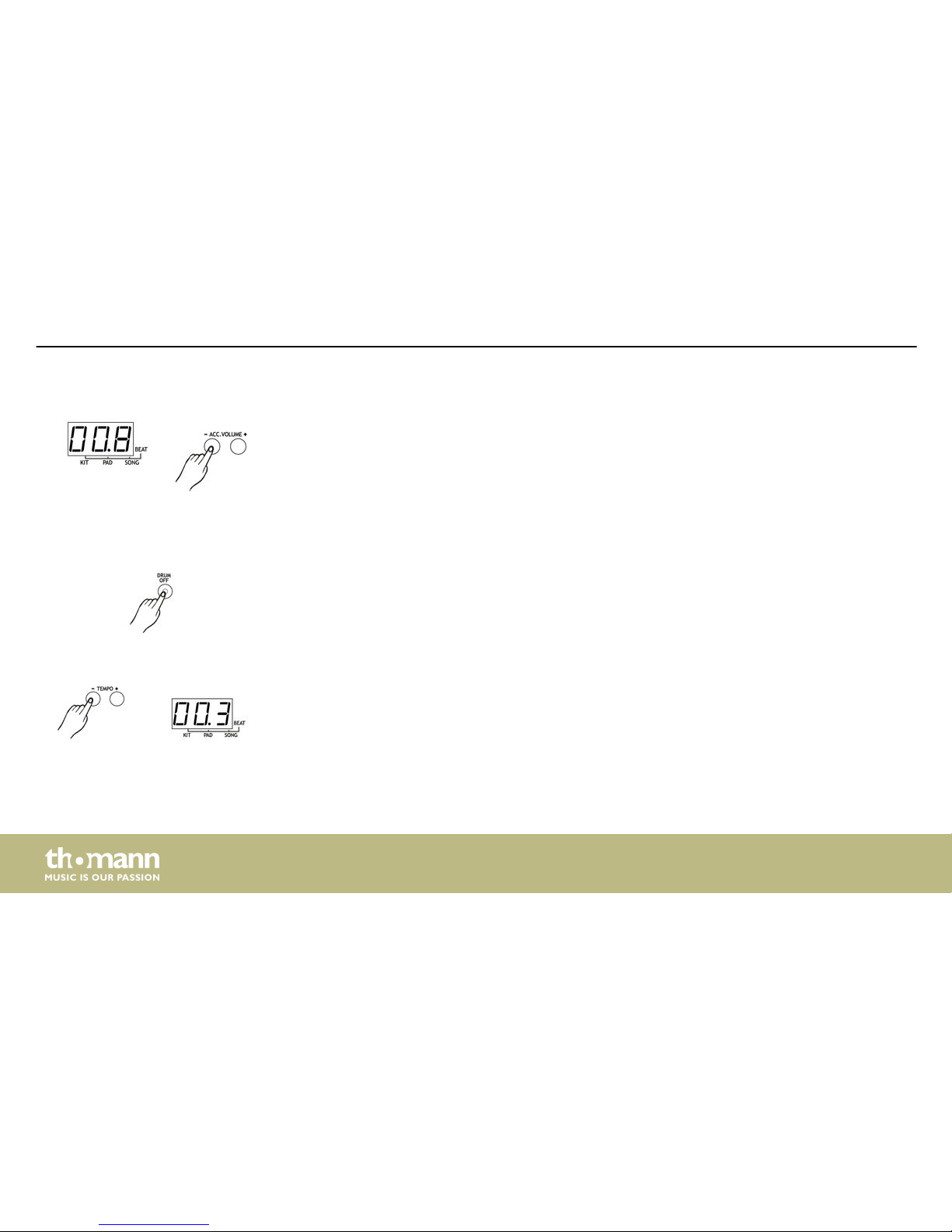
In ACC.VOLUME menu, the three-digit LED display shows the accompaniment volume in ‘Axx’
format. Using the jog wheel or the [SELECT –/+] buttons you can adjust the accompaniment
volume stepwise from 0…9.
The selected value is automatically saved.
Using the [DRUM OFF] button you can mute or unmute the drum track during the playback of
songs. The control LED of the button lights up when this function is enabled, i.e. the drum
track is muted.
Press one of the [TEMPO –/+] buttons once to enter the TEMPO menu. Use the [TEMPO –/+]
buttons to adjust the playback tempo (click and song) stepwise in a range of 30…280. To
resume normal playback tempo press both buttons simultaneously.
Accompaniment volume
Muting the drum track
Tempo
Functions
mobile drum
26
Page 27
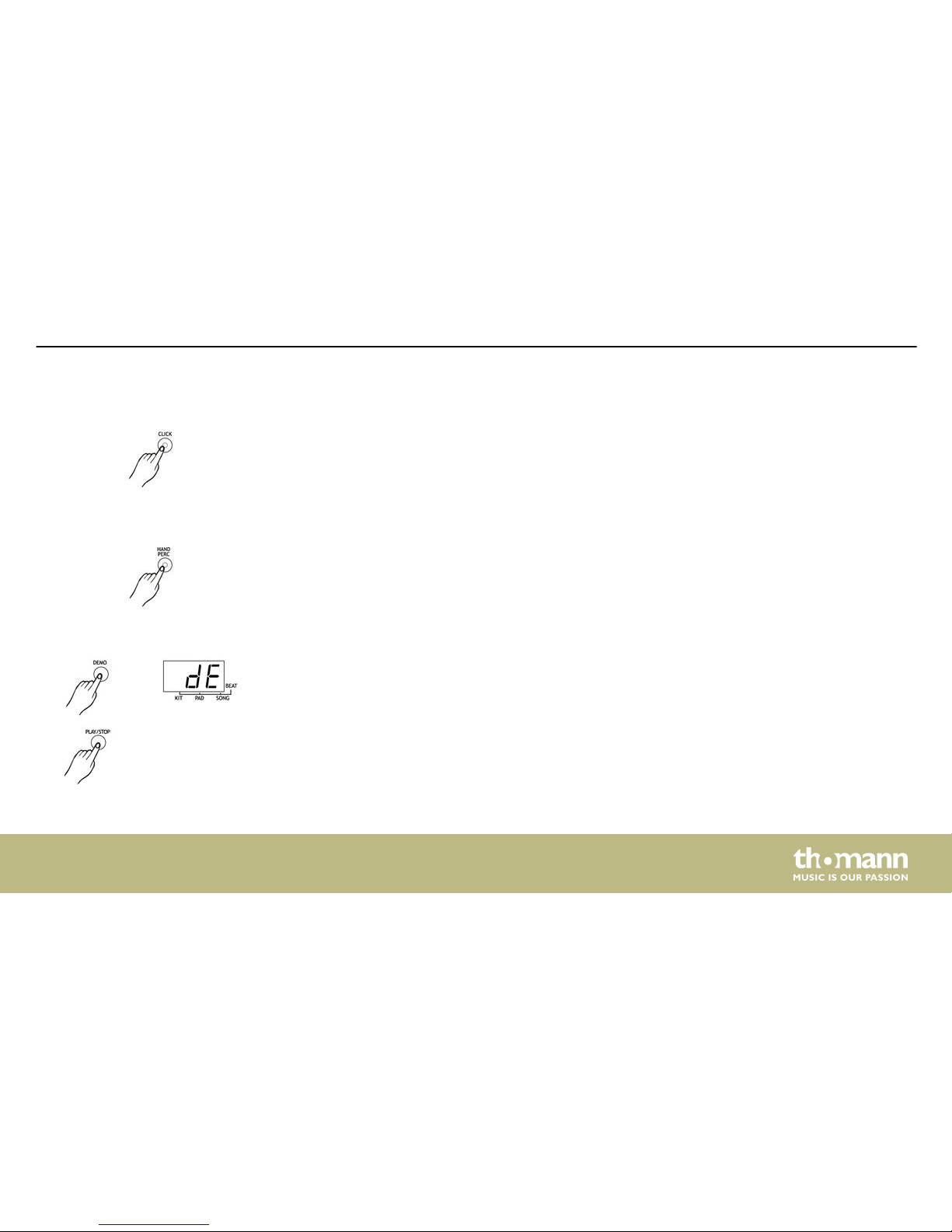
During song playback, the beat indicator (control LED) is automatically activated. Press the
[CLICK] button once to enable a human voice counting. Press twice to enable the click sound.
Press the [CLICK] button again to turn the metronome off.
Use the [HAND PERC] button to enter the Hand Percussion mode (song no. 5, kit no. 21). The
control LED of the button lights up when this function is enabled.
Use the [DEMO] button to enter the Demo mode. The three-digit LED display shows the value
‘dE’ . Use the [START] and [STOP] buttons to start or pause the playback of demo songs.
Metronome
Hand percussion
Demo
Functions
MD-90
27
Page 28
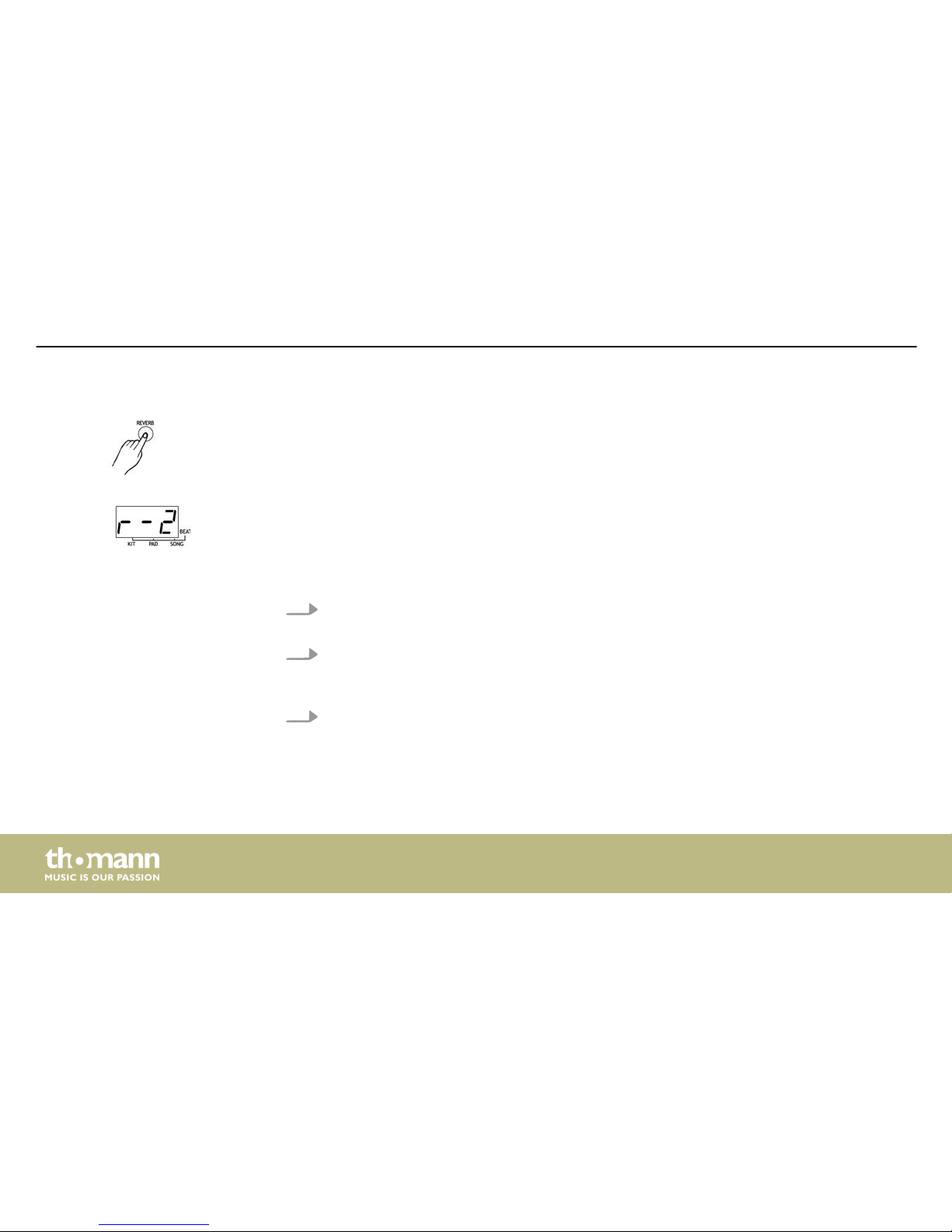
Use the [REVERB] button to enter the REVERB menu. The three-digit LED display shows the cur‐
rently selected reverb level in ‘Rxx’ format. Use the jog wheel or the [SELECT –/+] buttons to
adjust the level stepwise as desired from 0…3.
The selected value is automatically saved.
1. Prepare to record: Select a song and a drum kit. Determine the desired tempo and the
settings for DRUM OFF and REVERB.
2. Start recording: Press the [REC] button. The control LED of the button starts flashing.
Press [START/STOP] or hit a pad to start the recording. The control LED of the button
goes out.
3. Stop recording: Press the [REC] button or [START/STOP]. The control LED of the button
goes out. If the memory is used up the recording is automatically stopped and the threedigit LED display shows ‘FL’
Reverb
Recording
Functions
mobile drum
28
Page 29
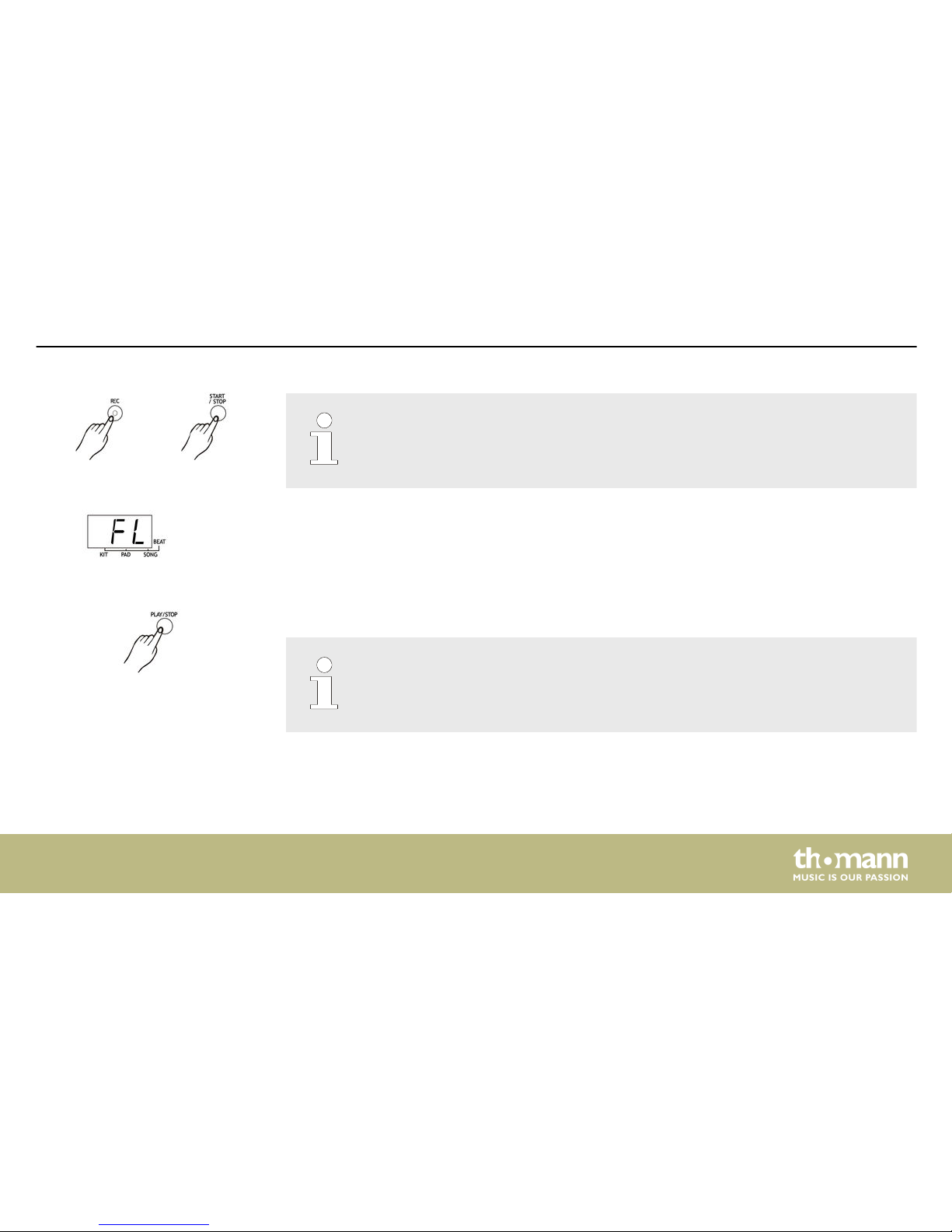
When starting the recording, the vocal voice counting of the metronome is automati‐
cally activated but will not be recorded. Tu turn the metronome off press the [CLICK]
button.
Use the [PLAY/STOP] button to start or stop the playback of recordings.
When recording a new song, the previous recording will be overwritten. If the power
supply is disconnected, the recorded track is deleted.
Playback
Functions
MD-90
29
Page 30
7 In and outputs
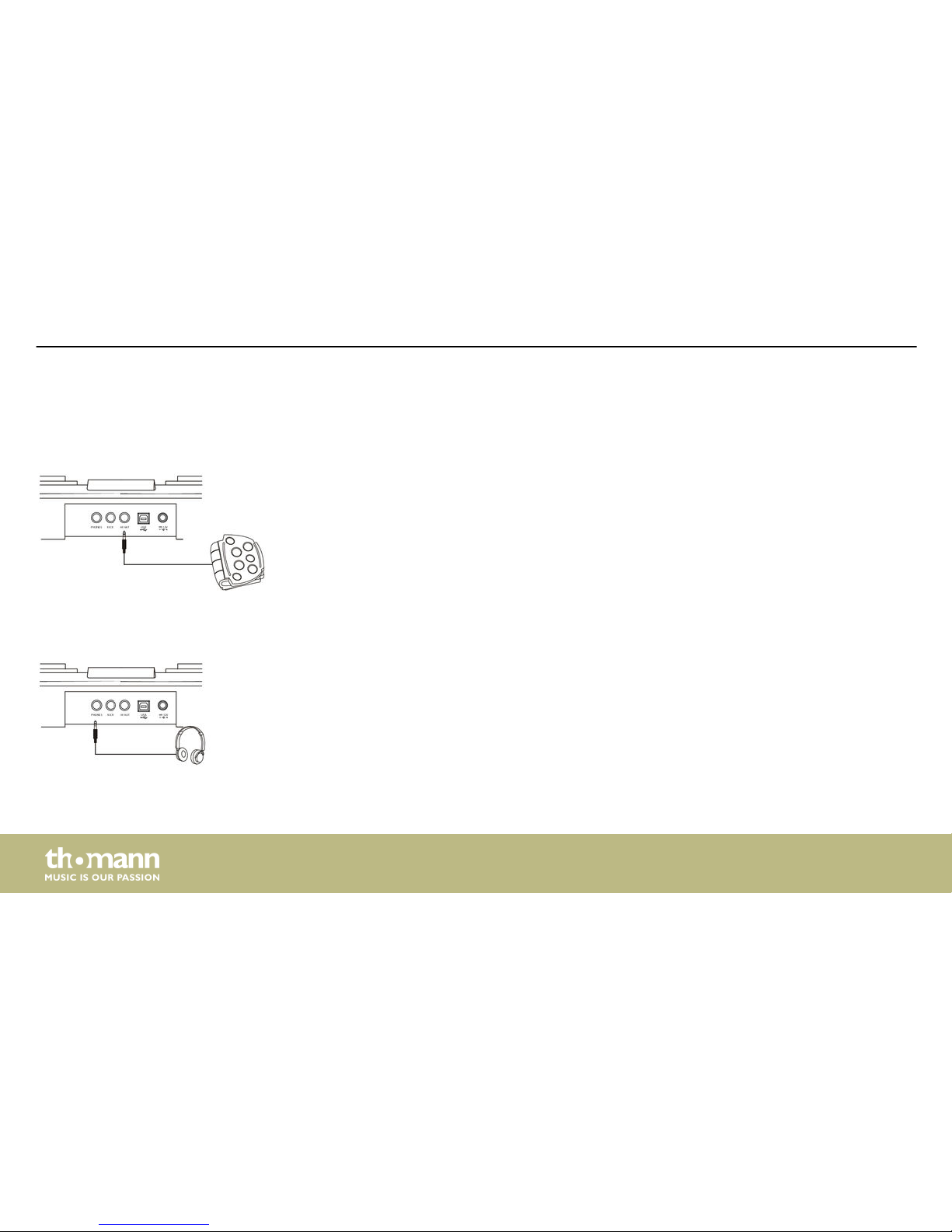
You can connect kick and hi-hat pedals with 1/4" phone jacks to the corresponding sockets.
The headphone output on the rear panel is available to connect headphones with a 1/4" TRS
phone jack.
Pedals
Headphones
In and outputs
mobile drum
30
Page 31
This device outputs MIDI code via the USB / MIDI interface when you hit pads or press the
pedals. Metronome signals and signals within songs will not be transferred. The device also
receives MIDI data from other devices.
USB/MIDI interface
In and outputs
MD-90
31
Page 32
8 Technical specifications
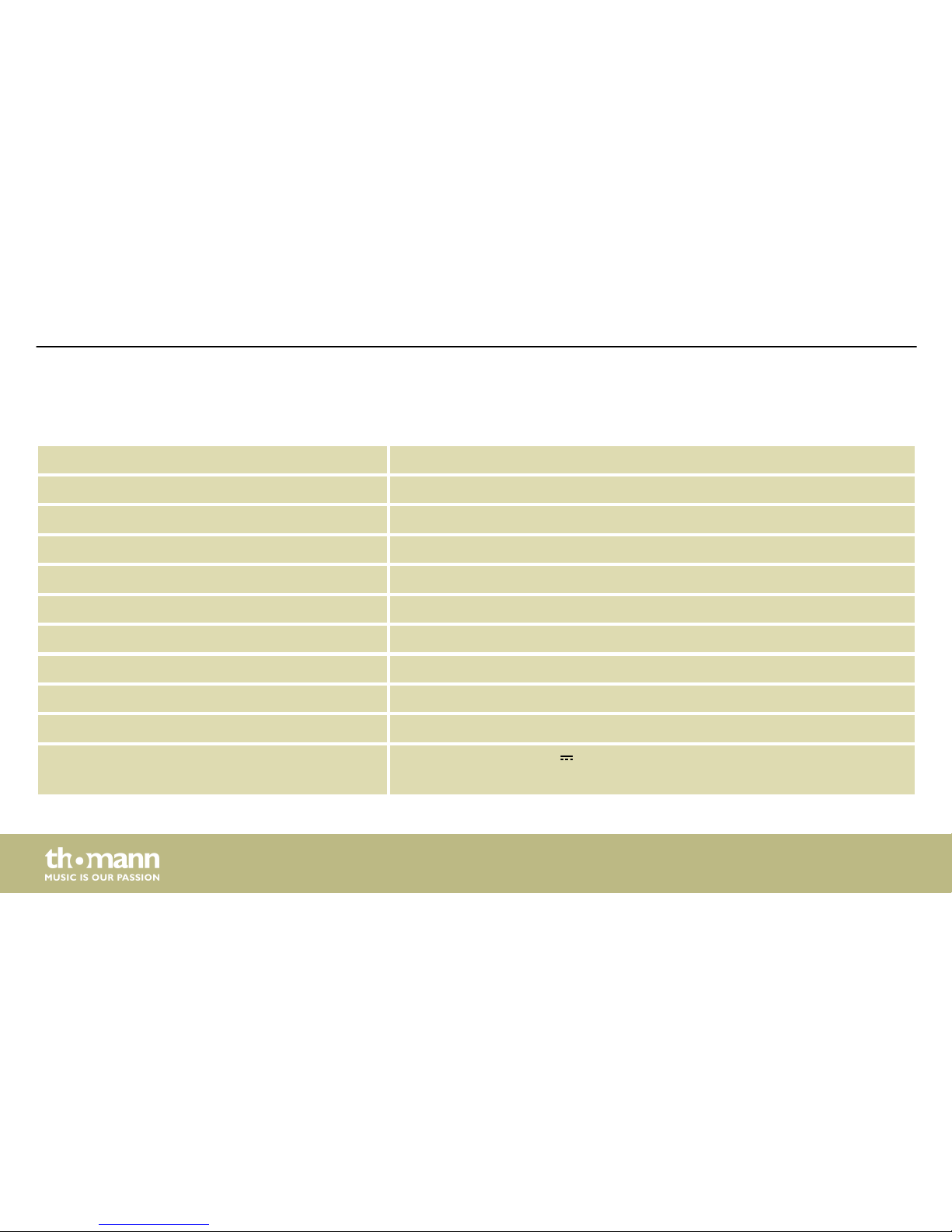
Pads 7 pressure-sensitive drum pads, connections for kick and hi-hat pedals
Drum kits 25 predefined drum kits, 5 user drum kits
Voices 215 percussion voices, 128 GM voices, 8 MB voice data
Songs 100 songs (80 styles, 20 songs), 1 demo song
Metronome 2 different sounds
Recording 1 track
Display Three-digit LED display
Connections USB (MIDI IN/OUT)
Headphones (1/4" phone socket)
Kick and Hi-Hat pedal
Operating voltage supply
n Power adaptor (12 V ) or
n 6 × C cells (C, LR14, 1.5 V)
Technical specifications
mobile drum
32
Page 33
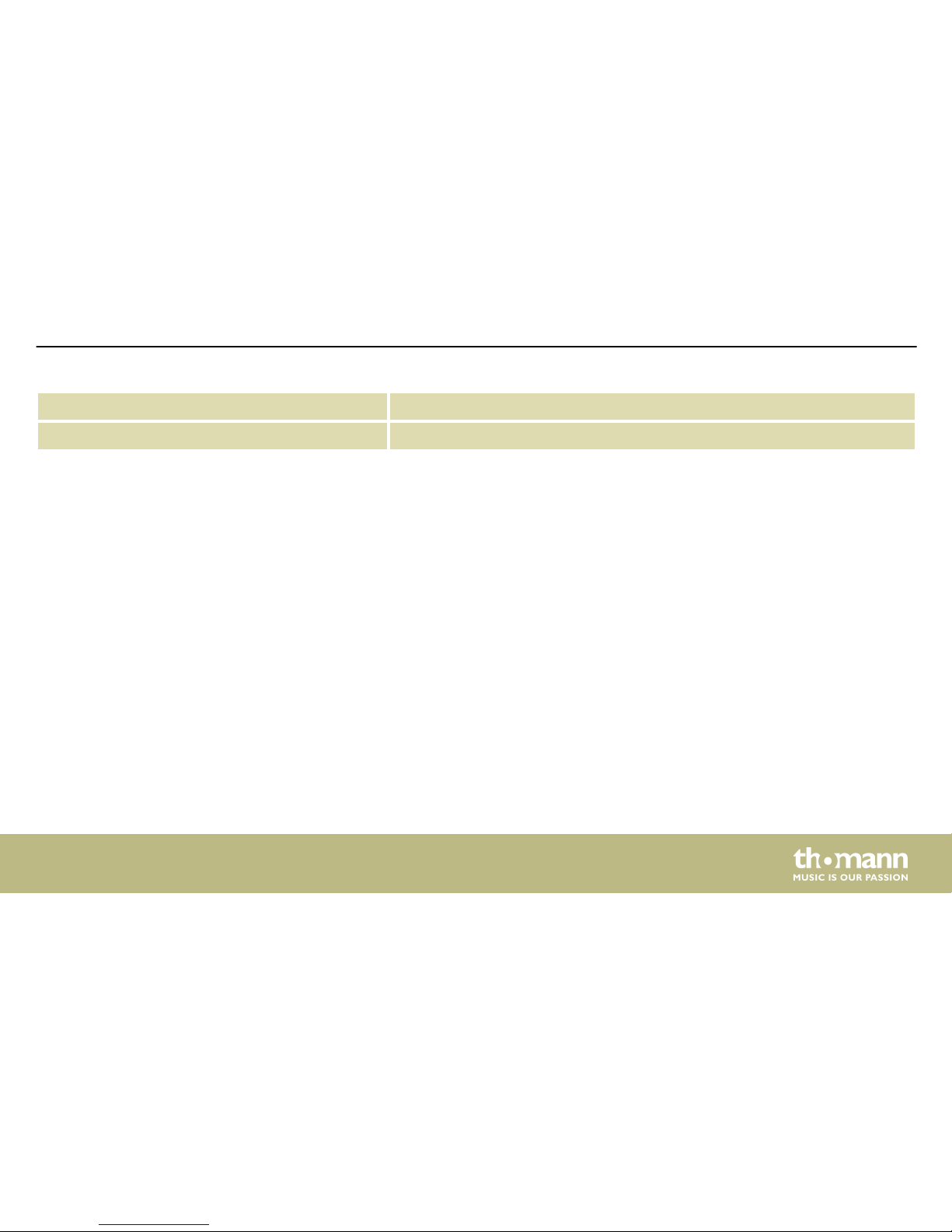
Dimensions (W × D × H) 500 mm × 370 mm × 157 mm
Weight 3.3 kg
Technical specifications
MD-90
33
Page 34
9 Cleaning
Clean the accessible parts of the device regularly. The frequency of cleaning depends on the
operating environment: moist, smoky or particularly dirty environments may cause a higher
accumulation of dirt on the components of the device.
n Use a dry soft cloth for cleaning.
n Remove stubborn stains with a slightly damp cloth.
n Never use cleaners containing alcohol or thinner.
n Never put any vinyl items on the device, as vinyl can stick to the surface or lead to its disco‐
louration.
Device parts
Cleaning
mobile drum
34
Page 35
10 Protecting the environment
For the transport and protective packaging, environmentally friendly materials have been
chosen that can be supplied to normal recycling.
Ensure that plastic bags, packaging, etc. are properly disposed of.
Do not just dispose these materials with your normal household waste, but make sure that
they are fed to a recovery. Please follow the notes and markings on the packaging.
Batteries must not be disposed of as domestic waste or thrown into fire. Dispose of the bat‐
teries according to national or local regulations regarding hazardous waste. To protect the
environment, dispose of empty batteries at your retail store or at appropriate collection sites.
Disposal of the packaging mate‐
rial
Disposal of batteries
Protecting the environment
MD-90
35
Page 36
This product is subject to the European Waste Electrical and Electronic Equipment Directive
(WEEE). Do not dispose with your normal household waste.
Dispose this device through an approved waste disposal firm or through your local waste
facility. When discarding the device, comply with the rules and regulations that apply in your
country. If in doubt, consult your local waste disposal facility.
Disposal of your old device
Protecting the environment
mobile drum
36
Page 37
11 Appendix
11.1 Voice list
No. Name No. Name No. Name
Kick kit
1 Rock Kick 001 11 Acoustic Kick 001 21 Acoustic Kick 011
2 Rock Kick 002 12 Acoustic Kick 002
3 Rock Kick 003 13 Acoustic Kick 003
4 Standard Kick 001 14 Acoustic Kick 004
5 Standard Kick 002 15 Acoustic Kick 005
6 Standard Kick 003 16 Acoustic Kick 006
7 Standard Kick 004 17 Acoustic Kick 007
8 Pop Kick 001 18 Acoustic Kick 008
Appendix
MD-90
37
Page 38
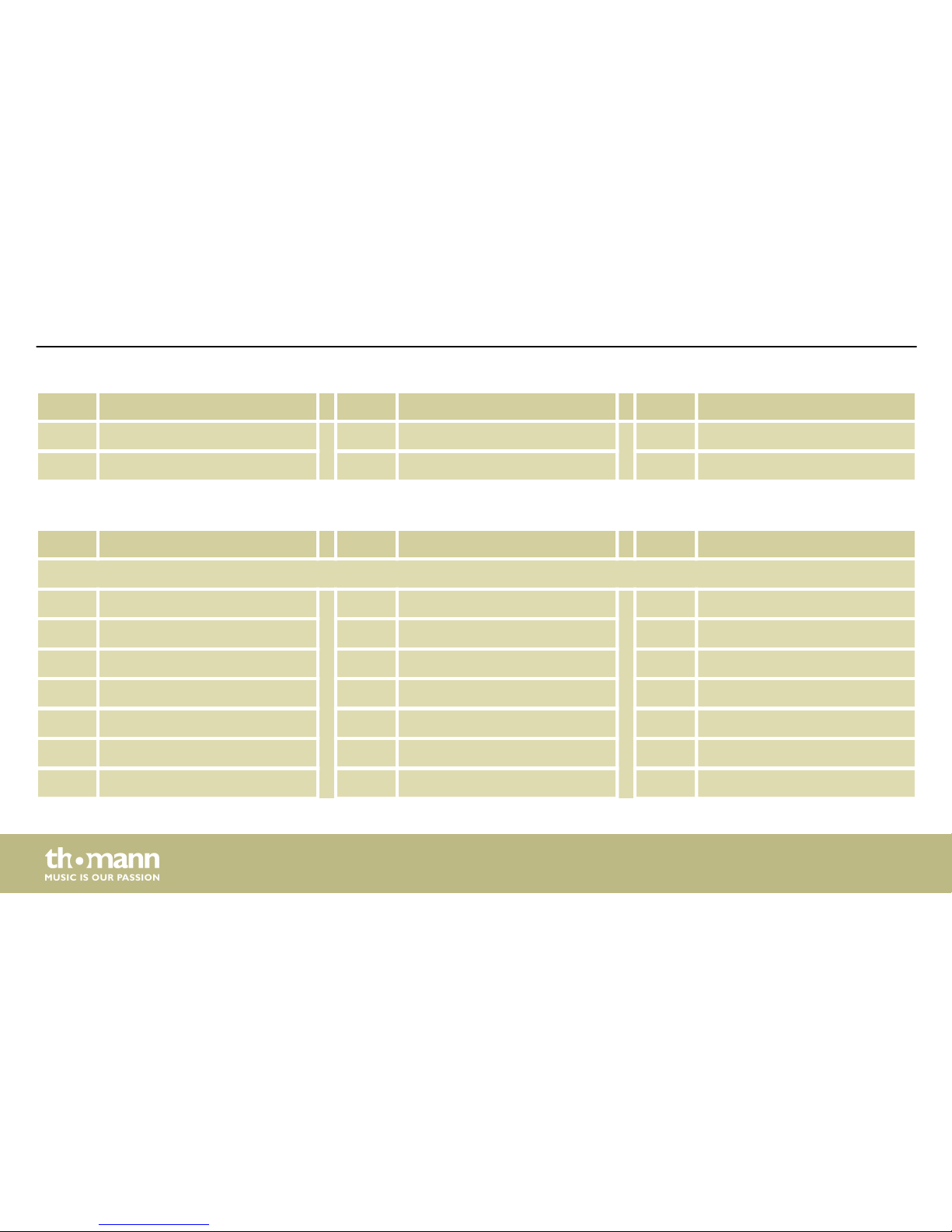
No. Name No. Name No. Name
9 Pop Kick 002 19 Acoustic Kick 009
10 Pop Kick 003 20 Acoustic Kick 010
No. Name No. Name No. Name
Snare kit
22 Standard Snare 001 31 Standard Stick 002 41 Acoustic Snare 004
23 Standard Snare 002 32 Rock Snare 001 42 Acoustic Snare 005
24 Standard Snare 003 33 Rock Snare 002
25 Standard Snare 004 34 Rock Snare 003
26 Standard Snare 005 35 Pop Snare 001
27 Standard Snare 006 36 Pop Snare 002
28 Brush Snare 001 37 Pop Snare 003
Appendix
mobile drum
38
Page 39
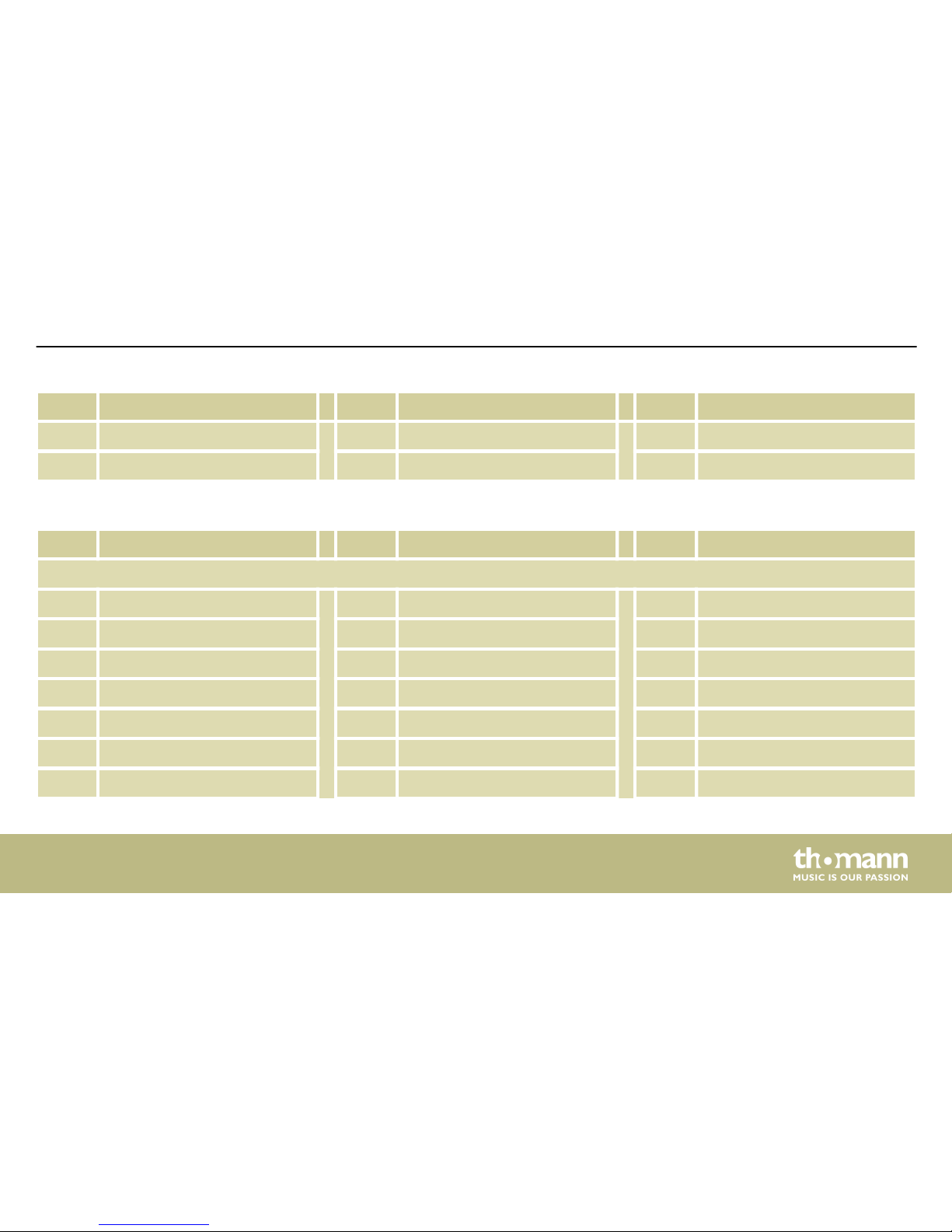
No. Name No. Name No. Name
29 Brush Snare 002 38 Acoustic Snare 001
30 Standard Stick 001 39 Acoustic Snare 002
No. Name No. Name No. Name
Tom kit
43 Standard Tom 001 53 Room Tom 005 63 Analog Tom 003
44 Standard Tom 002 54 Room Tom 006 64 Analog Tom 004
45 Standard Tom 003 55 Electronic Tom 001 65 Analog Tom 005
46 Standard Tom 004 56 Electronic Tom 002 66 Analog Tom 006
47 Standard Tom 005 57 Electronic Tom 003 67 Acoustic Tom 001
48 Standard Tom 006 58 Electronic Tom 004 68 Acoustic Tom 002
49 Room Tom 001 59 Electronic Tom 005 69 Acoustic Tom 003
Appendix
MD-90
39
Page 40
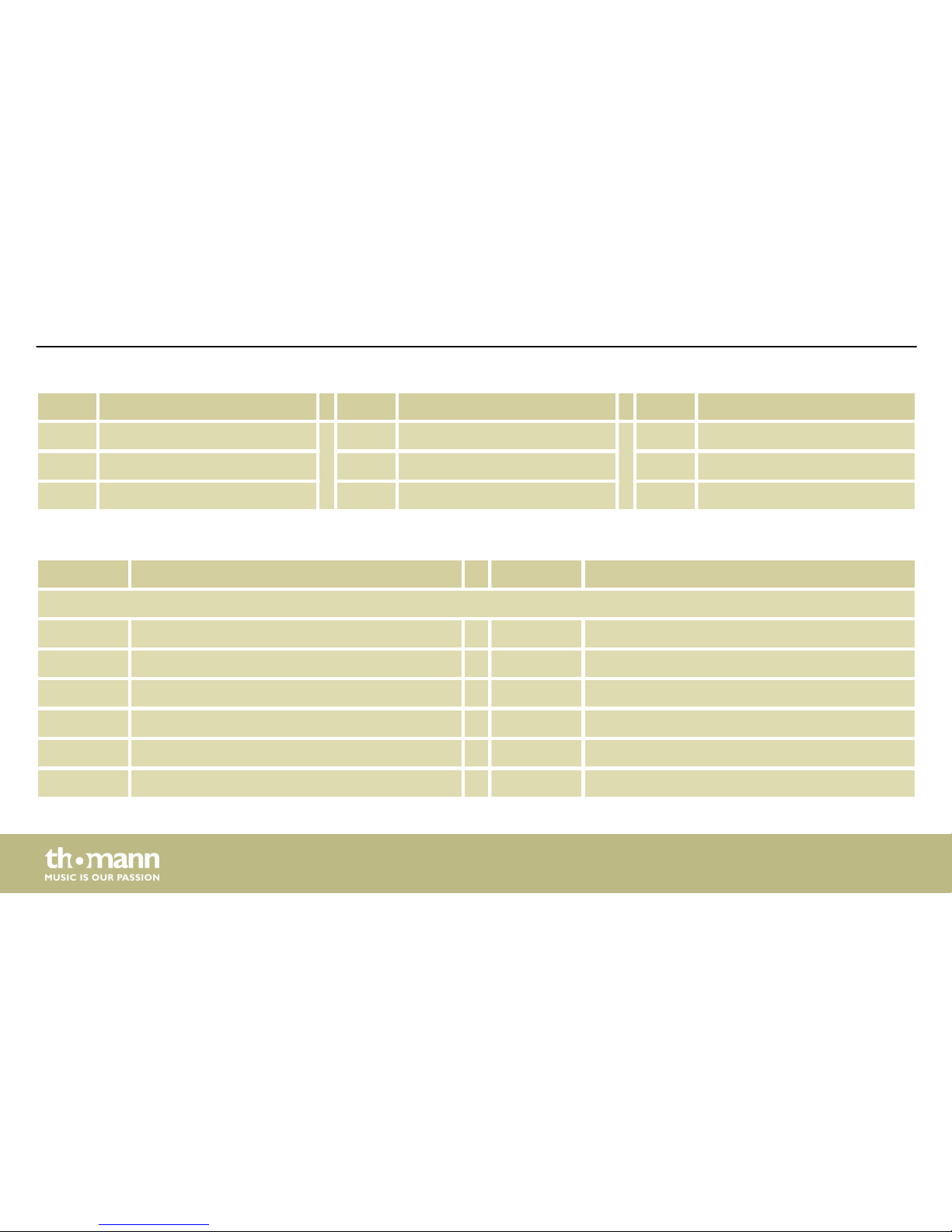
No. Name No. Name No. Name
50 Room Tom 002 60 Electronic Tom 006 70 Acoustic Tom 004
51 Room Tom 003 61 Analog Tom 001 71 Acoustic Tom 005
52 Room Tom 004 62 Analog Tom 002 72 Acoustic Tom 006
No. Name No. Name
Hihat kit
73 Standard Hihat Close 81 Rock Hihat Pad
74 Standard Hihat Pad 82 Rock Hihat Open
75 Standard Hihat Open 83 Acoustic Hihat Close
76 Analog Hihat Close 84 Acoustic Hihat Pad
77 Analog Hihat Pad 85 Acoustic Hihat Open
78 Analog Hihat Open
Appendix
mobile drum
40
Page 41
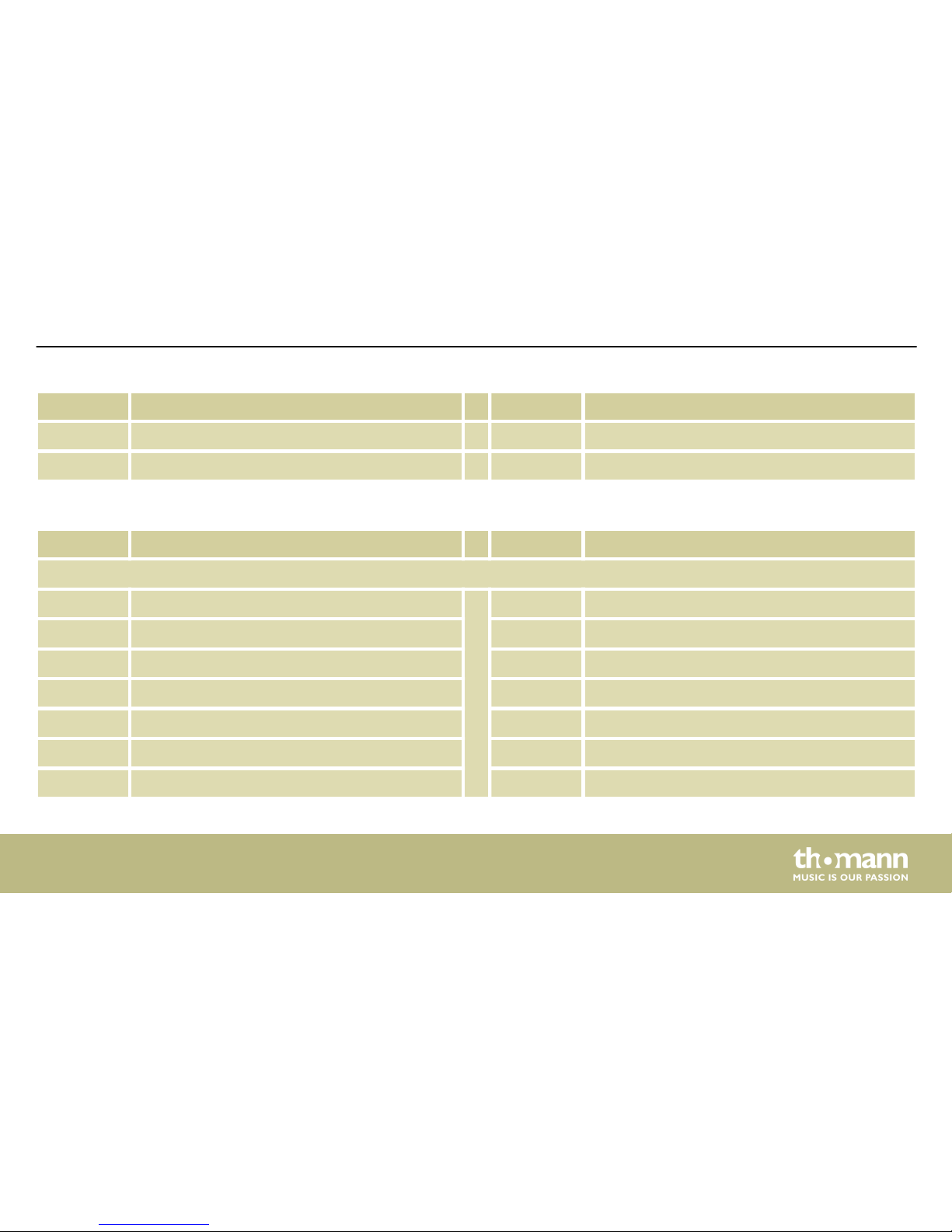
No. Name No. Name
79 Shakable
80 Rock Hihat Close
No. Name No. Name
Crash kit
86 Standard Crash001 93 Rock Crash
87 Standard Crash002 94 Standard Ride 002
88 Standard Crash003 95 Electronic Crash
89 Analog Ride001 96 Splash002
90 China Crash 97 Ride Bell
91 Splash001
92 Standard Ride 001
Appendix
MD-90
41
Page 42
No. Name No. Name No. Name
Panel kit
98 Vibraslap 108 High Timbale 118 Long Guiro
99 Hand 109 Low Timbale 119 Mute Cuica
100 Tambourine 110 High Agogo 120 Open Cuica
101 Stcowb 111 Low Agogo 121 Mute Surdo
102 Mutecowb 112 Cabasa 122 Open Surdo
103 Mute Hi Conga 113 Shaker 123 Maracas
104 Open Hi Conga 114 Claves 124 HighQ
105 Low Conga 115 Mute Triangle 125 Slap
106 Hi Bongo 116 Open Triangle 126 Scratch Push
107 Low Bongo 117 Short Guiro 127 Scral
Appendix
mobile drum
42
Page 43
No. Name No. Name
Panel kit
128 One 138 Laugh
129 Two 139 Metronome1
130 Three 140 Metronome2
131 Four 141 Tambourine001
132 Cartoon001 142 Tambourine002
133 Cartoon002 143 Tambourine003
134 Cartoon003 144 Tambourine004
135 Cartoon004 145 Tambourine005
136 Cartoon005
137 Cartoon006
Appendix
MD-90
43
Page 44
No. Name No. Name No. Name
SFX kit
146 SFX001 156 SFX011 166 SFX021
147 SFX002 157 SFX012 167 SFX022
148 SFX003 158 SFX013 168 SFX023
149 SFX004 159 SFX014 169 SFX024
150 SFX005 160 SFX015 170 SFX025
151 SFX006 161 SFX016 171 SFX026
152 SFX007 162 SFX017 172 SFX027
153 SFX008 163 SFX018 173 SFX028
154 SFX009 164 SFX019 174 SFX029
155 SFX010 165 SFX020 175 SFX030
Appendix
mobile drum
44
Page 45
No. Name No. Name No. Name
SFX kit
176 SFX031 186 SFX041 196 SFX051
177 SFX032 187 SFX042 197 SFX052
178 SFX033 188 SFX043 198 SFX053
179 SFX034 189 SFX044 199 SFX054
180 SFX035 190 SFX045 200 SFX055
181 SFX036 191 SFX046 201 SFX056
182 SFX037 192 SFX047 202 SFX057
183 SFX038 193 SFX048 203 SFX058
184 SFX039 194 SFX049 204 SFX059
185 SFX040 195 SFX050 205 SFX060
Appendix
MD-90
45
Page 46
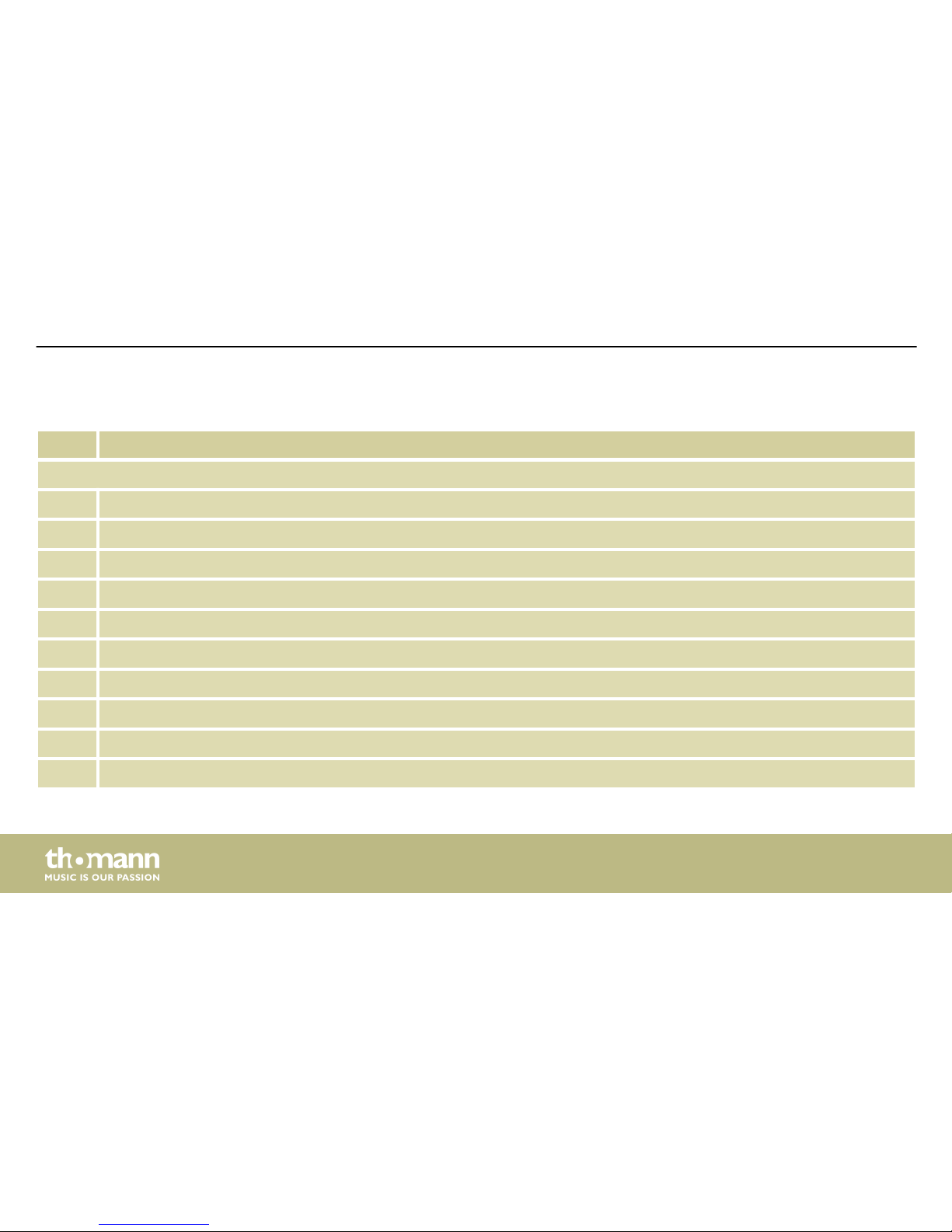
No. Name
SFX kit
206 SFX061
207 SFX062
208 SFX063
209 SFX064
210 SFX065
211 SFX066
212 SFX067
213 SFX068
214 SFX069
215 SFX070
Appendix
mobile drum
46
Page 47
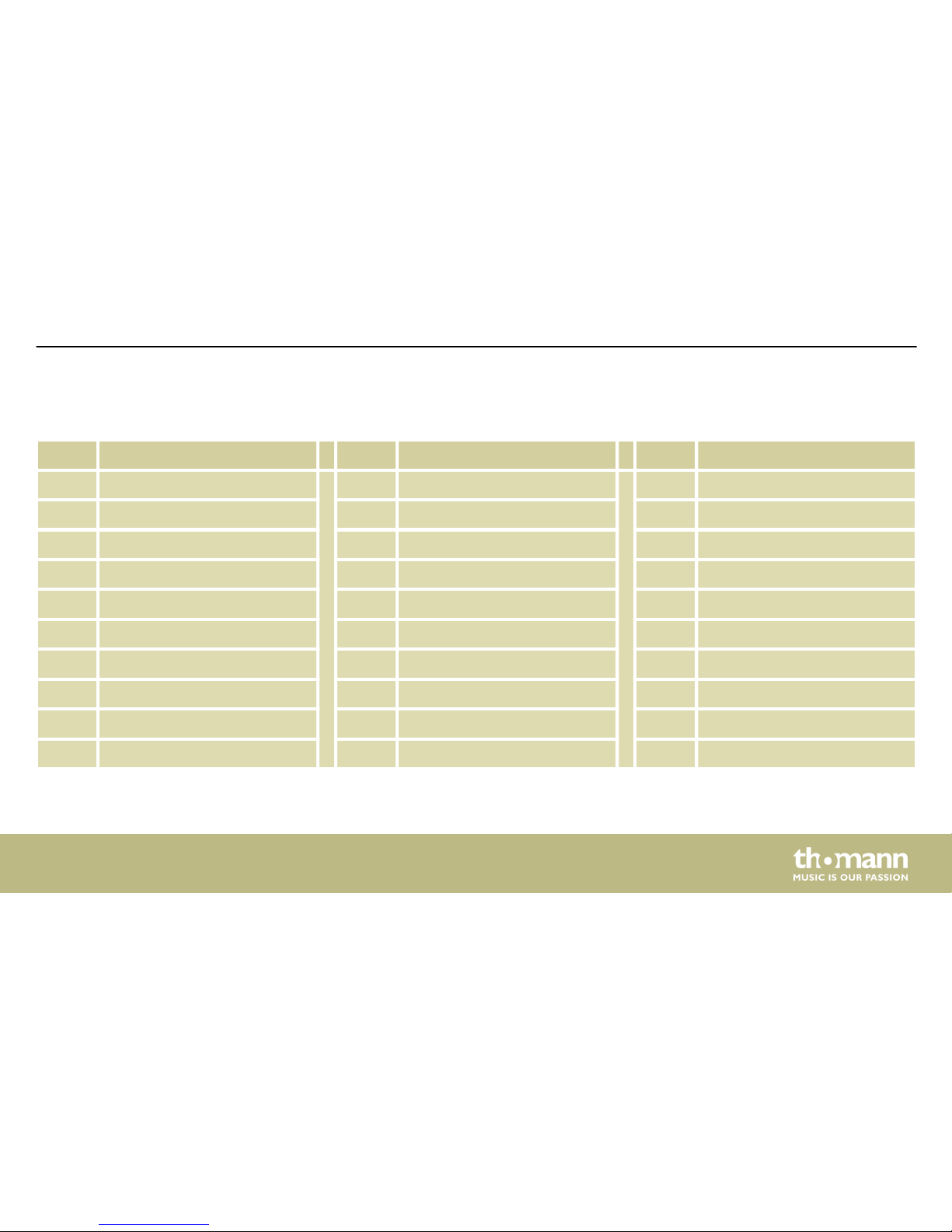
11.2 Kit list
No. Name No. Name No. Name
1 Pop1 11 Rock2 21 Conga1
2 Pop2 12 Boss 22 Conga2
3 Standard 1 13 Rock3 23 Timbales
4 Room 14 Standard 3 24 Latin
5 Rock 1 15 Rock4 25 Funk
6 Electronic 16 Jazz2 26 User 1 (pop1)
7 Analog 17 Funk 27 User 2 (pop2)
8 Jazz 1 18 Clave 28 User 3 (Standard1)
9 Brush 19 Drum Bass 29 User 4 (Room)
10 Standard 2 20 Hip Hop 30 User 5 (Rock1)
Appendix
MD-90
47
Page 48
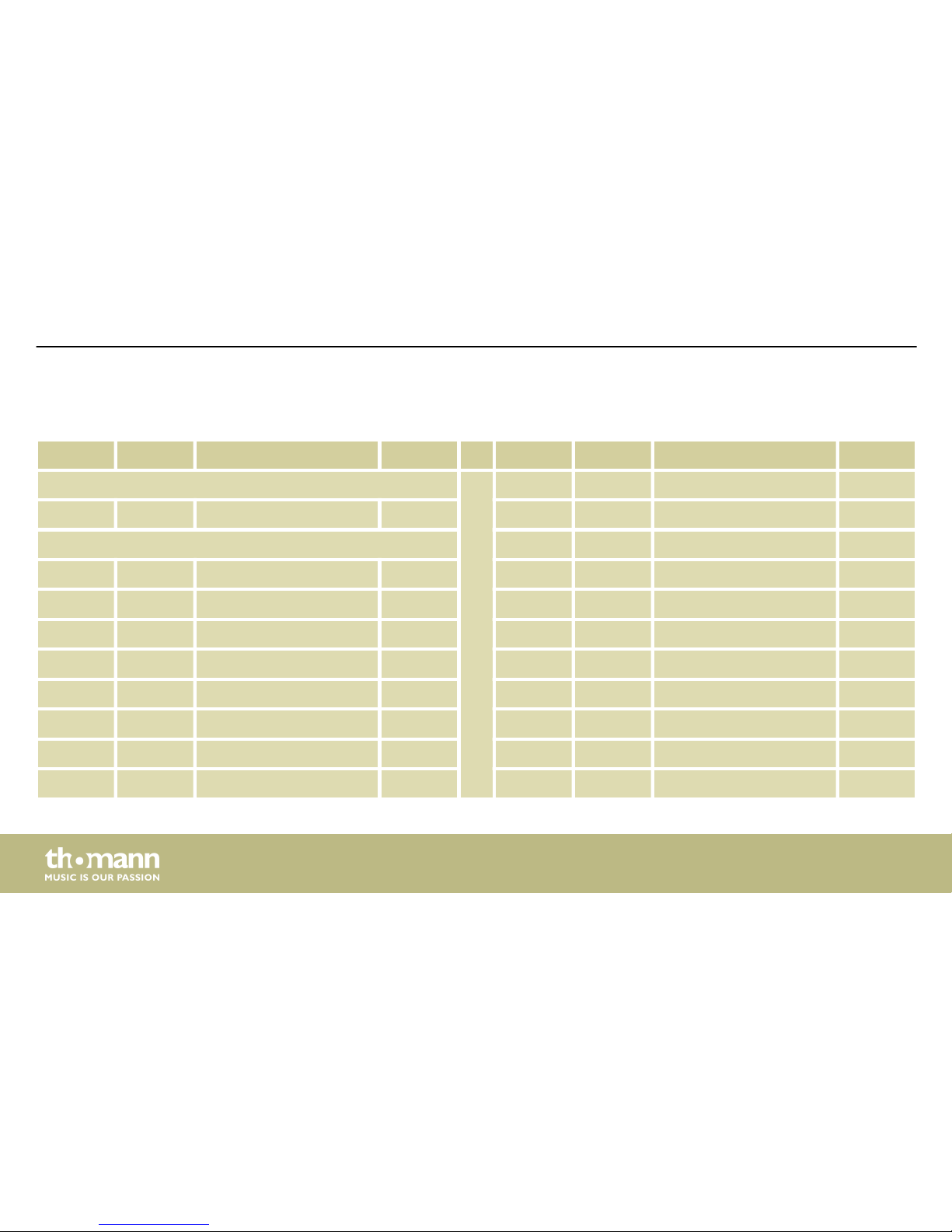
11.3 Song list
No. Kit Name Beat No. Kit Name Beat
Intro 10 04 Rock1 4/4
01 01 Intro 4/4 11 05 Rock2 4/4
8 beat 12 03 Rock3 4/4
02 03 8 Beat2 4/4 13 01 Rock4 4/4
03 02 8 Beat3 4/4 14 02 Rock5 4/4
04 05 8 Beat4 4/4 15 05 Hard Rock1 4/4
05 21 8 Beat5 4/4 16 05 Hard Rock2 4/4
06 21 8 Beat Ballad1 4/4 17 07 16 Beat 1 4/4
07 21 8 Beat Ballad2 4/4 18 03 16 Beat 2 4/4
08 01 8 Beat Ballad3 4/4 19 01 16 Beat 3 4/4
09 03 Soft Rock 4/4 20 07 16 Beat 4 4/4
Appendix
mobile drum
48
Page 49
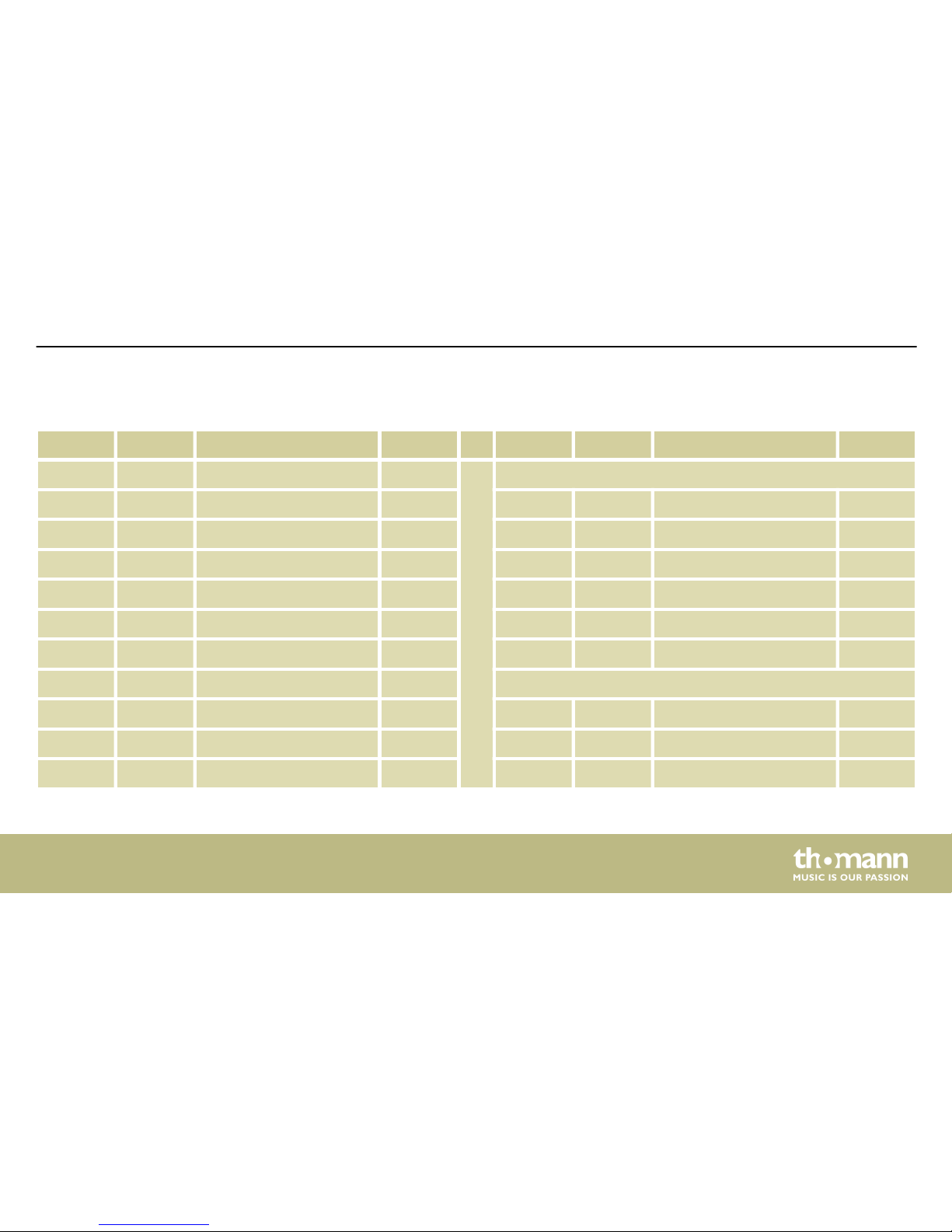
No. Kit Name Beat No. Kit Name Beat
21 04 16 Beat 5 4/4 Dance
22 02 16 Beat 6 4/4 31 07 Dance 1 4/4
23 01 16 Beat 7 4/4 32 07 Dance 2 4/4
24 21 16 Beat Ballad 1 4/4 33 01 Dance 3 4/4
25 21 16 Beat Ballad 2 4/4 34 06 Dance 4 4/4
26 05 16 Beat Ballad 3 4/4 35 04 Dance 5 4/4
27 03 16 Beat Ballad 4 4/4 36 07 Dance 6 4/4
28 01 16 Beat Ballad 5 4/4 Rap
29 03 16 Beat Funk 1 4/4 37 03 Rap 1 4/4
30 01 16 Beat Funk 2 4/4 38 01 Rap 2 4/4
39 03 Rap 3 4/4
Appendix
MD-90
49
Page 50
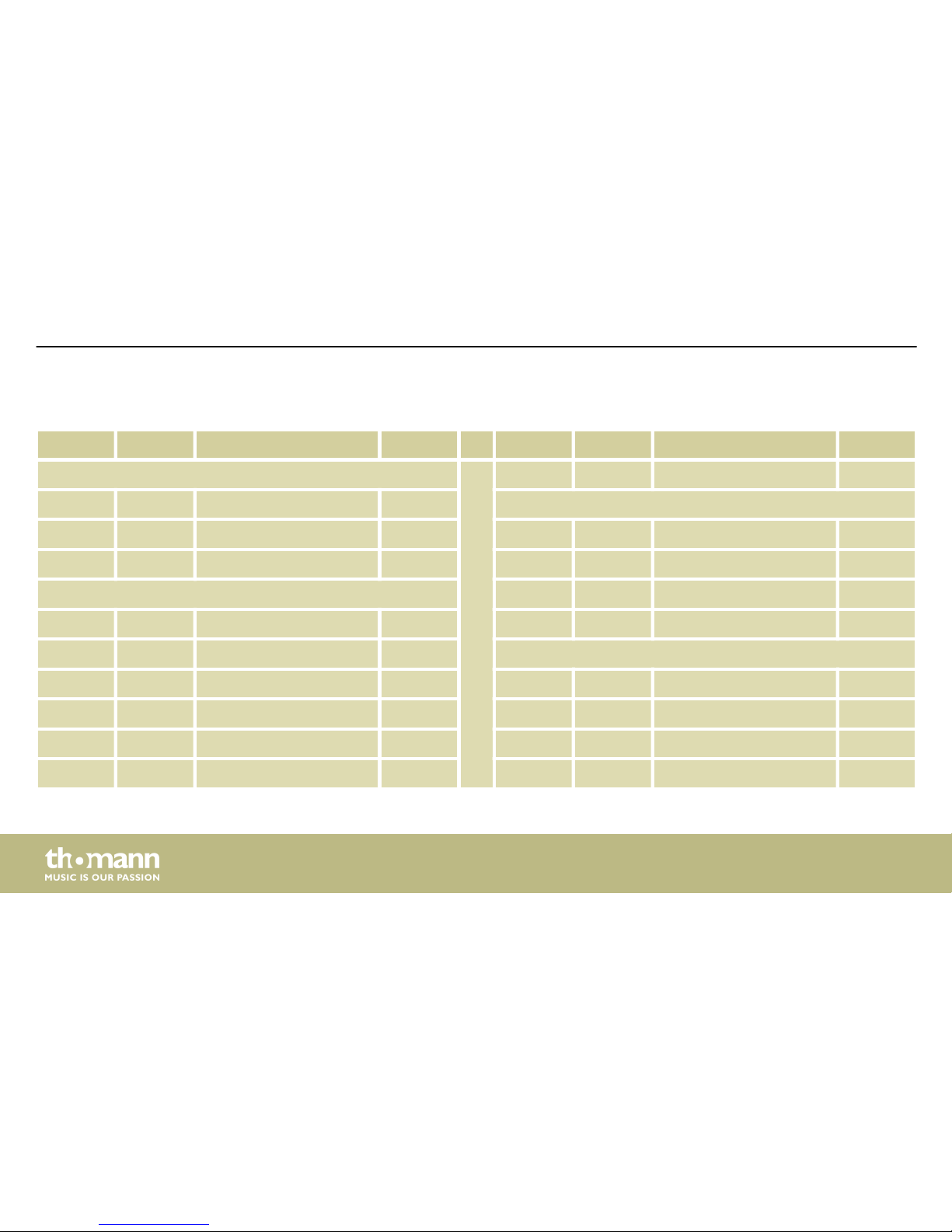
No. Kit Name Beat No. Kit Name Beat
Bounce 49 03 Shuffle 7 4/4
40 04 Bounce 1 4/4 Slow rock
41 03 Bounce 2 4/4 50 03 Slow Rock 1 4/4
42 01 Bounce 3 4/4 51 04 Slow Rock 2 4/4
Shuffle 52 01 Slow Rock 3 4/4
43 03 Shuffle 1 4/4 53 04 Slow Rock 4 4/4
44 02 Shuffle 2 4/4 Latin
45 03 Shuffle 3 4/4 54 03 Reggae 1 4/4
46 01 Shuffle 4 4/4 55 23 Reggae 2 4/4
47 05 Shuffle 5 4/4 56 12 Bossa Nova 1 4/4
48 04 Shuffle 6 4/4 57 12 Bossa Nova 2 4/4
Appendix
mobile drum
50
Page 51
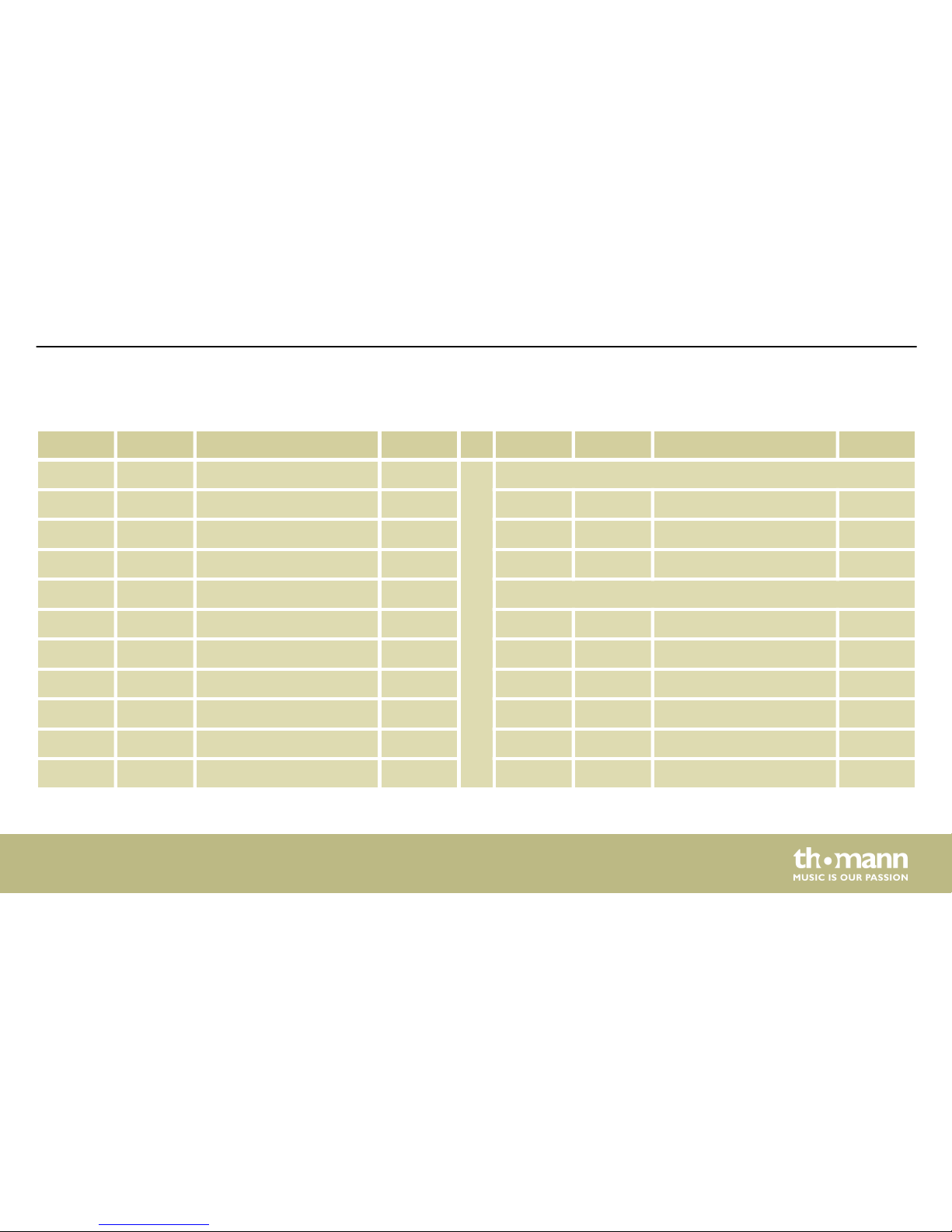
No. Kit Name Beat No. Kit Name Beat
58 03 Samba 4/4 Swing
59 01 Salsa 4/4 67 09 Swing 1 4/4
60 03 Latin Rock 4/4 68 09 Swing 2 4/4
61 03 Cha-Cha 4/4 69 08 Swing 3 4/4
62 12 Mambo 4/4 Others
63 12 Rhumba 1 4/4 70 12 Waltz 4/4
64 12 Rhumba 2 4/4 71 02 3/4 Ballad 4/4
65 12 Rhumba 2 4/4 72 03 Swing Blues 4/4
66 01 Tango 4/4 73 02 Blues 4/4
74 01 March 1 4/4
75 01 March 2 4/4
Appendix
MD-90
51
Page 52
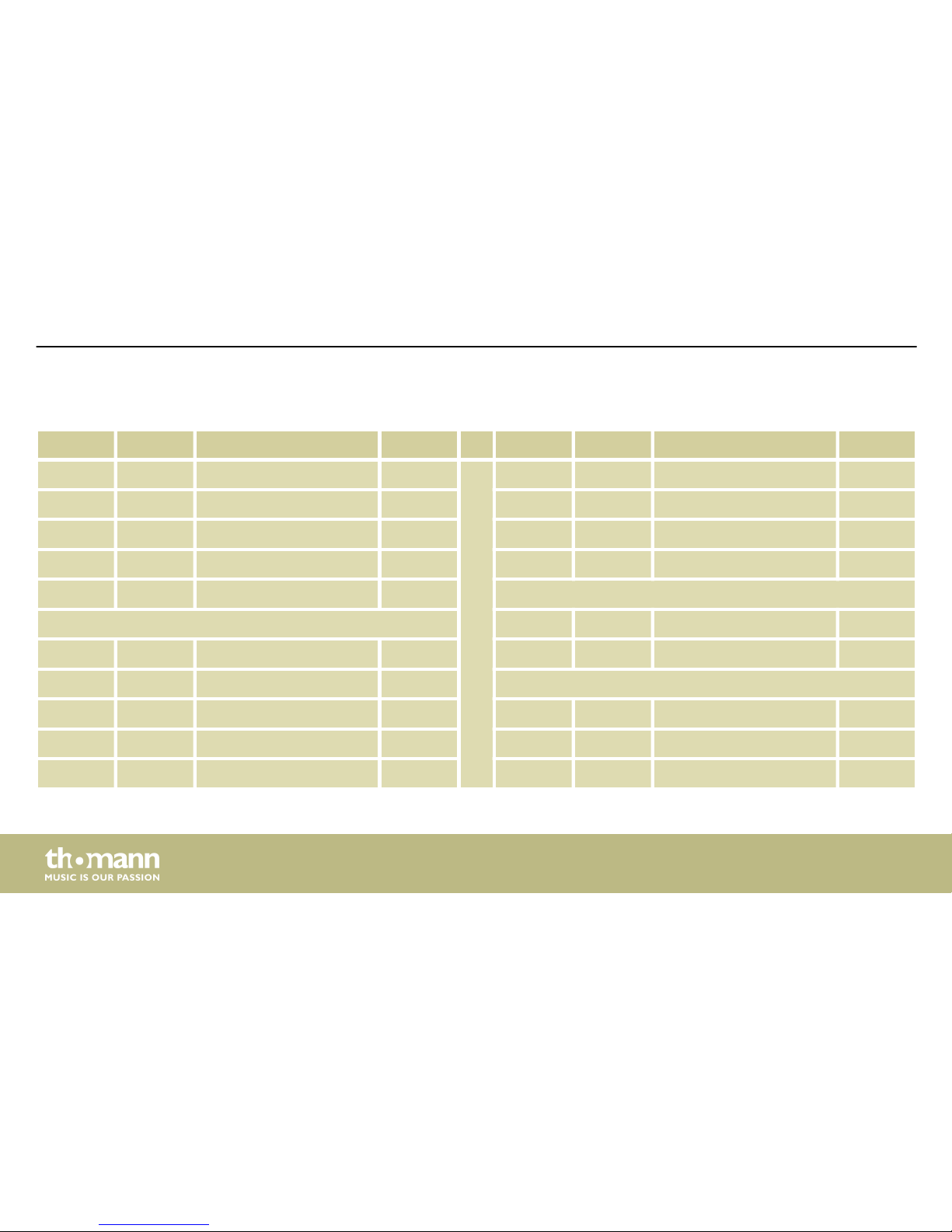
No. Kit Name Beat No. Kit Name Beat
76 03 R&B 4/4 86 01 Hard Rock 3 4/4
77 01 Hip-Hop 4/4 87 03 Pop Dance 1 4/4
78 03 Funk 4/4 88 07 Pop Dance 2 4/4
79 12 Country 4/4 89 03 R&B 4/4
80 09 Big Band 4/4 16 beat
8 beat 90 01 16 beat 4/4
81 03 8 Beat 1 4/4 91 03 Fusion 4/4
82 05 8 Beat 2 4/4 Funk
83 03 Ballad 4/4 92 02 Funk 1 4/4
84 05 Hard Rock 1 4/4 93 03 Funk 2 4/4
85 05 Hard Rock 2 4/4
Appendix
mobile drum
52
Page 53
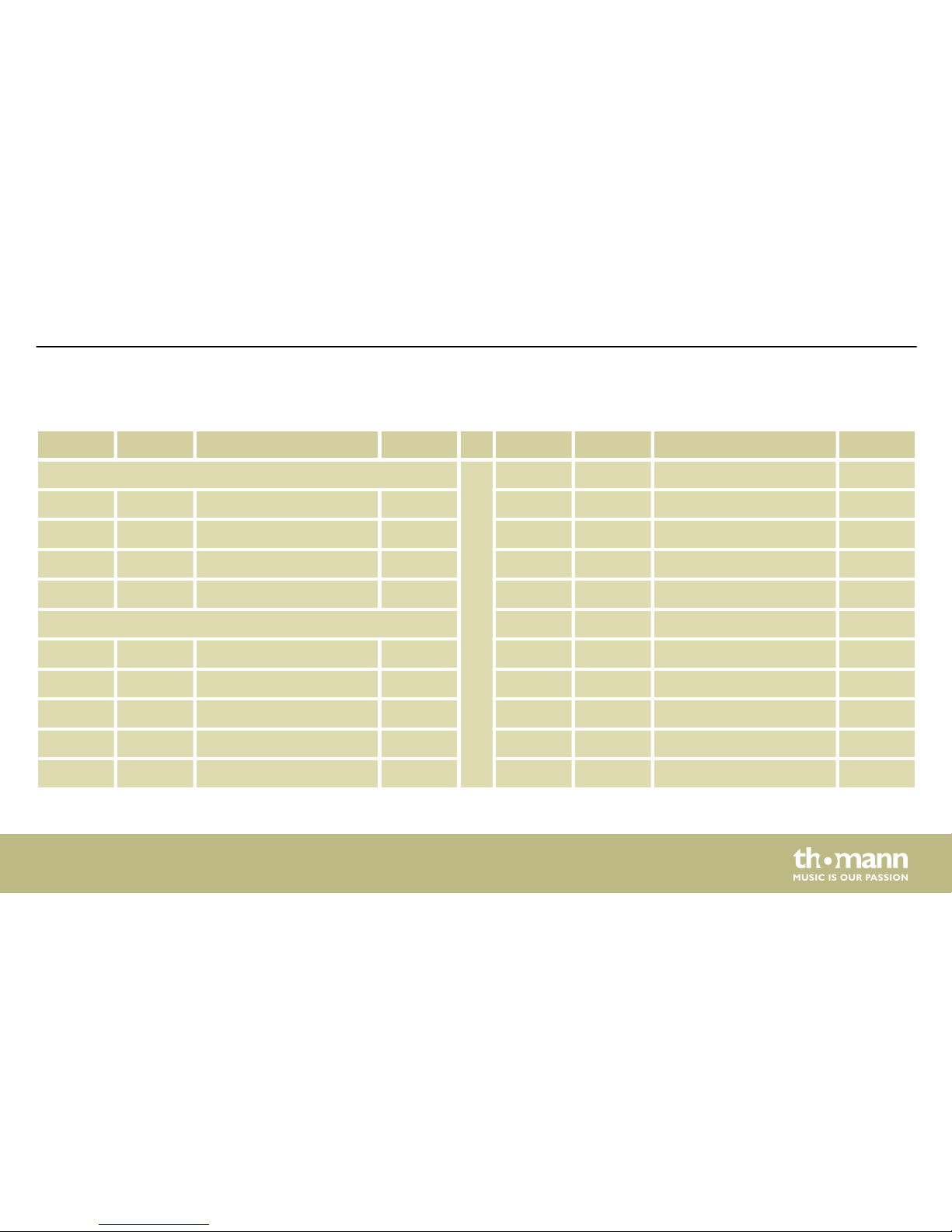
No. Kit Name Beat
Shuffle
94 04 Shuffle 1 4/4
95 03 Shuffle 2 4/4
96 03 16 Beat Shuffle 4/4
97 01 16 Beat Triplet 4/4
Others
98 03 Reggae 4/4
99 12 Bossa Nova 4/4
100 08 Big Band 4/4
Appendix
MD-90
53
Page 54
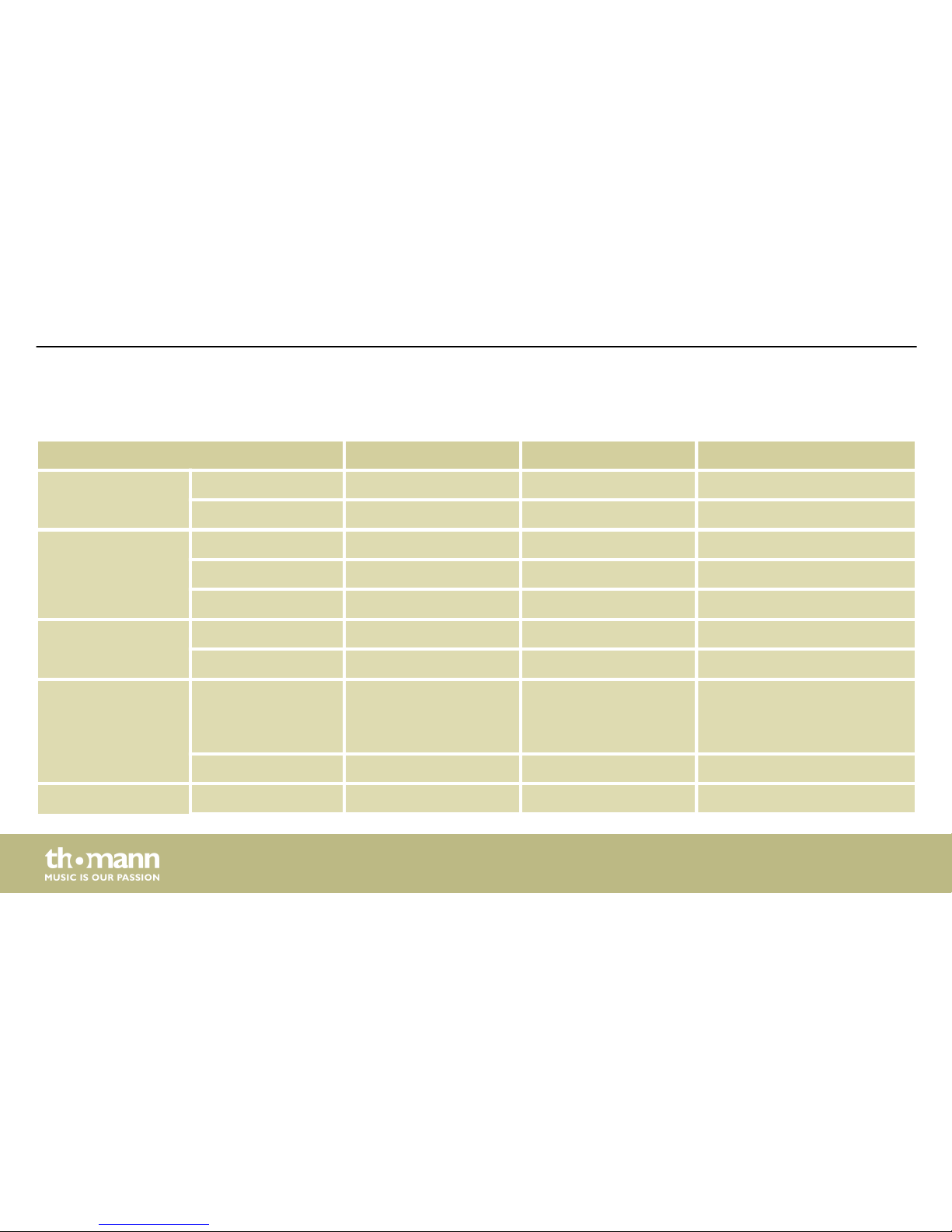
11.4 MIDI implementation
Function Transmitted Recognised Remarks
Basic channel Default Ch 10 Ch 1…16
Changed No No
Mode Default No 1
Messages No No
Altered ******** No
Note number True voice 27…88 0…127
******** 0…127
Velocity Note ON Yes (9nH, V=1…127)
No (9nH, V=0)
Yes (9nH, V=1…127)
No (9nH, V=0; 8nH,
V=0…127)
Note OFF Yes (99H, V: 0) Yes
Aftertouch Keys No No
Appendix
mobile drum
54
Page 55
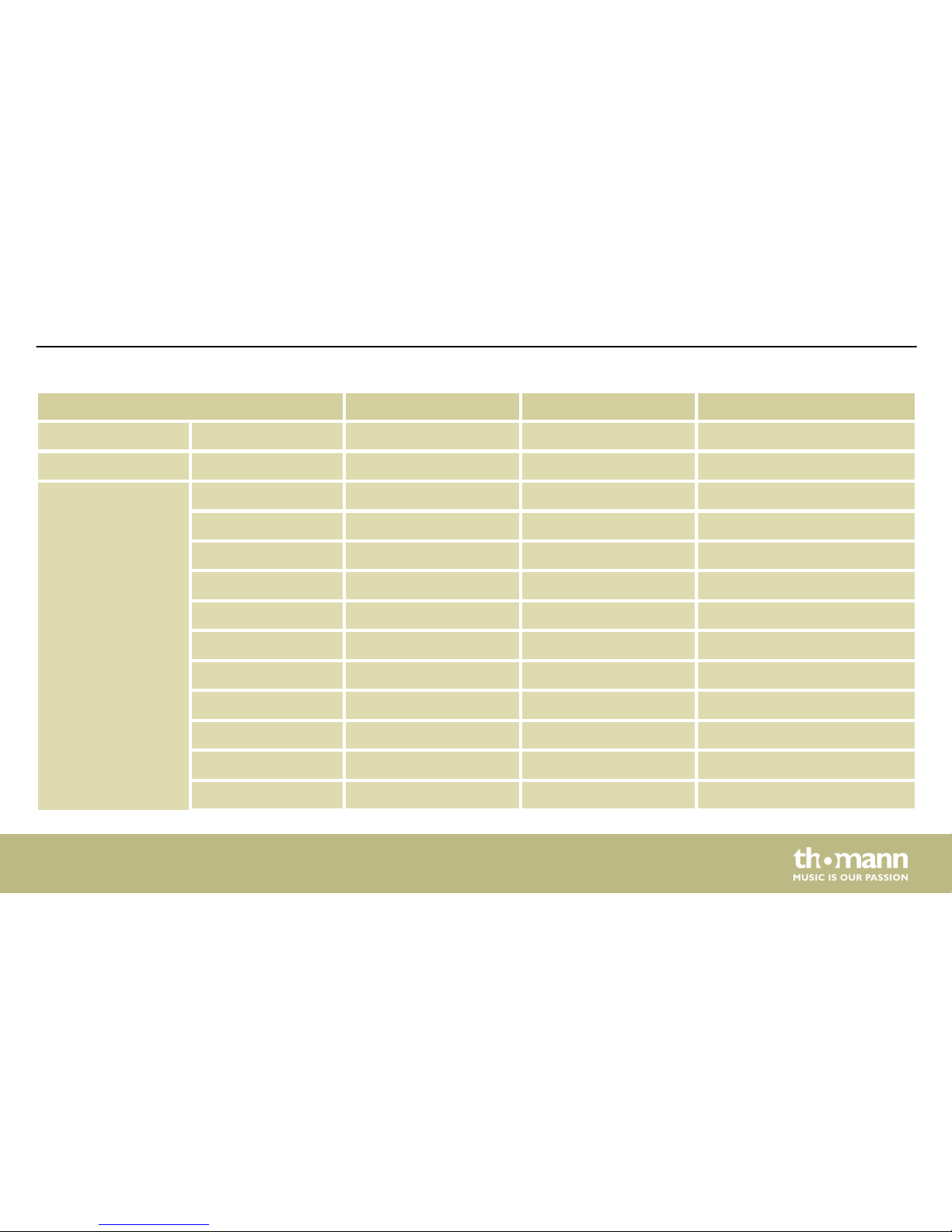
Function Transmitted Recognised Remarks
Channels No No
Pitch bender No Yes
Control change 0 No Yes Bank select
1 No Yes Modulation
5 No Yes Portamento time
6 No Yes Data entry
7 No Yes Volume
10 No Yes Pan
11 No Yes Expression
64 No Yes Sustain pedal
65 No Yes Portamento ON/OFF
66 No Yes Sostenuto pedal
67 No Yes Soft pedal
Appendix
MD-90
55
Page 56
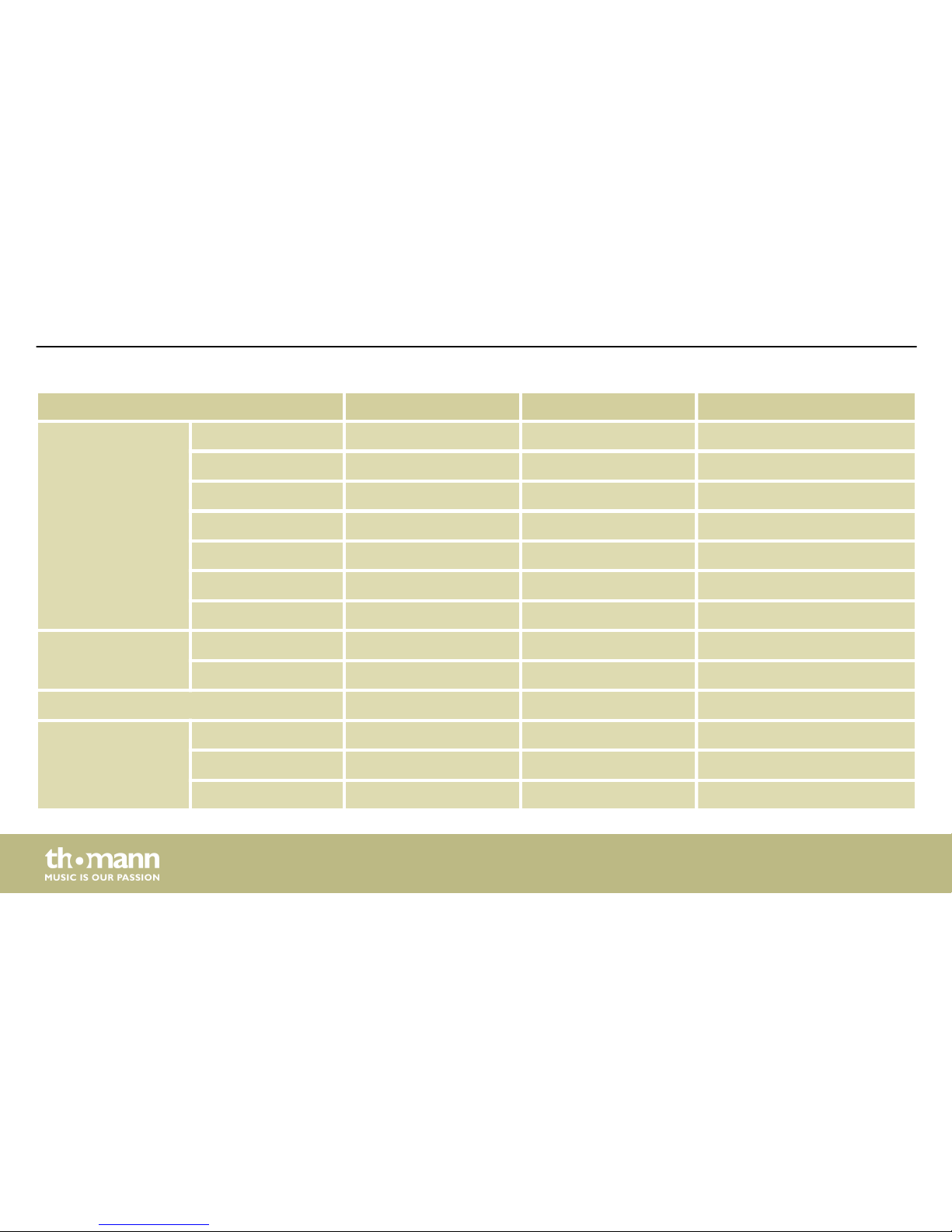
Function Transmitted Recognised Remarks
80 No Yes Reverb program
81 No Yes Chorus program
91 No Yes Reverb level
93 No Yes Chorus level
120 No Yes All Sound Off
121 No Yes Reset All Controllers
123 No Yes All Notes Off
Program change No Yes
Variable range No 0…127
System exclusive ******** Yes
System common Song Position No No
Song Select No No
Tune No No
Appendix
mobile drum
56
Page 57
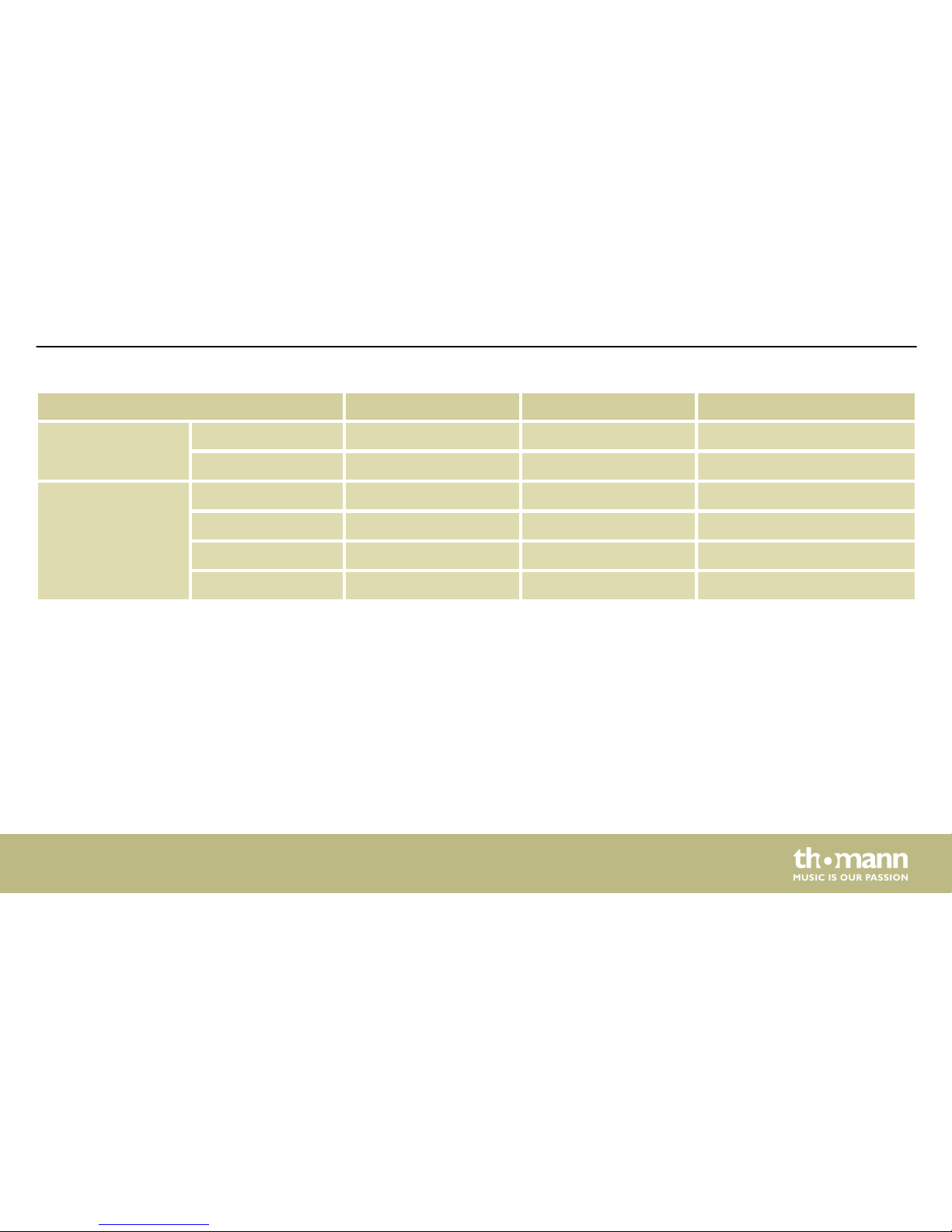
Function Transmitted Recognised Remarks
System real time Clock No No
Command No No
Aux messages Local ON/OFF No No
All Notes OFF No Yes
Active Sense No Yes
System reset No Yes
n Mode 1: OMNI On, Poly
n Mode 2: OMNI On, Mono
n Mode 3: OMNI Off, Poly
n Mode 4: OMNI Off, Mono
Appendix
MD-90
57
Page 58
Notes
mobile drum
58
Page 59

Page 60

Musikhaus Thomann · Hans-Thomann-Straße 1 · 96138 Burgebrach · Germany · www.thomann.de
 Loading...