

Page 1
UG2010-03-AVU5001
Edition 3
User’s Guide
Page 2

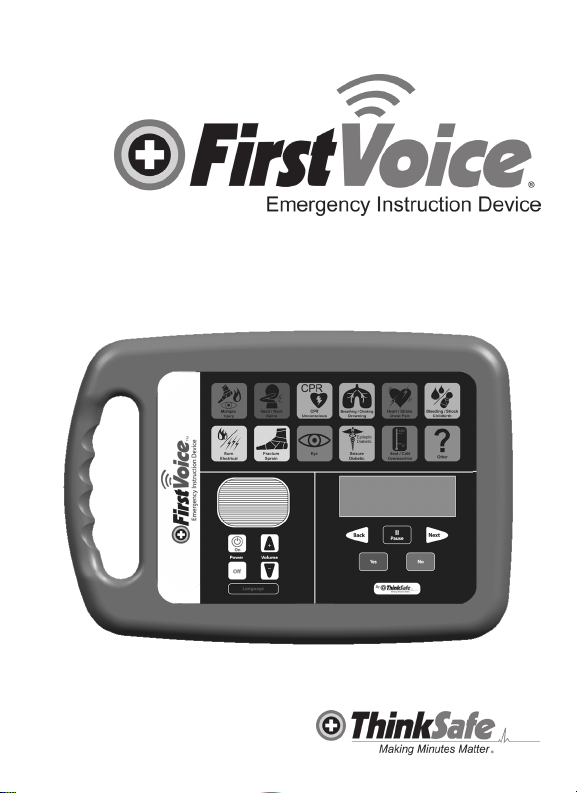
First Voice™ Emergency Instruction Device (EID) User’s Guide
UG2010-03-AVU5001 | Edition 3
Decisions concerning rst aid may be life and death decisions. Some rst
!
aid decisions and procudures involve the risk of serious injury or death.
If you suspect serious injury or illness, obtain emergency assistance immediately by dialing 911 or the appropriate medical emergency number or
seeking any closer emergency medical assistance. Do not put yourself or
others at risk.
Device Manufacturer: Think Safe, Inc.
1105 Hawkeye Drive, Hiawatha, IA 52233 (1-888-473-1777)
This EID is manufactured and sold under US patents and other patents pending.
The information in this guide applies to First Voice™ EID AVU5001 and is
subject to change. Please contact Think Safe at www.rstvoice.us or your local
distributor for information on revisions.
Edition History:
Edition 3.0
Publication Date: March 2010
Publication #: UG2010-03-AVU5001
Printed in the USA
Copyright 2008 Think Safe, Inc.
No part of this publication may be reproduced, transmitted, transcribed, stored
in a retrieval system or translated into any human or computer language in any
form by any means without the consent of the copyright holder. Unauthorized
copying of this publication may not only infringe copyright but also reduce the
ability of Think Safe to provide accurate and up-to-date information to users
and operators alike.
Please ll out the registration card included with this EID and mail it to the
manufacturer to keep current on EID updates and protocol changes.
WARNINGS
Decisions concerning rst aid may be life and death decisions. Some rst aid decisions
and procudures involve the risk of serious injury or death.
If you suspect serious injury or illness, obtain emergency assistance immediately by dialing 911 or the appropriate medical emergency number or seeking
any closer emergency medical assistance. Do not put yourself or others at
risk.
2
Page 3

Obtain permission from the person in need of emergency rst aid (or the parent
or guardian of a child) before attempting to render rst aid. If the person in
need of assistance is unable to communicate, you may assume he or she has
consented to assistance.
First Voice™ should not be used by anyone who cannot fully understand the
operation of the First Voice Emergency Instruction Device, cannot understand
the information and instruction provided by First Voice, or cannot make the
decisions required to follow those instructions.
Read the First Voice User’s Guide and thoroughly familiarize yourself (and
everyone likely to use the Emergency Instruction Device) with the First Voice
Emergency Instruction Device and its operation before there is an emergency.
Test your First Voice Emergency Instruction Device regularly to make sure its
batteries are fresh and the unit is operating properly. See the following pages
for test procedures. If you believe First Voice is not functioning properly, do not
use or rely on it until it is in proper working order.
First Voice is not a substitute for rst aid training and certication. First Aid
training and certication recommendations are available at www.think-safe.
com or by calling 1-888-473-1777 for more information regarding CPR or First
Aid certication. Welcome to First Voice™. This one-of-a-kind, interactive
emergency rst aid system will help you react to medical emergencies with
condence. Take a few minutes to familiarize yourself with it now so you will be
ready to act when emergencies strike. Please read all instructions before using
First Voice™.
Although the First Voice™ Emergency Instruction Device prompts users
through emergency rst aid procedures, it is intended for use in supporting
emergency response not as a replacement for sound rst aid or CPR training. Potential users are therefore advised to secure basic rst aid and CPR
instruction for ultimate emergency readiness. Our e-learning and other training
solutions discussed under Training in this User ’s Guide, are a convenient &
cost-effective resource for this instruction.
3
Page 4

Emergency procedures contained in First VoiceTM comply with current
Emergency Cardiovascular Committee (ECC) Guidelines and International
Liaison Committee of Resuscitation (ILCOR) standards for CPR. First aid
and emergency response procedures are compliant with National First Aid
Science Standards determined by major training organizations such as American Red Cross (ARC), American Heart Association (AHA), National Safety
Council (NSC), Health & Safety Institute (HSI)/American Safety & Health
Institute (ASHI)/Medic First International (MFI) plus Homeland Security/FEMA
guidelines. Although First VoiceTM prompts users through emergency rst aid
procedures, it is intended for use in supporting emergency response not as a
replacement for sound rst aid training. Potential users are therefore advised
to secure basic rst aid/CPR instruction for ultimate emergency readiness.
User liability: Good Samaritan laws vary from state to state but generally protect would-be rescuers acting in good faith by making them immune from civil
law suits in the event rst aid treatment or the administration of CPR fails.
First Voice™ Emergency Instruction Device (EID) Overview
The First Voice™ EID comes with:
• User’s Guide
Warranty (3 year)
Registration Card
Incident Documentation Forms
Getting Started
Indications for Use
The First Voice™ Emergency Instruction Device (EID) should be used as a
refresher training or real-time information delivery device for the infrequently
trained rescuer or layrescuer. The buttons on the First Voice™ EID contain
protocols for most major traumas (over 30) resulting in ER visits or hospitalizations plus all minor rst aid injuries. Familiarize yourself with the emergency
buttons and the different emergency situations that the buttons address.
Training
The First Voice™ Emergency Instruction Device (EID) is intended to be used
under the oversight of a well-designed emergency response plan. Any emergency response plan should provide for training of the EID users in proper rst
aid and CPR administration. Think Safe, the maker of First Voice™, recommends that you train on and familiarize yourself with the EID prior to an actual
emergency event.
The First Voice™ EID may be purchased within a bundled EID Training Package (AVU5601) which serves as a convenient resource for individual or group
4
Page 5

refresher training drills. This training package contains a rugged carrying case,
EID Training Scenarios Book (TS001), First Voice™ Handbook (V10570) and
EID with User’s Guide (AVU5001).
Individual components of this system are available for purchase from any
First Voice™ representative or distribution outlet. See www.rstvoice.us for
more products.
Think Safe, the maker of First Voice™, offers training for all potential users in
the operation of the First Voice™ Emergency Instruction Device (EID). Several
national and local organizations offer training certication in basic life support,
CPR, bloodborne pathogen hazards, AED (automated external debrillator)
use, or rst aid procedures. EID training or rst aid/CPR certication information can be obtained from your local First Voice representative. Visit www.
rstvoice.us or call 1-888-473-1777 for more information or to locate a distributor or representative near you.
Emergency Instruction Device (EID)
Setting up the First Voice™ EID
The First Voice™ EID (AVU5001) uses three AA standard batteries. Battery life
depends on duration and frequency of EID use. New heavy duty AA alkaline
batteries may last up to 2 years on standby. Think Safe recommends keeping a
spare set of three new AA batteries on hand at all times as a precaution. Do not
install previously used batteries. The First Voice™ EID has no battery charging
capabilities but it may be used with rechargeable batteries.
To install the batteries, make sure the EID is turned off. Turn the unit over and
open the battery compartment. Insert the batteries in the correct position and
close the battery lid. When the batteries are installed properly and the ON button is pressed, the LCD window will show and the EID will audibly state, “First
Voice has been activated. Press the appropriate emergency button to proceed.” If the EID does not turn on, check to make sure the batteries are new
or properly charged, battery contacts are clean, batteries are installed correctly
and the battery lid is securely closed. Proceed to troubleshooting for more tips
if the EID does not turn on.
Store the EID in accordance with your emergency response plan or protocols.
Ideally this will be in a high-trafc area that is easy to access, has proper signage, and is convenient for regular inspections.
The EID is a perfect storage companion in an alarmed cabinet with appropri-
ate responder supplies, First Voice™ SET system, and an automated external debrillator (AED). See www.rstvoice.us on First Voice™ accessories.
5
Page 6

Using the First Voice™ EID
The First Voice™ EID is easy to operate. Press the white and black ON button
to turn on the EID. Press the appropriate colored Emergency button to activate
the audio/LCD instructions for the occurring medical emergency. Listen to
the audio instructions and/or follow the LCD instructions, pressing the NEXT
/ BACK button as needed or YES / NO button when prompted with questions about the victim or the medical emergency. The instructions will direct
you when certain personal protection or medical supplies are needed by the
responder or victim.
Be sure to read the WARNINGS section of this guide. If there is a medical
emergency:
• Activate your emergency response plan and call the appropriate medical
emergency response number or 911.
• Quickly retrieve the EID and appropriate responder supplies and bring them
to the victim.
• Check the scene for safety and follow appropriate rst aid protocols. Use the
EID to guide you through proper rst aid protocol sequence if necessary.
Turning the EID OFF
Press the OFF button to turn off the EID. The unit will also automatically turn
off after 10 minutes of non-use in order to preserve battery life.
Pausing or Replaying Instructions
To pause the audio/LCD instructions at any time, press the PAUSE button.
Press PAUSE again to resume the instructions. To repeat an instruction seg-
ment, press the BACK button. To forward to the next instruction segment, press
the NEXT button.
LCD Window Display
The liquid crystal display (LCD) window in the middle of the EID displays criti-
cal written instructions and reminders corresponding to the audio instructions.
System requirements specify that the LCD screen should not be subjected
to temperatures for extended periods under -20 degrees Celsius or over 50
degrees Celsius.
Volume Keys
Use the + and – buttons to adjust the volume of the EID. If you are in a loud
environment (above 95 decibels) it is advised to carefully read the LCD instructions in order to insure you have heard all appropriate audio instructions.
Language Button
Pressing the “Language” button toggles between English and customized audio
instructions. Call technical support for more details at 1-888-473-1777.
6
Page 7

Emergency Buttons
The buttons on the First Voice™ EID contains protocols for most major traumas
(over 30) resulting in ER visits or hospitalizations plus all minor rst aid injuries.
Familiarize yourself with the emergency buttons and the different emergency
situations that the buttons address. To start the instructions over from the
beginning, press that Emergency button again. Pressing another Emergency
button at any time will override any instructions in progress.
1) Multiple Injury
This button is intended to help respond to a victim with multiple or unknown
injuries. First Voice™ will prompt you through a series of yes/no questions to
help assess, prioritize, and treat the injuries in the order of greatest urgency.
This is particularly helpful when only one responder is available on the scene of
a serious accident and there are numerous injuries.
2) Head/Neck/Spine
This button instructs you how to deal with suspected injuries to the head, neck,
or spine. The protocol emphasizes the necessity of maintaining the stability of
the head and neck while assessing or treating the victim.
3) CPR/Unconscious
This button walks you step by step through the ABCs (airway, breathing,
circulation) of cardio-pulmonary resuscitation (CPR) with protocols specically
tailored for adults, children, and infants and for special conditions such as pregnancy or obesity. The interactive instructions will guide you through assessing
and clearing the airway, rescue breathing, checking pulse and administering
compressions as needed based upon the interactive buttons pressed.
4) Breathing/Choking/Drowning
This button tells you how to assess and clear the airway of adults, children and
infants, when and how to help victims expel obstructions (including specic protocols for pregnant or obese victims), and how to react to breathing emergencies caused by conditions such as allergic reactions, asthma and emphysema,
or resulting from a near-drowning incident.
5) Heart/Chest Pain/Stroke
This button helps you identify symptoms and provide appropriate response
during the crucial rst minutes of a heart attack or stroke. The First Voice™
Handbook includes intake questionnaires that are specic to these medical
emergencies which help responders to gather vital background information
from the victim while waiting for advanced medical care to arrive.
6) Bleeding/Shock/Childbirth
Addressing everything from amputations and gunshot wounds to nosebleeds
7
Page 8

and lost teeth, this button tells when to call 911 and provides instructions on the
best ways to control the bleeding depending on the location of the wound and
severity of the bleeding. This button also covers shock, which often accompanies bleeding and other traumas, as well as emergency childbirth, including
maternal and neonatal care during and immediately following delivery.
7) Burn/Electrical
The Burn/Electrical button helps you respond appropriately by tailoring the
treatment to the type and severity of the burn, including thermal (re, heat,
steam, and liquid), chemical, electrical and ash burns, and instructs when to
call 911.
8) Fracture/Sprain
The Bone/Sprain button helps with injury assessment, decisions on whether or
not to move the victim, and how to immobilize the injury when necessary.
9) Eye Injury
This button addresses embedded or foreign objects, chemicals, blows to the
eye, retinal detachment, cuts or punctures, ash burns, and more.
10) Heat/Cold/Overexertion
This button enables you to recognize and treat emergencies caused by overexertion or by overexposure to heat or cold along with the illnesses that often
accompany them—heat stroke, frostbite, and hypothermia.
11) Seizure/Diabetic
The Seizure/Diabetic button tells you how to recognize and handle a seizure,
protect the victim, and know when to seek advanced assistance. It also provides protocols for responding to potentially life-threatening diabetic emergen-
cies.
12) Other
This button covers a variety of protocols, from bite and sting emergencies or
allergic reactions to hazardous materials exposure such as chemical poisons
and biological threats. Based on guidelines provided by the Department of
Homeland Security, it discusses rst-stage response in the event of biological
threats (such as anthrax), chemical poisoning, and radiation—whether acciden-
tal or deliberate.
Upgrading the EID due to changes in protocols
The First Voice™ EID is a long term asset designed to allow for updates
and changes in rst aid science that improve care and outcomes for victims
experiencing medical emergencies. The EID may also be customized with the
approval of the manufacturer to allow for instructions due to specic risks or
specialized needs of the customer or end user.
8
Page 9

• Unscrew the compartment on the back of the unit to allow access to a media
data card port
• An updated data card must be obtained from your local First Voice™ representative or distributor
• Remove the compartment cover
• Pull out the installed data card and replace with the updated card
• Return the outdated or previous data card to a local distributor or representative, depending on terms related to your maintenance agreement or upgrade
Contact us at www.rstvoice.us or call 1-888-473-1777 for more information.
Accessories
Contact your local representative, or distributor visit us at www.rstvoice.us or
call 888-473-1777 for more information.
Maintenance Agreement
First aid and CPR treatment protocols are updated frequently in response to
changes in rst aid science recommendations by the ECC/ILCOR, American
Red Cross, American Heart Association, National Safety Council, Department
of Homeland Security/FEMA, and other major training organizations. The First
Voice™ EID is a long term asset designed to allow for updates and changes in
rst aid science that improve care and outcomes for victims experiencing medical emergencies. These updated protocols are available to First Voice™ own-
ers for an ongoing annual fee or one-time upgrade fees. Register for updates
online at www.rstvoice.us or contact your local representative. Customer
Service may be reached at 1-888-473-1777 to answer any additional questions
on this service.
Maintaining the First Voice™ EID
The First Voice™ EID is easy to maintain. Other than checks recommended
after each use of the EID the maintenance is limited to periodically checking the
following:
• Check the batteries in the EID at least once quarterly by turning the unit on
and pressing any of the emergency buttons. Replace the batteries if any of the
following occur:
- Audio instructions fail to deploy
- A series of dots appear on the LCD screen
- The LCD screen is not functioning properly
- Audio instructions are slow or garbled
- A low battery message displays or low battery beep
- The unit does not turn on
(See Troubleshooting for additional information)
9
Page 10

• The unit automatically shuts off after a 10 minute period of time if not used to
preserve batteries.
• Familiarize yourself with the EID. The EID is an excellent resource for individual skill refresher or group training drills. First Voice™ offers various training
options for the use of the EID and rst aid/CPR certication. Contact us at
www.rstvoice.us for more information or your local First Voice™ representative.
• Do not immerse the First Voice™ EID in water, liquids, or other substances.
The EID is designed to be weather-resistant and rugged but it is not submers-
ible. The EID is not intended to be stored outside or exposed to extreme
temperatures for long periods of time. Do not store the EID case or EID near
heaters, burners, stoves, replaces, or other heat sources.
• If the EID is dropped or is struck by an object, turn it on and verify that it
works properly. Check the outside of the EID, if you see any cracks or other
signs of damage contact Think Safe immediately for technical support at
1-888-473-1777.
Resetting the First Voice™ EID
If the device is exposed to strong Electo Magnetic Interference (EMI), the
product may need to be reset. To reset the device remove the batteries and
reinstall. The device should automatically restart.
Cleaning the First Voice™ EID
The outside of the EID can be cleaned with a soft cloth dampened in soapy
water, chlorine bleach (2 Tbsp per Qt or L of water), ammonia-based cleaners,
or 70% isopropyl (rubbing) alcohol.
Do NOT use strong solvents such as acetone or acetone-based cleaners, abrasive materials or enzymatic cleaners to clean the EID or accessories.
Do NOT immerse the EID in uids.
Do not sterilize the EID or its accessories.
Troubleshooting
If you experience problems operating the First Voice™ EID, check the following
list of possible problems and solutions. If the problem persists, contact our
Customer Service Department at 1-888-473-1777 for more assistance.
10
Page 11

Problem Possible Solution
When I press the Emergency buttons
on the EID, nothing happens.
Check to make sure the EID unit is
turned on. Make sure the batteries
are properly installed. If problems
continue, install NEW batteries.
The voice/audio coming from the EID
is hard to hear.
Adjust the volume by pressing the
VOLUME + button. Volume may
decrease as batteries are depleted.
If the VOLUME + button does not
increase the volume, try changing the
batteries.
The EID does not continue or
proceed to the next instruction after
you have pressed NEXT.
The EID may be waiting for you to
answer a YES/NO question. Press
the BACK button to repeat the last
instruction or question.
The audio instructions stop even
though
I haven’t pressed PAUSE.
The EID may be waiting for a Yes/No
response to a question. Try pressing
the BACK button to repeat the question and answer Yes or No.
I don’t have time to do everything the
audio instructions say.
Press the PAUSE button at any time
to pause the audio instructions. Then
press PAUSE to resume. If you miss
any part of an instruction, press the
BACK button to repeat.
The EID gets stuck and only scrolls
dots on the LCD screen after numer-
ous instructions have been given.
The EID won’t proceed when NEXT
is pressed.
Make sure new batteries have been
installed. Press the BACK button and
then push NEXT. Remove Batteries
and reinstall Please notify technical
support if you nd any of these “hang
ups” in your equipment.
1-888-473-1777.
The LCD screen is “black” and
does not show any visual images or
characters.
Make sure that the equipment is
operating within the stated speci-
cations. Call technical support if
temperature range is less than 50C
and higher than -20C.
11
Page 12

The EID only has dots that appear
and just keep scrolling on the LCD
screen.
The EID makes clicking/ticking noise
when turned on or EID will not turn
on.
LCD screen displays message “Low
Battery Level”.
No words appear on LCD screen or
LCD screen is ashing.
LCD screen displays message “SD
Card is missing or not correctly in-
stalled” or SD Card error message.
The EID beeps when button next button is pressed.
The EID beeps when Yes or No is
pressed.
The EID beeps and turns off. Not enough power in batteries to
The Eid gets stuck or freezes. Refer to page 10 Resetting First
Customer Service
Customer Service is available online at www.rstvoice.us or by calling 1-888473-1777 from 8:00 a.m. to 5:00 p.m. CST.
Limited Warranty
Limited Warranty for the Physical First Voice™ Unit
Think Safe warrants the physical First Voice™ EID unit to be free from defects
in material and workmanship under normal operating conditions for a period of
three years from the date of purchase. This warranty extends only to the rst
consumer purchaser of the First Voice™ EID unit. Think Safe makes no other
Make sure new batteries have been
installed. Call toll free technical support to discuss maintenance including
potential data card replacement.
1-888-473-1777.
Not enough power in batteries to turn
on EID. Install new batteries.
Install New Batteries.
Power in batteries is too low to power
LCD screen. Install new batteries.
Check data card to ensure it is prop-
erly installed.Call toll free technical
support for additional assistance.
1-888-473-1777
Press Yes or No as a question is
being asked.
Press Next as an instruction segment is in process and needs to be
continued.
operate the EID. Install new batteries.
Voice EID.
Page 13

representation or warranty of any kind, either express or implied, concerning
the physical First Voice™ EID unit.
First Voice™ disclaims any implied warranty of merchantability or tness
for a particular purpose.
Think Safe’s warranty does not extend to First Voice™ units that have been
serviced, modied, or altered by anyone other than Think Safe or one of its authorized service centers. Nor does it extend to any unit with a removed, altered,
or unreadable serial number. If, despite Think Safe’s disclaimer of such warranties, any other warranty arises concerning the physical First Voice™ unit, the
duration of that warranty shall be limited to a period of one year from the date
of purchase by the rst consumer purchaser of the First Voice™ unit.
If a defect in material or workmanship covered by Think Safe’s warranty is
discovered during the warranty period, Think Safe will, at its option, repair or
replace the unit at no charge to bring the unit into compliance with Think Safe’s
warranty. In doing so, Think Safe may, at its option, use either new or reconditioned parts, components, or units. If Think Safe determines that it is unable
to repair or replace the unit to bring the unit into compliance with Think Safe’s
warranty, Think Safe will refund the purchase price of the unit. This repair/
replace/refund remedy is the sole and exclusive remedy with regard to any
warranty covering the physical First Voice™ unit without regard to the nature or
origin of the warranty.
No Warranty Concerning Software, First Aid Information, and Instructions
Think Safe makes no representation or warranty of any kind, either express
or implied, concerning the software or the rst aid information and instructions
provide in, with, or by means of the First Voice™ unit. First Voice™ disclaims
any implied warranty of merchantability or tness for a particular purpose with
regard to that software, information, and/or instructions.
Think Safe has made a reasonable good faith effort to provide software that
will allow for proper and reliable operation of the First Voice™ unit. Portions of
the software may be covered by warranties provided by the entities providing
the software to Think Safe. However, Think Safe itself does not warrant that
the software provided in or with the First Voice™ unit is free from errors or will
operate properly (or operate at all) at any particular time or place or in any
particular situation.
Think Safe has made a reasonable, good faith effort to provide rst aid information and instructions that reects the standard of knowledge and accepted
emergency rst aid practices in the United States at the time Think Safe
included the information and instructions in or with the First Voice™ system.
13
Page 14

However, Think Safe makes no representation, warranty, or guaranty concerning any aspect of the rst aid information and instructions provided, including
(but not limited to) the accuracy, arrangement, content, completeness, timeliness, or sequence of the information and instructions.
If, despite Think Safe’s disclaimer of such warranties, any warranty arises concerning the software or the rst aid information and instructions, the duration of
that warranty shall be limited to a period of one year from the date of purchase
by the rst consumer purchaser of the First Voice™ unit. Further, the remedy
with regard to any such warranty shall be for Think Safe, at its option, either (a)
to bring the software or the rst aid information and instructions into compliance
with the warranty or (b) to refund the purchase price of the First Voice™ unit.
No Warranty Concerning the Accompanying First Aid Supplies
Think Safe makes no representation or warranty of any kind, either express or
implied, concerning any rst aid material or supplies accompanying or related
to the First Voice™ unit. First Voice™ disclaims any implied warranty of merchantability or tness for a particular purpose with regard to those FIRST AID
SUPPLIES AND MATERIALS.
Think Safe has made a reasonable good faith effort to provide quality rst aid
materials and supplies. Some of these materials and supplies may bear their
own instructions, warranties, and warnings, which you should read and understand. Think Safe itself does not warrant that the rst aid materials and supplies
are safe or appropriate for any purpose or use.
If, despite Think Safe’s disclaimer of such warranties, any warranty arises concerning the rst aid material or supplies, the duration of that warranty shall be
limited to a period of one year from the date of purchase of the material of supplies. Further, the remedy with regard to any such warranty shall be for Think
Safe, at its option, either (a) to provide material or supplies in compliance with
the warranty or (b) to refund the purchase price of the materials or supplies.
Limitation of Liability: Exclusion of Certain Damages
Use First Voice™ unit and the software, information, instructions, and supplies
provided by or associated with First Voice™ at your own risk. Under no circumstances will Think Safe be held liable under any theory of liability (whether
contract, tort, or statute) for any injuries, losses, or damages of any kind arising
out of or relating to the use of or the inability to use the physical First Voice™
unit or the software, information, instructions, and supplies provided by or associated with First Voice™. Losses and damages that are excluded include direct,
indirect, consequential, and punitive damages.
14
Page 15

In no event shall Think Safe’s liability to any person exceed the purchase price
paid by the original consumer purchaser for the First Voice™ unit.
Some states and jurisdictions do not allow the limitation or exclusion of
incidental or consequential damages, or limitations on the length of an implied
warranty, so the above limitations on the length of an implied warranty may
not apply to you. Think Safe’s warranty gives you specic legal rights, and you
may have other rights that vary from state to state or from one jurisdiction to
another.
Call 1-888-473-1777 for more information or contact us at www.rstvoice.us.
For service requests please reference: (a) your bill of sale or other proof of purchase, (b) a description of the problem, and (c) your name, address, telephone
number, and email address.
The Makers of First Voice™
1105 Hawkeye Drive
Hiawatha, IA 52233
888-473-1777
www.rstvoice.us
© 2009 Think Safe, Inc. All rights reserved. UG2009-01-AVU5001
15
Page 16

Page 17

Changing the face of rst aid.
Think Safe Inc.
1105 Hawkeye Drive
Hiawatha, IA 52233
888-473-1777
www.rstvoice.us
 Loading...