

Page 1
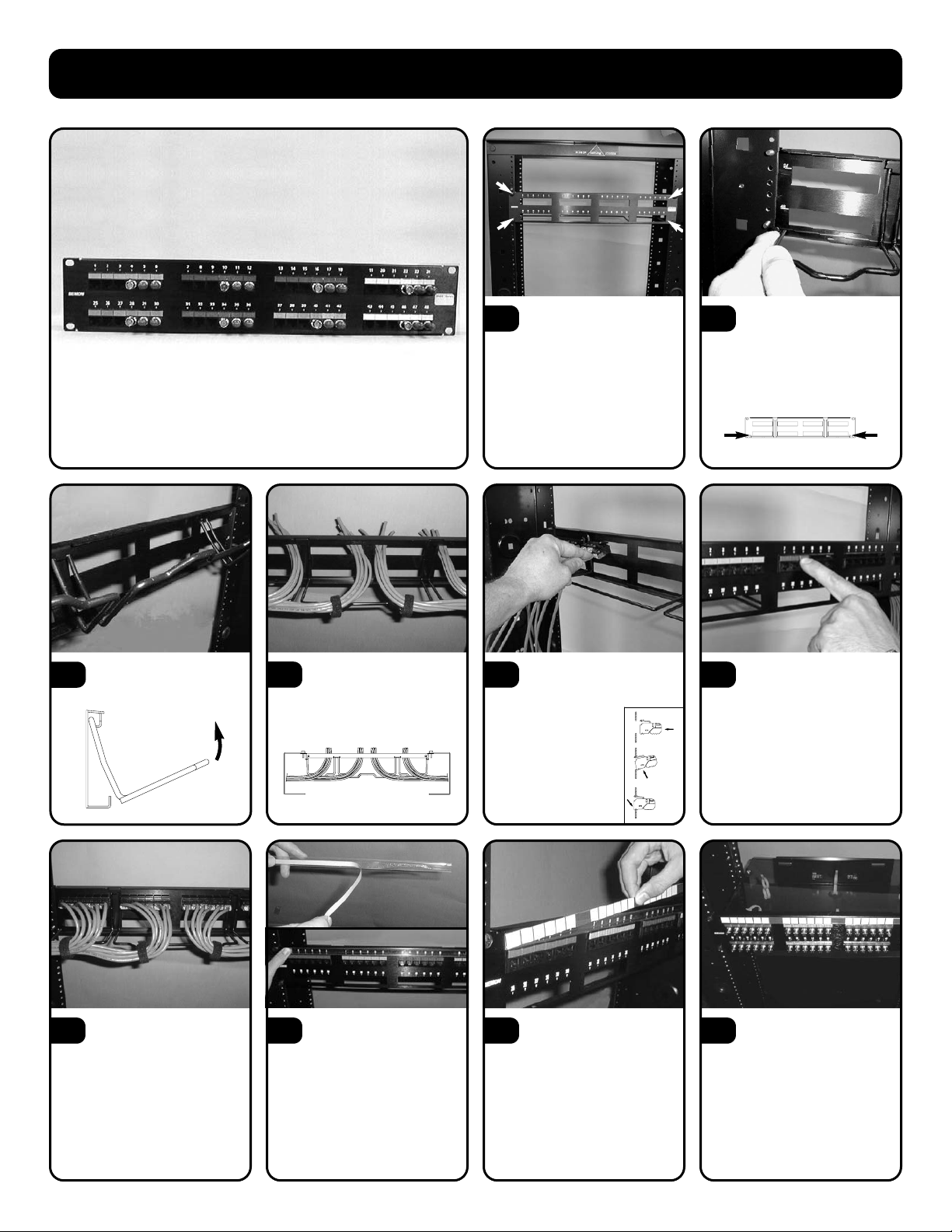
MAX
®
Patch Panel Instructions
Using the #12-24 machine
screws and washers
provided, mount the patch panel to
the desired position on an 19" relay
rack or equivalent.
1
The MAX Patch Panel comes
with rear cable manager preinstalled. In applications where the
rear cable manager is not used, it can
be removed by un-hooking the outside
legs...
2
Terminate MAX modules and
install into patch panel
according to the instructions that
accompanied the MAX
modules.
Note: Flat MAX modules are
recommended for patch
panels and angled MAX
modules are recommended
for the work area.
5
With rear cable manager in
place, cut cables to length
for termination (approximately 100130mm (4-5 inches) of cable from
rear management bar).
4
When using fiber optic MAX
modules, an optional fiber
management tray is available
separately (see Ordering
Information). See instructions
included with fiber management tray
for proper installation.
Note: The rear cable management bar
must be removed prior to installation of
fiber management tray.
10
After MAX modules are
terminated and installed in
patch panel, dress cables on rear
manager with cable ties provided or
Siemon VCM-series cable managers
(available separately, see Ordering
Information.
7
Install optional label holder
by removing paper from
adhesive back and adhering to front
of patch panel just above rows of
MAX modules.
8
...and rotating the cable
manager outward.
3
Top View
Install color coded icons (as
shown above) or hinged
doors (as illustrated) provided with
modules into area above MAX
modules to secure modules into
panel. (See MAX module
instructions for additional details.)
6
Insert paper label into label
holder by separating the
plastic label holder and inserting
paper label between layers of the
plastic holder.
9
Page 2
MAX Patch Panel Instructions
© 2003 The Siemon Company
To assist safe installations, comply with the following:
A. Use caution when installing or modifying
telecommunications circuits.
B. Never touch uninsulated wire terminals unless
the circuit has been disconnected.
C. Never install this device in a wet location.
D. Never install wiring during a lightning storm.
Rev. B 01/03 100.6049
To assist safe installations, comply with the following:
A. Use caution when installing or modifying
telecommunications circuits.
B. Never touch uninsulated wire terminals unless
the circuit has been disconnected.
C. Never install this device in a wet location.
D. Never install wiring during a lightning storm.
www.siemon.com
Siemon — Southeast Asia
Singapore
Tel: (65) 345 9119
Siemon — UK
Woking, England
Tel: (44) (0) 1483 480040
Siemon — USA
Watertown, Connecticut
Tel: (1) 866-548-5814
Siemon — Australia
Sydney, Australia
Tel: (61) 2 9452 2666
Siemon — Canada
Markham, Ontario
Tel: (1) 905 940 9223
Siemon — China
Beijing, P.R. China
Tel: (86) 10 6559 8860
Siemon — France
Paris, France
Tel: (33) 1 46 46 11 85
Siemon — Germany
Frankfurt, Germany
Tel: (49) (0) 69 97168 184
Siemon — Italy
Milano, Italy
Tel: (39) 02 64 672 209
Siemon — Latin America
Coral Gables, Florida USA
Tel: (1) 305 446 9150
Latin American Sales
Manufacturer’s Reps
Castroville, Texas USA
Tel: (1) 830 538 6375
 Loading...