

Page 1
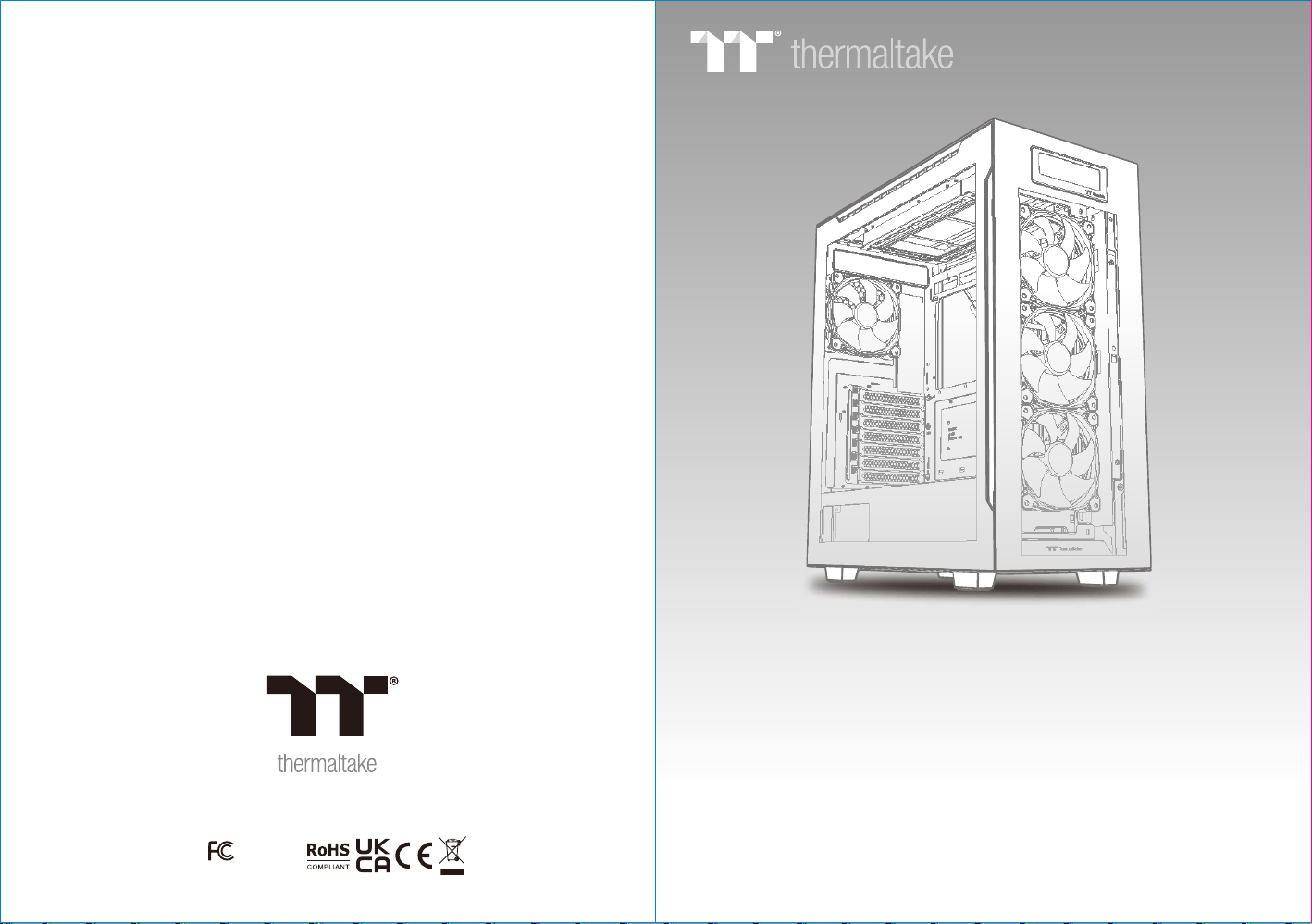
Picture is for reference only
Divider 550 TG Ultra
Divider 550 TG Ultra
© 2 022 Therma lta ke Tech nol ogy Co., L td. All Rights Reser ved . 2 022 .01
All other r egis tered t rademar ks bel ong to their re specti ve comp anies.
Tested To C omply
With F CC Standa rds
FOR H OME OR O FFICE USE
www. therm altak e.com
User 's Manu al
Benu tzerh andbu ch
Mode d ’empl oi
Manu al del us uario
Manu ale del l’ute nte
Manu al do Uti lizad or
安裝說明書
用戶手冊ユーザーズマニュアル
Руководство пользователя
kull anıcı elki tabı
(EEE Y önetm eliği ne Uygu ndur)
คู่มือการใช้
Page 2

TT Pr emi um
To co nti nue a chiev ing t he co rp ora te mi ssion o f del ive ring th e
per fec t use r exper ien ce, T he rma lta ke deve lop ed “T T Premi um”
wit h the e sse nce of co mbi nin g su pre me qu ality p rod uct s with a
new l ogo d esi gn . TT Pr emi um is f ar m ore t han j ust a gua ran tee
of qu ali ty. B ehind t he na me, i t re pre sen ts the pa ssi on in D IY,
Mod din g and T he rma lta ke’ s de sir e to be t he most i nno vat ive
bra nd in t he PC h ardwa re ma rke t. T o sat isf y the dem and o f the
hig h-e nd PC u se rs, T T Pre miu m fo llo ws it s core va lue s of
Exc ell ent Q ualit y, Un iqu e De sig n, Di verse C omb ina tions a nd
Bou ndl ess C re ati vit y to pr ov ide a h igh p erfor man ce PC p roduc t
for e ver y ent husia st. h ttp :/ /tt pre miu m. com
Co nte nts
Chapter 1. Product Introduction
Tt LC S - Liquid Cooling Support Certifi c a t i o n
Tt LC S Cer tif ied is a Th erm alt ak e exc lus ive cer tif ica tion
app lie d to on ly p rod uct s tha t pa ss th e des ign and
har dco re en thusi ast s sta nd ard s tha t a true LC S cha ssi s
sho uld b e hel d to . The T t LCS c ert if ica tio n was cre ate d
so th at we a t The rmalt ake c an de si gna te to a ll powe r
use rs wh ich c hassi s hav e bee n te ste d to be b est
com pat ibl e with ex tre me li qu id co oli ng conf igu rat ions to
ens ure y ou ge t the bes t per for ma nce f rom t he best
fea tur es an d fitme nt.
Joi n T t C o m m u nity To Receive Benefits
Dea r Val ued C us tom er,
Tha nk yo u for c hoosi ng Th erm al tak e.
As a ne w use r we va lue you r tho ugh ts a nd op ini ons and
you r fee dba ck is imp ort ant t o us . We at T her malta ke
wou ld li ke to u se this o ppo rtu ni ty to i nvi te you to j oin o ur
Com mun ity F orums . Reg ist er t oda y to st art enj oyi ng th e
ful l ben efi ts of our c omm uni ty .
Ben efi ts of b eing a me mbe r:
Qui ck an d res ponsi ve us er su pp ort
Rec eiv e hel p and adv ice w ith n ew b uil ds
Kee p up to d ate w ith new p rod uct r el eas es
Sha re yo ur th ought s and b uil ds w ith t he co mmuni ty
Ent er mo nth ly cont est s and g iv eaw ays
Bra nd of fic ial w ebs it e
htt p:/ /ww w.th erm alt ake.c om/
Glo bal F ace boo k
htt ps: //w ww.f ace boo k.com /Th erm alt ake In c
Taiwa n Fac ebo ok
htt p:/ /ww w.fa ceb ook .com/ The rma lta keT W
Glo bal c omm uni ty fo ru ms
htt p:/ /co mmu nity.th erm alt ake .c om
1.0
Sp eci f ica tio n
1.1
Ac ces s or y
1.2
War n ing a n d Not ice
Chapter 2. Installation Guide
Remo ve Co m pon ent s
2.0
Powe r S upp ly Uni t (PS U ) Ins tal l ati on
2.1
Mo the r bo a rd In s tal lat i on
2.2
3. 5" & 2. 5 " HDD I n sta lla t ion
2.3
PC I Car d I nst all a tio n
2.4
2.5
Ai r Coo l ing I nst a lla tio n
2.6
AI O Liq u id Co oli n g Ins t al l ati on
2.7
I/ O Con n ect ion
2.8
Remo ve Fi l ter s
2.9
AR GB Co n tro l Ins t ruc tio n
2.10
TT RGB P L US So ftw a re co ntr ol in t erf ace
01
02
03
06
07
08
09
11
12
13
14
15
16
17
Page 3
Di v ider 550 TG Ul t ra Di v ider 550 TG Ul t ra
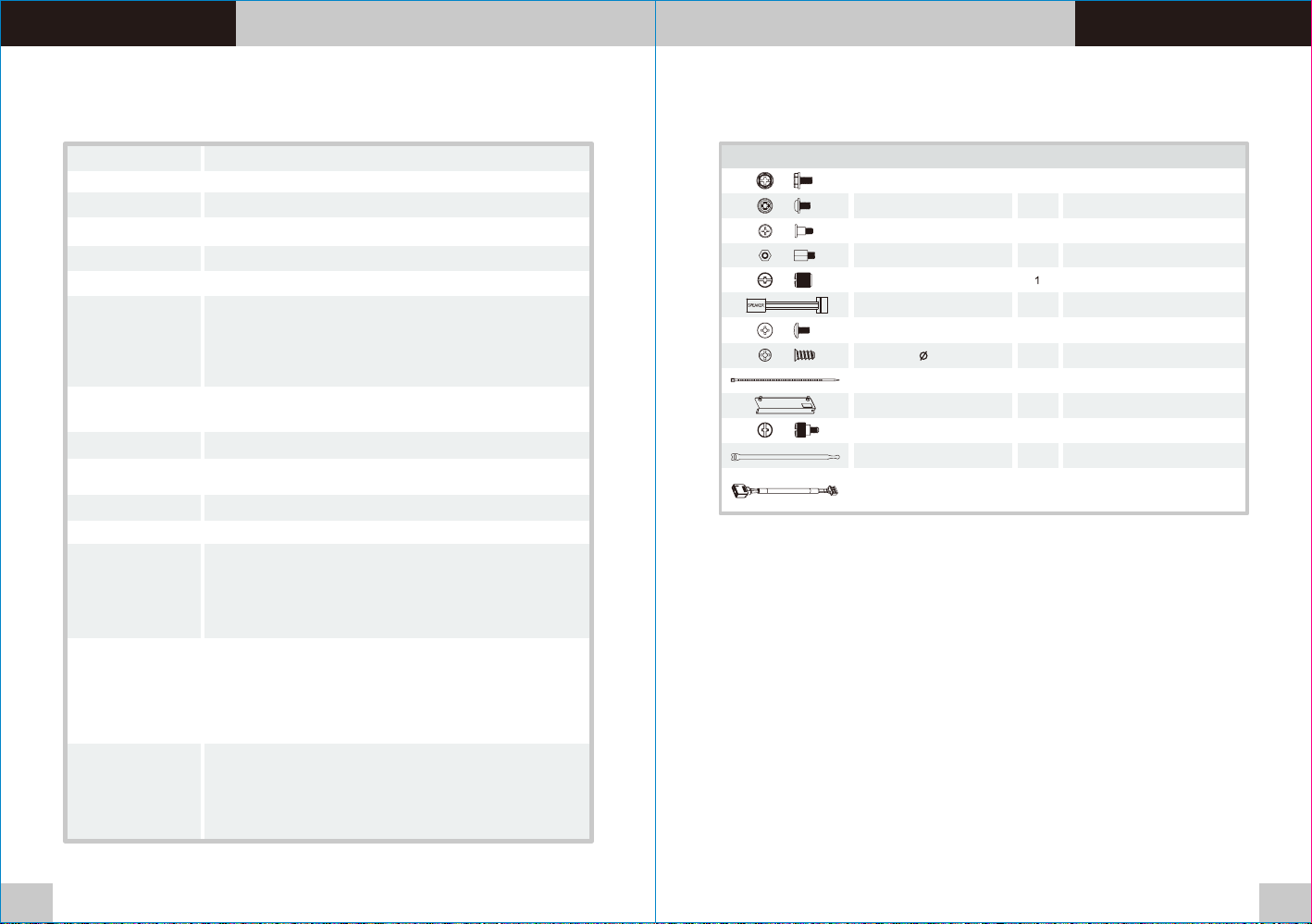
Specificatio n
Accessory
Mod el
Cas e Type
Dim ensio n (H x W x D) 530 x 2 30 x 466 mm ( 20.9 x 9. 1 x 18.3 in ch)
Sid e Panel
Col or
Mat erial
Coo ling Sy stem
Dri ve Bays
Exp ansio n Slots
Mot herbo ards
I/O P ort
PSU
Fan S uppor t
Rad iator S uppor t
Cle aranc e
Div ider 55 0 TG Ultr a
Mid Tow er
Tempe red Gla ss x 3
Bla ck
SPC C
Front (intake) :
120 x 120 x 25 mm ARGB fan
(1000rpm, 27.2 dBA) x 3
Rear (exhaust) :
120 x 120 x 25 mm fan
(1200rpm, 22 dBA) x 1
2 x 3.5 ”, 5 x 2.5”
or 7 x 2. 5”
7 (Ro tatab le Pate nted De sign)
6.7 ” x 6.7” (M ini ITX ), 9.6” x 9 .6” (Mi cro ATX), 1 2” x 9 .6” ( ATX)
USB 3 .2 (Gen 2 ) Type C x 1 , USB 3.0 x 2 , HD Audio x 1
Sta ndard P S2 PSU (o ption al)
Fro nt: 3 x 120 m m, 2 x 120 mm , 1 x 120 mm
3 x 140 m m, 2 x 140 mm , 1 x 140 mm
Top: 2 x 1 20 m m, 1 x 12 0 mm
2 x 140 m m, 1 x 140 mm
Rig ht (M/B S ide): 2 x 1 20 mm, 1 x 12 0 mm
Rea r: 1 x 120 mm
Fro nt: 1 x 360 mm, 1 x 240 mm, 1 x 120 mm
1 x 280 mm, 1 x 140 mm
Top: 1 x 2 80 m m, 1 x 14 0 mm
1 x 240 m m, 1 x 120 mm
Rig ht (M/B S ide): 1 x 2 40mm (v ertic al-in stall ed GPU re comme nded) ,
1 x 120 m m
Rea r: 1 x 120m m
CPU c ooler h eight l imita tion: 1 70 mm
VGA le ngth li mitat ion: 36 0 mm (Wit h radia tor)
390 m m (With out rad iator )
PSU l ength l imita tion: 1 80 mm (Wi th HDD Ca ge)
220 mm(Wi thout H DD Cage )
Figure Use For
Part Name
Screw #6-32 x 6 mm
Screw M3 x 5 mm
Screw M3 x 8.5 mm
Stand-off #6-32 x 6.5 mm
Net setter
Buzzer
Screw #6-32 x 6 mm
Screw 5 x 10 mm 4
Cable Ties
VGA Bracket
Thumb Screw #6-32 x 5 mm
Velcro Cable ties
MB Si gnal Br idge Ca ble
(AS US/MS I/ASR OCK/G IGABY TE)
Q`ty
4
40
For Motherboard / 2.5” HDD / SSD
10
3
1
10
10
1
3
3
1
For 2.5” HDD / SSD
For Motherboard Stand-off
Motherboard Alarm
For 3.5” HDD
For Case Fan
Cable Management
Cable Management
LED Signal Sync
For PSU
Backup
Backup
Backup
01 02
Page 4
Di v ider 550 TG Ul t ra Di v ider 550 TG Ul t ra
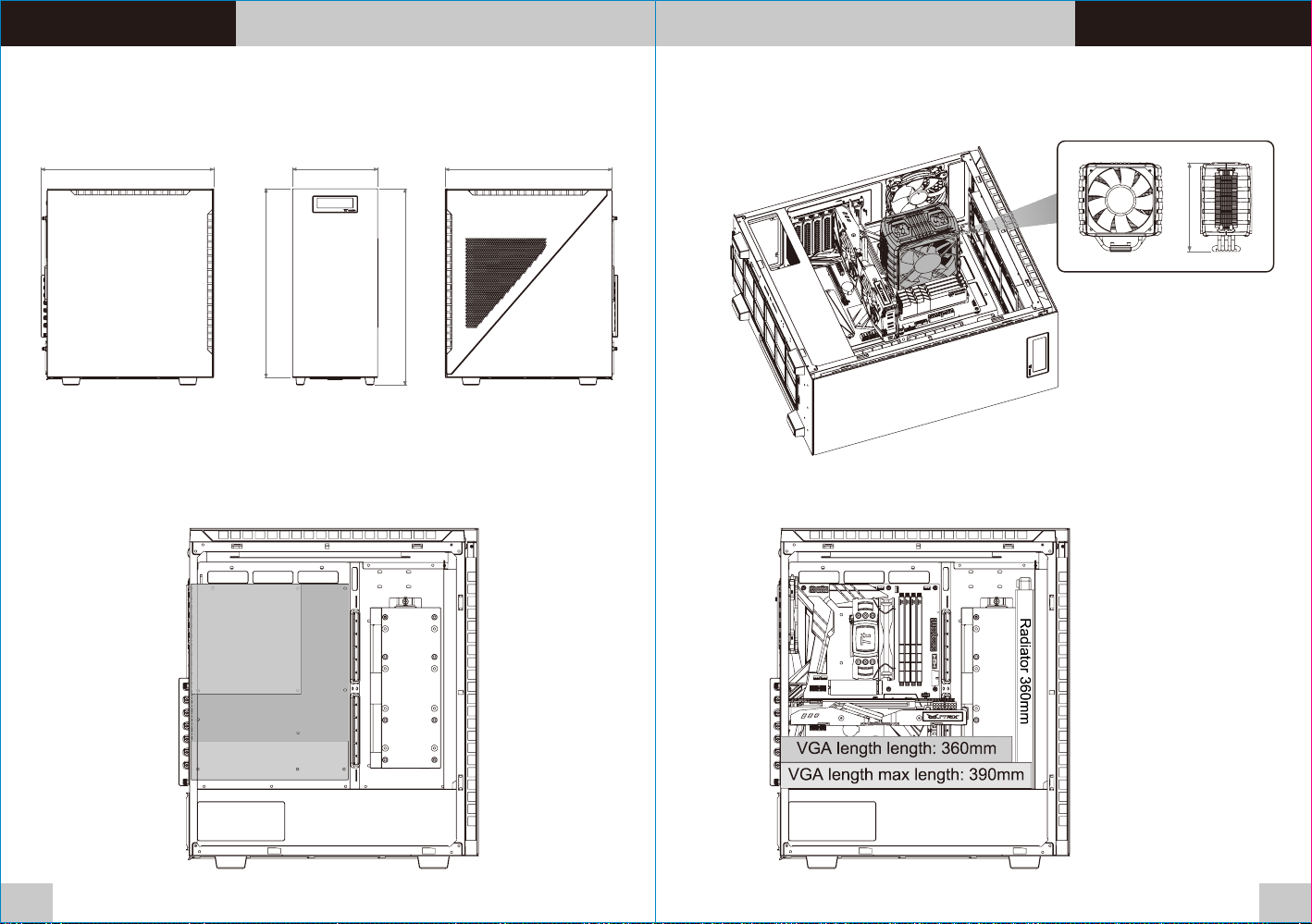
Warning and Noti ce
Chassis dimension
466m m 230m m
510m m
530m m
450m m
Motherboard Compatibility: ITX / mATX / ATX
(Up to 244mm w i d e )
ITX ITX
CPU cooler max height: 170mm
170m m
VGA length max length: 390mm
mATX mATX
ATX ATX
03 04
Page 5
Di v ider 550 TG Ul t ra Di v ider 550 TG Ul t ra
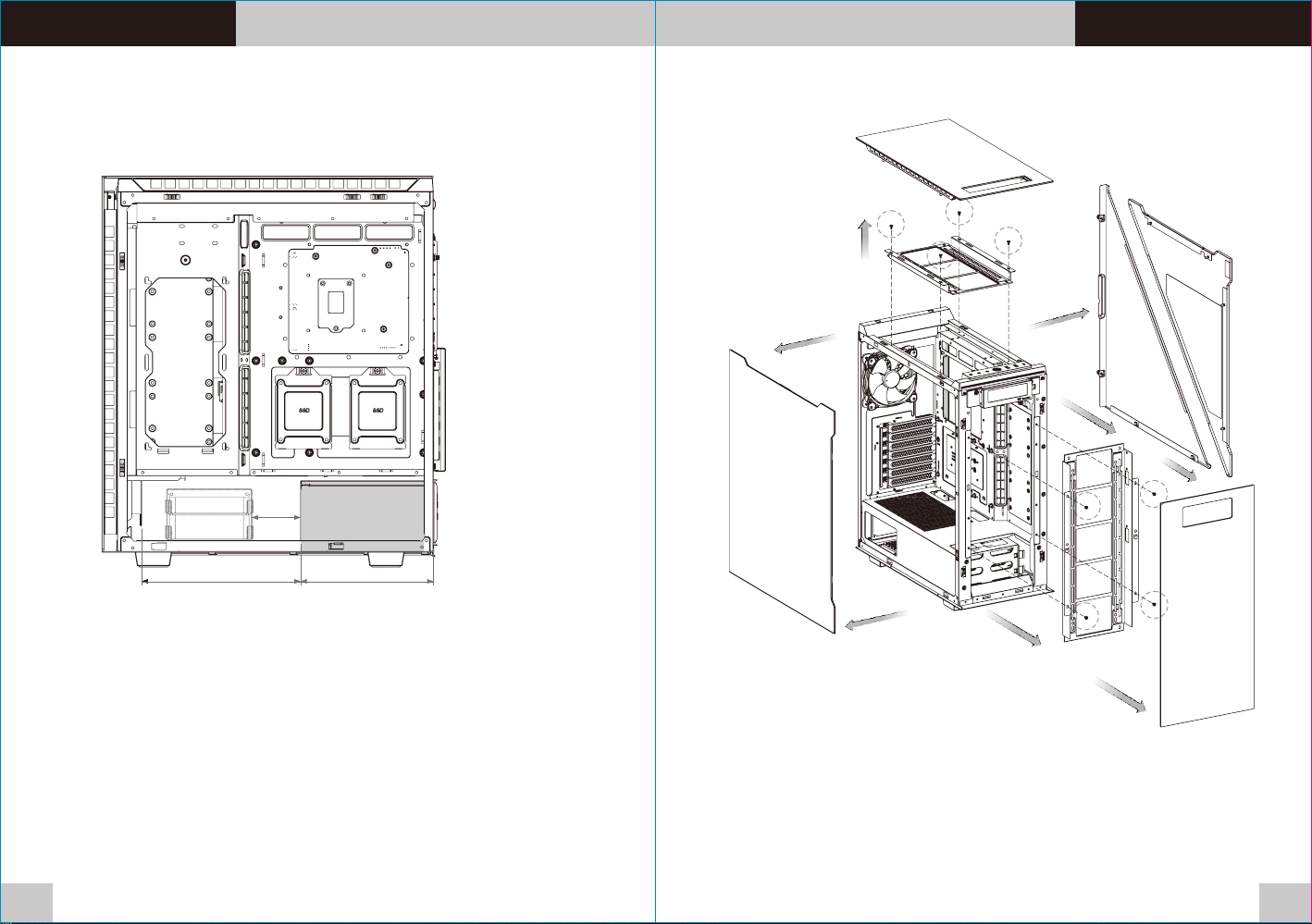
Remove Compone nts
PSU max length: 180mm
65mm
180m m215m m
05 06
Page 6
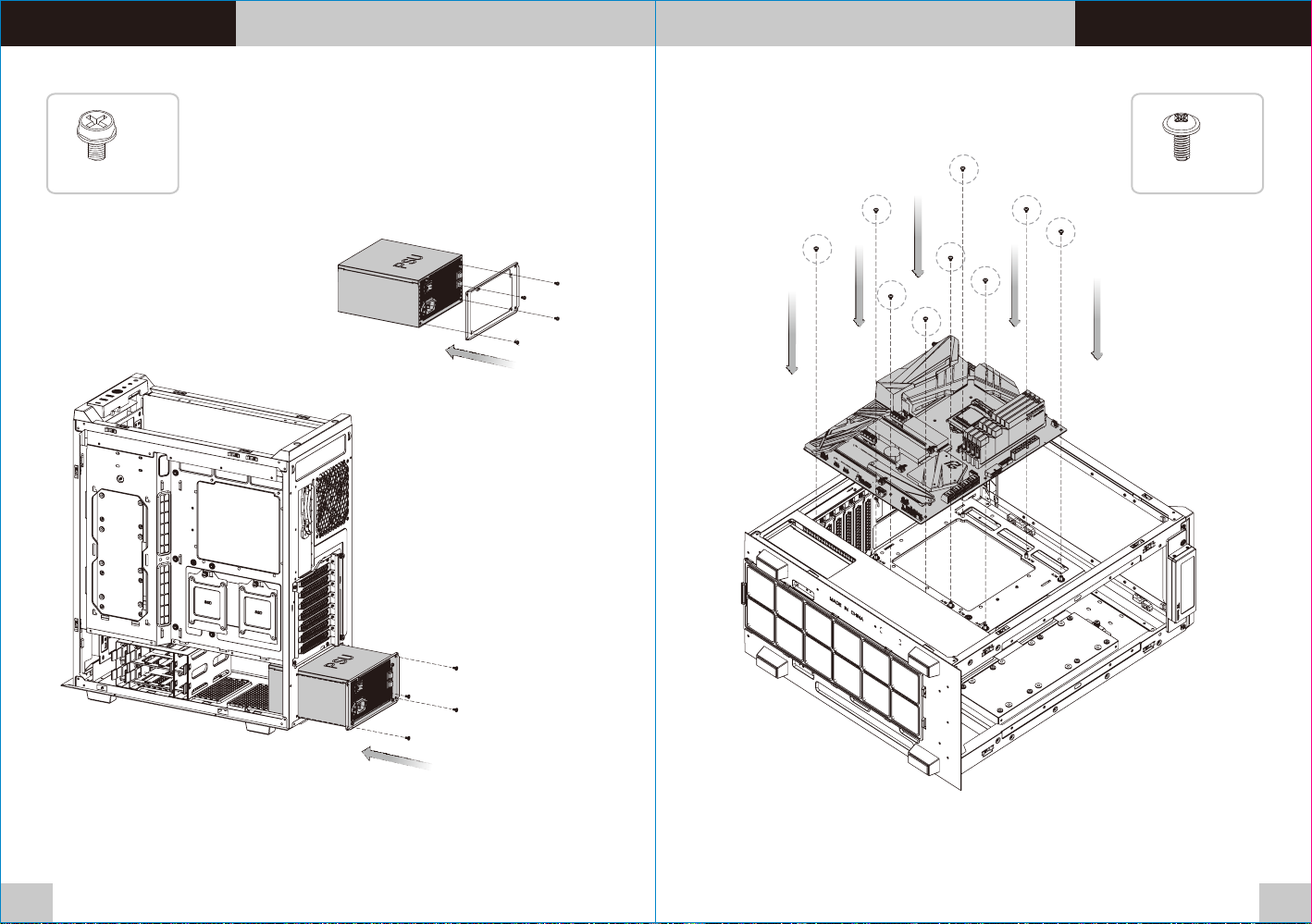
Di v ider 550 TG Ul t ra Di v ider 550 TG Ul t ra
Power Supply Unit Installation Motherboard In stallation
x 4 x 9
07 08
Page 7
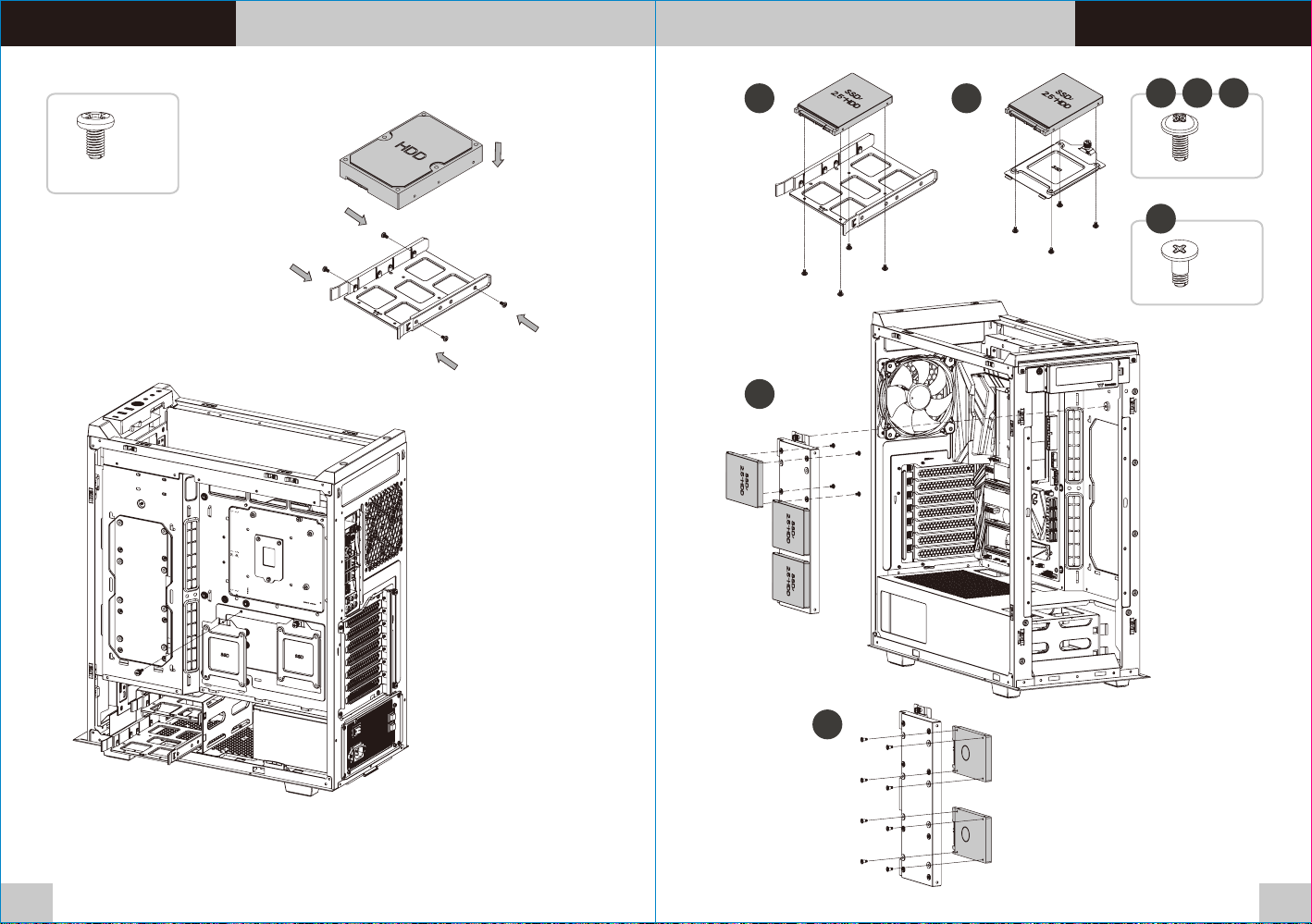
Di v ider 550 TG Ul t ra Di v ider 550 TG Ul t ra
3.5” HDD Installation
2.5” HDD Installation
x 4
A
B
A B C
x 4
D
x 8
C
D
09 10
Page 8
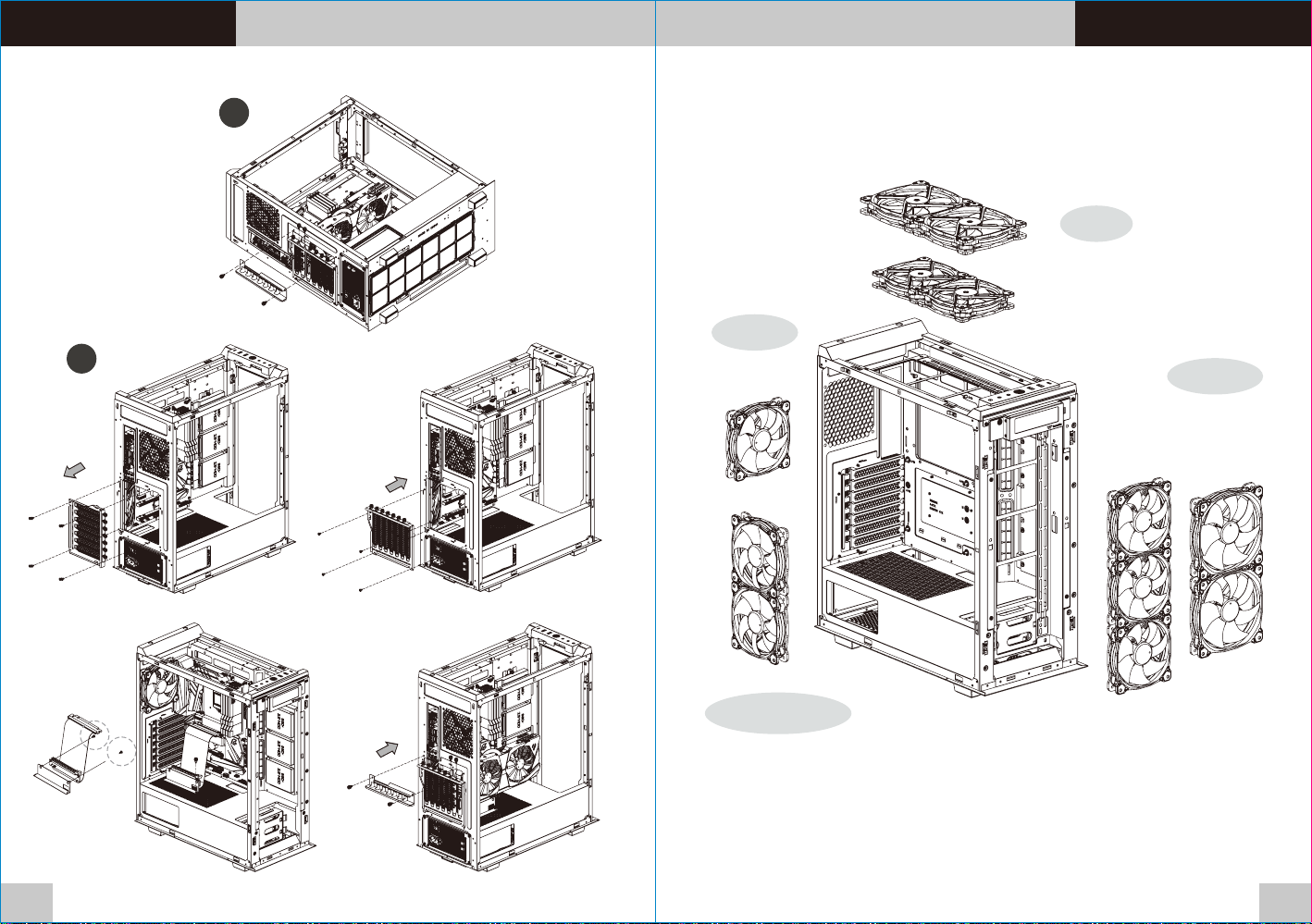
Di v ider 550 TG Ul t ra Di v ider 550 TG Ul t ra
PCI Card Installation
A
Air Cooling Installation
Top
140mm x 2
or
120mm x 2
Rear
B
120mm x 1
Front
120mm x 3
or
140mm x 2
M/B Side
120mm x 2
11 12
Page 9
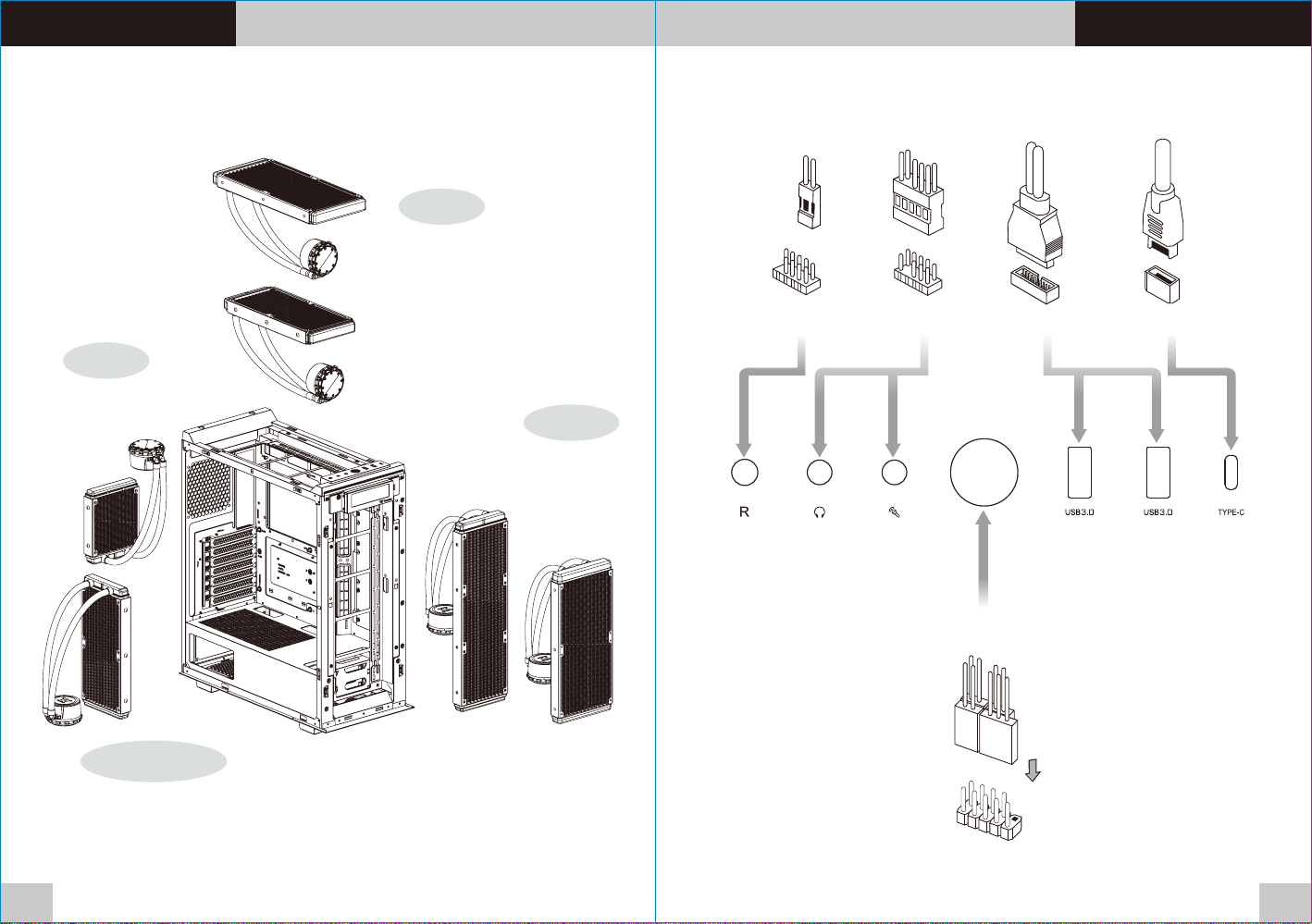
Di v ider 550 TG Ul t ra Di v ider 550 TG Ul t ra
AIO Liquid Cooling Installation I/O Connection
Top
280mm x 1
or
240mm x 1
RESET HD Audio USB 3.0 TYPE-C
Rear
120mm x 1
Front
360mm x 1
or
280mm x 1
Power SW / Power LED / HDD LED
M/B Side
240mm x 1
13 14
Page 10
Di v ider 550 TG Ul t ra Di v ider 550 TG Ul t ra
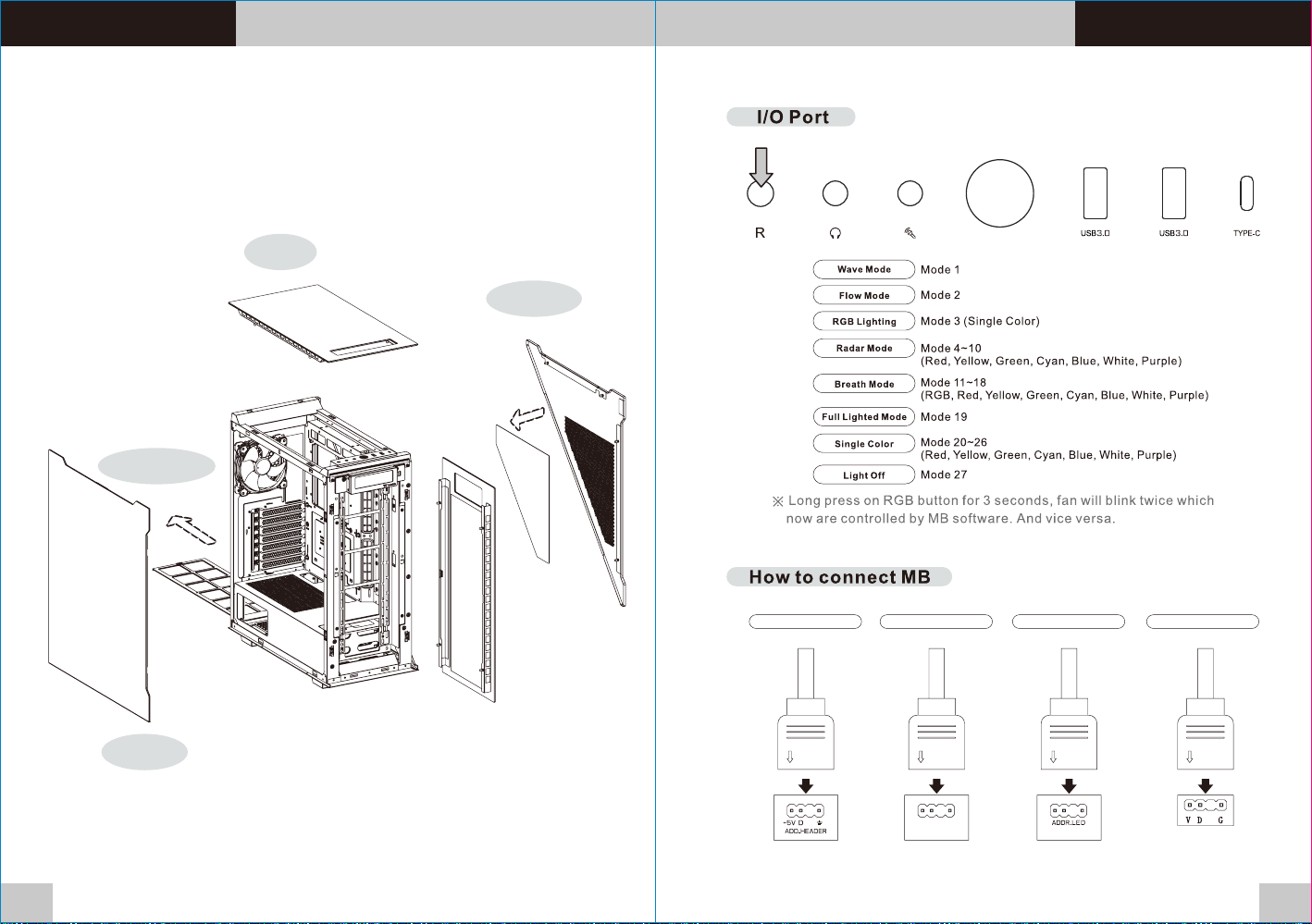
Remove Filters ARGB Control Instruction
Top
Right
Bottom
15
Left
ASUS
Aura Addressable Strip Header(s) Addressable RGB LED Header(s)
MSIMSI
JRG B-str ip Head er(s)
+5V D G
JRAINBOW
ASROCK
GIGABYTE
AORUS RGB Fusion with Digital LEDs
16
Page 11
Di v ider 550 TG Ul t ra Di v ider 550 TG Ul t ra
Pl e ase do w nloa d TT RG B P LUS fro m Therm a ltak e's Off i cial w e bsit e .
ht t ps:/ / www.ther malta ke.c o m/dow n load s
OS c o mpat i bili t y: Win d ows 10
TT RGB PLUS Software control interface
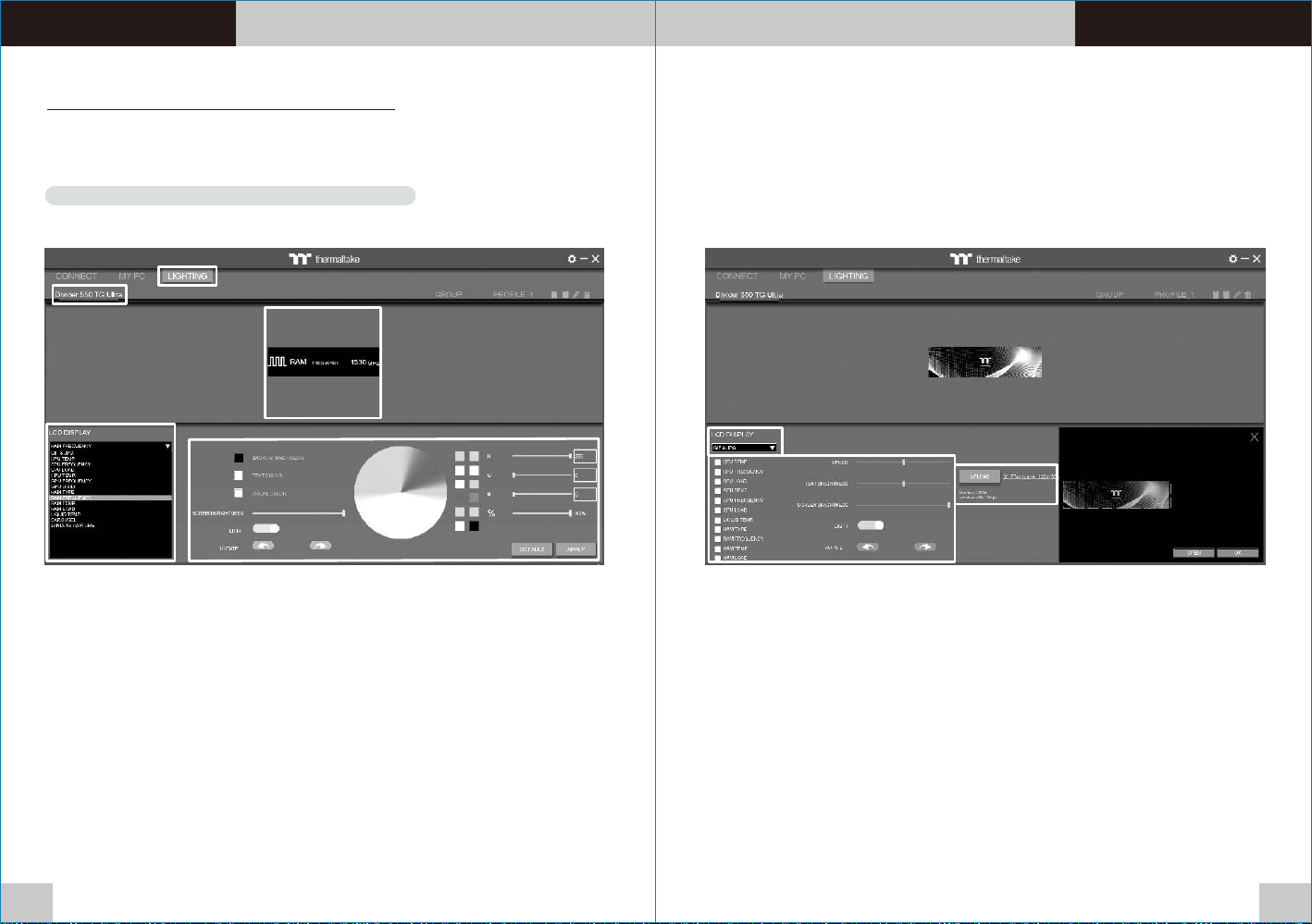
TT RG B PL US Soft wa re User I nt erfac e
Di v ider 550 TG Ul t ra LCD Moni t o r
LIGH T I N G GIF & JPG
AA
BB
CC
DD
A. Afte r ins tal lation of TT RGB P LUS, you can s ele ct “D ivide r 550 T G Ult ra”
on the “ LIG HTI NG” page.
B. Pre set t he Di vider 550 TG U ltr a LCD .
C. LCD D ISP LAY functi on li st.
• GIF & JPG (U pl oa d pi ct ur e to L CD d is pl ay)
• CPU TEMP.
• CPU FREQ UE NC Y
• CPU LOAD
• GPU TEMP .
• GPU FREQ UE NC Y
• GPU LOAD
• RAM TYPE
• RAM FREQ UE NC Y
• RAM TEMP.
• RAM LOAD
• LIQUID T EM P.
• CAROSU EL (Switch es b et we en M em or y/ Li quid inform at io n)
• WIN DO W CA PT UR E
D. LCD v isu al effe ct se ttings.
Set LC D dis pla y backgrou nd, t ext a nd visu al co lor, r ota te the LC D scr een o r
turn o ff LCD.
17
AA
BB
A. Sel ect “ GIF & J PG” for m “LC D DIS PLAY”.
You ca n upl oad a G IF or JPG f ile t o sho w the pictur e on th e LCD s creen .
B. Set t he LC D dis play text in for mat ion, sp eed a nd br igh tness ,
rota te th e LCD s creen or tur n off LCD .
C. Cli ck “U PLO AD” to uploa d the p ict ure. (G IF an d JPG f ile s only)
CC
18
Page 12
Di v ider 550 TG Ul t ra
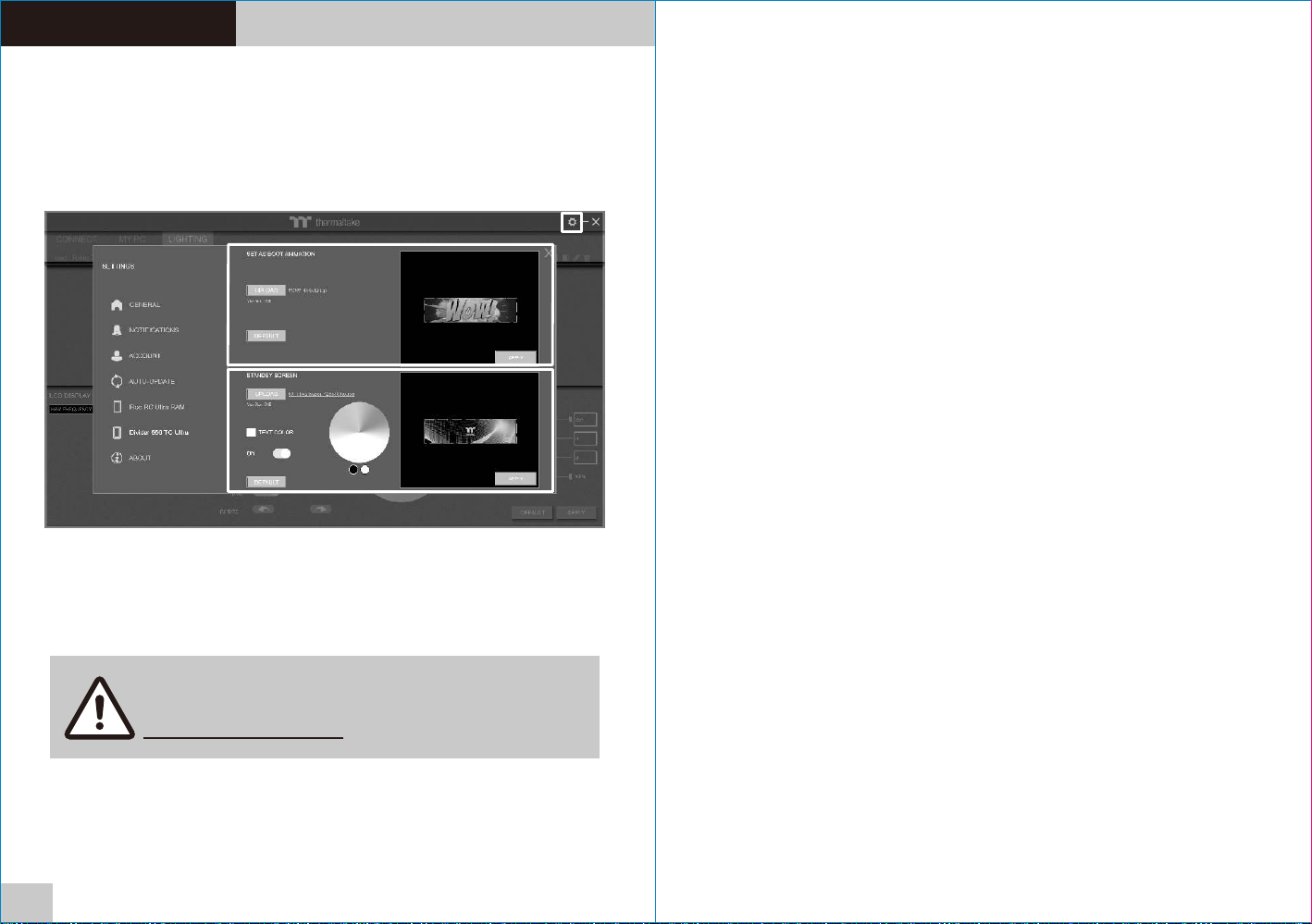
SETT I N G S
BB
CC
A. Cli ck th e gea r icon on the up per r igh t corner to en ter t he “S ETTIN GS” m enu .
B. Upl oad t he pi cture to set a s LCD b oot a nimation . (GI F onl y)
C. Upl oad t he pi cture to set a s LCD s tan dby screen . (JP G onl y)
AA
19
Software interface may vary with feature update,
please download the latest user manual from our
www.thermaltake.com
 Loading...