

Page 1
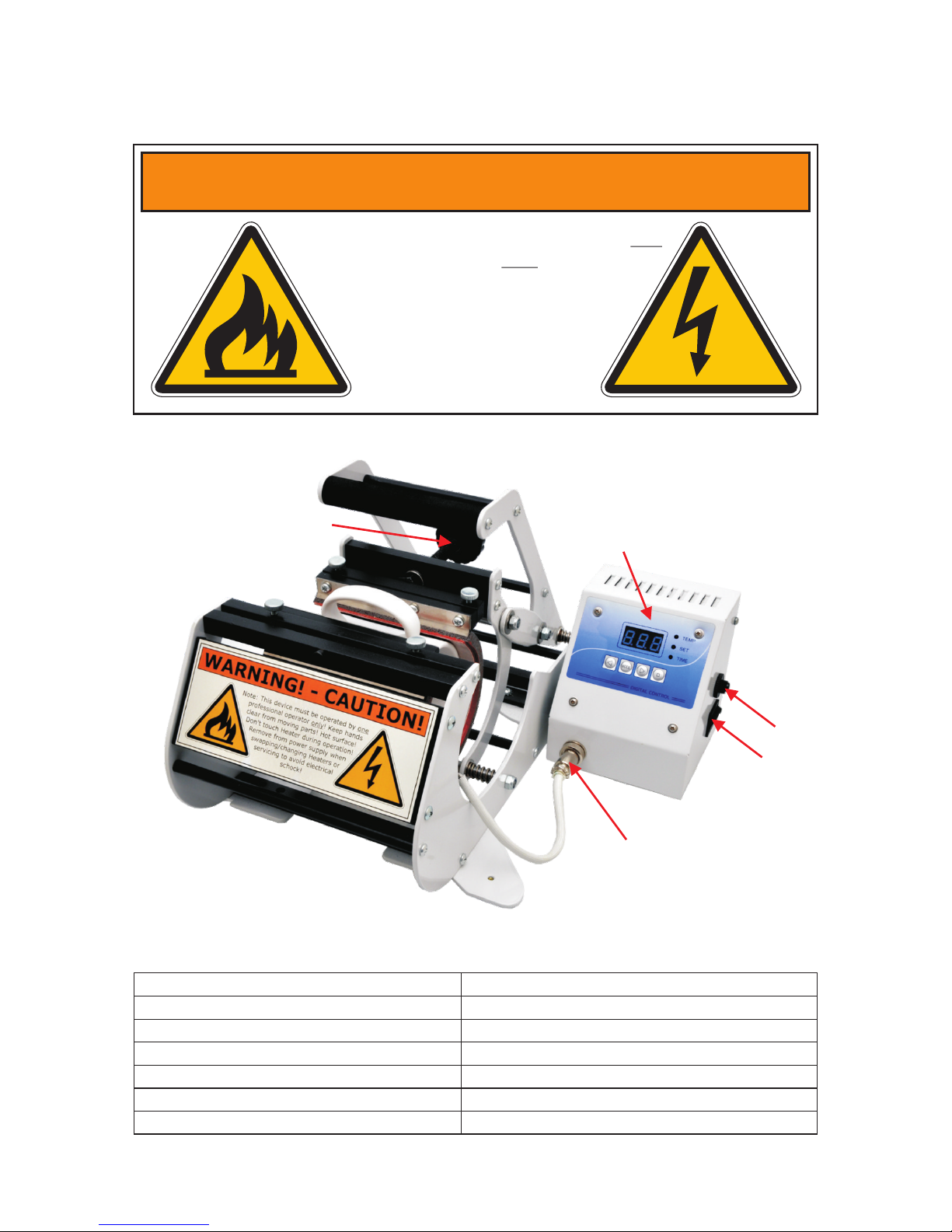
WARNING! - CAUTION!
Note: This device must be operated by one
professional operator only! Keep hands
clear from moving parts! Hot surface!
Don't touch Heater during operation!
Remove from power supply when
swapping/changing Heaters or
servicing to avoid electrical
shock!
HTP621 MugPress Operator Manual
Press Adjust Knob
Heater Wire Connection
Controller Box
On/Off Switch
Fuse
Copyright TheMagicTouch, Germany 2015
Specifications
Dimensions (L x W X H)
29 x 35 x 14 cm
Printable Area
Variable, depending on Heater type
Weight
6 kg
Voltage
110-120/220-230 V
Amperage 2.0 A
Maximum Wattage
300 W
Environmental Conditions 10-40°C / 50-105 , 30-70% RH°F
Page 2
SetUp for CPM/Toner Transfer
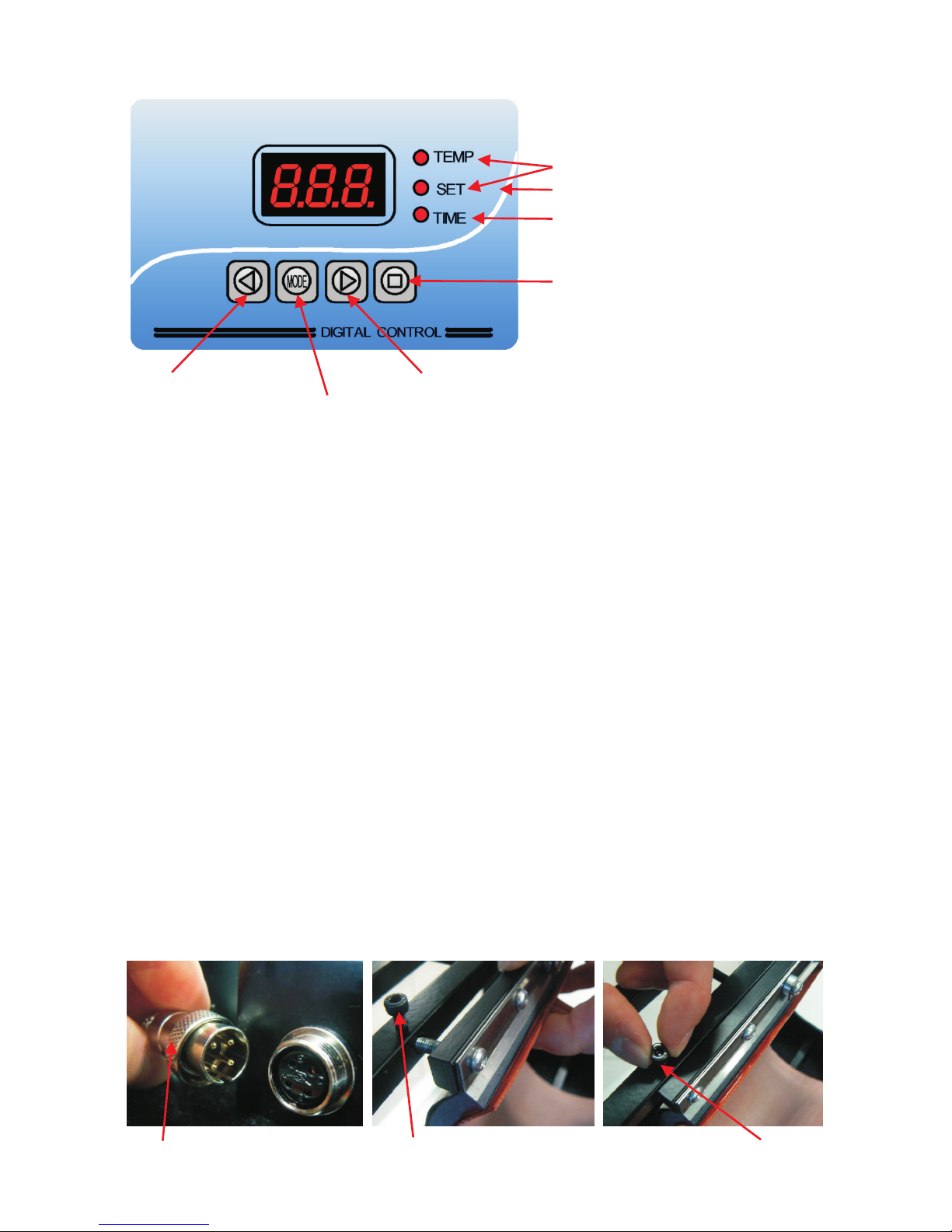
Swapping Heater's
Caution: Remove from Power Supply and wait for Heater to cool down!
Turn ring to release Heater Wire
from socket and unplug...
Open screws to release Heater
from it's Holder...
Place Heater, tighten screws
and re-attach Heater Wire.
Insert blank mug in Heater and power on Press. The 'SET' LED comes on. Set your Idle
Temperature to 140-150°C/285-300°F and press Mode Button. Now both the 'SET' and the
'TEMP' LED comes on. Set your maximum Temperature to 150-160°C/300-320°F and again
press Mode Button. Now the 'TIME' LED comes on. Set Time to 40 seconds and press Mode
Button. The press will now heat up to Idle Temperature and start beeping. At that time
remove the blank mug and insert the mug to be decorated with the transfer attached and
the MPad wrapped around it and push the Start/Stop Button. Once the time is elapsed the
Press will start beeping again. Press the Start/Stop Button, remove the mug and power off
Press. Alternative, in case of decorating more than one mug, wait until Temperature has
gone back to Idle, insert next Mug and press Start/Stop Button again.
SetUp for Sublimation Transfer
Insert blank mug in Heater and power on Press. The 'SET' LED comes on. Set your Idle
Temperature to 160°C/320°F and press Mode Button. Now both the 'SET' and the 'TEMP'
LED comes on. Set your maximum Temperature to 170°C/340°F and again press Mode
Button. Now the 'TIME' LED comes on. Set Time to 40 seconds and press Mode Button.
The press will now heat up to Idle Temperature and start beeping. At that time remove the
blank mug and insert the mug to be decorated with the transfer attached and push the
Start/Stop Button. Once the time is elapsed the Press will start beeping again. Press the
Start/Stop Button, remove the mug and power off Press. Alternative, in case of decorating
more than one mug, wait until Temperature has gone back to Idle, insert next Mug and
press Start/Stop Button again.
Set Idle Temperature
Set Maximum Temperature
Set Time
Start/Stop Button
Numbers Down Button Numbers Up Button
Mode Button, cycles between set Idle, MaxTemp and Time
Control Panel
When LED(s) on:
 Loading...