

Page 1
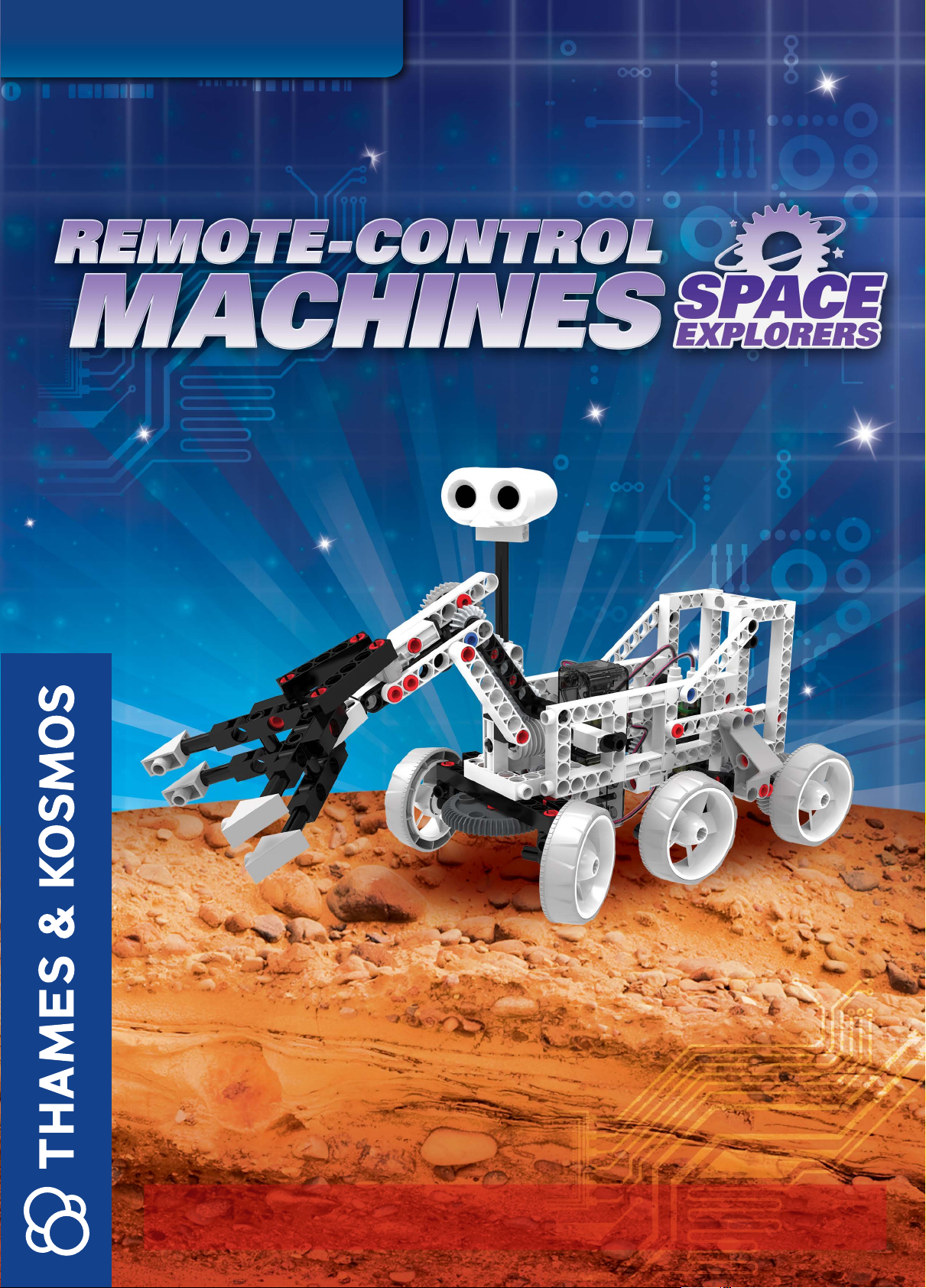
EXPERIMENT MANUAL
Franckh-Kosmos Verlags-GmbH & Co. KG, Pfizerstr. 5-7, 70184 Stuttgart, Germany | +49 (0) 711 2191-0 | www.kosmos.de
Thames & Kosmos, 301 Friendship St., Providence, RI, 02903, USA | 1-800-587-2872 | www.thamesandkosmos.com
Thames & Kosmos UK Ltd, Goudhurst, Kent, TN17 2QZ , United Kingdom | 01580 212000 | www.thamesandkosmos.co.uk
Page 2

› › › SAFETY INFORMATION
Safety Information
WARNING. Only for use by children aged 8 years and older.
Instructions for parents or other supervising adults are included
and have to be observed. Keep packaging and instructions as
they contain important information.
WARNING. Not suitable for children under 3 years. Choking
hazard — small parts may be swallowed or inhaled.
Store the experiment material and assembled models out of the
reach of small children.
Safety for Experiments with
Batteries
››› The wires are not to be inserted into socket-outlets. Never
perform experiments using household current! The high voltage
can be extremely dangerous or fatal!
››› To operate the models, you will need six AAA baeries (1.5-
volt, type AAA/LR03) or six AAA rechargeable baeries (1.2volt, min. 1100 mAh), which could not be included in the kit due
to their limited shelf life.
››› The supply terminals are not to be short-circuited. A short
circuit can cause the wires to overheat and the baeries to
explode.
››› Different types of baeries or new and used baeries are not
to be mixed.
››› Do not mix old and new baeries.
››› Do not mix alkaline, standard (carbon-zinc), or rechargeable
(nickel-cadmium) baeries.
››› Baeries are to be inserted with the correct polarity. Press
them gently into the baery compartment. See page 2.
››› Always close baery compartments with the lid.
››› Non-rechargeable baeries are not to be recharged. They
could explode!
››› Rechargeable baeries are only to be charged under adult
supervision.
››› Rechargeable baeries are to be removed from the toy before
being charged.
››› Exhausted baeries are to be removed from the toy.
››› Dispose of used baeries in accordance with environmental
provisions, not in the household trash.
››› Be sure not to bring baeries into contact with coins, keys, or
other metal objects.
››› Avoid deforming the baeries.
As all of the experiments use baeries, have an adult check the
experiments or models before use to make sure they are
assembled properly. Always operate the motorized models
under adult supervision.
After you are done experimenting, remove the baeries from the
baery compartments. Note the safety information
accompanying the individual experiments or models!
Notes on Disposal of Electrical
and Electronic Components
The electronic components of this product are recyclable. For the
sake of the environment, do not throw them into the household
trash at the end of their lifespan. They must be delivered to a
collection location for electronic waste, as indicated by the
following symbol:
Please contact your local authorities for the appropriate
disposal location.
Dear Parents,
Before starting the experiments, read through the instruction
manual together with your child and discuss the safety
information. Check to make sure the models have been
assembled correctly, and assist your child with the experiments.
We hope you and your child have a lot of fun with the
experiments!
FCC Part 15 Statement
This device complies with Part 15 of the FCC Rules. Operation is
subject to the following two conditions: (1) this device may not
cause harmful interference, and (2) this device must accept any
interference received, including interference that may cause
undesired operation.
Changes or modifications not expressly approved by the party
responsible for compliance could void the user’s authority to
operate the equipment.
NOTE: This equipment has been tested and found to comply with
the limits for a Class B digital device, pursuant to Part 15 of the
FCC Rules. These limits are designed to provide reasonable
protection against harmful interference in a residential
installation. This equipment generates, uses and can radiate
radio frequency energy and, if not installed and used in
accordance with the instructions, maybe cause harmful
interference to radio communications. However, there is no
guarantee that interference will not occur in a particular
installation. If this equipment does cause harmful interference to
radio or television reception, which can be determined by turning
the equipment off and on, the user is encouraged to try to correct
the interference by one or more of the following measures:
- Reorient or relocate the receiving antenna.
- Increase the separation between the equipment and receiver.
- Connect the equipment into an outlet on a circuit different form
that to which the receiver is connected.
- Consult the dealer or an experienced radio/TV technician for
help.
Page 3
62 0 3 74 - 0 2 -1 3 05 15
› › › KIT CONTENTS
GOOD TO KNOW!
If you are missing any
parts, please contact Thames & Kosmos
customer service.
US: [email protected]
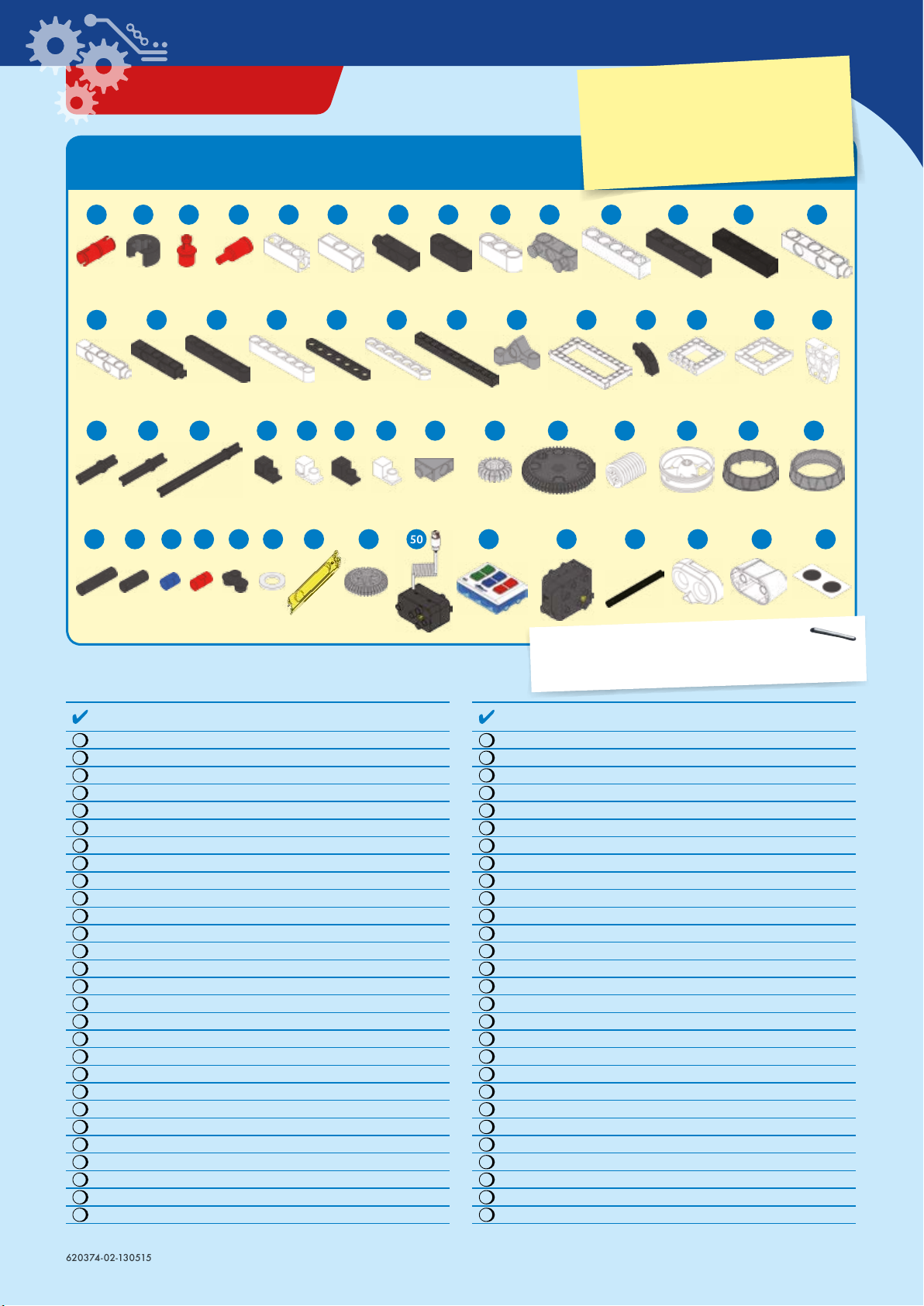
What’s inside your experiment kit:
1 2 3 7 854 6 9 10 11 12 13 14
17 1815 16 19 2120 22 23 24 25 26 27
28
42
29 30 31 32 33 34 35 36 39 4037 38 41
43 44 45 46 47 48 49 50 51 52 53 54 55 56
Checklist: Find – Inspect – Check off
No. Description Qty. Item No.
1 Joint pin 14
2 Axle lock 4
3 Shaft plug 5
4 Shaft pin 6
5 3-hole rod 2
6 3-hole cross rod 9
7 3-hole dual rod 4
8 3-hole wide rounded rod, black 4
9 3-hole wide rounded rod, white 2
10 Cross rod with pegs 1
11 5-hole rod, white 5
12 5-hole rod, black 2
13 5-hole cross rod, black 4
14 5-hole dual rod B, white 4
15 5-hole dual rod C, white 1
16 5-hole dual rod C, black 4
17 7-hole wide rounded rod, black 4
18 7-hole wide rounded rod, white 6
19 7-hole flat rounded rod, black 4
20 7-hole flat rounded rod, white 6
21 11-hole rod 4
22 Diagonal connector 4
23 Short frame 2
24 Curved rod 2
25 Square frame A 1
26 Square frame B 4
27 Trapezoidal block 1
28 30-mm axle 8
1156-W10-A1R
3620-W10-A1D
7026-W10- H1R
7026-W10-J3R
7026 -W10 -Q1W
7026 -W10 -X1W
7061- W10- R1D
7404-W10-C1D
7404-W10-C1W
7404-W10-B1S
7413-W10-K2W
7413-W10-K2D
7413-W10-K3D
7026-W10 -S2W
7026-W10 -S3W
7026-W10-S3D
7404-W10-C2D
7404-W10-C2W
7404-W10-C3D
7404-W10-C3W
7026-W10 -C1D
7404-W10-B2S
7413-W10-I1W
7061-W10-V1D
7026 -W10 -V1W
702 6-W1 0-T2W
7061- W10- L1W
7413-W10-N1D
You will also need:
6 x AAA batteries (1.5-volt, type AAA/LR03) or
6 x AAA rechargeable batteries (1.2-volt, min. 1100 mAh)
No. Description Qty. Item No.
29 35-mm axle 4
30 70-mm axle 2
31 90-degree converter X, black 2
32 90-degree converter X, white 2
33 90-degree converter Y, black 2
34 90-degree converter Y, white 4
35 Flat triangle 4
36 Small gear 11
37 Large gear with holes 1
38 Worm 1
39 Wheel 6
40 Tire, hard plastic 4
41 Tire, rubbery plastic 2
42 30-mm tube 6
43 20-mm tube 2
44 Short anchor pin 9
45 Anchor pin 46
46 Two-to-one converter 10
47 Washer 4
48 Anchor pin lever 1
49 Medium gear 4
50 Motor unit 2
51 IR remote control unit 1
52 IR motor unit 1
53 80-mm tube 1
54 Sensor box front 1
55 Sensor box back 1
56 Sensor box eye stickers 1
7413-W10-O1D
7061- W10- Q1D
7061-W10-J1D
7061- W10-J 1W
7061-W10-J2D
7061- W10-J 2W
7128-W10-A2S
7026-W10 -D2S
7026-W10-W5S
7344-W10-A1W
739 2-W10 -H1W
7392-W10 -G1S
7413-W10-D1S
7400-W10- G1D
7400-W10-G2D
880-W10-M1B
7061- W10- C1R
7061-W10-G1D
R12-3620
7061-W10-B1Y
7346-W10-C1S
7400-W85-A
7337-W85-A1
7337-W85-B1
7337-W16-A1D
7337-W10-A2W
7337-W10-A3W
R20-7337
Page 4
› › › TIPS AND TRICKS
Hole A
Here are a few tips for assembling
and using the models. Read them
carefully before starting.
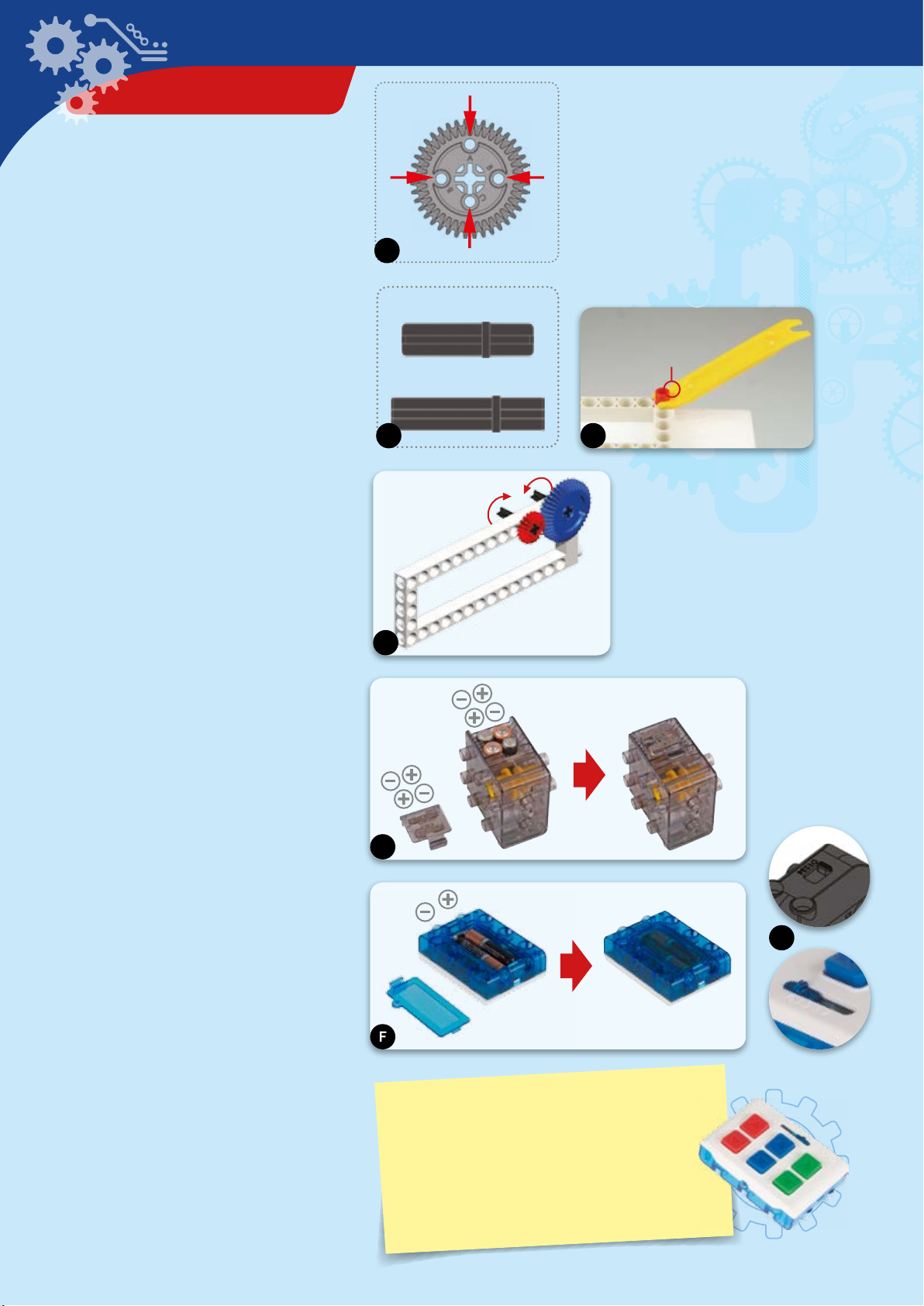
A. Gear hole alignment
Pay close aention to the alignment of the
holes in the gear wheels. Make sure that
you insert the shaft pins into the correct
holes and that the gears are oriented
exactly as shown in relation to each other
and to the model.
B. -mm and -mm axles
Make sure you use the correct axles. The
30-mm and 35-mm axles look very similar,
so the assembly instructions indicate
which one to use with a 1:1 scale image.
C. The part separator tool
In the box, you will find a lile yellow tool
called the anchor pin lever. End A of the
part separator tool makes it easy to
remove anchor pins from the frames.
Hole
B
Hole
B
A
Hole C
30-mm axle
35-mm axle
B C
A
D. Gear wheels
The models will often have several gear
wheels installed in a row. In order for the
models to work well, these gears will have
to mesh well. Otherwise, the force from
one gear wheel won’t be properly
transferred to the next.
E. Batteries in IR motor unit
Insert the baeries according to their
indicated plus-minus polarity and close the
compartment with the transparent cover.
F. Batteries in IR remote control
unit
Open the baery compartment by
unscrewing the screw and removing the
cover. Insert two baeries, paying aention
to the polarity indicated in the
compartment and on the baeries. Close
the compartment again and reinsert the
screw to secure it.
G. Using the IR remote control
To control a model, turn on both the motor
unit and the remote control unit by moving
their switches from the “off” position (0) to
any of the four channels (1–4). The motor
unit and the remote control must be set to
the same channel to communicate. The
channels enable you to use up to four
models (sold separately) at the same time
in the same space.
D
E
F
IMPORTANT!
Make sure your remote control unit and your
motor unit are both set to the same channel
(–) or else they will not work. When the
remote control and motor are not in use, turn
them off by seing their switches to “” so as
to not drain the baeries.
G
Page 5
› › › TABLE OF CONTENTS
TIP!
You will find additional
information in the “Check it out”
sections on pages -, , ,
, , , , and .
Remote-Control Machines: Space Explorers
Safety Information ........................................................... Inside front cover
Kit Contents ......................................................................................................
Tips and Tricks ................................................................................................
Table of Contents ............................................................................................
Exploring Space with Machines and Robots
Mars Exploration ............................................................................................
Build a model resembling the Curiosity Mars Rover and learn about how
it got to Mars and what it did when it got there. Read about the history
of Mars exploration.
The model:
Mars rover ............................................................................................................... 5
Geing to Space ............................................................................................
Build models of a space shuttle and a space shuttle’s robotic arm. Learn
about how these devices were used to transport people and materials
into space.
The models:
Space shule .......................................................................................................19
Shule arm ........................................................................................................... 26
TIP!
Above each set of assembly
instructions, you will find a red bar:
Shoot for the Moon ......................................................................................
Construct a model of a lunar rover and learn about how astronauts
used it on the moon.
The model:
Lunar rover ............................................................................................................33
Deep Space .....................................................................................................
Build a rocket launcher car model and imagine using it to get a space
probe off the planet. Then build a space probe model that might travel
far away from Earth to explore deep space.
The models:
Rocket launch car ................................................................................................41
Probe ..................................................................................................................... 48
Robots in Space ............................................................................................
Build remote-control models of robots that might one day be used to
assist humans on spacecraft or in extraterrestrial colonies.
The models:
Space droid ............................................................................................................54
Walking bot ...........................................................................................................60
Futuristic Spacecraft ...................................................................................
Build cool models of fantastical spacecraft that could be used to
transport humans far away from our home planet.
The models:
Cross-wing starship ............................................................................................ 66
Spaceship controller ..........................................................................................73
Publisher’s Information ................................................... Inside back cover
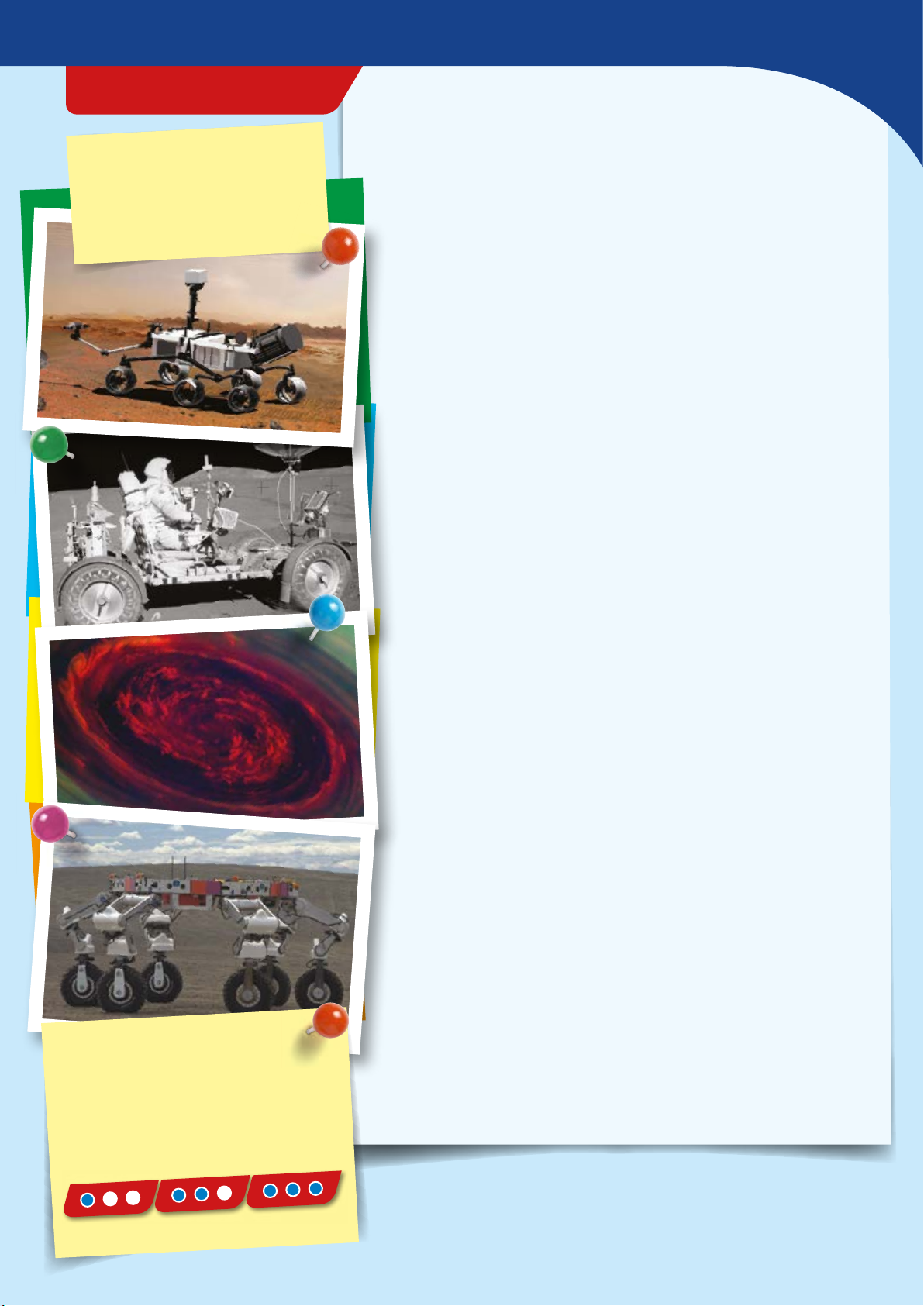
››› It shows you the difficulty level for
the model’s assembly:
easy medium hard
Page 6
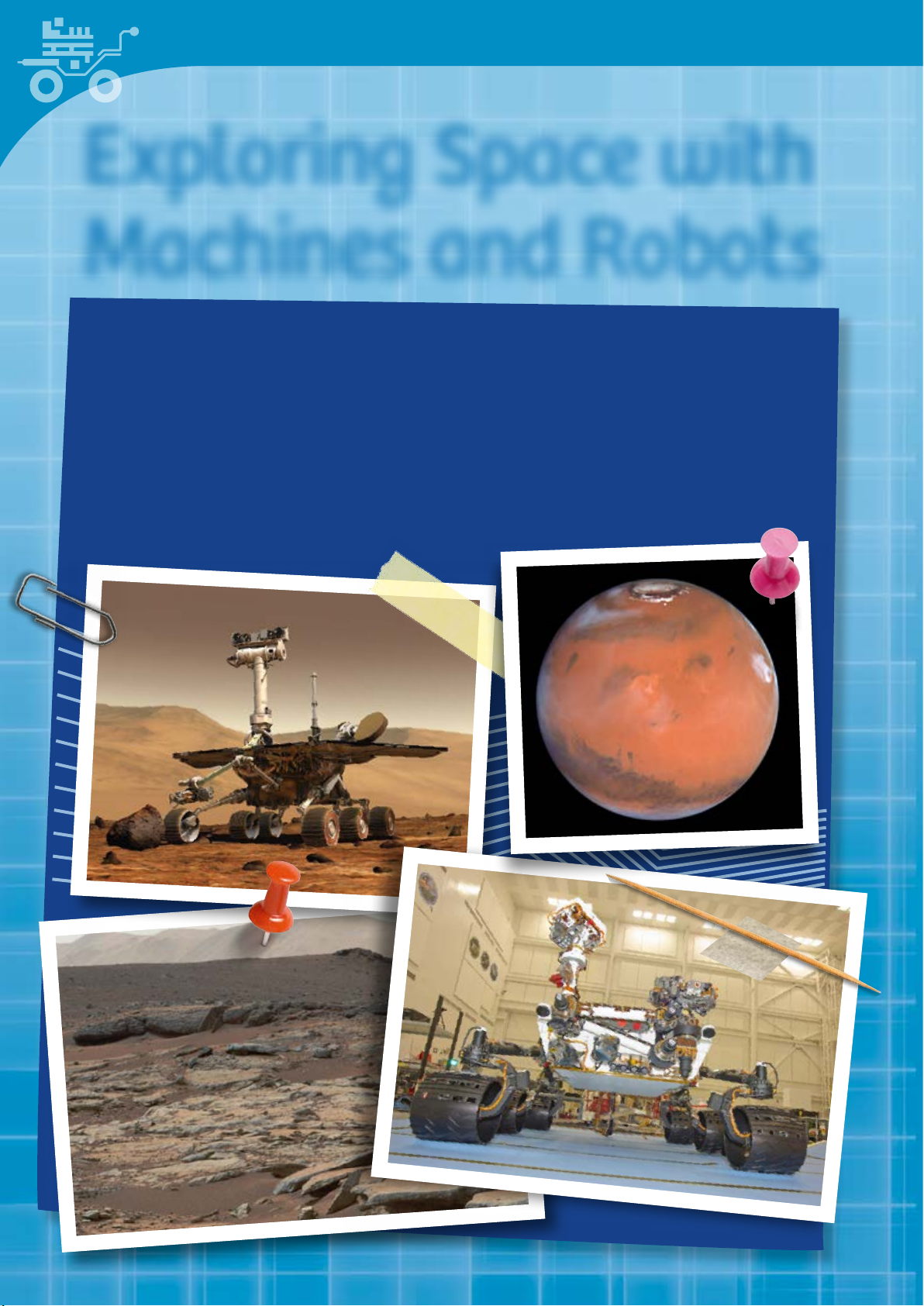
Exploring Space with
Machines and Robots
Robots are mechanical agents controlled by computer programs. They can be
programmed to perform all sorts of tasks and movements. Robots can assemble
cars, play soccer, wash windows, vacuum floors, fly planes, map terrain, climb
mountains, entertain people, cook dinner — the list goes on and on. And now,
robots are increasingly used in extraterrestrial exploration.
In this kit, you will build ten models of real and imaginary robots that perform
their duties in outer space and on other planets.
Page 7
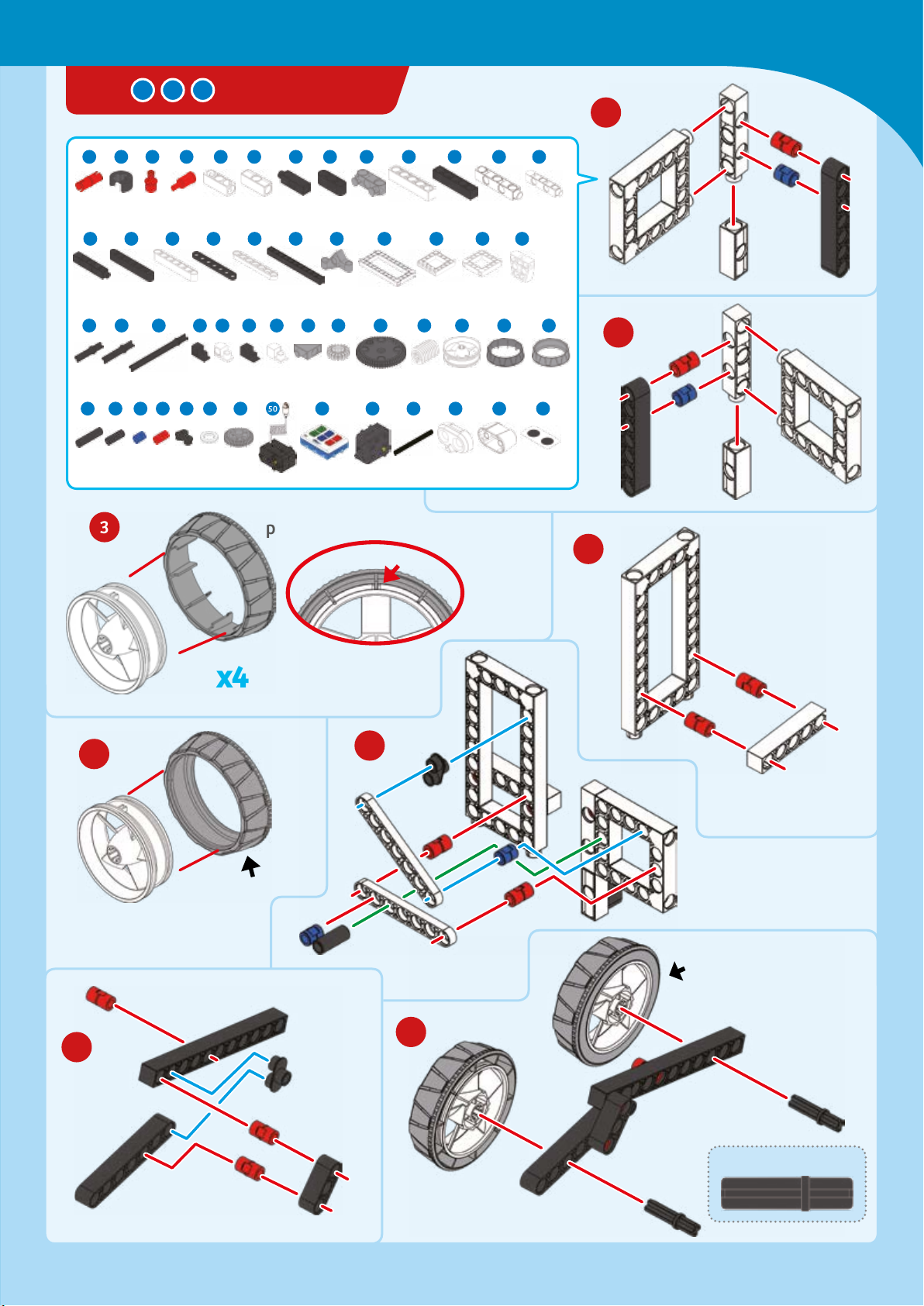
MARS ROVER
3
Mars Exploration
1
1 2 3 7 854 6 10 11 12 14
14 x
17 18
16 19 2120 22 23 25 26 27
4 x 4 x 4 x 4 x 6 x 4 x 4 x 2 x
28
29 30 31 32 33 34 35 36 39 4037 38 41
43 44 45 46 47 49 50 51 52 53 54 55 56
42
6 x 2 x 9 x 46 x 10 x 4 x 3 x
1 x 4 x 2 x 5 x 9 x 4 x
2 x
4 x 1 x 4 x 2 x 3 x
1 x 4 x
9 x 4 x 2 x 2 x 2 x 2 x 2 x 4 x 8 x
1 x
1 x
1 x
1 x 1 x 1 x
Hard
3
plastic
Align
1 x
15
1 x
2
2 x 4 x 6 x 1 x 1 x
4
x
x
5
x
Rubbery
plastic
7
6
Rubbery
plastic
8
30-mm axle
Page 8
9
11
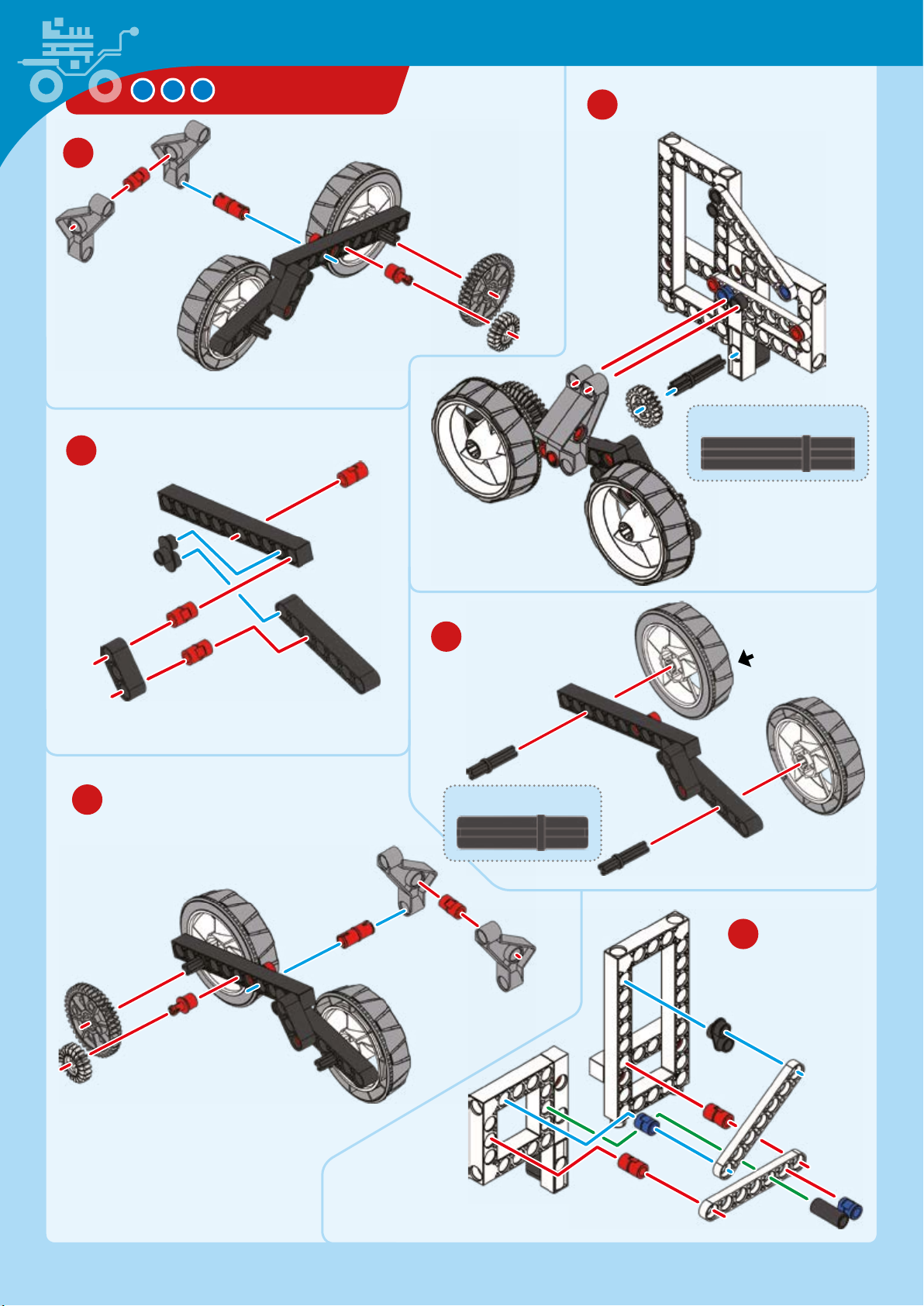
MARS ROVER
10
35-mm axle
13
12
30-mm axle
Rubbery
plastic
14
Page 9
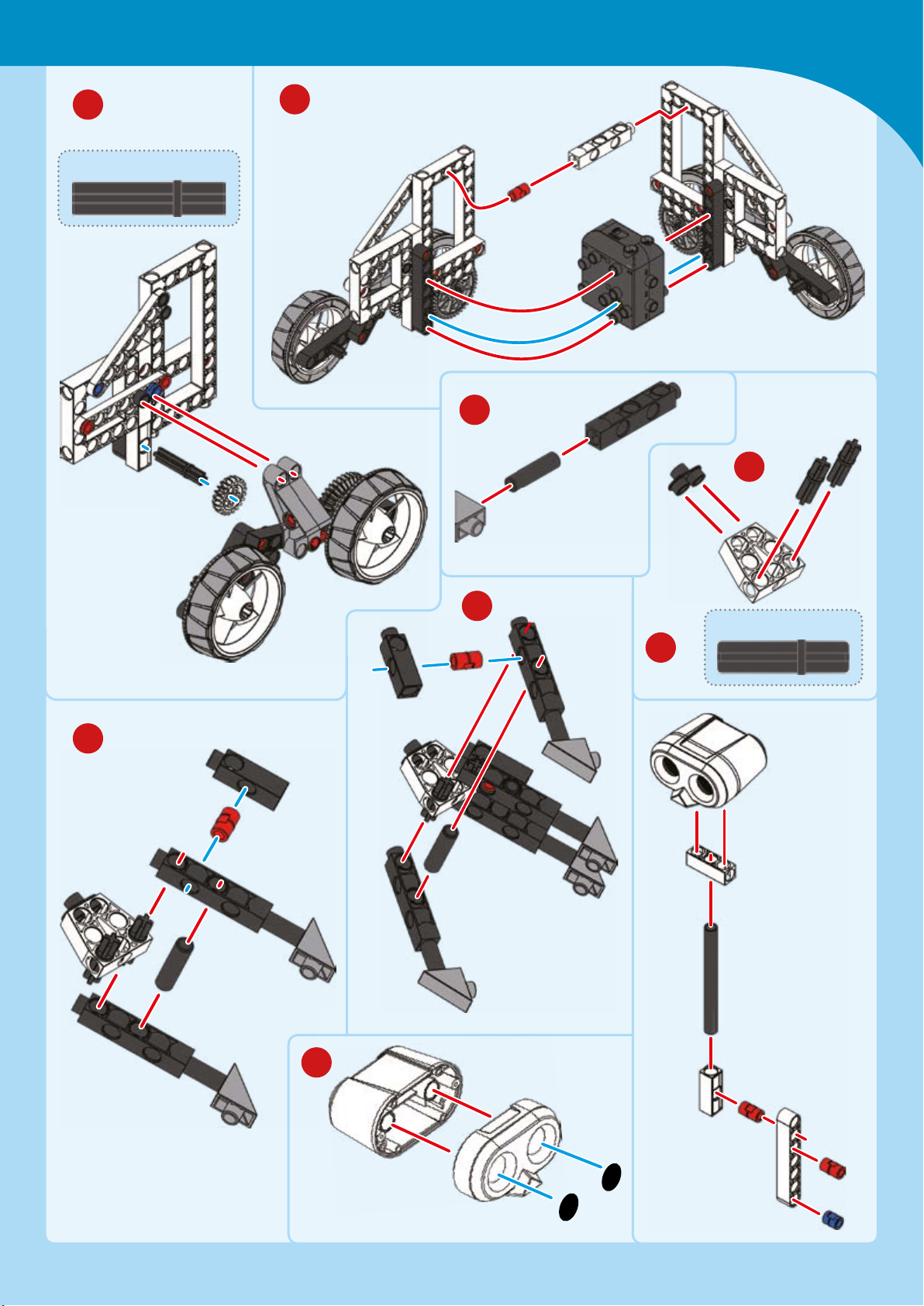
Mars Exploration
15
35-mm axle
16
17
x
18
19
20
30-mm axle
22
21
Stickers
Page 10
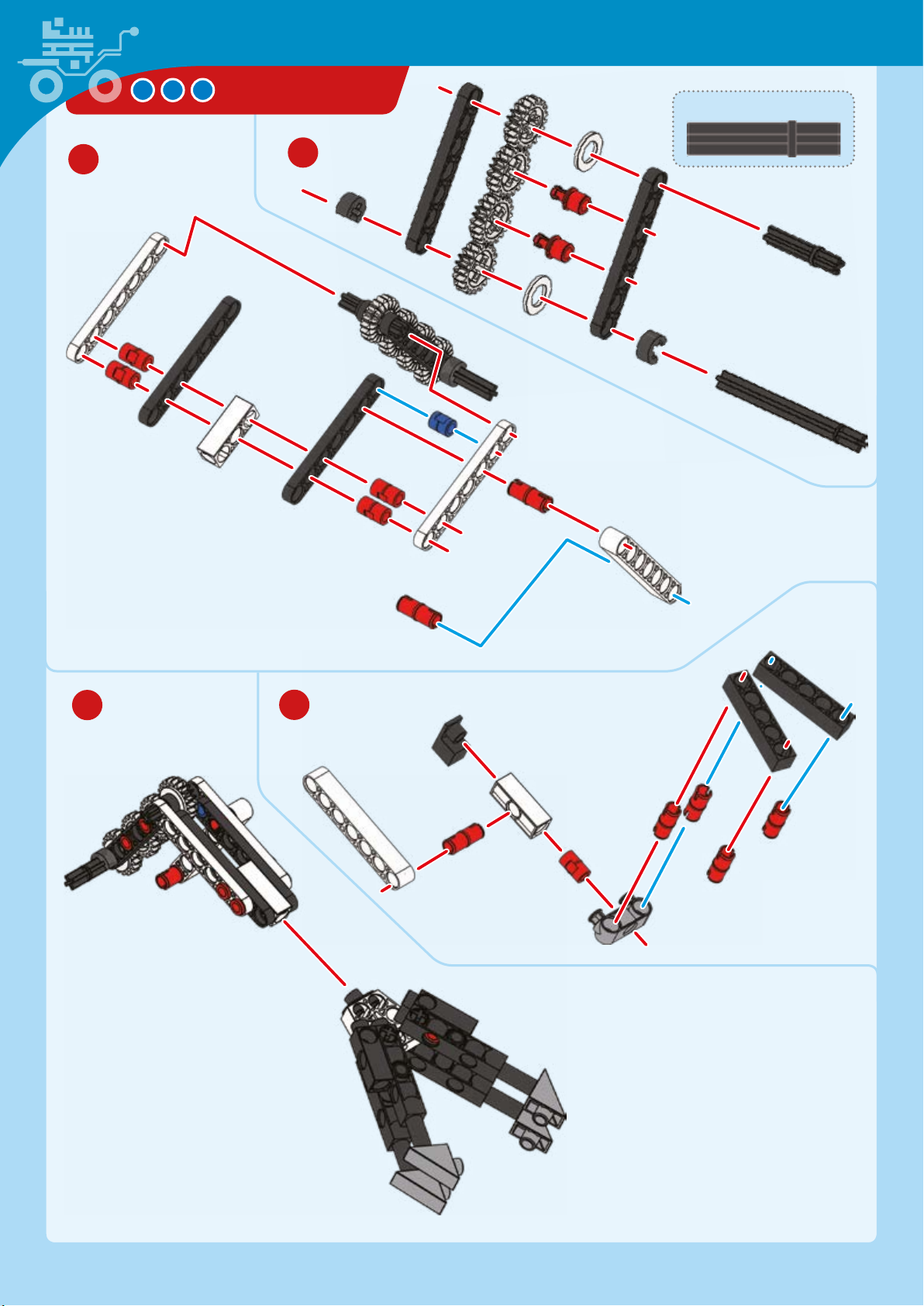
MARS ROVER
35-mm axle
24
23
25
26
Page 11
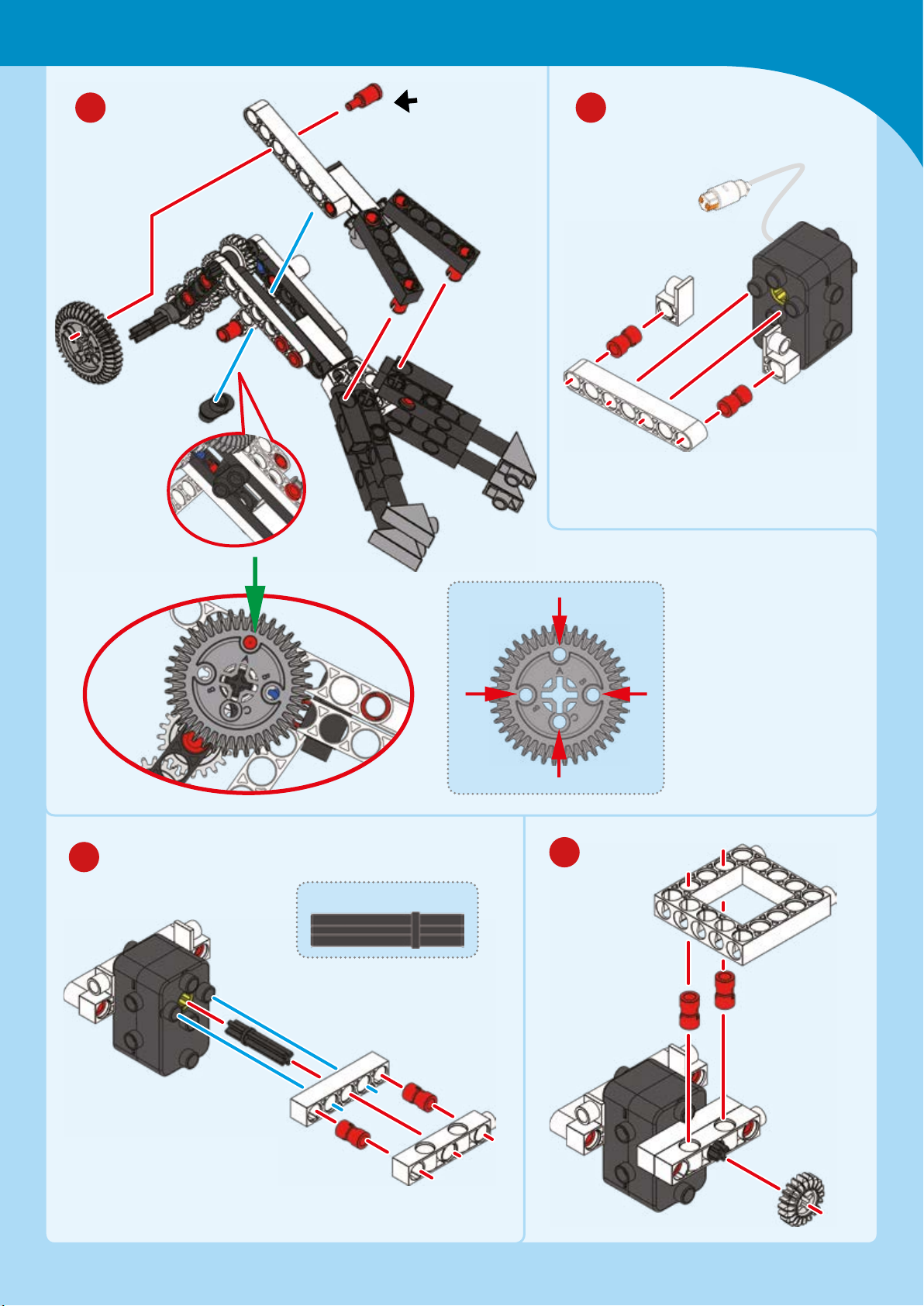
Mars Exploration
27 28
Connect to
hole A
29
Hole A
Hole A
Hole
B
Hole
B
Hole C
30
35-mm axle
Page 12
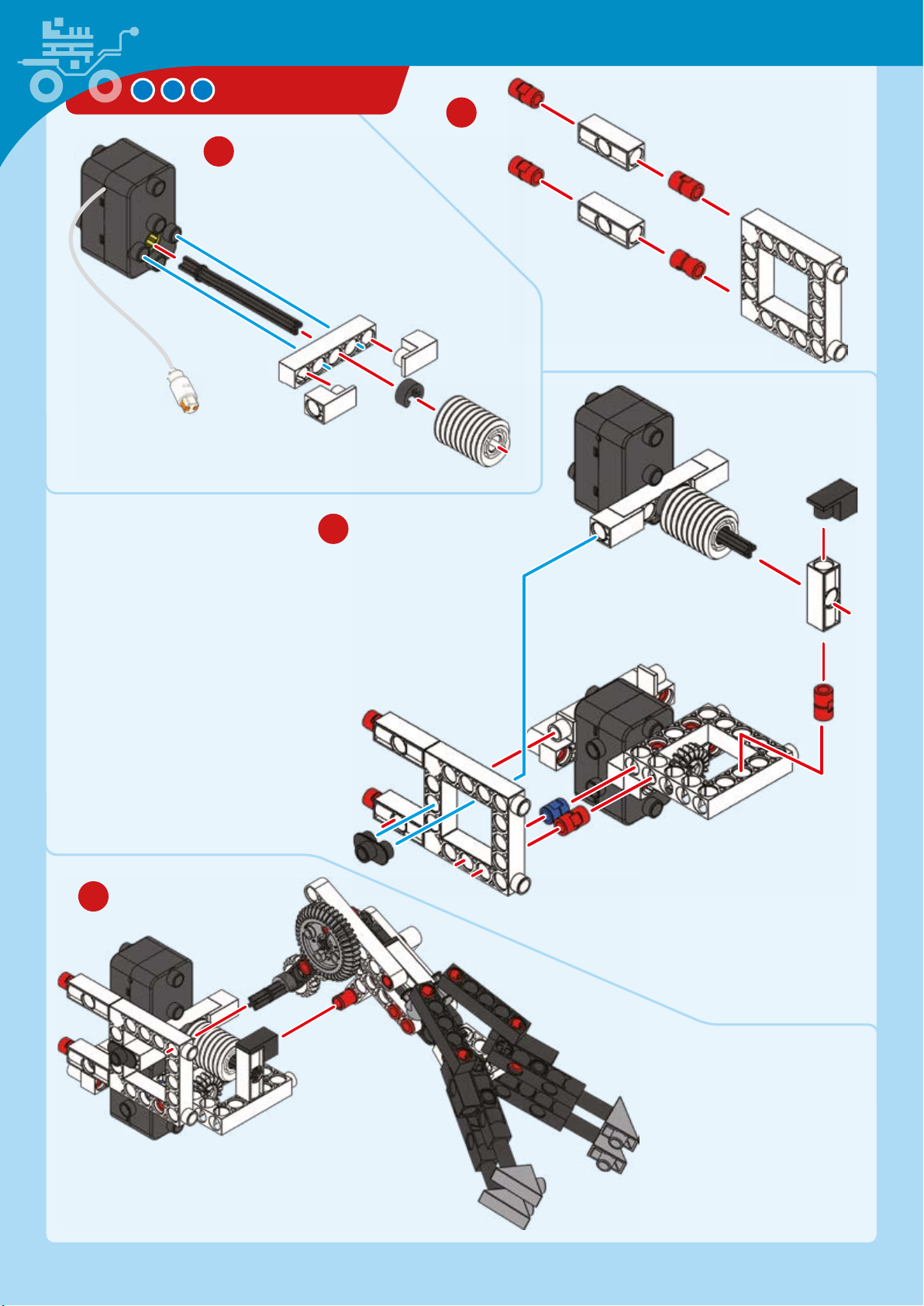
MARS ROVER
31
32
x
33
34
Page 13
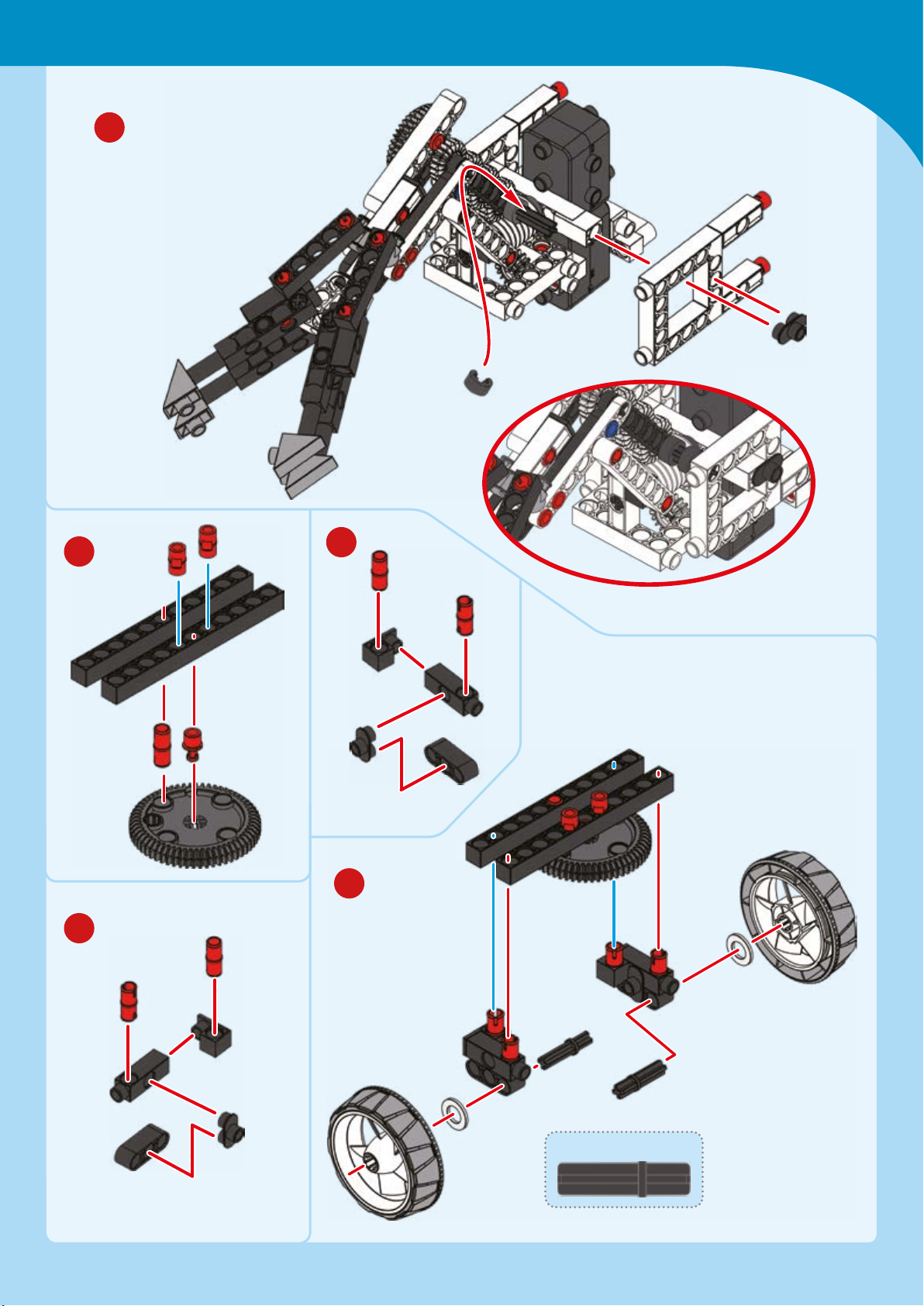
35
Mars Exploration
36
38
37
39
30-mm axle
Page 14
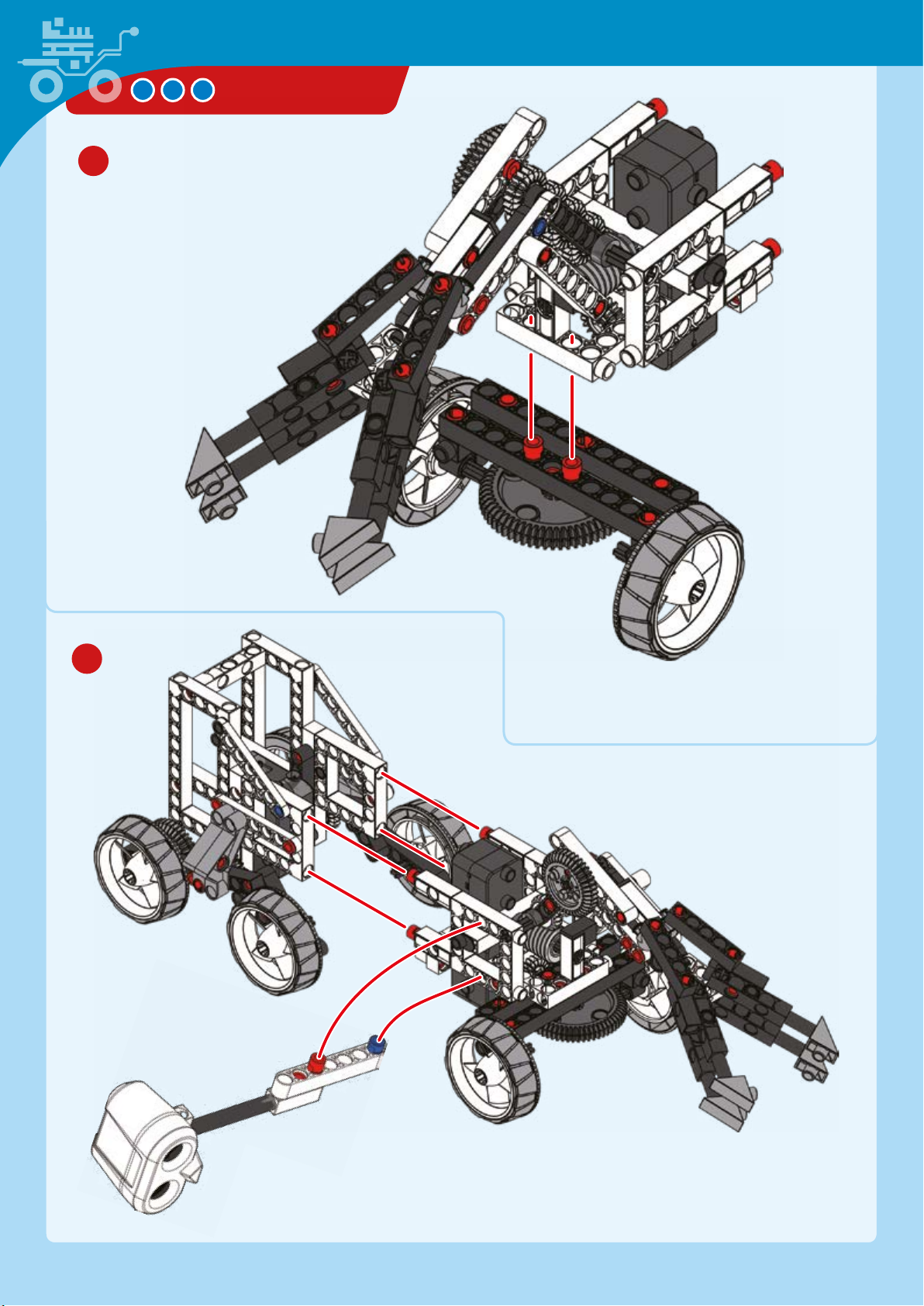
40
MARS ROVER
41
Page 15
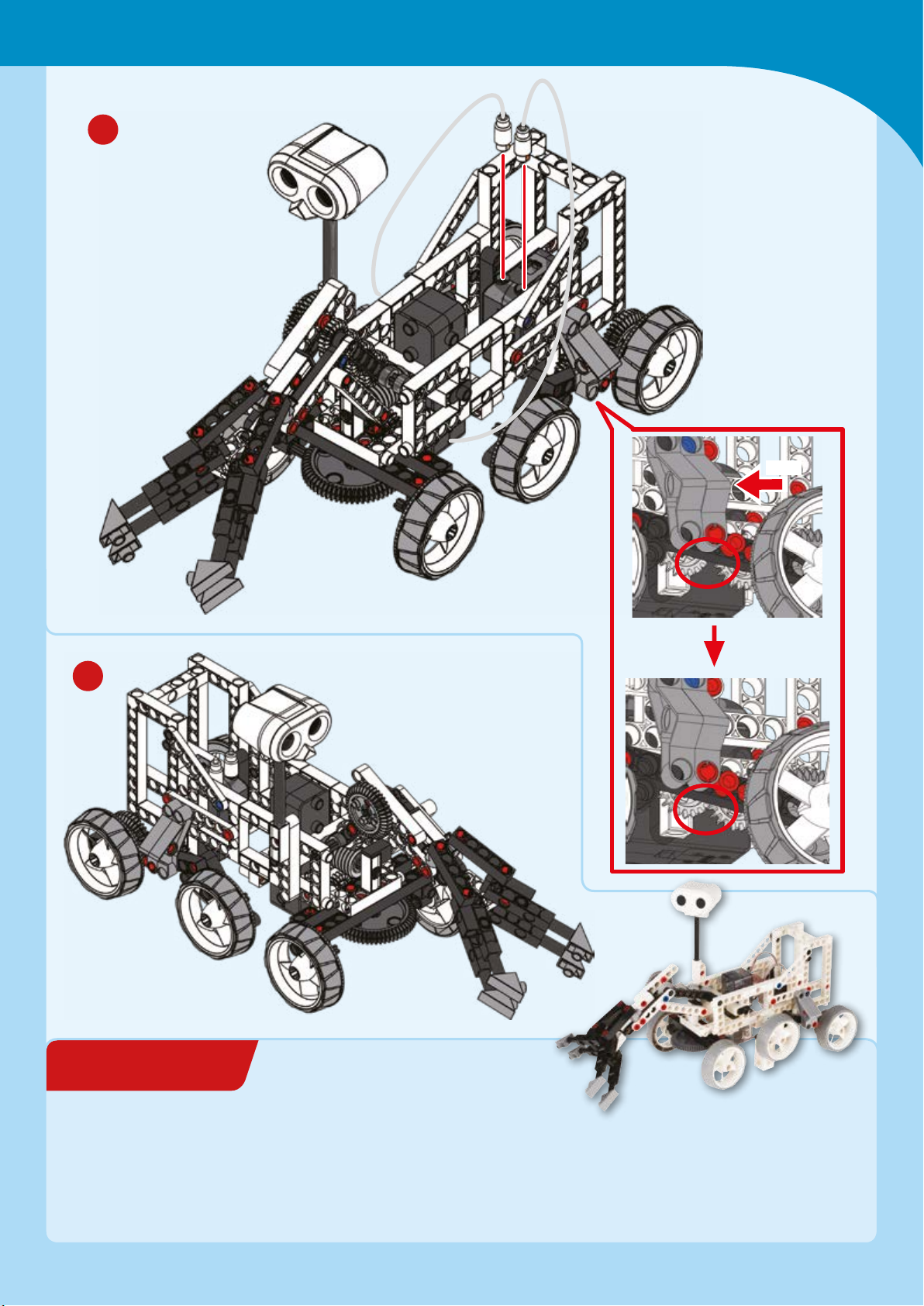
EXPERIMENT 1
42
Mars Exploration
Push
43
HERE’S HOW
Have a friend or family member set
up a make-believe Mars landscape in
a room in your house. They can
gather various light objects to be
Done!
Exploring “Mars”
investigated and collected such as
small cardboard boxes (e.g., tea
boxes and matchboxes), light toys,
and empty cans, and place them
around the room. Turn on your model
and, while staying at least one meter
away from the model at all times, try
to collect all of the objects and bring
them to one location for pretendtransport back to Earth!
Page 16
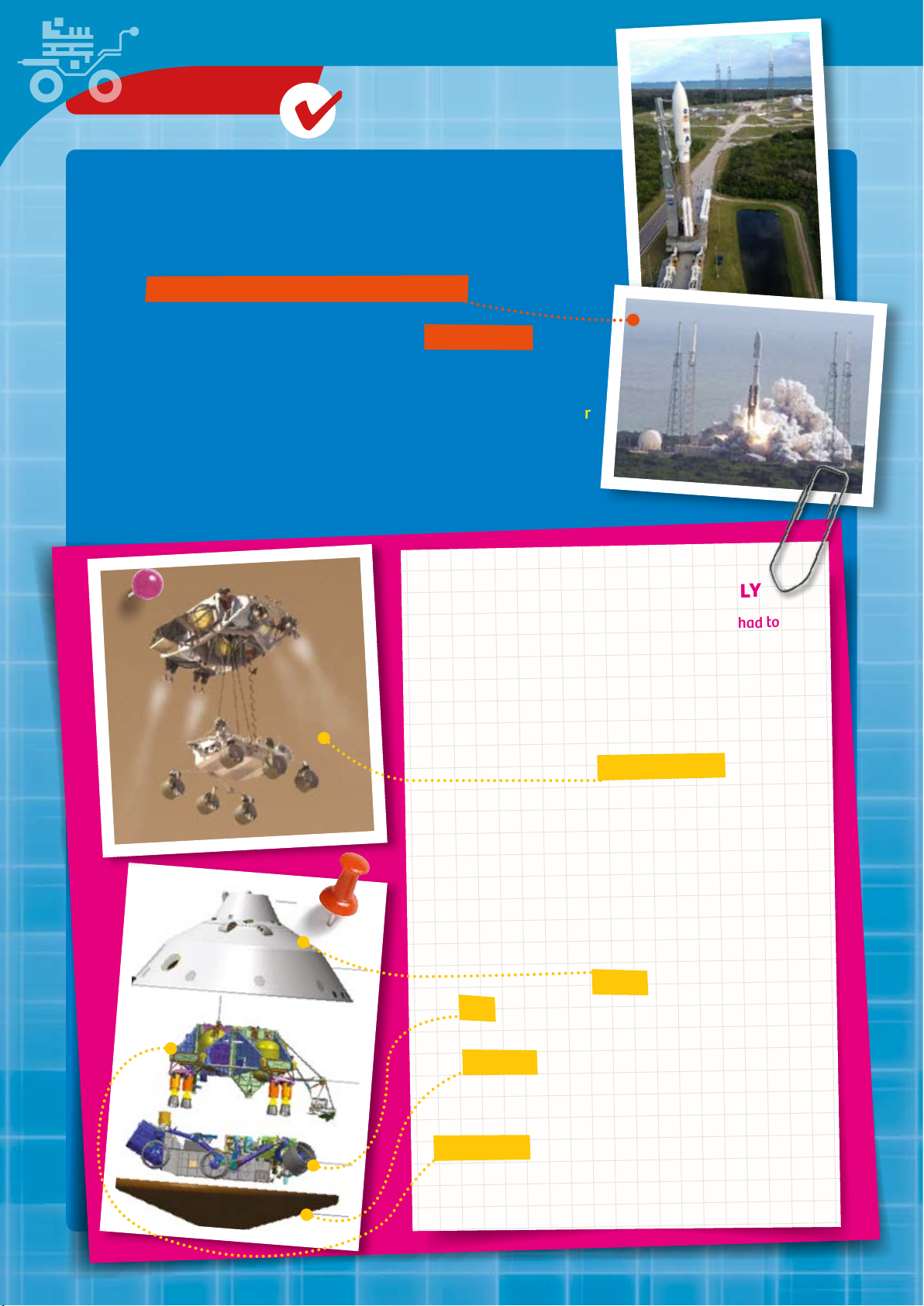
CHECK IT OUT
Curiosity Makes You Smarter
On November 26, 2011, the moment had finally arrived. The most
ambitious NASA mission to date for the exploration of Mars had
started: The Mars Science Laboratory (MSL) lifted off from Cape
Canaveral on board an Atlas V 541 rocket.
The centerpiece of this Mars mission was the Curiosity rover. A rover
is a vehicle that is controlled by radio signals sent from Earth. If it is
too far away from Earth, it can also be driven autonomously. It is
smart enough to steer itself toward goals and avoid obstacles. A rover
such as Curiosity is equipped with a variety of measuring instruments
and tools, and it can transmit its measurement results back to Earth.
Curiosity’s most important objective is to answer this question: Was
Mars ever or might it still be habitable?
GETTING A ROBOT TO MARS SAFELY
In order to answer that question, Curiosity first had to
complete the long voyage to the planet — about 570
million kilometers. To make that journey, the rover and
the MSL needed eight and a half months. On August 6,
2012, Curiosity finally landed softly on Mars.
After all, a lot of thought had gone into it. NASA
engineers had designed a “sky crane” system to be held
by retrorockets 20 meters above the Martian surface.
From there, the rover was finally lowered to the surface
on nylon tethers.
In order to understand this beer, let’s take a look at the
most important elements of the Mars Science
Laboratory.
The cruise stage guided the MSL during its flight to
Mars. Before entering the Mars atmosphere, the module
was separated from the capsule. The capsule protected
the rover from the conditions of space and the Martian
atmosphere as it parachuted down toward the surface.
The heat shield in turn provided protection against the
extremely high temperatures of atmospheric entry.
After the heat shield and capsule had completed their
tasks, they were cut loose. At that point, the freed
descent stage took care of the soft and precise landing
of the rover on the Martian surface. It was the descent
stage that held the sky crane system mentioned above.
Page 17
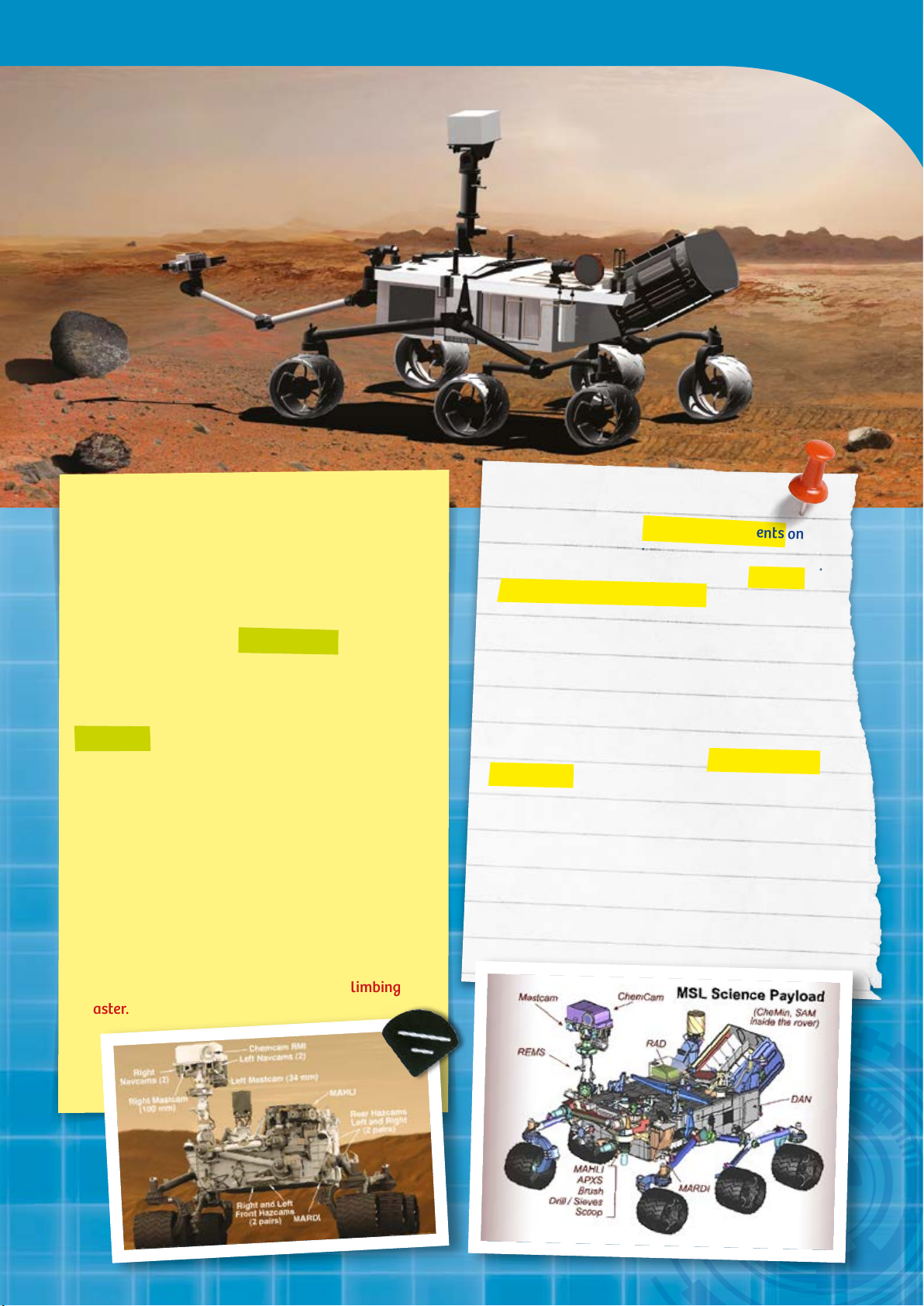
Mars Exploration
CURIOSITY’S ENGINEERING IN DETAIL
With a mass of 900 kg and the size of a compact car,
Curiosity is by far the heaviest man-made object ever
to land on the Martian surface.
In contrast to earlier rover missions to Mars, Curiosity
is powered with a small atomic baery rather than
solar cells. That makes it more mobile and frees it
from having to rely on solar radiation.
For moving across the Mars surface, Curiosity has
six wheels symmetrically aached to two tubular
frames. The rover is steered by the two pairs of
wheels at the front and back. Since they can turn a
full 90° to the left or right, the rover can rotate 360°
while standing in one spot.
Curiosity can move at a speed of up to 4 centimeters
per second. That means it can cover 100 to 300 meters
a day — admiedly not a lot. But the rover isn’t on
Mars just to drive around. It’s there to collect data. To
be able to do that wherever it goes, it can handle
slopes of up to 45° and obstacles of up 75 cm in height
— in all directions. So it’s a virtual rock-climbing
master.
EVERYTHING IN FOCUS
The rover has a lot of scientific instruments on
board for studying rocks, atmosphere, and
radiation. For example, there are four “hazard
avoidance cameras” (hazcams) installed on the
lower portion of the rover for collecting
environmental data. These cameras collectively
cover a field of view of 120° and can take 3D
pictures. With their help, the entire surroundings
can be searched for obstacles up to four meters
away.
Curiosity is also equipped with a two-meter-long
robotic arm on the front. This is called a “Sample
Acquisition, Processing, and Handling” system, or
“SA/SPaH” for short. Its three joints make it
resemble a human arm, or more precisely a system
composed of a shoulder, elbow, and wrist joint.
That makes it very flexible and capable of moving
some of its instruments right up next to the object
being studied.
Page 18
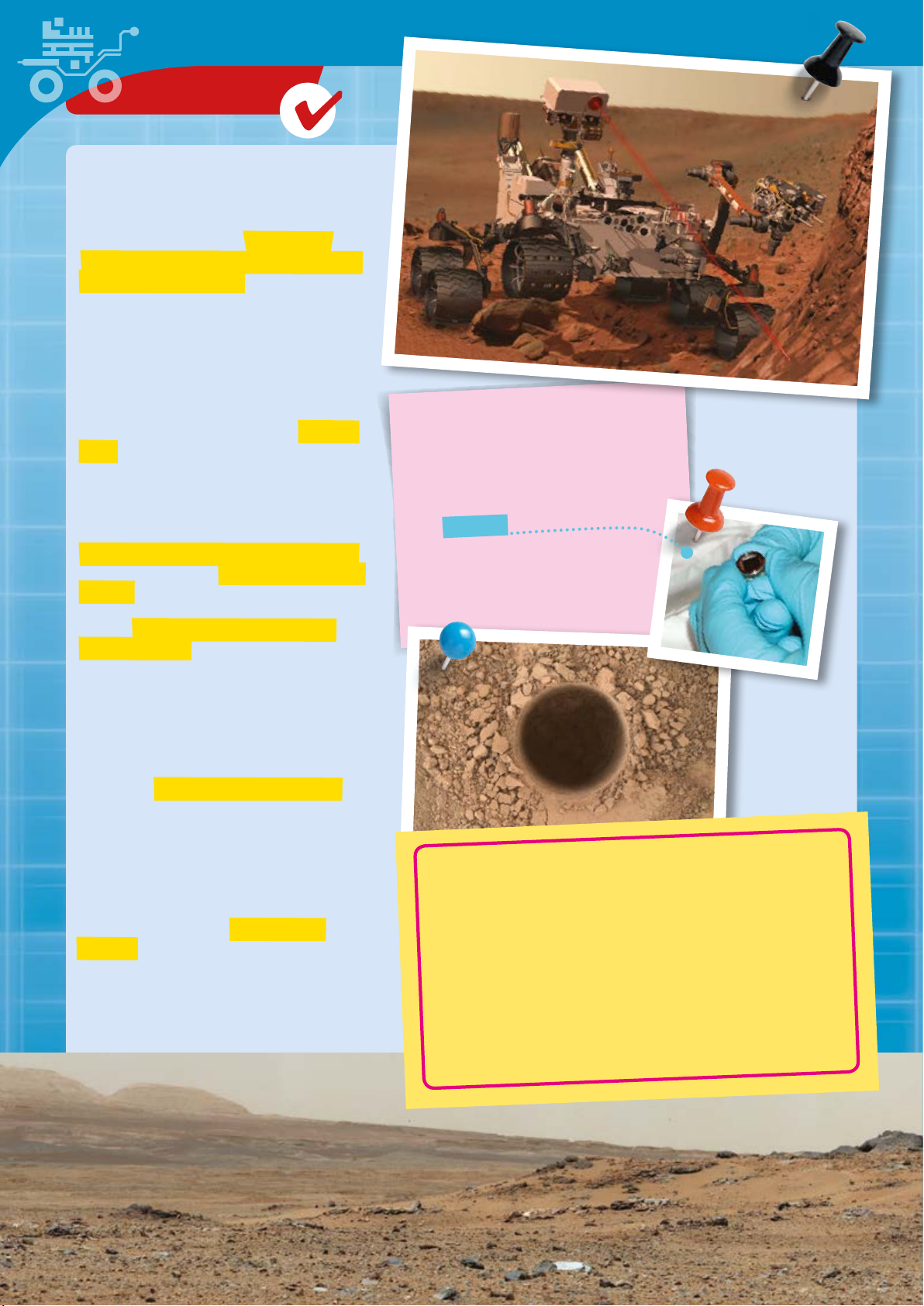
CHECK IT OUT
WELL EQUIPPED WITH
DRILL, SHOVEL, AND BRUSH
Curiosity’s arm is equipped with a drilling
system, a digging shovel, a brush, and a sieve
with collection containers. This equipment can
even allow it to analyze deeper levels of soil
and rock.
The most important part of the arm is the drill
at its tip. This is capable of drilling holes in rock
up to 5 cm deep. In the process, the drilling core
material is pulverized and analyzed.
A particularly striking feature is the 1.1-meter
mast at the front left corner of the chassis. The
top part, which contains almost all the
instruments, resembles a human head due to
its freedom of movement. In fact, Curiosity’s
mast can rotate 360°.
The chemistry and camera system (ChemCam
for short) consists of a laser, spectrometer, and
camera. Spectrometers are used to determine
the composition of light radiation. That in turn
lets you figure out what elements Martian
rocks are made of, since every element has its
own characteristic spectra. In this process, the
laser is focused on a small point and heats the
material there so intensely that it starts to
vaporize. Then, the optical spectrometer
studies the composition of the gases and
plasmas created.
GREETINGS FROM EARTH
As part of NASA’s “Send Your Name to
Mars” program, members of the public
were able to immortalize themselves
by entering their names onto a Mars
rover microchip. 1.2 million names
were scanned in, laser-etched onto two
small microchips each about the size of
a dime, and brought on board Curiosity.
Is that cool or what?
For general meteorological measurements, the
rover is equipped with instruments for
determining wind speed and direction, UV
radiation, surface temperature and pressure,
and the temperature and relative humidity of
the atmosphere.
For communication with ground control on
Earth, Curiosity has two communication
systems. One is responsible for receiving
control commands and transmiing status
data. The other handles the transmission of
scientific data (up to 250 megabits per day),
which are then analyzed by NASA scientists.
CURIOSITY FINDS THE BUILDING BLOCKS
OF LIFE ON MARS
And was there ever life on Mars? After just a few days,
Curiosity delivered further proof for the earlier presence of
water on Mars (see also next section). The rover discovered
some of the building blocks of life on a chip of stone. The
samples showed traces of clay, sulfates, and other minerals
— all elements that make life possible. So you see, Curiosity
has made us smarter!
Page 19
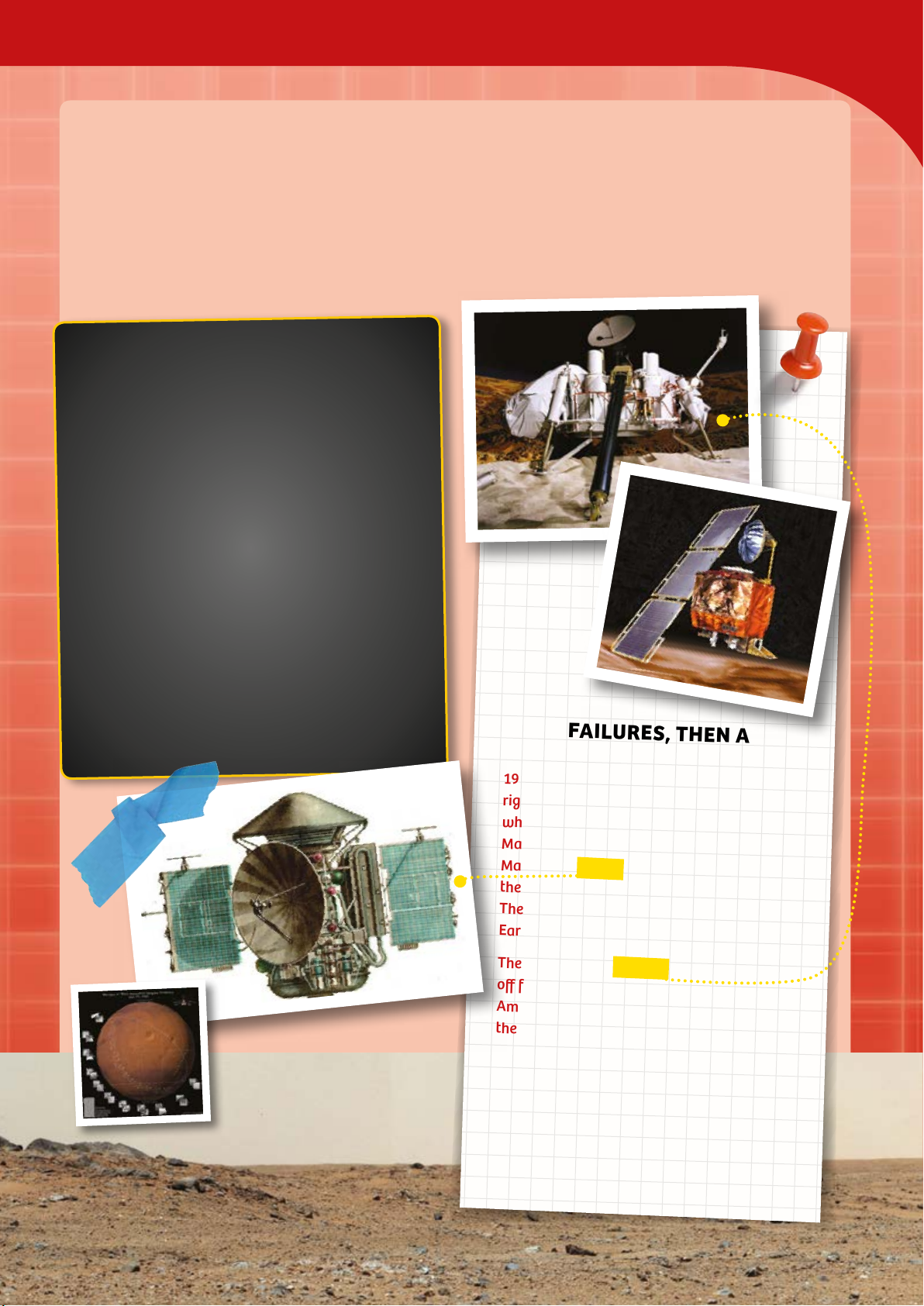
Mars Exploration
Geing to Know Mars, One Step at a Time
For researchers, Mars was right up there with the moon as an aractive candidate for exploration. It is
close to Earth and a rocky planet. It gets its red color from iron compounds in its soil. Its surface is a
rocky desert with monstrous extinct volcanoes and dried seas and river beds.
A trip to Mars on a space ship would take about a year. For centuries, researchers have wanted to find
out whether humans might be able to sele there one day.
STARTING SHOT,
The history of Mars expeditions is a long one. But
its starting point wasn’t marked by Americans. The
Russians (or Soviets, at that time) were the first to
take off for Mars, the so-called red planet. On
October 10, 1960, they sent a probe on its way to
Mars. However, it didn’t even manage to reach an
orbit around Earth. NASA’s first Mars mission,
Mariner 3, also failed. That 1964 probe was unable
to separate from its booster rocket.
Over 30 more missions were to follow — and more
than half of them failed. The challenges have
always been immense.
In 1965, Mariner 4 was the first probe to fly by
Mars. It was equipped with a camera and took 22
photos. One important insight gained from that
mission: The Martian surface is barren and
desolate, more or less like a lunar landscape.
Mars Climate Orbiter
MORE FAILURES, THEN A
BREAKTHROUGH
1971 brought more failures: Mariner 8 failed
right at launch. The Soviet probe Kosmos 419,
which was supposed to be the first to land on
Mars, only reached an orbit around Earth.
Mars 2 and Mars 3 (Soviet Union) did reach
the planet, but only provided a lile data.
The landing module of Mars 3 was the first
Earth object to land on the red planet.
The NASA probes Viking 1 and Viking 2 took
off for Mars in 1975. They were the first
American missions to land space vehicles on
the surface of Mars.
Viking 1 accomplished this on June 20, 1976,
and Viking 2 landed successfully as well.
Both probes sent more than 50,000 photos
and a wealth of data about the composition
of the Martian surface. The hope of finding
traces of life, however, was not fulfilled.
Page 20
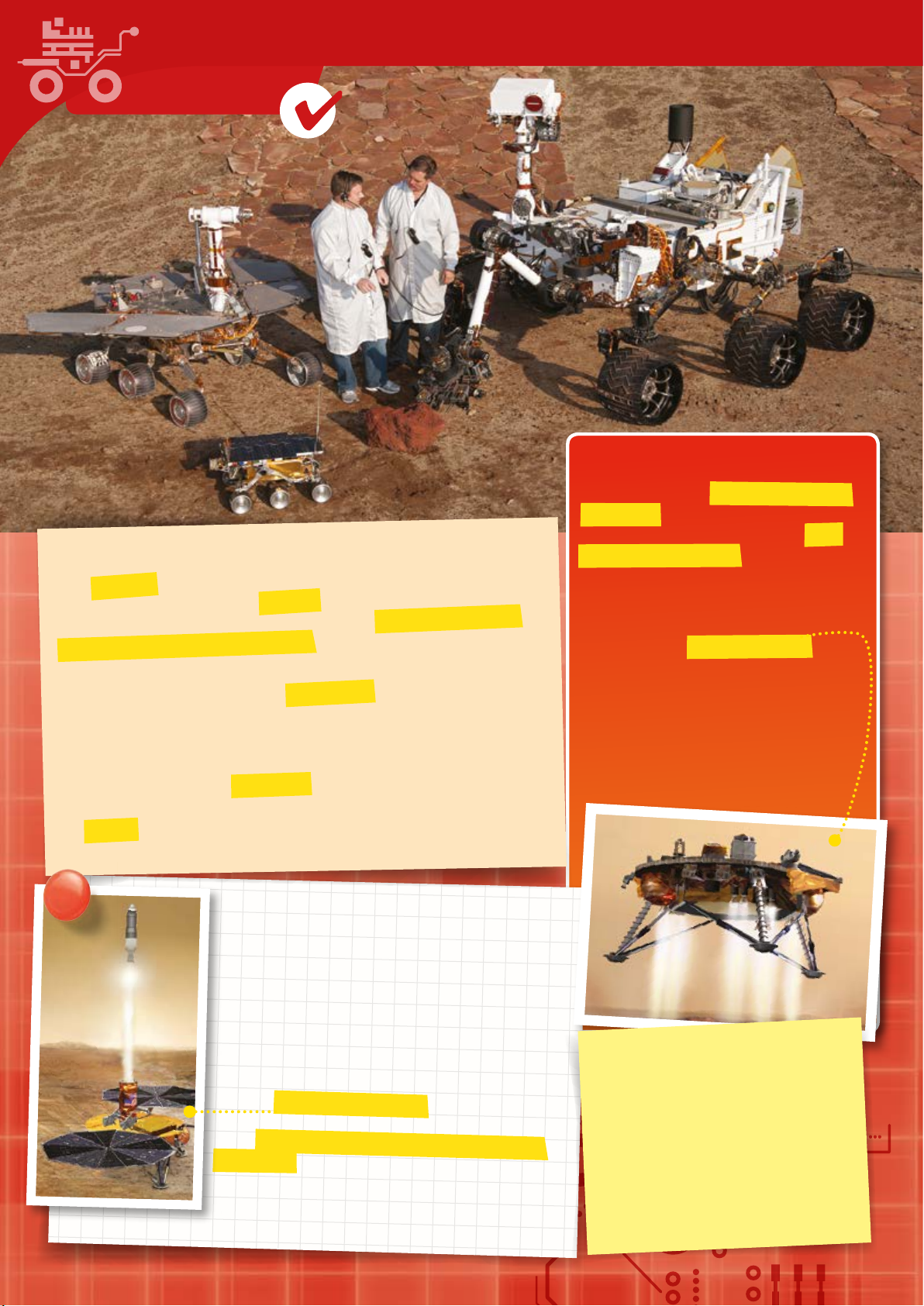
CHECK IT OUT
Opportunity
Sojourner
EXPLORING AND MEASURING THE RED PLANET
With Pathfinder, NASA landed another probe on the red planet in 1997.
Pathfinder and its robotic vehicle Sojourner transmied 16,000 pictures to
Earth. And their radar data provided evidence for the widespread presence of
water ice under the Martian polar regions. Water is, of course, a crucial
prerequisite for life.
On October 24, 2001, the NASA probe Mars Odyssey entered into an orbit
around the red planet. It delivered data about the Mars surface, looked for
evidence for the past presence of water, and used its gamma spectrometer to
measure the composition of the surface and its minerals.
The 2003 European mission Mars Express was also a success. The probe created
a three-dimensional map of the Martian surface with unprecedented resolution.
Its Beagle 2 lander, however, remains lost. Good and bad luck often go together
on Mars missions.
Curiosity
WATER AND ICE ON MARS!
In January 2004, the NASA rovers Spirit and
Opportunity landed on Mars. In early March,
they delivered the sensational news: There
was liquid water on Mars. Opportunity found
sulfur compounds that can only form in liquid
water. The two rovers transmied several
hundred thousand photos to Earth.
In May 2008, the NASA probe Phoenix landed
in the arctic latitudes of the northern Martian
hemisphere. Its gripper arm of over two
meters in length allows it to look for ice under
the surface. Its very first excavation job was a
success: Just a few centimeters under the
Martian dust, Phoenix found conclusive
evidence of water ice.
WHAT NOW?
Most of the probes are no longer in operation. The Curiosity
rover, though, which you know about from the first chapter,
is still actively delivering data. Over all these years, the
numerous Mars missions carried over 9 tons of material to
that planet. But so far, nothing has been carried from Mars
back to Earth. Just think of how exciting it would be to study
some Martian rocks here in our laboratories!
A joint American-European project has set itself precisely
that task. Mars Sample Return (MSR) is in the planning
stages with NASA and ESA, the European counterpart to
NASA. The plan is to bring the very first rock samples from
Mars to Earth. The mission is currently in an early phase of
development, with liftoff expected as soon as 2022. You
never know, you might be part of the research team when the
time comes, if you do your homework!
THE ULTIMATE QUESTION
Is or was there ever life on Mars?
The various Mars mission experiments
provided no clear evidence about the
existence of organic life on Mars. All of the
biological experiments, however, observed
changes that could be caused by organic
life. Still, who knows?
Page 21
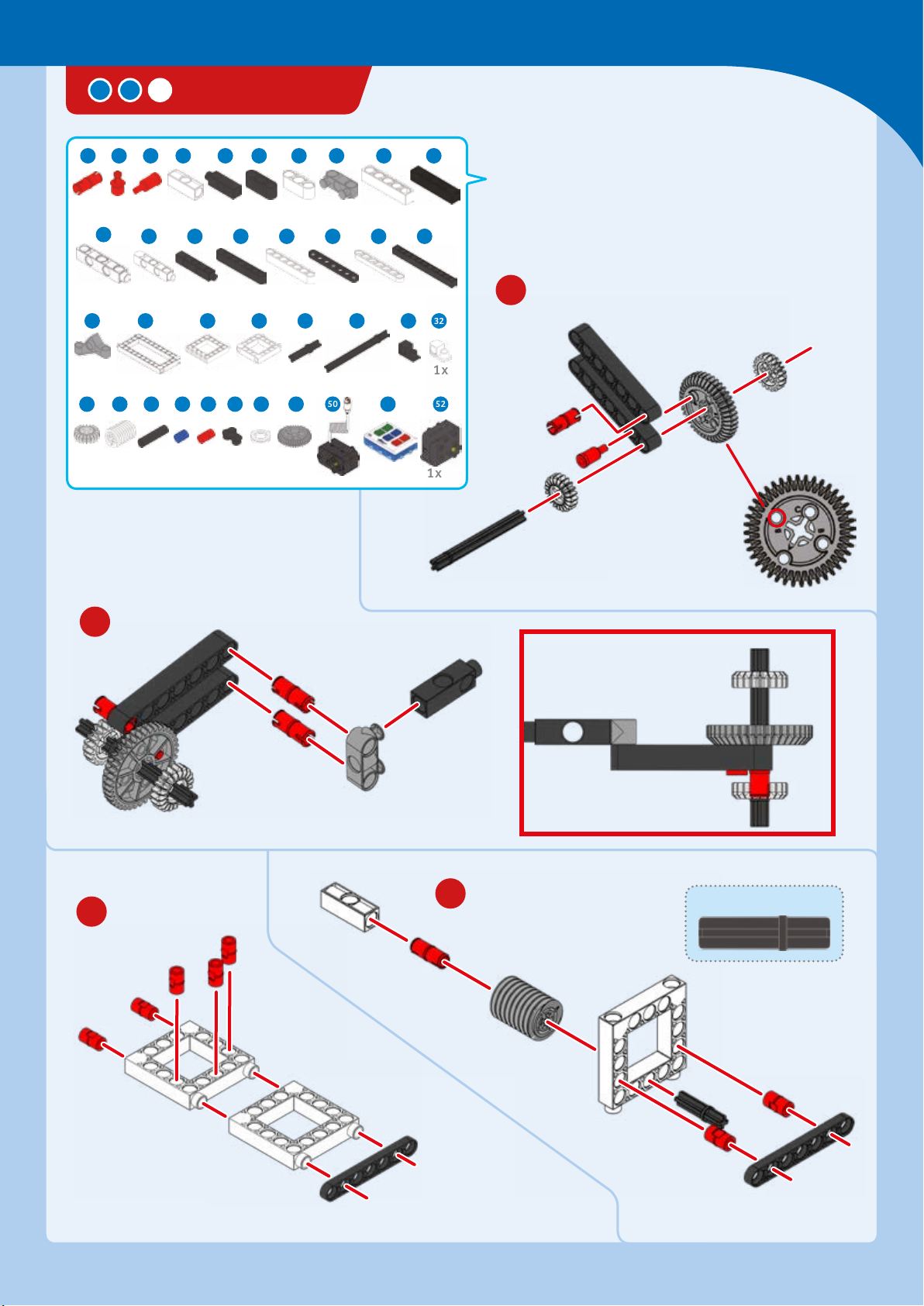
SPACE SHUTTLE
1 3 7 84 6 9 10 11 13
Getting to Space
4 x
22 23 25 26 28
4 x 2 x
36
3 x
14
x
4
38
1 x
5 x 1 x 3 x 4 x
1 x 3 x 2
1 x 4 x
44 45 46 47 49 50 51 52
42
3 x 4 x 38
1 x 2 x 1 x 3 x 2 x
17 1815 16 19 2120
x 4 x 4 x 5 x 2 x
x 3 x 1 x 4 x
2
1 x
30 31 32
1 x
1 x
1
1 x 2 x 1 x 3 x
Connect to
hole B
4
3
30-mm axle
Page 22
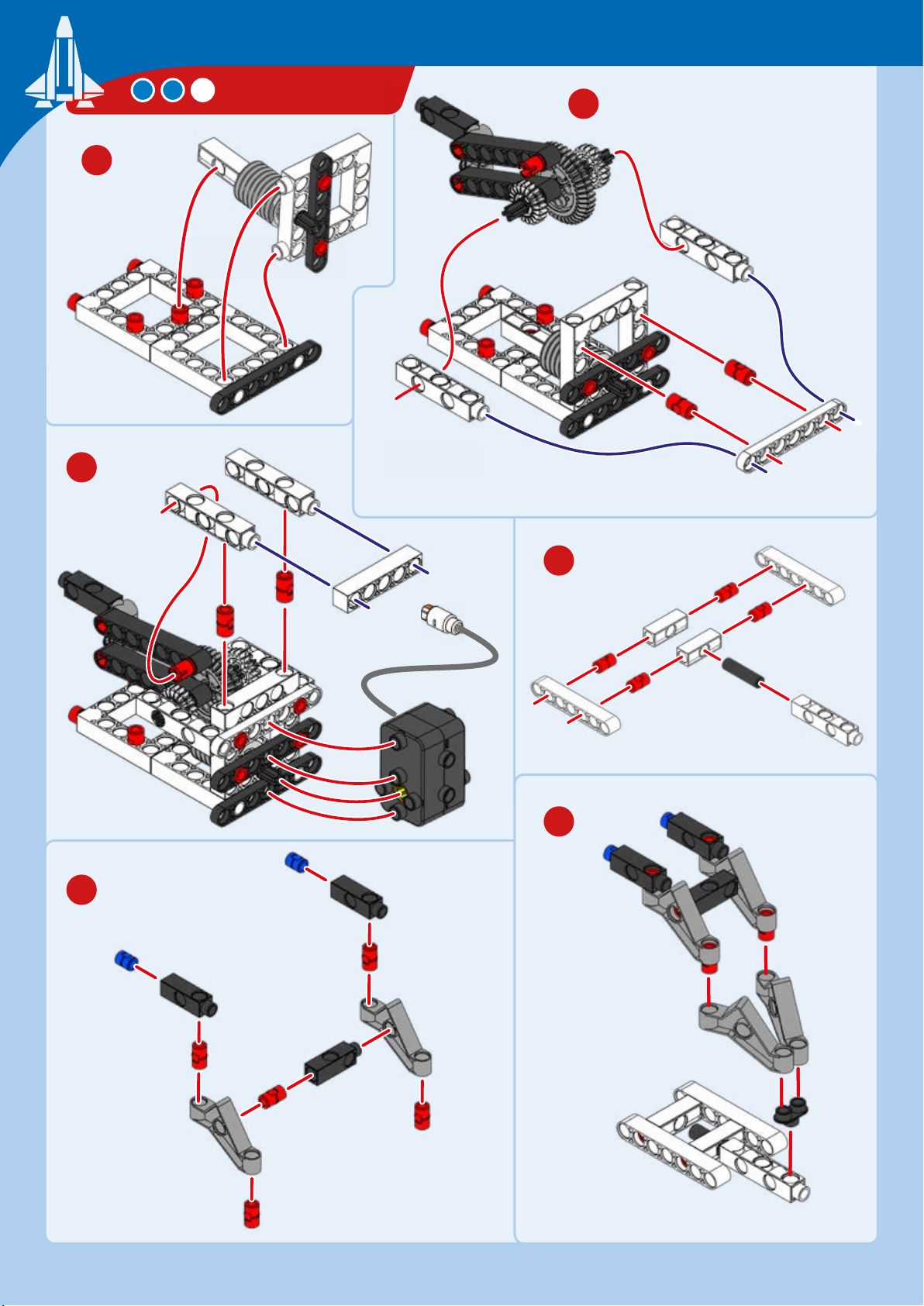
SPACE SHUTTLE
6
5
7
8
10
9
Page 23
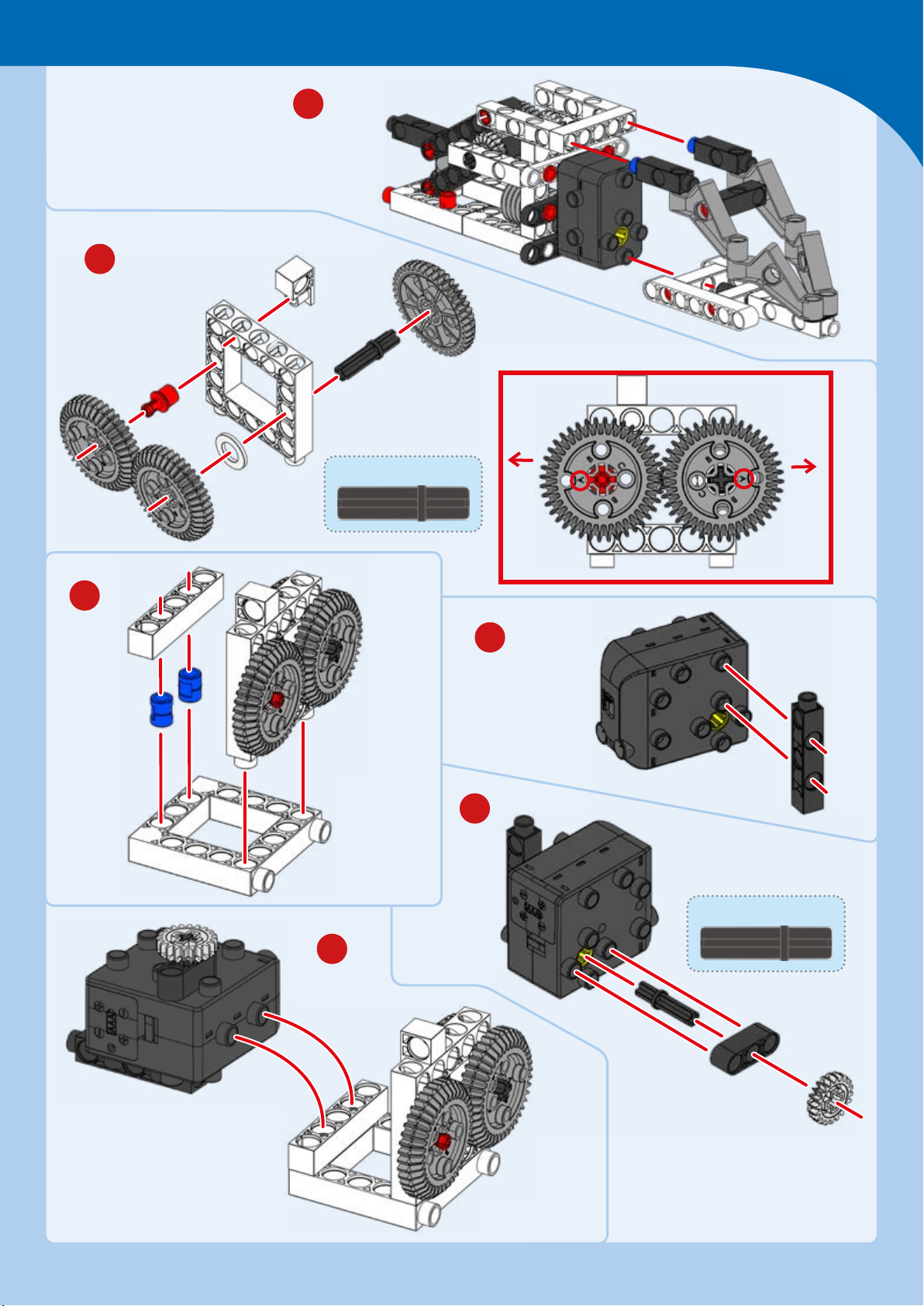
12
Getting to Space
11
30-mm axle
A A
13
14
15
30-mm axle
16
Page 24
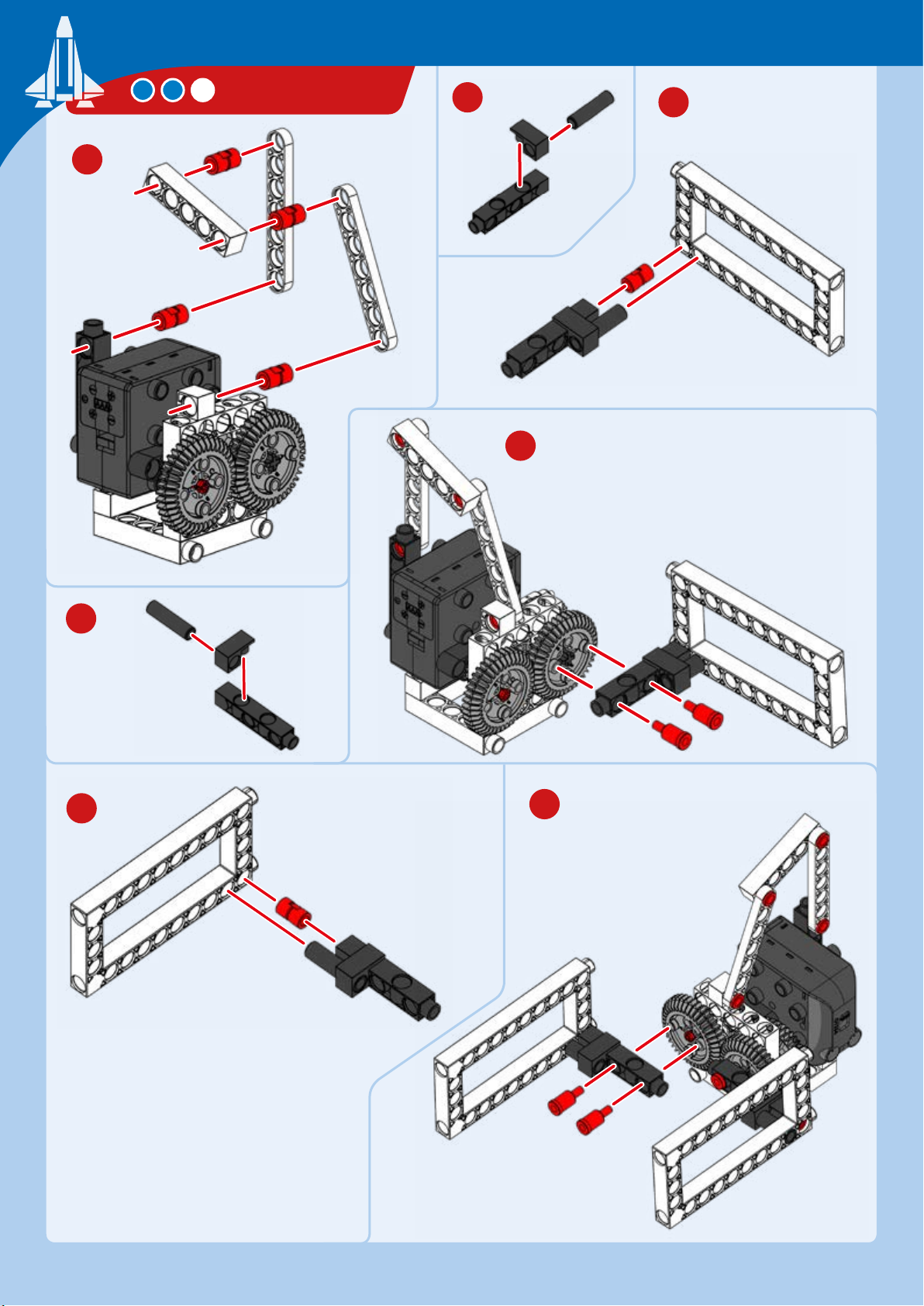
17
SPACE SHUTTLE
18
19
20
21
22
23
Page 25
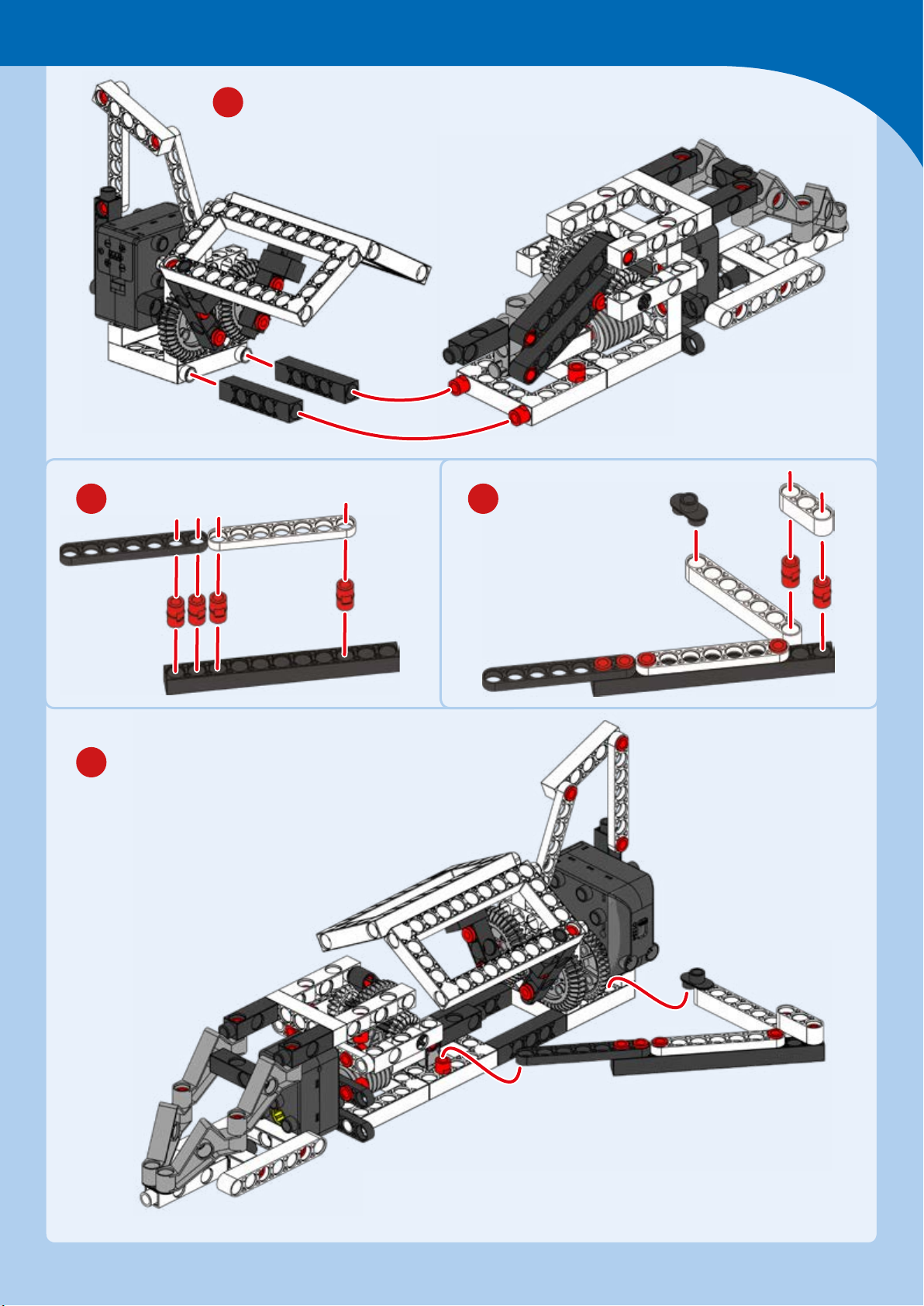
23
Getting to Space
24 25
x
26
Page 26
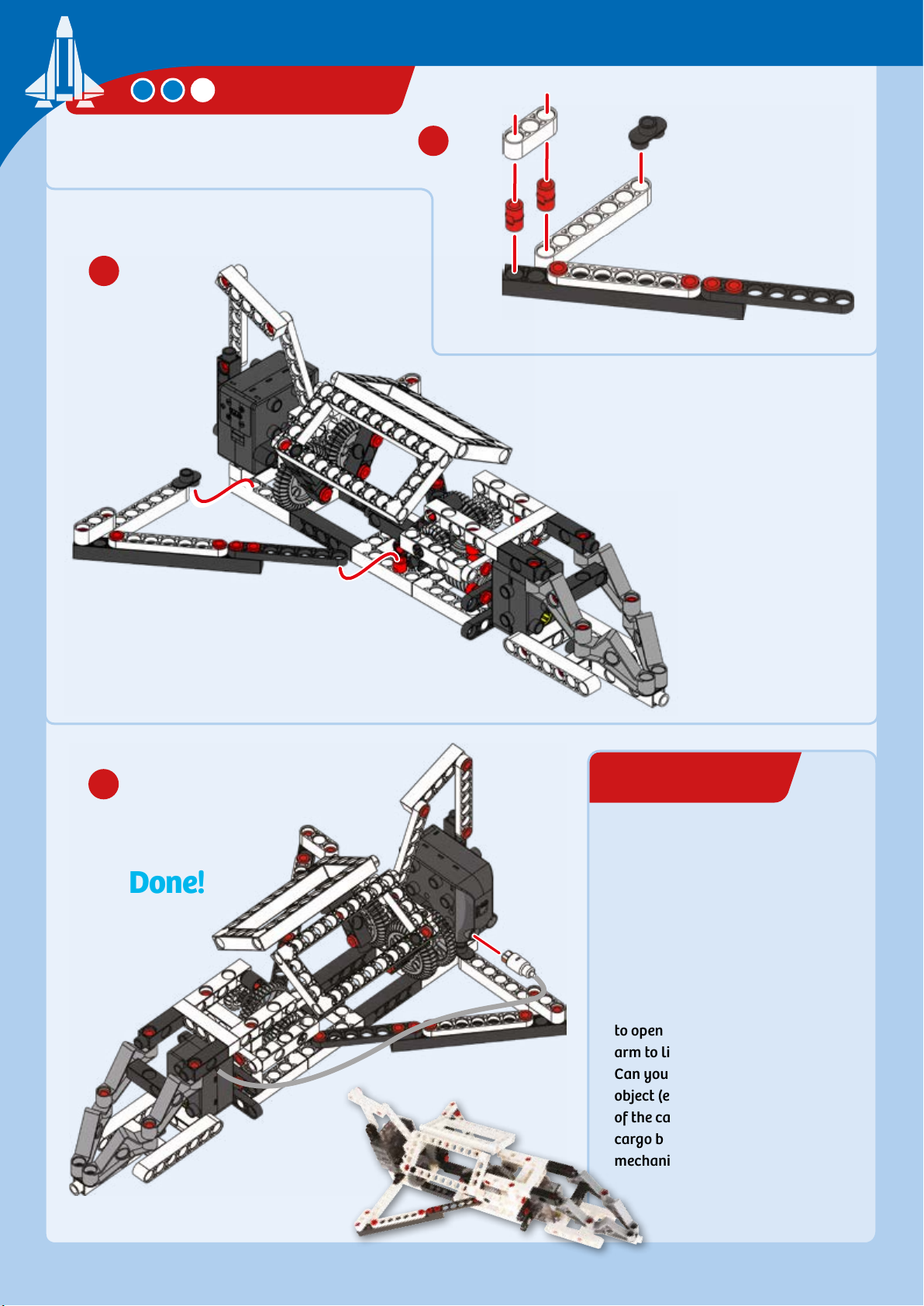
EXPERIMENT 2
28
SPACE SHUTTLE
27
29
Done!
Cargo mission
HERE’S HOW
What can your space shule
transport to the International
Space Station? Turn on your model
and see if you can remotely control
the space shule’s cargo bay doors
to open and the inner mechanical
arm to lift out of the cargo bay.
Can you get the arm to lift a small
object (e.g., a small toy or coin) out
of the cargo bay? Can you close the
cargo bay doors after you stow the
mechanical arm?
Page 27
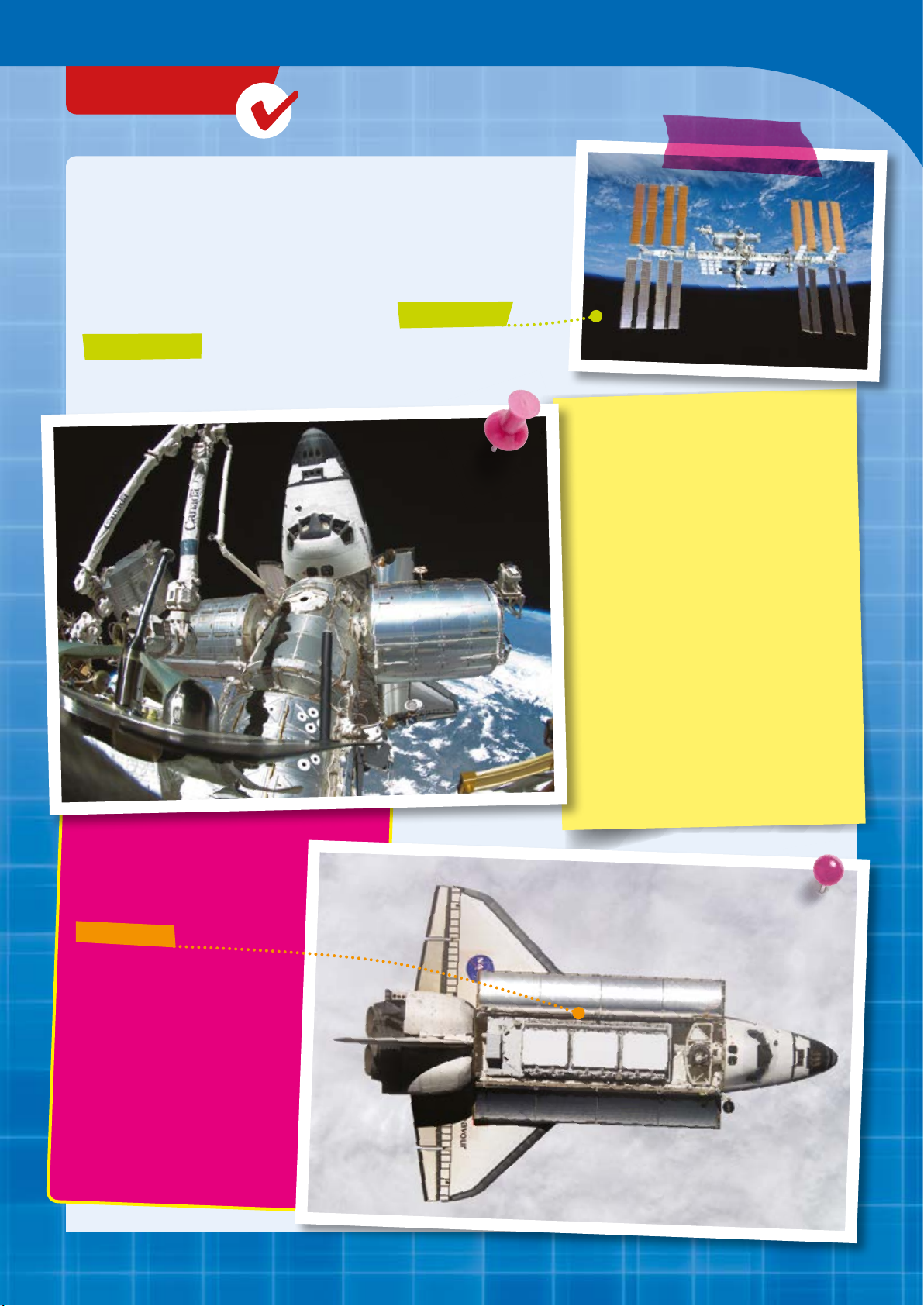
CHECK IT OUT
A Cargo Truck for Space
Its loading bay gave the Space Shule a lot of flexibility. It
was the only carrier capable of taking a cargo of up to 24.5
tons from Earth to space, such as to the International
Space Station. The ISS is a manned space station operated
and equipped by several countries working together.
Getting to Space
—
OFF INTO SPACE
AND
BACK AGAIN
Among the shule’s greatest successes
was the servicing of space probes and
the Hubble Space Telescope, as well as
many flights with built-in laboratories.
ROOM FOR MORE
THAN ONE SCHOOL
BUS
The cargo bay was located in
the shule’s central portion. It
had two large gates that could
be swiveled upward in order to
expose the bay to open space.
In addition, the shule was able to
bring satellites from space back to
Earth. This first happened during the
STS-51-A mission, when two satellites
had to be re-captured.
Other missions, such as STS-7, saw
research platforms carried in the cargo
bay and then released into space for
several hours during the mission. Then,
they were captured with the robotic
arm again (see next chapter).
The bay was 18.38 meters long
and had a diameter of 4.57
meters.
That could easily hold a school
bus. Or how many times would
your car fit into it?
Page 28
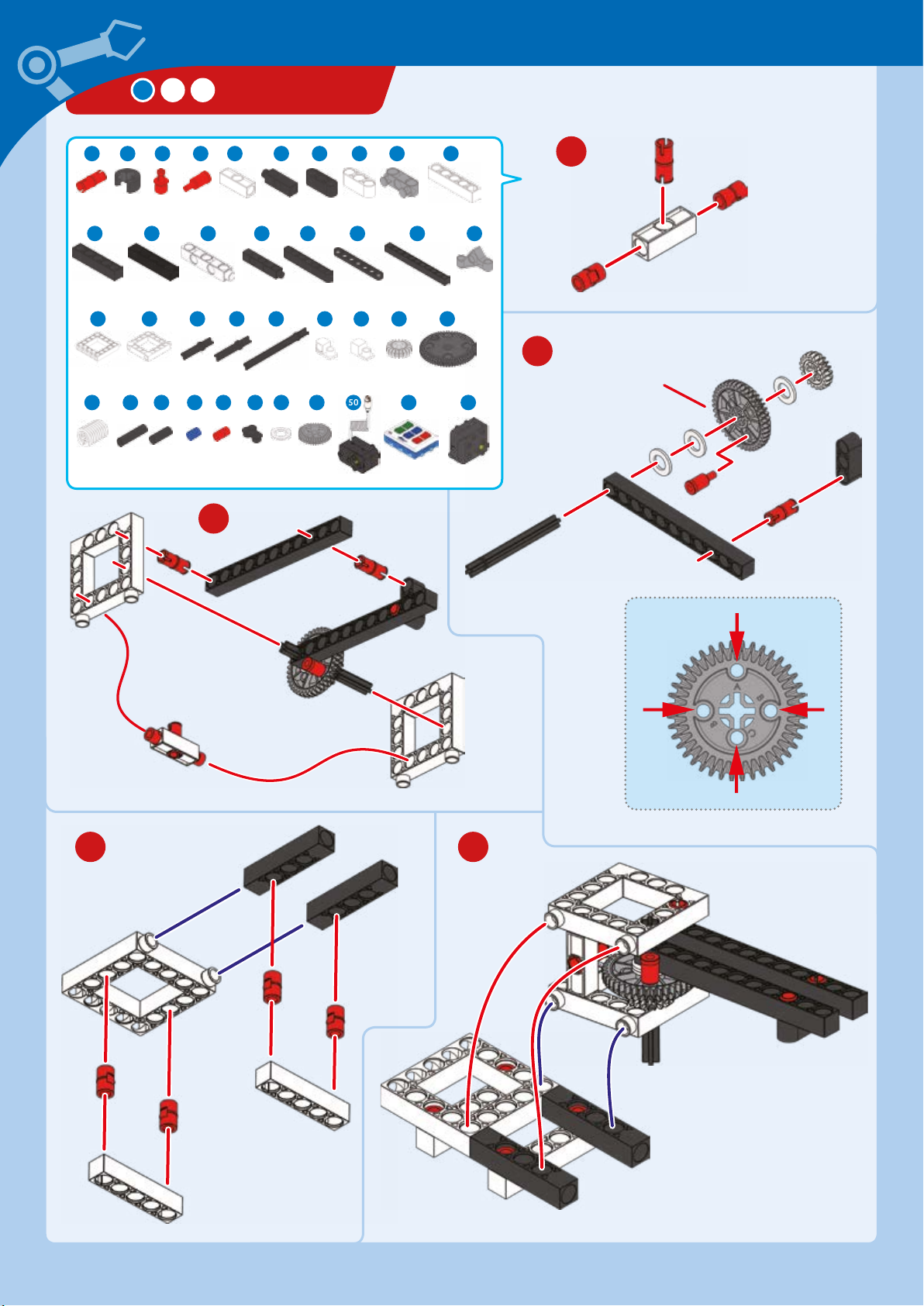
SHUTTLE ARM
1 2 3 7 84 6 9 10 11
9 x
12 13 14 1716 19 21 22
2 x 2 x 1 x
25 26 28
1 x 4 x
38 42
6 x 2
1 x
2 x 1 x 2 x 2 x 1 x
1 x 3 x 2 x 2 x 4 x
29 30 32 34 36 37
43 44 45 46 47 49 50 51 52
x 11 x 4 x 4 x 2 x
6
x
3 x 2 x 1 x 2 x
x 1 x 4 x 1 x
x
2
6 x 3 x 1
1 x
1 x
3
1
2
Connect to
hole A
1 x
4 5
Hole A
Hole
B
Hole
B
Hole C
Page 29
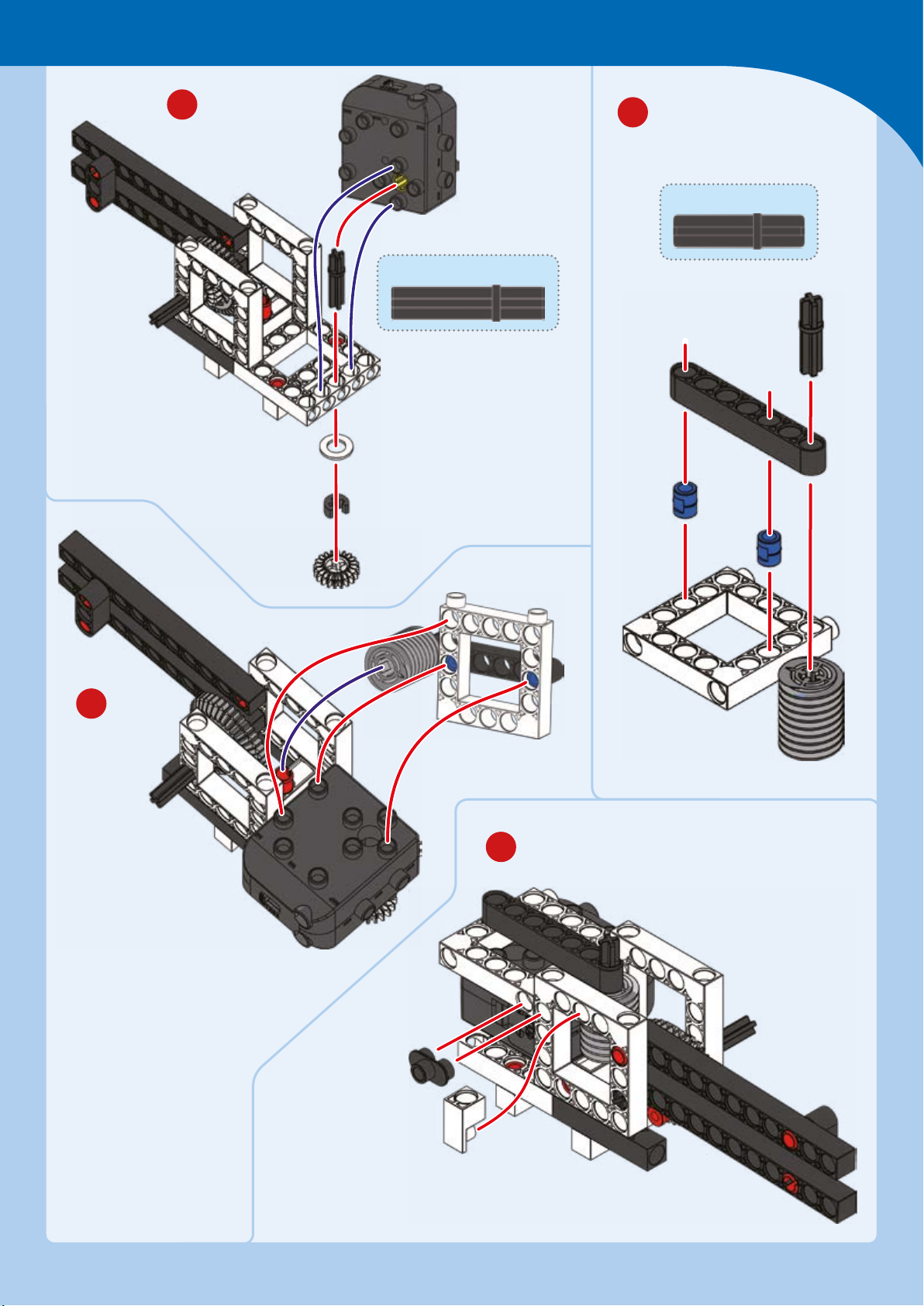
Getting to Space
6
35-mm axle
7
30-mm axle
8
9
Page 30
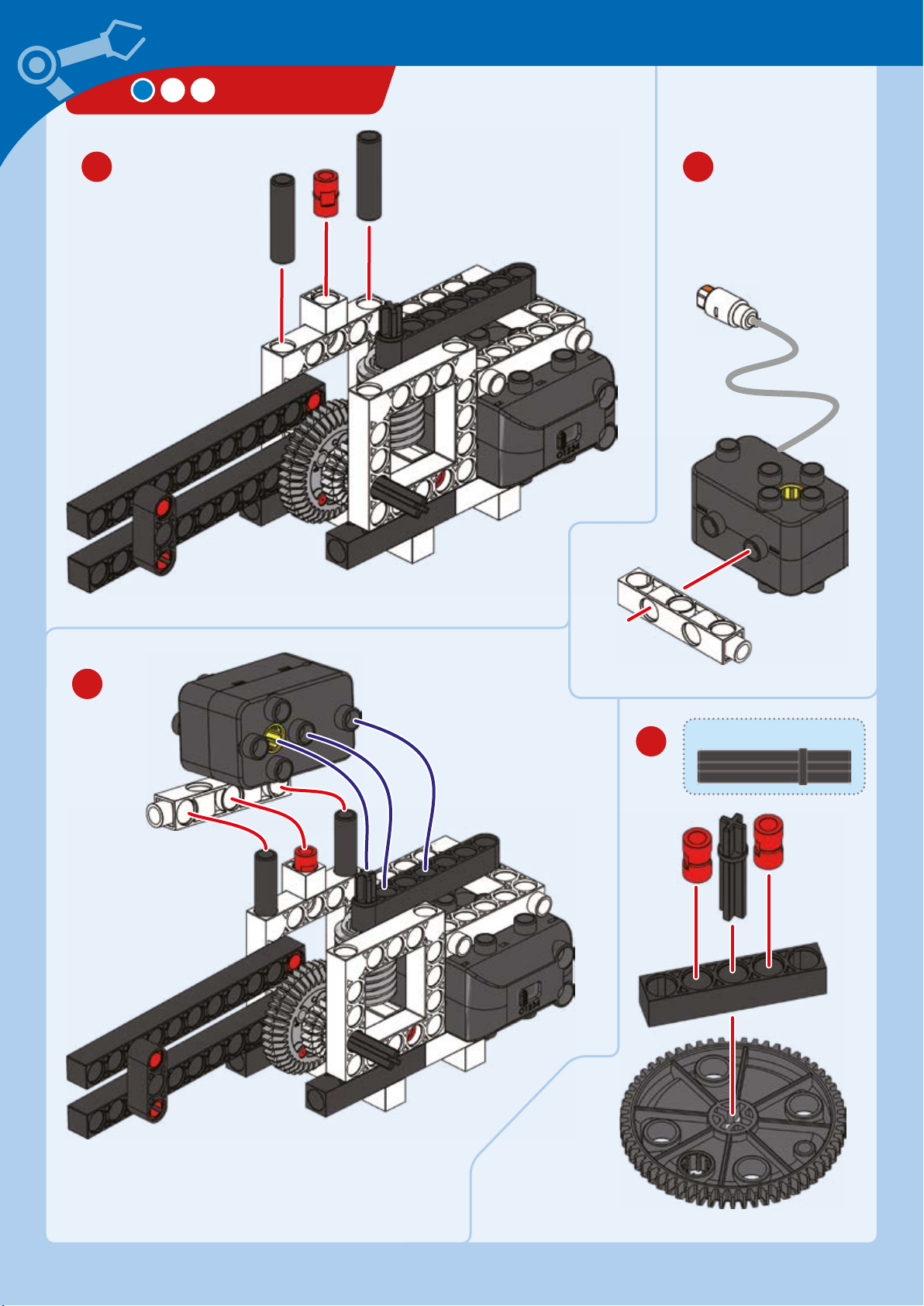
SHUTTLE ARM
10 11
12
13
35-mm axle
Large gear
with holes
Page 31
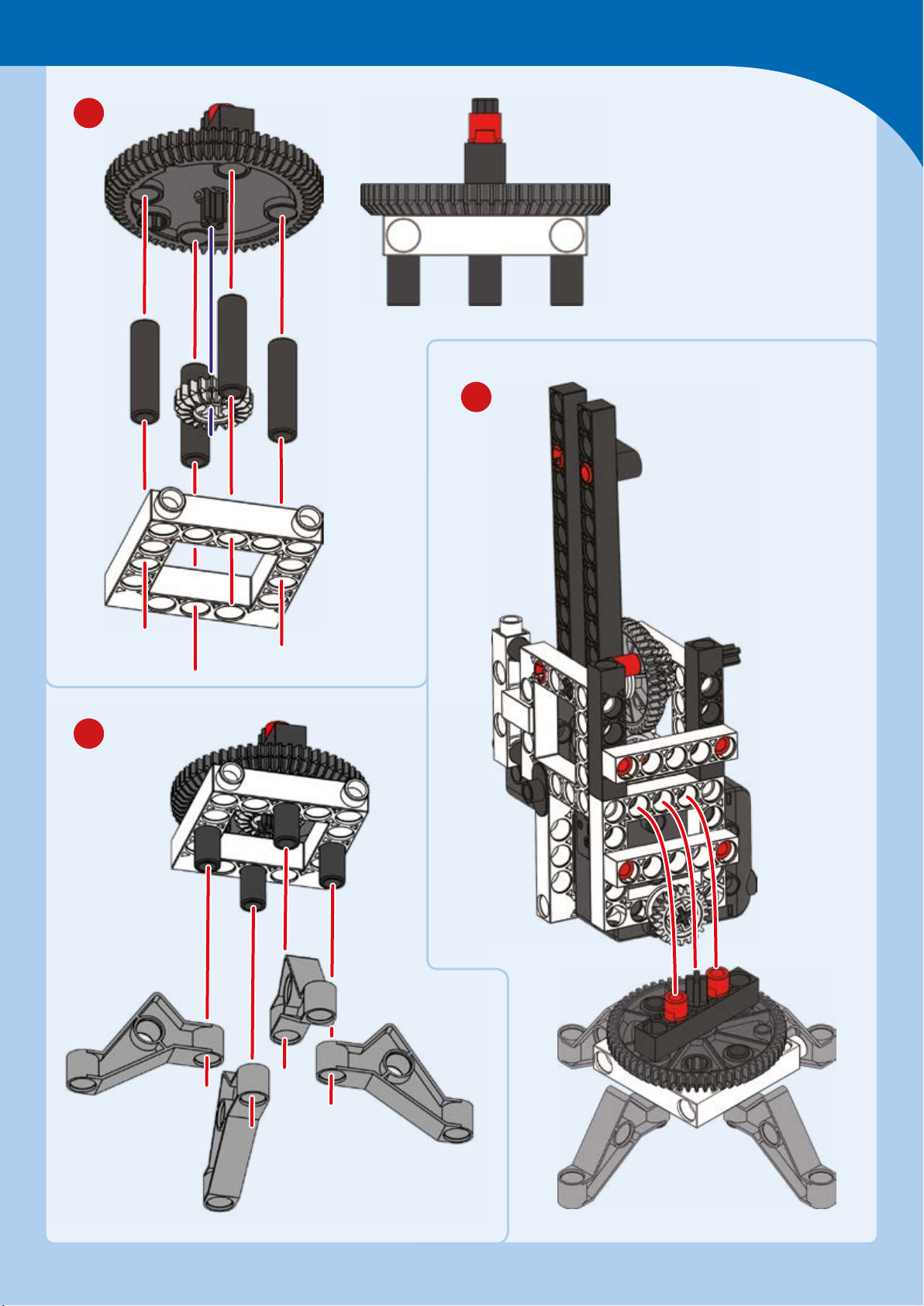
14
Getting to Space
16
15
Page 32
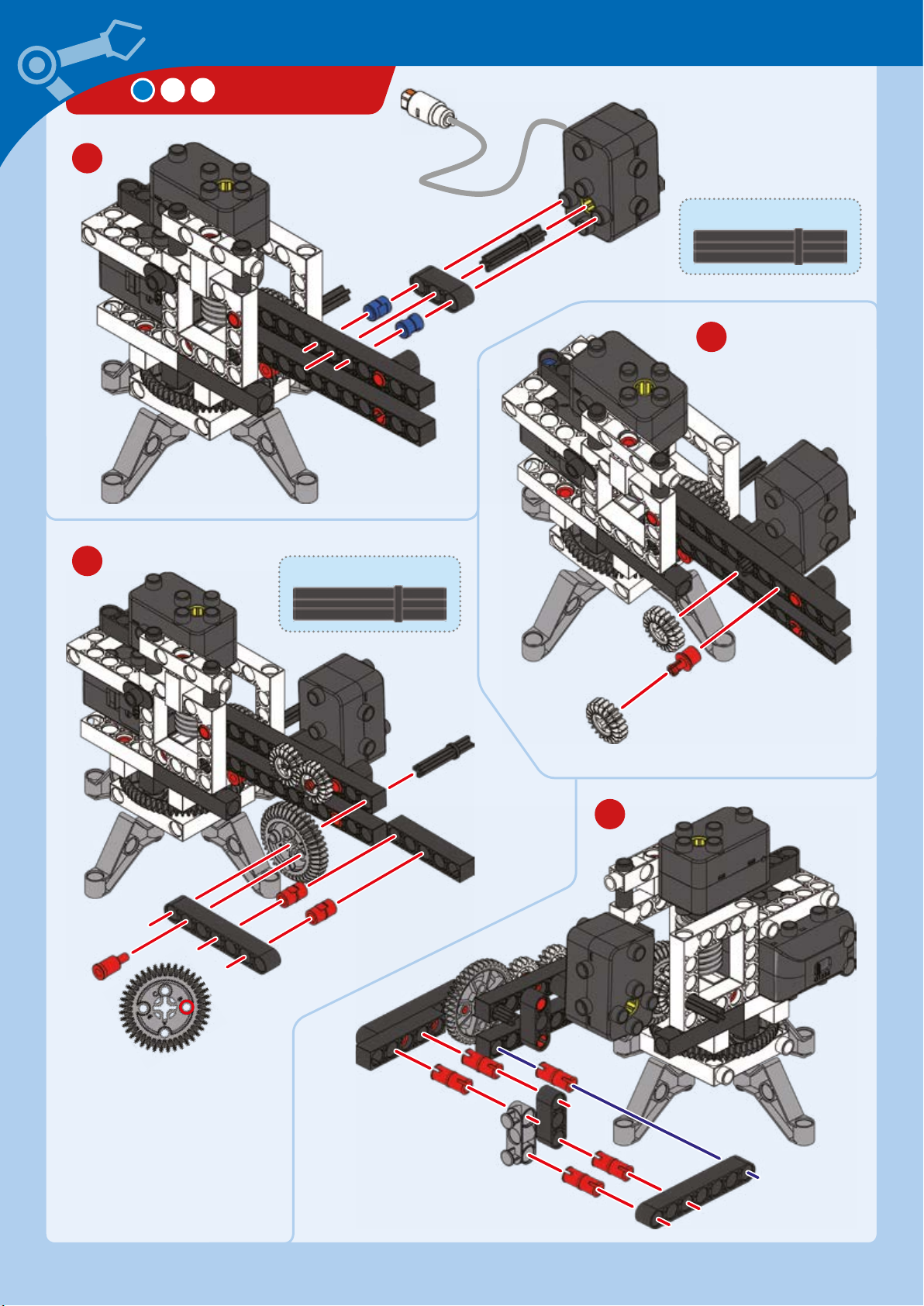
17
SHUTTLE ARM
35-mm axle
18
19
35-mm axle
20
Connect to
hole B
Page 33
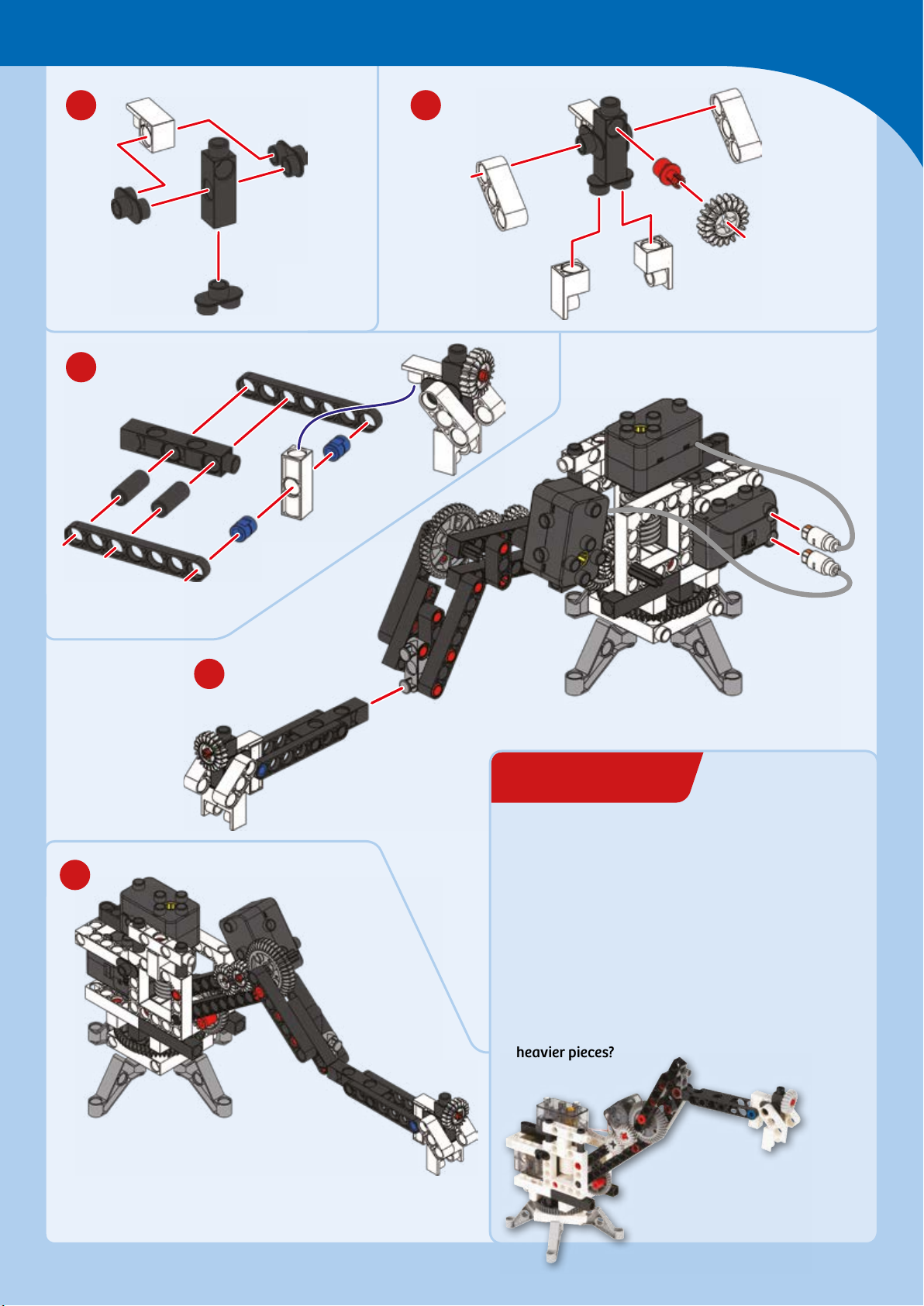
EXPERIMENT 3
21 22
23
Getting to Space
25
24
Reach for the stars
HERE’S HOW
Turn your model on and test its range of motion.
How far to the left and right can it turn? Can it
turn all the way around? Can it reach down to the
horizontal plane (to the tabletop)? How high up
can it reach? Also, try affixing some heavier
building pieces to the end of the arm: Can it lift
heavier pieces?
Done!
Page 34
CHECK IT OUT
Robotics Comes in Handy
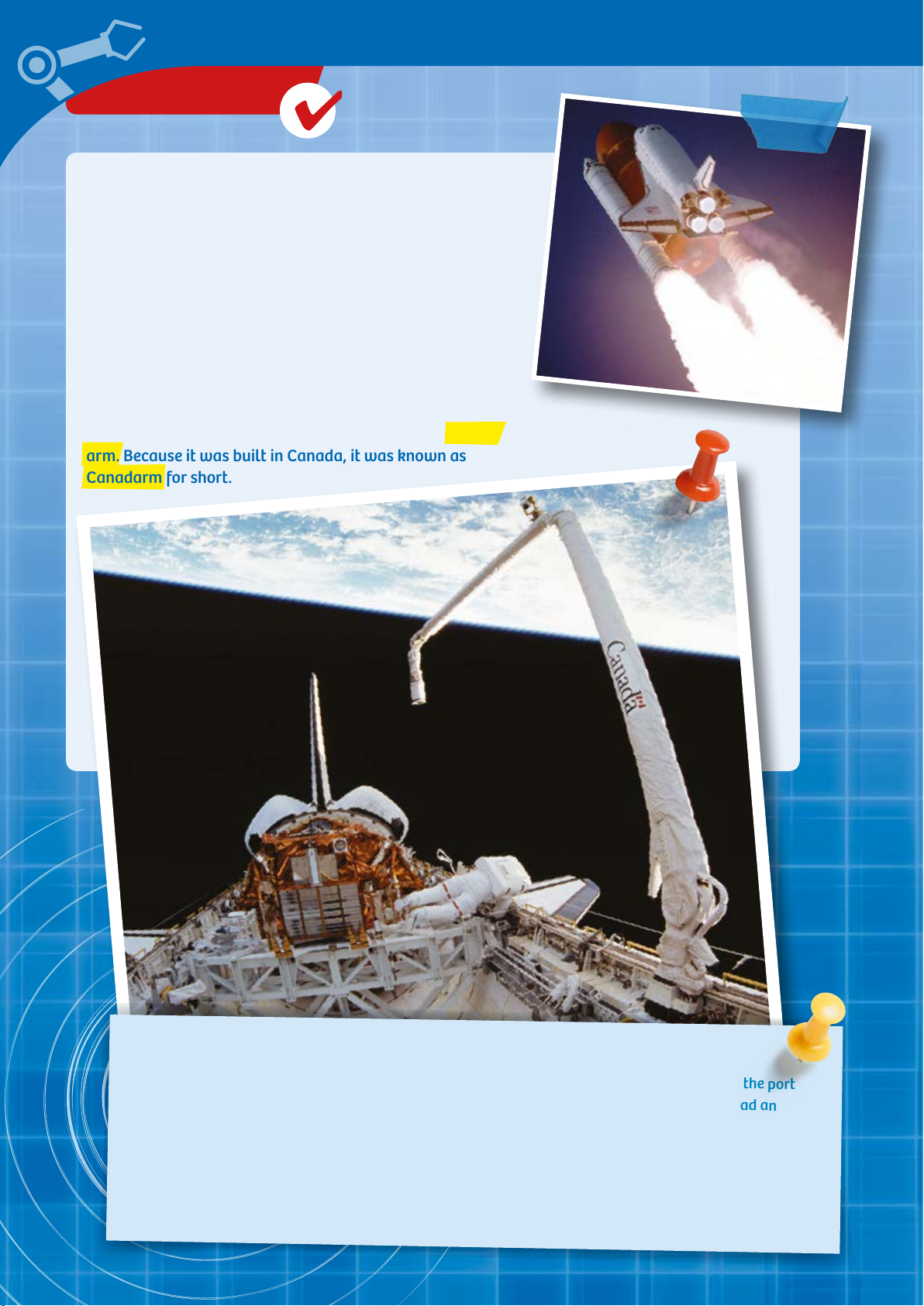
The Space Shule was a reusable spaceplane developed
by NASA. It is sometimes also referred to as an orbiter.
It functioned as both a space taxi and a space transporter.
For example, it carried both astronauts and materials to
the International Space Station (ISS), which orbits the
Earth at a height of around 400 km.
In order to pull “luggage” such as satellites or ISS modules
in and out of its cargo bay, it was equipped with a robotic
arm. Because it was built in Canada, it was known as
Canadarm for short.
A GIANT ARM WITH A REACH OF OVER METERS
The arm was 15.33 meters long and had a diameter of over 38 centimeters. It was aached to the port
side (that is, the left) of the loading bay. The Canadarm was modeled after our own arms. It had an
upper and a lower portion and, of course, a hand. Thanks to its gripping mechanism, it was able to move
cargo and even capture satellites so that astronauts could repair them.
The controls were handled by an astronaut who stayed on the shule’s flight deck. Using images
supplied by several cameras, the astronaut was able to steer the arm with precision. The arm was
unbelievably strong, and could grab and move objects weighing up to 29 tons!
Page 35
Shoot for the Moon
LUNAR ROVER
1 3 7 854 6 9 10 11 13 14
5 x
1 x 3 x 2 x 1 x 4 x 4
28
42
5 x 2 x 8
2 x 2 x 1 x 9 x 3 x
17 1815 16 19 2120 23 24 25 26 27
29 30 31 33 34 35 36 39 4037 41
43 44 45 46 47 49 50 51 52 53 54 55 56
x 21 x 4 x 2 x 2 x
3
4 x 2 x 1
x 2 x 2 x
x 2 x 2 x 2 x 2 x 3 x
2 x
1 x
x 4 x 1 x 3 x
2 x 1 x 4 x
2 x 4 x 2
1 x
1 x 1 x 1 x 1 x
4 5
1
1 x
x 2 x 4 x 1 x
2
2
7
6
30-mm axle
Page 36
LUNAR ROVER
9
8
30-mm axle
10
Hole
B
Hole A
11
Hole
B
Hole C
12
Connect to
both holes B
Stickers
Page 37
Shoot for the Moon
13
15
14
16
x
Rubbery
plastic
Align
18 19
17
20
x
Hard
plastic
Page 38
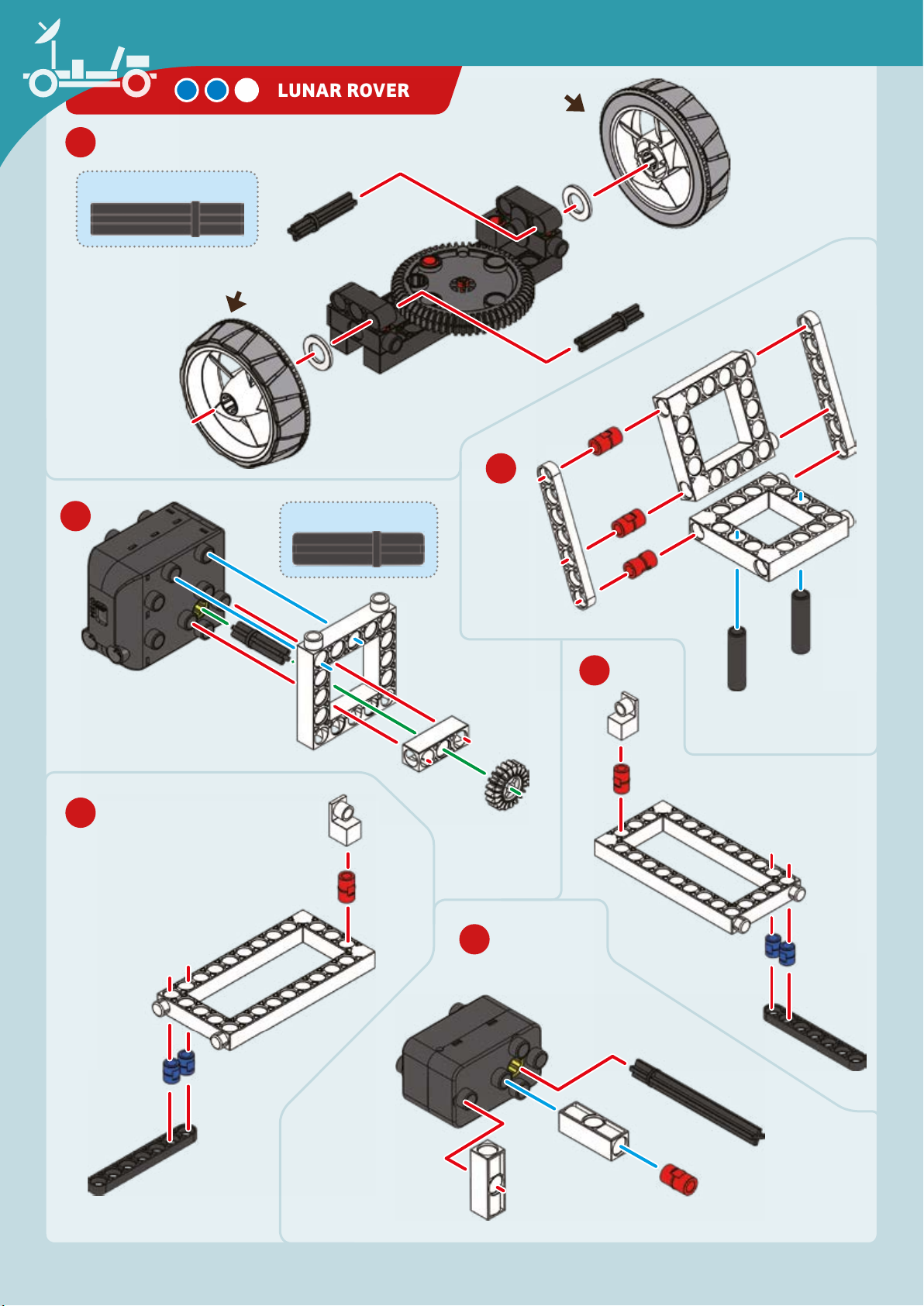
21
35-mm axles
Rubbery
plastic
LUNAR ROVER
Rubbery
plastic
22
23
24
30-mm axle
25
26
Page 39
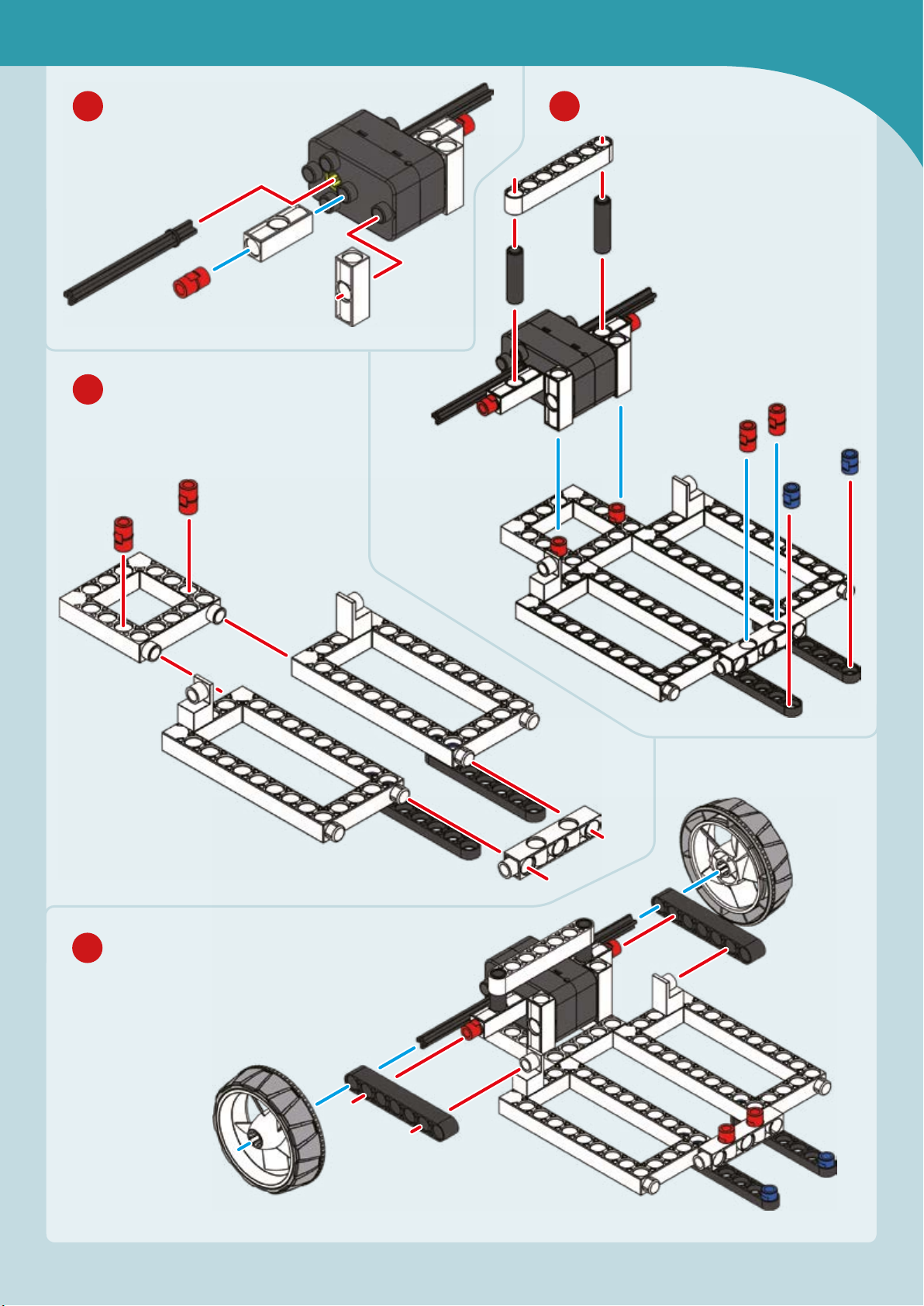
Shoot for the Moon
27
28
29
30
Page 40
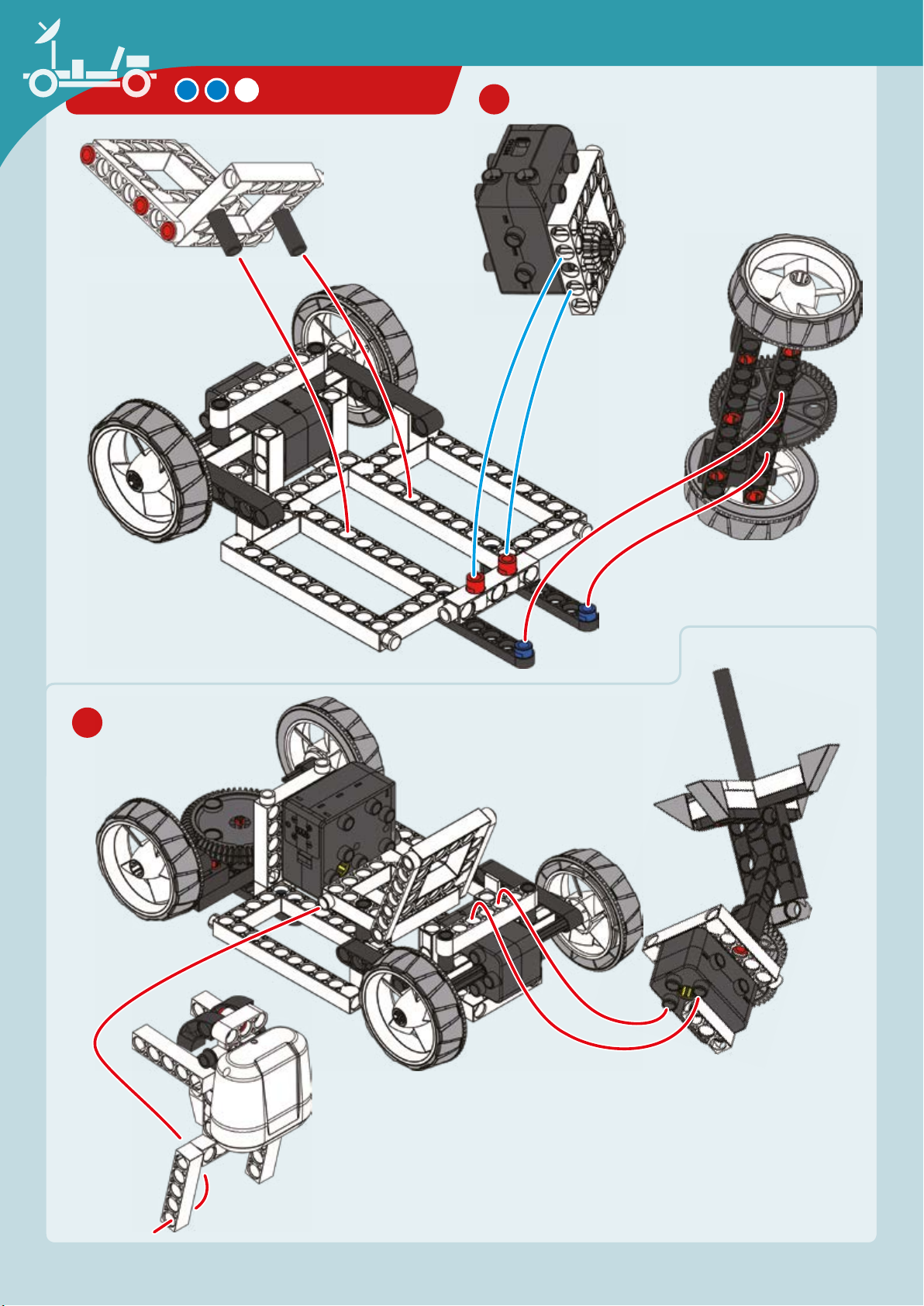
LUNAR ROVER
31
32
Page 41
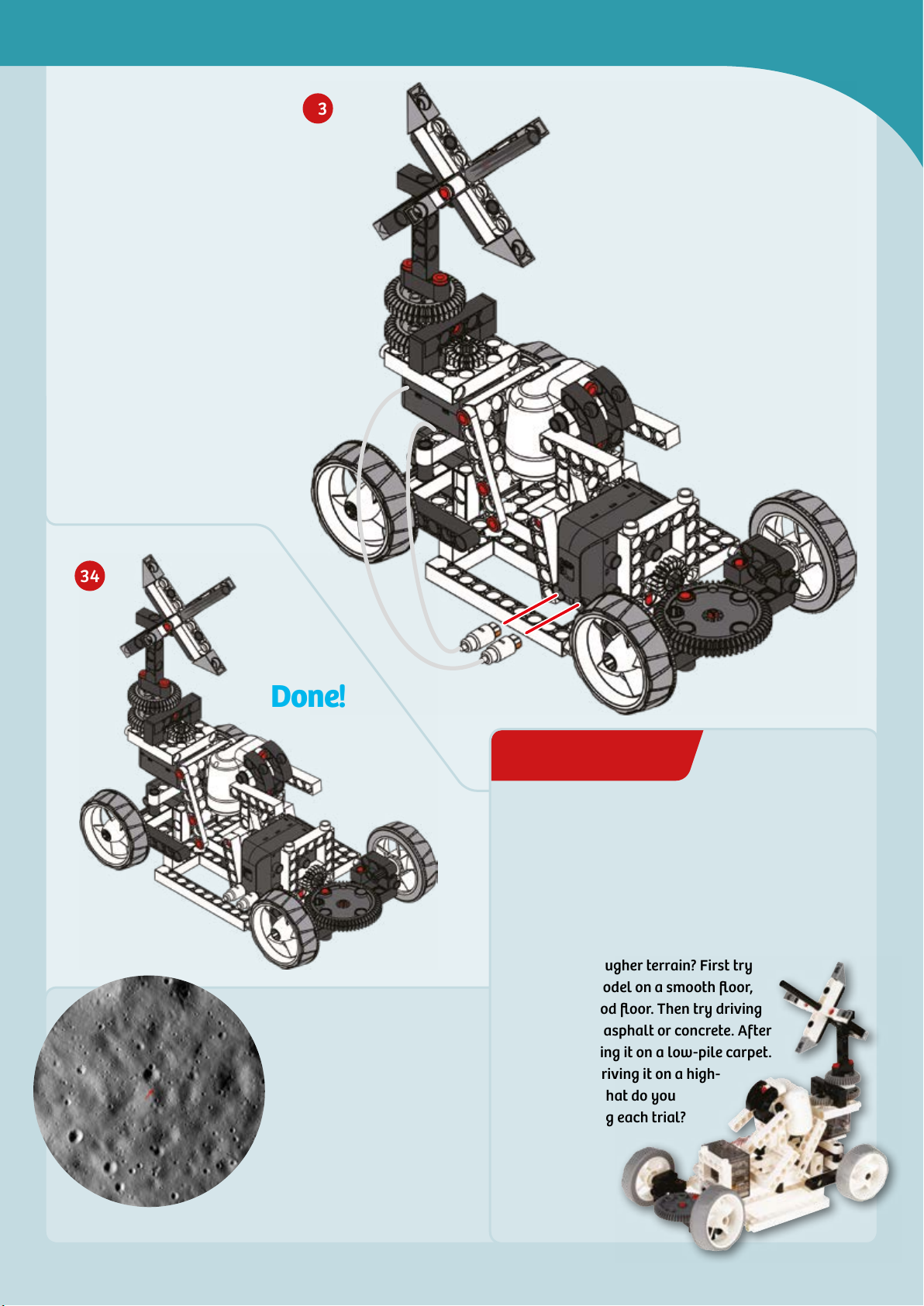
33
EXPERIMENT 4
Shoot for the Moon
34
Done!
The highest point on the moon is
10,786 meters above the mean
radius (the “baseline” surface
level). By comparison, Mount
Everest is 8,848 meters above
sea level on Earth. But the
difference is that the slope up
to the top of Everest is much
steeper than the slope up to the
top of the moon’s highest point.
That’s one small step ...
HERE’S HOW
Many areas on the moon’s surface are very flat, so
your lunar rover model was designed to travel on
smooth, flat surfaces. But can it drive over
bumpier or rougher terrain? First try
driving the model on a smooth floor,
such as a wood floor. Then try driving
it on rougher asphalt or concrete. After
that, try driving it on a low-pile carpet.
Finally, try driving it on a high-
pile carpet. What do you
observe during each trial?
Page 42
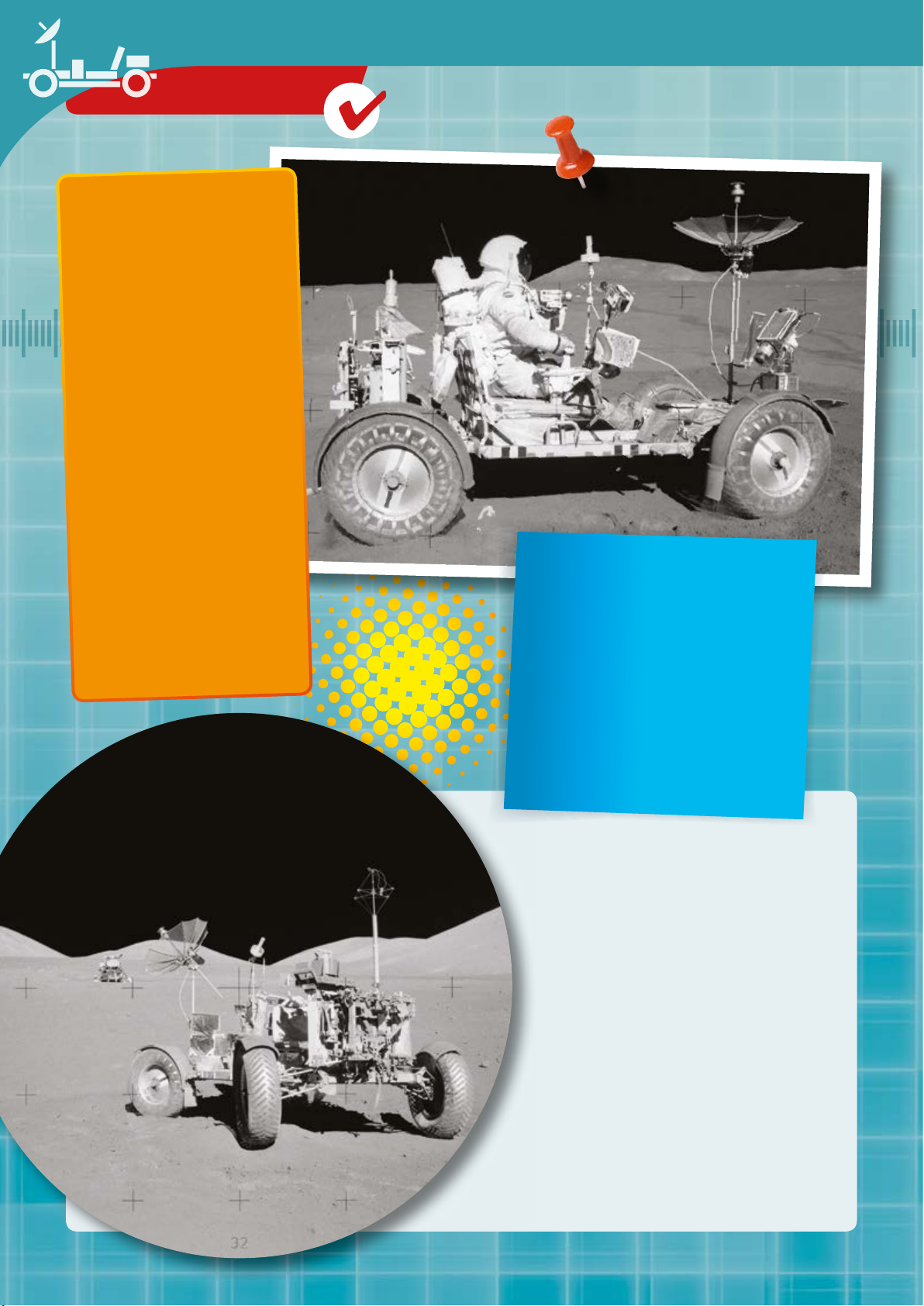
CHECK IT OUT
Trips to
the Moon
The Lunar Roving
Vehicle (LRV) was a car
that was built especially
for the NASA Apollo
Moon missions. One of
these four-wheeled
electric vehicles was
assigned to each of the
last three Apollo
missions 15, 16 and 17.
The job of this moon car
was to help the
astronauts cover greater
distances on the moon
and to carry rock
samples.
LIGHT, COMPACT, AND
KIND OF SLOW
The LRV was 3.1 meters long and
weighed barely 210 kg. It had a
foldable chassis, giving it a pack size of
0.90 m × 1.50 m × 1.70 m for
transportation on the lunar module.
That’s about one third the size of a
Smart Fortwo — which is about the
tiniest car you can get.
BREAKDOWN SERVICE
ON THE MOON
For power, it carried two nonrechargeable 36-volt silver oxide-zinc
baeries, which gave it a top speed of 13
km/h and a maximum range of 92 km.
On the second day of the Apollo 17
mission, a fender was torn off the LRV’s
right rear wheel and had to be repaired.
The only materials available were
whatever was on board the lunar module
— tape, maps, clamps, and the like. But
they were enough to fix the problem. To
this day, that was the only car repair job
performed off the planet Earth!
Page 43
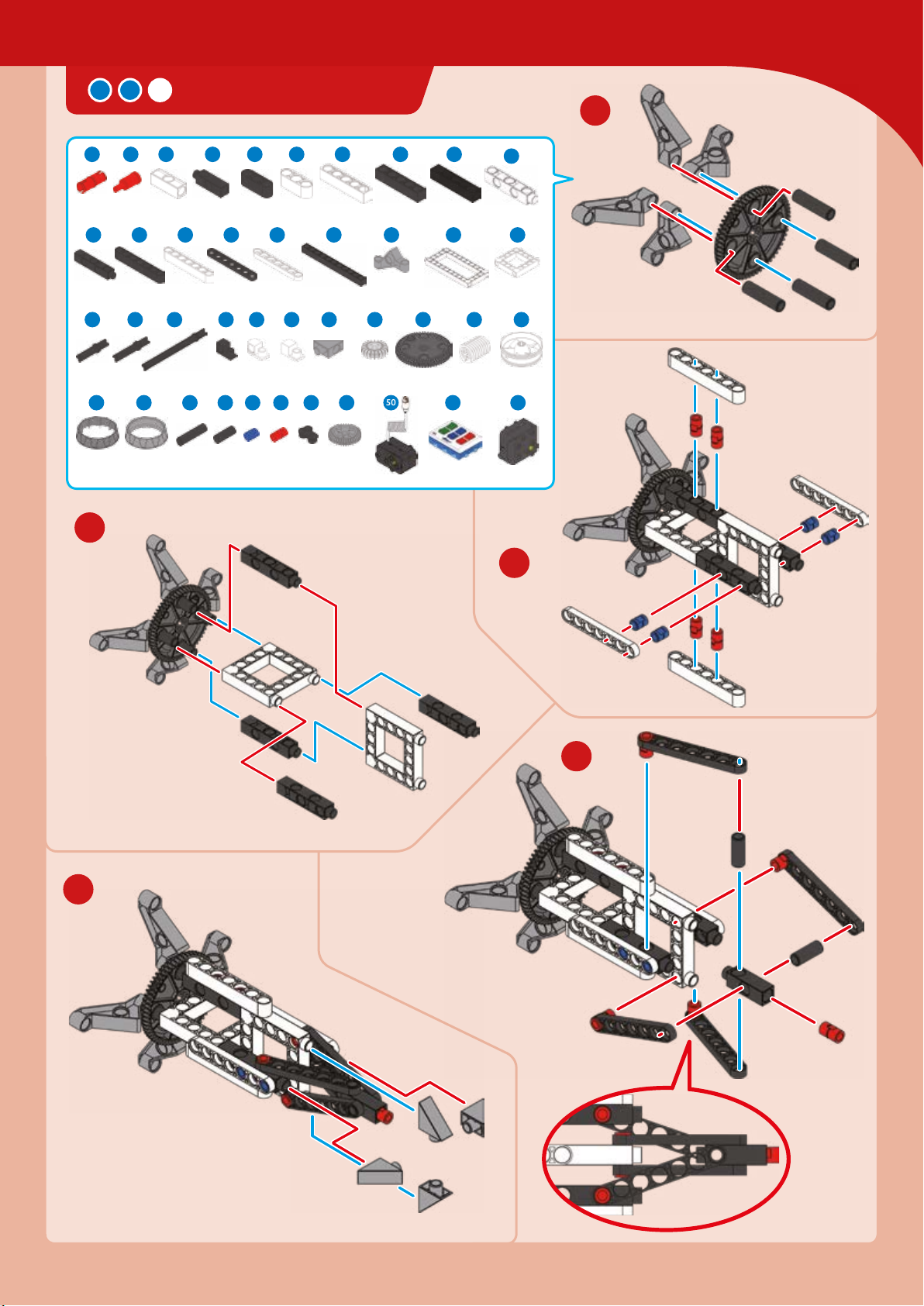
ROCKET LAUNCH CAR
Deep Space
1
1 7 84 6 9 11 12 13
2 x 2 x 3 x
x
7
17 1816 19 2120 22 23 26
4 x 4 x 6 x 4 x 3 x 2
28
29 30 31 32 34 35 36 39
7 x
40
41 42
6 x 2 x 6 x 30 x 6 x 3 x
2
x 4 x
2 x 2 x 2
x 2 x 2 x
43 44 45 46 49 50 51 52
x 2 x 3 x
x 4 x 2 x
37 38
4 x 4 x 2 x 1 x 2
2 x
2
1 x
14
1 x
4 x
6 x 1 x 1 x
1 x
3
4
5
Page 44
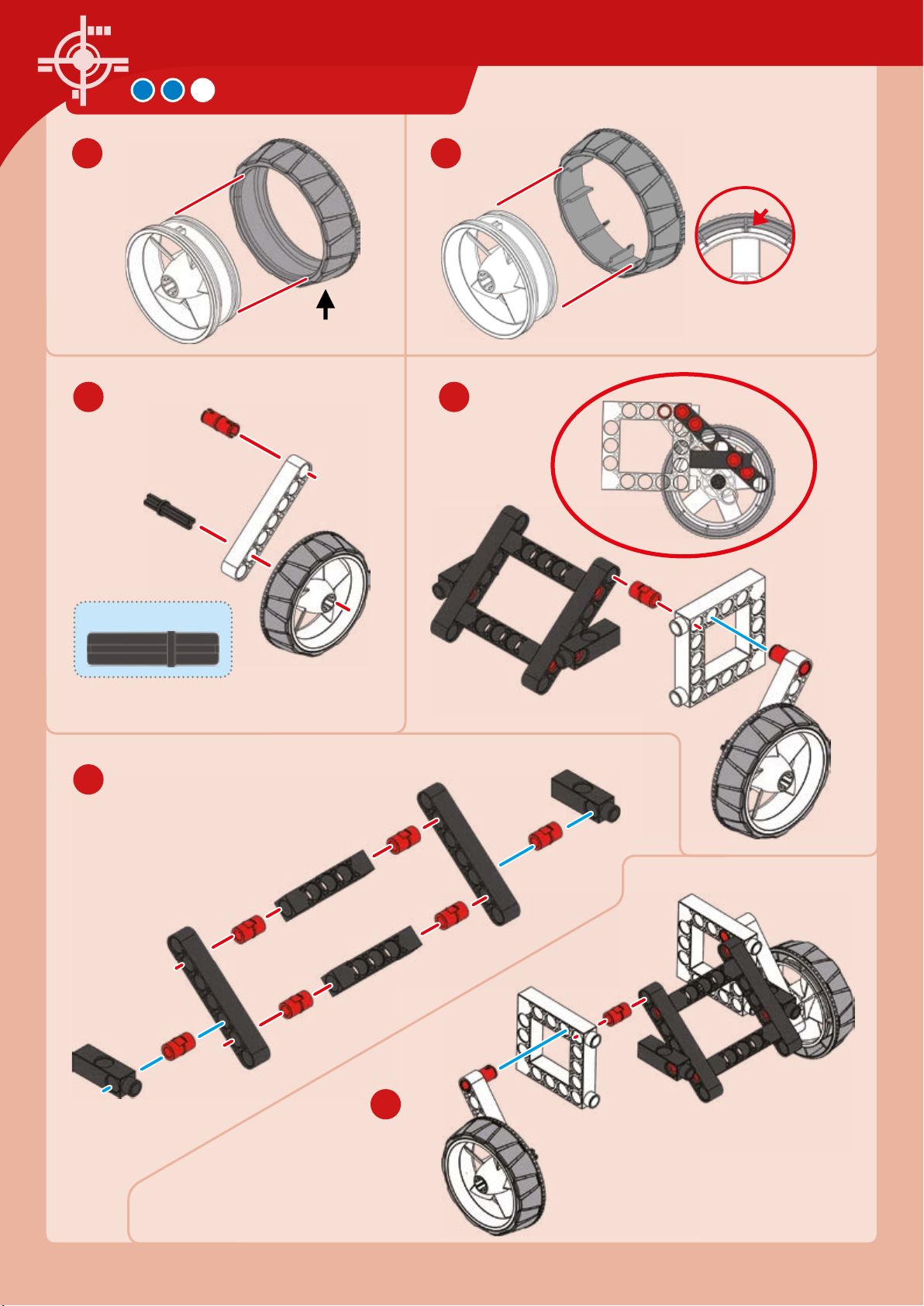
ROCKET LAUNCH CAR
Hard
plastic
6 7
8 9
x
Rubbery plastic
x
x
Align
30-mm axle
10
11
Page 45
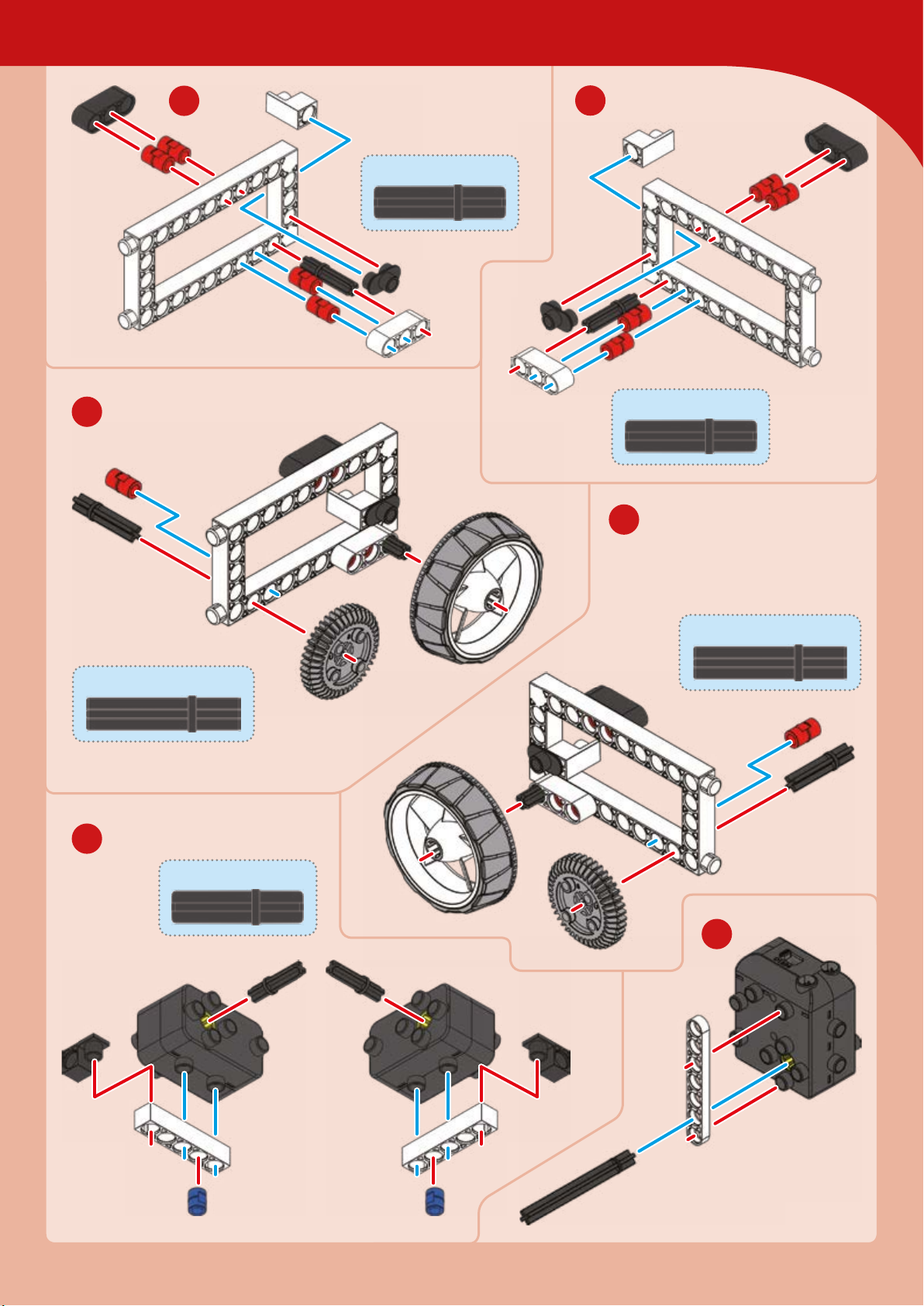
Deep Space
14
12
13
30-mm axle
30-mm axle
15
35-mm axle
16
35-mm axle
30-mm axles
17
Page 46
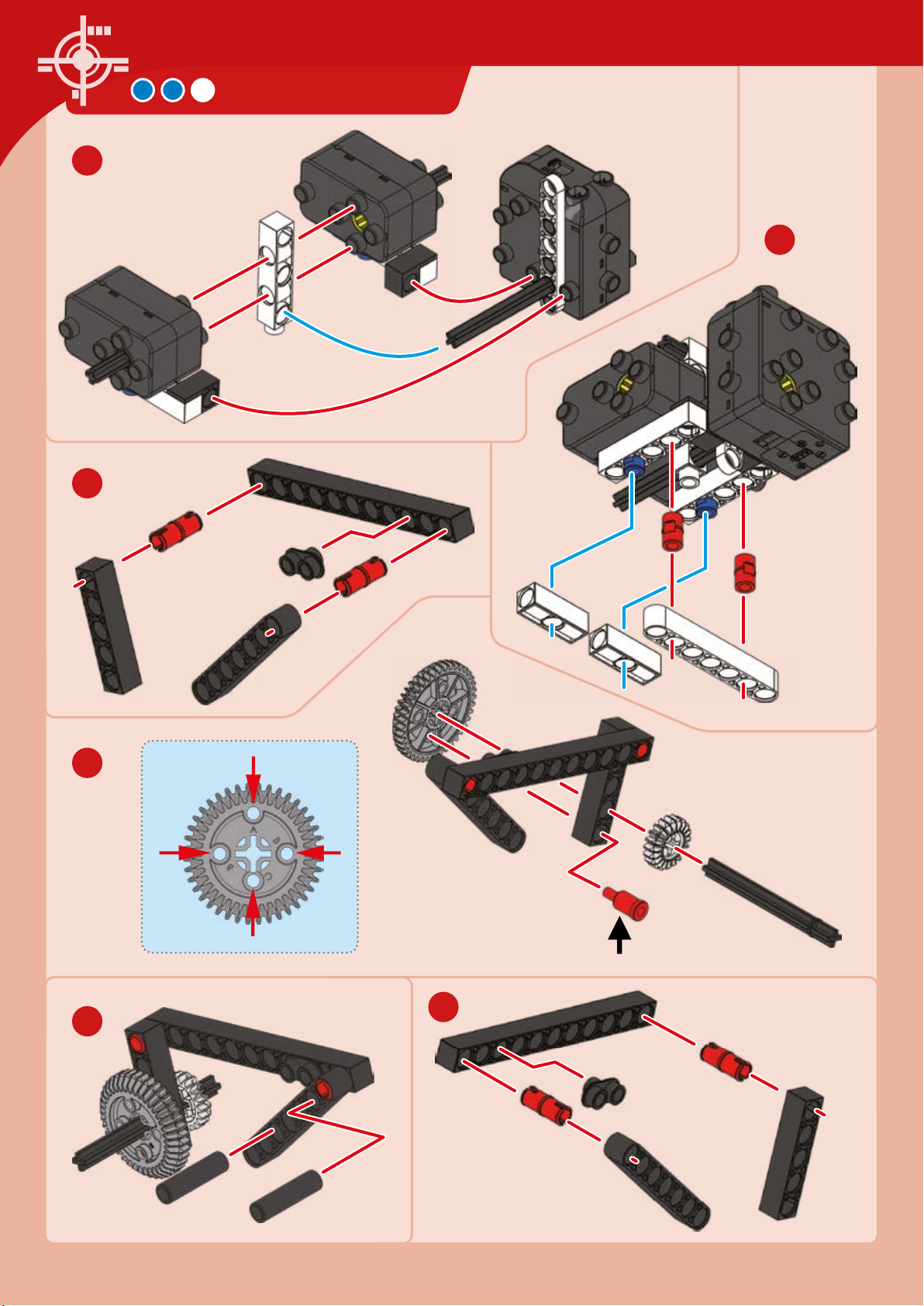
18
20
ROCKET LAUNCH CAR
19
21
22
Hole
B
Hole A
Hole C
Hole
B
Connect to
hole B
23
Page 47
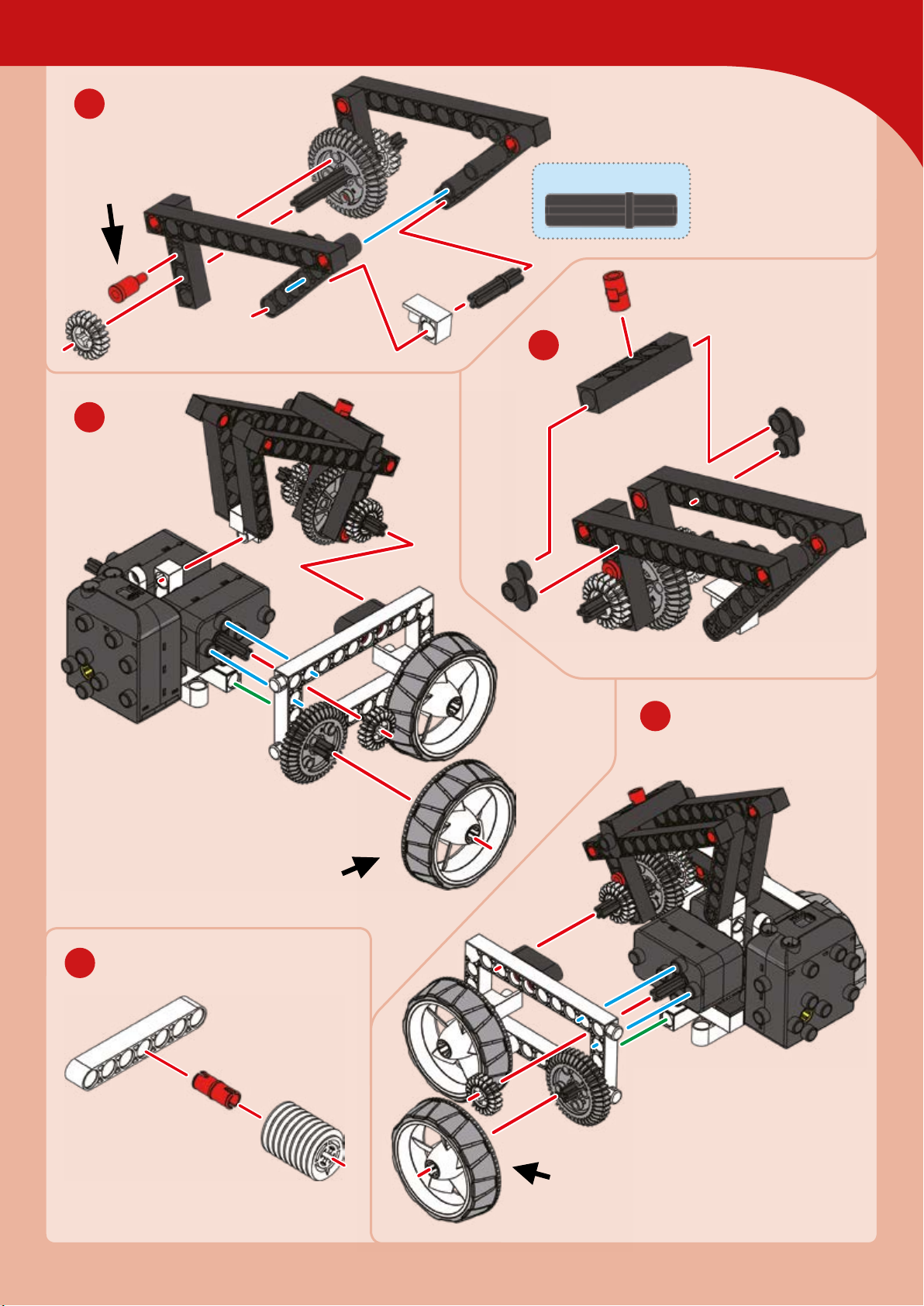
24
Deep Space
Connect to
hole B
26
30-mm axle
25
28
27
Rubbery
plastic
Rubbery
plastic
Page 48
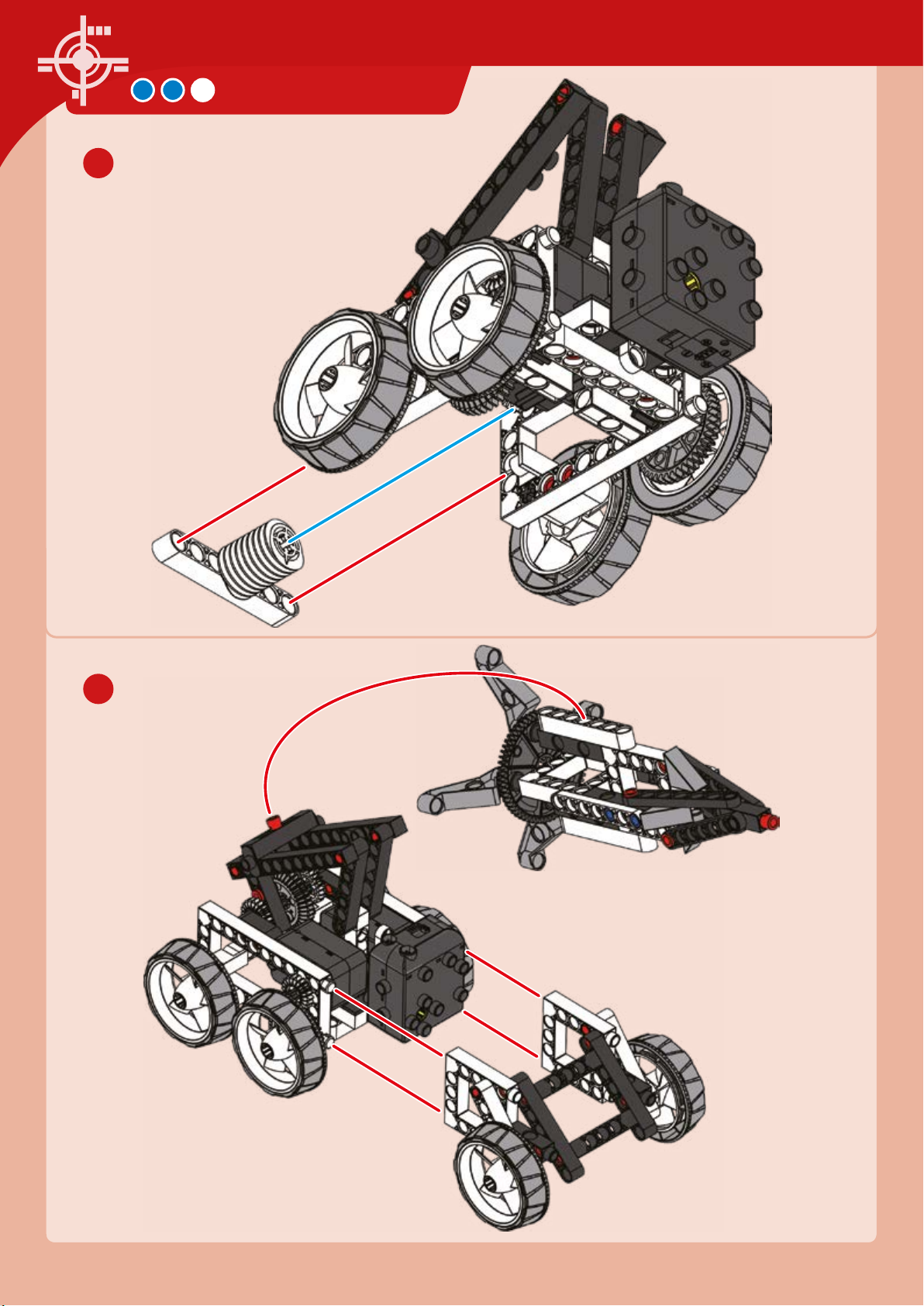
29
ROCKET LAUNCH CAR
30
Page 49
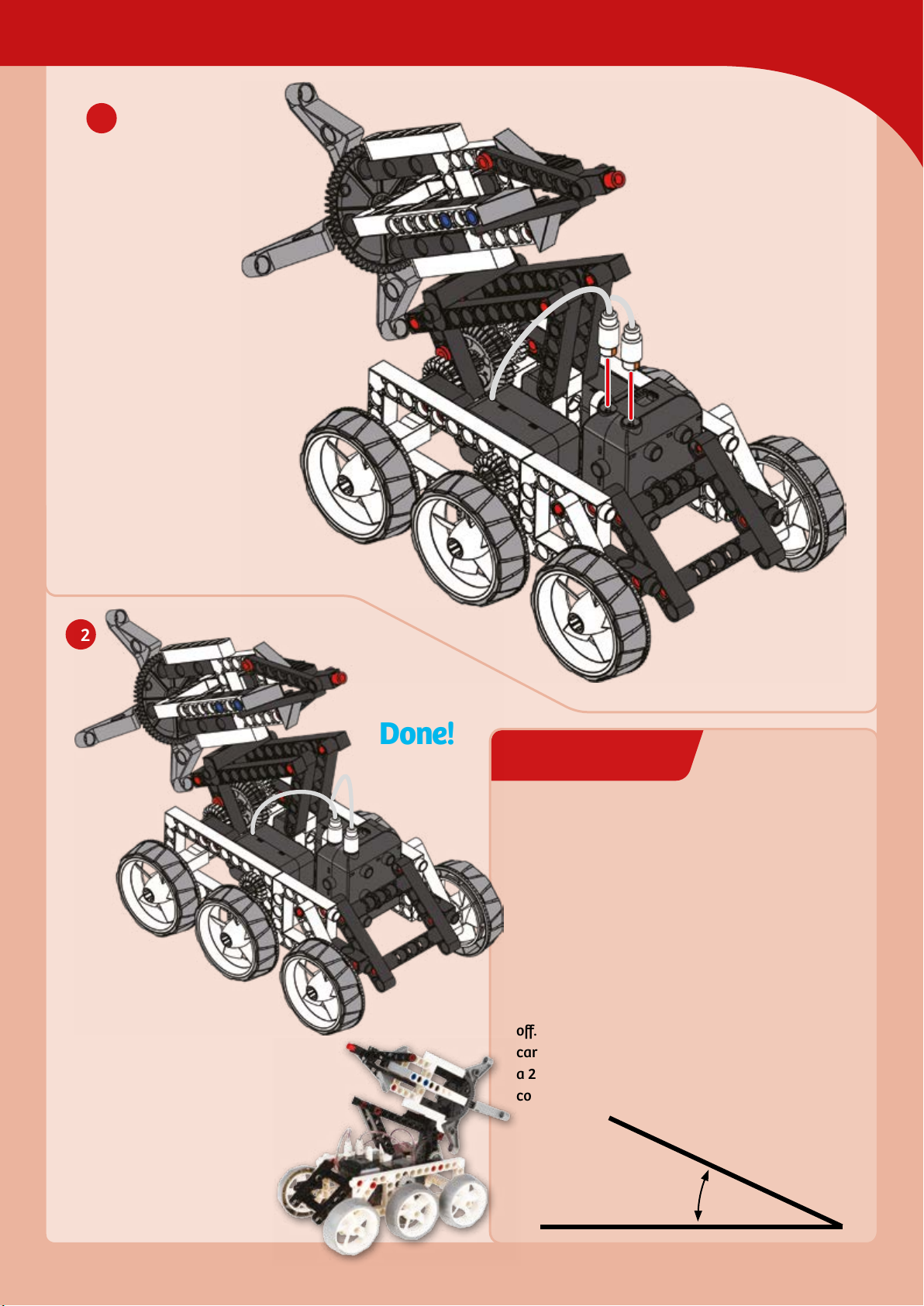
31
EXPERIMENT 5
Deep Space
32
Done!
Aiming high
HERE’S HOW
As the operator of this rocket launch car, it’s your
job to get this rocket, which is carrying a scientific
probe, into space. Mission control has given you
specific instructions to drive the rocket launch
vehicle two meters forward and then position the
rocket at a 25-degree angle to prepare it for blast
off. Can you measure out two meters and drive the
car into position? Can you then angle the rocket at
a 25-degree angle? Measure it with a protractor or
compare it to the 25-degree angle printed here.
25° angle
Page 50
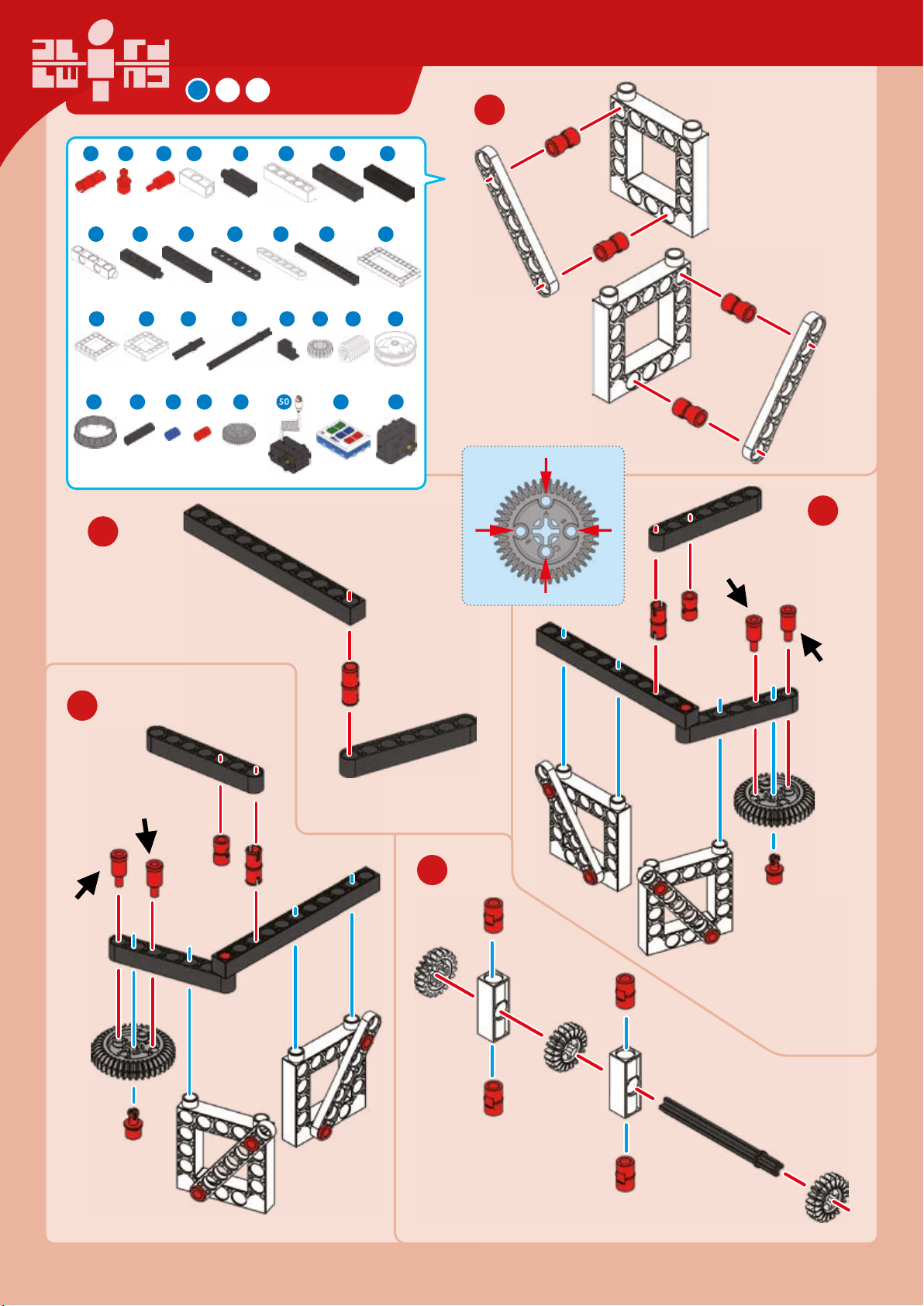
PROBE
1 3 74 6 11 12 13
1
6 x
14 1716 19 2120 23
2 x
25 26 28
1 x 4 x
40
1 x
x 2 x 3 x 4 x
4
4 x 4 x 3 x 4 x 3 x 1 x
44 45 49 50 51 52
42
2 x 2 x 32 x 2 x
5
x 2 x 2 x
30 33 36 39
1 x
38
5 x 2 x 2 x 1 x
1 x
2
x
1 x
x
1 x 1 x
Hole A
Hole
B
Hole
B
Connect to
hole A
Hole C
3
4
Connect
to
hole C
Connect
to hole C
Connect to
hole A
5
Page 51
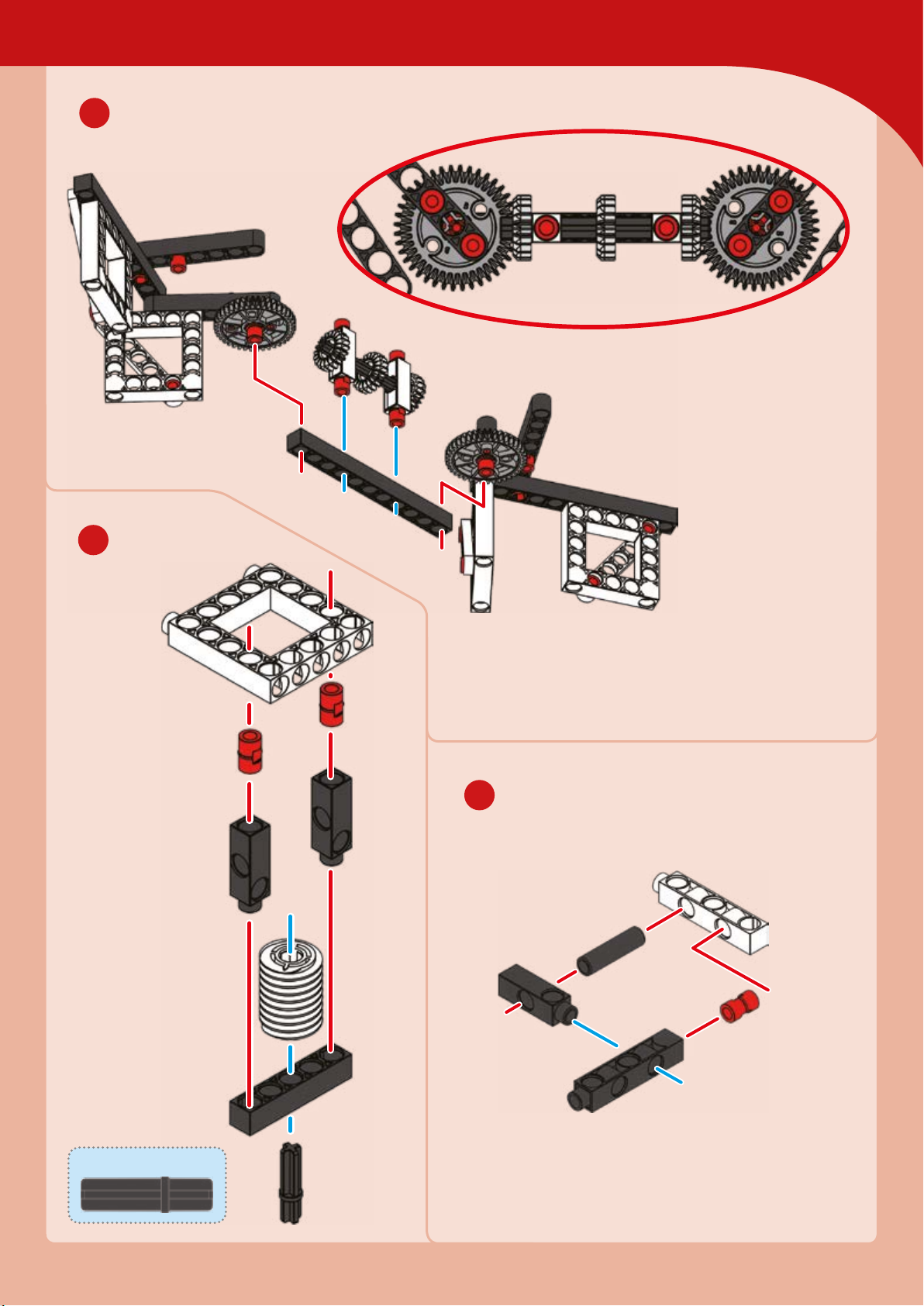
Deep Space
6
7
8
x
30-mm axle
Page 52
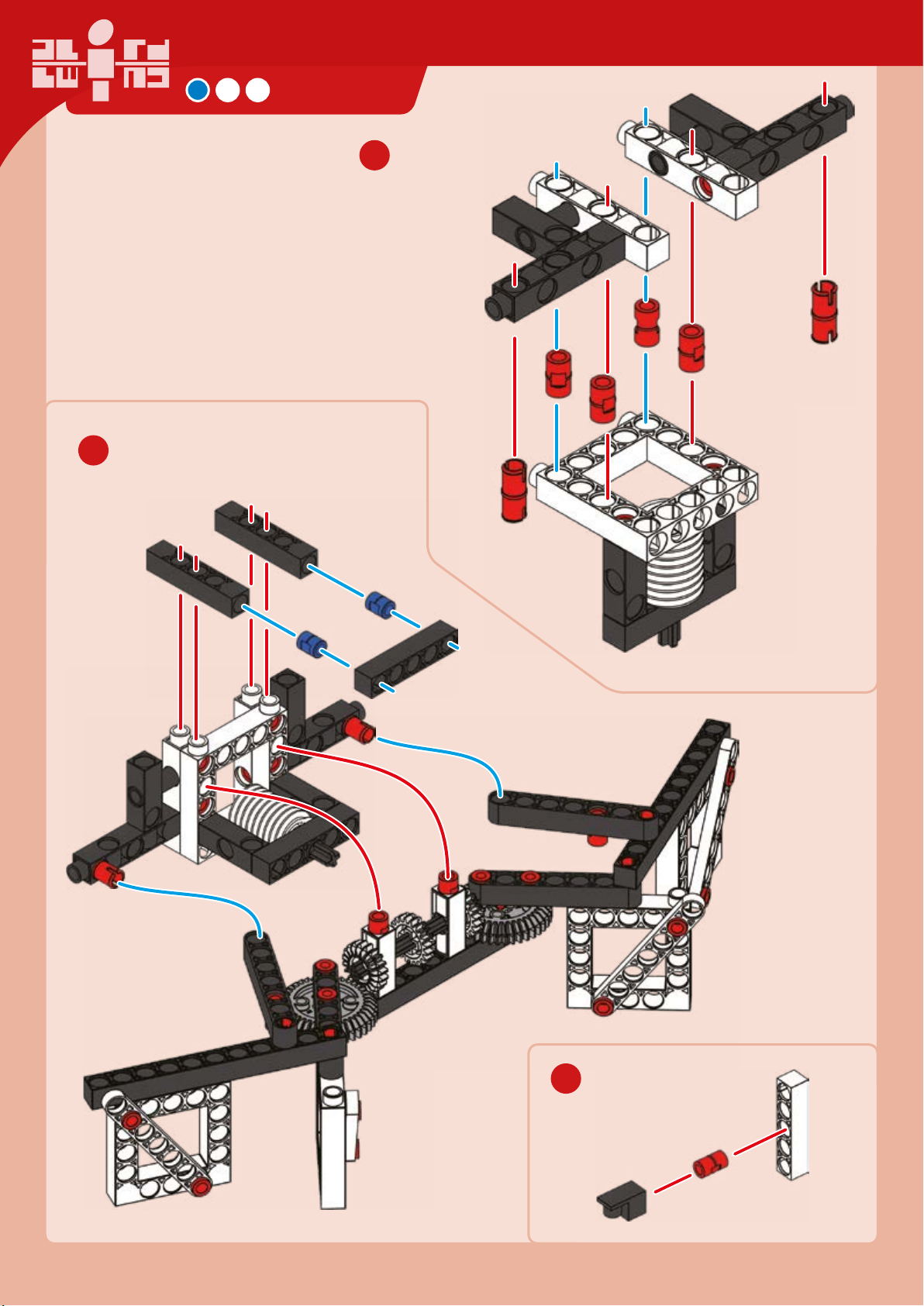
10
PROBE
9
11
x
Page 53
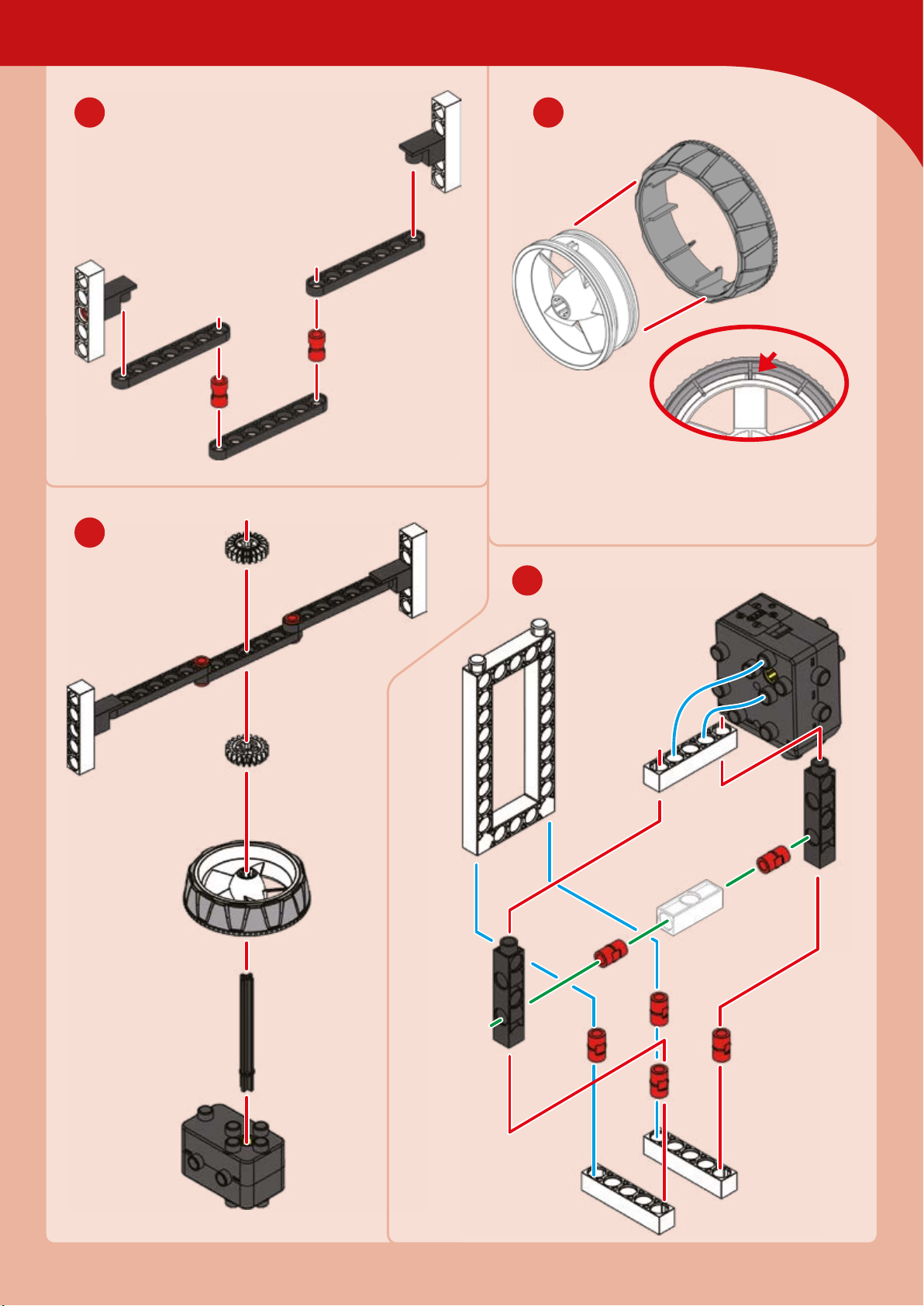
Deep Space
12 13
14
Hard
plastic
Align
15
Page 54

EXPERIMENT 6
17
PROBE
16
Searching far and wide
HERE’S HOW
Pretend you are a NASA scientist. Your space
probe needs to be deployed on a mission to travel
far away from Earth and photograph planets as it
passes by them. Once it is in space, it has “solar
panel arms” that need to be deployed and a
“communications antenna” that needs to be set
spinning. Can you do it?
“Solar panel arms”
18
“Communications
antenna”
Done!
Page 55
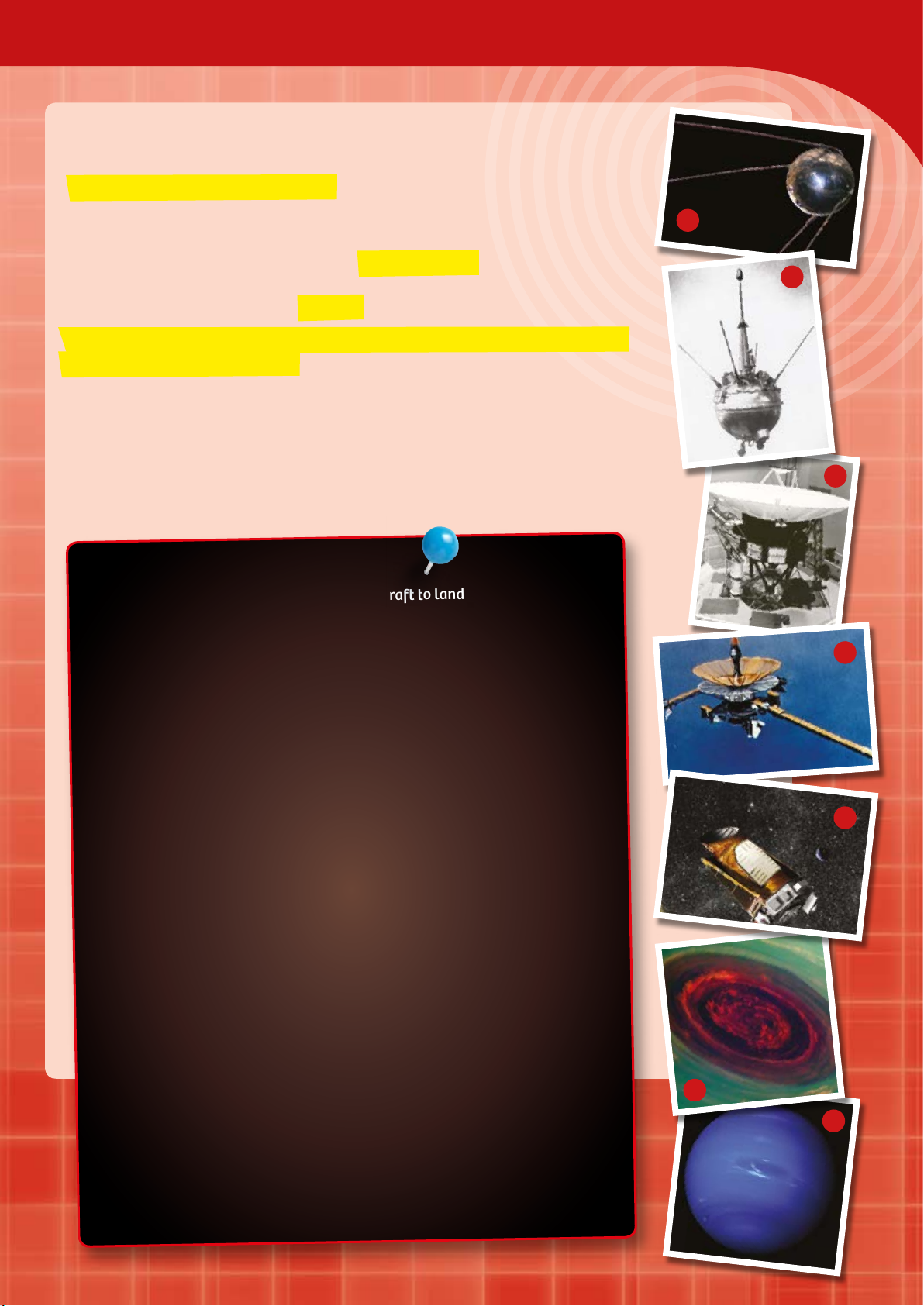
Traveling Through Endless Space
A satellite is an artificial spacecraft. This kind of aendant — which is the
literal meaning of the Latin word — orbits around a heavenly body such as a
planet or a moon.
Deep Space
1
Satellites that orbit Earth are known as Earth satellites. Sputnik 1 (1) was the
first artificial Earth satellite. Artificial satellites that orbit and study bodies
other than the Earth are called orbiters.
A space probe, on the other hand, is an unmanned spacecraft sent into space
for the purpose of exploration.
Most fly toward a distant goal in space such as the planet Mars, asteroids,
comets, or the moons of Jupiter. Some explore the space between planets.
Supplying the satellite with electrical power (energy) is usually accomplished
with solar cells and back-up accumulators or baeries, if just short periods of
use are planned. Satellites that are going to move farther away from the Sun
can’t rely on solar energy. In that case, an atomic baery supplies the power.
LUNA MARKS THE START
Luna () was the very first man-made spacecraft to land on another body. It
struck the moon’s surface in a targeted collision on September 13, 1959. Luna
2 was a mission of the Soviet Union, the name for Russia at the time.
Voyager () was a NASA space probe designed to explore the outer
planetary system. It was launched on August 20, 1977 from Cape Canaveral.
2
3
4
OVER BILLION KILOMETERS FROM EARTH
The Voyager 2 mission counts as one of the greatest successes of NASA, and of
space travel in general. It continues to transmit data regularly to Earth. In
addition, it is the second-farthest man-made object from Earth (after its sister
probe, Voyager , which actually launched after Voyager 2 but moved faster).
The distance of Voyager 2 from the Sun was 15.74 billion km on July 1, 2014.
COULD WE LIVE SOMEWHERE ELSE IN SPACE?
The space probe Galileo () was launched by NASA on October 18, 1989 for
the purpose of exploring Jupiter and its moons. It got its name from the Italian
inventor and scientist Galileo Galilei. NASA’s Kepler () space observatory
was named after a great researcher as well: the German astronomer Johannes
Kepler. He was the first to recognize the laws of planetary orbits. The Kepler
spacecraft was launched in 2009. Just like the Galileo probe, one of Kepler’s
missions is to search for extrasolar planets (exoplanets) — planets like ours,
in other words, that might be capable of sustaining life in other solar systems.
On February 2, 2011, NASA announced that 1235 planetary candidates had
been identified since the start of the mission. Many others have been added
since then.
Space probes have given us some very cool images of planets we could never
get from here on Earth! A swirling storm on Saturn () and Neptune ().
5
6
7
Page 56
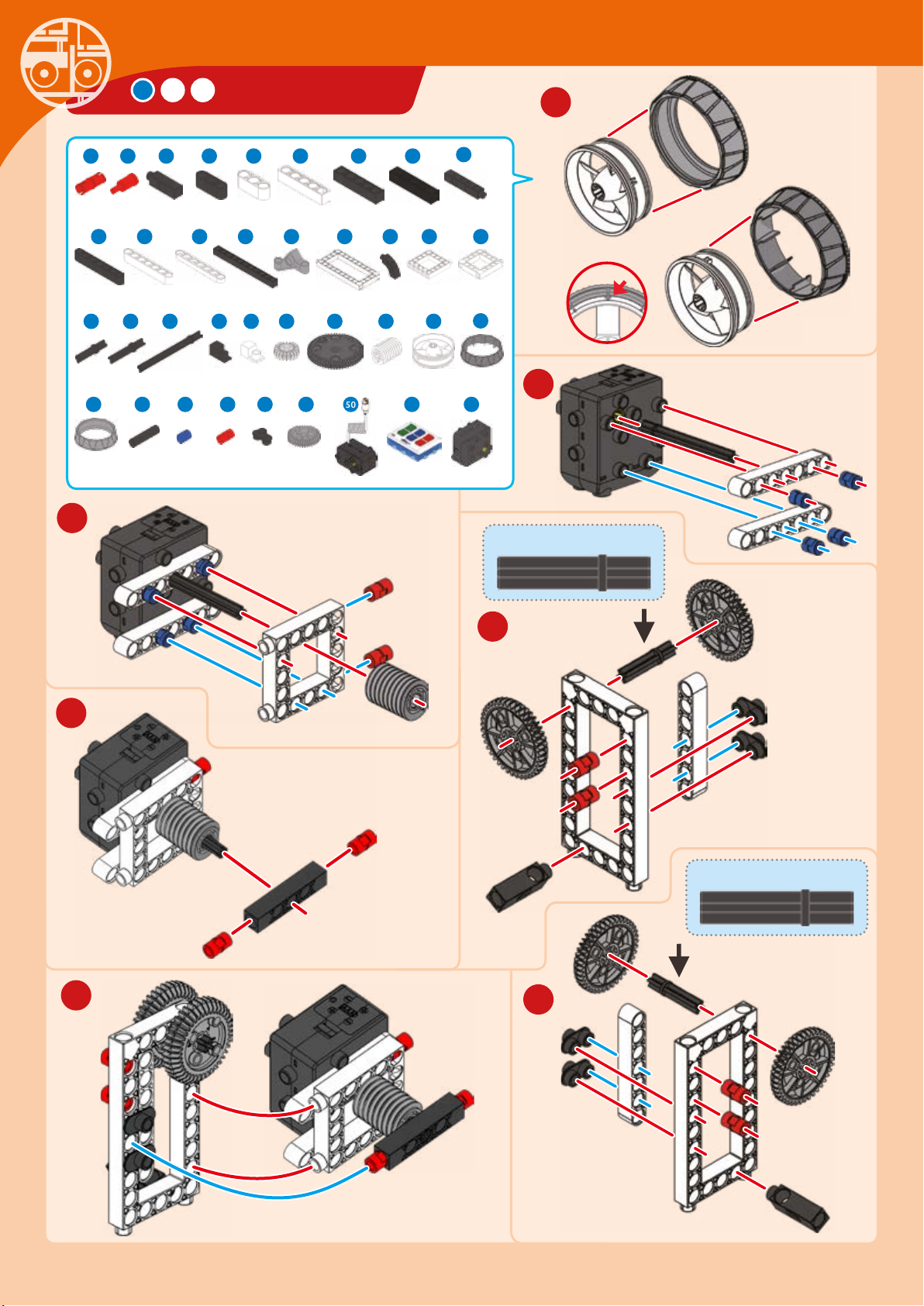
SPACE DROID
1
x
Rubbery
plastic
1 7 84 9 11 12 13
4
x 2 x
6 x
17 18
2 x 4 x 6 x 4 x 4 x 2 x
28
29 30 33 34 36 39
41 42
2 x
1 x 6 x 27 x 9 x 4 x
2
x 2 x 2 x 1 x 3 x
2120 22 23 24 25 26
37 38
10 x 4 x 2 x 2 x 4 x 6 x
44 45 46 49 50 51 52
2 x
3
16
x
2
2 x 1 x 4 x
6 x 1 x 1 x
1 x
1 x
40
2 x
Hard
plastic
Align
x
2
35-mm axle
4
5
35-mm axle
6
7
Page 57
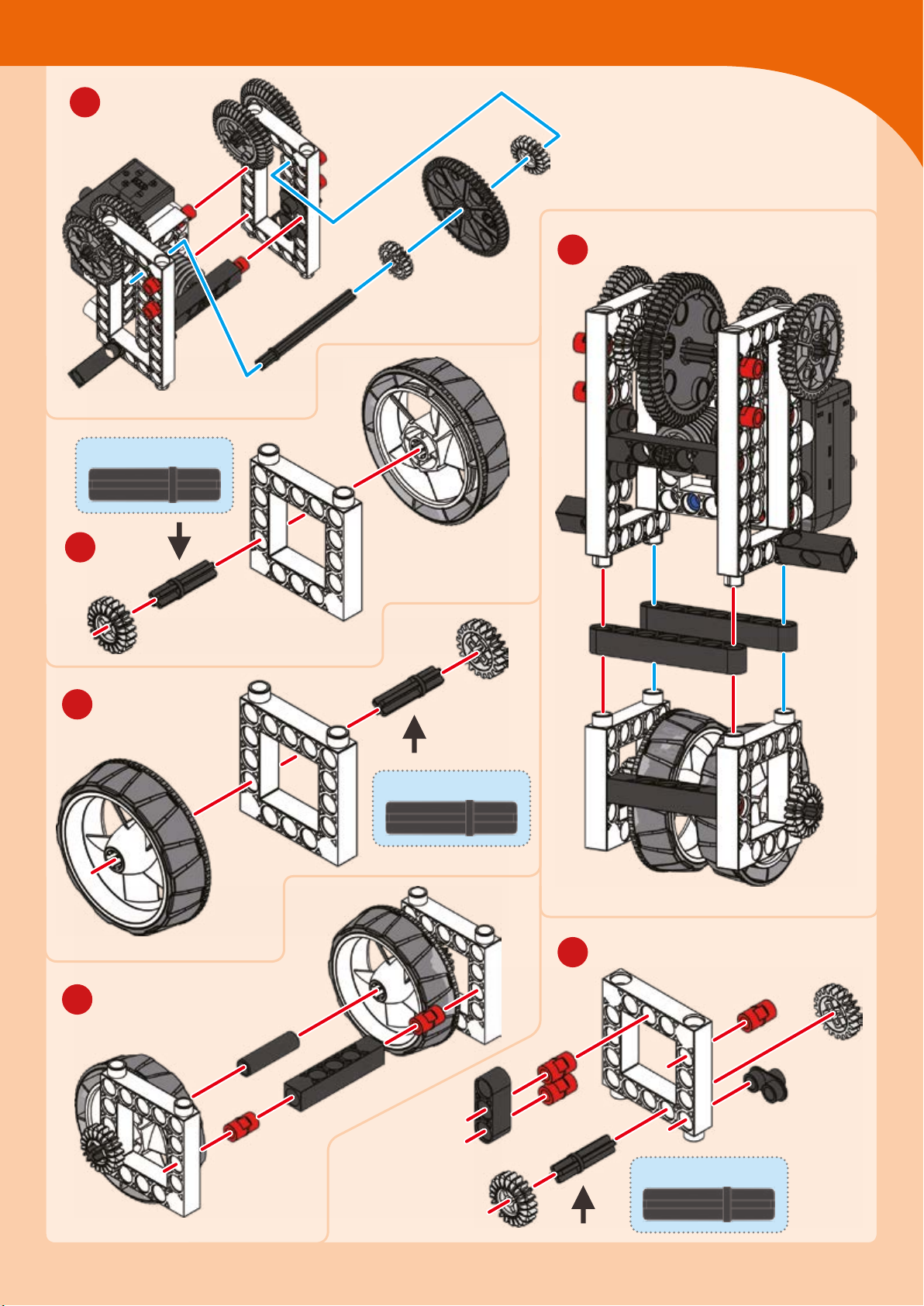
8
30-mm axle
Robots in Space
12
10
9
Hard
plastic
Hard
plastic
30-mm axle
13
11
30-mm axle
Page 58
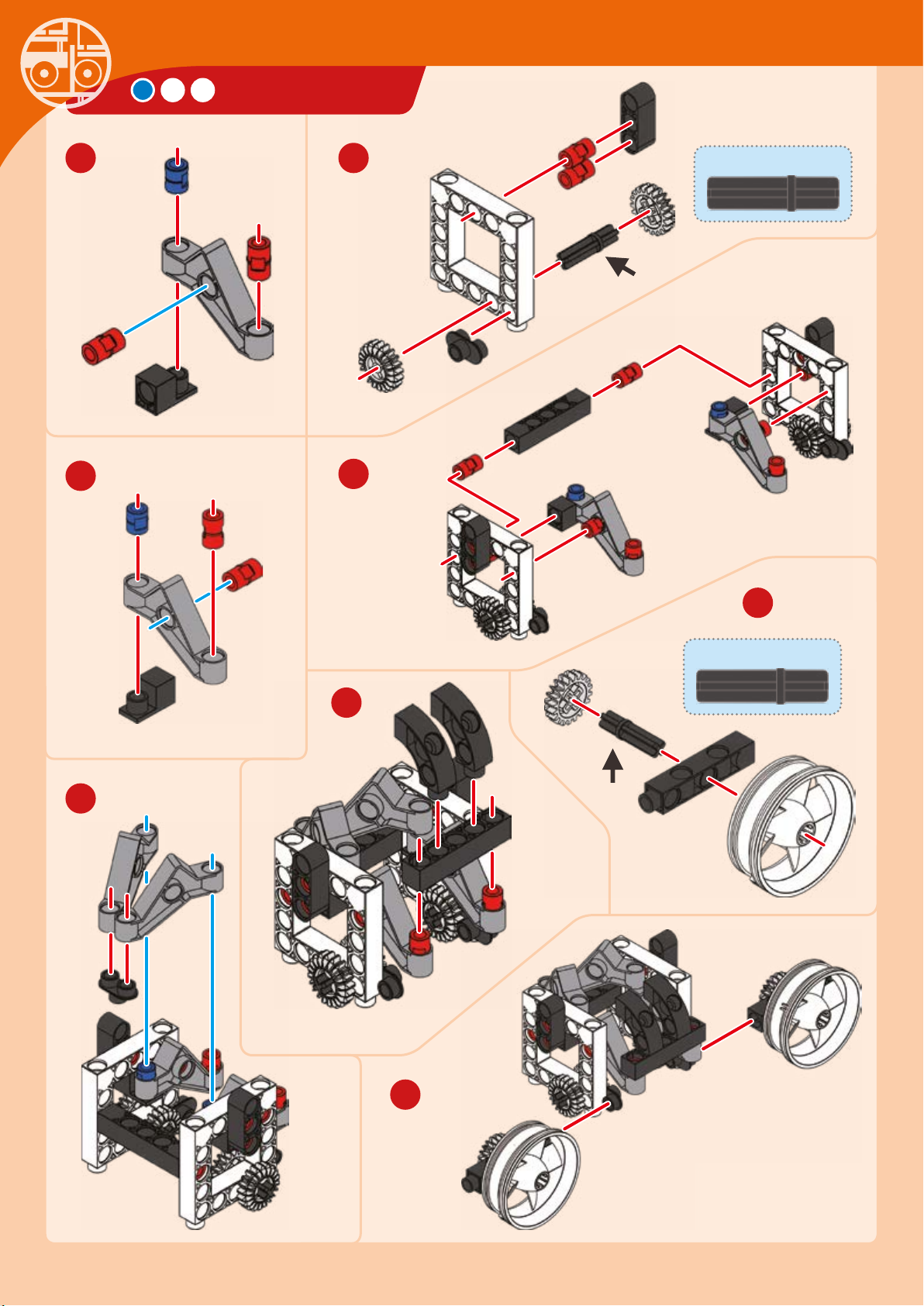
SPACE DROID
14 15
16
17
30-mm axle
20
18
30-mm axle
x
19
21
Page 59
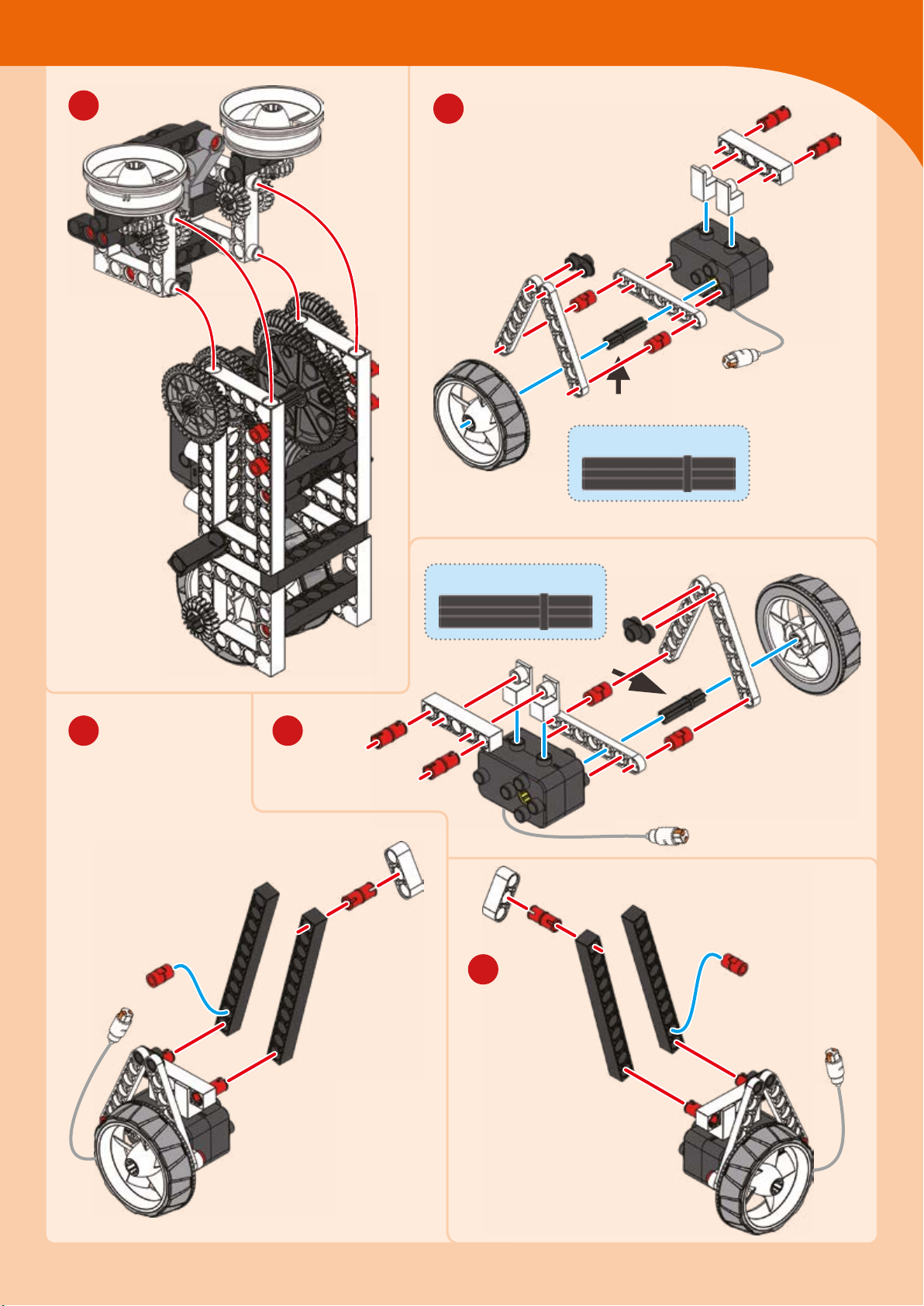
Robots in Space
22
23
35-mm axle
Rubbery
plastic
35-mm axle
2524
26
Rubbery
plastic
Page 60
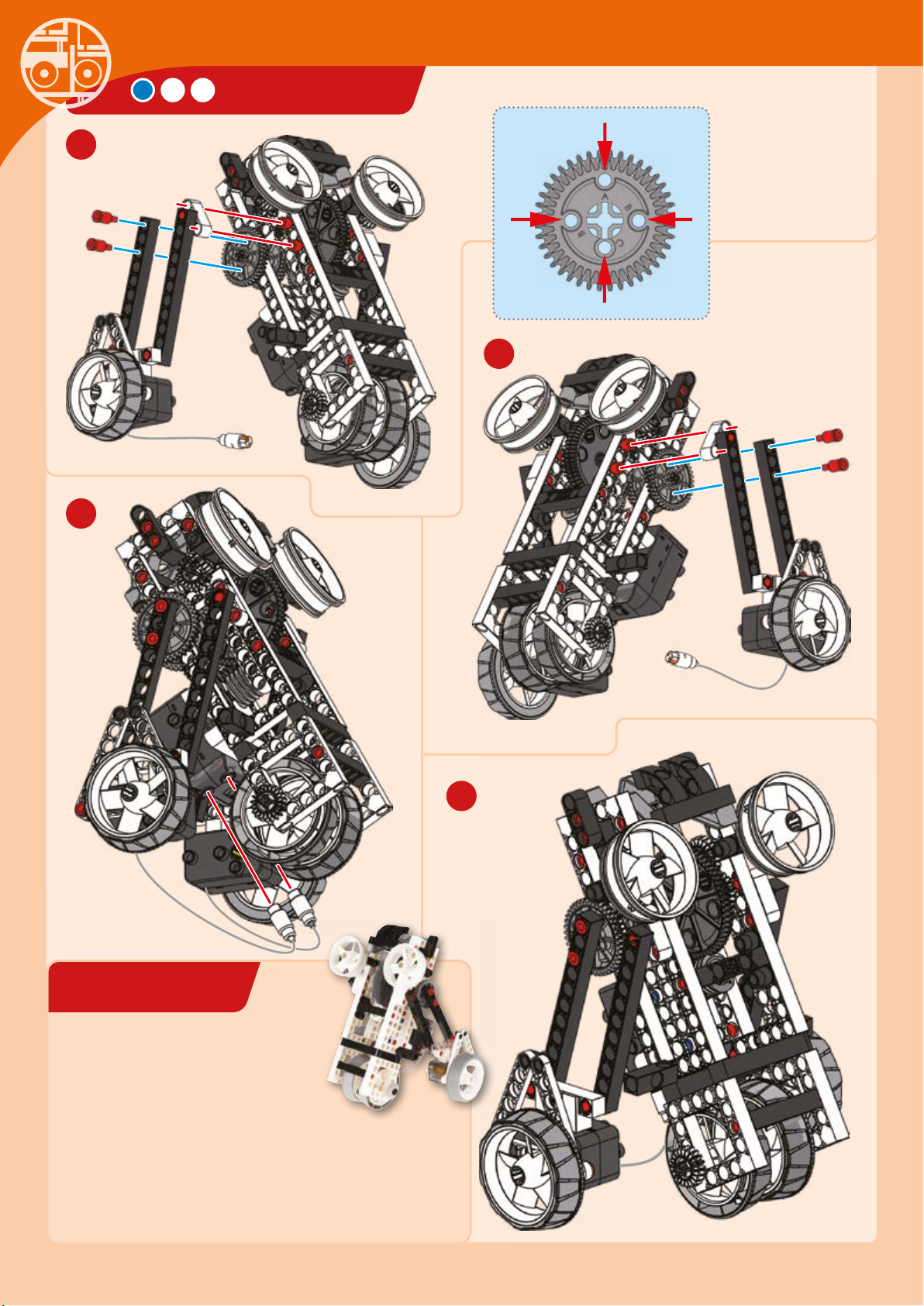
SPACE DROID
EXPERIMENT 7
27
Connect to holes B
29
Hole A
Hole
B
Hole
B
Hole C
28
Connect to
holes B
At your service
HERE’S HOW
Your personal assistant droid is ready to serve you. Can
you control it to move forward and backward in a straight
line? Can you control it to turn left and right by only
powering one motor at a time? Can you make it stand
upright as if to greet a newly discovered alien friend?
30
Done!
Page 61
Robots in Space
CHECK IT OUT
The Famous Robots of Hollywood
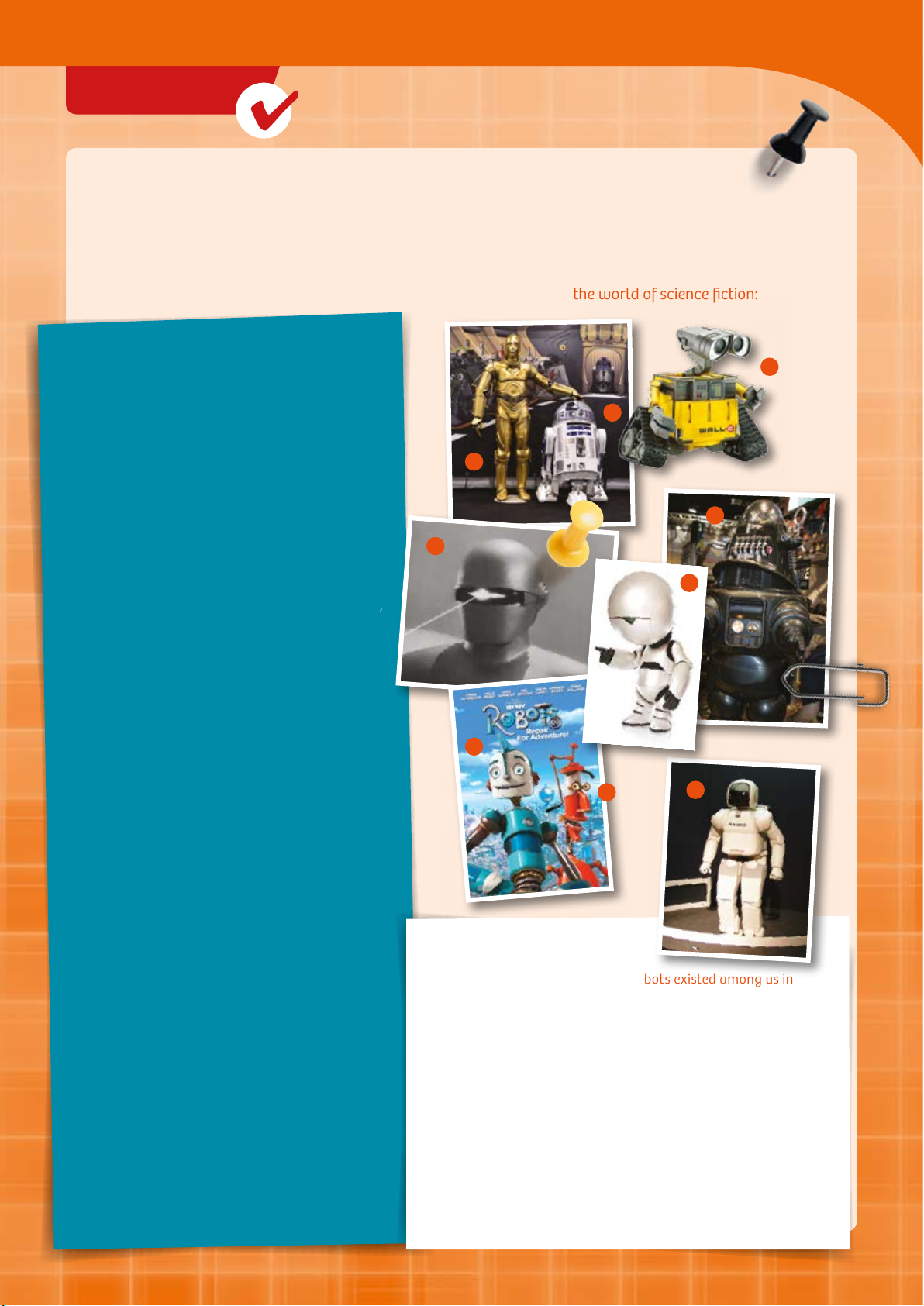
Droids, or human-like robots, have already existed for a while in the fantasy worlds of science fiction books
and movies. Science fiction conceives of worlds in which new technological possibilities and speculations are
woven into the story. The stories often take place in the future or far away in space.
Let’s take a look at a few of the best-known and coolest examples from the world of science fiction:
ROBOTS STEAL THE SHOW
Let’s start with George Lucas’s “Star Wars,” which featured
two robots who stole the show: C-3PO and R2-D2.
C-PO (1) is a “protocol droid” designed to mediate humanrobot interactions. R-D (2) is a droid designed to repair
space ships much as a human mechanic might.
Or how about the garbage robot WALL-E (3)? He’s the
short-statured trash cleaner in the film of the same name.
He’s also fond of gazing at the starry sky and watching
kitschy musical s from the 60s, and falls in love with a
robot named EVE.
Gort (4) is another famous android. He plays an important
role in the film “The Day the Earth Stood Still.” Not very
talkative or athletic, this giant chunk of metal spends most
of the time standing around motionless. But he disarms his
adversaries at lightning speed with the help of laser beams,
and is able to bring his faithful companion Klaatu back to
life.
Bumblebee from “Transformers” is an Autobot. He starts by
taking the shape of a 1977 Chevrolet Camaro. Later on in
the film, he transforms himself into the 2009 version of the
same model. That’s a prey versatile robot.
1
4
2
5
6
3
—
PRACTICAL, SERIOUS, OR ILLTEMPERED
BE LIKE THAT, TOO
Robby (5) from “Forbidden Planet” would be an asset to
any household. Because he obeys Isaac Asimov ’s laws of
robotics, he cannot do any harm to humans. And his ability
to reproduce things can be prey handy when you’ve
broken the neighbor’s window or whatever.
Number from “Short Circuit,” on the other hand, is not just
really nice, he’s always looking for new input. His
boundless curiosity even lets him win over a few (human)
hearts.
The life of a robot is no simple thing — at least, that’s how
Marvin (6) sees it. He is the secret hero of “The Hitchhiker’s
Guide to the Galaxy.” Bad moods and headaches are just
two of the problems that he always has to contend with.
But when the chips are down, he’s a cool guy to have
around to help you out of a tight spot.
SINGIN’ IN THE OIL
Rodney (7) and Fender (8) from “Robots” are another
comical robotic duo.
Rodney is a young inventor, and Fender is always losing his
parts. While the two may not be exactly cool, they are
nevertheless rather amusing, such as when Fender covers a
classic Gene Kelly tune. His version, of course, is a lile
different — “Singin’ in the Oil.”
ROBOTS CAN
7
8
9
ALMOST HUMAN
What would it be like if humanoid robots existed among us in
everyday life? We’re not quite there yet. In real life, today’s robots
have a hard enough time just standing on their own two legs.
But the most fundamental problems have already been solved. So
robots such as Honda’s ASIMO (9) can walk all by themselves and
use their artificial hands and arms to do work.
Maybe science fiction will soon become reality. For that to happen,
personal robots will have to be able to communicate with their
surroundings, with other robots, and with people, and work
together with them as well. They still have a lot to learn before
they can do that. They have to learn to move around beer and
more safely, they have to be able to recognize things in their
environment, and they have to be able to understand human
speech. Just like the robot movie stars in Hollywood.
Page 62
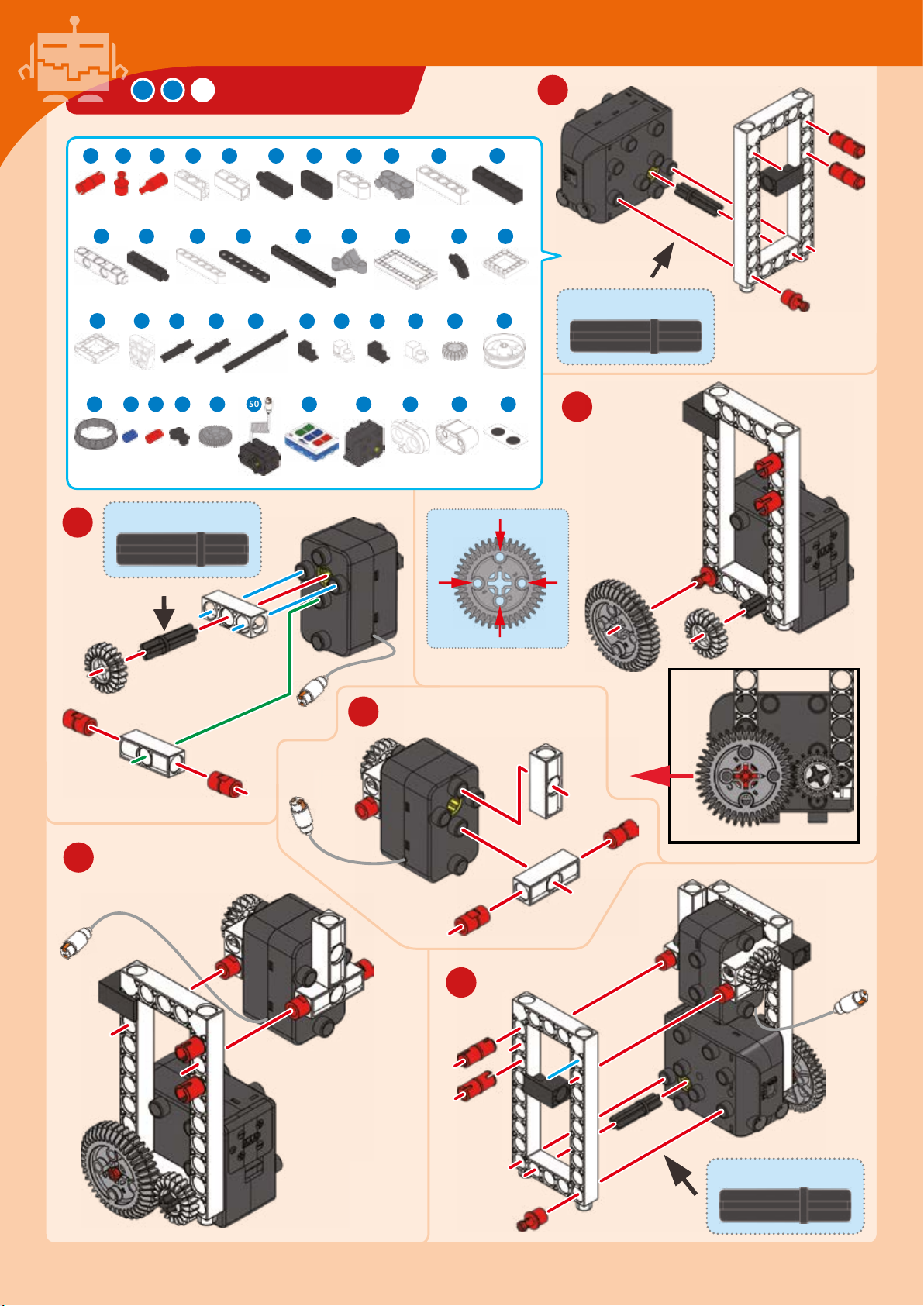
WALKING BOT
1 3 7 854 6 9 10 11 12
1
11 x
2 x
26 27
4 x
40
2 x
3
3 x 1 x 2 x 6 x 2 x
14 1816 19 21 22 23 24 25
2 x 3 x 4 x 2 x 4 x 2 x
28
29 30 31 32 33 34 36
1 x
44 45 46 49 50 51 52 54 55 56
8 x 26 x 5 x 4 x
1 x
4 x 2 x 1 x 3 x 2 x
3 x 4 x 2 x 2 x 1 x 1 x 1 x 3 x
1 x
1 x
1 x 1 x 1 x
30-mm axle
Hole
B
2 x 1 x
30-mm axle
39
2 x
2
Hole A
Hole
B
Hole C
4
C
5
6
30-mm axle
Page 63
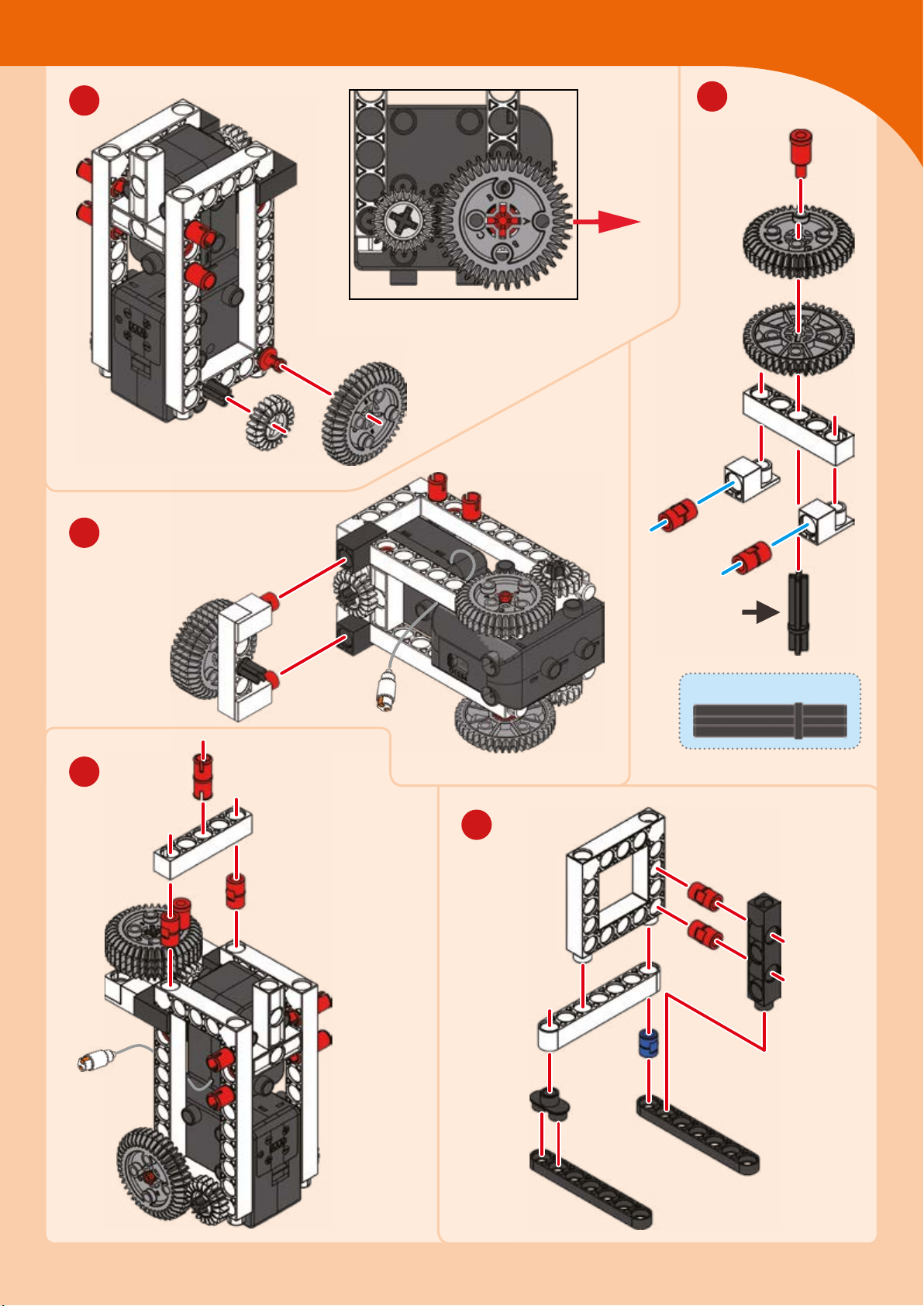
Robots in Space
7
A
9
8
Connect to
hole A
10
35-mm axle
11
Page 64
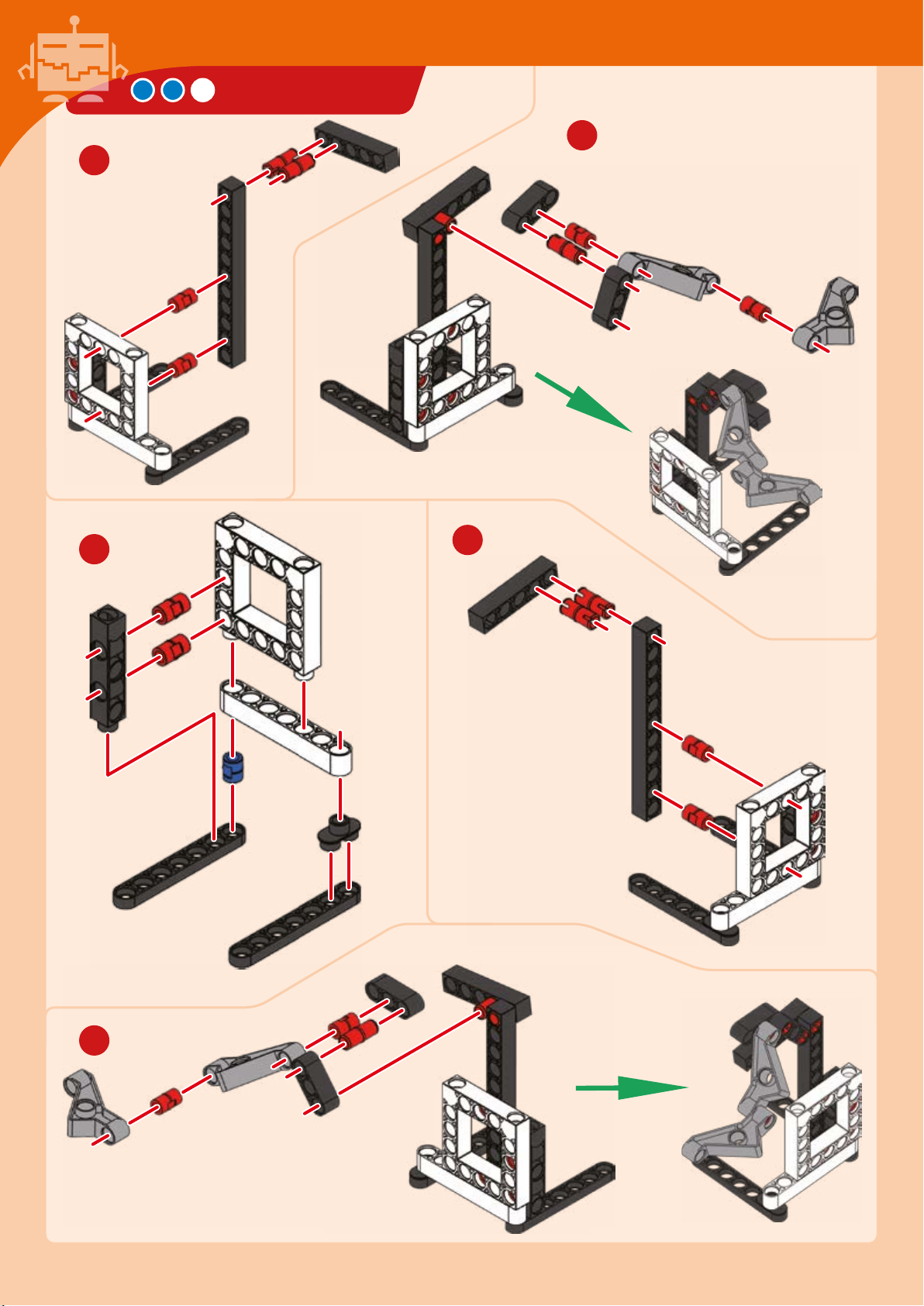
12
WALKING BOT
13
14
15
16
Page 65
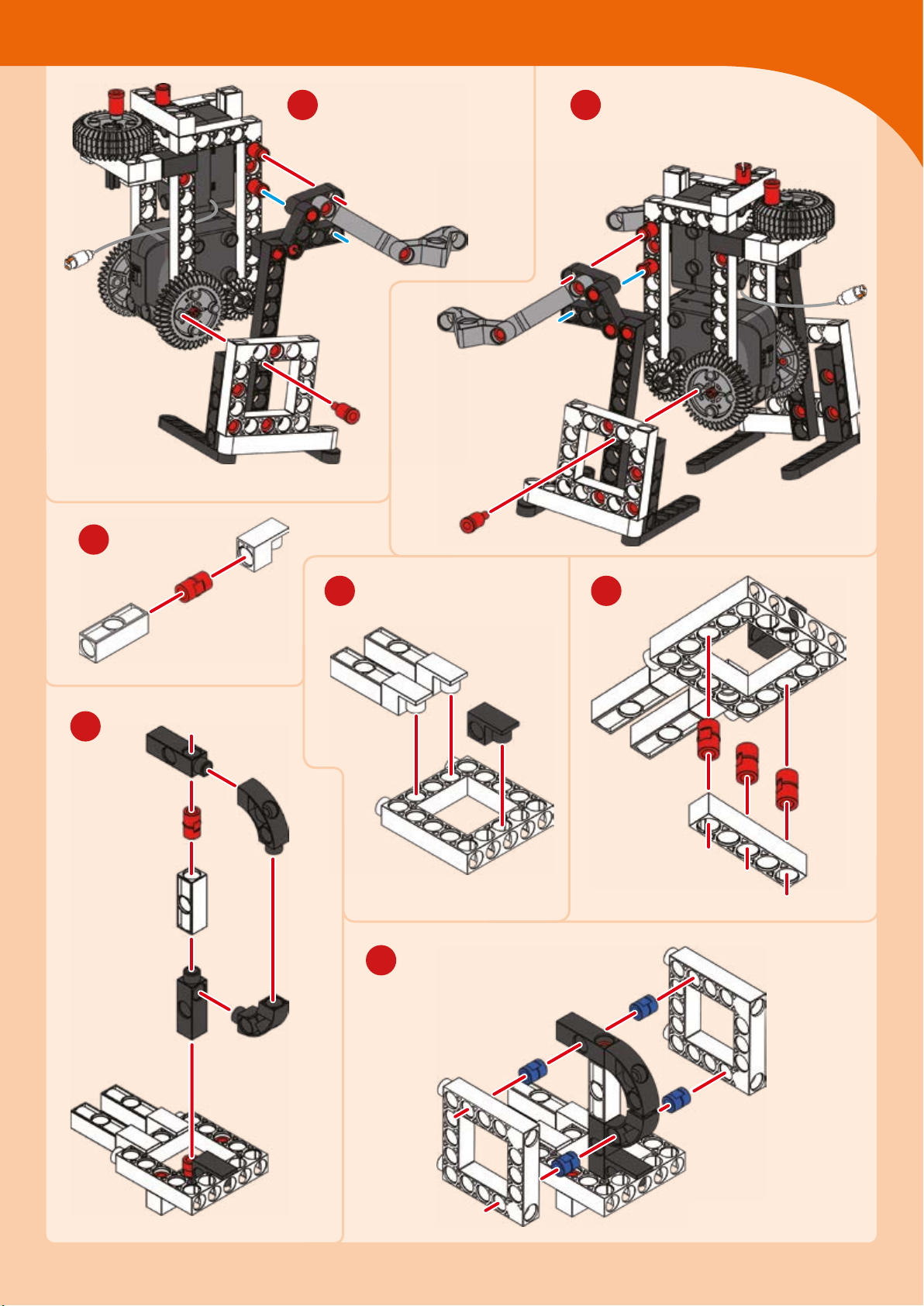
Connect to
hole C
Robots in Space
17 18
Connect to
hole C
22
19
20 21
x
23
Page 66
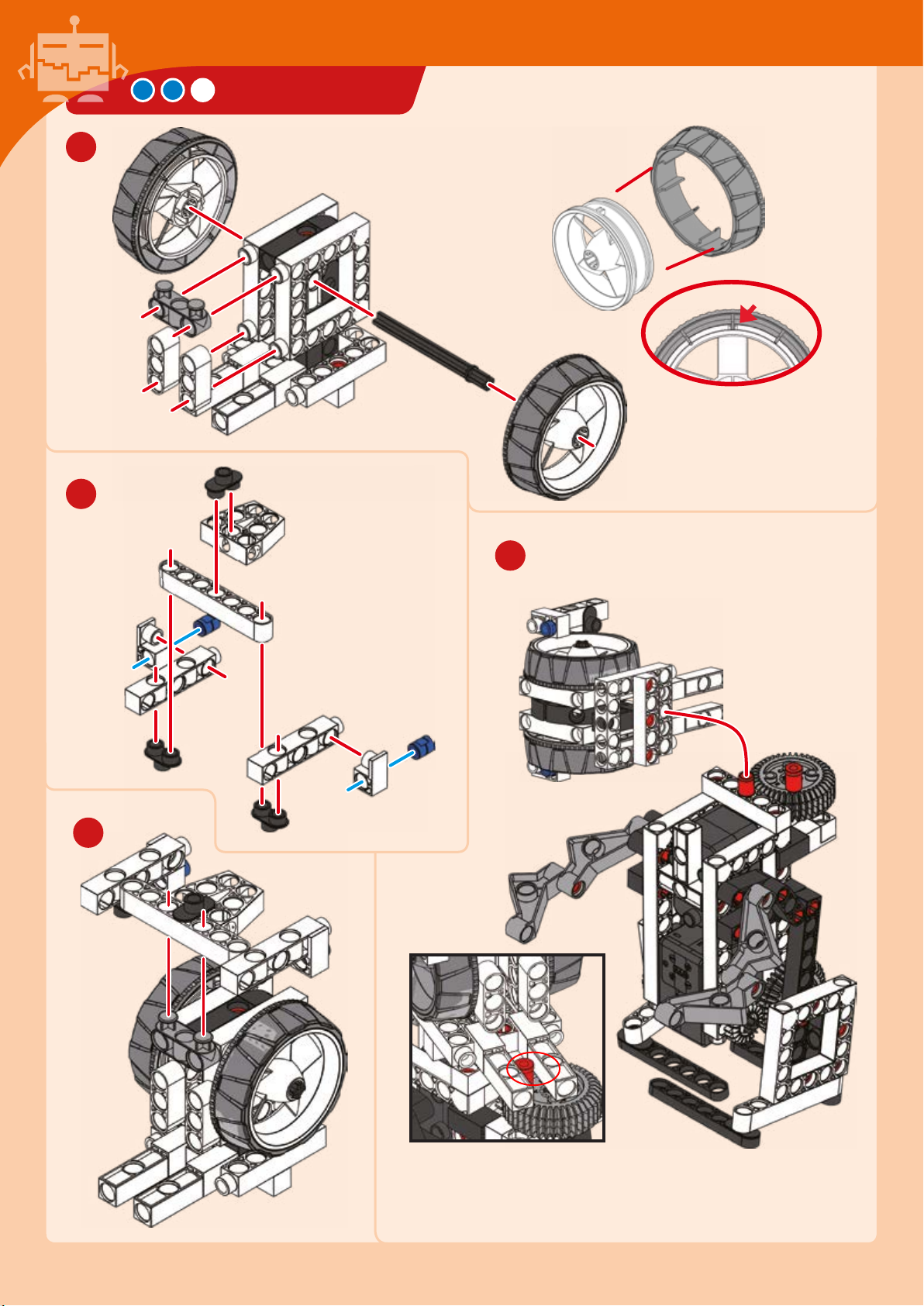
24
25
WALKING BOT
Hard
plastic
Align
26
27
Page 67
28
EXPERIMENT 8
Robots in Space
Walking the walk
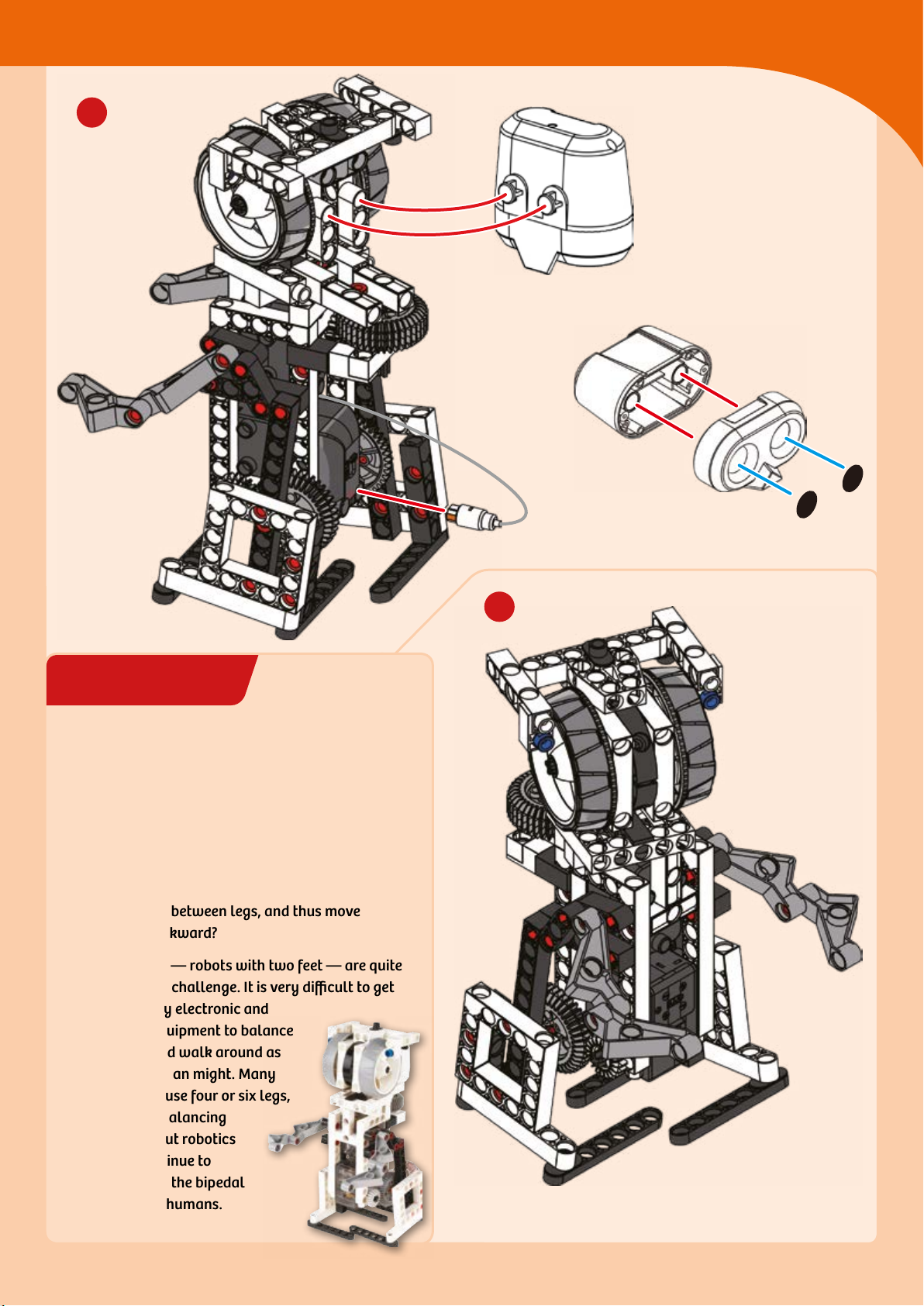
HERE’S HOW
This robot pal is designed to walk on two legs.
Experiment with the positioning of the rods that
make up its feet. Can you get it to balance on one
foot and then the other, to slowly shift its weight
back and forth between legs, and thus move
forward or backward?
Bipedal robots — robots with two feet — are quite
an engineering challenge. It is very difficult to get
a robot’s heavy electronic and
mechanical equipment to balance
on two legs and walk around as
easily as a human might. Many
legged robots use four or six legs,
which makes balancing
much easier. But robotics
engineers continue to
strive to mimic the bipedal
locomotion of humans.
Stickers
29
Done!
Page 68
CROSSWING STARSHIP
1 3 7 854 6 9 10 12
11 x
13 14
4 x 4 x
25
1 x
39 40
2
6 x 1 x 2 x 9 x 3 x
17 1816 19 21 22 23
4 x 4
26 27 28
4 x
1 x
42
1 x 4 x 41 x 5 x 3 x 4 x
2 x 2 x
x 2 x 4 x 4 x 4 x 2 x
29 30 31 32 34 36
5 x
44 45 46 47 49 50 51 52
2
4 x 2 x 1 x 2 x
2 x 11 x 2 x 2 x 2 x 4 x
2 x
1 x
1 x
1
38
1 x
3
5
1
30-mm axles
4
6
Hole A
Hole
B
Hole
B
Hole C
Connect to hole A
Page 69
Futuristic Spacecraft
7
35-mm axle
8
Connect to
hole B
9
Connect to
hole A
10
Connect to
hole B
35-mm axle
12
11
Page 70
CROSSWING STARSHIP
13
15
14
17
16
18
19
20
Page 71
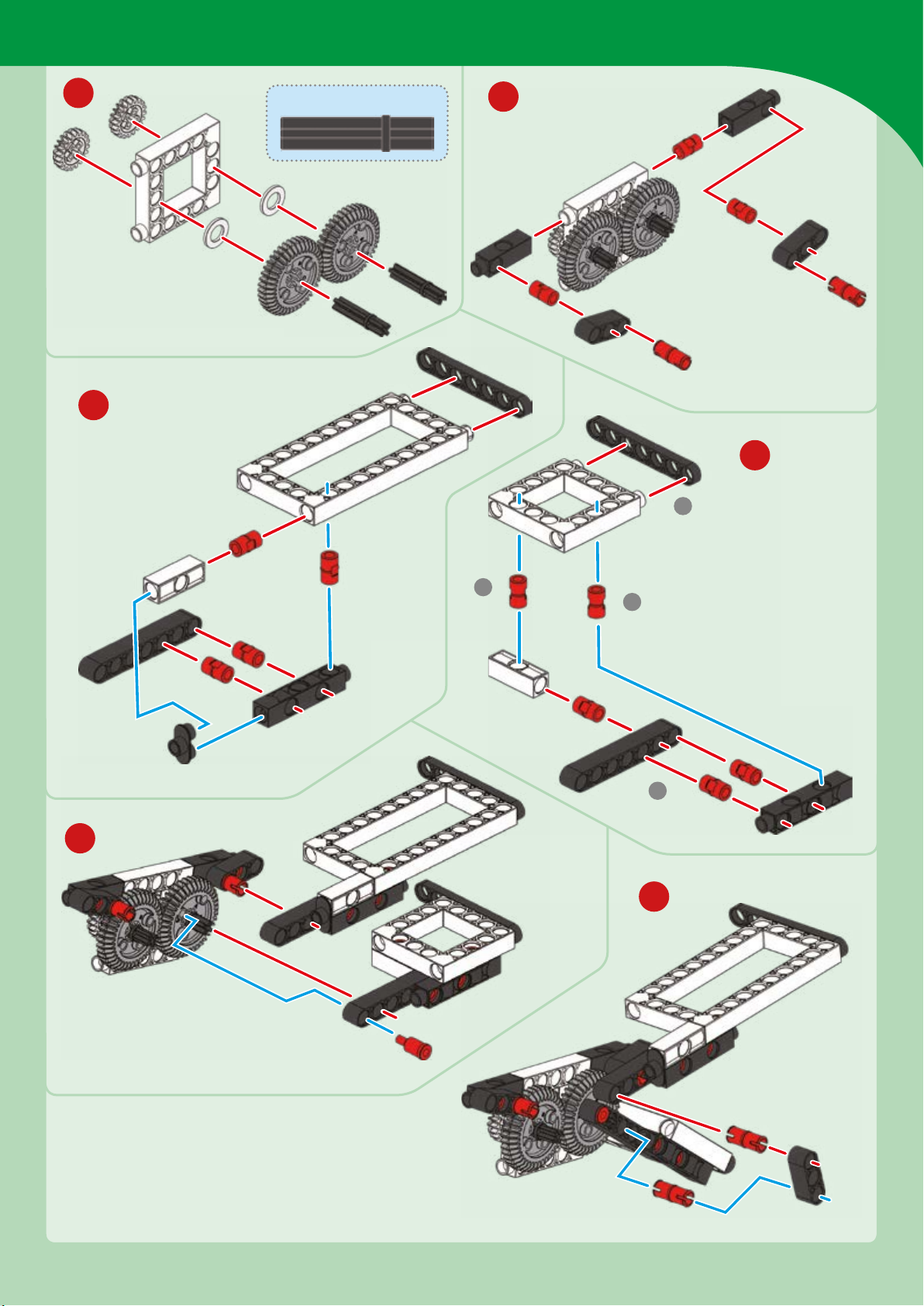
Futuristic Spacecraft
21
23
35-mm axles
22
24
1
25
2
2
1
26
Connect to
hole B
Page 72
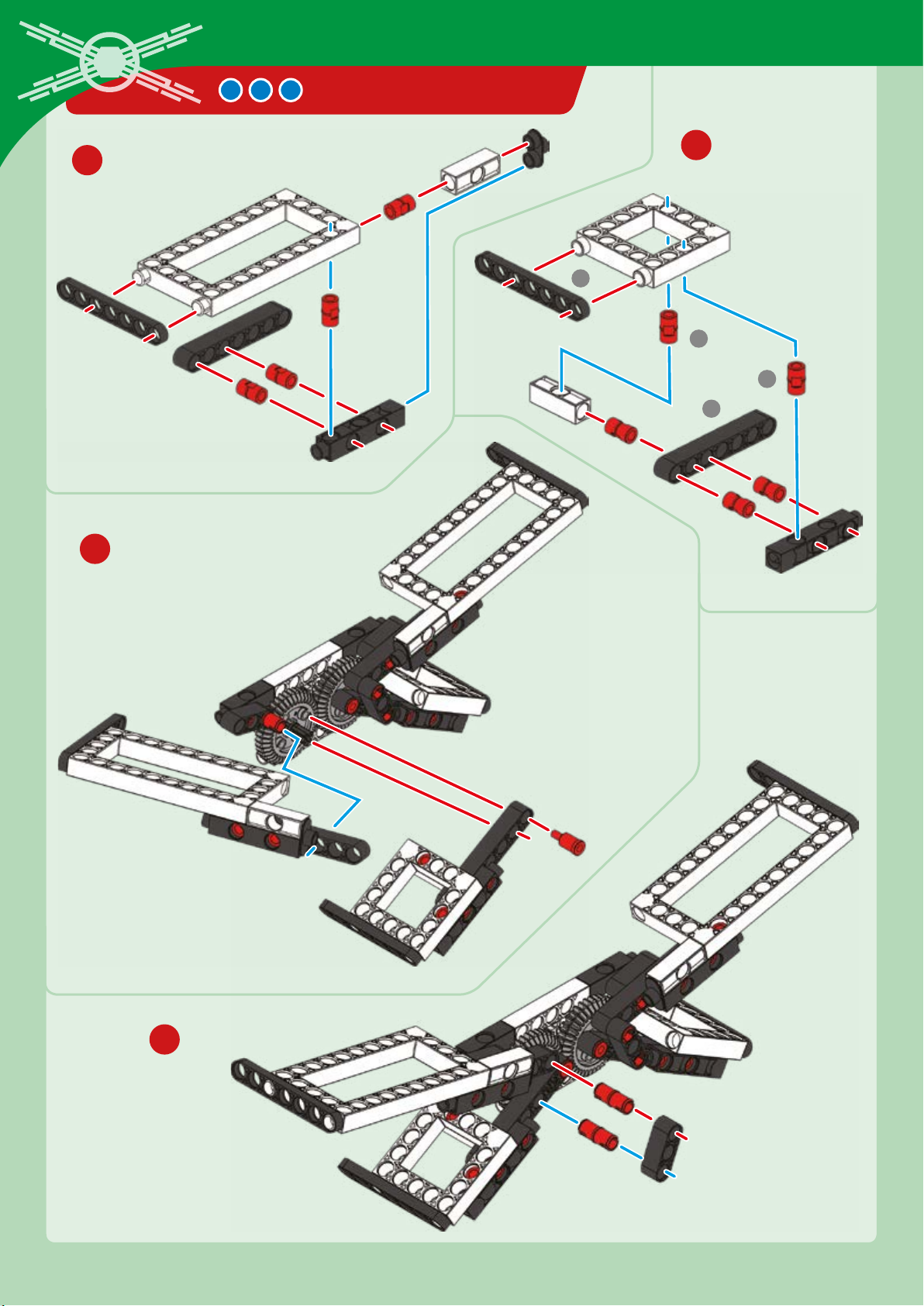
CROSSWING STARSHIP
27
28
1
2
2
1
29
30
Connect to
hole B
Page 73
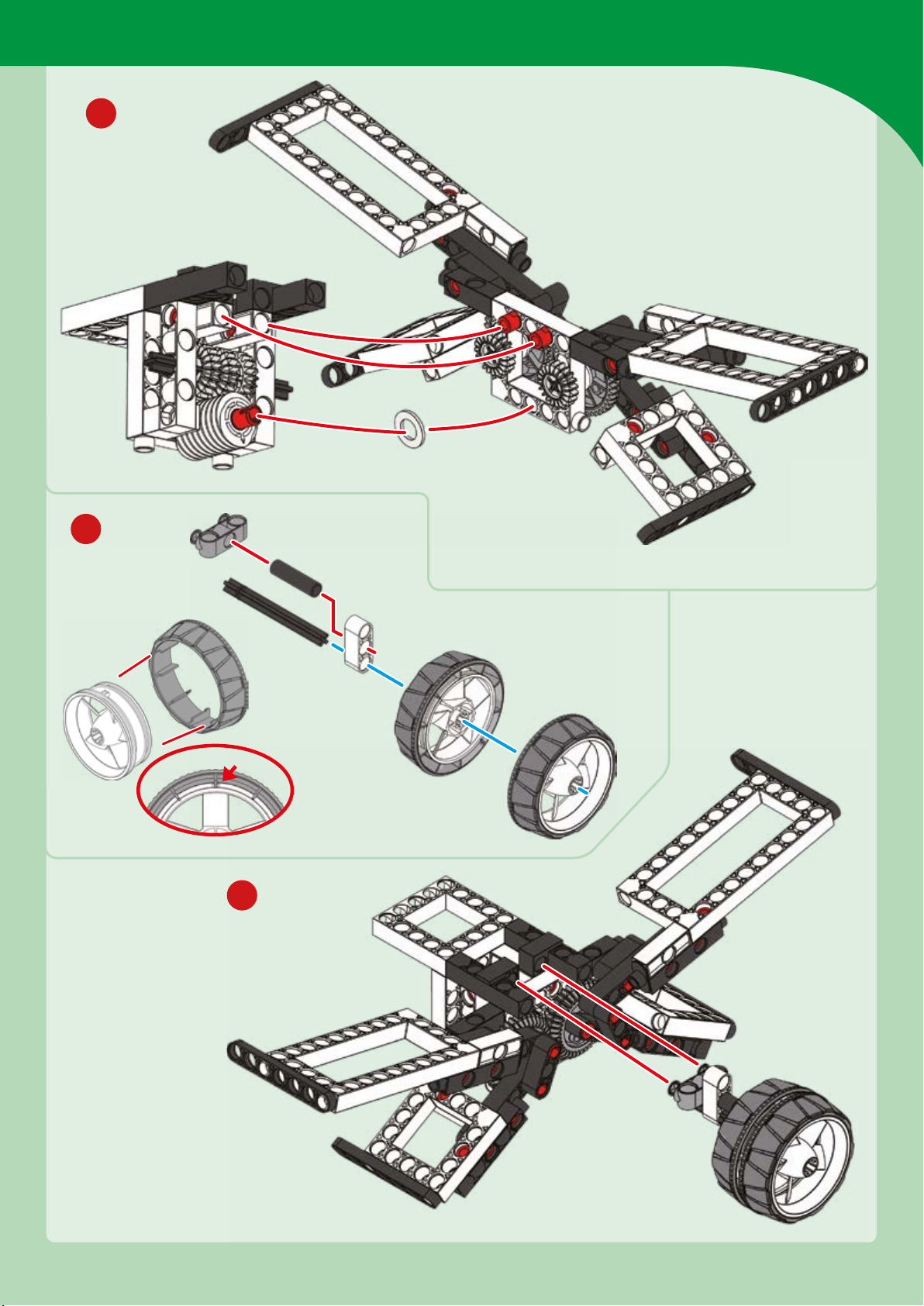
31
Futuristic Spacecraft
32
33
Page 74
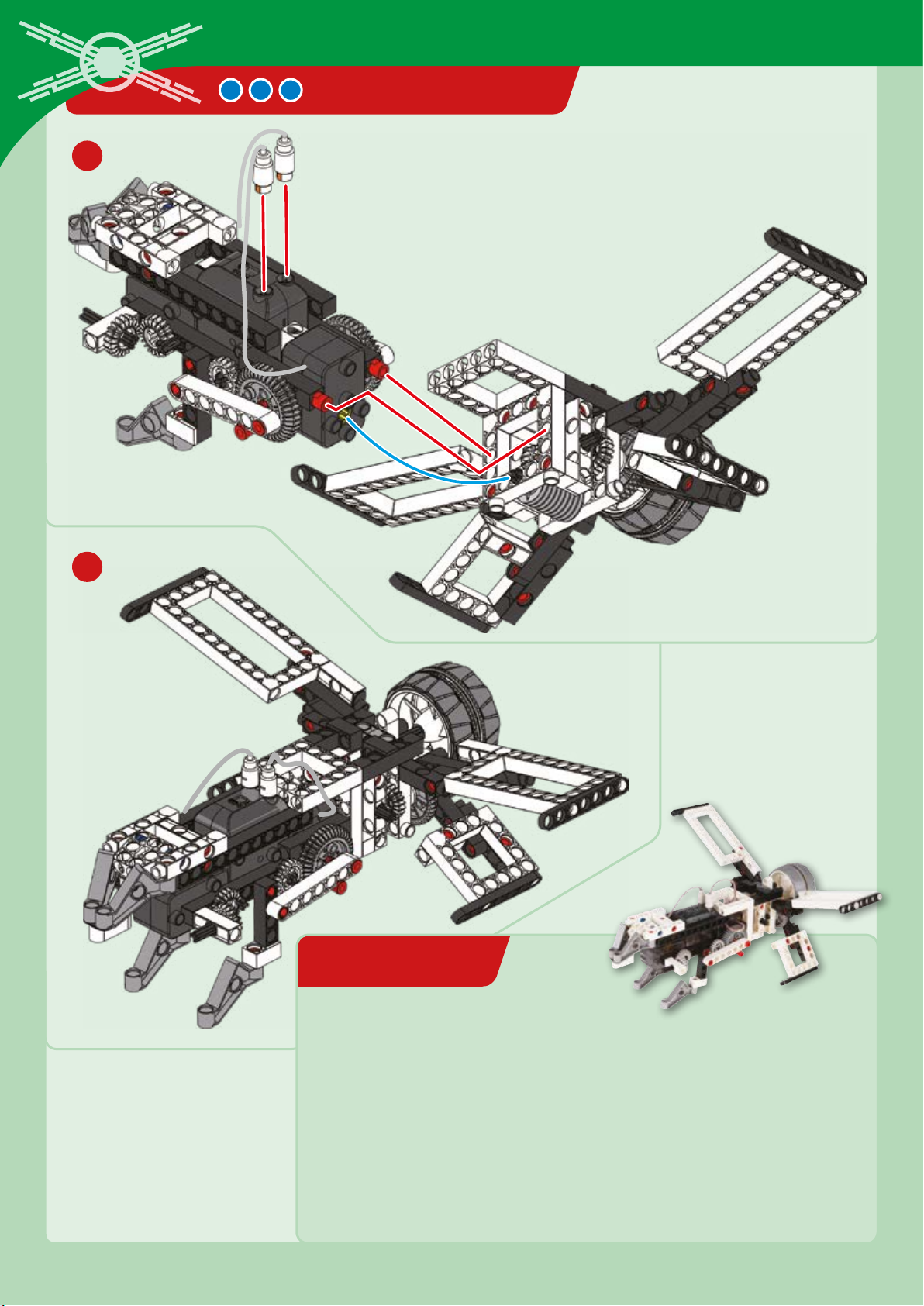
34
EXPERIMENT 9
CROSSWING STARSHIP
35
Done!
Jumping into hyperspace
HERE’S HOW
This fantastic model imagines a time in the future when hyperspace travel —
faster than light speed travel — is possible. The thruster wings in the back lock
together during light speed travel and separate to provide greater
maneuverability when flying through atmosphere. The landing gear in the front
retracts to further streamline the shape of the starship. Turn your model on to test
out the operation of the wings and the landing gear.
Page 75
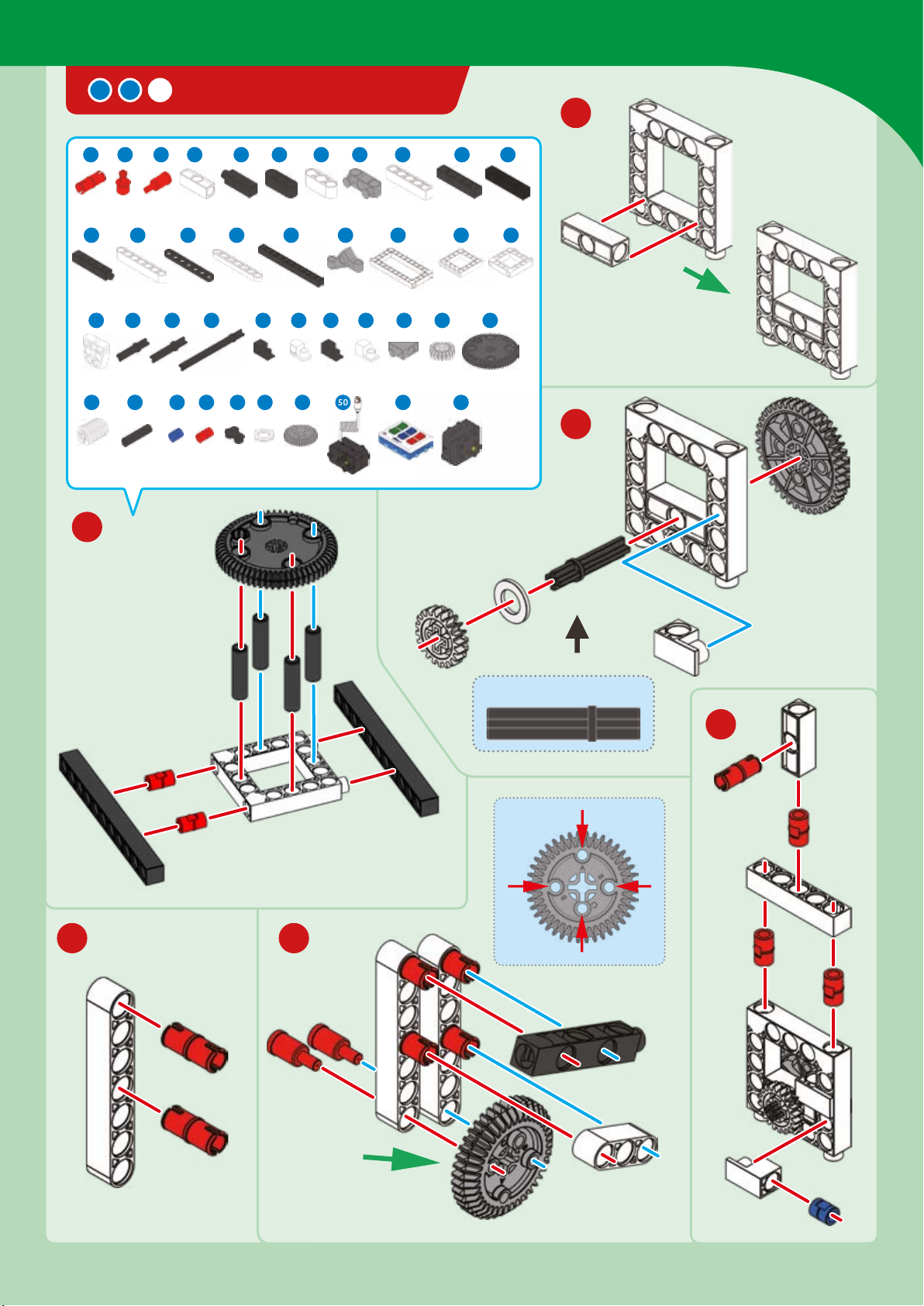
SPACESHIP CONTROLLER
1 3 7 84 6 9 10 11 12 13
10 x
3 x 2 x 6 x 3 x
1816 19 2120 22 23 25 26
4 x 2 x 1 x 2 x 2
x 4 x
Futuristic Spacecraft
2
x
3 x 5 x 4 x 1 x 2
27 28
1 x
38 42
1 x
29 30 31 32 34 36
44 45 46 47 49 50 51 52
6 x 4 x 23 x 5 x 3 x 4 x
1
x 4 x 2 x
33 35 37
4 x 2
2 x
x 2 x 1 x 4 x 1 x
2 x
2
1 x
x
1 x 4 x
4 x
1 x
1 x
3
35-mm axle
4
5 6
x
Hole A
Hole
B
Hole
B
Hole C
Connect to
holes B
Page 76
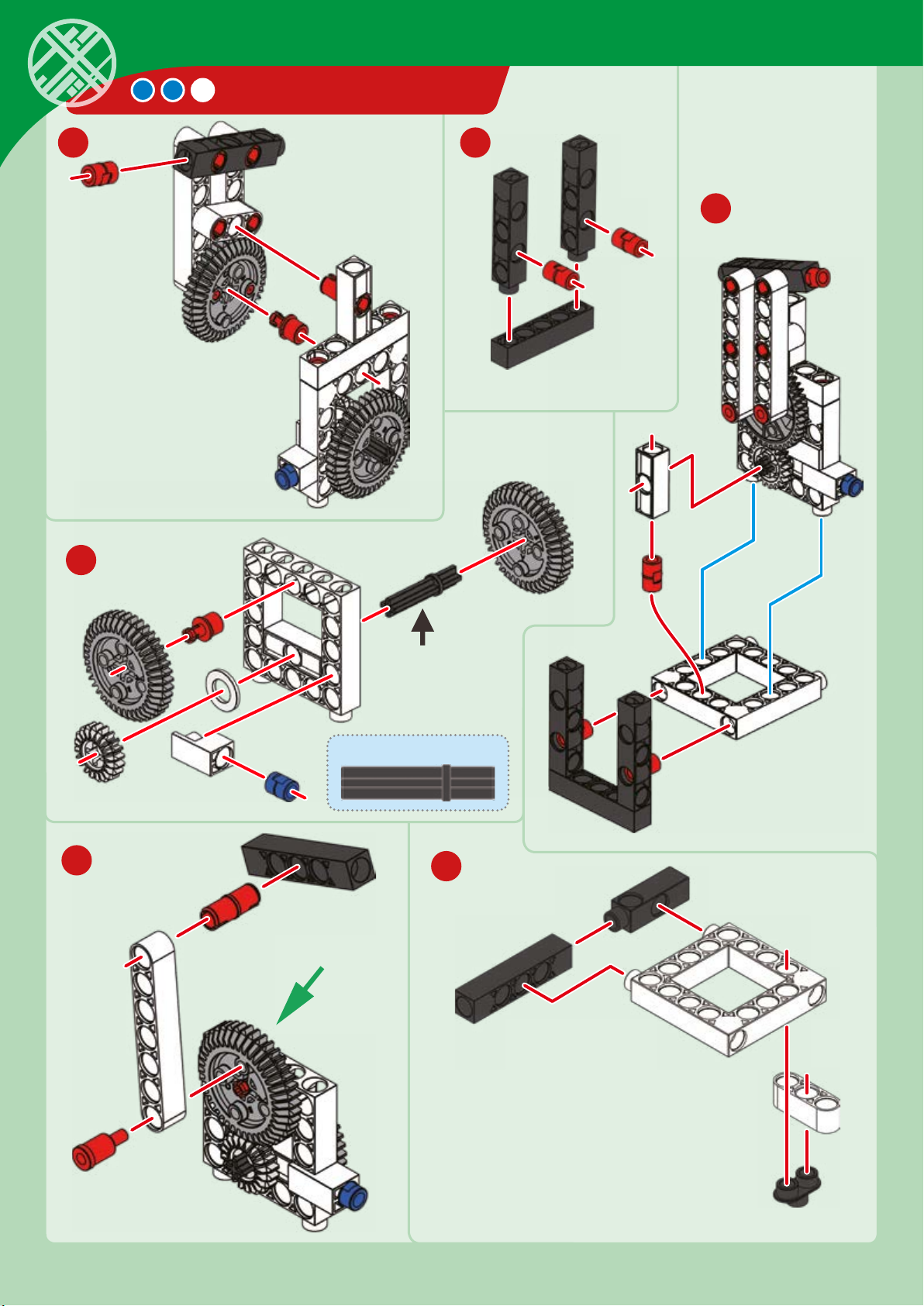
SPACESHIP CONTROLLER
7 8
9
10
11
35-mm axle
12
Connect to
hole B
Page 77
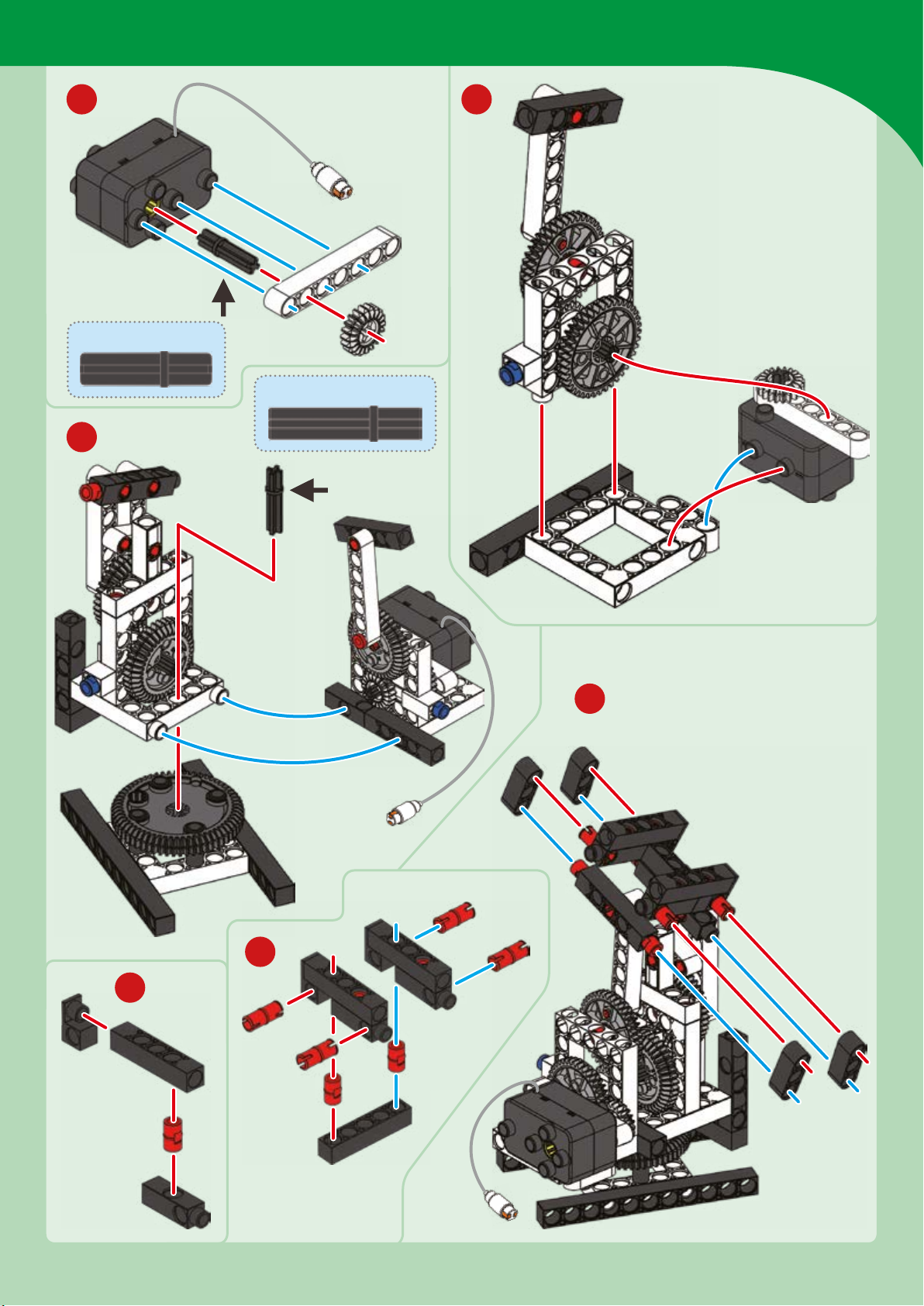
13 14
30-mm axle
35-mm axle
15
Futuristic Spacecraft
x
18
17
16
Page 78
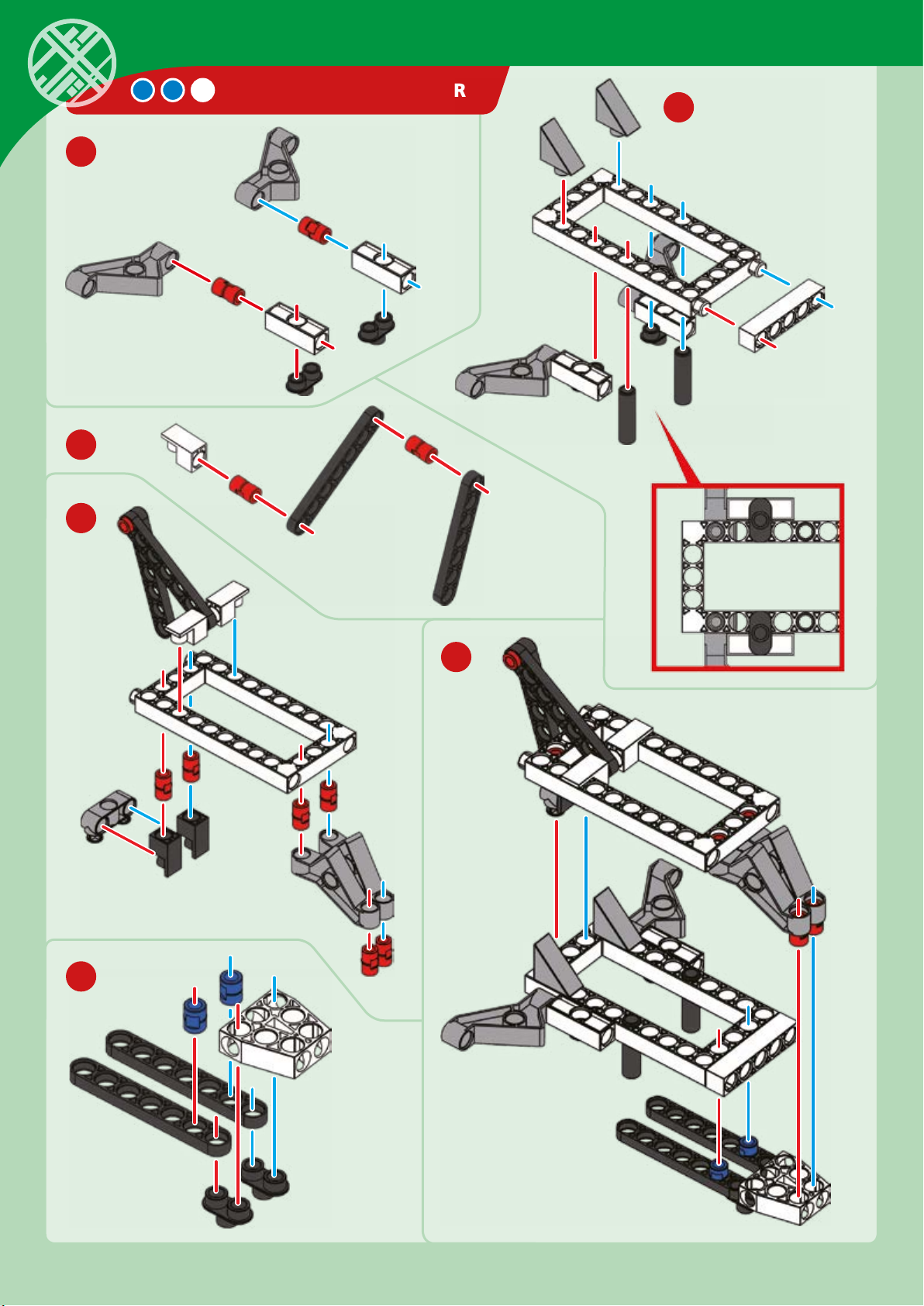
19
21
22
SPACESHIP CONTROLLER
20
23
24
Page 79
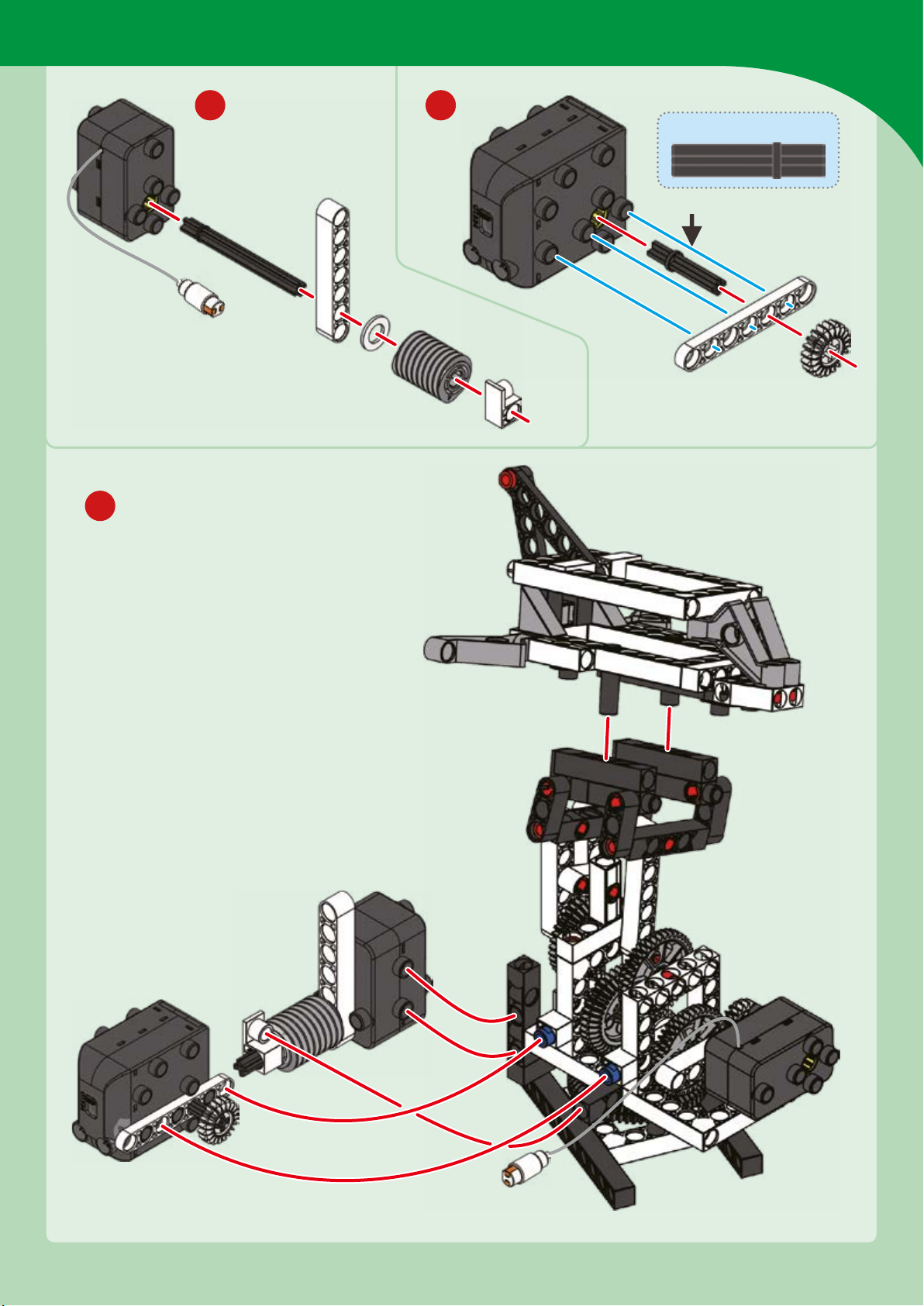
Futuristic Spacecraft
27
25
26
35-mm axle
Page 80
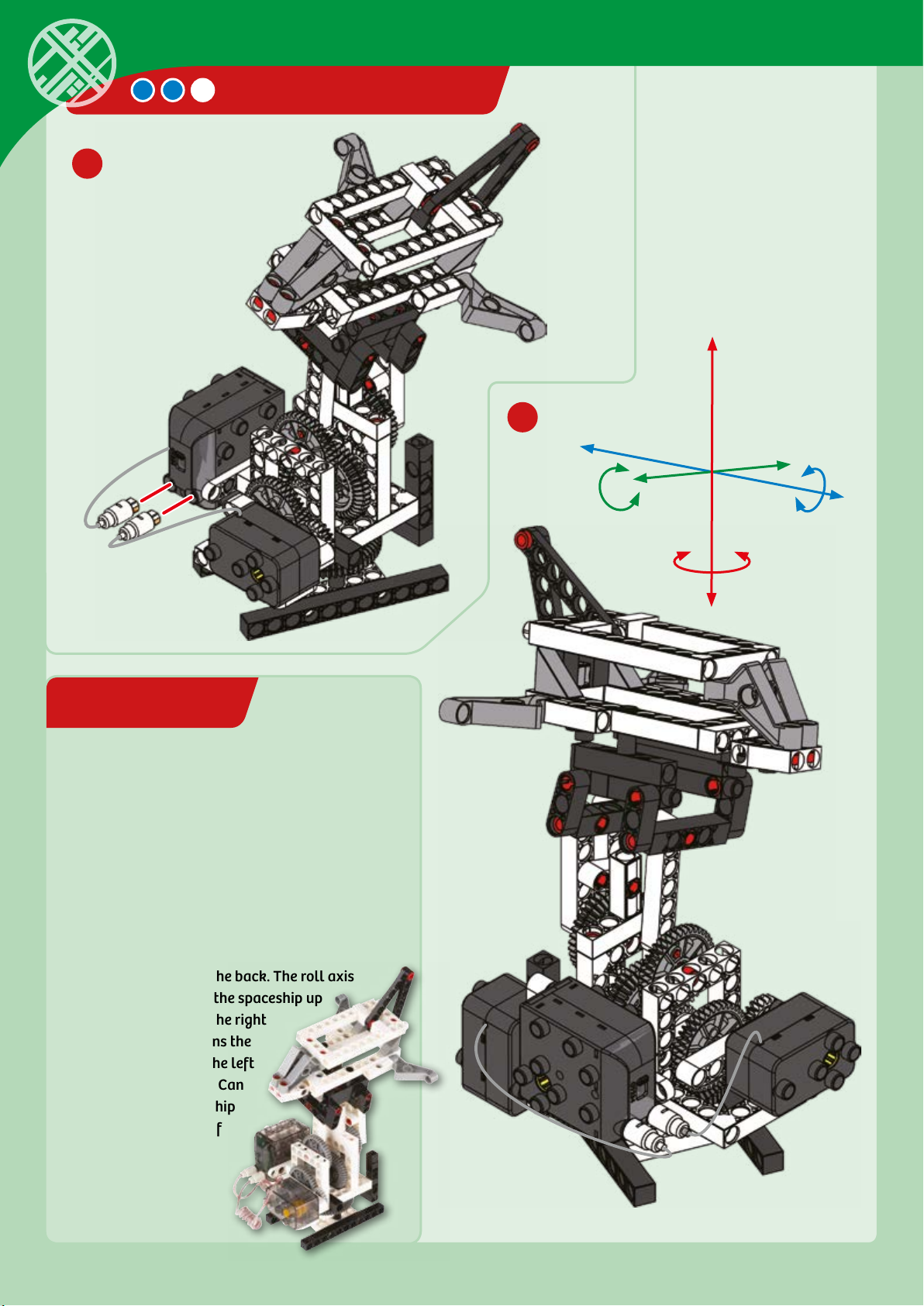
EXPERIMENT 10
28
SPACESHIP CONTROLLER
29
Space flight simulator
HERE’S HOW
In space, the concepts of “up” and “down” don’t
mean what they do on Earth! If you had a
spaceship, you could point it in any direction and
go. This model lets you control a model
spaceship in many directions, on three axes. The
pitch axis moves the front of the spaceship up
and down relative to the back. The roll axis
moves the left side of the spaceship up
and down relative to the right
side. The yaw axis spins the
spaceship around to the left
or the right. Try it out! Can
you point your spaceship
toward every corner of
the room you are in?
Pitch
Roll
Yaw
Done!
Page 81
CHECK IT OUT
Futuristic Spacecraft
“GOOD MORNING, PEOPLE
OF EARTH”
Where do we go
from here?
Robot technologies have long been successfully
used in the exploration of planets and space.
Without them, there would be no spectacular
missions to Mars or anywhere else.
But researchers have also been working on other
astounding ideas and solutions. Let’s start by
taking a look at two projects that have already
been realized.
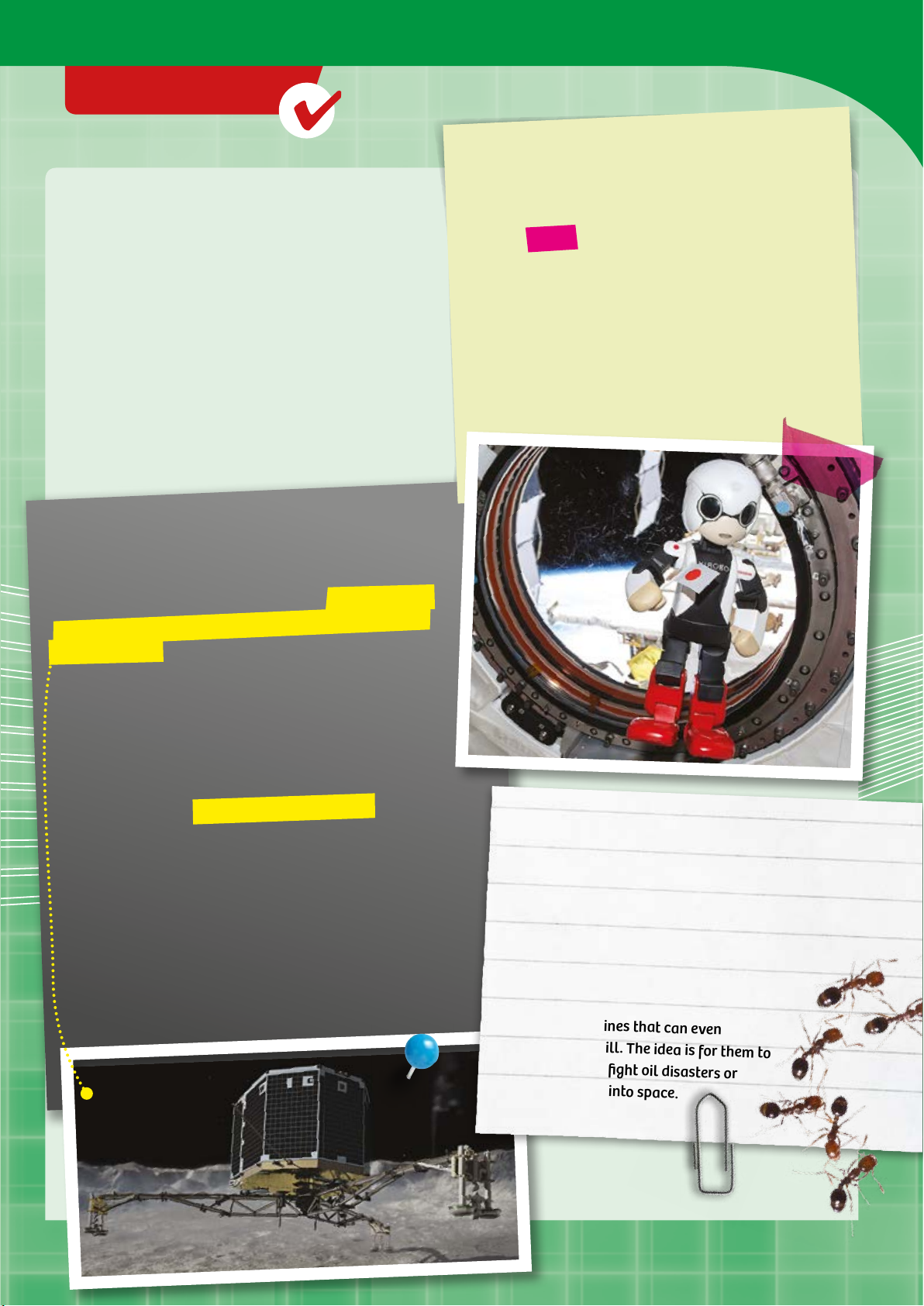
Landing million kilometer away
Space engineers have already shown what they are
capable of with one of the most difficult missions in the
history of space travel: the landing of the European probe
“Philae” on the comet 67P/Churyumov-Gerasimenko, or
Chury for short. Comets are the remains from the creation
of our Solar System. They are made of ice and frozen gases
mixed with bits of rock, metal, and dust.
There is, in fact, already a personal robot in space. His
name is Kirobo, and he was flown to ISS in August
2013. Once there, the 34-centimeter-tall and onekilogram-light robot was supposed to “host” the
Japanese astronaut Koichi Wakata and accompany
him in space. Kirobo is considered a good listener, can
recognize faces, and makes small talk with his human
colleagues. He was created based on the cartoon
character Tetsuwan Atomu, or “Astro Boy,” Japan’s
all-time most famous robot hero.
Philae is the first human-made device to land on a comet.
To understand the magnitude of this achievement, think
about the fact that Philae had to travel over ten years
through space with the Rosea probe. At the time of the
landing, Chury was over 510 million kilometers from
Earth. And the comet only had a diameter of just under 4
kilometers.
Even though Philae’s landing wasn’t perfect, the probe
achieved 80 percent of its scientific goals shortly
afterwards.
The results should contribute to our understanding of the
Solar System. One of the questions to be answered is
whether the Earth could have goen its water and its first
biomolecules from comets.
ANT ROBOTS IN SPACE
And what do researchers have planned
for the future?
Dreams for the future include ant robots
from Harvard University, which are
intended to work together without any
outside input. The researchers have
created a homogeneous swarm of 1024
artificial machines that can even
reproduce at will. The idea is for them to
be used to help fight oil disasters or
maybe even fly into space.
Page 82
CHECK IT OUT
Are robots the astronauts of
the future?
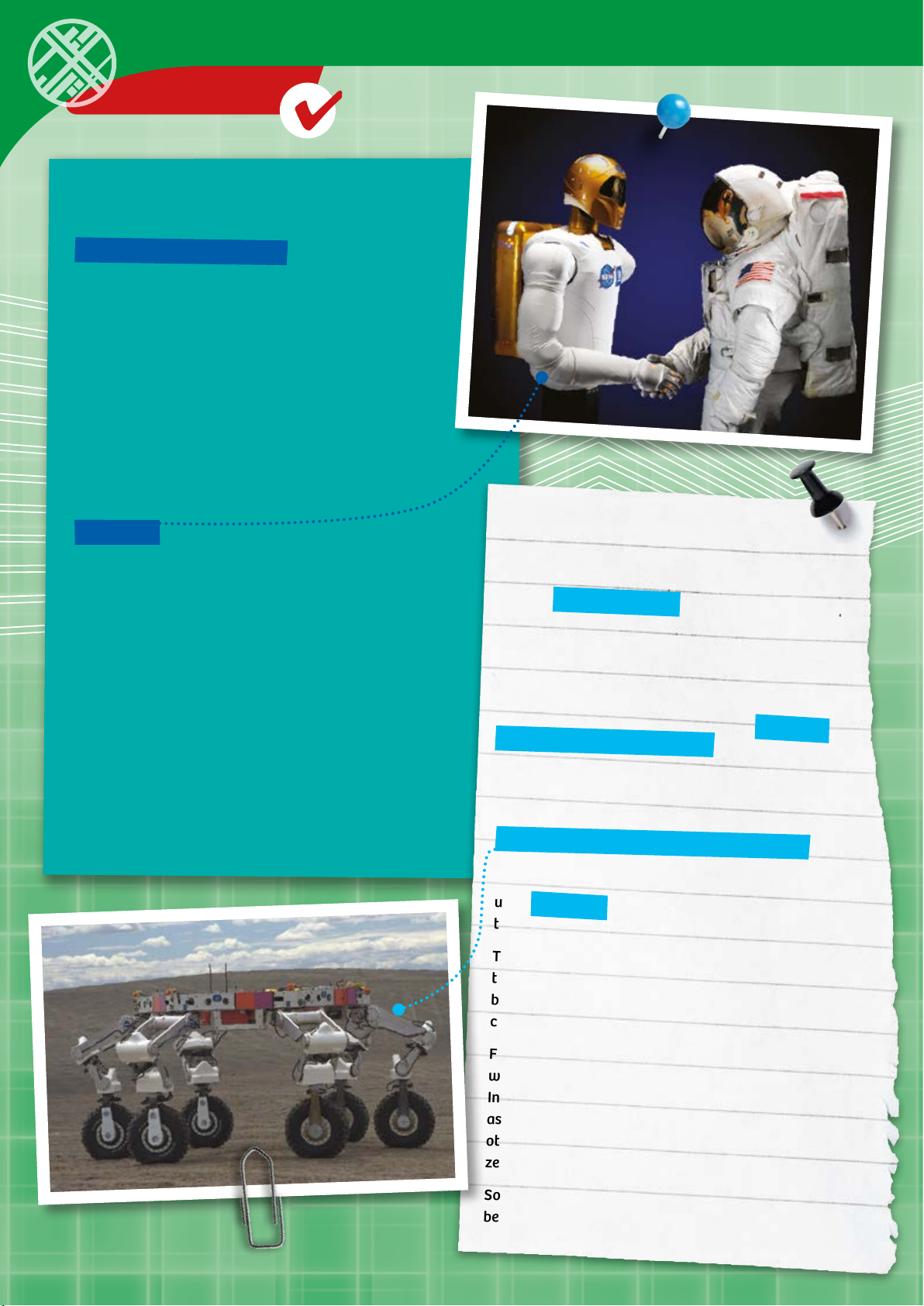
A Robonaut (robotic astronaut) is a humanoid robot
developed by NASA along with the Defense Advanced
Research Projects Agency (DARPA). It is supposed to
complete outboard tasks during space flights or on space
stations such as the ISS. That way, astronauts will no
longer have to leave the space ship or space station.
There are already several models of this robot series.
Some are equipped with various means of movement,
such as a Segway platform on four wheels. These
ground-based Robonauts will be developed for missions
on planetary surfaces. Robonauts can be controlled
remotely.
Robonaut 2, developed jointly by NASA and General
Motors, was sent to the ISS in February 2011. His humanlike hands were designed to allow him to use the same
tools as the station’s human crew.
Robonaut 2 is modularly constructed, so the arms,
“head,” or torso can be switched out. He also has
cameras. He can evaluate the pictures it takes and decide
all by himself what actions to carry out in response. For
example, Robonaut 2 is capable of entering text into a
cell phone, recognizing and operating switches, and
picking up and using tools. So Robonaut 2 can perform
self-directed tasks, including outside the space station. If
all works as planned, he should in fact be able to be used
to relieve the human astronauts of duties like that.
A D PRINTER FOR THE MOON
Another future project sounds even more like science
fiction: living on distant planets or other heavenly
bodies. Living on the moon has long seemed
impossible. How could all the building materials for
a space station be transported there?
Now, researchers want to approach the problem in a
different way. Using the latest technical advances in
3D printing, NASA plans to convert the six-legged
robot ATHLETE into a 3D printer. ATHLETE, which
looks a lile like a giant spider, was originally
designed to explore the moon’s surface.
In the future, this robot is supposed to be used to
create a moon base using a 3D printing process. As
its building materials, instead of relying on the
usual raw materials, this 3D spider printer will be
using moon dust, employing microwaves and laser
technology to melt the moon dust particles.
The first ATHLETEs have already been converted for
this purpose. The initial prototypes are already
being tested as 3D printers at one of the NASA
centers.
For several years, NASA has been working together
with a private company on a 3D printer for the ISS.
In the future, this 3D space printer should enable
astronauts to manufacture their own tools and
other devices. The first tests of the 3D printers in
zero gravity have been successful.
So you see: The future of space travel has already
begun.
Page 83

Kosmos Quality and Safety
More than one hundred years of expertise in publishing science
experiment kits stand behind every product that bears the Kosmos
name. Kosmos experiment kits are designed by an experienced team
of specialists and tested with the utmost care during development
and production. With regard to product safety, these experiment
kits follow European and US safety standards, as well as our own
refined proprietary safety guidelines. By working closely with our
manufacturing partners and safety testing labs, we are able to
control all stages of production. While the majority of our products
are made in Germany, all of our products, regardless of origin,
follow the same rigid quality standards.
1st Edit ion 2015 Thame s & Kosmos, LLC , Providence , RI, USA
Thame s & Kosmos® is a re gistered trad emark of Thame s & Kosmos, LLC.
This wor k, including a ll its parts , is copyright p rotected. An y use outside t he specific l imits of the co pyright law wit hout the conse nt of the publis her is prohibit ed and punishab le by law.
This app lies specif ically to repr oductions, t ranslations , microfil ming, and stora ge and process ing in electro nic systems and n etworks. We d o not guarantee t hat all material i n this work
is free f rom copyright o r other protec tion.
Technical pr oduct develo pment: Geni us Toy Taiwan Co. , Ltd., Taichung , Taiwan, R .O.C.
Author: Manfred Schwarz
Translation: David Gamon
Editing: Ted McGuire
Additional Graphics and Packaging: Dan Freitas
Manual design concept: Atelier Bea Klenk, Berlin
Manual illustrations: Geni us Toy Taiwan Co. , Ltd., Taichung , Taiwan, R .O.C., and T hames & Kosmos
Manual p hotos:
Courte sy of NASA and /or NAS A JPL: p. 3 all, p. 4 a ll, p. 14-18 all, p. 2 5 all, p. 32 all, p . 39 (moon), p. 40 all , p. 53 all; p. 80 all .
Wikipe dia: p. 59 (C-3PO and R2- D2) Dirk Vorder strasse, CC BY 2 .0; p. 59 (Marv in) Fair use, cour tesy of Touchsto ne Pictures and S pyglass Ente rtainment; p. 5 9 (Robby) Pattym ooney, CC
BY SA 3.0; p. 59 ( ASIMO) Cour tesy Honda, C C BY SA 3.0.
iStock : p. 59 (WALL-E ) © Disney Pixar Stu dio, Editoria l use only.
Other : p. 59 (Robots M ovie Poster) Fai r use, courte sy of Twentieth Ce ntury Fox Animat ion and Blue Sky Stu dios; p. 59 (Gort ) Public domain i mage, courte sy of 20th Cent ury Fox; p. 79
(Kirob o) Media image , courtesy of Ki bo Robot Proje ct; p. 79 (Phila e) DLR, CC-BY 3.0 ; p. 79 (Fire ants ) Stephen Ausmu s, public doma in image.
All othe r photos: Gen ius Toy Taiwan Co ., Ltd., Taichung , Taiwan, R .O.C., and T hames & Kosmos
The publ isher has made e very effor t to locate the hol ders of image ri ghts for all of t he photos used . If in any individ ual cases any ho lders of image r ights have not b een acknowle dged,
they are a sked to provide e vidence to the p ublisher of t heir image righ ts so that they m ay be paid an image f ee in line with th e industry stan dard.
Distr ibuted in North A merica by Tha mes & Kosmos, L LC. Providen ce, RI 02903
Phone: 800-587-2872; Web: www.thamesandkosmos.com
Distr ibuted in United K ingdom by Tham es & Kosmos UK , LP. Goudhu rst, Kent TN17 2QZ
Phone: 01580 212000; Web: www.thamesandkosmos.co.uk
We reser ve the right to m ake technical c hanges.
Printe d in Taiwan / Im primé en Taiwan
Page 84
620374-03-130515
 Loading...