

Page 1
TFA.me ID-02
WLAN Funk-Wetterstation
Kat.-Nr. 35.8100.54
Lieferumfang
y WLAN Funk-Wetterstation (Basisstation)
y Netzadapter für Basisstation
y Thermo-Hygro-Sender ID-A0 (Kat.Nr. 30.3900.02)
y Schnellstart-Anleitung
Vielen Dank, dass Sie sich für dieses Gerät aus dem Hause TFA entschieden haben.
Bevor Sie mit dem Ge rät ar beiten
Lesen Sie sich bitte die Bedienungsanleitungen genau durch. Durch die Beachtung der Anleitungen vermeiden Sie auch Beschädigungen des
Gerätes und die Gefährdung Ihrer gesetzlichen Mängelrechte durch Fehlgebrauch. Für Schäden, die aus Nichtbeachtung dieser Bedienungsanleitung verursacht werden, übernehmen wir keine Haftung. Ebenso haften wir nicht für inkorrekte Messwerte und Folgen, die sich aus solchen
ergeben können. Beachten Sie besonders die Sicherheits- und Entsorgungshinweise in der mit dem Gerät gelieferten Schnellstart-Anleitung!
Bewahren Sie alle Anleitungen gu t auf!
Bedienungsanleitungen
Art der Bedienungsanleitung/Sprachen Wo zu nden Inhalt
Bedienungsanleitung für 35.8100.54
D-GB
Diese Anleitung 9 Funktionsbeschreibung der
WLAN-Funk-Wetterstation
Schnellstart-Anleitung für 35.8100.54
D-GB-F-I-NL-E
Im Lieferumfang und Homepage
Hier aufrufe n!
9 Inbetriebnahme
9 Technische Daten
9 Sicherheitshinweise
9 Entsorgungshinweise
9 Konformitätserklärung
Anleitung TFA.me allgemein
D-GB
go.tfa.me Web Portal
Hier aufrufe n!
9 Inbetriebnahme allgemein
9 Funktionsbeschreibung des TFA.me Portals
FAQ Häug gestellte Fragen
D-GB
Fragen allgemein
Fragen TFA.me Portal
Fragen TFA.me Inbetriebnahme
9 Allgemeinen Fragen und Antworten
9 Fragen und Antworten zum TFA.me Portal
9 Fragen und Antworten zur Inbetriebnahme
Zu Ihrer Si cherheit
Das Produkt ist ausschließlich für den beschriebenen Einsatzbereich geeignet. Verwenden Sie das Produkt nicht anders, als in diesen Anleitungen dargestellt wird. Das eigenmächtige Reparieren, Umbauen oder Verändern der Geräte ist nicht gestattet.
Einsatzbereich und alle Vorteile Ih res ne uen Gerätes auf einen Blick
y Lokale Pro-Prognose von wetter.com ür 3 bis 6 Tage
y 40 verschiedene Wettersymbole, tägliche Höchst- und Tiefsttemperaturen, Regenwahrscheinlichkeit/-menge, Sonnenstunden,
UV-Index, Windgeschwindigkeit/-richtung
y Warnfunktion bei Sturm, Stark regen, Blitzeis, Hitze oder hohem UV-Wert
y Kabellose Übertragung von Außentemperatur und Luteuchtigkeit über Sender (868 MHz, max. 100 m),
bis zu 5 Sender können auf dem Display angezeigt werden (optional)
y Anzeige der Innentemperatur und Luftfeuchtigkeit
y Beleuchtetes Display mit 4 Helligkeitsstufen und Dimmfunktion
y Uhrzeit mit Datum oder Wochentag (6 Sprachen)
y Zum Aufstellen oder an die Wand hängen
y Abmessung und Gewicht: 217 x 30 (47) x 139 (141) mm, 378 g
y Inklusive Netzteil, Batterien 3 x AA (Backup) und 2 x AA (für Sender) nicht inklusive
Mit Gateway-Funktion zum Online-Abr uf der Messwerte auf dem kostenfreien TFA.me Portal:
Nach der Registrierung auf go.TFA.me können die Temperatur- und Luftfeuchtigkeitswerte der Innensensoren, des mitgelieferten Außensenders
und optional die Messwerte von insgesamt bis zu 50 TFA-ID Sendern, die sich in Reichweite der Station benden, online überwacht und
ausgewertet werden. Der Funktionsumfang des TFA.me Portals beinhaltet eine Alarmfunktion via E-Mail, eine übersichtliche Diagramm-Funktion
und Export-Möglichkeiten sowie eine Daten-Speicherung für mind. 12 Monate. Die Spracheinstellung ist Deutsch oder Englisch.
Page 2
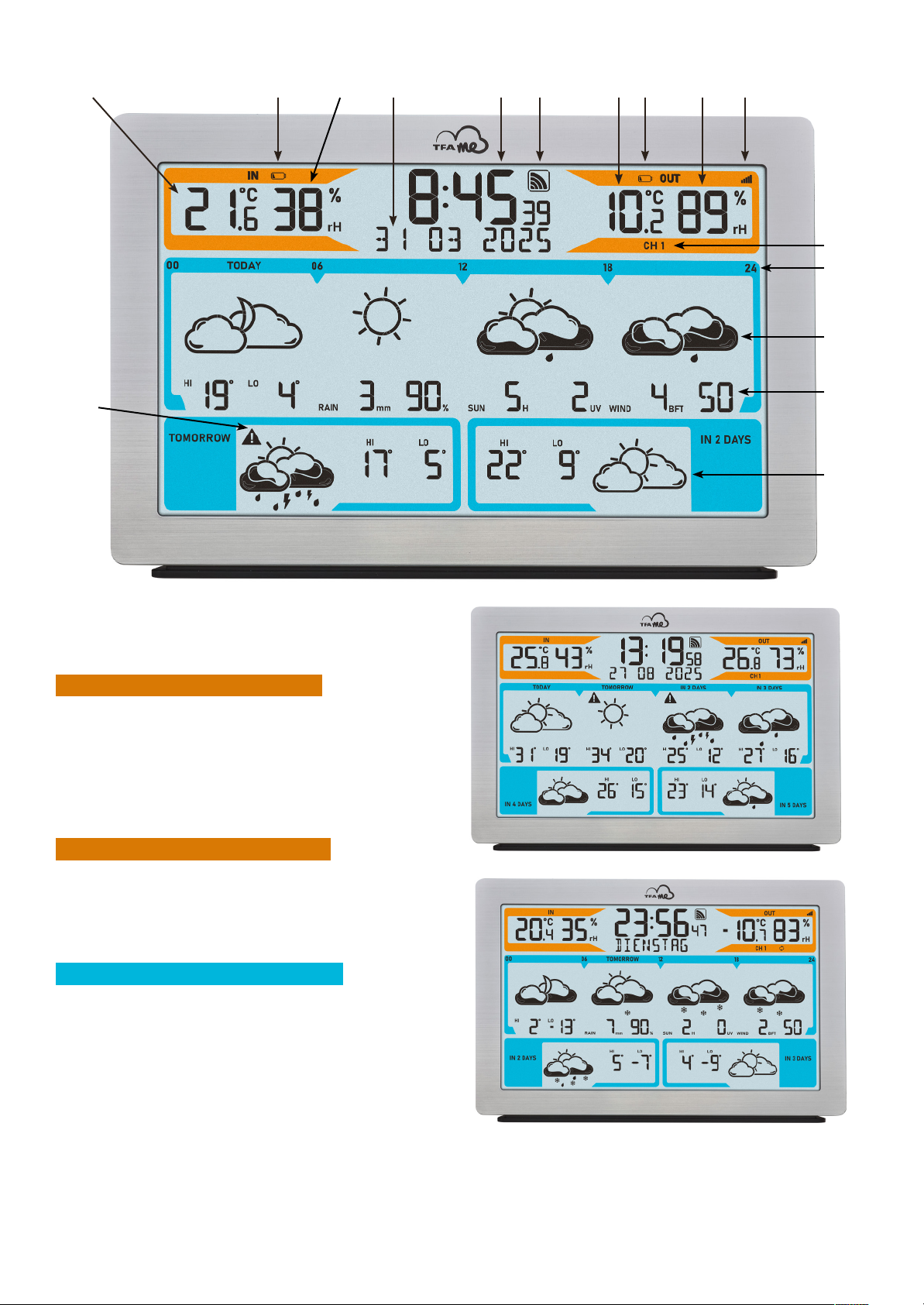
Bestandteile
Basisstation
1. Di splay
Anzeigebereich Innensensor (orange)
1.1 Innentemperatur
1.2 Batteriesymbol für die Basisstation
1.3 Innenluftfeuchtigkeit
Anzeigebereich Uhrzeit, Kalender und Info-Feld
1.4 Uhrzeit
1.5 Empfangssymbol WLAN
1.6 Datum/Wochentag/Ino-Feld
Anzeigebereich Außensender (orange)
1.7 Außentemperatur
1.8 Batteriesymbol für den Sender
1.9 Außenluftfeuchtigkeit
1.10 Empfangssymbol für den Sender
1.11 Kanal 1/2/3/4/5 und Kanalwechsel-Symbol
Anzeigebereich Wettervorhersage (blau)
1.12 Tag/Uhrzeit für den Tagesabschnitt der Vorhersage
1.13 Wettersymbol für den angezeigten Tag/Tagesabschnitt
1.14 Zusätzliche Wetterinformationen für den angezeigten Tag
1.15 Wettersymbol für den angezeigten Tag mi t
Höchst- und Tiefsttemperaturen
1.16 Warnsignal kritische Wetterlage
1.1 1.2 1.3 1.4 1.5 1.7 1.8 1.9 1.10
1.11
1.12
1.16
1.13
1.14
1.15
1.6
Page 3
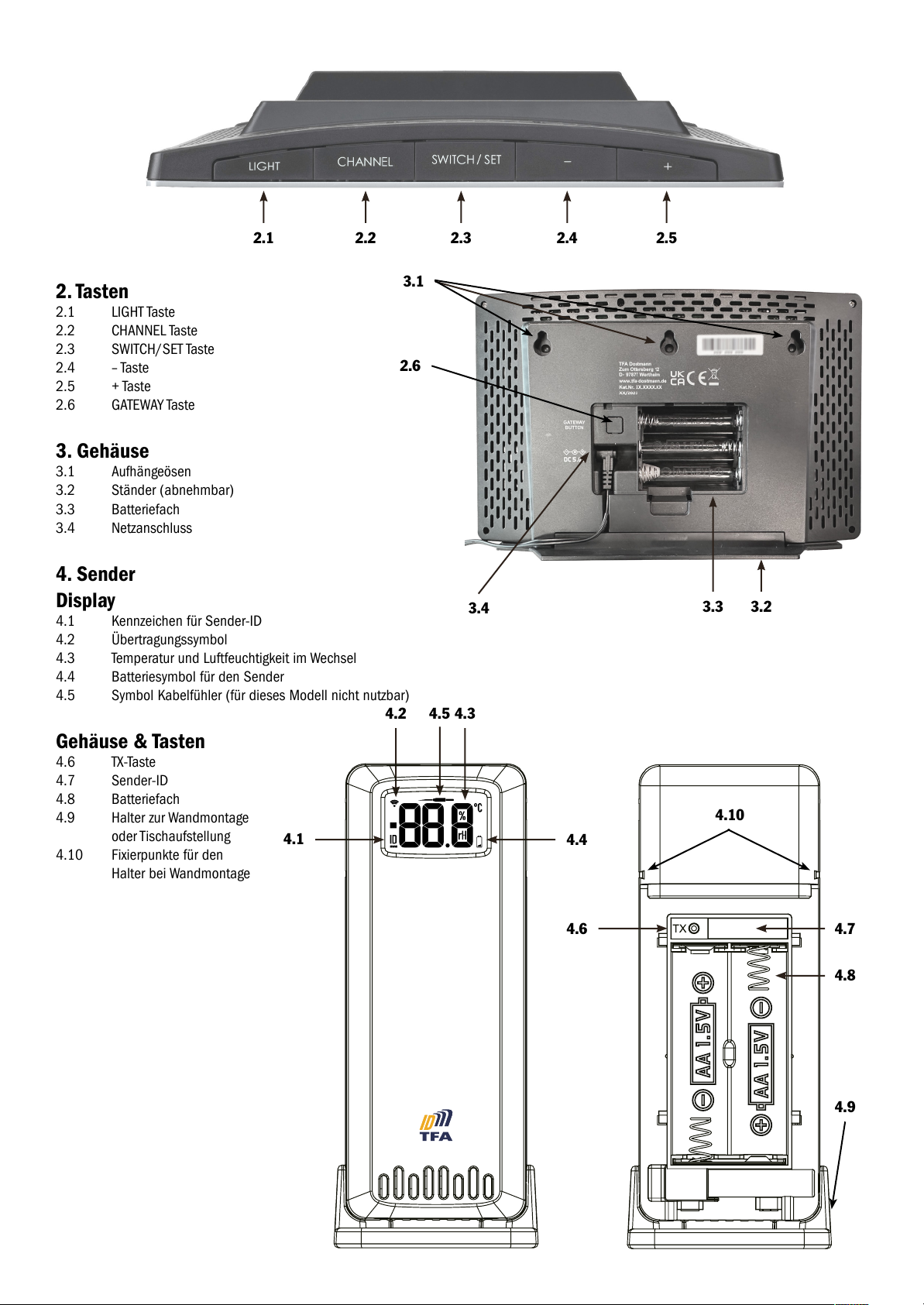
2. Tasten
2.1 LIGHT Taste
2.2 CHANNEL Taste
2.3 SWITCH/SET Taste
2.4 – Taste
2.5 + Taste
2.6 GATEWAY Taste
3. Gehäuse
3.1 Aufhängeösen
3.2 Ständer (abnehmbar)
3.3 Batteriefach
3.4 Netzanschluss
4. Sender
Display
4.1 Kennzeichen für Sender-ID
4.2 Übertragungssymbol
4.3 Temperatur und Luftfeuchtigkeit im Wechsel
4.4 Batteriesymbol für den Sender
4.5 Symbol Kabelfühler (für dieses Modell nicht nutzbar)
Gehäuse & Tasten
4.6 TX-Taste
4.7 Sender-ID
4.8 Batteriefach
4.9 Halter zur Wandmontage
oder Tischaufstellung
4.10 Fixierpunkte für den
Halter bei Wandmontage
2.1
2.6
3.1
3.2
2.2 2.3 2.4 2.5
3.3
3.4
4.1
4.2 4.34.5
4.4
4.7
4.10
4.8
4.9
4.6
Page 4
Erste Inbetriebnahme
Nehmen Sie sich die Schnellstart-Anleitung zur Hand und folgen Sie den einzelnen Schritten.
Für die Inbetriebnahme Ihrer TFA.me Station muss diese zunächst über Ihr WLAN-Netzwerk mit dem Internet verbunden werden. Anschließend
ist eine Standortkonguration erorderlich, um die korrekte Ortszeit und die Wettervorhersage ür diesen Standort zu erhalten. Zum Schluss
erfolgt die Inbetriebnahme des Senders.
Eine Registrierun g und ein Account auf dem TFA.me Portal sind nur dann notwendig, wenn Sie die lokalen Messwerte Ihrer TFA.me Geräte auch
online über das Portal abragen möchten. Weitere Inormationen zur Registrierung und Einrichtung nden Sie im
go.tfa.me Portal.
Bedienung
Information über die letzte Aktualisierung der Wetterdaten, Auswahl Kalenderanzeige und Sprache
y Wenn Sie die SWITCH/SET Taste für drei Sekunden gedrückt halten, gelangen Sie in den Einstellmodus.
y Es erscheint die Information über die letzte Aktualisierung der Wetterdaten. Alle Wettersymbole und Vorhersagedaten beginnen zu blinken
und Uhrzeit und Datum der letzten Wetterdatenaktualisierung werden angezeigt.
y Drücken Sie noch einmal die SWITCH/SET Taste. DATUM (Voreinstellung) blinkt.
y Mit der + oder - Taste können Sie zwischen DATUM oder WOCHENTAG als ständige Anzeige oder einem WECHSEL beider Anzeigen alle
5 Sekunden wählen.
y Drücken Sie noch einmal die SWITCH/SET Taste. DEUTSCH (Voreinstellung) blinkt.
y Mit der + oder - Taste können Sie die Spracheinstellung für die Wochentage und das Menü auswählen:
DEUTSCH, ENGLISH, DUTCH, ESPANOL, ITALIANO, FRANCAIS.
y Drücken Sie noch einmal die SWITCH/SET Taste, kehren Sie in den Normalmodus zurück.
y Das Gerät verlässt automatisch den Einstellmodus, wenn länger als 20 Sekunden keine Taste gedrückt wird. Das Gerät übernimmt da nn
automatisch die bisher getätigten Einstellungen.
Anzeige der Wettervorhersage
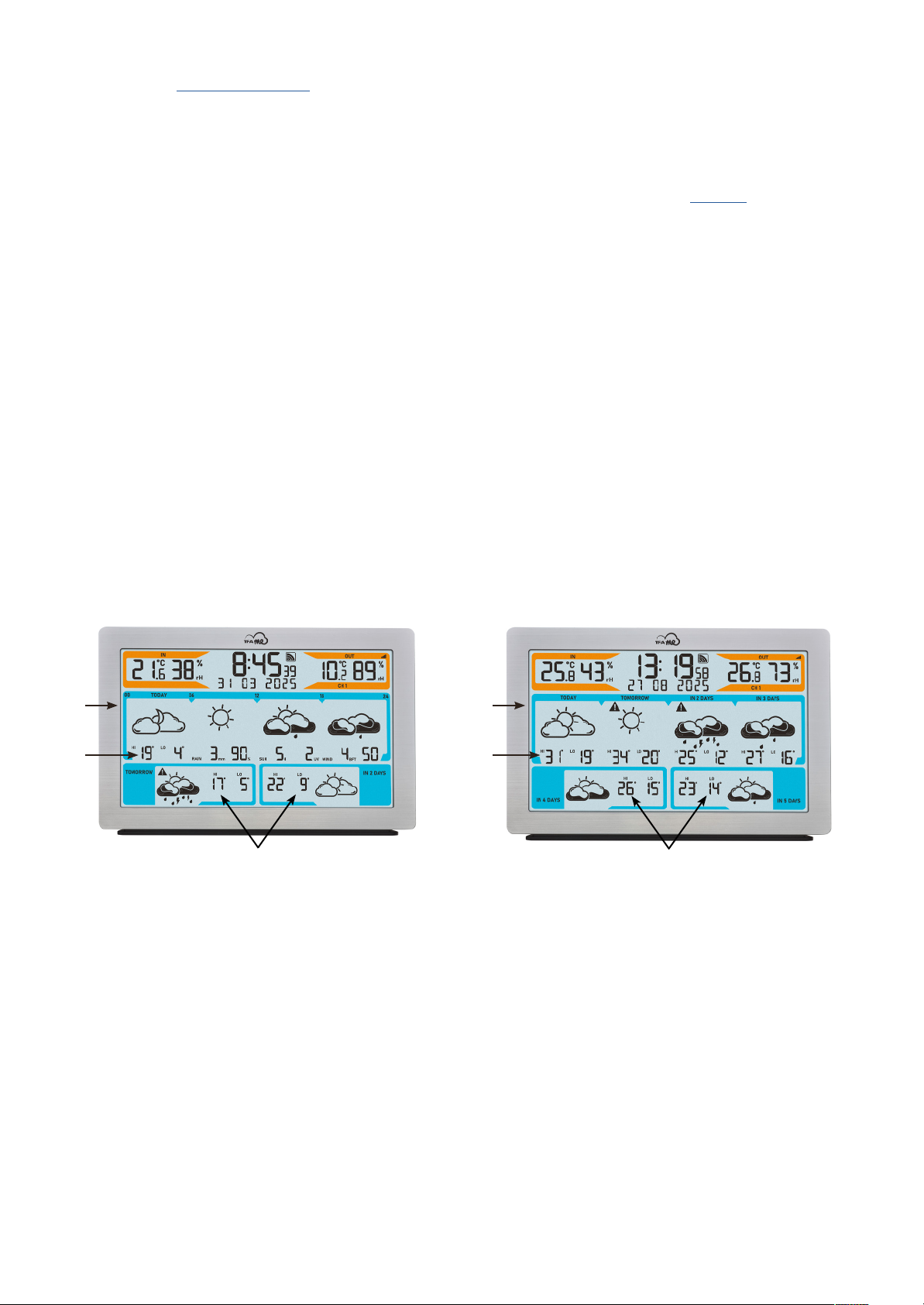
Das Gerät bietet zwei Anzeigeoptionen:
3-Tages-Vorhersage (Beispiel Fig. A):
A1 Wetterentwicklung ür den angezeigten Tag (TODAY) in 4 Tagesabschnitten: 00-06 Uhr, 06-12 Uhr, 12-18 Uhr, 18-24 Uhr
A2 Zusätzliche Wetterinormationen ür heute: HI Vorhersage Höchsttemperatur °C, LO Vorhersage Tiesttemperatur °C,
RAIN Regenmenge mm, Regenwahrscheinlichkeit %, SUN Sonnenstunden H, UV-Index, WIND Windgeschwindigkeit BFT,W indrichtung
A3 Ganztägige Vorhersage ür die olgenden 2 Tage (TOMORROW / IN 2 DAYS) mit HI Vorhersage Höchsttemperatur °C und
LO Vorhersage Tiesttemperatur °C
6-Tages-Vorhersage (Fig. B):
B1 Wetter ür heute (TODAY), morgen (TOMORROW), in 2 Tagen (IN 2 DAYS) und in 3 Tagen (IN 3 DAYS), als ganztägige Prognose
B2 HI Vorhersage Höchsttemperatur °C und LO Vorhersage Tiesttemperatur °C ür jeden einzelnen Tag
B3 Wetter in 4 Tagen (IN 4 DAYS) und in 5 Tagen (IN 5 DAYS) mit HI Vorhersage Höchsttemperatur °C und LO Vorhersage
Tiefsttemperatur °C als ganztägige Prognose
A1
Fig. A: 3-Tages-Vorhersage Fig. B: 6-Tages-Vorhersage
B1
A2 B2
A3
B3
Page 5
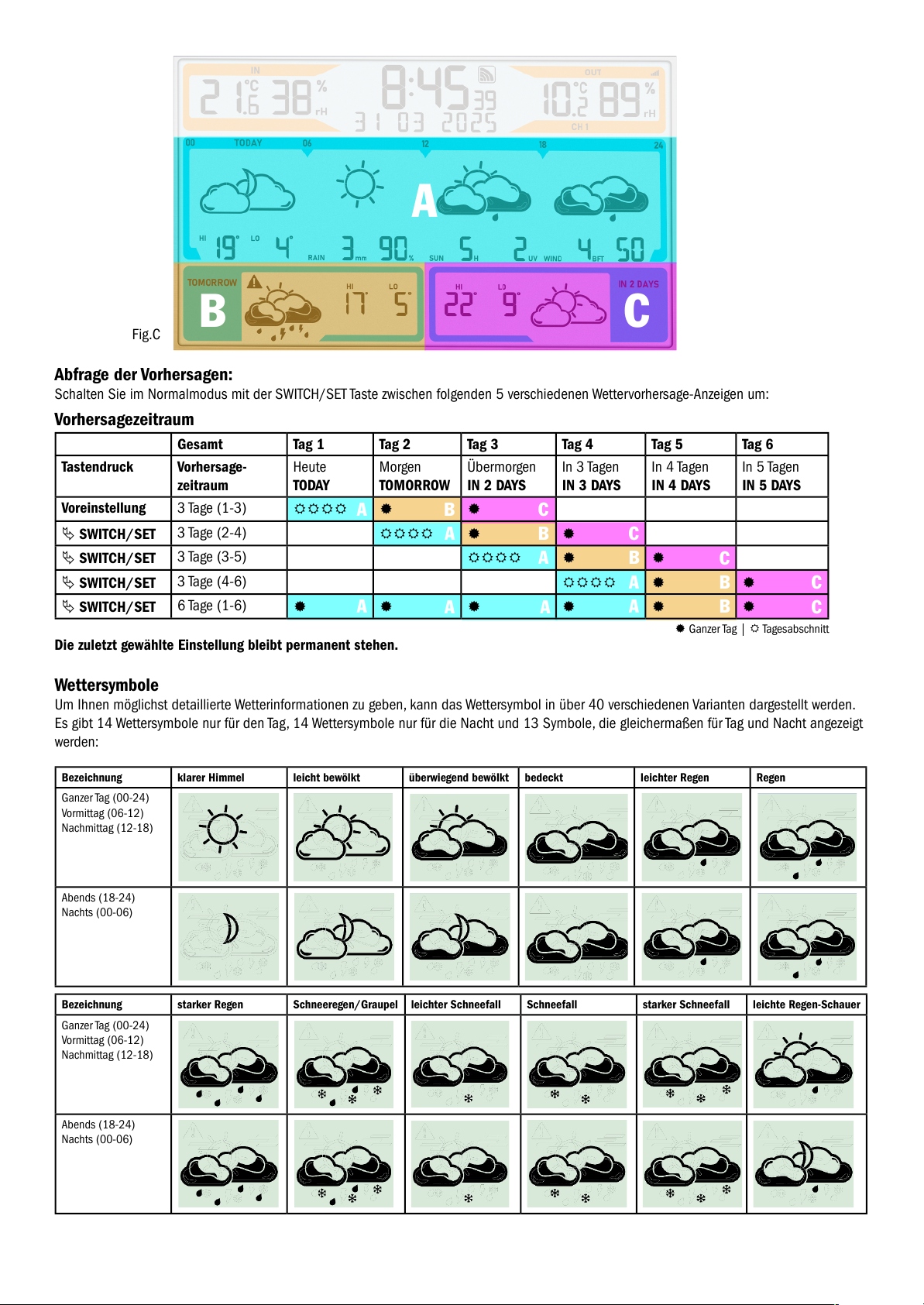
A
A
B C
Fig.C
Abfrage der Vorhersagen:
Schalten Sie im Normalmodus mit der SWITCH/SET Taste zwischen folgenden 5 verschiedenen Wettervorhersage-Anzeigen um:
Vorhersagezeitraum
Gesamt Tag 1 Tag 2 Tag 3 Tag 4 Tag 5 Tag 6
Tastendruck Vorhersage-
zeitraum
Heute
TODAY
Morgen
TOMORROW
Übermorgen
IN 2 DAYS
In 3 Tagen
IN 3 DAYS
In 4 Tagen
IN 4 DAYS
In 5 Tagen
IN 5 DAYS
Voreinstellung 3 Tage (1-3)
SWITCH/SET
3 Tage (2-4)
SWITCH/SET
3 Tage (3-5)
SWITCH/SET
3 Tage (4-6)
SWITCH/SET
6 Tage (1-6)
Die zuletzt gewählte Einstellung bleibt permanent stehen.
Wettersymbole
Um Ihnen möglichst detaillierte Wetterinformationen zu geben, kann das Wettersymbol in über 40 verschiedenen Varianten dargestellt werden.
Es gibt 14 Wettersymbole nur für den Tag, 14 Wettersymbole nur für die Nacht und 13 Symbole, die gleichermaßen für Tag und Nacht angezeigt
werden:
Bezeichnung klarer Himmel leicht bewölkt überwiegend bewölkt bedeckt leichter Regen Regen
Ganzer Tag (00-24)
Vormittag (06-12)
Nachmittag (12-18)
Abends (18-24)
Nachts (00-06)
Bezeichnung starker Regen Schneeregen/Graupel leichter Schneefall Schneefall starker Schneefall leichte Regen-Schauer
Ganzer Tag (00-24)
Vormittag (06-12)
Nachmittag (12-18)
Abends (18-24)
Nachts (00-06)
A
B
B
B
B
B
C
C
C
C
C
A
A
A
A
A
A
Ganzer Tag | Tagesabschnitt
Page 6
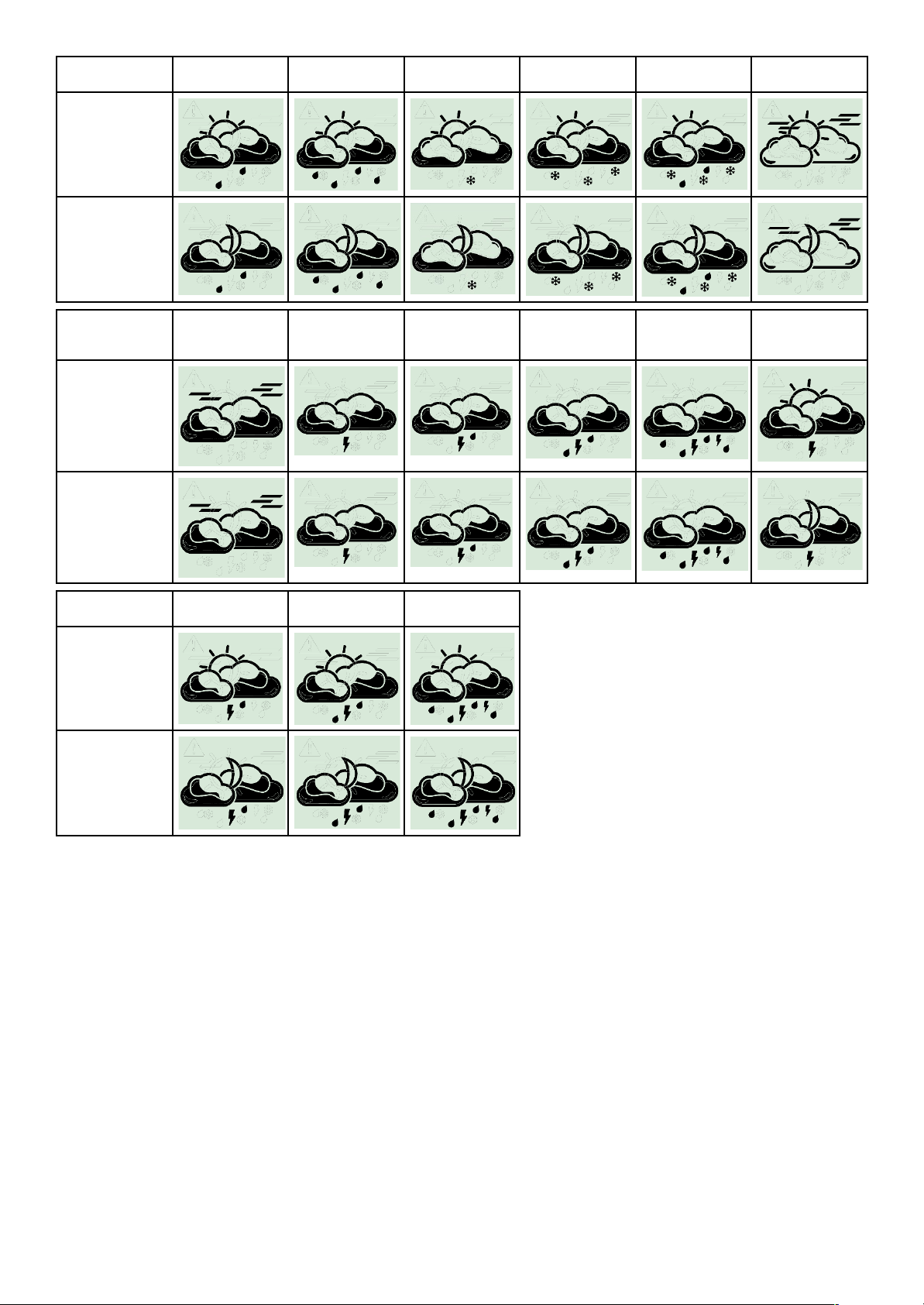
Bezeichnung Regen-Schauer starke Regen-Schauer Schnee-Schauer starke Schnee-
Schauer
Schneeregen- /
Graupel-Schauer
leichter Nebel
Ganzer Tag (00-24)
Vormittag (06-12)
Nachmittag (12-18)
Abends (18-24)
Nachts (00-06)
Bezeichnung starker Nebel trockenes Gewitter leichter
Gewitter-Regen
Gewitter-Regen starker
Gewitter-Regen
überwiegend
bewölkt, trockenes
Gewitter
Ganzer Tag (00-24)
Vormittag (06-12)
Nachmittag (12-18)
Abends (18-24)
Nachts (00-06)
Bezeichnung leichte
Gewitter-Schauer
Gewitter-Schauer starke
Gewitter-Schauer
Ganzer Tag (00-24)
Vormittag (06-12)
Nachmittag (12-18)
Abends (18-24)
Nachts (00-06)
Zusätzliche Wetterinformationen
y Tageshöchst- und Tiefsttemperatur
Zusätzlich zur aktuellen Wetterinformation sagt Ihnen die Station die Tageshöchst- und Tiefsttemperatur voraus. Beachten Sie, dass Abweichungen nach oben oder unten auftreten können, insbesondere in Regionen mit größeren Höhenunterschieden.
y Regenmenge
Die Niederschlagsmenge ist die Höhe der Wasserschicht, die sich bei Niederschlag (Regen, Schnee, Hagel, Nebel usw.) auf einer ebenen
Fläche gebildet hätte. 1 Millimeter Niederschlag entspricht genau 1 Liter Niederschlag pro Quadratmeter.
y Regenwahrscheinlichkeit
Die Regenwahrscheinlichkeit ist die über die Vorhersageregion gemittelte Wahrscheinlichkeit in Prozent, dass es an dem Tag, für den
die Vorhersage ermittelt wurde, tat sächlich irgendwann regnet. Besteht eine Regenwahrscheinlichkeit von 70 Prozent, heißt das:
In 70 von 100 Fällen, die durch die gleiche Wetterlage charakterisiert sind, treten Niederschläge im betreffenden Zeitraum in der
Vorhersageregion auf.
y Sonnenstunden
Die Sonnenscheindauer erlaubt Hinweise auf Zeit und Stärke der Bewölkung in der Vorhersageregion. Sie gibt die Zeitdauer in Stunden an,
in der eine wolkenlose und ungetrübt klare Atmosphäre eine Sonnenstrahlung erm öglicht.
Page 7
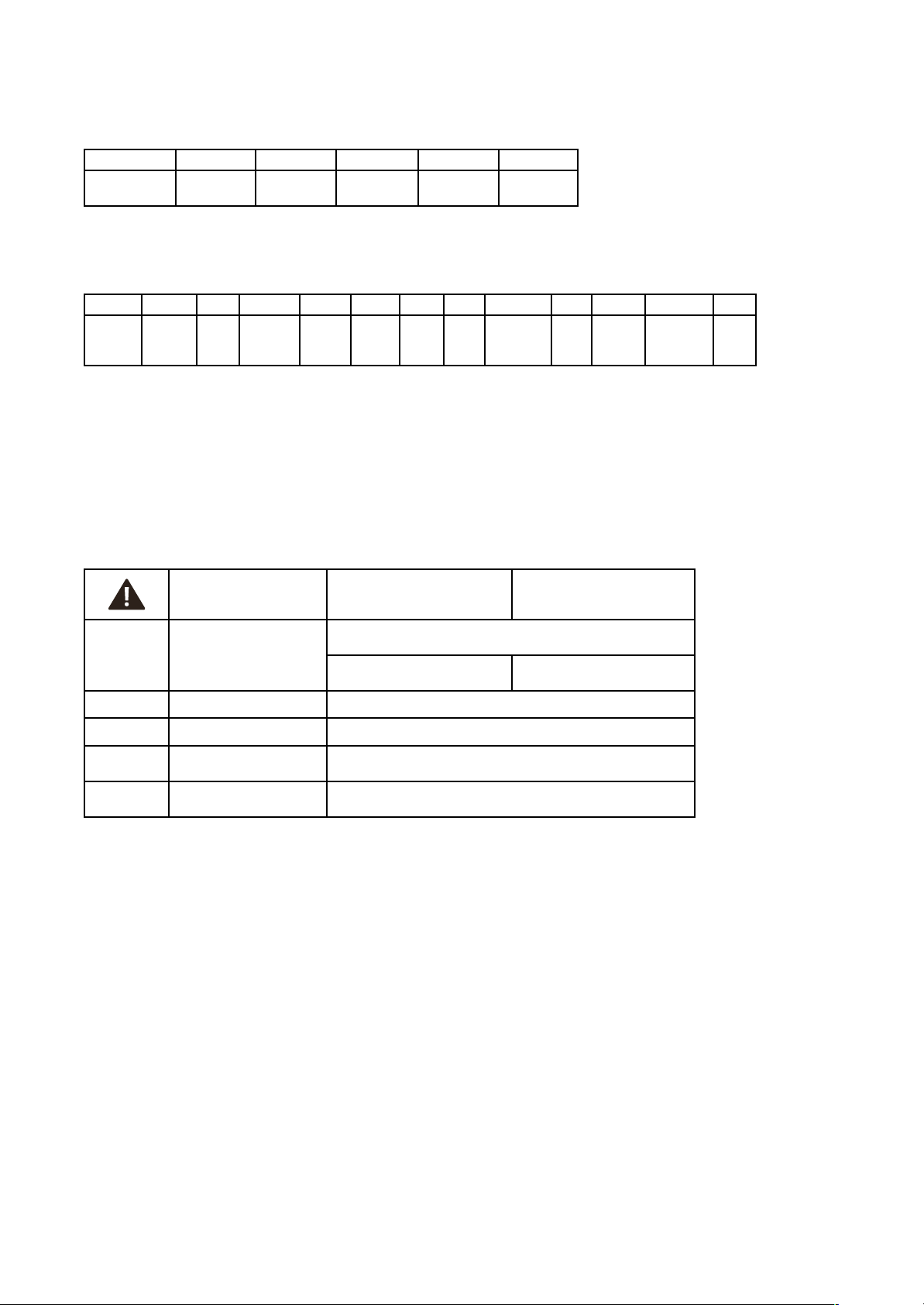
y UV-Index
Der UV-Index misst die Intensität der UV-Strahlung au der Erdoberfäche. Höherer UV-Index bedeutet stärkere UV-Strahlung und höheres
Risiko für Sonnenbrand und Hautschäden. Der UV-Index wird auf einer Skala von 0 bis 11+ gemessen. Der UV-Index bezieht sich immer
auf den Tageshöchstwert der UV-Strahlung, wenn die UV-St rahlen am gefähr lichsten sind, in der Regel um die Mittagszeit.
UV-Index 1-2 3-5 6-7 8-10 ab 11
Bezeichnung Schwache
UV-Belastung
Mäßige
UV-Belastung
Starke
UV-Belastung
Sehr starke
UV-Belastung
Extreme
UV-Belastung
y Windstärke
Die Windgeschwindigkeit wird in Beaufort ausgedrückt und über den angegebenen Zeitraum gemittelt.
Die Skala wird wie folgt angegeben:
0 1 2 3 4 5 6 7 8 9 10 11 12
Windstille leiser Zug leichte
Brise
schwache
Brise
mäßige
Brise
frische
Brise
starker
Wind
steifer
Wind
stürmischer
Wind
Sturm schwerer
Sturm
orkanartiger
Sturm
Orkan
y Windrichtung
Die Windrichtung ist deniert als die Richtung, aus welcher der Wind kommt und wird in acht Schritten angegeben:
N - Nord, NO - Nordost, O - Ost, SO - Südost, S - Süd, SW - Südwest, W - West und NW - Nordwest
y Warnfunktion
Bei Warnlagen für Sturm, Starkregen, Blitzeis, Hitze oder hohem UV-Wert erscheint ein Warndreieck neben dem angezeigten Tag
bzw. Tagesabschnitt.
Warnlage Ganzer Tag Tagesabschnitt
Regen
Achtung - bei massiven Niederschlagsmengen
Niederschlagsmenge 1Std. ≥ 15 mm
Niederschlagsmenge
24-Std.-Zeitraum ≥ 30 mm
Niederschlagsmenge
6-Std.-Zeitraum ≥ 20 mm
Wind Achtung - Sturmböen Windböen ≥ 8 bt / 75 km/h
Hitze Achtung - bei extremer Hitze Tageshöchsttemperatur HI ≥ 35°C (Warnanzeige am Nachmittag)
UV Achtung - bei mass iver
UV-Strahlung
UV-Index ≥ 8
Blitzeis/
Eisregen
Achtung - bei Blitzeis/Eisregen Warnereignis wird von wetter.com vorhersagt
(i.d.R. in Verbindung mit Schneeregen/Graupel)
Display-Beleuchtung (im Normalbetrieb mit Netzteil)
y Für die Display-Beleuchtung stehen 5 Einstellmöglichkeiten zur Wahl:
y Mit einem einfachen Tastendruck der Taste LIGHT kann zwischen LICHT AUS (Display-Beleuchtung deaktiviert), und den Stufen LVL „1“
(minimale Helligkeit), „2“, „3“ (Voreinstellung) und „4“ (maximale Helligkeit) gewählt werden. Die zuletzt gewählte Stufe bleibt dann
dauerhaft aktiv.
Hinweis: Die Beleuchtung im Dauerbetrieb funktioniert nur über Netzadapter! Im reinen Batteriebetrieb ist die Hintergrundbeleuchtung immer
ausgeschaltet und wird mit der LIGHT Taste für 10 Sekunden aktiviert.
AutoDim-Funktion
Es lässt sich auf Wunsch eine automatische Dimm-Funktion für die Nachtstunden aktivieren. Die Display-Beleuchtung wird dann automatisch
für den festgelegten Zeitbereich auf Stufe 1 (minimale Helligkeit) geschaltet.
y Drücken und halten Sie die Taste LIGHT ür 3 Sekunden gedrückt. Anschließend wird AUTO DIM angezeigt und die Voreinstellung AUS
blinkt. Nu tzen Sie nun die Taste + oder -, um AN auszuwählen.
y Bestätigen Sie die Eingabe mit der LIGHT Taste.
y Die Voreinstellung 22:00 für den Startzeitpunkt DIM START blinkt. Nutzen Sie die Taste + oder -, um den Startzeitpunkt anzupassen.
y Bestätigen Sie die Eingabe mit der LIGHT Taste.
y Die Voreinstellung 06:00 ür den Endzeitpunkt DIM ENDE blinkt. Nutzen Sie die Taste + oder -, um den Endzeitpunkt anzupassen.
y Bestätigen Sie die Eingabe mit der LIGHT Taste.
Page 8

Funksender
Nach der Inbetriebnahme des mitgelieferten Senders für Temperatur und Lu ftfeuchtigkeit ID-A0 (wie in der Schnellstart-Anleitung beschrieben),
erscheinen die Messwerte im Anzeigebereich für den Außensender (orange).
Betrieb mit mehreren Außensendern (maximal 5)
Au dem Display der Station können maximal 5 Sender angezeigt werden. Jeder Sender besitzt eine eigene este Identikationsnummer (neunstellig, alphanumerisch). Diese ID-Nummer ist au dem jeweiligen Sender angebracht.
y Halten Sie die TX Taste im Batterieach des Senders ür 5 Sekunden gedrückt, wird die ID-Nummer auch au dem Display des Senders
angezeigt (je drei Ziern nach einander).
y Wenn Sie mehrere Funksender angeschlossen haben, wechseln Sie mit der CHANNEL Taste zwischen den Kanälen 1 bis 5. Die ID-Nummer
des empfangenen Senders erscheint kurz und die Außenwerte werden auf dem Display der Basisstation angezeigt.
y Sie können auch einen automatischen Kanalwechsel einstellen. Nach dem letzten registrierten Sender erscheint bei erneuter Bedienung
der CHANNEL Taste das Kreissymbol für automatischen Ka nalwechsel.
y Drücken Sie die CHANNEL Taste noch einmal, um die Funktion auszuschalten.
Verlust des Sendersignals
y Wenn nach erfolgreichem Empfang der Kontakt zwischen Sender und Empfänger zu einem späteren Zeitpunkt verloren geht,
werden die zuletzt übertragenen Werte für 30 Minuten weiterhin angezeigt, danach erscheinen Striche „- -“.
Das Empfangssymbol für den Sender verschwindet.
y Nach 60 Minuten ohne Aktualisierung erolgt automatisch eine Suche (5 Minuten) nach dem registrierten Sender. Sollten keine Mess-
werte empangen worden se in, wird die Suche alle 60 Minuten wiederholt. Während der Sendersuche blinkt das Empangssymbol ür den
Sender.
Hinweis: Bei der automatischen Suche nach einem verlorenen Sender werden nur bekannte Sender (mit bereits registrierter individueller ID)
gesucht und akzeptiert. Sender mit neuen IDs werden von der Station nur in der Situation der ersten Sendersuche nach dem Einschalten des
Geräts und mit der manu ellen Sendersuche empfangen.
Manuelle Sendersuche
y Wählen Sie mit der CHAN NEL Taste auf der Basisstation den gewünschten Kanal aus.
y Halten Sie die CHANNEL Taste für drei Sekunden gedrückt. Ein Signalton ertönt. Eine bereits registrierter Sender-ID auf diesem Kanal wird
gelöscht und die Sendersuche beginnt.
y Das Funkempangssymbol ür den Sender blinkt. Drücken Sie nun kurz die TX Taste im Batterieach des Senders. Die Übertragung der
Daten erfolgt sofort und bei erfolgreichem Empfang werden die Außenwerte auf der Basisstation angezeigt.
Energieversorgung
y Die Basisstation ist so konzipiert, dass sie für einen Normalbetrieb mit dem mitgelieferten Netzteil betrieben werden muss.
Die Batterien 3 x 1,5 V AA (nicht inklusive) erhalten bei Stromausfall die Funktion aufrecht, damit keine Neueinstellung vorgenommen
werden muss und die Einstellungen erhalten bleiben.
y Im reinen Batteriebetrieb bendet sich die Station im Energiesparmodus, um den Stromverbrauch zu reduzieren. Ohne Netzteil unktionie-
ren die WLAN-Funktionen und die Online-Verbindung nicht. Es gibt keine dauerhate Displaybeleuchtung (nur au Tastendruck).
Batteriewechsel
y Sobald das Batteriesymbol in der Displayzeile der Außenwerte oder im Display des Senders erscheint, wechseln Sie bitte
die Batterien im Sender.
y Sobald im Anzeigebereich der Innenwerte das Batterie-Symbol angezeigt wird, sind entweder keine Pufferbatterien in der
Basisstation eingelegt oder sie sollten gewechselt werden.
y Wenn die Spannung im reinen Batteriebetr ieb den Mindestwert erreicht, beginnt da s Batteriesymbol zu blinken.
Unter dieser Bedingung besteht ein hohes Risiko eines Systemabsturzes . Wechseln Sie sofort die Batterien in der Basis station.
Wiederholte Inbetriebnahme
y Wenn das Gerät schon einmal in Betrieb genommen wurde und das WLAN-Modul noch Netzwerkdaten (SSID & PW) in seinem Speicher
hat, blink t das WLAN-Symbol nach dem Einstecken des Netzteils un d versucht, sich mit Internet und Server automatisch zu verbinden.
y Nach erfolgreicher Verbindung mit dem lokalen WLAN und dem Internet wird das WLAN-Symbol konstant angezeigt.
y Ist die Verbindung mit dem Se rver gegeben, erscheint auch der Rahmen um das Symbol.
y Falls der Server bereits eine Ortseinstellung ür diese Geräte-ID hat, wird nach einer kurzen Wartezeit, in der Regel 10 bis 20 Sekunden,
die entsprechende Ortszeit und das Datum vom Server empangen sowie die Wetterdaten.
y Während der Inbetriebnahme blinkt auch das Übertragungssymbol ür den Außensender. Drücken Sie kurz die TX Taste im Batterieach des
Senders.
Page 9

Geräte-IDs beauskunften
Gateway
y Wenn Sie die - Taste im Normalmodus für 3 Sekunden gedrückt halten, zeigt die Station für 5 Sekunden die Geräte-ID des eingebauten
WLAN-Gateway-Moduls an (9-stellig).
WLAN-Version, Firmware-Version und aktuelle IP-Adresse
y Wenn Sie die + Taste im Normalmodus ür 3 Sekunden gedrückt halten, zeigt die Station zuerst die WLAN-Version „WIFI XXXX“ ür
4 Sekunden, dann die Firmware-Version „FW XXXX“ ür 4 Sekunden, dann erscheint „IP XX X.“ (die ersten 3 Ziern) ür 4 Sekunden,
danach werden die restlichen 9 Ziern der IP-Adresse „XXX.XXX .XXX“ ür 4 Sekunden angezeigt. Danach kehrt das Gerät wieder in den
normalen Modus zurück.
Wenn derzeit keine Verbindung zu einem Netzwerk besteht, erscheinen für die IP-Adresse nur Striche („----“), im AccessPoint-Modus
wird die vorprogrammierte IP für den AP-Modus an gezeigt, nach erfolgreicher Verbindung mit dem lokalen Netzwerk wird die IP im
lokalen Netzwerk angezeigt.
Factory-Reset
y Im Falle einer gravierenden Fehlfunktion oder wenn Sie alle Einstellungen und Speicher der Station und des WLAN-Gateway-Moduls auf
Werkseinstellungen zurücksetze n möchten, drücken und halten Sie die Tasten + und - für 5 Sekunden gleichzeitig gedrückt. Ein Signalton
ertönt. RESET erscheint im Display, rechts daneben ein sich im Laufe des Prozesses veränderndes Symbol. Zum Abschluss nach ca. 30
Sekunden ertönt ein weiterer Signalton.
y Das Gerät muss nun wieder neu in Betrieb genommen werden (siehe Schnellstart-Anleitung).
Platzierung
Aufstellen und Befestigen der Basisstation und des Senders
y Mit dem ansteckbaren Ständer au der Un terseite kann die Basisstation au einer glatte n Oberfäche augestellt werden.
y Mit den Aufhängeösen an der Rückseite kann die Basisstation an der Wand im Wohnraum befestigt werden.
y Vermeiden Sie die Nähe zu anderen elektrischen Ge räten (Fernseher, Computer, Funktelefone) und massiven Metallgegenständen.
y Betreiben Sie die Basisstation nicht in un mittelbarer Nähe der Heizung, anderer Hitzequellen oder in direkter Sonneneinstrahlung.
y Der Außensender kann mit dem Halter au einer geraden, glatten Ob erfäche augestellt werden oder an der Wand beestigt werden.
Suchen Sie sich einen sc hattigen, niederschlagsgeschützten Platz für den Außensender aus. (Direkte Sonneneinstrahlung verfälscht die
Messwerte und ständige Nä sse belastet die elektronischen Ba uteile unnötig).
y Prüen Sie, ob eine Übertragung der Messwerte vom Außensender am gewünschten Austellort zur Basisstation stattndet (Reichweite Frei-
feld ca. 100 Meter), bei massiven Wänden, insbesondere mit Metallteilen kann sich die Sendereichweite erheblich reduzieren.
y Suchen Sie sich gegebenenfalls einen neuen Aufstellort für Außensender und/oder Basisstation.
y Stellen Sie sicher, dass die Basisstation am Aufstellort ausreichend Empfang des WLAN-Signals hat.
Pfege und Wartung
y Reinigen Sie die Geräte mit einem weichen, leicht feuchten Tuch. Keine Scheuer- oder Lösungsmittel verwenden!
y Entfernen Sie die Batterien und ziehen Sie den Stecker der Basisstation, wenn Sie die Geräte längere Zeit nicht verwenden.
y Bewahren Sie Ihr e Geräte an einem trockenen Platz auf.
Page 10
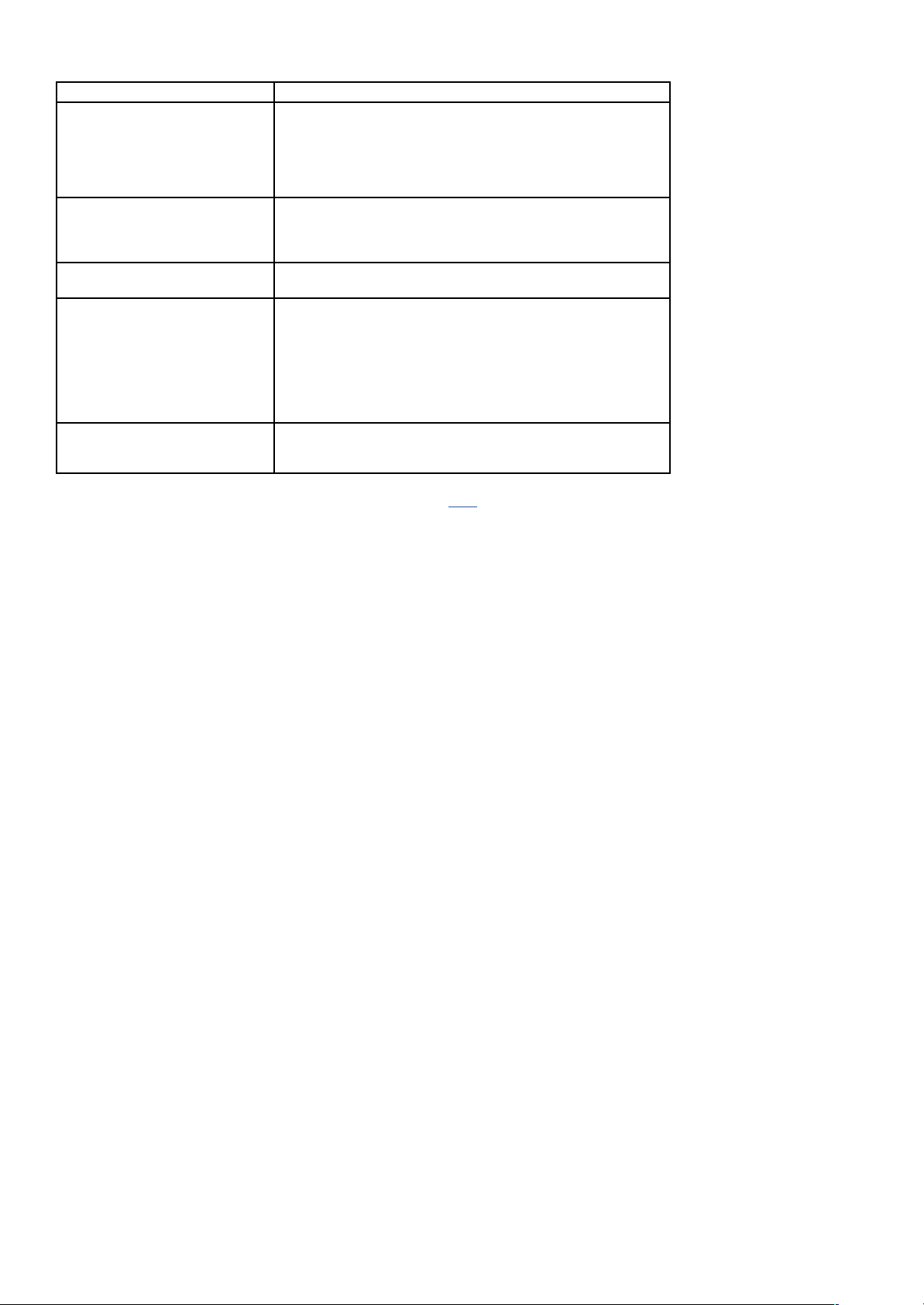
Fehlerbeseitigung
Problem Lösung
Keine Anzeige au f der Basisstation Netzbetrieb:
Basisstation mit Netzteil anschließen
Netzteil überprüfen
Batteriebetrieb:
Batterien po lrichtig einlegen
Batterien wechseln
Display der Basisstation nicht beleuchtet Netzbetrieb:
Hintergrundbeleuchtung mit der LIGHT Taste aktivieren
Batteriebetrieb:
Hintergrundbeleuchtung kurzzeitig aktivieren mit beliebiger Taste
Keine Anzeige au f dem Sender Batterien po lrichtig einlegen
Batterien wechseln
Kein Außensenderempfang
Anzeige „- -“
Kein Außensender installiert
Batterien de s Außensenders prüfen
(nur Batterien/Akkus mit 1,5V Spannung verwenden!)
Neuinbetriebnahme von Außensender und Basisstation gemäß Bedienungsanleitung
Manuelle Außensendersuche gemäß Bedienungsanleitung starten
Anderen Aufstellort für Außensender und/oder Basisstation wählen
Abstand zwischen Außensender und Basisstation verringern
Beseitigen der Störquellen
Unkorrekte Anzeige Factory Reset
Batteriebetrieb:
Batterien wechseln
Weitere Inormationen zur Problembehandlung nden Sie bei den FAQs auf unserer Homepage.
Wenn Ihr Gerät trotz dieser Maßnahmen immer noch nicht funktioniert, wenden Sie sich an den Händler,
bei dem Sie das Produkt gekauft ha ben.
09/2024
TFA Dostmann GmbH & Co. KG
Zum Ottersberg 12
97877 Wertheim|Germany
www.tfa-dostmann.de
Page 11
TFA.me ID-02
WIFI Wireless Weather Station
Cat. No. 35.8100.54
Delivery contents
y WIFI Wireless weather sta tion (base station)
y Power adaptor for base station
y Thermo-hygro sensor ID-A0 (cat.-no. 30.3900.02)
y Quick set-up guide
Thank you for choosing this product from TFA.
Before you use this product
Please make sure you read the instruction manu als carefully. Following and respecting the instructions in your manuals will prevent damage to
your instrument and loss of your statutory rights arising from defects due to incorrect use. We shall not be liable for any damage occurring as
a result of non-following of these instructions. Likewise, we take no responsibility for any incorrect readings or for any consequences resulting
from them. Pay particular attention to the safety and disposal instructions in the Quick set-up guide supplied with the device! Please keep all
instruction manu als safe for future reference!
Instruction manuals
Type of instruction manual/languages Where to nd Content
Instruction manu al for 35.8100.5 4
D-GB
This instruction manual 9 Functional description of the
WIFI Wireless Weather Station
Quick set-up guide
for 35.8100.54
D-GB-F-I-NL-E
Part of delivery content and homepage
Open here!
9 Getting started
9 Specications
9 Safety notices
9 Waste dis posal
9 Declaration of conformity
Manual TFA.me general
D-GB
go.tfa.me Web-Portal
Open here!
9 Getting started general instruction
9 Functional description of the TFA.me portal
FAQ Frequently asked questions
D-GB
General Questions
Questions about the TFA.me Portal
Questions about the Initial Setup
9 General questions and answers
9 Questions and answers about the
TFA.me portal
9 Questions and answers about the
initial setup
For your safety
This product is exclusively intended for the range of application described. It should only be used as described within these instruction manuals. Unau thorised repairs, alterations or changes to the devices are prohibited.
Range o application and all the benets o your new instrument at a gla nce
y Local proessional orecast rom wetter.com or 3 to 6 days
y 40 different weather symbols, daily highest and lowest temperatures, probability/amount of rain, hours of sunshine, UV index,
wind speed/direction
y Warning function in the event of storm, heavy rain, black ice, heat or high UV values
y Wireless transmission o ou tdoor temperature and humidity via transmitter (868 MHz, max. 100 m),
up to 5 transmitters can be displayed (optionally)
y Indication of indoor temperature and humidity
y Illuminated display with 4 brightness levels and dimming function
y Time with date or weekday (6 languages)
y Wall mounting or tab le stand
y Dimensions and weight: 217 x 30 (47) x 139 (141) mm, 378 g
y Power adapter included, batteries 3 x AA (backup) and 2 x AA (for transmitter) not included
With gateway function for online access to measured values on the free TFA.me platform:
After registering at go.TFA.me, the measured values of the indoor sensors, of the supplied outdoor transmitter and optionally of up to 50 TFA-ID
transmitters within the transmission range can be monitored and analysed online. The functional scope of the TFA.me portal includes an alarm
function via e-mail, a clear diagram function and export options, as well as a data storage for at least 12 months. The language setting is
German or English.
Page 12
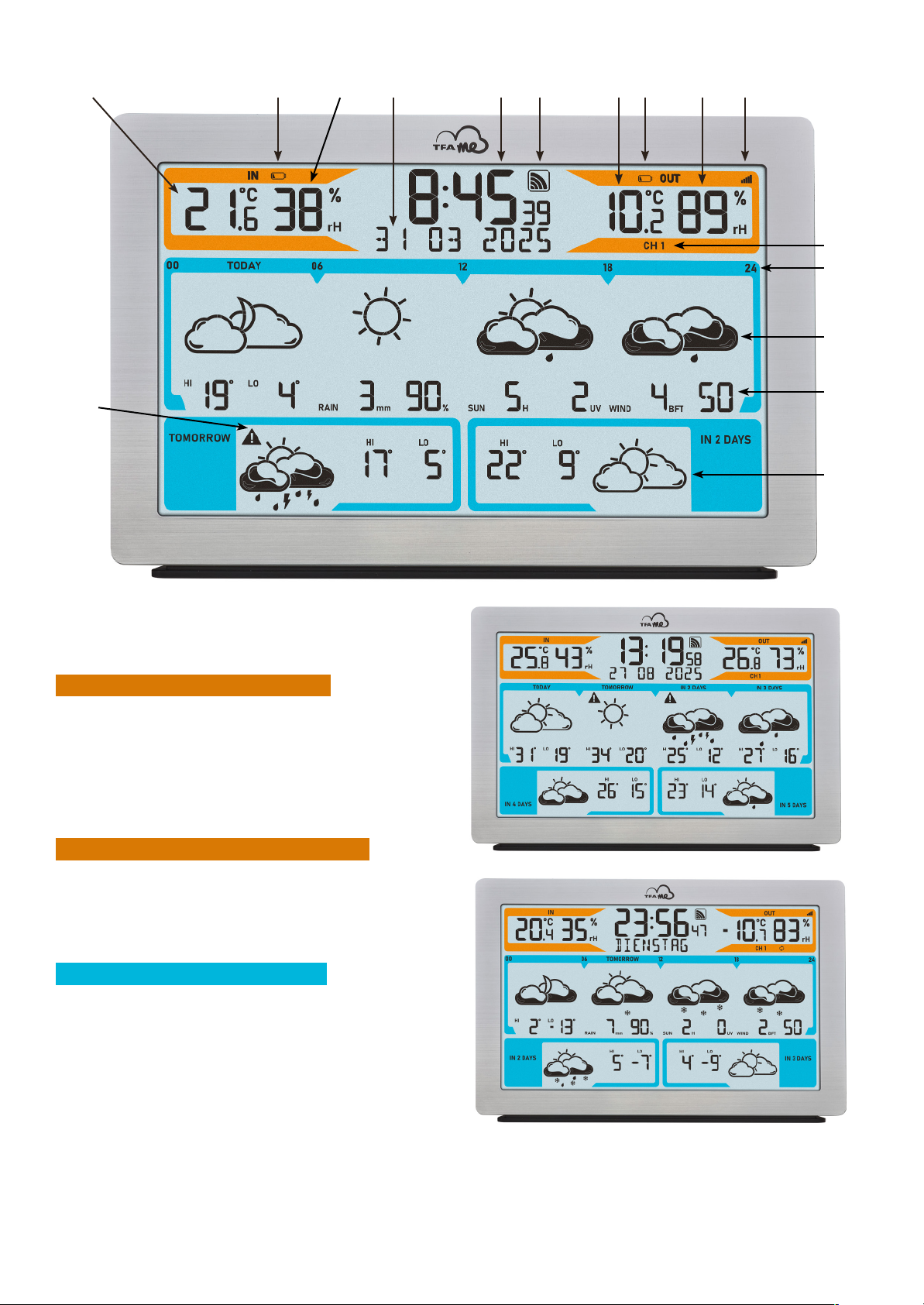
Elements
Base station
1. Di splay
Display area: indoor sensors (orange)
1.1 Indoor temperature
1.2 Battery symbol for the base station
1.3 Indoor humidity
Display area: time, calendar and info box
1.4 Time
1.5 Reception symbol WIFI
1.6 Date/weekday/ino box
Display area: outdoor transmitters (orange)
1.7 Outdoor temperature
1.8 Battery symbol for the transmitter
1.9 Outdoor humidity
1.10 Reception symbol for the transmitter
1.11 Channel 1/2/3/4/5 and circle symbol for alternating channel
Display area: weather forecast (blue)
1.12 Day/Time for the part of the day of the forecast
1.13 Weather symbol for the displayed day/part of the day
1.14 Additional weather information for the displayed day
1.15 Weather symbol for the displayed day with highest
and lowest temperatures
1.16 Warning signal or critical weather situations
1.1 1.2 1.3 1.4 1.5 1.7 1.8 1.9 1.10
1.11
1.12
1.16
1.13
1.14
1.15
1.6
Page 13
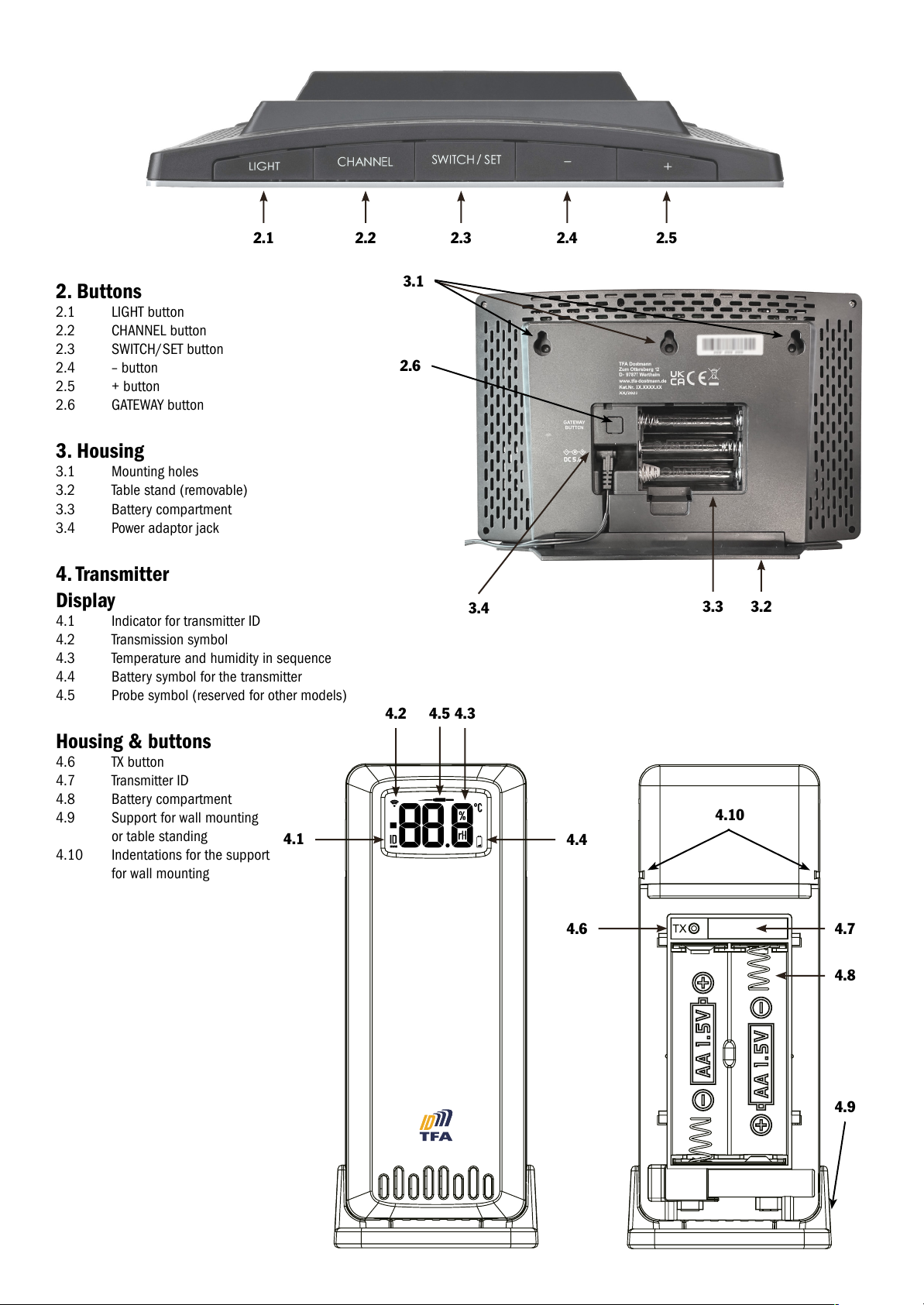
2. Buttons
2.1 LIGHT button
2.2 CHANNEL button
2.3 SWITCH/SET button
2.4 – button
2.5 + button
2.6 GATEWAY button
3. Housing
3.1 Mounting holes
3.2 Table stand (removable)
3.3 Battery compartment
3.4 Power adaptor jack
4. Transmitter
Display
4.1 Indicator for transmitter ID
4.2 Transmission symbol
4.3 Temperature and humidity in sequence
4.4 Battery symbol for the transmitter
4.5 Probe symbol (reserved for other m odels)
Housing & buttons
4.6 TX button
4.7 Transmitter ID
4.8 Battery compartment
4.9 Support for wall mounting
or table standing
4.10 Indentations for the support
for wall mounting
2.1
2.6
3.1
3.2
2.2 2.3 2.4 2.5
3.3
3.4
4.1
4.2 4.34.5
4.4
4.7
4.10
4.8
4.9
4.6
Page 14
Initial start-up
Use the quick set-up guide and ollow the individual steps. To start up your TFA.me station, it must rst be connected to the Internet via your
WiFi network. Following this it is necessary to co ngure the location to receive the correct local time and the weather orecast. Finally, the
transmitter is started up.
Registration and an account on the TFA.me portal are only necessary if you want to query the local measured values of your TFA.me devices
online via the platform. Further information on registration and setup can be found on the go.tfa.me portal.
Operation
Information about the last update of the weather data, selection of calendar display and language
y Press and hold the SWITCH/SET button for three seconds to enter the setting mode.
y Inormation about the last update o the weather data appears. All weather symbols and orecast data start to fash and the time an d
date of the last weather data update are displayed.
y Press the SWITCH/SET button again. DATUM/DATE (deault) fashes on the display.
y With the + or - button you can choose between DATUM/DATE or WOCHENTAG/WEEKDAY as a permanent display or select
WECHSEL/ALTERNATE for a changing display every 5 seconds.
y Press the SWITCH/SET button again. DEUTSCH/GERMAN (deault) fashes on the display.
y Press the + or - button to set the day-o-the week and menu language: DEUTSCH, ENGLISH, DUTCH, ESPANOL, ITALIANO, FRANCAIS.
y If you select ENGLISH, the day-of-the week and menu language will now appear in English.
y Press the SWITCH/SET button again and you will return to normal mode.
y The device will automatically quit the setting mode if no button is pressed for 20 seconds. The device will automatically use the settings
you have made so far.
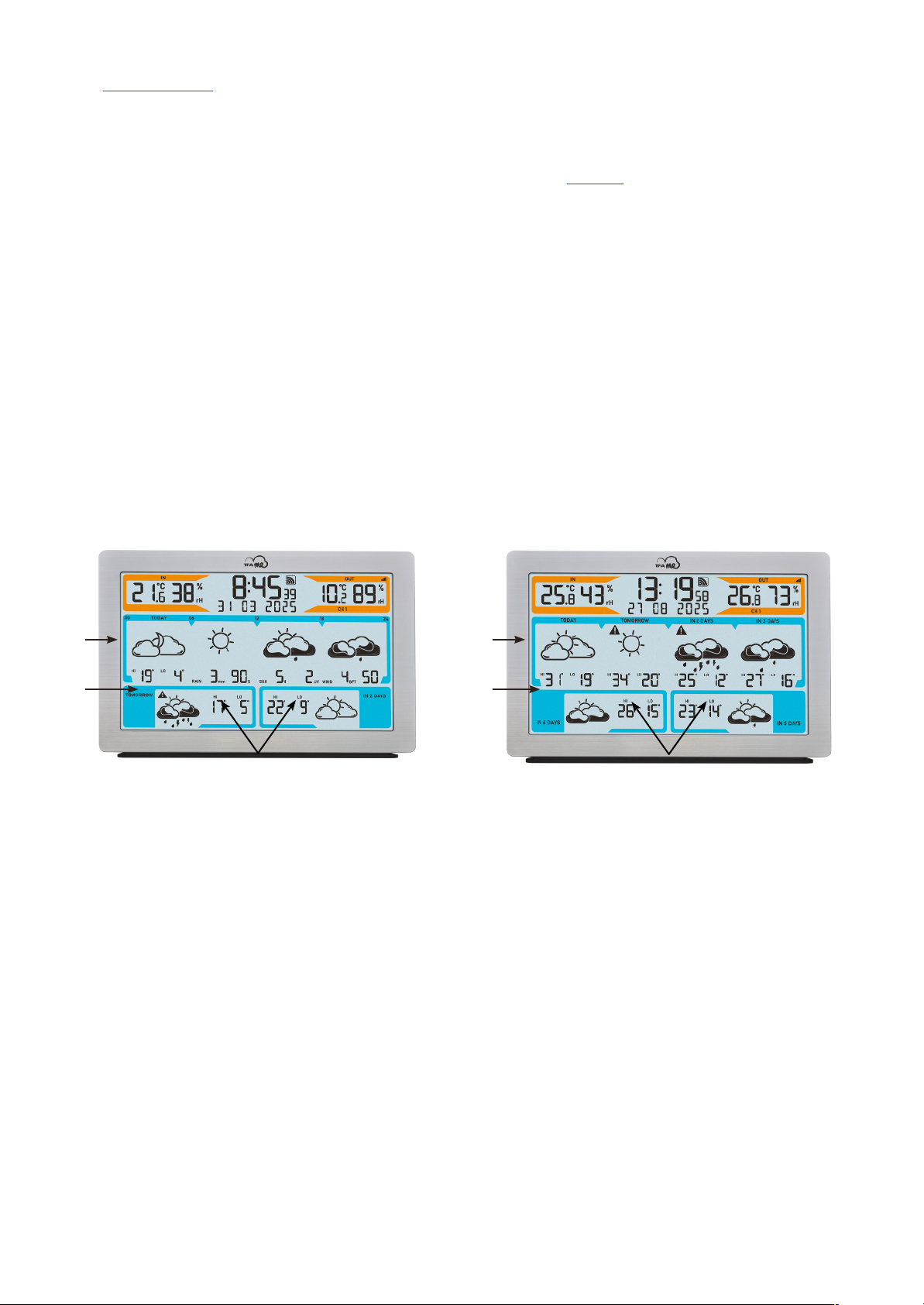
Display of weather forecast
Choose between two display op tions:
3-day forecast (example Fig. A):
A1 Weather development or the displayed day (TODAY) in 4 parts: 00-06, 06-12, 12-18 and 18-24 o‘clock
A2 Additional weather inorm ation or tod ay: HI orecast highest temperature °C, LO orecast lowest temperature °C ,
RAIN rainfall ammount mm, rain probability %, SUN sunshine hours H, UV index, WIND wind speed BFT, wind direction
A3 All-day orecast or the ollowing 2 days (TOMORROW / IN 2 DAYS) with HI orec ast highest temperature °C
and LO orecast lowest temperature °C
6-day forecast (example Fig. B):
B1 Weather or TODAY, TOMORROW, IN 2 DAYS and IN 3 DAYS, as an all-day orecast
B2 HI orecast highest temperature °C and LO or ecast lowest temperature °C, or every single day
B3 Weather IN 4 DAYS and IN 5 DAYS with HI orecast highe st temperature °C and LO orecast lowest temperature °C,
as an all -day forecast
A1
Fig. A: 3-day forecast Fig. B: 6-day forecast
B1
A2 B2
A3
B3
Page 15
A
A
B C
Fig.C
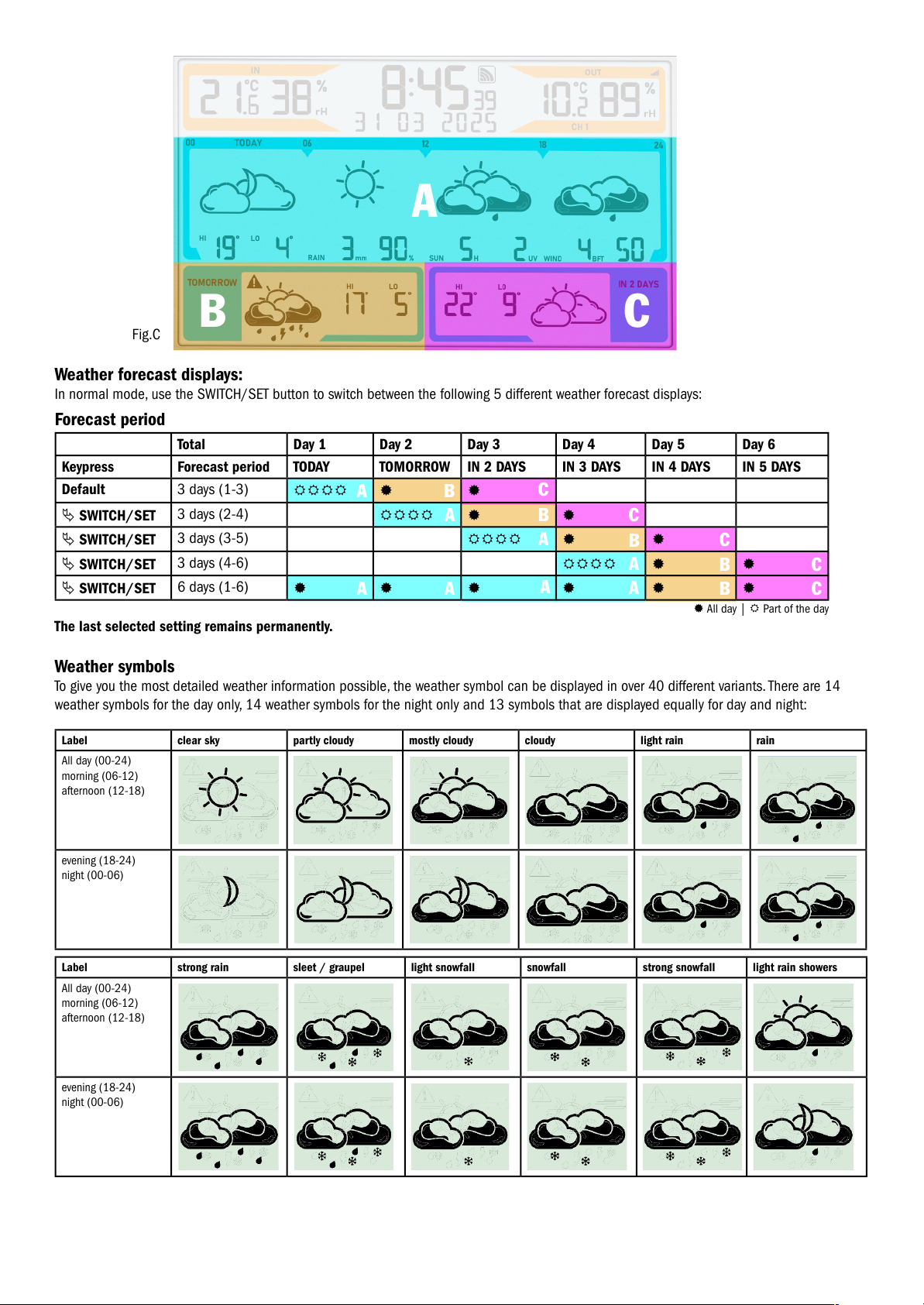
Weather forecast displays:
In normal mode, use the SWITCH/SET button to switch between the following 5 different weather forecast displays:
Forecast period
Total Day 1 Day 2 Day 3 Day 4 Day 5 Day 6
Keypress Forecast period TODAY TOMORROW IN 2 DAYS IN 3 DAYS IN 4 DAYS IN 5 DAYS
Default 3 days (1-3)
SWITCH/SET
3 days (2-4)
SWITCH/SET
3 days (3-5)
SWITCH/SET
3 days (4-6)
SWITCH/SET
6 days (1-6)
The last selected setting remains permanently.
Weather symbols
To give you the most detailed weather information possible, the weather symbol can be displayed in over 40 different variants. There are 14
weather symbols for the day only, 14 weather symbols for the night only and 13 symbols that are displayed equally for day and night:
Label clear sky partly cloudy mostly cloudy cloudy light rain rain
All day (00-24)
morning (06-12)
afternoon (12-18)
evening (18-24)
night (00-06)
Label strong rain sleet / graupel light snowfall snowfall strong snowfall light rain showers
All day (00-24)
morning (06-12)
afternoon (12-18)
evening (18-24)
night (00-06)
A
B
B
B
B
B
C
C
C
C
C
A
A
A
A
A
A
All day | Part of the day
Page 16
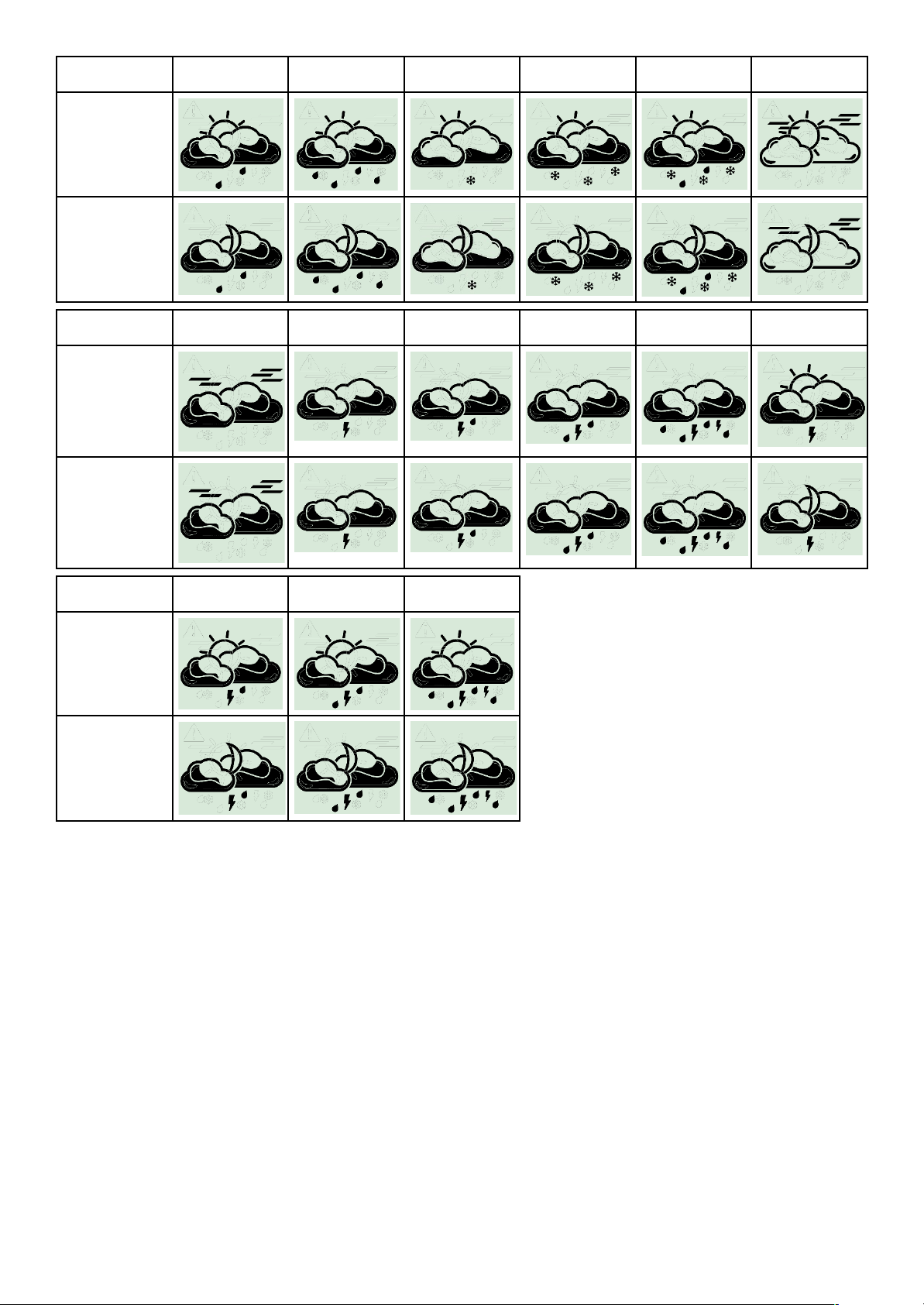
Short description rain showers strong rain showers snow showers strong sno w showers sleet / graupel
showers
light fo g
All day (00-24)
morning (06-12)
afternoon (12-18)
evening (18-24)
night (00-06)
Label strong fog dry thunderstorm light th undery rain thundery rain strong thundery rain mostly cloudy
dry thunderstorm
All day (00-24)
morning (06-12)
afternoon (12-18)
evening (18-24)
night (00-06)
Label light th undershowers thundershowers strong
thundershowers
All day (00-24)
morning (06-12)
afternoon (12-18)
evening (18-24)
night (00-06)
Additional weather information
y Daily highest and lowest temperatures
In addition to the current weather information, the station also predicts the daily highest and lowest temperatures. Please note that deviations upwards or downwards can occur, especially in regions with large differences in altitude.
y Rainfall amount
The amount o precipitation is the height o the layer o water that would have ormed on a fat surace in the event o precipitation (rain,
snow, hail, fog, etc.). 1 mm of precipitation equals 1 litre of water per sq uare metre.
y Probability of rainfall
The probability of rain is the probability in per cent, averaged over the forecast region, that it will actually rain at some point on the day for
which the forecast was determined. If there is a 70 per cent probability of rain, this means that in 70 out of 100 cases characterised by
the same weather situation, precipitation will occur in the forecast region during the relevant period.
y Sunshine duration
The duration of sunshine provides an indication of the time and intensity of cloud cover in the forecast region. It indicates the tim e in
hours during which a cloudless and completely clear atmosphere allows solar radiation.
Page 17
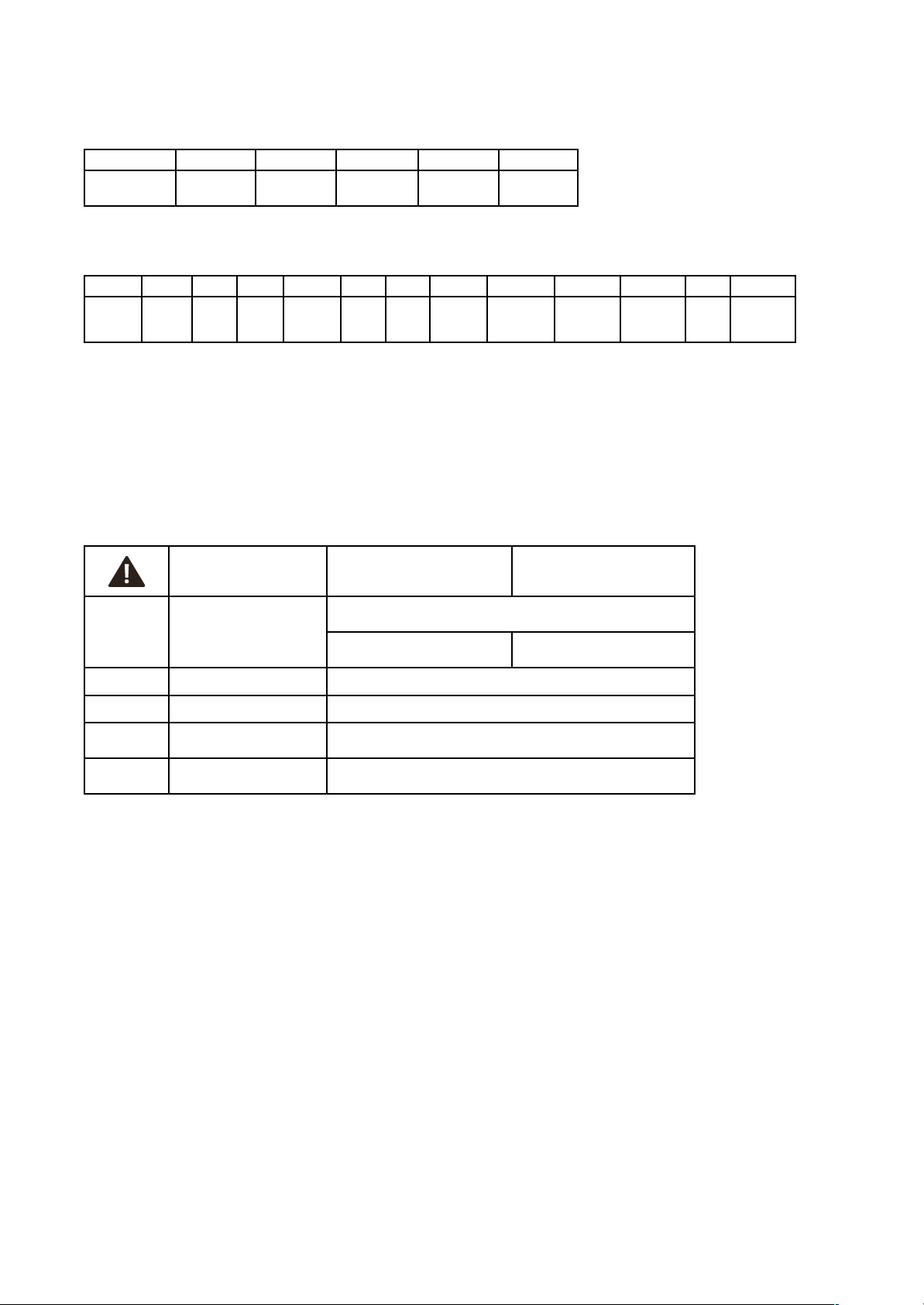
y UV-Index
The UV index measures the intensity o UV radiation on the earth‘s su race. A higher UV index means stronger UV radiation and a higher
risk of sunburn and skin damage. The UV index is measured on a scale from 0 to 11+ The UV index always refers to the maximum daily
value of UV radiation when the UV rays are at their most dangerous, usually around midday.
UV-Index 1-2 3-5 6-7 8-10 from 11
Label Low
UV radiation
Moderate
UV radiation
Strong
UV radiation
Very strong
UV raditation
Extreme
UV radiation
y Wind speed
The wind speed is indicated in Beauort and averaged over the specied period. The scale is shown as ollowsn:
0 1 2 3 4 5 6 7 8 9 10 11 12
Calm Light air Light
breeze
Gentle
breeze
Moderate
breeze
Fresh
breeze
Strong
breeze
Moderate
gale
Fresh gale Strong/
severe gale
Storm,
whole gale
Violent
storm
Hurricaneforce
y Wind direction
Wind direction is generally reported by th e direction from which the wind originates and is given in eight steps:
N - north, NE - no rtheast, E - ea st , SE - so utheast, S - south, SW - southwest, W - west and NW - northwest
y Warning function
In the event of warnings for storms, heavy rain, black ice, heat or high UV values, a warning triangle appears next to the
displayed day or part of the day.
Warning situation Whole day Part of the day
Rain
Caution - massive amounts of
precipitation
Amount o precipitation 1 hour ≥ 15 mm
Amount of precipitation
in 24 hours ≥ 30 mm
Amount of precipitation
in 6 hours ≥ 20 mm
Wind Caution - strong gale Gales ≥ 8 bt / 75 km/h
Heat Caution - extreme heat Highest daily temperature HI ≥ 35°C (warning display in th e aternoon)
UV Caution - very strong
UV radiation
UV-Index ≥ 8
Black ice/
freezing rain
Caution black ice/ freezing rain
Warning event is predicted by wetter.com
(usually in conjunction with sleet/graupel)
Display illumination (in normal operation with power adapter)
y There are 5 setting options for the display illumination:
y With a simple press o the LIGHT button, you can choose between LIGHT OFF (display illumination deactivated), and the levels
LVL1 (minimum brightness), 2, 3 (default setting) and 4 (maximum brightness). The last selected level will remain permanently active.
Note: The light in continuous operation only works with power adapter. In pure battery operation, the backlight is always switched off and is
activated for 10 seconds using the LIGHT button.
AutoDim function
If you wish, an automatic dimming function can be activated during night time.
The display illumination is then automat ically switched to level 1 (minimum brightness) or the specied time slot.
y Press and hold the LIGHT button or 3 seconds. AUTO DIM appears on the display and OFF (deault) fashes.
y Press the + or - button to select ON.
y Conrm the setting with the LIGHT button.
y The start time DIM START fashes (22:00 deault). Us e the + or - button to adjust the start time.
y Conrm the setting with the LIGHT button.
y The stop time DIM STOP fashes (6:00 deault). Use the + or - button to adjust the stop time.
y Conrm the setting with the LIGHT button.
Page 18

Wireless transmitters
After start-up of the supplied transmitter for temperature and humidity ID-A0 (as described in the quick set-up guide), the measured values
appear in the display area for the outdoor transmitter (orange).
Operation with several transmitters (maximum 5)
A maximum of 5 transmitters can be displayed on the station. Each transmitter has its own ID number (nine digits, alphanumeric).
This ID number is printed on the respective transmitter.
y I you press and hold the TX button in the battery compartment o the transmitter or 5 seconds, the ID number is also shown on the
display of the transmitter (three dig its each in succession).
y If you have connected several transmitters, press the CHANNEL button to change between the channels 1 to 5. The ID number of
the received transmitter appears for a short time and the outdoor values are indicated on the display of the base station.
y You can also choose an alternating channel display. Press the CHANNEL button. Ater the last registered channel,
a circle symbol will appear.
y To deactivate the function press the CHANNEL button again.
Loss of the transmitter signal
y If the contact between the transmitter and receiver is lost at a later time after successful reception, the last transmitted values continue to
be displayed for 30 minutes, then „- -“ appears. The reception symbol for the transmitter disappears.
y Ater 60 minutes without an update, a search or the registered transmitter is initiated automatically or 5 minutes. I the reception ails,
scanning will be repeated every 60 minutes. During the transmitter search, the reception symbol or the transmitter fashes.
Note: When automatically searching for a lost transmitter, only known transmitters (with previously registered individual ID) are searched for
and accepted. Transmitters with new IDs are only received by the station in the situation o the rst transmitter search ater starting the device
and with the manual transmitter search.
Manual transmitter search
y Select the desired channel with the CHAN NEL button on the base station.
y Press and hold the CHAN NEL button for three sec onds. A beep will sound. A transmitter ID already registered on this channel
will be cancelled and the transmitter search begins.
y The reception symbol or the transmitter will be fashi ng. Now briefy press the TX button in the battery compartment o the transmitter.
The transmission of the data takes place immediately and if the reception is successful, the outdoor values ap pear on the base station
display.
Energy supply
y The base station must be operated with the supplied mains adapter for normal operation. The batteries 3 x 1.5V AA (not included)
maintain the unction in the event o a power ailure, so that no readjustment has to be made and the settings are retained.
y In pure battery operation, the station is in energy-saving mode to reduce power consumption. The WIFI functions and the online
connection do not work without a power adapter. There is no permanently illuminated display (only on keypress).
Battery replacement
y As soon as the battery symbol will appear on the outdoor values display of the base station or on the display of the outdoor transmitter,
change the batteries of the outdoor transmitter.
y As soon as the battery symbol appears in the display of the indoor values, either no backup batteries are inserted in the base station
or they should be changed.
y When the voltage reaches the mi nimum limit in pure battery operation, the battery symbol starts to fash. Under this condition,
there is high risk of system crash. Change the batteries of the base station immediately.
Repeated start-up
y If the device has already been put into operation and the WIFI module still has network data (SSID & PW) in its memory, the WIFI symbol
fashes ater the mains adapter is plugged in and tries to connect to the Internet and server automatically.
y After successful connection with the local WIFI and internet, the WIFI symbol will appear stable.
y If the connection with the server is given, the frame around the WIFI symbol will appear stable.
y If the server already has a location setting for this device ID, after a short wait, usually 10 to 20 seconds, the corresponding
local time and date are received from the server as well as the weather data.
y During start-up, the transmission symbol or the transmitter also fashes. Now briefy press the TX button in the battery compartment
of the tra nsmitter.
Page 19

Checking device ID‘s
Gateway
y If you press and hold the - button for 3 seconds in normal mode, the station displays the device ID of the built-in WIFI gateway module
for 5 seconds (9 dig its).
WIFI-version, Firmware version and current IP address
y I you press and hold the + button or 3 seconds in normal mode, the station rst dis plays the WIFI version ‘WIFI XXXX’ or 4 seconds, then
the rmware version ‘FW XXXX’ or 4 seconds, the n ‘IP XXX.’ (the rst 3 digits) or 4 seconds, then th e remaining 9 digits o the IP address
are displayed ‘XXX.XXX.XXX’ or 4 seconds. The display automatically returns to normal mode.
If currently not con nected with a network, IP will only show dashes, (“----“), during AccessPoint-Mode the pre-programmed IP for AP-mode is indicated, after successful connection with local network the IP is shown within the local network.
Factory-reset
y In case of a serious malfunction or if you want to reset all settings and memories of the station and the WIFI gateway module to factory
settings, press and hold the buttons + and - simultaneously for 5 seconds. A beep will sound. RESET is indicated on the display, to the
right appears a symbol that changes during the process. Finally, after approx. 30 seconds, another signal tone sounds.
y Now the device must be put into operation again (see qu ick set-up guide).
Installation
Positioning and mounting of the base station and the transmitter
y The base station can be placed onto any fat surace with the attachable stand on the underside.
y The base station can be wall mounted at a chosen location by the mounting holes found at the back of the unit.
y Make sure to avoid the vicinity o any source o intererence such as computer screens, TV sets or solid metal objects.
y Do not place the ba se station in the vicinity of radiators, other sources of heat or in direct sunlight.
y With the support the outdoor tra nsmitter can be placed onto any fat surace or wall mounted at a chosen location. When placed
outdoors, choose a shady and dry place for the transmitter. Direct sunligh t may trigger incorrect measurement and continuous humidity
damages the electronic components needlessly.
y Once the desired location is chosen, check whether the transmission rom the transmitter to the base station is possible
(transmission range of up to 100 m in open areas). Within solid walls, especially ones with metal parts, the transmission range
can be reduced considerably.
y If necessary, choose another position for the outdoor transmi tter and/or base station.
y Make sure that the base station has sucient reception o the WIFI signal at the installation location.
Care and maintenance
y Clean the devices with a soft damp cloth. Do not use solvents or scouring agents.
y Remove the batteries and unplug the power adapter of the base station if the device will not be used for a long period of time.
y Store the devices in a dry place.
Page 20
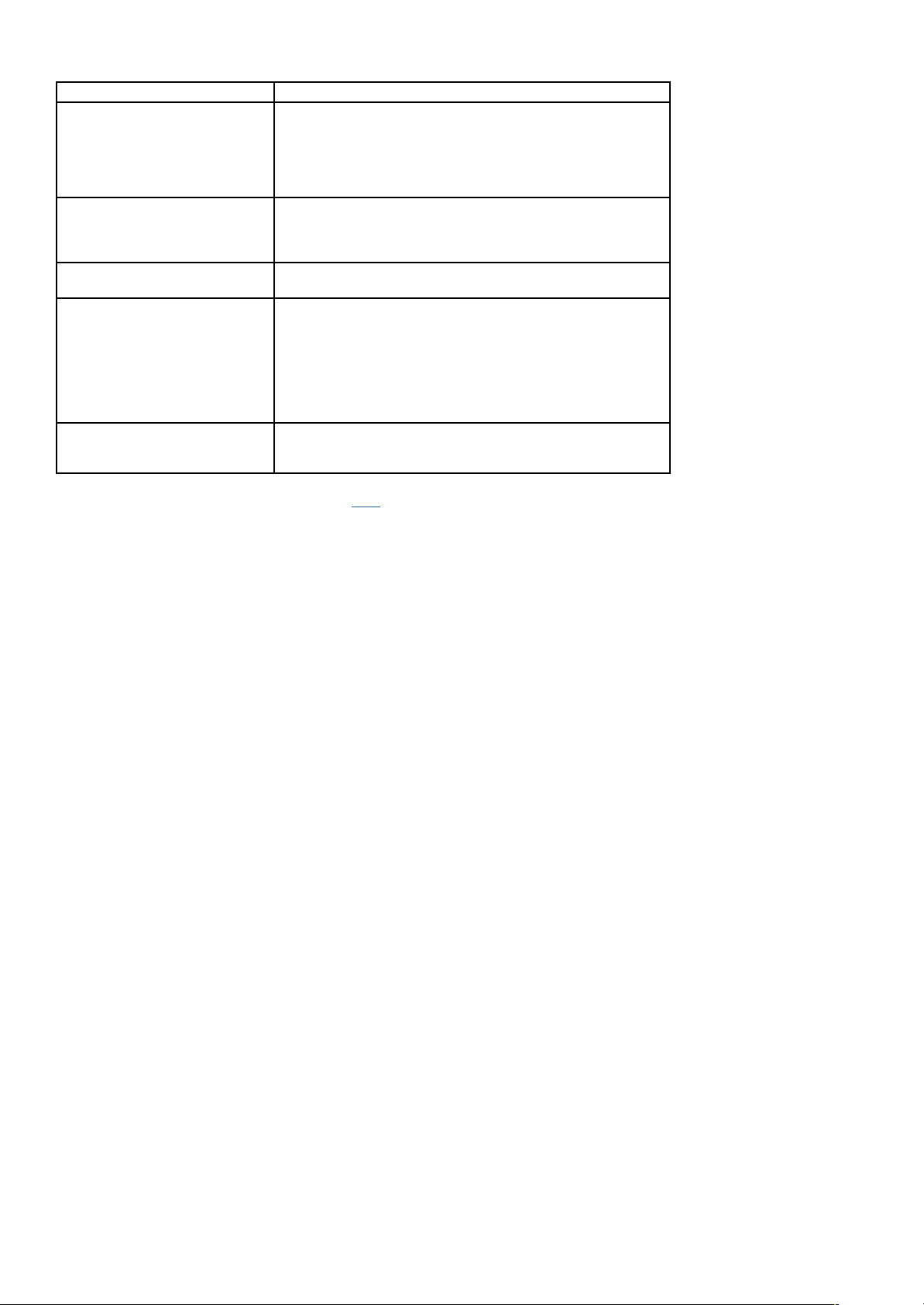
Troubleshooting
Problem Solution
No display on the base station Operation with power adapter:
Connect the base station to the power adapter
Check the power adapter
Battery operation:
Ensure the batteries‘ polarities are correct
Change the batteries
Display of the base station is not illuminated Operation with power adapte r :
Press the LIGHT button to activate the backlight
Battery operation:
Press any button to activate the backlight bri efy
No display on the transmitter Ensure the batteries‘ polarities are correct
Change the batteries
No reception of the outdoor transmitter
Display „- -“
No outdoor transmitter is installed
Check the outdoor transmitter‘s batteries
(only use batteries/rechargeable batteries with 1.5V voltage!)
Restart the outdoor transmitter and the base statio n according to the manual
Manual search for the transmitter (according to the manual)
Choose another place for the transmitter and/or the base station
Reduce the distance between the transmitter and the base station
Check if there is any source of interference
Incorrect indication Factory Reset
Battery operation:
Change the batteries
For more information on troubleshooting, see the FAQs on our website.
If your device fails to work despite these measures, please contact the retailer where you purchased the product from for advice.
09/2024
TFA Dostmann GmbH & Co. KG
Zum Ottersberg 12
97877 Wertheim|Germany
www.tfa-dostmann.de
 Loading...