

Page 1
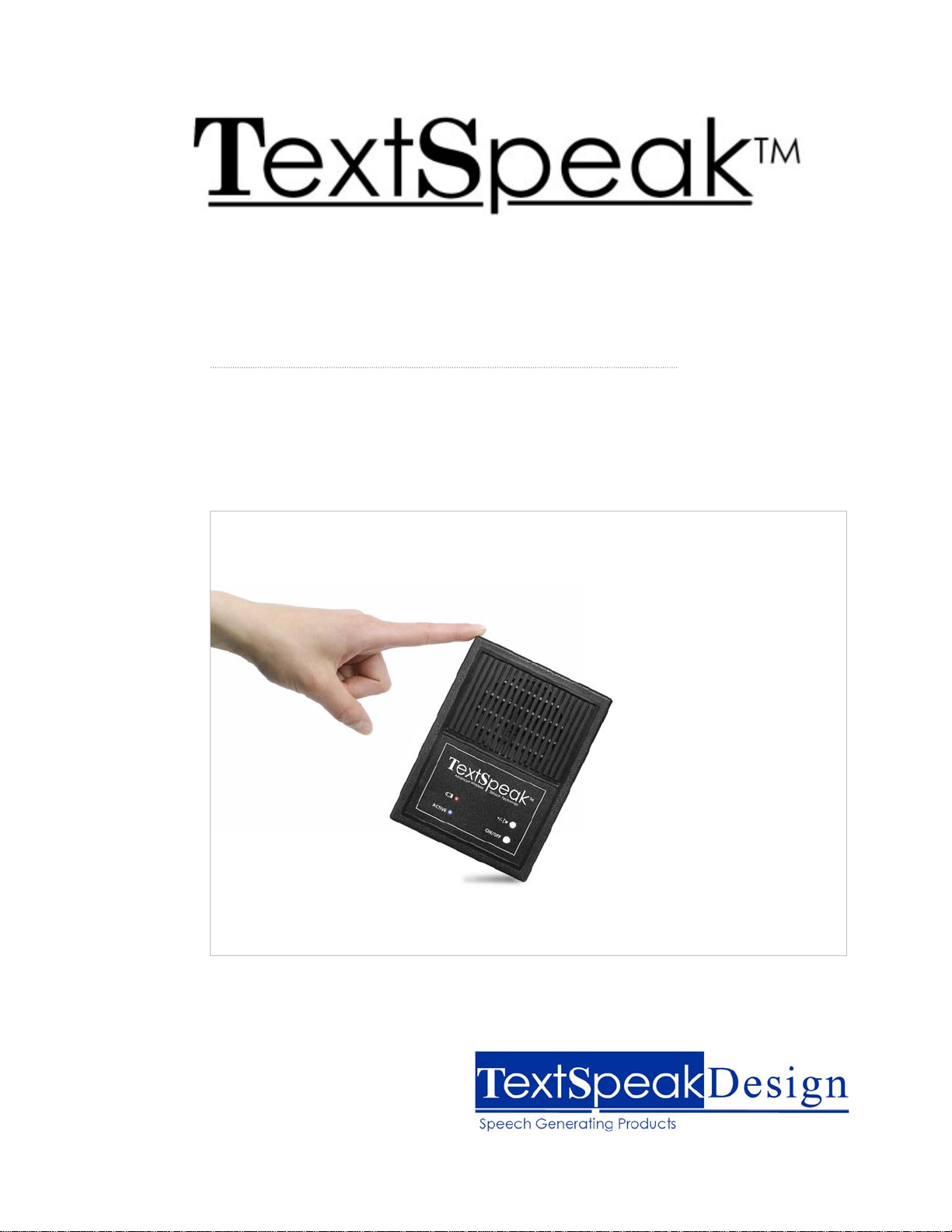
Model TS-04 -W
Wireless Speech Keyboard System 2.0
Users’ Guide
Page 2
Overview
TextSpeak™ TS-04 text-to-speech speaker and wireless keyboard system instantly
converts typed text to a natural sounding voice. The easy-to-use speaker/keyboard
combination works right out of the box without setup, and speaks with an unlimited
vocabulary.
• Easy to use AAC Augmentative Communication Device
• Just type to talk, use any speakerphone to talk over a phone line
• Nothing to learn, ready to work when you open the box!
• Programmable phrase storage using integrated FLASH memory
• Operates on AC wall adaptor or batteries
• Uses exclusive Digital Acoustics® technology
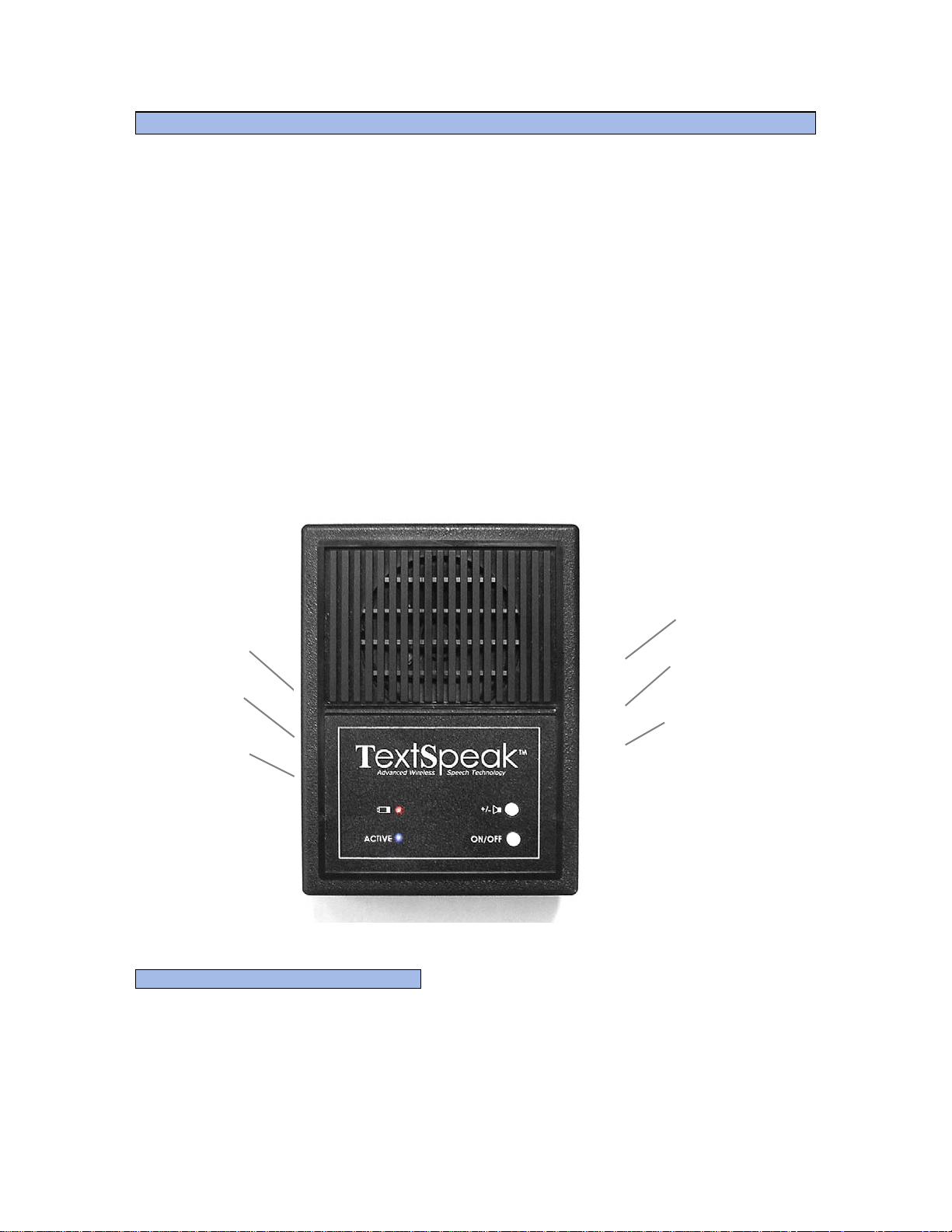
TS-04 S
ONTROLS AND CONNECTIONS
C
PEAKER
External
Keyboard
Connector
(Model TS-04K)
Low Battery
Indicator
On Off
Indicator
Power
Connector
(9 volt DC)
Hi/Lo Volume
Select
On/Off
Switch
LED Status Display
• On continuously Active/Normal – waiting to Speak
• Flashing quickly Synthesizing Speech
• Flashing slowly Function key phrase recording in progress
• Flashing very slowly Battery “standby” operation
- 2 -
Page 3
Power Modes and Battery Operation
AC Adapter Operation
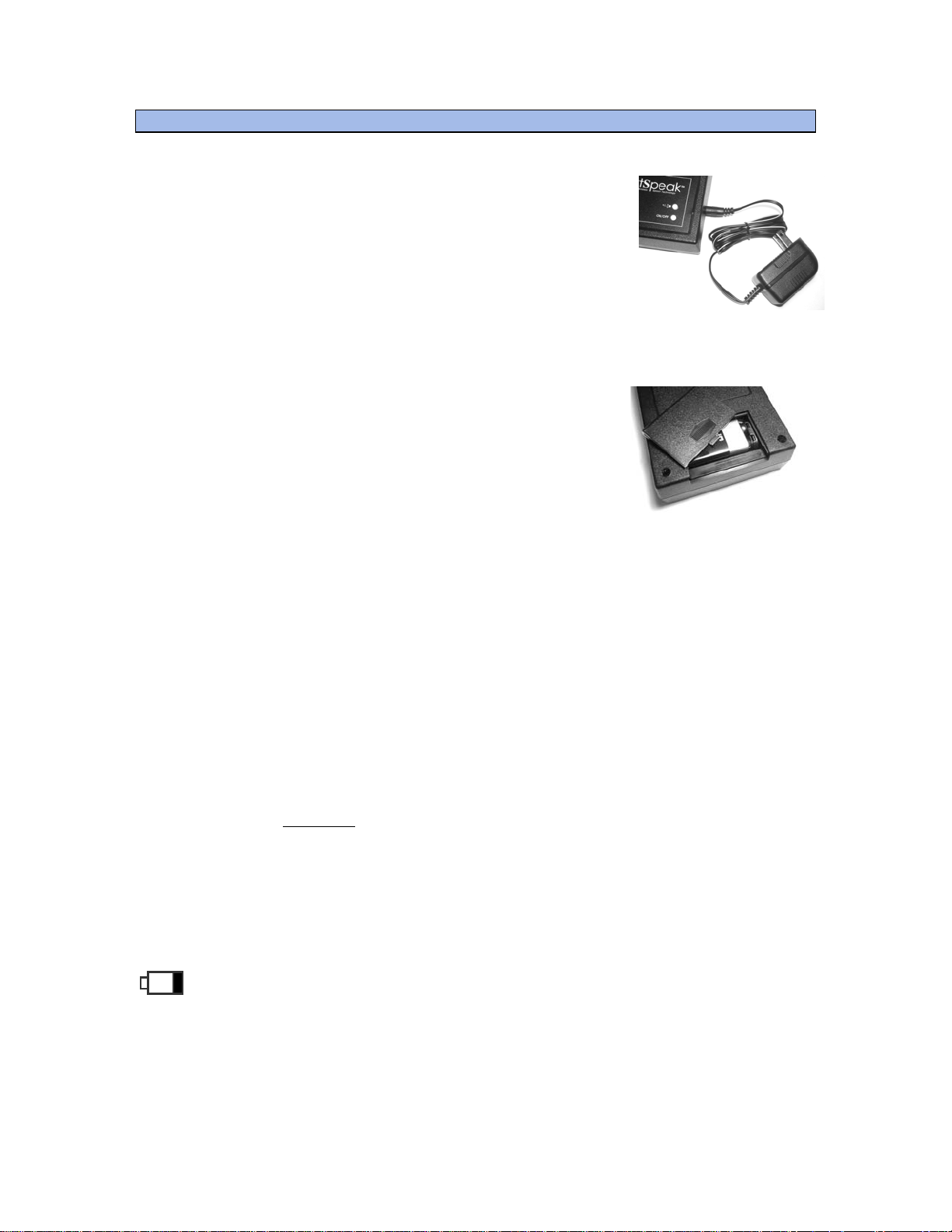
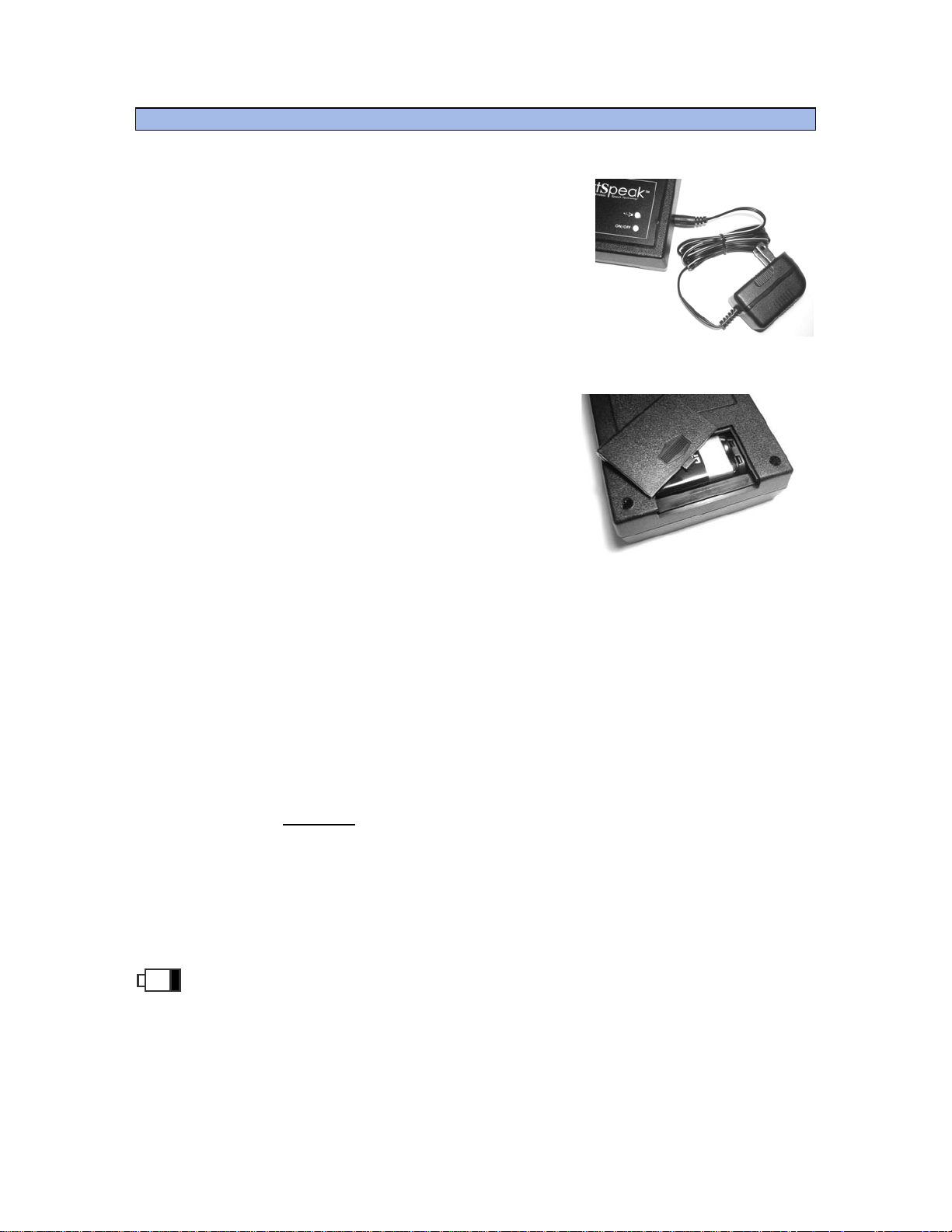
A 9-volt AC power adaptor is supplied with the TS-04. AC
powering permits you to leave the TS-04 on all the time
and be ready to use instantly when you type on the
keyboard.
The wireless keyboard has a 10-foot range to enable
portable typing across a room.
Portable/Battery Operation
Battery operation is enabled automatically if the AC
power is not used or detected.
Press the ON/OFF button to control power in AC or
battery modes
Smart powering modes: (Battery operation only)
Smart power management prolongs battery life and may provide weeks of usage
before requiring a new battery in the speaker
● Standby - When the keyboard is not used to generate speech for Power
3 minutes the TS-04 will enter Sleep Mode.
● Resume - Press the space bar 2-4 times in quick succession to ‘wake
Power up the TS-04 from sleep mode.
● Auto Off - After 10 minutes of inactivity the TS-04 will automatically turn off
to conserve battery power. Pressing the “END” key will also turn
the power off and may be used at any time.
NOTE: The TS-04 keyboard
has automatic ON/OFF powering and extremely long
battery life. Normal use requires battery replacement of 2 AAA batteries only once
every 6-12 months. Refer to Appendix A to learn more about keyboard battery
replacement.
Low Battery Indication:
When the low battery indicator is flashing change the 9 Volts Battery in the
TS-04 or use external AC power.
- 3 -
Page 4
T
Getting Started
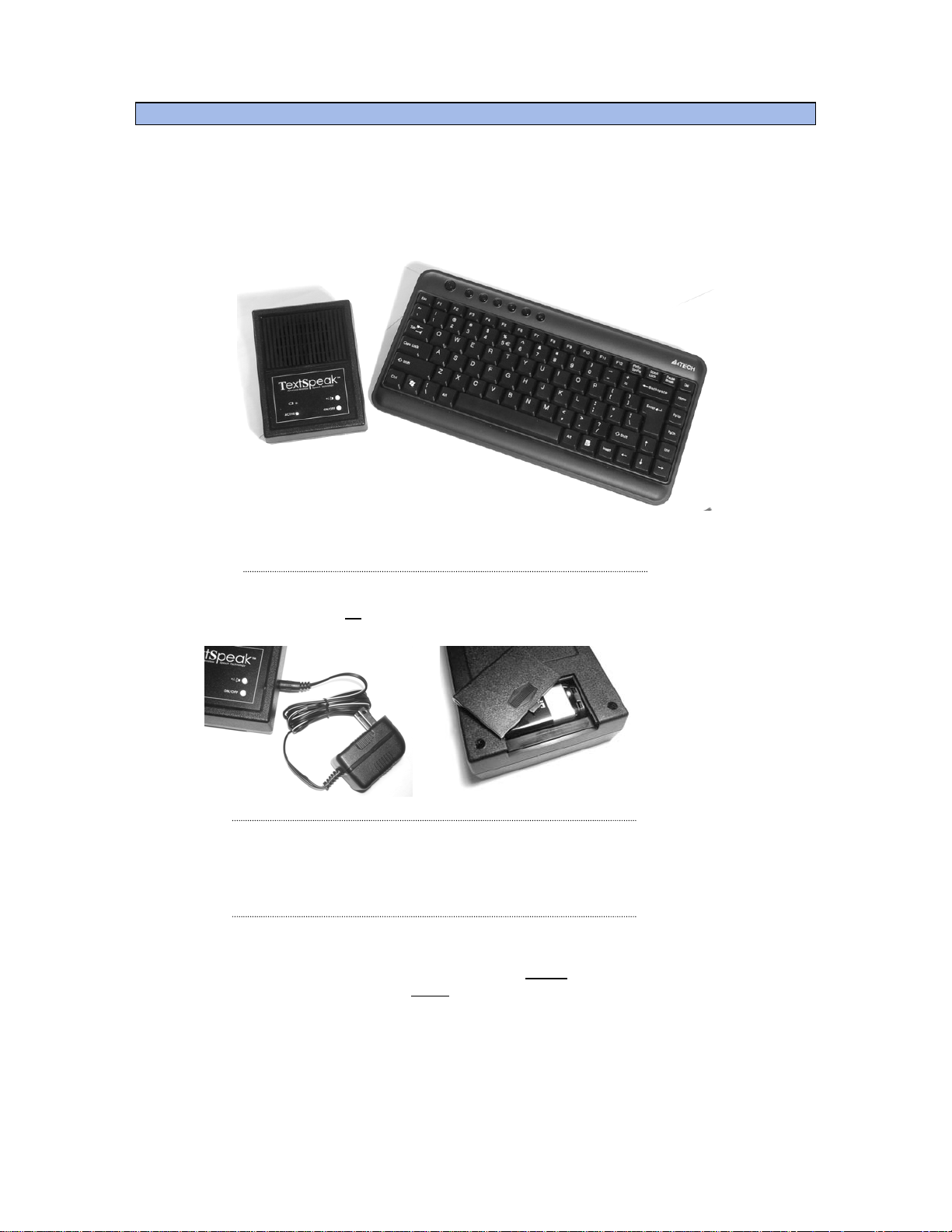
TextSpeak TS-04 system includes 2 components, the speech generating speaker and
a wireless keyboard. For normal operation, simply press the Power ON/OFF switch,
type on the keyboard, press ENTER , and you're ready to start talking!
Step 1:
Step 2:
Step 3:
S-04 Speaker TS-04 Keyboard
Connect AC Power or
install a 9-volt battery
Press the white On/Off button on TS-04 Speaker for powering
Type on the keyboard H e l l o and press Enter to ‘speak’ your first word! Type
other words or phrases, press Enter
again, and you’ll be typing and talking!
- 4 -
Page 5
Power Modes and Battery Operation
AC Adapter Operation
A 9-volt AC power adaptor is supplied with the TS-
04. AC powering permits you to leave the TS-04 on
all the time and be ready to use instantly when you
type on the keyboard.
The wireless keyboard has a 10-foot range to enable
portable typing across a room.
Portable/Battery Operation
Battery operation is enabled automatically if the AC
power is not used or detected.
Press the ON/OFF button to control power in AC
or battery modes
Smart powering modes: (Battery operation only)
Smart power management prolongs battery life
and may provide weeks of usage before requiring a new battery in the speaker
● Standby - When the keyboard is not used to generate speech for Power
3 minutes the TS-04 will enter Sleep Mode.
● Resume - Press the space bar 2-4 times in quick succession to ‘wake
Power up the TS-04 from sleep mode.
● Auto Off - After 10 minutes of inactivity the TS-04 will automatically turn off
to conserve battery power. Pressing the “END” key will also turn
the power off and may be used at any time.
NOTE: The TS-04 keyboard
has automatic ON/OFF powering and extremely long
battery life. Normal use requires battery replacement of 2 AAA batteries only once
every 6-12 months. Refer to Appendix A to learn more about keyboard battery
replacement.
Low Battery Indication:
When the low battery indicator is flashing change the 9 Volts Battery in the TS-04
or use external AC power.
- 5 -
Page 6
Typing To Talk
To start using the TS-04 press the speaker Power ON/OFF switch, wait until the blu e
Active indicator is ON, and begin typing to talk. There is no ON/OFF switch for the
keyboard. It powers on instantly every time you begin typing and powers off
automatically.
To talk, type a word or phrase, then press the enter key.
If you make a mistake typing just press the backspace key to delete the last key-
press entry (or words) while typing.
i
In normal operation TextSpeak waits to speak
until after the ENTER key is pressed!
Advanced features such as auto-repeat, saving phrases, continuous speech generation
and speaking over telephones are described below.
Using Function Keys to Say Phrases
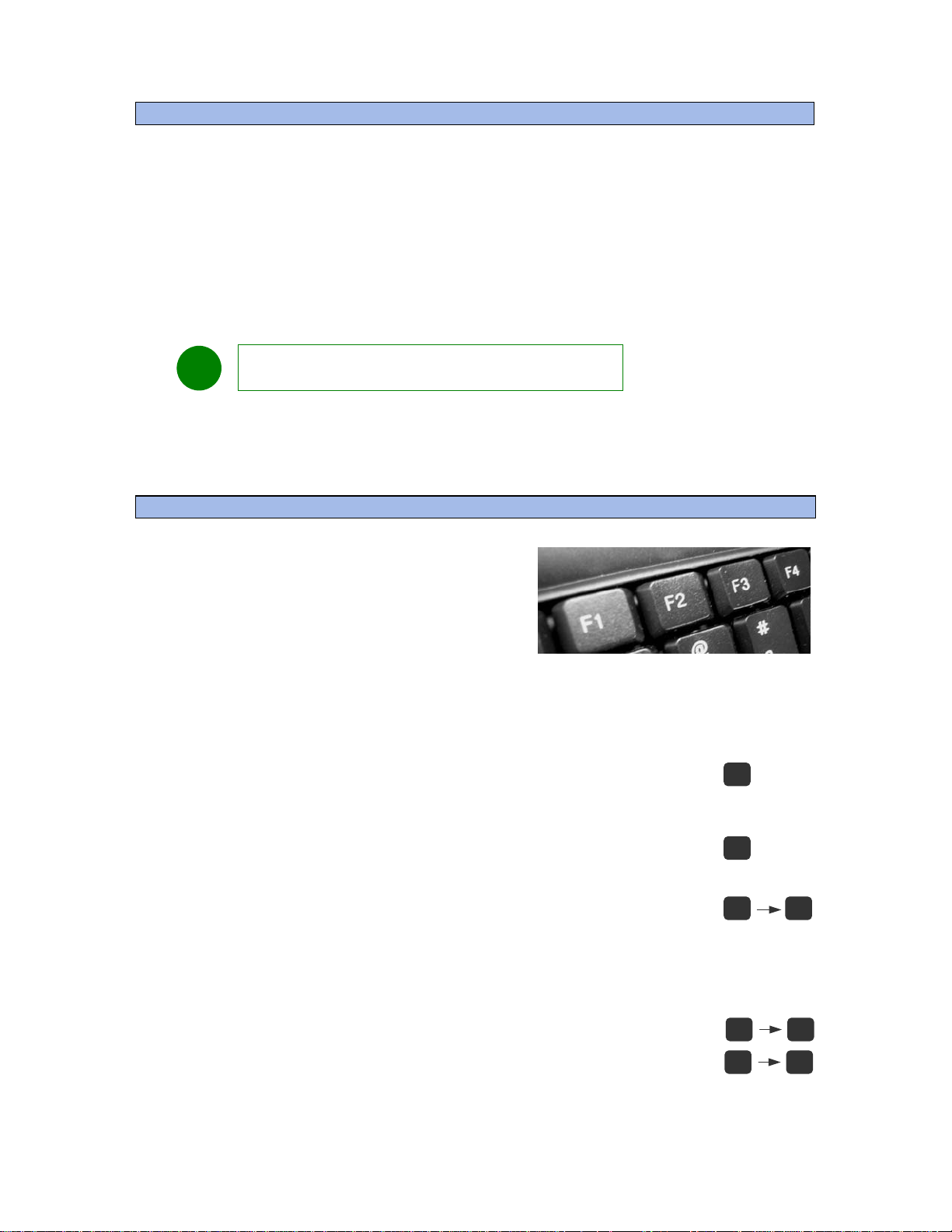
Function keys can be used to store commonly
used phrases. After programming, pressing any
function key will speak the pre-programmed
phrases.
A total of 32 phrases are available. F1 and F2 pre-allocated to special factory stored phrases. 30
other phrases are programmable.
F1 is pre-programmed to speak
“Hello, I cannot speak and will be
using a speech synthesizer”
F2 is pre-programmed to speak
“Please be patient while I type responses”
F3 to F12 are User Programmable
Function key phrases are recorded and saved to memory after the TS-04 is powered
off.
"Alt" and "Control" key combinations may be used to store
20 additional phrases. Hold down (or press and release) the ALT
or CTRL key, then press the desired Function Key (F3 to F12) to
program recorded phrases.
F1
F2
F3 F12
F6Alt
F9Ctrl
- 6 -
Page 7
Storing Speech Keyboard Phrases To Memory
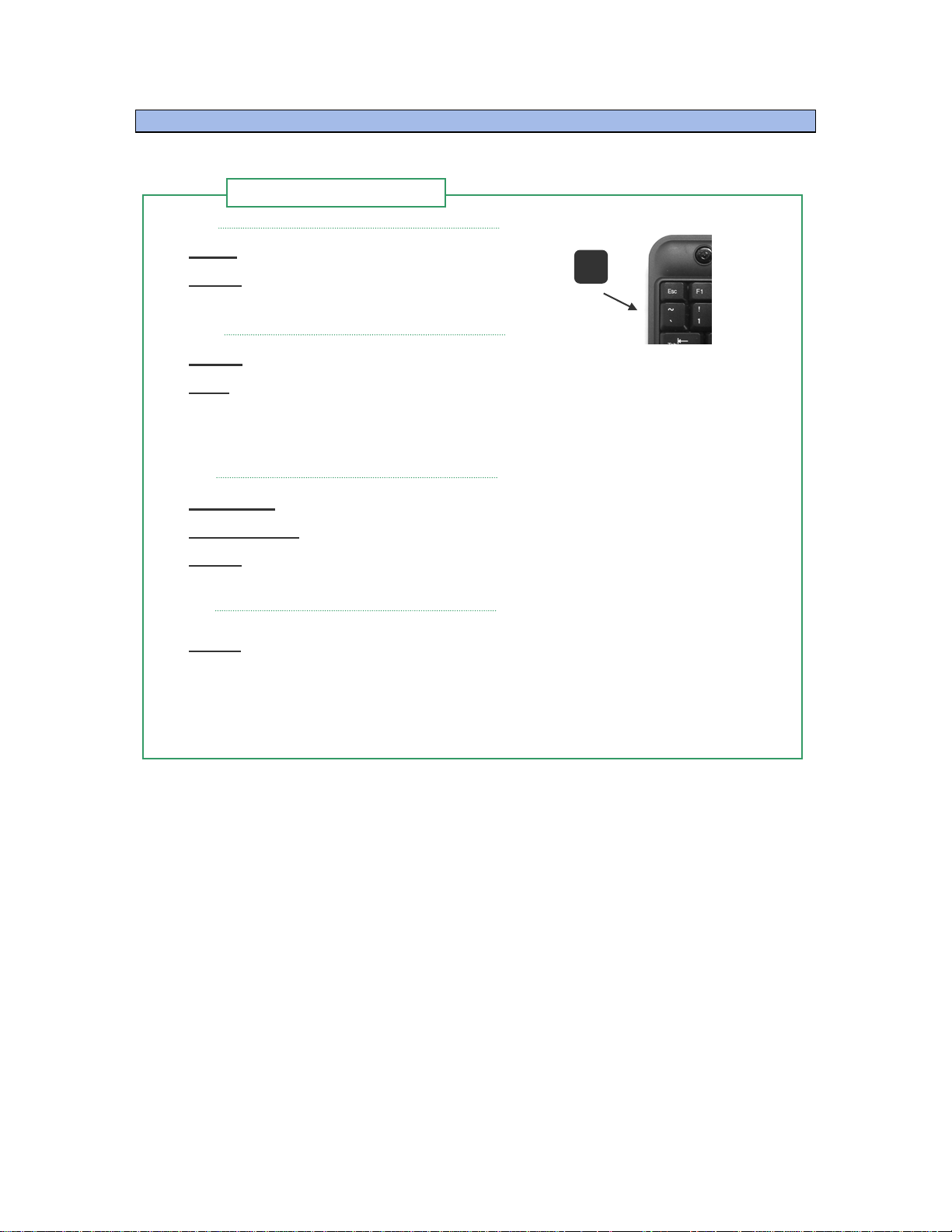
Step 1
Record a Keyboard
Step 2
Step 3
Step 4
Press Press the accent/tilde key
Listen
Listen for the reply "Press F Key"
~
Select Press the desired key by pressing F3 to F12
Wait for the confirmation of the key number to be spoken
Wait
Note: 10 phrases may be stored using F3 to F12. 20 additional phrases may be used
by adding the ALT and CTRL key with keys F3 to F12. To program these press the
Alt or CTRL key before the each function key
.
Type Text Type the text or phrase wish to record
Press ENTER
Listen
Listen for the audio reply "O.K.", indicating success
Press the 'Enter' key to stop recording
Verify Press the function key to verify the phrase
• The ESC (Escape) key may be used to cancel a phrase recording sequence
• Saved phrases pressed sequentially will be spoken in order and combined.
• Phrases are saved in memory when power is removed.
SAMPLE PHRASES
F3 My name is John Russell, I live at 2, Main Street
F7 Please contact by brother at 203-820-1234
CTRL+F3 Tomorrow
ALT+F3 I am OK, thanks
ALT+F4 I would like to eat
ALT+F5 I would like to call home
- 7 -
Page 8
Speaking on a telephone line
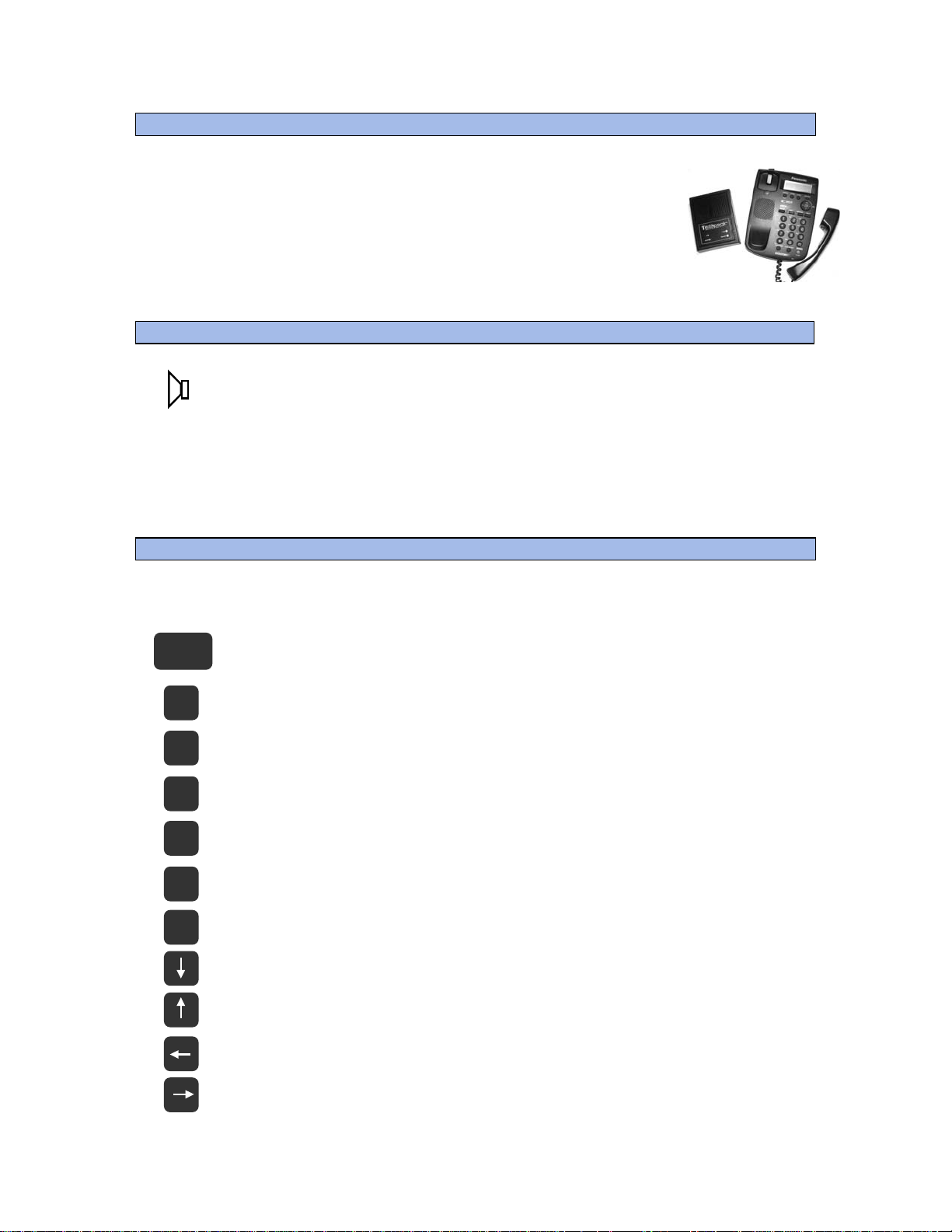
You can use TextSpeak TS-04 to speak directly into a telephone using any
standard speakerphone.
Simply place the TS-04 speaker near the phone and the distant
caller will hear your typed phrases loud and clear.
Adjusting Volume and Speech Generation Speed
The Hi and Lo Switch on the TS-04 controls 2 levels of volume. If more
+/-
adjustment is required press the keyboard Arrow Up and Arrow Down
keys multiple times.
Talking Speed (time between each word) is adjustable in 4 steps. To slow down
talking speed, press the Left Arrow multiple times. To speed up speech, press the
Right Arrow multiple times. If you wish to save the settings as a power up default,
refer to Appendix A.
Special Key control commands
Enter
Pg
Up
Pg
Dn
~
‘
Esc
/
End
Enter Press to speak a typed phrase (default mode)
Page Up Sentence Mode (speak when Enter is pressed)
Page Down Spelling Mode (speak every letter typed)
Program (refer to "Storing Phrases' in previous section)
‘Escape’ Cancel current action
‘Slash’ Repeat last phrase
End Power off command
6
Arrow Down Volume Down
Arrow Up Volume Up
Arrow Left Slow down speech playback
Arrow Right Speed up speech playback
- 8 -
Page 9

p
FUNCTION KEY WORKSHEET
F1
Hello, I cannot s
eak and will be using a
F2 Please be patient while I type responses
F3
F4
F5
F6
F7
F8
F9
F10
F11
F12
Available for saved phrases
Available for saved phrases
Available for saved phrases
Available for saved phrases
Available for saved phrases
Available for saved phrases
Available for saved phrases
Available for saved phrases
Available for saved phrases
Available for saved phrases
“ALT” KEY + FUNCTION KEY COMBINATIONS
ALT F3
ALT F4
ALT F5
ALT F6
ALT F7
ALT F8
ALT F9
ALT F10
ALT F11
ALT F12
Available for saved phrases
Available for saved phrases
Available for saved phrases
Available for saved phrases
Available for saved phrases
Available for saved phrases
Available for saved phrases
Available for saved phrases
Available for saved phrases
Available for saved phrases
“CTRL” KEY + FUNCTION KEY COMBINATIONS
CTRL F3
CTRL F4
CTRL F5
CTRL F6
CTRL F7
CTRL F8
CTRL F9
CTRL F10
CTRL F11
CTRL F12
Available for saved phrases
Available for saved phrases
Available for saved phrases
Available for saved phrases
Available for saved phrases
Available for saved phrases
Available for saved phrases
Available for saved phrases
Available for saved phrases
Available for saved phrases
7
- 9 -
Page 10
Appendix A Changing voice, language and settings
The TS-04 is capable of supporting 2 voice styles as well as English and Spanish
languages. Selecting these may be made by entering a special “Setup Mode”
Pressing the ‘CTRL’ and “S” key enables “Setup Mode”
CTRL
S
E
Press “E” to alternate language between English and Spanish.
(For Spanish, the “ñ” key is mapped at the English “;” key)
V
Press “V” to alternate voices between Female and Male.
F
Press “F” to restore all original factory volume and voice settings.
Press “S” to save settings. This stores the current voice and language setting
S
in memory. The current selection of volume and speech rate w ill also be
saved and used as the new power up default setting.
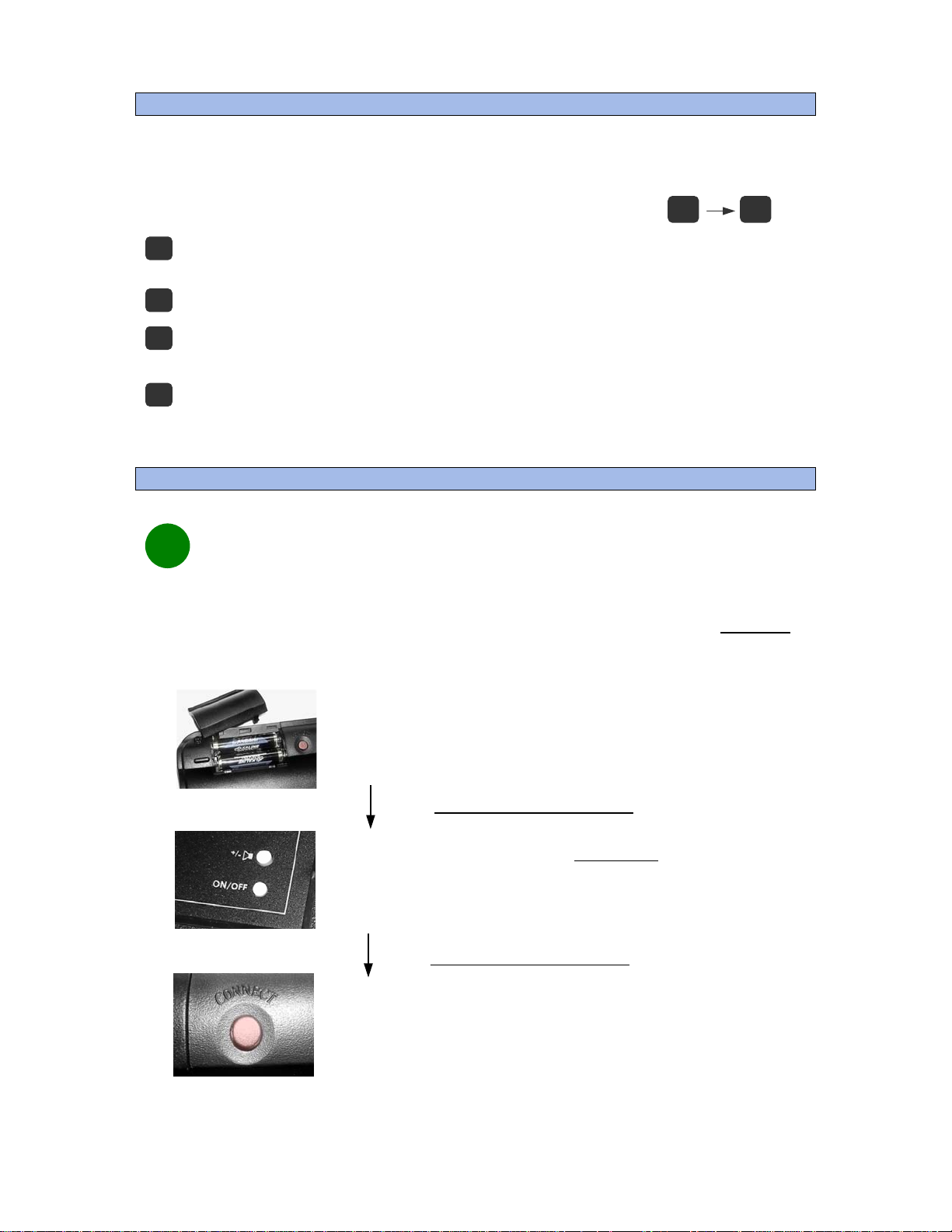
Appendix B Replacing Keyboard Batteries
When keyboard batteries are replaced wireless links must be
i
restored for speech to be generated
Keyboard batteries should normally be replaced every year. However, when batteries are removed a special CONNECT
process MUST be used to reactivate the keyboard link to the TS-04.
batteries. The TS-04 9v main battery does not require this process.
This process is ONLY needed for KEYBOARD
Step 1
Locate the 2 AAA keyboard batteries
Locate position of “CONNECT” button
Step 2
Depress BOTH ON/OFF and SPEAKER
buttons simultaneously for 2 seconds
Wait for Speech Audio phrase
“Press Keyboard Connect Now”
Step 3
Press the red CONNECT button on
the underside of the keyboard.
(Location is next to the battery compartment)
- 10 -
Page 11

Specifications
Size and Weight
TS-04 Speech Generating Speaker
• L: 5.3 inches W: 4.0 inches H: 1.5 inches W: 10 oz
TS-04 Wireless Keyboard
• L: 13 inches W: 7 inches H: 1.2 inches W: 1 lb 2 oz
Power and Battery
Speaker Operation
• 9 Volt AC Adaptor
• Battery 9V Alkaline MN1604 or Equiv
• Battery Life (Est) 100+ Hours based on 10 minutes/hour use
Keyboard Operation
• Auto Power On/Off
• Battery 2 AAA Alkaline
• Battery Life (Est) 6-12 months
Keyboard Access
• Wireless QWERTY Full Size, Mini-keyboard 2.4Ghz , 3 Meter range
What's In The Box?
• One TextSpeak TS-04 Speech Generating Speaker
• One TextSpeak Wireless Keyboard
• Power transformer for DC Operation
• Batteries
• Instruction manual
Technical – How the TS-04 Works
• Unlimited Phoneme Based Word Generation
• Sleep mode power use 125 mW
• 24 mHz Flash Based DSP Processor with integrated Codec
• 2KB Flash hold 30 Items for phrase storage
• Real time conversion for streaming text
The TS-04 Speaker performs text-to-speech synthesis based on concatenative unit samples. The units can vary from whole words
down to phonemes. A corpus of pre-recorded words is stored in flash memory using patented multilevel storage (MLS) memory and a
mapping of the various sub-word parts is held in a lookup table. Speech creation is achieved by combining concatenation units of
speech elements to produce words. Speech may be generated in real time, wi th unlimited vocabulary
The system process flow includes Text Normalization, Words to Phoneme, Phon eme Mapper, MLS, Memory and Audio D/A Conversion.
Keyboard/Speaker Radio links utilize via 2.4 GHZ Channel Hopping Transceivers.
External Keyboards (TS-04K), incorporate auto-detecting PS/2 Keyboard connectors
Technical Support
TextSpeak Design Group Westport, CT 06880 www.TextSpeak.com
This document may contain advance information. Contact factory for technical specification before product design and/or
use. Design and specifications are subject to change without notice. This product in NOT INTENDED to be used for lifesafety or medical critical care alarms and/or notificati ons. TextSpeak™ and Digital Acoustics® are trademarks of Digital
Acoustics Corporation © 2008/2011 (D03-TS04C_Users-1X.docu 0910)
- 11 -
 Loading...