

Page 1
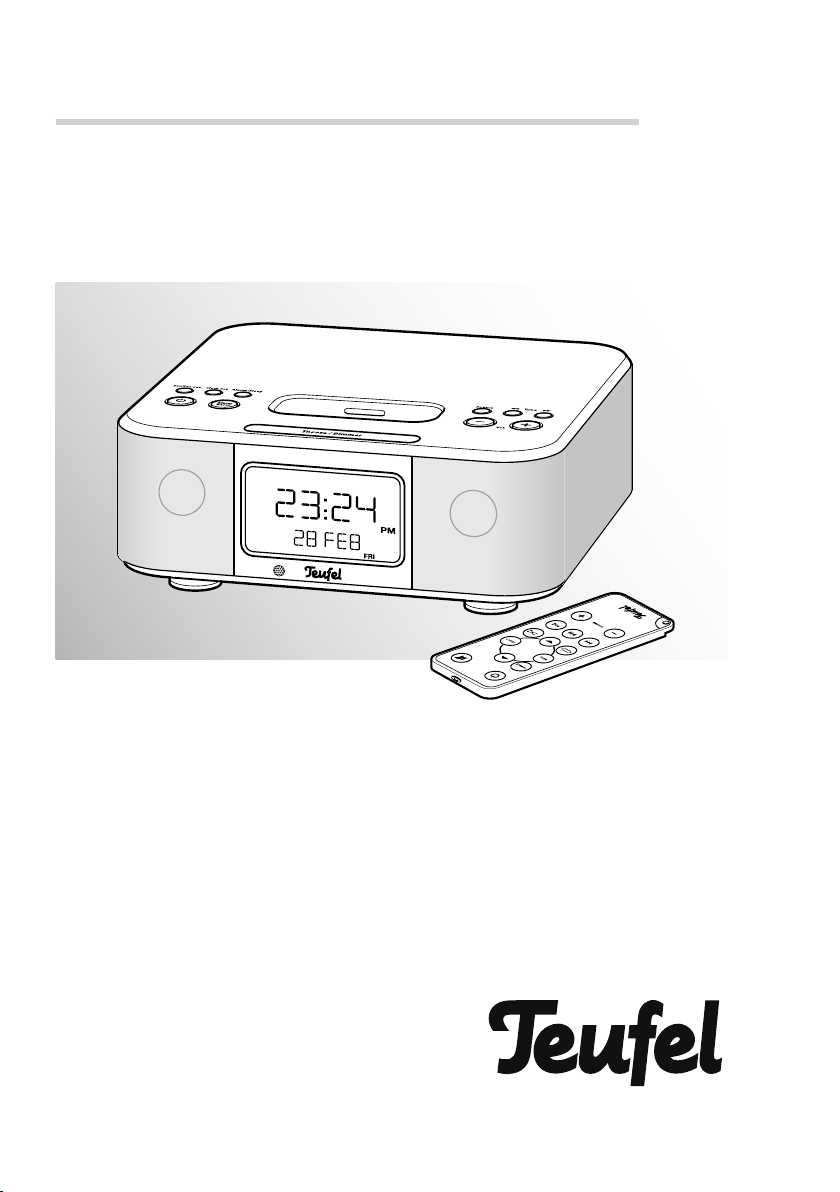
Technical description and operating instructions
gb was
here
iTeufel Clock v3
Radio alarm clock with iPod/iPhone dock
Page 2

Contents
General notes and information ................................................................................3
Safety notes ............................................................................................................4
Product contents ......................................................................................................7
Control elements and connections ............................................................................8
Setup and preparation .......................................................................................... 12
Clock and alarm .................................................................................................... 13
Setting the time and date ............................................................................ 13
Alarm function (alarm) ................................................................................ 14
iPod/iPhone operation ........................................................................................... 16
Connecting an iPod/iPhone ........................................................................16
iPod/iPhone playback ................................................................................ 16
Adjusting the volume ..................................................................................17
Removing the iPod/iPhone .......................................................................... 17
Radio mode...........................................................................................................18
Antenna .................................................................................................... 18
Selecting radio mode .................................................................................18
Setting the radio stations ............................................................................. 18
Saving radio stations .................................................................................. 18
Operation with an external device .........................................................................19
Special functions....................................................................................................20
Sleep function ...........................................................................................20
Display brightness ...................................................................................... 20
Care and cleaning .................................................................................................21
Protecting the environment .................................................................................... 21
Technical data .......................................................................................................22
2
• iTeufel Clock v3
Page 3

General notes and information
Notice
The information in this document may be
changed without prior notice and in no
way constitutes any liability on the part
of Lautsprecher Teufel GmbH.
No part of these instructions may be reproduced in any form or be broadcasted in any way electronically, mechanically, by photocopy or recording without
the written permission of Lautsprecher
Teufel GmbH.
© Lautsprecher Teufel GmbH
Version 1.0
March 2011
Original packaging
If you wish to exercise your eight-week
right of return, we ask that you be absolutely sure to hold onto the packaging. We can only accept the return of
the speakers IN THE ORIGINAL PACKAGING.
Empty boxes are not available!
Complaints
In case of complaint we will need the following information to process your enquiry:
1. Invoice number
Can be found on the sales slip (enclosed
with the product) or on the order confi rmation received as a PDF document,
e.g. 4322543.
2. Serial number or batch number
Located on the bottom side of the unit,
e.g. serial number: IT04....
Many thanks for your support!
Contact
For questions, suggestions or criticism
please contact our customer service department:
Lautsprecher Teufel GmbH
Gewerbehof Buelowbogen
Buelowstrasse 66
10783 Berlin (Germany)
Phone: 00800 – 200 300 400 (free of
charge)
Fax +49 (0)30 / 300 930 930
E-mail: [email protected]
www.teufelaudio.com
Proper use
Only use the unit as described in these instructions. Any other use will be deemed as
not in accordance with the instructions and
may lead to damage to property or even
persons. The manufacturer accepts no liability for damage caused by use not in accordance with the instructions. The product
is intended for private use.
Before operating the unit for the
fi rst time please read the safety
notes and operating instructions
carefully. This is the only way to use all
functions safely and reliably.
Keep the operating instructions safe and
pass them on to anyone who may own
the unit after you.
• iTeufel Clock v3
3
Page 4
Safety notes
Caution icons
You will fi nd the following caution icons
in these instructions:
Danger
injury or death.
Attention
High risk!
Failure to observe the warning
may result in severe personal
Moderate risk!
Failure to observe the warning
may result in property damage.
Minor risk!
Points which should be observed when handling the unit.
Safety notes
Danger
age which is too high can cause electric
shocks.
• The device is only suitable for use with
• Only use the enclosed mains adapter.
• Immediately disconnect the mains
• If the unit emits smoke or smells of
Risk of electric shock!
Faulty installation of electrical equipment or mains volt-
a mains voltage of 100 V–240 V ~ /
50/60 Hz.
When connecting the unit, make sure
that the correct voltage is present. You
can fi nd more detailed information directly on the mains adapter.
adapter and discontinue using the device if its case or the mains line is defective or exhibits other visible damages.
burning or other unusual odours, disconnect it immediately from the power
supply and do not operate it.
• The standby button does not disconnect the device from the mains
line. Set the unit up so that the mains
adapter is easily accessible and no
vents are blocked.
• Never open the unit case.
• Repairs may only be carried out by
an authorised specialist workshop.
Only parts which conform with the
original unit specifi cations may be
used in this case. There are electrical and mechanical parts in this unit
which are essential in order to avoid
exposure to sources of danger.
• Only use the accessory products specifi ed by the manufacturer.
• Do not insert any objects through the
vents into the case.
• Only use the unit in indoor areas.
• Do not operate the unit in moist areas and protect it from drops of water and splash water. Also take care
not to stand vases or other containers
of liquid on or near the unit in order
to avoid liquid getting into the case.
If water or other debris do penetrate
the case, immediately disconnect the
mains adapter and if applicable, remove any batteries present. Then send
the device in to our service address.
• Never touch the mains adapter with
wet hands.
• Check the unit regularly for damage.
Danger
ing and suffocate.
• Do not allow children to play with the
Danger to children!
Children can become trapped
in the packing fi lm when play-
unit or the packing fi lm. Danger of
suffocation.
4
• iTeufel Clock v3
Page 5
• Ensure that children do not remove
small parts from the unit or take them
off of the unit (e.g. the remote control batteries, control buttons or mains
adapter). They could swallow the
parts and choke.
• If a battery is swallowed, immediately
consult a physician with the child.
• Never allow children to operate electrical devices unsupervised.
Danger to hearing!
Loud noise may lead to hear-
ing loss.
There is a potential risk of sudden very
high noise pressure especially when activating the device which is set to full volume. This may have psychological consequences and also cause physical
injury. Children and pets are particularly at risk.
• Set your signal source unit volume
control to a low setting.
• When the volume is set high, always
keep a certain distance from the unit
and never place your ear directly on
the speaker.
• To avoid damage to health, avoid ex-
tended listening at high volume.
Danger
to chemical burns.
• Do not allow battery acid to come in-
Danger of chemical
burns!
Leaking battery acid may lead
to contact with skin, eyes or mucous
membranes. In case of contact with
acid rinse the affected areas immediately with plenty of plain water and if
necessary see a doctor.
Danger
• Never attempt to recharge lithium bat-
• Only use batteries of the same or
• You may not heat, short circuit batter-
• Do not expose batteries and storage
Danger
• Never use the unit unmounted in vehi-
• Arrange the unit so that it cannot be
• Handle the speaker (subwoofer) on
• Do not place the unit near sources of
Attention
• Do not place open fl ames such as
Danger of explosion!
Lithium batteries can explode
if handled improperly.
teries.
equivalent type.
ies and storage batteries or dispose
of them in fi re.
batteries to direct sunlight.
Danger of injury/damage!
Incorrect location may result in
damage.
cles, in unstable locations, on wobbly
tripods or furniture, on underdimensioned brackets etc. The device could
tip or fall down and cause injury to
persons or be damaged itself.
knocked over accidentally and make
sure that the cables do not pose a trip
hazard.
the bottom of the device with care –
do not place the device on objects
that could damage the speaker.
heat (e.g. heaters, ovens, other heat
generating equipment such as amplifi ers etc.)
Fire hazard!
Improper use may lead to
damage or fi re.
burning candles or similar on the unit.
• iTeufel Clock v3
5
Page 6
• Do not place the unit in direct sunlight.
• Ensure suffi cient ventilation.
• Do not cover the vents with curtains,
cloths, newspapers or similar. Heat
build-up inside the unit can shorten
the lifetime of the unit.
Attention
stroy the unit.
• If the unit is to be left unsupervised
Risk of damage!
Power overload due to lightning strike may damage or de-
for a long period (e.g. during a holiday), or if a thunderstorm is forecast,
disconnect the mains adapter from the
socket.
• If the unit is to be left unsupervised for
a long period (e.g. during a holiday),
or if a thunderstorm is forecast, disconnect the mains adapter from the
socket.
Leaked batteries may damage the remote control. In case of prolonged absence, remove the battery from the remote control.
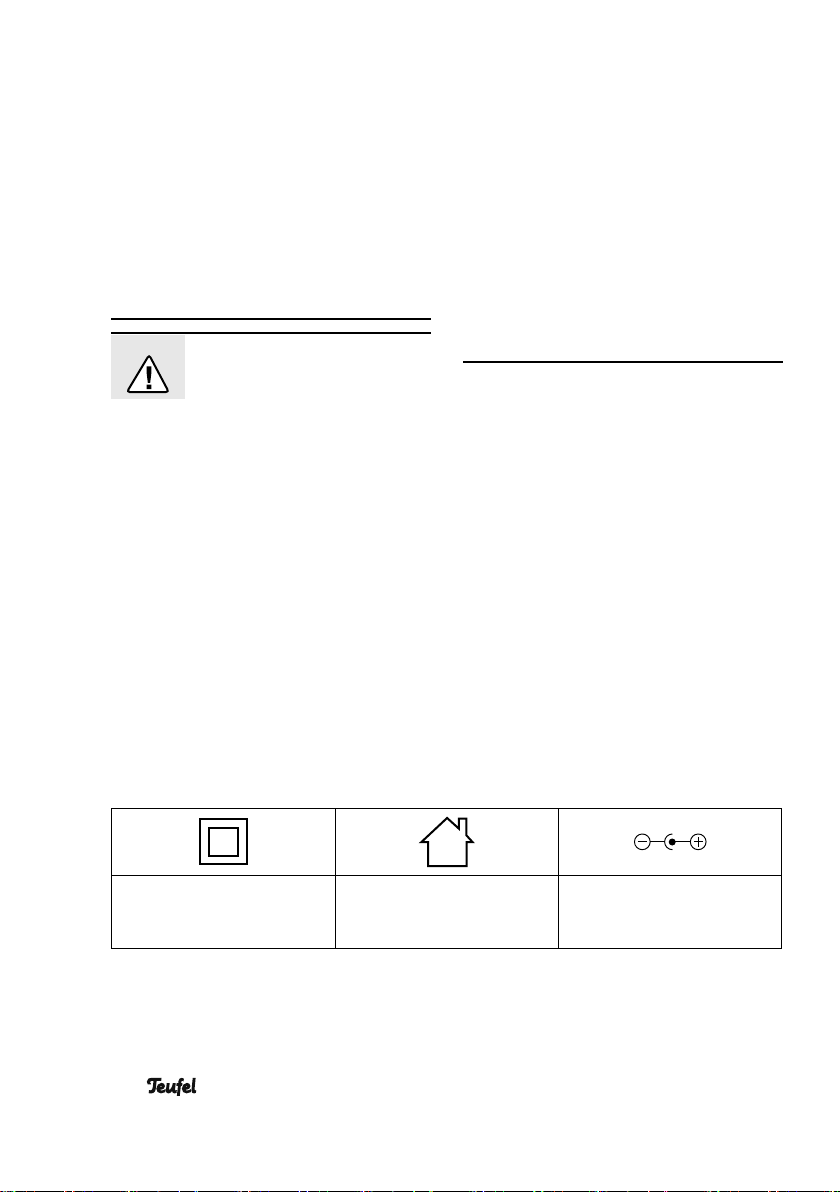
Explanation of symbols
Protection class II Only use in indoor areas. Polarity on the circular
connector: outside (–), inside (+)
6
• iTeufel Clock v3
Page 7
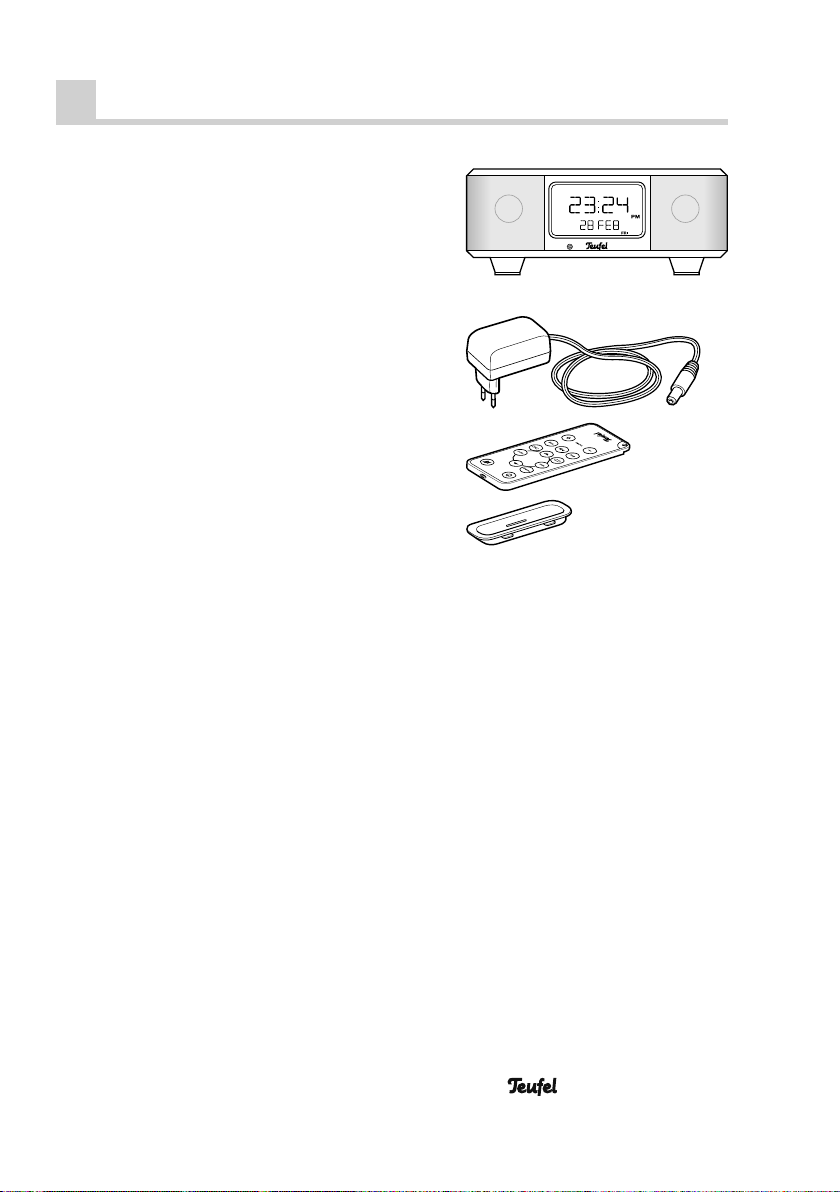
Product contents
Check to be sure
• Check that all items have been delivered and that nothing is damaged:
햲
1 x iTeufel Clock
햳
1 x mains adapter
햴
1 x remote control including bat-
tery
햵
Various dock adapters for various
iPod/iPhone models
• If the delivery is incomplete or exhibits
transport damage, please contact our
service department (see page 3).
• Do not operate the unit in the event of
transport damage!
v3
햲
햳
햴
햵
• iTeufel Clock v3
7
Page 8
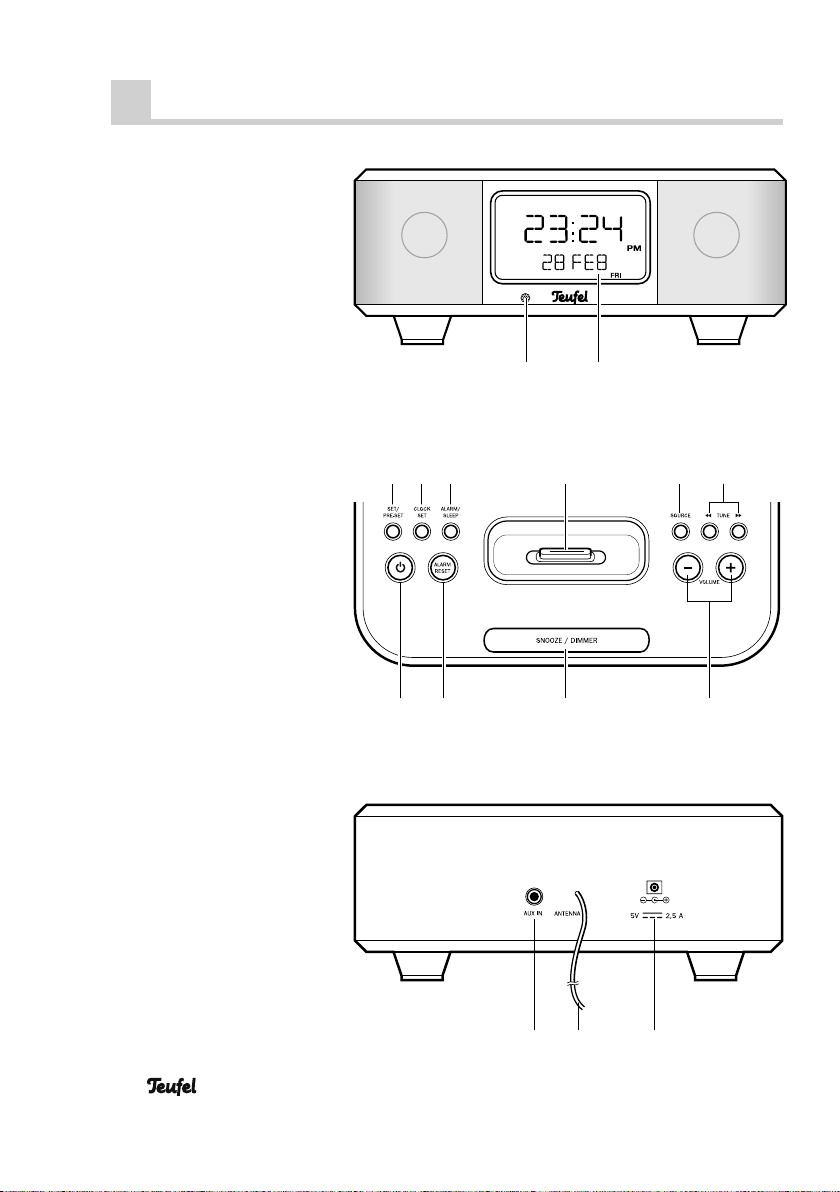
Control elements and connections
Front view
12
View from
above
Rear view
345
768
9101112
13 1514
8
• iTeufel Clock v3
Page 9
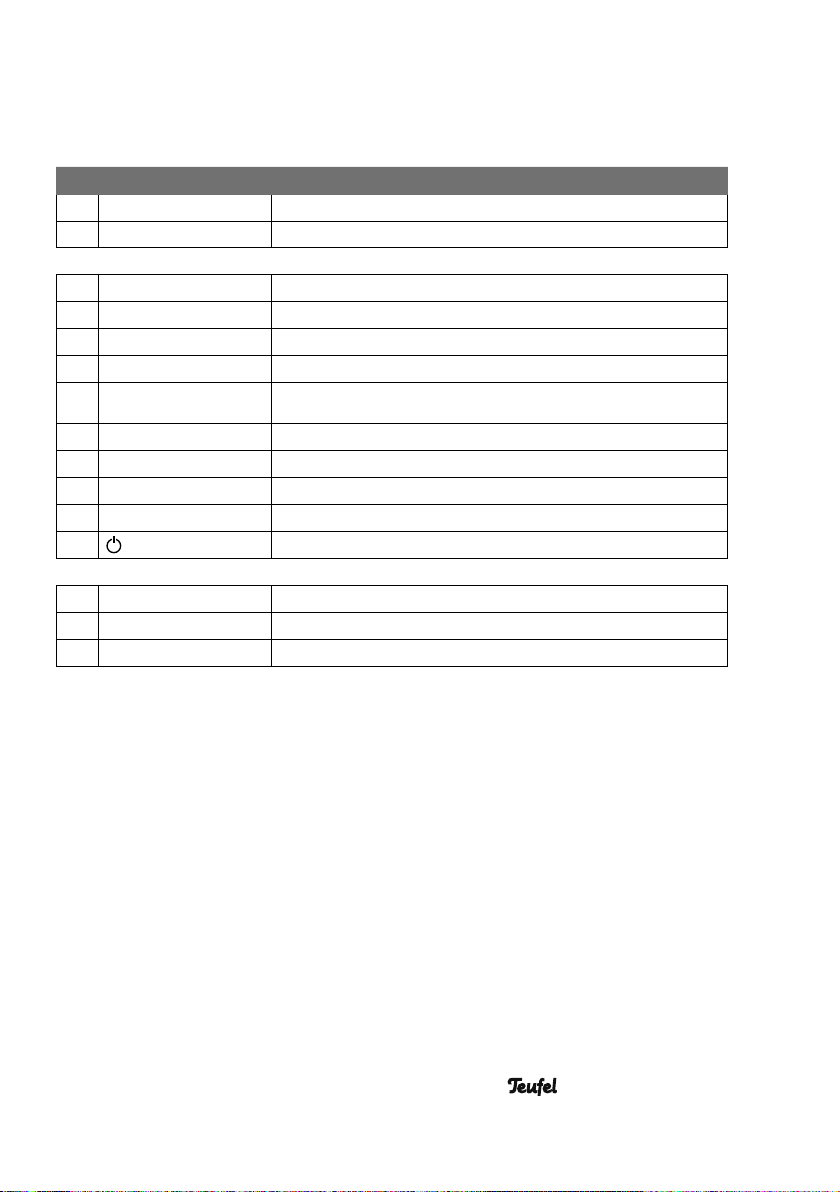
No Name Meaning/function
1
2
Sensor for remote control
Display panel
3 SET / PRE-SET
4CLOCK SET
5 ALARM / SLEEP
6
7SOURCE
8TUNE
9VOLUME
10 S NO OZE / DI MM ER
11 ALARM RESET
12
13 AUX IN
14 ANTENNA
15 D C 5V
For setting the time, date and alarm
Setting the clock
Alarm/sleep function
iPod-/iPhone dock
Selecting the signal source (radio, iPod/iPhone or ext. device)
Confi guring settings/selecting radio stations
Adjusting the volume
Snooze button/changing the display brightness
Deactivating the alarm
On/Standby button
Connector jack for external device
FM throw-out aerial
Input jack for the mains adapter
• iTeufel Clock v3
9
Page 10
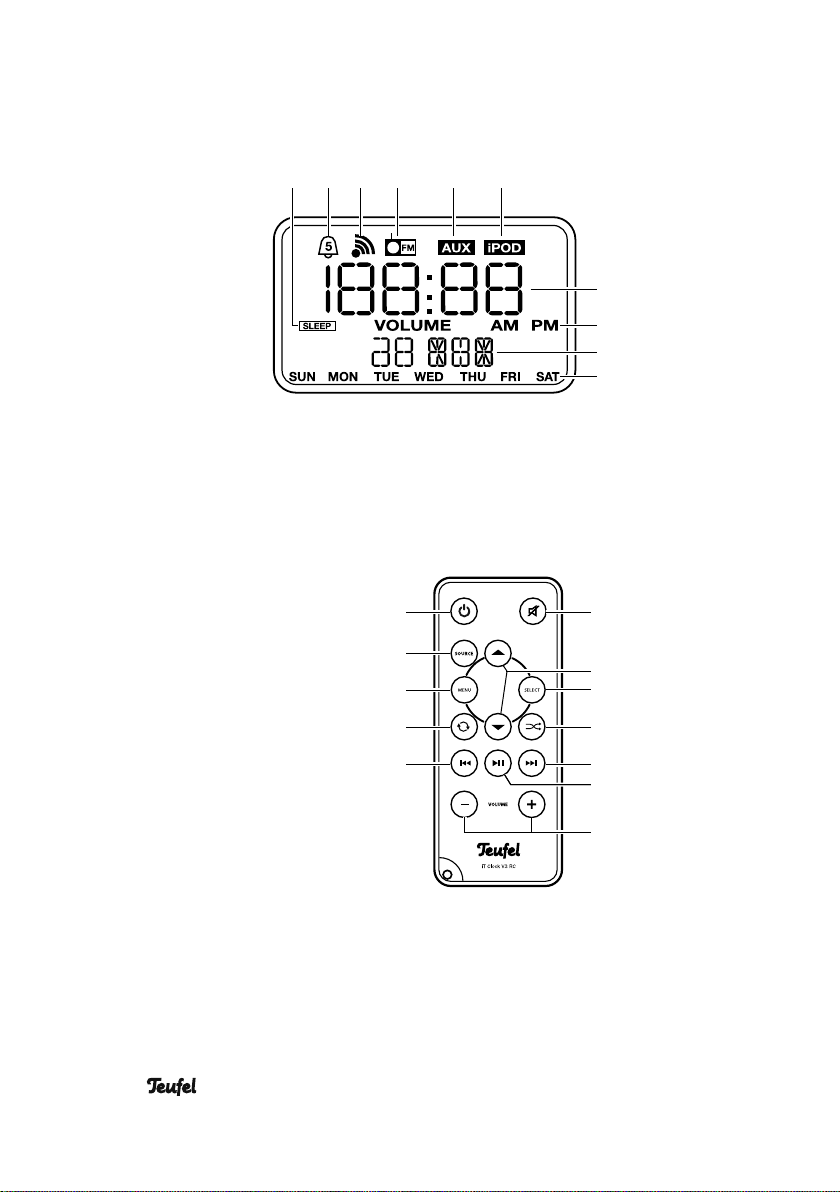
Display
Remote control
1716 18 19 20 21
37
22
23
24
25
26
10
• iTeufel Clock v3
36
35
34
33
27
28
29
30
31
32
Page 11
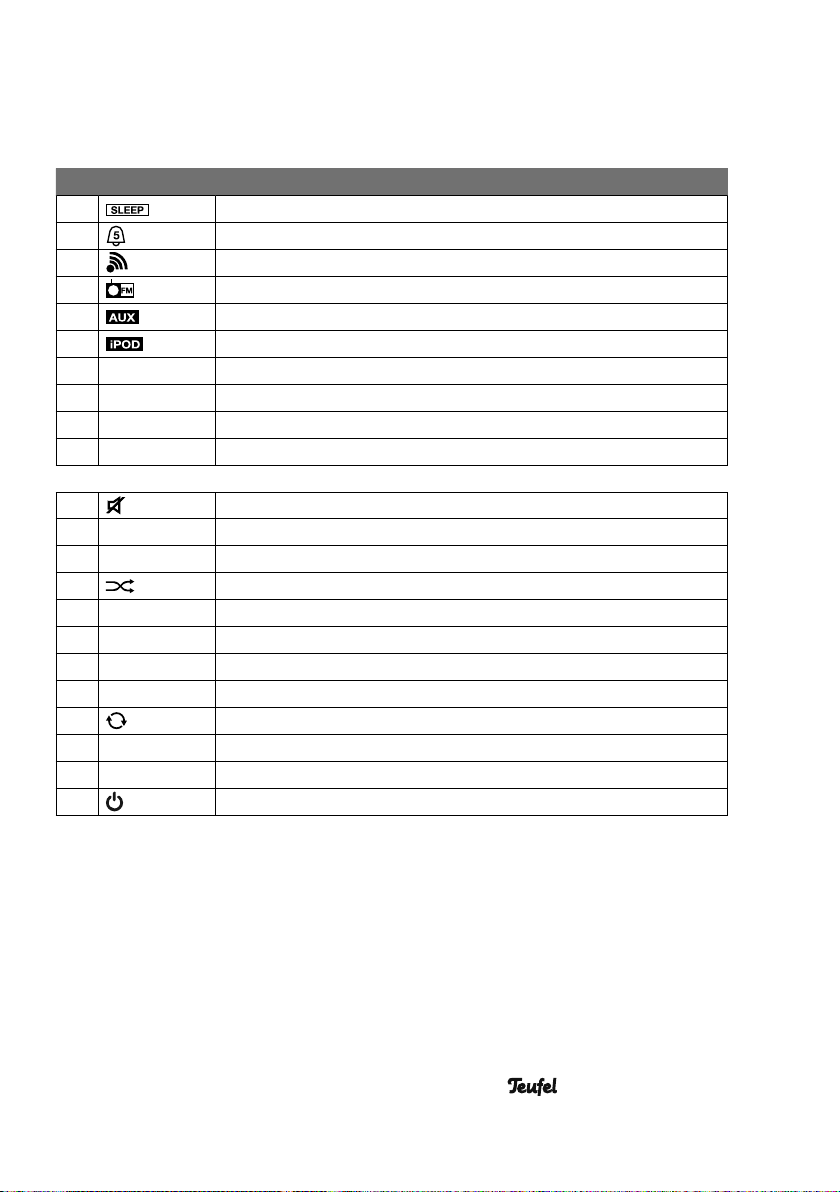
No Name Meaning/function
16
17
18
19
20
21
22
23
24
25
Sleep function is activated
Alarm setting
Alarm source: Buzzer
Radio mode/alarm source: Radio
Signal source: External device
iPod/iPhone mode/alarm source: iPOD
Time display, alarm time
AM = before noon, PM = afternoon
Display of the date/the (alarm) volume
Display of the weekday
26
▲▼
27
28 SELECT
29
►►|
30
►||
31
32 VOLUME
|◄◄
33
34
35 MENU
36 SOURCE
37
Mute
Navigating in the iPod/iPhone menu/selecting saved stations
Selecting menu items or tracks
Random playback
Skipping to the next track
Starting/pausing playback
Adjusting the volume
Skipping to the beginning of the track or to the previous track
Repeat function
Accessing the iPod/iPhone menu
Selecting the signal source
On/Standby button
• iTeufel Clock v3
11
Page 12
Setup and preparation
Setup location
• Select a stable, level base.
• Make sure that the environment is
clean and free from dust.
• Avoid placing the unit close to sources of heat or in direct sunlight.
• Arrange the connector cables so that
they do not pose a trip hazard.
• Do not place any heavy objects on
top of the cables or the unit.
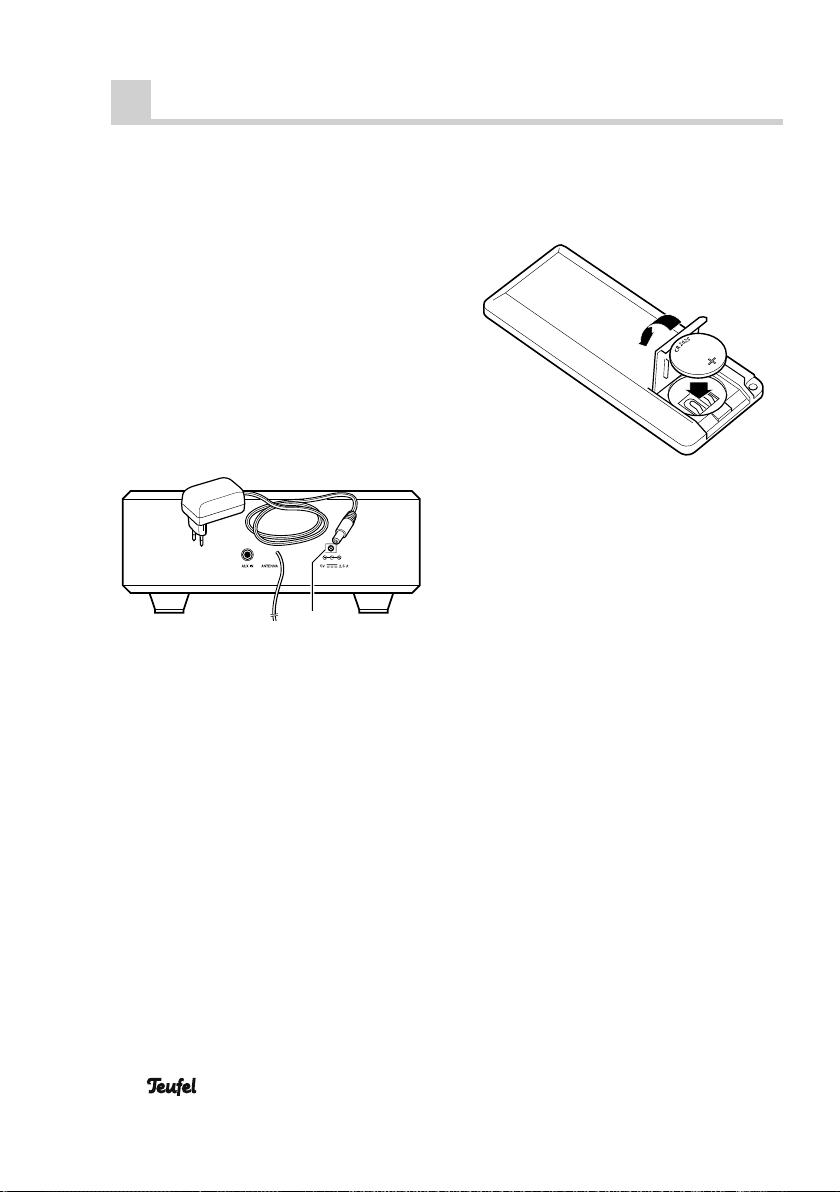
Connecting to a power
supply
15
1. Insert the small mains adapter plug 햳
in the jack DC 5V (15).
2. Insert the mains adapter in an easily
accessible mains socket.
Remote control
A type CR2025 lithium battery powers
the remote control.
This battery is already located in the remote control upon delivery and is insulated with a plastic strip. Part of this
plastic strip protrudes from the battery
compartment. Carefully pull out the strip.
The remote control is now ready for use.
Changing the batteries
1. Hold the remote control with the bottom facing up.
2. Push the battery compartment cover down towards the arrow and fold
it open.
3. Remove the battery and replace it
with a new one. When inserting the
battery, make sure the polarity is correct (see fi gure).
4. Fold the battery compartment cover back into the closed position and
push it up.
Functionality
The remote control relays the control signals by means of infrared light. For this,
it is necessary that you point the remote
control towards the unit and no objects
are in the way.
Fluorescent and energy-saving lamps,
which are installed in the immediate vicinity, may affect the functions of the remote control or even disable them.
12
• iTeufel Clock v3
Page 13
Clock and alarm
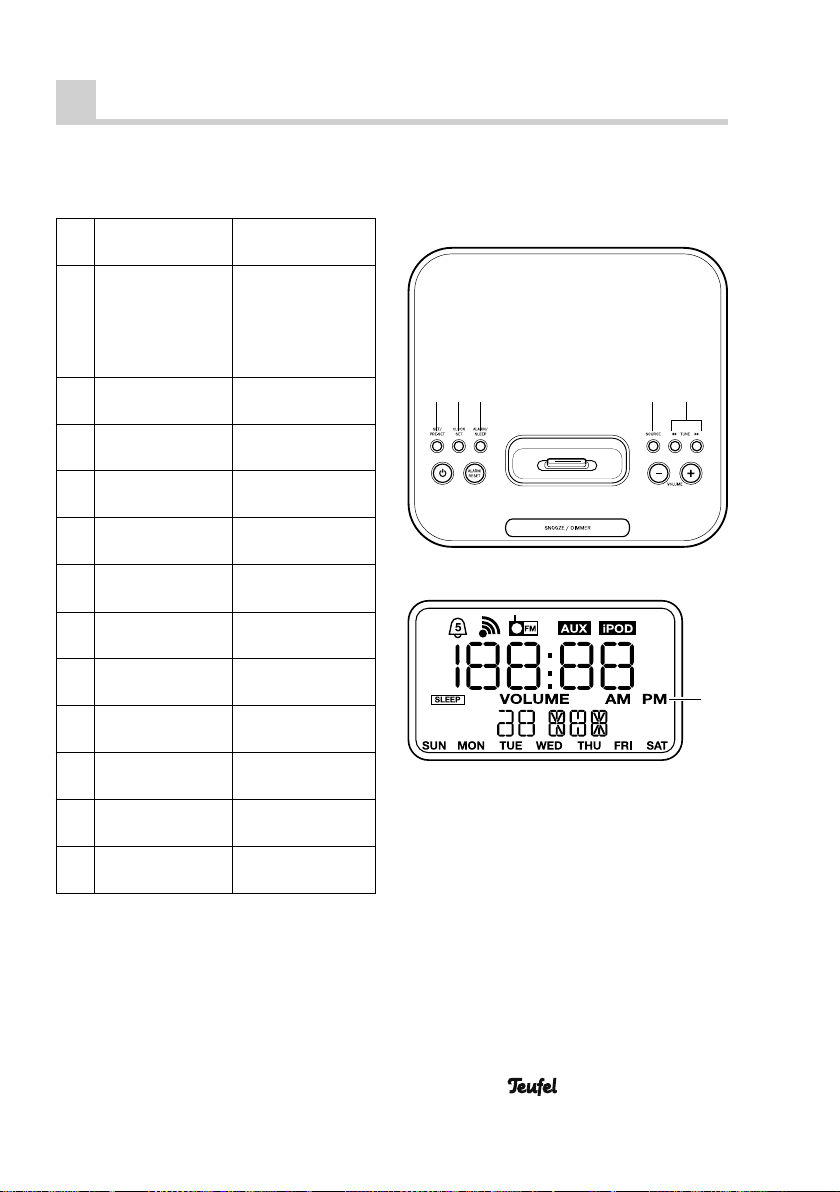
Setting the time and date
1. Push and hold
CLOCK SET (4)
2. Briefl y push
TUNE ►► (8)
3. Briefl y push
SET/PRE-SET (3)
4.
Repeatedly push
◄◄ TUNE ►► (8)
5. Briefl y push
SET/PRE-SET (3)
6.
Repeatedly push
◄◄ TUNE ►► (8)
7.
Briefl y push
SET/PRE-SET (3)
8.
Repeatedly push
◄◄ TUNE ►► (8)
9. Briefl y push
SET/PRE-SET (3)
10.
Repeatedly push
◄◄ TUNE ►► (8)
11. Briefl y push
SET/PRE-SET (3)
12.
Repeatedly push
◄◄ TUNE ►► (8)
13. Briefl y push
SET/PRE-SET (3)
The display will
blink.
◄◄
Set 12 / 24 hour
time mode (AM
or PM (23) is displayed in 12 hour
time mode).
Hours blink
Set the hours
Minutes blink
Set the mintues
Year blinks
Set the year
Month blinks
Set the month
Day blinks
Set the day
Done
83 4 5 7
23
• iTeufel Clock v3
13
Page 14
Alarm function (alarm)
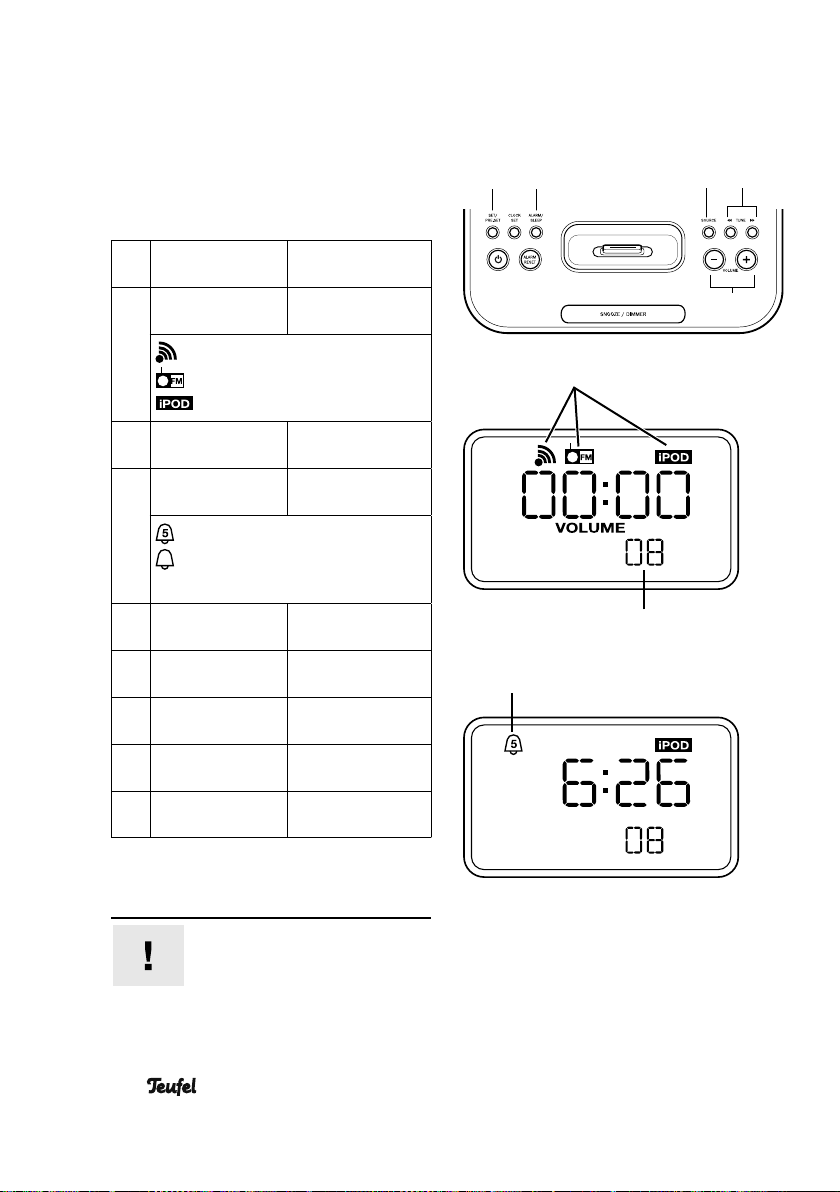
Alarm einstellen
1. Briefl y push
Alarm/Sleep (5)
2. Repeatedly push
SOURCE (7)
Buzzer
Radio
iPod/iPhone
3. Repeatedly push
– VOLUME + (9)
4. Repeatedly push
Alarm/Sleep (5)
(5 days):
(7 days):
no symbol: alarm deactivated
5. Briefl y push
SET/PRE-SET (3)
6. Repeatedly push
◄◄ TUNE ►► (8)
7. Briefl y push
SET/PRE-SET (3)
8. Repeatedly push
◄◄ TUNE ►► (8)
9. Briefl y push
SET/PRE-SET (3)
Symbols on the
display blink
Select the alarm
source
Set the alarm volume
Select the alarm
setting
alarm from Mon. – Fri.
alarm on every day
Hours blink *)
Set the hour
Minutes blink
Set the Minute
Done
35
Alarm sources
Alarm setting
87
9
Alarm volume
*) If the hours do not blink, briefl y push
the button ALARM/SLEEP (5) again.
Important!
If you have selected FM or
iPOD as the alarm source,
make sure that the corresponding device is available for playback. That is,
14
• iTeufel Clock v3
Page 15
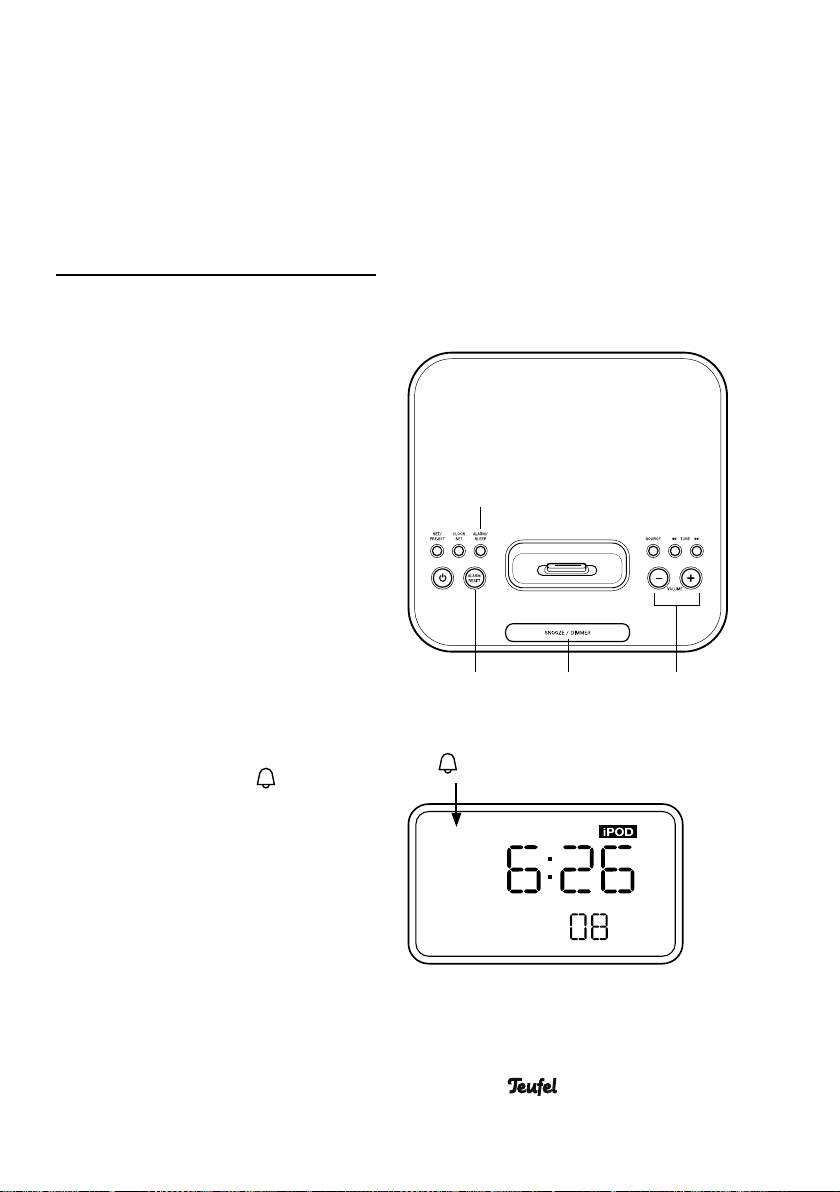
the desired station must be selected or
the iPod/iPhone must be located in the
dock. If no iPod/iPhone is in the dock,
the buzzer alarm will sound instead of
the music from the iPod/iPhone.
When the alarm sounds ...
The alarm of the selected source with the
previously set volume sounds when the
alarm time is reached.
Snooze function
If you would like to sleep a bit longer,
push the button SNOOZE / DIMMER (10).
The alarm will be disengaged for 5 minutes, after which time it will sound again.
You can repeat this process for up to 2
hours.
Disengaging the alarm
In order to disengage the alarm, push
the button ALARM RESET (11).
Deactivating/activating the alarm
If you would like to deactivate the alarm,
for example, if you are on holidays,
push the button ALARM/SLEEP (5), re-
peatedly until the symbol
play disappears.
After approx. 8 seconds, the blinking
will stop and the setting is saved. You
can also reactivate the alarm in the
same manner.
on the dis-
5
911 1 0
No symbol: Alarm deactivated
• iTeufel Clock v3
15
Page 16
iPod/iPhone operation
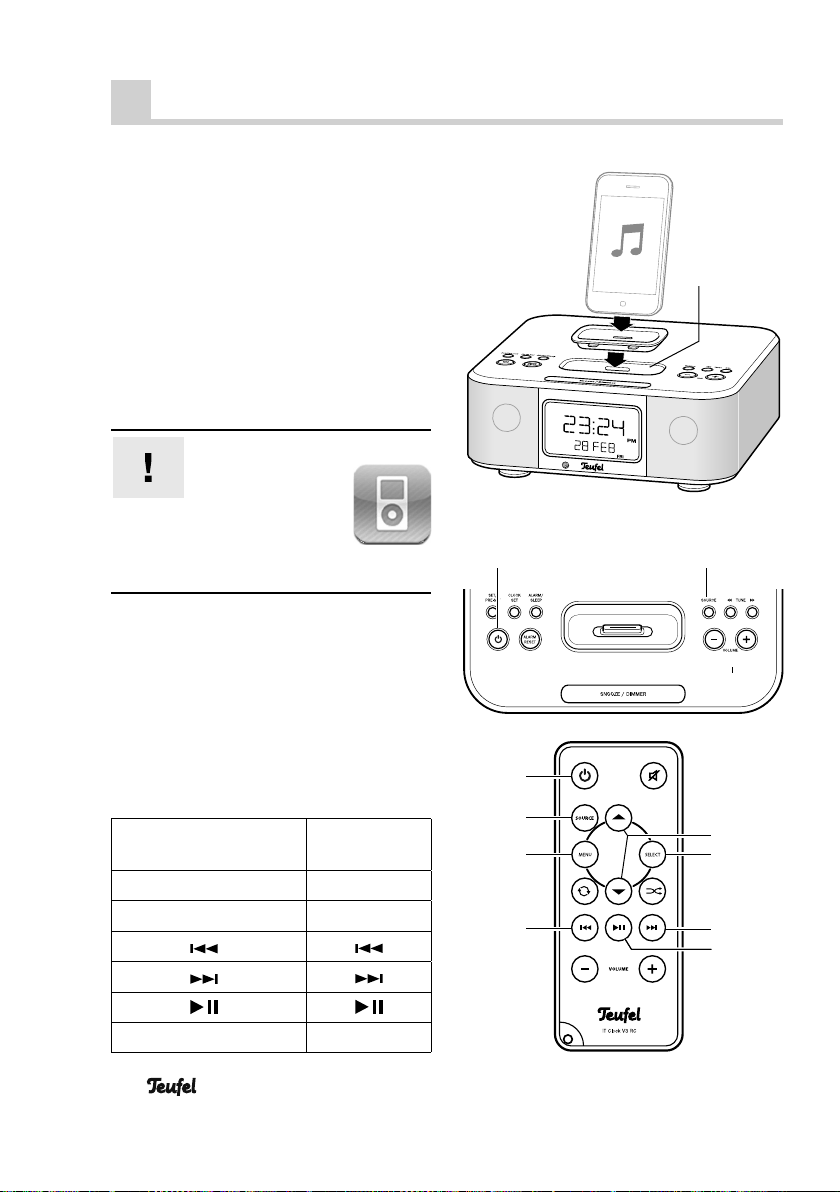
Connecting an iPod/iPhone
1. Search for the corresponding dock
adapter 햵 (see adapter back side).
2. Push the adapter into the iPod/iPhone
dock 6 until it audibly locks into
place.
3. Carefully place the iPod/iPhone on
the plug-in contact in the dock.The
iPod/iPhone is now ready for playback and the storage battery is
charged.
Important!
With the iPod
Touch and iPhone,
you have to launch the application “iPod”, which is normally located in the dock area of the home screen.
iPod/iPhone playback
1. Activate the device with the On/
Standby button (12) or (37).
2. With the button SOURCE (7) or (36)
select “iPOD” as a source.
6
12 7
You can now directly control the basic functions of your iPods/iPhones with the remote
control or the buttons on the device:
Button on the device or
on the remote control
35 Menu
28 Select
33
30
31
27 ▲/▼
16
• iTeufel Clock v3
Corresponds to
the iPod button
MENU
Select
Scroll wheel
37
36
35
33
27
28
30
31
Page 17
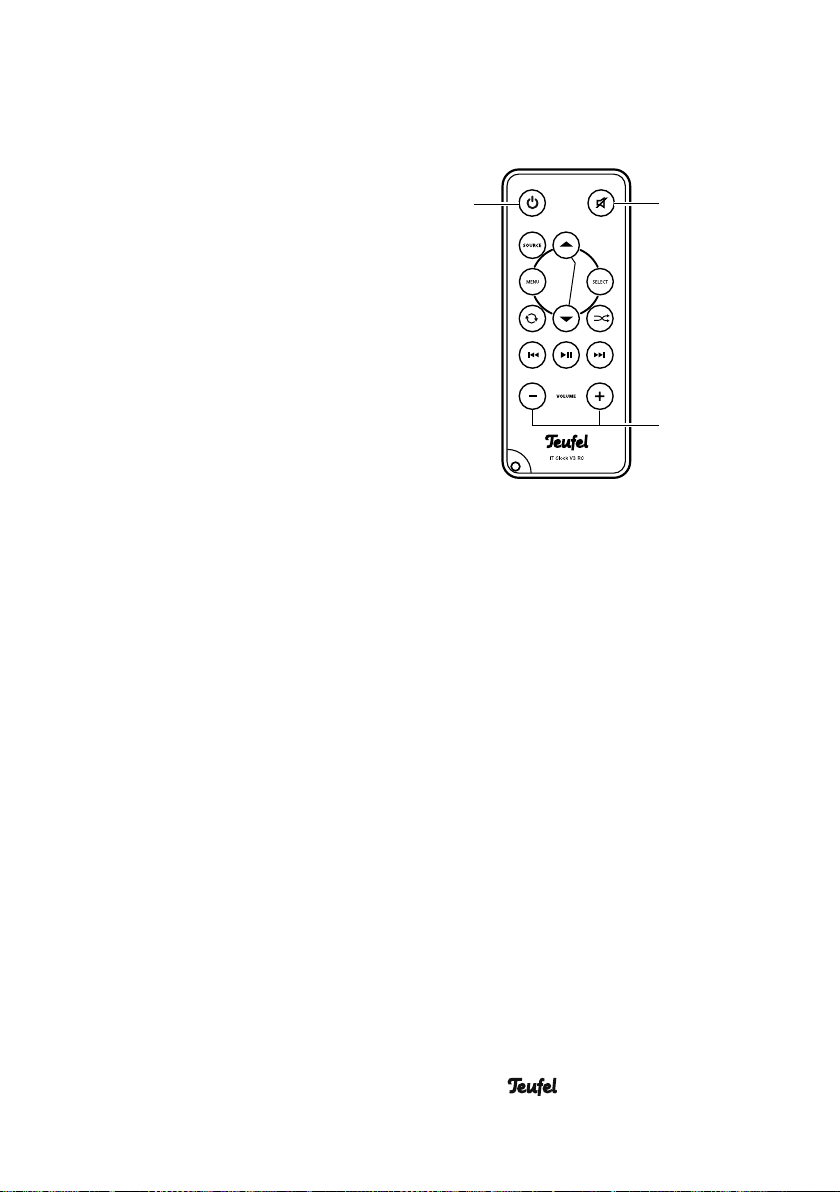
Adjusting the volume
• You can adjust the volume with the
buttons – VOLUME + (9) or
– VOLUME + (32).
• With the button Mute (26), you can
turn the sound off and on again.
Removing the iPod/iPhone
3. Turn the device off with the On/Stand-
by button (12) or (37).
4. Carefully remove the iPod/iPhone
from the dock.
37
26
32
• iTeufel Clock v3
17
Page 18
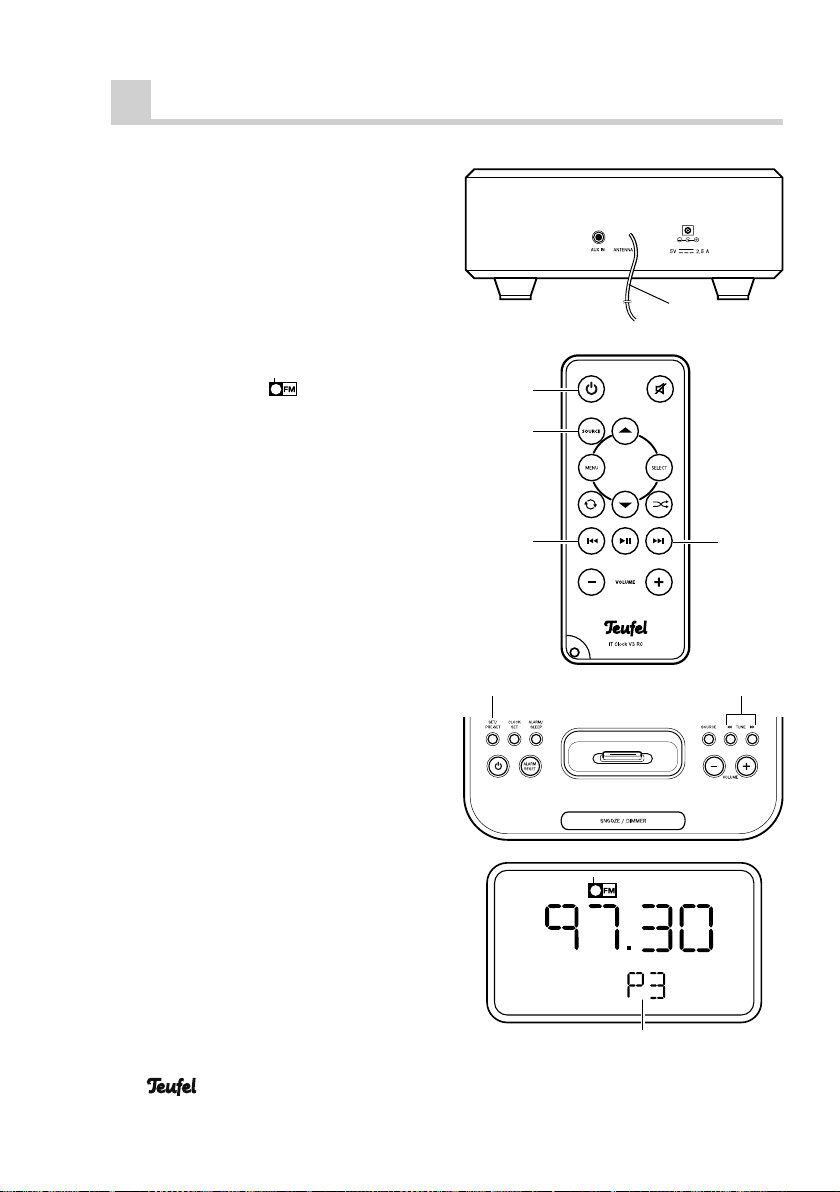
Radio mode
Antenna
Unwind the throw-out aerial (14) and adjust the position of the antenna for ideal
reception. Then fi x the antenna in place
with adhesive tape.
Selecting radio mode
1. Turn the device on with the On/Stand-
by button (12) or (37).
2. Select the source
SOURCE (7) or (36).
with the button
Setting the radio stations
• Set the tuning frequency with the but-
tons TUNE (8) or ►►| ( 30) or |◄◄ (33):
The frequency is increased or reduced
by one increment (0.05 MHz) each
time the button is tipped.
Pushing and holding the button continually increases or decreases the frequency until a station has been found.
Saving radio stations
You can save up to 6 radio stations.
1. Set the frequency of the station to be
saved.
2. Hold the button SET/PRE-SET (3) un-
til the memory slot appears and blinks
under the frequency display.
3. With the buttons ◄◄ TUNE ►► (8) se-
lect a memory slot between 1 and 6.
4. Briefl y push SET/PRE-SET (3).The sta-
tion has been saved.
14
37
36
33
38
30
18
Station memory slot
• iTeufel Clock v3
Page 19
Accessing saved stations
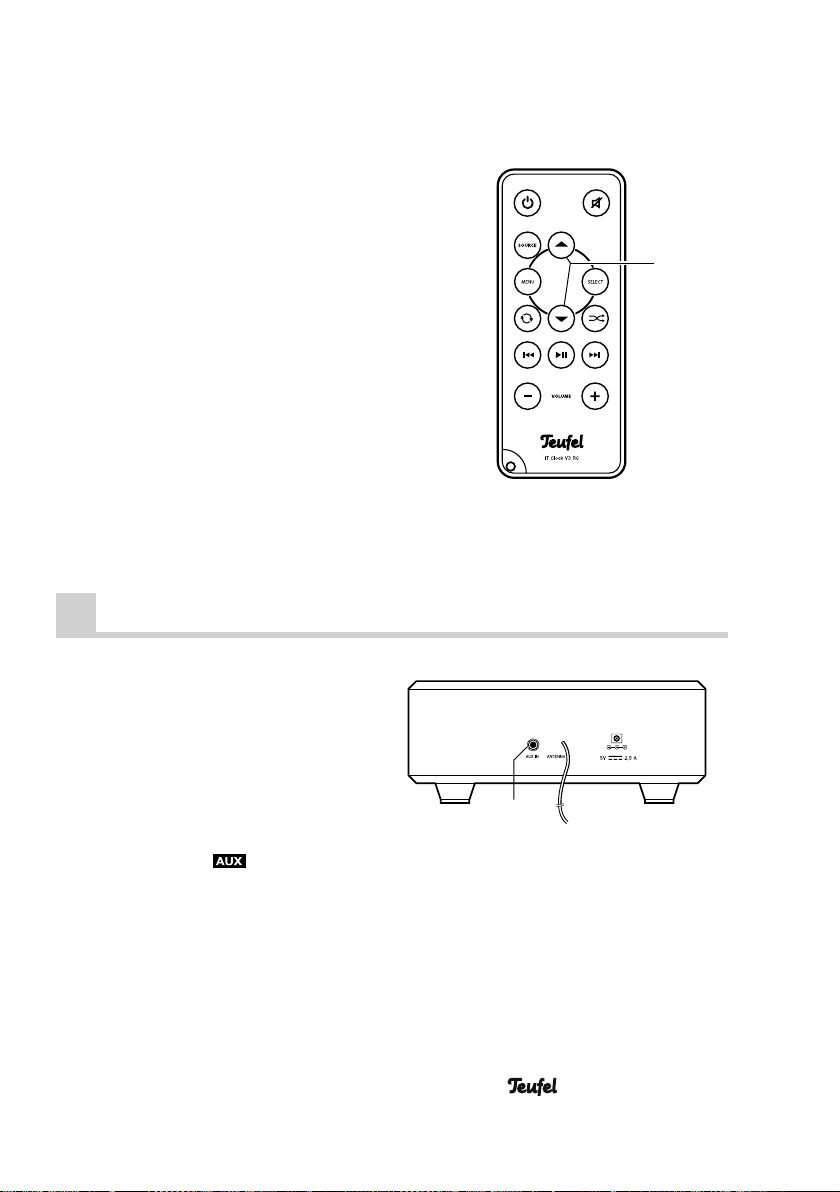
You can access saved stations with the
arrow buttons (27) on the remote control
or by repeatedly pushing the button SET/
PRE-SET (3).
Operation with an external device
• To connect an external device (e.g.
mobile or MP3 player) you will need
a cable with a 3.5 mm stereo jack
plug (not included in the product contents).
• With this cable, connect the line out
or earphone jack of the external device and the jack AUX IN (13).
• Select the source
SOURCE (7) or (36).
• All control functions can only be executed on the external device. Only the
volume control and the mute function
can be controlled with the buttons of
the iTeufel Clock v3.
with the button
27
13
• iTeufel Clock v3
19
Page 20
Special functions
Sleep function
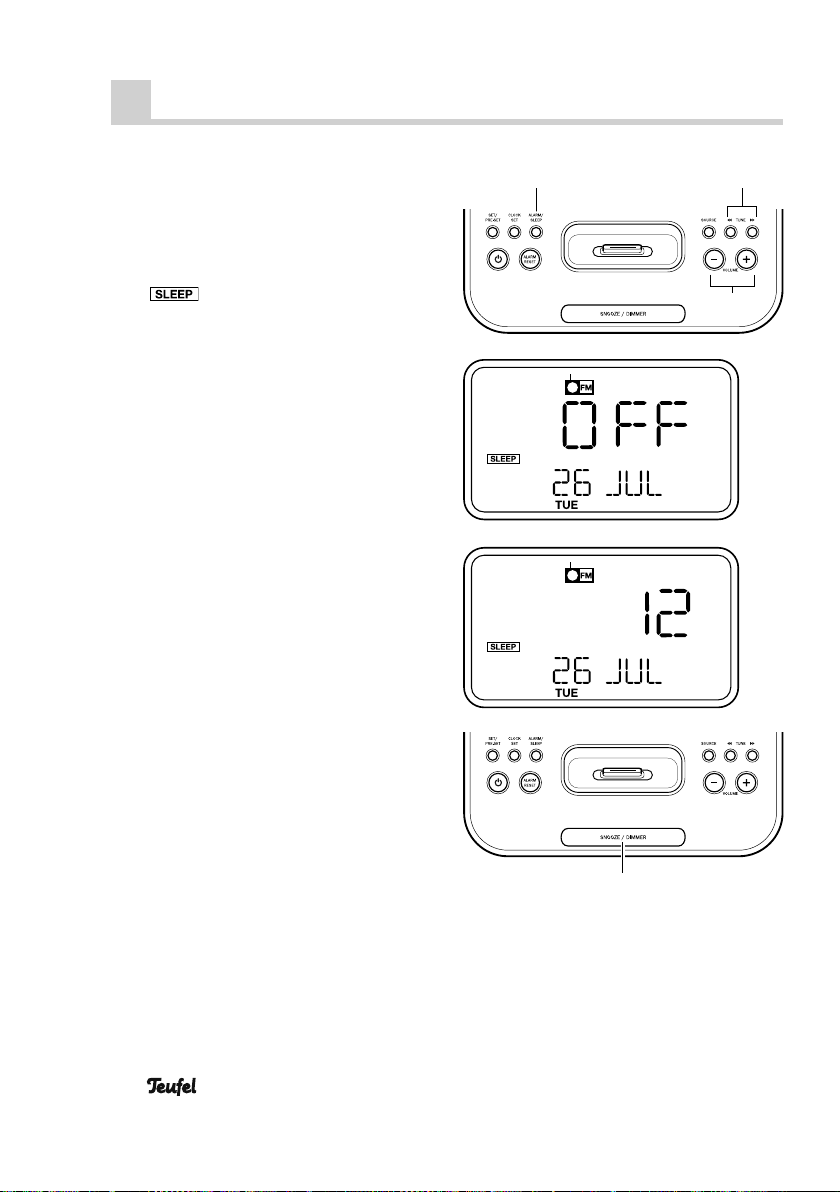
This function deactivates your iTeufel
Clock v3 after a preset time.
1. During music playback, push and
hold the button A LARM / SLEEP (5) until
2. With the buttons – VOLUME + (9) or
◄◄ TUNE ►► (8), set the desired time
until deactivation in increments of 15
minutes.
The maximum time amounts to 60 minutes. The sleep function is deactivated
with the setting “OFF”.
A few seconds after being set, the display returns to the original readout.
To display the remaining time, push
and hold the button ALARM / SLEEP (5)
until the remaining time appears.
appears on the display.
Display brightness
By repeatedly pushing the button
SNOOZE / DIMMER (10), you can set the
display brightness to three intensities.
85
9
20
10
• iTeufel Clock v3
Page 21
Care and cleaning
Clean the device regularly with a soft,
damp microfi bre cloth. Please be absolutely sure to observe the following notes
in the process:
Danger
or short circuit.
• Make sure that no liquid penetrates
• Pull the plug mains adapter out of the
Risk of electric shock!
In contact with live parts, water can lead to electric shock
the mains adapter or the device.
socket before cleaning.
Protecting the environment
Batteries and rechargeable
batteries
Batteries and rechargeable
batteries must not be disposed of with household
waste!
Every consumer is required by law to
bring all batteries and rechargeable batteries, whether they contain harmful substances*) or not, to a collection point run
by the communal authority or borough
or run commercially , so that they can be
disposed of in an environmentally friendly manner.
Please only hand in fully discharged batteries !
Attention
• If possible, only use plain water with-
• Do not in any case use aggressive
Risk of damage!
The wrong cleaner could damage the sensitive case surface.
out any additives. A mild soapy solution is suitable for removing stubborn
stains.
cleaning agents, spirit, thinner, petrol
or the like for cleaning.
Disposal of the unit
Used units must not be disposed of with household
waste
If the unit is no longer opera-
tional, every consumer is required by law to dispose of used devices separate from household waste, e. g.
at a collection point run by the communal authority borough. In this way, used
devices can be recycled and waste materials disposed of in an environmentally
friendly manner.
For this reason, electrical equipment is
labelled with the displayed symbol
*) labelled with: Cd = Cadmium,
Hg = Mercury, Pb = Lead
• iTeufel Clock v3
21
Page 22

Technical data
Operating voltage: 100-240 V~ / 50/60 Hz
Mains adapter: 5 V DC / 2,5 A
Radio reception range FM (87,5 MHz – 108,0 MHz)
Dimensions (W x H x D): 180 x 70 x 170 mm
Net weight: 675 g
Technical changes reserved!
This product conforms with Council of the
European Union guidelines 2004/108/EC and
2006/95/EC.
22
• iTeufel Clock v3
Page 23

• iTeufel Clock v3
23
Page 24

For questions, suggestions or criticism please contact our customer service department:
Lautsprecher Teufel GmbH
Gewerbehof Buelowbogen – Aufgang D1
10783 Berlin (Germany), Buelowstrasse 66
Phone: 00800 – 200 300 400 (free of charge)
Fax: +49 (0)30 – 300 930 930
www.teufelaudio.com
No responsibility is assumed for the correctness of this information.
Technical changes, typographical errors and other errors reserved.
Instruction No. 91792_GB / HC-20110308
 Loading...