

Page 1

ST815 Laser Source
User Manual
V1.2
Contents
1. Summary ........................................................ 1
Page 2

ST815 Laser Source
2
2. Functions ....................................................... 1
3. Specifications ................................................ 2
4. Layout ............................................................ 3
5. Operation ....................................................... 5
6. Faults & Solutions ......................................... 7
7. Advertent Items ............................................. 7
Page 3

ST815 Laser Source
8
--The instrument should be avoided of mechanical
oscillation, collision, fall off and any other mechanical
damage.
--The light output connectors should be avoided the touch
of the hard objects, dirty objects, acid, alkali and other
caustic objects. Please cover the dustproof cap to avoid
the dust and other bad chemical objects.
--Please clean the fiber jumper earthen port using alcohol
and operate it after the alcohol is air-dry.
--It is forbidden that the user looks at the light output
end directly when you operate the instrument to avoid
the light burn the eye and skin.
--Clean the ceramic core regularly
--The battery should be taken out if the instrument is out of
operation for a long while, otherwise, the service time of
battery will be affected.
Test s.r.l.
Strada Vic. Battifoglia, 14/N
Zona Industriale
06132 S. Andrea delle Fratte (PG)
Phone: +39 075 8788003
Web: www.test.it
ST815 Laser Source
1
1. Summary
With better performance and special fast field testing
function, ST815 adopts advanced technology of exact light
and dealing with technology and to support high
performance light for the field test and the lab development.
It has been an ideal instrument for maintenance and
development of optical network equipments.
ST815 can be widely used in various kinds of optical cable
testing fields, such as LAN, WAN, CAN, CATV and
long-distance Fiber Network.
Together with ST800 series optical power meter, ST815
Laser Source can support stable light signal on many kinds
of wavelength, it can recognize the fiber, test the fiber loss
and continuity accurately, help to evaluate the transmission
quality of fiber chain as well.
2. Features
2.1 Handheld, easy to operate
2.2 Two to four wavelength optional
2.3 Continuous light, modulated light output
2.4 Output double wavelength or three wavelengths
through single adapter
2.5 Output three or four wavelength through double
adapter
2.6 High stabilization
2.7 Auto shut off function without operation in 10 minutes
2.8 Big LCD, intuitive, easy to use
2.9 LED backlight switch on/off
210 Auto close back light in 8 seconds
2.11 AAA dry battery or Li battery
2.12 Battery voltage display
Page 4

ST815 Laser Source
2
2.13 Low voltage checking and shut off design to save
energy
3. Specifications
3.1 Emitter type: FP-LD/DFB-LD
3.2 ST815 series wavelength switch:
ST815 Wavelength: 1310±20nm, 1550±20nm
ST815B Wavelength: 1310±20nm, 1550±20nm,
1490±20nm
ST815C Wavelength: 1310±20nm, 1550±20nm, 850±20nm,
1300±20nm
ST815D Wavelength: 1310±20nm, 1550±20nm,
1625±20nm
ST815E Wavelength: 1310±20nm, 1550±20nm, 650±20nm
3.3 Spectral width: ≤5nm
3.4 Output Power: ≥-7 dBm, ≥0dBm(customized),650
nm≥0dBm
3.5 Stability in short time:≤±0.05dB/15min
3.6 Stability in long time:≤±0.1dB/5h
3.7 Light output mode: CW continuous light, 270Hz, 1kHz,
2kHz, 330Hz modulization output, 650nm red light 2Hz
3.8 Battery display: LCD
3.9 Working wavelength and modulated light display: LCD
3.10 Battery: 3 pieces AAA dry battery or Li battery
3.11 Low voltage: If the battery voltage is low, auto warning
every 20s
3.12 Low voltage shut off: When the battery voltage is low,
this meter will auto shut off
3.13 Battery working duration: dry battery about 15 hours
3.15 Working temperature: 0℃ ~ 40℃
3.16 Storage temperature: -10℃ ~ 70℃
3.17 Relative Humidity: ≤90%
3.18 Dimension (mm): 160×76×28
ST815 Laser Source
7
6. Faults & Solutions
Faults
Reasons
Solutions
The instrument
cannot be
switched on
The battery is under
low voltage
Charge the
battery at
once
No optical
power output
The earthen core of
the connector is
broken
Replace the
connector
The optical
power is
decreased
Connector and the
inner light caudal fiber
earthen core are dirty
Clean the
earthen core
using
absorbent
cotton with
alcohol
7. Advertent Items
Attention: The light source maybe hurt to eyes, so it is
forbidden that the user looks at the light output end
directly when you operate the instrument in order to avoid
the light burn the eyes!
Note: If you use dry battery, do not recharge the
battery. That is dangerous!
Please pay attention to the followings in order to keep the
performance of the instrument and prolong its service time.
Page 5
ST815 Laser Source
6
Press " " button to turn the backlight on or off. When
the backlight is on, the sign will display on the
screen, otherwise this sign disappear. If the backlight is
in a closed state, the operation of any function key will
open the 8 seconds’ backlight besides pressing "start"
button.
5, Under-voltage
When the battery voltage is low, the power indicator
become , when the battery voltage is lower than
warning voltage, the equipment will alarm "Low voltage"
every 20 seconds. When the battery voltage is lower
than protection voltage, it will be in auto turn-off state.
The equipment should be charged in time, charging time
is about 4 to 6 hours, please observe the charger, if the
charging indicator light becomes from red to green,
which means the battery is full.
6. When the equipment is not in use, the user should
immediately cover the dust cap to keep the adapter
clean.
ST815 Laser Source
3
3.19 Weight: 0.22Kg
4. Layout
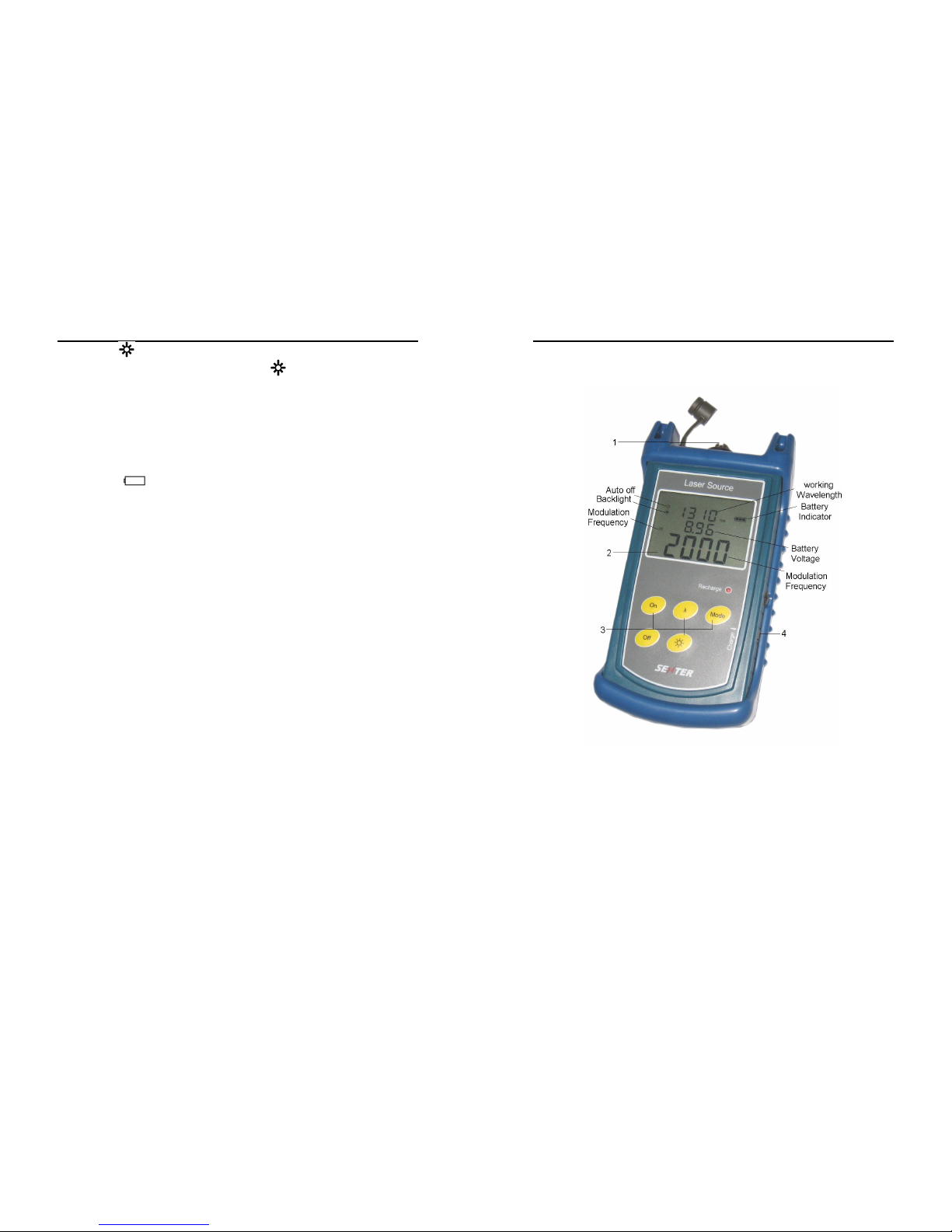
ST815, ST815B Figure
1. 1310nm, 1550nm output adapter
2. LCD
3. Operation buttons
4. Charging socket
Page 6
ST815 Laser Source
4
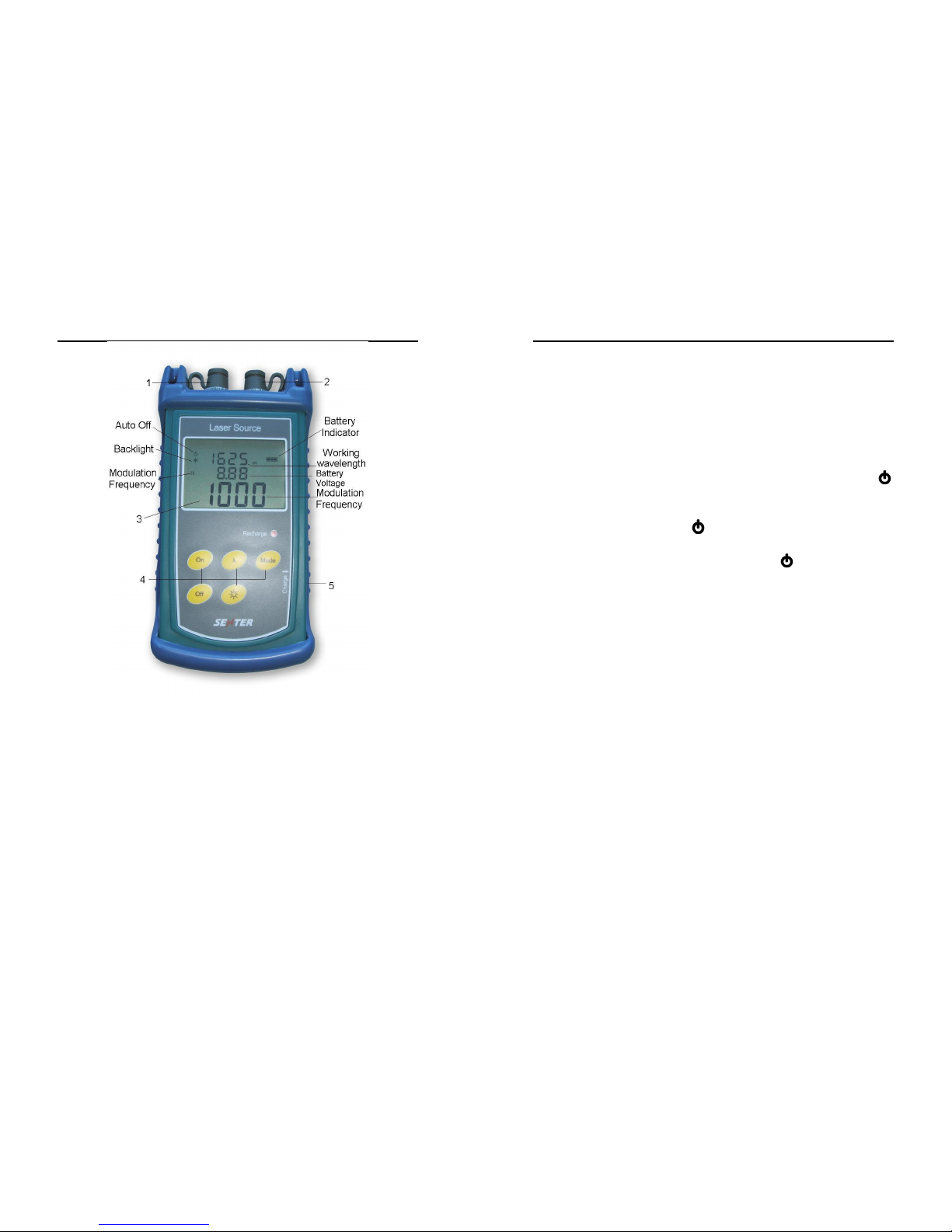
ST815C, ST815D, ST815E Figure
1. 1310nm, 1550nm output adapter
2. The second output adapter:
ST815C: 850nm, 1300nm output adapter
ST815D: 1625nm output adapter
ST815E: 650nm output adapter
3. LCD
4. Operate button
5. Charging socket
ST815 Laser Source
5
5. Operation
1. Power On/Off
Press "On" key 2 seconds to start the equipment, LCD
displays operating wavelength, battery voltage and
modulation state. When you open the ST815, it works on
1310 nm wavelength and continuous light output state;
press "off" key 2 seconds to close the equipment. The
system defaults auto-shutdown, auto shutdown logo
is displayed on the screen. Open and turn off the
automatic shutdown function: Press "off" button on the
screen, auto-off mark disappear, which shows the
automatic shutdown function is closed; and then press
"off" button, automatic shutdown logo is displayed on
the screen at this time has indicated that the automatic
shutdown feature open. If there is no operation for 10
minutes, the equipment will automatically shutdown.
2. Wavelength switch function
Press "wavelength" button when power on, you can
switch different wavelengths, and LCD screen display the
different output wavelength.
Note: If you want to switch the 1310nm, 1550nm
wavelength to 850nm, 1300nm (ST815C) or 1625nm
(ST815D) or 650nm (ST815E), do not forget to change
the output adapter.
3. Modulation output
Press the "Mode" button, you can achieve the modulated
light 270Hz, 1 kHz, 2 kHz, 330Hz, 650nm red light 2Hz,
continuous light output, at the same time, on the LCD
screen the equipment will show the corresponding
modulation frequency of the state.
4. Backlight
 Loading...