

Page 1
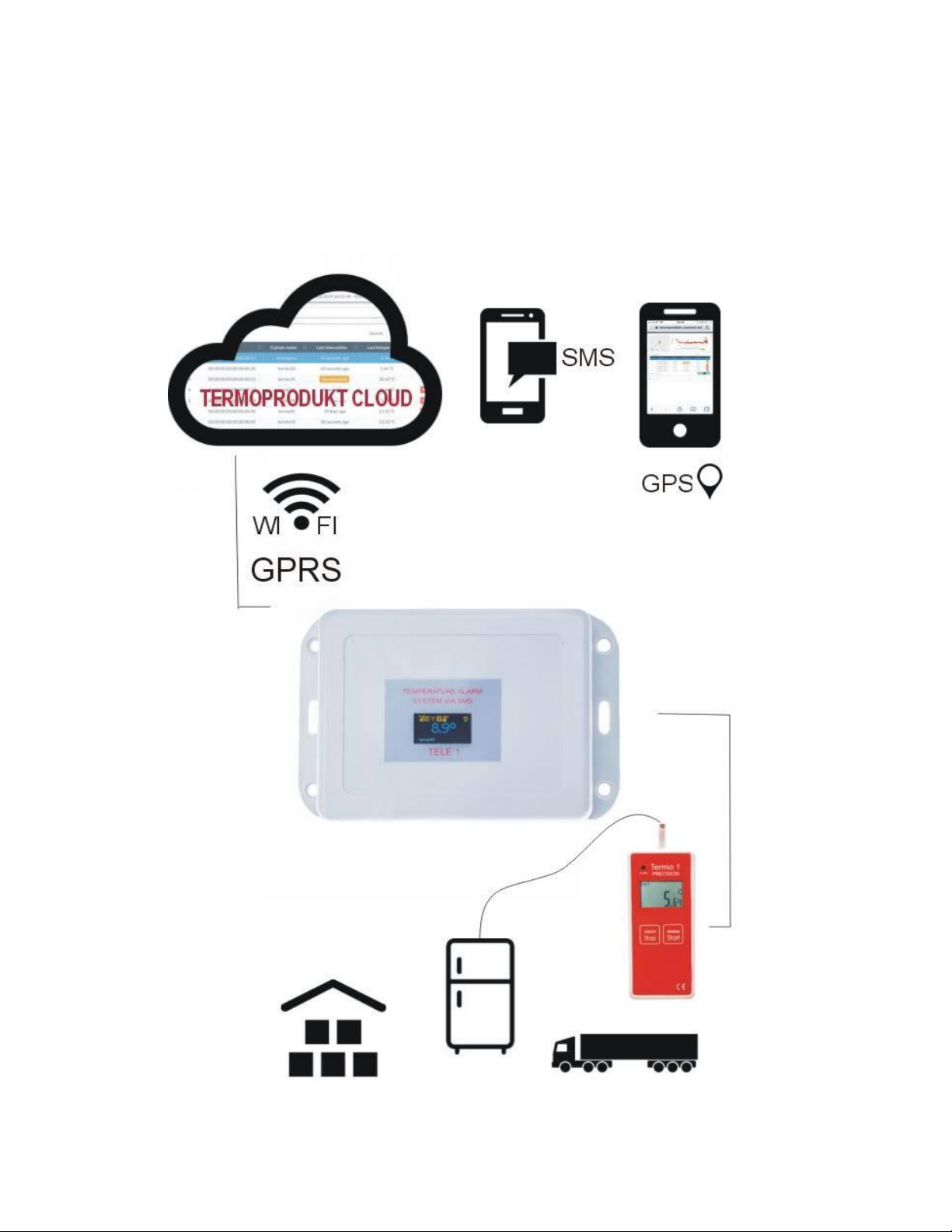
TEMPERATURE MONITORING SYSTEM
WITH SMS NOTIFICATION AND CLOUD PLATFORM
Page 2

Spis treści:
1. Itroduction – what is Node Tele-1
2. SIM Card
3. Settings/Configuration Node Tele-1 SMS/GSM/GPS
4. Node Tele-1 display
5. Termoprodukt Cloud Platform
6. Connection Node-1 with data logger
1.Introduction – what is Node Tele-1
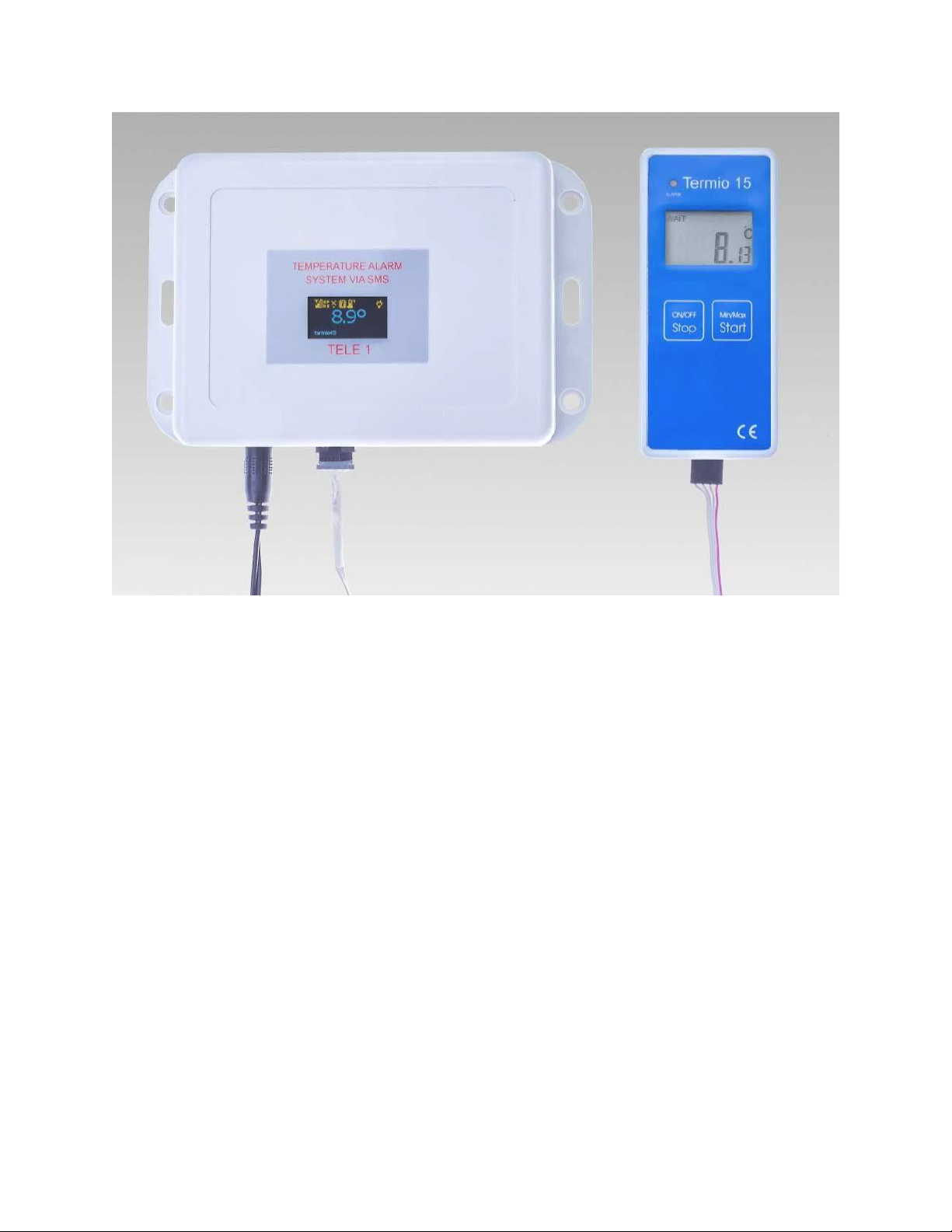
Node Tele-1 SMS/GSM/GPS works with Termoprodukt data loggers : Termio1, Termio2,
Termio15, Termio31 and allows connecting data loggers with Termoprodukt Cloud Platform.
For customers who already have Termoprodukt data loggers there is ability to buy Node Tele-1
module and connect it with Termoprodukt Cloud Platform.
Node Tele-1 function is sending alarm SMS message automatically once the setting limits
(temperature alarms/thresholds) being exceeded and also sending saved datas from data
logger to Termoprodukt Cloud Platform.
Termoprodukt Cloud Platform function is saveing, collecting and processing data from data
loggers.
Access to the Termoprodukt Cloud platform is possible via Mozilla, Chrome or Safari web
browsers.
At this moment only one data logger can be connected to one Tele-1 device but many of data
loggers can be conneted to Termoprodukt Cloud Platform via Module Node-1 sets.
The Module Node Tele-1 set includes:
• Node Tele-1 SMS / GSM / GPS
• Temperature logger : Termio1, Termio15, Termio31, Termio-2 – for customer to choose
• Cable to connecting GSM module with data logger
• Power Supply
Temperature measurement:
• Termio1 in the range –50 to 300 ° C with an accuracy of 0.07 ° C
• Termio15 in the range –50 to 70 ° C with an accuracy of 0.3 ° C
• Termio31 in the range –200 to 1200 ° C with an accuracy of 1 ° C
Page 3

More informations about Termoprodukt data logger are available on https://termoprodukt.co.uk/
Data loggers can record and save datas even without Tele-1 Module. They are independet.
In the case of power loss, the Tele-1 module has a battery backup that lasts for about 25
minutes. During this time, the module sends SMS with information about power failure.
2.SIM Card
For Module Tele-1 customer need a SIM card (not included in set) with the active sms service.
The module works correctly with any active SIM card from any operator, including prepaid
cards.
3. Settings/Configuration Node Tele-1
Insert SIM card to Node Tele-1, connect Power Supply and data logger to Node Tele-1 and now
it is time to start configuration.
The device is configured via a web browser.
During configuration provide the name of the data logger and WIFI settings if the module is
within its range. Setup the frequency of SMS notifications and the message that will be
displayed in the SMS notification.
Setup temperature alarms thresholds and sending notificatins with information about power
failure.
Configuration : After purchasing user gets Module Node-1 set and invitation for new Cloud
account on mail.
Welcome to Termoprodukt portal. Your account is ready for use.
Navigate to termoprodukt.usermd.net and login to dashboard using following credentials :
example :
● Password: 71f8dac1
After entering the address : thermoprodukt.usermd.net in the browser, enter the username
(usually email) and password generated by the system automatically.
The first login requires a password change. The new password should contain a minimum of 8
characters, uppercase letter, lowercase letter and special character, e.g. $.
Page 4
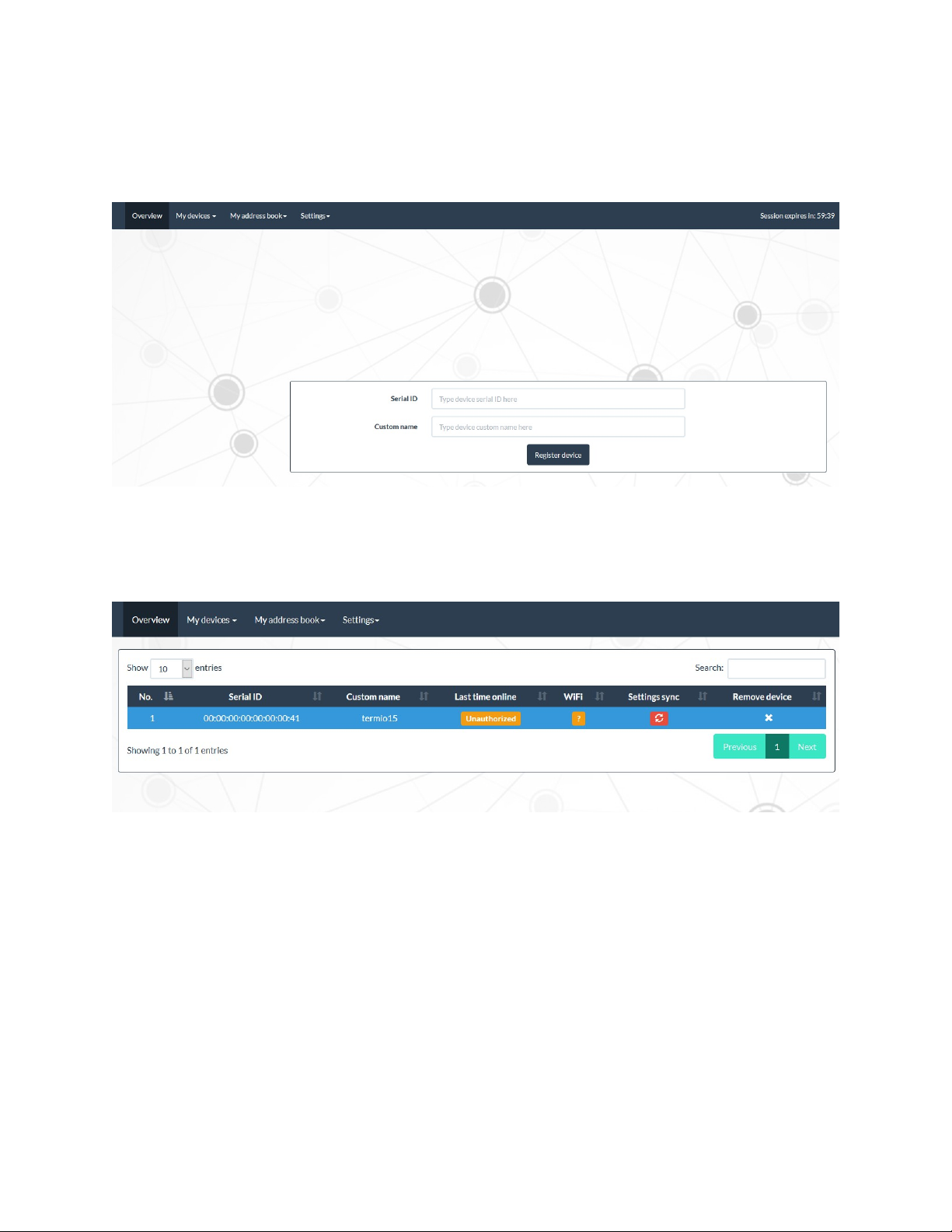
After logging in we receive an empty window with the menu.
For now, descriptions are only available in English.
First, go to the My device / Add new devices tab and in the window serial ID enter the 16 digit
number that is visible on the display – Node Tele-1.
Then we can see window with new added device.
You must wait for its authorization, which lasts up to a few minutes. Authorization is the
coneccection of the Thermoprodukt Cloud Platform with Node Tele-1 SMS / GSM / GPS.
Synchronization of the module with the server in the program is confirmed by changing the
Setting sync parameter from Unauthorized to List time online - time since the last
connection.
Page 5
My Address Book/Add new contact – to add telephone number ( max 3 numbers).
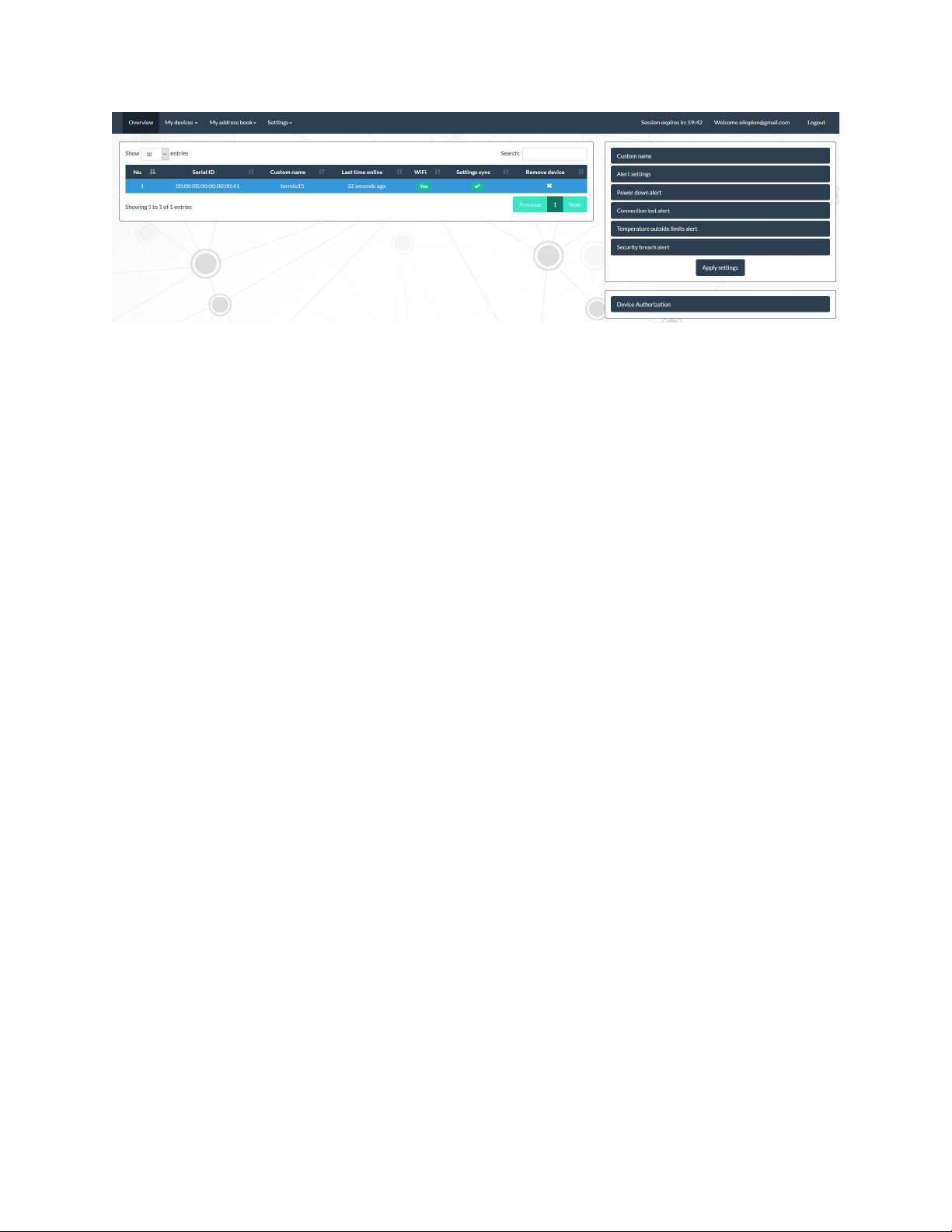
The menu on the right in My devices / Registered devices tab contains configuration settings
that must be made at least once. After making the settings, the module will work fully
independently sending sms, monitoring and recording temperature on the platform.
Custom name – to put device name or place where device works.
WIFI Setting - the module Node Tele-1 can be connected to the Termoprodukt Cloud not only
via GSM / GPRS, but also via WIFI. After completing the windows and confirming the display
will show the sign of an active connection. For example, if the prepaid card expires but the Node
Tele-1 set has a WIFI connection configured, the data will be transferred to the cloud.
Alert setting – to specifying the frequency with which SMSes will be sent after exceeding the
temperature limits/thresholds and SMS contest. For example if value
Alert frequency will be 10 minutes, that means that the Node Tele-1 will send an SMS
notification after this time. It is worth setting a higher frequency due to sudden momentary
temperature changes caused e.g. by frequent opening or closing of the fridge.
Alert message - the content of sent sms
Alert message field :
Attention! The characters should be separated by a space.
If we enter in the Alert message field e.g :
term % N
% T
we will receive a text message :
term 23 ℃
The SMS content can contain the following elements:
● %B - Battery level - % B - Battery level - battery voltage level that keeps the device
Page 6

working for about 20 minutes after losing power. It is given in the range of 0 - 500mV.
● %D - Date and time of event - the time and date when the alarm occurred
● %N - Device name - device name, but you can also enter any other message content
instead of this character, e.g.
thermometer %N %T.
We will then receive SMS with a text message :
thermometer 23℃.
● %P - GPS position
● %T - Current temperature
● %A - Alert type - four types of alarms are available : Power down alert, Connection lost
alert, Temperature outside limit alert, Security breach
Power down alert - sms notification about power loss. To activate this alarm, open the tab and
then check the box and select the phone to which Notifications will be sent.
Connection lost alert - this alarm informs you that data transfer between the module and the
server has been stopped.
Temperature outside limit alert - is used to set temperature alarm limits after exceeding
which an SMS message will be sent.
Security breach alert – empty SMS
Attention! All configuration changes must be accepted by button Apply settings.
4. Node Tele -1 Display
The top row from the left are represented in turn by icons: active GPRS connection, active WIFI,
saving measurements to memory, temperature measurement, mains power. No SIM card, WIFI
is indicated by the symbol :
The display also shows the current name of data logger given by the user and the name of the
WIFI network to which the device is connected.
Page 7
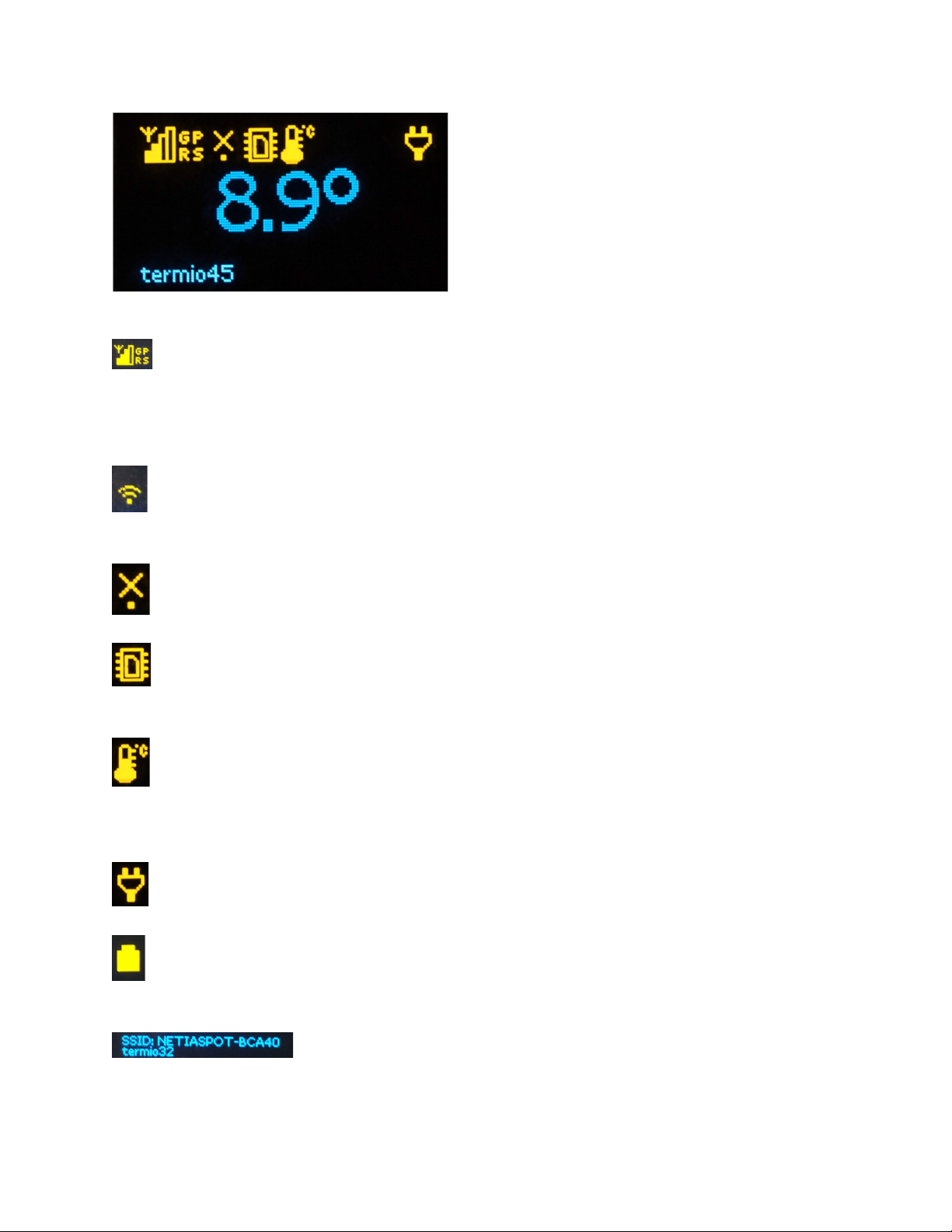
connection Thermoprodukt Cloud with Node Tele1 is active. If the SIM card is missing then
"inactive" appears on the display. When there is no coverage or the card is inactive, the signal
quality indicator is empty
active WIFI network
inactive (in this case means no WIFI network)
saving measurements to the device's memory
temperature measurement in ℃
mains power on
power supply from internal battery, working time approx. 25 minutes
name of modem and temperature recorder
Page 8
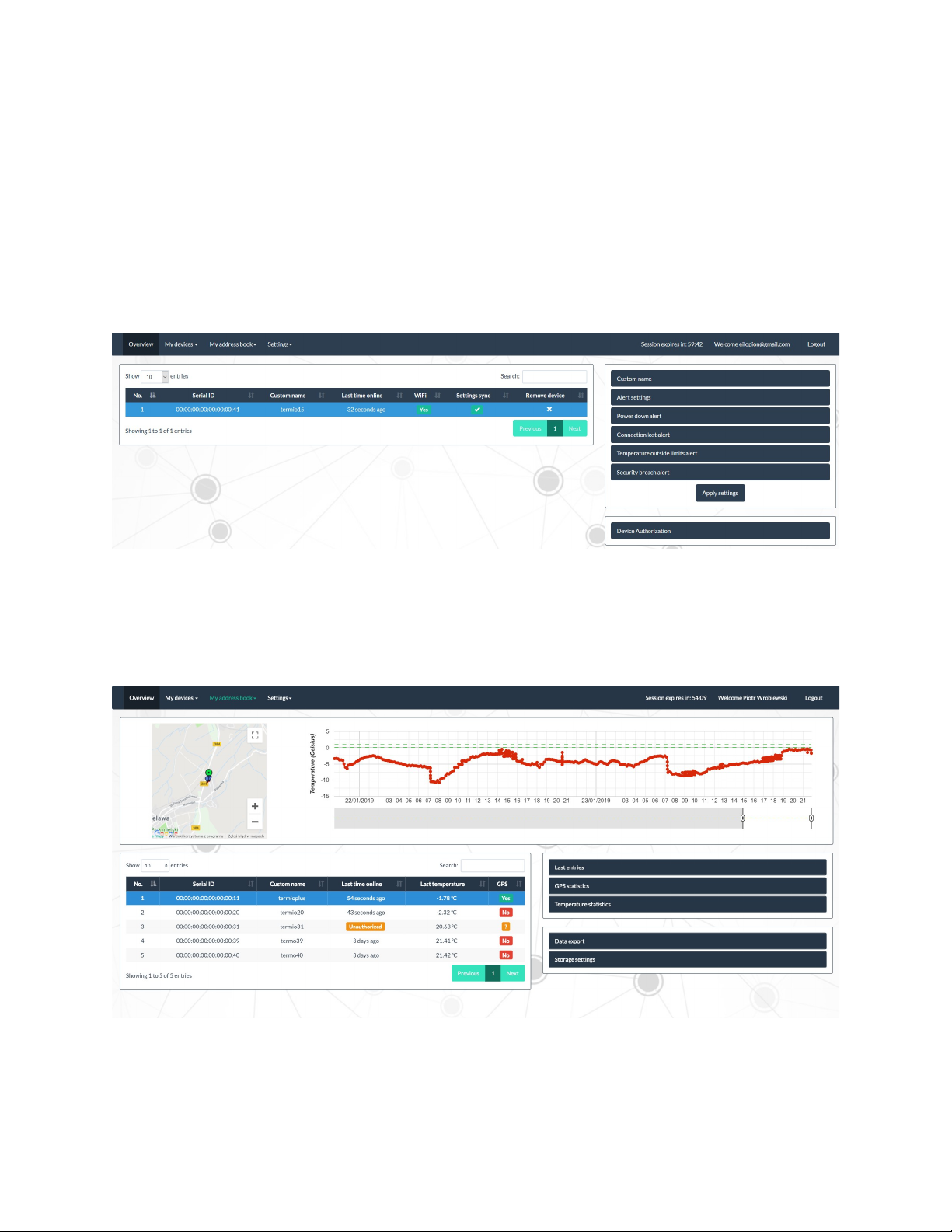
5. Termoprodukt Cloud Platform
Termoprodukt Cloud is a server platform that collects and processes data from data loggers.
Data from data loggers to the platform can be sent from any location via WIFI or GPRS. Access to
the collected data is possible through a web browser. The platform allows you to display current
measurements, generate reports for any period of time, and configure SMS alerts. Access to
Termoprodukt Cloud is free.
After completing the module configuration, familiarize yourself with the operation of the top
menu and the Device authorization function.
Overview - returns the main window of the program.
My device - the tab contains Add new device and Registered device. The first Add new
device adds a new device to the list, by selecting the second tab Registered device we can
see a list of all added data loggers.
Page 9
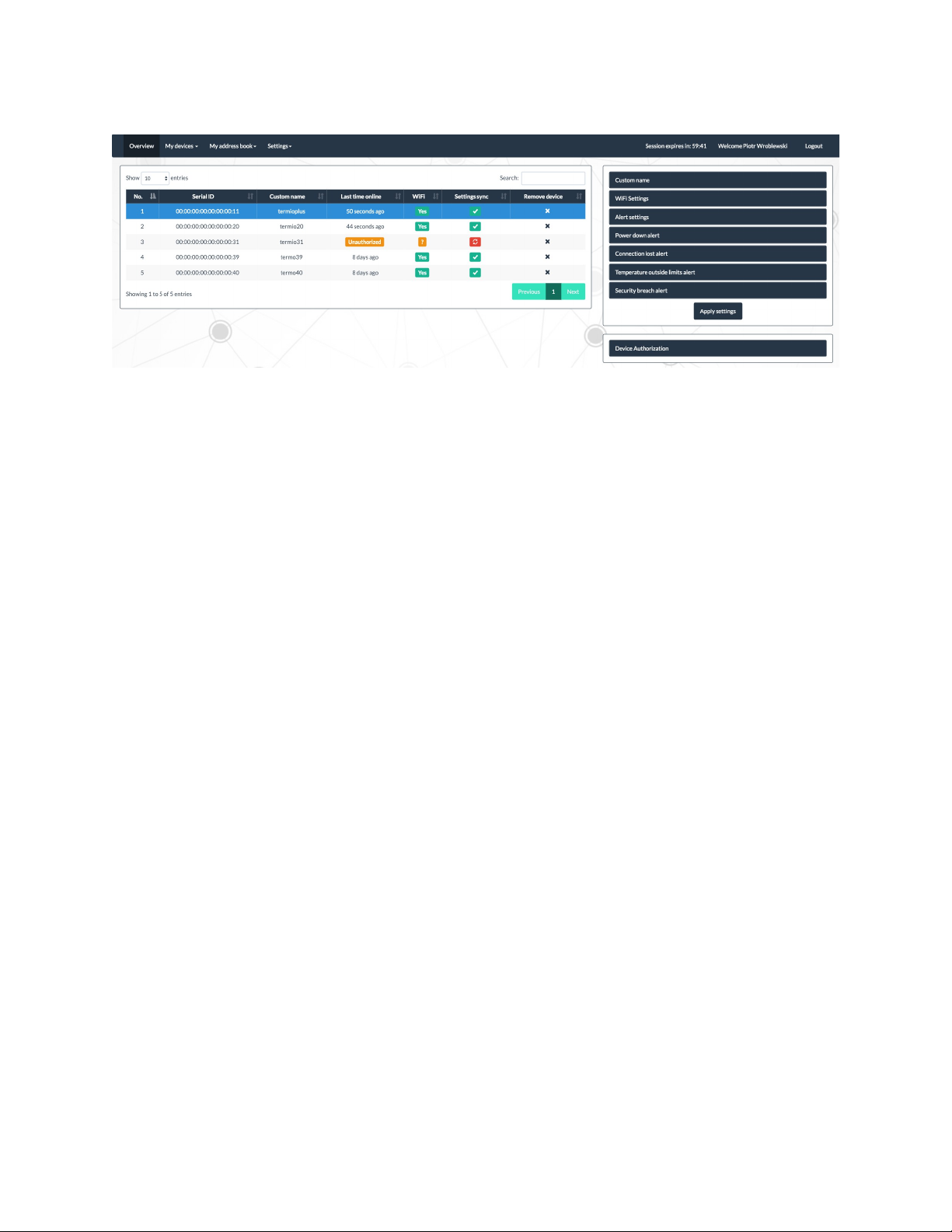
My address book - phone book for SMS notification. This tab includes :
Add new contact to add a new contact and Stored contacts storing all added numbers.
Setting - allows to change password and username.
After connecting data logger with Node TELE1 and configuring by Termoprodukt Cloud-product
is authorized.
Note: if it is necessary to replace the SIM card with a different one then a new connection
should be authorized again.
To do this, turn off the TELE1 device, wait for the internal battery to discharge.
Replace the SIM card and switch the module ON again.
WARNING:
Do not replace SIM cards while the device Tele-1 is on.
Then hold the Reset button on the side of the module Node Tele-1 and select in Termoprodukt
Cloud window Device Autorisation.
After authorization, the base station Node Tele-1 must be reconfigured.
6. Connection Node-1 with data logger
At this moment only one data logger can be connected to one Tele-1.
Data logger and Node Tele-1 are connected with 30 cm tape.
Page 10
 Loading...