

Page 1
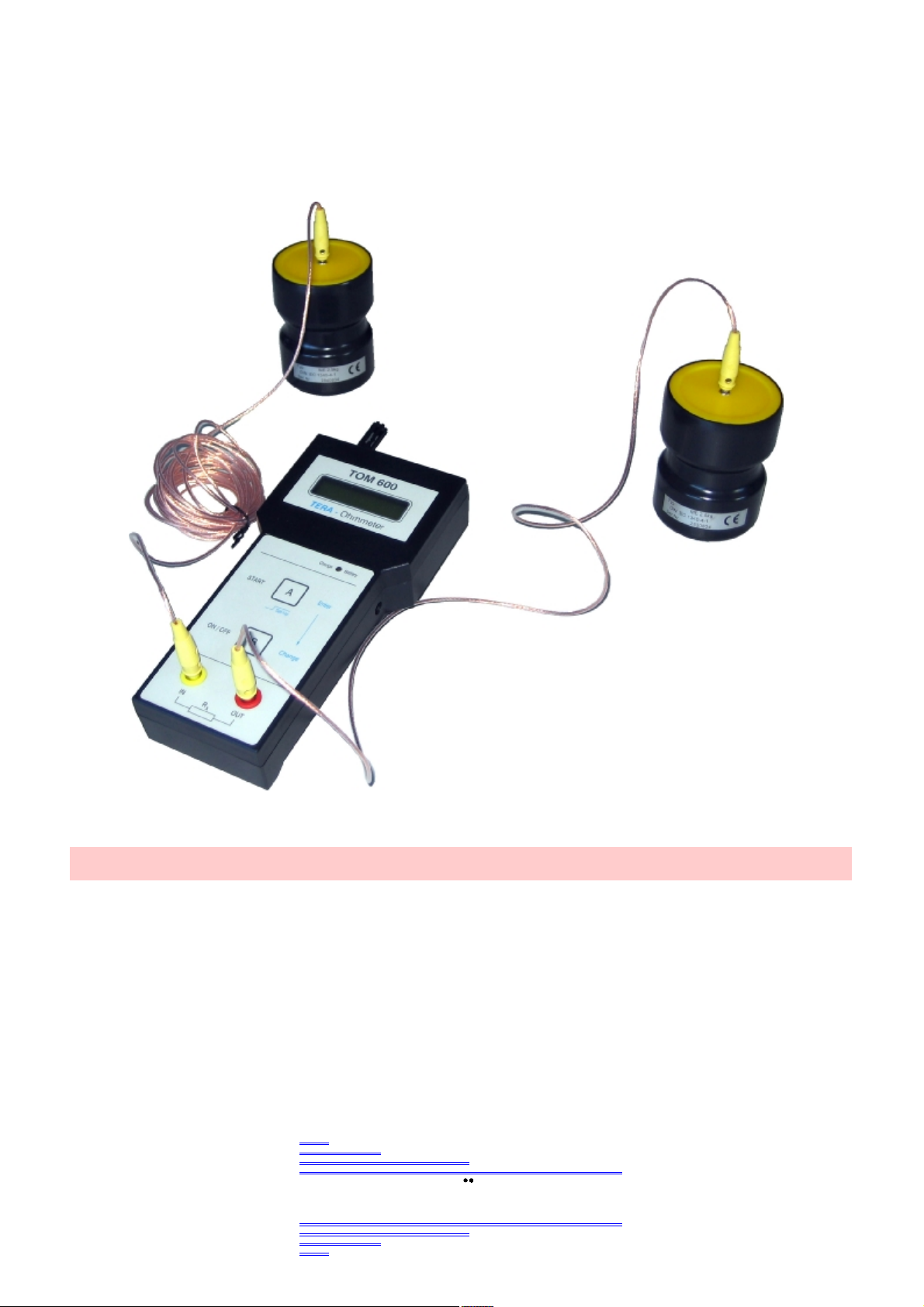
TOM600(ME)
TERA Ohmmeter 600
SYSTEM PROF. DR. ING. HANS KLEINWÄCHTER
The TERA Ohmmeter TOM 600 operates with the Voltage-Current-Measurement.
High resistances up to 2x10¹²Ohm (2 TERA Ohm) can be measured with a voltage of
100 volts and a precision of 5%
As peculiarity, the ambient temperature and the humidity will be measured and stored to
every measured resistance value
KLEINWACHTER
Forschungs-. Entwlcklungs-.
Produktlons-u. Vertrlebsges.m.b.H
1
Page 2

1.
Description
2. Operating Instruction
The TERA Ohmmeter TOM-600 is suitable very well for the mobile use in industrial areas through its
compact housing and through the battery power. It can also be used stationary with a plug power supply.
Important: Don’t use the AC-Adapter without installed rechargeable batteries.
The TOM-600 is menu-controlled, has only two buttons and so it is very operator-friendly.
All parameters are shown at the LC - Display.
The included PC-Software is for remote controlled usage, and additionally measuring results can be
administered and processed.
The TOM-600 works with the voltage – current measure - principle.
To the transactions of the measurements anuses of tied-up Norm DIN EN 61340 / EOS-ESD 4.1/6.1 the
measuring time can be selected with the internal timer.
At Timer = ON the measurement values inclusive the air parameters can be stored in the internal EEPROM.
They don’t are deleted by switching off the unit. The values can be read out trough the PC-Interface at all
times.
Since the resistance values depend very strongly on the Humidity and the air temperature,
these influences are measured together with the resistance value.
So a reproducible measure ment is given.
2.1 Start Operation
The TERA Ohmmeter TOM 600 is delivered with 4 x Mignon (AA) NiMH – Batteries, and is directly ready
to start. For charging the batteries and stationary operation use the enclosed plug power supply only.
l The electrodes are connected to the corresponding sockets (s. legend) and place on the probe .
l During the measurement of very high-ohm-resistors is to be kept that no influence effect is happen on
the measure input.
l To Switch On the unit press key „B“ ON/OFF.
After switching on, first the software version is shown.
Provided the timer is „ON“, in the display appears press start. You can start the measure by pressing key
“A” start. The current resistance value and the timer attitude are shown afterwards.
*>2.0xE12W T=OFF**
Air: xx°C xx%r.F
2
Page 3

If the timer should be turned off, immediately appears at the display:
>2.0xE12W T=OFF
* mathematical representation of technical representation < 2TW
* * Alternating to the timer display T=OFF is shown the measure voltage mode: Auto, 100V or 10V
To turn off the appliance press again key B .
In the battery mode the unit turns off , if no button was pressed, automatically after approximately 5 minutes.
2.2 Charging the NiMH Battery
The TOM 600 allowed only to operating directly with the enclosed power supply. Also only with these the
installed NiMH – batteries can be charged. Connect the power supply to the integrated socket, and connect
the plug power supply to a power socket. If the appliance is switched off, and the charging work correct, the
green Charge LED shines.
The NiMH - batteries are completly charged after maximum of 14 hours and good for > 10 hours
continuous operation. A longer charging time can dammage the batteries.
2.3 Measure Range and Measure Voltage
The TOM 600 has an automatic ranging approve the whole resistor range. The appliance, accordingly the
measure resistance, selects the Measure voltage automatically.
l Measured resistance less then 200 kW —- Measure Voltage 10 VDC
l Measured resistance more then 200 kW —- Measure Voltage 100 VDC
In the Set-Up this automation can be switched off, and a constant measure voltage can be select.
The measure ranges are than as following :
l Measure voltage 10V -- measure range 20kW .... 200GW
l Measure voltage 100V -- measure range 100kW .... 2TW
3
Page 4

3. SET
-
UP Function
By pressing the key (A) Set-Up longer as 2 seconds the „set-up" function is starting.
At the display appears:
By pressing key (B) „Change” the timer is switches between off and on.
If pressing key (A) „Set-Up“, by TIMER OFF the timer is switched off and you can continued by point 3.1.
If you press the key by TIMER ON, you can now choose the measure time.
In the display appears :
By pressing key (B) „Change“ it appears T= 002s and than in 1 second Steps up to10 Second.
After that the timer starts with T=010s the changing steps are now 10 Seconds up to 60 Seconds, after this
you get 60 second steps up to 240 seconds.
Press the (A) „Set-Up“ key to choose the displayed timer time.
At the display appears:
By pressing key (B) „Change” the timer is switching between AVERAGE and LAPSE.
Press the (A) „Set-Up“ key to choose the displayed timer mode.
Now, it is asked whether you will delete the EEPROM stored data files.
In the display appears:
By pressing key (B) „Change” the display is switching between YES and NO.
By pressing the (A) „Set-Up“ key if YES is displayed, all files in the EEPROM memory will be erased.
By pressing the (A) „Set-Up“ key if NO is displayed, no file will be erased, and the next file is storage by the
next free file number.
In the 1st line at the display appears for approximately 2 seconds:
After that it appears in the 2nd line:
SET TIMER !
TIMER OFF (On)
NEW TIMER !
TIME = 001 s
TIMER MODE :
AVERAGE (LAPSE)
DEL FILES ?
YES (NO)
WAIT . . .
FILES DELETED !
4
Page 5

3.1 Measure Voltage/Display Mode
Now it will be ask for your choose off the measure voltage.
In the display appears :
VOLTGE MODE :
AUTO (MAN.10V) (MAN. 100V)
By pressing key (B) „Change” the display is switching between AUTO (Automatic), MAN. 10V, and MAN.
100V. Press the (A) „Set-Up“ key to choose the displayed voltage mode.
After that, it will be ask for your choose off the display voltage.
DISPLAY MODE :
R>2.0xE12? (R>2.0 T? )
By pressing key (B) „Change” the display is switching between the mathematical and technical displa y form.
Press the (A) „Set-Up“ key to choose the displayed display time.
Now the unit will execute a reset, and in the display appears if timer is on, else go to point 3.2 Timer off.
T=xxxs Avg Auto (Lap) (+10V, +100V)
PRESS START !
By pressing key (A) „Start” the next measurement will be started.
The timer decrements in 1 second steps up to Zero, then the measure value will appears in the display as
Ravg by AVERAGE - Mode and Rlap by Lapse – Mode.
In the 2nd line the air temperature and the humidity is displayed:
Ravg = 2.5xE9? (Rlab = 2.5 G? )
AIR: xx°C xx%r.F
Alternates all 2 second in the 2nd line appears:
FN:xxx T=xxxs
By pressing key (A) „Start“ the measure value together with the air temperature and the Humidity will be
saved in the EEPROM using the displayed File – No. These values can be read later with the PC - software.
3.2 Timer
If the timer is not activated, the TOM 600 directly switches on the resistance display in the on-line operation.
According to the chosen display mode and voltage mode in the display appears:
Example:
R=5.5xE10W T=OFF AUTO
AIR: xx°C xx%r.F
5
Page 6

4. Other
D
isplay
Information
5. PC
-
Operating
If the maximum measurement is exceeded appears at the display:
Measure voltage = Auto, 100V R>2.0xE12? (R>2,0 T? )
Measure voltage = 10V R>2.0xE11? (R>200 G? )
If the minimal measurement is under-stride appears at the display:
Measure voltage = Auto, 10V R<2.0xE04? (R<20 k? )
Measure voltage = 100V R<1.0xE05? (R<100 k? )
By searching the measure range, it appears in the 1st line of the display :
When the battery voltage is lower than 4,6Volt, it appears in the 2nd line of the display alternate to the actual
display-message.
The accumulator must be charged again, but the current measurement can be completed. If the Battery
Voltage is lower as 4.3 volts the following display appear and the unit automatically switches off, to save the
batteries.
4.1 Display Contrast
On the front side left from the PC – Interface there is a hole trough this you can screw a potentiometer for
adjust the Contrast of the LCD - Display.
System requirement
l PC with 486er CPU or higher
l 3,5” Floppy disk 1,44MB
l free serial Interface COM1 or COM2
l Windows98, 2000, Xp with EXCEL
Installations
Put the disk with the TOM software into the floppy drive.
Make a Double click in the Explorer of the Install file, and following the instructions.
The software is now installed.
WAIT !
LOW BATTERY !
LOWEST BATTERY !
AUTO SWITCH OFF !
6
Page 7

6. Warranty
7. Technical Specifications
8. Safety AdviceTechnical Specifications
Start the Software
Connect the TERA – Ohmmeter with the PC – Interface cable to a free serial PC Interface (COM 1 or 2)
from your PC, and press key „A“ to switch on the TERA – Ohmmeter.
Make a Double click at the Desktop at the TOM 600 Icon. The software will start automatically when
Excel
is installed at your PC.
We provide 12 month warranty from date of receiving the unit, if the unit was handled properly. The
damage of the NiMH-batteries caused by improper handling as well as mechanical damage on the unit are
excluded from warranty. Warranty is not provided, if the housing was opened.
Housing: Plastic Housing 223 x 106 x 60 mm (L x B x H)
Weight : app. 350 g.
Display : alphanumeric Display, 2 lines with 16 Letters,
Measure Ranges : Resistor 20 kΩ - 2.0 TΩ Tolerance <5%
Temperature 0°C....60°C Tolerance ± 3°C
Humidity 10%...90%r.F. Tolerance ± 5%
PC-Interface : serial Interface, 9-polige SUB-D - connector
PC-Software : Excel – Software for Data reading and remote control
Battery : 4xMignon (AA) NiMH 2100 mAh
Operating time of the completely charged battery: > 12 hours of continuous operation
Charge time with enclosed power adapter: maximum 14 hours
Power Supply : 9V-DC / 300 mA
The measurement unit is not approved for the use in explosive areas!
The unit is not approved for the use in power utilities!
Info: Make sure, that there is no voltage on your measuring. External Voltage gives you a wrong
measure value and can destroy your instrument !
Display field 60 mm x 25 mm
7
Page 8

9. Part of Delivery
10. Optiona
l Accessories
11. Maintenance/Calibration
l Tera – Ohmmeter TOM-600 with temperatur and huminity sensor
l pce. rechargeable NIMH Mignon (AA) Batteries
l conductive suitcase with foam insert
l Plug Power supply 9V-DC / 300mA
l 1 pce. Teflon insulated measurement cord, 1m
l 1 pce. Teflon insulated measurement cord, 5m
l Serial PC - Cable 9 pol.
l 3,5“ Disk with Excel PC – Software and manual
l Operating Instructions
l Certificate of factory calibration
l 2,50 kg Electrode pair trough EOS/ESD S 4.1/S 7.1 and DIN EN 61340 –5-1, -4-1, -2-3
For Measuring Grounding Resistors and point-topoint resistance, specially for installed
ESD Table or floor coverings
l Ring Electrode to EOS/ESD S 11.11 + DIN EN 61340 –5-1, -2-3
comprising to the measurement of transit and surface resistances,
1 shielded and 1 no shielded Measurecord.
The appliance is maintenance-free. If the appliance should get dirty , it can be cleaned with a lint-free cotton
cloth with solvent-free detergent.
Don’t open the housing. When the housing was opened you loose warranty.
If the appliance should not be used for a longer time, remove the Batteries out of the appliance.
The interval for factory calibration is normally 1 year.
8
Page 9
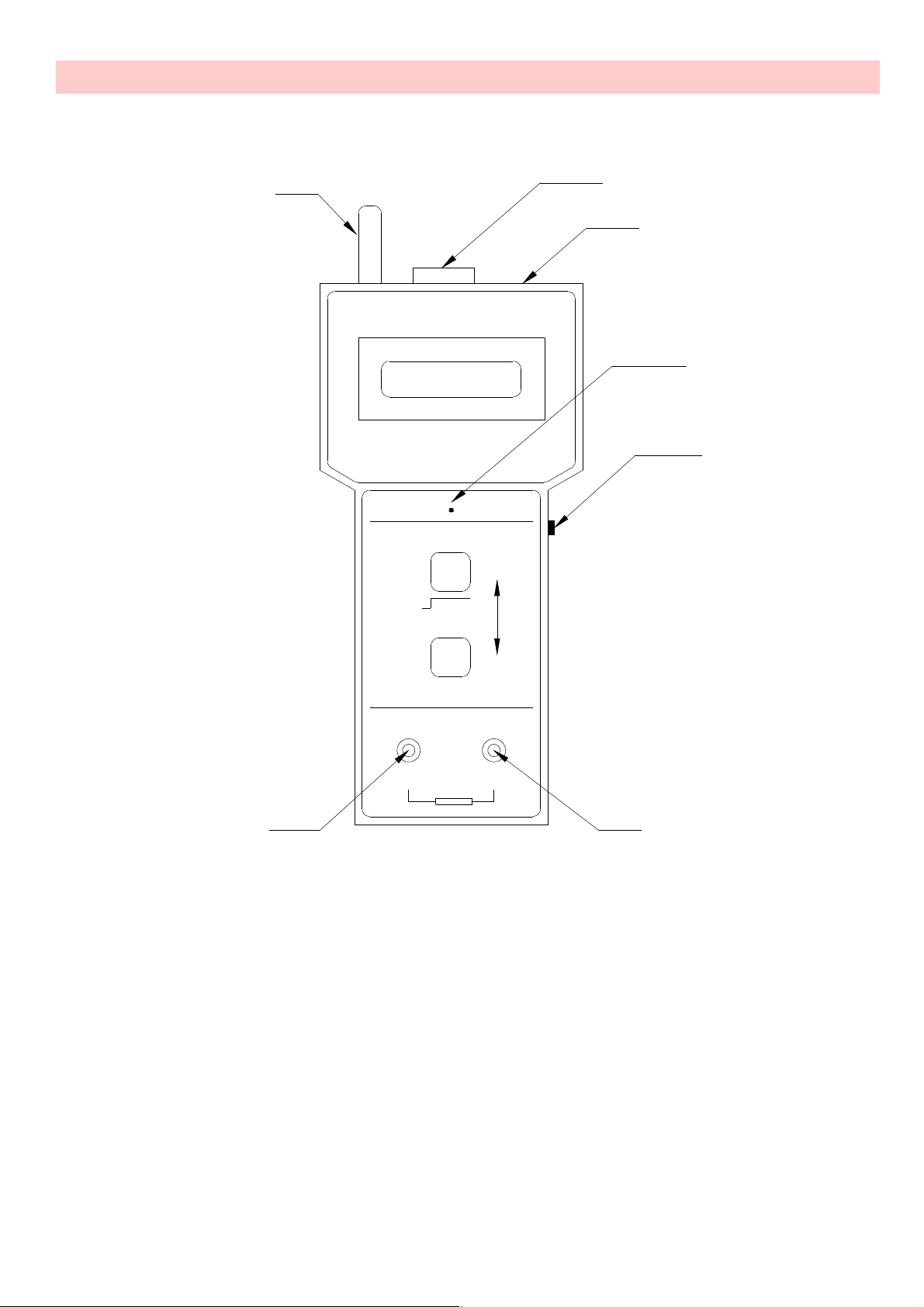
12. Legend
6
4
TOM 600
TERA-Ohmmeter
Charge Battery
START
ON/OFF
A
Set-Up
B
IN
R
x
2
5
7
1
Enter
Charge
OUT
3
1. Power Supply connector 9V DC
2. Serial PC – Interface
3. Measure Voltage Output
4. Measure Input
5. Contrast – Potentiometer for LC Display
6. Temperature / Humidty - Sensor
7. Charge control LED
9
Page 10

10
KLEINWACHTER
Forschungs-. Entwlcklungs-. Produktlons-u. Vertrlebsges.m.b.H
KONFORMITÄTSERKLÄRUNG
Die Firma
Kleinwächter GmbH
Krummattstr. 9
79688 Hausen i.W.
erklärt in alleiniger Verantwortung, dass die Produkte
TERA Ohmmeter TOM 600 (ME)
Messgeräte zur Messung des elektrischen Gleichspannungsfeldes
auf die sich diese Erklärung bezieht, die Forderung
der EWG-Richtlinie über die elektromagnetische Verträglichkeit
Richtlinie des Rates vom 3.5.1989 (89/336) Stand: Juli 1993
erfüllt, insbesondere der Normen
EN 61010 „Safety“
EN 55011 Gruppe 1, Klasse B
EN 50082-2/92
für ISM-Geräte.
Die Firma Kleinwächter GmbH hält folgende technischen Dokumentationen zur Einsicht bereit
· vorschriftsmäßige Bedienungsanleitung
· Baupläne
· technische Dokumentationen
Hausen, den 09.05.2004
Jürgen Brunner
techn. Geschäftsführer
 Loading...