

Page 1
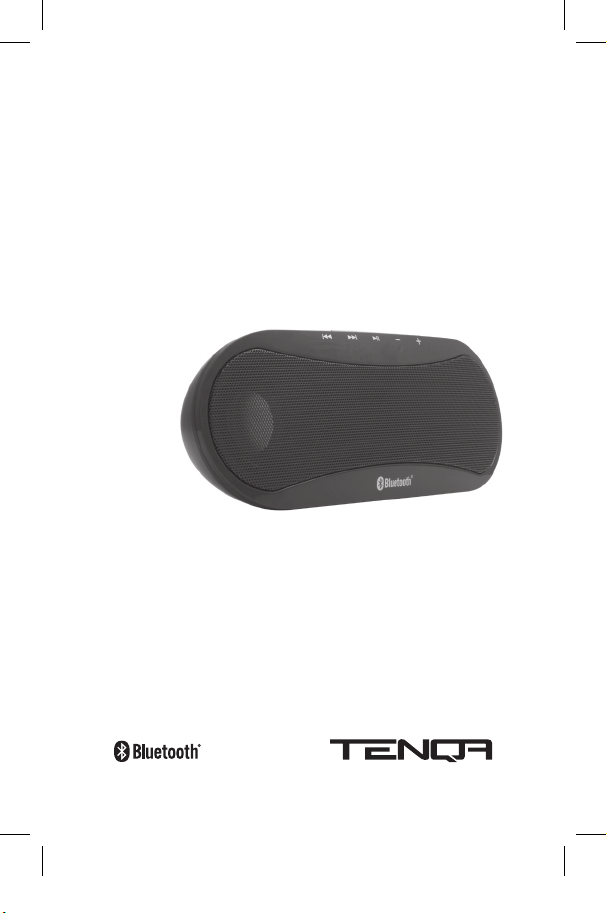
SP-99
Bluetooth
®
Wireless Speaker
Instruction Manual
Page 2

Contents
Welco me . . . . . . . . . . . . . . . . . . . . . . . . . 1
Oper atin g Instr uct ions . . . . . . . . . . . . . . . 2
2 Powe ring the SP- 99 and turnin g it on
2 Pairin g the SP-99 w ith your Blueto oth A2DP enab led Mobile Ph one, iPod
touch®, iPhone™, or m p3 player
2 Stre aming Wirele ss Audio fro m your Mobile Ph one
3 answe ring and maki ng phone calls w hen strea ming music
4 Stre aming Wirele ss Audio fro m a Bluetooth Transmit ter
4 Stre aming Wirele ss Audio fro m a Bluetooth Equipp ed Comput er or Blue-
tooth USB D ongle:
4 Conne cting Dire ctly with a 3. 5mm Audio Cab le
Troublesh ooting . . . . . . . . . . . . . . . . . . . . 5
FAQ . . . . . . . . . . . . . . . . . . . . . . . . . . . . 5
Safe ty In form ation . . . . . . . . . . . . . . . . . . 6
6 Bluetooth C ommunicat ion
7 WARNI NG
7 Handlin g the SP-9 9
7 Avoid Wa ter and Wet Loc ations
7 Repair ing the SP- 99
7 Powe ring the SP- 99
8 Avoidin g Hearing Dam age
8 Driv ing Safely
8 Radio F requency I nterfere nce
9 Impor tant Hand ling Informa tion
9 Using C onnector s and Ports
9 Keepin g the SP-9 9 Within Acc eptable Temp eratures
9 Keepin g the Outsid e of the SP-9 9 Clean
10 Dispos al and Recy cling Inform ation
Gloss ary . . . . . . . . . . . . . . . . . . . . . . . . 10
Spec ifica tions . . . . . . . . . . . . . . . . . . . . . 10
Limi ted War ranty . . . . . . . . . . . . . . . . . . 11
Conf ormity Declara tion . . . . . . . . . . . . . . 13
Page 3

Welcome
Than k you for your pu rchase of th e Ten qa™ SP-99 Blu etooth® Wireles s Speaker.
You are on yo ur way to livin g a life free of wi res. But firs t, please re ad this user’s
guide ca refully for im portan t informati on concern ing operati on, perfor mance and
safe ty. If you are un familiar with s ome of the ter ms in this user ’s guide, please
consu lt the glossa ry locate d in this manual.
You will find t he SP-99 to b e convenien t, compac t, portab le and easy to c onnect
with y our mobile pho ne, iPod touc h®, iPhone™, co mputer, mp3 p layer, or any oth er
devic e with Bluetooth A 2DP capab ilities. Plea se note that y our Bluetooth ena bled
music pl ayer must be eq uipped with Blu etooth A2DP stereo t ransmitti ng
capabi lities – if not, y ou may need a Blue tooth Wireles s Tr ansmitter.
Find t he latest pr oducts at w ww.tenq a.com.
1
Page 4

2
Operating Instructions
POWERING THE SP-99 A ND TURNING IT ON
• Insta ll 4 AA batt eries into th e recepta cle located o n the rear of t he device.
Pleas e make sure you h ave installe d them accor ding to the dia gram in the
bat tery rece ptacle.
• You can also p ower the SP -99 with th e included po wer adapter b y plugging it
into th e rear of the SP -99 and ins erting the p lug into a suita ble power out let.
• Swit ch the SP-9 9’s power but ton to the ON p osition on th e back of the de vice.
The gr een power ind icator light w ill turn on and t he Bluetooth pairi ng indicato r
light (b lue) will blink indic ating that t he SP-99 is n ow in pairing mo de.
PAIRING THE SP-9 9 WITH YOU R BLUETOOTH A2DP ENABL ED
MOBILE PHONE, IP OD TOUCH®, IPHONE ™, OR MP 3 PLAYER
Pairin g creates a un ique and encr ypted wir eless link bet ween the SP -99 and ot her
Bluetooth e nabled devic es such as mob ile phones, mp 3 players, an d computer s.
• Turn on the S P-99 and en sure your mobi le phone is on and i n Bluetooth “pairing
mode.” T his can be done b y accessing t he Bluetooth menu o n your phone w here
you will fi nd an option to “s earch for new d evices.” Ple ase consult y our phone’s
instr uction man ual if you are uns ure how to do thi s.
• Afte r searching f or new devic es, choose “S P-99” and e nter the pas sword
“00 00” whe n prompted .
• Upon su ccessful ly pairing the d evices, th e blue indicat or light will rem ain solid
blue and y ou will hear a ton e indicating p airing is com plete.
Note: If a suc cessful pa iring can not b e establishe d, the blue indi cator will blink
inter mittent ly. Please rep eat the pair ing procedu re steps ab ove.
STR EAMING WIREL ESS AUDIO F ROM YOUR MOBILE PHONE
Follow t he pairing in structio ns listed abo ve. If you nee d help settin g up your mobile
phone t o pair with ano ther Bluetooth d evice, pleas e consult you r mobile phone’s
instr uction man ual and follow t he instruc tions to comp lete pairing w ith the SP- 99.
To strea m music from yo ur mobile phon e, simply acce ss your mobile p hone’s music
playe r and press “pla y” on your phon e’s music player. You ar e now stream ing
music wi relessly!
Page 5
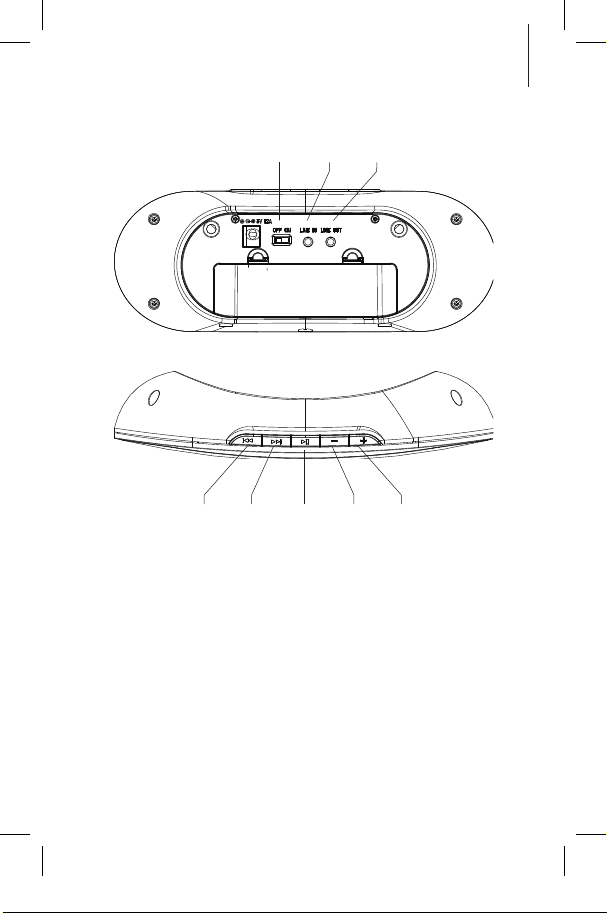
Line- In
Jack
Line- Out
Jack
Track
Back wards
Off/ On
Track
Play/ Pause Vol ume - Volu me +
For ward
ANSWERING AND MAK ING PHONE CA LLS WHEN S TREAMING
MUSIC
If you r eceive a phon e call while your m obile phone is c onnecte d to the SP-9 9, your
phone w ill indicate a n incoming call er as normal ac cording to yo ur ringer set ting.
Upon an swering th e call, the str eaming audio wi ll silence and yo u will hear the
audio as n ormal throu gh your mobile p hone. Upon c ompletion of t he call, your
music wi ll resume play ing where it le ft off.
Makin g a phone call whi le streamin g music is simple as w ell. Simply dial an d place
the cal l as normal and t he music will aut omatically p ause while th e call is in progress . Upon comple tion of the call, y our music will re sume playin g where it lef t off.
3
Page 6

4
STR EAMING WIREL ESS AUDIO F ROM A BLUETOOTH
TRANSMITTER
To strea m music from a Blue tooth enabled tr ansmitt er, please make su re the SP-9 9
is paire d properly b y following t he pairing ins truction s above and th e blue indicat or
light is o n and not flashin g. Many Bluetooth t ransmitt ers suppor t auto-p airing and
do not re quire enter ing a passwo rd.
Note: The SP -99 does no t support t he AVRCP “remo te control ” function w hen
conne cted with a B luetooth audio tr ansmitter t hat conne cts via a 3.5 he adphone
jack or si milar device.
STR EAMING WIREL ESS AUDIO F ROM A BLUETOOTH EQUIP PED
COMP UTER OR BLUETOOTH USB DONGLE:
To strea m music from yo ur compute r via a Bluetooth USB d ongle or an inte rnally
equipp ed Bluetooth dev ice, please c onsult the man ufactur er’s instruc tions for yo ur
par ticular devic e. Upon succ essfully p airing the dev ices, open y our music playe r
soft ware and pr ess play. The m usic will be tran smitted w irelessly to t he SP-99 .
Note: The Blue tooth USB dongle o r internal Blu etooth device in y our comput er
must su pport AVRC P profile to en able the “remo te control ” function an d A2DP to
suppo rt wireles s audio strea ming.
CONNECTING DIRECT LY W ITH A 3 .5MM AUDIO CABLE
The SP -99 is equipp ed with a “line -in” jack enab ling direct wi red connec tions to
audio so urces such a s mp3 players , CD players, c omputers o r other audio p layers
with a s tandard 3. 5mm headph one jack. Be fore conne cting with t he audio cable,
pleas e disable any Blue tooth connect ion with the S P-99 firs t.
Plug on e end of the 3.5 mm audio cable in to the “line- in” jack and the o ther end
into yo ur audio sourc e. You can now play m usic directl y from your au dio device to
the SP -99.
Note: All “remo te control ” buttons o n the device w ill be disabled w hen transm itting aud io via the “line -in” jack as the se are Bluetooth AV RCP functi ons only.
Pleas e operate all f unctions f rom the audio s ource direc tly.
Page 7

Troubleshooting
Q. W hy can’t I hear s ound from t he SP-109 ?
A. Che ck the volume l evel on both t he SP-109 and you r Bluetooth enable d music
playe r. A lso ensure th at there are n o ‘barrier s’ between t he SP-109 and yo ur paired
Bluetooth ® device su ch as walls, peo ple or furnit ure as this may p revent the
speak er and device f rom pairing s uccessf ully.
If you s till can not hea r sound, rese t the device t hat you are tr ying to pair t he
speak er with. If th is does not sol ve the issue t hen delete th e pairing info rmation
and bri gn the pairing p rocess ag ain.
Q. My d evice say s Bluetooth® Mo dule not fou nd’ what ca n I do?
A. Thi s means that y our device ca nnot find its in ternal Blueto oth® chip for s ome
reas on. Restar ting your de vice should fi x this problem . If not, plea se contact t he
manuf acturer of y our device.
Q. My B luetooth® de vice won’t pa ir with the s peaker.
A. You nee d to ensure th at the phone, c omputer or o ther devic e that you wish t o
conne ct suppor ts the Bluetooth A 2DP ster eo sound pro file. The spea ker will not
suppo rt a mono Blueto oth® profile . Please che ck with your de vice manuf acturer to
ensur e compatibili ty.
FAQ
Q. Ho w far can my spe aker be from t he device an d still play au dio?
A. Th e SP-109will re main connec ted up to a rang e of 10 meters (3 0 feet). Soun d
qualit y may star t to deterior ate afte r about 7 mete rs dependin g on the prese nce of
barr iers such as wal ls, people or fu rniture.
Q. Ca n other elec trical dev ices inte rfere wi th Bluetoot h?
A. Blueto oth technolo gy employs a te chnique calle d frequenc y hopping to
cons tantly chan ge the freq uency at whic h it sends out d ata, reduc ing interf erence
with w ireless dev ices like cord less landline p hones. Nois e interfer ence can oc cur
if the Blu etooth device is u sed in close pr oximity wi th a microwav e. Check if th ere
are any s uch device s in the surrou ndings, and if s o keep the dist ance bet ween
the SP -10 9 and such devi ces to at leas t 5 - 10m. Usually an y interfer ence will onl y
cause a s light crackl ing sound. Th e frequenc y of Bluetooth® i s much higher th an
that o f radio stati on bands.
Q. Ca n somebod y else take con trol of my S P-109 if th ey are in rang e?
A. No, t he SP-109 can onl y connect to p reviously p aired devic es that have b een
auth enticate d. The pairin g procedur e creates an e ncrypte d key known o nly to the
two de vices pair ed.
5
Page 8

6
Safety Information
Pleas e read all safe ty inform ation and ope rating inst ructions b efore using t he
SP-9 9 to avoid injur y.
BLUETOOTH COMMUNICATION
Bluetooth w ireless tec hnology ope rates wit hin a range of ab out 10m (33 fee t).
Inst all the trans ceiver and an y connecte d Bluetooth devic e as closely to e ach other
as pos sible.
The fo llowing condi tions may hav e a negative e ffect on t he Bluetooth conn ection:
• cert ain obstac les (people, m etal, walls, et c.)
• an elec tromagne tic environm ent
• A devic e with a 2.4 GHz f requenc y (e. g. a Wireles s LAN devic e, cordless
telep hone, or micro wave oven) in u se near this de vice. Becau se Bluetooth
devic es and Wirele ss LAN (IE EE802.11b/g) use t he same fre quency, micro wave
inter ference s may occur. Thi s may lead to com municatio n speed deter ioration,
noise in terfere nce or invalid c onnection s. In such cas es, turn of f the respec tive
devic e to avoid inte rferenc e.
• The de vice is instal led on a metal su rface.
Micro waves emit ting from a Blu etooth device ma y affect el ectronic m edical
devic es. To avoid acci dents, tur n off this dev ice and other B luetooth device s in the
follow ing locatio ns:
• near fla mmable gas
• in a hospi tal, train, air plane, or a fueli ng station
• near au tomatic doo rs or a fire alarm
This de vice suppor ts secur ity capabil ities that co mply with t he Bluetooth stan dards t o provide a se cure conne ction when t he Bluetooth wirel ess techno logy is
used, b ut securit y may not be en ough dependi ng on the set ting. Be car eful when
commu nicating usi ng Bluetooth wirel ess technol ogy.
Any Blu etooth device yo u want to conn ect to the tr ansceiver i s required to c onform
with t he Bluetooth sta ndard speci fied by Bluetooth S IG.
Even i f the connec ted device s may confor m with the Blue tooth standar d, some
devic es cannot be c onnecte d or will not work c orrectl y depending o n the featur es
or spec ification s of the devic e.
For mo re informat ion on Bluetooth sa fety and fe atures, ple ase visit w ww.
Bluetooth .com.
Page 9

WARNING
Failu re to follow t hese safe ty inst ructions c ould resul t in fire, elec tric
shock , or other i njury or dam age.
HANDLING THE SP-99
Do not dr op, disasse mble, open, cr ush, bend, de form, punc ture, shred , microwave,
incine rate, paint , or insert fo reign objec ts into the SP -99. Use co mmon sense w hen
oper ating this and al l electroni c devices.
AVOID WATER AND WET L OCATIONS
Do not us e the SP-9 9 in the rain, or ne ar sinks, bat htubs or oth er wet locat ions.
Take care n ot to spill any fo od or liquid on the S P-99. In ca se the SP-9 9 gets wet,
unplug a ll cables, tur n off the SP -99 before c leaning, and al low it to dry th oroughly
befor e turning it o n again. Do not at tempt to dr y the SP-9 9 with an ext ernal heat
sourc e such as a micro wave oven or h air dryer.
REPAIRING THE SP-99
Never a ttempt to r epair or modi fy the SP- 99 yoursel f. The SP-99 d oes not cont ain
any use r-servic eable part s. If the SP- 99 has been su bmerged in wa ter, punctu red,
or subje cted to a sev ere fall it is adv ised not to us e the device ag ain.
POWERING THE SP-99
To power t he SP-99, us e only the pow er adapter t hat came wit h this device .
Read all s afety ins truction s for any prod ucts and acc essories b efore using w ith the
SP-9 9. Tenqa is not re sponsible fo r the operat ion of third pa rty acce ssories or t heir
compli ance with sa fety and re gulatory s tandards .
When u sing the includ ed power ada pter, make sure t hat the pow er adapter is f ully
conne cted to the S P-99 befo re you plug it in to a power out let. Then in sert the
SP-9 9’s power ada pter firmly in to the powe r outlet. Do n ot connect , disconnec t,
unplug , or plug in the po wer adapter w ith wet hand s. The powe r adapter may
beco me warm durin g normal use. A lways allow a dequate ven tilation aro und the
Tenqa pow er adapter a nd use care wh en handling. Un plug and do not us e the
powe r adapter if an y of the followi ng conditio ns exist:
• The po wer cord or plu g has become f rayed or dam aged.
• The ada pter is expo sed to rain, liq uid, or excess ive moistur e.
• The ada pter case ha s become dam aged.
• You suspe ct the adapt er needs ser vice or rep air.
• You want to c lean the adap ter.
7
Page 10

8
AVOIDING HEARING DAMAGE
Perm anent heari ng loss may oc cur if the SP- 99 is used at hig h volume. Set t he
volume t o a safe level. You c an adapt ove r time to a higher v olume of sound t hat
may sou nd normal bu t can be damagin g to your hear ing. If you exp erience rin ging
in your e ars or muted s peech, sto p listening and h ave your hear ing checke d.
The lou der the volum e, the less tim e is required be fore your he aring could be
affe cted. Hea ring exper ts sugges t that to prot ect your hea ring:
Limit t he amount of ti me you use the SP -99 at high vo lume. Avoid tur ning up the
volume t o block out noi sy surround ings.
Turn the v olume down if y ou can’t hear pe ople speakin g near you.
DRIVING SAFELY
Use of t he SP-99 wh ile operatin g a vehicle is not r ecommende d and is illegal in
some ar eas.
EXPOSURE TO RADIO F REQUENCY ENERGY
The SP -99 cont ains a radio fre quency rec eiver. When on , the SP-99 c an receive
radio f requency ( RF) energ y through it s antenna. T he SP-99 is de signed and
manuf actured t o comply wit h the limits for e xposure to R F energy se t by the
Fede ral Communic ations Com mission (FC C) of the Unite d States of A merica and
other c ountries .
If you ar e concern ed about exp osure to RF en ergy, you can limi t your expos ure by
limitin g the amount o f time using the S P-99 since t ime is a factor i n how much
expo sure a perso n receives . Placing more d istance be tween you r body and the
SP-9 9 is advised s ince exposu re level drop s off drama tically wit h distance.
For mo re informat ion from the U S FCC about e xposure to R F energy, see : www.fcc.
gov/oet /rfsaf ety
For inf ormation a bout the scie ntific res earch relat ed to RF energ y exposur e, see
the EM F Research D atabase m aintained by t he World Heal th Organiza tion at:
ww w.who.int/e mf
RADIO FREQUENCY INTERFERE NCE
Nearl y every ele ctronic dev ice is subjec t to radio fre quency inte rferenc e from extern al sources if i nadequate ly shielded or d esigned, or ot herwise n ot configure d to
be comp atible. As a r esult, the S P-99 may cau se interf erence wit h other devi ces.
Read t he following in formatio n and instru ctions to avo id interfe rence probl ems:
Airc raft: Us e of the SP-9 9 may be prohi bited while t raveling in air craft. Pl ease
consu lt local laws t o determine i f this device is a llowed to be op erated on bo ard
an aircr aft.
Page 11

Vehicl es: RF signals m ay conflict w ith installe d or inadequa tely shielde d electroni c systems in m otor vehicle s. Check wit h the manufa cturer or it s represen tative r egarding you r vehicle.
Elec tronic Dev ices: Mos t modern elec tronic equi pment is shield ed from RF
signals . However, cer tain elect ronic equip ment may not be s hielded again st the RF
signals f rom the SP- 99.
Pacem akers: To avoi d potential i nterfer ence with pa cemakers, p ersons wi th
pace makers shoul d always keep t he SP-99 m ore than six in ches from th eir
pace maker when th e device is tu rned on. Con sult with a doc tor about c oncerns
when us ing the SP-9 9 near a pace maker. If you hav e any reason t o suspect th at
inter ference is t aking plac e, turn the SP -99 off imm ediately.
Oth er Medical De vices: If yo u use any othe r personal me dical devic e, consult
the de vice manufa cturer and y our physicia n to determin e if it is adequa tely
shielde d from ext ernal RF ener gy. Turn the SP- 99 off in heal th care facili ties when
any reg ulations po sted in thes e areas instr uct you to do s o. Hospitals a nd health
care f acilities may u se equipment t hat is sensit ive to exte rnal RF ener gy.
Post ed Facilit ies: Turn off t he SP-99 in a ny facility w here poste d notices so
requir e.
IMPORTAN T HANDLING INF ORMATION
NOT ICE: Failur e to follow the se handling ins tructio ns could resul t in damage to
the SP -99 or othe r propert y.
USING CONNECTORS AND PORTS
Never f orce a conne ctor into a po rt. Chec k for obstru ctions on th e port. If t he
conne ctor and por t don’t join wit h reasonab le ease, they p robably do n ot match.
Make su re that the co nnector ma tches the p ort and tha t you have posi tioned the
conne ctor corr ectly in rela tion to the po rt.
KEEPING THE SP-99 WITHIN ACCEPTABLE TEMPER ATURES
Oper ate the SP- 99 in a place whe re the tempe rature is al ways betw een 0º and 35 º
C (32 º to 95º F). B attery li fe may be redu ced in low-te mperatur e condition s. Store
the SP -99 in a place w here the tem perature i s always bet ween -20 º and 45º C (-4 º
to 113º F). D on’t leave th e SP-99 in you r car becaus e temperat ures in park ed cars
can exc eed this ran ge and damage s ensitive in ternal comp onents. W hen you are
using th e SP-99, it i s normal for th e device to ge t warm. The ex terior of t he SP-99
func tions as a coolin g surface t hat trans fers heat fr om inside the un it to the coole r
air out side.
9
KEEPING THE OUT SIDE OF THE SP-99 CLE AN
To clean th e SP-99 unpl ug all cables and t urn off th e SP-99 (see i nside this user
Page 12

10
manual f or instruc tions on tur ning off the S P-99.) Th en use a soft , slightly dam p,
lint-fr ee cloth. Avo id getting mo isture in ope nings. Do not us e window clea ners,
house hold cleaner s, aerosol sp rays, solv ents, alcoh ol, ammonia, or ab rasives to
clean t he SP-99. A llow adequat e time for the S P-99 to dr y completel y before usin g
again.
DISPOSAL AND RECYCLING INFORM ATION
The SP -99 must be d isposed of pr operly acc ording to loc al laws and re gulations.
All bat teries mus t be dispose d of separat ely from hous ehold wast e. Contac t your
local a uthoritie s to learn abo ut recyclin g options wh en the SP-9 9 reaches th e end
of its li fe.
Glossary
A2 DP: Advan ced Audio Dis tributi on Profile
This co nverts no rmal audio file s, such as mp3 file s in a mobile phon e or compute r,
into st reaming st ereo music. M any new mobile p hones are bein g made with t his
feat ure built-in.
AVRC P: Audio/ Video Re mote Con trol Pro file
This fe ature allow s the user to con trol the ou tput of one de vice from a re mote
devic e. For examp le, if you are list ening to music o n your SP-9 9 Wireless Sp eaker
from y our mobile pho ne, you may be abl e to control s ome functi ons of the mobil e
phone b y using the hea dphone con trols for volu me, call tran sfer, etc.
Specifications
Recei ver Sensi tivity : <0.1% BER at -80 dBm
Bluetooth C hipset: C SR BC03M M
RF Out put Power (C lass 2): - 6~+4 dBm
Oper ation Rang e: Up to 10 meter s or 33 feet
S/N R ate: >75d B
Freq uency Resp onse: 150H z – 20 Khz
Audio O utput Po wer: 2W x 2
Speak ers: 2 inch x 2, 4 ohm
Dimen sions: 20 2 x 76.5 x 47.5 mm (7.95 x 3.0 1 x 1.87 in)
Page 13

Limited Warranty
TEN QA 1 YEA R LIMIT ED WARRA NTY
FOR CO NSUMERS, W HO ARE COV ERED BY CON SUMER PRO TECTIO N LAWS OR REG ULATION S IN
THEIR C OUNTRY O F PURCHA SE OR, IF DIFF ERENT, THE IR COUNT RY OF RESIDE NCE, THE BE NEFITS
CONF ERRED BY TH IS WARRAN TY ARE IN A DDITION T O ALL RIGHT S AND REME DIES CONV EYED
BY SUCH C ONSUMER P ROTECT ION LAWS A ND REGULAT IONS. THIS WA RRANT Y DOES NOT
EXCL UDE, LIMI T OR SUSPEN D ANY RIGHT S OF CONSUM ERS ARISIN G OUT OF NONC ONFORMI TY
WITH A S ALES CON TRACT. SO ME COUNT RIES, STATES A ND PROVIN CES DO NOT AL LOW THE
EXCL USION OR LIM ITATION OF INC IDENTAL OR C ONSEQUE NTIAL DA MAGES OR A LLOW LIMI TATIONS O N HOW LONG AN IM PLIED WAR RANT Y OR CONDIT ION MAY LAS T, SO THE LIMITAT IONS
OR EXC LUSIONS DE SCRIBED B ELOW MAY NOT A PPLY TO YOU. TH IS WARRAN TY GIVE S YOU
SPECI FIC LEGA L RIGHTS, A ND YOU MAY ALS O HAVE OTHE R RIGHTS T HAT VARY BY COU NTRY,
STATE OR P ROVINCE . THIS LIMI TED WARRA NTY IS GO VERNED BY A ND CONST RUED UNDER T HE
LAWS O F THE COUNT RY IN WHIC H THE PRODU CT PURCH ASE TOOK PL ACE. TE NQA, A DIV ISION
OF PIT TS PACIFI C, LLC, THE WA RRANT OR UNDER THI S LIMITE D WARRANT Y, IS HEREIN AFTER
REFE RRED TO AS “ TENQA”.
Tenqa’s warr anty obliga tions for thi s hardware p roduct are li mited to the t erms set for th below:
Tenqa, as de fined below, wa rrants this h ardware p roduct agai nst defect s in material s and workmanship u nder normal u se for a period o f ONE YEA R (365 DAYS) fro m the date of re tail purch ase by
the orig inal end-us er purchase r (“Warran ty Period ”). If a hardw are defect a rises and a vali d claim
is recei ved by Tenqa wit hin the Warra nty Perio d, at its optio n and to the ex tent permi tted by law,
Tenqa will eit her (1) repair th e product at n o charge, usin g new or refur bished repla cement par ts,
(2) exch ange the pro duct with a pr oduct tha t is new or which h as been manuf actured f rom new or
serv iceable use d parts and is a t least func tionally equ ivalent to th e original pro duct, or (3) r efund
the pur chase price o f the produ ct. Tenqa may re quest that y ou replace de fective p arts with n ew
or refu rbished use r-installable p arts tha t Tenqa provid es in fulfillmen t of its warr anty obliga tion. A
replac ement prod uct or part , including a us er-installab le part tha t has been inst alled in accor dance
with ins tructio ns provide d by Tenqa, assume s the remaini ng warrant y of the origin al product o r
thirt y (30) days f rom the date o f replaceme nt or repair, whi chever pro vides longe r coverage f or
you. Wh en a product o r part is exch anged, any re placement i tem becom es your prope rty and th e
replac ed item beco mes Tenqa’s prop erty. Par ts provide d by Tenqa in fulfill ment of its wa rranty
obligat ion must be use d in product s for which wa rranty se rvice is clai med. When a re fund is given ,
the pro duct for whi ch the refun d is provided m ust be retur ned to Tenqa and b ecomes Tenqa’s
prope rty. If a defe ct arises an d a valid claim is rec eived by Tenqa a fter the fir st ninety (9 0) days of
the Warr anty Per iod, a shipping a nd handling cha rge may apply t o any repair or e xchange of t he
produ ct undert aken by Tenqa.
EXC LUSIONS A ND LIMI TATIONS
This Limi ted Warran ty applies on ly to the hard ware produ ct manufac tured by or f or Tenqa that ca n
be ident ified by the “ Tenqa” tradem ark, trad e name, or logo af fixed to it . The Limite d Warranty
does no t apply to any no n-Tenqa hardwa re product o r any soft ware, even if p ackaged or s old with
the Tenqa ha rdware. M anufactu rers, supplie rs, or publish ers, other t han Tenqa, may pr ovide their
own war ranties to t he end user pur chaser, but Tenq a, in so far as per mitted by l aw, provides t heir
produ cts “as is”. Tenqa does n ot warrant t hat the oper ation of the p roduct will b e uninterru pted or
error-f ree. Tenqa is not r esponsible f or damage ari sing from failu re to follow ins truction s relating
to the pr oduct’s use.
This war ranty doe s not apply: ( a) to damage cau sed by use wit h non-Tenqa pro ducts; (b) to d amage
caused b y accident , abuse, misus e, flood, fire, ea rthquake o r other ext ernal cause s; (c) to damage
caused b y operatin g the produc t outside th e permitt ed or intende d uses descr ibed by Tenqa; (d ) to
damage c aused by ser vice per formed by an yone who is no t a represen tative of Tenq a; (e) to a product or pa rt that has b een modifie d to alter func tionality o r capabilit y without t he writte n permission
11
Page 14

12
of Tenqa; or ( f ) if any Tenqa seri al number has be en removed o r defaced.
TO THE E XTENT P ERMIT TED BY LAW, TH IS WARRAN TY AND TH E REMEDIE S SET FORT H
ABOV E ARE EXC LUSIVE AN D IN LIEU OF AL L OTHER WAR RANTI ES, REMEDI ES AND CONDI TIONS , WHETHE R ORAL OR W RITTE N, STATUTOR Y, EXPRES S OR IMPLIE D. AS PERMI TTED BY
APP LICABL E LAW, TENQ A SPECIFI CALLY DISC LAIMS AN Y AND ALL S TATUTORY O R IMPLIED
WARRA NTIES, IN CLUDING, W ITHOUT L IMITATION, WA RRANT IES OF MERC HANTABI LITY
AND FI TNESS FO R A PARTICU LAR PUR POSE AND WAR RANTI ES AGAINS T HIDDEN OR L ATENT
DEFE CTS. IF TEN QA CANN OT LAWFU LLY DISCLA IM STATUTO RY OR IMPLI ED WARRAN TIES THE N
TO THE E XTENT P ERMIT TED BY LAW, AL L SUCH WARR ANTIE S SHALL BE L IMITED IN D URATION
TO THE DU RATION OF T HE EXPR ESS WARRA NTY AND T O THE REPAI R OR REPLA CEMENT
SERV ICE AS DET ERMINED BY T ENQA IN I TS SOLE DIS CRETION . No Tenqa resell er, agent, or
employ ee is authori zed to make any m odificati on, extensi on, or additio n to this warra nty. If any
term is he ld to be illegal or u nenforce able, the lega lity or enfor ceabilit y of the remaini ng terms shall
not be af fected or i mpaired. E XCEPT AS P ROVIDED I N THIS WARR ANTY AN D TO THE MA XIMUM
EXT ENT PER MITTED B Y LAW, TENQ A IS NOT RESP ONSIBLE F OR DIRECT, SP ECIAL, I NCIDENTA L
OR CONS EQUENTI AL DAMA GES RESULTI NG FROM AN Y BREACH O F WARRANT Y OR CONDI TION,
OR UNDE R ANY OTHE R LEGAL TH EORY, INCLUD ING BUT NOT L IMITED T O LOSS OF USE; L OSS OF
REV ENUE; LOS S OF ACTUA L OR ANTIC IPATED PROF ITS (INCL UDING LOSS O F PROFIT S ON CONTRAC TS); LOS S OF THE USE OF MO NEY; LOSS O F ANTICIPAT ED SAVINGS ; LOSS OF BUSI NESS;
LOSS OF O PPORT UNITY; LO SS OF GOODW ILL; LOSS O F REPUTATI ON; LOSS OF, DAM AGE TO OR
CORRU PTION OF D ATA; OR ANY IND IRECT OR CO NSEQUEN TIAL LOS S OR DAMAGE H OWSOEV ER
CAUSE D INCLUDIN G THE REPL ACEMEN T OF EQUIPM ENT AND PR OPERT Y, THE FOREGOI NG
LIMITAT ION SHAL L NOT APPLY TO D EATH OR PE RSONAL IN JURY CLA IMS, OR AN Y STATUTORY
LIAB ILITY F OR INTEN TIONAL A ND GROSS NEG LIGENT AC TS AND/OR O MISSIONS . USE OF THIS
PRODU CT IMPLI ES CONSEN T OF THE AFO REMENTI ONED STATEM ENTS.
OBTA INING WAR RANT Y SERVIC E
Please a ccess and r eview the onli ne help resour ces refer red to in the do cumentat ion accomp anying
this har dware prod uct befor e seeking war ranty ser vice. If th e product is s till not func tioning
prope rly after m aking use of th ese resour ces, acces s the online web site: ww w.tenqa.co m for
instr uctions on ho w to obtain wa rranty se rvice. You mus t follow Tenqa’s war ranty pr ocesses.
Tenqa may pr ovide warr anty ser vice by send ing you new or re furbished c ustomer-in stallable
replac ement prod uct or part s to enable you t o service o r exchange yo ur own produ ct. Upon re ceipt
of the re placement p roduct or pa rt, the ori ginal produc t or part be comes the pr operty o f Tenqa and
you agre e to follow inst ructions , including, if r equired, ar ranging the r eturn of ori ginal produc t or
part t o Tenqa in a timely ma nner. When ser vice requi ring the ret urn of the orig inal produc t or part,
Tenqa may re quire a credi t card autho rization as s ecurity f or the retail p rice of the re placement
produ ct or part an d applicable sh ipping cost s. If you follow i nstruct ions, Tenqa will ca ncel the
credit c ard author ization, so y ou will not be cha rged for the p roduct or p art and shipp ing costs. I f
you fail to r eturn the r eplaced pro duct or par t as instru cted, Tenqa will c harge the cr edit card for
the aut horized amo unt.
Serv ice options , parts ava ilability and r esponse tim es may vary a ccording to t he countr y in which
serv ice is reques ted. Serv ice option s are subject t o change at any t ime. You may be res ponsible for
shippin g and handling ch arges if the p roduct can not be serv iced in the co untry in whi ch servic e is
reque sted. If you s eek servi ce in a countr y that is not th e country o f purchase, y ou will comply w ith
all applic able expor t laws and reg ulations and b e responsibl e for all custom d uties, V.A.T. and ot her
associ ated taxe s and charges . For intern ational ser vice, Tenqa ma y repair or exc hange defec tive
produ cts and par ts with com parable pro ducts and p arts that c omply with l ocal stand ards. In
accor dance with a pplicable law, Ten qa may requir e that you fur nish proof of p urchase de tails and/
or compl y with regis tration re quirement s before rec eiving war ranty ser vice. Tenqa wi ll maintain
and use cu stomer info rmation in ac cordanc e with the Tenqa C ustomer Pr ivacy Polic y accessibl e at:
www.Tenq a.com/pri vacy.php
Page 15

Conformity Declaration
FCC C OMPLIA NCE STATE MENT
This de vice compli es with par t 15 of the FC C rules. Op eration is s ubject to t he followin g
two co nditions : (1) This devic e may not cau se harmfu l interf erence, an d (2) this dev ice
must a ccept any in terfer ence recei ved, includ ing inter ference t hat may caus e undesire d
opera tion.
FCC ID S ETBIS 929V
Impor tant: C hanges or mod ification s to this produ ct not autho rized by Tenqa c ould void the EM C
(elect romagneti c compatibil ity) compli ance and nega te your auth ority to op erate the p roduct. T his
produ ct has demons trated E MC complianc e under condi tions that in cluded the us e of compliant
periph eral device s. It is impor tant that y ou use complia nt peripher al devices t o reduce the p ossibility of c ausing inter ference t o radios, tele visions, and o ther electr onic device s. This devi ce must not
be loca ted near oth er transmit ters.
Note: T his equipme nt has been te sted and foun d to comply wi th the limits p ursuant to p art 15 of
the FC C Rules. Thes e limits are des igned to prov ide reason able protec tion agains t harmful int erference in a re sidential in stallation . This equipme nt generat es, uses and c an radiate ra dio frequen cy
energ y and, if not ins talled and use d in accorda nce with the i nstruct ions, may caus e harmful in terferen ce to radio com munication s. However, th ere is no guara ntee that in terferen ce will not occ ur
in a part icular insta llation. If th is equipment d oes cause har mful inter ference t o radio or telev ision
recep tion, which c an be determ ined by turnin g the equipme nt off and on, t he user is enc ouraged to
try to c orrect th e interfer ence by one or m ore of the foll owing measu res:
• Reori ent or reloca te the recei ving anten na.
• Incre ase the sepa ration bet ween the eq uipment and r eceiver.
• Conne ct the equip ment into an ou tlet on a circui t differen t from that t o which the re ceiver is
conne cted.
• Consu lt the dealer or a n experien ced radio/ TV techn ician for help.
EURO PEAN CO MMUNIT Y COMPL IANCE S TATEMEN T
The equi pment comp lies with the R F Exposur e Requireme nt 1999/519/ EC, Council R ecommend ation of 12 Jul y 1999 on the limi tation of ex posure of th e general publi c to electro magnetic fie lds
(0- 30 0GHz.) Thi s equipment me ets the follo wing confo rmance st andards: EN 3 00 328, EN 3 01 894,
EN 301 4 89-17, EN 5038 5
EURO PE—EU D ECLAR ATION OF C ONFORM ITY
A copy of t he Declarat ion of Confo rmity is ava ilable at: ww w.Tenqa.com/eu ro/complia nce
Page 16
Copyr ight © 200 9 Pitts Pac ific, LLC. Al l rights res erved. Tenqa ® and the Tenqa lo go are regist ered
trade marks of Pit ts Pacific , LLC. The Blue tooth® word m ark and logos a re register ed tradem arks
owned b y Bluetooth SIG, In c. and any use of s uch marks by P itts Paci fic, LLC is und er license.
iPod®, iP od touch® an d iPhone™ are t rademark s of Apple Inc ., register ed in the U.S. an d other
count ries. Apple i s not respons ible for the op eration of th is device or it s complianc e with safet y
and regu latory st andards. O ther trade marks and tr ade names ar e those of thei r respecti ve owners .
Tenqa res erves the r ight to chang e, without no tice, prod uct offer ings or speci fications. M ade in
China. P rinted in Chin a. QDID: B012 258
 Loading...