

Page 1

We give you the edge.
Economy Telephone
Integral TE 13
Connected to ISDN Telecommunications Systems Integral
Operating Instructions
Page 2

TE 13 Operating Instructions
2
Important information
Please note
This telephone is only for connection to Tenovis TK system digital interfaces and
meets the basic
requirements of the European guidelines 1995/5/EG
(Radio und Telecommunication Terminal Equipment, R&TTE).This telephone is not
designed for direct operation on public telephone network interfaces
If problems occur when operating the device, please consult your dealer or the Tenovis service in the first instance.
The Declaration of Conformity can be requested from the following internet address.
www.tenovis.com/deutsch/verzeichnis/conformance.htm or under index look for
look for the key word: Conformity
The equipment may only be opened or repaired by a qualified technician. Do not
open the telephone yourself. Doing so could damage the unit and cause it to malfunction.
Positioning the telephone
Place the telephone on a non--slip surface, especially if the furniture is new or has
recently been cleaned with cleaning agents. Enamels or cleaning agents may contain substances which soften the base parts of your telephone, and the softened
bases can leave undesirable marks on the furniture. Tenovis cannot assume liability
for damages of this kind.
Page 3
TE 13 Operating Instructions
3
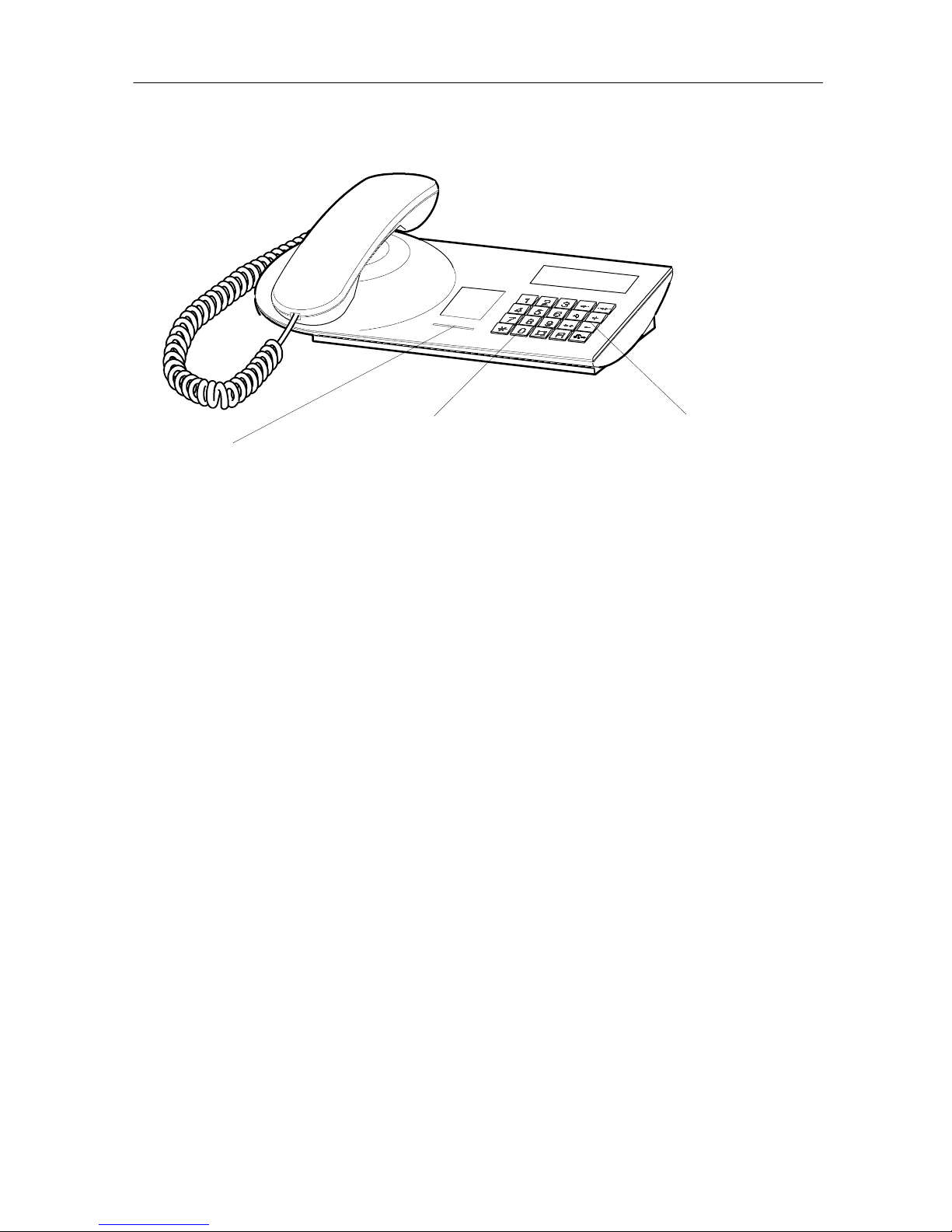
Your telephone at a glance
LED
Flashes when you receive a call,
illuminates for a message
and call diversion
8 pre--assigned function keys
For quick access to
certain functions
Alphanumeric
keys
For dialing call numbers
and entering codes
What you should know about your telephone
Your TE 13 telephone has a number of functions which make using it easier. Additional functions are available if your telephone is being used in a telephone system.
You can find more information in the operating manual for your telephone system.
You can enter each digit of a call number individually. Frequently called numbers c an be stored for destination and speed
dialing, and can be called at any time with the push of a button.
When someone calls, your telephone will ring and the LED next
to the keypad will flash.
Please contact y our system administrator for additional information on using your telephone system. Your administrator can
assist you with certain functions, such as changing your PIN,
deleting call numbers you programmed, etc.
Making
calls
Receiving
calls
Additional
information
Page 4
3
21
6
54
9
87
0
ABC DEF
GHI JKL MNO
PQRS TUV WXYZ
*
#
R
+--
TE 13 Operating Instructions
4
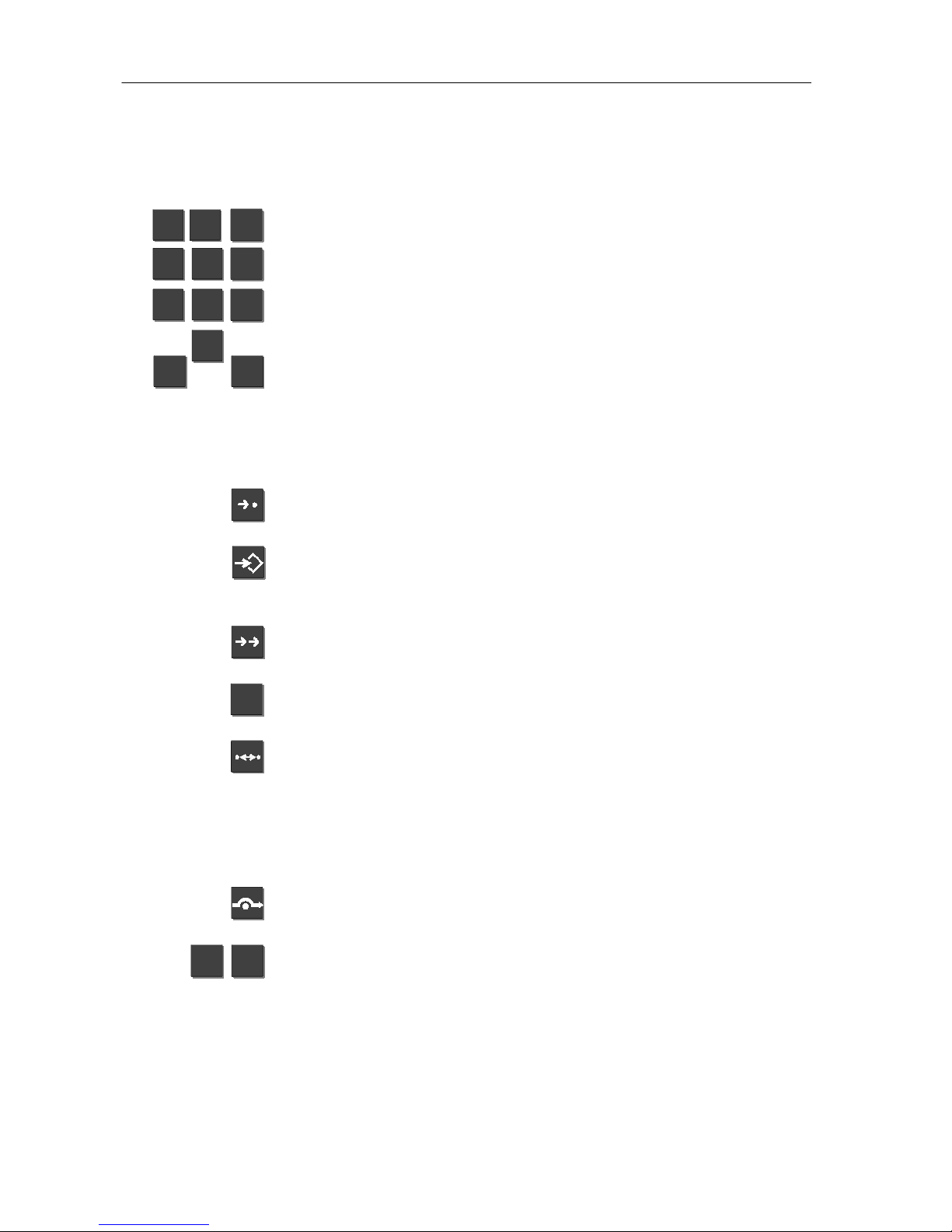
All keys at a glance
Digit keys with letters
Alphanumeric keys for dialing call numbers and entering codes.
The alphabetic labelling allows you to dial so called vanity numbers.
Star and Hash keys for special functions.
Function keys
Speed dial key for dialing the numbers stored in the telephone
system.
Programming key for initiating or ending programming mode, in
which you can c hange base settings or store call numbers, for
example.
Redial key for dialing the most recent or a selected call number.
Integral 5 / 3:
External call numbers only.
Refer--back key for consulting with internal or external subscribers.
Call--back key for initiating an automatic call--back if the internal
line you call is busy. Your telephone will ring as soon as the
other subscriber has finished calling (call back). You then pick
up the handset to call the subscriber again.
Integral 5 / 3:
You can also request a call--back if the other sub-
scriber does not answer the phone.
Call diversion. You can divert calls to another telephone.
You can adjust the handset volume during a call by pressing the
Plus and Minus keys. If you are making a handsfree call, the
volume of the loudspeaker will be adjusted.
Integral 5 / 3:
You can also adjust the ringing volume.
Page 5
TE 13 Operating Instructions
5
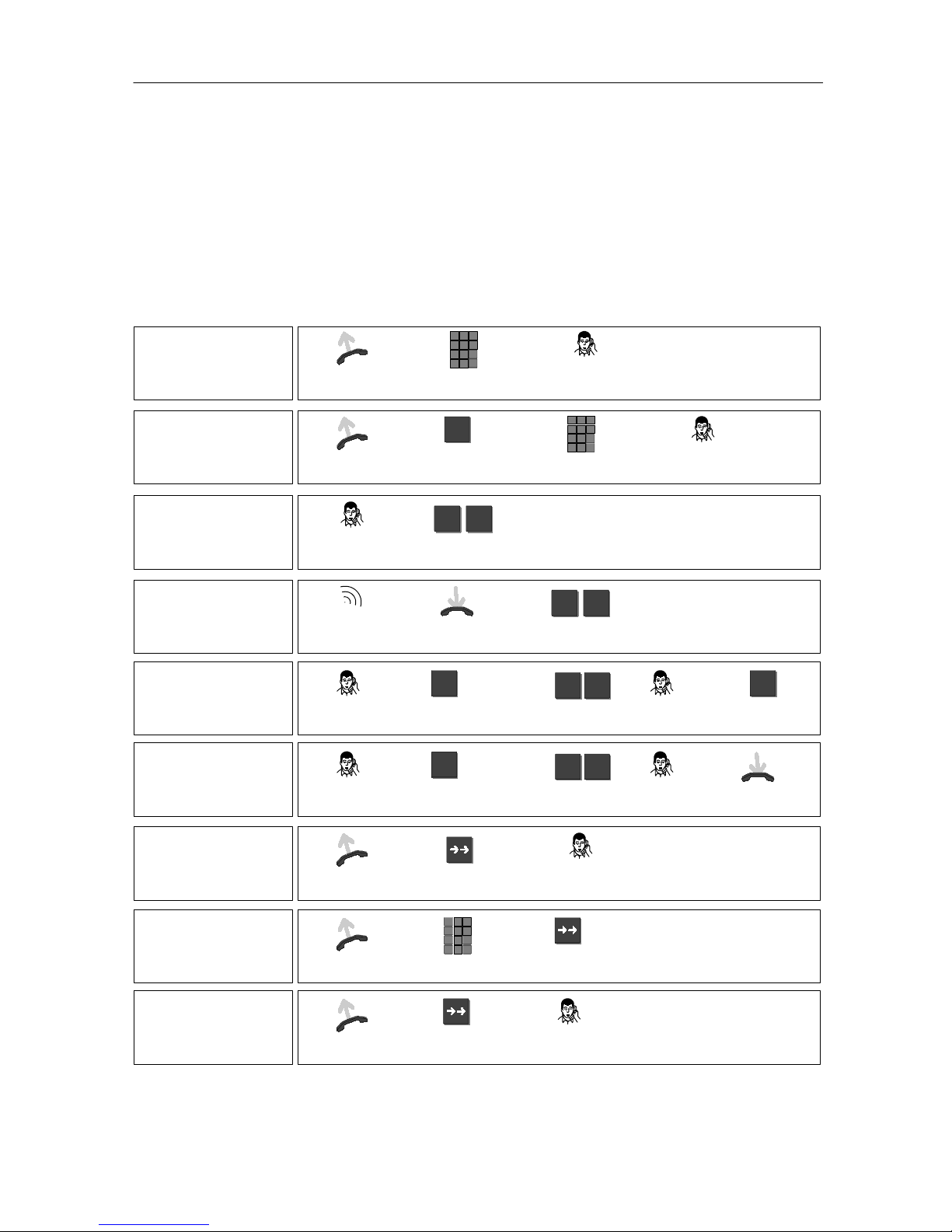
How to operate your telephone
The operation of some functions depends on the system with which your telephone
is being used.
If you mistakenly press an incorrect key during a programming sequence,
simply replace / lift the handset. You can then start the procedure over.
Basic functions of your telephone
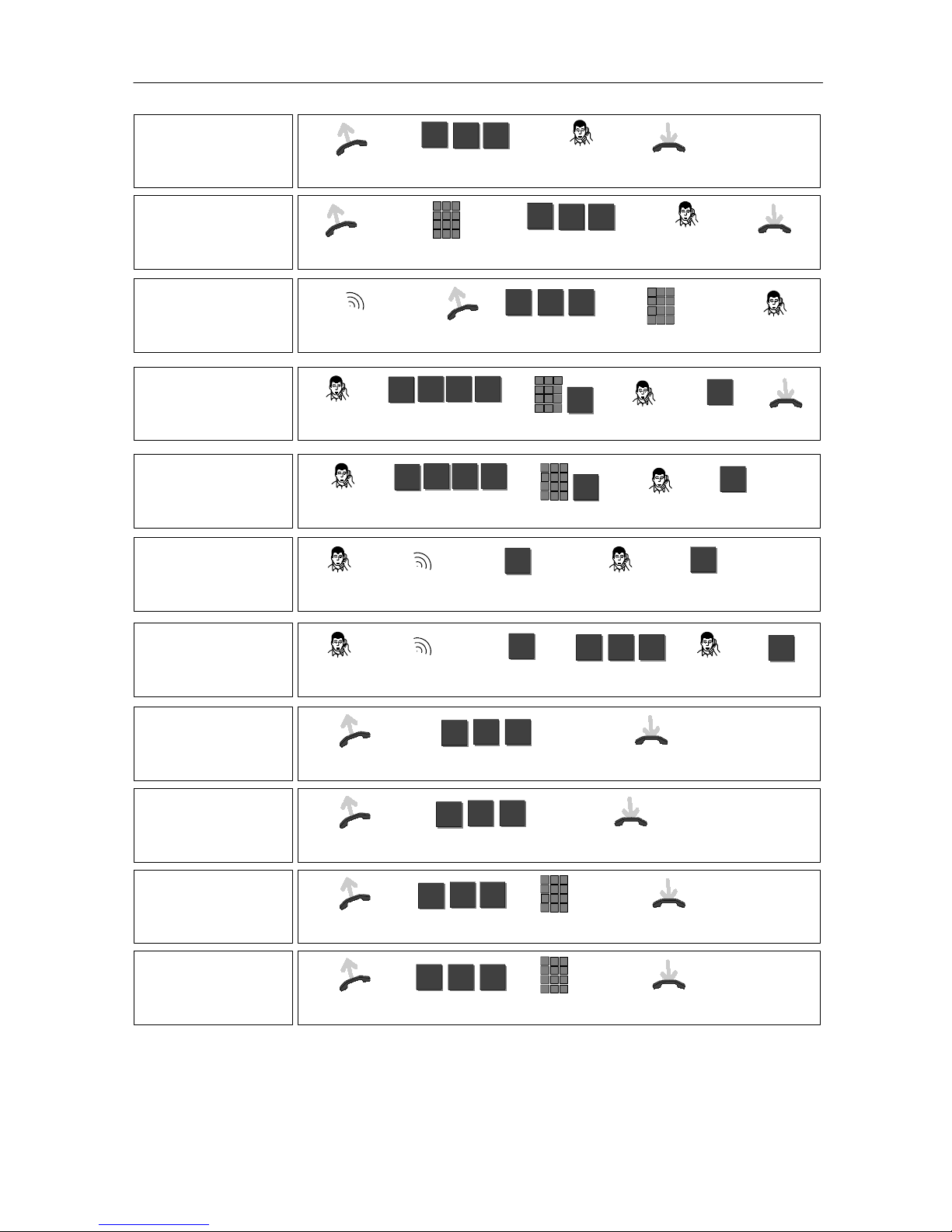
Making calls
(internal)
Lift
handset
Enter internal
call number
Conduct call
Making calls
(external)
Lift
handset
Dial external line
code (usually 0)
0
Enter external
call number
Conduct call
Adjusting the
volume during a call
(for current call
only)
During
call
Press (repeatedly) to
adjust volume
+ --
Adjusting the ringing volume
Your telephone
rings
Leave handset
on--hook
Press (repeatedly) to
adjust volume
+ --
Consultation
During
call
Initiate
consultation
R
Enter
call number
e.g.
4 4
Conduct
consultation
Return to
1st call
R
Forwarding
(transferring)
During
call
Initiate
consultation
R
Enter
call number
e.g.
4 4
Subscriber
answers
Replace
handset
Dialing last number
again (redial)
Int. 5 / 3: external
only
Lift
handset
Initiate
redial
Conduct call
Storing
a specific redial
number
Int. 5 / 3
Lift
handset
Enter
call number
Store call
number
Dialing
a selected redial
number
Int. 5 / 3
Lift
handset
Dial
call number
Conduct call
Page 6
TE 13 Operating Instructions
6
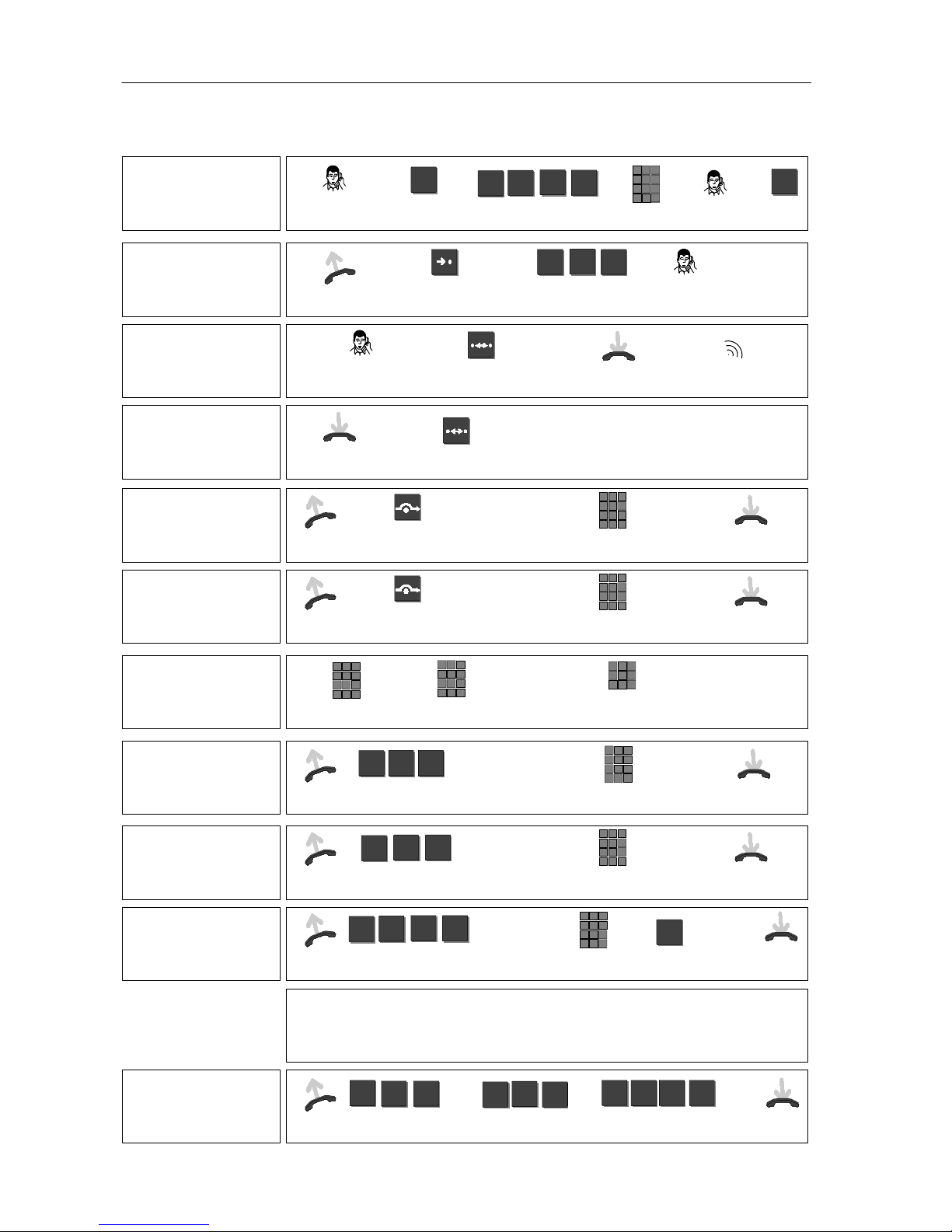
Special functions of the Integral 5 / 3
Holding the call on
the line
(from E6 software)
During
external call
Initiate call hold
(1st caller waiting)
R
Enter
code
1
*
03
Dial external
number
Conduct
2nd call
Return to
1st call
R
Dialing a
speed--dial number
Lift
handset
Programme
speed dial
Enter
speed--dial number
e.g.
1
1 6
Conduct call
Initiating call--back
Subscriber’s line is
busy
Initiate
call--back
OK
signal
Replace
handset
Your phone rings when
subscriber ends call
Cancelling
call--back
Leave handset
on--hook
Cancel
call--back
Diverting calls
to another
internal telephone
Lift
handset
Set up
call diversion
“3” for:
see 1)
Enter code
“1”, “2” or
Enter internal
call numberOKsignal
Replace
handset
Deactivating call
diversion to another
internal telephone
Lift
handset
Deactivate
call diversion
“3” for:
see 1)
Enter code
“1”, “2” or
Enter your
own call numberOKsignal
Replace
handset
Changing call diversion destination
from another phone
(from E6 software)
Call ATK system
externally
Enter remote
control no.
Switch over
dial mode
to DTMF
(tone dial)
Enter call number
and PIN of
desired subscriber
Dialing
tone
Further:
See
Switching
call diversion on/off
Diverting calls from
another internal
telephone to you
Lift
handset
Code
“call diversion from”
*
7 0
“3” for:
see 1)
Enter code
“1”, “2” or
Enter internal
call number
OK
signal
Replace
handset
Diverting calls
to another
internal telephone
Lift
handset
Code
“call diversion to”
*
7 1
“3” for:
see 1)
Enter code
“1”, “2” or
Enter internal
call numberOKsignal
Replace
handset
Diverting calls
to an external
telephone
Lift
handset
Code “External call
diversion”
1
9
*
4
“3” for:
see 1)
Enter code
“1”, “2” or
Enter external
call number
#
Confirm
call numberOKsignal
Replace
handset
1) Enter code for:
“Immediate call diversion”: 1
or “Delayed call diversion”: 2
or “Call diversion if busy”: 3
Deactivating
call diversion
Lift
handset
Code “call
diversion from”
7 0
#
Code
“call diversion to”
7
or
1
#
Code ”External
call diversion”
1
4 9
#
or
OK
signal
Replace
handset
Page 7
TE 13 Operating Instructions
7
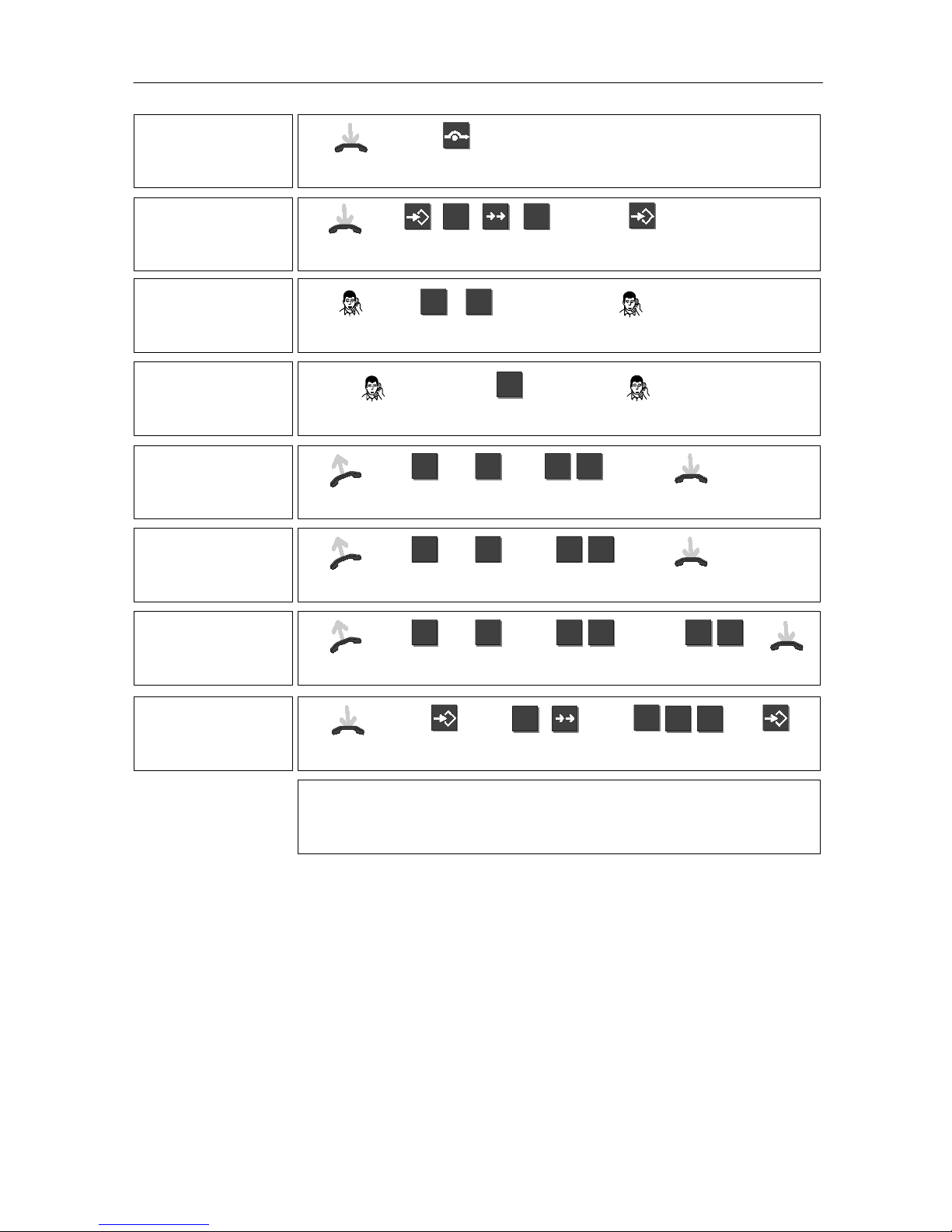
Announcement to
all subscribers
Lift
handset
Code
“Announcement”
*
8 0
Announcement
Replace
handset
Announcement to
one subscriber
Lift
handset
Enter internal
call number
Code
“Announcement”
*
8 0
Announcement
Replace
handset
Retrieving calls
(Call pick-up)
A telephone
rings
Lift
handset
Code
“Call pick--up”
3 4
*
Number of
ringing telephone
Conduct call
Conference
(internal)
During
internal call
Press Refer--back key
and enter code
R
6 8
*
Internal call no.
and button “R”
R
Conference
Connect
subscribers
R
Replace
handset
Conference
(external)
During
external call
Press Refer--back key
and enter code
R
6 8
*
Internal call no.
and button “R”
R
Conference Return to
1st call
R
2x
Answering an
internal call--waiting
call
During
call
2nd call (single
ringing tone)
Accept call
(1st caller waiting)
R
2nd call
Return to
1st call
R
Answering an
external call--waiting
call
During
call
2nd call (single
ringing tone)
Accept call
(1st caller waiting)
R
Code “ext. call
waiting”
3*2
2nd call
Recall
1st caller
R
2x
Activating
“Do not disturb”
(internal)
Lift
handset
Code
“Do not disturb”
*
7 2
OK
signal
Replace
handset
Deactivating
“Do not disturb”
(internal)
Lift
handset
Deactivate
“Do not disturb”
#
7 2
OK
signal
Replace
handset
Locking the
telephone
Lift
handset
Code
“Lock”
*
5 0
Enter
PIN
OK
signal
Replace
handset
Unlocking the
telephone
Lift
handset
Code
“Unlock”
5 0
#
Enter
PIN
OK
signal
Replace
handset
Page 8
TE 13 Operating Instructions
8
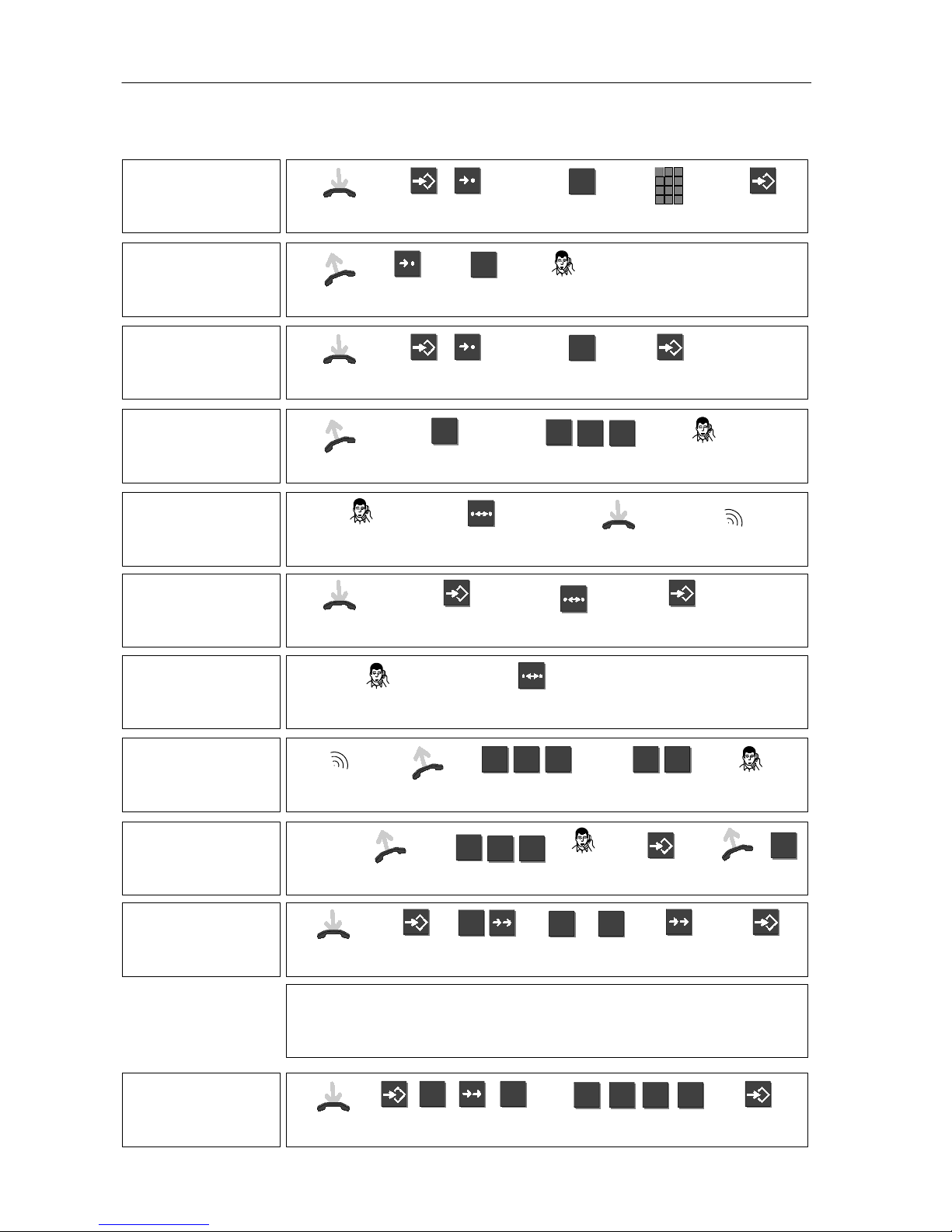
Special functions of the Integral 33
Programming a
speed--dial number
Leave handset on--hook
Initiate
programming
Press
speed--dial key
4
e.g.
Enter
call number
End
programming
Dialing a
speed--dial number
Lift
handset
Dial
speed--dial number
4
e.g.
Conduct call
Deleting a
speed--dial number
Leave handset on--hook
Initiate
programming
Press
speed--dial key
4
e.g.
End
programming
Dialing a
code--dial number
Lift
handset
Initiate
code dial
7
Enter
code--dial number
e.g.
3
4 5
Conduct call
Initiating call--back
Subscriber’s line is
busy
Initiate
call--back
OK
signal
Replace
handset
Your phone rings when
subscriber ends call
Cancelling
call--back
Leave handset
on--hook
Initiate
programming
Cancel
call--back
End
programming
Trapping a caller
You have a nuisance caller
on the line
Trap caller Error signal if caller
cannot be trapped
Answering a call for
another subscriber
Another tele-
phone rings
Lift
handset
Enter
code
* 2 3
Number of ringing
telephone
e.g.
4 3
Conduct call
Listening to
messages
LED
illuminates
Lift
handset
Dial mailbox
number
e.g.
5
4 3
Listen to
messages
Delete
messages
opt.
Dial
call number
opt.
End
query
R
Programming
volume
and tone
Leave hand-
set on--hook
Initiate
programming
Enter
function
5
e.g.
3 3
&
Enter code and
setting (see 1)
Enter additional
codes
or
End
programming
*
Codes and (settings)
:
Handset volume: 0 (0, 1) Signal tone volume: 3 (0 -- 7)
Loudspeaker volume: 1 (0 -- 4) Ringing tone: 5 (0 -- 7)
Ringer volume: 2 (0 -- 7) VIP call tone: 6 (0 -- 7)
Programming a
call diversion
destination
Leave hand-
set on--hook
Initiate
programming
2 3
Enter call--diversion
destination
e.g.
5 5 5 5
End
programming
Page 9
TE 13 Operating Instructions
9
Activating/
deactivating
call diversion
Leave hand-
set on--hook
Switch call diver-
sion on or off
Deleting a call
diversion
destination
Leave handset on--hook
Initiate
programming
2 3
End
programming
Conference
Consultation
call
Initiate
conference
R 4
You and two subscribers are
connected with each other
Cutting--in
(authorisation
required)
The line you dialed is
busy
Enter cut--in code
1
You can speak to
the subscriber
Cutting out of
and returning to a
hunt group line
Lift
handset
Lift
handset
Cut out: #
Return: *
# *
or
Enter
code
1 1
Replace
handset
Answering a call
elsewhere
(follow--me)
-- on your phone
Lift
handset
Set up follow--me: *
Cancel follow--me: #
* #
or
Enter
code
1 3
Replace
handset
Answering a call
elsewhere
(follow--me)
-- on another phone
Lift
handset
Set up follow--me: *
Cancel follow--me: #
* #
or
Enter
code
1 4
Enter your call
number
e.g.
6 6
Replace
handset
Setting the
telephone
Leave handset on--hook
Initiate
programming
Enter
function
1
Enter
code*
e.g.
9
0 0
End
programming
*
Codes:
VIP function on / off: 900 / 910
Suppress call number on / off: 905 / 915
Do not disturb on / off: 917 / 907
Page 10
TE 13 Operating Instructions
10
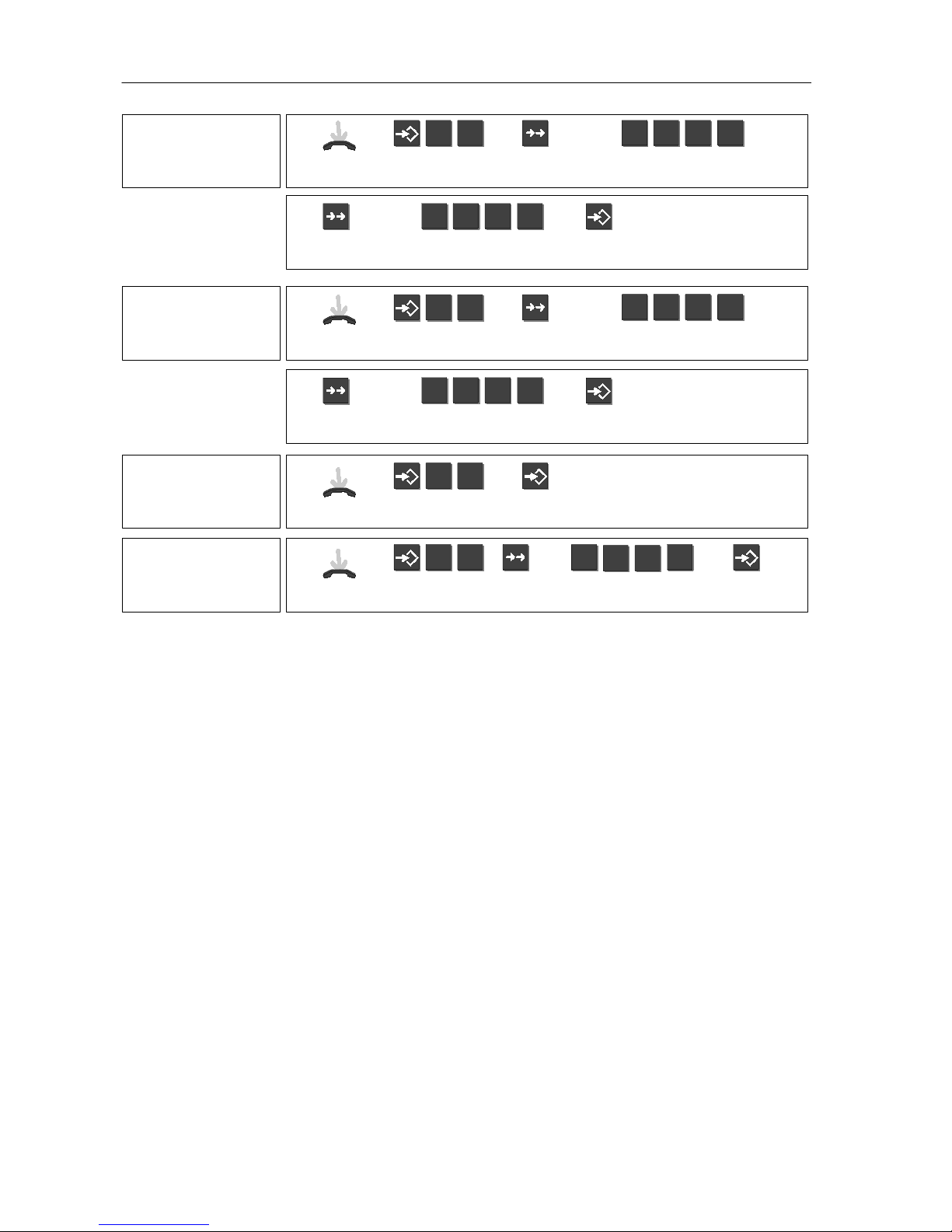
Programming your
PIN
(first time)
Leave hand-
set on--hook
Initiate
programming
8 0
Press redial
key
Enter
PIN
0 0 0 0
Press redial
key
Enter new PIN
(higher than 2000)
e.g.
2 0 0 0
End
programming
Changing your PIN
Leave hand-
set on--hook
Initiate
programming
8 0
Press redial
key
Enter
old PIN
e.g.
2 0 0 0
Press redial
key
Enter new PIN
(higher than 2000)
e.g.
5 6 7 8
End
programming
Locking the
telephone
Leave hand-
set on--hook
Initiate
programming
8 0
Lock telephone
Unlocking the
telephone
Leave hand-
set on--hook
Initiate
programming
8 0
To unlock:
enter PIN
e.g.
2
0 0
0
Unlock
telephone
Page 11

TE 13 Operating Instructions
11
What else you should know about the individual functions
If you would like to make an external call, you first need to
occupy an external line. How you do this depends on the telephone system you have. The alphabetic labelling allows you to
dial so called vanity numbers.
You can use this function to talk to a party within your in--house
telephone system during an already existing call.
The redial function dials the last call number again. Specific
redial lets you redial a call number that you have stored specifically for this purpose. You can add digits to the number manually. Numbers that you have dialled using a destination or
speed--dial key cannot be redialled using the redial button.
Integral 5 / 3:
for external call numbers only
As soon as the subscriber’s line is free, your telephone rings.
Lifting the handset will redial the call number.
Integral 5 / 3:
You can also request a call--back if the other sub-
scriber does not answer the phone.
Integral 33:
You can store a call number under each of the digit
keys 0 – 9. This number can contain up to 24 digits. If a number
has already been stored under a digit key, this number will be
overwritten once a new call number is entered.
Integral 5 / 3:
The speed--dial destinations are set by your ser-
vice point.
Integral 33:
This function allows you to dial numbers stored centrally in the system. If required, you can enter additional digits
after the code dial number e.g. an extension number.
Integral 33:
If you have cut yourself out of a hunt group line, you
may still be reached via your internal or external extension number.
Integral 33:
This function enables you to use another telephone
(excluding TH 13, TM 13 and TS 13) to set up call diversion for
your telephone. You must, however, first set up the diversion on
your phone.
Making
calls
Consultation
Redial
Call--back
Speed dial
Code dial
Hunt group
line
Follow me
Page 12

TE 13 Operating Instructions
12
You always have to press the Programming key to start and end
the programming mode. This is the only way to store your entries permanently.
Integral 33:
After you have finished your input and pressed the
Redial key, you can continue in the respective program, e.g.
make changes to the acoustic settings.
Integral 33:
Enter a number higher than 2000.
The PIN set in the factory is 0000.
Integral 33:
You can adjust the tone and volume for different
ringing tones. When programming enter the corresponding code
and setting.
Integral 33:
You can change your telephone’s pre--settings.
When programming, enter the corresponding code.
Many functions of you telephone are operated with codes. In
individual cases they can v ary from the following
standard
codes. Your service point can provide you with more information
if necessary.
Integral 5 / 3 c odes
Function
Code In your system
Activate function
*
Deactivate function
#
Divert internal calls 70
Divert calls internally 71
Divert calls externally 149
Announcement 80
Pick up call 34
Do not disturb 72
Lock / unlock the telephone 50
Programming
Changing
your PIN
Volume
and tone
Setting the
telephone
Overview
of codes
Page 13

TE 13 Operating Instructions
13
Integral 33 codes
Function Code In your system
Activate function
*
Deactivate function
#
Code dial 7
Answer call for someone
else
*
23
Cut in 1
Hunt group line 11
Answer calls elsewhere:
prepare on your telephone
13
Answer calls elsewhere:
prepare on another telephone
14
VIP function on / off 900 / 910
Suppress call number on /
off
905 / 915
Do not disturb on / off 917 / 907
Lock / unlock telephone,
program PIN, change PIN
80
Page 14

Page 15

Page 16

Tenovis GmbH & Co. KG
Geschäftsbereich
Kommunikationstechnik, Austria
Hietzinger Kai 139
A-1131 Wien
Telephone +43-1-8-7870
Fax +43-1-8-7870-7370
www.tenovis.at
Tenovis N.V., Belgium
Rue Henri Genessestraat 1
B-1070 Anderlecht
Telephone +32-2-525-5555
Fax +32-2-525-5556
www.tenovis.bn
Tenovis S.A.S, France
122--130, rue Marcel Hartmann
F--94853 Ivry / Seine Cedex
Téléphone +33--0--800--501--609
Fax +33--0--800--601--609
www.tenovis.fr
MTV Telecom Distribution PLC,
Great Britain
Sky Business Park
Eversley Way
Thorpe
Egham
Surrey TW2 0 8RG
Telephone +44-1784--7400--00
Fax +44-1784--4712--71
www.mtvtelecom.co.uk
Tenovis s.r.l., Italy
Via Gadames, 7
I-20151 Milano
Telephone +39-02-39244-1
Fax +39-02-39244-805
www.tenovis.it
4.999.046.167 ∙ 1/0501∙ I3 / 5 SW E 6∙ I3 3 SW E 0 5∙ gb∙ Pri n t e d i n Ge rma n y∙ Modifications reserv ed.
Tenovis B.V., Netherlands
Neptunusstraat 71
NL-2132 JP Hoofddorp
Telephone +31-23-5656-410
Fax +31-23-5656-411
www.tenovis.nl
Telecomunicaciones Tenovis, S.L,
Spain
Ventas Telecomunicación
Carretera N-VI, KM 18,150
E-28230 Las Rozas (Madrid)
Telephone +34-91-6312-400
Fax +34-91-6312-486
www.tenovis.es
Tenovis GmbH
Switzerland
Ifangstr. 1
CH-8952 Schlieren
Telephone +41-1-738-72-72
Fax +41-1-738-72-18
www.tenovis.ch
Tenovis
Kleyerstraße 94
D--60326 Frankfurt/Main
Info Service in Germany
Tel.: +49-69-7505-2830
Fax: +49-69-7505-2841
http://www.tenovis.com
e--mail: [email protected]
 Loading...