

Page 1

2017
5 Series
User Guide
Page 2
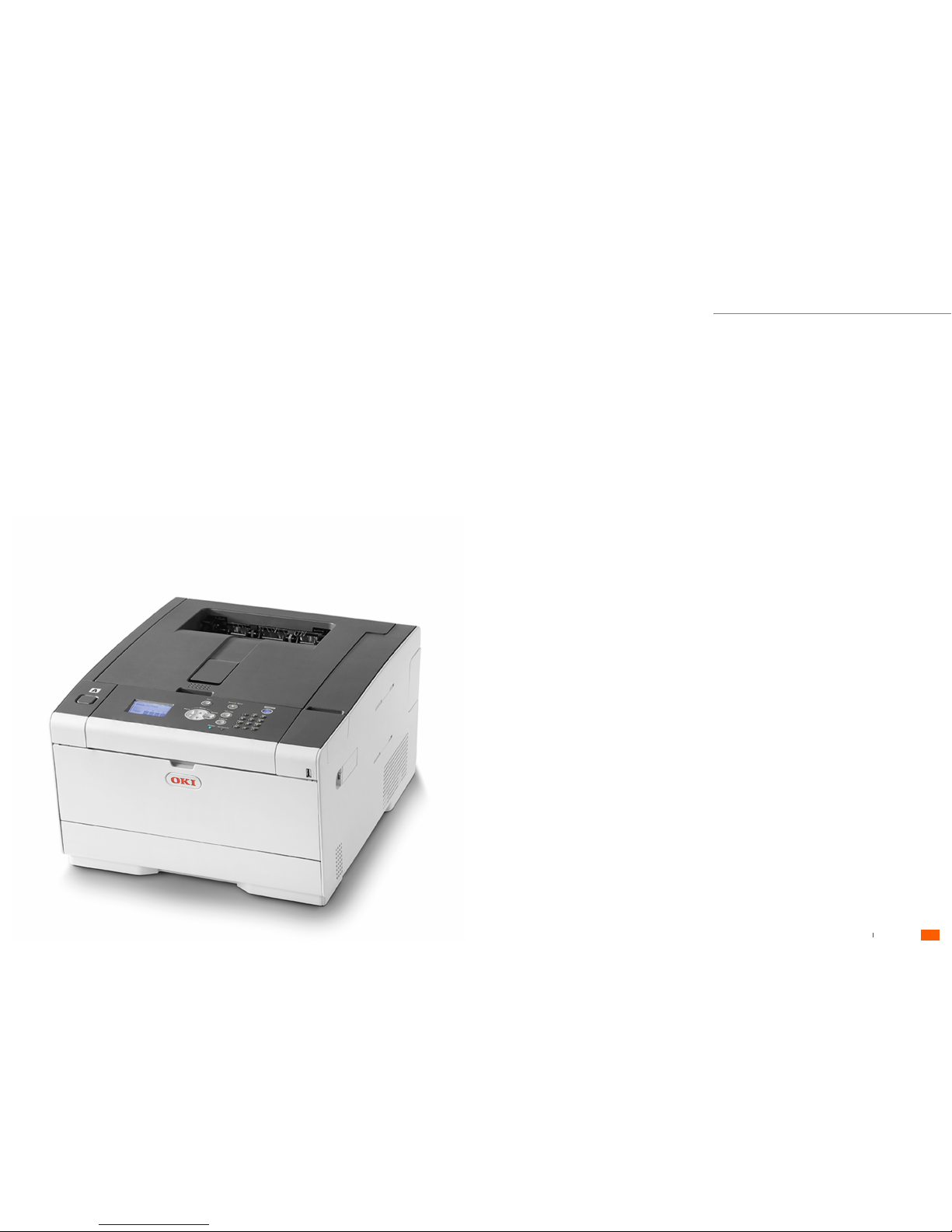
Printer Overview
Inside the printer....................................................................2
Front & Rear view...................................................................3
Basic Operations
Operator Panel.......................................................................4
Turning On / Off.....................................................................5
Printer Prefences
Film Printing............................................................................6
Reflective Printing...................................................................7
Loading Materials
Multi-Purpose Tray.............................................................8 - 9
Replacing Consumables
Replacing Toner Cartridges..........................................10 - 11
Replacing Image Drums................................................12 - 13
Media Jams
Removing Jammed Material...........................................14 - 15
Error Messages
System Error Codes..............................................................16
Toner Cartridge Error Codes................................................16
Image Drum Error Codes.....................................................17
Media Error Codes...............................................................17
Fuser Unit Error Codes.........................................................18
Belt Unit Error Codes...........................................................18
Paper Jam Error Codes........................................................18
Frequently Asked Questions
Printer Setup.........................................................................19
Software..................................................................19
Consumables...................................................................19
DVLA / Bristish Standards....................................................20
Media......................................................................20
Support..........................................................................20
Model................................................................................21
Guide
Contents
User Guide
1
Tennants UK Ltd 5 Series User Guide
Page 3
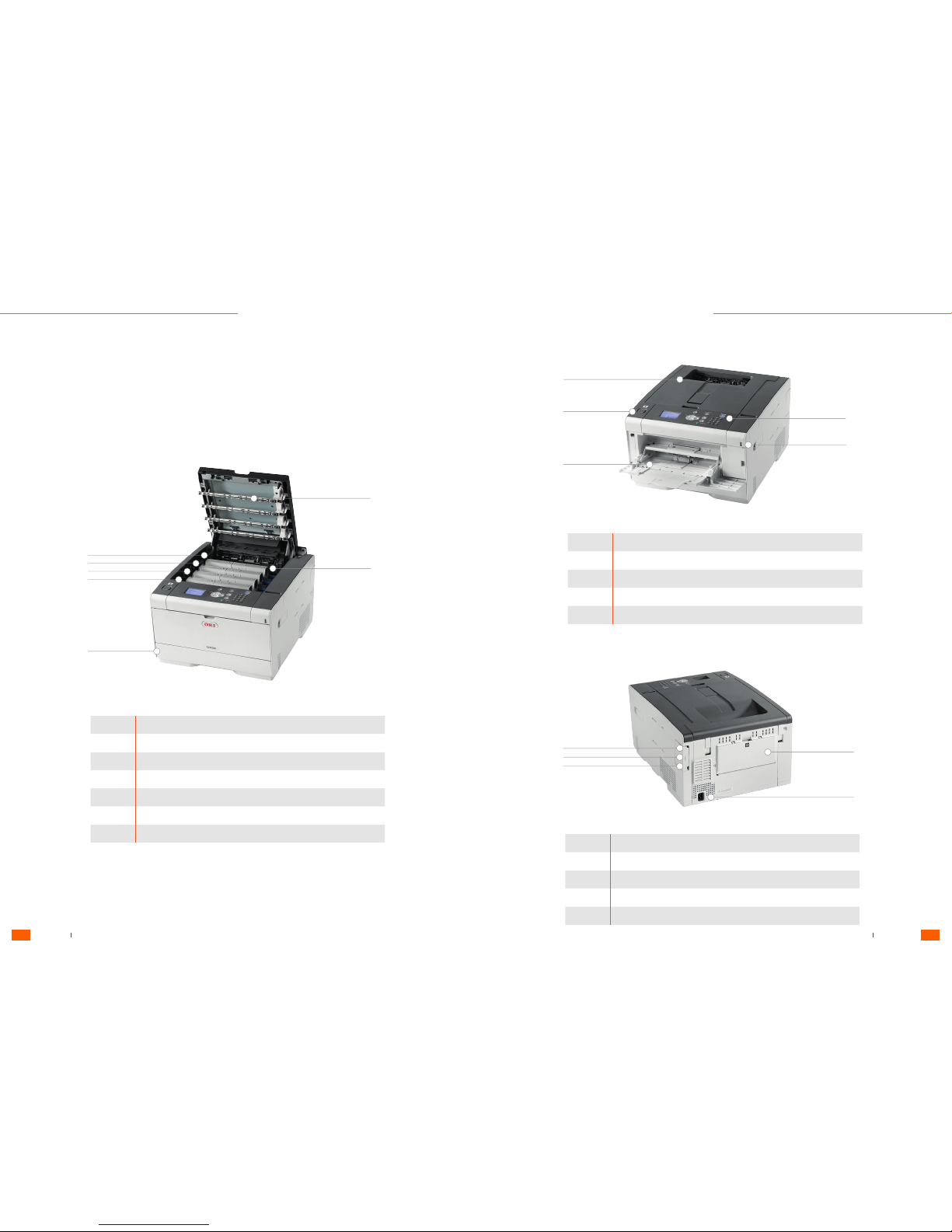
Inside the machine
Symbol Component Name
a Operator panel
b USB port
c MP tray (Multipurpose tray - plate printing)
d Open button
e Output tray (top cover)
Symbol Component Name
a LED head
b Fuser unit
c Toner cartridge / Image drum (Y: Yellow)
d Toner cartridge / Image drum (M: Magenta)
e Toner cartridge / Image drum (C: Cyan)
f Toner cartridge / Image drum (K: Black)
g Tray 1
Symbol Component Name
a Rear output tray
b Power connector
c Interface connector cover
d Network interface connector
e USB interface connector
a
a
b
b
b
a
c
c
d
e
f
c
d
g
e
d
e
Front View
Rear View
Printer
Overview
Tennants UK Ltd 5 Series User Guide
User Guide User Guide
3
2
Tennants UK Ltd 5 Series User Guide
Page 4
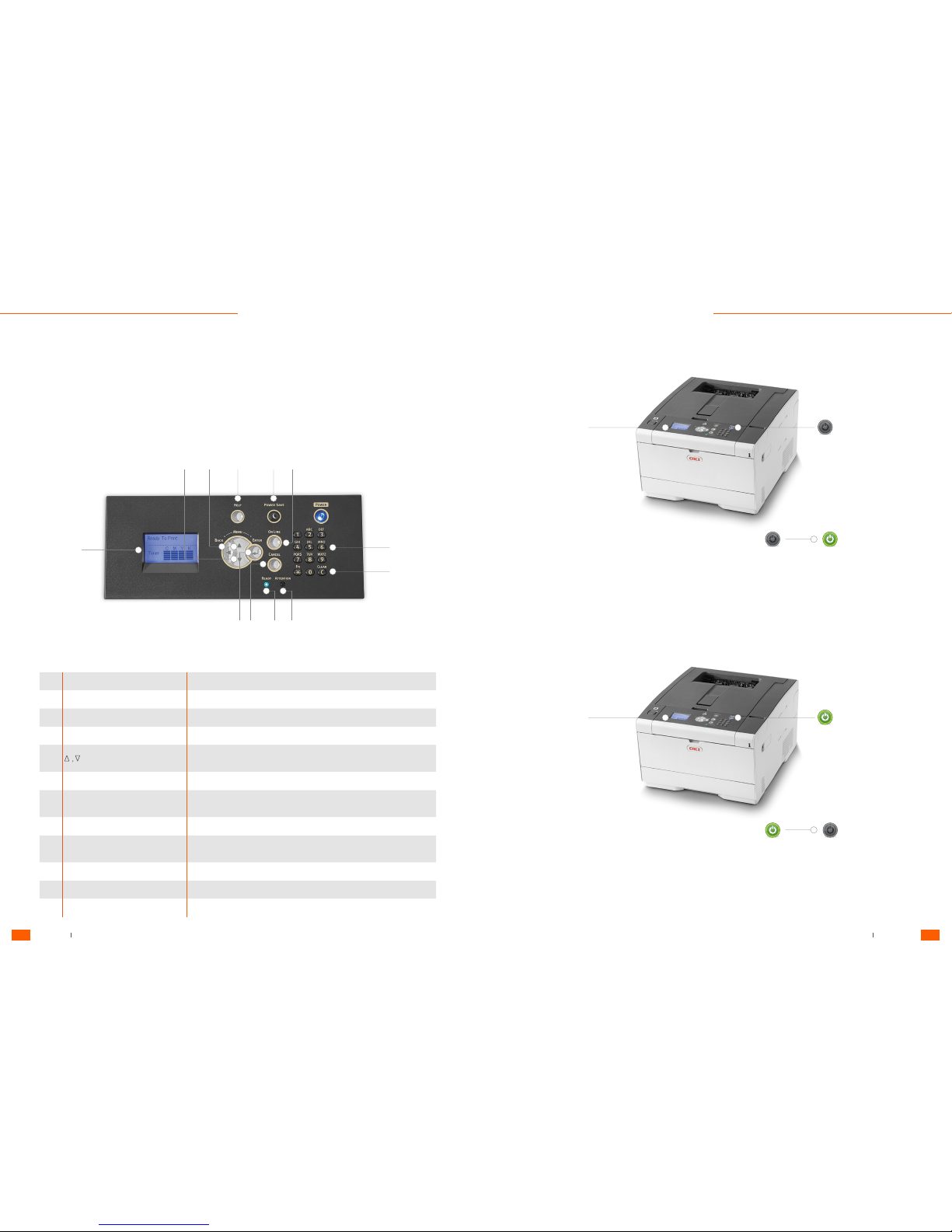
Operator Panel
Turning the machine on
Turning the machine off
No. Name Function
1 Display screen Indicates the printer status or instructions.
2 ONLINE Switches ONLINE and OFFLINE.
3 CANCEL Cancels the current print job immediately.
4 ENTER Sets the highlighted item.
5
• Displays menu items.
• Selects a menu item or scroll through the display screen.
6 BACK Returns to the previous screen.
7 HELP
Displays Help screen. To close the Help screen, press the (HELP)
button again or press the (BACK) or (CANCEL) button.
8 POWER SAVE Lights green in Power Save mode and flashes green in Sleep mode.
9 Numeric keypad
• Enter numbers.
• Enter alphabet characters and symbols.
10 CLEAR Clears the entered value.
11 READY indicator Lights in green in ONLINE mode and turns off in OFFLINE mode.
12 ATTENTION indicator Lights or flashes in orange if an error occurs on the machine.
1. Press the power switch for approximately a second.
Check that the machine is not receiving data before shutting down.
2. The standby screen appears when the machine is ready.
The "Shutting down. Please wait. Printer will turn off automatically" message is displayed on the screen, and the power switch
LED lamp flashes at approximately one-second intervals.
After a while, the machine automatically turns off, and the power switch LED lamp goes out.
Press and hold the power switch for 5 seconds or more to force shut down the machine. Use this method only if a
problem occurs.
When the machine is turned on, the power switch LED lamp lights up.
When the machine is turned off, the power switch LED lamp light goes out.
10
9
1134
8 2765
12
1
Power
Power
Standby Screen
Standby Screen
1. Press the power switch for approximately a second.
Basic
Operations
Tennants UK Ltd 5 Series User Guide
User Guide User Guide
5
4
Tennants UK Ltd 5 Series User Guide
Page 5
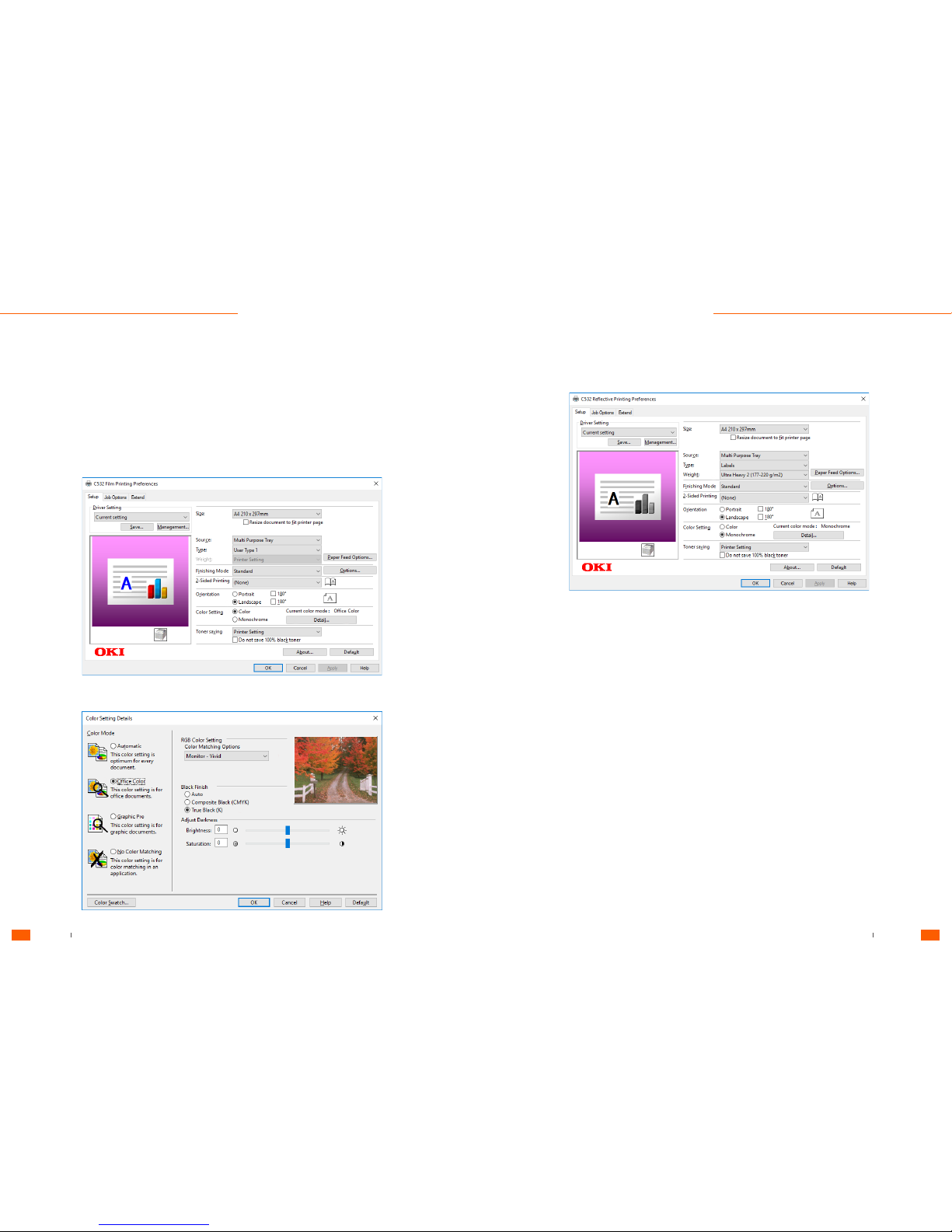
Film Printing
Reflective Printing
Printer
Preferences
Setup
Setup
Colour Setting Details
Tennants UK Ltd 5 Series User Guide
User Guide User Guide
7
6
Tennants UK Ltd 5 Series User Guide
Page 6
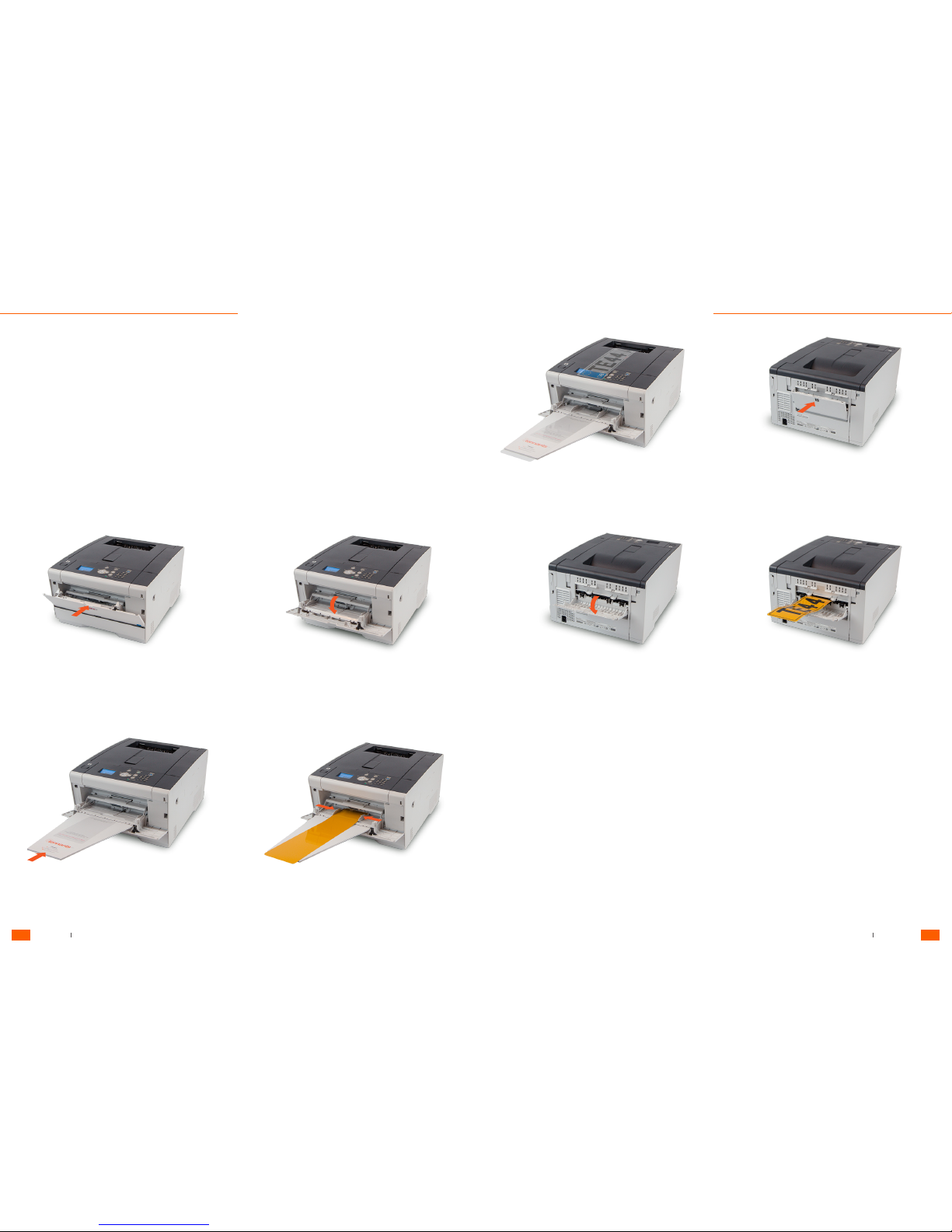
1. Open the MP tray forward by inserting your finger into the front recess and lowering. Do not open and close the Multi-Purpose
tray vigorously as this may cause damage to the machine.
3. Insert the extended feeder tray in to the MP tray.
5. Use standard top outlet for film prints.
7. Lower rear output tray.
6. For reflective printing only , open flap (D) to use rear outlet.
8. Reflective print will exit from the rear of the machine.
4. Load material and adjust the media guides to the correct
width.
Multi-Purpose Tray
For printing number plate media, use the multi-purpose tray on the front of the unit.
All systems are supplied with a specially made extended feeder tray to support film or reflective material.
Loading
Materials
Tennants UK Ltd 5 Series User Guide
User Guide User Guide
9
8
Tennants UK Ltd 5 Series User Guide
Page 7
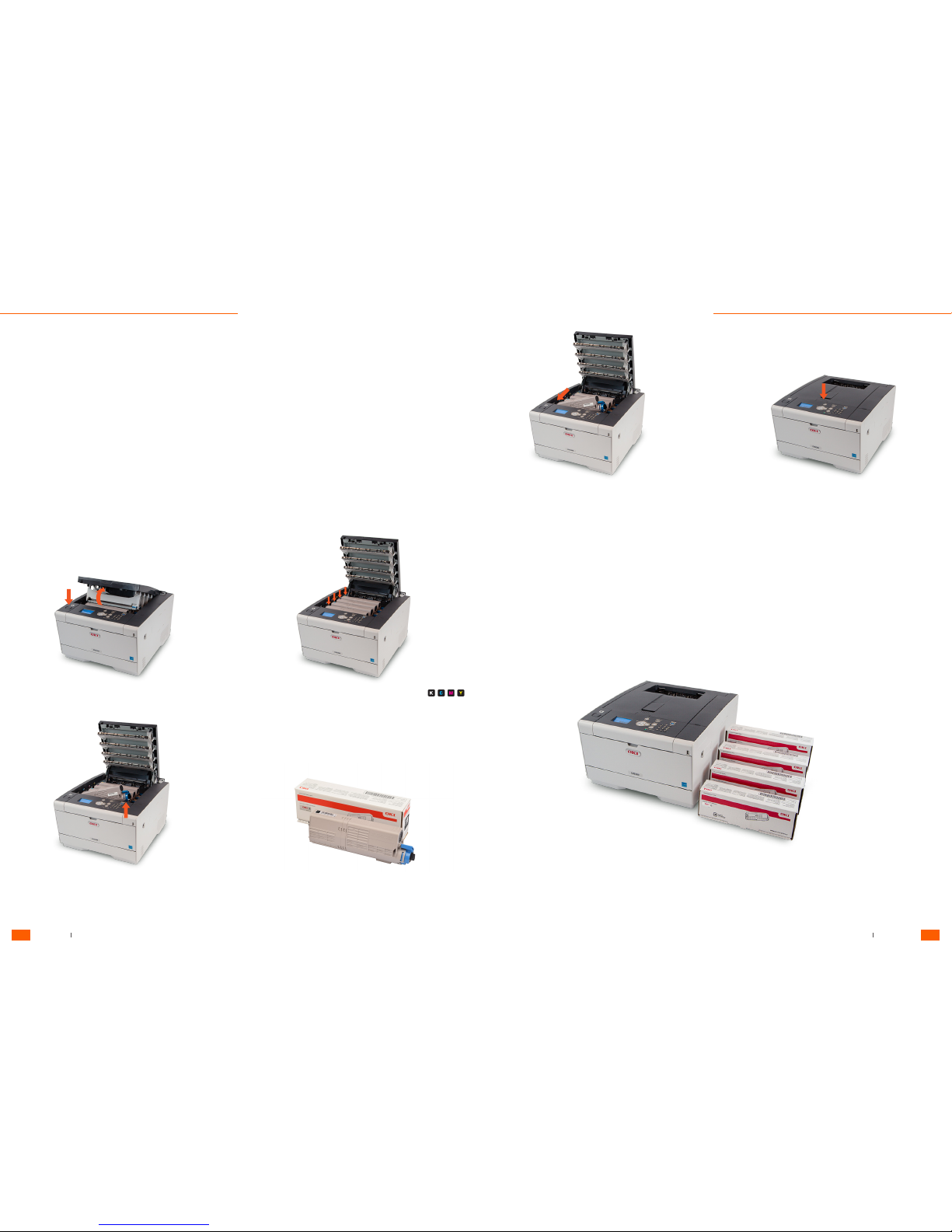
Replacing Toner Cartridges
When the "[COLOR] Toner Low" message ("[COLOR]" indicates C (cyan), M (magenta), Y (yellow) or K (black)) appears on the
display screen, prepare a replacement toner cartridge.
When the "[COLOR] Toner empty. Replace with new Toner Cartridge." appears and printing stops, replace the toner cartridge.
Use Oki Data genuine consumables to ensure optimum performance of the products.
Genuine OKI Original Toners and Drum Units
Even if the cyan (blue), magenta (red) or yellow toner cartridges run out, you can print in black and white by selecting
[Monochrome] or [Greyscale]. However, please replace the toner cartridge quickly after it runs out, as not doing so may cause
the image drum to be damaged.
• Have a new toner cartridge ready, as the print quality declines after more than one year following breaking the seal.
• If you replace the toner cartridge/image drum while it is being used, the toner consumption will not be counted normally.
Non-original toners, especially refills, that claim and appear initially to be compatible on plain paper, can very quickly contaminate
the imaging drums and ultimately cause image quality & fusing problems.
At Tennants, our own tests support these findings and furthermore show a distinct increase in media jams and reduced durability.
These refills and compatible toners may seem attractive due to the cost - however once contaminated toner is used in a machine
the only solution is to replace the toners and drums or to purchase a new printer.
1. Press the button (A) and open the output tray.
4. Pinch the tip of the blue lever of the toner cartridge and turn it
toward you until the tip aligns on the lug of the cartridge.
5. Lift the toner cartridge from the right side, and remove it from
the machine.
2. Identify an empty toner cartridge by its label colour.
9. Insert a new toner cartridge by aligning its left side
indentation with the protrusion on the image drum so the
toner cartridge and image drum colour labels align. Then
insert the right side gently into place and lock.
6. Unpack a new toner cartridge.
7. Shake the cartridge several times vertically and
horizontally.
8. Remove the tape from the toner cartridge.
10. Close the output tray slowly and push the centre of
the output tray for confirmation.
11. Please recycle toner cartridges.
A
Replacing
Consumables
Tennants UK Ltd 5 Series User Guide
User Guide User Guide
11
10
Tennants UK Ltd 5 Series User Guide
Page 8
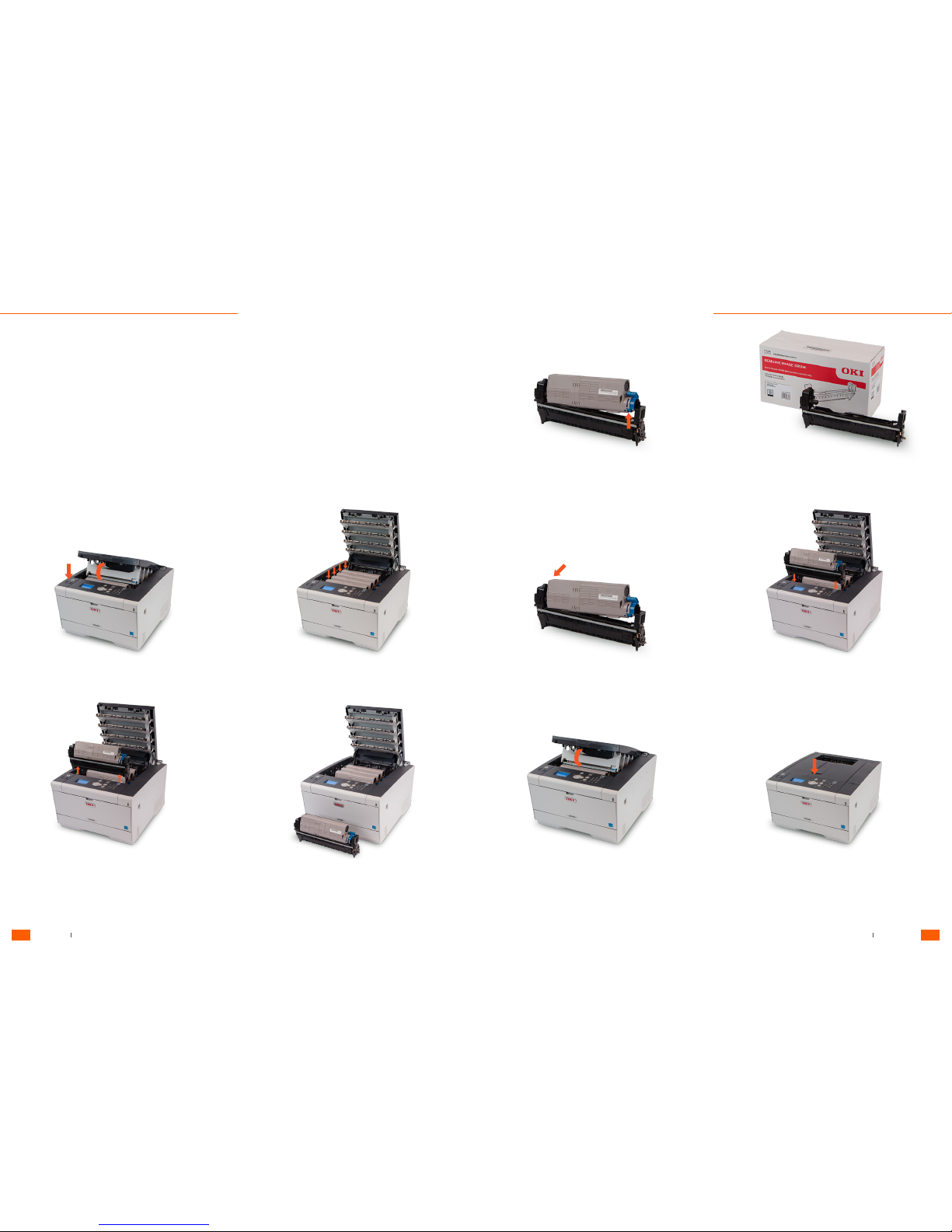
Replacing Image Drums
When the "[COLOR] Image Drum Near Life" message appears on the display screen, prepare a replacement image drum. If you
continue printing, the message "Install New Image Drum/ Image Drum Life" will be displayed and printing will stop.
When the "[COLOR] Image Drum Life" message is displayed and printing stops, replace the image drum.
1. Press the button (A) and open the output tray.
3. Remove the image drum from the machine by simply pulling
up.
8. Check label colour of a new image drum and place the drum
into the machine.
9. Close the output tray slowly. 10. Push the centre of the output tray for confirmation.
5. Unlock and remove the toner cartridge (d) lift from the right
side, and remove it from the image drum.
7. Insert the toner cartridge removed in step 5 by aligning its left
side indentation with the protrusion on the image drum so that
the toner cartridge and image drum colour label align. Then
insert the right side gently into place and lock.
2. Identify the image drum that has reached its lifetime by its label
colour.
4. Place the image drum on a clean, flat surface.
6. Unpack a new image drum, remove all packaging and place it
on a flat surface.
d
A
Replacing
Consumables
Tennants UK Ltd 5 Series User Guide
User Guide User Guide
13
12
Tennants UK Ltd 5 Series User Guide
Page 9
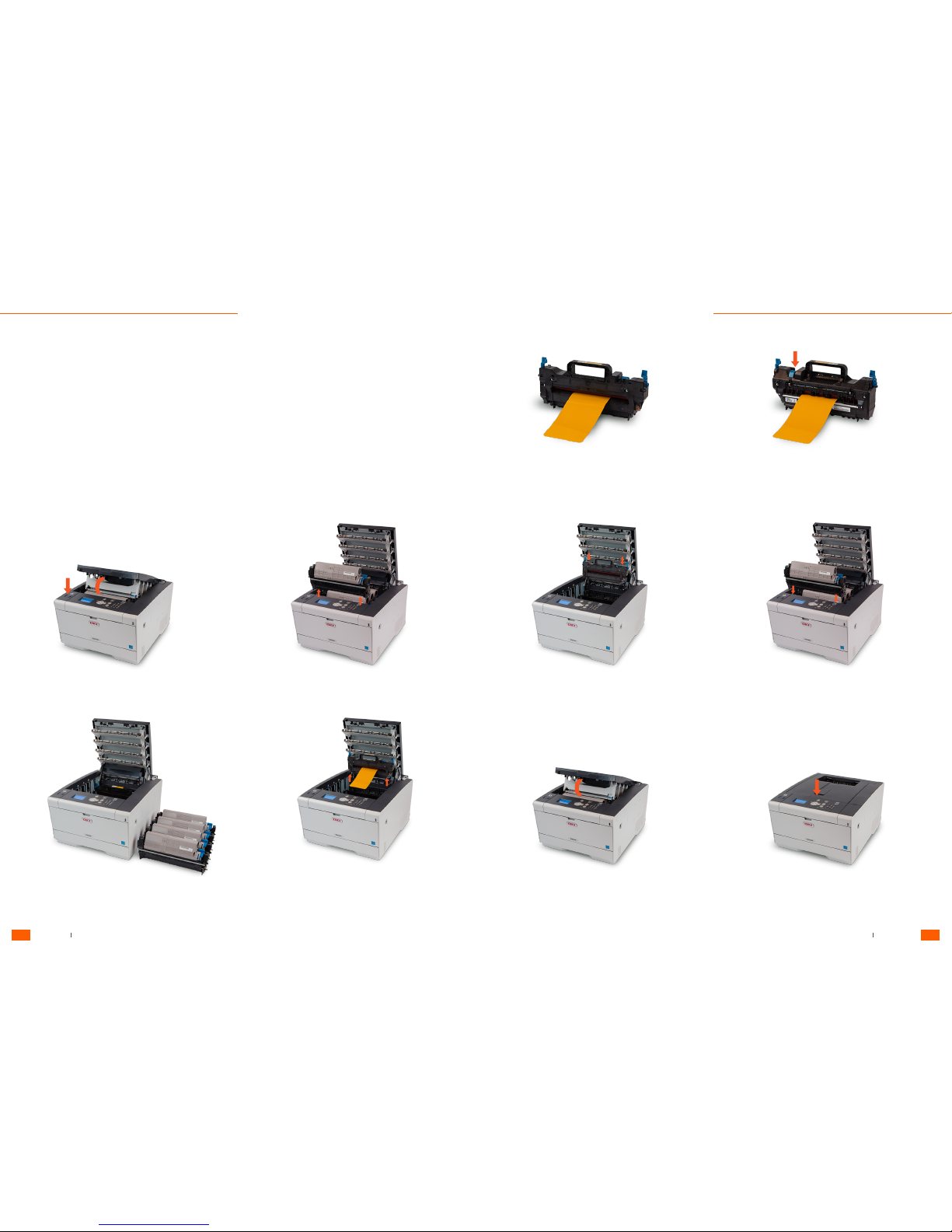
Removing jammed material
When the time for replacement consumables and maintenance items approaches, or when replacement becomes necessary,
messages such as "Time for replacing ABC is approaching" and "ABC is empty / Replace ABC" will appear.
1. Press the button (A) and open the output tray.
5. Place the fuser unit on a clean, flat surface.
3. Place the toners and image drums on a clean, flat surface.
7. Insert the fuser unit and lock in place.
9. Close the output tray slowly.
4. Unlock the fuser unit with the blue levers left and right then
remove. The fuser unit is extremely hot. Do not touch the
rollers.
8. Check label color on the toners and image drums and insert
into the machine.
10. Push the centre of the output tray for confirmation.
2. Remove the toners and image drums from the machine.
6. To remove the material, release the roller pressure by pushing
down on the release switch on the top of unit. Then pull the
media through.
A
Media
Jams
Tennants UK Ltd 5 Series User Guide
User Guide User Guide
15
14
Tennants UK Ltd 5 Series User Guide
Page 10

Error
Messages
System Error Codes
Toner Cartridge Error Codes
Image Drum Error Codes
Media Error Codes
Error Message Description
Wait a Moment. Network Initializing.
The network is being initialized.
Wait for a while until the machine connects to the network.
Checking File System File system in the hard disk is being checked. Wait for a while.
PU Flash Error
Turn the machine off, and then back on. If the same error
occurs, contact your dealer.
Communication Error
Turn the machine off, and then back on. If the same error
occurs, contact your dealer.
Offline
The machine is offline. Press the (ONLINE) button to set it to
[Online].
Data Present
Data remains unprinted. Wait for a while and if the message
does not disappear, check the data.
Cancelling Job
The job was cancelled or user is unauthorised. Wait for a
while.
Adjusting Temp.
The machine is adjusting the temperature of the fuser unit.
Wait for a while.
Color Adjusting
Color registration and density are being adjusted. Wait for a
while.
Please wait Executing Maintenance
The programs on the machine are being updated.
The machine automatically restarts after the update
completes.
Close Cover [COVER] Error: 310
Indicated cover is open. Close the cover.
Error: 310 The output tray.
Power Off/On
Turn the machine off, and then back on.
If the same error occurs, contact your dealer.
Service Call
Turn the machine off, and then back on.
If the same error occurs, contact your dealer.
Error Message Description
[COLOR] Toner Low
The toner indicated on the screen is low. Have a new toner
cartridge ready.
[COLOR] Waste Toner Full. Replace Toner. Waste toner is full. Replace the toner cartridge.
Error Message Description
COLOR] Image Drum Life. [PAGES] Pages Left.
The image drum indicated on the screen reaches its lifetime.
Replace the image drum with a new one.
C: Cyan (blue), M: Magenta (red), Y: Yellow, K: Black
Install New Image Drum. Image Drum Life. [COLOR].
Error: 350, 351, 352, 353
The image drum indicated on the screen reaches its lifetime.
Replace the image drum with a new one.
Opening and closing the cover can resume printing for a
while. Replace with a new one as soon as possible,
C: Cyan (blue), M: Magenta (red), Y: Yellow, K: Black
Install New Image Drum. Printing disabled due to low
threshold of Image Drum life. [COLOR]
Error: 680, 681, 682, 683
Printing has stopped because the image drum indicated on
the screen reached its lifetime. Replace with a new
image drum to print.
C: Cyan (blue), M: Magenta (red), Y: Yellow, K: Black
Install New Image Drum. Image Drum Life. [COLOR]
Error: 560, 561, 562, 563
The image drum indicated on the screen reaches its lifetime.
Replace the image drum with a new one.
C: Cyan (blue), M: Magenta (red), Y: Yellow, K: Black
Image Drum Sensor Error [COLOR]
Error: 540, 541, 542, 543
A toner sensor error has occurred in the image drum
indicated on the screen. Uninstall the image drum, and then
install it again. If the message persists, uninstall the toner
cartridge and install it again.
If the toner cartridge is not installed, install it.
Error Message Description
Install Paper. MPTray. Print on paper fed manually. Load paper in the MP tray.
Check Paper. Paper Size Error [TRAY
Error: 400
Paper size error has occurred in the indicated tray. Make sure
that the size of paper loaded in the tray matches the
[Paper Size] setting set on the operator panel. Load paper
according to the paper size and direction set. If the
setting made on the operator panel is wrong, cancel printing
first, set the right paper size from [Paper Size] on the
operator panel, and then print again.
Make sure that the cassette does not feed multiple sheets of
paper at a time after starting printing. If it happens,
remove paper, and then load paper correctly.
Change Paper in MPTray. [MEDIA_SIZE] [MEDIA_TYPE]
Error:460
The size and type of paper loaded in the MP tray do not
match those indicated on the screen. Make sure that the
size and type of paper loaded in the MP tray match those
selected on the application.
Change Paper in [TRAY]. [MEDIA_SIZE] [MEDIA_TYPE]
Error: 461, 462, 463
The size and type of fed paper do not match those indicated
on the screen. Use the same size and type of paper
Install Paper. [TRAY] [MEDIA_SIZE] Error: 490, 491, 492, 493
No paper is loaded in the indicated tray. Load paper of the
displayed size.
Install Paper Cassette. [TRAY] Error: 440, 441, 430, 431, 432
The tray is not installed. Install the cassette. If the cassette is
already inserted, pull it out, and then insert it again.
Tennants UK Ltd 5 Series User Guide
User Guide User Guide
17
16
Tennants UK Ltd 5 Series User Guide
Page 11

Fuser Unit Error Codes
Belt Unit Error Codes
Paper Jam Error Codes
Error Message Description
Install New Fuser Unit. Fuser Unit Life Error: 354
The fuser unit reaches its lifetime.
Replace the fuser unit with a new one.
Opening and closing the output tray can resume printing for a
while. Replace with a new one as soon as possible for
maintaining the print quality.
Check Fuser Unit Error: 320
The fuser unit is not properly installed. Remove and re-install
the fuser unit.
The Fuser Unit is not installed correctly. Reset Fuser Unit.
Error: 348
The fuser unit is not properly installed. Remove and re-install
the fuser unit. If the error persists after re-installing,
replace the fuser unit with a new one.
Error Message Description
Check Belt Unit Error: 330
The belt unit is not properly installed. Remove and re-install
the belt unit.
Install New Belt Unit. Belt Unit Life. Error: 355
The belt unit reaches its lifetime.
Replace the belt unit with a new one.
Opening and closing the output tray can resume printing for a
while. Replace with a new one as soon as possible for
maintaining the print quality.
Install New Belt Unit. Belt Unit Life. Error: 356
Waste toner of the belt unit is full. Replace the belt unit with a
new one. Opening and closing the output tray can
resume printing. Printing stops after 500 sheets are printed.
Error Message Description
Open Cover. Paper Jam. Output Tray.
Error: 370, 371, 372
A paper jam has occurred inside the machine.
Open the output tray and remove jammed paper.
Open Cover. Paper Jam. Output Tray.
Error: 380, 381, 382, 383, 385, 389
A paper jam has occurred inside the machine.
Open the output tray and remove jammed paper.
Open Cassette. Paper Jam. [TRAY]
Error: 391, 392, 393
A paper jammed via the paper feed path from the indicated
tray. Pull out the cassette, and then remove paper. If multiple
sheets of paper are fed at a time, remove paper and reload
paper.
Make sure that the paper stoppers are set in the right position.
Open Cover. Paper Jam. Output Tray. Error: 390
Paper jammed via the paper feed path from the MP tray.
If the edge of the jammed paper is not visible, open the
output tray and remove the paper.
Setup
Q. How do I set up my printer?
A. You can refer to our Support Guide or visit www.tennantsuk.com/support
Q. Is my 5 Series compatible with Windows?
A. Yes
Q. Is my 5 Series compatible with OS?
A. Yes
Q. How do I print a plate?
A. Watch our online videos on Print Production at www.tennantsuk.com/support
Software
Q. What software do I need to design and print my number plate?
A. Our Number Plate Media is fit for our software "LG Legal Plates" only. To find out more visit:
http://www.tennantsuk.com/lg-software/
Consumables
Q. Where can I purchase my replacement toners?
A. http://www.tennantsuk.com/shop
Q. Where can I purchase my replacement Image Drum?
A. http://www.tennantsuk.com/shop
Q. Where can I purchase my replacement Transfer Belt Unit?
A. http://www.tennantsuk.com/shop
Q. Where can I purchase my replacement Fuser Unit?
A. http://www.tennantsuk.com/shop
Q. Can I use 3rd party toners with my 5 Series?
A. No. We cannot gaurantee the warranty of this printer if customers use toners that aren't purchased via our online shop.
Frequently
Asked Questions
Tennants UK Ltd 5 Series User Guide
User Guide User Guide
19
18
Tennants UK Ltd 5 Series User Guide
Page 12

DVLA / British Standards
Q. Do I need to be registered with the DVLA to purchase a Number Plate Printer?
A. Yes. We do not supply printers, media or software to companies that are not registered with the DVLA. Find out more
here: http://www.tennantsuk.com/support/become-number-plate-supplier/
Q. Will my 5 Series printer be compliant with all relevant British Standard specifications?
A. We can only guarantee the compliance of Number Plates produced by our customers as long as they use Tennants media,
components, software and printers only.
Media
Q. How do I purchase media for my 5 Series printer?
A. http://www.tennantsuk.com/shop
Q. Can my printer print onto film?
A. Yes. Your 5 Series printer has been modified by Tennants UK and can be optimised for film sheets available at the Tennants
online shop. http://www.tennantsuk.com/shop
Q. Can My Printer Print onto Reflective?
A. Yes. Your 5 Series printer has been modified by Tennants and can be optimised for reflective sheets available at the Tennants
online shop. http://www.tennantsuk.com/shop
Q. Will My Printer print Motorcycle Plates?
A. Yes, your 5 Series printer will print standard oblong, motorcycle, square and bespoke plates.
Q. Will my printer print custom shaped plates?
A. The Tennants 5 Series printer will successfully print custom shaped media that is purchased via Tennants Online Shop and
designed in LG Signs.
Q. Can I use 3rd party plate media with my 5 Series printer?
A. No. We cannot gaurantee the legality of any of our plates that are purchased via other manufacturers or suppliers.
Support
Q. I need technical support, who do I contact?
A. We recommend you first check our printed guide supplied with the printer or online at www.tennantsuk.com/support where
most common FAQ's, videos and support material can be accessed. If you still need assistance with your printer, email our
customer service support team (Mon-Fri / 9-5) at [email protected]
Model
Q. What Model Printer Do I have?
A. Your printer is a Tennants Trade 5 Series Printer .
Q. Is my Printer a Thermal or Laser Printer?
A. Your laser printer uses a digital 4 LED full-colour electrophotographic printing method. It is not thermal.
Q. Will my printer print in full colour?
A. Yes. Our printers have 4 toners; Cyan, Magenta, Yellow, Black (CMYK).
Q. What print volume can I expect before toners need replacing?
A. http://www.tennantsuk.com/shop
Q. How do I purchase media for my 5 Series Printer?
A. http://www.tennantsuk.com/shop
Q. Can I use my printer for office use?
A. Yes. Our printers can be used for A4 and Banner printing. We do advise when switching from plate printing to office printing
to feed a few sheets through first to empty the drum and reduce the rare possibility of lines on your paper prints. More
information on other printing services can be found here:
http://www.oki.com/uk/printing/products/colour/a4/c500series/c532dn/index.html
Q. What is the difference between your Film and Reflective 5 Series Printers?
A. Our Trade 5 Series printers, when using Tennants number plate media, are modified to print onto film or reflective material.
Tennants UK Ltd 5 Series User Guide
User Guide User Guide
21
20
Tennants UK Ltd 5 Series User Guide
Page 13

Useful
Notes
............................................................................................................................................................................................................
............................................................................................................................................................................................................
............................................................................................................................................................................................................
............................................................................................................................................................................................................
............................................................................................................................................................................................................
............................................................................................................................................................................................................
............................................................................................................................................................................................................
............................................................................................................................................................................................................
............................................................................................................................................................................................................
............................................................................................................................................................................................................
............................................................................................................................................................................................................
............................................................................................................................................................................................................
............................................................................................................................................................................................................
............................................................................................................................................................................................................
............................................................................................................................................................................................................
............................................................................................................................................................................................................
............................................................................................................................................................................................................
............................................................................................................................................................................................................
............................................................................................................................................................................................................
............................................................................................................................................................................................................
............................................................................................................................................................................................................
............................................................................................................................................................................................................
............................................................................................................................................................................................................
............................................................................................................................................................................................................
............................................................................................................................................................................................................
............................................................................................................................................................................................................
............................................................................................................................................................................................................
............................................................................................................................................................................................................
............................................................................................................................................................................................................
............................................................................................................................................................................................................
............................................................................................................................................................................................................
............................................................................................................................................................................................................
............................................................................................................................................................................................................
............................................................................................................................................................................................................
............................................................................................................................................................................................................
............................................................................................................................................................................................................
............................................................................................................................................................................................................
............................................................................................................................................................................................................
............................................................................................................................................................................................................
............................................................................................................................................................................................................
............................................................................................................................................................................................................
............................................................................................................................................................................................................
............................................................................................................................................................................................................
............................................................................................................................................................................................................
............................................................................................................................................................................................................
............................................................................................................................................................................................................
............................................................................................................................................................................................................
............................................................................................................................................................................................................
............................................................................................................................................................................................................
............................................................................................................................................................................................................
............................................................................................................................................................................................................
............................................................................................................................................................................................................
............................................................................................................................................................................................................
............................................................................................................................................................................................................
............................................................................................................................................................................................................
............................................................................................................................................................................................................
............................................................................................................................................................................................................
............................................................................................................................................................................................................
............................................................................................................................................................................................................
............................................................................................................................................................................................................
............................................................................................................................................................................................................
............................................................................................................................................................................................................
............................................................................................................................................................................................................
............................................................................................................................................................................................................
............................................................................................................................................................................................................
............................................................................................................................................................................................................
Tennants UK Ltd 5 Series User Guide
User Guide User Guide
23
22
Tennants UK Ltd 5 Series User Guide
Page 14

............................................................................................................................................................................................................
............................................................................................................................................................................................................
............................................................................................................................................................................................................
............................................................................................................................................................................................................
............................................................................................................................................................................................................
............................................................................................................................................................................................................
............................................................................................................................................................................................................
............................................................................................................................................................................................................
............................................................................................................................................................................................................
............................................................................................................................................................................................................
............................................................................................................................................................................................................
............................................................................................................................................................................................................
............................................................................................................................................................................................................
............................................................................................................................................................................................................
............................................................................................................................................................................................................
............................................................................................................................................................................................................
............................................................................................................................................................................................................
............................................................................................................................................................................................................
............................................................................................................................................................................................................
............................................................................................................................................................................................................
............................................................................................................................................................................................................
............................................................................................................................................................................................................
............................................................................................................................................................................................................
............................................................................................................................................................................................................
............................................................................................................................................................................................................
............................................................................................................................................................................................................
............................................................................................................................................................................................................
............................................................................................................................................................................................................
............................................................................................................................................................................................................
............................................................................................................................................................................................................
............................................................................................................................................................................................................
............................................................................................................................................................................................................
............................................................................................................................................................................................................
............................................................................................................................................................................................................
............................................................................................................................................................................................................
............................................................................................................................................................................................................
Tennants UK Ltd 5 Series User Guide
User Guide
24
Page 15

Tennants UK Ltd.
Duke Street, New Basford, Nottingham. NG7 7JN
0115 973 8080 [email protected] www.tennantsuk.com
Company Registration No. 924063 Vat No. 116 6442 81
In partnership with
Part of the Tennants UK Group
SYSTEMS
Approved by
Route Signs
 Loading...