

Page 1
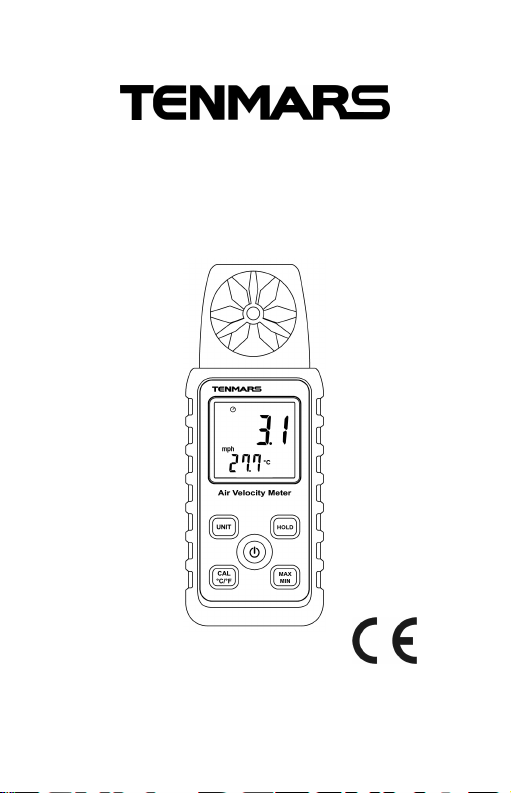
Air Velocity Meter
TM-741
TM-740
User’s manual
HB2TM7410000
Page 2

Page 3

Contents
1. Description....................................... 4
2. Safety Precaution............................ 4
3. features............................................ 5
4. Specifications .................................. 5
5. Accessories :................................... 6
6. Air Velocity Measures...................... 7
7. Operation......................................... 8
7.1Velocity Unit Button: ................................8
7.2CAL / ℃/ ℉ Button:................................. 8
7.3℃/ ℉ Button :.......................................... 8
7.4MAX/MIN/AVG Button : ...........................8
7.5Data Hold button:.....................................9
7.6Power Button:.......................................... 9
7.7Auto Power:............................................. 9
7.8Enable/disable auto power off................. 9
8. Instrument Description................... 10
9. Battery Replacement......................11
10. End of life...................................11
Page 4
TM-741/TM-740
1. DESCRIPTION
The meter measures air speed and temperature.
It is ideal for spot measurements.
at air outlets on account of its 30mm vane. In
addition to air speed and temperature.
2. SAFETY PRECAUTION
CAUTION
Be extremely careful for the following
conditions while measuring.
Do not operate the meter under the
environment with explosive gas (material),
combustible gas (material) steam or filled with
dust.
In order to avoid reading incorrect data, please
replace the battery immediately when the
symbol " " appears on the LCD.
In order to avoid the damage caused by
contamination or static electricity, do not touch
the circuit board before you take any adequate
action.
Operating Environment : Indoors use. This
instrument has been designed for being used
in an environment of pollution degree 2.
Operation Altitude : Up to 2000M.
EMC : EN61326-1(2006), IEC 61000-4-2(2008,
IEC 61000-4-3(2006) + (2007).
4
Page 5

TM-741/TM-740
3. FEATURES
30mm 6 plastics vane.
Light air response 0.4m/s.
Max/Min/Avg and data hold.
Auto power off with disable function.
4. SPECIFICATIONS
General Specifications
Display : Dual LCD display. The maximum
value on the primary display is 9999. The
maximum value on secondary display is 999.
Low Battery Indicator : When the LCD displays
" " symbol, please replace the battery.
Sampling Rate : 1 sample per second.
Power Supply : 2 batteries 1.5V AAA MN2400
LR03 AM4.
Battery Life : 50 hours during consecutive use.
Dimensions : 135 × 48 × 23 mm (L × W × H).
Weight : 80g (excluding the battery).
Operating Temperature and Humidity :
5°C ~ +50°C, <95% RH.
Storage Temperature and Humidity :
-10 to 60°C, <70% RH.
5
Page 6
TM-741/TM-740
℃
±1
℃
℉
±1.8
℉
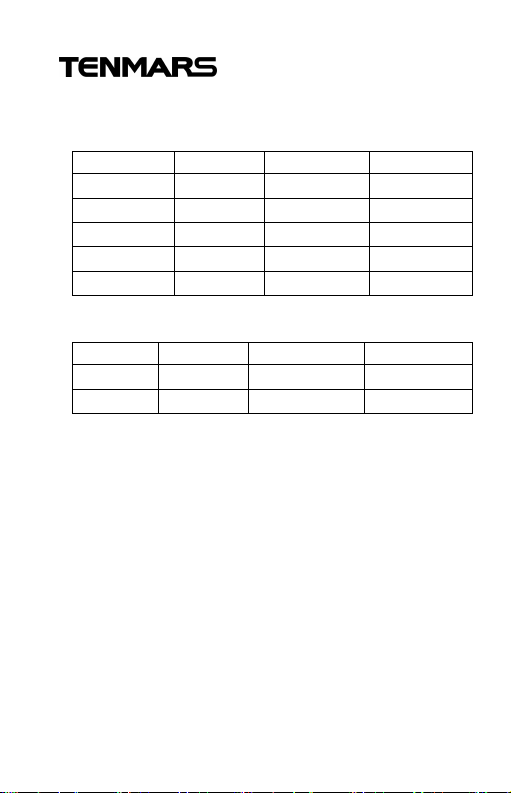
Electrical Specification:
Velocity:
Unit Range Resolution Accuracy
m/s 0.4~25
Km/hr(kph) 1.5~90
mph 0.9~55
Knots(kts) 0.8~48
ft/min(fpm) 79~4921
Temperature:
Unit Range Resolution Accuracy
-20~50 0.1
-4~122 0.1
0.1
0.1
0.1
0.1
1
±2﹪+0.2
±2﹪+0.8
±2﹪+0.4
±2﹪+0.4
±2﹪+40
5. ACCESSORIES :
User manual.
1.5V battery (AAA MN2400 LR03 AM4)*2.
Carrying case.
6
Page 7
TM-741/TM-740
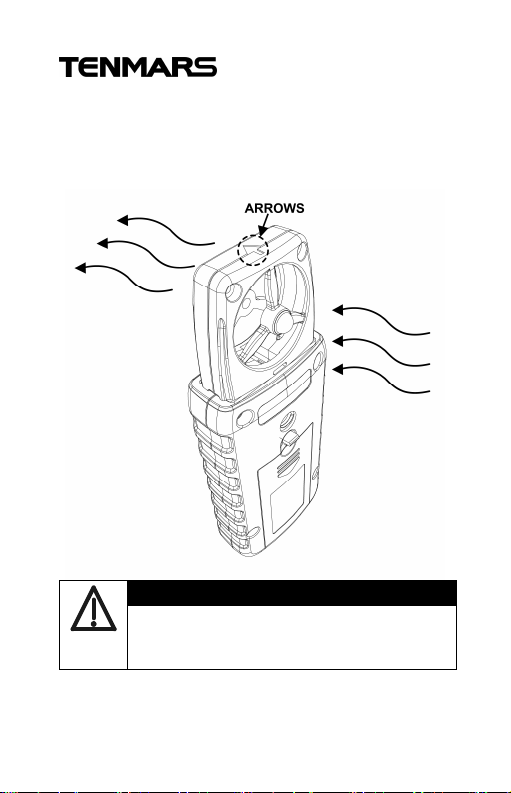
6. AIR VELOCITY MEASURES
Fallow the arrows to measure velocity. As
shown in figures.
WARNING
Please don’t touch the vanes by fingers
or foreign body to avoid damage to the
vanes.
7
Page 8

TM-741/TM-740
7. OPERATION
7.1 Velocity Unit Button:
Select the m/s Knots(kts) ft/min(fpm)
Km/hr(kph) mph.
7.2 CAL / ℃/ ℉ Button:
Calibration of 10 m/s
1. Prepare the 10m/s velocity.
2. Press CAL button and POWER button
more than 2 second the LCD will
display CAL.
3. Unlocks buttons.
4. Press CAL button again more than 2
second the meter will shut down.
5. Correct succeed.
7.3 ℃/ ℉ Button :
Select ℃/ ℉.
7.4 MAX/MIN/AVG Button :
Press “MAX/MIN” button simultaneously
Lockup data maximum and average and
minimum value of measure data. Press
the “MAX/MIN” button for more than 1
second to disable this feature.
8
Page 9

TM-741/TM-740
7.5 Data Hold button:
Freezes the reading present on the LCD
screen at the moment the button is
pressed.
7.6 Power Button:
Press the ” ” button more than 2
second to power on the meter.
7.7 Auto Power:
To save battery life, the meter powers
down automatically after approximately
12 minutes of inactivity.
7.8 Enable/disable auto power off
Power Off by pressing the ” ” button
more than 2 second the LCD “ ” symbol
will disappear or enable.
9
Page 10
TM-741/TM-740
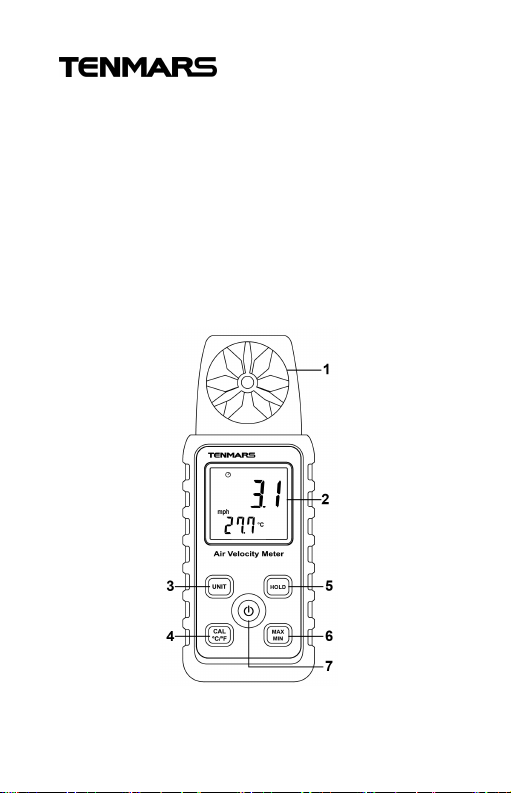
8. INSTRUMENT DESCRIPTION
1. Vane.
2. Display(LCD).
3. Velocity unit select button.
4. Calibration and ℃/℉ button.
5. Datahold button.
6. Maximun/Average/minimum button.
7. PowerButton : ON/OFF.
10
Page 11
TM-741/TM-740
WARNING
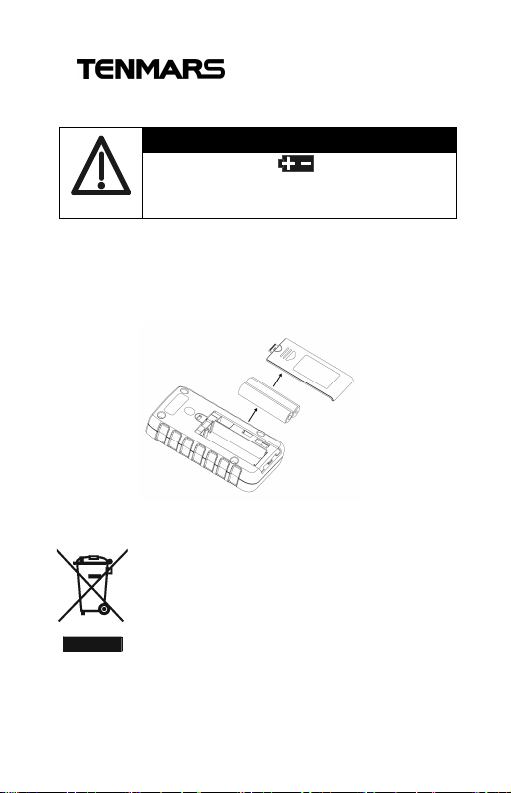
9. BATTERY REPLACEMENT
If the symbol ” ” appears on the
LCD, please replace the battery
immediately.
1. Remove the battery cover.
2. Replace the battery.
3. Install the battery cover.
10. END OF LIFE
Caution : this symbol indicates that
equipment and its accessories
shall be subject to a separate
collection and correct disposal.
11
Page 12

Professional Electrical and
Environment Test & Measurement
Instruments:
Battery Capacity / Impedance Tester
LED light meter, Temperature & Humidity
meter,Infrared Thermometer, Sound level
meter Light meter, EMF meter, UV Light meter,
RF meter, Hot wire Anemometer, CO meter
Anemometer, Lan cable tester, CO2meter,
Solar power meter, Radiation meter,
Clamp meter, Multimeter, Phase Rotation test,
Digital Insulation tester
Our products of high quality are selling
well all over the world
TENMARS ELECTRONICS CO., LTD
6F, 586, RUI GUANG ROAD, NEIHU,
TAIPEI 114, TAIWAN.
E-mail: [email protected]
http://www.tenmars.com
 Loading...