

Page 1
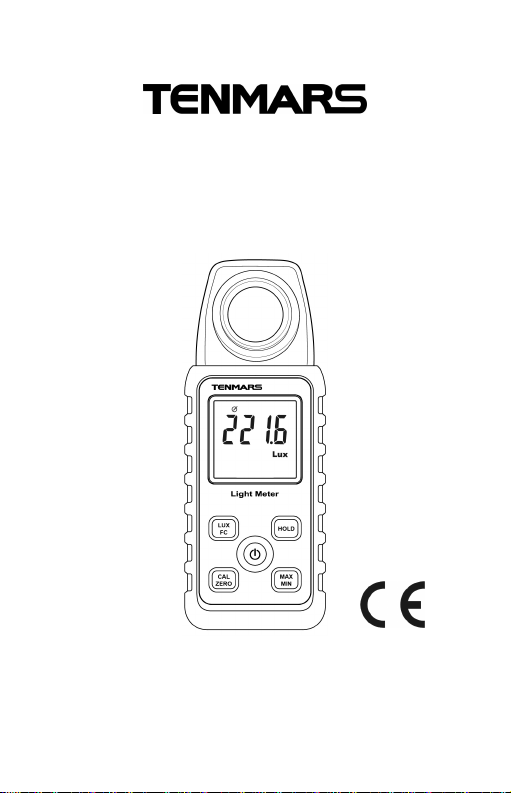
LUX/FC Light Meter
HB2TM72
1000
1
TM-721
User’s manual
Page 2

Page 3

CONTENTS
1. Description.................................................... 1
2. Safety Precaution ......................................... 1
3. Preface ......................................................... 2
4. features......................................................... 3
5. Specifications................................................ 4
6. Operation...................................................... 5
6.1. LUX/FC button:................................... 5
6.2. CAL/ZERO button:.............................. 5
6.3. MAX/MIN/AVGButton:........................ 6
6.4. Data Hold button:................................ 6
6.5. power button:...................................... 6
6.6. auto power:......................................... 6
6.7. Enable/disable auto power off ............ 6
7. Instrument Description.................................. 7
8 Relative SPECTRAL (Sensitivity).................. 8
10 Recommended Levels of Illumination......... 10
11 Battery Replacement .................................. 12
12.End of life.................................................... 12
Page 4
TM-721/TM-720
1. Description
Measures light from visible luminaries equipped
fluorescent, metal halide, high-pressure sodium
and incandescent sources.
2. Safety Precaution
CAUTION
Be extremely careful for the following
conditions while measuring
Do not operate the meter under the
environment with explosive gas (material),
combustible gas (material) steam or filled with
dust.
In order to avoid reading incorrect data,
please replace the battery immediately when
the symbol " " appears on the LCD.
In order to avoid the damage caused by
contamination or static electricity, do not
touch the circuit board before you take any
adequate action.
Operating Environment: Indoors use. This
instrument has been designed for being used
in an environment of pollution degree 2.
Operation Altitude: Up to 2000M.
Operating Temperature & Humidity: 5°C ~
40°C, 0%~ 80%RH.
Storage Temperature & Humidity:
1
Page 5

TM-721/TM-720
-10°C ~ 60°C, 0%~ 70%RH.
EMC: EN61326-1(2006),
IEC 61000-4-2(2008, IEC 61000-4-3(2006) +
(2007).
3. Preface
The flux of light received in a unit area of a
certain side being shown is popularly known as
illumination. The measuring unit in both United
Kingdom and America is known as footcandles
light, but in Europe it is also known as meter
candlelight.
One foot-candles light is the illumination of light
that falls on one side which is one foot away from
a one foot-candlelight and exactly intersecting
with the light. Its abbreviated form is written as 1
Fc=1 Lm/ft, similarly, one-meter candlelight is the
illumination of light that falls on a side which is
one meter away from a one meter candlelight and
exactly intersecting the light. It is also called Lux
i,e. the flux of light being received in each sq.
meter is called the illumination of one lumen.
1 FC=10.764 LUX, 1 LUX=0.09290 FC,
therefore,Nbr. of foot (meter) candlelight =
――――――――――――――
Nbr. of Lumen=Nbr. of foot (or meter)x area
Nbr. of Lumen
Area(sq. foot or sq. meter)
2
Page 6

TM-721/TM-720
4. Features
Overload Indication: LCD screen will show
“OL” on the upper left-hand corner.
Low battery Indication " ".
Sampling Rate: 2.5 times per second for
digital display.
Cosine Angular corrected.
According to JIS C 1609:1993 and CNS 5119
general A class Specifications.
Measuring lights source: all the visible light.
Measuring intensities of illumination in Lux or
footcandles.
Many applications include: Warehouses,
factories, office buildings, restaurants, schools,
library, hospitals, photographic, many video,
parking garages, museums, art galleries,
stadiums, building security.
Data hold.(HOLD)
Maximum/Average/Minimum Hold.(MAX/MIN)
Zero adjustment.(ZERO)
Auto power off and disable function.
Auto ranging.
3
Page 7
5. Specifications
TM-721/TM-720
Display
Sensor Silicon photodiode and filter
Measuring
Range
Resulation
Accuracy
Angle deviation
from cosine
characteristics
Power Supply
Battery life About 200 hours
Dimensions
Weight 250g (include battery)
Accessories
9999 count, maximum display
9999
999.9,9999, 99990,400000 Lux
99.99,999.9,9999,40000
Footcandles
0.1,1, 10,100 Lux
0.01,0.1,1,10 Footcandles
±3% ±3Lux(0~500Lux), ±3%(up
501 Lux) (Calibrated to standard
incandescent lamp 2856°K)
±8% other visible light source
30°
60 °
80 °
2 batteries 1.5V AAA MN2400
LR03 AM4
133(L)x48(W)x23 mm (H)
5.3(L)x 1.9(W) x0.2(H) inch
User’s manual, carrying case,
1.5V battery*2
±2%
±6%
±25%
4
Page 8

TM-721/TM-720
6. Operation
6.1. LUX/FC Button:
Select LUX/FC.
6.2. CAL/ZERO Button:
Calibration of 1000 LUX:
1. Prepare the 2856 °K /1000 Lux light
source.
2. Press CAL button and POWER button
more than 2 second the LCD will display
CAL.
3. Unlocks buttons.
4. Press CAL button again more than 2
second the meter will shut down.
5. Correct succeed.
ZERO Button:
Press the “ZERO” button for the zero
adjustment if any digits appear on the LCD
screen, when the light sensor cap is not
attached “CAP” will be shown on the screen.
Make sure that it is attached to the light
sensor.
5
Page 9
TM-721/TM-720
6.3. MAX/MIN/AVG Button:
Press “MAX/MIN” button simultaneously
Lockup data maximum and average and
minimum value of measure data. Press the
“MAX/MIN” button for more than 1 second to
disable this feature.
6.4. Data Hold Button:
Freezes the reading present on the LCD
screen at the moment the button is pressed.
6.5. Power Button:
Press the ” ” button more than 2
second to power on the meter.
6.6. Auto Power:
To save battery life, the meter powers down
automatically after approximately 12
minutes of inactivity.
6.7. Enable/Disable Auto Power Off
Power Off by pressing the ” ” button
more than 2 second the LCD “ ” symbol
will disappear or enable.
6
Page 10
TM-721/TM-720
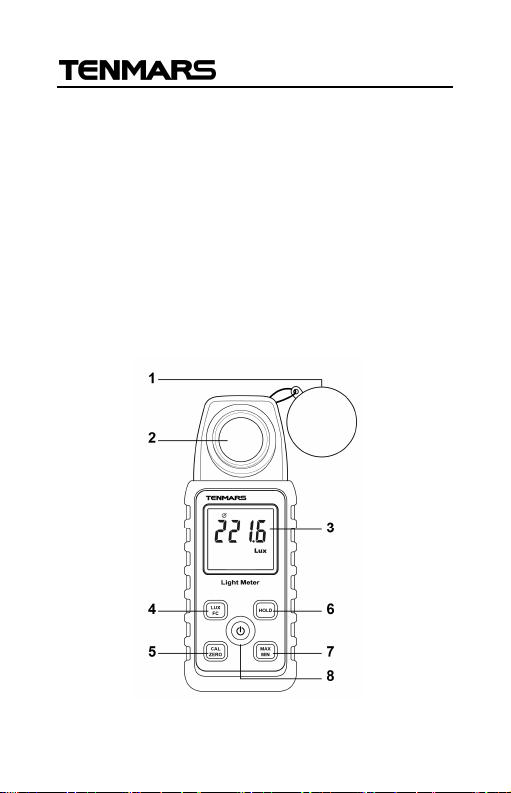
7. Instrument Description
1. Photo detector cover.
2. Photo detector.
3. Display (LCD).
4. Lux/Fc button.
5. Calibration and ZERO button.
6. Data hold button.
7. Maximun/Average/minimum button.
8. Power Button: ON/OFF.
7
Page 11
TM-721/TM-720
10
2030405060708090380
440
560
620
740
Typ. Ta=23
℃
WAVELENGTH(nm)
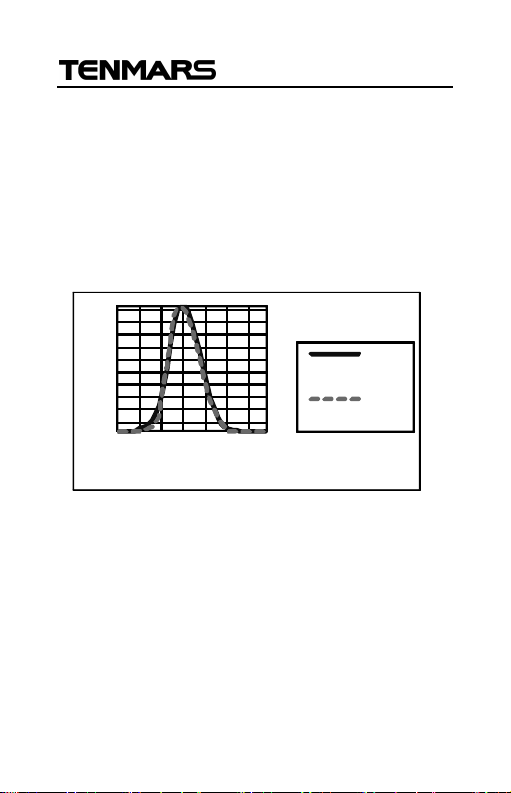
8 RELATIVE SPECTRAL (SENSITIVITY)
The deviation from the comparative standards
for luminosity is determined by JIS standard C
1609-1993.
Peak sensitivity wavelength: 550 nm .
100
V(λ)*
TM-721
0
500
RELATIVE SENSITIVITY (%)
*CIE luminous spectral luminous
680
8
Page 12
TM-721/TM-720
9 Attention
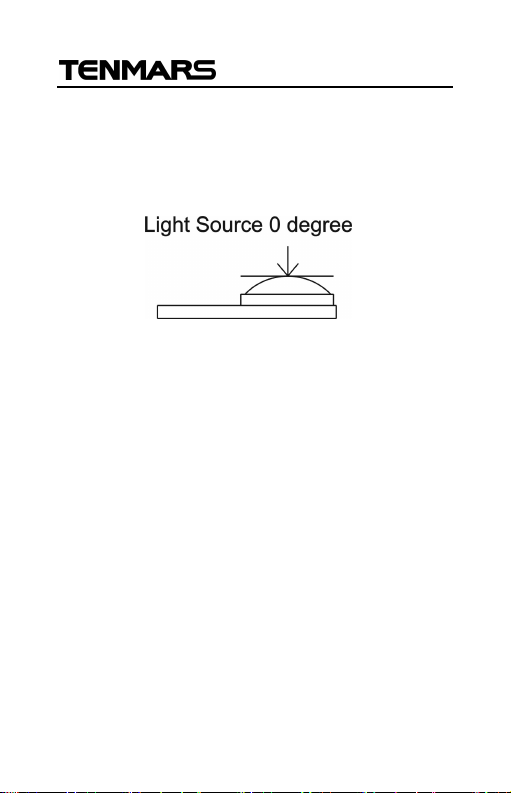
Set for referring the testing of source of light
is located at the right top end (0 degree) of
the light sensor ball plane.
When the meter is not in use, please keep
the cap of the light sensor in its place to
avoid the photo diode from wearing out.
When it is not in use for a long time, please
take the batteries away. And avoid keeping
it in a place of high temperature and
humidity.
9
Page 13
TM-721/TM-720
Illuminance
(lux)
Place
Offices, designing, drawing
rooms
Workrooms, corridors,
stairways, restrooms
Illuminance
(l
ux)
Place
Where such work as
visual work
Assembling, inspecting,
visual work
Assembling, inspecting,
ordinary work
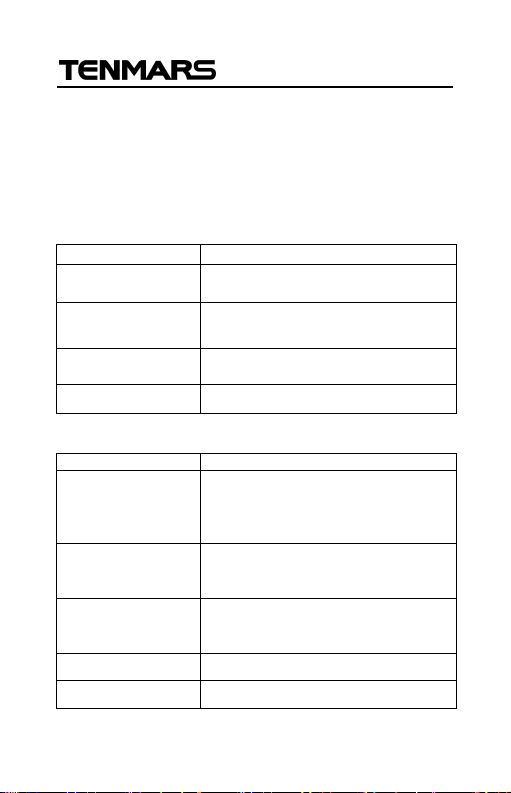
10 Recommended Levels of
Illumination
Suitable levels of illuminance
(According to the JIS standard Z 9110-1979)
Offices
1500 to 750
750 to 300
300 to 100
75 to 30 Indoor emergency stairways
Factories
Offices, conference rooms,
computer rooms
3000 to 1500
1500 to 750
750 to 300
300 to 150 Wrapping and packing
75 to 30 Indoor emergency stairways
assembling, inspecting testing,
selecting, extremely precision
testing, selecting, precision
testing, selecting and visual
10
Page 14

Schools
Illuminance(lux) Place
TM-721/TM-720
1500 to 300
750 to 200
300 to 75
75 to 30
10 to 2 School passages
Precision drawing or drafting,
precision experimenting, library
Classrooms, library reading
rooms, staff rooms, gymnasia
Lecture halls, assembly rooms,
locker rooms, corridors,
stairways and restrooms
Warehouses and emergency
stairways
11
Page 15
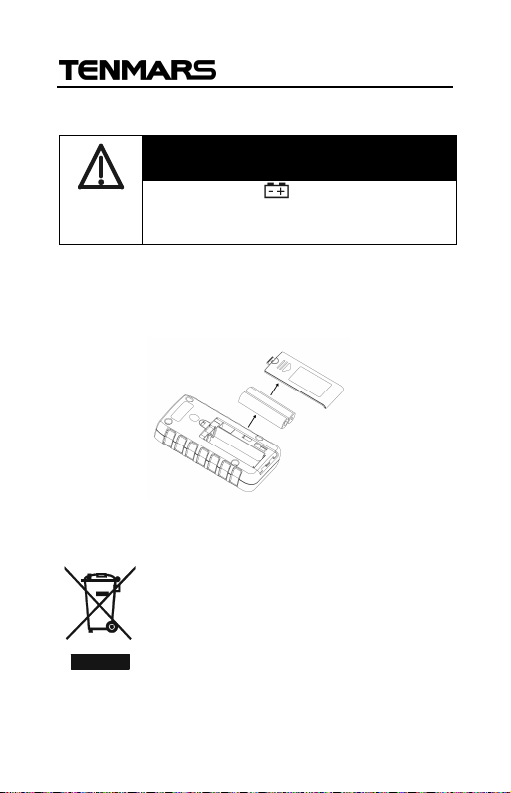
11 Battery Replacement
WARNING
If the symbol ” ” appears on the
LCD, please replace the battery
immediately
1. Remove the battery cover
2. Replace the battery.
3. Install the battery cover.
12. END OF LIFE
Caution : this symbol indicates
that equipment and its accessories
shall be subject to a separate
collection and correct disposal
TM-721/TM-720
12
Page 16

Professional Electrical and
Environment Test & Measurement
Instruments:
LED light meter, Temperature & Humidity
meter,Infrared Thermometer, Sound level
meter Light meter, EMF meter, UV Light meter,
RF meter, Hot wire Anemometer, CO meter
Anemometer, Lan cable tester, CO2meter,
Solar power meter, Radiation meter,
Clamp meter, Multimeter, Phase Rotation test,
Digital Insulation tester
Our products of high quality are selling
well all over the world
TENMARS ELECTRONICS CO., LTD
6F, 586, RUI GUANG ROAD, NEIHU,
TAIPEI 114, TAIWAN.
E-mail : [email protected]
http : //www.tenmars.com
 Loading...