

Page 1
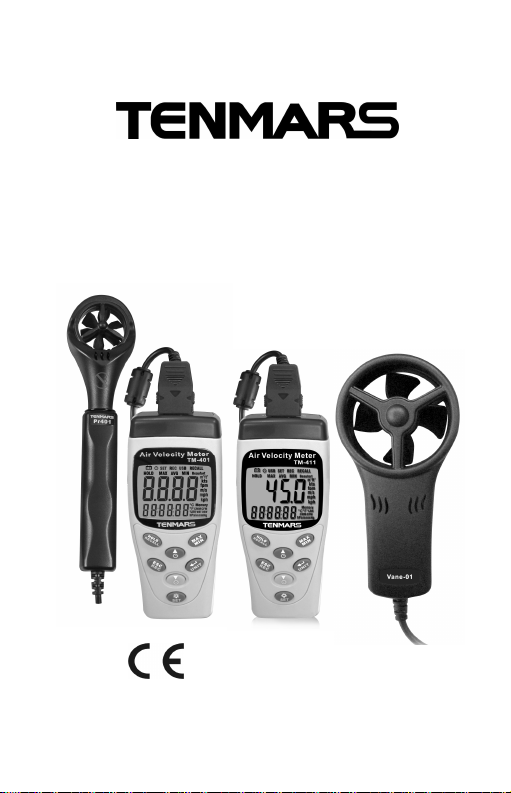
Air Velocity Meter
TM-401/402/403/404
TM-411/412/413/414
User Manual
HB2TM4010004
TENMARS ELECTRONICS CO., LTD
Page 2

Page 3

Table of Contents
1. Introduction ................................................. 1
2. CHARACTERISTICS .................................. 1
3. Functions Cross table.................................. 2
4. Air Velocity Meter Features......................... 4
5. Display Features ......................................... 6
6. Power On/Off............................................... 7
Auto Shutoff................................................. 7
LED Backlight.............................................. 7
Auto Backlight On/Off.................................. 8
Air Velocity Measures.................................. 9
7. Change Secondary Display Mode............. 10
8. Change Units............................................. 10
9. Air Flow Calculation....................................11
Setting Area................................................11
10. MAX/MIN/AVGrecord: .............................. 12
11. Freeze Display (HOLD)............................. 13
12. 99 Records................................................ 13
13. Clear Memory............................................ 14
14. Memory Recall .......................................... 15
15. Checking the LCD and Software Version.. 15
16. Battery Replacement................................. 16
17. Specifications............................................ 17
18. End of life.................................................. 19
Page 4

TM-401~404/TM-411~414
1. Introduction
TM-4XX series measures air speed ,temperature
and humidity. It is ideal for spot measurements
at air outlets on account of its 30mm vane. In
addition to air speed and temperature, TM-404
and TM-414 also measures air moisture and
absolute pressure. In this way, air conditions can
be reliably checked.
2. CHARACTERISTICS
30mm 6 plastics blade.(TM-40X)
45mm 4 plastics blade.(TM-41X)
Light air response 0.4m/s
Rapid response temperature sensor
Air flow calculate function.
Max/Min/Avg and data hold.
Auto power off with disable function.
Low battery indication. “ ”
Low battery indication.
Data logging capacity: 99 records.
Memory recall function.
Backlight function.
Absolute Pressure Sensor.
Humidity Sensor
DEW-POINT and WET-BULB temperature
measurement.
1
Page 5
TM-401~404/TM-411~414
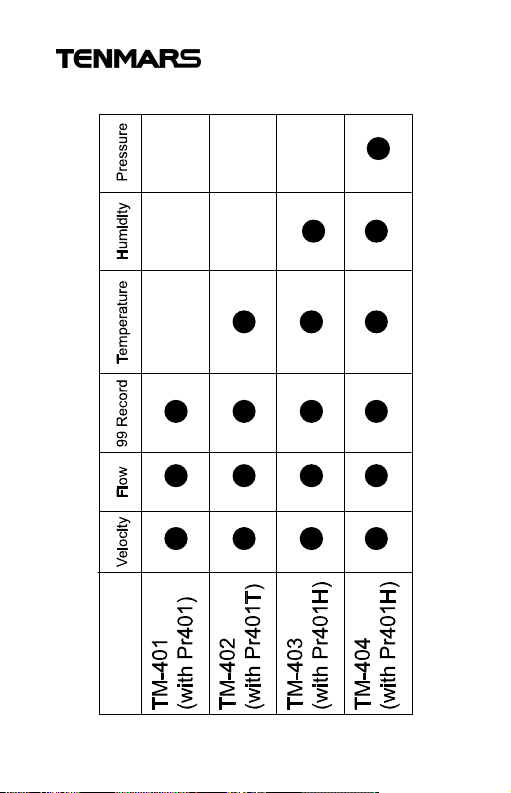
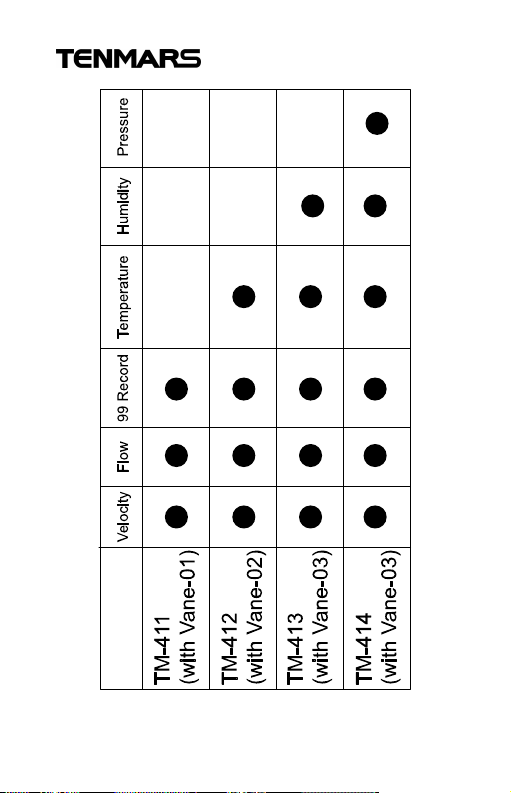
3. Functions Cross table
2
Page 6
TM-401~404/TM-411~414
3
Page 7
TM-401~404/TM-411~414
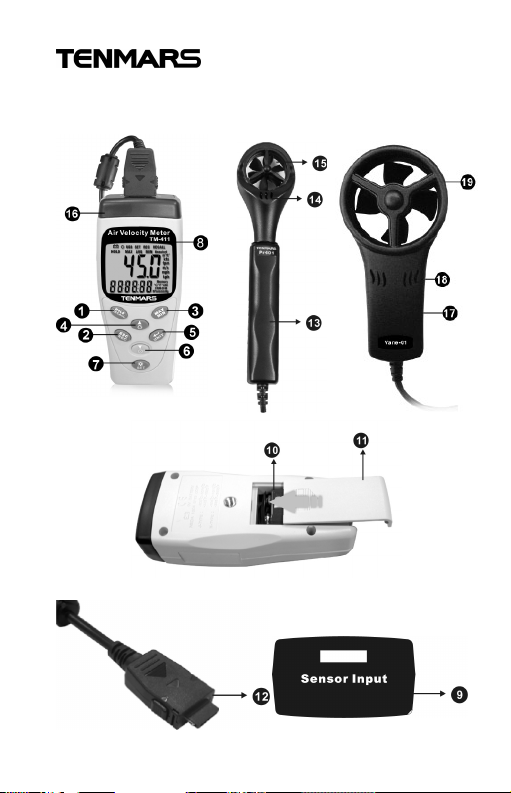
4. Air Velocity Meter Features
4
Page 8

TM-401~404/TM-411~414
1. HOLD and Recall key
2. ESC and Rec key
3. Max, Min and AVG key
4. Select up and Auto shutoff key
5. Enter and Unit change key
6. Select down and Power key
7. Backlight and Set Key
8. Display and Backlight
9. Probes input
10. Battery placement
11. Battery cover
12. Probes Plug
13. Probes hold
14. Probes sensor (Temperature/Humidity)
15. Blades
16. Internal Pressure Sensor (TM-404/414)
17. Probes hold
18. Probes sensor (Temperature/Humidity)
19. Blades
5
Page 9
TM-401~404/TM-411~414
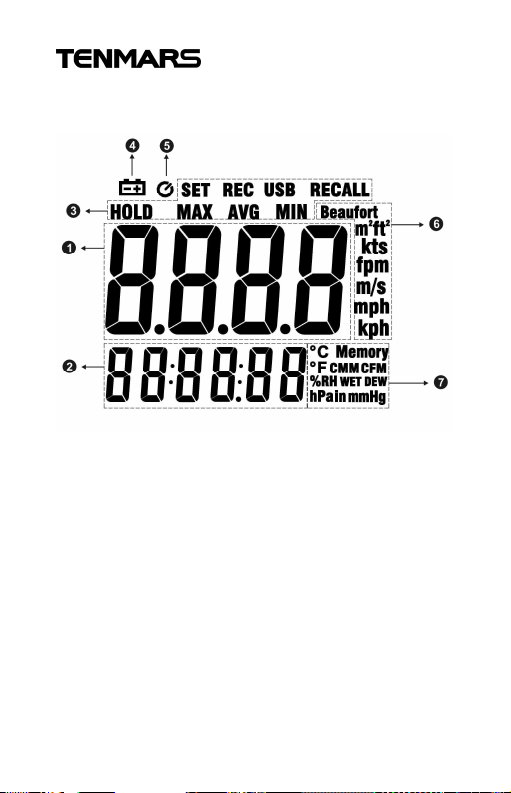
5. Display Features
1. Primary display
2. Secondary display
3. Functional symbol display area
4. Lower battery indication.
5. Auto shutoff symbol indication.
6. Units of Primary display
7. Units of Secondary display
6
Page 10
TM-401~404/TM-411~414
6. Power On/Off
In the shutoff mode Press key to turn on he
power.
If want to turn off Press and hold key.
※ In the Set ,Unit change and recall mode can
not turn off the power.
Auto Shutoff
The device will auto shutoff if there is no action for
15 minutes.
If want to disable or enable the auto power off
function, please press and hold key.
※ In the Set ,Unit change and recall mode can
not change this.
LED Backlight
When press key to turn on backlight. Press
key to turn off again. The backlight will turn off of
after 30 seconds.
7
Page 11
TM-401~404/TM-411~414
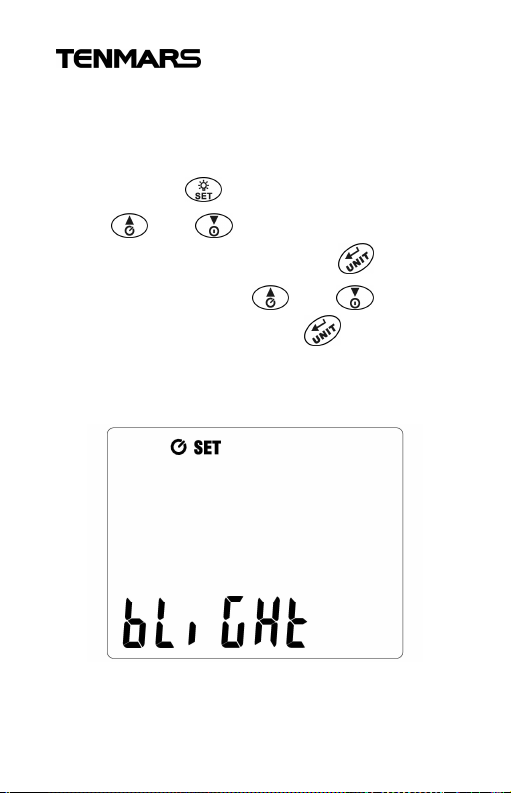
Auto Backlight On/Off
Users can set on or off the 30-seconds auto-off
backlight
Press and hold key into setting mode.
Press and key to select BLIGHT
setting, as shown in figures. Press key into
Backlight setting. Press and key to
select auto off on or off. Press key to finish
and leave setting mode.
8
Page 12
TM-401~404/TM-411~414
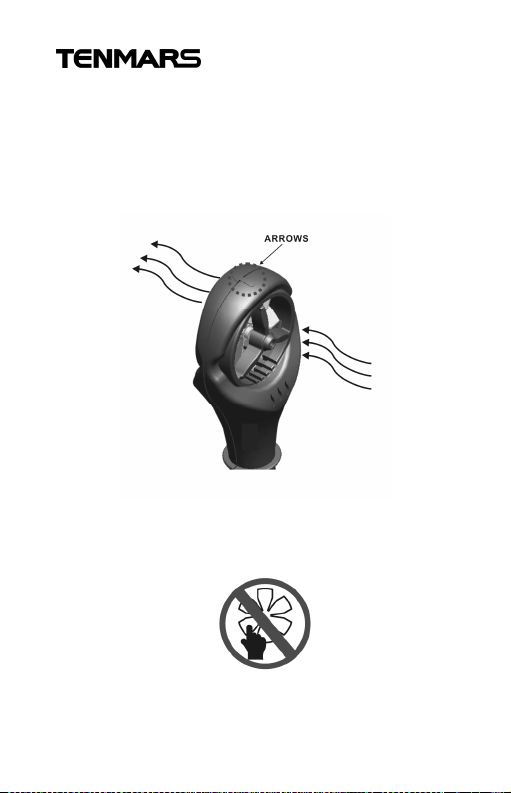
Air Velocity Measures
1. Please insert probe plug into the device
sensor input socket.
2. Fallow the arrows to measure velocity. As
shown in figures.
※ Please don not touch the blades by fingers or
foreign body to avoid damage to the blades.
9
Page 13
TM-401~404/TM-411~414
7. Change Secondary Display
Mode
In the normal mode, Press and key to
change secondary display mode. The order of
℃CMM(CFM)℃
WET(403/404/413/414)
℃ DEW (403/404/413/414)
HPa(404/414)%RH (403/404/413/414).
※ In the Humidity mode need to waiting minutes
to acquire accuracy humidity reading.
8. Change Units
Press and hold key into the setting units
mode. If want to change the secondary display
units, please press and hold key again.
When in the setting units mode, LCD blink the
choose unit. Press and key to change
the units and press key to finish and leave
setting mode. Unit to switch the order of
Beaufurtktsfpmm/smphkph
10
Page 14
TM-401~404/TM-411~414
9. Air Flow Calculation
When secondary display in the flow mode
(CMM/CFM), the device will calculate flow by the
users key in area volume.
Setting Area
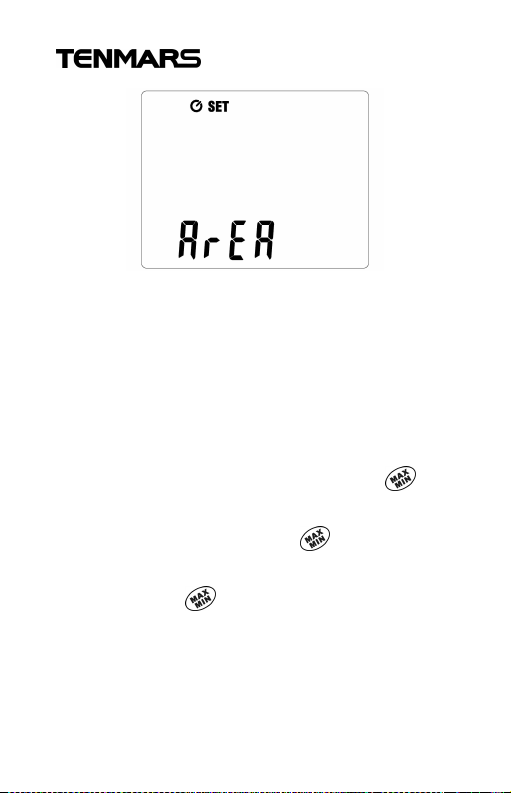
Press and hold key into the setting mode.
Press and key to select setting area
mode, as shown in figures. Press key into the
setting area mode.
From left to right to set the digits, and press
and key to adjust digits to left or right. Press
and key to increase and decrease
volume through last right digits.
Users can press and hold key to change
area units (m2/ ft2).
11
Page 15
TM-401~404/TM-411~414
※ The units(m2) maximum volume is 1.5 m2, and
minimum volume is 0.096 m2.
※ The units (ft2) maximum volume is 16.15 ft2,
and minimum volume is 1.03 ft2.
10. MAX/MIN/AVG record:
This function can record maximum, minimum and
average. User can select viewing. Press key
to start record MAX, MIN, and AVG. Show the
max reading to display. Press key to switch
viewing between MAX, AVGand MIN.
Press and hold key to disable this function.
※ In the Set ,Unit change and recall mode can
not used this function.
12
Page 16

TM-401~404/TM-411~414
11. Freeze Display (HOLD)
Users can press key to freeze display, and
press key again to release display.
※ In the Set ,Unit change and recall mode can
not used this function.
12. 99 Records
Device cans storage air velocity data up to 99
records.
Press key to storage once record data, and
shown memory location on the LCD about 1
second.
※ When the enable HOLD and MAX/MIN
function, the record data still real reading.
13
Page 17
TM-401~404/TM-411~414
13. Clear Memory
When the memory are full or want to clear
memory data, please fallow the setup to clear
memory.
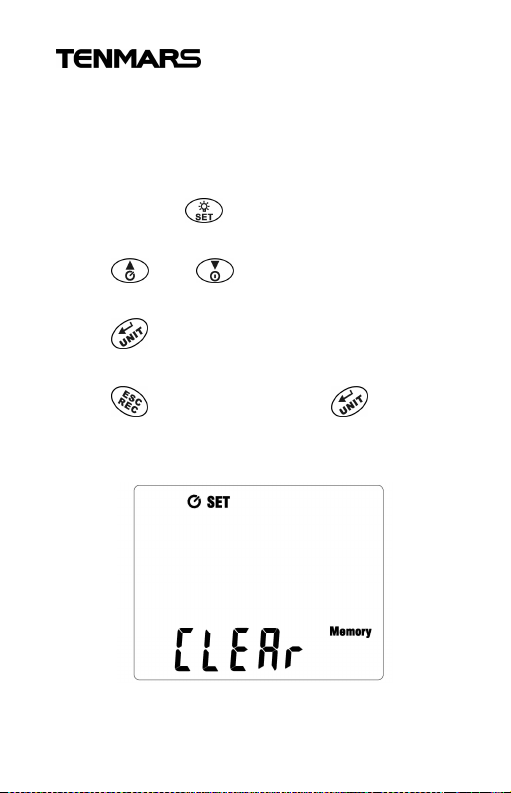
Press and hold key into the setting mode,
as shown in figures.
Press and key to select the clear
memory mode.
Press key into the clear memory mode.
The LCD showed the “yes” to reconfirm.
Press key to leave or press key to
clear memory and leave clear memory mode.
14
Page 18
TM-401~404/TM-411~414
14. Memory Recall
Users can recall the memory data to show on the
display.
Press and hold key into the RECALL mode.
The secondary display showed the memory
location and primary display showed the storage
velocity data.
Press and key to increase and
decrease memory location.
If want to leave the recall mode, please press and
hold key to leave this mode.
15. Checking the LCD and Software
Version
In the shutoff mode, Press and hold key to
turn on device and LCD will keep all dark continued.
Starting device will show the software version
about 1 second.
15
Page 19

TM-401~404/TM-411~414
WARNING
16. Battery Replacement
If the symbol “ ” appears on the
LCD, please replace the battery
immediately
Turn off the device and disconnect all test leads
before replacing the battery.
Use only the correct type of batteries, properly
installed in the case, to power the device.
16
Page 20
TM-401~404/TM-411~414
Unit
Range
Resolution
Accuracy
Beaufort
Unit
Range
Resolution
Accuracy
Beaufort
Unit
Range
Resolution
Accuracy
CMM
CFM
Unit
Range
Resolution
Accuracy
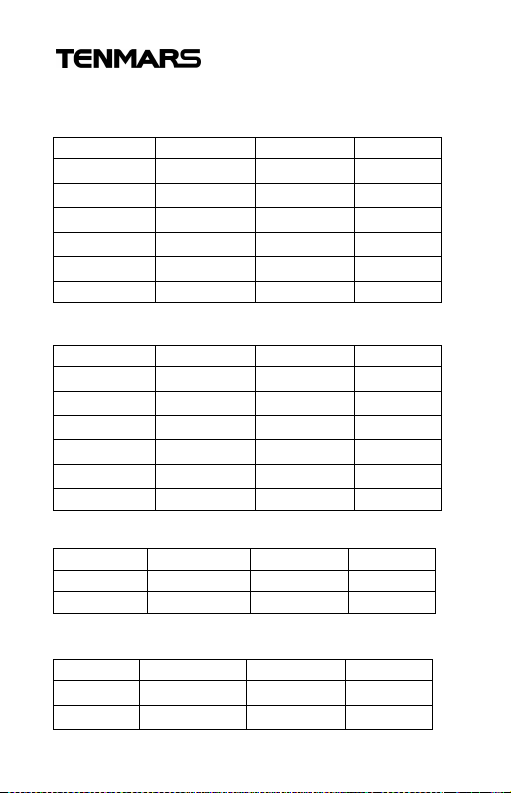
17. Specifications
Velocity(TM-401~TM-404):
m/s 0.4~20 0.1
Km/hr(kph) 1.5~72 0.1
mph 0.9~44 0.1
Knots(kts)
ft/min(fpm)
Velocity(TM-411~TM-414):
m/s
Km/hr(kph)
mph
Knots(kts)
ft/min(fpm)
Air Flow Calculation:
Temperature:
℃
℉
0.8~38
79~4000
1~8 1 --
0.4~30
1.5~106
0.9~66
0.8~58
79~5866
1~8 1 --
0~9999 1 -0~9999 1 --
-20~60 0.1
-4~140 0.1
0.1
1
0.1
0.1
0.1
0.1
1
±2﹪+0.2
±2﹪+0.8
±2﹪+0.4
±2﹪+0.4
±2﹪+40
±3﹪+0.2
±3﹪+0.8
±3﹪+0.4
±3﹪+0.4
±3﹪+40
±1℃
±1.8℉
17
Page 21
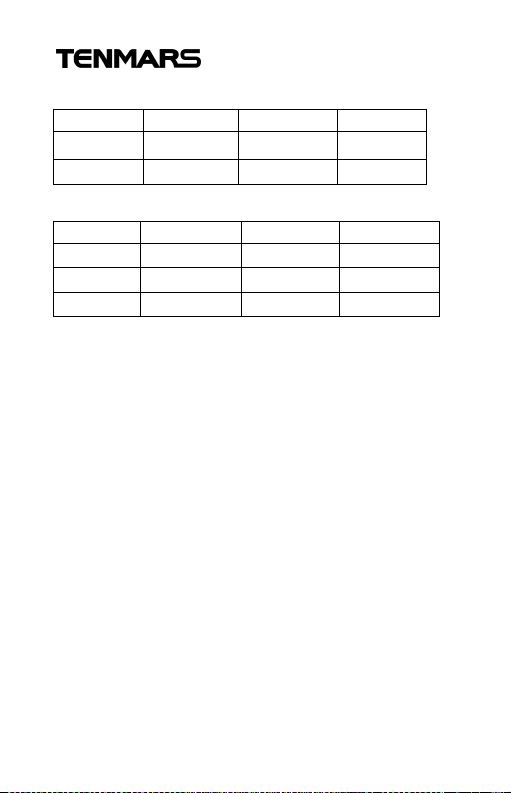
Humidity:
Unit
Range
Resolution
Accuracy
Unit
Range
Resolution
Accuracy
TM-401~404/TM-411~414
%RH 20~80 0.1
%RH <20 , >80 0.1
±3.5%RH
±5%RH
Absolute Pressure:
hPa 350~1100 0.1
mmHg 263~825 0.1
inHg 10.3~32 0.1
±2hPa
±1.5mmHg
±0.1
Display : 42mm(W) x33mm(L) Monochrome
LCD with backlight
Battery : 9V (NEDA 1604、IEC 6F22 or JIS
006P)
Battery Lift : Approx continuous used 100
hours.
Shutoff Rate Power : 3uA
Operate Maximum Power : 25mA
Operating temperature and humidity :
5℃to 40℃,below 80% RH.
Storage temperature and humidity : -10℃ to
60℃, below 70%.
Instrument dimensions : 130(L)x 56(W)x 38(H)
mm. Weight : About 160g.
Probe dimensions (TM-401~TM-404) : 195(L)
x47(W) x30(H) mm.
18
Page 22
TM-401~404/TM-411~414
Cable length : 95cm.
Probe dimensions (TM-411~TM-414) :
135(L) x67(W) x31(H) mm.
Cable length : 95cm.
Weight : About 100g.
Accessories : User’s manual x1, 9V battery x1,
Probe x1, Bag x1
18. End of life
Caution:
This symbol indicates that
equipment and its accessories shall
be subject to a separate collection
and correct disposal
19
Page 23

Page 24
Professional Electrical and
Environment Test & Measurement
Instruments:
Battery Capacity / Impedance Tester
LED light meter, Temperature & Humidity meter,
Infrared Thermometer, Sound level meter
Light meter, EMF meter, UV Light meter,
RF meter, Hot wire Anemometer, CO meter
Anemometer, Lan cable tester, CO2meter,
Solar power meter, Radiation meter,
Clamp meter, Multimeter, Phase Rotation test,
Digital Insulation tester
Our products of high quality are selling
well all over the world
TENMARS ELECTRONICS CO., LTD
6F, 586, RUI GUANG ROAD, NEIHU,
TAIPEI 114, TAIWAN.
E-mail: [email protected]
http://www.tenmars.com
 Loading...