

Page 1
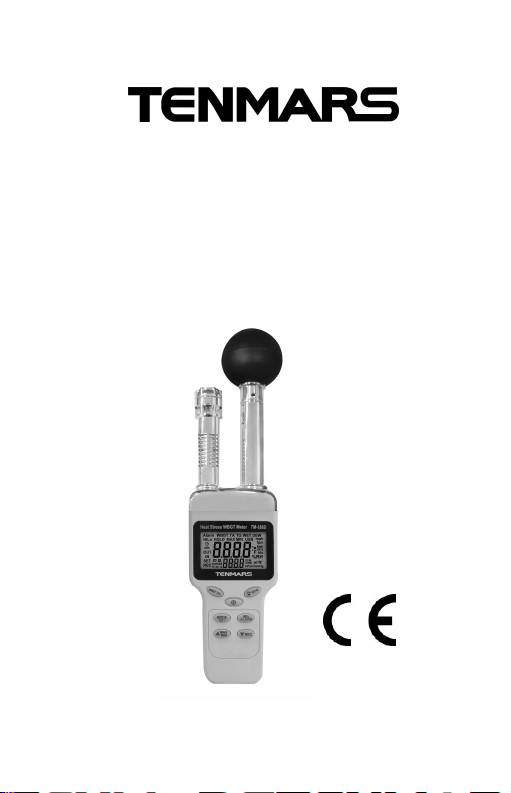
HEAT STRESS WBGT
METER
TM-188 / TM-188D
User’s
Manual
HB2TM1880002
TENMARS ELECTRONICS CO., LTD
Page 2

Page 3

1. Preface ..................................................... 2
2. General Description.................................. 2
3. Specifications (23℃±5℃)......................... 4
4. Instrument Description.............................. 8
5. LCD Description........................................ 9
6. Power On/Off.......................................... 10
7. Auto Power Off........................................ 10
8. Alarm On/Off........................................... 10
9. Disable Auto Power Off............................11
10. LED Backlight ..........................................11
11. Temperature Unit .....................................11
12. Mode....................................................... 12
13. Data Hold................................................ 13
14. Single Data Record................................. 13
15. Viewing Data Records ............................ 14
16. AUTO DATALOGGER(TM-188D)........... 15
17. Maximum/Minimum (MAX/MIN).............. 16
18. USB (TM-188D)...................................... 16
19. Setting and Calibration............................ 17
20. Thermal hazard prevention standards .... 24
21. Precautions............................................. 25
22. Software installation (TM-188D).............. 25
23. External DC power.................................. 26
24. Safety and maintenance standards......... 26
25. Battery replacement................................ 27
26. End of life................................................ 28
Page 4
TM-188/TM-188D
1. Preface
Thank you for purchasing our product.
Please, read the operating instructions in details
before you use this HEAT STRESS WBGT meter,
so you will operate the meter correctly. This meter
can be operated in industry and home.
WARNING
Non-compliance warning and/or
operating instructions may damage the
instrument or its parts or injuring the
operator.
2. General Description
Quick-response capacitance sensor.
Accurate measurement for wet bulb globe
temperature(WBGT), black globe
temperature(TG), humidity(%RH), air
temperature(TA),wet bulb(WET)and dew
point(DEW).
Max/Min and data hold.
Low battery indication “ ”.
LCD display with LED backlight.
Single data record (TM-188 is able to record 50
data).
2
Page 5

TM-188/TM-188D
Viewing data records.
Switch the temperature unit to ℃ or ℉.
Brass black ball in 50mm diameter.
WBGT alarm setting.
Auto power off with disable function.
Interface:USB PC serial interface. (TM-188D)
Data logging capacity :12000 records. (TM-188D)
Sampling interval: Max 24 hours; Min 1
Second. (TM-188D)
In order to measure the WBGT index, you should
refer to the following regulations:
ISO7243 : Hot environments. Estimation of the
heat stress on working man.
ISO7726 : Ergonomics of the thermal
environment-instruments for
measuring physical quantities.
3
Page 6
TM-188/TM-188D
3. Specifications (23℃±5℃)
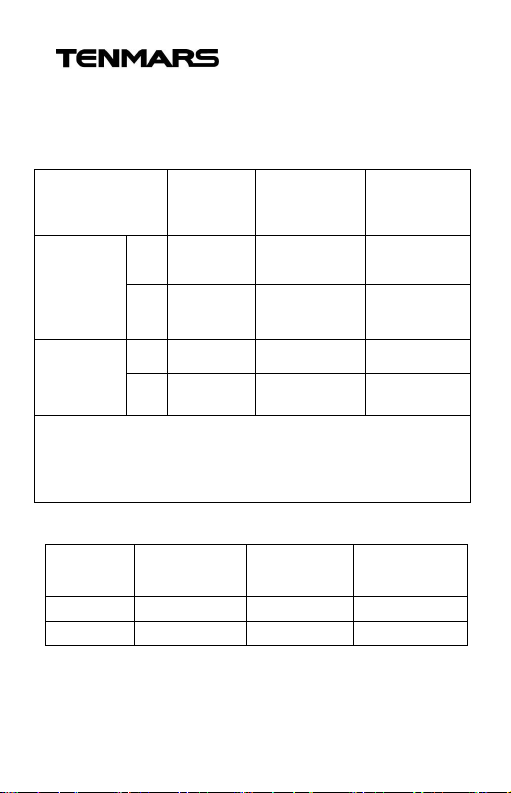
Wet bulb globe temperature (WBGT)
Unit Range Resolution
indoor
&
Outdoor
without
sunlight
Outdoor
With
sunlight
※indoor & outdoor without sunlight:
WBGT = (0.7×WET)+(0.3×TG)
Outdoor with sunlight:
WBGT=(0.7×WET)+(0.2×TG)+(0.1×TA)
Air temperature (TA)
Unit Range Resolution
℃
℉
℃
0~59.0 0.1 ±1.0
32.0~
℉
138.0
℃
0~56.0 0.1 ±1.5
32.0~
℉
132.0
0~50.0 0.1 ±0.8
32.0~122.0 0.1 ±1.5
0.1 ±1.8
0.1 ±2.7
Accuracy
at 15~
40℃
Accuracy
at 15~40℃
4
Page 7
TM-188/TM-188D
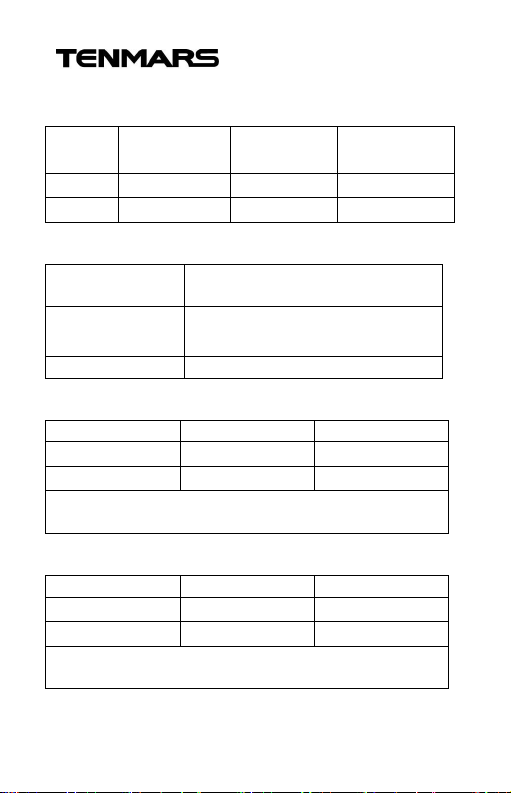
Black globe temperature (TG)
Unit Range Resolution
℃
℉
0~80.0 0.1 ±0.6
32.0~176.0 0.1 ±1.1
Accuracy
at 15~40℃
Relative Humidity (%RH)
Measurement
Range
Accuracy
±3.0%RH(20~80%) at 25℃
±5.0%RH(<20%,>80%) at 25℃
1%~99%
Resolution 0.1%
Dew point temperature (DEW)
Unit Range Resolution
℃
℉
-35.3~48.9 0.1
-31.5~120.1 0.1
The value is calculated from the RH and Air
temperature.
Wet bulb temperature (WET)
Unit Range Resolution
℃
℉
-21.6~50.0 0.1
-6.9~122.0 0.1
The value is calculated from the RH and air
temperature.
5
Page 8

TM-188/TM-188D
Dimension : 243 x 70 x 50mm (L x W x H).
Weight : 220g. (Without batteries).
Sampling Rate : one times per second.
Power supply : 006P 9V,orAC100~240V DC 9V/
0.5A(9mm).
Battery life : 200 hours.
Operating Temperature & Humidity :
0°C to +50°C, <95%RH. (Non-condensing)
Storage temperature & humidity :
-10°C to +50°C, <70% RH. (Non-condensing)
Data output :USB PC serial interface(TM-188D)
LCD:
52mm(W)x36mm(L) monochrome LCD and
backlight.
Standard accessories:
006P 9V battery x1.
User’s manual x 1.
Carrying x1.
USB cable(TM-188D) x1.
AC100~240V to DC9V/0.5A(9mm)x1(TM-188D)
6
Page 9
TM-188/TM-188D
after used the meter in the humid
, we strongly recommend send the
WARNING
Please place the meter in the
environment of high temperature
and low humidity for 24 hours
environment.
WARNING
In order to ensure the accuracy of this
meter
meter back to original factory for
maintenance every year.
EMC : This test was designed in accordance with
EMC Standards in force and its compatibility has
been tested in accordance with EN61326-1(2006).
7
Page 10
TM-188/TM-188D
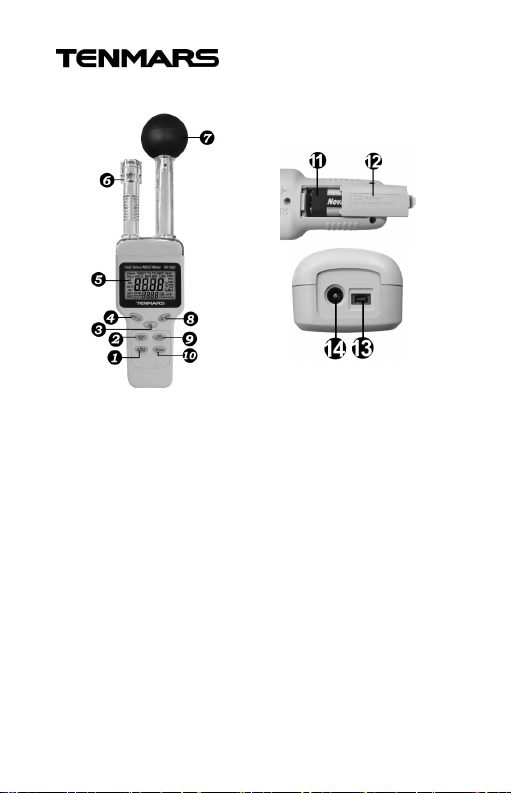
4. Instrument Description
1. UP/MAX/MIN 9. SEL/Alarm
2. MODE/SET 10. Down/REC
3. Power/Auto power off 11. Battery holder
4. UNIT/HOLD 12. Battery cover
5. LCD 13. 5 pin mini USB
socket.
6. Temp & humidity
sensor
7. Black globe sensor
8. Backlight/MEM
14. DC power jack
8
Page 11
TM-188/TM-188D
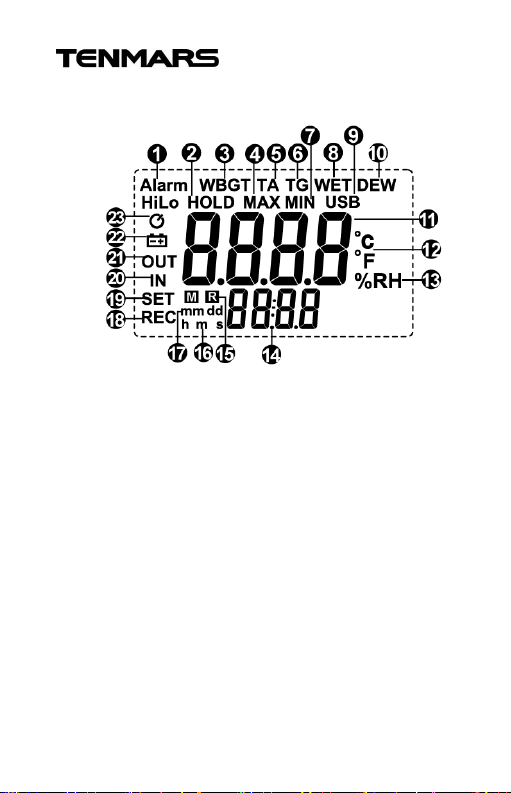
5. LCD Description
1. Alarm symbol 13. Relative Humidity
2. HOLD symbol 14. Secondary display
3. WBGT 15. Read & memory
4. MAX symbol 16.Time symbol
5. Air temperature 17. Date symbol
6. Black globe temp 18. Record symbol
7. Min symbol 19. Set symbol
8. Wet bulb temp 20. Indoor symbol
9. USB symbol 21. Outdoor symbol
10. Dew point temp 22. Low battery symbol
11. Primary display 23. Auto power off symbol
12. Temperature unit
9
Page 12
TM-188/TM-188D
6. Power On/Off
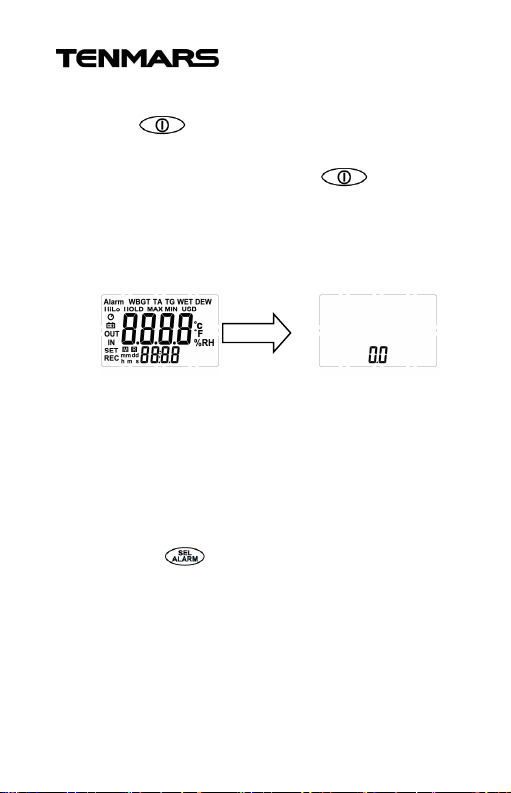
Press button to turn on or turn off the
meter.
Display all the symbol: press button
more than 1 second to turn on the meter the
firmware version will soon be displayed for one
second.
Ex:
7. Auto Power Off
Power off automatically after approx. 15 minutes
without using the meter.
8. Alarm On/Off
Press the button for more than 2 second to
turn on or turn off the alarm function.
※ The alarm function will be disable if the
HOLD、SET、Viewing Data Records function is
enabled.
10
Page 13

TM-188/TM-188D
9. Disable Auto Power Off
When the power is on, press the button for
more than 2 second, to cancel or recovery
automatically shutdown. Automatic shutdown
feature is enabled If shows on the screen.
※ The auto power off will be disable if the SET
function, USB function, Alarm is enabled.
10. LED Backlight
: Press this button once to turn on the LCD
backlight. The LCD backlight automatically turns
off after 15 seconds.
11. Temperature Unit
Press button to switch the temperature to
℃/℉ unit.
11
Page 14
TM-188/TM-188D
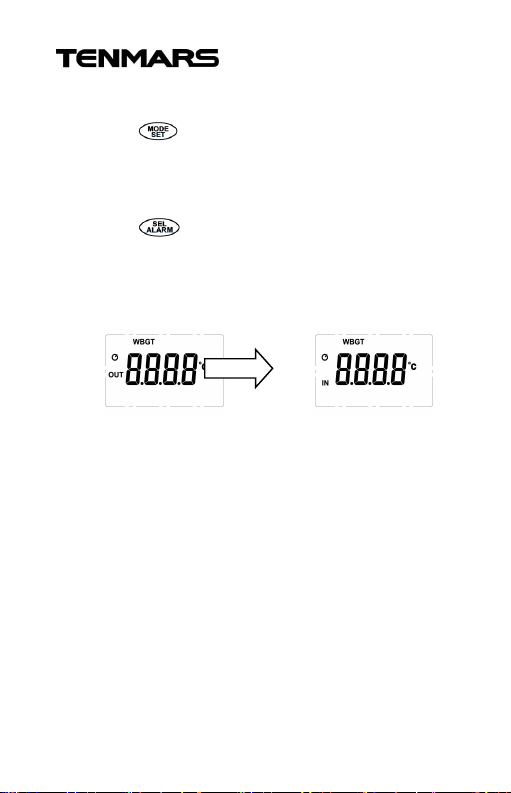
12. Mode
Press button for less than 1 second to
change the mode. Units switch in order of
WBGT=>TA=>%RH=>TG=>WET=>DEW.
Press button for less than 1 second to
change the IN/OUT when the LCD displays
WBGT mode.
EX:
※ The mode function will be unavailable if the
HOLD function and SET function is enabled.
12
Page 15

TM-188/TM-188D
13. Data Hold
Press button for more than 2 seconds to
enable hold function.
Ex:
※ The HOLD function will be unavailable if SET
function is enabled.
14. Single Data Record
Press button for less than 1 second to
record the current measured result and the “REC”
and “R” symbol will also appear on the LCD.
※ The single data record function will be
unavailable if the HOLD, SET, Viewing data
records function is enabled.
13
Page 16

TM-188/TM-188D
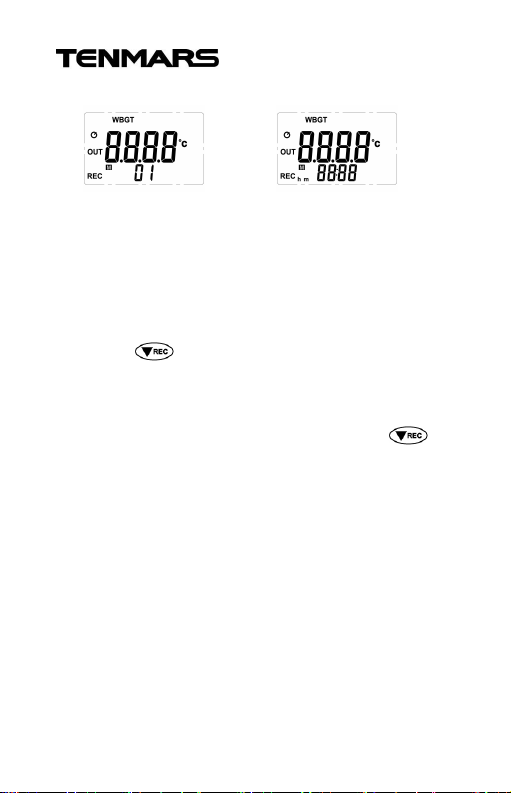
15. Viewing Data Records
Press button for more than 2 seconds to
turn on or off the viewing data records.
Press or buttonto view the number of
records.
Press button to change the mode. (IN/OUT
WBGT、TA、%RH、TG、WET、DEW)
Press button to view the date of recorded
data.
(Select the year, month, date, hours, mined,
second)(TM-188D).
Press button to switch the temperature unit.
Press button for more than 2 seconds to
exit the viewing data records mode.
14
Page 17
TM-188/TM-188D
Ex: TM-188 TM-188D
※ The viewing data records mode will be
unavailable if the HOLD, SET function is
enabled.
16. AUTO DATA LOGGER(TM-188D)
Press button for more than 2 seconds to
turn on Auto Data logger mode, and the “REC”, “R”
symbol will also appear on the LCD. If you want to
disable Auto Data logger mode, press
button again for more than 2 seconds, and the
“REC”, “R” symbol will also disappear on the LCD.
It is well temporarily turn off if the single data
record function and the HOLD function enabled.
※ The auto data logger mode will be unavailable
if the HOLD, SET function is enabled.
15
Page 18

TM-188/TM-188D
17. Maximum/Minimum (MAX/MIN)
Press button for more than 2 seconds to
enter MAX/MIN mode, and the LCD will display the
maximum temperature data and the “MAX”
symbol.
Press button for less than 1 second to
change maximum or minimum.
Press button for more than 2 seconds to exit
maximum/minimum mode.
※ The maximum/minimum mode will be
unavailable if the HOLD, SET, Viewing Data
Records function is enabled.
18. USB (TM-188D)
The LCD will be displayed the “USB” symbol if the
USB cable is connected.
16
Page 19

TM-188/TM-188D
19. Setting and Calibration
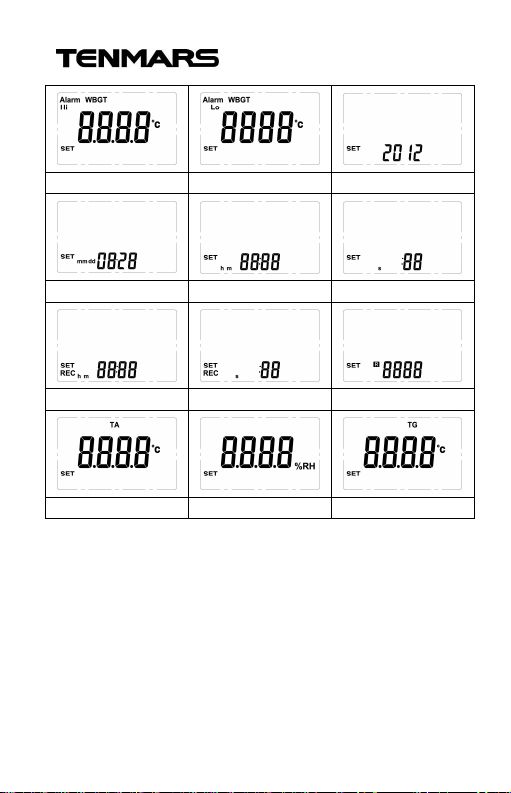
Press button for more than 2 seconds to enter
into setting mode Fig.A~L(see Table 1):
Fig. A or B setting: WBGT alarm High/Low setting:
If you want to setup High, press button to
select Fig.A.
If you want to setup Low,press button to
select Fig.B.
Press button to start setting, LCD displays
will flashing.
Press button to change temperature unit.
Press button to change the digit you want to
adjust.
Press , button to change the
temperature value.
Press button to save the setting.
17
Page 20

TM-188/TM-188D
Fig. C setting year (TM-188D):
z setting.
Fig. D setting month, date (TM-188D):
Press button to select the Fig. D.
Press button to start setting , LCD displays
will flashing.
Press button to select the digit you want to
adjust.
Press and button to increase or
decrease the month and data.
Press button to save setting.
Fig. E setting hour,minute (TM-188D):
Press button to select the Fig. E.
Press button to start setting.
Press button to select the digit you want to
adjust.
Press , button to increase or decrease
the hour and minute, the hour of the maximum
value is 24 and the minimum is 00, the minute of
the maximum value is 59 and the minimum is 00.
Press button to save setting.
18
Page 21

TM-188/TM-188D
Fig. F setting second (TM-188D):
Press button to select the Fig.F.
Press button to start setting, LCD displays
will flashing.
Press button to select the digit you want to
adjust.
Press , button to increase or decrease the
second, the second of the maximum value is 59 and
the minimum is 00.
Press button to save setting.
Fig. G setting sampling interval in hours and minutes
(TM-188D):
Press button to select the Fig.G.
Press button to start setting, LCD displays
will flashing.
Press button to select the digit you want to
adjust.
Press , button to increase or decrease
the hour and minute, the hour of the maximum
value is 24 and the minimum is 00, the minute of
the maximum value is 59 and the minimum is 00.
19
Page 22

TM-188/TM-188D
Press button to save setting.
Fig. H setting sampling interval in second
(TM-188D):
Press button to select the Fig.H.
Press button to start setting, LCD displays
will flashing.
Press button to select the digit you want to
adjust.
Press , button to increase or decrease
the second, the second of the maximum value is
59 and the minimum is 00.
Press button to save setting.
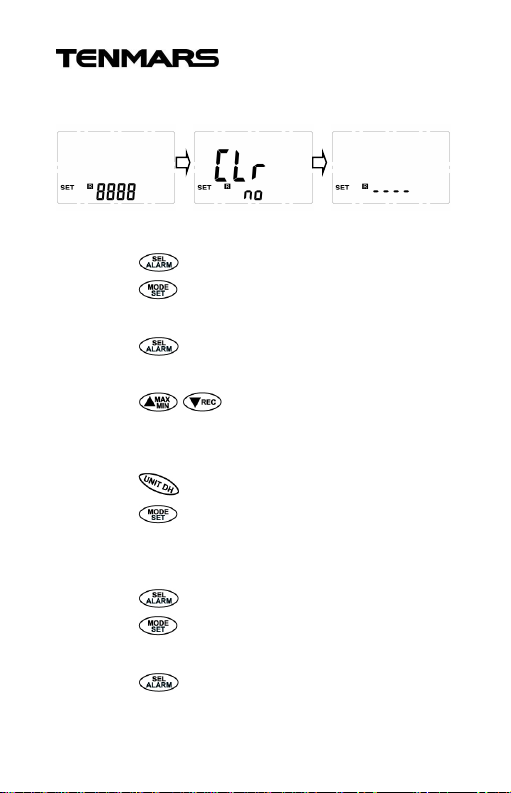
Fig. I setting clear records:
Press button to select the Fig.I.
Press button to start setting, LCD displays will
flashing.
Press button to select the NO or YES.
If selected the YES and press button, the
records will be cleared.
20
Page 23
TM-188/TM-188D
Ex:
Fig. J setting air temperature offset calibration:
Press button to select the fig.J.
Press button to start setting LCD displays will
flashing.
Press button to select the digit you want to
adjust.
Press , button to increase or decrease
the digit, the digit of the maximum value is 9.9 and
the minimum is -9.9.
Press button to change temperature unit.
Press button to save setting.
Fig. K setting Humidity offset calibration:
Press button to select the Fig.K.
Press button to start setting, LCD displays
will flashing.
Press button to select the digit you want to
adjust.
21
Page 24

TM-188/TM-188D
Press , button to increase or decrease
the digit, the digit of the maximum value is 9.9 and
the minimum is -9.9.
Press button to save setting.
Fig. L setting black globe temperature offset
calibration
Press button to select the Fig .L.
Press button to start setting, LCD displays
will flashing.
Press button to select the digit you want to
adjust.
Press , button to increase or decrease
the digit, the digit of the maximum value is 9.9 and
the minimum is -9.9.
Press button to change temperature unit.
Press button to save setting.
22
Page 25
TM-188/TM-188D
Fig.AFig.BFig.CFig.DFig.EFig.F
Fig.GFig.HFig.
I
Fig.JFig.KFig.
L
Table 1
23
Page 26
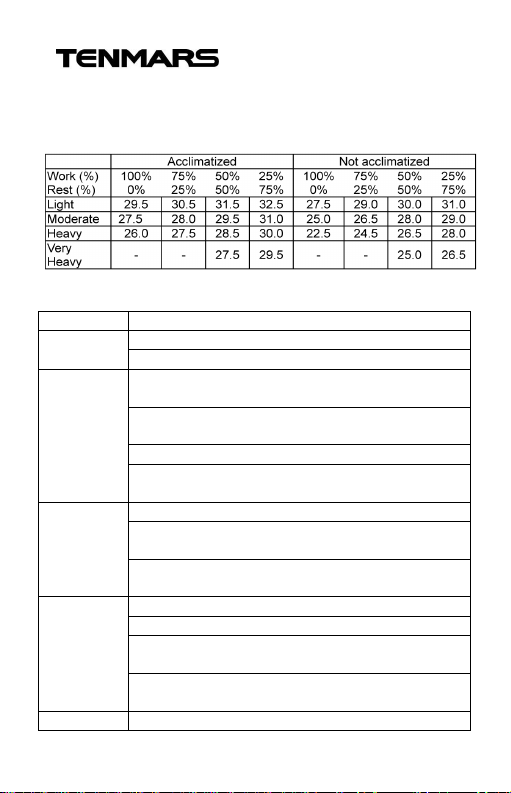
TM-188/TM-188D
Categories
Examples Activities
Resting
Sitting quietly
Sitting with moderate arm movements
Light
movements
whil
e using mostly arms
Using a table saw
machine or bench and some walking about
Moderate
Scrubbing in a standing position
pushing
Kg weight load
Heavy
Carpenter sawing by hand
Shoveling
dry san
d
basis
puling (e.g., pick
-
and-shovel work
Very heavy
Shoveling wet sand
20. Thermal hazard prevention standards
Screening Criteria for Heat Stress Exposure
(WBGT values in℃)
Example of activities within Metabolic Rate
Categories
Sitting with moderate arm and leg
Standing with light work at machine or bench
Standing with light or moderate work at
Walking about with moderate lifting or
Walking on level at 6 Km/hr while carrying 3
Heavy assembly work on a non-continuous
Intermittent heavy lifting with pushing or
24
Page 27

TM-188/TM-188D
According to the American Conference of
Governmental Industrial Hygienists.[ACGIH](2005)
21. Precautions
Keep the meter away from electromagnetic
interference (EMI) which may cause erratic
readings.
The measured values will be inaccurate if you
touch the black ball during the test.
If the shape of black ball is being impacted to
deformation, this will lead to inaccurate measured
values.
22. Software installation (TM-188D)
1. Link website https://www.tenmars.com/
2. Click English in the upper right corner of the
web page.
3. Search TM-188D.
4. Click on the TM-188D photo.
5. Click File Download, then select Software
Download.
6. Download and unzip the software.
7. For the latest software information and
installation procedures, Please download the
Installation Guide.
8. For software usage instructions, please
download the software User Manual.
25
Page 28
TM-188/TM-188D
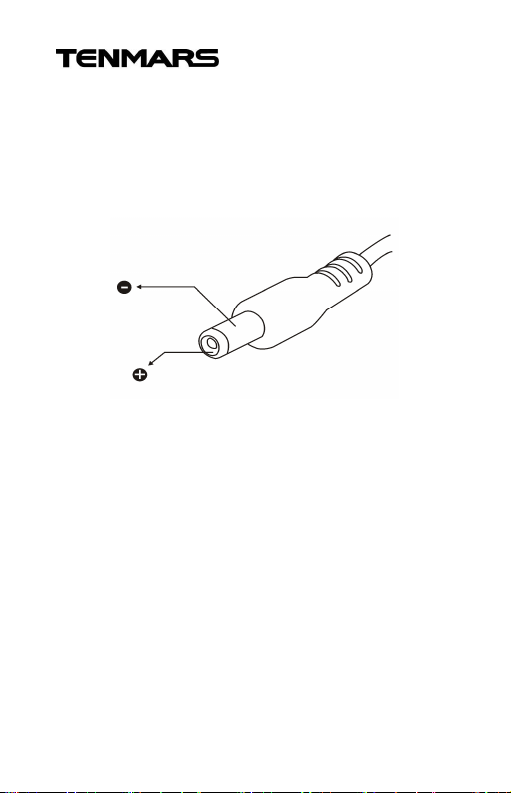
23. External DC power
External AC to DC adapter : Voltage 9 VDC(8~14 V
Max)/500mW.
Socket: Pin positive, Ground casing negative.
External diameter 5.5mm internal diameter 2.1mm .
24. Safety and maintenance standards
Do not put this device in direct sunlight or
where it is hot and/or damp.
Operating altitude: below 2,000m.
DC
26
Page 29
TM-188/TM-188D
WARNING
l, please
prevent battery leakage and corroding the
25. Battery replacement
1. If the LCD displays “ ”symbo
replace the battery immediately.
2. If not used for a long time or more than
1 month, please remove the battery to
internal components.
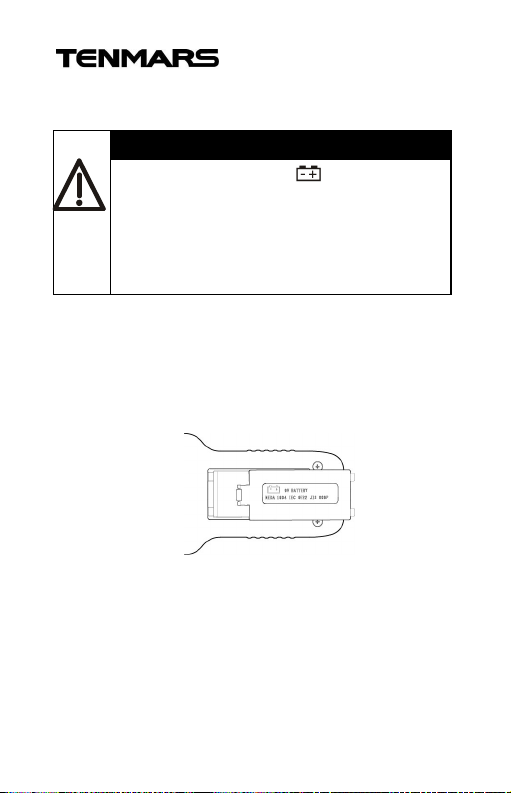
1.Turn off the power.
2.Open the battery cover under the thermometer
and remove the battery.
3.Please install a new 9V battery with the
direction of positive and negative polarity.
4.Close the battery cover.
27
Page 30

TM-188/TM-188D
26. End of life
WARNING
If not using the meter, please remove the
battery to avoid possible damage.
Caution: This symbol indicates that
equipment and its accessories shall
be subject to a separate collection
and correct disposal.
28
Page 31

Page 32

Professional Electrical and
http://www.tenmars.com
Environment Test & Measurement
Instruments:
Battery Capacity / Impedance Tester, TACHO
Meter ,LED light meter, Temperature & Humidity
meter ,Infrared Thermometer, Sound level
meter ,Light meter, EMF meter, UV Light meter,
RF meter, Hot wire Anemometer, CO meter
Anemometer, Lan cable tester, CO2meter,
Solar power meter, Radiation meter,
Clamp meter, Multimeter, Phase Rotation test,
Digital Insulation tester
Our products of high quality are selling
well all over the world
TENMARS ELECTRONICS CO., LTD
6F, 586, RUI GUANG ROAD, NEIHU,
TAIPEI 114, TAIWAN.
E-mail : [email protected]
 Loading...