

Page 1
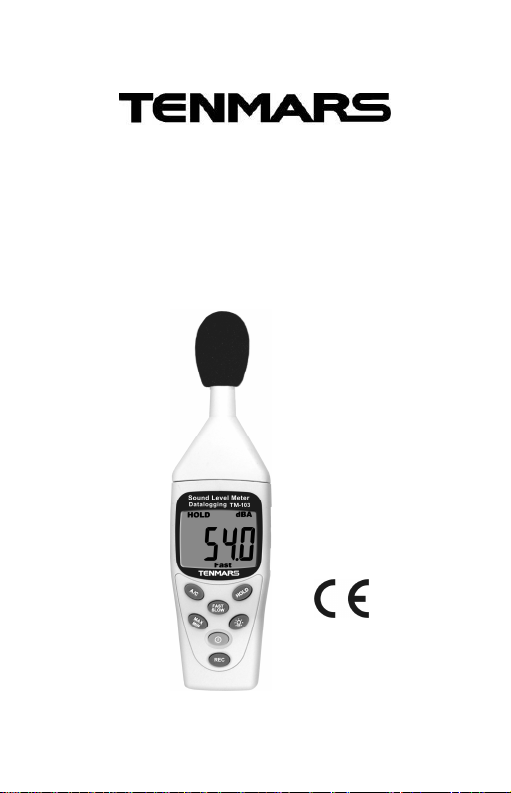
TM-102
TM-103
Sound Level Meter
Datalogging
User’s
Manual
HB2TM1020003
TENMARS ELECTRONICS CO., LTD
Page 2

CONTENTS
1. General Description & Specifications............ 1
2. Name and Funtions....................................... 3
3. Calibration Procedures ................................. 7
4. Measurement Preparation ............................ 8
5. Operating precautions................................... 8
6. Measurement................................................ 9
7. Setup User end........................................... 10
8. User end manipulation menu.......................11
9. End of life.................................................... 13
Page 3

TM-102/ TM-103
Thank you for using our Sound Level Meter.
To ensure that you can get the most from it, we
recommend that you read and follow the manual
carefully before use.
This unit conforms to the IEC651 Type2, ANSI
S1.4 Type2 for Sound Level Meters.
This Sound Level Meter has been designed to
meet the measurement requirements of safety
Engineers, Health, Industrial safety offices and
quality control in various environments.
Ranges from 30dB to 130dB at frequencies
between 31.5HZand 8 KHZ .
Display with 0.1dB steps on a 4 digits LCD.
With two equivalent weighted sound pressure
levels, A and C.
1. GENERAL DESCRIPTION &
SPECIFICATIONS
a. Display: 4 digits LCD with maximum/minimum,
Resolution: 0.1dB, Display Update: 0.5 sec.
b. Standard applied: IEC 61672-1 Class2, ANSI
S1.4 Type2.
c. Frequency range: 31.5Hz~8KHz.
d. Measuring level range:
A Weighting 30 ~130dB. C Weighting 35~130dB.
e. Frequency weighting: A/C.
f. Microphone: 1/2 inch Electretcondenser
microphone.
1
Page 4

TM-102/ TM-103
g. Time weighting: FAST(125mS),SLOW(1 sec).
h. Level ranges: 30 ~130dB(Auto Range).
i. Accuracy: ±1.5dB.
j. Dynamic range: 50dB.
k. MAX/MIN: Hold readings for the Maximum
and Minimum value.
l. DATA HOLD: The reading data shown on
LCD can be locked while pressing the button
m. Low Battery Indication: Replace battery as
LCD display “ ”.
n. Power Supply: 9V NEDA 1604,IEC 6F22,
JIS 006P battery×1pcs.
o. Power Life : About 50 hrs (alkaline Battery).
p. Operation height: 2000M under the elevation
above sea level.
q. Operation temperature & Humidity:
5°C~40°C, below 80%RH.
r. Storage Temperature & Humidity:
-10°C ~60°C, below 70%RH.
s. Dimension: 200mm(L)x55mm(W)x38mm(H).
t. Weight: About 170g. (Including batteries)
u. Accessories: Instruction manual、carrying
case、9V Battery, windscreen.
2
Page 5
TM-102/ TM-103
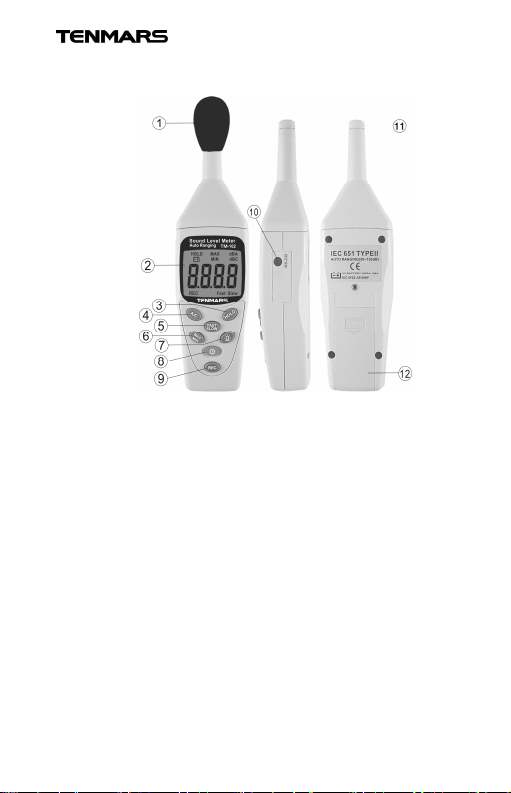
2. NAME AND FUNTIONS
1. Windscreen.
2. Display.
3. HOLD button.
4. Frequency weighting select button.
5. Time weighting select button.
6. Maximum/Minimum hold button.
7. Backlight button.
8. Power button.
9. REC button. (TM-103)
10. USB Interface Connector.(TM-103)
11. Microphone.
12. Battery Cover.
3
Page 6
TM-102/ TM-103
j.
Sound level read out
1. Windscreen
If you operate at wind speed over 10m/sec,
please put protective accessorieswindscreen in front of the microphone.
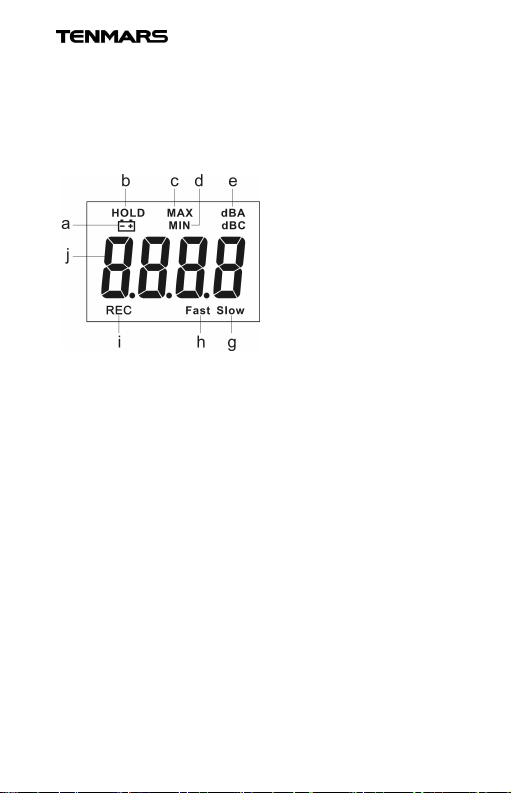
2. Display
a.Low battery indication
b.DATA HOLD
indication
c.Maximum indication
d.Minimum indication
e.A-Weighting
f. C-Weighting
g.Slow response
h.Fast response
i.REC response
3. HOLD button.
The reading data shown on LCD can be locked
while pressing the button.
4. Frequency Weighting select button.
A: A-Weighting. For general sound level
measurements.
C: C-Weighting. For checking the lowfrequency content of noise. (If the C-Weighted
level is much higher than the A-weighted level,
then there is a large amount of low-frequency
noise)
5 Time weighting select button.
FAST: for normal measurements.
SLOW: for checking average level of fluctuation
noise.
6 MAX/MIN hold button
4
Page 7

TM-102/ TM-103
Press the key to activate the function.
The “MAX” symbol appears on the display
and instrument measures and show the
Maximum value of parameter which
automatically updates itself when a larger
value is measured.
Press the key again and the “MIN” symbol
appears on the display and the instrument
measures and displays the Minimum value
of the parameter which automatically
updates itself when a lower value occurs.
The MAX/MIN function will be disable if:
The MAX/MIN is pressed for more than 1
second.
Turn off the meter.
7 Backlight button.
Press the button you enable the display
backlight to easy readings in dark environments.
Press more than 1 second to disable backlight,
which however it automatically OFF after 15
seconds.
8 Power button.
The key for 1sec to turn the sound level
meter ON or OFF. The auto power will be off
automatically after 5 minutes idle time
9 REC button(TM-103)
Press the button to start recording data and
5
Page 8

TM-102/ TM-103
press REC again to stop recording.
THE MINIMAL INTERVAL IS 1 SECOND
AND MAXSIMUM INTERVAL TIME IS
7HOURS 59 MINUTES AND 59 SECONDS
TOTAL RECORDS 14.000.
10 USB Interface Connector (TM-103)
USB interface with a personal.
11 Microphone
1/2 inch Electret Condenser microphone.
12 Battery cover.
6
Page 9
TM-102/ TM-103
Sound level
3. CALIBRATION PROCEDURES
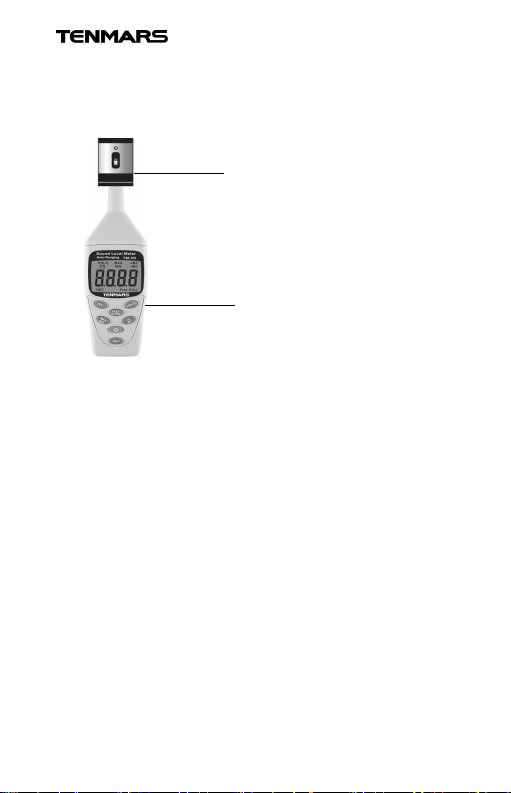
1. Using a standard Acoustic Calibrator.
(94dB, 1KHz Sine wave)
Acoustic calibrator
2. Make the button settings. Display:dBA
Time weighting: FAST
3. Insert the Microphone nozzle carefully into the
insertion hole of the calibrator.
4. Press A/C button then press the HOLD button,
hold the 2 buttons at the same time more than
1 second. LCD will be blinking to confirm
calibration.
5. When LCD blinked, release the A/C and the
HOLD buttons. The sound level meter will
display 94.0 dBA. The calibration is done.
6. The 94dB calibration process can be repeated
until the meter reads 94.0 dB. Recalibration
cycle: 1 year.
7
Page 10

TM-102/ TM-103
4. MEASUREMENT PREPARATION
1. Battery Loading
Remove the battery cover on the back and
put in one 9V Battery.
2. Battery Replacement When the battery
voltage drops below the operating voltage, the
mark appears. If it appears, battery should
be replaced with new one.
5. OPERATING PRECAUTIONS
1.Wind blowing across the microphone would
bring additional extraneous noise. Once using
the instrument in the presence of wind, it is
necessary to mount the windscreen preventing
to pick up undesirable signals.
2.To achieve more accurate measurement, use
an extension cable to separate the Microphone
from the main body so that the effect of
unexpected sound reflection can be eliminated.
3.Calibrate the instrument before operation if the
instrument was not in use for a long time or
operation at bad environment.
4.Do not store or operate the instrument at high
temperature and high humidity environment.
5.Keep microphone dry and avoid severe
vibration.
6.Please take out the battery and keep the
instrument in low humidity environment. When it
is not in use.
8
Page 11

TM-102/ TM-103
6. MEASUREMENT
1. Open battery cover and install a 9 Volt battery
in battery compartment.
2. Turn on power and select the desired
response time and weighting. If the sound
source consists of short bursts or only
catching sound peak, set response to FAST.
To measure average sound level, use the
slow setting. Select A weighting for general
noise sound level and C weighting for
measuring sound level of acoustic material.
3. Hold the instrument comfortably in hand or fix
on tripod and point the microphone at the
suspected noise source, the sound pressure
level will be displayed.
4. When MAX/ MIN (maximum, minimum hold)
mode is chosen. The instrument captures and
holds the maximum or minimum noise level.
Press once to select MAX value. Press again
to select MIN value, Press again to exit the
MAX/MIN mode. “MAX” or ”MIN” symbol
disappears.
5. Turn off the instrument and remove the
battery when it is not in use.
6. If the test exceeds 130dB,LCD will be display
,and if it is below 30dB, it will display .
9
Page 12

TM-102/ TM-103
7. SETUP USER END
1. The User End package contains
Custom designed USB cable for User End
2. System Required
Windowns 2000/ XP/10
3. Minimum Hardware Required
Pentium III 500MHZ PC compatible,or
above 128MB RAM; At least 10MB hard
disk space available to install User End
program.Recommended display resolution
is 800X600 or above.
10
Page 13
TM-102/ TM-103
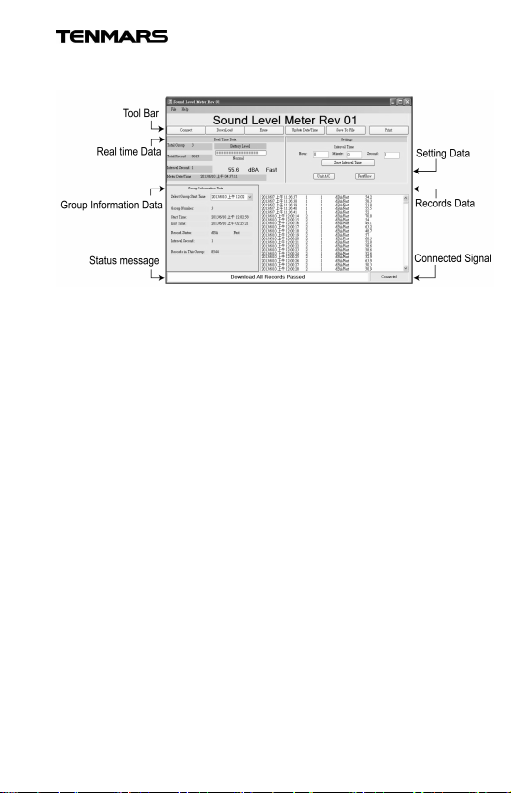
8. USER END MANIPULATION MENU
1.Tool Bar
Tool bar section has 6 buttons:
[Connect] [Download ] [Erase]
[Update Meter Date/Time]
[Save Records to File] [Print]
Use button [Connect ] to connect meter and PC.
This step is the first step to use this software.
Use button [Download] to download records from
Meter to Local computer.
※If you are downloading ,the meter’s button
will be unavailable.
Use button [Erase] to erase all the records saved
in memory.
Use button [Update Meter Date/Time] to let the
time in meter to be same with the computer time.
Remember if the battery is taken out, the clock in
the meter will stop.
11
Page 14

TM-102/ TM-103
Use button [Save to File] to export the records
from the list box to txt file. This button will be
enabled after downloading records.
Use button [Print] to print all the downloaded data.
2.Real time Data
Real time data section is used to displayed real
time data including DB value, dba/dbc status,
fast/slow status, hold, rec, max/min status.
Current meter situation including total group and
total records in the memory, interval, meter date
and time, are also displayed at the left side.
3.Group information Data
Group information data section is used to display
selected group information including start time,
end time, dba/dbc status, records number in
selected group.
4.Status Message
Status message is to display current mete status
such as recording, connected, disconnected,
5.Setting Data
This section is used to set interval into meter.
6.Records Data
Data will be downloaded into this section after
[download records] button is pressed.
12
Page 15

TM-102/ TM-103
7.Connected Signal
The light is used indicated connection status.
Green means connected, red means
disconnected.
9. END OF LIFE
Caution: this symbol indicates that
equipment and its accessories
shall be subject to a separate
collection and correct disposal.
13
Page 16

Professional Electrical and
Environment Test & Measurement
Instruments:
Battery Capacity / Impedance Tester, TACHO
Meter ,LED light meter, Temperature &
Humidity meter ,Infrared Thermometer, Sound
level meter ,Light meter, EMF meter, UV Light
meter,
RF meter, Hot wire Anemometer, CO meter
Anemometer, Lan cable tester, CO2meter,
Solar power meter, Radiation meter,
Clamp meter, Multimeter, Phase Rotation test,
Digital Insulation tester
Our products of high quality are selling
well all over the world
TENMARS ELECTRONICS CO., LTD
6F, 586, RUI GUANG ROAD, NEIHU,
TAIPEI114, TAIWAN.
E-mail: [email protected]
http: //www.tenmars.com
 Loading...