

Page 1
User%Guide%
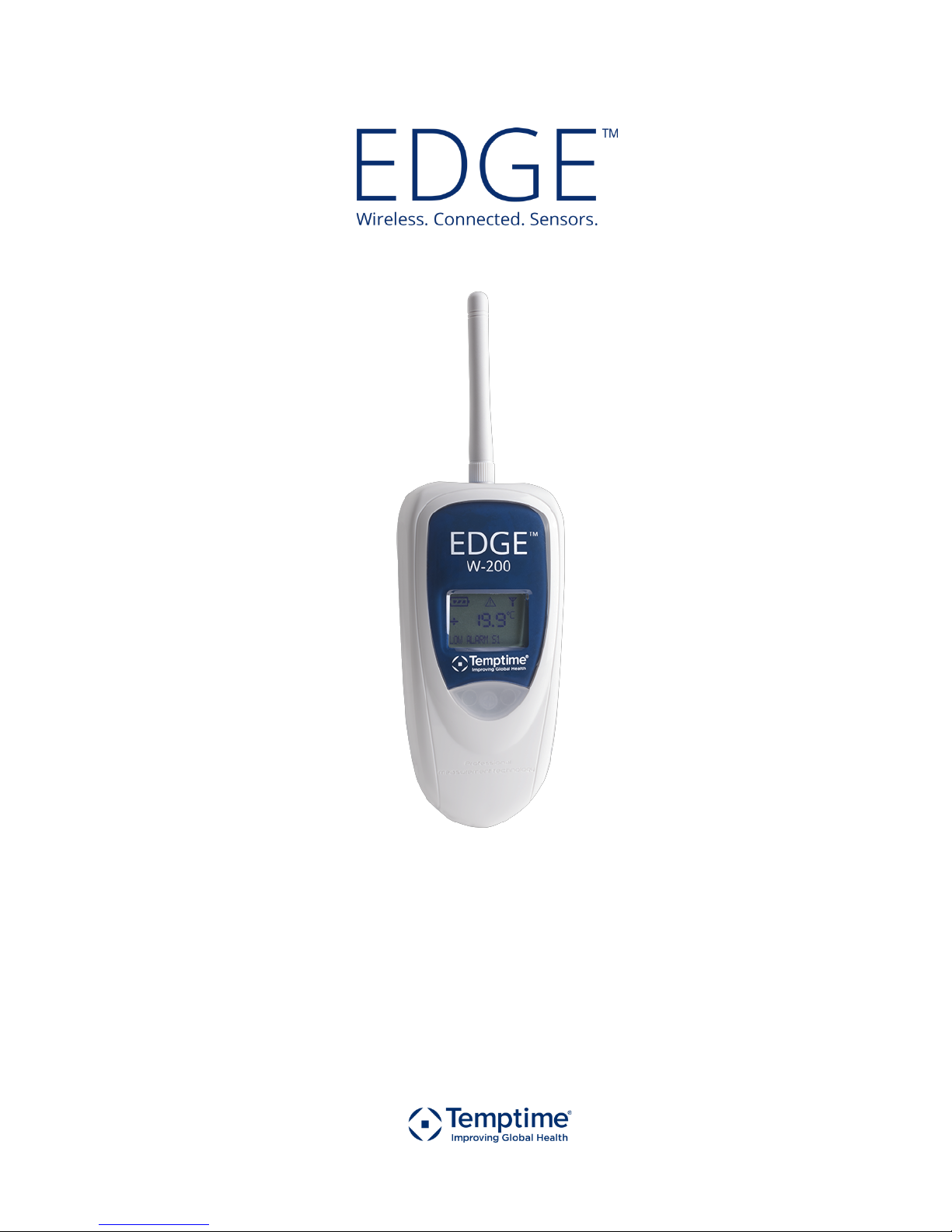
W-200!Module
temptimecorp.com!
Page 2
Notices!and!safety!
Temptime!LoRaWan!enabled!solution! EDGE!W-200!module! Page!2!
1 Notices!and!safety!
!"!"! #$%&'()*+,'-./'*0+,)
IMPORTANT!NOTE:!Do!not!use!this!product !fo r!p ro te c tio n !or !as !p ar t!o f!a n!a u to m a te d !emergency!system!or!as!for!any!other!application!that!
involves!protecting!people!and/or!property.!Customers!a n d !us ers!o f!Temptime!products!are!responsible!for!making!sure!that!the!product!is!fit!
for!the!intended!usage.!Do!not!open!the!product!casing!and!do!not!disassemble!or!modify!internal!co m po nen ts!in!an y!m a nne r.!Temptime!
products!do!not!contain!any!internal!components!that!require!user!intervention!or!repair.!If!the!device!shows!signs!of!improper!operation,!
disconnect!it!immediately!from!its!power!source!and!contact!Temptime!technical!services.!
!"!"1 2$''&-()3$-+*+4)
This!product!contains!a!lithium!battery.!Make!sure!you!respect!polarity!(+/-)!when!inserting!batteries!into!Temptime!devices.!
Reversing!polarity!by!inserting!the!batteries!incorrectly!can!cause!the!product!to!heat!up,!and!may!lead!to!battery!liquid!
leakage.!Use!only!batteries!recommended!by!Temptime.!Do!not!change!battery!type s,!such !as!rec harg eab le,!alkaline !and !
magnesium,!or!use!batteries!of!different!brands,!or!even!different!types!of!batteries!of!the!same!brand.!Incorrect!batteries!
may!cause!the!device!to!heat!up,!and!may!result!in!a!fire!or!battery!liquid!leakage.!Never!dispose!of!batteries!in!fire.!Do!not!
charge!regular!batteries!that!are!not!specifically!rechargeable.!When!the!battery!is!low,!or!in!case!the!battery-operated!device!in!question!
remains!unused!for!a!lengthy!period!of!time,!remove!the!battery!from!the!device!in!order!to !avo id!any !risk!of!ba ttery !liquid!leakage.!Never!
leave!batteries!within!the!reach!of!children.!In!case!of!a!battery!leak,!avoid!all!conta ct!w it h!t he !liq u id!p re sen t!o n !th e !ba tte rie s.!R ins e!w ith !c lea r!
water!immediately!in!case!the!battery!liquid!comes!into!contact!with!the!eyes,!mouth!or!skin.!Contact!a!do ct or!o r!e m e rge nc y!service!
immediately.!Battery!liquid!is!corrosive!and!can!damage!visio n ,!o r!cau se !b lin dn e ss!o r!ch e m ica l!bu rn s.!
!"!"5 677),'$'&8&+')
This%paragraph%pertains%to%915%MHz%EDGE™%wireless%modules.!This!device!complies!with!part!15!of!the!FCC!rules.!Operation!is!
subject!to!the!following!two!conditions:!(1)!This!device!may!not!cause!harmful!interference,!and!(2)!this!device!must!accept!
any!interference!received,!including!interference!that!may!cause!undesired!operation:!!FCC!Part!15!§107!-!§109!-!§207!-!§247!
(Ed!2008).!
!"!"9 7$+$:$);)<+:.,'-()7$+$:$)=<7>)
This%paragraph%pertains%to%915%MHz%EDGE™%wireless%modules.!This!device!complies!with!Industry!Canada!license-exempt!RSS!standard(s).!
Operation!is!subject!to!the!following!two!conditions:!(1)!this!device!may!not!cause!interference,!and!(2)!this!device!must!accept!any!
interference,!including!interference!that!may!cause!undesire d !o pe rat ion !o f!t he !d evic e.!
!"!"? 70+%0-8*'()3*'@)A.-0B&$+)-&4.C$'*0+,)
This%paragraph%pertains%to%868%MHz%EDGE%wireless%modules.%The!CE!mark!on!this!product!indicates!that!Temptime!declares!
that!this!product!is!compliant!with!Radio!equipment!and!Telecommunications!Termina l!equ ipm en t!(R& TT E)!d irective!
1999/5/EC!and!the!Low!Voltage!Directive!(LVD)!2006/95/EC.!The!following!standards!were!utilized!to!meet!the!essential!
requirements!of!these!directives:!EN!301!489-3!v1.4.1!(02),!EN!300!220-2!V2.1.2!(R&TTE)!&!EN!60950-1:2006/A11:2009!(LVD).!
Caution:!Any!changes!or!modifications!not!expressly!approved!by!Temptime!could!void!the!user's!authority!to!operate!the!equipment.!
!"!"D EAAA)/08BC*$+/&)
This!wireless!device!complies!with!the!essential!requirements!and!other!relevant!provisions!of!the!Waste!Electrical!and!Electronic!Equipment!
Directive!2002/96/EC!(WEEE!Directive).!
!"!"F A+G*-0+8&+'$C)B-0'&/'*0+)
Please!respect!local!regulations!concerning!disposal!of!packaging,!unused!wireless!devices!and!their!accessories,!and!promote!their!recycling.!
Page 3

Notices!and!safety!
Temptime!LoRaWan!enabled!solution! EDGE!W-200!module! Page!3!
!"!"H I0J#)/08BC*$+/&)
The wireless device is in compliance with the restriction of the use of certain hazardous substances in electrical and electronic
equipment Directive 2002/95/EC (RoHS Directive). Do not dispose of this product with household trash. Temptime recycles this
product under certain conditions. Please contact us for more information.
!"!"!K L*,/C$*8&-)$+:)C*8*'$'*0+)0%)C*$M*C*'()
Temptime assumes no responsibility for any loss or claims by third parties which may arise through the use of this product. This
document is non-contractual and subject to change without notice.
© 2017 Tem
ptime. All rights reserved. Temptime, the Temptime logo, EDGEConnect Mobile, Temptime EDGE, and EDGECloud are
the exclusive property of Temptime. All other brands mentioned are the property of their respective owners. Specifications subject to
change without notice
September!2017!
Ref:!COMM!EDGE!W-200!Module User!Guide! Rev.!02!
Page 4

Notices!and!safety!
Temptime!LoRaWan!enabled!solution! EDGE!W-200!module! Page!4!
Table!of!Contents!
1! Notices%and%safety%.............................................................................................................%2!
2! Introduction%.......................................................................................................................%6!
2.1! Overview!.........................................................................................................................................!6!
2.2! Main!module!features!.....................................................................................................................!7!
2.3! Available!sensor!types!.....................................................................................................................!8!
2.4! Package!contents!.............................................................................................................................!9!
3! Getting%started%.................................................................................................................%10!
3.1! Requirements!................................................................................................................................!10!
3.2! Product!description!.......................................................................................................................!10!
3.3! Typical!installation!.........................................................................................................................!11!
3.4! How!to!check!your!module’s!wireless!signal!.................................................................................!12!
3.5! Requirements!and!recommendations!...........................................................................................!13!
3.6! Placing!your!EDGE!module!for!best!wireless!performance!...........................................................!13!
3.7! Preparing!mounting!kit!with!a!magnet!(optional)!.........................................................................!14!
4! External%Smart%Sensors%.....................................................................................................%15!
4.1! Connecting!Smart!Sensors™!..........................................................................................................!15!
4.2! Placing!Smart!Sensors™!.................................................................................................................!17!
5! External%digital%sensors%.....................................................................................................%20!
5.1! Connecting!the!sensor!...................................................................................................................!21!
5.2! Placing!the!sensor!..........................................................................................................................!21!
6! Internal%sensor%..................................................................................................................%23!
6.1! Placing!modules!with!an!internal!sensor!.......................................................................................!23!
7! Temperature/humidity%Smart%Sensors™%...........................................................................%24!
7.1! Connecting!the!sensor!...................................................................................................................!24!
7.2! Placing!the!sensor!..........................................................................................................................!25!
8! Activating%the%EDGE%W-200%module%..................................................................................%26!
Page 5

! Notices!and!safety!
Temptime!LoRaWan!enabled!solution! EDGE!W-200!module! Page!5!
8.1! Refreshing!the!module!display!with!a!short!press!........................................................................!27!
9! Appendix%-%Troubleshooting%..............................................................................................%28!
10!Index%................................................................................................................................%29!
!
!
!
!
! )
Page 6
! Introduction!
Temptime!LoRaWan!enabled!solution! EDGE!W-200!module! Page!6!
2 Introduction!
Congratulations!and!thank!you!for!choosing!the!Temptime!EDGE!W-200!wireless!monitoring!solution.!
This!document!presents!an!overview!of!the!EDGE!W-200!wireless!module,!followed!by!practical!
instructions!to!get!your!mod ule!u p!an d!ru nn ing!q uickly!as!part!of!your!overall!EDGE!LoRa!solution.!
Detailed!configuration!instructions!and!software!settings!are!provided!in!the!documentation!for!EDGE!
W-200!companion!software!applications:!
• EDGEConnect*Mobile,!a!Temptime!mobile!app!for!iOS!and!Android!used!to!setup!EDGE!W-200!
modules!
• EDGEConnect,!an!Temptime!web!application!offering!a!complete!sensor!monitoring!interface!!
This!document!focuses!on!the!physical!aspects!of!the!module!and!compatible!sensors.!Please!see!the!
EDGEConnect!web!application!user!guide!and!the!EDGEConnect!Mobile!application!user!guide!for!details!
on!those!parts!of!the!solution.!
2.1 Overview!
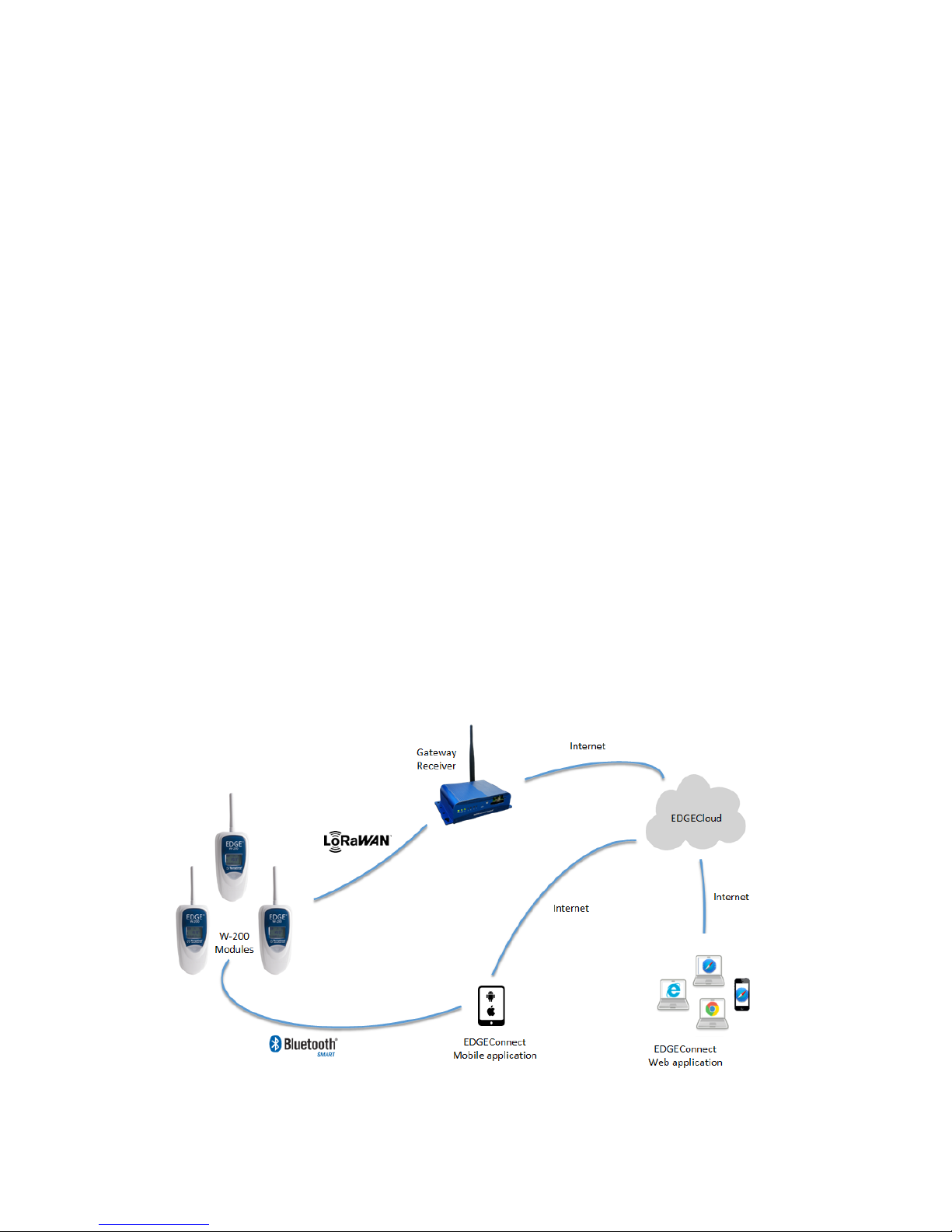
The!Temptime!EDGE!W-200!is!a!wireless!temp eratu re!a nd !hu m idity!device!that!integrates!LoR aWAN™!
technology!to!offer!very!long!range!wireless!co nn ec tivity!–!up!to!10!miles!(16!km)!line-of-sight.!This!
module!connects!wirelessly!to!your!LoRaWAN™!receiver!installed!at!your!site,!which!transmits!locally!
collected!sensor!data!via!the!Internet!to!the!Cloud.!Th e !EDGEC onnect!web!application!is!then!used!to!
view!and!manage!sensors!on!an!everyday!basis,!with!the!EDGEConnect!Mobile!application!used!to!
upload!configurations.!
!
Figure*1*–*W-200*modules*communicate*with*the*Cloud*via*a*local*receiver** !
Page 7

! Introduction!
Temptime!LoRaWan!enabled!solution! EDGE!W-200!module! Page!7!
2.2 Main!module!features!
• EDGE!W-200!wireless!temperature!and!humidity!datalogging!module!with!LCD!
• Unlimited!data!storage!on!EDGECloud;!up!to!4,000!readings!in!mod u le !memory!
• LoRaWAN™!wireless!connectivity!
• Bluetooth!Smart®!wireless!connectivity!
• Various!supported!temperature!and!humidity!ranges!(details!in!next!section)!
• Calibration!parameters!embedded!directly!in!EDGE!Smart-Sensors!(for!ease-of-use!and!standard!
exchange!for!periodic!calibration)!
• ISO!17025!(COFRAC)!calibration,!Temptime!certified!calibration,!or!NIST!traceable!calibration!
upon!request!
• Automatic!and!spontaneous!alarm!transmission!(transmitted!as!they!occur)!
• Configurable!high/low!alarm!threshold,!alerts,!regular!transmission!interval!!
• Automatic!wireless!connection!to!LoRaWAN™!enabled!receiver!
! )
Page 8
! Introduction!
Temptime!LoRaWan!enabled!solution! EDGE!W-200!module! Page!8!
2.3 Available!sensor!types!
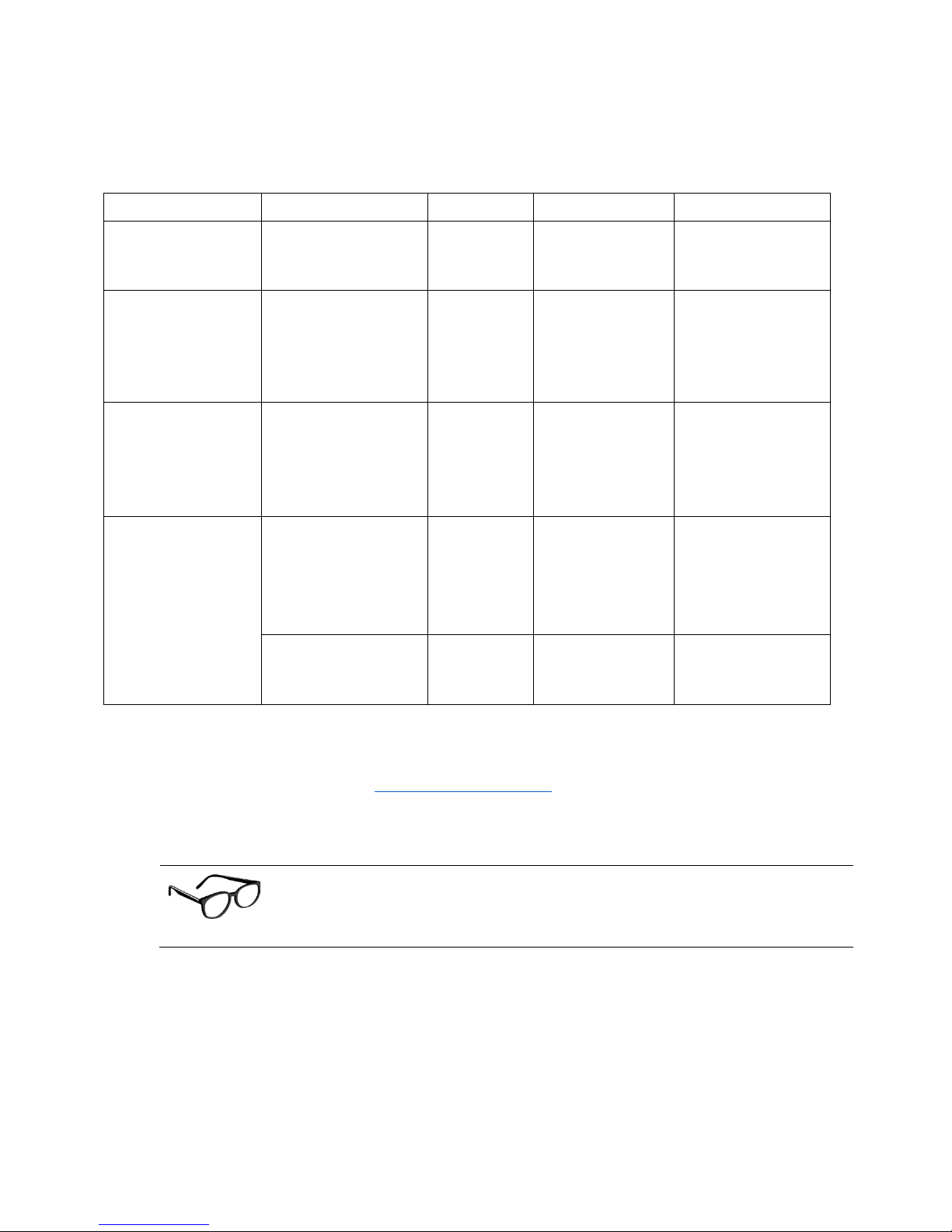
EDGE!W-200!models!are!available!with!several!different!sensor!options,!as!described!below:!
Sensor%type%
Ranges%
No.%sensors%
Cable%
Application%
Internal!digital!
temperature!sensor!
0°C!to!+50°C!
(32°F!to!122°F)!
1!
n/a!
Ambient!
temperature!
measurement!
External!digital!
temperature!sensor!
-40°C!to!+80°C!!
(-40°F!to!176°F)!or!!
-40°C!to!+120°C!!
(-40°F!to!248°F)!
1!
Round!white!
cable!(1m!or!!
3.3ft!!in!length)!
Freezers,!
refrigerators,!and!
cold!rooms;!ovens,!
incubators,!and!
water!baths!
External!digital!
temperature!+!
humidity!sensor!
Temperature:!!
-40°C!to!+100°C!
(-40°F!to!212°F)!
Relative!humidity!
from!0!to!99.9%!
1!dual!
sensor!
Round!white!
cable!!
Various!storage,!
medical!and!
traceability!uses!
Smart!PT100!sensor!
-100°C!to!+150°!
(-148°F!to!302°F)!
1!
Round!orange!
cable!(3.5m!or!
11.5ft!in!length)!
Ultra-lowtemperature!(ULT)!
freezers,!typically!80°C!
-200°C!to!+50°C!
(-328°F!to!122°F)!
1!
Round!orange!
cable!(1.4m!or!
4.6ft!in!length)!
Liquid!nitrogen!
(LN2)!tanks!
Table*1*-*EDGE*W-200*sensor*options*
Please!check!the!Temptime!web!site!(www.Temptimecorp.com)!or!contact!your!authorized!
representative!for!up-to-date!product!information.!
!
!
The!sensors!used!with!EDGE!W-200!modules!support!a!variety!of!temperature!
and!humidity!ranges.!However,!in!all!cases!the!W-200!module!itself!must!be!
used!within!its!supported!operating!range:!0°!to!+50°!C!(32°F!to!122°F)!
! )
Page 9

! Introduction!
Temptime!LoRaWan!enabled!solution! EDGE!W-200!module! Page!9!
2.4 Package!contents!
• 1!EDGE!W-200!wireless!module!(with!or!without!Internal!temperature !sen so r) !
• 1!Lithium!battery!
• 1!Antenna!
• 1!External!sensor!with!cable!
• 1!Calibration!certificate!per!sensor!(if!purchased!with!calibration!option)!
• 1!mounting!kit!with!plastic!holder,!magnet,!screws,!and!Velcro®!
• 1!set!of!plastic!cable!holders!and!cable!ties!
• 1!flat!cable!adaptor!
!
Page 10
! Getting!started!
Temptime!LoRaWan!enabled!solution! EDGE!W-200!module! Page!10!
3 Getting!started!
3.1 Requirements!
• Temptime!LoRa!Gateway!Receiver!(P/N!20-5005)!installed!an d!s e tu p !fo r!Clou d!co n ne ctivity ! via!
EDGEConnect!Web!Application!
• Temptime!EDGEConnect!Mobile™!application!installed!on!a!comp a tib le !m o b ile !d ev ice !(a va ilable !
for!iOS!and!Android!operating!syste m s)! and!requ ired !for!co nfigu ratio n!
• Please!read!EDGEConnect™!and!EDGEConnect!Mobile™!User!Manuals!carefully.!
3.2 Product!description!
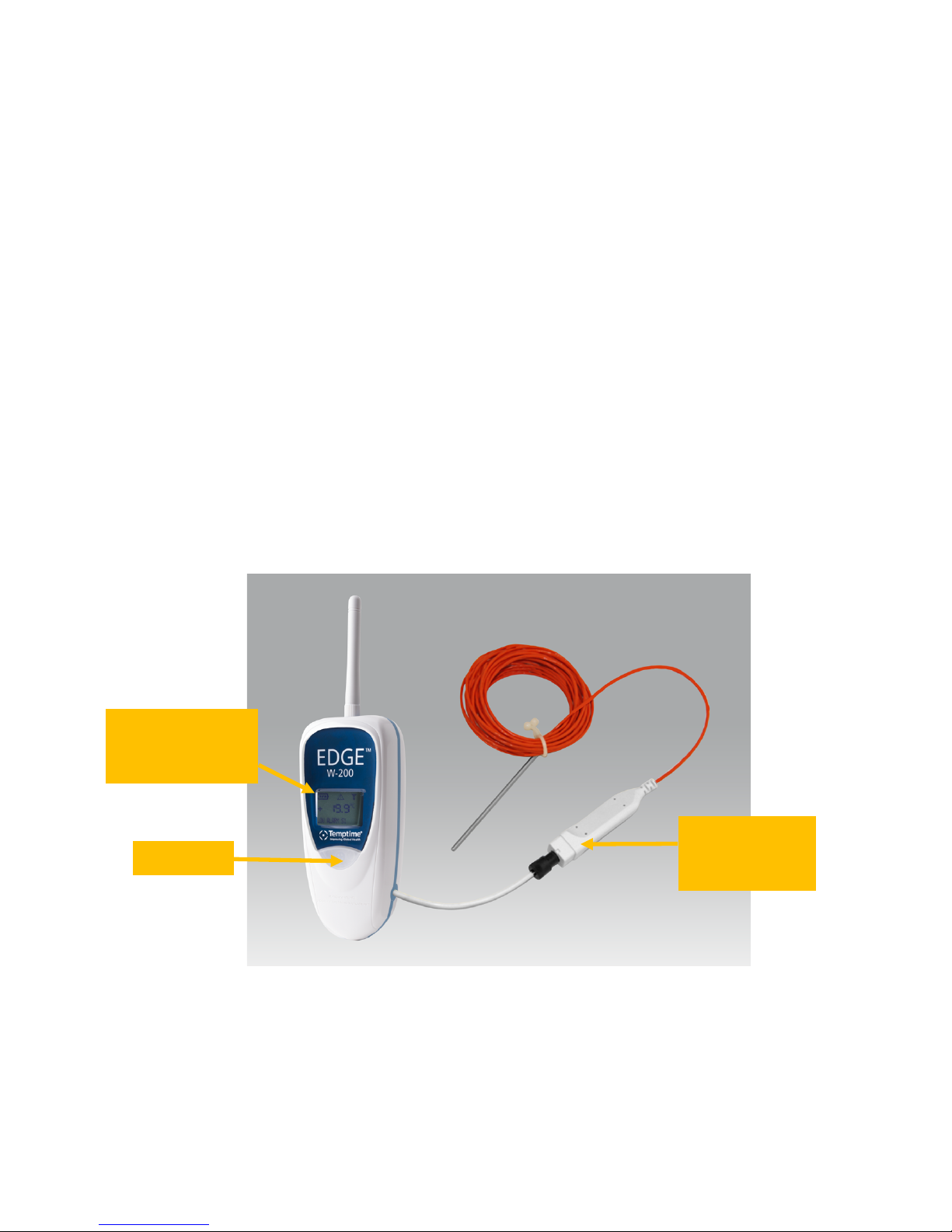
EDGE!W-200!modules!are!available!either!with!internal!temperature!sensors,!or!external!sensors!as!
shown!below.!The!modules!themselves!are!identical!in!both!cases!(other!than!the!external!sensor!
cable).!!There!are!two!variations!of!external!sensors,!Smart!PT100!sensors!and!digital!sensors.!Both!of!
which!will!be!explained!in!the!following!sections.!
!
!
Figure*2*–*EDGE*W-200*wireless*module*(example*with*external*PT100*sensor)*
!
LCD display with
module name,
temperature, signal
and battery indicators
Push-button
EDGE Smart
Sensor connector
for external sensors
Page 11
! Getting!started!
Temptime!LoRaWan!enabled!solution! EDGE!W-200!module! Page!11!
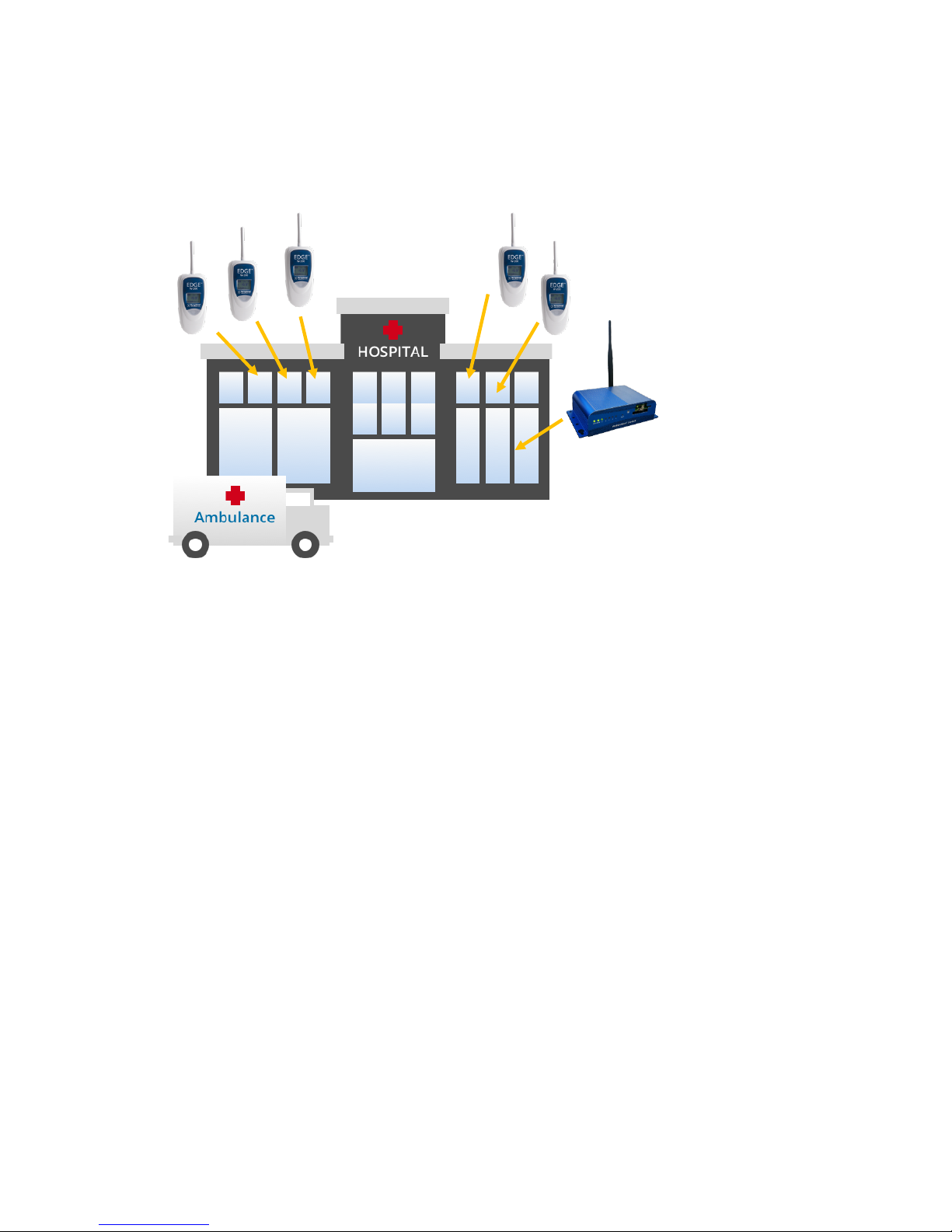
3.3 Typical!installation!
A!typical!installation!therefore!involves!one!or!more!EDGE!W-200!modules!and!a!LoRaWAN™!receiver.!!
!
!
!
! !
!
Long-range!wireless!connectivity!enab les!EDGE!W-200!modules!to!be!placed!nearly!anywhere!in!your!
building!or!site.!In!cases!where!the!signal!is!not!strong!enough,!a!second!LoRaWAN!receiver!may!be!
required.!Please!contact!Temptime!service!team!for!support.!
!
! )
Page 12
! Getting!started!
Temptime!LoRaWan!enabled!solution! EDGE!W-200!module! Page!12!
3.4 How!to!check!your!module’s!wireless!signal!!
Note! This!section!assumes!that!your!Temptime!LoRaWAN™!receiver!(20-50005!)!is!installed,!
configured,!and!running!properly.!See!Temptime*EDGE*LoRa*Gateway*Receiver*Configuration*
Guide!for!more!details!on!the!receiver!componen t.!
To%see%whether%an%EDGE%W-200%module%is%within%wireless%range%of%the%receiver:%
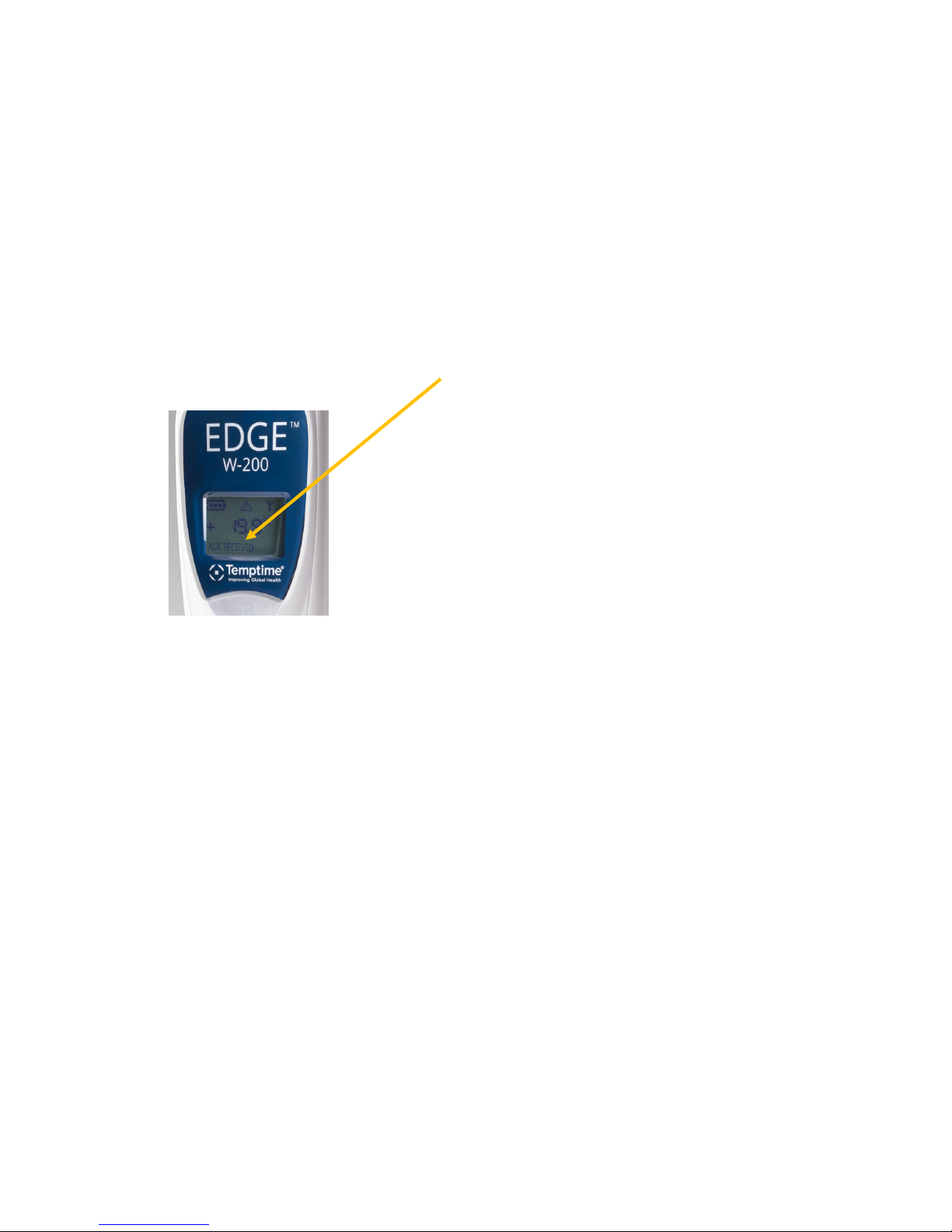
1. Press!the!pushbutton!on!the!front!of!the!module!(short!press).!
2. If!the!module!detec ts !a !receive r,!the !text!“ACK_R ECEIVED”!(acknowledgment*received)!is!
displayed!in!the!lower!left-hand!corner!of!the!screen.!Otherwise!“ACK_NOT_RECEIVED”!is!
displayed!(see!Appendix*-*Troubleshooting!on!page!28!of!this!document).!
!
!
Figure*3*–*Confirming*connection*with*LoRa*Gateway*receiver*
3. If!required,!test!various!ranges!by!placing!your!module!at!different!locations!around!your!site!
and!repeating!this!test.!
This!informal!site!testing!procedure!will!enable!you!to!verify!that!all!your!modules!are!communicating!
correctly.!
Excessive!obstruction,!interference,!or!harsh!conditions!can!affect!wireless!performance.!Please!contact!
Temptime!technical!support!for!specific!cases!if!you!hav e!a!m o du le!tha t!is!having !difficulty!rea ch ing!the !
receiver.!
!
! )
Page 13

! Getting!started!
Temptime!LoRaWan!enabled!solution! EDGE!W-200!module! Page!13!
3.5 Requirements!and!recommendations!
• The!EDGE!Gateway!receiver!runs!continuously,!24/7/365 ,!and !sho uld !be!co n ne cted !to!an !
Uninterruptible!Power!Supply!(UPS)!that!protects!against!power!surges!and!provides!power!to!
back!up!the!receiver.!
• The!EDGEConnect!web!application!will!show!an!alert!clearly!on!the!computer!screen!if!a!module!
is!not!communicat ing .!Y o u !may!also!verify!connectio n s !by !p re ss in g!t h e!p u s hb u t to n !o n!t h e! EDGE!
W-200!module!and!making!sure!“ACK_RECEIVED”!is!displayed.!
• Recommended!maintenance!and!calibration!procedures!should!be!followed.!
!
3.6 Placing!your!EDGE!module!for!best!wireless!performance!
For!optimal!operation,!follow!these!recommendations!when!physically!placing!your!device:!
• Do!not!place!the!module!within!40!cm!(16!in.)!of!another!module.!
• Make!sure!the!wireless!module!is!not!placed!on!an!electrical!conduit!or!cable!tray!(such!as!for!
computer!network!cables).!
• For!best!results,!place!the!module!so!that!it!faces!the!general!direction!of!the!receiver.!
• Keep!about!20!cm!(8!in.)!of!clear!space!around!the!module.!For!example,!a!module!that!is!
“stuck”!between!two!refrigerators!may!not!communicate!effectively.!
• Make!sure!all!cables,!if!any,!are!firmly!attached!and!that!sensors!are!properly!inserted!in!the!
appropriate!chamber.
Page 14
! Getting!started!
Temptime!LoRaWan!enabled!solution! EDGE!W-200!module! Page!14!
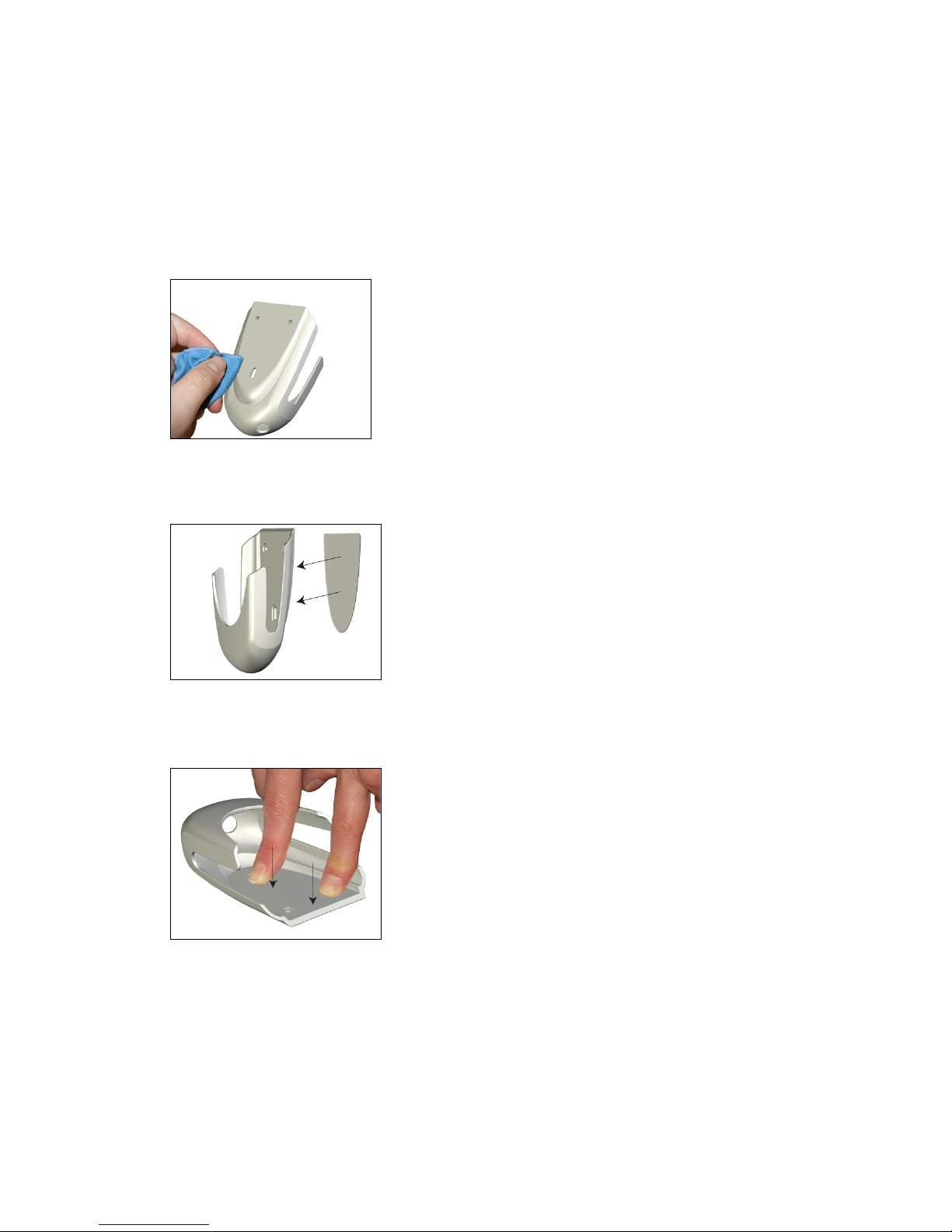
3.7 Preparing!mounting!kit!with!a!magnet!(optional)!
Your!EDGE!W-200!module!includes!a!plastic!holder!so!you!can!mount!the!device!easily!on!various!
surfaces.!In!addition!to!the!provided!screws,!you!will!also!find!a!magnetic!pad!with!adhesive!backing!
that!you!can!attach!to!the!holder!and!then!adhere!the!holder!to!metal!surfaces!easily.!
1. Clean!the!back!of!the!holder!with!a!mild!cleanser!or!alcohol.!
2. Remove!the!protection!from!the!adhesive!pad!on!the!magnet!and!place!the!magnet!on!the!back!
of!the!holder!
!
3. Place!the!holder!and!magnet!down!on!a!flat!surface!and!press!d ow n !stron gly!for!3 0!seco n ds!to !
firmly!attach!the!magnet.!
Page 15
! External!Smart!Sensors!
Temptime!LoRaWan!enabled!solution! EDGE!W-200!module! Page!15!
4 External!Smart!Sensors!
The*procedures*described*in*this*document*assume*that*your*EDGE*LoRa*Gateway*receiver*is*up*and*
running,*and*that*you*have*created *an *acco un t*on *the*EDGEConnect*web*application*(with*a*voucher*to*
authorize*Cloud*access).*This*section*focuses*on*the*physical*aspects*of*the*EDGE*W-200*module.*
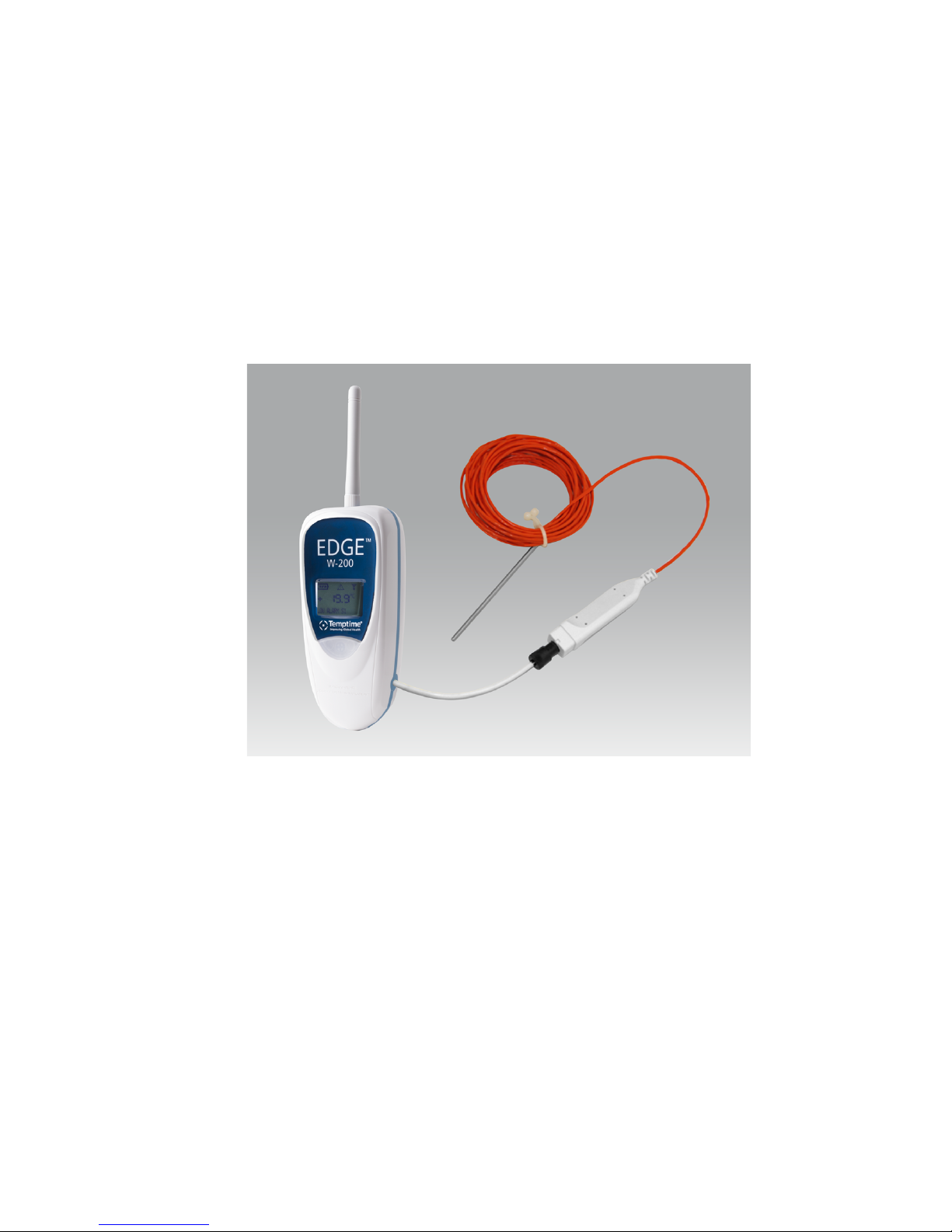
This!image!shows!a!EDGE!W-200!module!with!an!external!PT100!sensor,!connected!via!EDGE!Smart!
Sensor!technology.!
Figure*4*–*EDGE*W-200*wireless*module*with*PT100*sensor*
4.1 Connecting!Smart!Sensors™!
The!EDGE!W-200!module!and!external!PT100!sensors!(and!dual!temperature/humidity!sensors)!provided!
by!Temptime!are!independent!of!each!other!with!respect!to!calibration.!A!calibrated!external!sensor!
stores!its!own!calibration!parameters!directly,!and!thus!can!be!used!with!any!EDGE!W-200!module.!
EDGE!W-200!modules!with!support!for!external!sensors!use!a!specially!designed!Temptime!Smart!Sensor!
technology!that!offers!several!key!advanta ge s!with !respe ct!to!co n ven tion al!solutio ns:!
• Calibration!correction!parameters!are!stored!directly!in!the!Smart!Sensor!
• Plug!and!play!functionality!with!no!special!configuration!on!your!part!
• Module!independence!from!sensor!type:!any!supported!Temptime!sensor!can!be!used!with!any!
given!EDGE!W-200!module,!simplifying!repairs,!swaps/standard!exchange,!and!calibration!cycles!
Page 16
! External!Smart!Sensors!
Temptime!LoRaWan!enabled!solution! EDGE!W-200!module! Page!16!
(Note:!if!you!change!the!sensor!on!a!fun ctio nin g! EDG E!W-200!module,!you!must!reconfigure!the!
module!on!the!server-side!using!the!EDGEConnect!Web!application.)!
!
! !
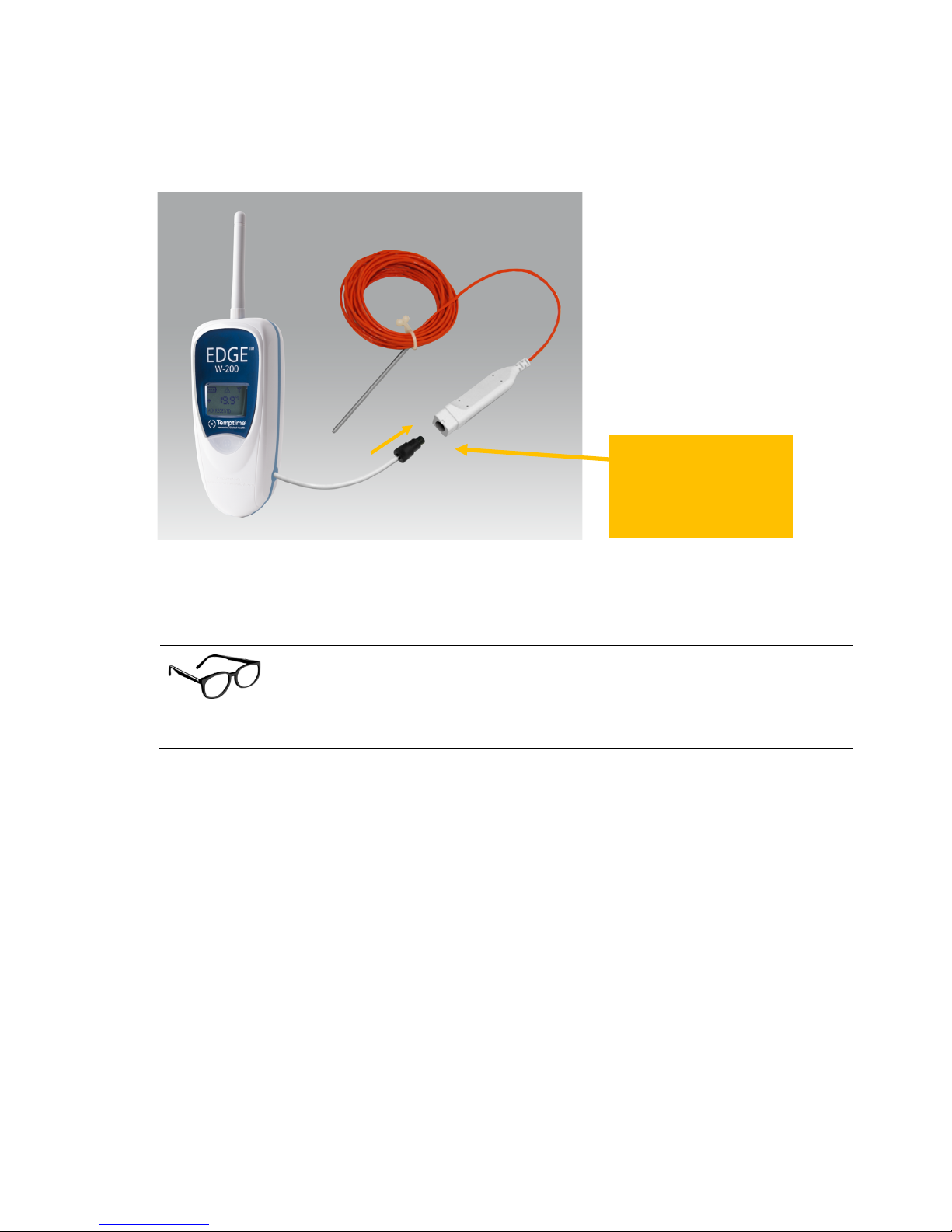
Figure*5*–*Connecting*your*EDGE*W-200*wireless*module*with*an*external*sensor*
!
!
This!feature!offers!an!effective!way!to!handle!sensors!at!calibration!time!
(depending!on!your!standard!o pe rating !pro ce du re)! without!leaving!your!
equipment!unattended.!Simply!have!a!calibrated!sensor!on-hand!and!swap!it!
with!the!one!that!needs!calibration.!
!
! )
Insert the cable from your
module into the keyed plug
on the EDGE S mart Sensor
connector.
Page 17

! External!Smart!Sensors!
Temptime!LoRaWan!enabled!solution! EDGE!W-200!module! Page!17!
4.2 Placing!Smart!Sensors™!!
9"1"! N&+&-$C)+0'&)$M0.'),&+,0-)BC$/&8&+')
• Given!the!extreme!temperature!ranges!typically!handled!by!PT100!sensors,!please!be!sure!to!
use!the!PT100-compatible!mounting!system!provided!with!your!freezer,!oven,!nitrogen!tank,!or!
other!equipment.!
!
As!mentioned!earlier,!the!EDGE!wireless!monitoring!system!supports!three!different!PT100!temperature!
sensors,!each!designed!for!a!different!application!and!temperature!range.!Placement!of!your!PT100!
sensor(s)!depends!on!the!equipme nt!yo u !inten d!to !m on itor,!as !des cribe d!b elow.!
!
!
In!all!cases!described!in !t h is!s e ct io n ,!th e !p las tic !co nnector!joining!the!mod u le !an d !
the!sensor!must!be!in!the!same!temperature!space!as!the!module,!not!the!sensor.!
!
Note! When!routing!the!cable!for!any!EDGE!sensor,!avoid!direct!co n t a c t!with!or!close!proximity!
placement!of!the!sensor!cabling!with!any!high!voltage!wiring.!Cabling!should!be!placed!with!no!
less!than!a!minimum!of!5!cm!(2!inches)!dis ta nc e !fro m!high!voltage!comp o ne n ts .!A lso ,!a vo id !
running!the!sensor!cable!in!parallel!w it h !hig h !v olt a ge !w ir ing .!
Your!equipment!may!be!different!than!that!described!here.!Contact!the!manufacturer!of!your!
equipment!for!instructions!regarding!proper!placement!of!the!sensor.!!
9"1"1 OP!KKQ)R!KKS7)'0)T!?KS7)
When!installing!a!PT100!sensor!in!an!ultra-low-tempera ture !(ULT )!freeze r,!it!is!easiest!to!pro cee d!w ith!a !
thawed!freezer.!!!
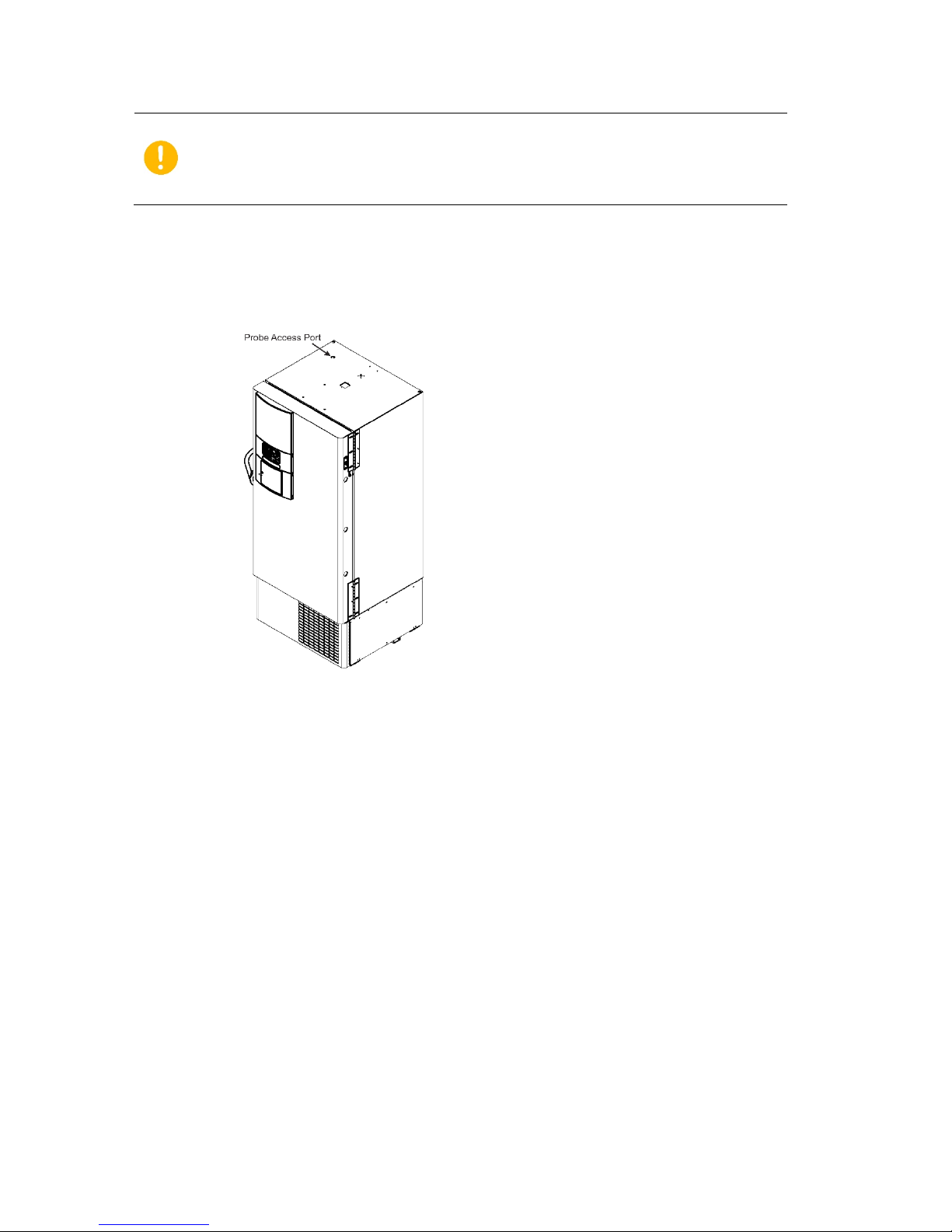
When!possible,!route!the!sensor!through!the!same!access!port!used!by !the!u nit!con tro l!sensor!or!an!
accessory!port,!such!as!that!shown!below!in!Figure!6.!
When!routing!the!PT100!sensor!through!the!same!port!used!b y!the !con trol!sensor,!Tem ptime!
recommends!installing!the!sensor!only!after!the!freezer!has!reached!a!thawed!state.!!
To!negate!the!possibility!of!condensation!dripping!on!the!electronics,!avoid!routing!the!cable!in!close!
proximity!to!any!electrical!enclosures.!!
Mount!the!PT100!sensor!as!close!to!the!unit!control!sensor!as!possible.!When!possible,!we!recommend!
mounting!the!sensor!within!5!cm!(2!inches)!of!the!control!sensor.!
When!mounting!the!PT100!sensor,!avoid!direct!con ta c t !w i th !the!wall!of!the!freeze r .!T h is !will!ensure!the!
sensor!is!mounted!to!pe rmit!measurement!o f!a ir!te mperature!only.!
Page 18
! External!Smart!Sensors!
Temptime!LoRaWan!enabled!solution! EDGE!W-200!module! Page!18!
We!do!not!recommend!installing!the!sensor!through!the!door!gasket!on!a!ULT!
freezer.!This!leads!to!excessive!ice!build-up!and!possible!door!damage!as!well!as!
longer!compressor!ru n !times!that!may!result!in !o th er !m e c h an ic al!p ro b le ms.
The!orange!cable,!which!supports!temperatures!from!-200°C!to!+!50°C,!may!be!placed!inside!the!freezer.!
Make!sure!you!attach!the!sensor!using!the!provided!cable-ties!and!reseal!any!openings!you!may!have!
unsealed!to!insert!the!sensor!using!permagum!sealant.!
Figure*6*–*Sample*PT100*(-100°C*to*+150°C)*for*ULT*freezer**
! )
Page 19
! External!Smart!Sensors!
Temptime!LoRaWan!enabled!solution! EDGE!W-200!module! Page!19!
9"1"5 OP!KKQ)R1KKS7)'0)T?KS7)
PT100!sensors!for!LN2/cryogenic!tanks!must!be!mounted,!when!applicable,!in!close!proximity!to!the!unit!
display!sensor.!!
To!avoid!temperature!measurement!disappearances,!Temptime!recommends!mounting!the!sensor!at!the!
same!height!as!the!display!sensor.!!!!
As!an!example,!some!freezers!have!an!access!panel!on!the!back!of!the!unit!in!which!you!may!route!the!
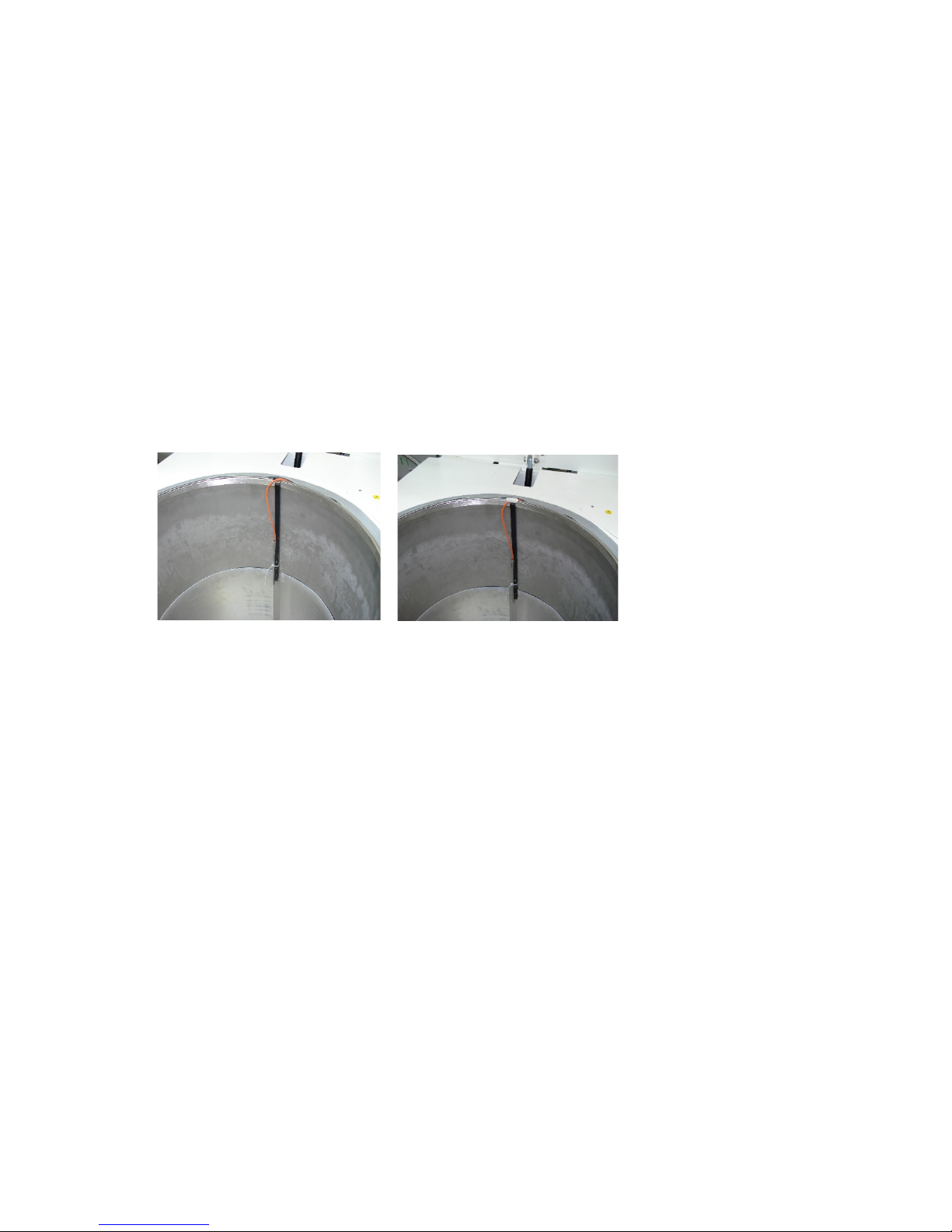
sensor!cable!up!the!back!wall.!Place!the!cable!under!the!tank!gasket!utilizing!the!notch!at!the!12!o’clock!
position.!We!recommend!the!installation!of!permagum!sealant!where!the!cable!passes!through!the!
notch.!!
Depending!on!whether!storing!in!vapor!or!liquid!phase,!place!the!sensor!at!a!depth!suitable!for!proper!
temperature!monitoring.!
Figure*7*–*PT100*(-200°C*to*+50°C)*for*nitrogen/cryogenic*tank****
Page 20
! External!digital!sensors!
Temptime!LoRaWan!enabled!solution! EDGE!W-200!module! Page!20!
5 External!digital!sensors!
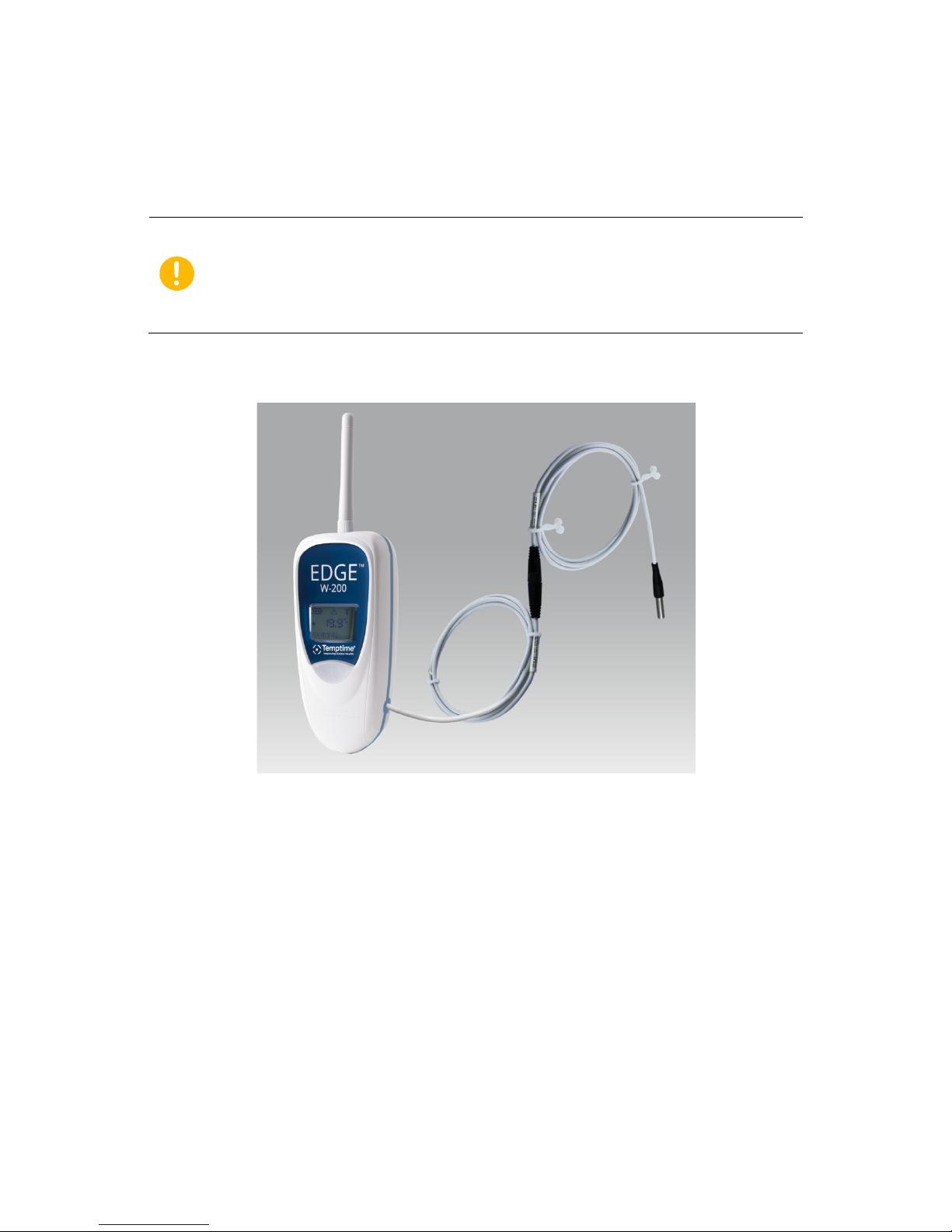
This!image!shows!a!EDGE!W-200!module!with!an!external!digital!sensor.!
!
!
!
Figure*8*–*EDGE*W-200*module*with*external*digital*sensor*(optional*cable*lengths)*
Depending!on!the!design!of!the!space!to!be!monitored,!you!may!be!able!to!pass!the!sensor!through!an!
access!port!or!opening.!We!recommend!that!you!use!the!access!port!or!opening!if!one!is!available.!
1. When!installation!permits!routing!the!sensor!cabling!through!an!access!port!or!opening,!connect!
the!male!end!of!the!sensor!firmly!into!the!fem a le!end !of!the !EDGE!wireless!module.!!
2. When!installation!requires!passage!through!the!door!gasket!seal,!connect!the!male!end!of!the!
sensor!into!the!female!end!of!the!provided!flat!cable!adaptor!by!joining!the!connectors!(without!
unscrewing!them).!Then!connect!the!other!end!of!the!flat!cable!into!the!end!of!the!EDGE!
wireless!module.!
! )
External!digital!sensors!do!not!connect!to!modules!via!the!EDGE!Smart!Sensor!
solution.!Therefore,!calibration!parameters!must!be!managed!using!the!
EDGEConnect!web!application!and!EDGEConnect!Mobile!application!for!upload!
them!to!the!module.!
Page 21
! External!digital!sensors!
Temptime!LoRaWan!enabled!solution! EDGE!W-200!module! Page!21!
5.1 Connecting!the!sensor!
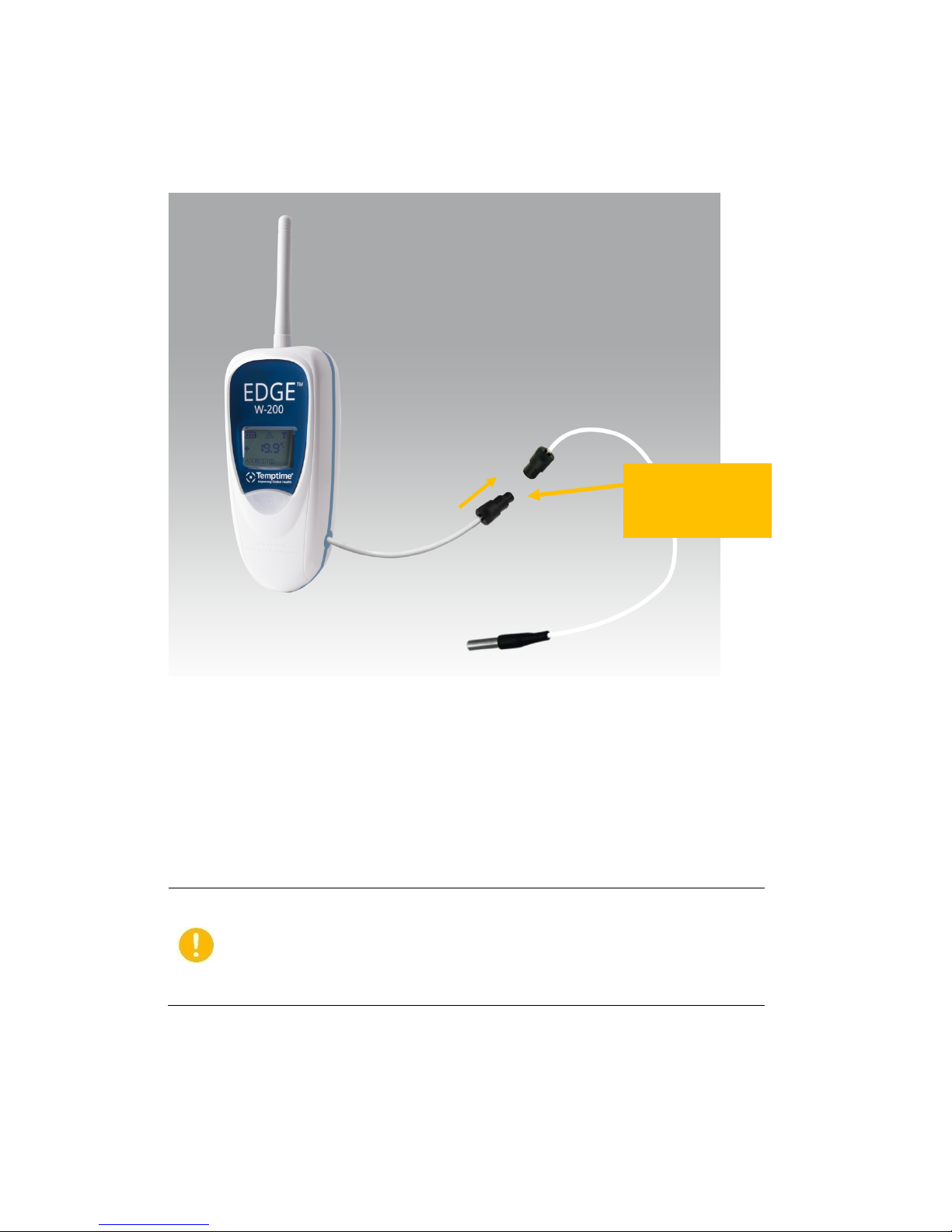
Simply!join!the!sensor!cable!to!the!module!cable!as!shown!here:!
!
Figure*9*–*EDGE*W-200*module*with*external*digital*sensor*(optional*cable*lengths)*
5.2 Placing!the!sensor!
1. If!you!have!an!EDGE!module!with!one!or!more!external!sensors,!the!best!solution!is!to!use!the!
access!port!or!opening!to!insert!the!sensor(s).!Otherwise,!run!the!temperature!sensor!into!th e !
enclosure!via!the!door!joint,!taking!care!to!place!the!flat!cable!flush!with!the!joint.!
Installation!through !the!door!gasket!on!fre e ze rs !may!cause!ice!build-up!
inside!the!freezer!and/ o r!o n !th e!f re ez er !door.!This!may!result!in!damage!
to!the!freezer!door!if!not!properly!maintained .!W he n!u sed !w ith!
incubators,!use!of!the!f lat !ca b le!may!cause!condens at io n,!which!could!
potentially!increase!the!risk!of!contamination.!
2. Clean!the!surface!for!the!sensor!using!alcohol!to!remove!any!grease!or!dirt.!
3. Attach!one!of!the!plastic!cable!holders!to!the!sensor,!remove!the!prote c tiv e !s tri p !from!the!
adhesive,!and!place!the!holder!on!the!clean!spot!inside!the!enclosure.!
Insert the cable from
your module into the
keyed plug on the
sensor connector.
Page 22
! External!digital!sensors!
Temptime!LoRaWan!enabled!solution! EDGE!W-200!module! Page!22!
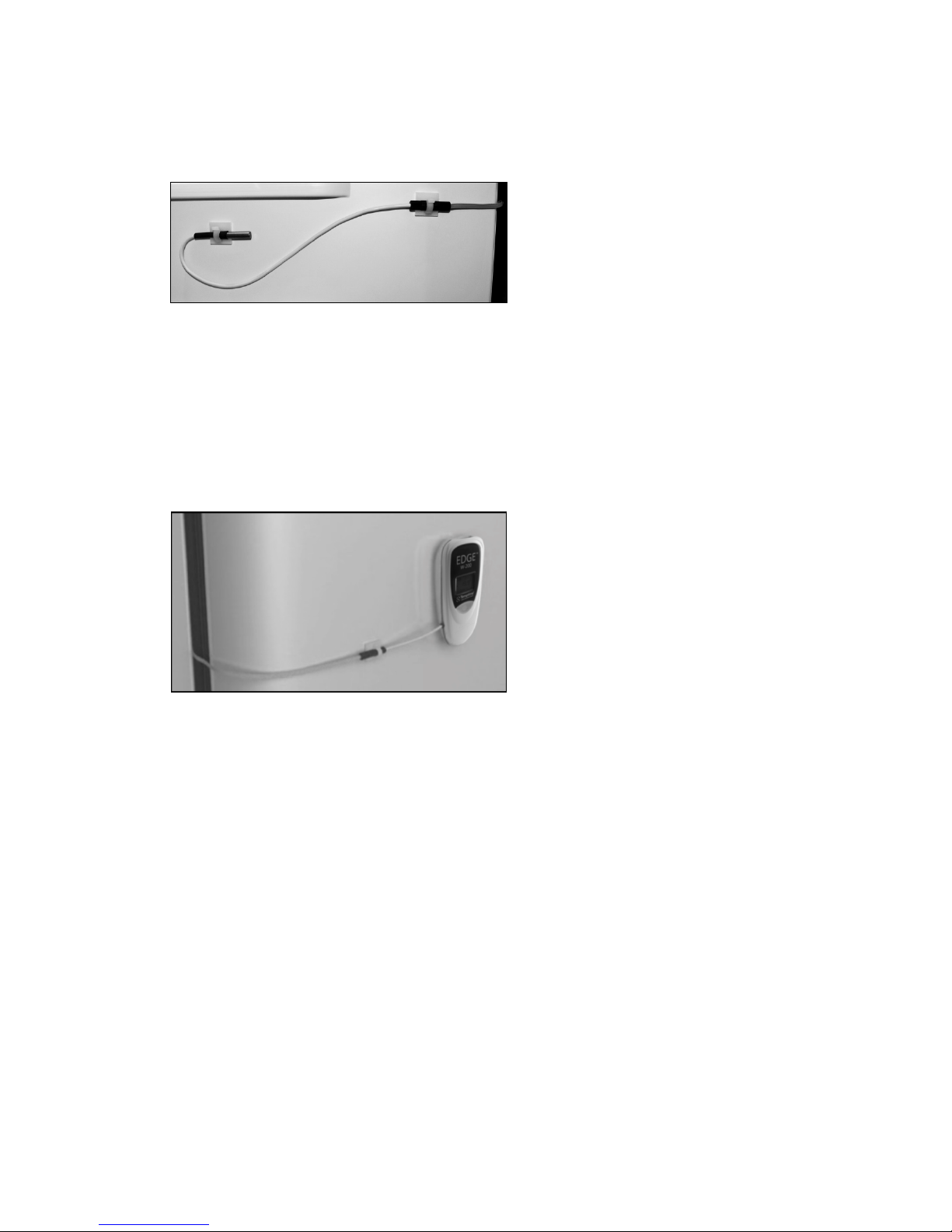
4. Place!the!sensor!/!flat!ribbon!cable!connector!on!the!inside!of!the!chamber!in!the!same!manner,!
as!shown!here:!
!
!
Figure*10*–*Sensor*inside*refrigerator*chamber*(modules*with*external*sensor*only)*
5. Your!mounting!kit!includes!a!plastic!holder!that!can!be!mounted!using!the!provided!magnet,!
screws!or!Velcro®.!Choose!the!method!that!is!most!appropriate!for!your!situation!and!place!the!
EDGE!module!as!described!in!section!3.6*Placing*your*EDGE*module*for*best*wireless*
performance.!
6. For!example:
Figure*11*–*EDGE*module*mounted*on*the*refrigerator*door*
7. Attach!or!coil!the!excess!cable!neatly.!!
!
Page 23
! Internal!sensor!
Temptime!LoRaWan!enabled!solution! EDGE!W-200!module! Page!23!
6 Internal!sensor!
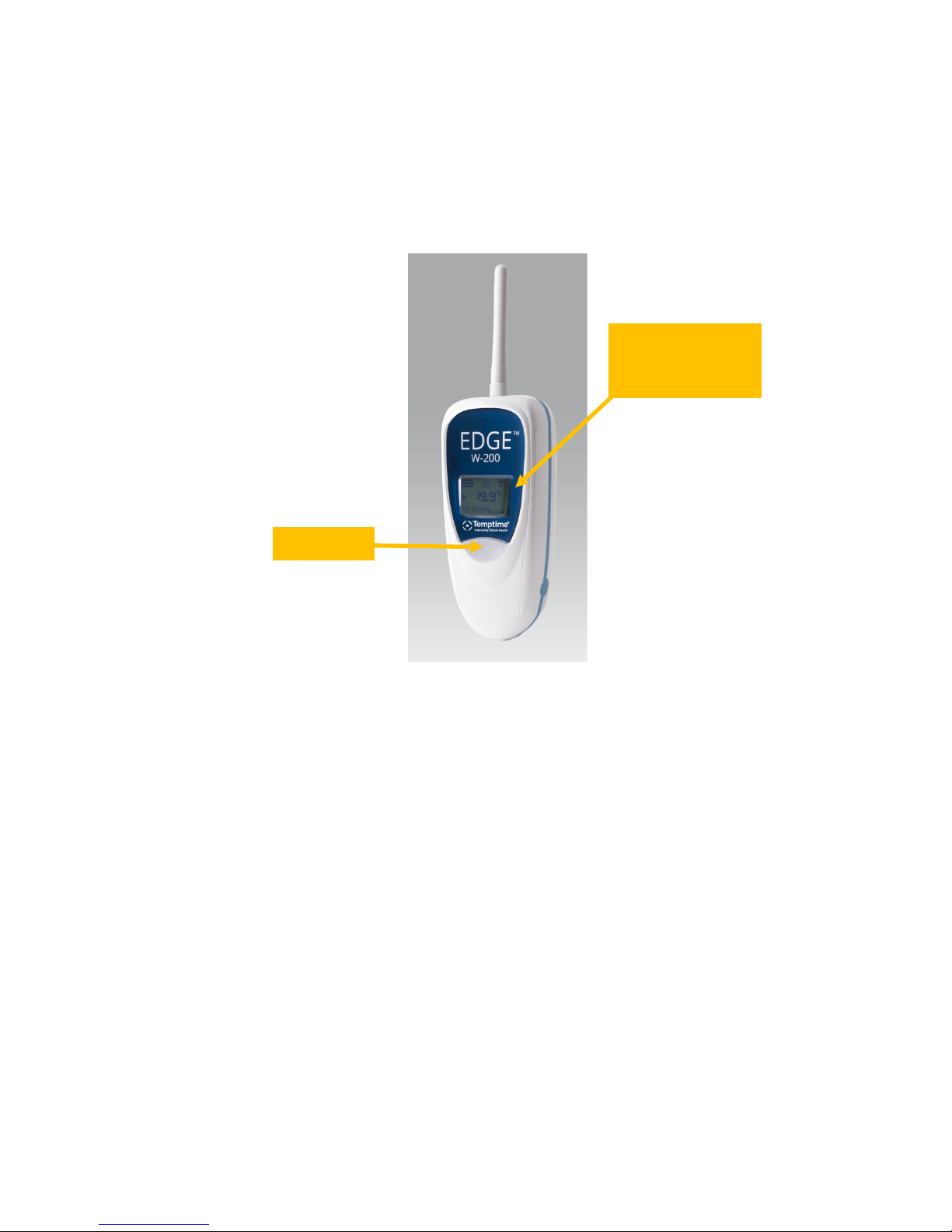
EDGE!W-200!modules!with!integrated!temperature!do!not!have!a!cable!protruding!from!the!side!of!the!
module,!and!you!do!not!have!to!connect!a!sensor!yourself.!
!
Figure*12*–*Module*with*internal*temperature*sensor*
6.1 Placing!modules!with!an!internal!sensor!!
Depending!on!your!refrigerator!or!freezer!model,!it!may!be!better!to!leave!the!module!sitting!on!a!shelf!
inside!the!chamber!ra th e r!t ha n !s tick in g!it !to !a !sid e !w a ll.!!
This!is!particularly!relevant!when!you!have!carried!out!a!mapping!study!and!determined!the!ideal!
location!for!the!senso r.!In !th a t!ca s e,!make!sure!that!the!sen s or !d oe s !no t !in te rfe re !w ith !lo a d in g!a n d !
unloading!your!product(s)!and!that!the!location!does!not!represent!a!risk!for!either!your!product(s)!or!
the!sensor.!
LCD display with
module name,
temperature, signal
and battery indicators
Push-button
Page 24
! Temperature/humidity!Smart!Sensors™!
Temptime!LoRaWan!enabled!solution! EDGE!W-200!module! Page!24!
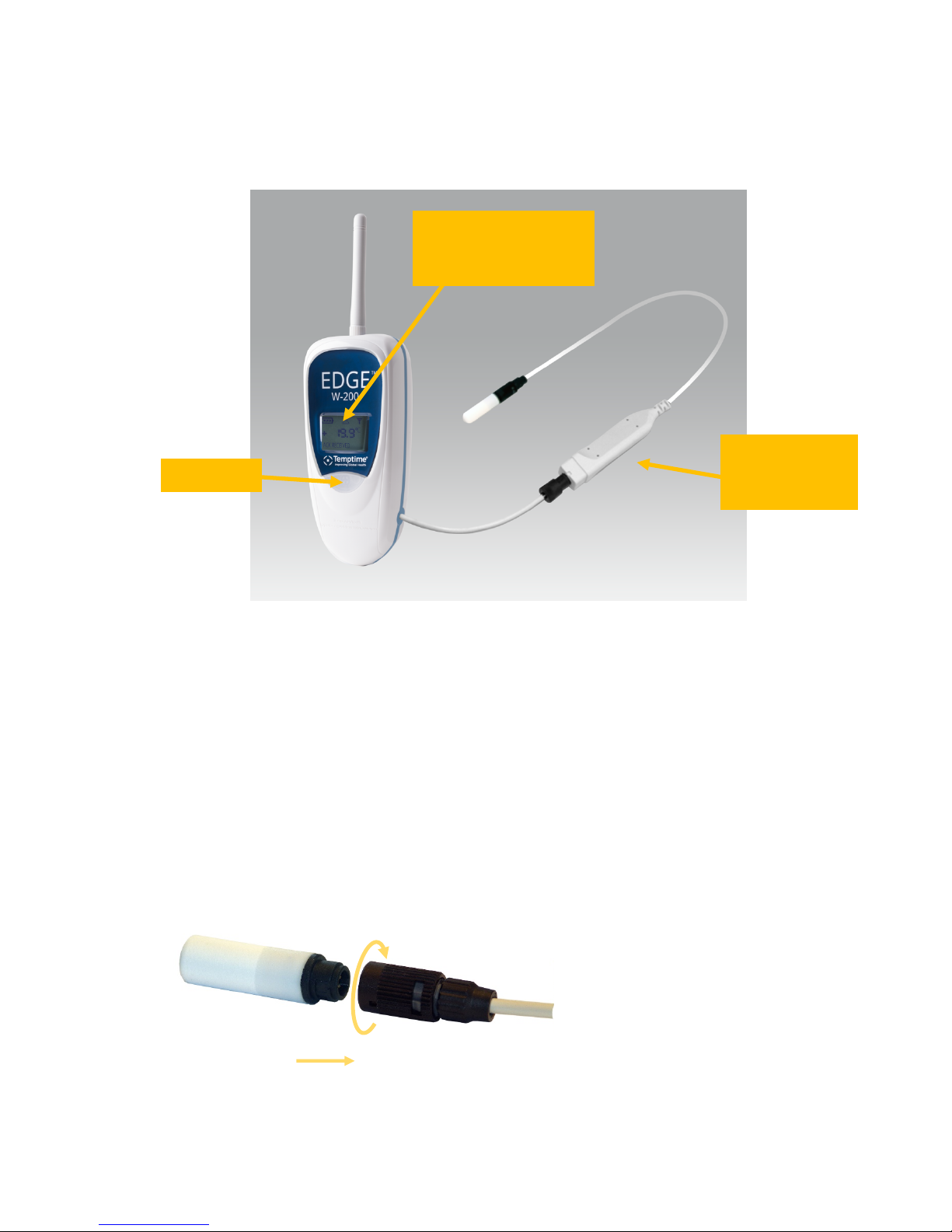
7 Temperature/humidity!Smart!Sensors™!
!
Figure*13*–*Dual*temperature*&*humidity*sensor*
The!EDGE!W-200!wireless!humidity!/!temperature!module!monitors!both!relative!humidity!levels!and!
temperature.!This!module!is!generally!use d!in!va riou s!type s!of!sto rage ,!me dica l!and !tracea bility!
applications.!The!white!sensor!shown!above!contains!both!the!humidity!and!temperature!sensor.!
This!sensor!connects!via!the!EDGE!Smart!Sensor!connector,!and!thus!will!contain!calibration!parameters!
directly!if!the!sensor!was!calibrated!by!Temptime.!
7.1 Connecting!the!sensor!
Connect the sensor and wireless module by joining the connectors.
Insert!sensor!
connector!
Rotate!ring!to!lock!
into!place!
LCD display with module
name, temperature,
humidity, signal and battery
indicators
Push-button
Temptime Smart
Sensor connector
for external sensors
Page 25

! Temperature/humidity!Smart!Sensors™ !
Temptime!LoRaWan!enabled!solution! EDGE!W-200!module! Page!25!
Figure*14*–*Align*and*press*firmly*to*join*connectors*
7.2 Placing!the!sensor!
Mount!the!EDGE!module!in!the!desired!location!using!the!provided!plastic!holder,!which!you!may!
attach!using!a!magnet!or!Velcro®!tape.!Choose!the!method!tha t!wo rks!b est!for!yo ur!loc ation !an d!
place!the!EDGE!W-200!module!as!described!earlier!in!3.6*Placing*your*EDGE*module*for*best*wireless*
performance.!Use!the!provided!plastic!cable!holders!to!attach!or!coil!the!excess!cable!neatly.!
!
!
When!routing!the!cable!for!the!EDGE!sensor,!avoid!direct!co n ta c t !w i th !o r !c lo se !proximity!
placement!of!the!sensor!cabling!with!any!high!voltage!wiring.!Cabling!should!be!placed!
with!no!less!than!a!minimum!of!5!cm!(2!inches)!distance!from!high!voltage!components.!
Also,!avoid!running!the!sensor!cable!in!parallel!with!high!voltage!wiring.!
For!all!other!manufacturers’!equipment,!contact!the!manufacturer!of!the!instrument!for!
instructions!regarding!proper!placement!of!the!sensor.*
! !
Page 26
! Activating!the!EDGE!W-200!module!
Temptime!LoRaWan!enabled!solution! EDGE!W-200!module! Page!26!
8 Activating!the!EDGE!W-200!module!
This*section*assumes*that*your*EDGE*LoRaWAN™*receiver*is*up*and*running*and*with in *w ir ele ss *ra n g e* of*
the*EDGE*W-200*module*you*are*trying*to*connect.*
!
The!EDGE!W-200!temperature!/!humidity!module!runs!on!battery!power.!To!activate!your!EDGE!W-200!
module!and!enable!it!to!communicate!via!your!EDGE!Gateway!receiver!and!the!Cloud,!follow!these!
steps:!
1. Insert!the!provided !b at te ry,!if!n o t !already!installed,!making!sure!to!respect!the!polarity!(see!
image!printed!inside!b a tt er y!slot).!We!recommend!that!you!use!a!manual!screwdriver,!being!
careful!not!to!over-tighten!the!screws.!
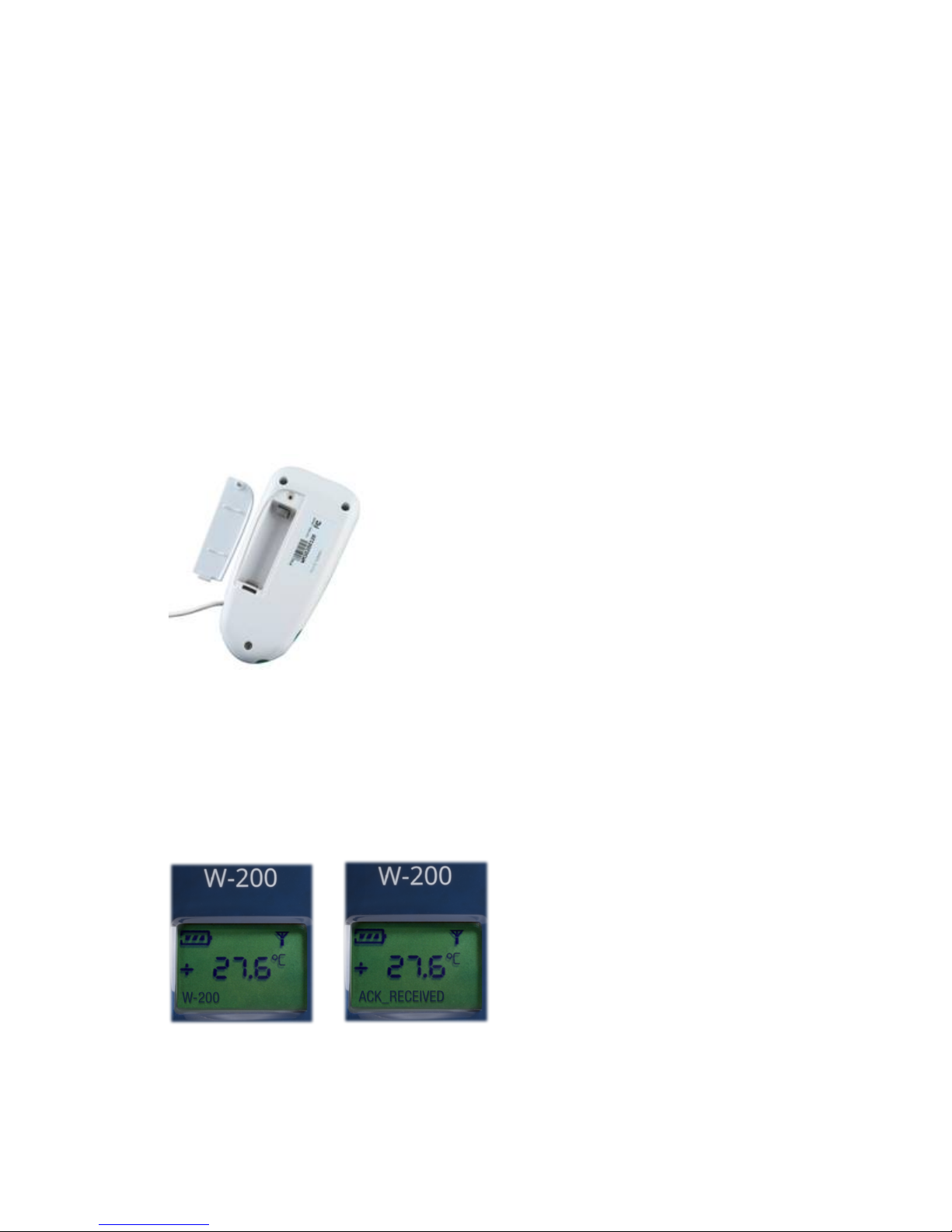
Figure*15*–*Remove*the*back*cover*and*insert*battery*
2. Wait!during!the!boot!sequence,!while!the!device!displays!various!information,!such!as!the!serial!
number,!etc.!
3. Once!the!boot!is!complete,!press!the!pushbutton!on!the!front!of!the!EDG E!W-200!module.!
4. If!a!receiver!is!within!wireles s!ra n g e,!th e !module!establishes!th e!wireless!connection!
automatically!and!ACK_Received!is!displayed!on!the!scree n . !
è
5. See!EDGEConnect!and!EDGEConnect!Mobile!documentation!for!more!details!on!activation!and!
settings.!
Page 27

! Activating!the!EDGE!W-200!module!
Temptime!LoRaWan!enabled!solution! EDGE!W-200!module! Page!27!
8.1 Refreshing!the!module!display!with!a!short!press!
You!may!refresh!the!EDGE!W-200!display!with!the!latest!sensor!readings!by!performing!a!short!press!on!
the!module’s!pushbutton.!Press!the !butto n!briefly!to!update!and!view!the!current!reading.!!
!
Page 28

! Appendix!-!Troubleshooting!
Temptime!LoRaWan!enabled!solution! EDGE!W-200!module! Page!28!
9 Appendix!-!Troubleshooting!!
If!you!are!having!difficu lt ies !w it h !your!configuration,!look!at!these!frequently!asked!questions!before!
contacting!technical!support.!
There%is%nothing%displayed%on%the%EDGE%module%screen.%What%should%I%do?%First,%check!to!make!sure!
the!battery!is!installed!and!th a t!it !is!in s er te d!in !t h e!rig h t!d ire c tio n !(+ /-!according!to!the!image!in!the!
battery!slot).!Try!testing!the!unit!with!a!battery!that!is!known!to!be!of!the!correct!size!and!voltage!(3.6V!
Lithium,!3600!mA).!Contact!technical!support!if!the!battery!is!OK!and!still!nothing!is!disp la y ed !o n !th e !
screen.!
I%press%the%button%fo r%3 %s ec o n d s%b u t %my%EDGE%W-200%module%does%not%connect%to%my%receiver;%what%
should%I%do?!If!your!module!d isp la ys!“ACK_NOT_RECEIVED”!instead!of!“ACK_RECEIVED”!when!you!press!
the!button,!try!bringing!the!module!close r!to!yo ur!rec eive r!for!a!b ette r!wire less!co n ne ction.!Also,!check!
to!make!sure!the!receiver!is!working!prope rly.!
The%EDGE%module%is%properly%connected%to%the%Clo u d.%Why%don’t%I%get%any%t e mperature%readings ?%
This!is!usually!due!to!a!loose!cable!or!improperly!connected!temperature!sensor.!Check!the!cable!
between!the!EDGE!module!and!the!sensor.!Unplug!the!sensor!and!plug!it!back!in.!Make!sure!there!are!
no!exposed!wires.!Try!a!different!sensor.!
Can%external%sensors%be%submerged%in%glycol?%
Yes,!for!all!metal-tipped!sensors,!but!not!the!dua l!tem pe ratu re/h um id ity!sen sor!(w ith!the !w hite!
Teflon/PTFE!casing).!To!“absorb”!sudden!variations!in!temperature,!such!as!those!caused!by!opening!
and!closing!the!chamber!door,!you!may!submerge!the!metal!part!of!the!sensor!in!glycol!or!glycerol.!This!
limits!inconsequentia l!te mperature!variations!re co rd e d !b y!th e ! senso r.!Ch ec k!y ou r!la b o rato ry ’s!Q u a lity!
guide!for!recommendations!and!make!sure!to!use!a!volume!of!glycol!that!corresponds!to!the!volume!of!
product(s)!you!are!monitoring.!To!achieve!the!same!results,!you!may!also!delay!the!transmission!of!
alarms!via!the!software!and!leave!the!sensors!exposed.!
Page 29

! Index!
Temptime!LoRaWan!enabled!solution! EDGE!W-200!module! Page!29!
10 Index!
ACK_NOT_RECEIVED,!12,!28!
ACK_RECEIVED,!12,!13,!28!
!
Battery,!2,!9,!26,!28!
!
Cloud!connectivity,!10!
!
EDGEConnect!Mobile,!6,!10,!20,!26!
EDGEConnect,!6,!13,!15,!16,!20,!26!
!
Glycol,!28!
!
Mounting!kit,!14!
!
Pushbutton,!12!
!
Sensor!types,!8!
!
 Loading...