

Page 1
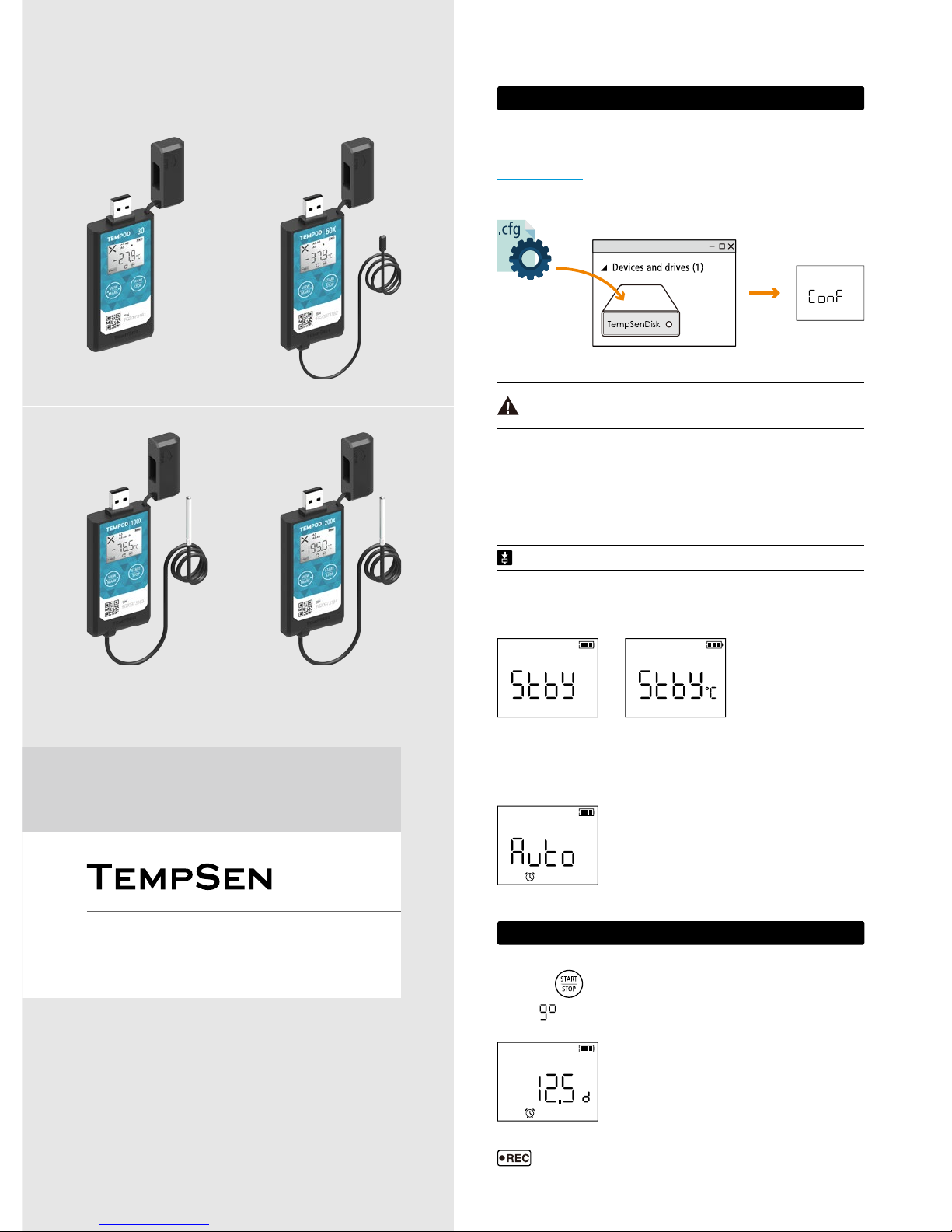
Connect Tempod® data logger to PC via USB connection, open online configuration portal
www.tempodlogger.com in internet browser, then select the device you are going to configure, input
configuration parameters, download configuration profile (.cfg) and save it to the logger created
Removable Storage Device "TempSenDisk" .
Connect logger to computer, open TempCentre software, move to Configure Device mode, enter
configuration parameters, and click on Apply to complete configuration.
Please DO NOT remove logger from PC before you are prompted of configuration success.
QG_170707 REV. A
Configuration profile created contains Local Time Zone information, so please download
new configuration profile when you are in different time zone to avoid time error.
1> Conguration
↑Standby
Ready for Manual Activiation after configuration (Press Start button to activate device). Temperature
unit appears in right indicating device is set to condition start (After device manually activited, recording
begins after temperature meets preset temperature conditions).
←Auto
Wait for recording begins at preset time automatically after
configuration.
↑Configuration
success
Quick Guide
▼ Congure Device via TempCentre
▼ LCD After Conguration
▼ Congure Device Online
Please download TempCentre software from www.tempsen.com/software/tempcentre
Tempod® 30 / 50X / 100X / 200X
Temperature Data Logger
2F, Building C2, Espace
6000 Shenzhuan Rd.
Shanghai 201619
China
T: +86 21 6768 5210
F: +86 21 6768 5232
E: [email protected]
W: www.tempsen.com
Press and hold
button for 3 seconds to activate device and start recording.
Meanwhile
(go) flashing on LCD reminds you to keep current button action.
2> Start Recording
←Start Delay (12.5 days)
appears on downleft corner of LCD indicating recording begins.
LCD changes to time countdown if device was set to a start delay after
successful activation.
Page 2
Quick Guide
▼ Time Mark
▼ Repeat Start
6> AccessKey
Qualified for Air Transportation Monitoring
Battery supplied with Tempod passed the Part III, SubSection 38.3 of the UN Manual of Tests and
Criteria. Tempod® data logger is also certified to meet requirements in General Requirements and
Section II of Packaging Instruction 970, IATA Dangerous Goods Regulations 58th Edition. Tempod®
complies with RTCA-DO160G Environmental Conditions and Test Procedures for Airborne Equipment,
it's allowed to used in air freight in active status.
You could enable and apply AccessKey during configuration, then user will be required to provide
correct AccessKey when programming device.
shows on LCD once AccessKey is enabled.
Press
button for 3 seconds to add a time stamped mark. Up to 9 marks available.
If device was set to Repeat Start, then user could press
to start a new recording again directly
after recording stops, no need to program device again.
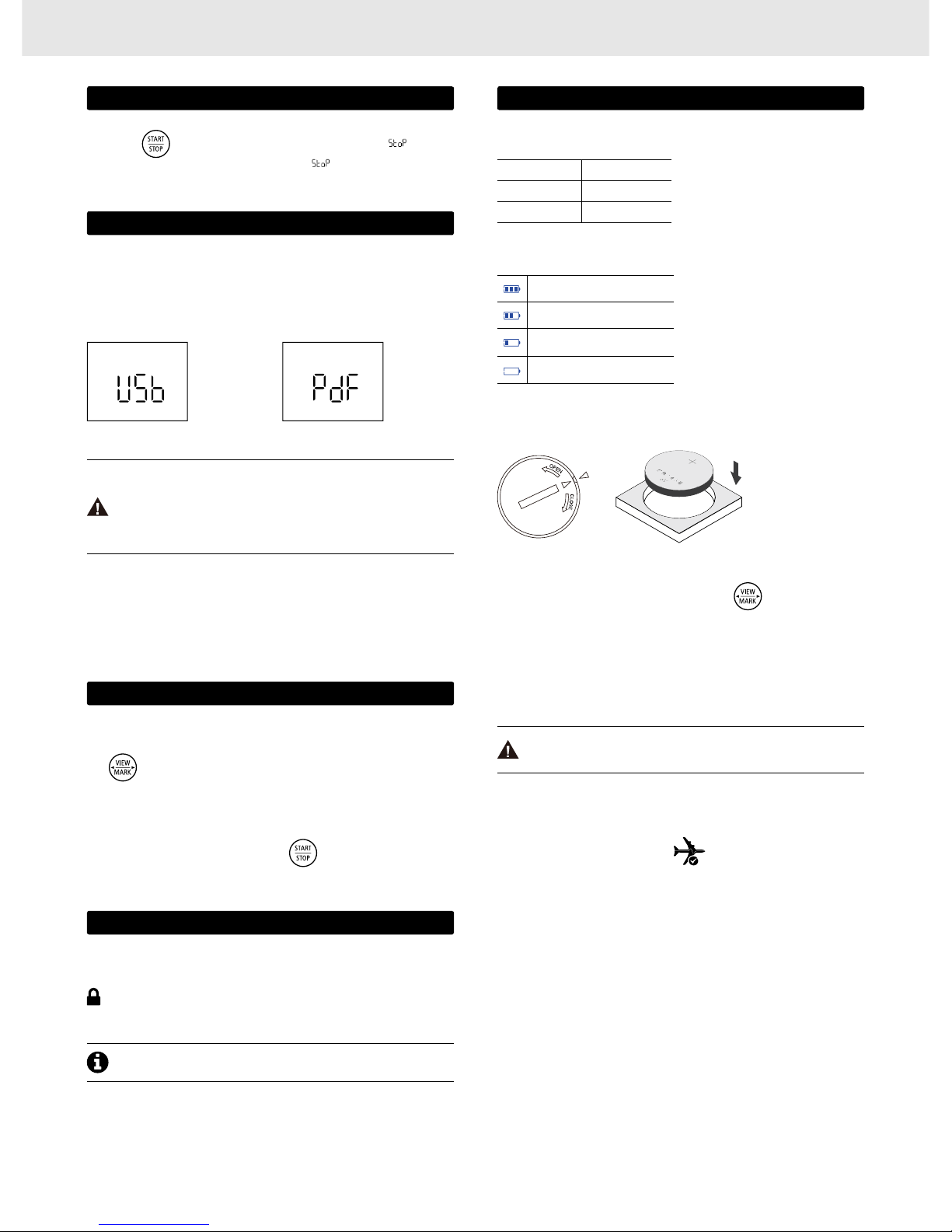
Press and hold
button for 3 seconds to manually stop recording, meanwhile (stop)
flashing on LCD reminds you to keep current button action until
becomes static, recording stopped
successfully.
4> Download Data
3> Stop Recording
Connect Tempod® data logger to USB port, logger begins to generate PDF report automatically, and it
would take couple of seconds to complete. The PDF report will be available in logger created removable
storage device "TempSenDisk". Please copy the PDF report and save it to your computer.
You could also download Tempod using TempCentre software, connect device to computer, open
TempCentre software, and then TempCentre starts searching USB data logger and then downloading
data automatically.
• Please DO NOT perform any "Save" or "Save as" actions within PDF reader software.
Otherwise, content of PDF file will be reorganized by PDF reader and raw data
embedded in PDF file becomes unrecognizable.
• Please DO NOT remove Tempod from USB port while it's still in process of generating
PDF report.
▼ Download Device via TempCentre
↑Generating PDF ↑Connecting to USB
▼ Download PDF Report
5> Other Actions
7> Battery
Full
Medium
Low
P
lease raplace battery
Empty
Please raplace battery NOW!
Environment Battery Life
Over 0°C 18 months
Under -10°C 10 months
Battery life varies from different temperature
conditions, usage frequencies, and batteries.
TempSen suggest use Panasonic
®
CR2450
lithium battery.
Battery indicator may not accuractly reflect actual
remaining battery in different low temperature
conditions.
▼ Battery Life
▼ Battery Indicator
• Please insert a coin in the groove on battery compartment cover to spin it in the direction of OPEN
to open battery cover, and take battery out, then please click
button several times until
LCD changes to blank, otherwise volume of new battery would not be correctly recognized within
one hour after battery replacement.
• Place a new Panasonic CR2450 battery into battery compartment with positive side upward.
• Put cover back to compartment in the position where triangle on cover points to the triangle on
logger, then spin cover in the direction of CLOSE to close battery cover.
▼ Replace Battery
Please DO NOT remove battery during recording or after configuration, otherwise error
will occur.
Please contact us by sending email to [email protected] if Accesskey lost.
Page 3
Tempod® 30 / 50X / 100X / 200X
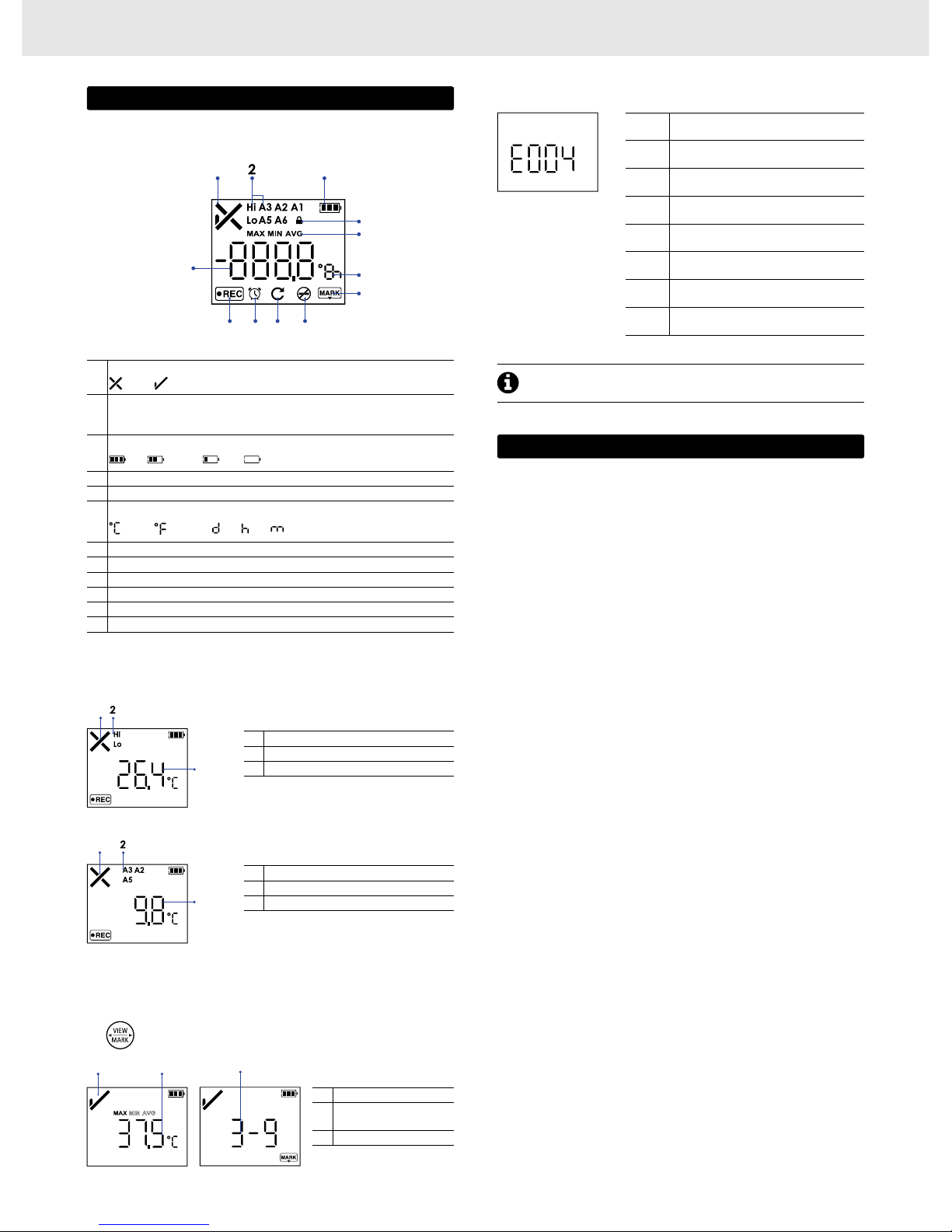
Click button to step through following recording statistics screens.
▼ Logging Statistics
▼ Errors
1 Status: Alarm
2 Alarmed Zones: High, Low
3 Current Reading: 26.4°C
1 Status: Alarm
2 Alarmed Zones: A2, A3, A5
3 Current Reading: 9.8°C
E004
Error 004
Device reset
E006
Error 006
Start time error
E009
Error 009
Start failure due to low battery
E101
Error 101
CFG file checksum error
E102
Error 102
CFG file error, incorrect device model
E104
Error 104
CFG file error, incompatible device version
E105
Error 105
CFG file error, missing or incorrect AccessKey
E106
Error 106
CFG file error, incorrect auto start time
1 Status: OK
2
Statistics
Max: 37.5°C
3 Marked events: 3
↖Error: 004
Error message appears
on device LCD when error
condition occurs.
▼ Home Screens
1
3
1
3
1
2
8> LCD
1
Overall Alarm Status
Alarm, OK
2
Alarm zones
Hi (High), Lo (Low)
A1, A2, A3, A5, A6
3
Remaining battery level
Full Medium Low Empty
4 AccessKey Protected
5 Statistics
6
Units
Celsius , Fahrenheit , day , hour, minute
7 Mark
8 Stop Button Disabled
9 Repeat Start Enabled
10 Clock
11 Running Status: Recording
12 Reading
1
3
4
5
6
7
8910
11
12
▼ Full Screen
Please re-configure device to eliminate error.
3
9> Important Usage Information
• Please open the cap of battery compartment and remove battery isolation strip before use.
• You could choose to Show Tabular Data in PDF report during configuring device, but please note
that it will take at around one minute to create PDF report with 28800 data points in tabular data
pages after device connected to computer. Computer is not able to discover device connected until
PDF report generation completes.
• Please DO NOT use the device if LCD no response or shows error (i.e E004) after activated.
• If error occurs after configuration, please try to re-configure data logger to eliminate error.
• Please DO NOT place device but only external probe (if any) in environment lower than -30°C to
avoid possible damage to device.
Page 4

Quick Guide
TempSen warrants this TempSen-branded hardware product against defects in materials
and workmanship under normal use for a period of ONE (1) YEAR from shipment date
(“Warranty Period”). If a hardware defect arises and a valid claim within the Warranty
Period, as its option and to the extent permitted by law, TempSen will either (1) repair the
hardware defect at no charge, using new parts or parts equivalent to new in performance
and reliability, (2) exchange the new product with a product is new or equivalent to new in
performance and reliability and is at least functionally equivalent to the original product, or (3)
refund the purchase price of this product. TempSen may request that you replace defective
parts with new or refurbished user-installable parts that TempSen provides in fulfillment
of its warranty obligation. A replacement product or parts, including a user-installable part
that has been installed in accordance with instructions provided by TempSen, assumes the
remaining warranty of the original product or ninety (90) days from the date of replacement
or repair, whichever provides longer coverage for you. When a product or part is
exchanged, any replacement item becomes your property and the replaced item becomes
TempSen’s property. Parts provided by TempSen in fulfillment it’s warranty obligation must
be used in products for which warranty service is claimed. When a refund is given, the
product for which the refund is provided must be returned to TempSen and becomes
TempSen’s property.
EXCLUSIONS AND LIMITATIONS
This Limited Warranty applies only to the hardware product manufactured by or for
TempSen that can be identified by the “TempSen” trademark, trade name, or logo affixed
to it. The Limited Warranty does not apply to any non-TempSen hardware product or
any software, even if packaged or sold with the TempSen hardware. Manufacturers,
suppliers, publishers, other than TempSen, may provide their own warranties to the end
user purchaser, but TempSen, in so far as permitted by law, provides their products “as
is”. Software distributed by TempSen with or without the TempSen brand name (including,
but not limited to system software) is not covered under this Limited Warranty. Refer to the
licensing agreement accompanying the software for details of your rights with respect to its
use.
TempSen does not warrant that the operation of product will be uninterrupted or errorfree. TempSen is not responsible for the damage arising from failure to follow instructions
relating to the product’s use.
This warranty does not apply: (a) to consumable parts, such as batteries, unless damage
has occurred due to a defect in materials or workmanship; (b) to cosmetic damage,
including but not limited to scratches, dents, and broken plastic on ports; (c) to damage
caused with non-TempSen products; (d) to damage caused by accident, abuse, misuse,
flood, fire, earthquake, or other external causes; (e) to damage caused by operating the
product outside the permitted or intended uses described by TempSen; (f) to damage
caused by service (including upgrades and expansions) performed by anyone who is not
a representative of TempSen or TempSen Authorized Service Provider; (g) to a product or
part that has been modified to alter functionality or capability without the written permission
of TempSen; or (h) if any TempSen serial number has been removed or defaced.
IMPORTANT: DO NOT OPEN THE HARDWARE PRODUCT. OPENING THE HARDWARE
PRODUCT MAY CAUSE DAMAGE THAT IS NOT COVERED BY THIS WARRANTY. ONLY
TEMPSEN OR AN AUTHORIZED SERVICE PROVIDER SHOULD PERFORM SERVICE ON
THIS HARDWARE PRODUCT.
10> Warranty
Please follow local regulations when recycling or disposing of wasted electronics.
 Loading...