

Page 1
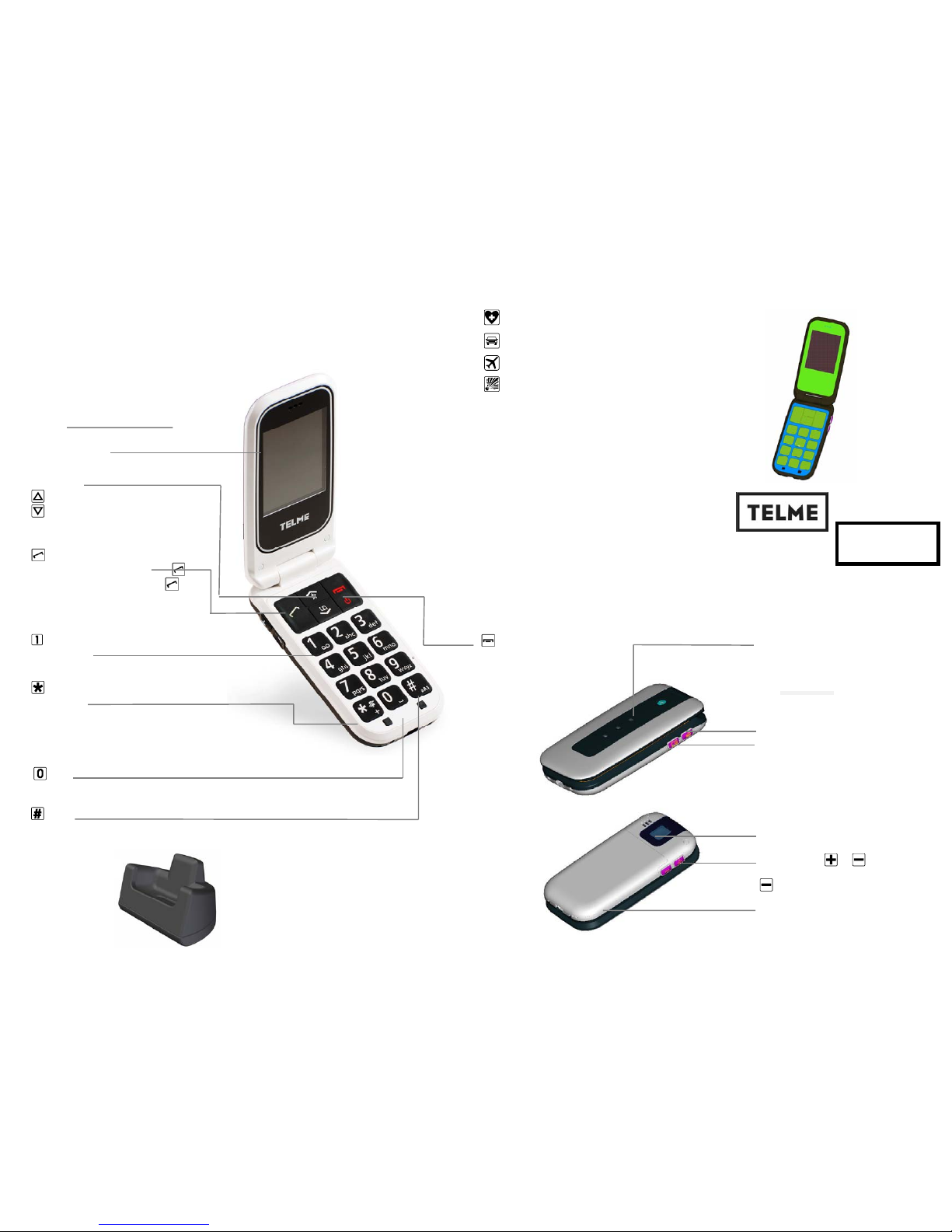
Speaker
Display (= Screen)
Arrow Keys
- On standby:
: Favorites (pre-set: Alarm Settings)
: Enter phone book contact list
- In menu and phonebook: scrolling
Pick-up/OK/Call list-Key
- Calling: Enter the number, then press
- Answering an incoming call: Press
- In menu: Confirm selection
- On standby: Enter call list (dialed, received, missed)
Voicemail
- Press and hold to connect with voicemail
(= answering maschine)
- Key
- In standby:
Long press: activate/ deactivate silent mode
Press twice: + (for international prefix, e.g +44 for UK)
- For SMS: Special characters: ( , . ‘ ‘ ? ; : ! “ ’ @ _ ~ & + - ( ) < > { } [ ] % = / \ # *
$ § ...)
Camera-key
-Trigger button
- Key
- For SMS: Space
Volume Control
&
Control the handset volume
incoming call: turn ringer off
Battery door
LED-lamps:
Envelope: New Message
Earphone: Missed call
Battery:
Blinking: Low battery
Glowing: Charging
Emergency Button
End/Back/Delete/Menu/ On/Off-Key
- In standby: Enter the menu
- In menu: One step back
- Writing numbers or text: Delete
- During a call: Terminate
- On/ Off: Press for 2 sec.
Torchlight
Dear Customer!
Congratulations to buying this TELME mobile telephone! You have made the right decision.
Content of delivery: Mobile telephone, charging adapter, battery, instructions, desktop charger
16 SAFETY INSTRUCTIONS
- Key
- SMS: Switch between capital, small letters & numbers
Desktop charger
1 Controls
17 INTENDED USE
This mobile telephone is robust and intended for mobile
use. It is to be protected from moisture (rain,
bathroom...) and impacts. Do not expose to prolonged
direct sunlight.
Other use as described above leads to damage of product and
furthermore is associated with hazards such as electrical
shock, fire and so on. The entire product may not be altered
nor rebuilt nor can the housing be opened.
18 TECHNICAL DATA
Never direct LED flashlight into the eyes of humans or
animals! (Protection class 3)
SAR-value: The maximum weight determined by the FCC is
1.6 W/kg. This model has a maximum of 0,788 W/kg.
Switch off mobile telephone in hospitals or near medical
devices. There should be a minimal distance between
pacemakers and switched-on telephones.
Do not drive a vehicle while holding a mobile phone in
your hand. Follow the laws and traffic rules of the country
you are in.
The mobile phone must be switched off while you are in an
airplane.
The telephone must be switched off near petrol stations or
other areas with explosive materials.
Dual band GSM
850/1900MHz
Dimensions: 99x51x17mm
Weight: 99g
Battery: Li-Ion 3.7V /
1000mAh
Standby-Time: 320h
Talk time: 5h
F210
Page 2
2 INSERT SIM CARD
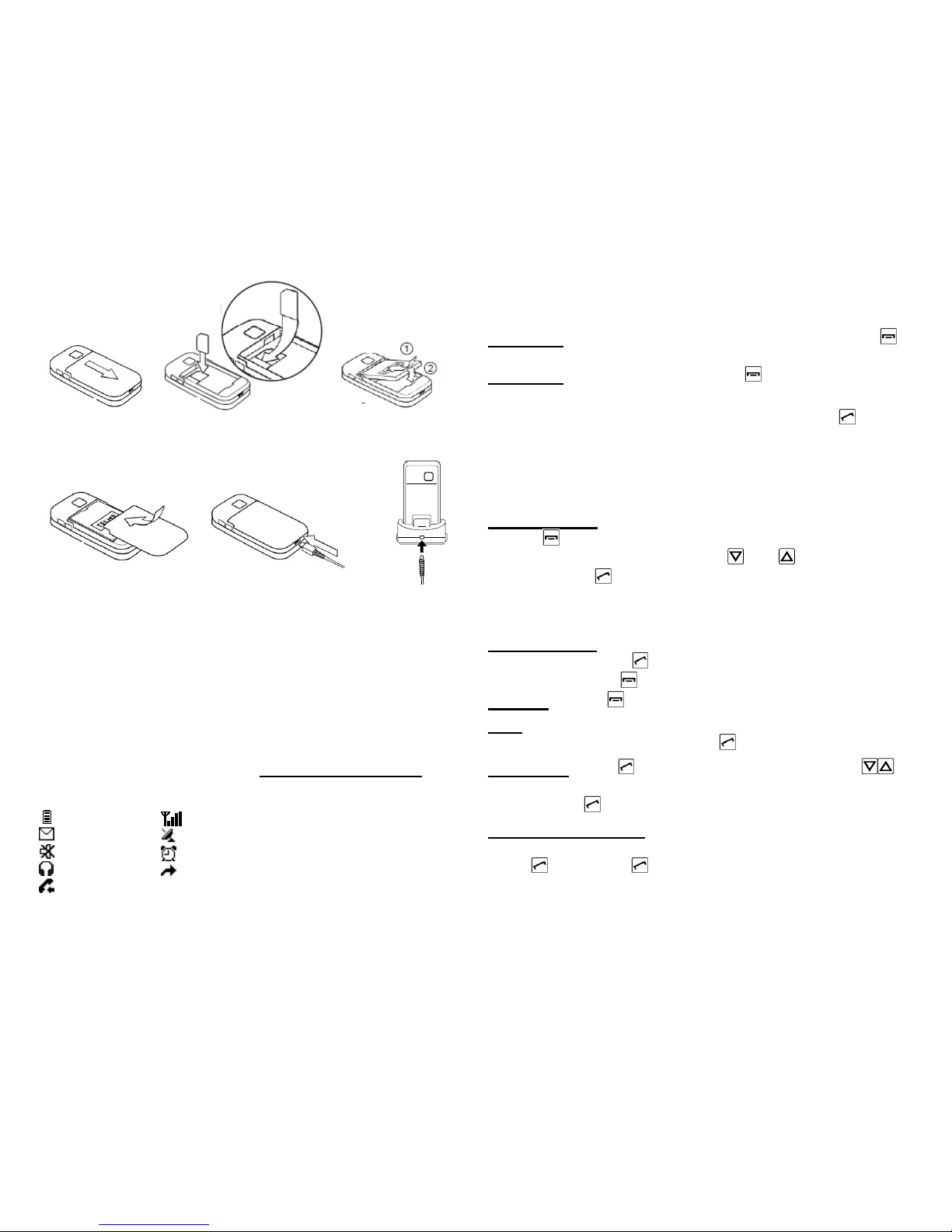
Fig. 1: Remove battery cover (as shown).
Fig. 2:
Slide SIM card in with the gold contact facing down.
3 INSERT BATTERY AND CHARGING
Fig. 3: Insert battery (gold contacts on right front side).
Fig. 4: Close battery door: slide cover to closed position
with a ‘click’.
Fig. 5: Plug charging cable into the socket on the lower
narrow side of the phone or
Fig. 6: in the plug on the back of the desktop charger
Charging: Battery indication bars in upper right corner of
the display are moving
The led on the upper side of the closed phone is on.
Full battery: Bars in upper right display corner are solid.
Note: Charge battery for at least 2 hours before first use!
4 DISPLAY SYMBOLS (SCREEN)
5 FIRST STEPS
Switch on the phone by pressing the power on/off-key for
at least 2 seconds.
Switch off
by pressing power on/off for 2 seconds again.
When using a new SIM card, enter the 4 digit PIN Code
(Personal Identification Number) and confirm with
.
PIN-Code: The PIN-Code is a 4-digit number combination
preventing others from switching on your mobile phone.
Switch off your PIN-Code: In menu: Settings Æ Security
Settings Æ PIN Æ PIN off.
Entering Menu:
Press
- key.
Scroll through menu points: with
and .
Confirm: with
.
Note: due to inactivity, the phone lights and screen turn off
after a while. To turn on again, press any key.
Incoming Call:
Pick up call: Press
- key.
Reject call: Press
- key.
End call
: Press - key.
Dial: Enter the telephone number via the keypad (including
area code with 0) - start call with
.
Redial list: press - key, scroll through call list with (all
dialled, missed and received calls) and select a number and
start call with
.
Handsfree Speaking:
During a call handsfree function can be switched on or off:
press
Options Æ Handsfree.
Fig 5 Fig 4
Fig 1 Fig 2
Fig 3
Fig 6
battery strength
new SMS
ringtone off
earphone
missed call
signal strength
Roaming mode
alarm on
call diversion
Page 3
6 PHONE BOOK
Saving names and numbers (start with international prefix,
e.g. +44 for UK).
Enter menu in standby modus (Standby-Modus: chapter 5)
with
, then , , , Æ Menu-Points: Search name, Add
contact, Own Number, Emergency numbers (add, change,
delete, status on/off), Copy All, Edit Contact, Delete,
Settings;
Storing phone book entries (Name & Number):
Enter menu with
Æ continue to Phone book: , , ,
Æ continue to Add contact:
, ÆEnter name via the
keypad (See chapter 8, Write SMS for text entry),
, ÆEnter
number,
and to Save.
Searching phone book entries:
Open the phone book with
:
Scroll through the entries with
and . Or:
Search names: enter the initial letters of the searched name
via the keypad (scroll through with
). When the requested
name is shown, press
to start a call.
7 EMERGENCY FUNCTION
You can store a total of 5 emergency numbers (family,
neighbours, friends, emergency services). In case of
emergency these preselected numbers will be dialed
automatically in a sequence, if the emergency key on the
back of the phone gets pressed and held.
A continuous warning tone then starts in “loudspeaker mode”
during emergency, so you and people nearby are warned
due to the emergency! If the first number cannot be reached,
the second number will be called automatically. If the second
number in row cannot be reached, the third will be called.
(max. 3 rotations of the 5 numbers).
Note: To avoid getting caught on a mailbox, the reached
person has to confirm your emergency by calling back.
If no emergency number is saved or if your calling card has
expired or you have no access to a foreign network (e.g.
roaming not permitted), 112 will be dialed.
Saving emergency numbers: Enter menu Æ Phone book Æ
Emergency numbers Æ Add emergency number Æ
choose Emergency number (1-5) Æpick contact from phone
book Æ done
Note: select emergency number: private number (has to
confirm as explained above) or official service number, f.i.:
ambulance, police, etc. (no confirmation call required).
Switch emergency function On / Off: In menu Phone book
Æ Emergency numbers Æ Status Æ On / Off.
Note: If you want to save emergency numbers from official
services, police, fire department, etc., you have to clarify this
with the certain institution. No liability will be assumed for
possible costs incurred if you dial accidentally.
8 SMS MESSAGES
SMS (Short Message Service) are written messages with a
maximum of 160 characters.
Receive SMS: A short signal and a registration on the
display inform you about a new, incoming SMS message.
With
you can read the message immediately or see a list
of messages which have already been received in the menu
Messages Æ SMS Æ Received SMS.
Write SMS: Enter menu with Æ Messages Æ SMS Æ
Write new SMS: The text entry is done by the keypad.
(e.g. 2x
, 2x , 3x , 3x , 3x for Hello).
Page 4
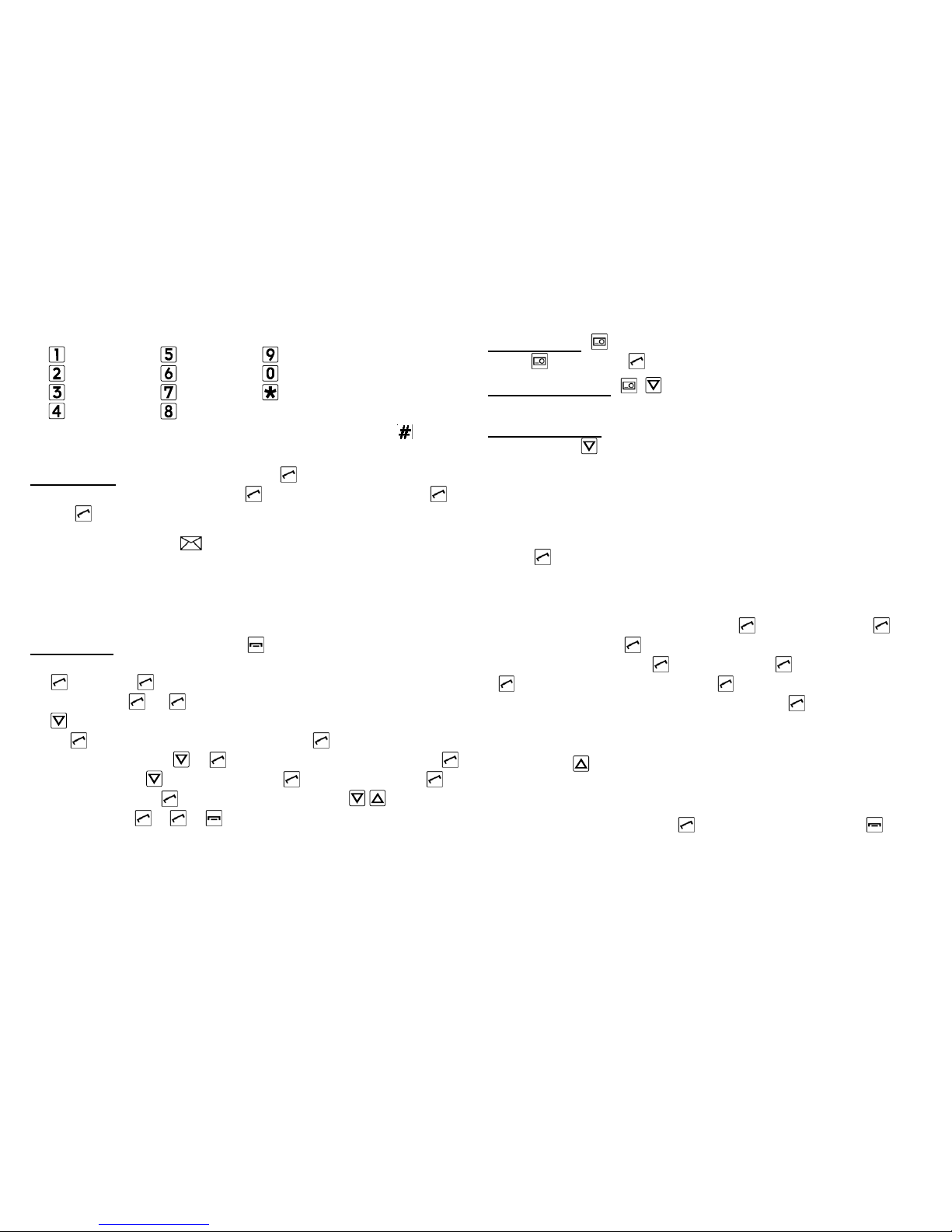
Each key carries several characters, appearing by multiple
presses.
Switch between different entry methods by pressing :
abc-only small ABC-only CAPITAL 123-Numbers
Send SMS: Select Send with 2x and enter number or
select from phone book (2x
, select contact with ).
Press
to send SMS.
9 MMS MESSAGES
MMS (Multimedia Message Service) are messages incl.
pictures, audio, etc.
First time use: Menu ÆMMSÆMMS SettingsÆMMS
accountÆchoose operator
Send MMS: enter Menu with Æ Messages Æ MMS Æ
Create new MMS:
1.
(Edit) Æ Add number: Enter number/ select phone
book entry
Æ
2.
to Subject (this will be the headline of the message)
Æ
(Edit) Æ Insert message text Æ (Done).
3. Edit content: 1x
Æ (Edit) Æ Insert text or picture:
(Options) Æ to Add picture: Æ open phone: Æ
open pictures:
Æ scroll to picture with Æ choose
picture with
Æ Æ (done).
If you have problems at the first time sending MMS, contact
your operator to check MMS settings.
10 CAMERA:
Take picture: press camera-button Æpicture detail OK,
press
, store with
Camera settings: , : Settings, picture size, white
balance
Picture gallery: menu Æ select picture, scroll to next
picture with
.
Pictures: Æ option: View, Send as MMS, Use as
background, Use for contact (choose the phone book
entry, (note: only contacts from phone memory, not from
SIM-card). Calls to/from this contact will then show the
linked picture on the display), Rename, Delete, Delete all
files
(OK).
11 TOOLS:
Bluetooth:
Switch on: In menuÆ Tools
Æ Bluetooth Æ
Bluetooth on/off
Pairing: menu Tools
Æ Bluetooth Æ Connections
Æ Search for new device to search for devices Æ
select the device you want to pair, select
. Next time you
turn on Bluetooth connection will start automatically.
Alarm
Standby 1x
in menu Æ On/Off: to switch Alarm clock on
or offÆ Change: to set the time and repetition (once, daily,
personal setting).
If the alarm rings, end with . Use mute function with to
reactivate the alarm after 1 minute.
w x y z 9 ý þ
Space; 0
Special
characters: , . ? ; : ! “ ’ @ _ ~
-
. , ! ? ‘ “ @ : 1
a b c 2 ä æ å à
d e f 3 è è ê
g h i 4 ì í î ï
j k l 5 £
m n o 6 ö ø ó
p q r s 7 ß $
t u v 8 ü ù ú
Page 5
12 OTHER FUNCTIONS IN SETTINGS
Enter menu with
Æ continue to Settings: , Æ
Sound & Alert: To choose a phone profile (f.i. Silent) and
configure your personal settings.
Call waiting: You can activate/deactivate and check status
to get a notification about an incoming call while having a
phone talk.
Network settings: Choose automatic (automatic boot in a
network) or manual selection (select a network manually).
Favorites
: your favorite functions pressing 1 button
Auto power on/Auto power off
Voicemail number: Change the voicemail number
Security settings: Activate, deactivate or change PIN and
phonecode (default phone code: 1234).
Restore Factory: Reset the phone to factory settings.
13 DISPOSAL
Disposal of packaging
: Packaging materials are
recyclable and shall enter the recycling process.
Disposal of battery: Do not insert battery into
household trash for disposal! You are obligated to
return used batteries. These can be handed into
local collection areas or to specialty shops.
Disposal of Device: When this product is taken out of
service, please do not throw it into the household
trash. Take care of the environment by bringing it to a
collection place, where old devices are accepted and
brought into an environmentally-friendly disposal/
recycling procedure.
14 FREQUENTLY ASKED QUESTIONS
Screen shows “Insert SIM card! Only emergency call
112“: Check the direction of the SIM card
A call failed: Check the selected telephone number and
area code again for accuracy (area code entered?).
The mobile telephone display is blank/black: Telephone
is in energy saving mode (press any key) or it is switched off
(press
for 2 seconds to switch on).
The mobile phone does not react: Remove battery, re-
insert and switch on the device. If there is still no reaction,
refer to the service centre.
The charging procedure does not begin: This can take
several minutes. If there is no reaction after 10 minutes, refer
phone to service centre.
15 Warning
FCC Warning:
This device complies with part 15 of the FCC Rules. Operation is subject to the
following two conditions: (1) This device may not cause harmful interference, and
(2) this device must accept any interference received, including interference that
may cause undesired operation.
Changes or modifications not expressly approved by the party responsible for
compliance could void the user's authority to operate the equipment.
Note: This equipment has been tested and found to comply with the limits for a
Class B digital device, pursuant to part 15 of the FCC Rules. These limits are
designed to provide reasonable protection against harmful interference in a
residential installation. This equipment generates, uses and can radiate radio
frequency energy and, if not installed and used in accordance with the
instructions, may cause harmful interference to radio communications.
However, there is no guarantee that interference will not occur in a particular
installation. If this equipment does cause harmful interference to radio or
television reception, which can be determined by turning the equipment off and
on, the user is encouraged to try to correct the interference by one or more of
the following measures:
—Reorient or relocate the receiving antenna.
Page 6

—Increase the separation between the equipment and receiver.
—Connect the equipment into an outlet on a circuit different from that to which
the receiver is connected.
—Consult the dealer or an experienced radio/TV technician for help.
Specific Absorption Rate (SAR) information
SAR tests are conducted using standard operating positions accepted by the
FCC with the Phone transmitting at its highest certified power level in all tested
frequency bands, although the SAR is determined at the highest certified power
level, the actual SAR level of the phone While operating can be well below the
maximum value, in general, the closer you are to a Wireless base station
antenna, the lower the power output.
Before a new model phone is a available for sale to the public, it must be tested
and certified to the FCC that it does not exceed the exposure limit established by
the FCC, Tests for each phone are performed in positions and locations (e.g. at
the ear and worn on the body)as required by the FCC.
For body worn operation, this model phone has been tested and meets the FCC
RF exposure guidelines when used with an accessory designated for this product
or when used with an accessory that Contains no metal and that positions the
handset a minimum of 1.5 cm from the body. Non-compliance with the above
restrictions may result in violation of RF exposure guidelines.
FCC Hearing-Aid Compatibility (HAC)
The F210 has been tested for hearing aid compatibility. This device has an M4
and T4 rating.
When some wireless devices are used near some hearing devices such as
hearing aids and implants, users may detect a buzzing or humming noise. Some
hearing devices are more immune than others to this interference noise. Wireless
devices may also vary in the amount of interference they generate.
The ratings for compatibility of digital wireless devices with hearing aids are
described in the American National Standards Institute (ANSI) C63.19 standard:
M-Rating: Phones rated M3 or M4 meet FCC requirements and are likely to
generate less interference with hearing devices than phone that are not labeled.
M4 is the better/higher of the two ratings.
T-Rating: Phones rated T3 or T4 meet FCC requirements and are likely be more
usable with hearing devices' telecoil than unrated phones. T4 is the better/higher
of the two ratings. F210 is rated T4
The more immune the hearing aid device is, the less likely one is to experience
interference noise from the wireless phone. Hearing aid devices may also be
rated. Adding the rating of the hearing aid and the phone would determine
probable usability:
1. Any combined rating equal to or greater than six offers the best use.
2. Any combined rating equal to five is considered normal use.
The ratings are not guarantees. Results will vary depending on the user's hearing
device and hearing loss. If your hearing device happens to be vulnerable to
interference, you may not be able to use this device successfully. Trying out this
device with your hearing device is the best way to evaluate it for your personal
needs.
This device has been tested and rated for use with hearing aids for some of the
wireless technologies that it utilizes. However, there may be some newer
wireless technologies used in this phone that have not been tested yet for use
with hearing aids. It is important to try the different features of this phone
thoroughly and in different locations, using your hearing aid or cochlear implant,
to determine if you hear any interfering noise. Consult your service provider or
the manufacturer of this phone for information on hearing aid compatibility.
 Loading...