

Page 1

Telit GM862 PCS
Tri Band GPRS Data Terminal System
TECHNICAL
MANUAL
Code: 1vv0300638
Rev. 2
Oct. 23, 2003
Page 2

TECHNICAL MANUAL
T elit GM862 PCS
Tri Band GPRS Data Terminal System
REVISION INDEX
REV
MOD.
SUBJECT OF MODIFICA TION
DATE SIGNATURE
1 Change pcb revision from CS1083 to CS1083a 17/07/03
2 Change value on a PCB components 21/10/03
Page 3

TECHNICAL MANUAL
Telit GM862 PCS
Tri Band GPRS Data Terminal System
INDEX Part1 CAP TITLE REV 1 INTRODUCTION 2 2 MECHANICAL VIEW 0 3TECHNICAL SPECIFICATIONS1
Page 4

TECHNICAL MANUAL
T elit GM862 PCS
Tri Band GPRS Data Terminal System
Rev. 2
1 INTRODUCTION
The Telit GM862 PCS is a Tri Band transceiver with integrated Data Terminal Adapter
functions that emulates a traditional modem allowing the compatibility in GSM/DCS/
PCS environment with many data communication software.
The design and development of the Telit GM862 PCS Tri Band cellular data terminal
system is in line with the following documents:
3GPP TS 51.010–1 v. 4.4.0 GSM/EDGE Radio Access Network; Digital cellular
telecommunications system (Phase 2+): Mobile Station (MS) Conformance
Specification; Part 1. Conformance Specification.
EN 301 511 Global system for mobile communications (GSM); Harmonised standard
for mobile stations in the GSM 900 and DCS 1800 bands covering essential
requirements under Article 3(2) of the R&TTE directive (1999/5/EC).
EN 60950 Safety of information technology equipment, including business equipment.
EN 301 489–07 Electromagnetic compatibility and radio spectrum matters (ERM);
Electromagnetic compatibility (EMC) standard for radio equipment and services; Part
7: Specific conditions for mobile and portable radio and ancillary equipment of digital
cellular radio telecommunications systems (GSM and DCS).
Page 1 of 2
Page 5

TECHNICAL MANUAL
T elit GM862 PCS
Tri Band GPRS Data Terminal System
Rev. 2
1.1 Delta HW between GM862–PCS HW rev.1 and GM862–PCS HW rev.2
The changes that determines the difference between the GM862–PCS HW rev.1 and
the GM862–PCS HW rev.2 are the following:
On the GM862–PCS HW rev.2 the following components are added/changed:
Added: R103 47KOhm 0402 between AXE and Vcore.
See CP030027 for further details.
Changed: R327 changed value from 220R 5% 0402 to 820R 5% 0402
See CP030041 for further details.
Page 2 of 2
Page 6

TECHNICAL MANUAL
T elit GM862 PCS
Tri Band GPRS Data Terminal System
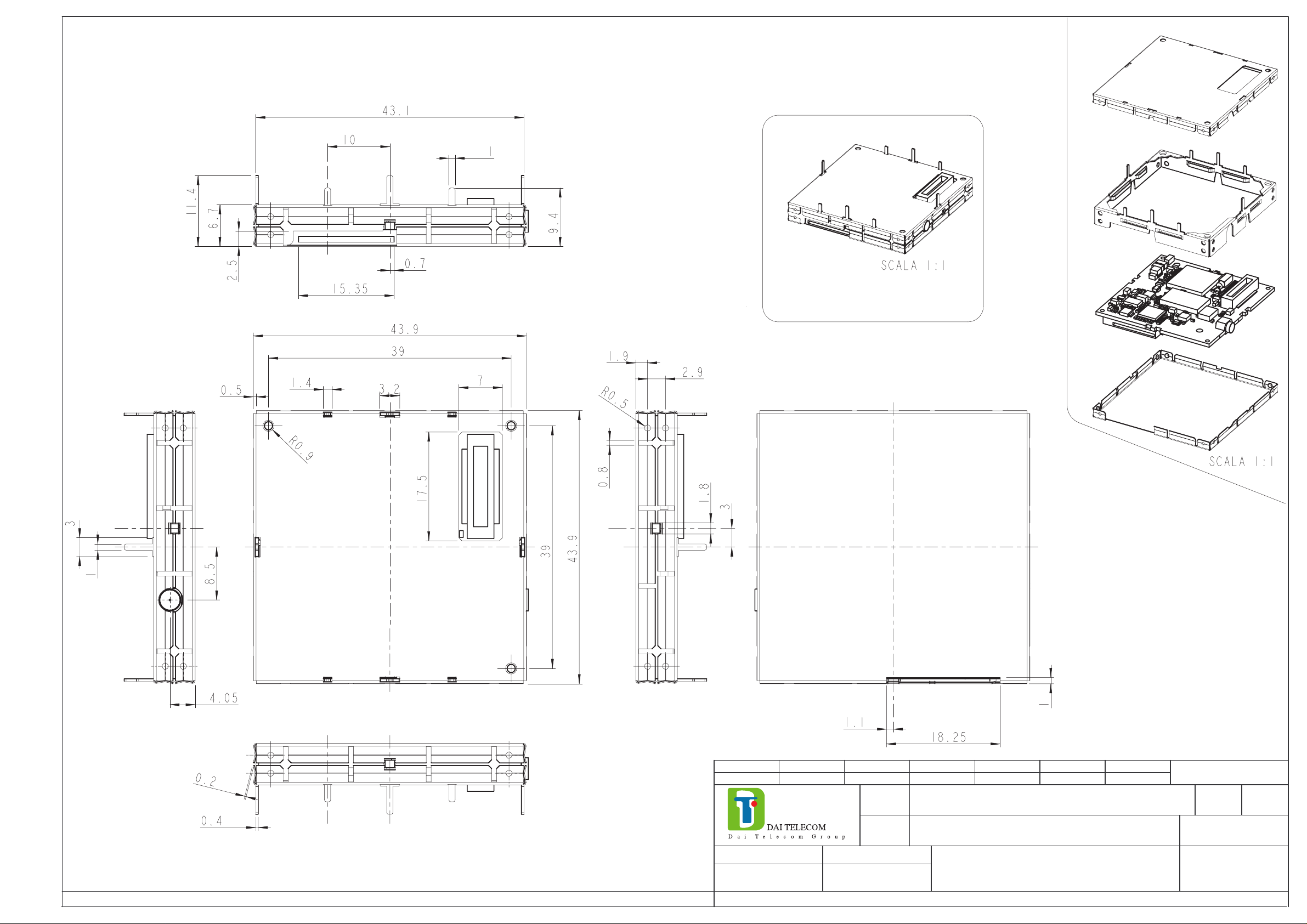
2 MECHANICAL VIEW
2.1 Mechanical view Telit GM862 PCS
Page 1 of 1
Page 7
MODIFICA
DATA
Scala:
1:1
Toll.gen.
Materiale:
Annotazioni:
Valido da:
Foglio
11
Sostituisce il N.
N.fogli
Il presente disegno a termini di legge non deve essere utilizzato per la costruzione del particolare ne’ riprodotto o reso pubblico senza il nostro permesso scritto.
DIS
Lucà
Progetto
0260
Verif.
Data
03.07.2003
Denominazione dell’oggetto:
CODICE
MECHANICAL VIEW GM862 PCS 40260NT10072
Page 8

TECHNICAL MANUAL
T elit GM862 PCS
Tri Band GPRS Data Terminal System
Rev. 1
3 TECHNICAL SPECIFICATIONS
The scope of this document is to summarize the technical characteristics of the Telit
GM862 PCS Data Terminal System.
Page 1 of 1
Page 9

TECHNICAL MANUAL
Telit GM862 PCS
Tri Band GPRS Data Terminal System Rev.1
Contents
1 GENERAL PRODUCT DESCRIPTION.................................................................................7
1.1 Dimensions .............................................................................................................................................................................7
1.2 Weight......................................................................................................................................................................................8
1.3 Environmental requirements ............................................................................................................................................8
1.3.1 Temperature range.......................................................................................................................................................8
1.3.2 Vibration Test (non functional).................................................................................................................................8
1.4 Operating Frequency...........................................................................................................................................................9
1.5 Transmitter output power..................................................................................................................................................9
1.6 Reference sensitivity.............................................................................................................................................................9
1.7 Antenna ................................................................................................................................................................................ 10
1.7.1 Antenna connector.....................................................................................................................................................10
1.8 Supply voltage.................................................................................................................................................................... 12
1.9 Power consumption...........................................................................................................................................................12
1.10 Embodied Battery charger..............................................................................................................................................12
1.11 User Interface..................................................................................................................................................................... 13
1.11.1 Speech Coding............................................................................................................................................................13
1.11.2 Sim Reader..................................................................................................................................................................13
1.11.3 SMS..............................................................................................................................................................................13
1.11.4 Real Time Clock and Alarm.....................................................................................................................................13
1.11.5 Data/fax transmission................................................................................................................................................13
1.11.6 Local security management......................................................................................................................................14
1.11.7 Call control ..................................................................................................................................................................14
1.11.8 Phonebook...................................................................................................................................................................14
1.11.9 Characters management ............................................................................................................................................14
1.11.10 SIM related functions................................................................................................................................................14
1.11.11 Call status indication.................................................................................................................................................14
1.11.12 Indication of network service availability.............................................................................................................14
1.11.13 Automatic answer (Voice, Data or FAX)..............................................................................................................15
1.11.14 Supplementary services (SS)....................................................................................................................................15
1.11.15 Acoustic signaling.....................................................................................................................................................15
1.11.16 DTMF tones................................................................................................................................................................15
1.11.17 Buzzer output.............................................................................................................................................................16
1.12 EMC.......................................................................................................................................................................................16
1.13 Logic level specifications .................................................................................................................................................16
1.13.1 Reset signal.................................................................................................................................................................17
1.14 Audio levels specifications...............................................................................................................................................19
1.15 Interface connectors on GM862-PCS ..........................................................................................................................20
Page 1 of 187
Page 10

TECHNICAL MANUAL
Telit GM862 PCS
Tri Band GPRS Data Terminal System Rev.1
1.16 Mounting the GM862-PCS on your Board................................................................................................................. 25
1.16.1 Antenna Coaxial cable fixing...................................................................................................................................25
1.16.2 Precautions..................................................................................................................................................................26
2 AT COMMAND........................................................................................................................27
2.1 Definitions............................................................................................................................................................................27
2.2 AT Command Syntax.......................................................................................................................................................28
2.2.1 Command lines...........................................................................................................................................................28
2.2.2 Information responses and result codes .................................................................................................................29
2.2.3 Command Response Timeout..................................................................................................................................29
2.2.4 Command issuing timing..........................................................................................................................................32
2.2.5 Factory Profile and parameters stored in the profile ............................................................................................32
2.3 Command Availability Table......................................................................................................................................... 33
2.4 Hayes Compliant AT Commands .................................................................................................................................39
2.4.1 Generic Modem Control...........................................................................................................................................39
2.4.1.1 &F - restore factory configuration.....................................................................................................................39
2.4.1.2 Z - soft reset...........................................................................................................................................................39
2.4.1.3 +FCLASS - select active service class.............................................................................................................40
2.4.1.4 &Y - designate a default reset profile ...............................................................................................................40
2.4.1.5 &W - store current configuration.......................................................................................................................41
2.4.1.6 &Z - store telephone number in the Telit GM862-PCS module internal phonebook...............................41
2.4.1.7 &N - display internal phonebook stored numbers..........................................................................................42
2.4.1.8 +GMI - request manufacturer identification....................................................................................................42
2.4.1.9 +GMM - request model identification..............................................................................................................42
2.4.1.10 +GMR - request revision identification............................................................................................................43
2.4.1.11 +GCAP - request capabilities list ......................................................................................................................43
2.4.1.12 +GSN - request serial number............................................................................................................................43
2.4.1.13 &V - display current configuration & profile..................................................................................................44
2.4.1.14 &V0 - display current configuration & profile................................................................................................45
2.4.1.15 &V1 - display S registers values .......................................................................................................................45
2.4.1.16 &V2 - display last connection statistics ...........................................................................................................46
2.4.1.17 \V - single line connect message.......................................................................................................................46
2.4.1.18 %L - report line signal level................................................................................................................................47
2.4.1.19 %Q - report line quality .......................................................................................................................................47
2.4.2 DTE - modem interface control...............................................................................................................................48
2.4.2.1 E - command echo................................................................................................................................................48
2.4.2.2 Q - quiet resut codes ............................................................................................................................................48
2.4.2.3 V- result code form...............................................................................................................................................49
2.4.2.4 X - extended result codes....................................................................................................................................49
2.4.2.5 I - Request identifier and software checksum ..................................................................................................50
2.4.2.6 &C - data carrier detect (DCD) control............................................................................................................50
2.4.2.7 &D - data terminal ready (DTR) control..........................................................................................................51
2.4.2.8 &K - flow control .................................................................................................................................................51
2.4.2.9 &S - data set ready (DSR) control.....................................................................................................................52
2.4.2.10 \R - ring (RI) control............................................................................................................................................53
2.4.2.11 +IPR - fixed DTE interface rate .........................................................................................................................53
2.4.2.12 +IFC - DTE - DTA flow control........................................................................................................................54
2.4.2.13 +ILRR - DTE - modem rate reporting..............................................................................................................55
2.4.2.14 +ICF - DTE - modem character format............................................................................................................56
2.4.3 Call Control.................................................................................................................................................................57
2.4.3.1 D - dial ....................................................................................................................................................................57
2.4.3.2 T - set tone dial ......................................................................................................................................................59
Page 2 of 187
Page 11

TECHNICAL MANUAL
Telit GM862 PCS
Tri Band GPRS Data Terminal System Rev.1
2.4.3.3 P - set pulse dial....................................................................................................................................................59
2.4.3.4 A - answer..............................................................................................................................................................59
2.4.3.5 A/ - Last command automatic repetition..........................................................................................................60
2.4.3.6 H - disconnect.......................................................................................................................................................60
2.4.3.7 O - return to On Line Mode................................................................................................................................61
2.4.3.8 &G - guard tone....................................................................................................................................................61
2.4.3.9 &P - pulse dial make/break ratio ........................................................................................................................62
2.4.4 Modulation control....................................................................................................................................................62
2.4.4.1 +MS - modulation control...................................................................................................................................62
2.4.4.2 %E - enable/disable line quality monitor and auto retrain or fallback / fallforward.................................63
2.4.5 Compression control.................................................................................................................................................64
2.4.5.1 +DS - set data compression................................................................................................................................64
2.4.5.2 +DR - data compression reporting....................................................................................................................64
2.4.6 Break control...............................................................................................................................................................65
2.4.6.1 \B - transmit break to remote..............................................................................................................................65
2.4.6.2 \K - break handling...............................................................................................................................................65
2.4.7 S parameters................................................................................................................................................................66
2.4.7.1 S0 - number of rings to auto answer.................................................................................................................66
2.4.7.2 S1 - ring counter ...................................................................................................................................................66
2.4.7.3 S2 - escape character............................................................................................................................................67
2.4.7.4 S3 - carriage return character..............................................................................................................................67
2.4.7.5 S4 - line feed character ........................................................................................................................................68
2.4.7.6 S5 - backspace character.....................................................................................................................................68
2.4.7.7 S7 - wait time for carrier, silence or dial tone.................................................................................................69
2.4.7.8 S10 - lost carrier to hang up delay.....................................................................................................................69
2.4.7.9 S12 - escape prompt delay..................................................................................................................................70
2.4.7.10 S25 - delay to DTR off.........................................................................................................................................70
2.4.7.11 S30 - disconnect inactivity timer........................................................................................................................71
2.4.7.12 S38 - delay before forced hang up.....................................................................................................................71
2.5 ETSI GSM 07.07 AT Commands ..................................................................................................................................72
2.5.1 General.........................................................................................................................................................................72
2.5.1.1 +CGMI - request manufacturer identification.................................................................................................72
2.5.1.2 +CGMM - request model identification...........................................................................................................72
2.5.1.3 +CGMR - request revision identification.........................................................................................................72
2.5.1.4 +CGSN - request product serial number identification..................................................................................73
2.5.1.5 +CSCS - select TE character set........................................................................................................................73
2.5.1.6 +CIMI - request international mobile subscriber identity (IMSI)................................................................74
2.5.2 Call control..................................................................................................................................................................75
2.5.2.1 +CBST - select bearer service type...................................................................................................................75
2.5.2.2 +CRLP - radio link protocol...............................................................................................................................76
2.5.2.3 +CR - service reporting control.........................................................................................................................77
2.5.2.4 +CEER - extended error report ..........................................................................................................................78
2.5.2.5 +CRC - cellular result codes ..............................................................................................................................79
2.5.3 Network service handling.........................................................................................................................................80
2.5.3.1 +CNUM - subscriber number.............................................................................................................................80
2.5.3.2 +CREG - network registration report ................................................................................................................81
2.5.3.3 +COPS - operator selection................................................................................................................................83
2.5.3.4 +CLCK - facility lock/ unlock............................................................................................................................84
2.5.3.5 +CPWD - change facility password..................................................................................................................85
2.5.3.6 +CLIP - calling line identification presentation..............................................................................................86
2.5.3.7 +CLIR - calling line identification restriction.................................................................................................87
2.5.3.8 +CCFC - call forwarding number and conditions..........................................................................................88
2.5.3.9 +CCWA - call waiting.........................................................................................................................................90
2.5.3.10 +CHLD - call holding services ..........................................................................................................................91
2.5.3.11 +CUSD - unstructured supplementary service data........................................................................................92
2.5.3.12 +CAOC - advice of charge..................................................................................................................................94
Page 3 of 187
Page 12

TECHNICAL MANUAL
Telit GM862 PCS
Tri Band GPRS Data Terminal System Rev.1
2.5.3.13 +CLCC - list current calls ..................................................................................................................................95
2.5.3.14 +CSSN – SS Notification....................................................................................................................................96
5.4.3.15 +CCUG – Closed User Group supplementary service control....................................................................97
2.5.4 Mobile Equipment control........................................................................................................................................98
2.5.4.1 +CPAS - phone activity status..........................................................................................................................98
2.5.4.2 +CFUN Set phone functionality (Power Saving Management)...................................................................99
2.5.4.3 +CPIN - enter PIN..............................................................................................................................................100
2.5.4.4 +CSQ- signal quality..........................................................................................................................................102
2.5.4.5 +CPBS - select phonebook memory storage.................................................................................................103
2.5.4.6 +CPBR - read phonebook entries....................................................................................................................104
2.5.4.7 +CPBF - find phonebook entries.....................................................................................................................105
2.5.4.8 +CPBW - write phonebook entry....................................................................................................................106
2.5.4.9 +CCLK - Clock Management..........................................................................................................................107
2.5.4.10 +CALA - Alarm Management.........................................................................................................................108
2.5.4.11 +CALM - alert sound mode..............................................................................................................................110
2.5.4.12 +CRSL - ringer sound level..............................................................................................................................110
2.5.4.13 +CLVL - loudspeaker volume level................................................................................................................111
2.5.4.14 +CMUT - microphone mute control ...............................................................................................................111
2.5.4.15 +CACM - accumulated call meter...................................................................................................................112
2.5.4.16 +CAMM - accumulated call meter maximum...............................................................................................112
2.5.4.17 +CPUC - price per unit and currency table....................................................................................................113
2.5.5 Mobile equipment errors.........................................................................................................................................114
2.5.5.1 +CMEE - report mobile equipment error.......................................................................................................114
2.5.5.2 +CME ERROR: - ME error result code.........................................................................................................115
2.5.6 Voice Control (TIA IS-101)...................................................................................................................................116
2.5.6.1 +VTS: - DTMF tones transmission.................................................................................................................116
2.5.7 Commands For GPRS .............................................................................................................................................117
2.5.7.1 +CGACT - PDP context activate or deactivate.............................................................................................117
2.5.7.2 +CGATT - GPRS attach or detach..................................................................................................................118
2.5.7.3 +CGDATA - Enter data state ...........................................................................................................................119
2.5.7.4 +CGDCONT - define PDP context .................................................................................................................120
3.3.7.1 +CGPADDR - show PDP address..................................................................................................................121
2.5.7.5 +CGREG - GPRS network registration status ..............................................................................................122
3.3.7.2 +CGQMIN - quality of service profile (minimum acceptable)..................................................................123
3.3.7.3 +CGQREQ - quality of service profile (requested)......................................................................................124
2.5.8 Commands For Battery Charger............................................................................................................................125
2.5.8.1 +CBC - Battery Charge.....................................................................................................................................125
2.6 ETSI GSM 07.05 AT Commands for SMS and CB services...............................................................................126
2.6.1 General configuration..............................................................................................................................................126
2.6.1.1 +CSMS - select message service .....................................................................................................................126
2.6.1.2 +CPMS - preferred message storage...............................................................................................................127
2.6.1.3 +CMGF - message format.................................................................................................................................128
2.6.1.4 +CSMP – Set parameters in text mode...........................................................................................................128
2.6.1.5 +CSDH – Show parameters in text mode.......................................................................................................129
2.6.1.6 +CSAS – Save setting text mode .....................................................................................................................129
2.6.1.7 +CRES – Restore text mode settings..............................................................................................................130
2.6.1.8 +CSCB – Select Cell Broadcast Message types ...........................................................................................131
2.6.1.9 +CMS ERROR - message service failure result code..................................................................................132
2.6.2 Message configuration............................................................................................................................................133
2.6.2.1 +CSCA - service center address......................................................................................................................133
2.6.3 Message receiving and reading .............................................................................................................................134
2.6.3.1 +CNMI - new message indications to Terminal Equipment.......................................................................134
2.6.3.2 +CMGL - list messages.....................................................................................................................................136
2.6.3.3 +CMGR - read message ....................................................................................................................................138
2.6.4 Message sending and writing.................................................................................................................................140
2.6.4.1 +CMGS - send message....................................................................................................................................140
Page 4 of 187
Page 13

TECHNICAL MANUAL
Telit GM862 PCS
Tri Band GPRS Data Terminal System Rev.1
2.6.4.2 +CMSS - send message from storage.............................................................................................................141
2.6.4.3 +CMGW - write message to memory............................................................................................................142
2.6.4.4 +CMGD - delete message.................................................................................................................................143
2.7 Custom AT Commands..................................................................................................................................................144
2.7.1 General configuration..............................................................................................................................................144
2.7.1.1 #CAP - Change Audio Path..............................................................................................................................144
2.7.1.2 #SRS - Select ringer sound...............................................................................................................................145
2.7.1.3 #SRP –Select Ringer Path.................................................................................................................................146
2.7.1.4 #STM - Signalling Tones Mode ......................................................................................................................147
2.7.1.5 #PCT – display PIN Counter............................................................................................................................147
2.7.1.6 #SHDN – Software Shut Down .......................................................................................................................148
2.7.1.7 #WAKE – Wake from Alarm mode ................................................................................................................149
2.7.1.8 #QTEMP –Query Temperature overflow.......................................................................................................150
2.7.1.9 #SGPO –Set General Purpose Output............................................................................................................151
2.7.1.10 #GGPI – Read General Purpose Input............................................................................................................152
2.7.1.11 #GPIO –General Purpose Input/Output pin control.....................................................................................153
2.7.1.12 #MONI – Monitor Cells ....................................................................................................................................155
2.7.1.13 #QSS – Query SIM Status ................................................................................................................................156
2.7.1.14 #ACAL – Set Automatic Call...........................................................................................................................157
2.7.1.15 #SMOV – SMS Overflow .................................................................................................................................158
2.7.1.16 #SHFEC – Set Handsfree echo canceller.......................................................................................................158
2.7.1.17 #HFMICG – Handsfree Microphone Gain.....................................................................................................159
2.7.1.18 #HSMICG – Handset Microphone Gain ........................................................................................................159
2.7.1.19 #SHFSD – Set Handsfree side tone................................................................................................................160
2.7.1.20 #/ – Repeat last command.................................................................................................................................160
2.7.1.21 #BND – Select Band (DCS 1800 or PCS 1900)...........................................................................................161
2.8 FAX Class 1 Commands ................................................................................................................................................162
2.8.1 General configuration..............................................................................................................................................162
2.8.1.1 +FCLASS - select active service class...........................................................................................................162
2.8.1.2 +FMI – Report manufacturer ID......................................................................................................................163
2.8.1.3 +FMM? – Report model ID..............................................................................................................................163
2.8.1.4 +FMR – Report revision ID..............................................................................................................................164
2.8.2 Transmission/Reception control............................................................................................................................164
2.8.2.1 +FTS – Stop Transmission and pause............................................................................................................164
2.8.2.2 +FRS – Wait for receive silence......................................................................................................................165
2.8.2.3 +FTM – Transmit data modulation.................................................................................................................165
2.8.2.4 +FRM – Receive data modulation ...................................................................................................................166
2.8.2.5 +FTH – Transmit data with HDLC framing..................................................................................................166
2.8.2.6 +FRH – Receive data with HDLC framing....................................................................................................167
2.8.3 Serial port control.....................................................................................................................................................167
2.8.3.1 +FLO – Select flow control specified by type...............................................................................................167
2.8.3.2 +FPR – Select serial port rate...........................................................................................................................168
2.8.3.3 +FDD – Double escape character replacement control ................................................................................168
2.9 Easy GPRS Extension.....................................................................................................................................................169
2.9.1 Overview...................................................................................................................................................................169
2.9.2 Easy GPRS definition..............................................................................................................................................169
2.9.2.1 Configuring the GPRS access..........................................................................................................................170
2.9.2.2 Configuring the embedded TCP/IP stack.......................................................................................................170
2.9.2.3 Defining the Internet peer to be contacted.....................................................................................................170
2.9.2.4 Open the connection with the internet host...................................................................................................170
2.9.2.5 Close the Socket and deactivate the context ..................................................................................................171
2.9.3 Known limitations ...................................................................................................................................................171
2.9.4 Easy GPRS custom AT command Definition.....................................................................................................172
2.9.4.1 #USERID – Authentication User ID control.................................................................................................172
Page 5 of 187
Page 14

TECHNICAL MANUAL
Telit GM862 PCS
Tri Band GPRS Data Terminal System Rev.1
2.9.4.2 #PASSW – Authentication Password control...............................................................................................173
2.9.4.3 #PKTSZ –Packet Size control..........................................................................................................................174
2.9.4.4 #DSTO – Data Sending Timeout control.......................................................................................................175
2.9.4.5 #SKTTO – Socket inactivity timeout control................................................................................................176
2.9.4.6 #SKTSET – Socket definition control............................................................................................................177
2.9.4.7 #SKTOP – Socket Open command.................................................................................................................178
2.9.4.8 #QDNS – Query DNS........................................................................................................................................178
2.9.4.9 #SKTSAV – Socket Parameters Save Command.........................................................................................179
2.9.4.10 #SKTRST – Socket Parameters Reset Command.........................................................................................180
2.10 Easy Camera custom commands.................................................................................................................................181
2.10.1.1 #CAMON – Camera ON..................................................................................................................................181
2.10.1.2 #CAMOFF – Camera OFF...............................................................................................................................181
2.10.1.3 #TPHOTO – Camera Take Photo....................................................................................................................182
2.10.1.4 #RPHOTO – Camera Read Photo...................................................................................................................182
2.10.1.5 #CSQUAL – Camera Select Quality of Photo..............................................................................................183
2.10.1.6 #CSMODE – Camera Select Operating MODE............................................................................................184
3 CONFORMITY ASSESSMENT......................................................................................... 185
LIST OF ACRONYMS................................................................................................................. 186
Page 6 of 187
Page 15
TECHNICAL MANUAL
Telit GM862 PCS
Tri Band GPRS Data Terminal System Rev.1
1 General Product Description
1.1 Dimensions
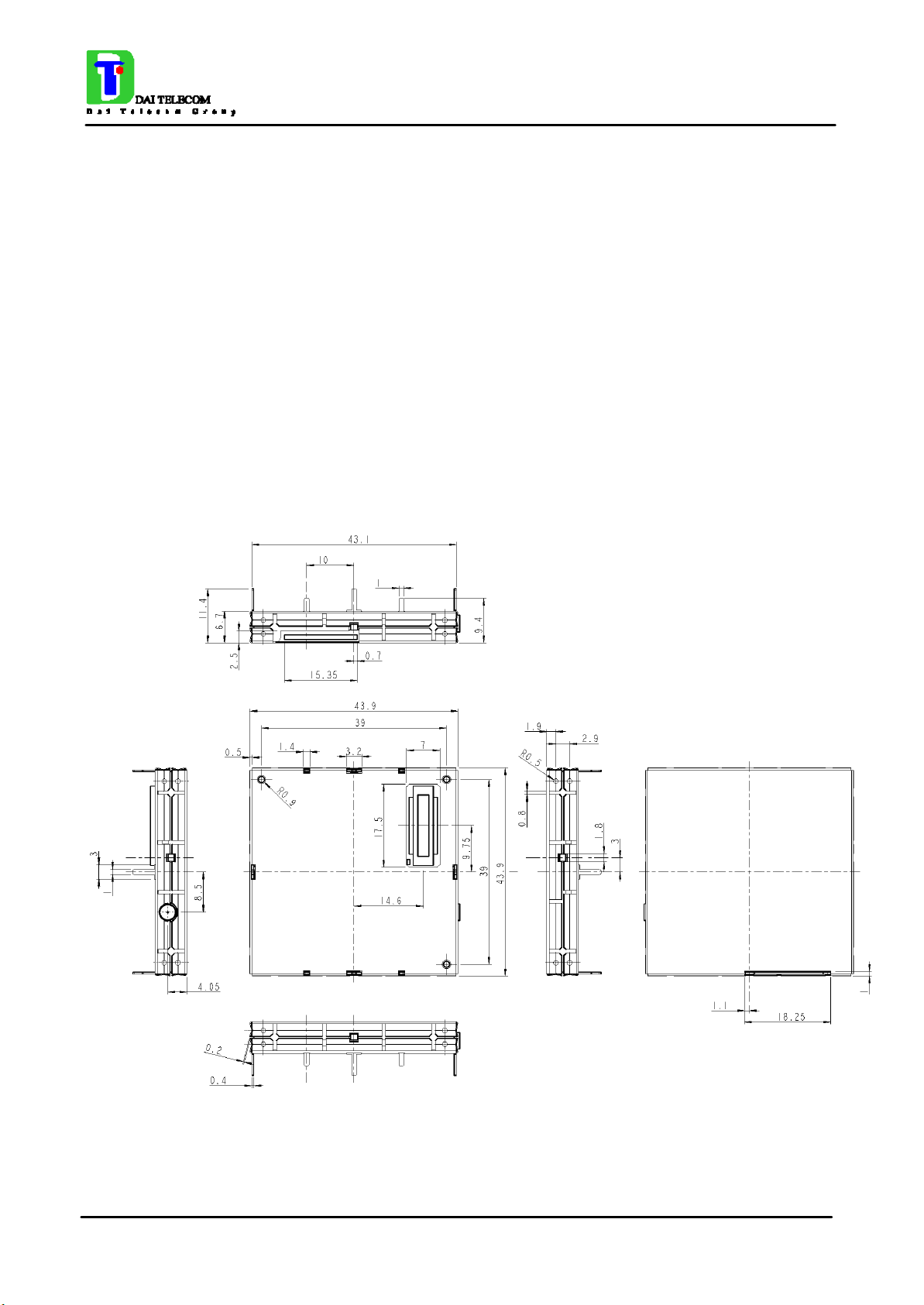
The Telit GM862-PCS module overall dimension are:
• Lenght: 43.9 mm
• Width: 43.9 mm
• Thickness: 6.9 mm
• Volume: ≅ 13 cm
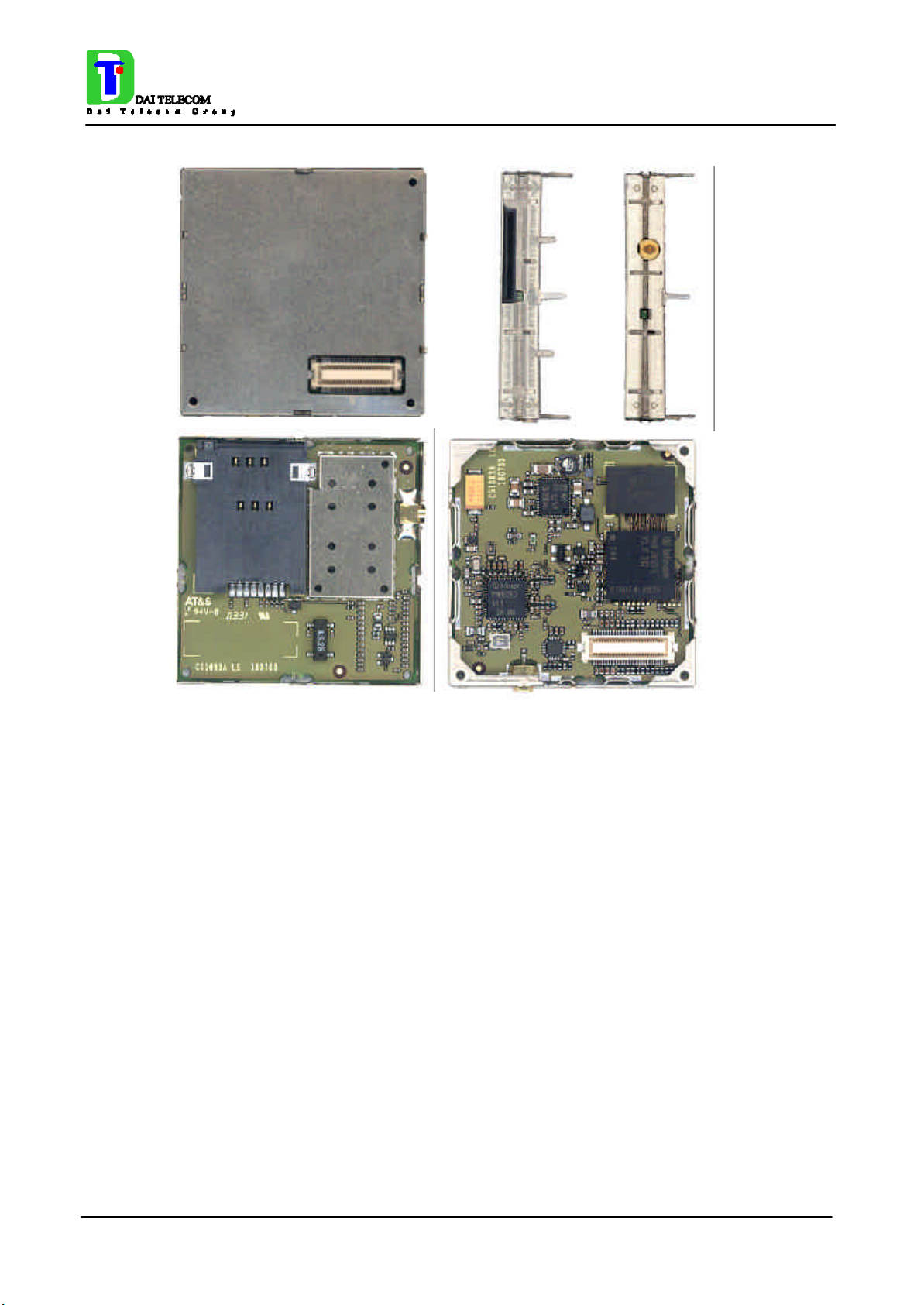
The layout of Telit GM862-PCS module is shown in the following figure:
3
Page 7 of 187
Page 16
TECHNICAL MANUAL
Telit GM862 PCS
Tri Band GPRS Data Terminal System Rev.1
1.2 Weight
The Telit GM862-PCS module weight is 23 gr with shield and 16 gr without shield.
1.3 Environmental requirements
The Telit GM862-PCS module is compliant with the applicable ETSI reference documentation
GSM 05.05 Release1999 ETSI EN300910 V8.4.1
1.3.1 Temperature range
• Temperature in normal functional conditions –10°C ÷ +55°C
• Temperature in extreme functional conditions* –20°C ÷ +70°C
• Temperature in storage conditions –30°C ÷ +85°C
*these temperature can affect the sensitivity and performance of the module
1.3.2 Vibration Test (non functional)
• 10 ÷12Hz ASD = 1.92m 2 /s 3
Page 8 of 187
Page 17
TECHNICAL MANUAL
Telit GM862 PCS
Tri Band GPRS Data Terminal System Rev.1
• 12 ÷ 150Hz –3dB/oct
1.4 Operating Frequency
The operating frequencies in GSM, DCS, PCS modes are conform to the GSM specifications.
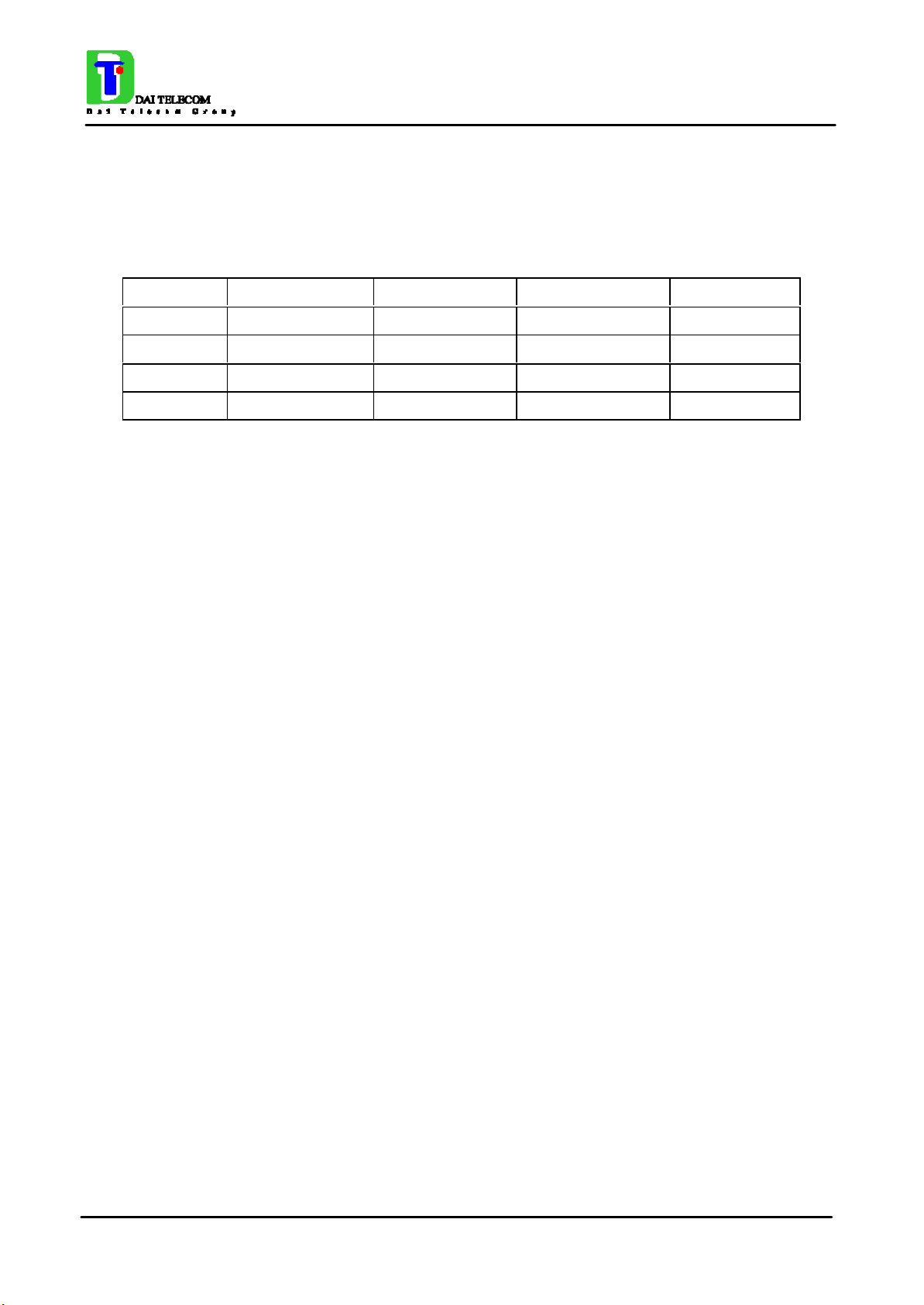
Mode Freq. TX (MHz) Freq. RX (MHz) Channels (ARFC) TX - RX offset
E-GSM-900 890.0 - 914.8 935.0 - 959.8 0 – 124 45 MHz
880.2 - 889.8 925.2 - 934.8 975 - 1023
DCS-1800 1710.2 - 1784.8 1805.2 - 1879.8 512 – 885 95 MHz
PCS-1900 1850.2 - 1909.8 1930.2 - 1989.8 512 - 810 80 MHz
NOTE: PCS 1900 is supported only in the Telit GM862-PCS module
1.5 Transmitter output power
GSM–900
The GM862-PCS transceiver module in GSM–900 operating mode are of class 4 in accordance
with the specification which determine the nominal 2W peak RF power (+33dBm) on 50 Ohm.
DCS–1800
The GM862-PCS transceiver module in DCS–1800 operating mode are of class 1 in accordance
with the specifications which determine the nominal 1W peak RF power (+30dBm) on 50 Ohm.
PCS–1900
The GM862-PCS transceiver module in PCS–1900 operating mode are of class 1 in accordance
with the specifications which determine the nominal 1W peak RF power (+30dBm) on 50 Ohm.
1.6 Reference sensitivity
GSM–900
The sensitivity of the GM862-PCS transceiver module according to the specifications for the class 4
GSM–900 portable terminals is better than –102dBm in all the operational conditions.
DCS–1800
The sensitivity of the GM862-PCS transceiver module according to the specifications for the class 1
portable terminals GSM 1800 is better than –102dBm in normal operating conditions.
PCS–1900
The sensitivity of the GM862-PCS transceiver module according to the specifications for the class 1
portable terminals PCS 1900 is better than –102dBm in normal operating conditions.
Page 9 of 187
Page 18
TECHNICAL MANUAL
Telit GM862 PCS
Tri Band GPRS Data Terminal System Rev.1
1.7 Antenna
The antenna that the customer chooses to use, depending on his application, should fulfil the
following requirements:
Frequency range Standard Dual Band frequency range,
Standard Tri Band frequency range for -PCS
Bandwith 80 MHz in GSM & 170 MHz in DCS & 140
MHz PCS band
Gain > 0 dB (referenced to l/2 dipole)
Impedance 50 ohm
Input power > 2 W peak power
NOTE: PCS 1900 frequency coverage is required only for the Telit GM862-PCS module
1.7.1 Antenna connector
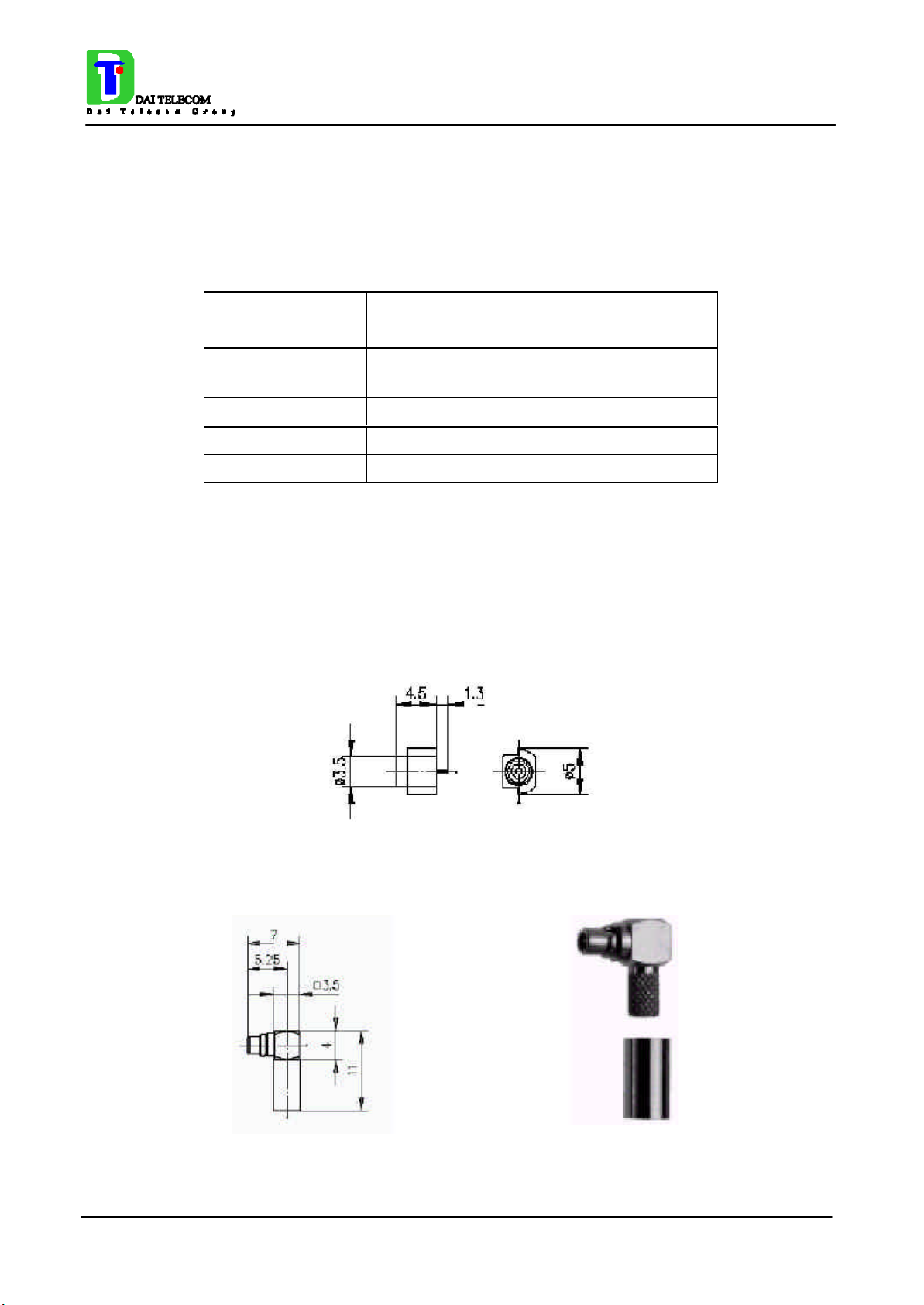
The Telit GM862-PCS module includes a 50 Ohm MMCX coaxial female 2 PIN Angle Coax SMD
J01341A0081 connector to allow the antenna connection.
On the user application side the following connector must be used:
a) Telegärtner MMCX angle plug crimp - Order n. J01340A0121
Page 10 of 187
Page 19

TECHNICAL MANUAL
Telit GM862 PCS
Tri Band GPRS Data Terminal System Rev.1
connector is locatable at:
Telegärtner - K. Gärtner GmbH
Lerchenstrasse 35, D-71144 Steinenbronn
Phone: (+49) 71 57 125 100
NOTE: be very careful when connecting the Telit GM862-PCS module RF connector. The Telit
GM862-PCS module RF connector can be damaged if not connected with the proper antenna
RF connector. The minimum number of insertion cycles are recommended.
Page 11 of 187
Page 20

TECHNICAL MANUAL
Telit GM862 PCS
Tri Band GPRS Data Terminal System Rev.1
1.8 Supply voltage
The external power supply must be connected to VBATT signal (see paragraph 1.15,Interface
connectors on GM862-PCS) and must fulfil the following requirements:
• Nominal operating voltage 3.8 V
• Operating voltage range 3.4 V - 4.2 V
1.9 Power consumption
The typical current consumption of the Telit GM862-PCS module are:
• Power off current (typical) 26 µA;
• Stand–by current < 17 mA
• Operating current 250 mA
• Operating current 350 mA
(< 4 mA
rms
@ typical network conditions
rms
1.9 A
rms
using command AT+CFUN )
rms
@ worst network conditions
peak
1.10 Embodied Battery charger
This feature is available only on the Telit GM862-PCS.
The battery charger is suited for 3.7V rechargeable Li-Ion battery and it might be used with less
performances also with different technology batteries. The Charger needs only 1 CURRENT
LIMITED power source input and charges the battery directly through VBATT connector pins.
• Battery charger input pin CHARGE
• Battery pins VBATT, GND
• Battery charger input voltage min 5.0 V
• Battery charger input voltage typ 5.5 V
• Battery charger input voltage max 7.0 V
• Battery charger input current max 400mA
• Battery type Rechargeable Li-Ion
NOTE: If embodied battery charger is used, then a LOW ESR capacitor of at least 100µF must be
mounted in parallel to VBATT GM862-PCS pins.
NOTE: when power is supplied to the CHARGE pin, a battery must always be connected to the
VBATT pins of the GM862-PCS.
Page 12 of 187
Page 21

TECHNICAL MANUAL
Telit GM862 PCS
Tri Band GPRS Data Terminal System Rev.1
1.11 User Interface
The user interface is managed by AT commands specified on the GSM 07.07 and 07.05
specification and listed in the chapter 2, AT Command.
1.11.1 Speech Coding
The Telit GM862-PCS vocoder supports the following rates:
• Half Rate.
• Full rate,
• Enhanced Full Rate
1.11.2 Sim Reader
The Telit GM862-PCS support phase 2 GSM11.14 - SIM 3 volts ONLY. For 5V SIM operation an
external level translator can be added.
Furthermore the Telit GM862-PCS have an internal built-in SIM card reader, so there's no need for
an external SIM housing.
The Telit GM862-PCS has an enhanced internal built-in SIM card reader that allows also hot
removal of the SIM sensing, so there's no need for an external SIM housing.
1.11.3 SMS
The Telit GM862-PCS module supports the following SMS types:
Mobile Terminated (MT) class 0 – 2 with signalling of new incoming SMS, SIM full, SMS read
Mobile Originated class 0 – 3 with writing, memorise in SIM and sending
Cell Broadcast compatible with CB DRX with signalling of new incoming SMS.
1.11.4 Real Time Clock and Alarm
The Telit GM862-PCS module supports the Real Time Clock and Alarm functions through AT
commands, furthermore an alarm output pin (GPIO6) can be configured to indicate the alarm with a
hardware line output.
1.11.5 Data/fax transmission
The Telit GM862-PCS module supports:
• Packed Data transfer GPRS Class B, Multislot Class 10.
• Data transmission according to the GSM 07.07, 07.05
• CSD up to 14.4 Kbps
• Fax service, Class 1 Group 3
Page 13 of 187
Page 22

TECHNICAL MANUAL
Telit GM862 PCS
Tri Band GPRS Data Terminal System Rev.1
1.11.6 Local security management
With lock of Subscriber Identity module (SIM), and security code request at power–up.
1.11.7 Call control
Call cost control function.
1.11.8 Phonebook
Function available to store the telephone numbers in SIM memory.
Capability depends on SIM version/memory
1.11.9 Characters management
Availability of lowercase, uppercase and IRA characters. (international reference alphabet)
In SMS PDU mode all character set are supported.
1.11.10 SIM related functions
Activation/deactivation of the numbers stored in phone book FDN, ADN and PINs. Extension at the
PIN2 for the PUK2 insertion capability for lock condition.
1.11.11 Call status indication
By AT commands.
1.11.12 Indication of network service availability
By AT commands and LED indication on dedicated output.
The STAT_LED is an Open Collector output where it is possible to directly connect a LED to show
information on the network service availability and Call status.
STAT_LED indications
LED status Device Status
permanently off device off
fast blinking
(period 1s, Ton 0,5s)
slow blinking
(period 3s, Ton 0,3s)
permanently on a call is active
Page 14 of 187
Net search / Not
registered / turning
off
Registered full
service
Page 23

TECHNICAL MANUAL
Telit GM862 PCS
Tri Band GPRS Data Terminal System Rev.1
1.11.13 Automatic answer (Voice, Data or FAX)
After n (depends of settings) rings automatically answers with beep (see S0 param).
1.11.14 Supplementary services (SS)
• Call Barring,
• Call Forwarding,
• Calling Line Identification Presentation (CLIP),
• Calling Line Identification Restriction (CLIR),
• Call Waiting, other party call Waiting Indication,
• Call Hold, other party Hold / Retrieved Indication,
• Closed User Group supplementary service (CUG),
• Advice of Charge,
• Unstructured SS Mobile Originated (MO)
1.11.15 Acoustic signaling
The acoustic signalling of Telit GM862-PCS module on the selected acoustic device are the
following:
• Call waiting;
• Ringing tone;
• SMS received tone;
• Busy tone;
• Power on/off tone;
• Off Hook dial tone;
• Congestion tone;
• Connected tone;
• Call dropped;
• No service tone;
• Alarm tone.
1.11.16 DTMF tones
DTMF tones managed by specific AT commands.
These tones are generated with AT commands only during voice calls.
The minimum duration of a DTMF tone is 100 ms.
Page 15 of 187
Page 24

TECHNICAL MANUAL
Telit GM862 PCS
Tri Band GPRS Data Terminal System Rev.1
Group high
Group low
697 Hz 1 2 3
770 Hz 4 5 6
852 Hz 7 8 9
941 Hz * 0 #
1209 Hz 1336 Hz 1477 Hz
1.11.17 Buzzer output
The General Purpose I/O pin GPIO7 can be configured to output the BUZZER output signal, with
only an external Mosfet/transistor and a diode a Buzzer can be directly driven.
The ringing tone and the other signaling tones can be redirected to this Buzzer output with a
specific AT command.
1.12 EMC
Compliant to & ETS 300–342–1 and all applicable GSM Specifications.
Compliant to Directive 1999/05/CE.
1.13 Logic level specifications
Where not specifically stated, all the interface circuits work at 2.8V CMOS logic levels.
The following table shows the logic level specifications used in the Telit GM862-PCS module
interface circuits:
Absolute Maximum Ratings -Not Functional
Parameter Min Max
Input level on any
digital pin when on
Input voltage on
analog pins when on
-0.3V +3.75V
-0.3V +3.0 V
Page 16 of 187
Page 25

For 2,0V signals:
TECHNICAL MANUAL
Telit GM862 PCS
Tri Band GPRS Data Terminal System Rev.1
Operating Range - Interface levels (2.8V CMOS)
Level Min Max
Input high level 2.1V 3.3V
Input low level 0V 0.5V
Output high level 2.2V 3.0V
Output low level 0V 0.35V
Operating Range - Interface levels (2.0V CMOS)
Level Min Max
Input high level 1.6V 3.3V
Input low level 0V 0.4V
Output high level 1,65V 2.2V
Output low level 0V 0.35V
1.13.1 Reset signal
Signal Function I/O Pin
RESET Phone reset I/O 23 (connector SO301)
RESET is used to reset the Telit GM862-PCS module. Whenever this signal is pulled low, the
GM862 is reset. When the device is reset it stops any operation and after the release of the reset it
shuts down, without doing any detach operation from the network where it is registered to. This
behavior is not a proper shut down because any GSM device is requested to issue a detach request
on turn off. For this reason the Reset signal must not be used to normally shutting down the device,
but only as an emergency exit in the rare case the device remains stucked waiting for some network
response.
The RESET is internally controlled on start-up to achieve always a proper power-on reset sequence,
so there's no need to control this pin on start-up. It may only be used to reset a device already on
that is not responding to any command.
NOTE: do not use this signal to power off the Telit GM862-PCS module. Use the ON/OFF
signal (Pin 17 of SO301) to perform this function or the AT#SHDN command.
Page 17 of 187
Page 26

TECHNICAL MANUAL
Telit GM862 PCS
Tri Band GPRS Data Terminal System Rev.1
Reset Signal Operating levels :
Signal Min Max
RESET Input high 2.2V* 3.3V
RESET Input low 0V 0.2V
* this signal is internally pulled up so the pin can be left floating if not used.
If unused, this signal may be left unconnected. If used, then it must always be connected with an
open collector transistor, to permit to the internal circuitry the power on reset and undervoltage
lockout functions.
Page 18 of 187
Page 27

TECHNICAL MANUAL
Telit GM862 PCS
Tri Band GPRS Data Terminal System Rev.1
1.14 Audio levels specifications
The audio of the Telit GM862-PCS, module is organised into two main paths:
- internal path (called also MT)
- external path (called also HF)
These two paths are meant respectively for handset and headset/handsfree use.
The Telit GM862-PCS module has a built in echo canceller and a noise suppressor, tuned separately
for the two audio paths; for the internal path the echo canceller parameters are suited to cancel the
echo generated by a handset, while for the external audio path they are suited for a handsfree use.
For more information on the audio refer to the Hardware User Guide.
The following table reports all the audio level specifications.
Microphone characteristics
Internal audio mic. input External audio mic. input
Line coupling AC ( 100nF cond.) AC ( 100nF cond.)
Line type Balanced Balanced
Differential input resistance
Line nominal sensitivity 50mV
Max input voltage 360mV
Microphone nominal sensitivity
25kΩ 25kΩ
3mV
22mV
-45dB
rms
rms
/ +24dB -45dB
Vrms/Pa
rms
rms
Vrms/Pa
/ +10dB
- Analog Gain suggested
Echo canceller type Handset Car kit hands free
Speaker characteristics
Internal audio ear. output External audio ear. output
Line coupling DC DC
Line type Bridged Bridged
Speaker impedance
≥ 16Ω ± 5% @ 1kHz ≥ 16Ω ± 5% @ 1kHz
Minimun load impedance
15Ω 15Ω
Signal bandwidth 150-8000 Hz @ -3dB 150-8000 Hz @ -3dB
Maximum output 1700mV
rms
850mV
rms
Maximum power output 30mW 7.5mW
Volume level steps (SW) -2dB -2dB
Number of volume steps (SW) 10 10
Page 19 of 187
Page 28
TECHNICAL MANUAL
vertical side)
vertical side)
Telit GM862 PCS
Tri Band GPRS Data Terminal System Rev.1
1.15 Interface connectors on GM862-PCS
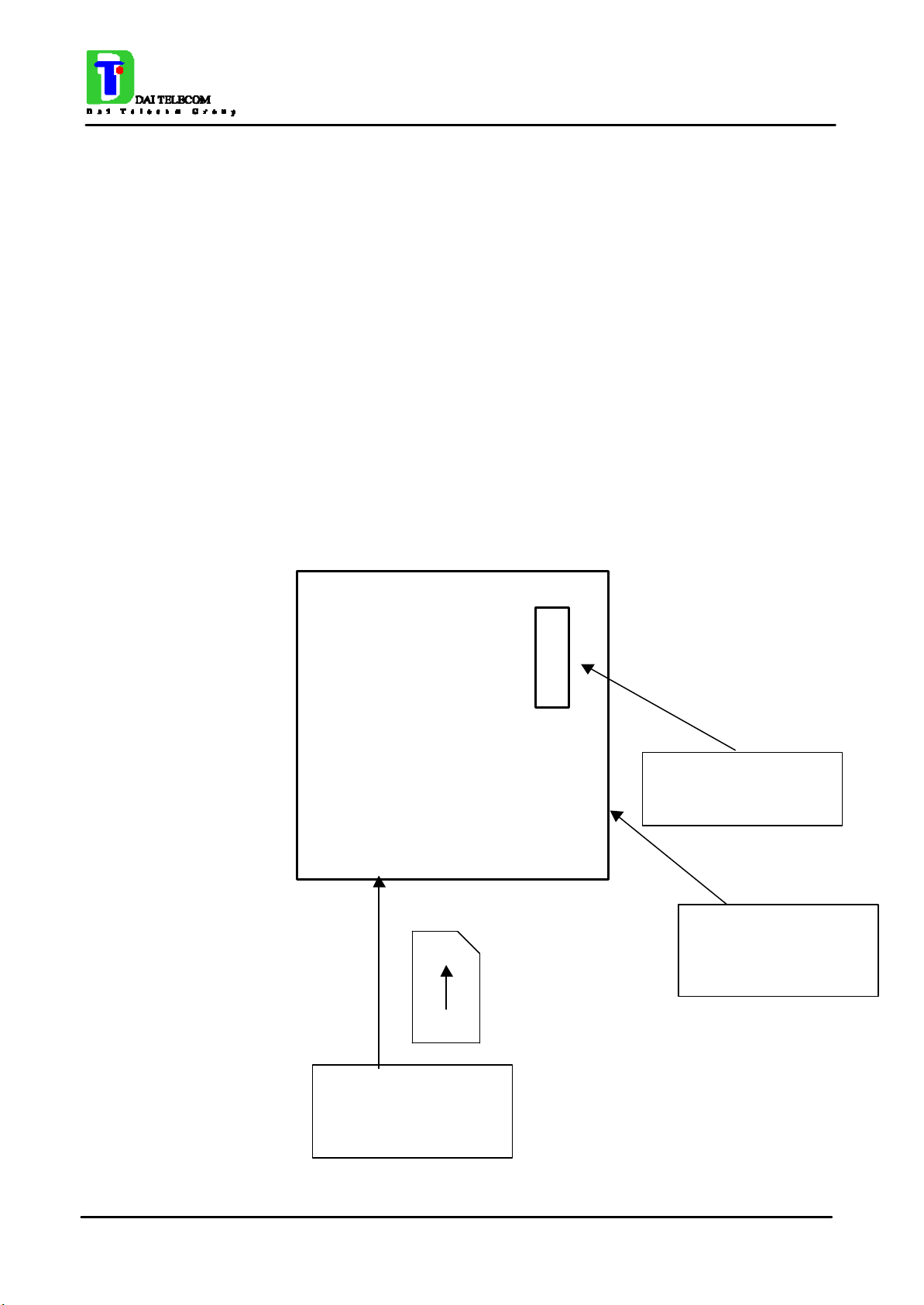
The Telit GM862-PCS module has two interface connectors and a SIM Card reader:
1) SO601: Antenna connector (see 1.7.1, Antenna connector)
2) SO301: Interface connector
3) SO402: SIM Card Reader
The GM862-PCS transceiver module interface connector SO301 is a CSTP 50 pin vertical SMD
Molex 52991–0508 (male). Its pin-out (down view) is:
49 50
1 2
Connector Position
and PIN-Out order
Antenna connector
position(on the
SIM CARD reader
position (on the
Page 20 of 187
Page 29
TECHNICAL MANUAL
Telit GM862 PCS
Tri Band GPRS Data Terminal System Rev.1
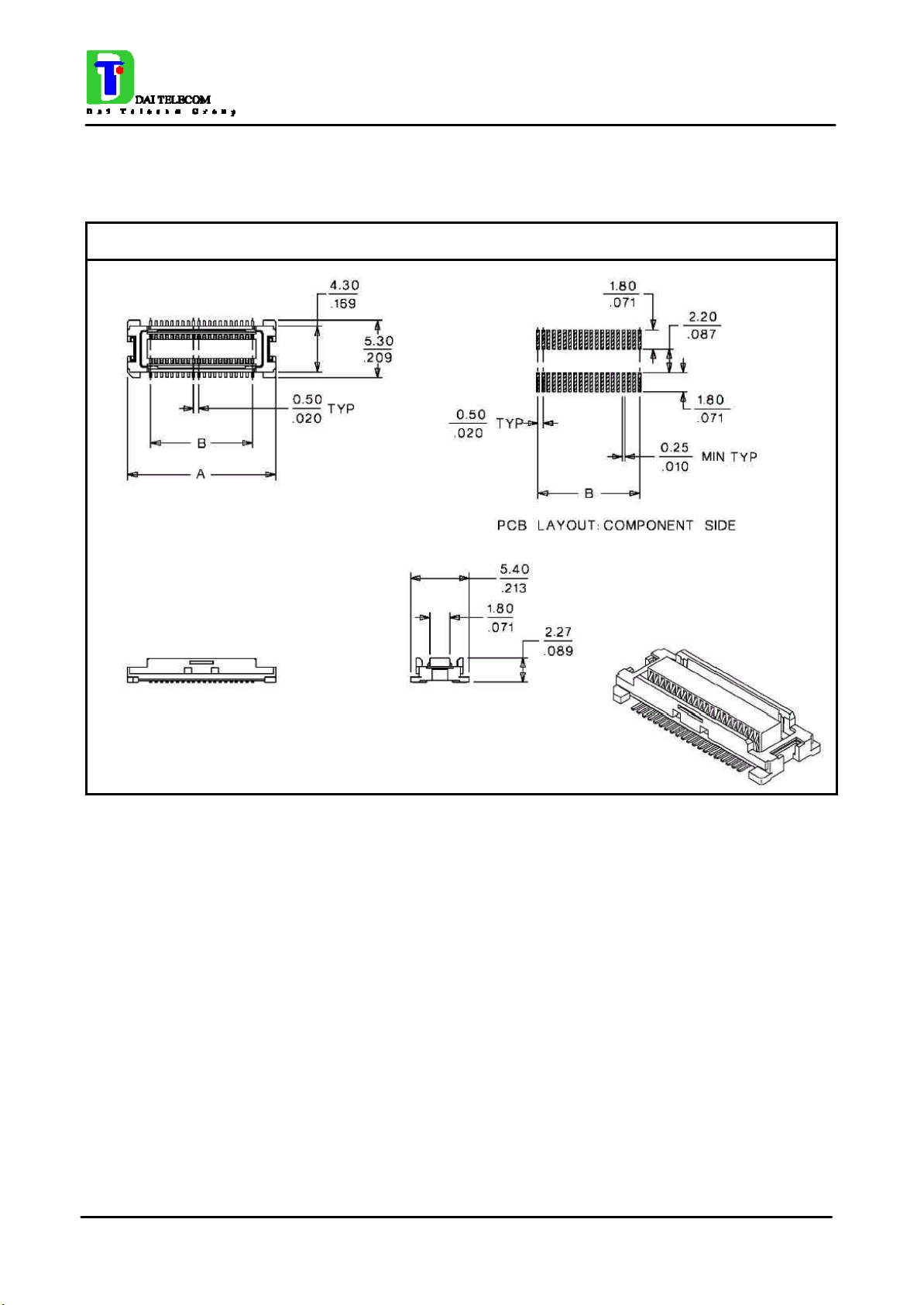
Molex 52991-0508 (male) GM862-PCS Connector LAY-OUT
Page 21 of 187
Page 30
TECHNICAL MANUAL
Telit GM862 PCS
Tri Band GPRS Data Terminal System Rev.1
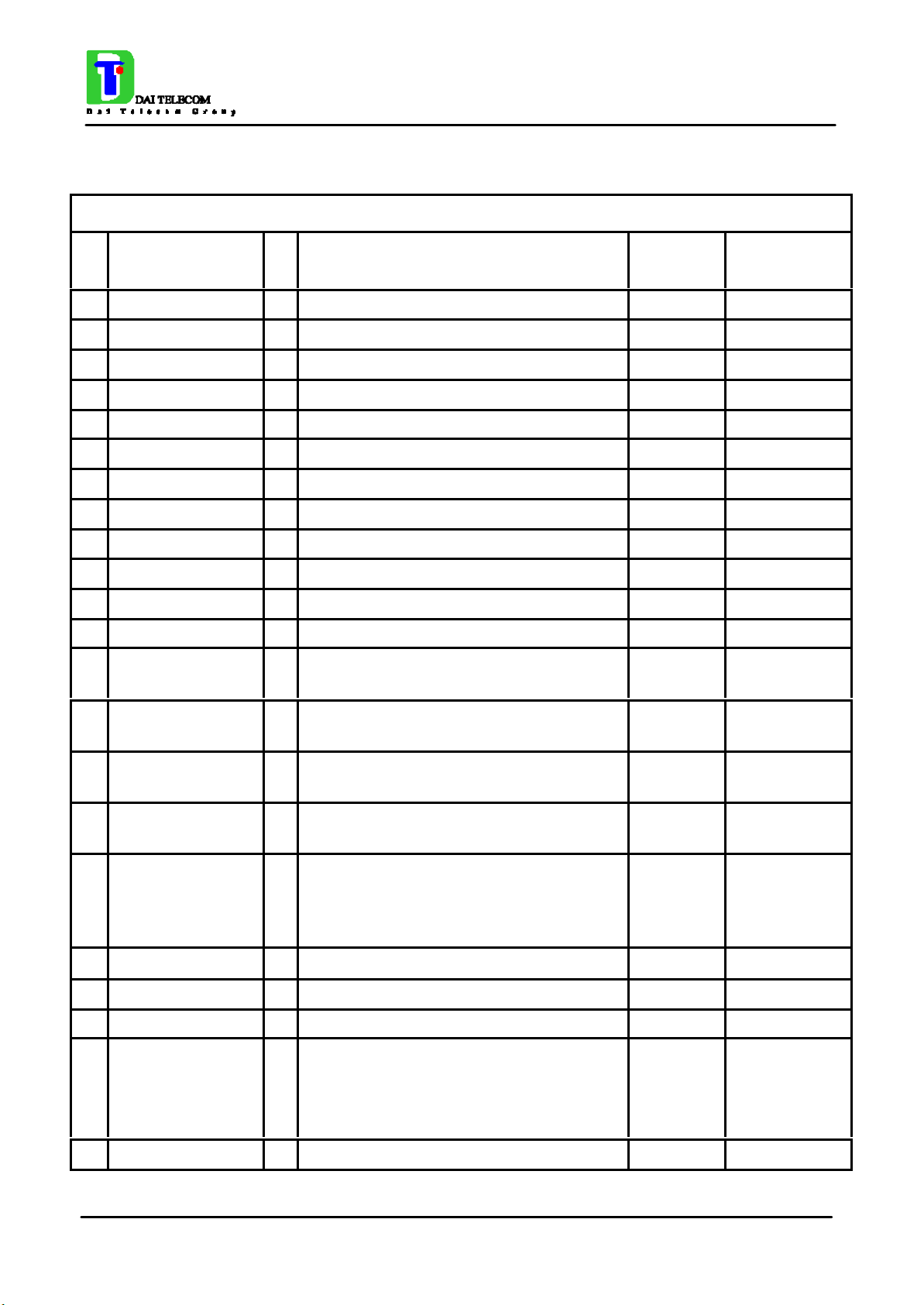
Molex 52991-0508 (male) GM862-PCS Connector PIN-OUT
Pin Signal I/O Function Internal
Pull up
1 VBATT - Main power supply Power
2 GND - Ground Power
3 VBATT - Main power supply Power
4 GND - Ground Power
5 VBATT - Main power supply Power
6 GND - Ground Power
7 VBATT - Main power supply Power
8 CHARGE AI Battery Charger Input (5) Power
9 EAR_HF+ AO Handsfree ear output, phase + Audio
10 EAR_MT- AO Handset earphone signal output, phase - Audio
11 EAR_HF- AO Handsfree ear output, phase - Audio
12 EAR_MT+ AO Handset earphone signal output, phase + Audio
13 MIC_HF- AI
Handsfree microphone input; phase -,
nominal level 3mVrms
Type
Audio
14 MIC_MT+ AI
15 MIC_HF+ AI
16 MIC_MT- AI Handset microphone signal input; phase-,
17 ON/OFF I Input command for switching power ON or
18 AXE I Handsfree switching
19 SIMIO I/O External SIM signal - Data I/O 3V ONLY
20 C103/TXD I Serial data input (TXD) from DTE CMOS 2.8V
21 PWRCTL/
CAM_SYNC
22 SIMVCC - External SIM signal – Power (3) 3V ONLY
Handset microphone signal input; phase+,
nominal level 50mVrms
Handsfree microphone input; phase +,
nominal level 3mVrms
nominal level 50mVrms
OFF (toggle command). The pulse to be
sent to the GM862 must be equal or greater
than 1 second.
O Module Status ON indication (Signal
output for power on/off control of external
devices) /
Camera interface on –PCS (4)
10KΩ
47KΩ
820Ω
Audio
Audio
Audio
CMOS 2.8V
2.0V signal
CMOS 2.8V
Page 22 of 187
Page 31

TECHNICAL MANUAL
Telit GM862 PCS
Tri Band GPRS Data Terminal System Rev.1
23 RESET I Reset input
24 SIMRST O External SIM signal – Reset 3V ONLY
25 MON1_CAM I/O Camera Interface on –PCS (4) CMOS 2.8V
26 SIMCLK O External SIM signal – Clock 3V ONLY
27 CCIN I/O External SIM signal – Presence (active
low)
28 GPIO2 O General purpose output (Open Collector) /
Camera Interface on –PCS (4)
29 C106/CTS O Output for Clear to send signal (CTS) to
DTE
30 C125/RING O
31 GPIO1 I General purpose input transistor base
32 PD[0] I/O Camera Interface on –PCS (4) CMOS 2.8V
33 C107/DSR O Output for Data set ready signal (DSR) to
34 PD[1] I/O Camera Interface on –PCS (4) CMOS 2.8V
Output for Ring indicator signal (RI) to
DTE
DTE
2KΩ
47KΩ
see par.1.13.1
CMOS 2.8V
Open Collector
CMOS 2.8V
CMOS 2.8V
CMOS 2.8V
35 EMMI TX O TX Data for debug monitor (1) CMOS 2.8V
36 C109/DCD O
37 C104/RXD O Serial data output to DTE CMOS 2.8V
38 PD[2] I/O Camera Interface on –PCS (4) CMOS 2.8V
39 STAT_LED O Status indicator led Open Collector
40 PD[3] I/O Camera Interface on –PCS (4) CMOS 2.8V
41 EMMI RX I RX Data for debug monitor (1) CMOS 2.8V
42 PD[4] I/O Camera Interface on –PCS (4) CMOS 2.8V
43 C108/DTR I Input for Data terminal ready signal (DTR)
44 PD[5] I/O Camera Interface on -PCS (4) CMOS 2.8V
45 C105/RTS I Input for Request to send signal (RTS)
46 GPIO3 /
PD[6]
Output for Data carrier detect signal (DCD)
to DTE
from DTE (4)
from DTE
I/O Configurable general purpose I/O pin /
Camera Interface on -PCS (4)
CMOS 2.8V
CMOS 2.8V
CMOS 2.8V
CMOS 2.8V
47 GPIO4
IICSDA
I/O Configurable general purpose I/O pin /
Camera Interface on -PCS (4)
Page 23 of 187
CMOS 2.8V
Page 32

TECHNICAL MANUAL
Telit GM862 PCS
Tri Band GPRS Data Terminal System Rev.1
48 GPIO5
CAM_DRDY
49 GPIO6
/ALARM
I/O Configurable general purpose I/O pin /
Camera Interface on -PCS (4)
I/O GP I/O pin or ALARM output pin /
Camera Interface on -PCS (4)
/PD[7]
50 GPIO7
/BUZZER
GP I/O pin or BUZZER output pin /
I/O
Camera Interface on -PCS (4)
/CAM_PWR_ON
(1) For the exclusive use of the Technical Support Service
(2) An earphone with a 150 ohm impedance can be directly connected to EAR+ and EAR–
(3) On this pin a maximum of 47nF bypass capacitor is allowed.
(4) When activating the Easy camera these pins will not be available for other use
CMOS 2.8V
CMOS 2.8V
CMOS 2.8V
Page 24 of 187
Page 33
TECHNICAL MANUAL
Telit GM862 PCS
Tri Band GPRS Data Terminal System Rev.1
1.16 Mounting the GM862-PCS on your Board
In order to electrically connect your board to the Telit GM862-PCS module , use a CSTP 2x25 pin
vertical SMD SCH–SCH Molex 53748 - 0504 (female, low profile) as a counterpart to the CSTP
50 pin vertical SMD Molex 52991–0508 (male) of your Telit GM862-PCS module .
When mounting the Telit GM862-PCS module on your board, take care of soldering the GM862PCS shielding reeds on a ground plane or signal.
NOTE: be very careful when connecting the Telit GM862-PCS module RF connector. The Telit
GM862-PCS module RF connector can be damaged if not connected with the proper antenna
RF connector. The minimum number of insertion cycles is recommended.
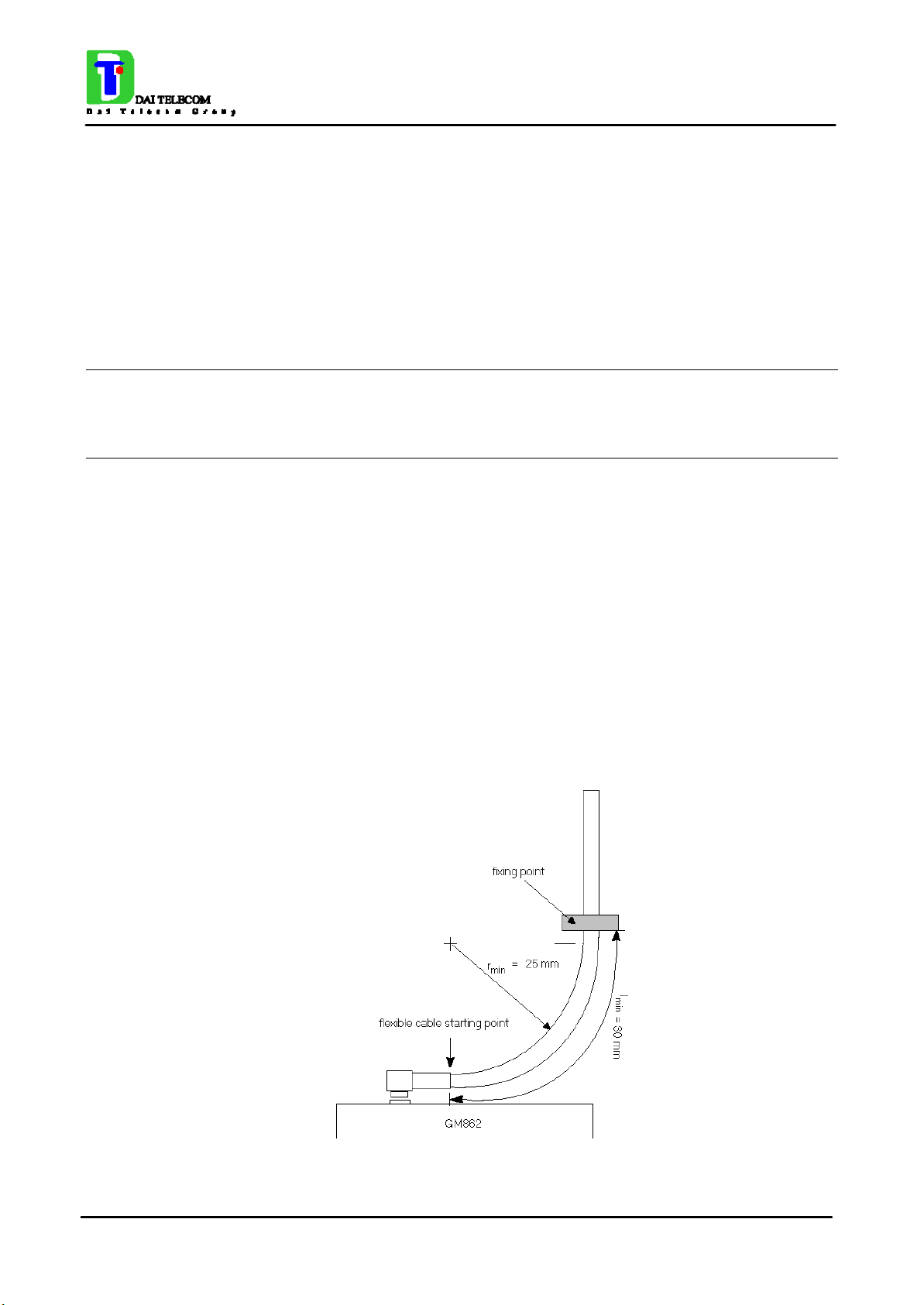
1.16.1 Antenna Coaxial cable fixing
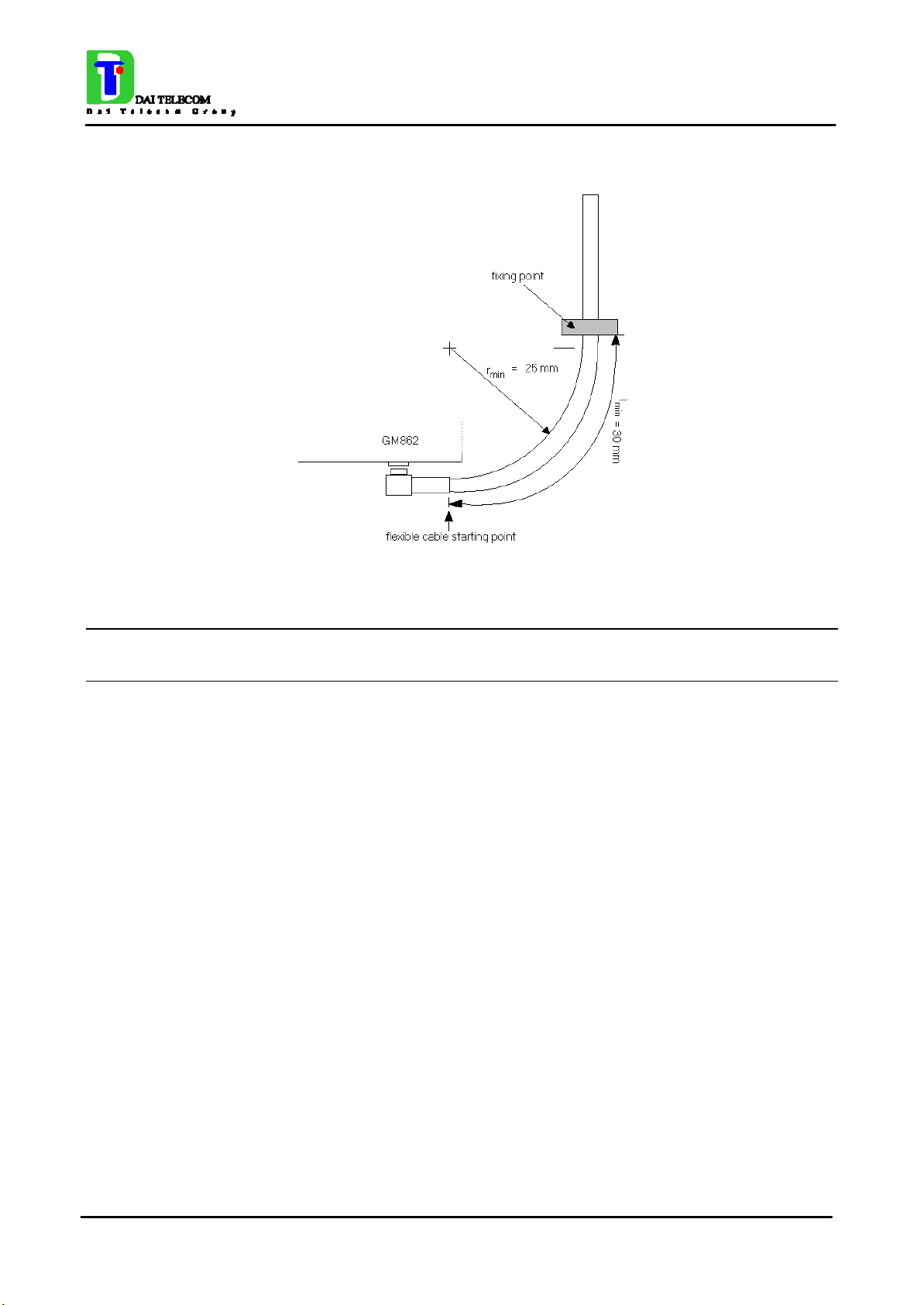
The following constraints must be respected in the Telit GM862-PCS antenna cable connection:
- The fixing point of the coaxial cable must not be placed too close to the antenna connector,
leaving at least 30mm of flexible cable between the fixed point and the plug end.
- The fixing point must be at the same height of the antenna connector, eventually using a wedge
between the PCB and the cable if it is directly fixed to the PCB.
- The flexible cable must never be bent with a radius lower than 25mm (RG174 cable).
- The cable must be a RG174 type or more flexible ones.
The following pictures explain these constraints:
- Angle connector fixing example -
Page 25 of 187
Page 34
TECHNICAL MANUAL
Telit GM862 PCS
Tri Band GPRS Data Terminal System Rev.1
- Angle connector fixing example 2 -
NOTE: in the examples the cable is always bent, this is not a constrain. If the installation does
not require it, then the cable can be kept straight, ensuring that the fixing is without sliding.
1.16.2 Precautions
- The plug should be inserted in the connector only after the installation of the Telit GM862-PCS
modul e in the board. This is to prevent accidental breaking of the antenna connection during the
transport.
- The coaxial cable must be fixed at least in one point, without sliding possibilities.
- The plug insertion/removal must be done axially with the female connector of the GM862-PCS,
keeping lateral strains to a minimum.
- The insertion/crimping pull out force must be less than 15N.
Page 26 of 187
Page 35

TECHNICAL MANUAL
Telit GM862 PCS
Tri Band GPRS Data Terminal System Rev.1
2 AT Command
The Telit GM862-PCS module can be driven via the serial interface using the standard AT
commands1. The Telit GM862-PCS module is compliant with:
1. Hayes standard AT command set, in order to maintain the compatibility with existing SW
programs.
2. ETSI GSM 07.07 specific AT command and PCS specific commands.
3. ETSI GSM 07.05 specific AT commands for SMS (Short Message Service) and CBS (Cell
Broadcast Service)
4. FAX Class 1 compatible commands
Moreover the Telit GM862-PCS module supports also Telit proprietary AT commands for special
purposes.
In the following the dedicated description of how to use the AT commands with the Telit GM862PCS module.
2.1 Definitions
The following syntactical definitions apply:
<CR> Carriage return character, is the command line and result code terminator character, which
value, in decimal ASCII between 0 and 255,is specified within parameter S3.
The default value is 13.
<LF> Linefeed character, is the character recognised as line feed character. Its value, in decimal
ASCII between 0 and 255, is specified within parameter S4. The default value is 10.
The line feed character is output after carriage return character if verbose result codes are used (V1
option used ) otherwise, if numeric format result codes are used (V0 option used) it will not appear
in the result codes.
<...> Name enclosed in angle brackets is a syntactical element. They do not appear in the
command line.
[...] Optional subparameter of a command or an optional part of TA information response
is enclosed in square brackets. Brackets themselves do not appear in the command line. When
subparameter is not given in AT commands which have a read command, new value equals to its
previous value. In AT commands which do not store the values of any of their subparameters, and
so have not a read command, which are called action type commands, action should be done on the
basis of the recommended default setting of the subparameter.
1
The AT is an ATTENTION command and is used as a prefix to other parameters in a string. The
AT command combined with other parameters can be set up in the communications package or
typed in manually as a command line instruction.
Page 27 of 187
Page 36

TECHNICAL MANUAL
Telit GM862 PCS
Tri Band GPRS Data Terminal System Rev.1
2.2 AT Command Syntax
GSM commands use syntax rules of extended commands.
Every extended command has a test command (trailing =?) to test the existence of the command
and to give information about the type of its subparameters. There are two types of extended
command:
- Parameter type commands which also have a read command (trailing ?) to check the current
values of subparameters.
- Action type commands do not store the values of any of their possible subparameters, and
therefore do not have a read command.
2.2.1 Command lines
The basic structure of the command lines are:
• ATCMD1<CR> where AT is the command line prefix, CMD1 is a basic command (i.e. it have
not + prefix) and CR is the command line terminator character
• ATCMD2=10<CR> where 10 is a subparameter
• AT+CMD1;+CMD2=, ,10<CR> These are two examples of extended commands (which have a
+ prefix). They are delimited with semicolon. In the second command the subparameter is
omitted
• +CMD1?<CR> This is a read command for checking current subparameter values
• +CMD1=?<CR> This is a test command for checking possible subparameter values
These commands might be performed in a single command line as shown below:
ATCMD1 CMD2=10+CMD1;+CMD2=, ,10;+CMD1?;+CMD1=?<CR>
anyway it is always preferable to separate into different command lines the basic commands (i.e.
without + prefix) and the extended commands (the ones with + prefix); furthermore it is suggested
to avoid placing several action commands in the same command line, because if one of them fails,
then an error message is received but it is not possible to argue which one of them has failed the
execution.
If command V1 is enabled (verbose responses codes) and all commands in a command line has
been performed successfully, result code <CR><LF>OK<CR><LF> is sent from the TA to the TE,
if subparameter values of a command are not accepted by the TA or command itself is invalid, or
command cannot be performed for some reason, result code <CR><LF>ERROR<CR><LF> is sent
and no subsequent commands in the command line are processed.
If command V0 is enabled (numeric responses codes), and all commands in a command line has
been performed successfully, result code 0<CR> is sent from the TA to the TE, if sub-parameter
values of a command are not accepted by the TA or command itself is invalid, or command cannot
be performed for some reason, result code 4<CR> and no subsequent commands in the command
line are processed.
In case of errors depending on ME operation, ERROR (or 4) response may be replaced by +CME
ERROR: <err> or +CMS ERROR: <err>.
Page 28 of 187
Page 37

TECHNICAL MANUAL
Telit GM862 PCS
Tri Band GPRS Data Terminal System Rev.1
2.2.2 Information responses and result codes
The TA response, in case of verbose response format enabled, for the previous examples command
line could be as shown below:
information response to +CMD1? <CR><LF>+CMD1:2,1,10<CR><LF>
information response to +CMD1=? <CR><LF>+CMD1(0-2),(0,1),(0-15)<CR><LF>
final result code <CR><LF>OK<CR><LF>
Moreover there are other two types of result codes:
• result codes that inform about progress of TA operation (e.g. connection establishment
CONNECT)
• result codes that indicate occurrence of an event not directly associated with issuance of a
command from TE (e.g. ring indication RING).
Here the basic result codes according to ITU-T V25Ter recommendation
Result Codes
Numeric form Verbose form
0 OK
1 CONNECT
2 RING
3 NO CARRIER
4 ERROR
6 NO DIALTONE
7 BUSY
8 NO ANSWER
2.2.3 Command Response Timeout
Every command issued to the Telit GM862-PCS module returns a result response if response codes
are enabled (default). The time needed to process the given command and return the response varies
from command to command and may depend also from the network on which the command may
interact. As a result every command is provided with a proper timeout time, if this time elapses
without any result from the operation, then an ERROR response can be reported as if the operation
was not successful and the operation is anyway terminated.
The timeout time is quite short for commands that imply only internal set up commands, but may be
very long for command that interact with the network (or even a set of Networks).
The default timeout is 100 ms for all the commands that have no interaction with the network or
upper software layers.
Page 29 of 187
Page 38
TECHNICAL MANUAL
Telit GM862 PCS
Tri Band GPRS Data Terminal System Rev.1
In the table below are listed all the commands whose timeout differs from the default 100 ms and
their effective timeout is reported:
Command Timeout (Seconds)
+CBST 0.2
+CR 0.2
+CRC 0.2
+CRLP 0.2
+CSCS 0.2
+CEER 5
+CGMI 5
+CGMM 5
+CGMR 5
+CGSN 20
+CIMI 20
+CNUM 20
+CREG 5
+COPS 180
+CLCK 180
+CPWD 180
+CLIP 180
+CLIR 180
+CCFC 180
+CCWA 20
+CHLD 20
+CUSD 180
+CAOC 20
+CSSN 20
+CLCC 20
+CPAS 5
+CPIN 20
+CSQ 5
+CPBS 5
+CPBR 20
+CPBF 20
+CPBW 20
+CALM 5
+CRSL 5
Page 30 of 187
Page 39
TECHNICAL MANUAL
Telit GM862 PCS
Tri Band GPRS Data Terminal System Rev.1
+CLVL 5
+CMUT 5
+CACM 20
+CAMM 20
+CPUC 20
+CMEE 5
+VTS 20
+GMI 5
+GMM 5
+GMR 5
+GSN 20
I3 5
I4 5
I5 5
+CSMS 5
+CPMS 5
+CMGF 5
+CSCA 20
+CSMP 5
+CSDH 5
+CSAS 5
+CRES 5
+CNMI 5
+CMGS 180 / 5 for prompt">"
+CMSS 180
+CMGW 5 / 5 for prompt">"
+CMGD 5
+CMGR 5
+CMGL 5
#CAP 10
#SRS 10
#SRP 10
#STM 10
#PCT 10
#SHDN 10
#QTEMP 10
#SGPO 10
#GGPI 10
Page 31 of 187
Page 40

TECHNICAL MANUAL
Telit GM862 PCS
Tri Band GPRS Data Terminal System Rev.1
#MONI 10
+CGACT 180
+CGATT 180
+CGDATA 20
+CGDCONT 20
+CGPADDR 20
+CGQMIN 20
+CGQREQ 20
2.2.4 Command issuing timing
The chain Command -> Response shall always be respected and a new command must not be
issued before the GM862-PCS has terminated all the sending of its response result code (whatever it
may be).
This applies especially to applications that "sense" the OK text and therefore may send the next
command before the complete code <CR><LF>OK<CR><LF> is sent by the GM862-PCS.
It is advisable anyway to wait for at least 20ms between the end of the reception of the response and
the issue of the next AT command.
If the response codes are disabled and therefore the module does not report any response to the
command, then at least the 20ms pause time shall be respected.
During command mode, due to hardware limitations, under severe CPU load the serial port can
loose some characters if placed in autobauding at high speeds. Therefore if you encounter this
problem fix the baud rate with AT+IPR command.
2.2.5 Factory Profile and parameters stored in the profile
The GM862-PCS stores several command configurations in the internal non volatile memory (see
command &W), allowing to remember this status even after power off.
The parameters that are stored in the profile and their are:
GSM DATA MODE : +CBST: 0,0,1
AUTOBAUD : +IPR: 0
COMMAND ECHO : E1
RESULT MESSAGES : Q1
VERBOSE MESSAGES : V1
EXTENDED MESSAGES : X1
FLOW CONTROL OPTIONS : &K3
CTS (C106) OPTIONS : &B2
DSR (C107) OPTIONS : &S3
DTR (C108) OPTIONS : &D0
DCD (C109) OPTIONS : &C1
RI (C125) OPTIONS : \R1
C108/1 OPERATION : &D4
POWER SAVING : +CFUN: 1
DEFAULT PROFILE : &Y0
S REGISTERS: S0=0;S1=0;S2=43;S3=13;S4=10;S5=8;S7=60;S12=50;S25=5;S38=20
Page 32 of 187
Page 41
TECHNICAL MANUAL
Telit GM862 PCS
Tri Band GPRS Data Terminal System Rev.1
2.3 Command Availability Table
The available command, depending on the module are evidenced in the following table:
PRODUCT
COMMAND GM862-PCS GM862-GPRS GM862-GSM
&F
Z
+FCLASS
&Y
&W
&Z
&N
+GMI
+GMM
+GMR
+GCAP
+GSN
&V
&V0
&V1
&V2
• • •
• • •
• • •
• • •
• • •
• • •
• • •
• • •
• • •
• • •
• • •
• • •
• • •
• • •
• • •
• • •
\V
%L
%Q
E
Q
V
X
I
&C
&D
&K
&S
\R
• • •
• • •
• • •
• • •
• • •
• • •
• • •
• • •
• • •
• • •
• • •
• • •
• • •
Page 33 of 187
Page 42
TECHNICAL MANUAL
Telit GM862 PCS
Tri Band GPRS Data Terminal System Rev.1
+IPR
+IFC
+ILRR
+ICF
D
T
P
A
H
O
&G
&P
+MS
%E
+DS
+DR
• • •
• • •
• • •
• • •
• • •
• • •
• • •
• • •
• • •
• • •
• • •
• • •
• • •
• • •
• • •
• • •
\B
\K
S0
S1
S2
S3
S4
S5
S7
S10
S12
S25
S30
S38
ETSI GSM 07.07 AT COMMANDS
+CGMI
• • •
• • •
• • •
• • •
• • •
• • •
• • •
• • •
• • •
• • •
• • •
• • •
• • •
• • •
• • •
+CGMM
+CGMR
• • •
• • •
Page 34 of 187
Page 43

TECHNICAL MANUAL
Telit GM862 PCS
Tri Band GPRS Data Terminal System Rev.1
+CGSN
+CSCS
+CIMI
+CBST
+CRLP
+CR
+CEER
+CRC
+CNUM
+CREG
+COPS
+CLCK
+CPWD
+CLIP
+CLIR
+CCFC
• • •
• • •
• • •
• • •
• • •
• • •
• • •
• • •
• • •
• • •
• • •
• • •
• • •
• • •
• • •
• • •
+CCWA
+CHLD
+CUSD
+CAOC
+CLCC
+CSSN
+CCUG
+CPAS
+CFUN
+CPIN
+CSQ
+CPBS
+CPBR
+CPBF
+CPBW
+CCLK
• • •
• • •
• • •
• • •
• • •
• • •
• • •
• • •
• • •
• • •
• • •
• • •
• • •
• • •
• • •
• • •
+CALA
+CALM
• • •
• • •
Page 35 of 187
Page 44
TECHNICAL MANUAL
Telit GM862 PCS
Tri Band GPRS Data Terminal System Rev.1
+CRSL
+CLVL
+CMUT
+CACM
+CAMM
+CPUC
+CMEE
+VTS
+CGACT
+CGATT
+CGDATA
+CGDCONT
+CGPADDR
+CGREG
+CGQMIN
+CGQREQ
• • •
• • •
• • •
• • •
• • •
• • •
• • •
• • •
• •
• •
• •
• •
• •
• •
• •
• •
+CBC
ETSI GSM 07.05 AT COMMANDS
+CSMS
+CPMS
+CMGF
+CSMP
+CSDH
+CSAS
+CRES
+CSCB
+CSCA
+CNMI
+CMGL
+CMGR
+CMGS
+CMSS
•
• • •
• • •
• • •
• • •
• • •
• • •
• • •
• • •
• • •
• • •
• • •
• • •
• • •
• • •
+CMGW
+CMGD
• • •
• • •
Page 36 of 187
Page 45

CUSTOM AT COMMANDS
TECHNICAL MANUAL
Telit GM862 PCS
Tri Band GPRS Data Terminal System Rev.1
#CAP
#SRS
#SRP
#STM
#PCT
#SHDN
#WAKE
#QTEMP
#SGPO
#GGPI
#GPIO
#MONI
#QSS
#ACAL
#SMOV
#SHFEC
• • •
• • •
• • •
• • •
• • •
• • •
• • •
• • •
• • •
• • •
• • •
• • •
• • •
• • •
• • •
• • •
#HFMICG
#HSMICG
#SHFSD
#/
#BND
FAX CLASS 1 AT COMMANDS
+FCLASS
+FMI
+FMM?
+FMR
+FTS
+FRS
+FTM
+FRM
+FTH
+FRH
• • •
• • •
• • •
• • •
•
• • •
• • •
• • •
• • •
• • •
• • •
• • •
• • •
• • •
• • •
+FLO
• • •
Page 37 of 187
Page 46
TECHNICAL MANUAL
Telit GM862 PCS
Tri Band GPRS Data Terminal System Rev.1
+FPR
+FDD
EASY GPRS EXTENSION AT COMMANDS
#USERID
#PASSW
#PKTSZ
#DSTO
#SKTTO
#SKTSET
#SKTOP
#QDNS
#SKTSAV
#SKTRST
EASY CAMERA EXTENSION AT COMMANDS
#CAMON
#CAMOFF
• • •
• • •
• •
• •
• •
• •
• •
• •
• •
• •
• •
• •
•
•
#TPHOTO
#RPHOTO
#CSQUAL
#CSMODE
•
•
•
•
Page 38 of 187
Page 47
TECHNICAL MANUAL
Telit GM862 PCS
Tri Band GPRS Data Terminal System Rev.1
2.4 Hayes Compliant AT Commands
2.4.1 Generic Modem Control
2.4.1.1 &F - restore factory configuration
&F – restore factory configuration
Execute command
AT&F Calls the factory configuration, resetting the default profile.
Read command
Write command
Test command
Example
Reference V25ter.
SW release Version A
2.4.1.2 Z - soft reset
Z – soft reset
Execute command
ATZ <n>
Read command
Write command
Test command
Example
Reference V25ter.
Send a software reset to device, loading on the configuration the specified
default profile.
Parameter: <n > = 0…1 - profile
Note: Must be the last command on the line.
SW release Version A
Page 39 of 187
Page 48
TECHNICAL MANUAL
Telit GM862 PCS
Tri Band GPRS Data Terminal System Rev.1
2.4.1.3 +FCLASS - select active service class
+FCLASS - select active service class
Execute command
Read command
AT+FCLASS? Returns the current configuration value of the parameter <n>.
Write command
AT+FCLASS= <n> Set the GM862-PCS in specified connection mode (data, fax, voice), hence
all the calls done after, will be data or voice.
Parameter:
<n>: 0 = data
<n>: 1 = fax class 1
<n>: 8 = voice
Test command
AT+FCLASS=? Returns all supported values of the parameters <n>.
Example
Reference GSM 07.07
SW release Version A
2.4.1.4 &Y - designate a default reset profile
&Y – designate a default reset profile
Execute command
AT&Y <n> The GM862-PCS is able to store 2 complete configurations (see command
&W). The command &Y defines which one of the 2 profiles will be the
default profile to be loaded on startup.
Parameter: <n> = 0…1 - profile
Note: Differently from ATZ<n> command which simply loads the desired
profile , with the command AT&Y the chosen profile becomes the one
which will be loaded on every startup.
Read command
Write command
Test command
Example
Reference
SW release Version A
Page 40 of 187
Page 49
TECHNICAL MANUAL
Telit GM862 PCS
Tri Band GPRS Data Terminal System Rev.1
2.4.1.5 &W - store current configuration
&W – store current configuration
Execute command
AT&W <n> Stores on profile n the complete configuration of the device.
Parameter: <n> = 0…1 - profile
Read command
Write command
Test command
Example
Reference
SW release Version A
2.4.1.6 &Z - store telephone number in the Telit GM862-PCS module internal
phonebook
&Z – store telephone number in the GM862-PCS internal phonebook
Execute command
AT&Z <n> = <nr> The GM862-PCS has a built in non volatile memory in which telephone
numbers of a maximum 24 digits can be stored. The command AT&Z <n> =
<nr> stores in the record n the telephone number nr. The records cannot be
overwritten, they must be cleared before rewriting.
Parameter:
<n>: phonebook record <nr>: telephone number
Note1: To delete the record <n> the command AT&Z<n>= must be issued.
Note2: The records in the GM862-PCS memory can be viewed with the
command AT&N, while the telephone number stored in the record n can be
dialled by giving the command ATDS=<n>.
Read command
Write command
Test command
Example
Reference
SW release Version A
Page 41 of 187
Page 50
TECHNICAL MANUAL
Telit GM862 PCS
Tri Band GPRS Data Terminal System Rev.1
2.4.1.7 &N - display internal phonebook stored numbers
&N – display internal phonebook stored numbers
Execute command
AT&N <n>
Read command
Write command
Test command
Example
Reference
SW release Version A
Returns the telephone number stored in the internal memory at the record
number <n>.
Parameter: <n> - phonebook record
Note: if parameter <n> is omitted then all the internal records are shown.
2.4.1.8 +GMI - request manufacturer identification
+GMI – request manufacturer identification
Execute command
AT+GMI Returns the manufacturer identification.
Read command
Write command
Test command
Example
Reference V.25ter
SW release Version A
2.4.1.9 +GMM - request model identification
+GMM – request model identification
Execute command
AT+GMM Returns the model identification.
Read command
Write command
Test command
Example
Reference V.25ter
SW release Version A
Page 42 of 187
Page 51
TECHNICAL MANUAL
Telit GM862 PCS
Tri Band GPRS Data Terminal System Rev.1
2.4.1.10 +GMR - request revision identification
+GMR – request revision identification
Execute command
AT+GMR Returns the software revision identification.
Read command
Write command
Test command
Example
Reference V.25ter
SW release Version A
2.4.1.11 +GCAP - request capabilities list
+GCAP – request capabilities list
Execute command
AT+GCAP Returns the equipment supported command set list.
Read command
Write command
Test command
Example
Reference V.25ter
SW release Version A
2.4.1.12 +GSN - request serial number
+GSN – request serial number
Execute command
AT+GSN
Read command
Write command
Returns the device board serial number.
Note: The number returned is not the IMSI, it is only the board number
Test command
Example
Reference V.25ter
SW release Version A
Page 43 of 187
Page 52

TECHNICAL MANUAL
Telit GM862 PCS
Tri Band GPRS Data Terminal System Rev.1
2.4.1.13 &V - display current configuration & profile
&V – display current configuration & profile
Execute command
AT&V
Read command
Write command
Test command
Example AT&V
Returns all the configuration parameters settings.
DTE SPEED : 19200
DTE FORMAT : 8N1
CELLULAR PHONE : GSM TELIT: Operative
GSM DATA MODE : \N4=Not Trasparent
AUTOBAUD : +IPR0=YES
COMMAND ECHO : E1=YES
RESULT MESSAGES : Q0=YES
VERBOSE MESSAGES : V1=YES
EXTENDED MESSAGES : X1=YES
ECM TYPE MESSAGES : \V0=NO
LINE SPEED : F8=9600
CONSTANT DTE SPEED : \J0=YES
FLOW CONTROL OPTIONS : &K3=HW bidirect.
ERROR CORRECTION MODE : \N4=RLP
CTS (C106) OPTIONS : &B2=OFF while disc.
DSR (C107) OPTIONS : &S3=PHONE ready->ON
DTR (C108) OPTIONS : &D0=ignored
DCD (C109) OPTIONS : &C1=follows carrier
RI (C125) OPTIONS : \R1=OFF dur. off-hk
C108/1 OPERATION : &D4=NO
POWER SAVING ON DTR : +CFUN:1=NO
CALL ABORT : YES
DEFAULT PROFILE : &Y0=user profile 1
OK
Reference V25ter
SW release Version A
Page 44 of 187
Page 53
TECHNICAL MANUAL
Telit GM862 PCS
Tri Band GPRS Data Terminal System Rev.1
2.4.1.14 &V0 - display current configuration & profile
&V0 – display current configuration & profile
Execute command
AT&V0
Read command
Write command
Test command
Example
Reference
SW release Version A
Returns all the configuration parameters settings.
Note: this command is the same as &V, it is included only for
backwards compatibility.
2.4.1.15 &V1 - display S registers values
&V1 – display S registers values
Execute command
AT&V1
Read command
Write command
Test command
Example
Reference
SW release Version A
Returns the value of the S registers in decimal and hexadecimal value in the
format:
REG DEC HEX
<reg> <dec> <hex>
where
<reg> - S register number (0 .. 52)
<dec> - current value in decimal notation
<hex> - current value in hexadecimal notation
Page 45 of 187
Page 54
TECHNICAL MANUAL
Telit GM862 PCS
Tri Band GPRS Data Terminal System Rev.1
2.4.1.16 &V2 - display last connection statistics
&V2 – display last connection statistics
Execute command
AT&V2
Read command
Returns the last connection statistics & connection failure reason.
Write command
Test command
Example
Reference
SW release Version A
2.4.1.17 \V - single line connect message
\V – Single line connect message
Execute command
AT\V <n>
Set single line connect message.
Parameter:
<n> = 0 - off
<n> = 1 on
Read command
Write command
Test command
Example
Reference
SW release Version A
Page 46 of 187
Page 55
TECHNICAL MANUAL
Telit GM862 PCS
Tri Band GPRS Data Terminal System Rev.1
2.4.1.18 %L - report line signal level
%L – report line signal level
Execute command
AT%L
Read command
Write command
Test command
Example
Reference
SW release Version A
Reports the line signal level.
Note: Since on mobile phone there's no line connection, command is
included only for compatibility and returns only OK.
To check signal strength (level) use the +CSQ command.
2.4.1.19 %Q - report line quality
%Q – report line quality
Execute command
AT%Q
Read command
Write command
Test command
Example
Reference
SW release Version A
Reports the line quality indicator.
Note: Since on mobile phone there's no line connection, command is
included only for compatibility and returns only OK.
To check signal quality use the +CSQ command.
Page 47 of 187
Page 56
TECHNICAL MANUAL
Telit GM862 PCS
Tri Band GPRS Data Terminal System Rev.1
2.4.2 DTE - modem interface control
2.4.2.1 E - command echo
E – command echo
Execute command
Read command
Write command
ATE <n> Controls the command echo response of the device, enabling or disabling the
echo.
Parameter:
<n> = 0 - disables command echo, hence after this command the only
characters received by DTE are the responses to commands sent to device.
<n> = 1 - enables command echo (default) , hence command sent to the
device are echoed back to the DTE before the response is given.
Test command
Example
Reference V25ter
SW release Version A
2.4.2.2 Q - quiet resut codes
Q – quiet result codes
Execute command
Read command
Write command
ATQ <n> Enables or disables the result codes.
Parameter:
<n> = 0 - enables result codes
<n> = 1 - disables result codes
Note: After disabling result codes with ATQ1, the device does not return a
response to commands (usually OK), but command are executed anyway.
Test command
Example
Reference V25ter
SW release Version A
Page 48 of 187
Page 57
TECHNICAL MANUAL
Telit GM862 PCS
Tri Band GPRS Data Terminal System Rev.1
2.4.2.3 V- result code form
V – result code form
Execute command
Read command
Write command
ATV <n> Sets the result code format.
Parameter:
<n> = 0 set the short format (terse) return codes are numbers 0-9.
<n> = 1 set the long form (verbose) return codes.
Note: Line feed is not issued before a short format result code.
Test command
Example
Reference V25ter
SW release Version A
2.4.2.4 X - extended result codes
X – extended result codes
Execute command
Read command
Write command
ATX <n>
Test command
Note For complete control on CONNECT response message see also +DR
Selects the result code messages subset used by the modem to inform the
DTE of the result of the commands.
Parameter:
<n> = 0 - send only OK, CONNECT, RING, NO CARRIER, ERROR, NO
ANSWER results. Busy tones reporting is disabled.
<n> = 1,2,3,4 - reports all messages (default).
command.
Reference V25ter
SW release Version A
Page 49 of 187
Page 58
TECHNICAL MANUAL
Telit GM862 PCS
Tri Band GPRS Data Terminal System Rev.1
2.4.2.5 I - Request identifier and software checksum
I – request identifier and software checksum
Execute command
Read command
Write command
ATI <n> Returns the identifier and a software checksum.
Parameter:
<n> = 0 numerical identifier.
<n> = 1 GM862-PCS checksum
<n> = 2 checksum check result
<n> = 3 manufacturer, software product code
<n> = 4 product name
<n> = 5 DOB version
Test command
Example
Reference V25ter
SW release Version A
2.4.2.6 &C - data carrier detect (DCD) control
&C – Data carrier detect (DCD) control
Execute command
Read command
Write command
AT&C <n> Controls the RS232 DCD output behaviour.
Parameter:
<n> = 0 DCD remains high always.
<n> = 1 DCD follows the Carrier detect status: if carrier is detected DCD is
high, otherwise DCD is low. (default)
Test command
Example
Reference V25ter
SW release Version A
Page 50 of 187
Page 59
TECHNICAL MANUAL
Telit GM862 PCS
Tri Band GPRS Data Terminal System Rev.1
2.4.2.7 &D - data terminal ready (DTR) control
&D – data terminal ready (DTR) control
Execute command
Read command
Write command
AT&D <n>
Controls the GM862-PCS behaviour to the RS232 DTR transitions.
Parameter:
<n> = 0 DTR transitions are ignored.
<n> = 1 when the GM862-PCS is connected, the high to low transition of
DTR pin sets the device in command mode, the current connection is NOT
closed.
<n> = 2 when the GM862-PCS is connected , the high to low transition of
DTR pin sets the device in command mode and the current connection is
closed.
Note: if AT&D2 command is issued, the device does not answer to incoming
calls if DTR is low, even if ATA command is given.
Test command
Example
Reference V25ter
SW release Version A
2.4.2.8 &K - flow control
&K – flow control
Execute command
Read command
Write command
AT&K <n>
Controls the RS232 flow control behaviour.
Parameter.
<n> = 0 – disabled
<n> = 1 - only CTS active, Hardware mono-directional
<n> = 2 - XON/XOFF software mono direction
<n> = 3 - RTS/CTS active, Hardware bi-directional (default)
<n> = 4 - XON/XOFF, Software bi-directional with filtering
<n> = 5 - XON/XOFF, Software bi-directional without filtering (Pass
Through)
<n> = 6 - RTS/CTS active, Hardware bi-directional & software
XON/XOFF (bi-directional) with filtering
Test command
Example
Reference
SW release Version A
Page 51 of 187
Page 60
TECHNICAL MANUAL
Telit GM862 PCS
Tri Band GPRS Data Terminal System Rev.1
2.4.2.9 &S - data set ready (DSR) control
&S – data set ready (DSR) control
Execute command
Read command
Write command
AT&S <n> Controls the RS232 DSR pin behaviour:
n = 0 - always ON
n = 1 - follows the GSM traffic channel indication.
n = 2 - ON when connected
n = 3 - ON when device is ready to receive commands
Note: if option 1 is selected then DSR is tied up when the device receives
from the network the GSM traffic channel indication.
Test command
Example
Reference V25ter
SW release Version A
Page 52 of 187
Page 61
TECHNICAL MANUAL
Telit GM862 PCS
Tri Band GPRS Data Terminal System Rev.1
2.4.2.10 \R - ring (RI) control
\R – ring (RI) control
Execute command
Read command
Write command
AT\R <n> controls the RING output pin behaviour.
Parameter:
<n> = 0 - RING on during ringing and further connection
<n> = 1 – RING on during ringing
<n> = 2 - RING follows the ring signal
Note: to check the ring option status use the &V command.
Test command
Example
Reference
SW release Version A
2.4.2.11 +IPR - fixed DTE interface rate
+IPR – fixed DTE interface rate
Execute command
Read command
AT+IPR? Returns the current value of +IPR parameter.
Write command
AT+IPR = <rate> Specifies the DTE speed at which the device accepts commands
during command mode operation, it may be used to fix the DTE-
DCE interface speed.
Parameter:
<rate> = 0/300/1200/2400/4800/9600/19200/38400/57600/115200
If <rate> is unspecified or set to 0, then automatic speed detection is enabled
and also character format (see +ICF) is set to auto-detect.
If <rate> is specified and not 0, DTE-DCE speed is fixed at that
speed, hence no speed auto-detection (autobauding) is enabled.
Test command
AT+IPR=? Returns the supported serial port speed list.
Example
Reference V25ter
SW release Version A
Page 53 of 187
Page 62

TECHNICAL MANUAL
Telit GM862 PCS
Tri Band GPRS Data Terminal System Rev.1
2.4.2.12 +IFC - DTE - DTA flow control
+IFC – DTE-DTA flow control
Execute command
Read command
AT+IFC? Returns active flow control settings.
Write command
AT+IFC = <by_te>, <by_ta>
Test command
AT+IFC=?
Response
Selects the flow control behavior of the serial port in both
directions: from DTE to DTA (<by_ta> option) and from DTA to
DTE (<by_te>)
Parameter:
<by_te> - flow control option for the data received by DTE,
<by_ta> - flow control option for the data sent by DTA
<by_te> = 0 - flow control None
<by_te> = 1 - XON/XOFF filtered
<by_te> = 2 - C105 (RTS)
<by_te> = 3 - XON/XOFF not filtered
<by_ta> = 0 - flow control None
<by_ta> = 1 - XON/XOFF
<by_ta> = 2 - C106 (CTS)
Note: This command is equivalent to &K command.
Response
Returns all supported values of the parameters <by_te> and
<by_ta>.
Example
Reference V25ter
SW release Version A
Page 54 of 187
Page 63
TECHNICAL MANUAL
Telit GM862 PCS
Tri Band GPRS Data Terminal System Rev.1
2.4.2.13 +ILRR - DTE - modem rate reporting
+ILRR – DTE-modem rate reporting
Execute command
Read command
AT+ILRR? Returns active setting of port speed rate reporting information.
Write command
AT+ILRR = <n> Controls whether or not the +ILRR:<rate> information text is
transmitted from the GM862-PCS to the DTE.
Parameter:
<n> = 0 - local port speed rate reporting disabled
<n> = 1 - local port speed rate reporting enabled
Note: this information if enabled is sent upon connection.
Test command
AT+ILRR=? Returns all supported values of the parameter <n>
Example
Reference V25ter
SW release Version A
Page 55 of 187
Page 64

TECHNICAL MANUAL
Telit GM862 PCS
Tri Band GPRS Data Terminal System Rev.1
2.4.2.14 +ICF - DTE - modem character format
+ICF – DTE-modem character format
Execute command
Read command
AT+ICF? Returns current value of the character format.
Write command
AT+ICF = <format>[,<parity>] Defines the asynchronous character format to be used when
autobauding is disabled.
Parameter:
<format> = 0..5, < parity> = 0/1
AT+ICF = 0 - auto detect
AT+ICF = 1 - 8N2
AT+ICF = 2,0 - 8O1
AT+ICF = 2,1 - 8E1
AT+ICF = 3 - 8N1
AT+ICF = 5,0 - 7O1
AT+ICF = 5,1 - 7E1
Note: the character format is defined as: number of bit per char,
parity bit and stop bit; where parity can be None, Odd and
Even. E.g. 8E1 means 8 bit per char with the even parity bit
and 1 stop bit.
Test command
AT+ICF=? Returns all supported values of the parameters <format> and
<parity>
Example
Reference V25ter
SW release Version A
Page 56 of 187
Page 65

2.4.3 Call Control
2.4.3.1 D - dial
D – dial
TECHNICAL MANUAL
Telit GM862 PCS
Tri Band GPRS Data Terminal System Rev.1
Execute command
ATD <number>
ATD <number> ;
ATD <n> [;]
ATD> <n> [;]
ATDL
Starts a call to the phone number given as parameter.
Parameter: <number> - phone number to be dialled
Note: The call is a data call or voice call depending on +FCLASS setting. If
AT+FCLASS=8 command was issued before calling then the call will be
done as a voice call, instead if AT+FCLASS=0 command was issued the call
will be a data one. The default value of +FCLASS is 0 hence calls are by
default data ones.
The numbers accepted are 0-9 and *,#,”A”, ”B”, ”C”, ”D”,”+”.
For backwards compatibility with landline modems modifiers “T”, ”P”, ”R”,
”,”, ”W”, “!”, “@” are accepted but have no effect.
Issues a VOICE call to the number given regardless of the current value of the
parameter +FCLASS, which remains unaffected.
Parameter: <number> - phone number to be dialled.
Issues a call (VOICE if ";" modifier is added to the end of the command) to
the number stored in the GM862-PCS internal phonebook position number
<n>.
Parameter: <n> - internal phonebook position to be called
Issues a call (VOICE if ";" modifier is added to the end of the command) to
the number stored in the SIM phonebook in the record number <n>.
Parameter: <n> - SIM phonebook position to be called
Issues a call to the last number dialled.
ATDS=<nr>
ATD<n> I [;]
ATD<n> i [;]
ATD<n> G[;]
ATD<n>g[;]
ATD*<gprs_sc>[*
<addr>]
[*[<L2P>][*[<cid
>]]]]#
Issues a call to the internally stored number at the position <nr>. ( See
commands &N and &Z)
Issues a call [voice if ; is added] overwriting the CLIR setting in order to hide
the CLI to the called party for the current call only.
Issues a call [voice if ; is added] overwriting the CLIR setting in order to show
the CLI to the called party for the current call only.
Issues a call [voice if ; is added] checking the CUG supplementary service for
the current call. Refer to +CCUG command.
This command is specific of GPRS functionality and causes the MT to
perform whatever actions are necessary to establish communication between
the TE and the external PDN.
Parameters:
<GPRS_SC> - (GPRS Service Code) a digit string (value 99) which identifies
a request to use the GPRS
<addr> - string that identifies the called party in the address space applicable
to the PDP.
Page 57 of 187
Page 66
D – dial
Read command
Write command
Test command
Example
TECHNICAL MANUAL
Telit GM862 PCS
Tri Band GPRS Data Terminal System Rev.1
<L2P>: a string which indicates the layer 2 protocol to be used (see
+CGDATA command). For communications software that does not support
arbitrary characters in the dial string, the following numeric equivalents shall
be used:
1 - PPP
Other values are reserved and will result in an ERROR response to the set
command.
<cid>: a digit string which specifies a particular PDP context definition (see
+CGDCONT command).
Reference V25ter.
SW release Version A
Page 58 of 187
Page 67
2.4.3.2 T - set tone dial
T – set tone dial
Execute command
TECHNICAL MANUAL
Telit GM862 PCS
Tri Band GPRS Data Terminal System Rev.1
ATT
Read command
Write command
Test command
Example
Reference V25ter.
SW release Version A
It has no effect is included only for backward compatibility with landline
modems.
2.4.3.3 P - set pulse dial
P – set pulse dial
Execute command
ATP It has no effect is included only for backward compatibility with landline
modems.
Read command
Write command
Test command
Example
Reference V25ter.
SW release Version A
2.4.3.4 A - answer
A – answer
Execute command
ATA It is used to answer to an incoming call if automatic answer is disabled.
Note: This command MUST be the last in the command line and must be
followed immediately by a <CR> character.
Read command
Write command
Test command
Example
Reference V25ter.
SW release Version A
Page 59 of 187
Page 68
TECHNICAL MANUAL
Telit GM862 PCS
Tri Band GPRS Data Terminal System Rev.1
2.4.3.5 A/ - Last command automatic repetition
A/ – last command automatic repetition
Execute command
A/ It is used to execute again the last received command.
This command works only at fixed IPR.
Note: This command has been substituted with AT#/ command.
Refer to #/ command reference.
Read command
Write command
Test command
Example
Reference
SW release Version A
2.4.3.6 H - disconnect
H - disconnect
Execute command
ATH It is used to close the current conversation (voice, data or fax).
Note: When a data conversation is active the device is in on-line mode
commands are not sensed, instead characters are sent to the other
interlocutor. To issue this command you must be in command mode
operation, hence escape sequence (see register S2) may be required before
issuing this command, otherwise if &D1 option is active, DTR pin should be
tied low to return in the command mode.
When a voice call is active, no escape sequence is needed.
Read command
Write command
Test command
Example
Reference V25ter.
SW release Version A
Page 60 of 187
Page 69
TECHNICAL MANUAL
Telit GM862 PCS
Tri Band GPRS Data Terminal System Rev.1
2.4.3.7 O - return to On Line Mode
O – return to on line mode
Execute command
ATO
Read command
Write command
Test command
Example
Reference V25ter.
SW release Version A
It is used return to On-line mode from command mode. If there's no
connection active returns ERROR.
Note: After the issue of this command, if the device is in conversation, to
send other commands to the device you must return to command mode by
issuing the escape sequence or lowering DTR if &D1 option is active.
2.4.3.8 &G - guard tone
&G – guard tone
Execute command
AT&G
It is has no effect is included only for backward compatibility with landline
modems.
Read command
Write command
Test command
Example
Reference
SW release Version A
Page 61 of 187
Page 70
TECHNICAL MANUAL
Telit GM862 PCS
Tri Band GPRS Data Terminal System Rev.1
2.4.3.9 &P - pulse dial make/break ratio
&P – pulse dial make/break ratio
Execute command
AT&P
Read command
Write command
Test command
Example
Reference
SW release Version A
It is has no effect is included only for backward compatibility with landline
modems..
2.4.4 Modulation control
2.4.4.1 +MS - modulation control
+MS – modulation control
Execute command
Read command
Write command
AT+MS = <modulation>, <automode>,
<min_speed>, <max_speed>
Test command
Example
Reference
SW release Version A
This command has no effect is included only for
backward compatibility with landline modems.
Parameter:
<modulation> =V21 / V22 / V22B / V23C / V32 / V34
<automode> = 0/1
<min_speed> = 0
<max_speed> = 300-14400
Note: to change modulation requested use +CBST
command.
Page 62 of 187
Page 71
TECHNICAL MANUAL
Telit GM862 PCS
Tri Band GPRS Data Terminal System Rev.1
2.4.4.2 %E - enable/disable line quality monitor and auto retrain or fallback /
fallforward
%E – enable/disable line quality monitor and auto retrain or fallback/fallforward
Execute command
AT%E It has no effect is included only for backward
compatibility with landline modems.
Read command
Write command
Test command
Example
Reference
SW release Version A
Page 63 of 187
Page 72
TECHNICAL MANUAL
Telit GM862 PCS
Tri Band GPRS Data Terminal System Rev.1
2.4.5 Compression control
2.4.5.1 +DS - set data compression
+DS – set data compression
Execute command
Read command
AT+DS?
Write command
AT+DS = <n> Sets the V42 compression parameter.
Returns current value of the data compression parameter.
Parameter:
<n> = 0 - no compression
Note: The only value supported is 0 - no compression
Test command
AT+DS=? Returns all supported values of the parameter n
Example
Reference V25ter
SW release Version A
2.4.5.2 +DR - data compression reporting
+DR – data compression reporting
Execute command
Read command
Write command
AT+DR = <n> Controls the data compression reporting upon connection.
Parameter:
<n> = 0 no data compression reporting is displayed at the connection
<n> = 1 a data compression report message is sent by the device upon
connection
Test command
Example
Reference V25ter
SW release Version A
Page 64 of 187
Page 73
TECHNICAL MANUAL
Telit GM862 PCS
Tri Band GPRS Data Terminal System Rev.1
2.4.6 Break control
2.4.6.1 \B - transmit break to remote
\B – transmit break to remote
Execute command
Read command
Write command
AT\B It has no effect is included only for backward compatibility with
landline modems
Test command
Example
Reference
SW release Version A
2.4.6.2 \K - break handling
\K – break handling
Execute command
Read command
Write command
AT\K<n>
Test command
Example
Reference
SW release Version A
Response
It has no effect is included only for backward compatibility with
landline modems
<n> = 1.. 5
Page 65 of 187
Page 74
TECHNICAL MANUAL
Telit GM862 PCS
Tri Band GPRS Data Terminal System Rev.1
2.4.7 S parameters
2.4.7.1 S0 - number of rings to auto answer
S0 – number of rings to auto answer
Execute command
Read command
ATS0? Returns the current value of S0 parameter.
Write command
ATS0 = <n> Sets the number of rings required before device automatically
answers an incoming call.
Parameter:
<n> = 0-255
<n> = 0 auto answer disabled
Test command
Example
Reference V25ter
SW release Version A
2.4.7.2 S1 - ring counter
S1 – ring counter
Execute command
Read command
ATS1? S1 is incremented each time the device detects the ring signal of
an incoming call. S1is cleared if no ring occur over an eight
seconds interval.
This command returns the value of this parameter.
Write command
Test command
Example
Reference
SW release Version A
Page 66 of 187
Page 75
TECHNICAL MANUAL
Telit GM862 PCS
Tri Band GPRS Data Terminal System Rev.1
2.4.7.3 S2 - escape character
S2 – escape character
Execute command
Read command
Write command
ATS2 = <char> S2 holds the decimal value of the ASCII character used as escape
character. This command sets this character equal to <char>.
Parameter: <char> - escape character 0-255
Note: The escape sequence consists of three escape characters
preceded by n ms of idle and followed by m ms of idle.
Test command
Example
Reference
SW release Version A
2.4.7.4 S3 - carriage return character
S3 – carriage return character
Execute command
Read command
Write command
ATS3 = <char>
Test command
Example
Reference V25ter
SW release Version A
Sets the command line and result code terminator character in
decimal ASCII.
Parameter: <char> - carriage return character 0-127
Note: Default 13 (Carriage Return)
Page 67 of 187
Page 76
TECHNICAL MANUAL
Telit GM862 PCS
Tri Band GPRS Data Terminal System Rev.1
2.4.7.5 S4 - line feed character
S4 – line feed character
Execute command
Read command
Write command
ATS4 = <char> Sets the character recognized as line feed character.
Parameter: <char> - line feed character 0-127
Note: Default 10 (Line Feed). The line feed character is output
after carriage return character if verbose result codes are used
( V1 option used ).
Test command
Example
Reference V25ter
SW release Version A
2.4.7.6 S5 - backspace character
S5 – backspace character
Execute command
Read command
Write command
ATS5 = <char>
Test command
Example
Reference V25ter
SW release Version A
Sets the decimal ASCII character that is recognized as backspace
character.
Parameter: <char> - backspace character 1-127
Note: Default 8 ( backspace )
Page 68 of 187
Page 77
TECHNICAL MANUAL
Telit GM862 PCS
Tri Band GPRS Data Terminal System Rev.1
2.4.7.7 S7 - wait time for carrier, silence or dial tone
S7 – wait time for carrier, silence or dial tone
Execute command
Read command
Write command
ATS7 = <sec> S7 sets the length of time in seconds that the device will wait for
carrier before hanging up the call. The timer is started when the
device finishes dialing (originate), or 2 seconds after going off-
hook.
Parameter: <sec> - 1-255
Note: Default is 60 seconds
Test command
Example
Reference V25ter
SW release Version A
2.4.7.8 S10 - lost carrier to hang up delay
S10 – lost carrier to hang up delay
Execute command
Read command
Write command
ATS10 = <time> S10 defines the maximum time allowed to a carrier loss before
disconnecting.
Parameter: <time> - tenth of seconds 1-255
Note: default is 50 (5 seconds).
Test command
Example
Reference V25ter
SW release Version A
Page 69 of 187
Page 78
TECHNICAL MANUAL
Telit GM862 PCS
Tri Band GPRS Data Terminal System Rev.1
2.4.7.9 S12 - escape prompt delay
S12 – escape prompt delay
Execute command
Read command
Write command
ATS12 = <time> Defines the guard time of silence before and after the escape
sequence in order to accept it as a valid one.
Parameter: <time> - 20-255 fiftieth of seconds
Note: default is 50 (1 second )
Test command
Example
Reference
SW release Version A
2.4.7.10 S25 - delay to DTR off
S25 –delay to DTR off
Execute command
Read command
Write command
ATS25 = <time> Defines how long the DTR must be off to consider the high to
low transition as a valid one.
Parameter: <time> - 1-255 hundredth of seconds
Note: default is 5 ( 5 hundredth of second)
Test command
Example
Reference
SW release Version A
Page 70 of 187
Page 79
TECHNICAL MANUAL
Telit GM862 PCS
Tri Band GPRS Data Terminal System Rev.1
2.4.7.11 S30 - disconnect inactivity timer
S30 –disconnect inactivity timer
Execute command
Read command
Write command
ATS30 = <min> Defines the inactivity timeout timer value in minutes. The Device
disconnects if no characters are exchanged for a time period of at
least S30 minutes.
Parameter:
<min> - 0-127 minutes
<min> = 0 - means inactivity timer disabled, hence no
disconnect on inactivity feature is enabled.
Note: Default is 0
Test command
Example
Reference
SW release Version A
2.4.7.12 S38 - delay before forced hang up
S38 –delay before forced hang up
Execute command
Read command
Write command
ATS38 = <sec> Defines the time in seconds that the device waits after a hang up
command for transmit buffer to be emptied. 255 value means that
disconnecting is done only after complete buffer upload.
Parameter: <sec> - 0-255 s
Note: Default is 20 s
Test command
Example
Reference
SW release Version A
Page 71 of 187
Page 80
TECHNICAL MANUAL
Telit GM862 PCS
Tri Band GPRS Data Terminal System Rev.1
2.5 ETSI GSM 07.07 AT Commands
2.5.1 General
2.5.1.1 +CGMI - request manufacturer identification
+CGMI – request manufacturer identification
Execute command
AT+CGMI Returns the device manufacturer identification code.
Read command
Write command
Test command
Example
Reference GSM 07.07
SW release Version A
2.5.1.2 +CGMM - request model identification
+CGMM – request model identification
Execute command
AT+CGMM Returns the device model identification code.
Read command
Write command
Test command
Example
Reference GSM 07.07
SW release Version A
2.5.1.3 +CGMR - request revision identification
+CGMR – request revision identification
Execute command
AT+CGMR Returns device software revision number.
Read command
Write command
Test command
Example
Reference GSM 07.07
SW release Version A
Page 72 of 187
Page 81
TECHNICAL MANUAL
Telit GM862 PCS
Tri Band GPRS Data Terminal System Rev.1
2.5.1.4 +CGSN - request product serial number identification
+CGSN – request product serial number identification
Execute command
AT+CGSN Returns the product serial number, identified as the IMEI of the
mobile.
Read command
Write command
Test command
Example
Reference GSM 07.07
SW release Version A
2.5.1.5 +CSCS - select TE character set
+CSCS – select TE character set
Execute command
Read command
AT+CSCS? Returns the current value of the active character set.
Write command
AT+CSCS <chset> Sets the current character set used by the device.
Parameter: <chset> = "IRA" - char set
Note: The only character set supported yet is the
ITU–T.50 ( IRA)
Test command
AT+CSCS=? Returns the supported values of the parameter chset. Yet only
IRA is supported.
Example
Reference GSM 07.07
SW release Version A
Page 73 of 187
Page 82
TECHNICAL MANUAL
Telit GM862 PCS
Tri Band GPRS Data Terminal System Rev.1
2.5.1.6 +CIMI - request international mobile subscriber identity (IMSI)
+CIMI – request international mobile subscriber identify (IMSI)
Execute command
AT+CIMI
Read command
Write command
Test command
Example
Reference GSM 07.07
SW release Version A
Returns the value of the Internal Mobile Subscriber Identity
stored in the SIM.
Note: A SIM card must be present in the SIM card housing, else
the command returns ERROR.
Page 74 of 187
Page 83

TECHNICAL MANUAL
Telit GM862 PCS
Tri Band GPRS Data Terminal System Rev.1
2.5.2 Call control
2.5.2.1 +CBST - select bearer service type
+CBST – select bearer service type
Execute command
Read command
AT+CBST? Returns current value of the parameters <speed>,<name> and <ce>
Write command
AT+CBST = <speed>,
<name>, <ce>
Selects the bearer service <name> with data rate <speed>, and the
connection element <ce> to be used when data calls are originated.
Values may also be used during mobile terminated data call setup,
especially in case of single numbering scheme calls (refer +CSNS).
Parameters:
The default values of the subparameters are manufacturer specific since
they depend on the purpose of the device and data services provided by
it. Not all combinations of these subparameters are supported. The
supported values are:
<speed>
0 – autobauding (automatic selection of the speed)
1 - 300 bps (V.21)
2 - 1200 bps (V.22)
3 - 1200/75 bps (V.23)
4 - 2400 bps (V.22bis)
6 - 4800 bps (V.32)
7 - 9600 bps (V.32)
14 - 14400 bps (V.34)
65 - 300 bps (V.110)
66 - 1200 bps (V.110)
68 - 2400 bps (V.110 or X.31 flag stuffing)
70 - 4800 bps (V.110 or X.31 flag stuffing)
71 - 9600 bps (V.110 or X.31 flag stuffing)
75 - 14400 bps (V110 or X.31 flag stuffing)
<name>
0 - data circuit asynchronous
<ce>
0 – transparent
1 - non transparent
Default is +CBST = 7,0,1
Test command
AT+CBST=? Returns the supported range of values of the parameters.
Example
Reference GSM 07.07
SW release Version A
Page 75 of 187
Page 84
TECHNICAL MANUAL
Telit GM862 PCS
Tri Band GPRS Data Terminal System Rev.1
2.5.2.2 +CRLP - radio link protocol
+CRLP – radio link protocol
Execute command
Read command
AT+CRLP? Returns the current value of the RLP protocol parameters.
Write command
AT+CRLP = <iws>,
<mws>, <T1>, <N2>,
<ver>
Test command
AT+CRLP=? Returns supported range of values of the RLP protocol parameters.
Example
Reference GSM 07.07
SW release Version A
Radio link protocol (RLP) parameters used when non-transparent data
calls are originated may be altered with this command.
Parameters:
<iws> = 1...61 - IWF window Dimension
<mws> = 1...61 - MS window Dimension
<T1> = 39…255 – acknowledge timer (10 ms units).
<N2> = 1…255 – retransmission attempts
<ver> = 0 - protocol Version
The default values are: 61,61,78,6,0
Page 76 of 187
Page 85
TECHNICAL MANUAL
Telit GM862 PCS
Tri Band GPRS Data Terminal System Rev.1
2.5.2.3 +CR - service reporting control
+CR – service reporting control
Execute command
Read command
AT+CR? Returns current intermediate report setting
Write command
AT+CR = <mode> Controls whether or not intermediate result code +CR: <serv> is returned
from the TA to the TE. If enabled, the intermediate result code is
transmitted at the point during connect negotiation at which the TA has
determined which speed and quality of service will be used, before any
error control or data compression reports are transmitted, and before the
intermediate result code CONNECT is transmitted.
Parameter: <mode>
<mode> = 0 - disables intermediate result code report
<mode> = 1 - enables intermediate result code report
This command replaces V.25ter [14] command Modulation Reporting
Control +MR, which is not appropriate for use with a GSM terminal.
The result code parameter <serv> has the meaning:
ASYNC - asynchronous transparent
SYNC - synchronous transparent
REL ASYNC - asynchronous non-transparent
REL SYNC - synchronous non-transparent.
Test command
AT+CR=? Returns the supported range of values of the parameter <mode>.
Example
Reference GSM 07.07
SW release Version A
Page 77 of 187
Page 86
TECHNICAL MANUAL
Telit GM862 PCS
Tri Band GPRS Data Terminal System Rev.1
2.5.2.4 +CEER - extended error report
+CEER – extended error report
Execute command
AT+CEER
Read command
Write command
Test command
Example
Reference GSM 07.07
SW release Version A
Reports a information text regarding some error condition that may
occur:
- the failure in the last unsuccessful call setup (originating or answering)
- the last call release
- the last unsuccessful GPRS attach or unsuccessful PDP context
activation,
- the last GPRS detach or PDP context deactivation.
Note: if none of this condition has occurred since power up then No
Error condition is reported
Page 78 of 187
Page 87
TECHNICAL MANUAL
Telit GM862 PCS
Tri Band GPRS Data Terminal System Rev.1
2.5.2.5 +CRC - cellular result codes
+CRC – cellular result codes
Execute command
Read command
AT+CRC? Returns current value of the parameter <mode>.
Write command
AT+CRC = <mode> Controls whether or not the extended format of incoming call indication
is used. When enabled, an incoming call is indicated to the TE with
unsolicited result code +CRING:<type> instead of the normal RING.
Parameter:
<mode> = 0 - disables extended format reporting
<mode> = 1 - enables extended format reporting
Note: On +CRING indication <type> parameter is the call type:
<type> - call type:
ASYNC asynchronous transparent data
SYNC - synchronous transparent data
REL ASYNC - asynchronous non-transparent data
REL SYNC - synchronous non-transparent data
FAX - facsimile (TS 62)
VOICE - normal voice (TS 11)
Test command
AT+CRC=? Returns supported values of the parameter <mode>.
Example
Reference GSM 07.07
SW release Version A
Page 79 of 187
Page 88
TECHNICAL MANUAL
Telit GM862 PCS
Tri Band GPRS Data Terminal System Rev.1
2.5.3 Network service handling
2.5.3.1 +CNUM - subscriber number
+CNUM – subscriber number
Execute command
AT+CNUM Returns the subscriber number i.e. the phone number of the device that is
stored in the SIM card.
Note: the returned number format is:
+CNUM: [<alpha>] , <number> , <type>
<alpha> - optional alphanumeric string associated to <number>
<number> - string containing the phone number in the format <type>
<type>- type of number:
<type> = 145 - international numbering scheme (contains the
character "+")
<type> = 129 - national numbering scheme
Read command
Write command
Test command
Example
Reference GSM 07.07
SW release Version A
Page 80 of 187
Page 89

TECHNICAL MANUAL
Enables/disables network registration reports depending on the parameter
Telit GM862 PCS
Tri Band GPRS Data Terminal System Rev.1
2.5.3.2 +CREG - network registration report
+CREG – network registration report
Execute command
Read command
Write command
AT+CREG = <mode>
mode.
Parameter:
<mode>
0 – disable network registration unsolicited result code
1 - enable network registration unsolicited result code
2 - enable network registration unsolicited result code with network
Cell identification data
If mode=1, network registration result code reports:
+CREG: <stat>
<stat> = 0 - not registered, ME is not currently searching a new
operator to register to
<stat> = 1 – registered, home network
<stat> = 2 - not registered, but ME is currently searching a new
operator to register to
<stat> = 3 - registration denied
<stat> = 4 -unknown
<stat> = 5 - registered, roaming
If mode=2, network registration result code reports:
+CREG: <stat>[,<Lac>,<Ci>]
where:
<Lac> is the Local Area Code for the currently registered on cell
<Ci> is the Cell Id for the currently registered on cell
Note: <Lac> and <Ci> are reported only if mode=2 and the mobile is
registered on some network cell.
Test command
AT+CREG?
Reports the <mode> and <stat> parameter values in the format:
+CREG: <mode>,<stat>[,<Lac>,<Ci>]
Note: <Lac> and <Ci> are reported only if mode=2 and the mobile is
registered on some network cell.
Page 81 of 187
Page 90

Tri Band GPRS Data Terminal System Rev.1
+CREG – network registration report
Example
AT
OK
at+creg?
+CREG: 0,2 (the GM862-GPRS is in network searching state)
OK
at+creg?
+CREG: 0,2
OK
at+creg?
+CREG: 0,2
OK
at+creg?
+CREG: 0,2
OK
at+creg?
+CREG: 0,1 (the GM862-GPRS is registered )
TECHNICAL MANUAL
Telit GM862 PCS
OK
at+creg?
+CREG: 0,1
OK
Reference GSM 07.07
SW release Version A
Page 82 of 187
Page 91

TECHNICAL MANUAL
Telit GM862 PCS
Tri Band GPRS Data Terminal System Rev.1
2.5.3.3 +COPS - operator selection
+COPS – operator selection
Execute command
Read command
AT+COPS? Returns current value of <mode>,<format> and <oper>
Write command
AT+COPS =
[<mode>[,<format>[,<oper>
]]]
Test command
Forces an attempt to register the GSM network operator, <mode>
parameter defines whether the operator selection is done
automatically or it is forced with <oper> parameter.
Parameters:
<mode> = 0 - automatic choice (the parameter <oper> will be
ignored)
<mode> = 1 - manual choice
<mode> = 3 - set only <format> parameter (the parameter <oper>
will be ignored)
<format> = 0 - alphanumeric max length 16 digits
<format> = 1 – alphanumeric short form
<format> = 2 - Numeric 5 digits [country code (3) + network code
(2)]
<oper>: network operator in the <format> parameter defined
format.
Note: if manual choice selection operator is not available no other
operators will be chosen for registration.
AT+COPS=? Returns the list of network operators in the format:
+COPS: ( <stat> ,<oper (in format=0)>,””,<oper (in format=2)> )
where the new parameter stat defines the status of the operator:
<stat> = 0 – unknown
<stat> = 1 – available
<stat> = 2 – current
<stat> = 3 – forbidden
Note: since with this command a network scan is done, this
command may require some seconds before the output is given.
Example
Reference GSM 07.07
SW release Version A
Page 83 of 187
Page 92

TECHNICAL MANUAL
"SC" - SIM (PIN request) (device asks SIM password at power-up and
"OX"- BOIC-exHC (Barr Outgoing International Calls except to Home
"IR" - BIC-Roam (Barr Incoming Calls when Roaming outside the
"FD" - SIM fixed dialling memory feature (if PIN2 authentication has
not been done during the current session, PIN2 is required as
<passwd>: shall be the same as password specified for the facility
from the DTE user interface or with command Change Password
Telit GM862 PCS
Tri Band GPRS Data Terminal System Rev.1
2.5.3.4 +CLCK - facility lock/ unlock
+CLCK – facility lock/unlock
Execute command
AT+CLCK =
<fac>,
<mode>[,<passwd>
[,<class>]]
It is used to lock or unlock a ME o a network facility.
Parameters: <fac>:
when this lock command issued)
"AO"- BAOC (Barr All Outgoing Calls)
"OI" - BOIC (Barr Outgoing International Calls)
Country)
"AI" - BAIC (Barr All Incoming Calls)
home country)
"AB" - All Barring services (applicable only for <mode>=0)
"AG" - All outGoing barring services (applicable only for <mode>=0)
"AC" - All inComing barring services (applicable only for <mode>=0)
Read command
AT+CLCK=<fac>,2
<passwd>)
"PN" - network Personalisation
"PU" - network subset Personalisation
<mode>: defines the operation to be done on the facility
<mode> = 0 - unlock facility
<mode> = 1 - lock facility
<mode> = 2 - query status ( see below )
+CPWD
<class>: represents the class of information of the facility ( sum of bits
)
<class> = 1- voice (telephony)
<class> = 2 - data (refers to all bearer services)
<class> = 4 - fax (facsimile services) ()
query the status of the facility <fac>; returns
+CLCK:<status>
where <status> defines the current status of the
facility:
0 - not active ( locked )
1 - active ( unlocked )
Note: For some facility the status is requested to the network, hence if
no network is available the command returns the ERROR message.
Page 84 of 187
Page 93
TECHNICAL MANUAL
Telit GM862 PCS
Tri Band GPRS Data Terminal System Rev.1
+CLCK – facility lock/unlock
Write command
Test command
AT+CLCK=? Reports all the facility supported by the device.
Example
Reference GSM 07.07
SW release Version A
2.5.3.5 +CPWD - change facility password
+CPWD – change facility password
Execute command
AT+CPWD = <fac>,
<oldpwd>, <newpwd>
Read command
Write command
Test command
Example
Reference GSM 07.07
SW release Version A
Changes the password for the facility lock function of the facility fac.
Parameter: <fac>, <oldpwd>, <newpwd>
Note: parameter <oldpwd> is the old password while <newpwd> is the
new one.
Page 85 of 187
Page 94

TECHNICAL MANUAL
Telit GM862 PCS
Tri Band GPRS Data Terminal System Rev.1
2.5.3.6 +CLIP - calling line identification presentation
+CLIP – calling line identification presentation
Execute command
Read command
AT+CLIP?
Write command
AT+CLIP = <n>
Returns the status of the supplementary service CLI in the format:
+CLIP: <n>, <m>
where:
<n> = 0 - CLI presentation disabled
<n> = 1 - CLI presentation enabled
<m>: status if the CLIP service on the GSM network
<m> = 0 - CLIP not provisioned
<m> = 1 - CLIP provisioned
<m> = 2 - unknown (e.g. no network is present )
Note: This command issues a status request to the network, hence it
may take a few seconds to give the answer due to the time needed to
exchange data with it.
Enables or disables the calling line identification supplementary
service presentation depending on the value of the parameter <n>.
Parameters: <n>
<n> = 0 - disables CLI indication
<n> = 1 - enables CLI indication
If enabled the device reports after each RING the response:
+CLIP:<number>,<type>
where:
<number>: calling line number
<type>- type of number:
<type> = 145 - international numbering scheme (contains the character
"+")
<type> = 129 - national numbering scheme
Note: The command changes only the report behaviour of the device,
it does not change CLI supplementary service setting on the network.
Test command
AT+CLIP=? Returns the supported values of the parameter <n>
Example
Reference GSM 07.07
SW release Version A
Page 86 of 187
Page 95

TECHNICAL MANUAL
Telit GM862 PCS
Tri Band GPRS Data Terminal System Rev.1
2.5.3.7 +CLIR - calling line identification restriction
+CLIR – calling line identification restriction
Execute command
Read command
AT+CLIR?
Reports the network & the device CLIR setting in the format:
+CLIR:<n>,<m>
where
<n> is the facility status on the Mobile
0 – CLIR facility according to CLIR service network status
1 – CLIR facility active (CLI not sent)
2 – CLIR facility not active (CLI sent)
<m> is the facility status on the Network
0 - CLIR service not provisioned
1 - CLIR service provisioned permanently
2 - unknown (e.g. no network present, etc.)
3 - CLI temporary mode presentation restricted
4 - CLI temporary mode presentation allowed
Write command
AT+CLIR =
<n>,<m>
Test command
AT+CLIR=? Reports the supported values of the parameter <n>.
Refers to CLIR – service that allows a calling subscriber to enable or disable
the presentation of the CLI to the called party when originating a call
according to the parameters <n> and <m> given
Parameters: <n>, <m>
<n> is the facility status on the Mobile
0 – CLIR facility according to CLIR service network status
1 – CLIR facility active (CLI not sent)
2 – CLIR facility not active (CLI sent)
<m> is the facility status on the Network
0 - CLIR service not provisioned
1 - CLIR service provisioned permanently
3 - CLI temporary mode presentation restricted
4 - CLI temporary mode presentation allowed
Note: This command set the default behaviour of the device in outgoing calls
and of the network. The two settings should not be conflicting.
Example
Reference GSM 07.07
SW release Version A
Page 87 of 187
Page 96

TECHNICAL MANUAL
<number>: phone number of forwarding address in format specified by
<class>: is a sum of integers each representing a class of information
<time>: is the time in seconds after which the call is diverted if "no
Telit GM862 PCS
Tri Band GPRS Data Terminal System Rev.1
2.5.3.8 +CCFC - call forwarding number and conditions
+CCFC – call forwarding number and condition
Execute command
AT+CCFC =
<reason>,
<cmd>[,<number>[,<ty
pe>[,<class>][,,,<time>]
]]
Controls the call forwarding supplementary service. Registration,
erasure, activation, deactivation, and status query are supported.
Parameters:
<reason> = 0 – unconditional
<reason> = 1 - mobile busy
<reason> = 2 - no reply
<reason> = 3 - not reachable
<reason> = 4 - all calls (not with query command)
<reason> = 5 - all conditional calls (not with query command)
<cmd> = 0 – disable
<cmd> = 1 - enable
<cmd> = 2 - query status (see below for further explanations)
<cmd> = 3 – registration
<cmd> = 4 – erasure
<type> parameter
<type>: type of address byte in integer format :
145 - international numbering scheme (contains the character "+")
129 - national numbering scheme
which the command refers; default 7 ( voice + data + fax )
<class> = 1 - voice (telephony)
<class> = 2 - data
<class> = 4 - fax (facsimile services, from SW release C)
reply" reason is chosen. Valid only for "no reply" reason.
Page 88 of 187
Page 97

TECHNICAL MANUAL
Telit GM862 PCS
Tri Band GPRS Data Terminal System Rev.1
+CCFC – call forwarding number and condition
Read command
AT+CCFC =
<reason>,2,[number>[,
<type>[,dopo
<time>s]]]
Write command
Test command
AT+CCFC=? Reports supported values for the parameter <reason>.
Example
Queries the network for forwarding service settings on a specific
reason. The result is in the form:
+CCFC:<status>,<class>[,<number>[,<type>[,dopo <time>s]]]
where:
<status> = 0 - service not active
<status> = 1 - service active (calls will be forwarded)
<time>: - 1...30 when "no reply" option for reason is enabled or
queried, this gives the time in seconds to wait before call is forwarded,
default value is 20.
The other parameters are as seen before.
Note: When querying the status of a network service (<cmd>=2) the
response line for 'not active' case (<status>=0) should be returned only if
service is not active for any <class>.
Reference GSM 07.07
SW release Version A
Page 89 of 187
Page 98

Tri Band GPRS Data Terminal System Rev.1
2.5.3.9 +CCWA - call waiting
+CCWA – call waiting
Execute command
AT+CCWA =
[<n>[,<cmd>[,<class>]]]
Controls the call waiting indication supplementary service.
Activation, deactivation, and status query are supported.
Parameters:
<n>: enables/disables call waiting indication reporting:
<n> = 0 – disable
<n> = 1 - enable
<cmd> enables/disables or queries the service at network level:
<cmd> = 0 - disable
<cmd> = 1 – enable
<cmd> = 2 - query status
<class>: is a sum of integers each representing a class of information
which the command refers; default 7 ( voice + data + fax )
<class> = 1 - voice (telephony)
<class> = 2 - data
<class> = 4 - fax (facsimile services)
The response to the query command is in the form:
+CCWA=<status>,<class>
Where
<status> represents the status of the service:
<status> = 0 - inactive
<status> = 1 - active
<class> is the class of calls the service status refers to.
Note: if parameter <cmd> is omitted then network is not interrogated.
Note2: In the query command the class parameter must not be issued.
Note3: The difference between call waiting report disabling
(AT+CCWA = 0,1,7) and call waiting service disabling (AT+CCWA
= 0,0,7) is that in the first case the call waiting indication is sent to the
device by network but this last one does not report it to the DTE;
instead in the second case the call waiting indication is not generated
by the network. Hence the device results busy to the third party in the
2nd case while in the 1st case a ringing indication is sent to the third
party.
Note4: The command AT+CCWA=1,0 is a non sense and must not be
issued.
TECHNICAL MANUAL
Telit GM862 PCS
Read command
AT+CCWA?
Write command
Test command
Reports the current value of the parameter <n>.
Page 90 of 187
Page 99

TECHNICAL MANUAL
Telit GM862 PCS
Tri Band GPRS Data Terminal System Rev.1
+CCWA – call waiting
AT+CCWA=?
Example
Reference
SW release
Reports the supported values for the parameter <n>.
GSM 07.07
Version A
2.5.3.10 +CHLD - call holding services
+CHLD – call holding services
Execute command
AT+CHLD = <n> Controls the network call hold service. With this service it is possible
to disconnect temporarily a call and keep it suspended while it is
retained by the network, contemporary it is possible to connect
another party or make a multiparty connection.
The action of the command depends on the value of the parameter
Parameter:
<n> = 0 Releases all pending calls
<n> = 1 Releases all active calls (if present), and accepts or
reconnects the pending or waiting call
<n> = 2 Suspends (into pending status) the active call and accepts
or reconnects the waiting or pending call.
<n> = 3 NOT SUPPORTED
Note: ONLY for VOICE calls
Read command
Write command
Test command
Example
Reference GSM 07.07
SW release Version A
Page 91 of 187
Page 100

TECHNICAL MANUAL
Telit GM862 PCS
Tri Band GPRS Data Terminal System Rev.1
2.5.3.11 +CUSD - unstructured supplementary service data
+CUSD – unstructured supplementary service data
Execute command
AT+CUSD = <n>,[<str>]
Enables /disables the unstructured service data reporting.
Parameters:
<n>: is used to disable/enable the presentation of an unsolicited result
code: +CUSD: <m>[,<str>,<dcs>] to the TE.
<n>:
<n> = 0 - disable the result code presentation in the DTA
<n> = 1 - enable the result code presentation in the DTA
<dcs> indicates which alphabet is used (Data Coding Scheme),refer to
command Select TE Character Set +CSCS
<str> - USSD-string (when <str> parameter is not given, network is
not interrogated):
- if TE character set other than "HEX": ME/TA converts GSM
alphabet into current TE character set according to rules of GSM
07.05
- if TE character set is "HEX": ME/TA converts each 7-bit character
of GSM alphabet into two IRA character long hexadecimal number
(e.g. character ? (GSM 23) is presented as 17 (IRA 49 and 55))
-if<dcs> indicates that 8-bit data coding scheme is used: ME/TA
converts each 8-bit octet into two IRA character long hexadecimal
number (e.g. octet with integer value 42 is presented to TE as two
characters 2A (IRA 50 and 65))
<m>:
<m> = 0 - no further user action required, hence network initiated
USSD-Notify, or no further information needed after mobile initiated
operation.
<m> = 1 - further user action required, hence network initiated
USSD-Request, or further information needed after mobile initiated
operation
<m> = 2 - USSD terminated by the network
<m> = 3 - other local client has responded
<m> = 4 - operation not supported
<m> = 5 - network time out
Note: only mobile initiated operations are supported.
Warning: In case of successful mobile initiated operation, DTA waits
the USSD response from the network and sends it to the DTE before
the final result code. This will block the AT command interface for
the period of the operation.
Page 92 of 187
 Loading...