

Page 1
B
w
w
w
o
S
m
o
.
c
x
o
v
i
o
d
u
a
.
E
E
R
F
r
o
f
!
s
e
d
a
r
g
p
U
e
r
a
w
t
f
c
k
e
h
C
t
o
e
r
u
S
e
- Owner's Manual -
MP-2000 Portable Mu sic Player
ENABLED
FCC NOTICE
This device complies with part 15 of the FCC Rules. Operation
is subject to the following two conditions: (1) This device may
not cause harmful interference, and (2) this device must accept
any interference received, including interference that may
cause undesired operation.
Page 2

Warning
Note: This equipment has been tested and found to comply with the limits for a Class B
digital device, pursuant to part 15 of the FCC Rules. These limits are designed to provide
reasonable protection against harmful interference in a residential installation. This
equipment generates, uses and can radiate radio frequency energy and, if not installed and
used in accordance with the instructions, may cause harmful interference to radio
communications. However, there is no guarantee that interference will not occur in a
particular installation. If this equipment does cause harmful interference to radio or
television reception, which can be determined by turning the equipment off and on, the
user is encouraged to try to correct the interference by one or more of the following
measures:
- Reorient or relocate the receiving antenna.
- Increase the separation between the equipment and receiver.
- Connect the equipment into an outlet on a circuit different from that to which the
receiver is connected.
- Consult the dealer or an experienced radio/TV technician for help.
! NOTE: You are cautioned that any change or modifications to the equipment not
expressly approved by the party responsible for compliance could void your authority
to operate such equipment.
! NOTE: This unit was tested with shielded cables on the peripheral devices. Shielded
cables must be used with the unit to insure compliance.
Page 3

TAB LE O F C O N TEN TS
INTRODUCTION TO MP3 AND THE MP-2000
MPDJ KIT CONTENTS
BEFORE USING THE MP-2000
MP-2000 CONTROL BUTTONS
MP-2000 LCD DISPLAY
OPTIONAL MULTIMEDIA C ARD (MMC)
CONNECTING THE MP-2000 TO YOUR PC
SOFTWARE INSTALLATION
O B TA IN IN G A ND M ANA G I NG M P 3 FIL E S
REAL JUKEBO X SO FTWARE
THE DO WNLO ADER PROG RAM
HOW TO USE THE MP-2000
TROUBLESHOOTING
CAUTION IN USING AND STORING THE MP-20 00
MP-2000 TECHNICAL SPECIFICATIONS
1
2
3
4
5
6
7
8
9
10
17
19
36
37
38
Page 4

WH AT IS M P3?
1
MP3, short for MPEG-1, AUDIO LAYER 3 (an
referred to as the Moving Picture Experts Group), digital audio compression
algorit hm that achieves a compression factor of about 12:1 while preserving sound
quality. MP3 is an open format for maki ng large music files smaller without radically
degrad ing their audio quality. It is widely re cogn ized as the most popular format for
storing music on the World Wide Web and other component s of the Internet.
In addition, i
compu
audio file, while retaining a high sound quality. These files have the extension of
*.mp3 and can be downloaded from the Internet. They can also be converted for
personal use from your library of favorit e CD's.
t is an efficient way to store music or other audio content on your
ter. MP3 files can be anywhere from 1/4 to 1/20 the size of a c ommercial CD
audio subset of an industry standard
is a
THE MP-200 0
The MP-2000 player stores your favorite MP3 files in its flash memory so that they
can be played anywhere you pl ease, even on-the-go. The MP-2000's solid-state
design makes i t impervious to the skipping and jitter experi enced with portable CD
players. Since the MP-2000 is extremely light-weight and about the siz e of a pager,
it is perfect for use during jogging, walking, hiking, and just about any activity you
like to do.
Warning
It is illegal to encode MP3 files for trade or sale, unless you
have the expressed and explicit permis sion of the Copyright
holder(s).
Page 5
2
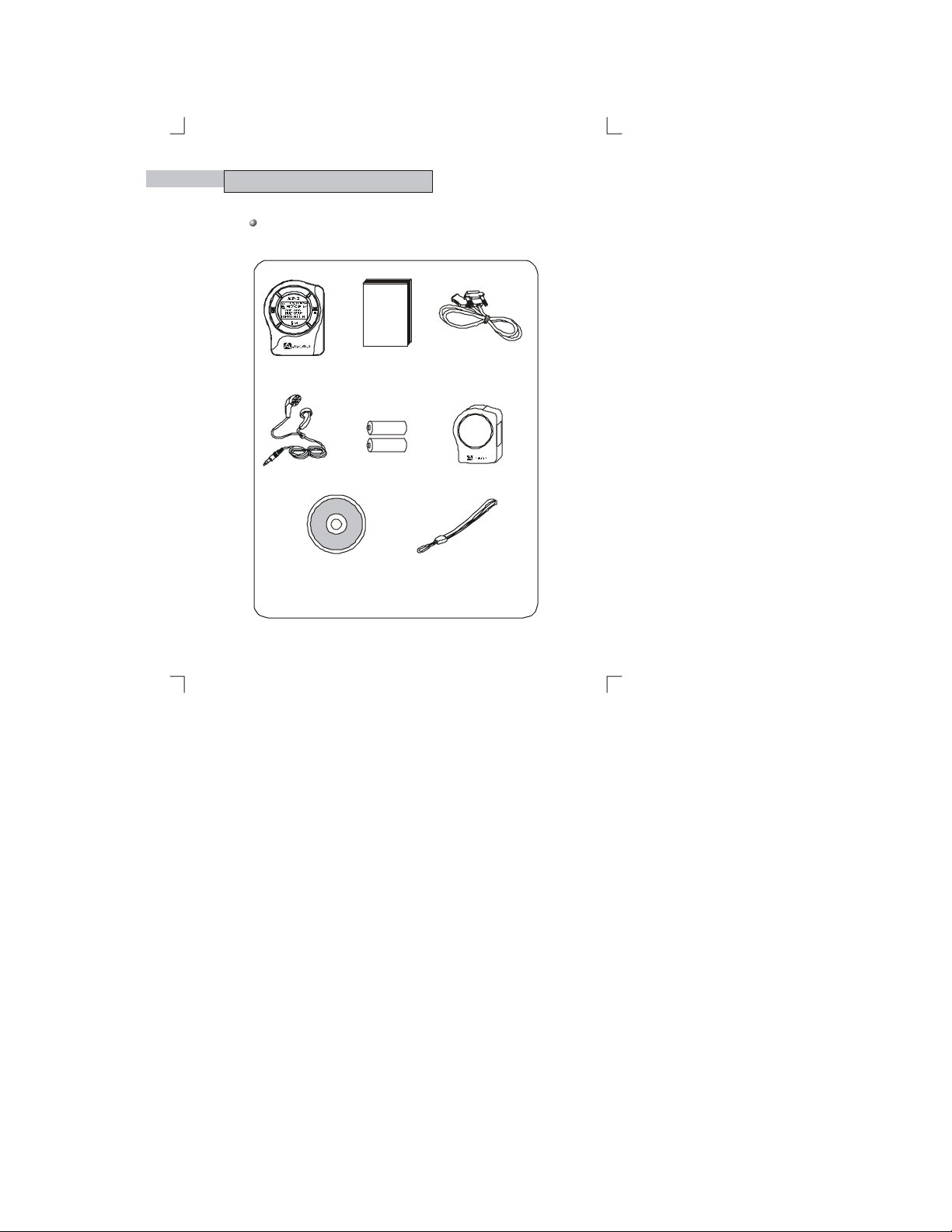
MP DJ K IT CONT ENT S
Take a moment to ex amine the components provided with your
MP DJ kit.
T
A
T
S
L
R
G
E
I
E
I
O
D
C
Y
I
C
B
S
E
U
R
M
MANUAL
MP-2000 PLA YER OWN ER'S MANU AL PARALLEL PO R T PC
EARPHONES
BATT ERIES (2 x AAA )
CONNECTING CABLE
LEATHER CASE
INSTALLA TION CD HAN D ST R AP
Page 6

BEFORE USING M P-200 0
System R equire m e n ts
Microsoft Windows 95 or 98
90MHz Intel Pentium or faster compatible processor
16MB RAM or greater (64MB rec ommended)
30MB available HD space (more if MP3 file storage is desired)
1 External Parallel Port
10X or faster CDROM Dri ve (32X re commen ded)
Installed sound card and speakers
Instal led Mouse
Internet access for the do wnload of MP3 files and CD Database support
(Recommended modem speed is 56K)
M P3 Int er net Site s
You can obtain MP3 files and the latest information on MP3
technology from a growing number of Internet sites.
The following are s ome sites you might want to explore:
Windows
http://www.audiovox.com
http://www.m p3.com
http://realguide.real.com
http://www.altavista.com
http://www.emusic.com
http://www.mp3now.com
http://www.goodnoise.com
http://www.listen.com
http://www.m p3site.com
http://mp3.lycos. co m
3
Page 7
4
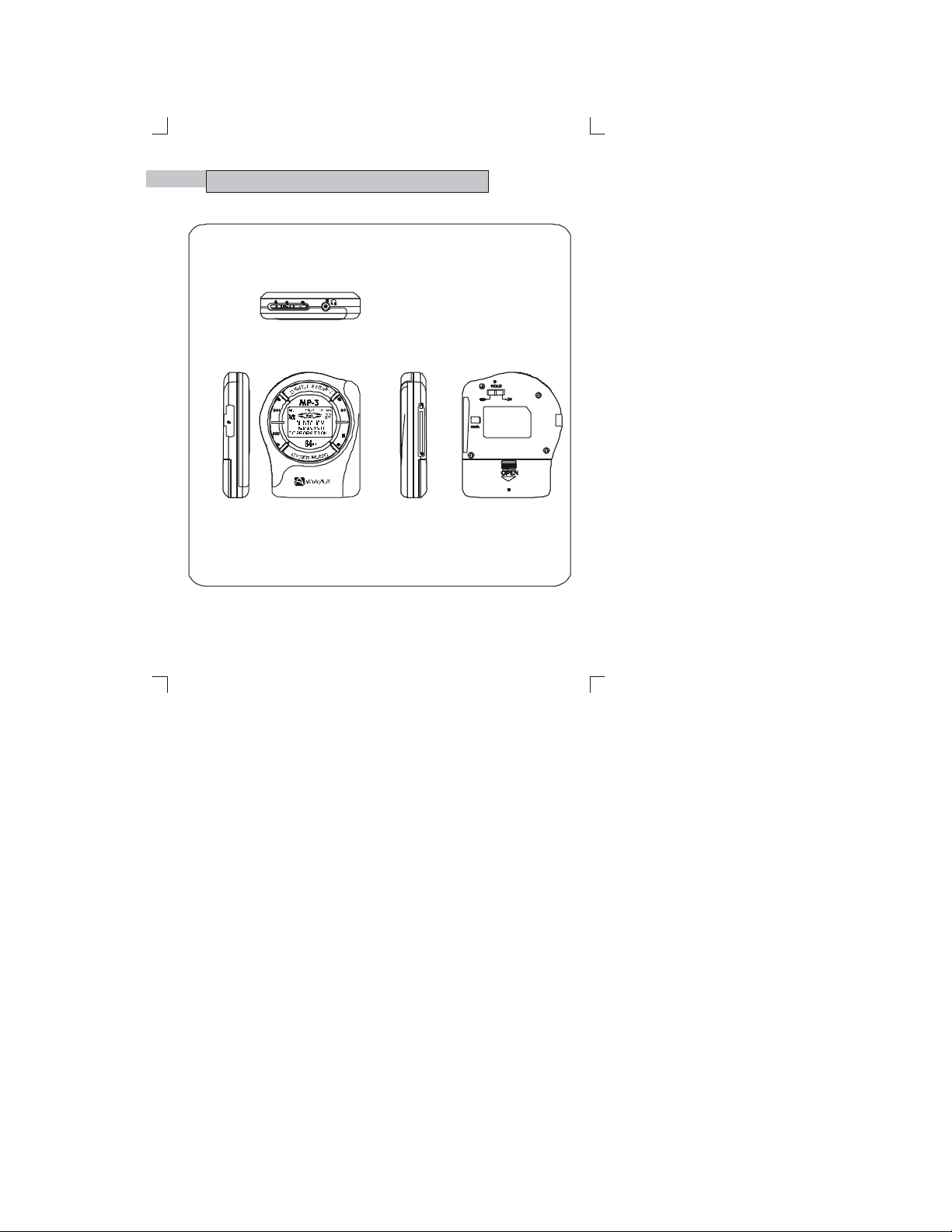
MP- 2 00 0 CONT ROL BUT T ONS
VOLUME LEVEL ADJUSTMENT(+)
MODE
VOLUME LEVEL ADJUSTMENT(-)
EAR PHONE JACK
PC CONNECTION
SOCKET
PROGRAM SELECTION FORWARD
PROGRAM SELECTION REVERSE
POWE R ON/
PLAY/PAUSE
STOP/
POWE R OFF
EJECT
BATTERY CASE
MULTIMEDIA CARD SLOT
HOLD
Page 8
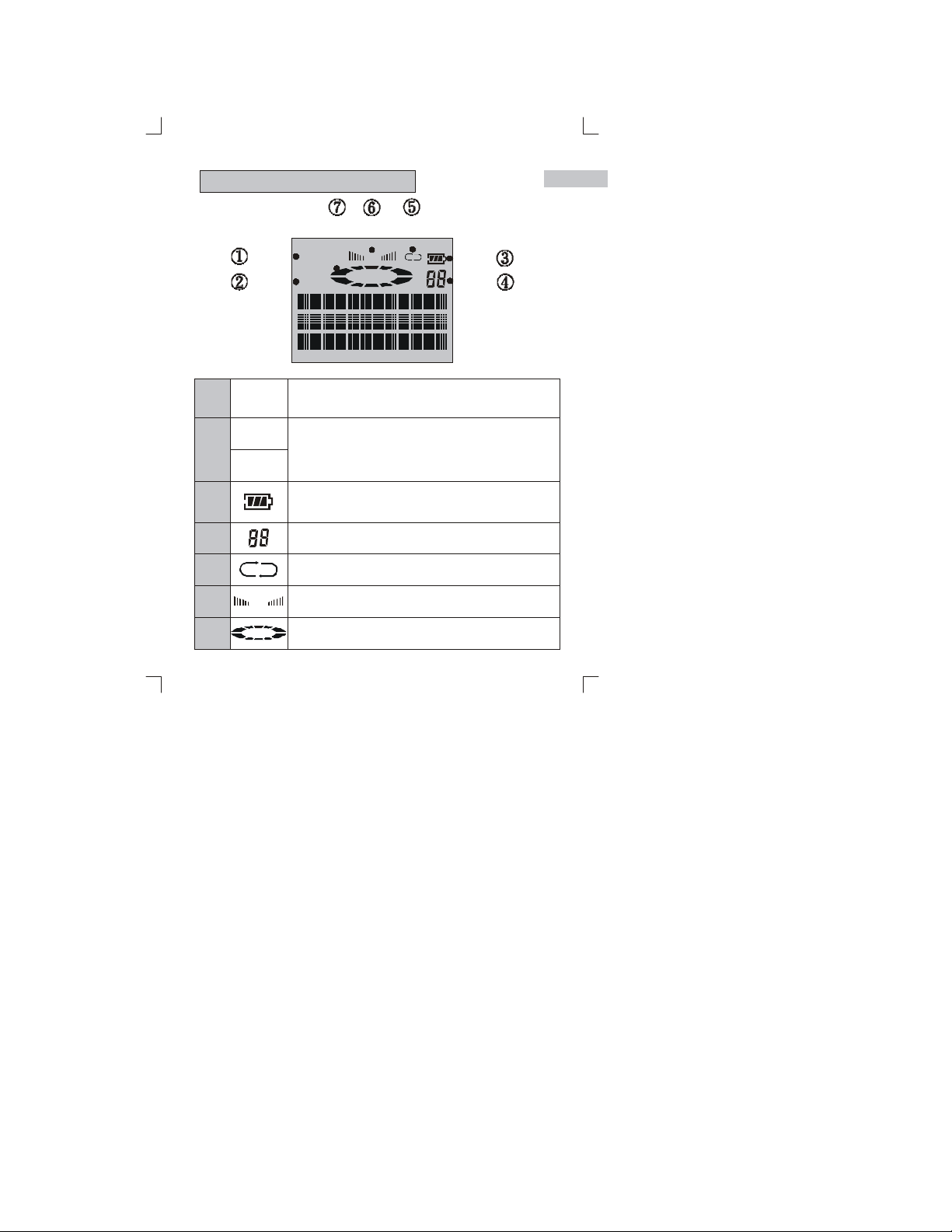
M P-2000 LC D D ISPLAY
5
1
2
3
4
5
6
7
HOLD
128kb
256kb
1 ALL
VOL
M P3
HOLD
128kb
256kb
Indicates that the HOLD switch has been set to the on
position. Prevents accidental or unintended operation of
any button.
Indicates the bit rate at which the MP3 file was created.
The higher number equals higher quality audio output. The
bit rate is measured in Kilobits-per-second (Kbps).
Indicates current battery statu s. Three bars indicates a fully
charged battery. This icon is always on while the unit is
operating.
Displays the track number
Ind i ca te s re pe at fu nc ti o n is acti v at e d
Indicates volum e level
Indi cates that an MP3 file is playing or is paused
M P3
VOL
1 AL L
Page 9
6
OPTIONAL FLASH M EMORY
MULTIMEDIA CARD [ M M C]
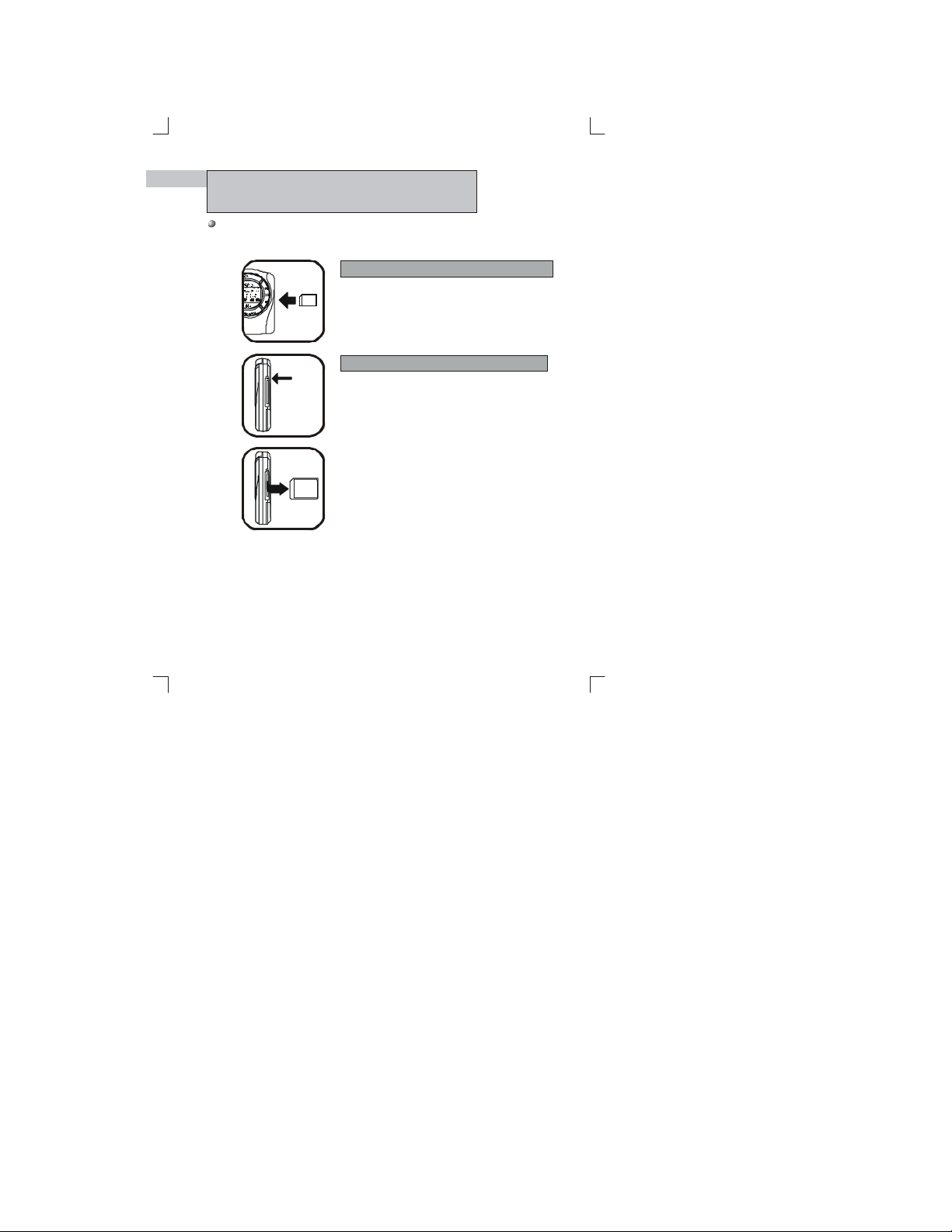
The MP-2000 player can store and play additi onal MP3 files by inserting
an opti onal flash memory card into the MMC slot.
1
T
S
R
E
E
O
2
Eject
button
3
Inser ting The Flash Memory C ard
Turn off the power by pressi ng and holding the
Stop Button for 2 sec onds. Insert the
MultiMedia card into the MMC slot .
()
■
(figure 1)
Ejecting Th e Flas h M em ory Card
If y ou have a MultiMedia Card inserted into the
MP-2000 player, remove it by pressing the Ej ect
Button .
(figures 2 & 3)
Caution : Do not remove the MultiMedia Card
while unit is on, or damage to the unit
and/or MMC could result.
Page 10

CONNECTING T HE MP-200 0 TO YOUR PC
To transfer MP3 files between your P C (personal computer) and the MP-2000, you
must connect the two as shown below. Do this prior to using the MPDJ Downloader.
7
1
2
Lock/Release
Tab(s)
Connect the supplied PC connecting
cable to your computer's parallel
printer port.
Note: The MP-2000 connector is
keyed and wil l accept the PC
Connector Cable only if
properly oriented (met al side
up).
Connect the P C cable to th e MP-2000
by pressing in the lock/release tabs
on each side and inserting the
connector into the MP-2000 plug.
Release the side tabs.
Turn on the MP-2000 by pressing the
Play button ( ).
Page 11
38
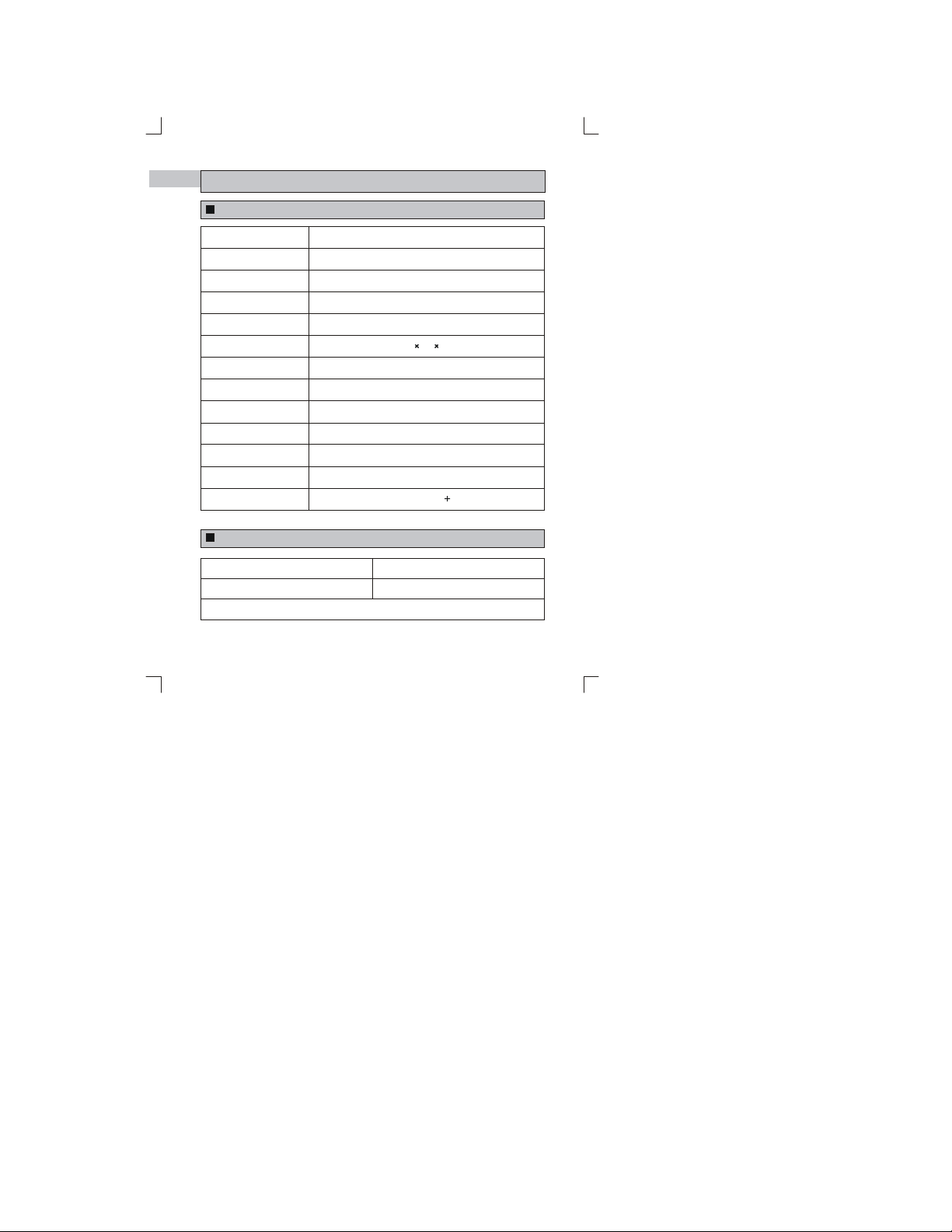
M P-2 000 TECHNICAL SPECIFIC A TIO N S
M P-2000 Player
Processor
Memory
Voltage Input
Battery
LCD Display
Dimensions (W*H*D)
Weight
Case
File Transfer
(from PC to MP-2000)
Memory Socket
Output of Earphone
Frequency Range
Speed
S/N Ratio
20MHz, 8bit MCU
64MB Built-in (expandable to 128M B)
2 x 'AAA' size alkaline batteries
Alphanumeric 3 line with 12 characters
63.4 83 18.3
56g (without batteries)
Aluminum, Poly Carbonate
~10sec/MB
Multimedia Card (MMC)
14mW (Max)
20Hz~20KHz( 1dB)
A cce ssories
3VDC
95dB
Earphones
Parallel PC Connecting Cable
32MB Flash Memory Card (MMC) - Optional
You ma y purchase any of the above accessories by calling the
Audiovox Customer Service Center at (800) 290-6650.
Hand Stra p
Leather Carrying Case
Page 12

150 Marcus Boulevard
Hauppauge, NY 11788
USA
http://www.audiovox.com
(800) 290-6650
RealJukebo x is either a regis tered trademark or trademark
of RealNetworks, Inc. in the United States and/ or other
countries.
RealPlayer is either a registered trademark or trademark
of RealNetworks, Inc. in the United States and/ or other
countries.
Music CD-related data is pr ovided through the Internet from
the CDDB Music CD Database. Copyright 1998 CDDB
Inc. All rights reserved.
CDDB and the CDDB Logo are trademarks of CDDB, Inc.
TM
TM
TM
FORM No. 128-5827
Print ed in Ko rea
 Loading...