

Page 1

User manual Telfort HSDPA USB-modem MAC UK V2.0 1 of 10
Telfort USB-Modem
User manual for Apple Macintosh
Page 2

User manual Telfort HSDPA USB-modem MAC UK V2.0 2 of 10
Content
1 USB-Modem Introduction.................................................................................................................................................... 3
1.1 Introduction........................................................................................................................................................................3
1.2 Safety Warning and Notice................................................................................................................................................3
1.3 Applicability Scope .............................................................................................................................................................4
1.4 System Requirements........................................................................................................................................................4
1.5 Functions............................................................................................................................................................................4
2 Installation .........................................................................................................................................................................5
2.1 Connect the Modem and PC ..............................................................................................................................................5
2.2 Running Application Software ...........................................................................................................................................5
2.3 Disconnect Modem or Mobile Card Safely ........................................................................................................................5
2.4 Software Uninstallation .....................................................................................................................................................5
3 Functions & Operation ........................................................................................................................................................ 6
3.1 Interface Introduction ........................................................................................................................................................6
3.2 Connecting to the Internet .................................................................................................................................................7
3.3 Settings ..............................................................................................................................................................................9
3.3.1 Security Settings ...........................................................................................................................................................10
3.3.2 Network Settings ..........................................................................................................................................................10
4 Help.................................................................................................................................................................................. 10
Page 3

User manual Telfort HSDPA USB-modem MAC UK V2.0 3 of 10
1 USB-Modem Introduction
1.1 Introduction
Thank you for choosing the Telfort USB-Modem.
To guarantee the modem always in its best condition, please read this manual carefully and
keep it for future use.
The pictures, symbols and contents in this manual are just for your reference. They might
not be completely identical with your modem. Please subject to the real object. Telfort
operates a policy of continuous development and reserves the right to update and modify the
technical specifications in this document at any time without prior notice.
The Telfort USB-Modem is a type of multi-mode, 3G modem, applicable to
GSM/GPRS/EDGE/WCDMA/UMTS/HSDPA network. It integrates some functions of modem
and mobile phone, and combines mobile communication with the Internet perfectly.
Via the mobile network, it carries out data service, helping you break away from limitation of
time and zone, and communicate wirelessly anytime and anywhere.
1.2 Safety Warning and Notice
To the owner
• Some electronic devices are susceptible to electromagnetic interference sent by
modem if inadequately shielded, such as electronic system of vehicles. Please
consult the manufacturer of the device manufacturer before using the modem if
necessary.
• Operating of your PC and modem may interfere with medical devices like hearing
aids and pacemakers. Please always keep the modem more than 20 centimeters
away from such medical devices when they are in use. Power off the modem if
necessary. Consult a physician or the manufacturer of the medical device before
using the modem.
• Be aware of the usage limitation when using a modem at places such as oil
warehouses or chemical factories, where there are explosive gases or explosive
products being processed. Do not use modem if necessary.
• Store the modem out of the reach of small children, it may cause injury if used as a
toy.
Page 4

User manual Telfort HSDPA USB-modem MAC UK V2.0 4 of 10
USB-Modem
• Please use original accessories or accessories that are authorized by the
manufacturer. Using any unauthorized accessories may affect your modem’s
performance, and violate related national regulations about telecom terminals.
• Avoid using the modem near metallic structure device or establishment that can
emit electromagnet wave. Otherwise it may influence receiving of signals.
• The modem is non-waterproof, please keep it dry and store in a shady and cool place.
• Don’t use the modem immediately after sudden temperature change. In such case,
there will be dew inside and outside the modem, so don’t use it until it becomes dry.
• Treat the modem carefully. Don’t drop, bend, knock or harshly treat it to avoid
destructive damage.
• No dismantling by non-professional and only qualified maintainer can undertake
repair work.
In Aircraft
Please power off the modem before the airplane takes off. In order to protect airplane’s
communication system from interference, it is never allowed to use the modem when it is in
flight. Using it before the plane is taking off, should get aircrew’s permission according to
safety regulations.
1.3 Applicability Scope
The Telfort USB-Modem supports Apple computers and laptops.
1.4 System Requirements
Operating System: Version 10.4 or above
Configuration
• CPU PowerPC or Intel
• Processor 500M or above
• Memory 128M or above
The performance of the modem may be influenced if configuration under recommendation
required.
1.5 Functions
Functions support includes: Data service, Applications management, etc.
Page 5

User manual Telfort HSDPA USB-modem MAC UK V2.0 5 of 10
2 Installation
2.1 Connect the Modem and PC
Connect the modem with your PC by the supplied modem cables. Download the installation
software package, double click it, and then follow the following steps to install:
1) Press “Continue” button on the welcome page.
2) Select a destination volume to install software on the volume “Macintosh HD”, and
then click “Install”.
3) Please enter user name and password to be authenticated, and left click ‘OK” to
install.
4) Left click “Restart” to restart computer and finish software installation.
Note:If you have problems with installation after the upper operation, please contact the
service provider for help.
After the installation, select “Finder” → “Applications” and there will be a “Telfort Mobile
Connect” program listed in, the modem is ready to work normally.
2.2 Running Application Software
After the modem is installed and connected normally, double click Finder → Applications →
Telfort Mobile Connect on the PC to run the application software.
2.3 Disconnect Modem or Mobile Card Safely
Please quit the application software at first, then click the “Eject” button of the USB-drive,
and then pull out the USB-Modem.
2.4 Software Uninstallation
Close the application program before the software uninstalling.
Select Finder → Applications → Telfort Mobile Connect and drag the application to the
Trash can to remove the application. After this, the laptop has to be restarted, for the
changes to take effect.
Page 6
User manual Telfort HSDPA USB-modem MAC UK V2.0 6 of 10
3 Functions & Operation
3.1 Interface Introduction
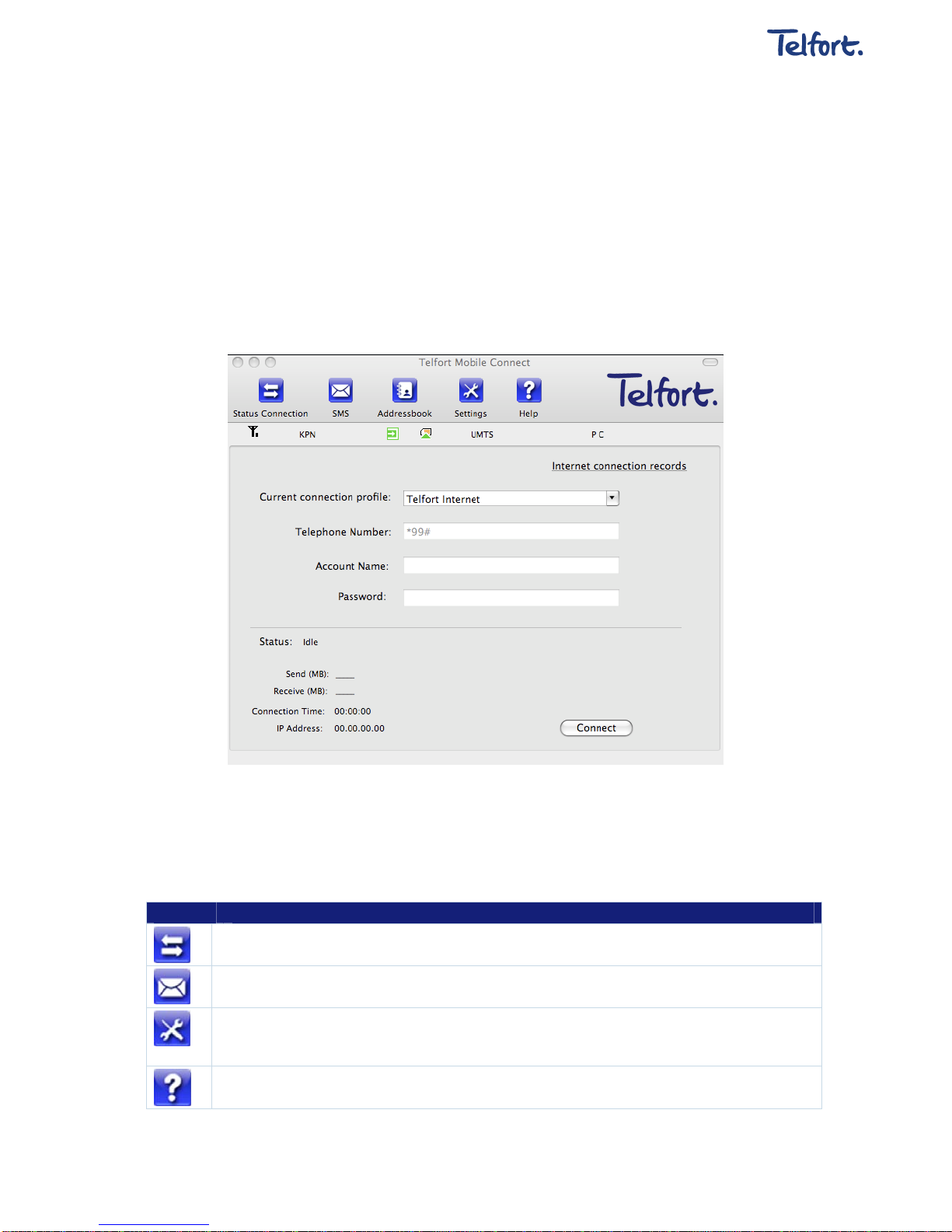
The Mac PC application software comprises into three parts: Functional Button Area,
System Information Area and User Area. The related functions can be executed by within the
corresponding area.
1. Functional Button Area:
There will be various functional button icons shown in this area. Select the function button
and it will carry out corresponding operation.
Status Connection: Connect to the Internet.
SMS: With this option you can send and receive SMS text-messages.
Settings: Set various settings for the application software, like connection profiles, networks etc.
Usage Overview: View related information for your connections, such as, profile name, start time,
disconnect time, duration, data received and data sent.
Help: System information for Help.
Page 7
User manual Telfort HSDPA USB-modem MAC UK V2.0 7 of 10
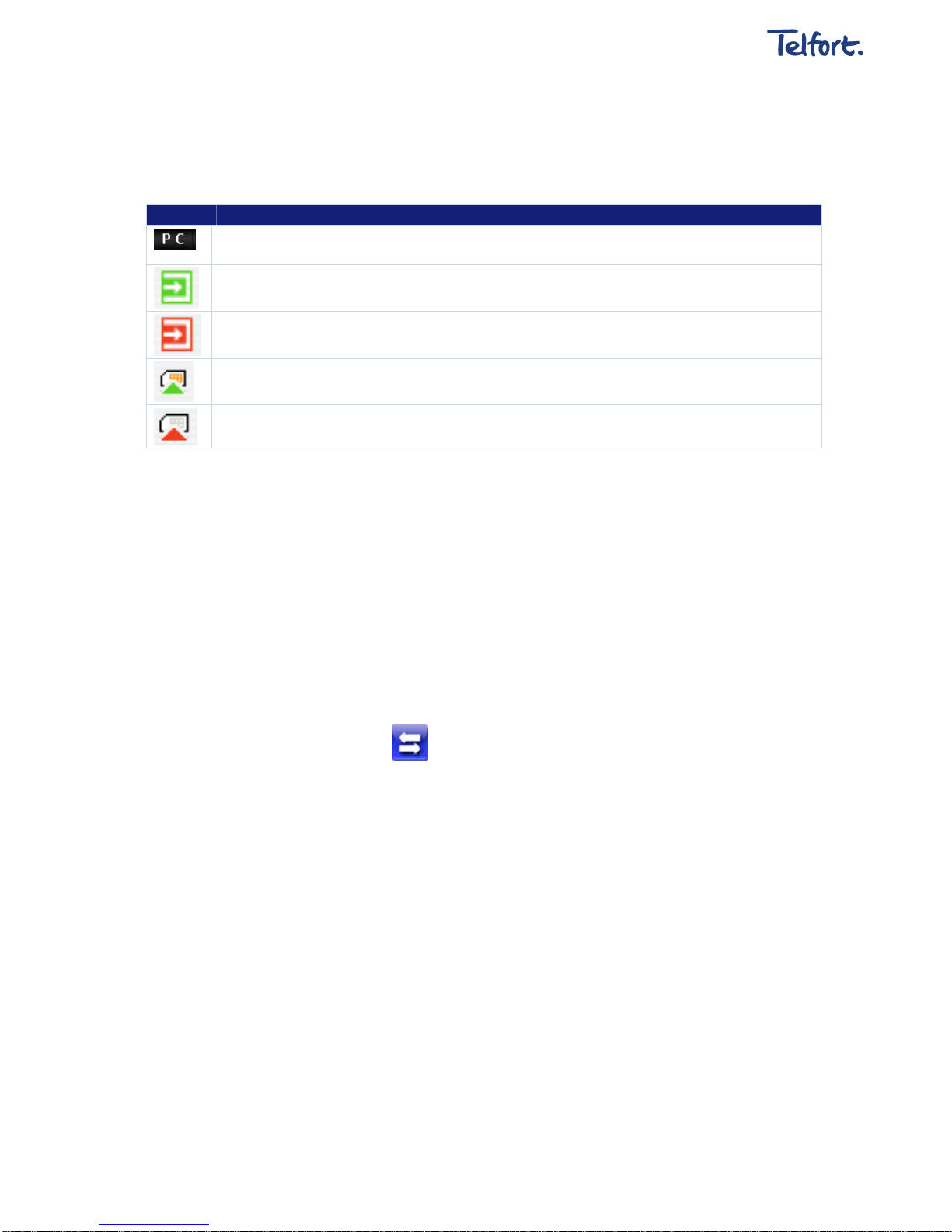
2. System Information Area
Shows the system status and related information.
Letter “P” means supporting packet-switch (P) service, while letter “C” means supporting circuit
switch (C) service.
Indicates insert status of the modem or mobile card, “Green” it has been connected to the computer.
Indicates insert status of the modem or mobile card, “Red” it has been disconnected to the computer.
Indicates insert status of the SIM/USIM card to the mode. Green indicates the card has been inserted.
Indicates insert status of the SIM/USIM card to the mode. Red indicates the card has not been
inserted.
3. User Area
Toont informatie met betrekking tot de interactie tussen de gebruiker en de computer onder
verschillende omstandigheden.
3.2 Connecting to the Internet
Show the interactive computer information under various conditions.
1. Connect to the Internet
Click the Status Connection icon.
To ensure the modem connects to Internet properly, you’d better configure the user’s
network information at first. You can save different operator’s network configurations in
different files.
The user configuration information includes: Description (Config filename), Telephone
Number, Account Name, Password, APN, DNS, and PDP address. If network support “Obtain
server address automatically”, the modem or mobile card can obtain the assigned IP
information automatically. If the network does not support it, you should fill the proper
address manually. Please consult the network supplier of the SIM/USIM card for all the
information above. The user configuration information may differ with the network supplier
and network types.
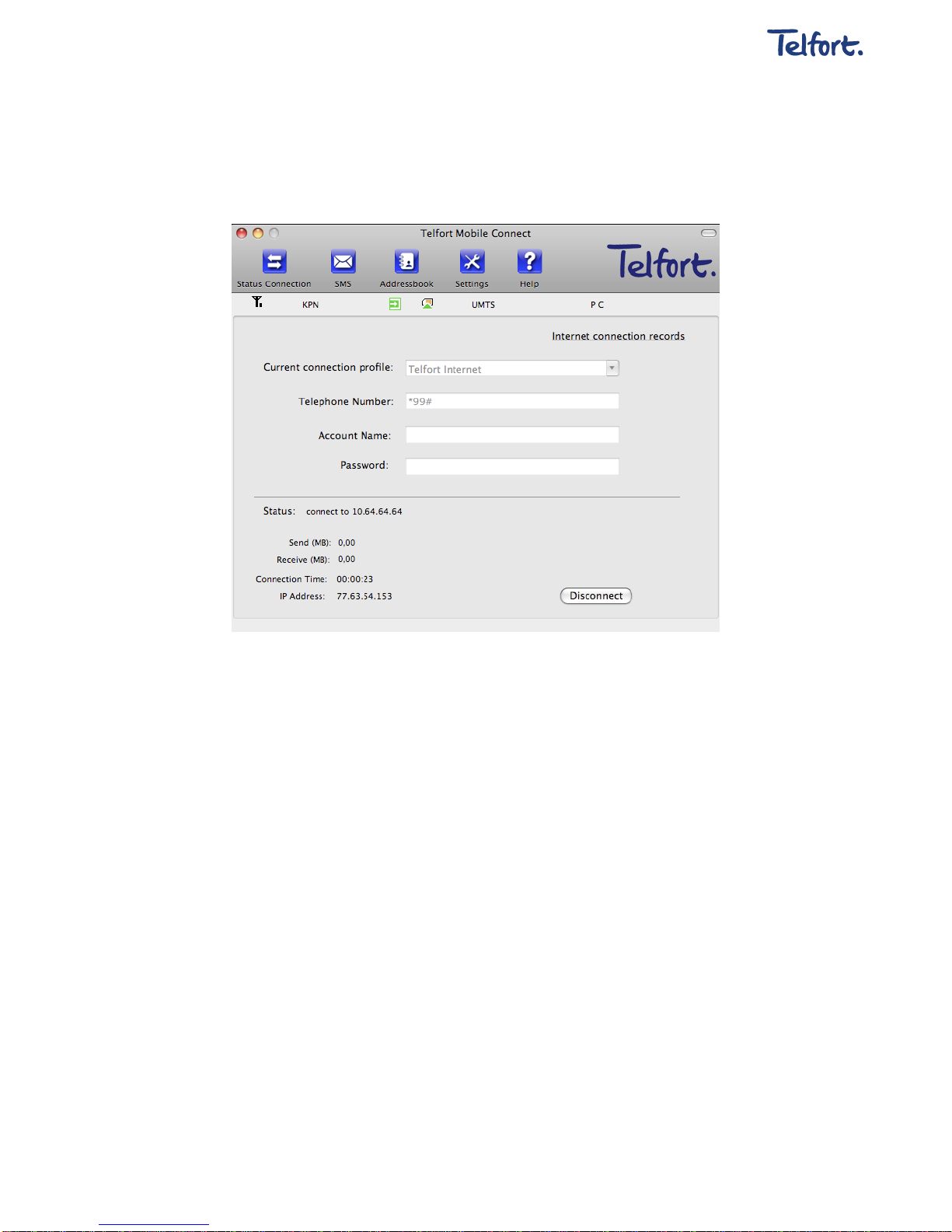
And then click “Connect” to start connecting Internet. When connected it will show all the
information of data flow, connected time and so on.
Page 8
User manual Telfort HSDPA USB-modem MAC UK V2.0 8 of 10
During the course of connecting, you can “Cancel” the connecting. With connection in
success, the button “Connect” becomes “Disconnect”.
Note: The modem can have the function of locking the SIM/USIM card. If you use the
SIM/USIM card provided by the other network service provider, maybe you can’t
connect to the network. If you have any problem, you can consult your network service
provider for further information.
2. Disconnect the Internet
Click “Disconnect” button to disconnect Internet. With disconnection in success, the button
“Disconnect” becomes “Connect”.
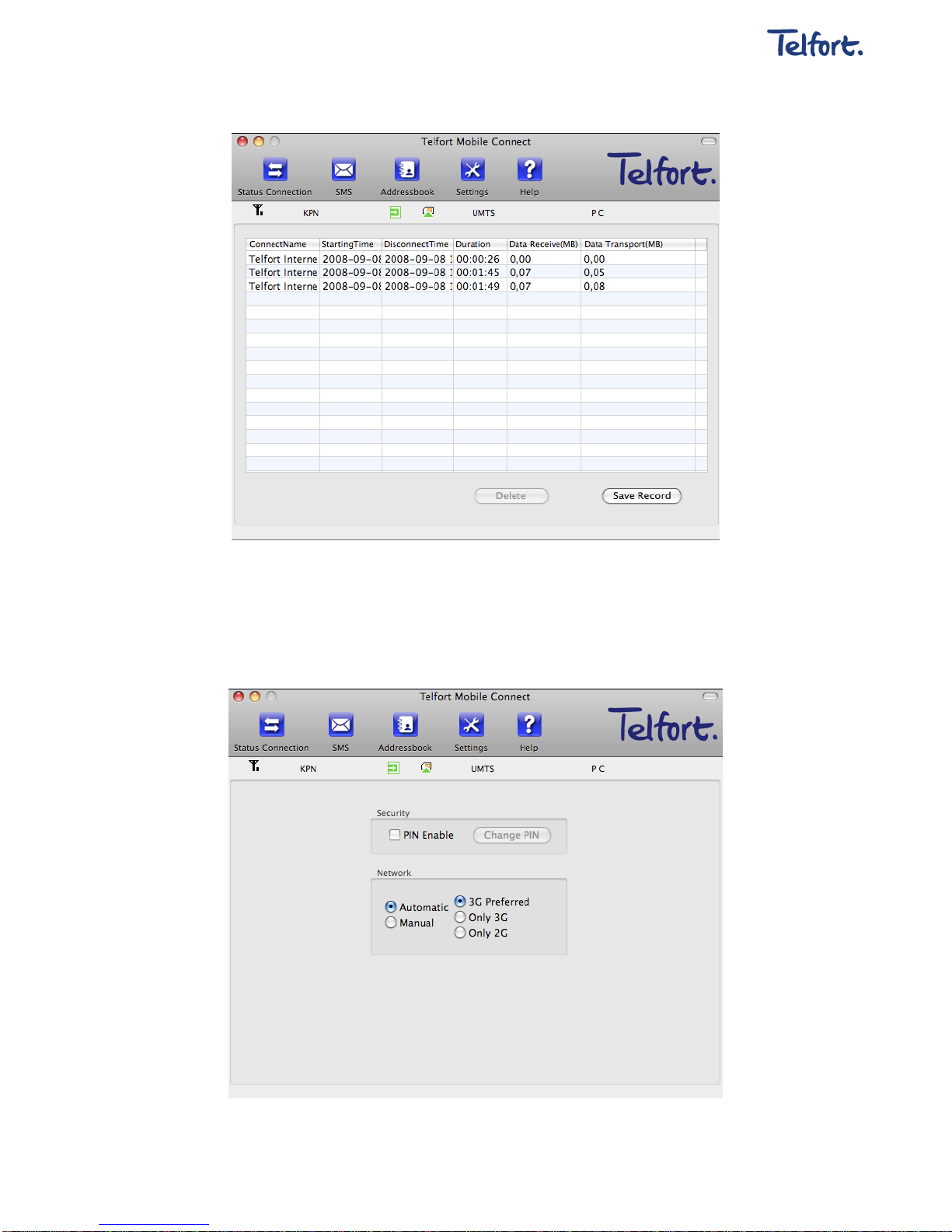
3. Internet Log
Click the “Usage Overview” link, and switch to the Internet log interface. You can view
related information for your operation, such as user name, start time, disconnects time,
duration, data received and data sent.
Page 9
User manual Telfort HSDPA USB-modem MAC UK V2.0 9 of 10
3.3 Settings
Click “Settings” icon to switch to the settings interface. It includes: security settings,
network settings.
Page 10

User manual Telfort HSDPA USB-modem MAC UK V2.0 10 of 10
3.3.1 Security Settings
Enable the PIN Code
When “PIN enable” item is selected, you will asked to enter a PIN code to use the modem.
You can click “Revise PIN” to modify the number. The default PIN code is ‘0000’.
3.3.2 Network Settings
Automatic: The system selects the network automatically according to user’s
configuration rules and network status.
Manual: User selects network in manual way.
Select network “Automatic”: the system will find the network available automatically.
Select network “Manual”: after a while, network operator list appears in which red ones
are unavailable. Select the proper network to connect.
4 Help
Click the “Help” icon on the application interface to switch to help pop-up windows. Under
“Help” subject, you can get the modem or the mobile card information on functions,
introductions, installation and usage guide, versions and date of application software and
hardware published, etc.
 Loading...