

Page 1

ICruzAudioHandsfreeKit
foriPhone4/iPhone3GS/iPhone3G
deximisatrademarkofiPhoneisatrademarkofAppleInc.,
registeredintheU.S.andothercountries. “MadeforiPhone” meansthatanelectronicaccessory
hasbeendesignedtoconnectspecificallytoiPhoneandhasbeencertifiedbythedeveloper
tomeetAppleperformancestandards.Appleisnotresponsiblefortheoperationofthisdevice
oritscompliancewithsafetyandregulatorystandards.Pleasenotethattheuseofthis
accessorywithiPhonemayaffectwirelessperformance.Allotherregisteredandunregistered
trademarksarethepropertyoftheirrespectiveowners.Visitor
SantomLimited.
callformoreinformation.
(1)888-445-5655
www.dexim.net
Model#DCA234
Page 2
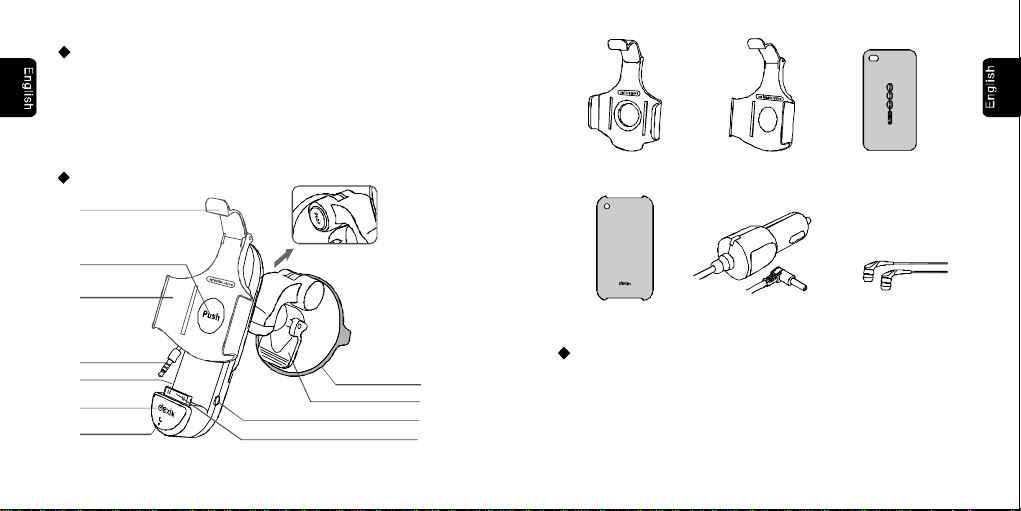
Contents:
1×Audiocarmountchargingholder
1×3.5DCcarcharger
1×CradleforiPhone4
1×CradleforiPhone3GS/3G
1×BraceletTPUCaseforiPhone4
1×PCCaseforiPhone3GS/3G
1×Earphone
ProductLayout:
Thumbtab
CradleforiPhone4
CradleforiPhone3GS/3G
BraceletTPUCase
foriPhone4
Flipbutton
Flipcradle
Audiocable
Line-out
Answer/End
Microphone
Audiocarmountchargingholder
--2 --3
Adjustmentknob
3.5DCchargeport
Apple30pinconnector
Suctioncup
Baselever
PCCasefor
iPhone3GS/3G
3.5DCcarcharger
Specifications:
Compatibility: iPhone4,iPhone3GS,iPhone3G
Carmountholderinput:5VDC1000mA,
Output:5VDC1000mA,
CarChargerinput:10.5V-26V,DC
Output:5VDC,1000mA
Earphone
Page 3
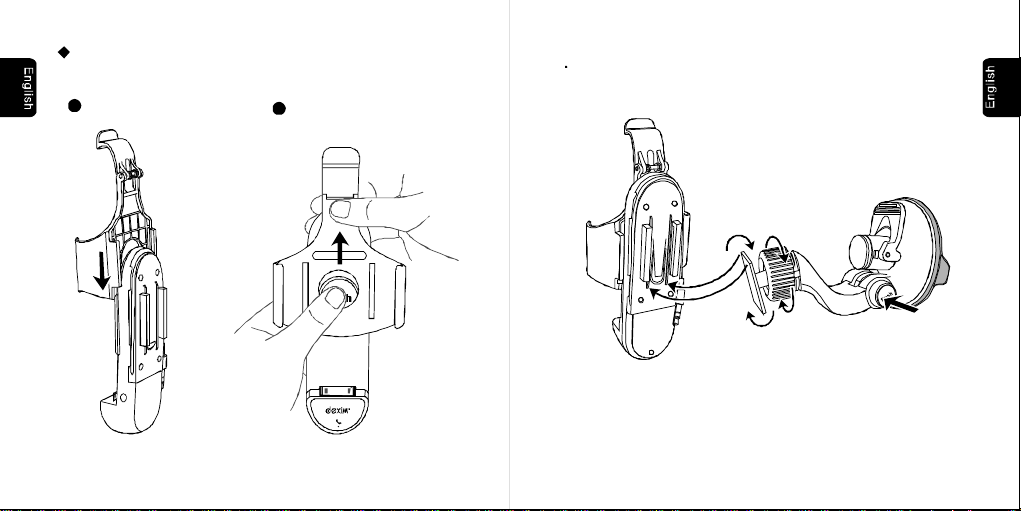
Instruction:
1.Choosethecradlefitforyourdevice
1 Slidein
--4 --5
2 Pushout
foriPhone3GS/3G
2.CarMountHolderInstallation
ConnectthepedestaltotheFlipHolder.Adjusttheangleandrotationof
thedashswivelmountbypressingtheadjustmentknob.
Page 4
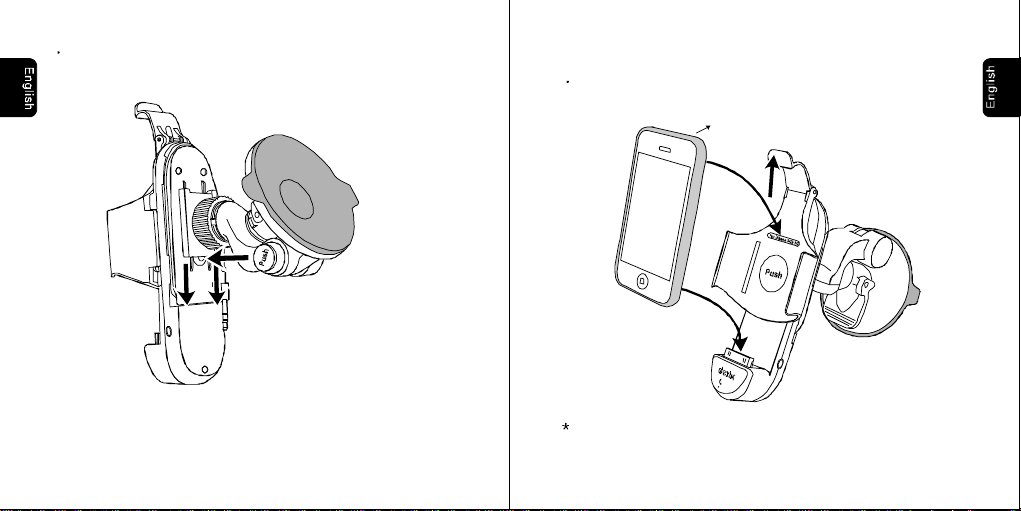
Howtoslidedownthepedestal.
3.ChargeiPhone
A.iPhoneInsertion
LiftandholdtheupperthumbtabandgentlyinsertiPhoneintotheholder.
MakesurethatiPhoneisfullydockedintotheconnector.
(iPhone3GSwithincludedprotectivecase)
CradleforiPhone4isfitforiPhone4withAppleBumpercase.
--6 --7
Page 5
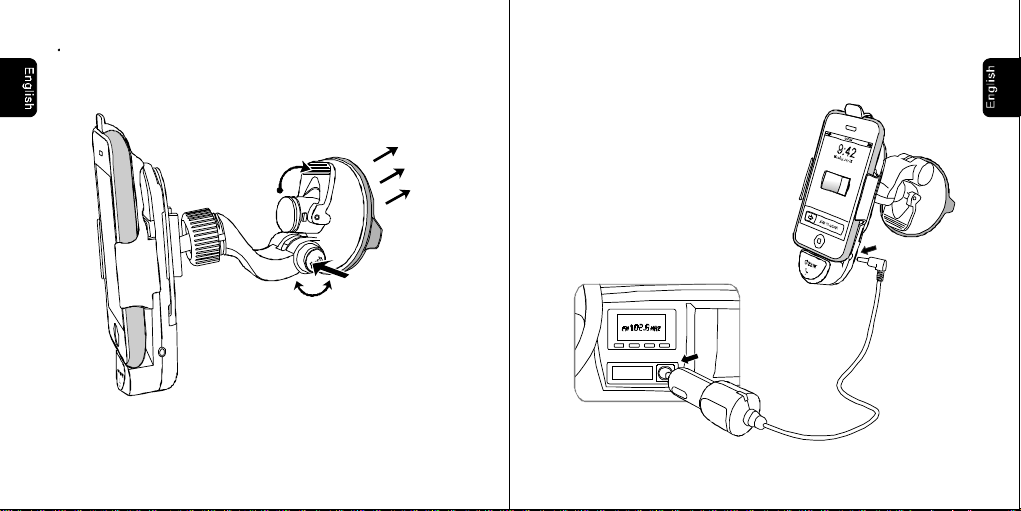
Findasafelocationontheinteriorofthevehicletomountthepedestal.
Firmlypushthesuctioncupagainsttheplaceandflipthebaselever
downtothelockedposition.Seeillustrationbelow.
B.ConnecttoCarChargerforCharging
Insertthecarchargerintothecigarettelightersocketandconnectitto
carmountholder.Chargingwillbeginautomaticallyonceyouinsert
youriPhone.
--9--8
Page 6
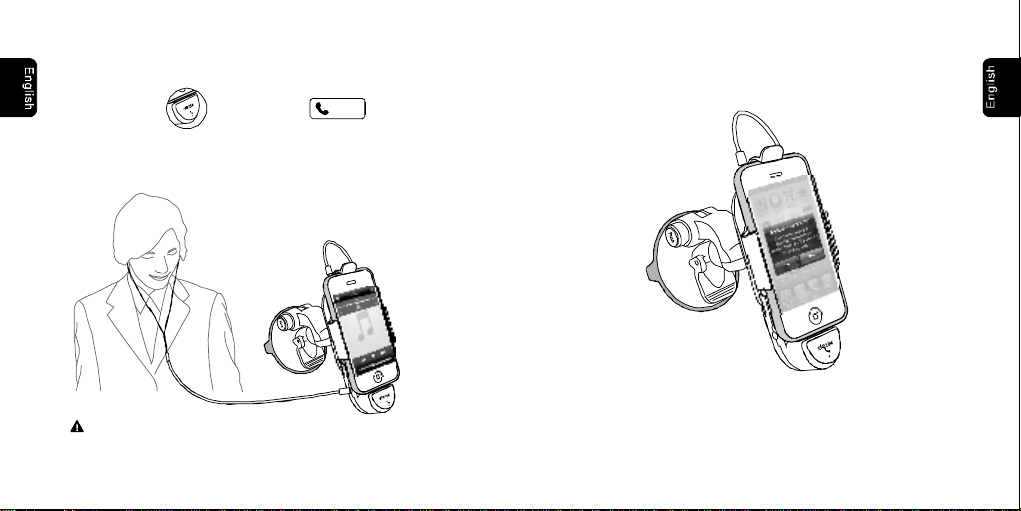
4.AnswerPhoneCalls
A.PlugtheaudiocableofcarmountholderintoiPhone’searphonejack
B.PressthebuttonoranswerbuttononiPhone’s
Answer
screentoanswerthephone
C.Earphoneprovidedforprivateconservation.
Caution:Pulltheaudiocableoutfirstly
removeiPhonefromcarmountholder.when
--10
5.iCruzApp
A.WheniPhoneisdockedintocarmountholder,“ApplicationNotInstalled”
messagewillbedisplayoniPhone’sscreen,presstodowanload
iCruzapp.
B.PressiCruzicontoenterandfindaclearfrequencysameasthecarFM
radio.ThenativeiPhonemusicwillbeplayedthroughcarstereo.
PressoniPhonetocontrolthevolume.+-
Yes
--11
Page 7
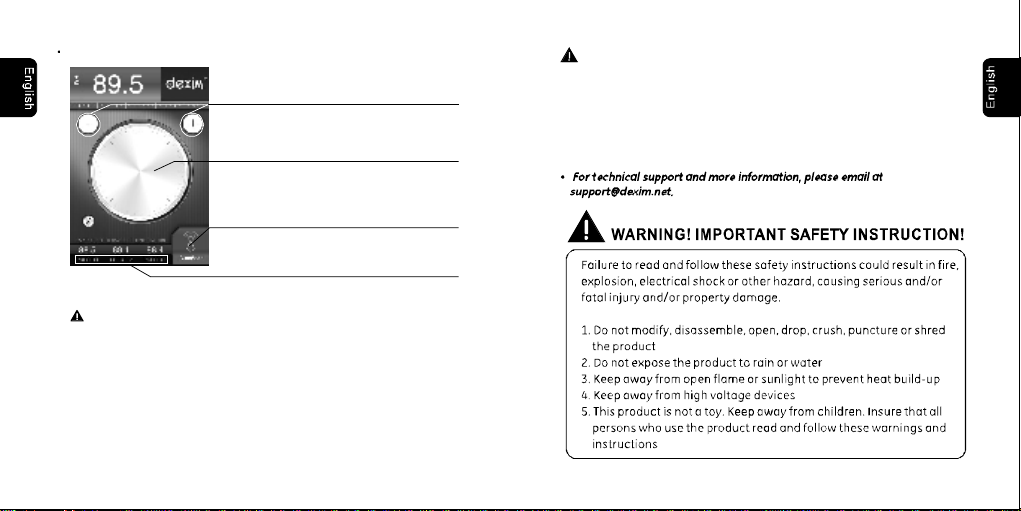
iCruzQuickGuide
Tap+-tosearchclearfrequenciesonebyone
UsethewheeloniPhone’sscreentoquick
Threeuser-programmablePRESETSenableyou
recallclearfrequencieswithatapofthescreen.
Caution:Pulltheaudiocableoutfirstly
removeiPhonefromcarmountholder.when
search,scanforclearfrequencies
PresstheAutoScantofind
theclearestfrequency
SafetyPrecautions
Donotinstalldeximcarmountholderinornearanairbagdeployment
zoneorwhereitwillobstructviewoftheroad.deximassumesno
responsibilityofliabilityforinjuryordeathasaresultofcarcrashes
and/orairbagdeployment.
deximisnotresponsiblefordamagearisingfromfailuretofollow
instructionsrelatingtotheproduct'suse.
--12
--13
Page 8

This device complies with part 15 of the FCC rules. Operation is subject to the
following two conditions: (1) this device may not cause harmful interference,
and (2) this device must accept any interference received, including
interference that may cause undesired operation.
NOTE: The manufacturer is not responsible for any radio or TV interference
caused by unauthorized changes and modifications to this equipment. Such
changes and modifications could void the user’s authority to operate the equipment.
NOTE: This equipment has been tested and found to comply with the limits for
a Class B digital device, pursuant to part 15 of the FCC Rules. These limits
are designed to provide reasonable protection against harmful interference in
a residential installation. This equipment generates uses and can radiate
radio frequency energy and, if not installed and used in accordance with the
instructions, may cause harmful interference to radio communications.
However, there is no guarantee that interference will not occur in a particular
installation.
If this equipment does cause harmful interference to radio or television
reception, which can be determined by turning the equipment off and on, the
user is encouraged to try to correct the interference by one or more of the
following measures:
- Reorient or relocate the receiving antenna.
- Increase the separation between the equipment and receiver.
-Connect the equipment into an outlet on a circuit different from that to which
the receiver is connected.
-Consult the dealer or an experienced radio/TV technician for help.
 Loading...