

Page 1

TelePatch™
Cardiac Monitor PM750
User Manual
INSTRUCTIONS FOR USE
TelePatch is intended for use as prescribed by a physician who wants to follow
cardiac activity. TelePatch is not intended for diagnostic use. A physician must
review and interpret ECG findings recorded during procedure.
TelePatch™ Cardiac Monitor PM750
USER MANUAL - UTM0000701-04D | January 06, 2017
Page 2

Have a question or need assistance?
Call Medicomp Patient Support: 800-234-3278 ext. 2370
Table of Contents
GETTING STARTED AND INTRODUCTION .................................................................................................... 5
Notices, Cautions, and Copyrights ............................................................................................................ 5
TelePatch Cardiac Monitor User Kit .......................................................................................................... 6
Contact Us ................................................................................................................................................. 9
ABOUT TELEPATCH CARDIAC MONITOR PM750 ......................................................................................... 9
INDICATIONS FOR USE .............................................................................................................................. 9
OVERVIEW ............................................................................................................................................... 10
SAFETY SPECIFICATIONS AND COMPLIANCE ............................................................................................. 10
Contraindication ..................................................................................................................................... 10
Safety Classification ................................................................................................................................ 10
Modifications .......................................................................................................................................... 10
Defibrillation ........................................................................................................................................... 10
System Safety .......................................................................................................................................... 10
COMPLIANCE .............................................................................................................................................. 11
Safety Classification ................................................................................................................................ 11
Radio Frequency Regulatory Compliance ............................................................................................... 11
BUTTONS, ICONS AND SCREEN INDICATOR DESCRIPTION ....................................................................... 12
TELEPATCH SYSTEM OVERVIEW ................................................................................................................. 14
TelePatch Pendant Description ............................................................................................................... 16
.................................................................................................................................................................... 18
TelePatch Smartphone Description ........................................................................................................ 18
Accessories to the TelePatch System ...................................................................................................... 19
TelePatch Charger Cord ...................................................................................................................... 19
Connecting Charger Cord: Smartphone .............................................................................................. 21
TelePatch Battery Charger .................................................................................................................. 22
Connecting Charger Cord: Battery Charger ........................................................................................ 23
TelePatch Electrode Patch .................................................................................................................. 26
STANDARD PROCEDURE SET-UP ................................................................................................................ 28
Patient Preparation ................................................................................................................................. 29
TelePatch™ Cardiac Monitor PM750
USER MANUAL - UTM0000701-04D | 01/06/2017 1
Page 3

Have a question or need assistance?
Call Medicomp Patient Support: 800-234-3278 ext. 2370
Step 1 - Identify Electrode Patch Site...................................................................................................... 29
Step 2 - Prepare the Skin ......................................................................................................................... 29
Step 3 - Electrode Patch Application ....................................................................................................... 30
Step 4 - Turn on Pendant and Connect ................................................................................................... 32
Step 5 - Starting the Smartphone ........................................................................................................... 34
Step 6 - Procedure Set Up ....................................................................................................................... 35
Step 7 - Procedure Settings ..................................................................................................................... 36
Pacemaker Settings ............................................................................................................................. 36
Protocol Setting................................................................................................................................... 37
Set Up .................................................................................................................................................. 38
Start Over ............................................................................................................................................ 38
Step 8 - Initial Procedure Screens ........................................................................................................... 39
Recording Symptoms: Standard TelePatch Procedure ........................................................................... 41
Manual Diary Entry ............................................................................................................................. 42
Audio Diary Entry ................................................................................................................................ 44
PROCEDURE SET-UP: Cable Cradle with Patient Cable ............................................................................ 44
Step 1 - Identify Electrode Sites .............................................................................................................. 44
Step 2 - Prepare the Skin ......................................................................................................................... 45
Step 3 - Snap on Electrodes and Set Up Cable Cradle............................................................................. 46
Step 4 - Start Pendant ............................................................................................................................. 48
Step 5 - Starting the Smartphone ........................................................................................................... 48
Step 6 - Procedure Set Up ....................................................................................................................... 48
Step 7 - Procedure Settings ..................................................................................................................... 48
Step 8 - Initial Procedure Screens ........................................................................................................... 48
Recording Symptoms: Cable Cradle Procedure ...................................................................................... 48
PROCEDURE SET-UP: Fingertip Electrodes ................................................................................................ 49
Step 1 - Start Pendant ............................................................................................................................. 49
Step 2 - Starting the Smartphone ........................................................................................................... 49
Step 3 - Procedure Set Up ....................................................................................................................... 49
Step 4 - Procedure Settings ..................................................................................................................... 49
Step 5 - Initial Procedure Screens ........................................................................................................... 49
TelePatch™ Cardiac Monitor PM750
USER MANUAL - UTM0000701-04D | 01/06/2017 2
Page 4

Have a question or need assistance?
Call Medicomp Patient Support: 800-234-3278 ext. 2370
Recording Symptoms: Fingertip Electrode Procedure ............................................................................ 49
COMMON QUESTIONS ............................................................................................................................... 50
How Do I Wear TelePatch System: Electrode Patch and Pendant? ........................................................ 50
How Do I Wear TelePatch System: Pendant, Cable Cradle With Electrodes? ........................................ 51
Can I Shower? ......................................................................................................................................... 51
Tip For During Shower ............................................................................................................................ 51
Tip For After Shower ............................................................................................................................... 51
Stress Loops ............................................................................................................................................ 52
EMERGENCY AND SUPPORT NUMBERS ..................................................................................................... 52
Call 911 .................................................................................................................................................... 52
PROCEDURE INFORMATION AND CAUTIONS ............................................................................................ 53
TELEPATCH SYSTEM WHEN WEARING ELECTRODE PATCH ................................................................ 53
SHOWERING OR SWIMMING WITH TELEPATCH SYSTEM AND ELECTRODE PATCH ........................... 53
TELEPATCH SYSTEM WHEN USING CABLE CRADLE ............................................................................. 54
SHOWERING OR SWIMMING WITH TELEPATCH SYSTEM AND CABLE CRADLE .................................. 54
SMARTPHONE / HANDSET .................................................................................................................. 55
BATTERY CHARGER ............................................................................................................................. 55
PENDANT PRECAUTIONS ............................................................................................................................ 56
ADVERSE REACTIONS ................................................................................................................................. 56
MAINTENANCE ........................................................................................................................................... 57
Cleaning the TelePatch System ............................................................................................................... 57
VISUAL AND AUDIBLE INDICATORS ........................................................................................................... 57
Normal Performance Indicators ............................................................................................................. 57
Error Indicators ....................................................................................................................................... 58
TROUBLESHOOTING ................................................................................................................................... 59
Setup Details and Troubleshooting Overview ........................................................................................ 59
TelePatch System Hookup Testing Information ..................................................................................... 60
Quality Hookup Tests Overview .............................................................................................................. 60
The Setup/Normal Setting ...................................................................................................................... 60
Pacemakers ............................................................................................................................................. 60
Lead Position Test ................................................................................................................................... 61
TelePatch™ Cardiac Monitor PM750
USER MANUAL - UTM0000701-04D | 01/06/2017 3
Page 5

Have a question or need assistance?
Call Medicomp Patient Support: 800-234-3278 ext. 2370
Skin Prep Results ..................................................................................................................................... 61
Error Displays .......................................................................................................................................... 61
Voltage Errors after Several Attempts .................................................................................................... 62
Lead Position Tests.................................................................................................................................. 62
Lead Test Error ........................................................................................................................................ 62
High/Low Voltage Notifications .............................................................................................................. 64
LOW VOLTAGE IN CHANNEL A ............................................................................................................ 64
LOW VOLTAGE IN CHANNEL B ............................................................................................................ 64
HIGH VOLTAGE IN CHANNEL A ............................................................................................................ 64
HIGH VOLTAGE IN CHANNEL B ............................................................................................................ 65
SAMPLE SCREEN WARNINGS ..................................................................................................................... 65
Screen Warnings ..................................................................................................................................... 65
Unable to find Pendant ........................................................................................................................... 65
Pendant is Turned Off ............................................................................................................................. 66
Procedure Has Ended .............................................................................................................................. 66
Start Procedure Exceptions ..................................................................................................................... 66
Selecting a Pendant ............................................................................................................................. 66
SAFE BATTERY USE AND DISPOSAL ............................................................................................................ 66
Safely Loading the Pendant Battery ........................................................................................................ 67
Battery Maintenance .............................................................................................................................. 69
Disposal of Rechargeable Lithium Ion Batteries ..................................................................................... 69
EXPLANATION OF MARKINGS .................................................................................................................... 69
EXPECTED LIFE ............................................................................................................................................ 71
PENDANT SPECIFICATIONS......................................................................................................................... 72
Guidance and Manufacturer’s Declaration - Electromagnetic Emissions ................................................ 73
Recommended separation distances between portable and mobile RF communications equipment and
the PM750 ................................................................................................................................................... 75
TelePatch™ Cardiac Monitor PM750
USER MANUAL - UTM0000701-04D | 01/06/2017 4
Page 6

Have a question or need assistance?
Call Medicomp Patient Support: 800-234-3278 ext. 2370
GETTING STARTED AND INTRODUCTION
Notices, Cautions, and Copyrights
CAUTION: FEDERAL LAW RESTRICTS TELEPATCH CARDIAC MONITOR PM750 FOR SALE
BY, OR ON THE ORDER OF, A LICENSED MEDICAL PRACTITIONER. THE DATA
OBTAINED FROM THE PENDANT IS FOR THE REVIEW BY A PHYSICIAN. IT IS
RECOMMENDED THAT A PHYSICIAN OVERREAD THE RESULTS.
THIS TELEPATCH CARDIAC MONITOR PM750 IS NOT INTENDED FOR USE BY USERS WHO ARE
UNABLE TO ACTIVATE THE SYMPTOM BUTTON WHEN THEY ARE EXPERIENCING A SYMPTOM.
USERS SHOULD BE SUPERVISED IF UNABLE TO ACTIVATE THE SYMPTOM BUTTON ON THEIR
OWN.
TelePatch™ Cardiac Monitor PM750 is a product of Medicomp, Inc.
Medicomp, Inc. is the manufacturer and provider of TelePatch products and services. TelePatch
is a trademark of Medicomp, Inc. ©2016 Medicomp, Inc. All rights reserved.
COPYRIGHT MEDICOMP, INC. 2016 ALL RIGHTS RESERVED. NO PART OF THIS PUBLICATION MAY
BE REPRODUCED OR DISTRIBUTED IN ANY FORM OR BY MEANS WITHOUT PRIOR WRITTEN
PERMISSION FROM MEDICOMP, INC.
TelePatch™ Cardiac Monitor PM750
USER MANUAL - UTM0000701-04D | 01/06/2017 5
Page 7
Have a question or need assistance?
Call Medicomp Patient Support: 800-234-3278 ext. 2370
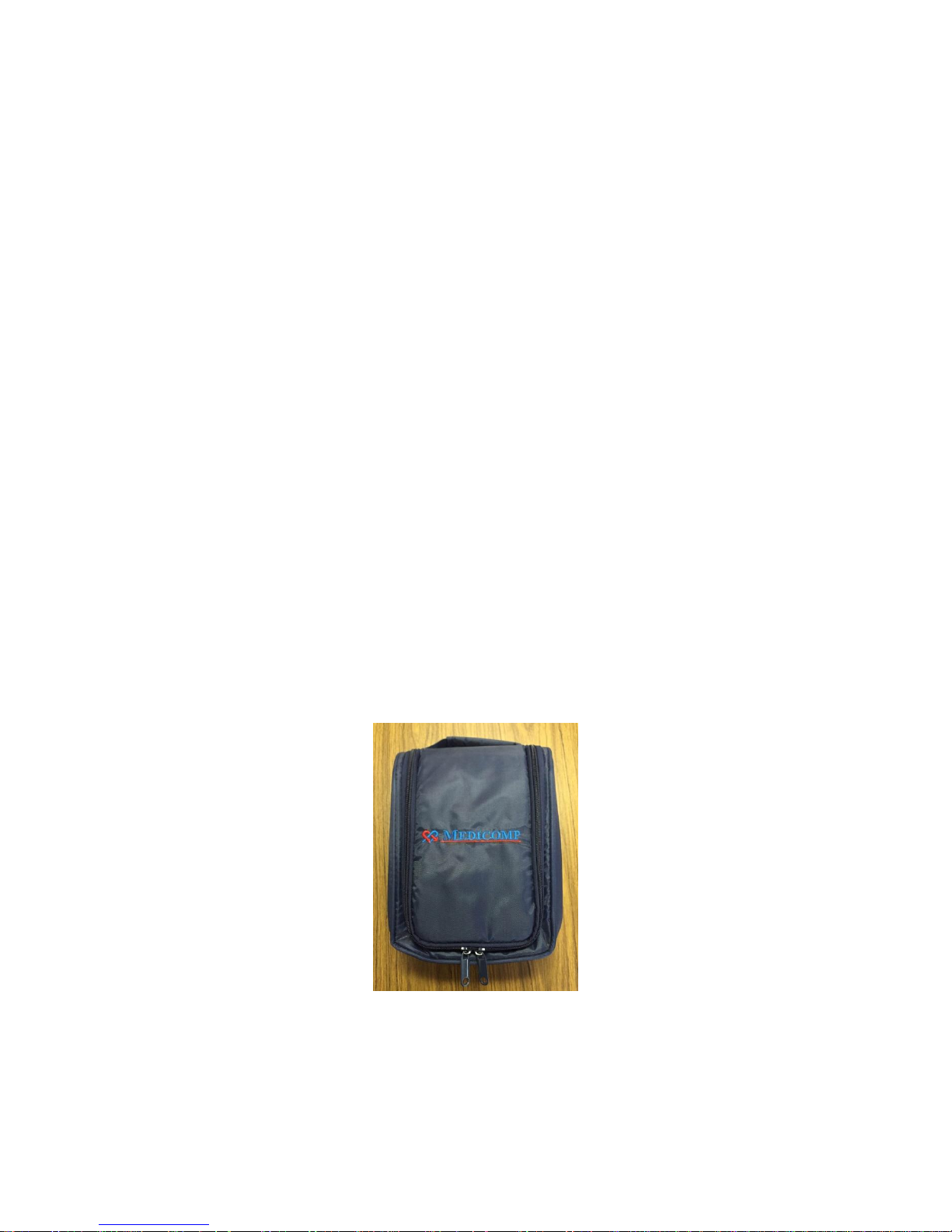
TelePatch Cardiac Monitor User Kit
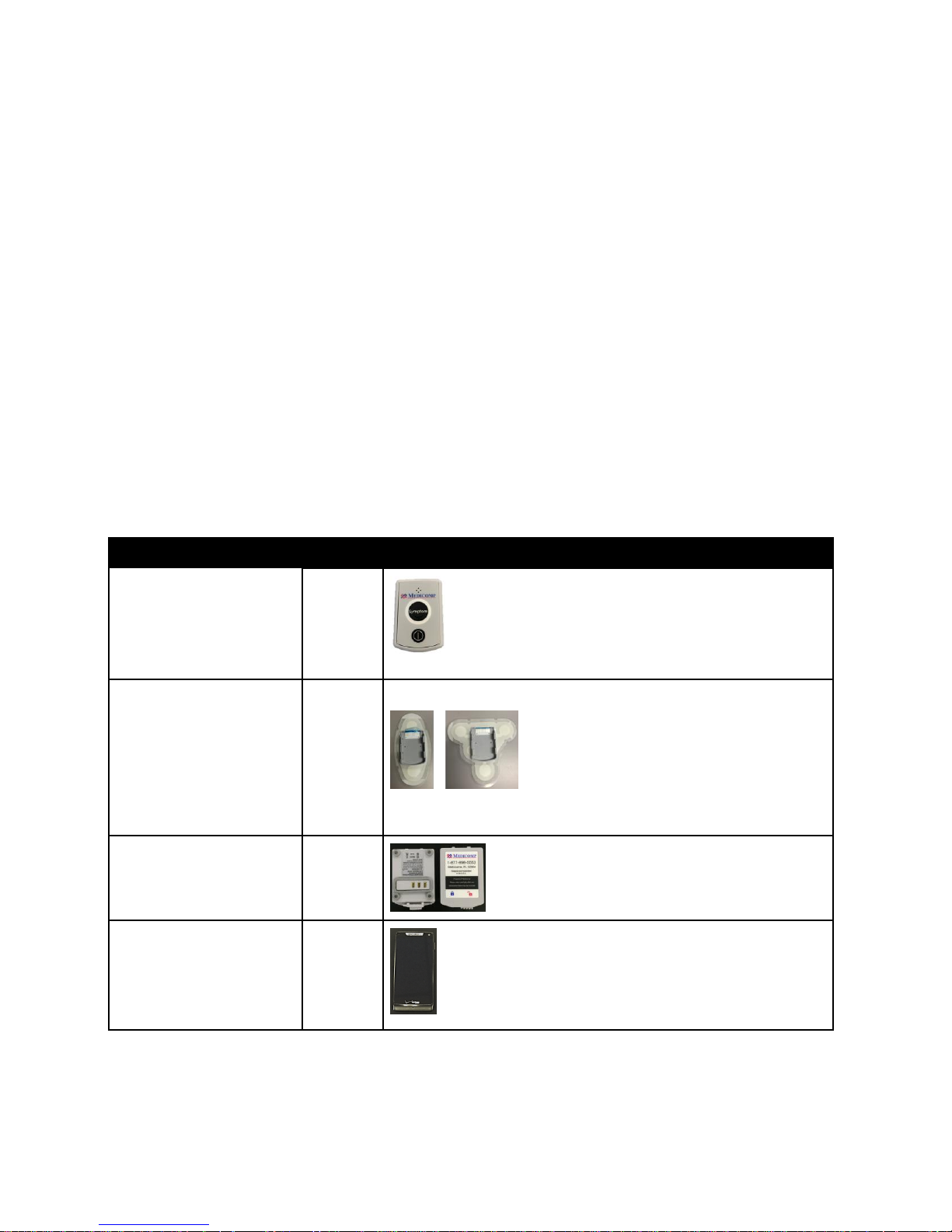
The standard TelePatch Cardiac Monitor PM750 kit comes with:
1. TelePatch Pendant
2. Electrode Patch with Cradle
3. Rechargeable Batteries
4. TelePatch Smartphone
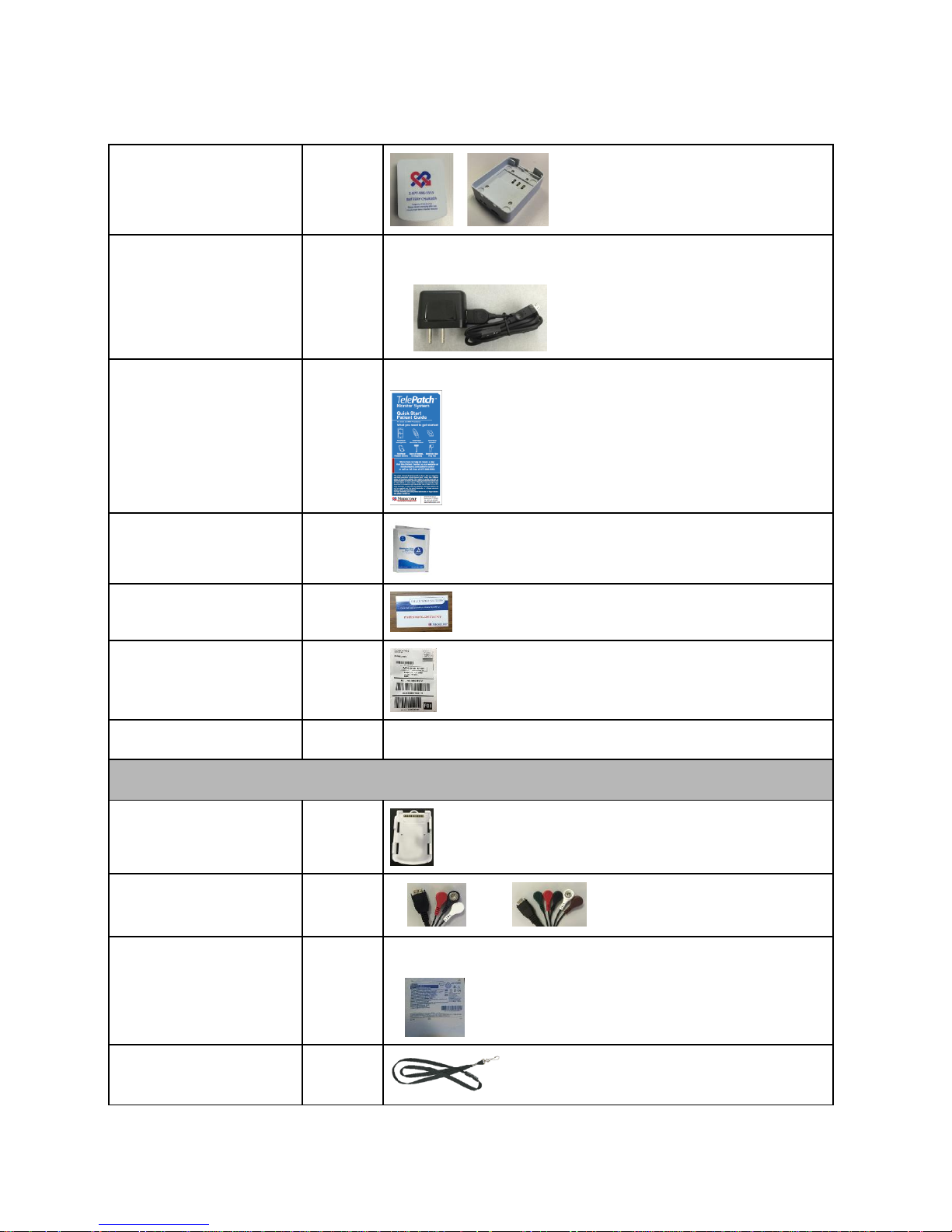
5. Battery Charger
6. Charger Cord for both Smartphone and Battery Charger
7. Electrode Prep Pad
8. Quick Start Patient Guide
9. Survey Invitation
10. Return Envelope with Pre-paid Shipping Label
TelePatch™ Cardiac Monitor PM750
USER MANUAL - UTM0000701-04D | 01/06/2017 6
TelePatch Cardiac Monitor Kit
Page 8
Have a question or need assistance?
Item
Quantity
Picture
TelePatch
Pendant
1
Electrode Patch
with Cradle*
1 - 4
*Kit will have one or the other patch style, single or double is based
on procedure prescribed by physician
Rechargeable Battery
2
TelePatch
Smartphone*
1
*Holter procedures do not require a Smartphone
Call Medicomp Patient Support: 800-234-3278 ext. 2370
TELEPATCH KIT CONTENTS
TelePatch™ Cardiac Monitor PM750
USER MANUAL - UTM0000701-04D | 01/06/2017 7
Page 9
Have a question or need assistance?
Battery Charger
1
Charger Cord
for Smartphone
and Battery Charger
1
Quick Start
Patient Guide
1
Electrode Prep Pad
1 Survey Invitation
1
Return Envelope with
Pre-paid Shipping Label
1 Legal Booklet
1
PICTURE TO BE ADDED
These items are not standard in TelePatch Kit. By physician request only
Cable Cradle
1
Cable
3-lead or 5-lead
1
Electrodes
(3-5 per pouch)
1- 4
Breakaway Lanyard
1
Call Medicomp Patient Support: 800-234-3278 ext. 2370
TelePatch™ Cardiac Monitor PM750
USER MANUAL - UTM0000701-04D | 01/06/2017 8
Page 10
Have a question or need assistance?
Contact Us
Contact Medicomp, Inc. for any issues concerning the TelePatch product such as:
• General questions about our product
• Product safety
• Safe disposal of component parts
• Return of product
Contact information
Medicomp, Inc.
600 Atlantis Rd.
Melbourne, FL, 32904
Website: www.medicompinc.com
Telephone: 800-23 HEART (800-234-3278)
Fax: 321-676-2282
email: [email protected]
Call Medicomp Patient Support: 800-234-3278 ext. 2370
ABOUT TELEPATCH CARDIAC MONITOR PM750
INDICATIONS FOR USE
The TelePatch Cardiac Monitor PM750, is a pager-sized, handheld or patient worn device
designed specifically to record and transmit ambulatory ECG signals. The device is designated as
Rx only, to be worn by infants to adults of all ages. The device can be worn for days or weeks, as
it is intended for use by patients who are experiencing symptoms that are transient and
infrequent in nature.
TelePatch™ Cardiac Monitor PM750
USER MANUAL - UTM0000701-04D | 01/06/2017 9
Page 11

Have a question or need assistance?
Call Medicomp Patient Support: 800-234-3278 ext. 2370
The TelePatch Cardiac Monitor System
OVERVIEW
Users of the TelePatch System should be able to activate the Symptom button unassisted or be
supervised and assisted. The TelePatch System can be worn by users weighing less than 10kg.
TelePatch is intended for use as prescribed by a physician who wants to follow cardiac activity.
A physician must review and interpret ECG findings recorded during procedure. The TelePatch
System is not intended for diagnostic use.
SAFETY SPECIFICATIONS AND COMPLIANCE
Contraindication
There are no potential adverse effects of the TelePatch Cardiac Monitor, PM750 on health.
Safety Classification
In accordance with IEC 60601-1 Third Edition Am 1: 2012:
● This equipment is designed to be operated with one 3.7V 440mAh 1.62Wh lithium ion battery, and under no circumstances shall
power be supplied in any other manner.
● Type BF equipment.
● Rated for Continuous Operation.
● Ordinary Equipment. Enclosed equipment. The device is protected to IP55 as required by the standard.
● This equipment shall not be used in the presence of a flammable anesthetic mixture with air or with oxygen or nitrous oxide, or
flammable cleaning agents.
● Equipment with an Applied Part, specifically designed for applications where a Conductive Connection is made to the Patient, but
not directly to the heart.
● The equipment requires no adjustment.
● Operating and Storage Humidity: 10% to 95%, non-condensing
● Operating Temperature: 0°C to 45°C (32°F to 284°F).
● Storage Temperature: -15°C to 60°C (5°F to 140°F).
● TelePatch System Shipment: Temperature limitation for shipment: -15°C to 60°C (5°F to 140°F).
● Atmospheric Pressure: Operating: 700 hPa to 1060 hPa; Storage/Transport: Not Applicable to TelePatch System
The equipment contains no user-serviceable parts. It shall be serviced only by Medicomp, Inc. Unauthorized repairs of the equipment will void
the warranty.
Modifications
For continued safety, equipment should not be modified in any manner and must be used only as indicated.
Defibrillation
The external parts of the equipment may provide a source of the defibrillation voltage if it is not removed from the patient during defibrillation.
Due to the small size of the unit and patient connectors, the cable or connector may break down and cause the defibrillation voltage to be
shunted and make it less effective for the patient. The unit and cable MUST be removed prior to defibrillation.
System Safety
Additional equipment connected to medical electrical equipment must comply with the respective IEC or ISO standards (e.g. IEC 60950 for data
processing equipment). Furthermore all configurations shall comply with the requirements for medical electrical systems (see IEC 60601-1-1 or
clause 16 of the 3Ed. of IEC 60601-1, respectively). Anybody connecting additional equipment to medical electrical equipment configures a
TelePatch™ Cardiac Monitor PM750
USER MANUAL - UTM0000701-04D | 01/06/2017 10
Page 12

Have a question or need assistance?
Call Medicomp Patient Support: 800-234-3278 ext. 2370
medical system and is therefore responsible that the system complies with the requirements for medical electrical systems. Attention is drawn
to the fact that local laws take priority over the above mentioned requirements. If in doubt, consult your local representative or the technical
service department
WARNINGS
USE THE TELEPATCH SYSTEM ONLY WITH THE LEADS, ELECTRODES, AND ACCESSORIES RECOMMENDED BY MEDICOMP. USE OF
OTHER ACCESSORIES MAY ADVERSELY AFFECT THE PERFORMANCE OF THE DEVICE OR MAY RESULT IN STRONGER
ELECTROMAGNETIC EMISSIONS OR REDUCE THE ELECTROMAGNETIC IMMUNITY OF TELEPATCH CARDIAC MONITOR PM750
CONDUCTIVE PARTS OF ELECTRODES AND ASSOCIATED CONNECTORS FOR TYPE BF OR CF APPLIED PARTS, INCLUDING NEUTRAL
ELECTRODE, SHOULD NOT CONTACT OTHER CONDUCTIVE PARTS, INCLUDING EARTH.
USERS WHO ARE WEARING NEUROSTIMULATING PENDANTS CANNOT BE SET UP WHILE THAT DEVICE IS TURNED ON. THE
OPERATION OF THESE PENDANTS INTERFERES WITH THE TELEPATCH’S ABILITY TO ACQUIRE THE ECG SIGNAL. IF ALLOWED THESE
DEVICES SHOULD BE TURNED OFF WHILE THE PATIENT IS WEARING TELEPATCH.
DO NOT USE THE TELEPATCH IN COMBINATION WITH EXTERNAL CARDIAC DEFIBRILLATORS OR HIGH FREQUENCY SURGICAL
EQUIPMENT.
PORTABLE AND MOBILE RF COMMUNICATIONS EQUIPMENT CAN AFFECT MEDICAL ELECTRICAL EQUIPMENT. THIS PENDANT
SHOULD NOT BE USED ADJACENT TO OR STACKED WITH OTHER EQUIPMENT.
LOAD ONLY 3.7V LITHIUM ION BATTERIES DELIVERED IN THE TELEPATCH KIT INTO THE TELEPATCH CARDIAC MONITOR BATTERY
COMPARTMENT.
LEAD FAILURES ARE DETECTED BY A 10 MV PEAK, 50% DUTY CYCLE RECTANGULAR PULSE, WHICH IS APPLIED TO EACH PATIENT
ELECTRODE CONNECTION THROUGH A 4.9MOHM RESISTOR AT A RATE OF 15 HZ WITH RESPECT TO THE SYSTEM GROUND.
THIS IS A PRESCRIBED MEDICAL DEVICE, NOT A TOY, INFANTS AND CHILDREN MUST BE SUPERVISED.
WARNING: CHOKING HAZARD – ADULT SUPERVISION REQUIRED
IN THE EVENT OF A DAMAGED PENDANT, DISCONTINUE USE AND CALL MEDICOMP PATIENT SUPPORT: 800-234-3278 EXT. 2370,
FOR RETURN AND REPLACEMENT.
COMPLIANCE
Safety Classification
In accordance with IEC 60601-1 Third Edition Am 1:2012 :
Conformance to Standards – non-clinical testing demonstrated conformance to voluntary safety IEC 60601-1 and to IEC 60601-1-2-2001 Class B
Medicomp, Inc.’s Quality System conforms to 21 CFR 820 and ISO 13485:2003
Radio Frequency Regulatory Compliance
Conformance to Standards
Non-clinical testing demonstrated conformance to voluntary safety IEC 60601-1 and to IEC 60601-1-2-2001 Class B
Medicomp, Inc.’s Quality System conforms to 21 CFR 820 and ISO 13485:2003
This Pendant contains transmitter module FCC ID:
Model Name: TAS0000700
FCC ID: 2AGDTPM750
IC account number/IC company number: 21061-PM750
CAN ICES-3 (B)/NMB-3(B)”
This Pendant complies with part 15 of the FCC Rules. Operation is subject to the following two conditions: (1) This Pendant may not cause
harmful interference, and (2) this Pendant must accept any interference received, including interference that may cause undesired operation.
Part 15 Clause 15.105
Note: This equipment has been tested and found to comply with the limits for a Class B digital Pendant, pursuant to part 15 of the FCC Rules.
These limits are designed to provide reasonable protection against harmful interference in a residential installation. This equipment generates
uses and can radiate radio frequency energy and, if not installed and used in accordance with the instructions, may cause harmful interference
to radio communications. However, there is no guarantee that interference will not occur in a particular installation. If this equipment does
cause harmful interference to radio or television reception, which can be determined by turning the equipment off and on, the user is
encouraged to try to correct the interference by one or more of the following measures:
—Reorient or relocate the receiving antenna.
—Increase the separation between the equipment and receiver.
—Connect the equipment into an outlet on a circuit different from that to which the receiver is connected.
TelePatch™ Cardiac Monitor PM750
USER MANUAL - UTM0000701-04D | 01/06/2017 11
Page 13
Have a question or need assistance?
TELEPATCH APPLICABLE BUTTONS
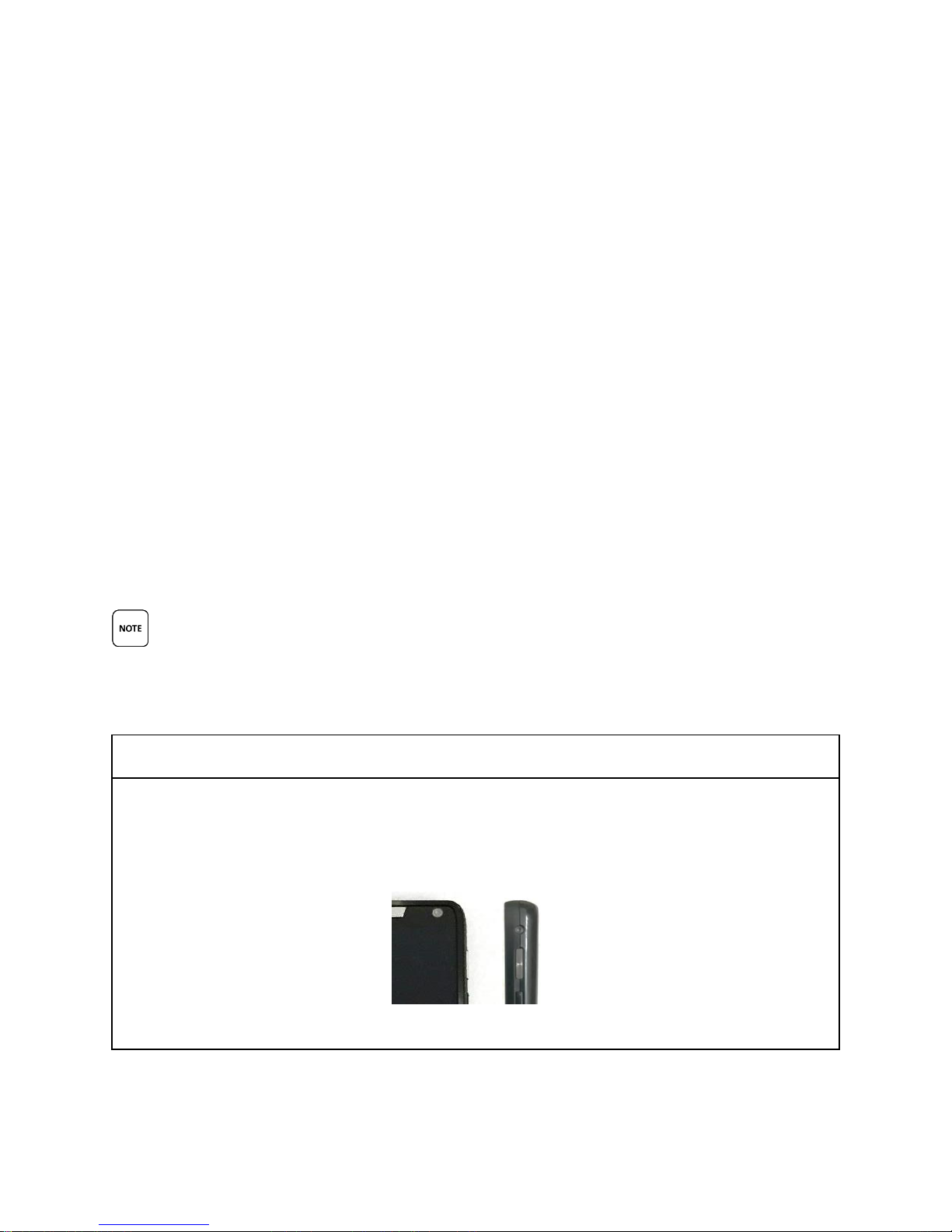
The Smartphone POWER Button
This is the Smartphone POWER button. It is located on the top, RIGHT side of the
Smartphone.
Front View Side View
Call Medicomp Patient Support: 800-234-3278 ext. 2370
—Consult the dealer or an experienced radio/TV technician for help.
Part 15 Clause 15.21
Changes or modifications not expressly approved by the party responsible for compliance could void the user's authority to operate the
equipment
This Pendant complies with Industry Canada license-exempt RSS standard(s). Operation is subject to the following two conditions: (1) this
Pendant may not cause interference, and (2) this Pendant must accept any interference, including interference that may cause undesired
operation of the Pendant.
Le présent appareil est conforme aux CNR d'Industrie Canada applicables aux appareils radio exempts de licence. L'exploitation est autorisée aux
deux conditions suivantes: (1) l'appareil ne doit pas produire de brouillage, et (2) l'utilisateur de l'appareil doit accepter tout brouillage
radioélectrique subi, même si le brouillage est susceptible d'en compromettre le fonctionnement. »
Under Industry Canada regulations, this radio transmitter may only operate using an antenna of a type and maximum (or lesser) gain approved
for the transmitter by Industry Canada. To reduce potential radio interference to other users, the antenna type and its gain should be so chosen
that the equivalent isotropically radiated power (e.i.r.p.) is not more than that necessary for successful communication.
Conformément à la réglementation d'Industrie Canada, le présent émetteur radio peut fonctionner avec une antenne d'un type et d'un gain
maximal (ou inférieur) approuvé pour l'émetteur par Industrie Canada. Dans le but de réduire les risques de brouillage radioélectrique à
l'intention des autres utilisateurs, il faut choisir le type d'antenne et son gain de sorte que la puissance isotrope rayonnée équivalente (p.i.r.e.) ne
dépasse pas l'intensité nécessaire à l'établissement d'une communication satisfaisante.
BUTTONS, ICONS AND SCREEN INDICATOR DESCRIPTION
Below is a detailed description of TelePatch Icons and Screen Indicators.
USER GUIDE DESCRIPTIONS FOR SCREEN INDICATORS AND ICONS ARE FOR USE WITH THE
TELEPATCH SMARTPHONE APPLICATION ONLY AND NOT FOR NORMAL CELLULAR PHONE
USAGE.
TelePatch™ Cardiac Monitor PM750
USER MANUAL - UTM0000701-04D | 01/06/2017 12
Page 14
Have a question or need assistance?
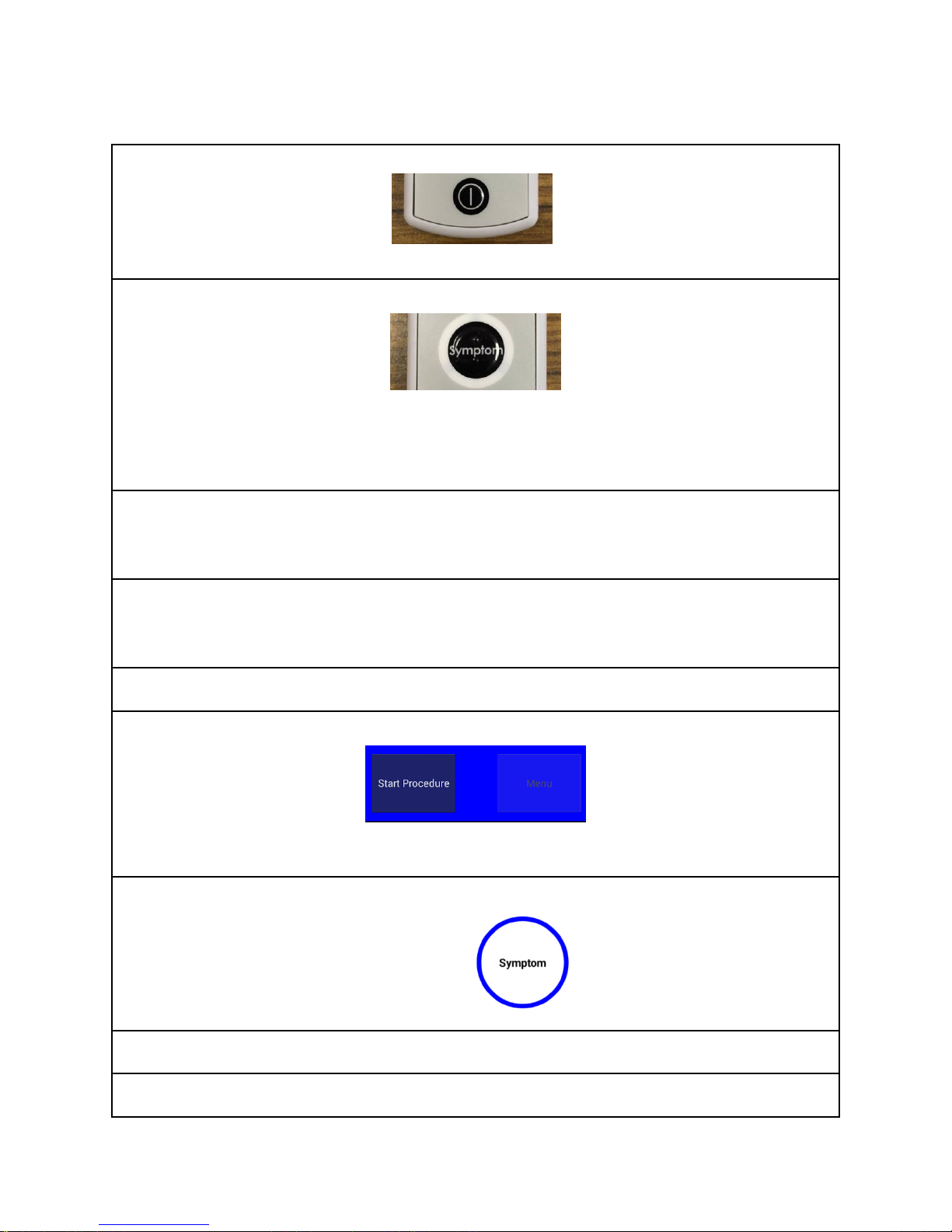
The Pendant POWER Button
This is the Pendant POWER button. It is located on the FACE of the Pendant.
The Pendant Symptom Button
This is the Pendant Symptom button. It is located in the center of the FACE of the Pendant.
Users push the Symptom* button to manually initiate the recording of symptoms that they
may be experiencing. (*Symptom capture can also be initiated on the Smartphone)
The Smartphone Needs Charging Indicator
Smartphone will have red flashing LED at top of Smartphone when battery is low. This LED
will stop flashing when plugged into the Charger Cord and Smartphone is charging.
The Smartphone Charged Light Indicator
There is no light indicator showing Smartphone is charging or full charged. Smartphone
battery percentage will read 100%.
TELEPATCH APPLICABLE TOUCH KEYS - Smartphone
Start Procedure
Initiates procedure for the TelePatch system.
Symptom Button
Press when experiencing a symptom.
FREQUENT SCREEN ICONS AND INDICATORS
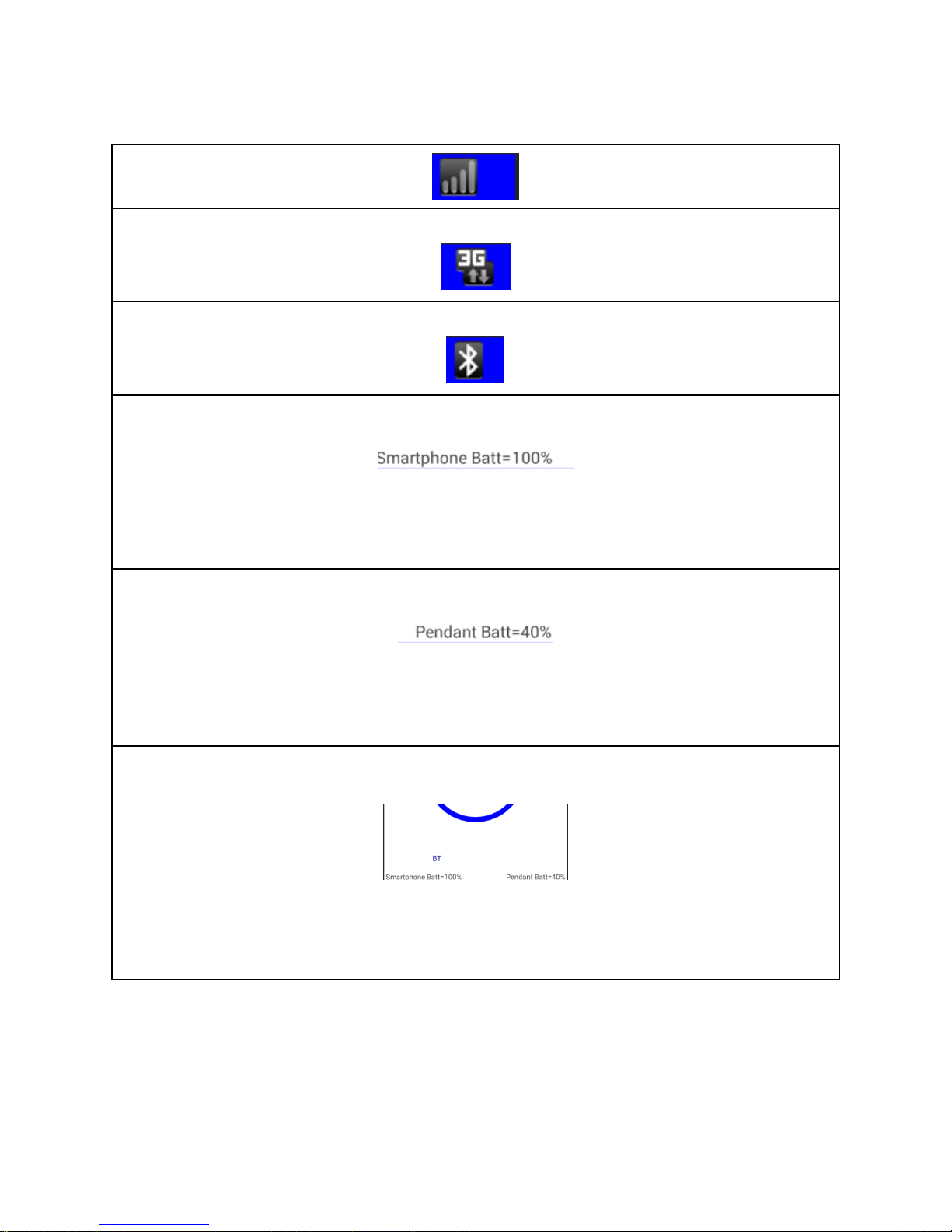
Cell Network Strength Icon
Call Medicomp Patient Support: 800-234-3278 ext. 2370
TelePatch™ Cardiac Monitor PM750
USER MANUAL - UTM0000701-04D | 01/06/2017 13
Page 15
Have a question or need assistance?
3G Connectivity Icon
Bluetooth Connectivity Icon
The Smartphone Battery Strength Indicator
This is the Smartphone Battery Strength Indicator in percentages. This is located in the lower
left corner of the Smartphone screen once Bluetooth communication has been set up. In this
example, the Smartphone battery strength is 100 percent.
Pendant Battery Strength Indicator
This is the Pendant Battery Strength Indicator in percentages. This is located in the lower right
corner of the Smartphone screen once Bluetooth communication has been set up. In this
example, the Pendant battery strength is 40 percent.
The Bluetooth Communication Indicator
This is the Bluetooth communication Indicator. Once Procedure Setup has been completed
and communication with the Pendant has been established, ' BT' will appear in the bottom
left side of the Smartphone screen.
Call Medicomp Patient Support: 800-234-3278 ext. 2370
TelePatch™ Cardiac Monitor PM750
USER MANUAL - UTM0000701-04D | 01/06/2017 14
TELEPATCH SYSTEM OVERVIEW
Page 16
Have a question or need assistance?
Call Medicomp Patient Support: 800-234-3278 ext. 2370
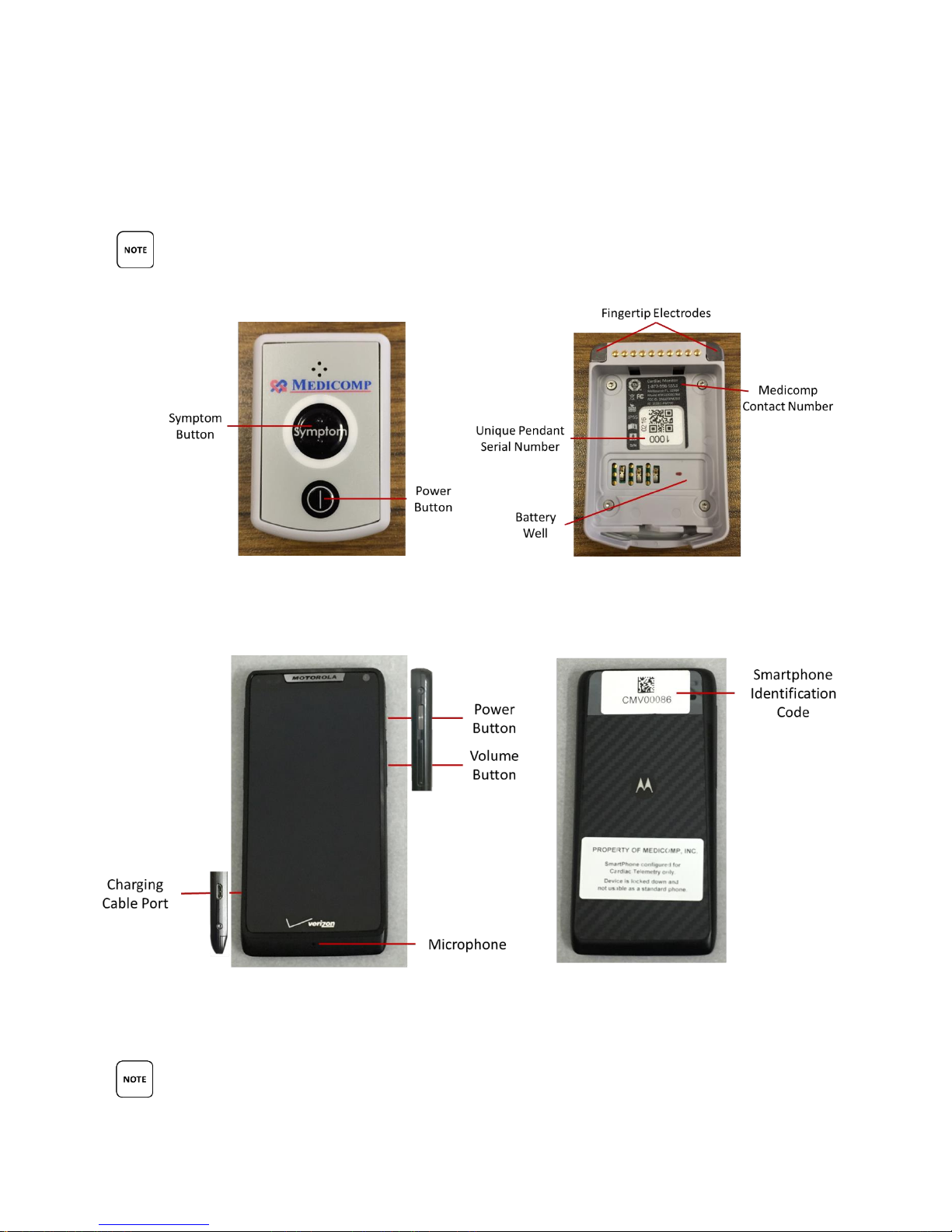
Below is a graphical overview of the TelePatch System. Detailed description of icons, buttons,
and screen indicators are in previous section.
KEY DESCRIPTIONS PROVIDED BELOW ARE FOR USE WITH THE TELEPATCH APPLICATION
ONLY. KEY DESCRIPTIONS ARE NOT INTENDED FOR NORMAL CELLULAR PHONE USAGE.
Front of TelePatch Pendant Back of TelePatch Pendant
Front of TelePatch Smartphone Back of TelePatch Smartphone
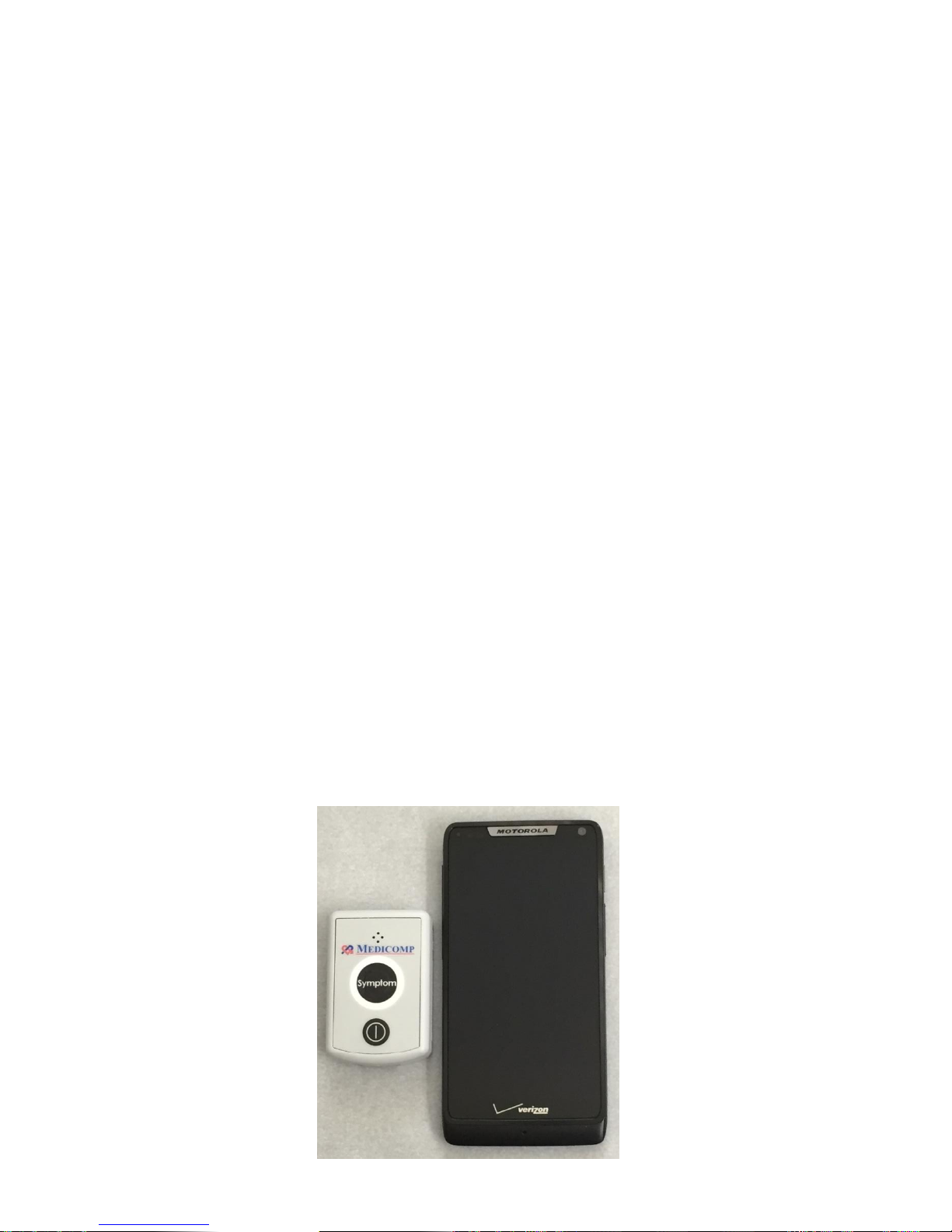
PENDANT AND SMARTPHONE PICTURED ARE NOT ACTUAL SIZE.
TelePatch™ Cardiac Monitor PM750
USER MANUAL - UTM0000701-04D | 01/06/2017 15
Page 17
Have a question or need assistance?
Call Medicomp Patient Support: 800-234-3278 ext. 2370
TELEPATCH CARDIAC MONITOR DESCRIPTION
TelePatch Pendant Description
Below is an overview of the TelePatch Pendant, which is part of the TelePatch Cardiac Monitor
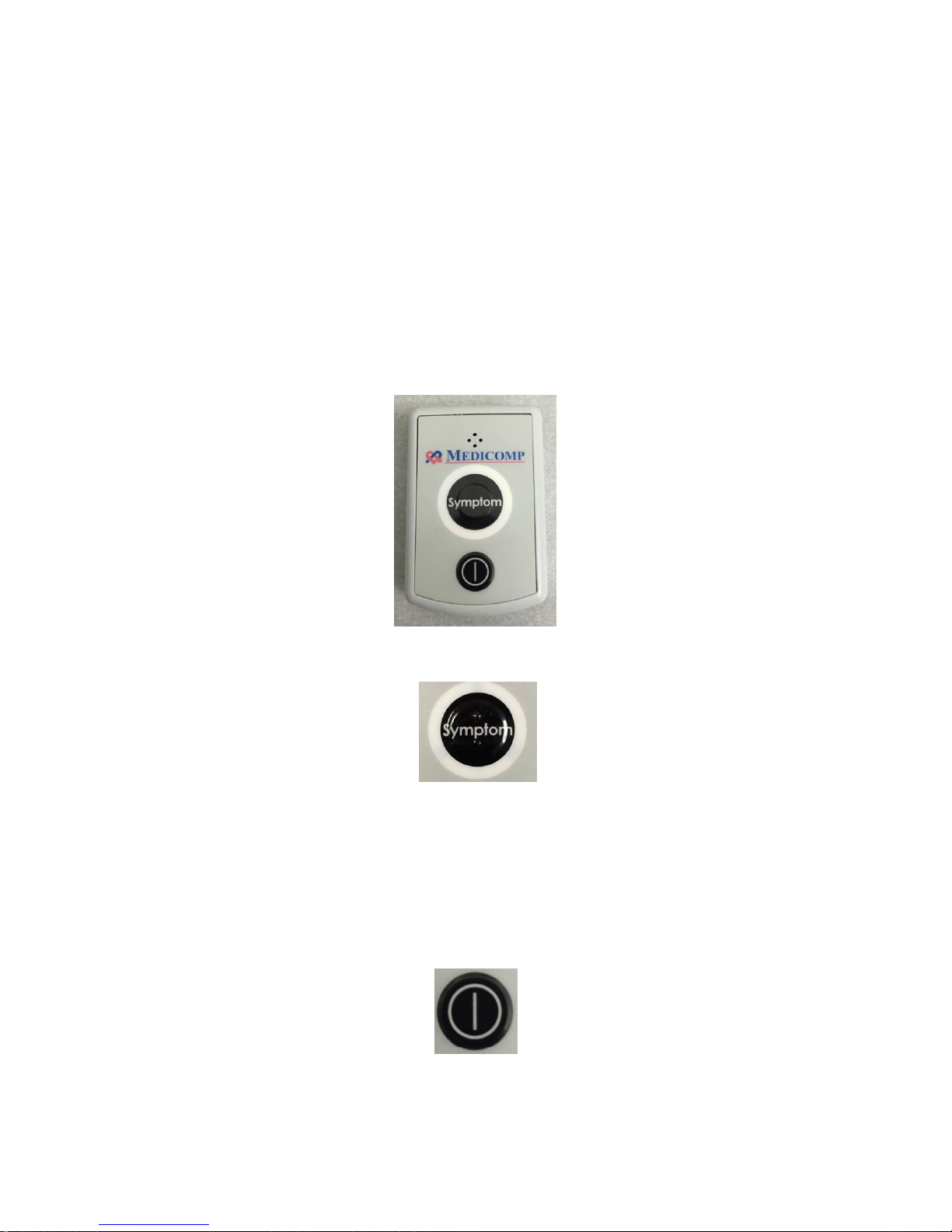
System. The TelePatch Pendant is very light-weight. It is a light gray, pager-sized ECG data
collecting Pendant.
The Pendant SYMPTOM Button
The TelePatch Pendant has a Symptom* button which is located in the center of the face of the
Pendant. (*Symptoms can also be initiated on the Smartphone screen). The Symptom button
has two raised bars so it can be distinguished from power button by touch.
The Pendant POWER Button
The Pendant POWER button is located on the face of the Pendant, below the Symptom button.
TelePatch™ Cardiac Monitor PM750
USER MANUAL - UTM0000701-04D | 01/06/2017 16
Page 18
Have a question or need assistance?
Call Medicomp Patient Support: 800-234-3278 ext. 2370
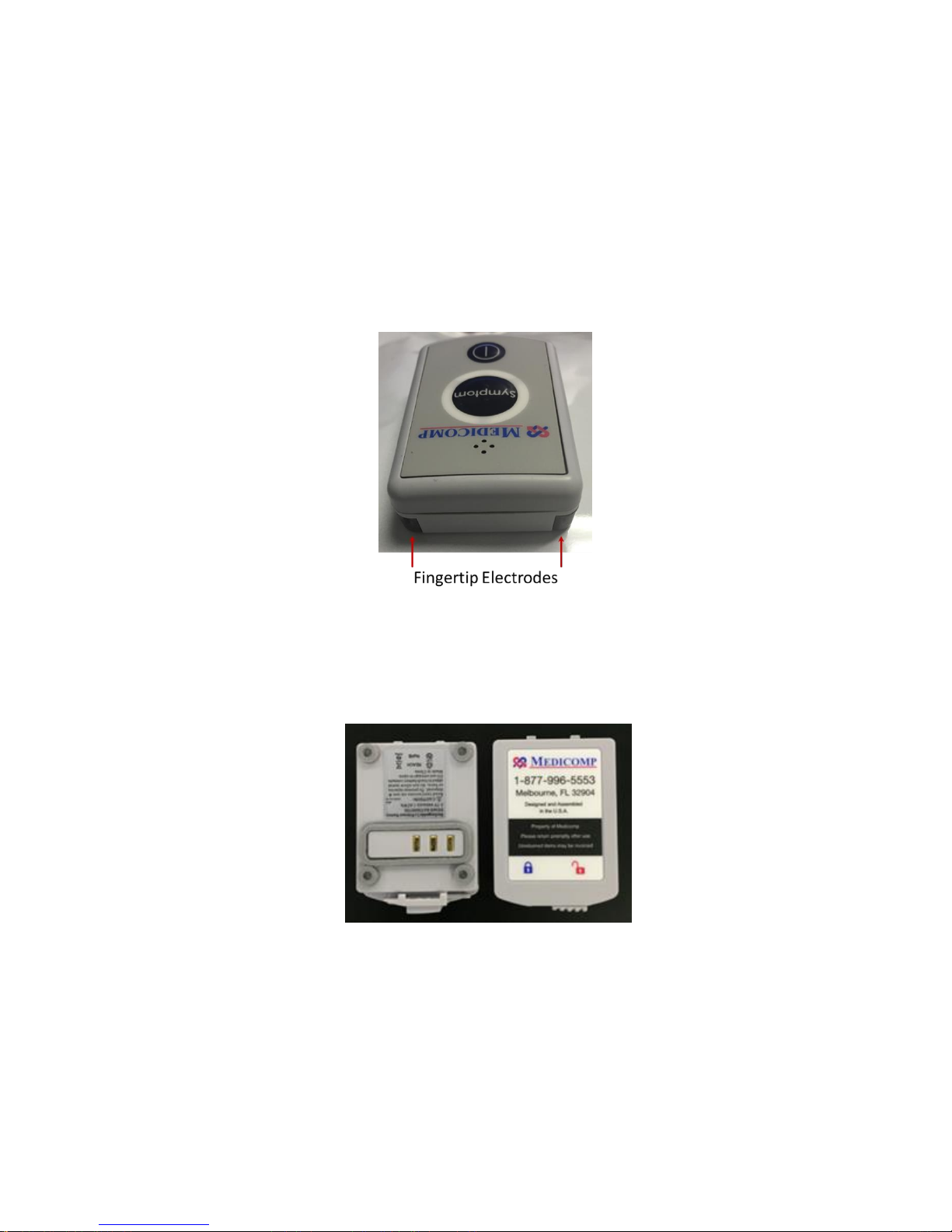
Fingertip Electrode Accessory
The fingertip electrode is built into the TelePatch pendant. Fingertip electrodes are used when
the patient cannot tolerate wearing the Electrode Patch or individual electrode patches.
Fingertip electrode procedures should be performed only after consulting your physician.
Detailed directions about fingertip electrode procedures begin on page 49.
TelePatch Battery
Bottom and top views of the TelePatch lithium ion battery
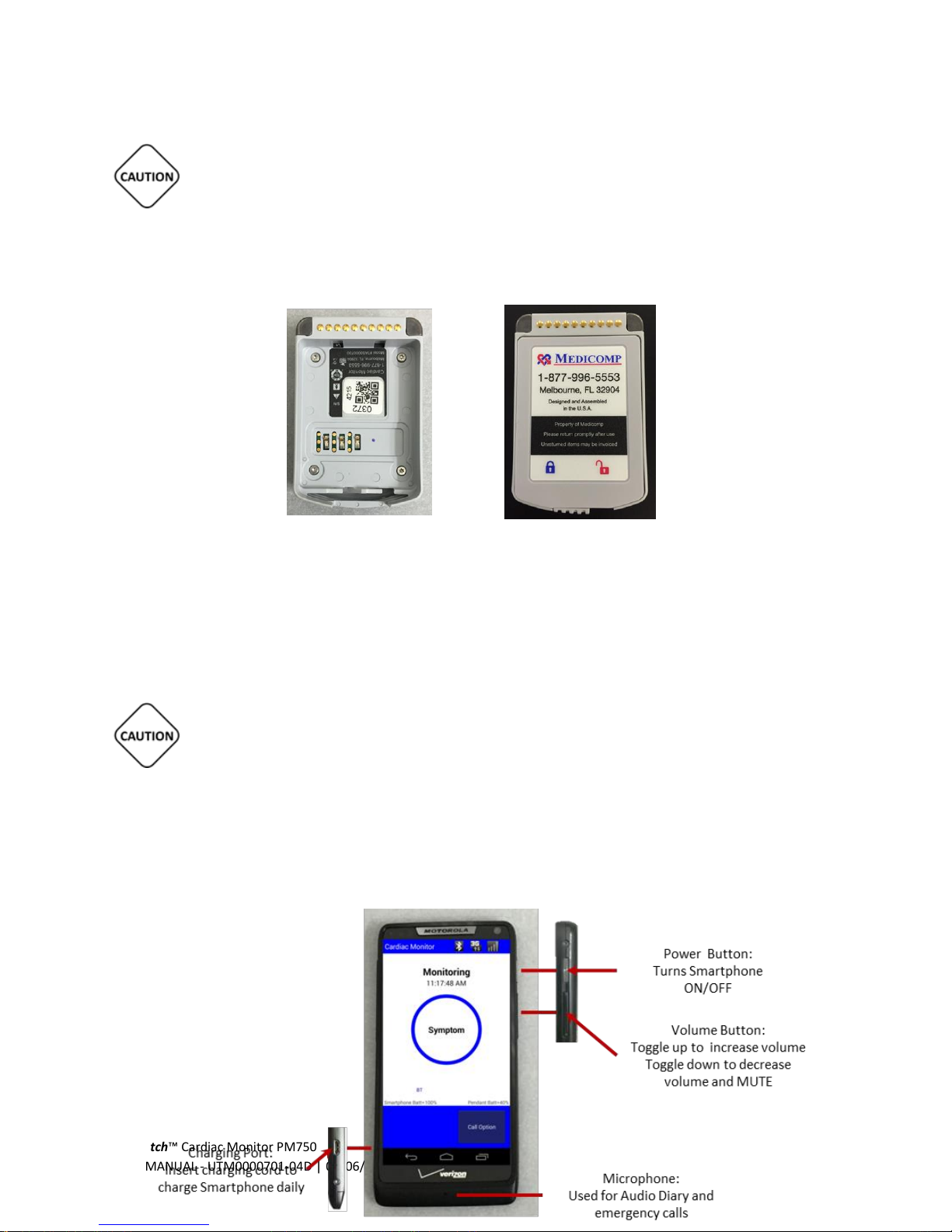
TelePatch Pendant operates on a rechargeable, lithium ion battery. The battery locks into the
battery well of the back of the TelePatch Pendant.
TelePatch™ Cardiac Monitor PM750
USER MANUAL - UTM0000701-04D | 01/06/2017 17
Page 19
Have a question or need assistance?
Call Medicomp Patient Support: 800-234-3278 ext. 2370
THE RECHARGEABLE BATTERY PROVIDED WITH THE TELEPATCH SYSTEM IS NOT TO BE
DISCARDED IN HOUSEHOLD WASTE. IF A BATTERY GETS DAMAGED CONTACT MEDICOMP, INC.:
877-996-5553
TelePatch Pendant
Battery Well Battery properly inserted in Battery Well
Detailed directions to change and charge the battery properly are found on page 25 or page 68.
IT IS VERY IMPORTANT TO TURN THE PENDANT OFF BEFORE CHANGING BATTERY,
OTHERWISE DATA MAY BE LOST. THE POWER BUTTON IS LOCATED ON THE FRONT FACE OF THE
PENDANT BELOW THE SYMPTOM BUTTON.
TelePatch Smartphone Description
Below is an overview of the TelePatch
Smartphone, which is part of the
TelePatch System.
TelePatch™ Cardiac Monitor PM750
USER MANUAL - UTM0000701-04D | 01/06/2017 18
Page 20
Have a question or need assistance?
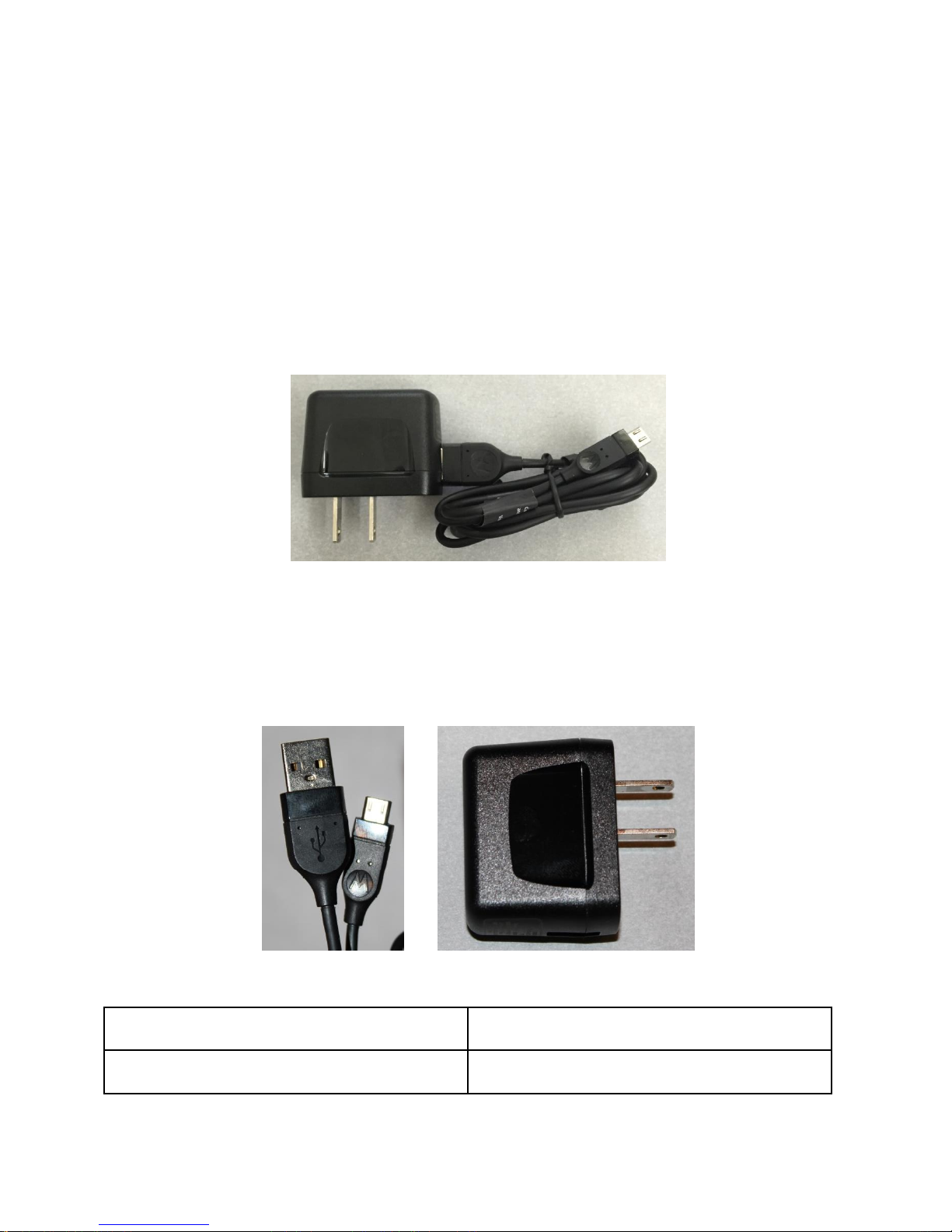
MicroUSB Cable
SKN6430A / S13239-0403532
AC Power Supply
SPN5504A / S004ASU0510085
Call Medicomp Patient Support: 800-234-3278 ext. 2370
Accessories to the TelePatch System
TelePatch Charger Cord
The TelePatch Charger Cord is compliant for use with the Smartphone and the Battery Charger.
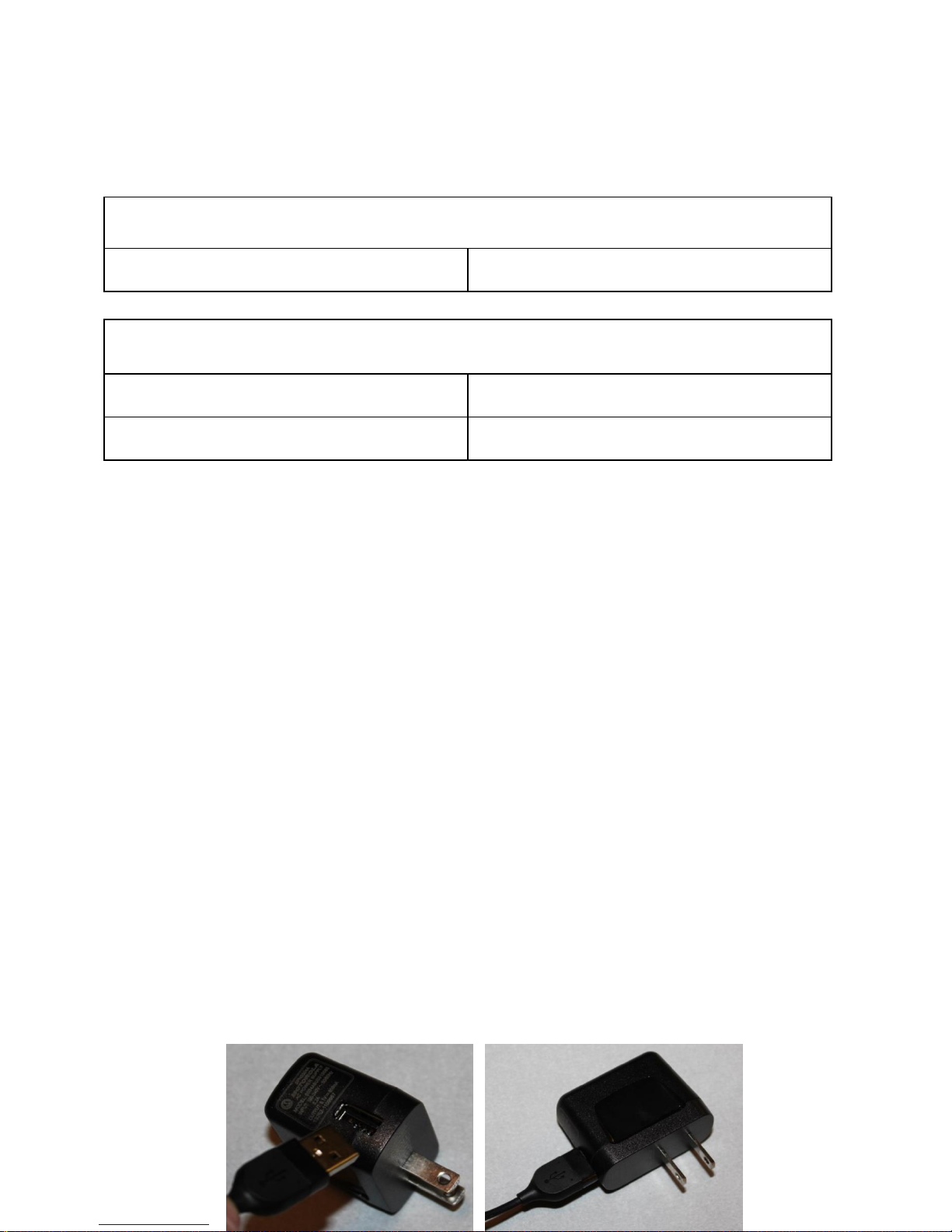
Both are components of the TelePatch System. The Charger Cord is a two piece device:
MicroUSB Cable AC Power Supply
TelePatch™ Cardiac Monitor PM750
USER MANUAL - UTM0000701-04D | 01/06/2017 19
Page 21
Have a question or need assistance?
MicroUSB cable
Connector type
Micro-USB
AC Power Supply
INPUT
100-240V~ 50/60Hz 0.2A
OUTPUT
5.1V=850mA 13262-1109957
Call Medicomp Patient Support: 800-234-3278 ext. 2370
Details pertaining to pertinent electrical specifications are provided below.
The TelePatch Charger Cord will replenish battery power when the Smartphone power or
Pendant Battery is depleted. When the Smartphone is turned on, the Smartphone battery
indicator lets users know when the battery life of the Smartphone and the Pendants Lithium Ion
Battery are depleting. Icons are displayed on the screen of the Smartphone.
For optimal performance from the Smartphone, it is recommended to plug the charger cord
into the Smartphone overnight until the Smartphone is fully charged. Instructions on charging
the Smartphone are on page 22 of this User Manual.
TelePatch Pendant Batteries will need to charge every seven (7) days on average. There are two
(2) lithium ion batteries in the TelePatch Kit, so the procedure will not be interrupted.
Instructions about how to charge the Pendant Battery can be found in the charging the
Batteries section of this User Manual.
How to attach USB Cable to AC Power Supply block:
Should the Charger Cord come apart or if the Charger Cord is in two pieces (the MicroUSB cable
and the Power Supply) when the TelePatch Kit is received, insert the USB connector into the
port on the power supply. Keep the two pieces connected for the duration of the procedure.
TelePatch™ Cardiac Monitor PM750
USER MANUAL - UTM0000701-04D | 01/06/2017 20
Page 22
Have a question or need assistance?
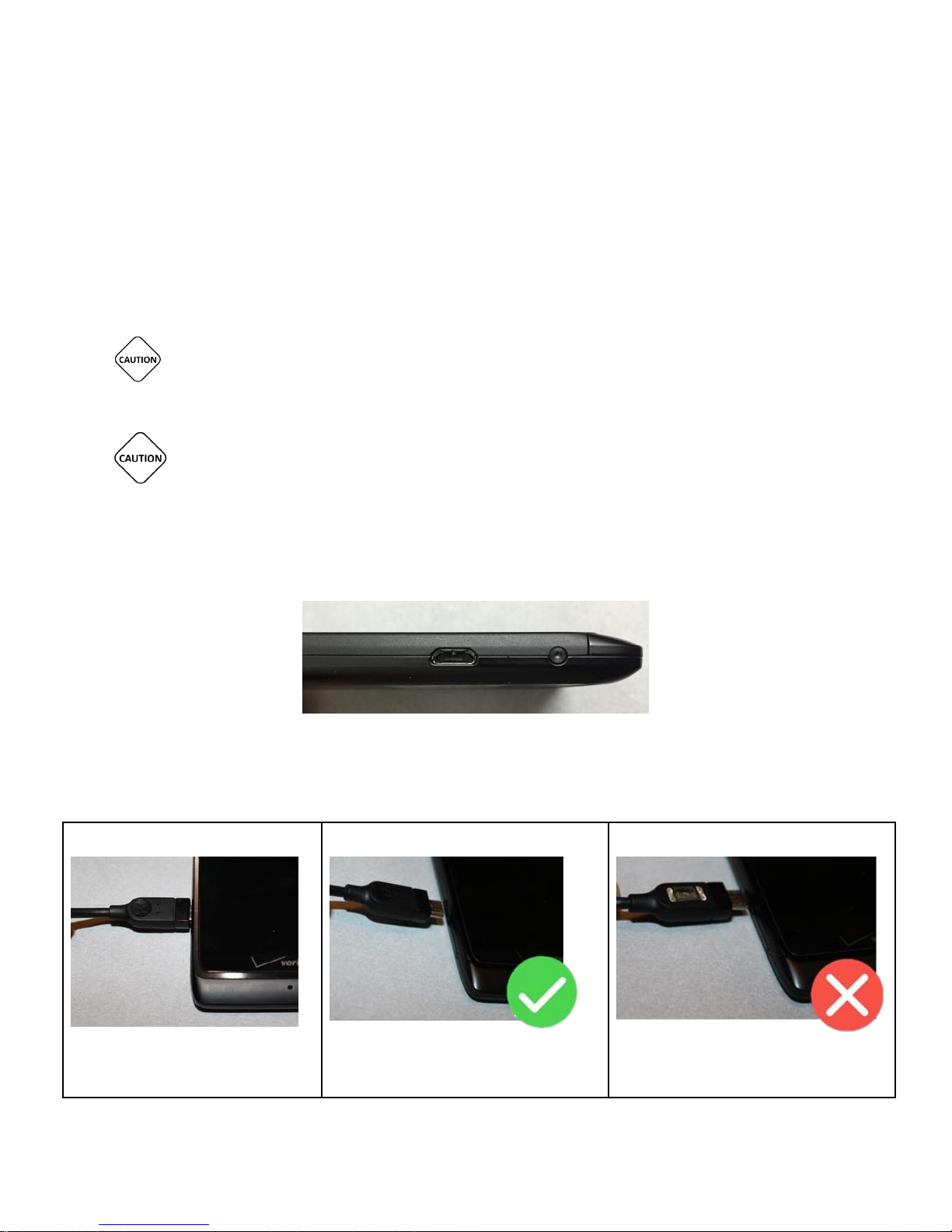
Charger properly inserted
Correct direction of charger head
Incorrect direction of charger head
Call Medicomp Patient Support: 800-234-3278 ext. 2370
SMARTPHONE AND BATTERY CHARGER ARE POWERED BY THE CHARGER CORD ONCE
CHARGER CORD IS PLUGGED IN TO SMARTPHONE OR BATTERY CHARGER AND THEN A
WALL OUTLET.
CHARGER CORD MUST NOT BE OBSTRUCTED BY FURNITURE OR LARGE OBJECTS AND
REMAIN ACCESSIBLE TO DISCONNECT FROM WALL OUTLET EASILY, AS NEEDED.
Connecting Charger Cord: Smartphone
The port for the Charger Cord is located on the left side of the smartphone near the bottom
TelePatch™ Cardiac Monitor PM750
USER MANUAL - UTM0000701-04D | 01/06/2017 21
Page 23

Have a question or need assistance?
Call Medicomp Patient Support: 800-234-3278 ext. 2370
Connecting the Charger Cord to the Smartphone:
Take the end of the Charger Cord and insert it into the lower left side of the Smartphone as
displayed in the graphic. The side of the Charger Cord plug-in with the indented circle is the
correct way to insert in the Charger Cord into the Smartphone.
WHEN CHARGING IS COMPLETE, UNPLUG THE CHARGER CORD FROM THE POWER
OUTLET AND THE SMARTPHONE.
MAKE SURE WALL OUTLET IS NOT CONTROLLED BY A LIGHT SWITCH.
SMARTPHONE IS POWERED BY THE CHARGER CORD ONCE CHARGER CORD IS PLUGGED
IN TO BOTH SMARTPHONE AND WALL OUTLET.
CHARGER CORD MUST NOT BE OBSTUCTED BY FURNITURE OR LARGE OBJECTS AND
REMAIN ACCESSIBLE TO DISCONNECT FROM WALL OUTLET EASILY, AS NEEDED.
UNPLUG THE CHARGER CORD FROM THE SMARTPHONE BEFORE PLACING
SMARTPHONE IN POCKET OR PURSE/BRIEFCASE. DO NOT WEAR THE SMARTPHONE
WHILE THE CHARGER IS ATTACHED TO THE SMARTPHONE.
TelePatch Battery Charger
TelePatch™ Cardiac Monitor PM750
USER MANUAL - UTM0000701-04D | 01/06/2017 22
Page 24

Have a question or need assistance?
Call Medicomp Patient Support: 800-234-3278 ext. 2370
Battery Charger – Top Battery Charger - Bottom
TelePatch rechargeable batteries have an approximate seven (7) day life before needing to be
recharged. The TelePatch Kit has two (2) batteries, a Battery Charger and a Charger Cable (also
used to charge the Smartphone).
TelePatch Pendant batteries need to be changed when the Pendant indicates the battery is low
on power: the orange LED will blink continuously on the face of the Pendant, and the Pendant
will chirp every 4 minutes. The battery level can also be seen on the Smartphone screen.
Using the Charger Cord with the TelePatch Battery Charger
The TelePatch Battery Charger will replenish battery power when lithium ion battery power is
depleted. The same Charger Cord used to charge the Smartphone is used to power the Battery
Charger.
For optimal performance from the Battery Charger, it is recommended to plug the Charger Cord
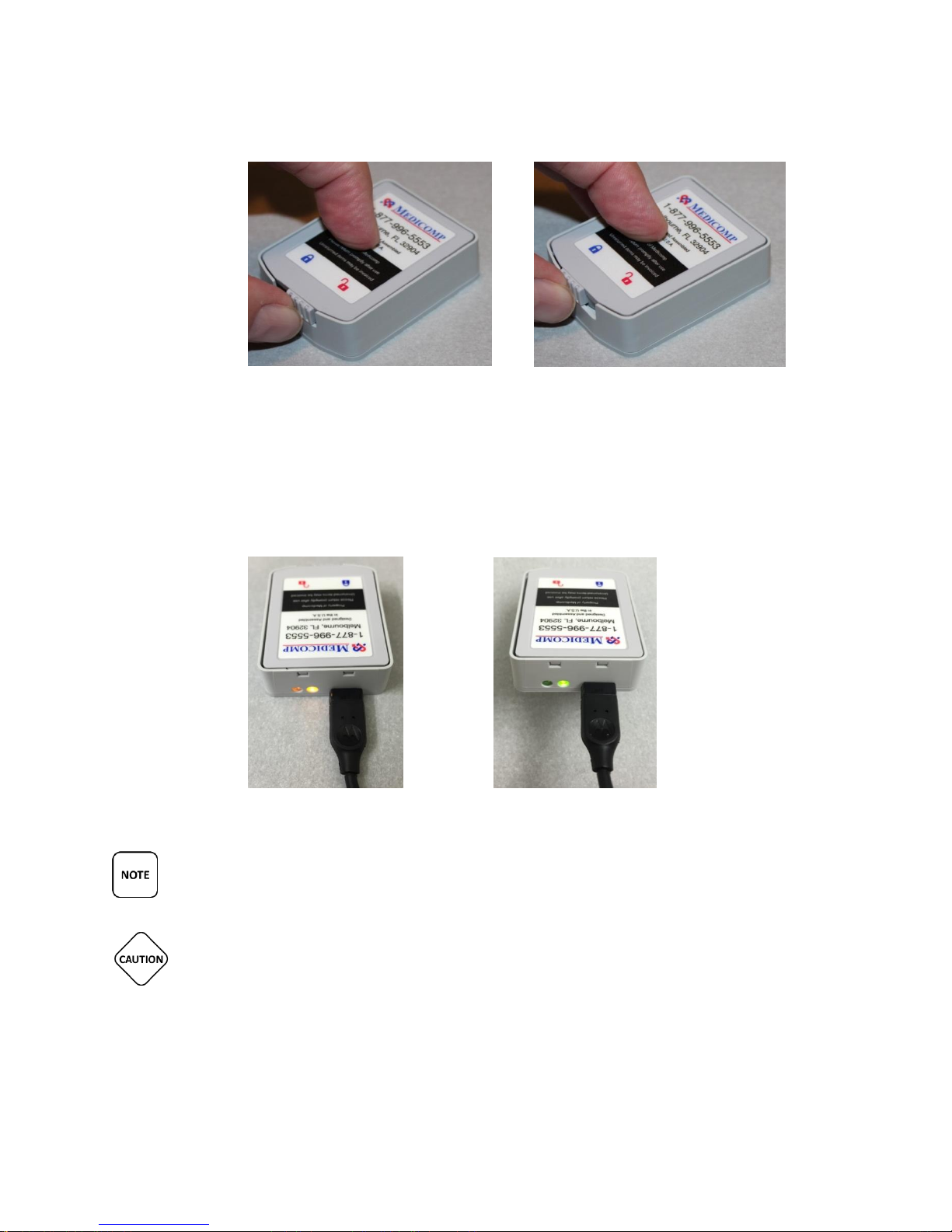
into the Battery Charger and a wall outlet until the battery is fully charged. The indicator light
on the flat end of the charger, next to the Charger Cord outlet, is flashing orange while
charging, and steady green when fully charged. The Battery Charger will stop charging the
battery once fully charged.
Connecting Charger Cord: Battery Charger
● Place the Battery Charger on a flat, dry surface, near a wall outlet
● Plug Charger Cord into the corresponding outlet on the Battery Charger
● Plug the Charger Cord into the wall outlet
TelePatch™ Cardiac Monitor PM750
USER MANUAL - UTM0000701-04D | 01/06/2017 23
Page 25
Have a question or need assistance?
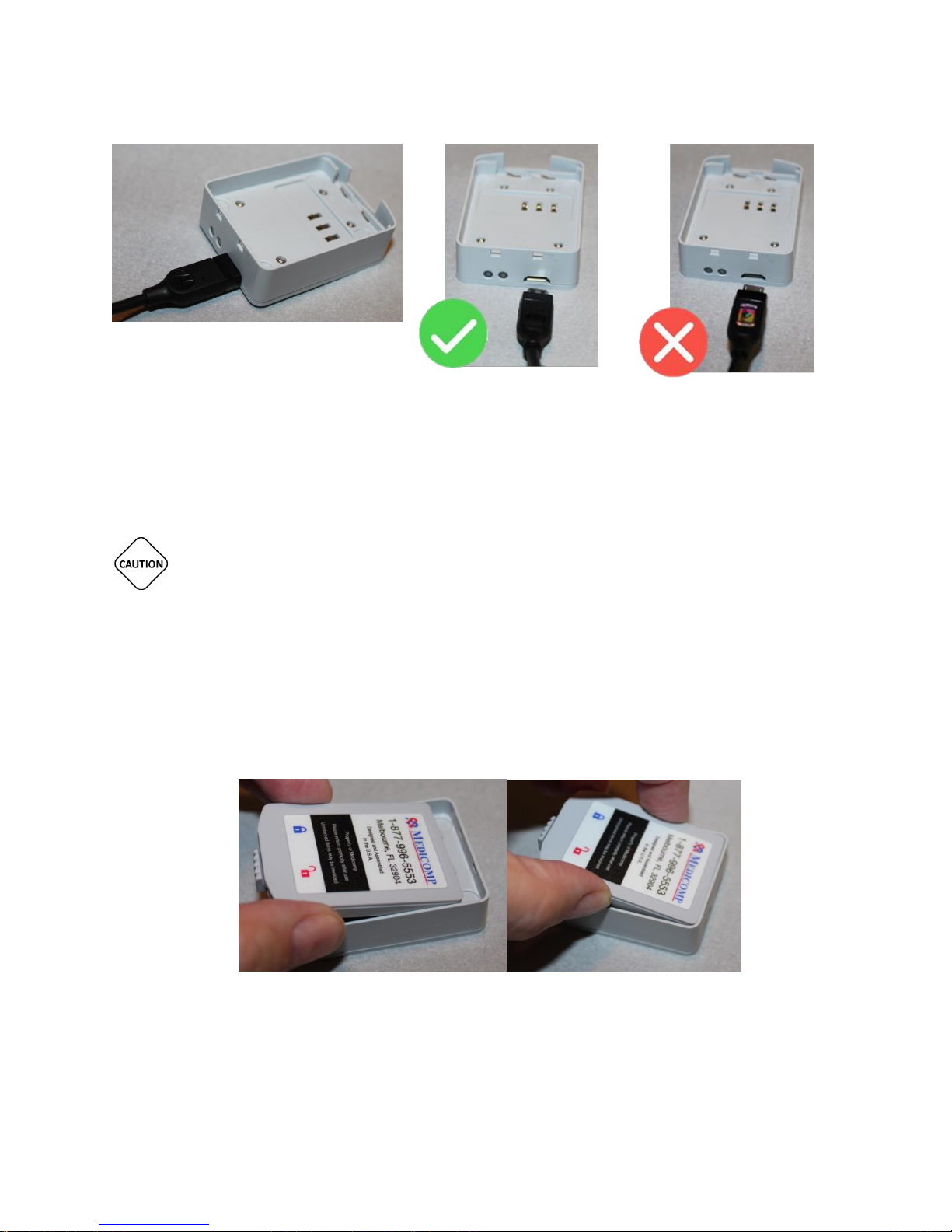
Charger Cord properly inserted into
Battery Charger
Correct direction of
Charger Cord head
Incorrect direction of
Charger Cord head
Call Medicomp Patient Support: 800-234-3278 ext. 2370
Charging a Battery in the Battery Charger
THIS PRODUCT UTILIZES A RECHARGEABLE LITHIUM-ION BATTERY PACK. TO ENSURE
SAFE CHARGING AND MAXIMUM PERFORMANCE OVER THE LIFE OF THE PRODUCT ALWAYS
USE THE MEDICOMP PROVIDED CHARGER. DO NOT ATTEMPT TO CHARGE THE BATTERY ON
ANOTHER MANUFACTURER’S CHARGER.
Place a Battery from the TelePatch Kit into the Battery Charger, with the Medicomp
label facing up and the two small tabs into the notches
Slide the latch at the back of the Battery to the left, securing the battery in place. The
Battery is locked in place when the latch is below the BLUE lock icon
TelePatch™ Cardiac Monitor PM750
USER MANUAL - UTM0000701-04D | 01/06/2017 24
Page 26
Have a question or need assistance?
Call Medicomp Patient Support: 800-234-3278 ext. 2370
Battery IS NOT locked in the charger Battery IS correctly locked into charger
A light at the end of the Battery Charger, next to the Charger Cord, will turn green when
the battery is fully charged.
Flashing Orange Light: Battery is charging Green Light: Battery is charged
MAKE SURE WALL OUTLET IS NOT CONTROLLED BY A LIGHT SWITCH.
BATTERY CHARGER IS POWERED BY THE CHARGER CORD ONCE CHARGER CORD IS
PLUGGED IN TO BOTH BATTERY CHARGER AND WALL OUTLET.
TelePatch™ Cardiac Monitor PM750
USER MANUAL - UTM0000701-04D | 01/06/2017 25
Page 27
Have a question or need assistance?
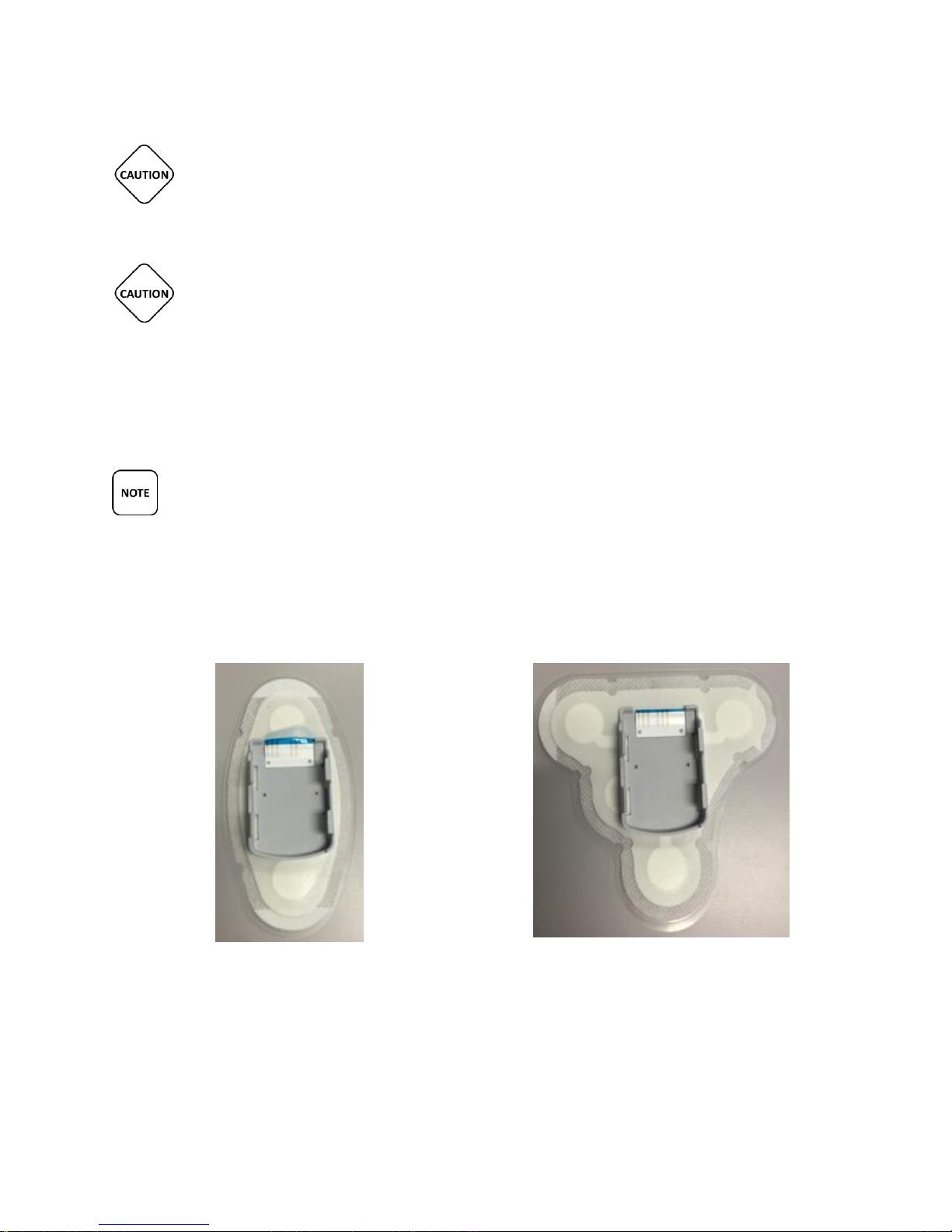
Single Channel Electrode Patch with Cradle
Dual Channel Electrode Patch with Cradle
Call Medicomp Patient Support: 800-234-3278 ext. 2370
CHARGER CORD MUST NOT BE OBSTUCTED BY FURNITURE OR LARGE OBJECTS AND
REMAIN ACCESSIBLE TO DISCONNECT FROM WALL OUTLET EASILY, AS NEEDED.
THIS PRODUCT UTILIZES A RECHARGEABLE LITHIUM-ION BATTERY PACK. ALL
BATTERIES WILL SLOWLY DISCHARGE OVER TIME EVEN IF THEY AREN’T USED. TO
ENSURE OPTIMAL PERFORMANCE AND LIFETIME OF THE BATTERY PACK, PLEASE
FULLY CHARGE THE BATTERY AT LEAST ONCE EVERY 6 MONTHS REGARDLESS OF USE. IT IS
FURTHER RECOMMENDED THAT IF THE BATTERY HASN’T BEEN CHARGED MORE RECENTLY
THAN A MONTH AGO THAT IT BE FULLY CHARGED PRIOR TO THE START OF A PATIENT
PROCEDURE.
DO NOT STORE BATTERIES IN THE BATTERY CHARGER.
TelePatch Electrode Patch
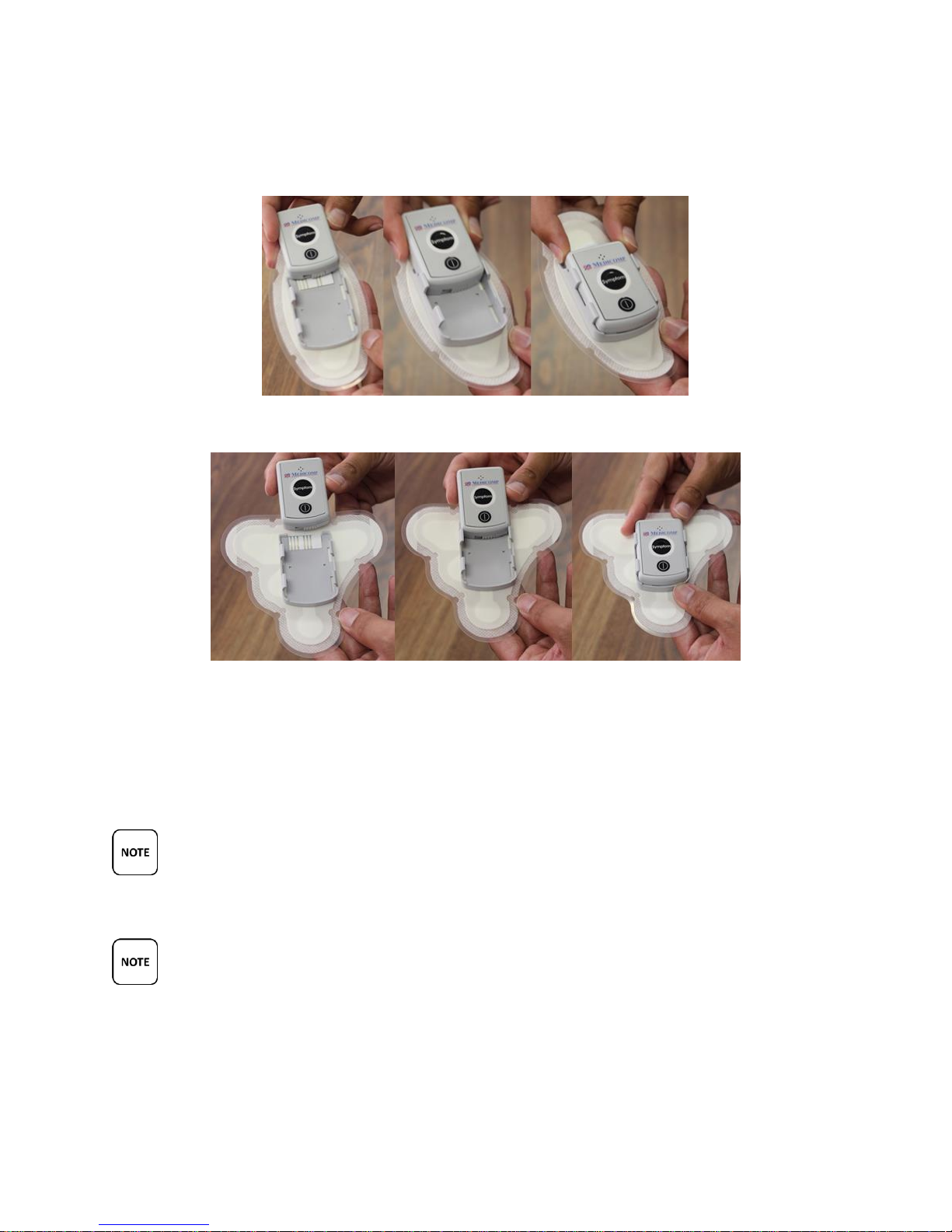
The TelePatch Pendant slides into the cradle on the Electrode Patch.
Placing Pendant into Electrode Patch cradle
● Slide Pendant into cradle with lock facing down into cradle.
TelePatch™ Cardiac Monitor PM750
USER MANUAL - UTM0000701-04D | 01/06/2017 26
Page 28
Have a question or need assistance?
Call Medicomp Patient Support: 800-234-3278 ext. 2370
● The Pendant is correctly placed when it clicks into cradle
Single Channel Electrode Patch
Dual Channel Electrode Patch
Single Channel Electrode Patch supports modified lead II with reference right leg drive.
Dual Channel Electrode Patch supports Channel A modified lead II, Channel B modified
III and a reference electrode.
THE TELEPATCH ELECTRODE PATCH IS A SINGLE USE ITEM. ONCE THE ELECTRODE PATCH
IS REMOVED FROM THE SKIN IT SHOULD BE DISCARDED AS HOUSHOLD WASTE.
MAKE SURE TO REMOVE THE TELEPATCH PENDANT FROM THE CRADLE BEFORE
DISCARDING THE ELECTRODE PATCH. THE PENDANT IS TO BE INSERTED IN CRADLE OF FRESH
ELECTRODE PATCH TO CONTINUE PROCEDURE.
TelePatch™ Cardiac Monitor PM750
USER MANUAL - UTM0000701-04D | 01/06/2017 27
Page 29

Have a question or need assistance?
Electrode Patch
Description
Medical sensor electrode, Foam, 1.5”
teardrop shape, wet gel
Gel
Wet Gel 7% KCL
Gel Sponge
Polyurethane (reticulated foam)
Substrate
Polyester printed with black ink
Foam
polyethylene foam with acrylic adhesive
Conductive Ink
Ag/AgCl
Insulator
Blue UV Dielectic
Release Liner
Polystyrene (HIPS) with silicone release
Connector
5 Pin Housing
Packaging
Pouch
Material
25# Paper/7.2#LOPE/.0003 Foil/14# LDPE
(minimum)
Dimensions
7”x11”
Pouch Contents
Printed Circuit Sensor
Call Medicomp Patient Support: 800-234-3278 ext. 2370
Description of Patch and Patch Packaging
TelePatch™ Cardiac Monitor PM750
USER MANUAL - UTM0000701-04D | 01/06/2017 28
STANDARD PROCEDURE SET-UP
TelePatch Electrode Patch Procedure
Page 30

Have a question or need assistance?
Call Medicomp Patient Support: 800-234-3278 ext. 2370
Patient Preparation
This section contains step-by-step instructions that describe how to prepare patient for a
TelePatch Cardiac Monitor procedure with the Electrode Patch. Follow the skin preparation
sequence as closely as possible. This will greatly enhance the ECG signal quality and optimize
analysis.
Patch Placement for the TelePatch Procedure
Step 1 - Identify Electrode Patch Site
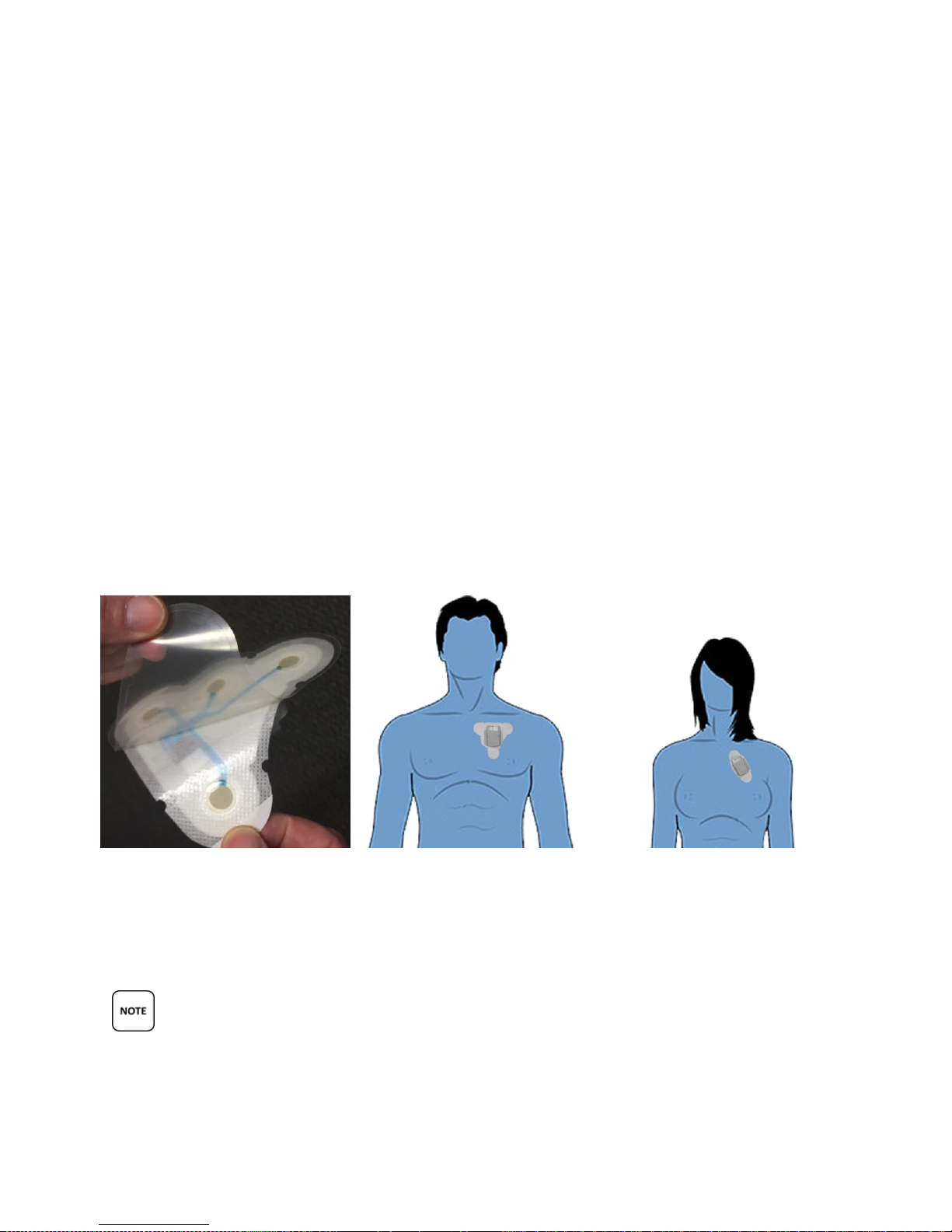
Refer to the figure below for proper patch placement:
Dual Channel and Single Channel Electrode Patch Placement
Step 2 - Prepare the Skin
Because the Electrode Patch will be worn for up to seven (7) days, proper skin preparation is
important for the procedure. Good skin preparation means better ECG signal traces that, in
turn, are easier for the doctor to review and evaluate. In order to obtain the best ECG
recording, the following procedure is recommended for initial hookup:
1. Whenever possible, be in an upright sitting position. This may be useful if any setup
problems occur that concern the signal voltage.
2. Following the placement diagram, select sites that are flat. Avoid skin folds or creases,
irritated skin or scar tissue, and highly muscular areas.
3. If necessary, shave an area at the patch site slightly larger than the size of the Electrode
Patch.
4. If powder, lotion, sun block, etc. has been applied to the chest or if skin is excessively
oily, wash site with plain soap and water. Do not use a soap that contains lotion or oil.
TelePatch™ Cardiac Monitor PM750
USER MANUAL - UTM0000701-04D | 01/06/2017 29
Page 31
Have a question or need assistance?
Call Medicomp Patient Support: 800-234-3278 ext. 2370
5. Skin-prep pads (found in alcohol prep-pad type packaging) can be used to clean and
prepare skin for initial application.
The above skin prep procedure is only required at the beginning of the procedure, during
Smartphone initialization. Users will not be required to perform this type of preparation each
time they apply a new Electrode Patch. It is best for users to have freshly showered with plain
soap each time they apply new Electrode Patches (about every 7 days).
If patch has connectivity issues the skin can be lightly abraded each electrode site with a
rough wash cloth, or an abrasive pad.
Step 3 - Electrode Patch Application
Applying TelePatch Patch
● Prepare skin, as shown in Step 2.
● When ready to position Electrode Patch on skin, remove backing from Electrode Patch,
apply to chest, using placement in the illustration. This can be done before inserting
Pendant in the cradle or after.
● Press Electrode Patch firmly onto skin with fingers once correctly positioned on the left
side of chest (Below collarbone).
● Once it is firmly adhered to skin peel remaining white tabs on the patch so the whole
surface of the patch is adhered to skin.
THE MEDICOMP ECG ELECTRODE PATCH IS SINGLE USE, NON-STERILE, AND DISPOSABLE
AND IS TO BE USED ON INTACT (UNINJURED) SKIN.
TelePatch™ Cardiac Monitor PM750
USER MANUAL - UTM0000701-04D | 01/06/2017 30
Page 32

Have a question or need assistance?
Call Medicomp Patient Support: 800-234-3278 ext. 2370
PRODUCT SHELF LIFE IN INTACT, ORIGINALLY SEALED PACKAGING IS 12 MONTHS.
ALLOW 15 MINUTES FOR SKIN TO ABSORB THE ELECTRODE GEL, WHICH MAY HELP
PROCEDURE INITATION ERRORS FROM OCCURRING.
CONDUCTIVE PARTS OF ELECTRODES AND ASSOCIATED CONNECTORS FOR TYPE BF OR
CF APPLIED PARTS, INCLUDING NEUTRAL ELECTRODE, SHOULD NOT CONTACT OTHER
CONDUCTIVE PARTS, INCLUDING EARTH.
Wearing TelePatch
● The Electrode Patch should stay in position about seven (7) days on average.
● The cradle on Electrode Patch holds the Pendant.
● Leave the Electrode Patch in place until it no longer remains adhered or as ordered by
physician.
● The Electrode Patch with the TelePatch Pendant in the cradle can be worn in shower
during procedure, pat dry with a towel once shower is complete.
● Do not go swimming while wearing Electrode Patch or Pendant during procedure.
● The Electrode Patch should be disposed of when changed for a fresh Electrode Patch or
at the completion of the procedure. For additional patches for your procedure contact
Medicomp Patient Care: 877-996-5553
DO NOT WEAR ELECTRODE PATCH OR TELEPATCH PENDANT SWIMMING OR
SUBMERGED IN WATER DURING PROCEDURE.
THE PENDANT AND BATTERY ARE NOT DISPOSABLE. THE PENDANT SHOULD BE REMOVED
FROM THE CRADLE ON THE ELECTRODE PATCH AND PLACED IN THE CRADLE OF THE FRESH
ELECTRODE PATCH.
THE TELEPATCH ELECTRODE PATCH IS A SINGLE USE ITEM. ONCE THE ELECTRODE PATCH
IS REMOVED FROM THE SKIN IT SHOULD BE DISCARDED AS HOUSHOLD WASTE.
TelePatch™ Cardiac Monitor PM750
USER MANUAL - UTM0000701-04D | 01/06/2017 31
Page 33
Have a question or need assistance?
Call Medicomp Patient Support: 800-234-3278 ext. 2370
Step 4 - Turn on Pendant and Connect
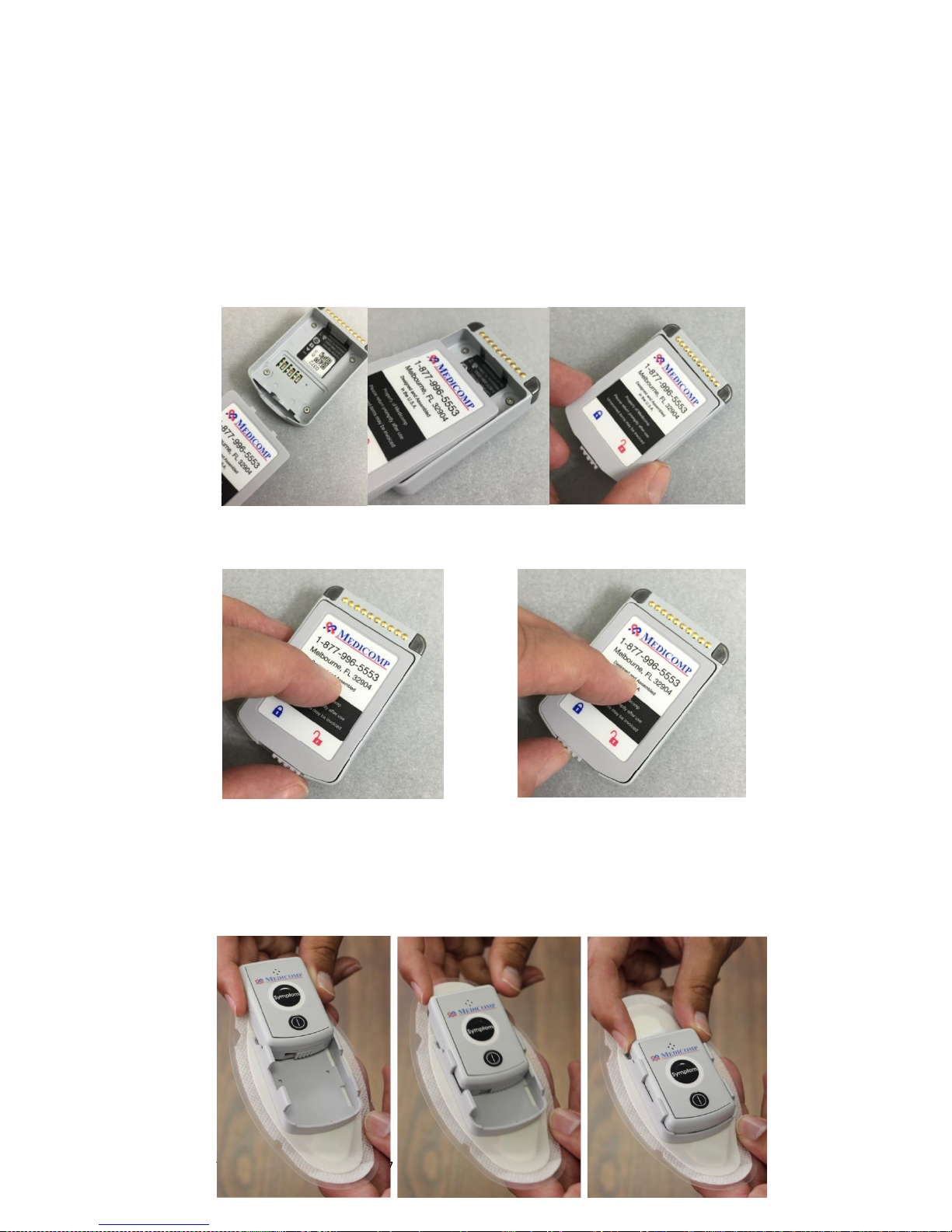
Insert a Battery into the Pendant
Remove the Pendant from the TelePatch Kit.
Hold the Pendant face down in hand or place on a flat surface. There is a well where the
Battery will be inserted.
Insert the Battery into the opening, with the Medicomp label facing up and the two
small tabs into the notches, as pictured.
Slide the latch at the back of the Battery to the left, securing the Battery in place
Battery is NOT secure in Pendant – unlocked Battery IS secure in Pendant - Locked
Turn the Pendant over, slide the Pendant into the Electrode Patch Cradle with the lock
facing down into the cradle.
The Pendant is correctly placed when it clicks into the Electrode Patch Cradle.
TelePatch™ Cardiac Monitor PM750
USER MANUAL - UTM0000701-04D | 01/06/2017 32
Page 34
Have a question or need assistance?
Call Medicomp Patient Support: 800-234-3278 ext. 2370
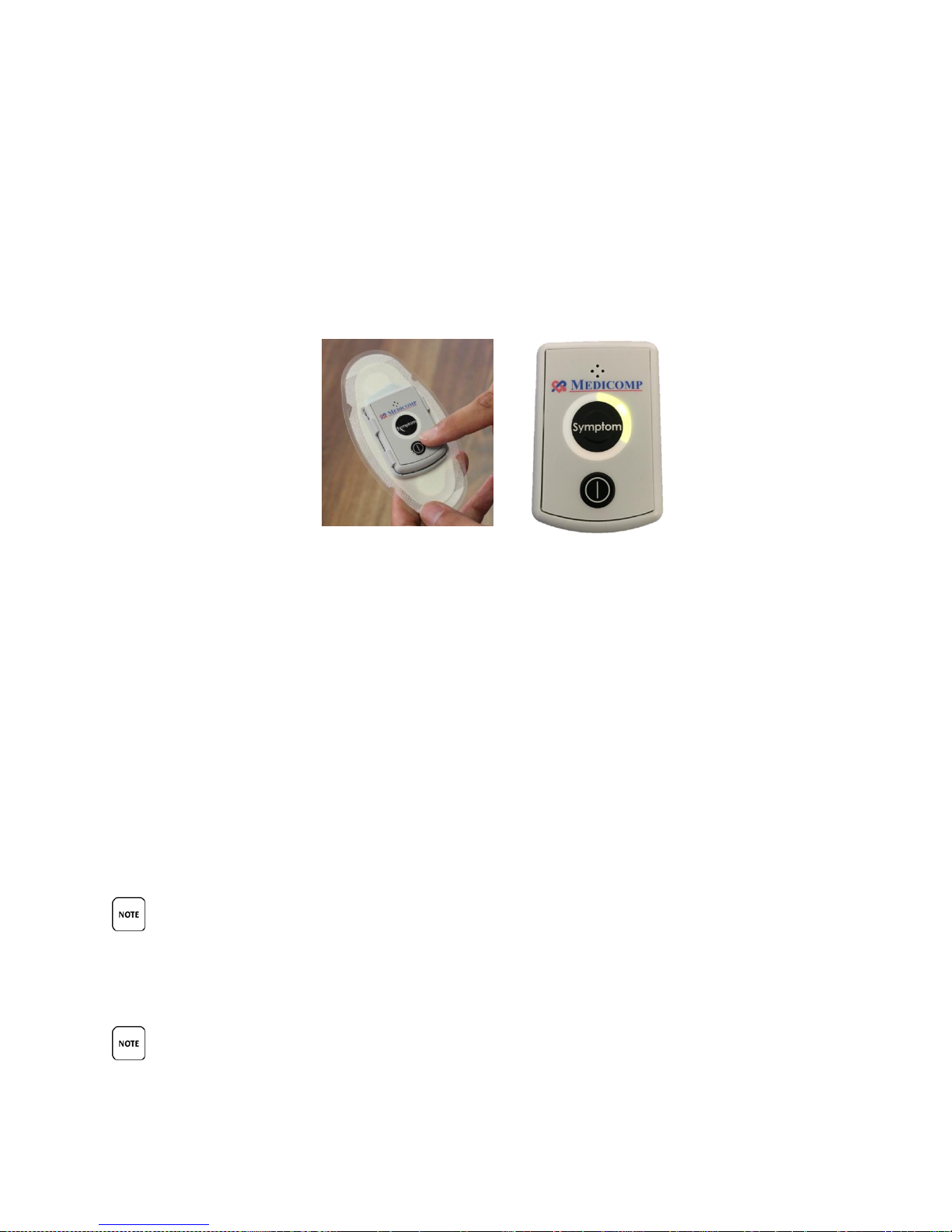
Turn the Pendant on:
Press and hold the power button on the face of the Pendant until the Pendant green
LED flashes.
For a Holter
procedure (24 hour
to 96 hour)
o Press the Symptom button three (3) times
For all other procedures (7 day to 30 day)
o The Pendant will initiate on its own.
o If Pendant does not turn on its own, press Power button to turn on pendant
During the TelePatch Procedure:
Wear and Electrode Patch and TelePatch Pendant all day and all night.
A physician will determine the duration of the TelePatch procedure.
The Electrode Patch will stay in position for seven (7) days, on average.
The Pendant should always be in the Electrode Patch Cradle.
TelePatch Pendant and Electrode Patch can be worn in the shower and during exercise.
All regular activities can be enjoyed during a TelePatch procedure.
TURN THE PENDANT ON BEFORE TAPPING “START PROCEDURE” ON THE SMARTPHONE AS
THE SMARTPHONE WILL IMMEDIATELY LAUNCH A PROCESS THAT WILL START
COMMUNICATION TO THE PENDANT VIA BLUETOOTH TECHNOLOGY. IF THE PENDANT IS NOT
TURNED ON AT THAT TIME, THE SMARTPHONE WILL NOT BE ABLE TO IDENTIFY THE PENDANT.
PENDANT BATTERY NEEDS TO BE CHANGED ABOUT EVERY SEVEN (7) DAYS
TelePatch™ Cardiac Monitor PM750
USER MANUAL - UTM0000701-04D | 01/06/2017 33
Page 35
Have a question or need assistance?
Call Medicomp Patient Support: 800-234-3278 ext. 2370
IT IS VERY IMPORTANT TO TURN THE PENDANT OFF BEFORE CHANGING BATTERY,
OTHERWISE DATA MAY BE LOST. THE ON/OFF BUTTON IS LOCATED ON THE FACE OF THE
PENDANT.
THE PENDANT AND BATTERY ARE NOT DISPOSABLE. THE PENDANT SHOULD BE REMOVED
FROM THE CRADLE ON THE ELECTRODE PATCH AND PLACED IN THE CRADLE OF THE FRESH
ELECTRODE PATCH.
IMPORTANT NOTE: If setting up a 24 hour – 96 hour Holter procedure, the procedure set-up is
complete at this point. The Smartphone is not used with Holter procedures.
Step 5 - Starting the Smartphone
Before using the Smartphone:
Charge the Smartphone until it is fully powered. If it is not fully charged (low) a red LED
will flash in the upper left corner of the face of the Smartphone.
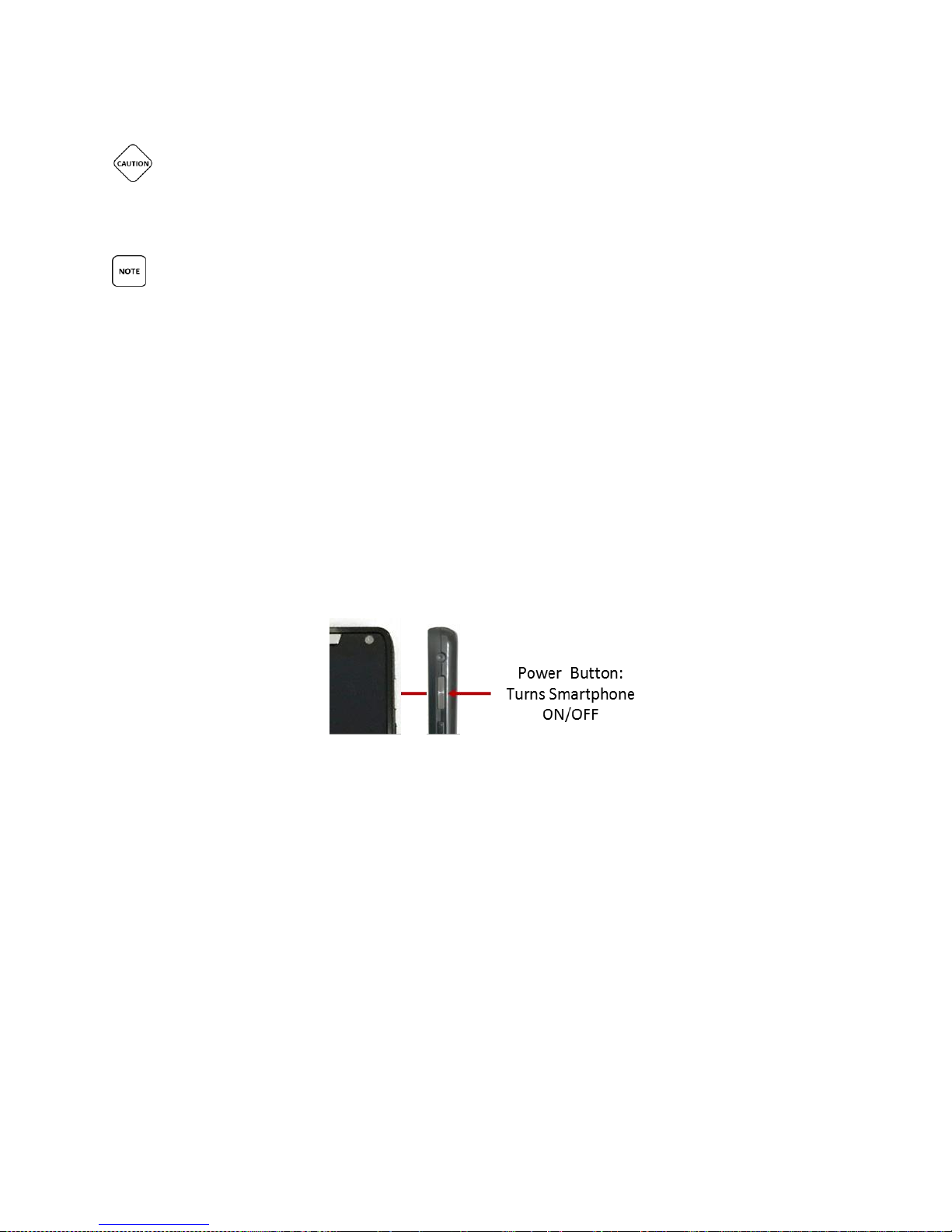
Take the Smartphone and turn it on by pressing and holding the POWER button which is
located in the upper right side of the Smartphone.
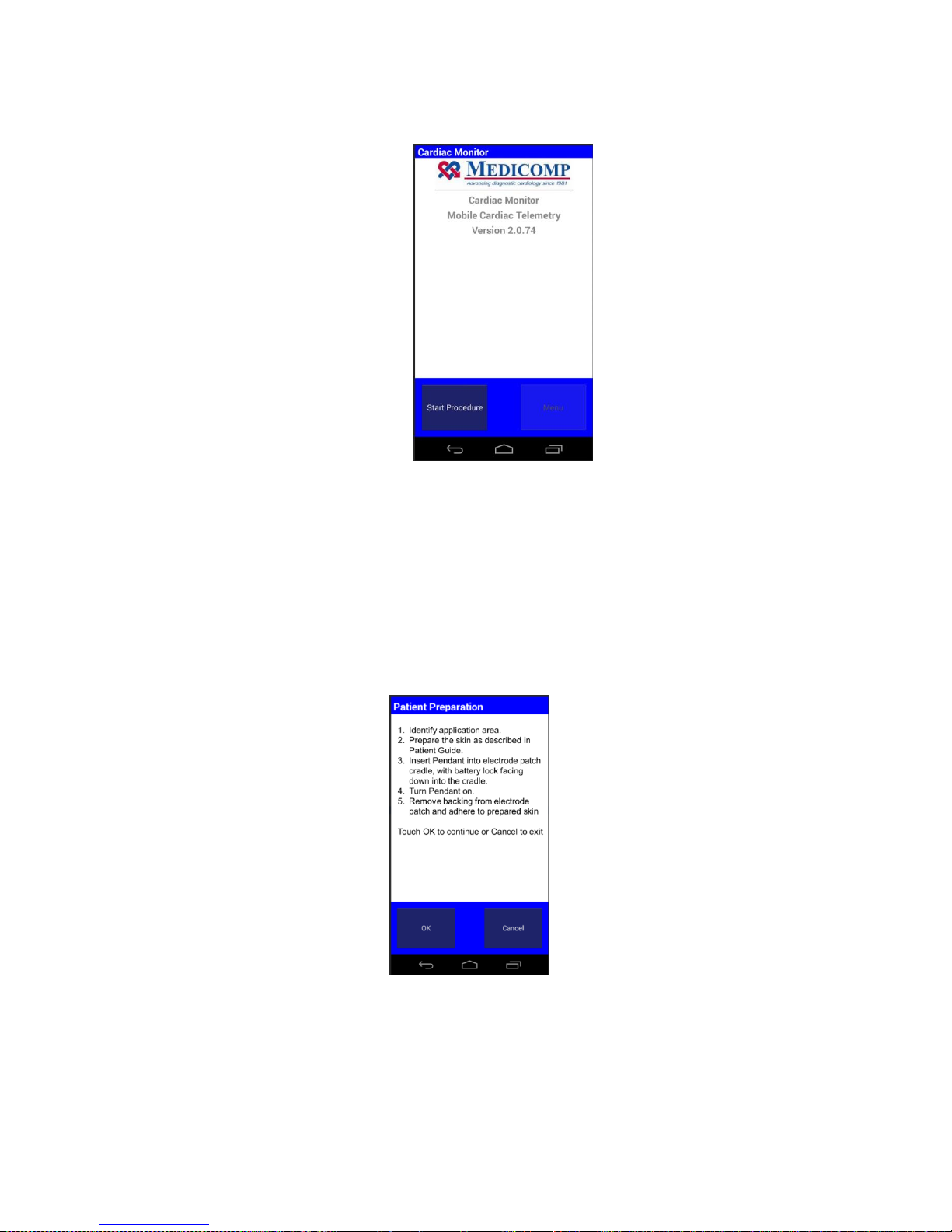
Wait for the Medicomp main screen to appear on the screen before continuing with
standard procedure setup.
Tap “Start Procedure.”
TelePatch™ Cardiac Monitor PM750
USER MANUAL - UTM0000701-04D | 01/06/2017 34
Page 36
Have a question or need assistance?
Call Medicomp Patient Support: 800-234-3278 ext. 2370
Medicomp TelePatch Smartphone Main Screen
Step 6 - Procedure Set Up
After identifying Electrode Patch site, preparing the skin, applying the Electrode Patch and,
turning on the Pendant, turning on the Smartphone, the patient is now ready for 'Procedure
Setup' with the TelePatch System. The steps are described below.
After following the instructions on the patient preparation screen, which may have already
been completed, the next step is to select the correct settings before starting a procedure.
Medicomp TelePatch Smartphone
Patient Preparation Screen
Tap “OK”
TelePatch™ Cardiac Monitor PM750
USER MANUAL - UTM0000701-04D | 01/06/2017 35
Page 37
Have a question or need assistance?
Call Medicomp Patient Support: 800-234-3278 ext. 2370
Step 7 - Procedure Settings
After following the instructions on the patient preparation screen, the next step is to select the
correct settings before starting a procedure. Follow the instructions below on how to select the
necessary procedure settings from the TelePatch System.
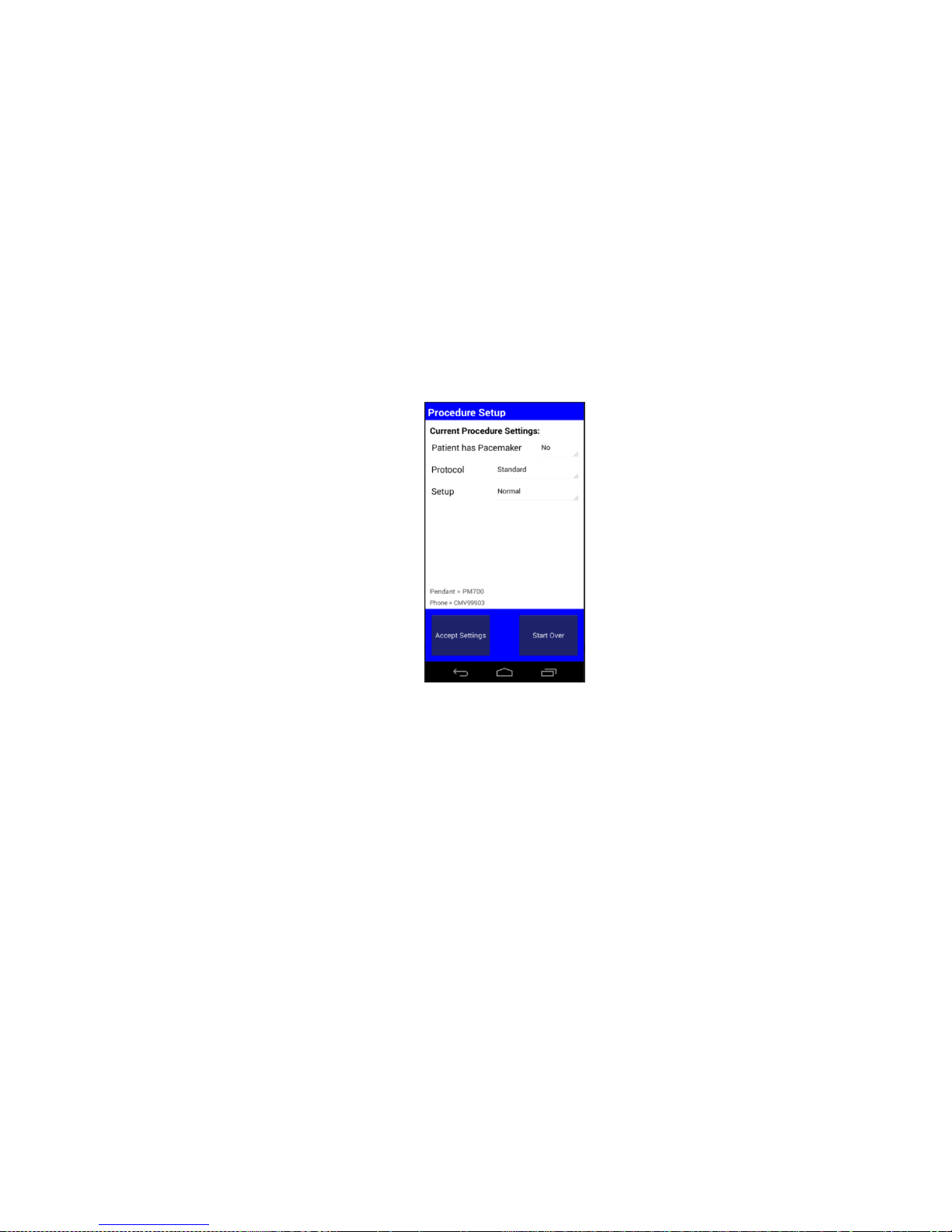
The Procedure Setup screen will display the default settings, which are:
Patient has Pacemaker = No
Protocol = Standard
Setup = Normal
Medicomp TelePatch Smartphone
Procedure Set Up Screen
Choose “Accept Settings” or change settings from this screen.
To accept default settings:
Tap “Accept Settings”
OR to change settings:
Tap the setting to be changed
Pacemaker Settings
The following describes the steps and screens when 'Pacemaker' is selected as a setting. To
select a setting for pacemakers:
Tap “No”
Tap option desired.
If the patient desires to change more settings, then repeat the steps above for Protocol
TelePatch™ Cardiac Monitor PM750
USER MANUAL - UTM0000701-04D | 01/06/2017 36
Page 38
Have a question or need assistance?
Call Medicomp Patient Support: 800-234-3278 ext. 2370
and Setup.
After all the correct settings have been chosen.
Tap “Accept Settings”
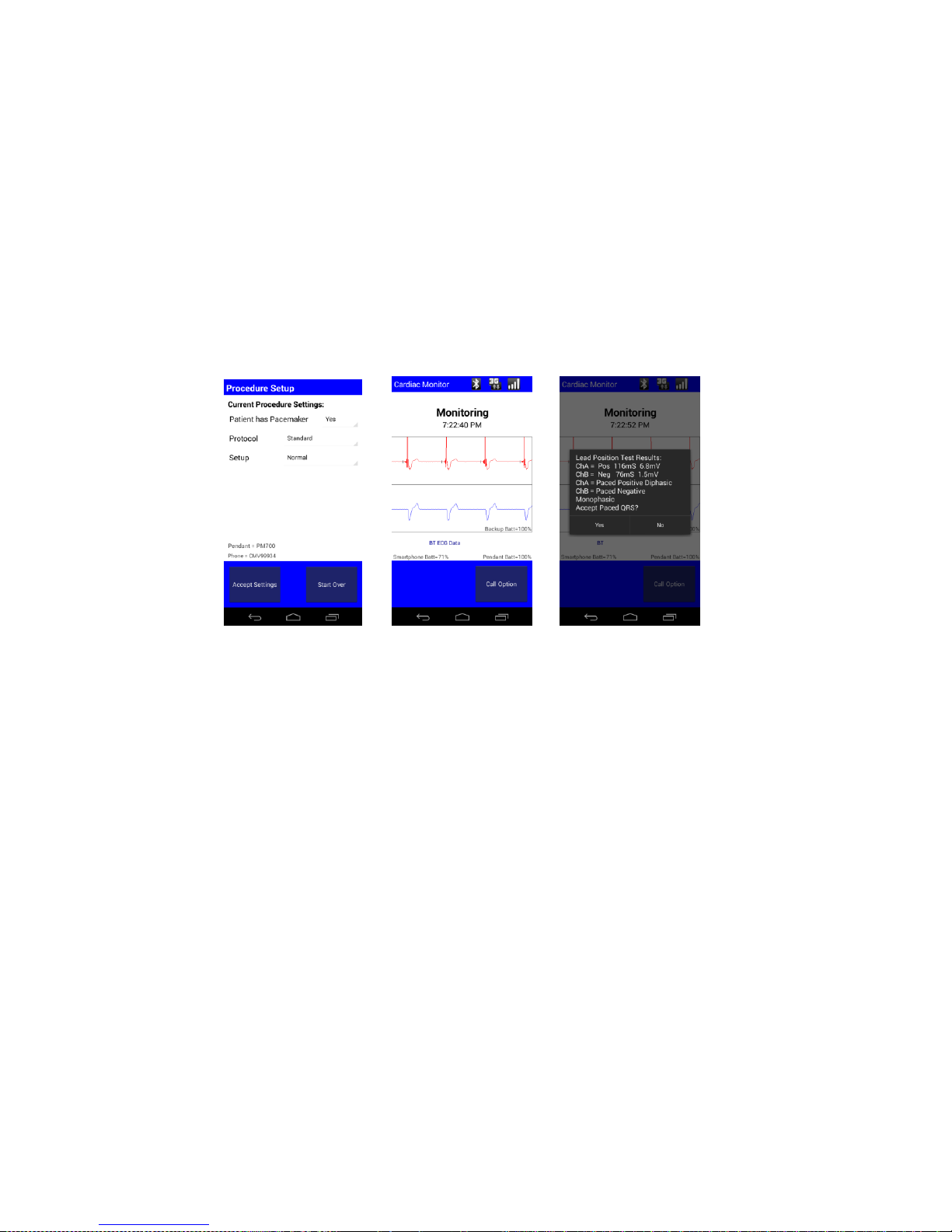
If the 'Pacemaker' setting is selected, and if a paced beat was detected as typical, the
Smartphone displays a screen of QRS during the procedure setup. Then it will display
the settings. Please select “Yes” to accept this step.
After all the correct settings have been chosen.
Tap “Accept Settings”
Pacemaker Setup Screens
For additional standard procedure setup instructions, go to patient preparation.
Protocol Setting
'Protocol' has three (3) sub-options. More information pertaining to those options is
provided below.
Standard - “Standard” is the default for adult users.
Atrial Fib - Use “Atrial Fib” for users who have permanent Atrial Fibrillation.
Pediatric - Use “Pediatric” for users under 16 years of age.
Users should check with child's Pediatrician to verify heart rate. The Pediatric protocol sets
Normal Sinus Rhythm at 80-150bpm. To select a setting from protocol:
To apply 'Protocol' as a setting:
Tap “Standard”
Tap desired Protocol
Press “Accept Settings”
TelePatch™ Cardiac Monitor PM750
USER MANUAL - UTM0000701-04D | 01/06/2017 37
Page 39

Have a question or need assistance?
Call Medicomp Patient Support: 800-234-3278 ext. 2370
For additional standard procedure setup instructions, go to PATIENT PREPARATION.
THE TELEPATCH SYSTEM CAN BE USED FOR INFANTS WEIGHING LESS THAN 10KG.
“TEST”SHOULD NEVER BE SELECTED AS A SETTING WITHOUT THE SUPERVISION AND
GUIDANCE OF A MEDICOMP CARDIAC MONITORING CENTER (CMC) TECHNICIAN. CALL THE
CMC FOR GUIDANCE IN “TEST” MODE.
Set Up
All TelePatch systems will be shipped in “Normal” mode. There is therefore, no need to instruct
users on how to select the “Normal” mode. The following instructions describe the steps and
screens for selecting “Test” mode. To apply the “Test” mode:
• Tap “Normal”
• Tap “Test” on drop down menu
If there are additional settings changes desired, repeat the steps above
for Pacemaker and Protocol. After all the correct settings have been
chosen,
• Tap “Accept Settings”
An example of a test result screen for the Skin Prep is provided below.
Skin Prep Test Result
For additional standard procedure setup instructions, go to PATIENT PREPARATION.
If a mistake is made during the procedure setup process, the set up can Start Over.
“START OVER” WILL ERASE ALL PREVIOUS SETTING SELECTIONS IN ORDER TO START THE
ENTIRE PROCEDURE SETTINGS PROCESS FROM THE VERY BEGINNING.
Start Over
• Tap “Start Over” button
This will erase all previous setting selections in order to start the entire procedure settings
TelePatch™ Cardiac Monitor PM750
USER MANUAL - UTM0000701-04D | 01/06/2017 38
Page 40
Have a question or need assistance?
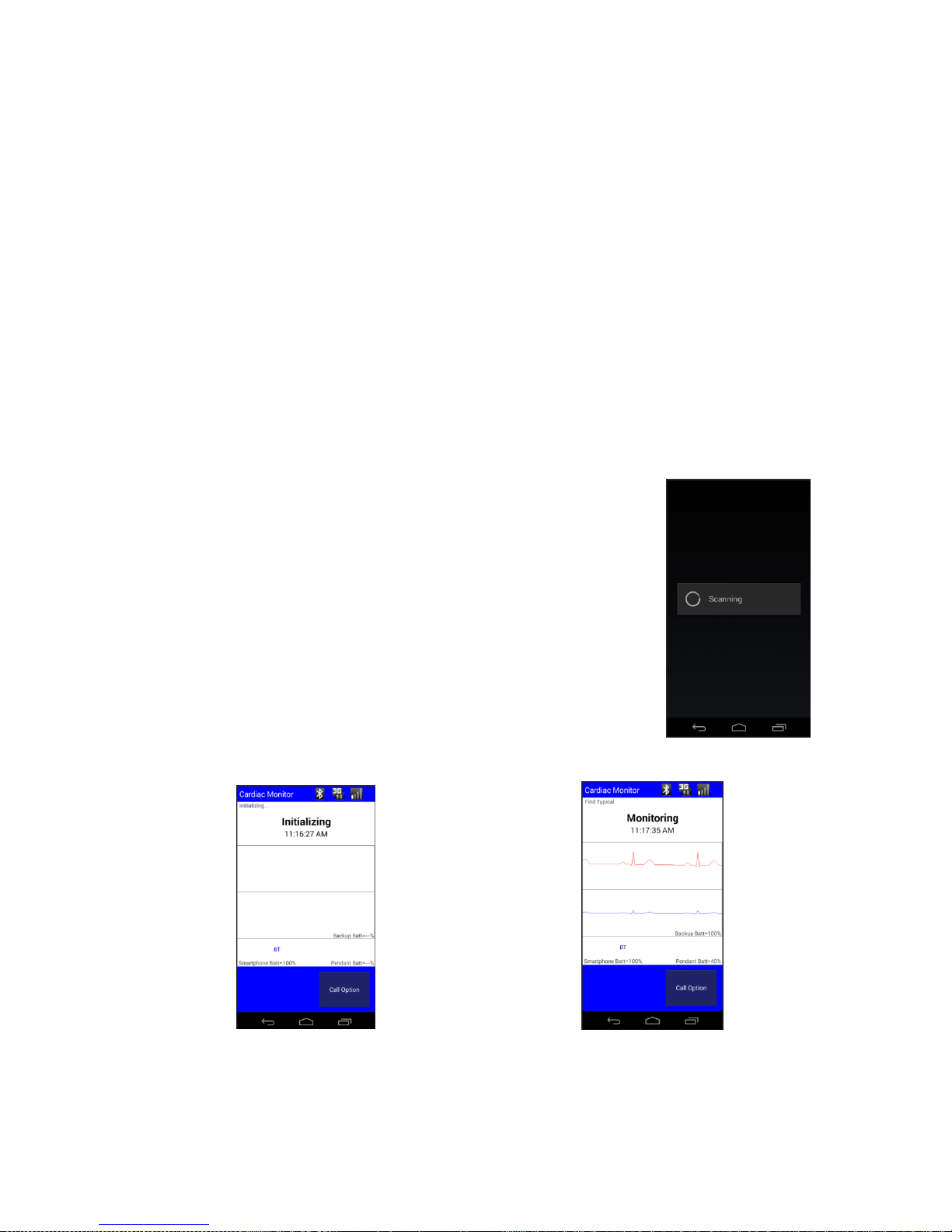
Medicomp TelePatch Smartphone
Initializing Procedure
Medicomp TelePatch Smartphone
ECG Baseline Reading
Call Medicomp Patient Support: 800-234-3278 ext. 2370
process over from the very beginning.
Protocol: The protocol is an integral part of the auto capture capability. It may be
defined as a set of guidelines that the ECG analysis algorithm uses in identifying
clinically-significant events. For example, the normal heart rate in Standard protocol is
60-100 bpm.
Pediatric Protocol: this range is 80-150 bpm. Therefore, the TelePatch System would not
trigger to generate recordings for heart-rate events of 140 bpm if the protocol had been
set to Pediatric, but would trigger if it had been set to Standard.
For additional standard procedure setup instructions, go to PATIENT PREPARATION.
Step 8 - Initial Procedure Screens
After applying and accepting the procedure settings, the procedure will
initialize.
Medicomp TelePatch Smartphone
Scanning for TelePatch Pendant
The TelePatch system will first collect ECG data, then the ECG
Data will appear on the screen for a short time, then the screen
TelePatch™ Cardiac Monitor PM750
USER MANUAL - UTM0000701-04D | 01/06/2017 39
Page 41
Have a question or need assistance?
Call Medicomp Patient Support: 800-234-3278 ext. 2370
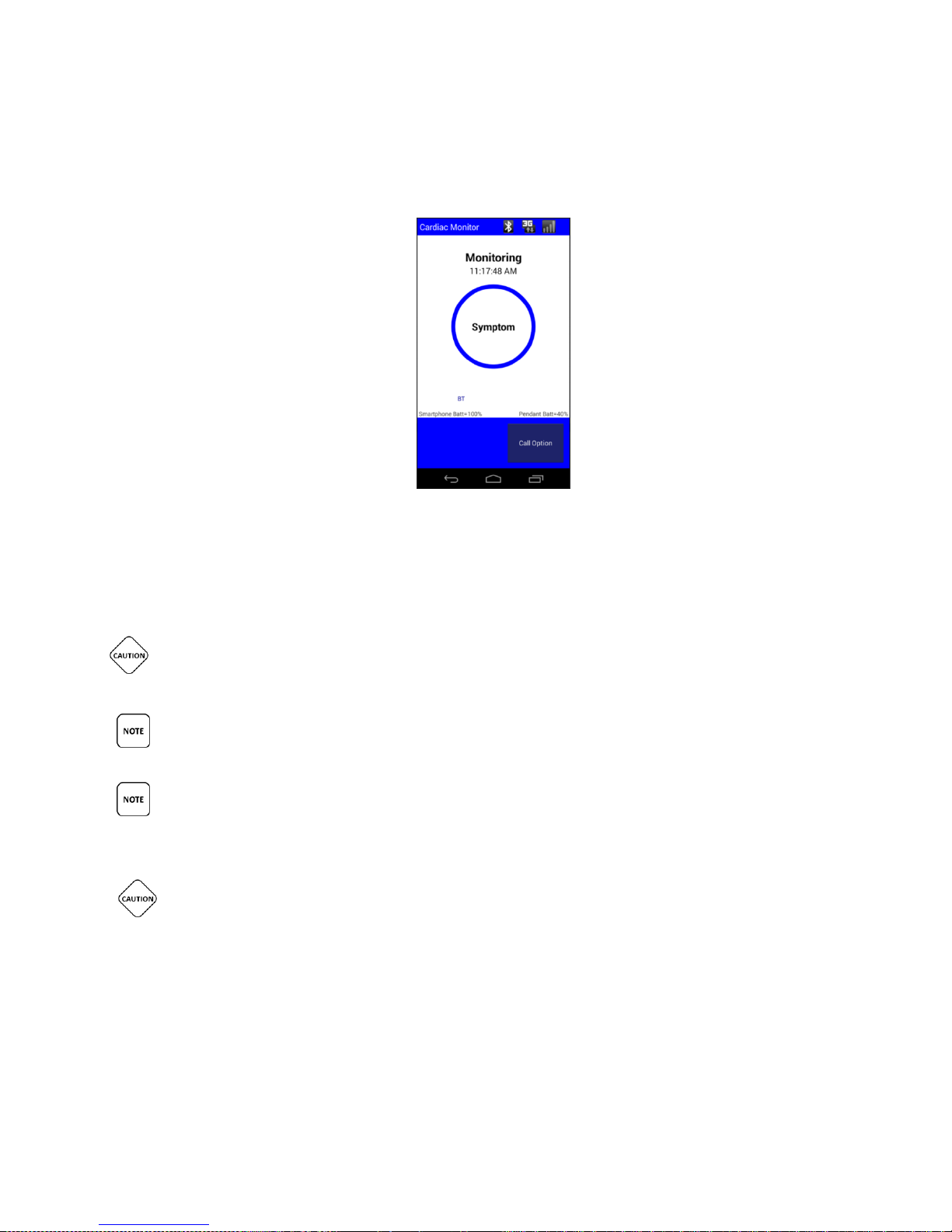
will display “Monitoring.”
'Monitoring' will be displayed the majority of the time during a procedure.
The Medicomp TelePatch Smartphone
Monitoring Screen
The TelePatch procedure is now running.
IT IS VERY IMPORTANT TO TURN THE PENDANT OFF BEFORE CHANGING BATTERY,
OTHERWISE DATA MAY BE LOST. THE POWER BUTTON IS LOCATED ON THE FACE OF THE
PENDANT.
DEPENDING ON THE SETTINGS, AND THE PATIENT PREPARATION, SOME INTERMITTENT
CONFIRMATION AND/OR ERROR SCREENS MAY APPEAR DURING THE INITIALIZATION.
PLEASE PERIODICALLY CHECK THE PENDANT AND/OR SMARTPHONE TO ENSURE THEY
ARE BOTH IN MONITORING MODE. THIS MEANS THE PENDANT IS BLINKING BLUE LED
LIGHTS, AND THE SMARTPHONE DISPLAY STATES ‘MONITORING’.
THE TELEPATCH SYSTEM IS DESIGNED TO OPERATE IN ENVIRONMENTS THAT MAY
EXPERIENCE TRANSIENT ELECTRICAL EVENTS LIKE ELECTROSTATIC DISCHARGE (ESD).
TELEPATCH IS DESIGNED TO BE RESISTANT TO SUCH EVENTS AND WILL TYPICALLY CONTINUE
TO OPERATE NORMALLY. A SEVERE ESD EVENT MAY CAUSE THE DEVICE TO SHUT DOWN IN
ORDER TO PROTECT THE MEMORY. IF A SHUTDOWN OCCURS, MANUALLY POWER THE DEVICE
ON USING THE POWER BUTTON ON THE FRONT OF THE DEVICE. ONCE POWERED ON,
TELEPATCH SHALL RESUME NORMAL OPERATION WITH NO LOSS OF FUNCTIONALITY OR
INFORMATION.
TelePatch™ Cardiac Monitor PM750
USER MANUAL - UTM0000701-04D | 01/06/2017 40
Page 42
Have a question or need assistance?
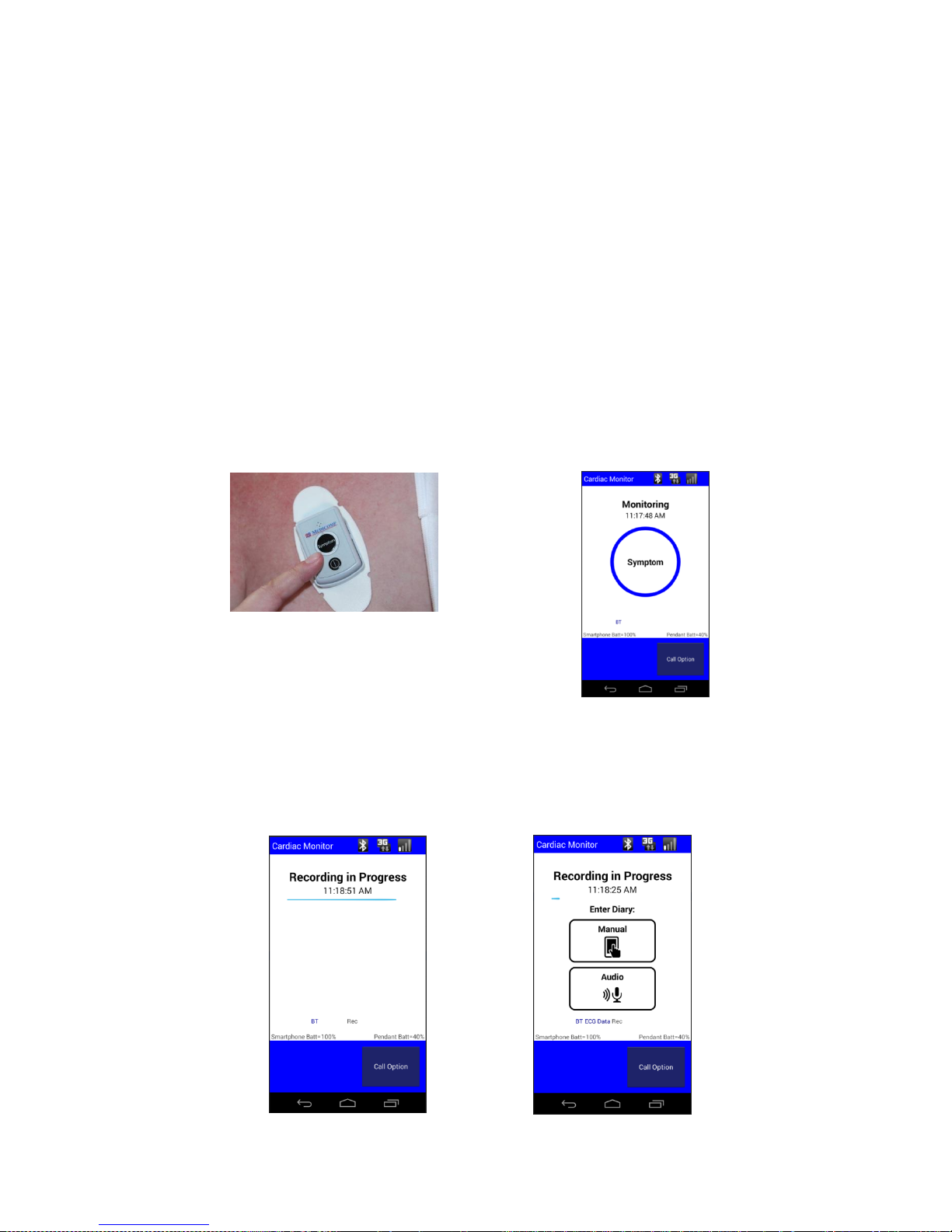
The SYMPTOM button on the Pendant
has two raised bars so it can be easily located.
Press SYMPTOM on TelePatch Pendant
OR Press SYMPTOM on Smartphone
Call Medicomp Patient Support: 800-234-3278 ext. 2370
Best Practices for using the Smartphone and the Pendant
Keep the Smartphone charged and turned on
Keep Smartphone within 10’ of the Pendant during procedure
Review how to record a SYMPTOM, make a Diary Entry
Review how to charge the Smartphone daily
Review how to change and charge the Pendant battery
Recording Symptoms: Standard TelePatch Procedure
When a Symptom is felt, or at other times as directed by your physician:
Press the SYMPTOM button on the Pendant or on the Smartphone, to record heart’s
activity.
The TelePatch Smartphone will display Recording in Progress for 60 seconds
The TelePatch Smartphone will light up with a message to make a Diary Entry
TelePatch™ Cardiac Monitor PM750
USER MANUAL - UTM0000701-04D | 01/06/2017 41
Page 43
Have a question or need assistance?
Manual Diary Entry
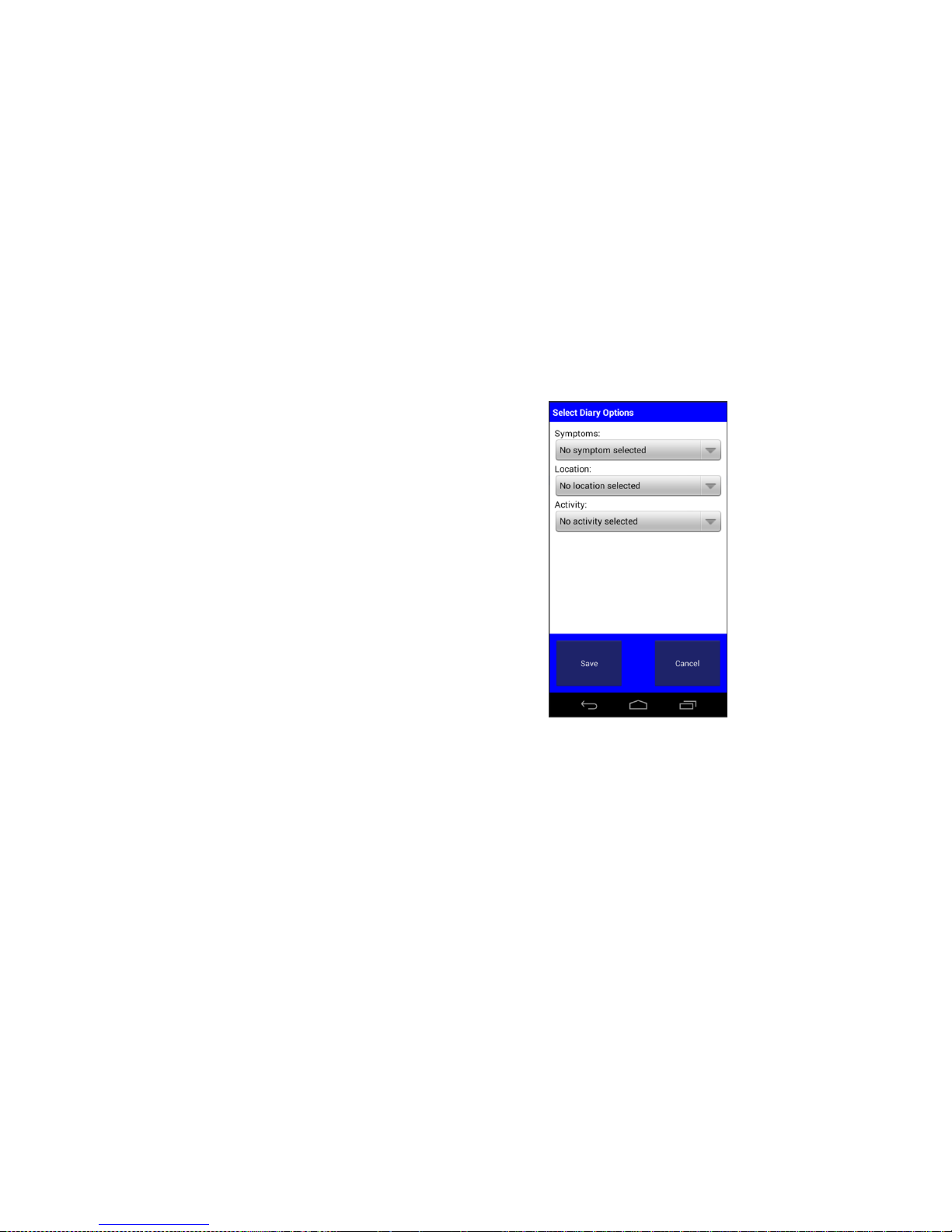
Tap “Manual”
Below the word Symptom Tap ”No
symptom selected”
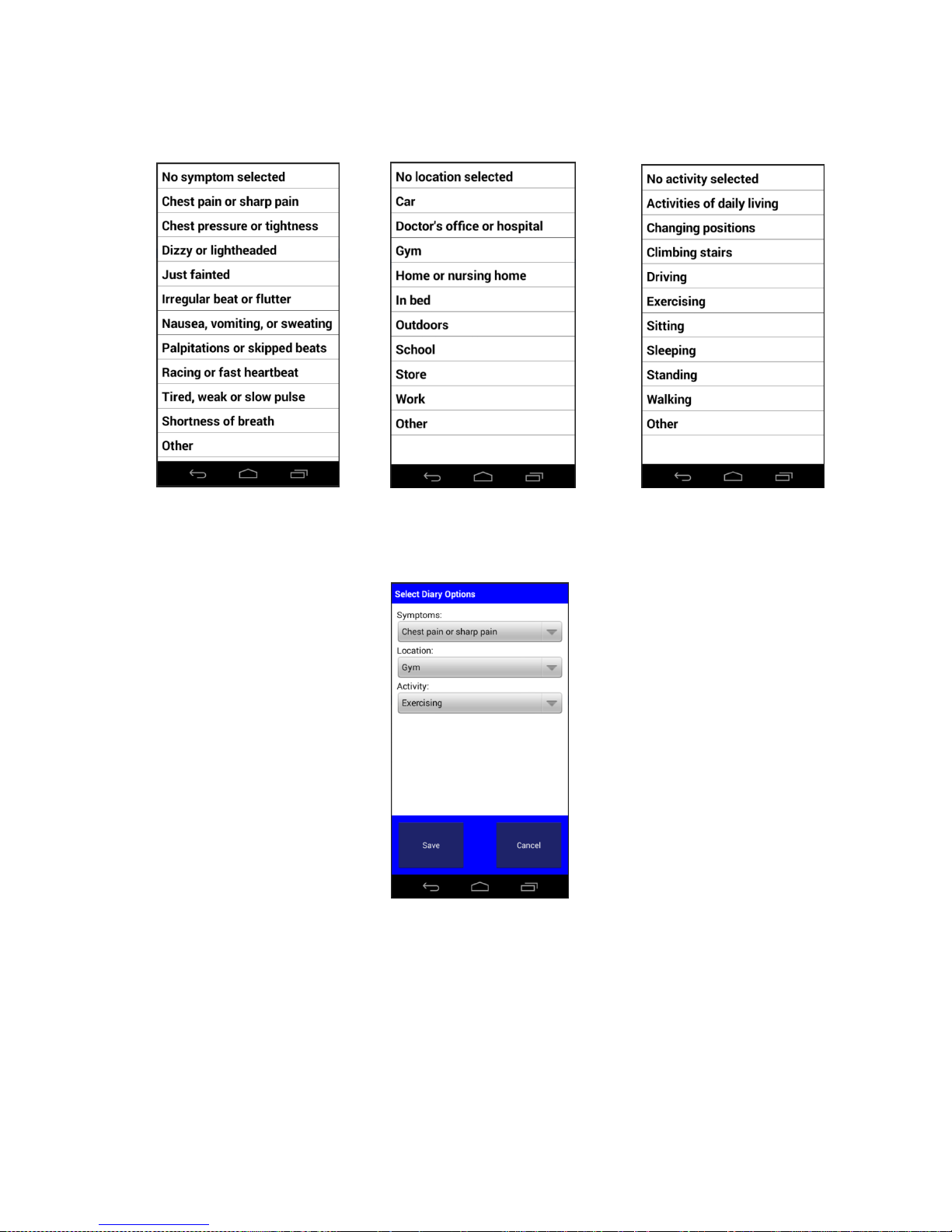
Choose a symptom from the list
Tap “Save”
Below the word “Location” Tap ”No
location selected”
Choose a location from the list
Tap “Save”
Below the word “Activity” Tap” No
activity selected”
Choose an activity from the list
Tap “Save”
From the Select Diary Options screen
(showing options picked) Tap “Save”
The “Monitoring” display will return*
*The screen may return to “Recording in Progress”, Smartphone screen will return to
“Monitoring” as soon as recording period is complete.
Call Medicomp Patient Support: 800-234-3278 ext. 2370
How to Make a Diary Entry:
It is important the prescribing physician to know when a symptom is felt and activity at the time
the SYMPTOM button was pressed.
While “Recording in Progress” is displayed on the Smartphone, Diary options will be
displayed
TelePatch™ Cardiac Monitor PM750
USER MANUAL - UTM0000701-04D | 01/06/2017 42
Page 44
Have a question or need assistance?
Symptom Menu
Location Menu
Activity Menu
Select Diary Options Screen – Options chosen
Call Medicomp Patient Support: 800-234-3278 ext. 2370
TelePatch™ Cardiac Monitor PM750
USER MANUAL - UTM0000701-04D | 01/06/2017 43
Page 45
Have a question or need assistance?
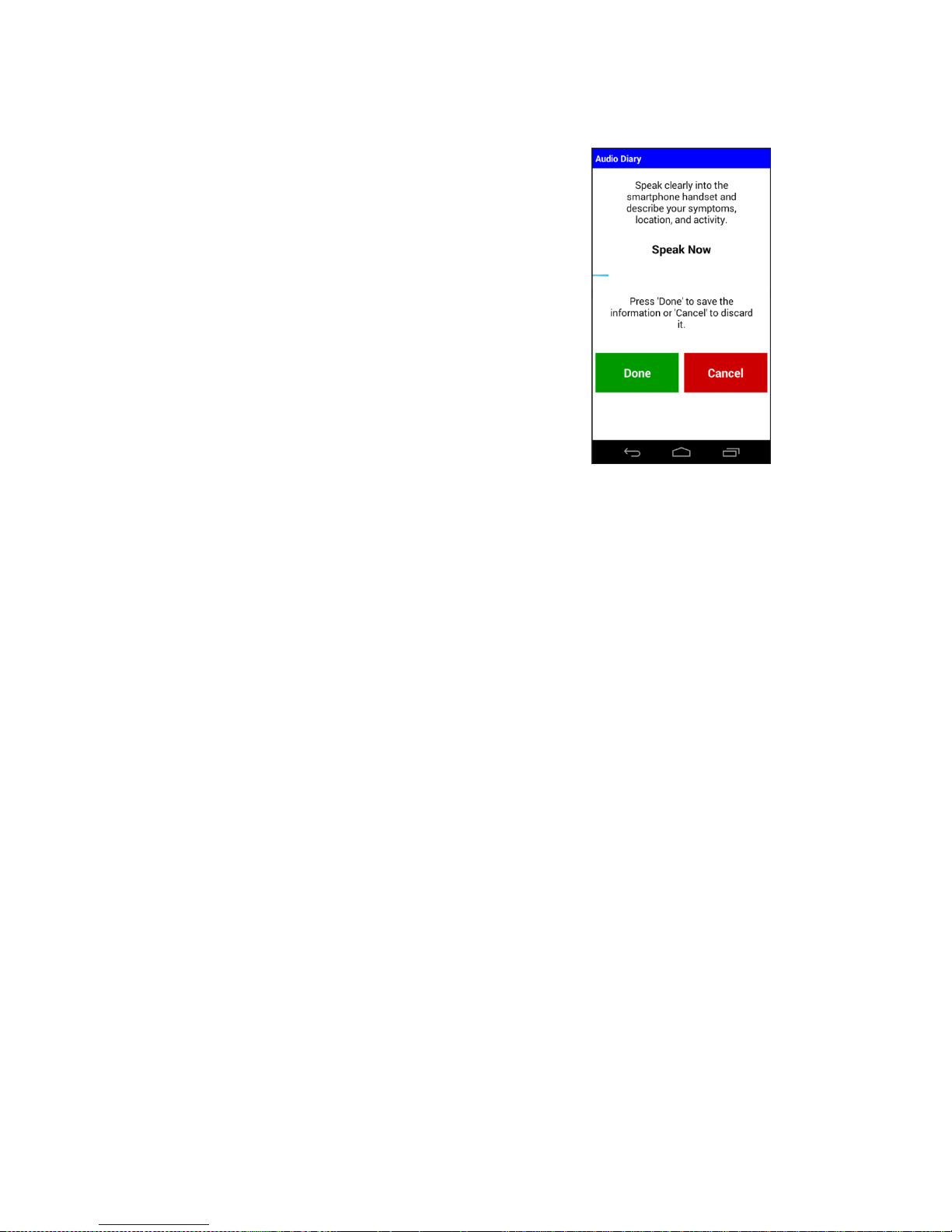
Audio Diary Entry
Tap “Audio”
Cleary state the symptom, location
where symptom occurred, and activity
during symptom
Tap “Done”
The “Monitoring” display will return*
*The screen may return to “Recording in Progress”, Smartphone screen will return to
“Monitoring” as soon as recording period is complete.
Call Medicomp Patient Support: 800-234-3278 ext. 2370
PROCEDURE SET-UP: Cable Cradle with Patient Cable
If wearing TelePatch Cradle and Pendant with individual electrodes, start preparation here
This section contains step-by-step instructions that describe how to prepare TelePatch System
and skin for a TelePatch Cable Cradle with Cable procedure - (requires individual chest
electrode patch application). Please follow the skin preparation sequence as closely as possible.
This will greatly enhance the ECG signal quality and optimize analysis.
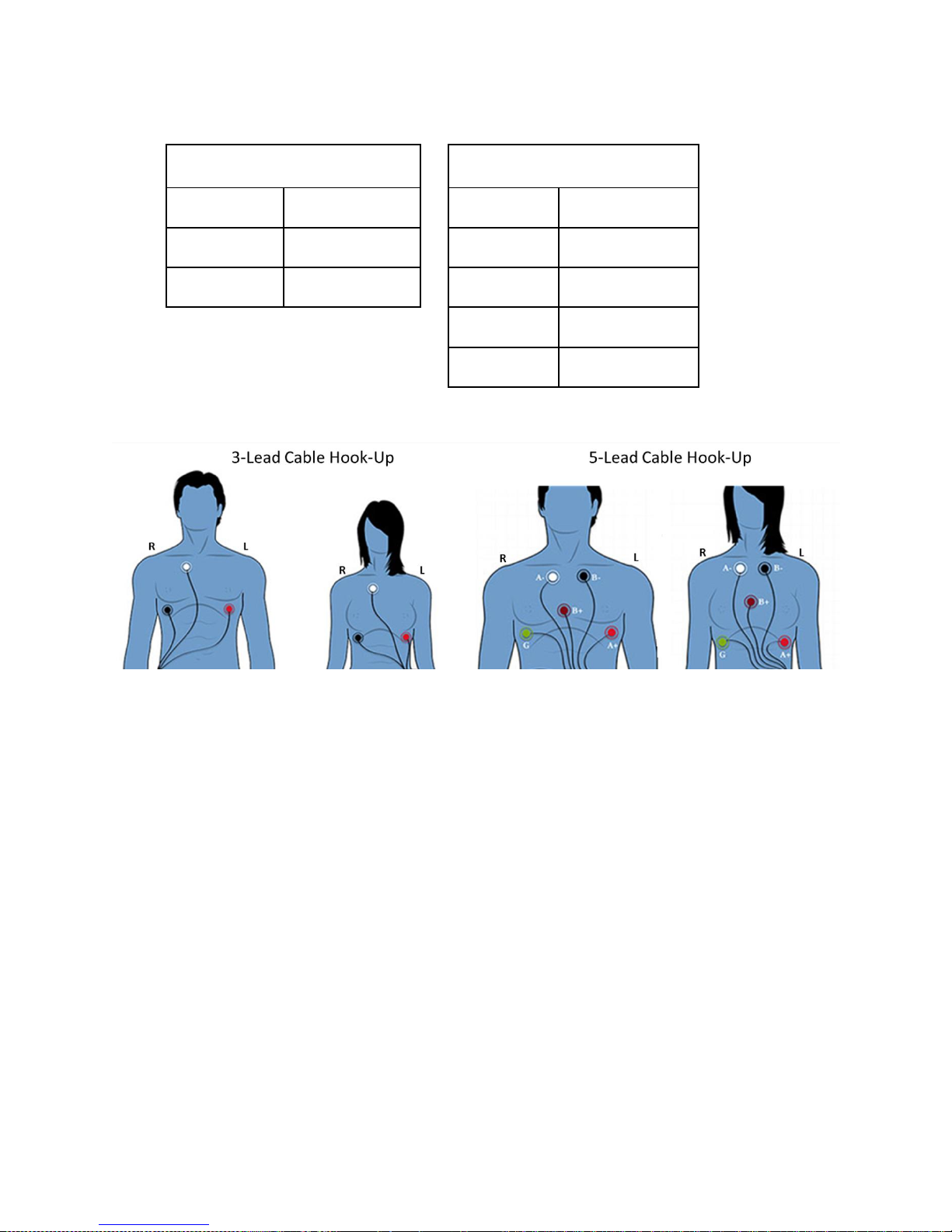
Step 1 - Identify Electrode Sites
Leads V5/MCL5 and a modified Lead I are used with the TelePatch Cable Cradle procedure, two-
channel ambulatory monitoring. By convention in the symptom recording reports, V5 is
Channel A and the modified Lead I is Channel B. Refer to the figure below for proper electrode
placement:
Patient Preparation
Electrode Placement for the TelePatch Procedure
TelePatch™ Cardiac Monitor PM750
USER MANUAL - UTM0000701-04D | 01/06/2017 44
Page 46
Have a question or need assistance?
3-Lead Wire Hook-Up
5-Lead Wire Hook-Up
A-
WHITE
A-
WHITE
A+ / B+
RED
A+
RED
B-
BLACK
B-
BLACK
B+
BROWN
G
GREEN
Call Medicomp Patient Support: 800-234-3278 ext. 2370
For women with large breasts, the following electrode positions are recommended:
Red in the left axillary line
Black in the right axillary line
This lead placement may eliminate potential skin prep problems and minimizes occurrences of
artifact.
Step 2 - Prepare the Skin
Individual electrodes may be worn for a few. In order to obtain the best ECG recording, the
following procedure is recommended for initial patient hookup:
1. Whenever possible, be in an upright sitting position. This may be useful if any setup
problems occur that concern the signal voltage.
2. Following the lead placement diagram, select sites that are flat and bony. Avoid skin
folds or creases, irritated skin or scar tissue, and highly muscular areas.
3. If necessary, shave an area at each electrode site slightly larger than the size of the
electrode.
TelePatch™ Cardiac Monitor PM750
USER MANUAL - UTM0000701-04D | 01/06/2017 45
Page 47
Have a question or need assistance?
Call Medicomp Patient Support: 800-234-3278 ext. 2370
4. If powder, lotion, sun block, etc. has been applied to the chest, or if skin is excessively
oily, wash each site with plain soap and water. Do not use a soap that contains lotion or
oil.
5. Skin-prep pads (found in alcohol prep-pad type packaging) can be used to clean and
prepare skin for initial application.
The above skin prep procedure is only required at the beginning of the procedure, during
Smartphone initialization. Users will not be required to perform this type of preparation each
time they re-locate electrodes. It is best for users to have freshly showered with plain soap each
time they apply new electrodes. When the Pendant is reconnected to the patient cable, the
unit performs a less restrictive setup.
If electrodes have connectivity issues the skin can be lightly abraded each electrode site
with a rough wash cloth, or an abrasive pad
ALLOW 15 MINUTES FOR SKIN TO ABSORB THE ELECTRODE GEL, WHICH MAY HELP
PROCEDURE INITATION ERRORS FROM OCCURRING.
CONDUCTIVE PARTS OF ELECTRODES AND ASSOCIATED CONNECTORS FOR TYPE BF OR
CF APPLIED PARTS, INCLUDING NEUTRAL ELECTRODE, SHOULD NOT CONTACT OTHER
CONDUCTIVE PARTS, INCLUDING EARTH.
Step 3 - Snap on Electrodes and Set Up Cable Cradle
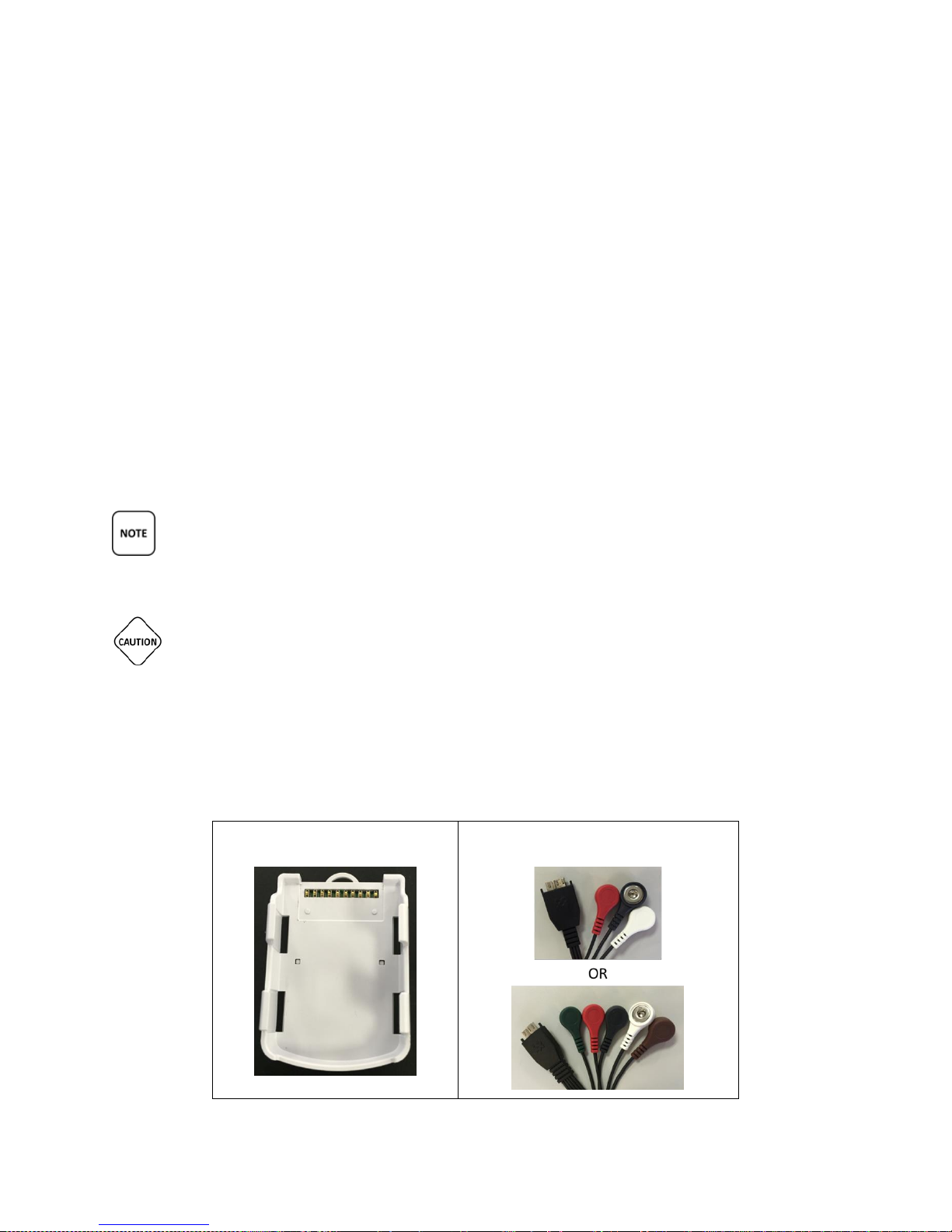
Locate the Cable Cradle, one battery, lead wires, envelope of electrodes and lanyard (optional).
TelePatch™ Cardiac Monitor PM750
USER MANUAL - UTM0000701-04D | 01/06/2017 46
Page 48
Have a question or need assistance?
Call Medicomp Patient Support: 800-234-3278 ext. 2370
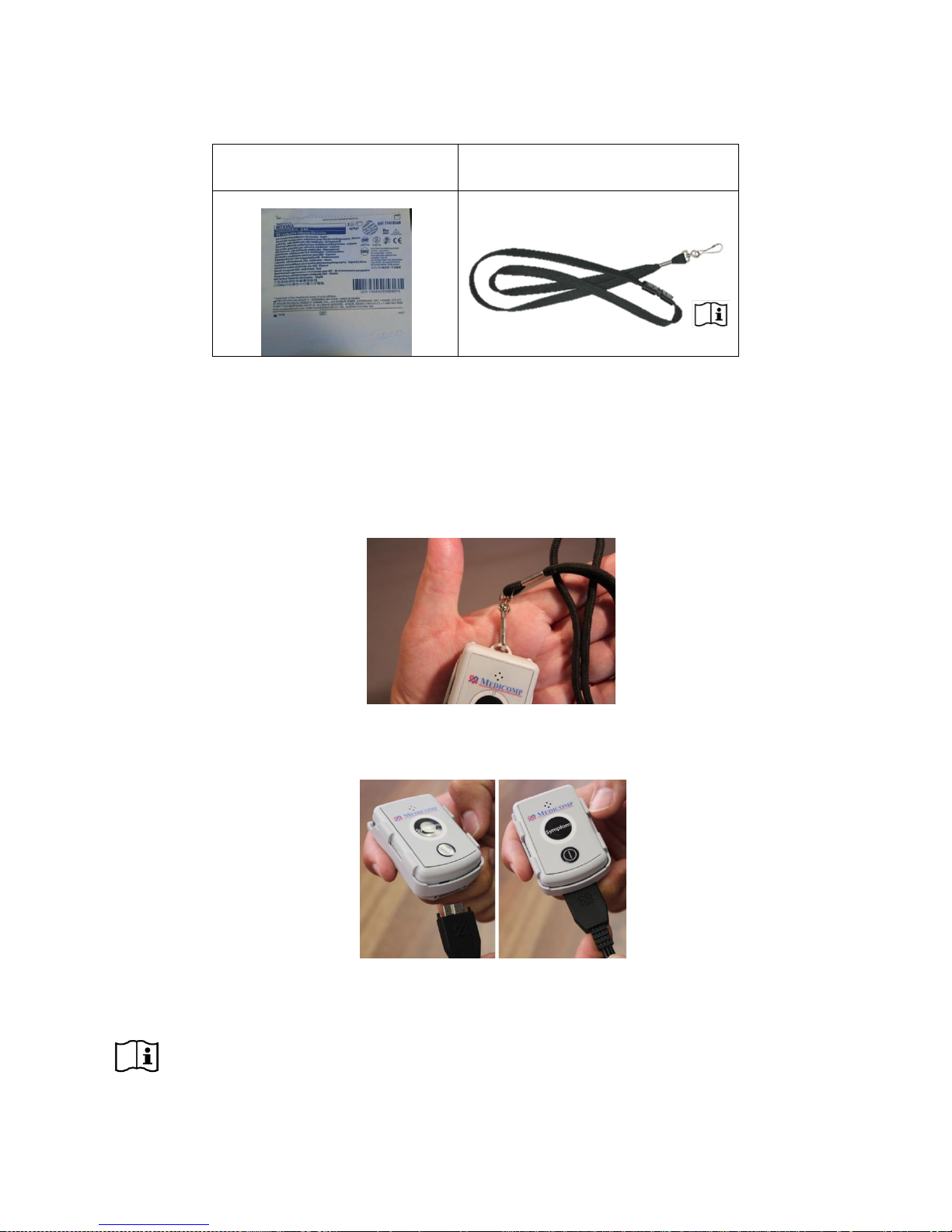
● Snap the wires onto the electrodes while they are still attached to the plastic backing.
● One by one, peel each electrode from the backing and apply it to the chest.
● Position the electrodes at the appropriate color-coded sites.
● If wearing cable cradle on lanyard, clip lanyard onto the loop at the top of cradle.
○ Cable Cradle may also be carried in pocket, be careful Cable remains connected
to Cable Cradle
● Hold flat plug at the end of electrodes cable and connect cable to the base of cradle into
the corresponding outlet.
● Place the lanyard over head to wear the cradle with cable attached
LANYARD IS NOT TO BE WORN WHILE SLEEPING.
TelePatch™ Cardiac Monitor PM750
USER MANUAL - UTM0000701-04D | 01/06/2017 47
Page 49

Have a question or need assistance?
Call Medicomp Patient Support: 800-234-3278 ext. 2370
CHILDREN WEARING PENDANTS MUST BE SUPERVISED BY ADULTS.
PEOPLE WORKING WITH MACHINERY OR WORKING IN ENVIRONMENTS WHERE LOOSE
HANGING ROPE- LIKE OBJECTS CAN POSE A POTENTIAL THREAT OR HARM TO
THEMSELVES AND/OR THE MACHINERY ARE ADVISED TO CARRY CABLE CRADLE WITH
PENDANT IN POCKET.
THE BREAKAWAY LANYARD IS TO BE DISPOSED OF AS HOUSEHOLD WASTE FOLLOWING
THE PROCEDURE.
WARNING: CHOKING HAZARD – ADULT SUPERVISION REQUIRED
IT IS VERY IMPORTANT TO TURN THE PENDANT OFF BEFORE LOADING BATTERIES,
OTHERWISE DATA MAY BE LOST. THE POWER BUTTON IS LOCATED ON THE RIGHT SIDE OF THE
PENDANT.
Step 4 - Start Pendant
● Follow directions for starting Pendant on page 32
Step 5 - Starting the Smartphone
● Follow directions for starting Smartphone on page 35
Step 6 - Procedure Set Up
● Follow directions for initiating procedure on page 35
Step 7 - Procedure Settings
● Follow directions for initial procedure set up on page 36
Step 8 - Initial Procedure Screens
● Follow directions for completing procedure set up on page 39
Recording Symptoms: Cable Cradle Procedure
● Follow directions for Recording a Symptom on page 41
Procedure while wearing the Cable Cradle
● Wear the Cable Cradle and Pendant all day and all night - except when showering
TelePatch™ Cardiac Monitor PM750
USER MANUAL - UTM0000701-04D | 01/06/2017 48
Page 50

Have a question or need assistance?
Call Medicomp Patient Support: 800-234-3278 ext. 2370
● The Cable Cradle can be worn on the included break-away lanyard or can be kept in
pocket (make sure Cable stays firmly attached).
● The Cable Cradle and Pendant should go into a pocket of a nightshirt while sleeping
○ Do not wear the lanyard at night while sleeping
● The physician will tell you the duration of your procedure
● The Pendant should always be in the Cable Cradle, the Cable should remain plugged into
the Cable Cradle
● Enjoy all of your regular activities like exercise or gardening, while wearing the Pendant,
Cable Cradle and Cable
● DO NOT shower with the Cable Cradle and Cable
○ Turn off the Pendant by pressing the Power Button
○ Unsnap the cable heads from the electrodes
○ Leave Cable Cradle, Cable, Pendant (and lanyard) outside the shower
○ Electrodes may be worn in the shower - fresh electrodes may need to be
applied following the shower
● After showered and dry, place lanyard with Cable Cradle and Pendant back on, re-attach
electrodes, turn on Pendant
PROCEDURE SET-UP: Fingertip Electrodes
If using Fingertip Electrodes for procedure, start preparation here.
Step 1 - Start Pendant
● Follow directions for starting Pendant on page 32
Step 2 - Starting the Smartphone
● Follow directions for starting Smartphone on page 35
Step 3 - Procedure Set Up
● Follow directions for initiating procedure on page 35
Step 4 - Procedure Settings
● Follow directions for initial procedure set up on page 36
Step 5 - Initial Procedure Screens
● Follow directions for completing procedure set up on page 39
Recording Symptoms: Fingertip Electrode Procedure
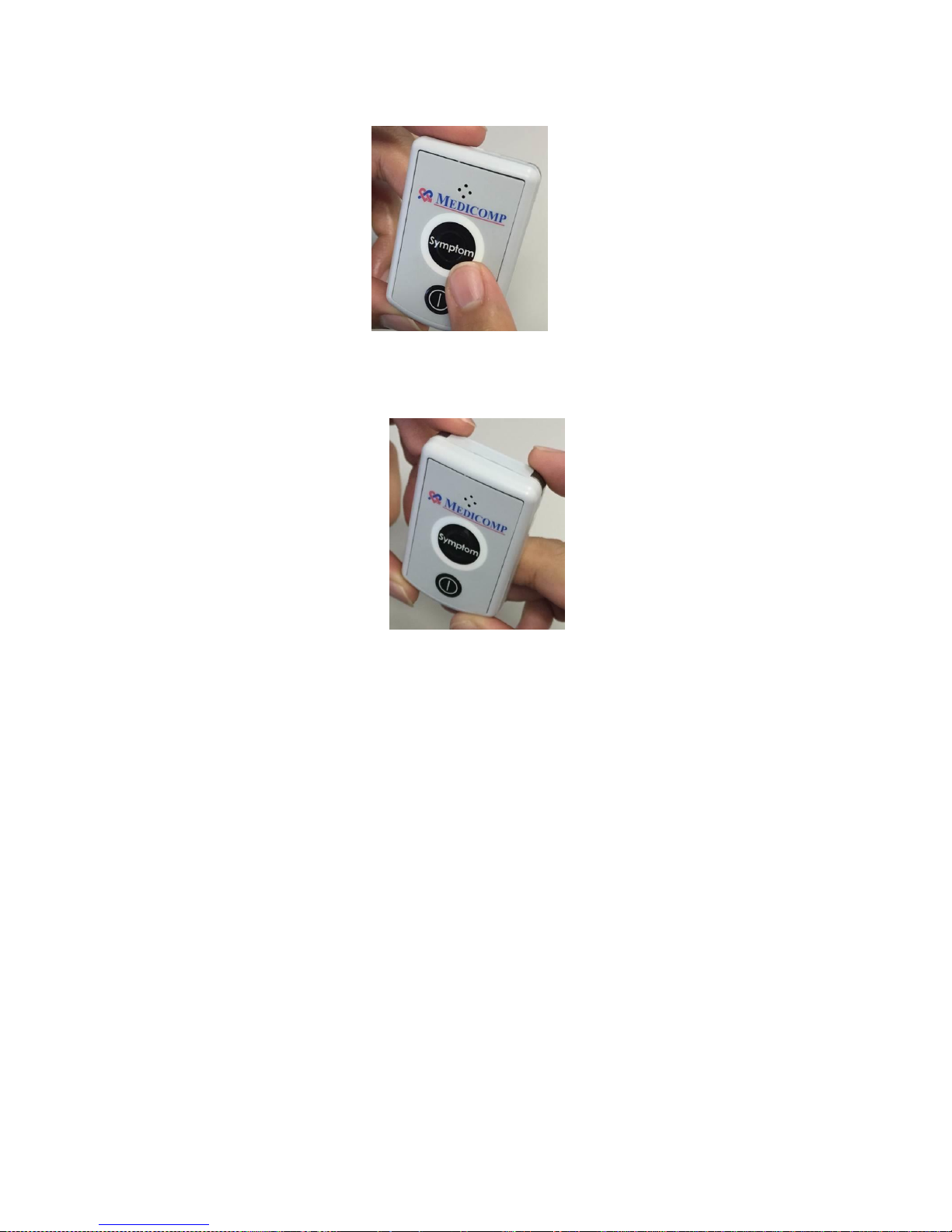
When experiencing a symptom, or at other times as directed by physician,
● Remove the Pendant from pocket or cable cradle
● Press the SYMPTOM button on the Pendant or on the Smartphone
TelePatch™ Cardiac Monitor PM750
USER MANUAL - UTM0000701-04D | 01/06/2017 49
Page 51
Have a question or need assistance?
Call Medicomp Patient Support: 800-234-3278 ext. 2370
● Place index fingers firmly on the Fingertip Electrodes (the silver-gray corners) on the top
edge of the Pendant for 30 seconds.
● Smartphone will display “Recording in Progress”, keep fingers on the Fingertip
Electrode corners until the Smartphone screen message says “Recording Complete”
● The Smartphone will light up and a message will remind user to make a Diary Entry.
○ See page 42 for instructions on making a Dairy entry
Procedure while using and Pendant and Fingertip Electrodes
Carry the Pendant all day and have it nearby at night.
Charge Smartphone daily.
The physician will determine the duration of the procedure.
Enjoy all regular activities like exercise or gardening, during procedure.
How Do I Wear TelePatch System: Electrode Patch and Pendant?
The TelePatch Pendant is securely held in the Electrode Patch cradle, and won’t interfere with
day to day activities. Make sure the Symptom button (on the Pendant or Smartphone) is easily
accessible.
TelePatch™ Cardiac Monitor PM750
USER MANUAL - UTM0000701-04D | 01/06/2017 50
COMMON QUESTIONS
Page 52

Have a question or need assistance?
Call Medicomp Patient Support: 800-234-3278 ext. 2370
How Do I Wear TelePatch System: Pendant, Cable Cradle With Electrodes?
You can wear the Cable Cradle on the breakaway Lanyard, or keep it in your pocket. Make sure
the cable stays plugged into the Cable Cradle at all times. When wearing Cable Cradle avoid
areas where the buttons might accidentally be pressed. At bedtime place Cable Cradle next to
you where its location is the most comfortable. Do not wear the Lanyard when sleeping.
Can I Shower?
When wearing the TelePatch Pendant with the Electrode Patch you can shower with the
Pendant and patch on. When done in the shower gently pat (not rub) the face of the patch and
the Pendant dry. You can remove the Pendant from the patch cradle if you would like to dry
behind the Pendant, then reinsert in the cradle immediately.
When wearing the Cable Cradle with cable DONOT wear the Cable Cradle or cable in the
shower.
1. Disconnect the cable from the Pendant and set the unit aside.
2. Unsnap the wires from electrodes. A diagram in the Patient Guide will help you to
replace them correctly when re-connecting.
Remove electrodes if skin is very irritated or if it has been 72 hours or more (per electrode
manufacturer's directive) since the last electrode change. If you don't need to remove the
electrodes, just make sure that water does not fall directly on them.
Tip For During Shower
The Electrode Patch and Pendant are water resistant. They will withstand brief periods in
contact with water – such as when showering. You can and should wear the Electrode Patch
and Pendant while showering but do not submerge or soak the devices in water.
If it is time to remove the electrodes, try removing them during your shower after they have
become thoroughly soaked with water. This will make removal easier.
Tip For After Shower
Please make sure to dry both the pendant and the plastic on the patch that holds the pendant
after getting wet.
If you are replacing Electrode Patch or single electrodes: After showering, determine where
electrode will be placed (refer to the diagram in the Patient Guide for placement) and dry your
skin well in those areas.
TelePatch™ Cardiac Monitor PM750
USER MANUAL - UTM0000701-04D | 01/06/2017 51
Page 53
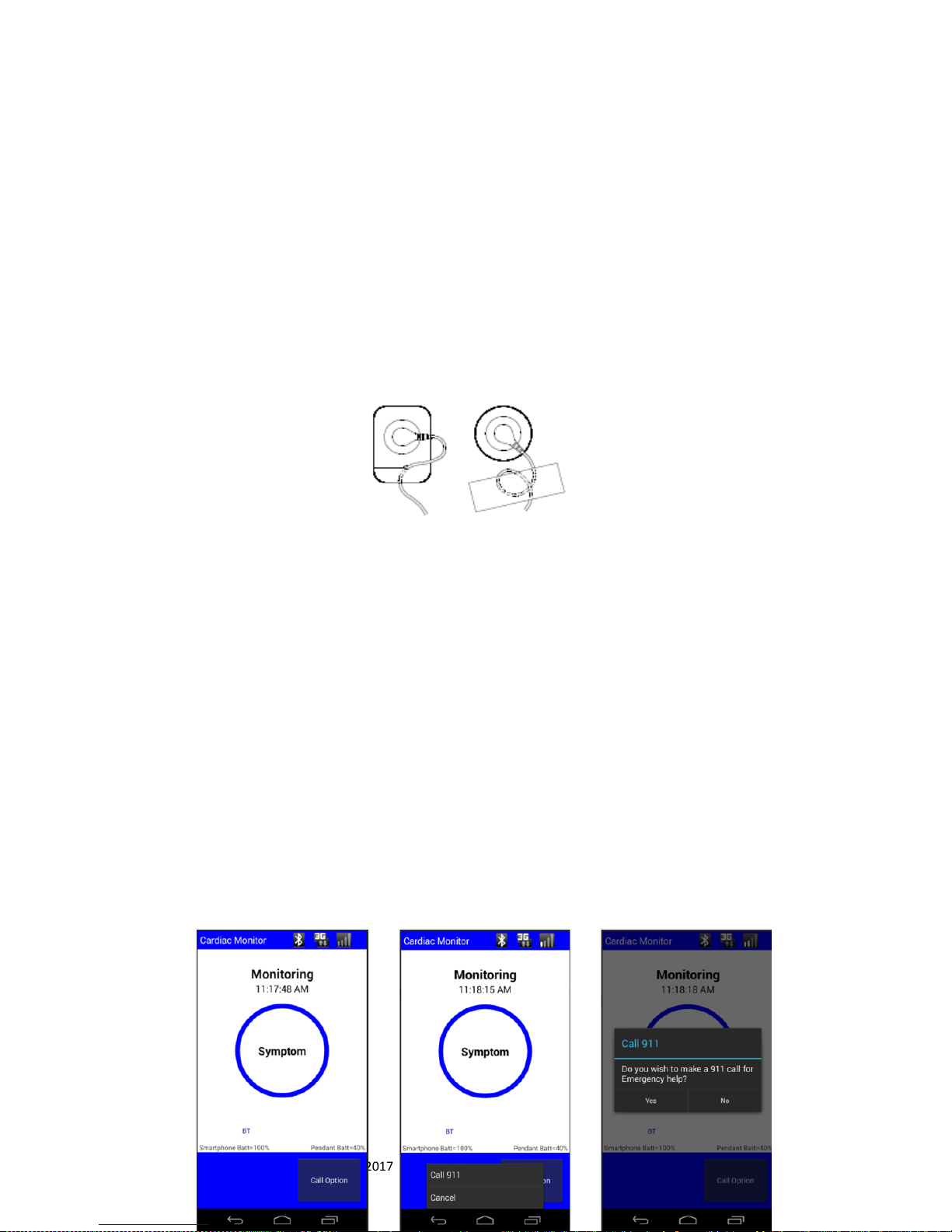
Have a question or need assistance?
Call Medicomp Patient Support: 800-234-3278 ext. 2370
If wearing the Cable Cradle with individual electrodes: Snap the wires onto the electrodes. Now,
carefully remove the back plastic cover from each electrode in turn and press the electrodes to
your skin so that complete contact is made with the adhesive backing. Plug the cable into the
Cable Cradle if it has been unplugged. Make sure the Pendant is turned on. The Smartphone
will resume receiving data from the Pendant.
Stress Loops
Stress Loops are only applicable to the TelePatch Cable Cradle procedure. Stress loops are
recommended. Two examples of stress loops are shown below.
Lead Wire Stress Loops
This is a good way to secure lead wires to prevent pulling, thus minimizing noise interference
during the procedure. Wear the Cable Cradle with the lanyard or keep the Cable Cradle in a
pocket.
EMERGENCY AND SUPPORT NUMBERS
Call 911
Below are instructions on how to call 911 from the Smartphone.
From the 'Monitoring' screen
Tap “Call Option”
Tap “Call 911”
Tap “YES“
• Hang up the call with the End Key
TelePatch™ Cardiac Monitor PM750
USER MANUAL - UTM0000701-04D | 01/06/2017 52
Page 54

Have a question or need assistance?
Call Medicomp Patient Support: 800-234-3278 ext. 2370
PROCEDURE INFORMATION AND CAUTIONS
TELEPATCH SYSTEM WHEN WEARING ELECTRODE PATCH
ALLOW 15 MINUTES FOR SKIN TO ABSORB THE ELECTRODE GEL, WHICH MAY
HELP PROCEDURE INITIATION ERRORS FROM OCCURRING.
UNLESS OTHERWISE INSTRUCTED, WEAR THE TELEPATCH CONTINUOUSLY
DURING NORMAL DAILY ACTIVITIES.
TURN THE PENDANT ON BEFORE TAPPING “START PROCEDURE” ON THE
SMARTPHONE AS THE SMARTPHONE WILL IMMEDIATELY LAUNCH A PROCESS
THAT WILL START COMMUNICATION TO THE PENDANT VIA BLUETOOTH
TECHNOLOGY. IF THE PENDANT IS NOT TURNED ON AT THAT TIME, THE
SMARTPHONE WILL NOT BE ABLE TO IDENTIFY THE PENDANT
PENDANT BATTERY NEEDS TO BE CHANGED ABOUT EVERY SEVEN (7) DAYS
IT IS VERY IMPORTANT TO TURN THE PENDANT OFF BEFORE REMOVING AND
LOADING BATTERY, OTHERWISE DATA MAY BE LOST. REMINDER: THE POWER
BUTTON IS LOCATED ON THE FACE OF THE PENDANT, BELOW THE SYMPTOM
BUTTON.
HEAVY EXERCISE OR OTHER ACTIVITIES THAT EXPOSE THE TELEPATCH TO
MOISTURE CAN AFFECT PATCH ADHESION DURATION. IF A PATCH SELFREMOVES DUE TO EXERCISE OR ACTIVITY, CLEAN THE AREA AS NOTED IN THE
PATIENT GUIDE AND APPLY A NEW PATCH.
THE PENDANT AND BATTERY ARE NOT DISPOSABLE. THE PENDANT SHOULD
BE REMOVED FROM THE CRADLE ON THE ELECTRODE PATCH AND PLACED IN
THE CRADLE OF THE FRESH ELECTRODE PATCH, NOT DISCARDED WITH
REMOVED ELECTRODE PATCH.
THE TELEPATCH PENDANT SHOULD NOT BE TREATED AS HOUSEHOLD WASTE.
ONLY THE ELECTRODE PATCH SHOULD BE DISCARDED AFTER USE.
RETURN TELEPATCH PENDANT AND ALL COMPONENTS IN KIT PROVIDED, TO
MEDICOMP, INC., USING THE INCLUDED POSTAGE PAID ENVELOPE.
SHOWERING OR SWIMMING WITH TELEPATCH SYSTEM AND ELECTRODE PATCH
THE TELEPATCH PENDANT IS WATER RESISTANT. YOU CAN SHOWER WITH THE
TELEPATCH PENDANT AND ELECTRODE PATCH INTACT.
TELEPATCH PENDANT AND ELECTRODE PATCH ARE NOT WATERPROOF,
MEANING THE PENDANT COULD CEASE TO FUNCTION IF FULLY SUBMERGED IN
WATER FOR A PERIOD OF TIME. AVOID SWIMMING AND FULL SUBMERSION
INTO WATER, WHILE WEARING TELEPATCH.
TelePatch™ Cardiac Monitor PM750
USER MANUAL - UTM0000701-04D | 01/06/2017 53
Page 55

Have a question or need assistance?
Call Medicomp Patient Support: 800-234-3278 ext. 2370
REMOVE TELEPATCH PENDANT BEFORE SWIMMING. THE PATCH WILL NOT
REMAIN INTACT ON THE SKIN IF SUBMERGED IN WATER FOR AN EXTENDED
PERIOD OF TIME.
DO NOT WEAR ELECTRODE PATCH OR TELEPATCH PENDANT SWIMMING OR
SUBMERGED IN WATER DURING PROCEDURE.
TELEPATCH SYSTEM WHEN USING CABLE CRADLE
ALLOW 15 MINUTES FOR SKIN TO ABSORB THE ELECTRODE GEL, WHICH MAY
HELP PROCEDURE INITIATION ERRORS FROM OCCURRING.
TURN THE PENDANT ON BEFORE TAPPING “START PROCEDURE” ON THE
SMARTPHONE AS THE SMARTPHONE WILL IMMEDIATELY LAUNCH A PROCESS
THAT WILL START COMMUNICATION TO THE PENDANT VIA BLUETOOTH
TECHNOLOGY. IF THE PENDANT IS NOT TURNED ON AT THAT TIME, THE
SMARTPHONE WILL NOT BE ABLE TO IDENTIFY THE PENDANT
IT IS VERY IMPORTANT TO TURN THE PENDANT OFF BEFORE REMOVING AND
LOADING BATTERY, OTHERWISE DATA MAY BE LOST. REMINDER: THE POWER
BUTTON IS LOCATED ON THE FACE OF THE PENDANT, BELOW THE SYMPTOM
BUTTON.
IF WEARING TELEPATCH WITH A CABLE CRADLE AND INDIVIDUAL ELECTRODES
IT IS RECOMMENDED TO PLACE THE PENDANT IN A POCKET DURING EXERCISE
OR OTHER ACTIVITIES. IF INDIVIDUAL ELECTRODES SELF-REMOVE DURING
ACTIVITY, CLEAN THE AREAS AND APPLY NEW ELECTRODES. AVOID FULL
IMMERSION INTO WATER (POOLS, HOT TUBS, OPEN WATER SWIMMING).
BREAKAWAY LANYARD IS NOT TO BE WORN WHILE SLEEPING.
CHILDREN WEARING PENDANTS MUST BE SUPERVISED BY ADULTS.
PEOPLE WORKING WITH MACHINERY OR WORKING IN ENVIRONMENTS WHERE
LOOSE HANGING ROPE- LIKE OBJECTS CAN POSE A POTENTIAL THREAT OR
HARM TO THEMSELVES AND/OR THE MACHINERY ARE ADVISED TO CARRY
CABLE CRADLE WITH PENDANT IN POCKET.
THE CABLE CRADLE SHOULD NOT BE WORN IN THE SHOWER.
THE TELEPATCH PENDANT SHOULD NOT BE TREATED AS HOUSEHOLD WASTE.
THE INDIVIDUAL ELECTRODES SHOULD BE DISCARDED AFTER USE.
THE BREAKAWAY LANYARD SHOULD BE DISCARDED AFTER USE.
RETURN TELEPATCH PENDANT, AND ALL COMPONENTS IN KIT PROVIDED, TO
MEDICOMP, INC., USING THE INCLUDED POSTAGE PAID ENVELOPE.
SHOWERING OR SWIMMING WITH TELEPATCH SYSTEM AND CABLE CRADLE
THE CABLE CRADLE SHOULD NOT BE WORN IN THE SHOWER.
WHEN WEARING TELEPATCH WITH A CABLE CRADLE AND INDIVIDUAL
ELECTRODES: BEFORE TAKING A SHOWER OR BATH, UNSNAP THE LEAD
WIRES FROM THE ELECTRODES (THAT ARE ATTACHED TO CHEST) REMOVE
THE CABLES, CABLE CRADLE AND LANYARD BEFORE ENTERING SHOWER..
TelePatch™ Cardiac Monitor PM750
USER MANUAL - UTM0000701-04D | 01/06/2017 54
Page 56

Have a question or need assistance?
Call Medicomp Patient Support: 800-234-3278 ext. 2370
WATER WILL NOT AFFECT THE INDIVIDUAL ELECTRODES; DO NOT REMOVE
THEM BEFORE SHOWERING IF THEY ARE STILL FIRMLY ATTACHED TO THE
SKIN. IF AN INDIVIDUAL ELECTRODE SELF-REMOVES IN SHOWER, PREPARE
THE AREAS AND APPLY NEW ELECTRODES.
IF SHOWERING WITH ELECTRODES, GENTLY PAT THEM DRY WITH A TOWEL
BEFORE RECONNECTING THE LEAD WIRES TO THE ELECTRODES
IF SWIMMING, REMOVE CABLE, CABLE CRADLE AND PENDANT BEFORE
SUBMERGING INTO WATER. USER MAY LEAVE ELECTRODES ON IF THEY ARE
STILL FIRMLY ATTACHED TO THE SKIN.
SMARTPHONE / HANDSET
TURN THE PENDANT ON BEFORE TAPPING “START PROCEDURE” ON THE
SMARTPHONE AS THE SMARTPHONE WILL IMMEDIATELY LAUNCH A PROCESS
THAT WILL START COMMUNICATION TO THE PENDANT VIA BLUETOOTH
TECHNOLOGY. IF THE PENDANT IS NOT TURNED ON AT THAT TIME, THE
SMARTPHONE WILL NOT BE ABLE TO IDENTIFY THE PENDANT
MAKE SURE WALL OUTLET IS NOT CONTROLLED BY A LIGHT SWITCH.
CHARGER CORD MUST NOT BE OBSTRUCTED BY FURNITURE OR LARGE
OBJECTS AND REMAIN ACCESSIBLE TO DISCONNECT FROM WALL OUTLET
EASILY, AS NEEDED.
SMARTPHONE IS POWERED BY THE CHARGER CORD ONCE CHARGER CORD IS
PLUGGED INTO BOTH SMARTPHONE AND WALL OUTLET.
WHEN CHARGING IS COMPLETE, UNPLUG THE CHARGER CORD FROM THE
POWER OUTLET AND THE SMARTPHONE.
UNPLUG THE CHARGER CORD FROM THE SMARTPHONE BEFORE PLACING
SMARTPHONE IN POCKET OR PURSE/BRIEFCASE.
DO NOT WEAR THE SMARTPHONE WHILE THE CHARGER IS ATTACHED TO THE
SMARTPHONE.
BATTERY CHARGER
BATTERY CHARGER IS POWERED BY THE CHARGER CORD ONCE CHARGER
CORD IS PLUGGED INTO BATTERY CHARGER AND THEN A WALL OUTLET.
MAKE SURE WALL OUTLET IS NOT CONTROLLED BY A LIGHT SWITCH.
CHARGER CORD MUST NOT BE OBSTRUCTED BY FURNITURE OR LARGE
OBJECTS AND REMAIN ACCESSIBLE TO DISCONNECT FROM WALL OUTLET
EASILY, AS NEEDED.
BATTERY CHARGER LIGHT WILL BE FLASHING AMBER OR ORANGE WHILE
BATTERY IS CHARGING.
BATTERY CHARGER LIGHT WILL BE GREEN WHEN BATTERY IS FULLY
CHARGED.
BATTERY CHARGER LIGHT MAY FLASH RED WHEN BATTERY IS NOT INSTALLED
IN CHARGER PROPERLY.
TelePatch™ Cardiac Monitor PM750
USER MANUAL - UTM0000701-04D | 01/06/2017 55
Page 57

Have a question or need assistance?
Call Medicomp Patient Support: 800-234-3278 ext. 2370
IF BATTERY CHARGER HAS NO LIGHT INDICATION LIT NEXT TO CABLE PLUG,
VERIFY CHARGER CORD IS PLUGGED INTO BATTERY CHARGER AND WALL
PROPERLY.
IF BATTERY CHARGER HAS NO LIGHT INDICATION LIT NEXT TO CABLE PLUG,
VERIFY BATTERY IS PLACED IN CHARGER PROPERLY.
WHEN CHARGING IS COMPLETE, UNPLUG THE CHARGER CORD FROM THE
POWER OUTLET AND THE BATTERY CHARGER.
PENDANT PRECAUTIONS
CAUTION: Portable and mobile RF communications equipment can affect medical electrical
equipment. This Pendant should not be used adjacent to or stacked with other equipment in
accordance with the directions described in the Practice Reference Manual.
NOTE: EUT (PM750 Pendant) shuts down between +/-8 and 15kV Air Discharge. It is
recommended that you restart the device (wait 30 seconds after power down) upon occurrence
of this event.
WARNING: When using lead wires, they should not contact other conductive equipment or
electric ground, including earth.
Lead failures are detected by a 10 mV peak, 50% duty cycle rectangular pulse, which is
applied to each patient electrode connection through a 4.9Mohm resistor at a rate of 15
Hz with respect to the system ground.
This is a prescribed medical Pendant, not a toy; keep away from small children.
In the event of a damaged Pendant, discontinue use and call Medicomp Patient Support:
800-234-3278 ext. 2370, for return and replacement.
ADVERSE REACTIONS
In the event of irritation worse than minor itching, to the Electrode Patch or individual
electrodes, consult your physician. Users may also contact Medicomp to discuss alternative,
Physicians must request change of procedure to Medicomp. Medicomp cannot authorize
change of patient procedure.
● Signs of significant irritation where the electrode patch is in contact with the skin.
● Any other unanticipated reaction to the adhesive or the electrode gel.
TelePatch™ Cardiac Monitor PM750
USER MANUAL - UTM0000701-04D | 01/06/2017 56
Page 58

Have a question or need assistance?
Normal Performance Indicators
Pendant Action
Visual Indicator
Audible Indicator
Pendant power up
Green, blue, and orange lit
simultaneously for 1.5 seconds.
Beep High-Low-High for 0.5
second per frequency while
LEDs are lit.
Pendant ready to start
procedure
Green LED blinks fast
None
Procedure initiated: Press
Symptom button 3 times
(Holter Only)
Green LED solid for 1.5 seconds
Beep High-Low-High for 0.5
second duration for each
beep
Procedure initiated not in
cradle: Press Symptom
button 3 times (Holter
procedure only)
Orange and blue blinks fast in
unison
Beep 4 times in unison with
LEDs
Procedure in progress: not in
cradle
3 LED sections: continuous
flashing
None
Pendant removed from
3 LED sections: continuous
None
Call Medicomp Patient Support: 800-234-3278 ext. 2370
MAINTENANCE
Cleaning the TelePatch System
The TelePatch pendant may need to be cleaned if for any reason it becomes exposed to
biological materials, like body fluids or matter. The user should clean the TelePatch Monitoring
System in order to maintain optimal use and functionality.
Use a tissue, lightly moistened with alcohol or a hospital-grade cleanser such as Sporicidin –
(Do not saturate) - wipe off debris, dirt or other matter that may gather on either the
Smartphone or Pendant of the TelePatch System. If the Pendant has been dropped in a basin
water (i.e.: sink or toilet) and will not power back on, contact Customer Support for a
replacement.
VISUAL AND AUDIBLE INDICATORS
TelePatch™ Cardiac Monitor PM750
USER MANUAL - UTM0000701-04D | 01/06/2017 57
Page 59
Have a question or need assistance?
Cradle
flashing
Pendant placed in cradle with
procedure running BT
OFF/Holter
Green LED: every 4 seconds
Beep for 2 seconds before
entering this mode for the
first time
Symptom Button Press on
cables or patch: Record
Symptom
Green LED lit for 1 second
Beep for 1 second
Symptom Recording
Complete on Cables or Patch
“Recording Complete” message
will be seen on screen of
smartphone
None
Finger Tip Electrodes Start of
Recording
Green LED 3 flashes 0.5 second
each then Green LED lit for 1
second
Beep 3 times in unison with
LED flashes then Beep for 1
second
Finger Tip Electrodes during
Recording period
Green LED flashes during 32
second recording period
None
Finger Tip Electrode
Recording complete
Green LED lit for 1 second
Beep for 1 second
Pendant communicating with
Smartphone
Blue LED: every 4 seconds
None
Holter procedure end
Green and blue blink
alternately at 2Hz
None
Pendant power down
All three LEDs simultaneously
every 1.5 seconds
Beep 3 times in unison with
lit LEDS.
Error Indicators
Pendant Action
Visual Indicator
Audible Indicator
Pendant configuration wrong
Blink all three LEDs 5 times
for 0.5 seconds every second
Beep 5 times in unison with
lit LEDs
New Holter procedure
powerup – running cradle and lead-
Green blinks twice and blue
blinks once repetitively
None
Call Medicomp Patient Support: 800-234-3278 ext. 2370
TelePatch™ Cardiac Monitor PM750
USER MANUAL - UTM0000701-04D | 01/06/2017 58
Page 60

Have a question or need assistance?
on/lead-off tests.
New Holter procedure
power-up, low main battery
error detected.
Orange LED blinks fast
None
RECORD button pressed,
Pendant not in cradle
3 slow Green flashes, then
Green LED flashing fast
3 beeps then none
RECORD button pressed
while Pendant creating a
recording
Green LED Flash
Long beep
Early low main battery
warning
Orange LED blink 1 per
second
Beep 1 second duration every
4 minutes
Late low main battery
warning
Orange LED blink 3 times per
second
Beep 1 second duration every
30 seconds
Call Medicomp Patient Support: 800-234-3278 ext. 2370
TROUBLESHOOTING
Setup Details and Troubleshooting Overview
This section helps resolve any problems that may be encountered while you are setting up the
TelePatch. Reduce the likelihood of seeing errors by making sure fresh Electrode Patch or fresh
individual electrodes are used, as appropriate, the cable is in good condition and securely
connected to the Cable Cradle, and care has been taken to perform the recommended skin
preparation.
Some problems are unavoidable due to a patient's particular heart condition or the unexpected
failure of a component. However, these cases are infrequently encountered.
When the TelePatch is connected begins its startup sequence, it assesses the quality of the ECG
signal. The TelePatch system will signal if there is a problem with the connections or if the
signal voltage is too high or too low for ideal auto-capturing. Messages on the Smartphone's
display will direct any necessary corrections.
Information is also provided in this section to assist with the setup procedure of any
replacement or exchanged TelePatch system component (e.g. Smartphone or Pendant).
TelePatch™ Cardiac Monitor PM750
USER MANUAL - UTM0000701-04D | 01/06/2017 59
Page 61

Have a question or need assistance?
Call Medicomp Patient Support: 800-234-3278 ext. 2370
Replaced components of the TelePatch will follow a slightly different setup procedure to the
standard method.
TelePatch System Hookup Testing Information
Quality Hookup Tests Overview
The TelePatch Quality Hookup tests evaluate cable connections, skin preparation, and signalvoltage conditions. This is a test that is performed automatically by the TelePatch System, with
no indication to, or participation from, the user or patient until specifically directed by specific
commands on the Smartphone.
The Quality Hookup test starts once either:
1. The patient has the electrode patch in place on the chest with the pendant secured in the
electrode patch cradle and the Smartphone is turned on to initiate the patient’s procedure.
OR
2. The patient has the individual electrodes in place with the cable attached to both the
electrodes and the cable cradle, and the Smartphone is turned on to initiate the patient’s
procedure.
The TelePatch System (Pendant and Smartphone) determines whether there is a problem and
the problem will be displayed on the Smartphone.
The option that is used to define how the wireless system handles these conditions is called the
'Setup' option.
The Setup/Normal Setting
All TelePatch systems are shipped in the 'Setup/Normal' mode.
'TEST' SHOULD NEVER BE SELECTED AS A SETTING WITHOUT THE
SUPERVISION AND GUIDANCE OF MEDICOMP PATIENT SUPPORT.
THE PATIENT SHOULD CALL MEDICOMP FOR GUIDANCE IN THE 'TEST'
MODE.
During the Quality Hookup Tests, the Smartphone may display the
following screens before the procedure begins:
Pacemakers
TelePatch™ Cardiac Monitor PM750
USER MANUAL - UTM0000701-04D | 01/06/2017 60
Page 62
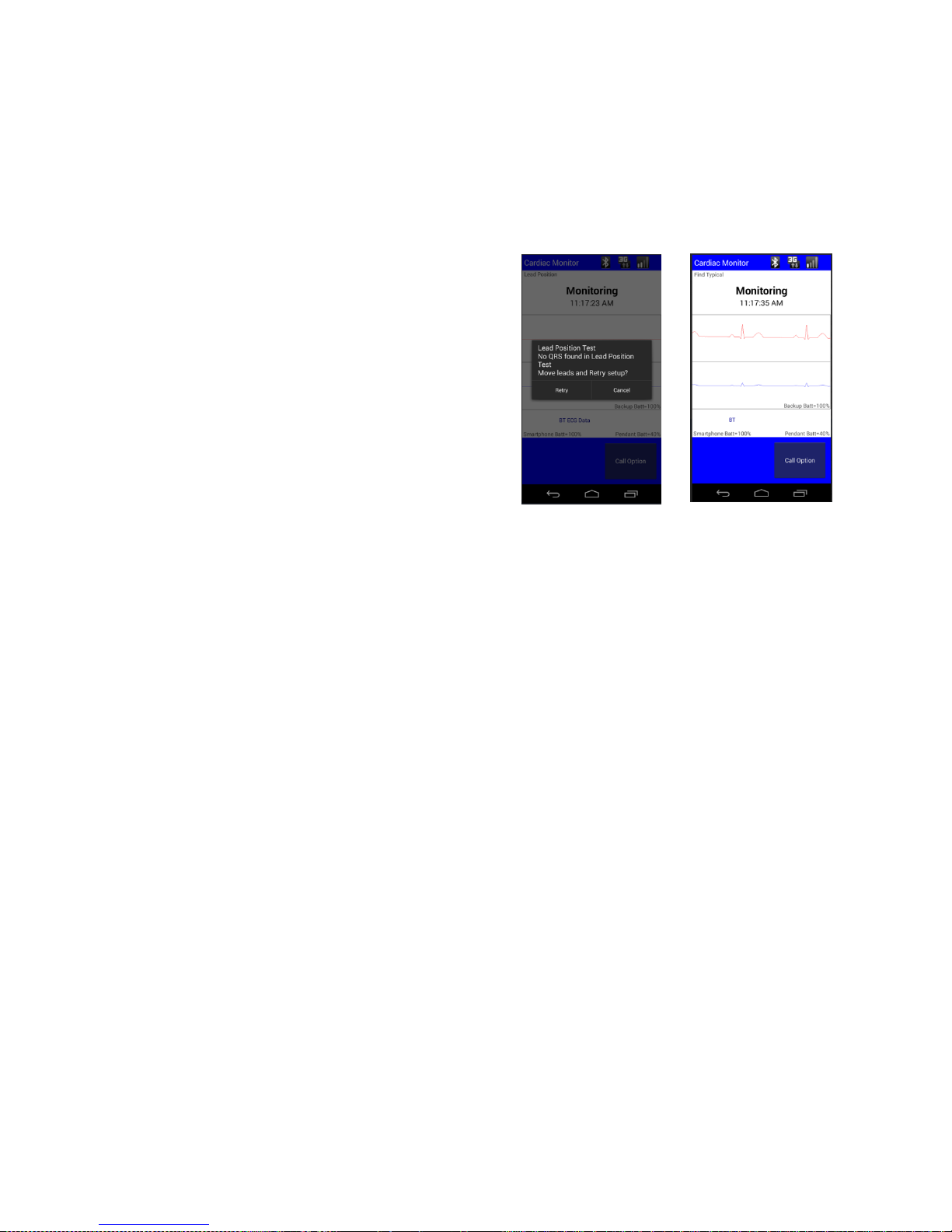
Have a question or need assistance?
Call Medicomp Patient Support: 800-234-3278 ext. 2370
If the 'Pacemaker' setting is selected, and if a paced beat was detected as typical, the
Smartphone displays a screen to confirm the QRS prior to beginning the procedure.
Lead Position Test
If no QRS is found, the following screen may be
displayed before the procedure begins. If this
screen is displayed, the patient is to follow the
guidance of a Cardiac Monitoring Center technician,
or Patient Support technician.
Skin Prep Results
The results of the skin prep test may be displayed
before the procedure begins.
• Go to PATIENT PREPARATION for additional steps.
• For additional troubleshooting instructions, call Medicomp Patient Support: 800-234-3278
ext. 2370
Error Displays
During procedure hookup, the TelePatch tests for flex circuit or cable breakage, and checks that
its minimal requirements for skin prep and signal voltage are met. These tests could last only a
few minutes or may take longer, depending on what the TelePatch detects. The Smartphone's
“objective” is to make sure that it receives a good signal. This ensures optimal auto-capturing
and good report results.
IMPORTANT POINTS
With very few exceptions, only errors seen with 'Lead Position Test' require that electrodes be
re-located on the patient's chest.
Most of the time, errors seen with “Lead Test Error” and “Testing Skin Prep” require reprepping or equipment changes.
Each time you make a change to correct a problem, you will need to tap 'Retry' for the
TelePatch to continue testing.
TelePatch™ Cardiac Monitor PM750
USER MANUAL - UTM0000701-04D | 01/06/2017 61
Page 63

Have a question or need assistance?
Call Medicomp Patient Support: 800-234-3278 ext. 2370
USERS WHO ARE WEARING NEUROSTIMULATING PENDANTS CANNOT BE SET UP
WHILE THAT DEVICE IS TURNED ON. THE OPERATION OF THESE PENDANTS INTERFERES WITH
THE TELEPATCH’S ABILITY TO ACQUIRE THE ECG SIGNAL. IF ALLOWED THESE DEVICES SHOULD
BE TURNED OFF WHILE THE PATIENT IS WEARING TELEPATCH.
• Go to PATIENT PREPARATION for additional steps.
• For additional troubleshooting instructions, call Medicomp Patient Support: 800-234-3278
ext. 2370
Voltage Errors after Several Attempts
For Cable Cradle Procedures
If inadequate signal voltage (can be either low or high) in one channel while the other one is
acceptable, place the electrodes in a ”parallel”, or ”side-by-side” lead arrangement. Identify the channel
that has the acceptable voltage and place the electrodes of the problem channel side-by-side with it. For
example:
Channel A good, Channel B bad - place Black electrode next to White. Configuration will be:
Black and white electrodes on the right upper chest, and red electrode underneath the left
breast.
Channel B good, Channel A bad - place White next to Black. Configuration will be: black and
white electrodes on the right lower chest.
• Go to PATIENT PREPARATION for additional steps.
• For additional troubleshooting instructions, go to TROUBLESHOOTING OVERVIEW
Lead Test Error
When a Lead Test Error occurs, the Smartphone displays a message
similar to:
THE WHITE ELECTRODE HAS A CONNECTION PROBLEM.
White = White electrode site (A-)
TelePatch™ Cardiac Monitor PM750
USER MANUAL - UTM0000701-04D | 01/06/2017 62
Lead Position Tests
Page 64

Have a question or need assistance?
Call Medicomp Patient Support: 800-234-3278 ext. 2370
Red = Red electrode site (A+/B+)
Black = Black electrode site (B-)
Lead errors occur when the lead wire connected to the Cable Cradle detects a very high
resistance that may be caused by one or more of the following conditions:
Very high resistance values
Expiration of Electrodes
Cables disconnected
Very high resistance values
May indicate a problem with the cable. Try changing the cable first, if one is available,
otherwise move on to the next step.
If not done so already, thoroughly wash the electrode site with PLAIN (no lotion or oil) soap and
water. Apply a small amount (about the size of the tip of a cotton swab) of Skin Prep gel to a
paper towel and firmly rub it into the skin at the gel cup site. Wipe off the excess gel. If no Skin
Prep is available, this can also be done with a rough, wet, washcloth. Always apply a new
electrode to the site. In difficult cases, light abrasion with a scrub pad may also be required; this
may occur with users who have very oily skin.
Press down on the center snap of the electrode and Tap 'Retry' on the Smartphone.
If the TelePatch Pendant and Smartphone proceed through to 'Lead Position Test', then after all
tests are completed and the Smartphone is actively 'Monitoring,' change the electrode, this
time making sure that it is in good contact with the skin.
Expiration Date of Electrodes
Check the expiration date on the electrodes. Inspect the electrode(s) in question to verify moist
gel cups. If the gel is dry, you will need to replace the electrode.
Cables (lead wires) not connected
If the electrode cables are disconnected, this error message will also appear.
• Go to PATIENT PREPARATION for additional steps.
• For additional troubleshooting instructions, call Medicomp Patient Support: 800-234-3278
ext. 2370
TelePatch™ Cardiac Monitor PM750
USER MANUAL - UTM0000701-04D | 01/06/2017 63
Page 65

Have a question or need assistance?
Call Medicomp Patient Support: 800-234-3278 ext. 2370
High/Low Voltage Notifications
LOW VOLTAGE IN CHANNEL A
(WHITE [A-]/RED [A+] ELECTRODE PAIR)
Although the TelePatch System automatically adjusts the signal size (voltage) to ensure optimal
analysis, some users may have cardiac anomalies that result in unacceptable signal voltage. The
signal may be too large or too small. The following section describes each error that might
occur. Sometimes, just having the patient lean back in a chair will increase the ECG voltage.
The Smartphone's message for this error is: Low A, Move Red
First, move the red electrode
After repositioning,
Press 'Retry'
If the Smartphone continues to display the error, try an electrode location on the opposite side
of the Red (A+/B+) electrode pictured. Don't try more than a few different locations.
• For additional troubleshooting instructions, call Medicomp Patient Support: 800-234-3278
ext. 2370
LOW VOLTAGE IN CHANNEL B
(BLACK [B-], RED [A+] ELECTRODE PAIR
The Smartphone's message for a low voltage in Channel B is: Low B, Move Black
First, move the black electrode
Low Voltage in Channel B, Move Black After repositioning,
Press 'Retry'
If the Smartphone continues to display the error, try an electrode location on the opposite side
of the Black (B-) electrode. Don't try more than a few different locations.
• For additional troubleshooting instructions, call Medicomp Patient Support: 800-234-3278
ext. 2370
HIGH VOLTAGE IN CHANNEL A
(RED [A+]/WHITE [A-] ELECTRODE PAIR)
The Smartphone's message for this error is: High A, Move Red
First, move the red electrode
High Voltage in Channel A, Move Red After repositioning,
TelePatch™ Cardiac Monitor PM750
USER MANUAL - UTM0000701-04D | 01/06/2017 64
Page 66
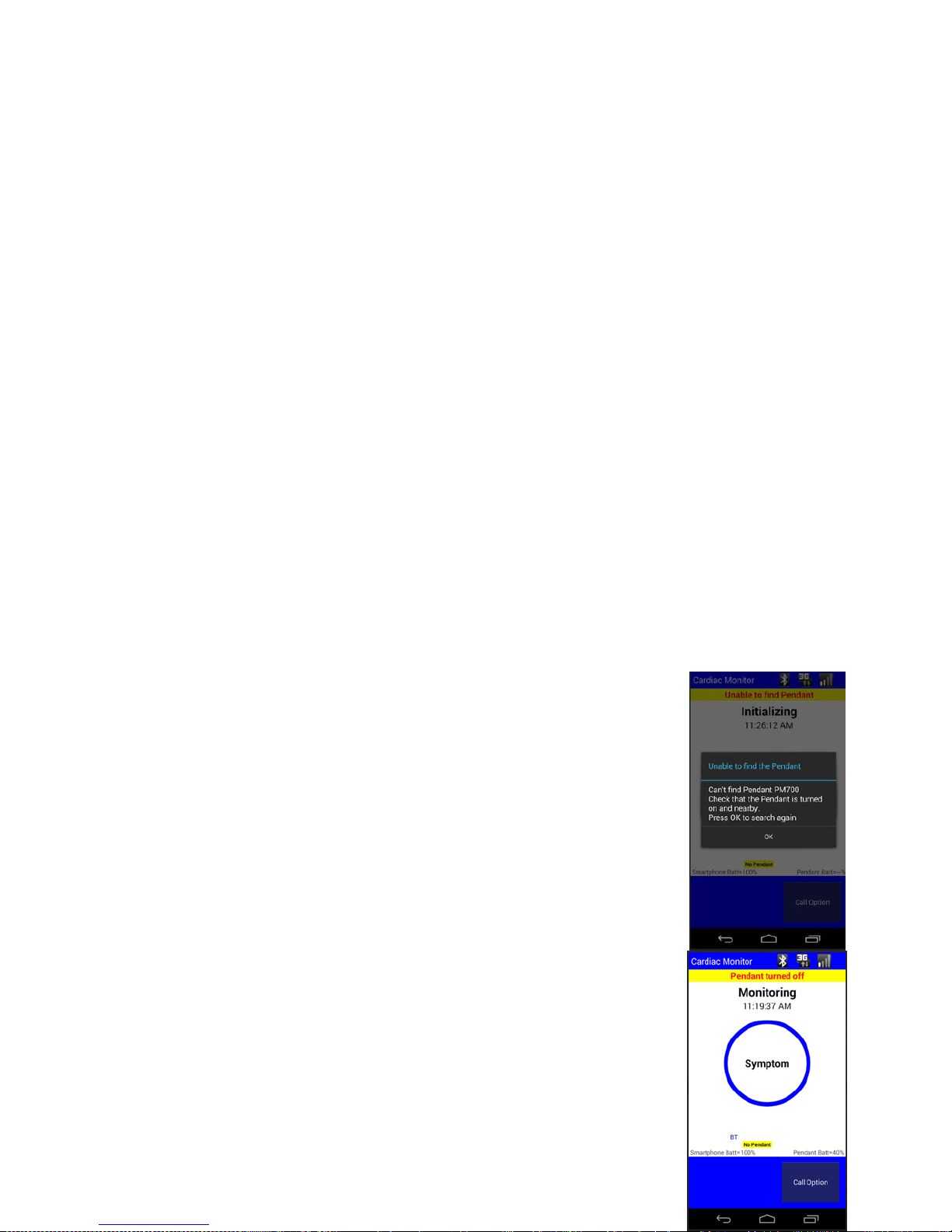
Have a question or need assistance?
Call Medicomp Patient Support: 800-234-3278 ext. 2370
Press 'Retry'
If the Smartphone continues to display the error, try an electrode location on the opposite side
of the Red (A+/B+) electrode. Don't try more than a few different locations.
• For additional troubleshooting instructions, call Medicomp Patient Support: 800-234-3278
ext. 2370
HIGH VOLTAGE IN CHANNEL B
(BLACK [B-]/RED [A+] ELECTRODE PAIR)
The Smartphone's message for a high voltage in Channel B is: High B, Move Black
First, move the black electrode
High Voltage in Channel B, Move Black After repositioning,
Press 'Retry'
If the Smartphone continues to display the error, try an electrode location on the opposite side
of the Black (B-) electrode pictured. Don't try more than a few different locations.
• For additional troubleshooting instructions, call Medicomp Patient Support: 800-234-3278
ext. 2370
SAMPLE SCREEN WARNINGS
Screen Warnings
There are a number of screen warnings that may appear on the
Smartphone screen. Below is a sampling of some of the most common
screen warnings.
Unable to find Pendant
At the very start of a new procedure, if the Smartphone IS turned on and
the Pendant is NOT turned on, the following warning or alert will be
displayed. Turn on the Pendant to proceed. While continuing a procedure,
if the Pendant is NOT turned on when the Smartphone IS turned on, the
following warning or alert will be displayed. Turn on the Pendant to
proceed.
TelePatch™ Cardiac Monitor PM750
USER MANUAL - UTM0000701-04D | 01/06/2017 65
Page 67
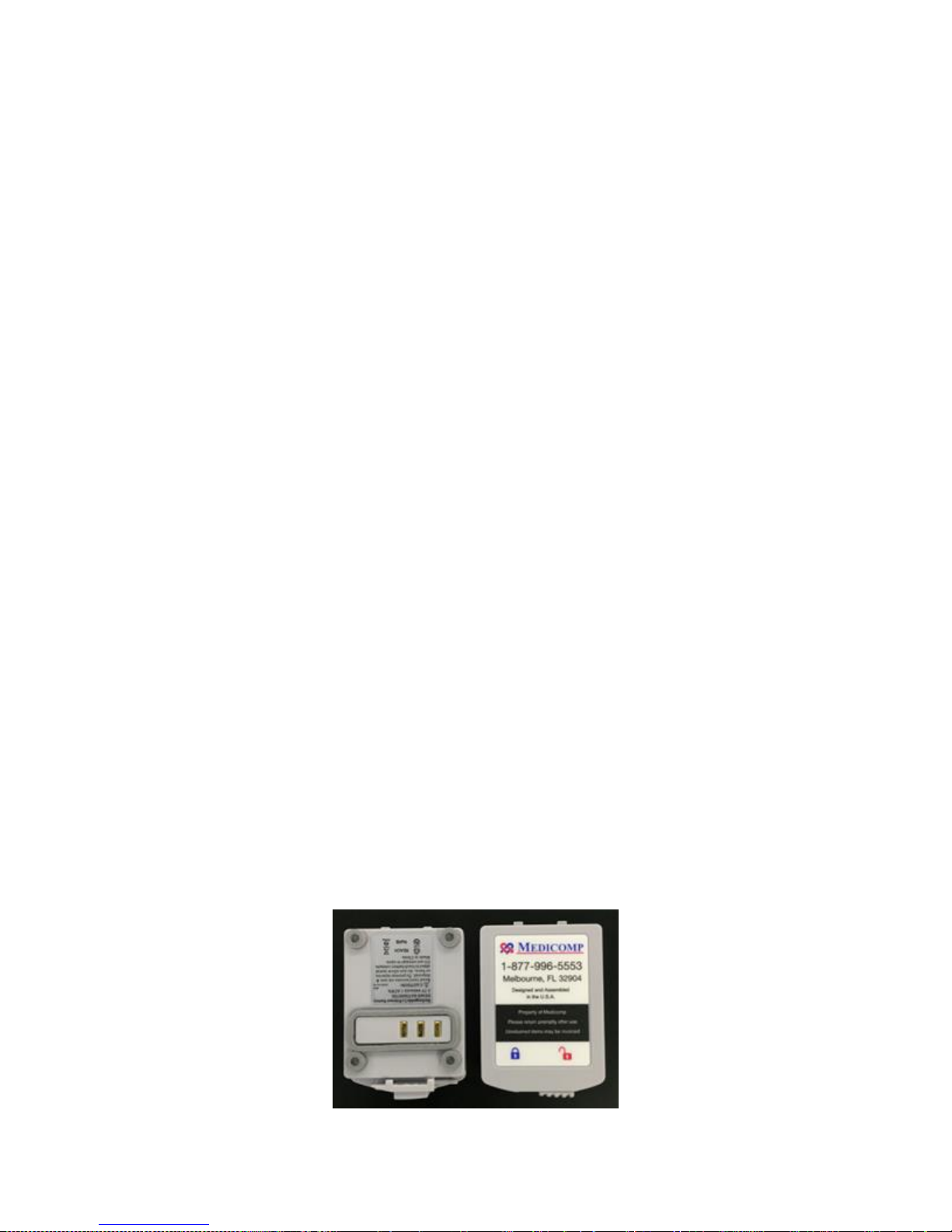
Have a question or need assistance?
Call Medicomp Patient Support: 800-234-3278 ext. 2370
Pendant is Turned Off
If the Pendant is turned off while in the middle of monitoring, the following warning or alert will
be displayed. Turn on the Pendant to proceed.
Procedure Has Ended
When the procedure ends, an alert will be displayed. Users should return the unit to the
Medicomp address provided in the Patient Guide. Every TelePatch Kit has a postage paid return
envelope. Include all components in the zippered kit and mail from any mailbox.
• For additional troubleshooting instructions, call Medicomp Patient Support: 800-234-3278
ext. 2370
Start Procedure Exceptions
Selecting a Pendant
If more than one Pendant is identified after pressing 'Start Procedure,' the patient will be
prompted to 'Select a Pendant to Use.' The instructions below provide detail steps to select a
Pendant before starting a procedure.
Select a Pendant to Use
● User chooses from the list of Pendants on the screen
● Select the Pendant with the unique serial number listed inside the well of the Pendant.
● Tap and highlight the Pendant serial number.
● Tap 'Select'
SAFE BATTERY USE AND DISPOSAL
The TelePatch Cardiac Monitor Pendant operates on a single, 3.7V lithium ion battery.
TelePatch™ Cardiac Monitor PM750
USER MANUAL - UTM0000701-04D | 01/06/2017 66
Page 68

Have a question or need assistance?
Call Medicomp Patient Support: 800-234-3278 ext. 2370
Bottom and top views of the TelePatch Pendant Battery
IF PENDANT’S BACKUP BATTERY IS LOW, PATIENT SHOULD CALL MEDICOMP PATIENT
SUPPORT: 800-234-3278 ext. 2370.
IT IS VERY IMPORTANT TO TURN THE PENDANT OFF BEFORE REMOVING AND
LOADING BATTERY, OTHERWISE DATA MAY BE LOST. REMINDER: THE POWER BUTTON
IS LOCATED ON THE FACE OF THE PENDANT, BELOW THE SYMPTOM BUTTON.
THIS PRODUCT UTILIZES A RECHARGEABLE LITHIUM-ION BATTERY PACK. TO ENSURE
SAFE CHARGING AND MAXIMUM PERFORMANCE OVER THE LIFE OF THE PRODUCT
ALWAYS USE THE MEDICOMP PROVIDED CHARGER. DO NOT ATTEMPT TO CHARGE
THE BATTERY ON ANOTHER MANUFACTURER’S CHARGER.
THIS PRODUCT UTILIZES A RECHARGEABLE LITHIUM-ION BATTERY PACK. ALL
BATTERIES WILL SLOWLY DISCHARGE OVER TIME EVEN IF THEY AREN’T USED. TO
ENSURE OPTIMAL PERFORMANCE AND LIFETIME OF THE BATTERY PACK, PLEASE
FULLY CHARGE THE BATTERY AT LEAST ONCE EVERY 6 MONTHS REGARDLESS OF USE. IT IS
FURTHER RECOMMENDED THAT IF THE BATTERY HASN’T BEEN CHARGED MORE RECENTLY
THAN A MONTH AGO THAT IT BE FULLY CHARGED PRIOR TO THE START OF A PATIENT
PROCEDURE.
Safely Loading the Pendant Battery
TelePatch Pendant operates on a rechargeable, lithium ion battery. The battery locks into the
battery well of the back of the TelePatch Pendant.
To safely load the battery into the Pendant:
● Remove the Pendant and one battery from the zippered kit
Insert battery into Pendant.
● Hold Pendant face down in hand or place on a flat surface. There is a well where
battery will be inserted
● Insert battery into well of Pendant: with the Medicomp label facing up, and the two
small tabs into notches in flat wall of the well
TelePatch™ Cardiac Monitor PM750
USER MANUAL - UTM0000701-04D | 01/06/2017 67
Page 69
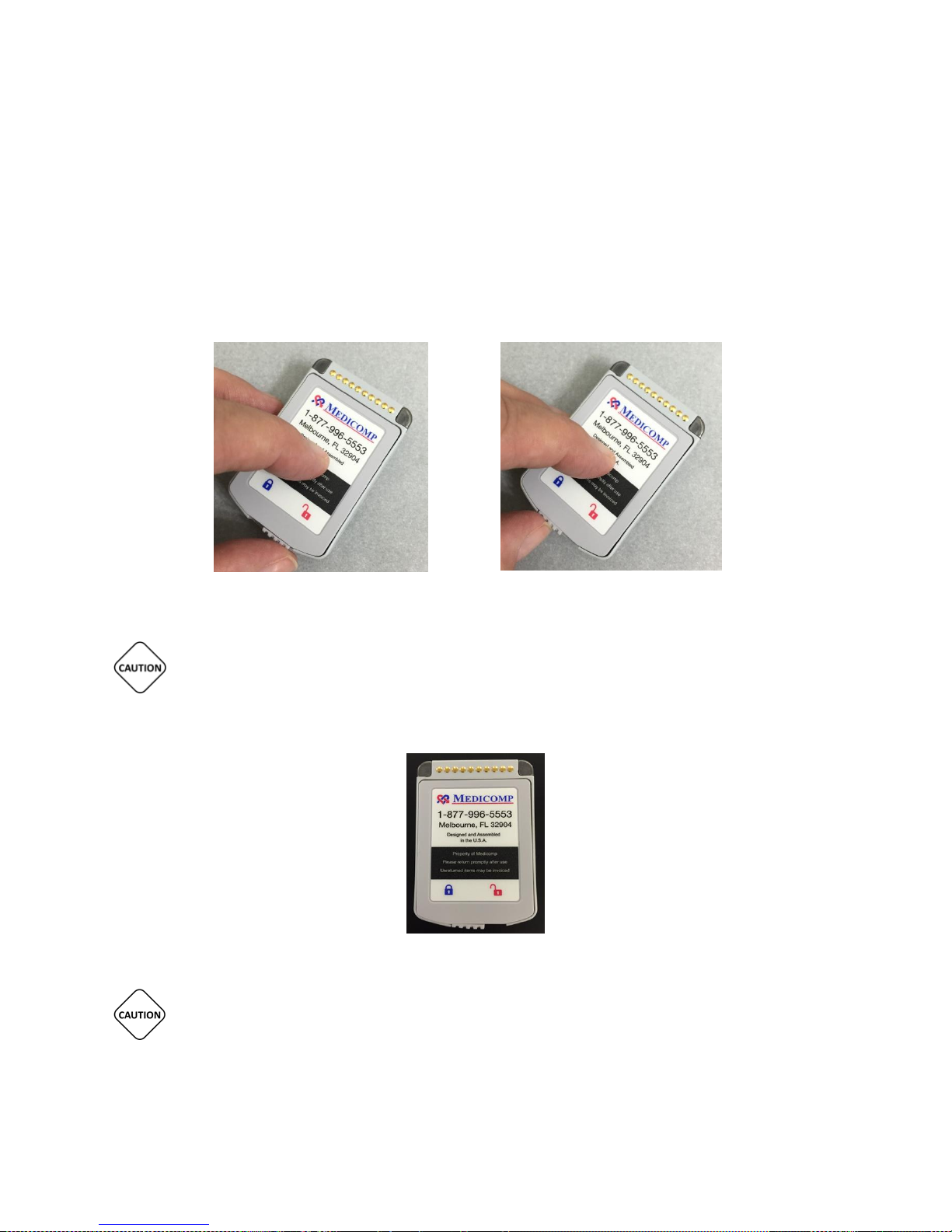
Have a question or need assistance?
Call Medicomp Patient Support: 800-234-3278 ext. 2370
Inserting battery into Pendant battery well
● Slide the latch at back of the battery to left, securing battery in place. Battery is locked
in place when moveable latch is under blue lock icon on label
Battery is unlocked (latch under RED icon) Battery Is locked (latch under BLUE icon)
LOAD ONLY 3.7V LITHIUM ION BATTERIES DELIVERED IN THE TELEPATCH KIT INTO THE
TELEPATCH CARDIAC MONITOR BATTERY COMPARTMENT.
Properly inserted TelePatch Battery
IT IS VERY IMPORTANT TO TURN THE PENDANT OFF BEFORE CHANGING BATTERY,
OTHERWISE DATA MAY BE LOST. THE POWER BUTTON IS LOCATED ON THE FRONT FACE OF THE
PENDANT BELOW THE SYMPTOM BUTTON.
TelePatch™ Cardiac Monitor PM750
USER MANUAL - UTM0000701-04D | 01/06/2017 68
Page 70
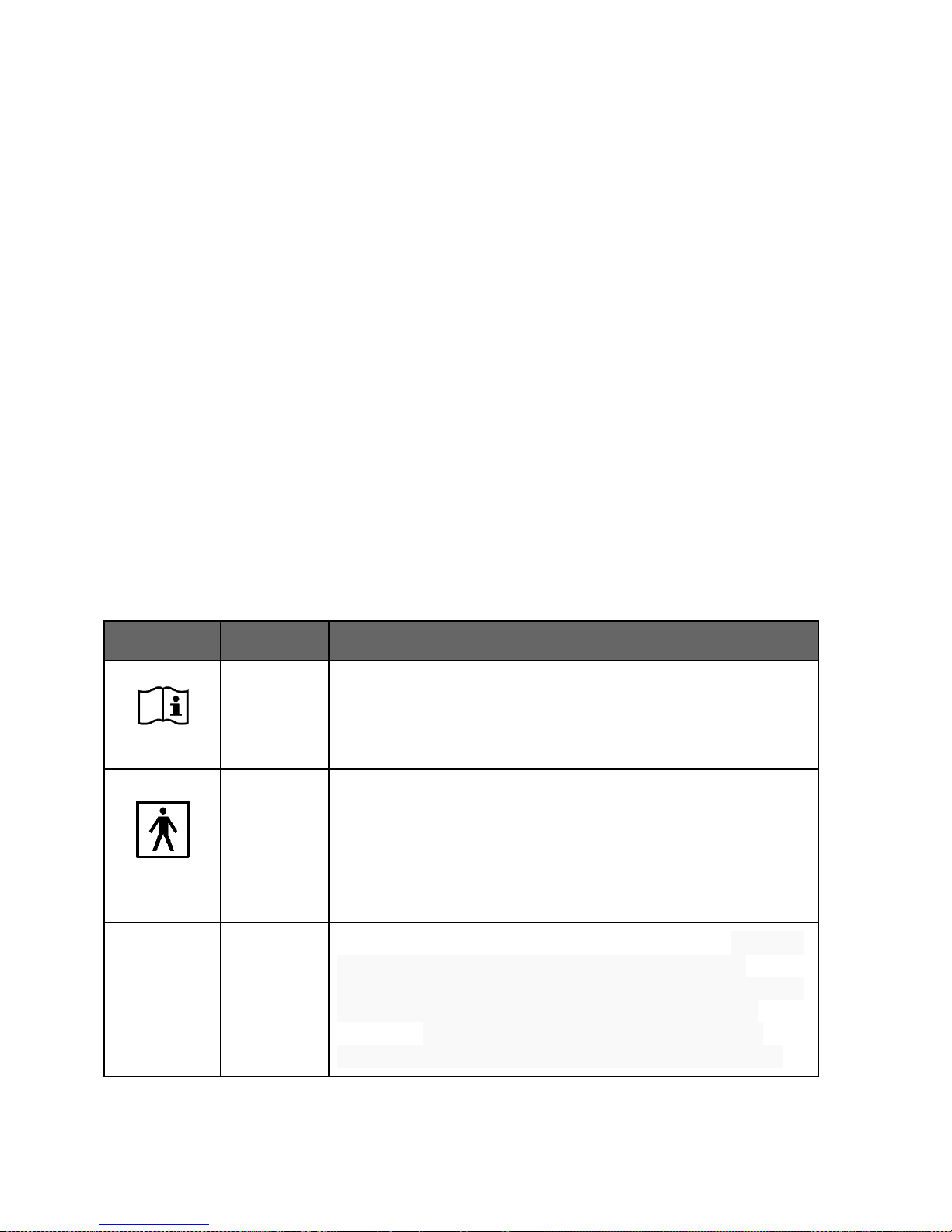
Have a question or need assistance?
Icon
Description
Pendant,
Lanyard
Operating instructions
Pendant
This symbol indicates type BF equipment classified in
accordance with IEC Publication IEC 60417-5333 Safety of
medical electrical equipment. Type BF equipment: equipment
with isolated patient connections, connections not
defibrillation-proof.
IP55
Pendant
This symbol indicates Ingress protection- Solids: 5 – Ingress of
dust is not entirely prevented, but it must not enter in
sufficient quantity to interfere with the satisfactory operation
of the equipment; complete protection against contact.
Liquids: 5 - Water projected by a nozzle (6.3mm) against
enclosure from any direction shall have no harmful effects.
Call Medicomp Patient Support: 800-234-3278 ext. 2370
Battery Maintenance
● Remove the battery from the Pendant during storage or if the Pendant is not to be used
for longer than two (2) weeks.
● Store in a cool, dry place, the best location is in the TelePatch Cardiac Monitor Kit
supplied for your procedure.
Disposal of Rechargeable Lithium Ion Batteries
In accordance with federal laws and regional regulations:
● RETURN all batteries to Medicomp, Inc.
● The rechargeable battery provided with the TelePatch System is NOT to be discarded in
household waste.
● If a battery gets damaged contact Medicomp, Inc.: 877-996-5553
EXPLANATION OF MARKINGS
Equipment markings and caution labels are important for safe and reliable use; they must not
be removed. The following symbols are used in this user manual, patch packaging, lithium ion
battery or the Pendant label. They may also appear on an accessory or accessory packaging.
TelePatch™ Cardiac Monitor PM750
USER MANUAL - UTM0000701-04D | 01/06/2017 69
Page 71
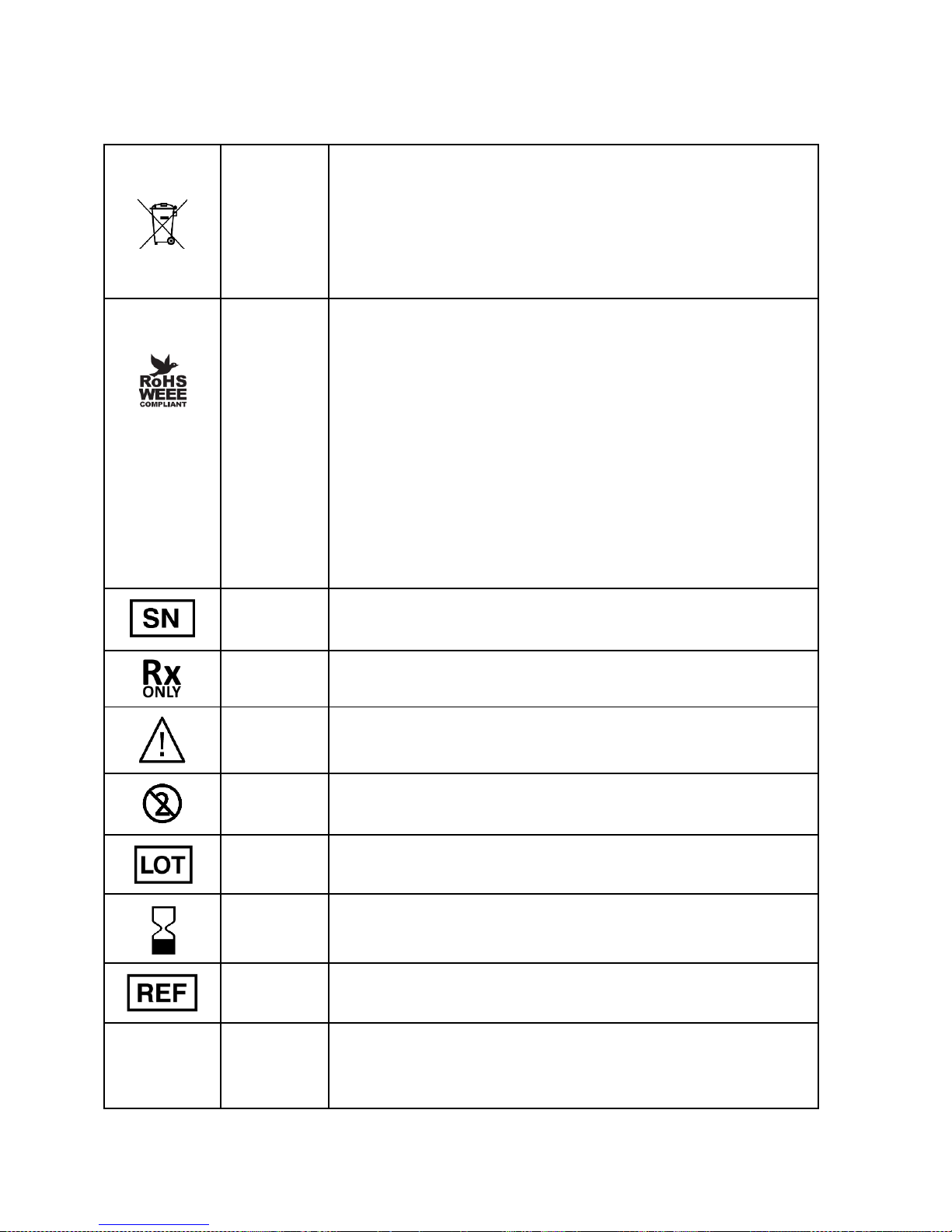
Have a question or need assistance?
Pendant
This symbol informs the user that the respectively labeled
component is not to be disposed of in the trash.
Users should properly dispose of components through
Medicomp, Inc. Please contact Medicomp, Inc. for
information on how to return item for recycling.
Pendant.
Lithium Ion
Battery
WEEE LOGO
The WEEE logo on this product indicates that this product
must not be disposed of with standard waste but rather
recycled. Please contact Medicomp, Inc. for more information
on proper component disposal.
RoHS Compliance
This product is in compliance with Directive 2002/95/ EC of
the European Parliament and of the Council of 27 January
2003, on the restriction of the use of certain hazardous
substances in electrical and electronic equipment (RoHS) and
its amendments.
Pendant
Serial Number
Patch
Prescription Required
Patch
Caution, consult accompanying documents
Patch
Do not reuse. This is a single use item
Patch
Batch code of product
Patch
Use by date indicated
Patch
Catalog Number/Part Number
Lithium Ion
Battery
Item is recyclable.
Users should properly dispose of components through
Call Medicomp Patient Support: 800-234-3278 ext. 2370
TelePatch™ Cardiac Monitor PM750
USER MANUAL - UTM0000701-04D | 01/06/2017 70
Page 72
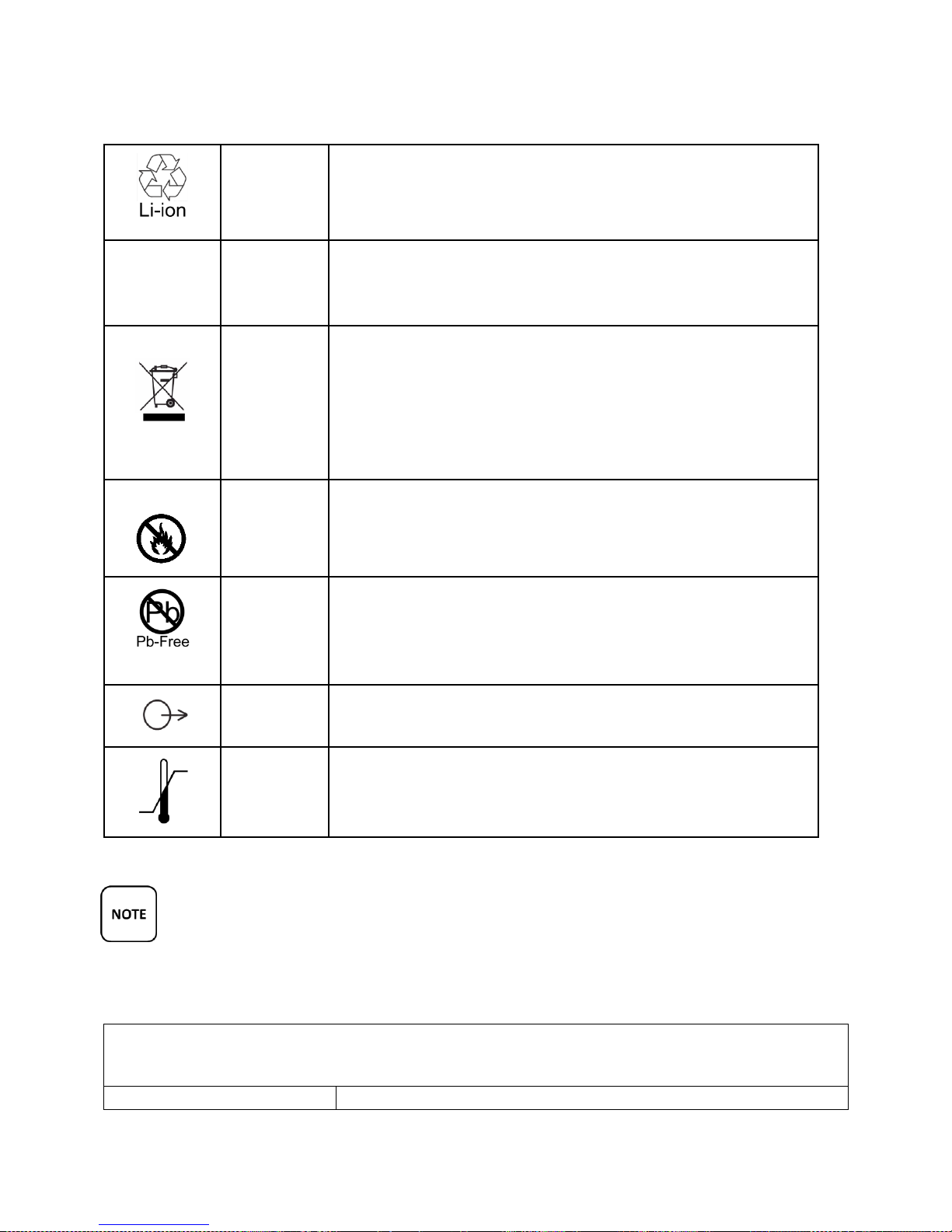
Have a question or need assistance?
Medicomp, Inc. Please contact Medicomp, Inc. for
information on how to return item for recycling.
REACH
Lithium Ion
Battery
EU regulation of chemicals and safe use: Registration,
Evaluation, Authorization and Restriction of Chemical
substances. Component substances are REACH approved.
Lithium Ion
Battery
Item must not be disposed of to the ‘normal’ household
waste, but be separately collected and recycled.
Users should properly dispose of components through
Medicomp, Inc. Please contact Medicomp, Inc. for
information on how to return item for recycling.
Lithium Ion
Battery
Do not incinerate
Lithium Ion
Battery
Product is lead free. Component and Assembly Pb content
shall be less than 0.1% by weight of the device (in accordance
with IPC/EIA J-STD-006) and shall not be intentionally
introduced.
Lead Wire
packaging
Lead wires comply with the Performance Standard for
electrode lead wires
Shipping
packaging
Temperature limitation for shipment of system is -15°C to
60°C (5°F to 140°F).
EXPECTED LIFE
TelePatch Pendant
Unit is expected to provide at least 7 years of normal use.
Call Medicomp Patient Support: 800-234-3278 ext. 2370
The TelePatch Pendant should NOT be treated as household waste.
ONLY the Electrode Patch or individual electrodes should be discarded after use.
Return TelePatch, Pendant, and all components in kit provided, to Medicomp,
Inc., using the included postage paid envelope.
TelePatch™ Cardiac Monitor PM750
USER MANUAL - UTM0000701-04D | 01/06/2017 71
Page 73
Have a question or need assistance?
Electrode Patch with cradle
When the patch no longer sticks well to skin, dispose of in a
receptacle out of reach of children and pets.
Lithium Ion Battery
Each unit is expected to provide at least 7 years of normal use.
Battery Charger
Unit is expected to provide at least 7 years of normal use.
Cable Cradle
Unit is expected to provide at least 4 years of normal use.
3-Lead and 5-Lead Cables
Cables are expected to provide at least 6 months of normal use.
Electrodes
When the patch no longer sticks well to skin, dispose of in a
receptacle out of reach of children and pets.
Lanyard
When procedure complete dispose of in a receptacle out of
reach of children and pets.
PENDANT SPECIFICATIONS
Technical Features
Single button operation
Records symptomatic ECG
Memory Characteristics
ECG Channels
Memory Card, Micro SD
1 and 2 Channel
4GB
Electrical Characteristics
Frequency Response
Input Impedance
Differential Range
Sampling Rate
Resolution
0.05Hz to 100 Hz
≥ 10.0 Mohm
+/- 5.0mV A/D
250 samples/second
12 bits
Physical Characteristics
Dimensions
Weight
58mm x 38.5mm x 15.5mm
37.5g (Pendant only)
Power Requirements
Battery Type
Battery Life
1 Lithium Ion (rechargeable), 1 Coin cell (internal)
7 days, typical usage
Call Medicomp Patient Support: 800-234-3278 ext. 2370
TelePatch™ Cardiac Monitor PM750
USER MANUAL - UTM0000701-04D | 01/06/2017 72
Page 74
Have a question or need assistance?
Environmental Durability
Pendant Waterproof Specification
IP55
Guidance and Manufacturer’s Declaration - Electromagnetic Emissions
The PM750 is intended for use in the electromagnetic environment specified below.
Emissions Test
Compliance
Electromagnetic Environment - Guidance
RF emissions CISPR 11
Group 1
The PM750 uses RF energy only for its internal
function. Therefore, its RF emissions are very low and
are not likely to cause any interference in nearby
electronic equipment.
RF emissions CISPR 11
Class B
The PM750 is suitable for use in all establishments,
including domestic establishments and those directly
connected to the public low-voltage power supply
network that supplies buildings used for domestic
purposes
Harmonic emissions IEC
61000-3-2
Not Applicable
Voltage Fluctuations/ flicker
emissions IEC 61000-3-3
Not Applicable
Guidance and Manufacturer’s Declaration - Electromagnetic Immunity
The PM750 is intended for use in the electromagnetic environment specified below. The customer or user of
the PM750 should assure that it is used in such an environment.
Call Medicomp Patient Support: 800-234-3278 ext. 2370
MEDICAL ELECTRICAL EQUIPMENT NEEDS SPECIAL PRECAUTIONS REGARDING EMC
AND NEEDS TO BE INSTALLED AND PUT INTO SERVICE ACCORDING TO THE EMC
INFORMATION PROVIDED IN THIS MANUAL.
USE THE TELEPATCH SYSTEM ONLY WITH THE LEADS, ELECTRODES, AND ACCESSORIES
RECOMMENDED BY MEDICOMP. USE OF OTHER ACCESSORIES MAY ADVERSELY AFFECT
THE PERFORMANCE OF THE DEVICE OR MAY RESULT IN STRONGER ELECTROMAGNETIC
EMISSIONS OR REDUCE THE ELECTROMAGNETIC IMMUNITY OF TELEPATCH CARDIAC MONITOR
PM750.
TelePatch™ Cardiac Monitor PM750
USER MANUAL - UTM0000701-04D | 01/06/2017 73
Page 75

Have a question or need assistance?
Immunity Standards per 60601-1-2 :2014, (Home Healthcare Environmental) and ETSI EN301 489-1 V1.9.2
(2011-09)
Immunity Test
IEC 60601
Test Level/Limits
Compliance Limits
Compliance Level
Electrostatic
discharge (ESD) IEC
61000-4-2
2kV,4kV,6kV 8kV (+/-)
Contact 2kV,4kV,8kV, 15kV
(+/-) AIR
2kV,4kV,6kV 8kV (+/-)
Contact 2kV,4kV,8kV,
15kV (+/-) AIR
2kV,4kV,6kV 8kV (+/-)
Contact 2kV,4kV,8kV, 15kV
(+/-) AIR
Electrical fast
transient/burst IEC
61000-4-4
±2.0kV AC/DC Mains
±1kV Signal and Control
Lines
±2.0kV AC/DC Mains
±1kV Signal and Control
Lines
±2.0kV AC/DC Mains
±1kV Signal and Control
Lines
Voltage Dips, short
interruptions and
voltage variations on
power supply input
lines IEC 61000-4-11
70% of Vnom, 25 cycles at
0deg
0% of Vnom, 0.5cycles at
0deg, 45deg, 90deg,
180deg, 225deg, 270deg,
315deg
0% of Vnom, 1.0 cycles at
0deg
0% of Vnom cycles at 0deg
70% of Vnom, 25 cycles at
0deg
0% of Vnom, 0.5cycles at
0deg, 45deg, 90deg,
180deg, 225deg, 270deg,
315deg
0% of Vnom, 1.0 cycles at
0deg
0% of Vnom cycles at
0deg
70% of Vnom, 25 cycles at
0deg
0% of Vnom, 0.5cycles at
0deg, 45deg, 90deg, 180deg,
225deg, 270deg, 315deg
0% of Vnom, 1.0 cycles at
0deg
0% of Vnom cycles at 0deg
Power frequency
(50/60 Hz) magnetic
field IEC 61000-4-8
30 A/m (Both 50Hz, 60Hz)
30 A/m (Both 50Hz, 60Hz)
30 A/m (Both 50Hz, 60Hz)
NOTE: EUT PM750 Pendant shuts down between +/-8 and 15kV Air Discharge. It is recommended that you
restart the device (wait 30 seconds after power down) upon occurrence of this event.
Guidance and Manufacturer’s Declaration - Electromagnetic Immunity
The PM750 is intended for use in the electromagnetic environment specified below. The customer or user of
the PM750 should assure that it is used in such an environment.
Immunity Standards per 60601-1-2 :2014, (Home Healthcare Environmental) and ETSI EN301 489-1 V1.9.2
(2011-09)
Immunity Test
IEC 60601
Compliance Limits
Compliance Level
Call Medicomp Patient Support: 800-234-3278 ext. 2370
TelePatch™ Cardiac Monitor PM750
USER MANUAL - UTM0000701-04D | 01/06/2017 74
Page 76

Have a question or need assistance?
Test Level/Limits
Conducted RF IEC
61000-4-6
3Vrms 150kHz to 80MHz,
80% AM 1kHz
3Vrms 150kHz to 80MHz,
80% AM 1kHz
3Vrms 150kHz to 80MHz,
80% AM 1kHz
Radio Frequency
Electromagnetic Field
Amplitude 61000-4-3
10 V/m, 80 MHz to 2.7
GHz, 80% AM 1kHz
10 V/m, 80 MHz to 2.7
GHz, 80% AM 1kHz
10 V/m, 80 MHz to 2.7
GHz, 80% AM 1kHz
Radiated RF IEC
61000-4-3
385MHz: 27V/m @ 18Hz
pulse modulation
450MHz: 28V/m @ FM
modulation
710MHz, 745MH, 780MHz:
9V/m @
217 Hz pulse modulation
810MHz, 870MHz,
930MHz: 28V/m @
18Hz Pulse modulation
1720MHz, 1845MHz,
1970MHz: 28V/m @
217 Hz Pulse Modulation
2450MHz: 28V/m @ 217Hz
Pulse modulation
5240MHz, 5500MHz,
5785MHz: 9V/m @
217 Hz Pulse modulation
385MHz: 27V/m @ 18Hz
pulse modulation,
450MHz: 28V/m @ FM
modulation
710MHz, 745MH,
780MHz: 9V/m @ 217 Hz
pulse modulation
810MHz, 870MHz,
930MHz: 28V/m @
18Hz Pulse modulation
1720MHz, 1845MHz,
1970MHz: 28V/m @
217 Hz Pulse Modulation
2450MHz: 28V/m @
217Hz Pulse modulation
5240MHz, 5500MHz,
5785MHz: 9V/m @
217 Hz Pulse modulation
385MHz: 27V/m @ 18Hz
pulse modulation,
450MHz: 28V/m @ FM
modulation
710MHz, 745MH, 780MHz:
9V/m @ 217 Hz pulse
modulation
810MHz, 870MHz,
930MHz: 28V/m @
18Hz Pulse modulation
1720MHz, 1845MHz,
1970MHz: 28V/m @
217 Hz Pulse Modulation
2450MHz: 28V/m @ 217Hz
Pulse modulation
5240MHz, 5500MHz,
5785MHz: 9V/m @
217 Hz Pulse modulation
Recommended separation distances between portable and mobile RF communications equipment and the
PM750
The PM750 is intended for use in an electromagnetic environment in which radiated RF disturbances are
controlled. The customer or the user of PM750 can help prevent electromagnetic interference by maintaining a
minimum distance between portable and mobile RF communications equipment (transmitters) and the PM750
as recommended below, according to the maximum output power of the communications equipment.
Rated maximum output
Separation distance according to frequency of transmitter
Call Medicomp Patient Support: 800-234-3278 ext. 2370
TelePatch™ Cardiac Monitor PM750
USER MANUAL - UTM0000701-04D | 01/06/2017 75
Page 77

Have a question or need assistance?
of transmitter (W)
150 kHz to 80 MHz
d = 1.167√P
80 MHz to 800 MHz d =
1.167√P
800 MHz to 2,5 GHz d =
2.333√P
0.01
.12
.12
.23
0.1
.37
.37
74
1
1.2
1.2
2.3
10
3.7
3.7
7.4
100
12
12
23
For transmitters rated at a maximum output power not listed above the recommended separation distance d in
meters (m) can be estimated using the equation applicable to the frequency of the transmitter, where P is the
maximum output power rating of the transmitter in watts (W) according to the transmitter manufacturer.
NOTE: 1 - At 80 MHZ and 800 MHZ, the separation distance for the higher frequency range applies.
NOTE: 2 - These guidelines may not apply in all situations. Electromagnetic propagation is affected by absorption
and reflection from structures, objects and people.
Call Medicomp Patient Support: 800-234-3278 ext. 2370
TelePatch™ Cardiac Monitor PM750
USER MANUAL - UTM0000701-04D | 01/06/2017 76
 Loading...