

Page 1
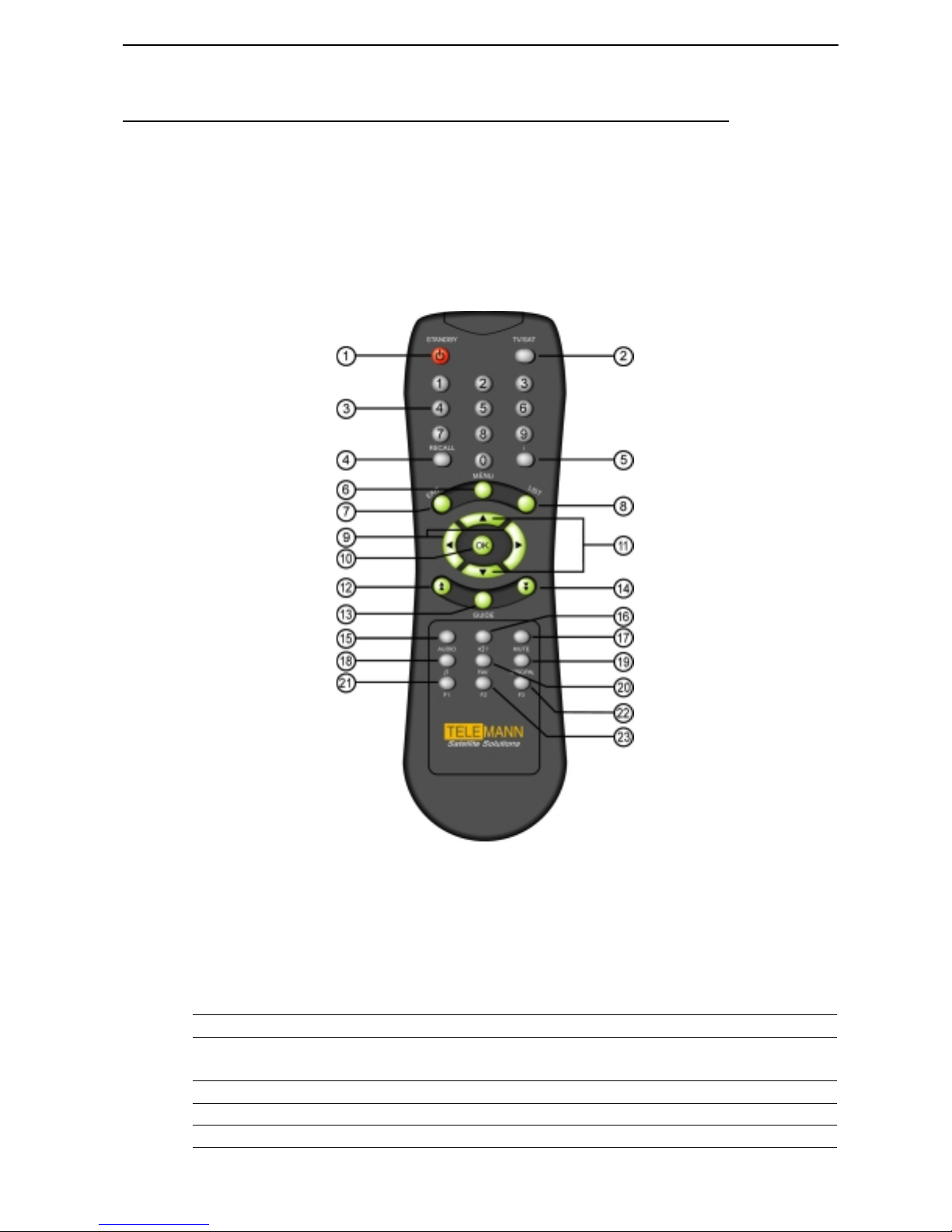
DTR5000N Remote Control
Remote Control
Remote Control Unit
This section describes how to operate the DTR5000N using the buttons on your
Remote Control Unit as shown below.
(1) POWER
(2) TV/SAT
(3) Number
(4) RECALL
(5) i
To turn your DTR5000N on/off.
To toggle from TV mode to satellite broadcasting mode
and vice versa
To select channel number or input parameters on menu.
To return back to the previous channel.
To display the program information on the screen
Page 2

DTR5000N Remote Control
(6) MENU
To display the main menu on the screen. Or to move back
to previous menu from current menu.
(7) EXIT
(8) LIST
(9) VOL UP/DN
(10) OK
(11) CH UP/DN
(12) Page UP
(13) GUIDE
(14) Page DOWN
(15) AUDIO
(16) Language( ? )
(17) MUTE
(18)
(19) NTSC/PAL
(20) FAV
To get completely out of menu.
To list all channels available on the screen
To increase/decrease the volume or select item on menu
To confirm your choices
To select a channel
To step pages up in the channel list
Program Guide on the screen
To step pages down in the channel list
To select Audio mode
To select the desired language or Audio PID.
To turn the sound on/off
To select TV, Radio, or Data channel
To convert video mode (NTSC/PAL/AUTO).
To display Favorite channel list on the screen
(21) F1 Function Key 1 ( Add channel )
(22) F2 Function Key 2
(23) F3 Function Key 3 ( Delete Channel )
Page 3
DTR5000N Remote Control
System Set-up
Here, we will go through the menu system, menu by menu. To manipulate the
menu, you use mainly the following key strokes : UP/DOWN, Left / Right, OK
Menu, Exit
Basic Menu Operation
Key strok e with your remote control
When you want to maneuver the Menu System with remote control, you can
use the following key stroke.
UP/DOWN key (▲ ▼) Moves menu selection up and down
Left / Right key () Can change option values
Page Up/Down ( ) Move up/down by page ( 6 channels)
OK Key ( OK ) Selects menus or You can move directly to a certain
channel by pressing the channel number.
Menu key Displays main Menu, Goes to previous menu
Numeric Key Enters numbers. Or Selects a certain channel by pressing
the channel number.
Exit key Quits the whole Menu
F1, F2, F3 Function Keys. F1 : Add Channels, F3 : Delete Channels
Key stroke with your PC keyboard
When you are connected to the DTR5000N, you should use keyboard to maneuver the Menu
System.
The following table explains each key stroke.
UP/DOWN Arrow Moves menu selection up and down
Left / Right Arrow Can change option values
Small ‘u’/’d’ Move channels up or down by page unit
Enter Key Selects menus or You can move directly to a certain
channel by pressing the channel number.
Numeric Key Inserts numbers. Or Selects a certain channel by
pressing the channel number.
ESC key Returns to previous menu
Small ‘e’ Removes channels from the list
Small ‘s’ Changes from TV Channel to Radio Channel, and to
Data Channel sequentially.
Small ‘e’ Removes or adds channels from/to the list
Page 4

DTR5000N Remote Control
 Loading...