

Page 1
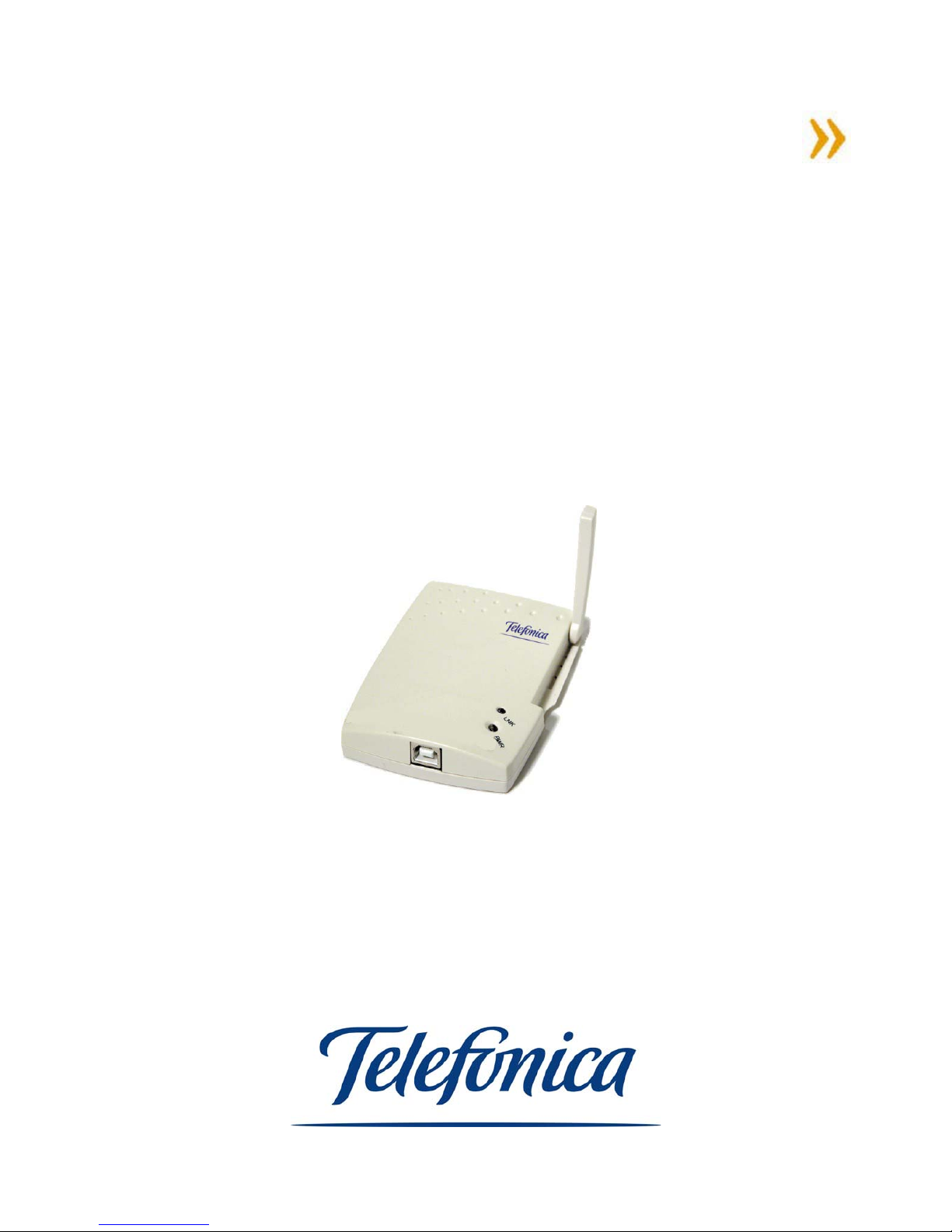
Equipamiento ADSL
Inalámbrico
USB Adapter
USER MANUAL
Page 2

Wireless USB Adapter
User Manual
Equipamiento ADSL Inalámbrico Page 2
INDEX
1. - INTRODUCTION ..........................................................................................3
2. - WIRELESS LOCAL AREA NETWORKS............................................................3
2.1 General Concepts..................................................................................................................................3
2.2 Types of Wireless Networks...............................................................................................................4
2.3 Equipment for Telefónicas Wireless Networks.............................................................................6
2.3.1 ADSL Wireless Network with Base Unit....................................................................................6
2.3.2 ADSL Wireless Network with Router Convertible in Wireless............................................ 6
2.3.3 Wireless clients for internet access in public areas............................................................... 7
3. - THE WIRELESS USB ADAPTER......................................................................7
3.1 Package Contents..................................................................................................................................7
3.2 Description of the Wireless USB Adapter.......................................................................................8
3.3 System Requirements..........................................................................................................................8
4. - INSTALLATION ............................................................................................9
4.1Physical Installation of the Wireless USB Adapter........................................................................ 9
4.2 Driver Installation for Windows 98/98SE/ME/2000/XP.............................................................9
4.3 Installation of the Monitor de Red Inalámbrica..........................................................................12
5. - MONITOR DE RED INALÁMBRICA CONFIGURATION ............................... 16
5.1 Configuration Options.......................................................................................................................16
5.2 Understanding the graphical interface of the Monitor de Red Inalámbrica.......................25
5.3 De-installation of the Monitor de Red Inalámbrica...................................................................27
6. - USAGE OF THE WIRELESS CONNECTION.................................................. 29
6.1 User Profiles..........................................................................................................................................29
7. - TOUBLESHOOTING .................................................................................. 30
7.1 Common Problems.............................................................................................................................30
7.2 Driver Verification...............................................................................................................................36
7.3 Customer Service................................................................................................................................37
8. - ACROBAT READER 5.0 INSTALLATION..................................................... 39
ANNEX A –TCP/IP TESTING............................................................................ 41
ANNEX B – DECLARATION OF CONFORMITY................................................. 44
Page 3
Wireless USB Adapter
User Manual
Equipamiento ADSL Inalámbrico Page 3
1 - INTRODUCTION.
Congratulations on purchasing your Wireless USB Adapter. This device forms part of
the Equipamiento ADSL Inalámbrico from Telefónica that gives you the advantage of
working in a network, without bothersome cables. This manual is designed to help you
install and start up your wireless USB Adapter. Please read carefully the following
chapters before you commence with the installation.
The Equipamiento ADSL Inalámbrico from Telefónica is based on the standard IEEE
802.11b. This guarantees the compatibility with other devices that also comply with
this standard, reaching speeds of up to 11Mbps.
Warning: Due to the existence of various Wireless standards, you may find other
solutions that are not compatible with the standard IEEE 801.11b and in this case the
Equipamiento ADSL Inalámbrico de Telefónica.
Warning
Before proceeding with the installation of your wireless USB Adapter it is very
important to that you identify your wireless device and follow step by step the
instructions specified in this manual. The different options of Telefónicas wireless
networks are explained in the section 2.3 “Equipment for Telefónicas Wireless
Networks”.
2 - WIRELESS LOCAL AREA NETWORKS
2.1.- GENERAL CONCEPTS
A Wireless network consists of two elements:
- Wireless clients (PCMCIA Card or USB Adapter)
- Access Point of the Equipamiento ADSL Inalámbrico (Base Unit, Wireless
Modem/Router)
Note: If you do have a wireless Modem/Router, that is, your ADSL Modem/Router is
conventional; you will need an additional Wireless Base Unit.
Wireless Clients (USB Adapter or PCMCIA Card)
These are peripheral devices that are installed in the PCs, within the range of a Base
Unit, that make up a wireless network.
Wireless Base Unit
The central point of a wireless network interconnects the wireless clients, as well as
connecting the wireless network to your cable network, such as MODEM/Router,
network printers, etc.
It can transmit a signal of up to 50 meters indoors and 200 meters outside. The range
of your wireless network depends very strongly on the environment, for example
obstacles, other radio frequencies, etc.
Page 4
Wireless USB Adapter
User Manual
Equipamiento ADSL Inalámbrico Page 4
If you wish to install a wireless network over a large area, you may need more than one
Base Unit.
2.2. - TYPES OF WIRELESS NETWORKS
There are various ways of configuring a wireless network:
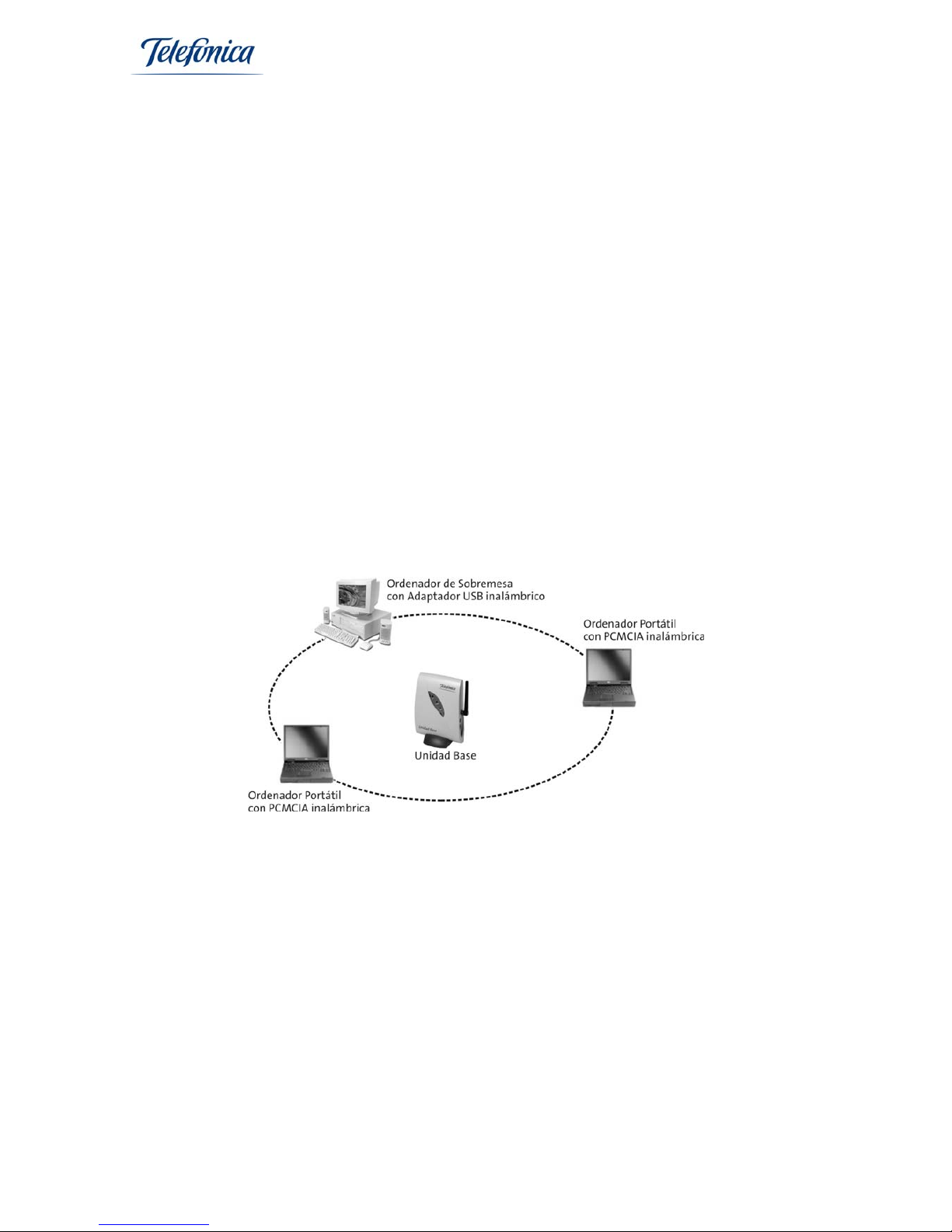
• Point to Point: Also know as “Peer-to-Peer” or “Ad-Hoc”. This communicates
two wireless devices with each other, without using any central point (Base
Unit).
• Infrastructure: This mode requires the use of a central wireless network point
and allows the wireless network to interconnect with a cabled network.
Below you will find some examples and configurations of wireless networks.
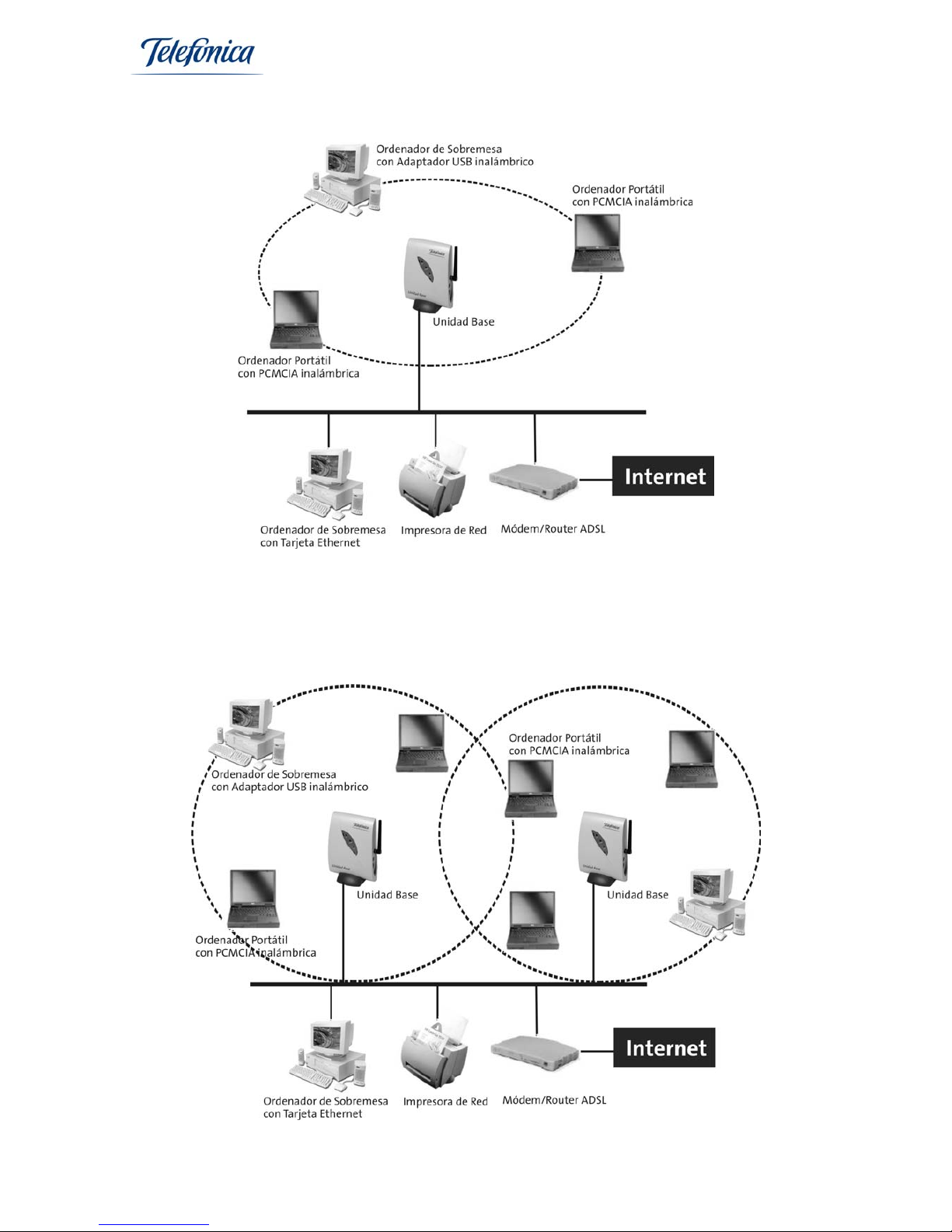
Infrastructure configuration
Under this configuration you can use one or more Base Units as signal repeaters to
give a greater coverage for larger areas or as a go-between for a wireless network and
Ethernet based networks.
The example below is of a Base Unit being used as a signal repeater:
Page 5
Wireless USB Adapter
User Manual
Equipamiento ADSL Inalámbrico Page 5
The example below is of the Base Unit connected to a cabled network.
The example below is of more than one Base Unit within a network. This may be
necessary for large areas or for poor signals due to obstacles. In this case, these zones
are completely transparent to the users and they can move between Base Units
without the service cutting off, this is also known as “Roaming”.
Page 6

Wireless USB Adapter
User Manual
Equipamiento ADSL Inalámbrico Page 6
2.3. - Equipment for Telefónicas Wireless Networks
Telefónica commercializes different types of wireless networks.
• ADSL Wireless Network with Base Unit.
• ADSL Wireless Network with Wireless Router.
• Wireless clients for internet access in public areas.
The devices that make up the Equipamiento ADSL Inalámbrico from Telefónica,
permits you to connect to your network, without the having to lay cables. Where
another wireless device that is compatible with Telefónicas system exists, you can
form part of this new network and have complete mobility, such as in the office, at
home or in public access areas.
In the following section, we will describe each of these options.
2.3.1. - ADSL Wireless Network with Base Unit.
This equipment is only applicable for users that have an ADSL service with
Modem/Router supplied by Telefónica making possible the wireless connection
between one or more PC and simultaneous internet access.
To make this possible, you must connect the Base Unit to one of the Ethernet ports of
your Modem/Router ADSL or to any segment of your local area cabled network. The
Base Unit commercialized by Telefónica is named “Unidad Base” and forms part of the
Equipamiento ADSL inalámbrico.
To be able to use this type of wireless network, you must have the following:
• ADSL Modem/Router.
• Wireless Base Unit.
• At least one wireless client (Wireless PCMCIA Card or Wireless USB Adapter).
2.3.2. - ADSL Wireless Network with Router Convertible in Wireless.
This service is very similar to the service 2.3.1 described above, with the difference the
Access Point function is incorporated inside the Kit ADSL Wireless Router from
Telefónica.
The Wireless Modem/Router ADSL from Telefónica can also become an ADSL
Modem/Router Convertible in Wireless that includes a PCMCIA slot that gives you the
option to upgrade your Modem/Router with a wireless PCMCIA Card. Without the
wireless PCMCIA Card, your ADSL MODEM/Router works as a conventional ADSL
Modem/Router with an Ethernet connection. Once you have installed the wireless
PCMCIA Card, your ADSL Modem/Router converts into a ADSL Modem/Router
combined with a wireless access point avoiding having to install two separate devices.
To be able to use this type of wireless network, you should have the following
equipment:
Page 7

Wireless USB Adapter
User Manual
Equipamiento ADSL Inalámbrico Page 7
• Kit ADSL Router Inalámbrico or Modem/Router ADSL Convertible in Wireless
along with a PCMCIA Card which converts it in Wireless.
• Wireless PCMCIA Card, to be installed in the PCMCIA slot of the Modem/Router
Convertible in Wireless.
• One or more wireless client (Wireless PCMCIA Card or Wireless USB Adapter).
In this manual you will find the installation instructions for the Wireless USB Adapter.
The instructions for the other equipment mentioned in this manual can be found in its
corresponding user manual.
2.3.3. - Wireless clients for internet access in public areas.
This service allows the users to access the Internet from their laptop in public wireless
places.
In this service there exists a service provider that offers the user a wireless signal via
various access points. The user must have a wireless client, either personal or hired;
the service provider will then supply the user with a username and password once
he/she has specified the duration necessary. Each service provider will have their own
billing procedure.
3. - THE WIRELESS USB ADAPTER
Following the steps of this guide will help you to complete the installation the simplest
way possible. We recommend that you take the following steps in this order:
1) Verify that your PC complies with the requirements indicates in chapter 3.3.
2) Make sure that the products box contains the elements indicated in the section
“3.1. PACKAGE CONTENTS”.
3) If you do not have Acrobat Reader installed in your PC or if you wish to update
your current version, refer to section “7. ACROBAT READER INSTALLATION”
4) Make the physical connection of the wireless PCMCIA Card, as described in the
section “4.1 PHYSICAL INSTALLATION OF THE WIRELESS USB ADAPTER”.
5) Follow the steps described in the section “4.2 DRIVER INSTALLATION”
The next chapters will describe the installation and configuration procedure. We
remind you that it is very important that you follow it step by step.
3.1 PACKAGE CONTENTS
The box of this product includes the following elements:
Page 8
Wireless USB Adapter
User Manual
Equipamiento ADSL Inalámbrico Page 8
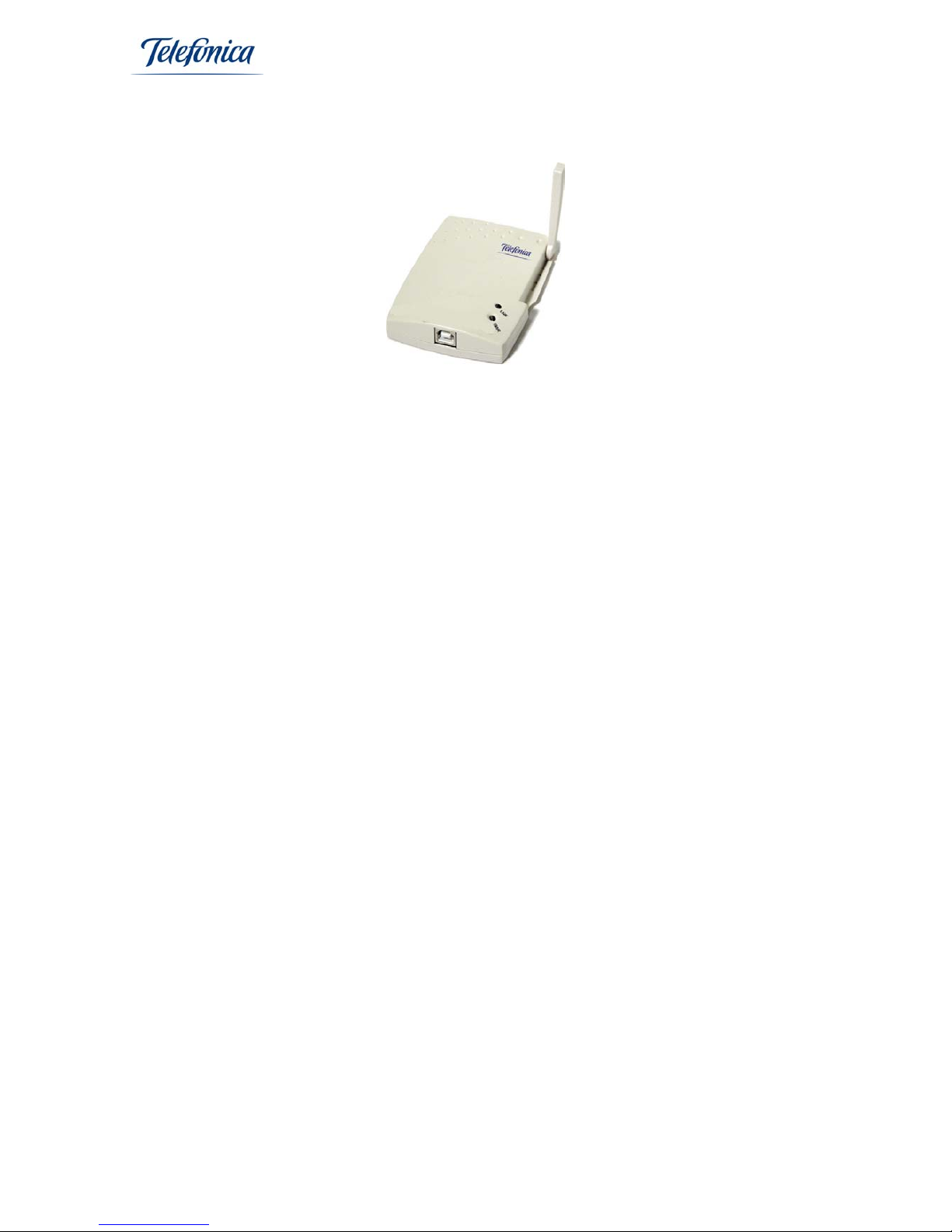
Wireless USB Adapter:
This device allows the wireless connection from a PC to a Wireless Access Point
(Wireless Base Unit or Wireless Modem/Router). In this guide you will find the
installation, configuration and maintenance procedure for your PC.
Documentation:
- Quick installation guides (English and Spanish).
- User Manuals (English and Spanish).
- Guarantee.
Installation and support CD-ROM that includes:
- Device drivers for the operating systems supported.
- Acrobat Reader 5.0. for PDF documents
- Quick installation guides in PDF format (English and Spanish).
- User Manuals in PDF format (English and Spanish).
-
3.2 DESCRIPTION OF THE WIRELESS USB ADAPTER
The Wireless USB Adapter is an external device that connects to a free USB port in your
PC. (If your PC does not have any USB ports, you can use an USB PCI Adapter. If you
need to add more USB ports to your PC, you can use an USB Hub. Both can be found in
the majority of Computer equipment shops.)
The USB Adapter does not need any external power supply, as it obtains all the power
it needs for the USB port of the PC.
The USB Adapter can be connected and disconnected whilst the PC is turned on
without damaging the device or the PC.
3.3 SYSTEM REQUIREMENTS
- Laptop or desktop PC.
- Operating System: Windows 98, Windows 98SE, Windows Millennium,
Windows 2000 o Windows XP.
- One free USB 1.1 o 2.0 port
- CD-ROM reader.
- 15MB free hard disk space.
Page 9
Wireless USB Adapter
User Manual
Equipamiento ADSL Inalámbrico Page 9
VERY IMPORTANT!
It is very possible that during the installation your PC will require the CD-ROM of the
operating system that you have installed. It is recommended that you have nearby
this CD-ROM.
4. - INSTALLATION
Now we will describe the connection and installation procedure for the different
elements. It is important that you follow the steps given in this section.
The installation process in this manual is valid for any of Telefónicas Wireless networks:
• ADSL Wireless Network with Base Unit.
• ADSL Wireless Network with Wireless Router.
• Wireless clients for internet access in public areas.
When you install a wireless network, we recommend that you install the access point
(Base Unit or Wireless Router) before proceeding with the installation of the wireless
PCMCIA Card or USB Adapter.
The configuration parameters of the connection in public access environments are
given by the service provider.
4.1 Physical installation of the Wireless USB Adapter
When installing a USB device, the installation is made very simple due to the PC
automatically detecting new devices.
Follow closely these steps to connect each PC:
1. Turn on your PC with the USB Adapter connected.
2. Your operating system will ask you to specify location of the driver once the USB
Adapter has been automatically detected and recognised.
3. Insert the CD-ROM that came included with the adapter and insert it into the
CD drive of the PC.
4. Please refer to the section “4. DRIVER INSTALLATION” of this manual, to install
the drivers that correspond with your operating system and follow the steps
given.
Remember:
It is very possible that during the installation your PC will require the CD-ROM of the
operating system that you have installed. It is recommended that you have nearby
this CD-ROM.
4.2. - Driver Installation for Windows 98/98SE/ME/2000/XP:
Next it is described the driver installation procedure of your wireless USB Adapter. It is
important to follow the steps in their order, given in this section.
Page 10
Wireless USB Adapter
User Manual
Equipamiento ADSL Inalámbrico Page 10
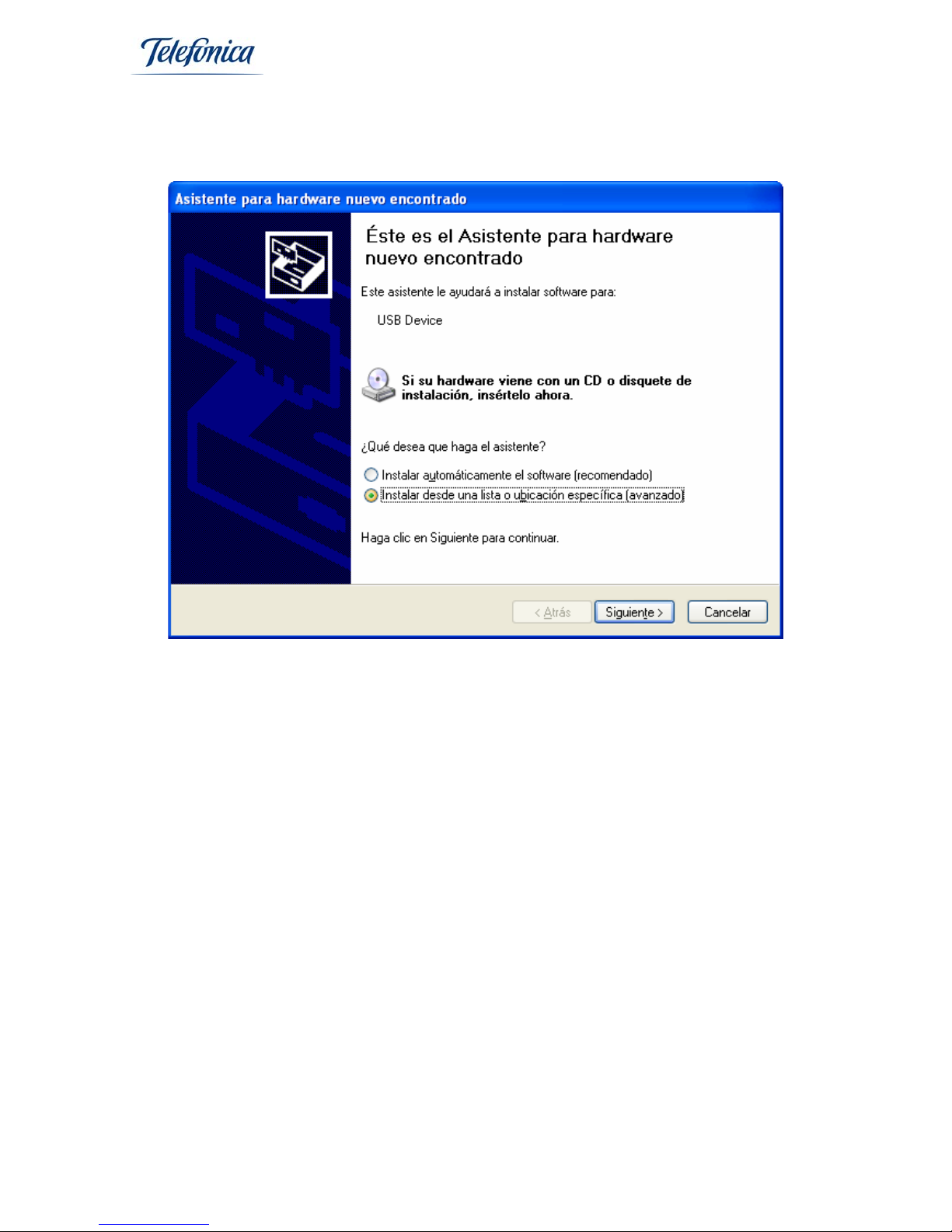
Connect the Wireless USB Adapter to a free USB port in your PC. When the system
detects, the new hardware assistant will start-up:
If you have not already done so, insert the CD-ROM (found in the products box) in the
corresponding CD drive of your PC. Select “Install from a list or specify a location
(advanced)” and click on “Siguiente”.
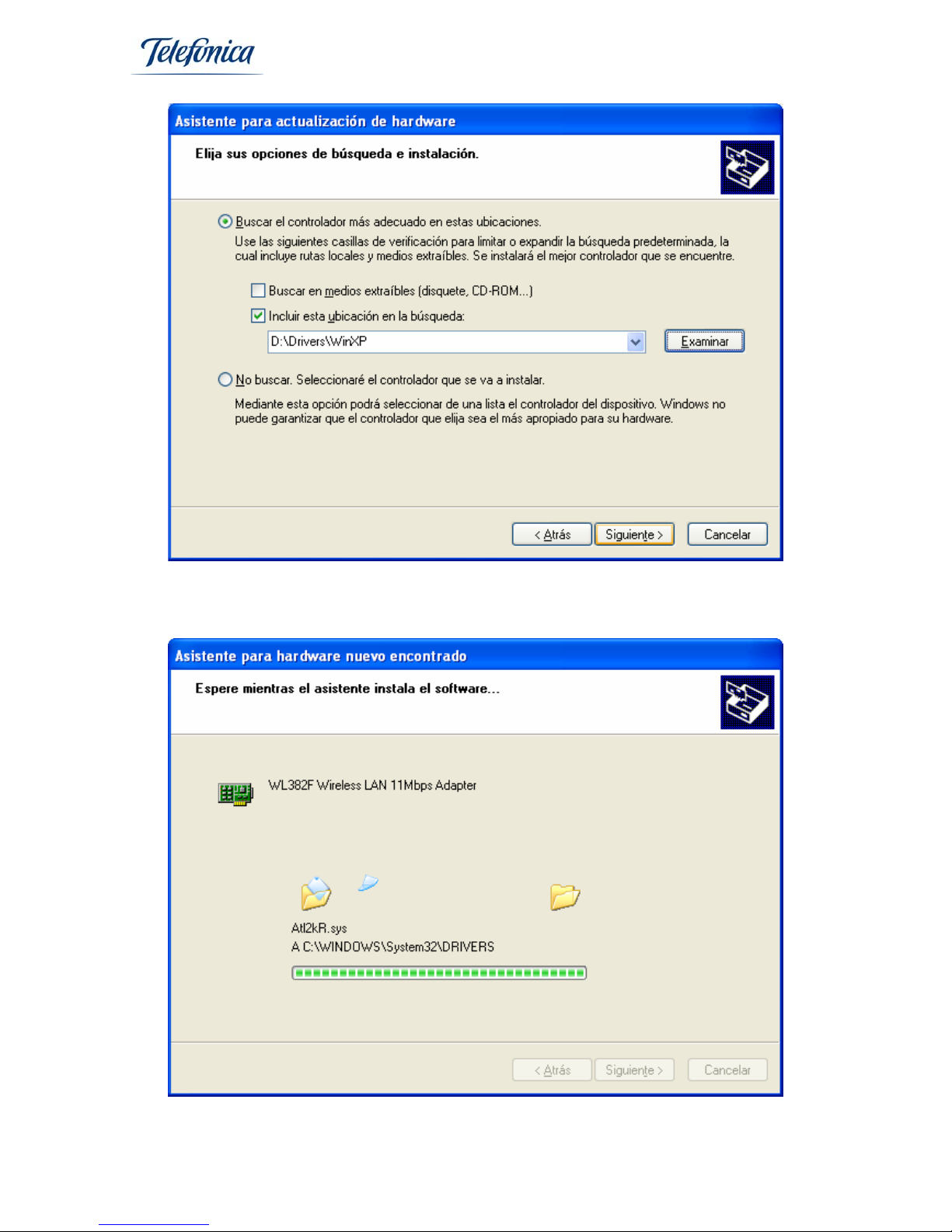
Select the location of the driver in, CD drive>Drivers>Choose the folder according to
your operating system of your PC and press “Siguiente”
Page 11
Wireless USB Adapter
User Manual
Equipamiento ADSL Inalámbrico Page 11
Windows XP will start to copy the necessary files for your adapter:
Page 12
Wireless USB Adapter
User Manual
Equipamiento ADSL Inalámbrico Page 12
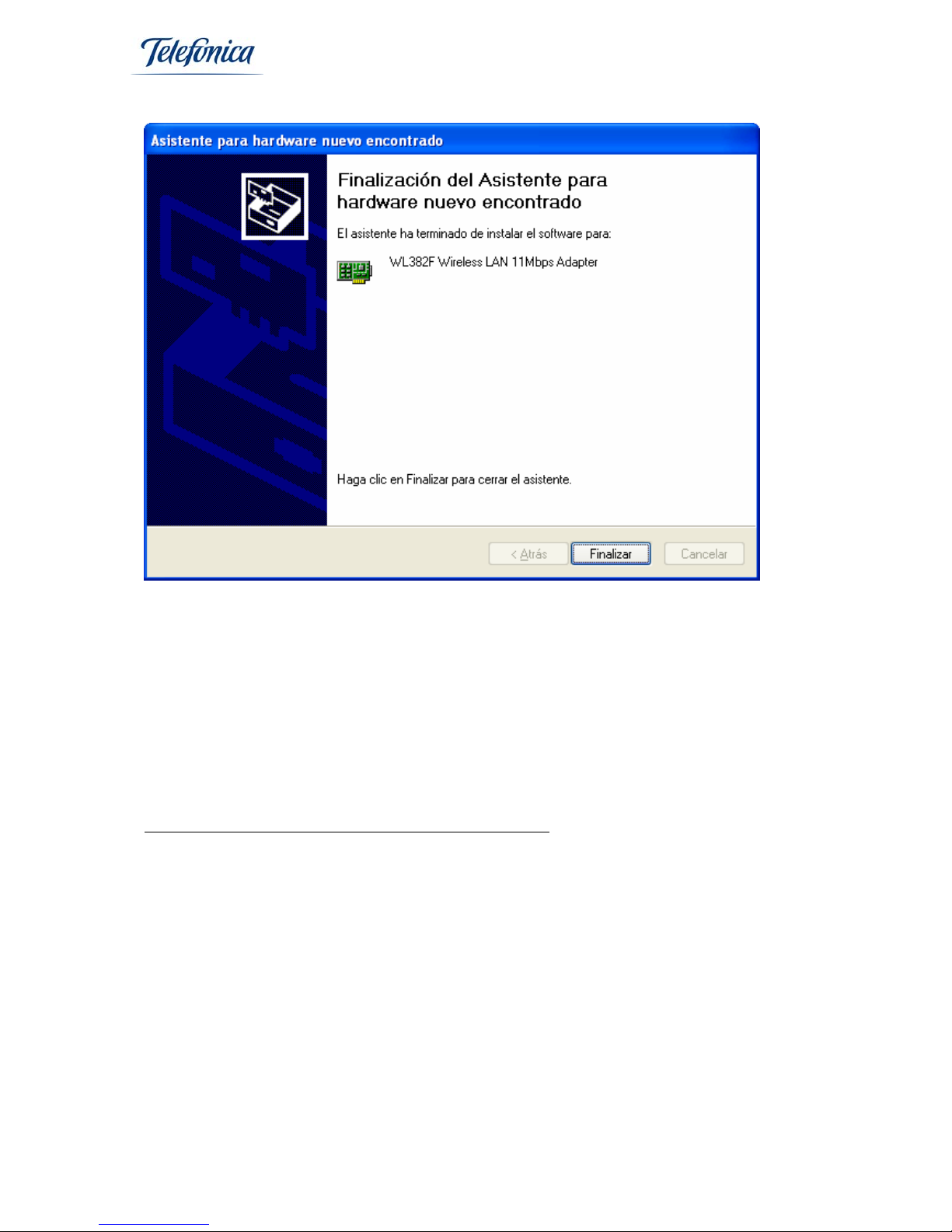
Once the system has finished copying and installing the drivers, a screen will appear
with confirmation. Press “Finalizar”. The driver installation has successfully finished.
Windows XP will inform you that your new hardware is installed and ready to use.
Only the driver of the USB Adapter has been installed up to now. It is now necessary to
install the utility that configures the wireless network. This application will allow you
to control, configure and run diagnostics of your wireless connection, including the IP
configuration.
4.3.- Installation of the Monitor de Red Inalámbrica
The “Monitor de Red Inalámbrica” application is the same in all the operating systems
supported, both in the installation process and in the configuration.
The wireless utility is installed in the following way:
In the CD-ROM provided with your wireless USB Adapter, you will find a folder named
“Utilidad”, double click on the installation programme that you will find inside this
folder:
Page 13
Wireless USB Adapter
User Manual
Equipamiento ADSL Inalámbrico Page 13
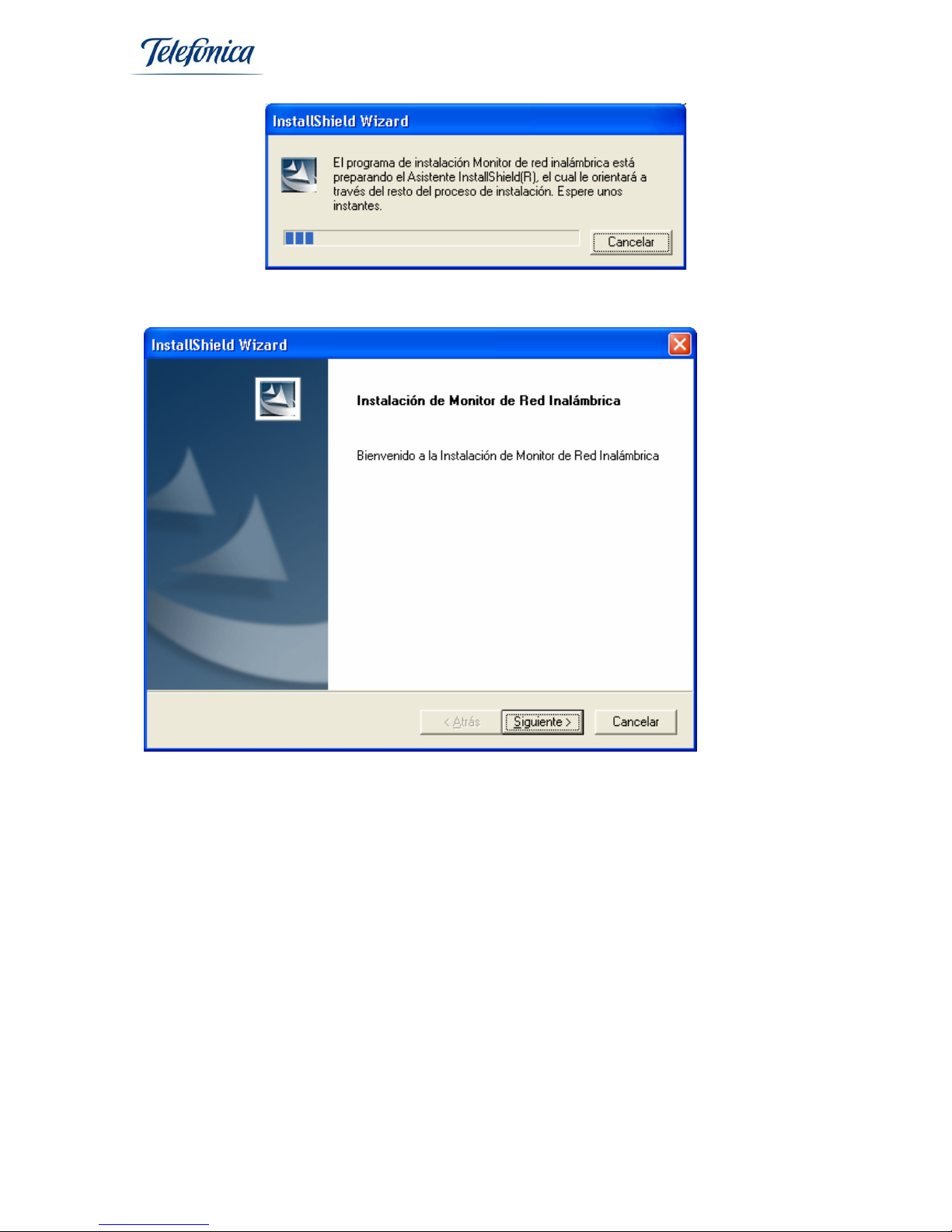
The installation programme of the Monitor de Red Inalámbrica will welcome you to
the installation:
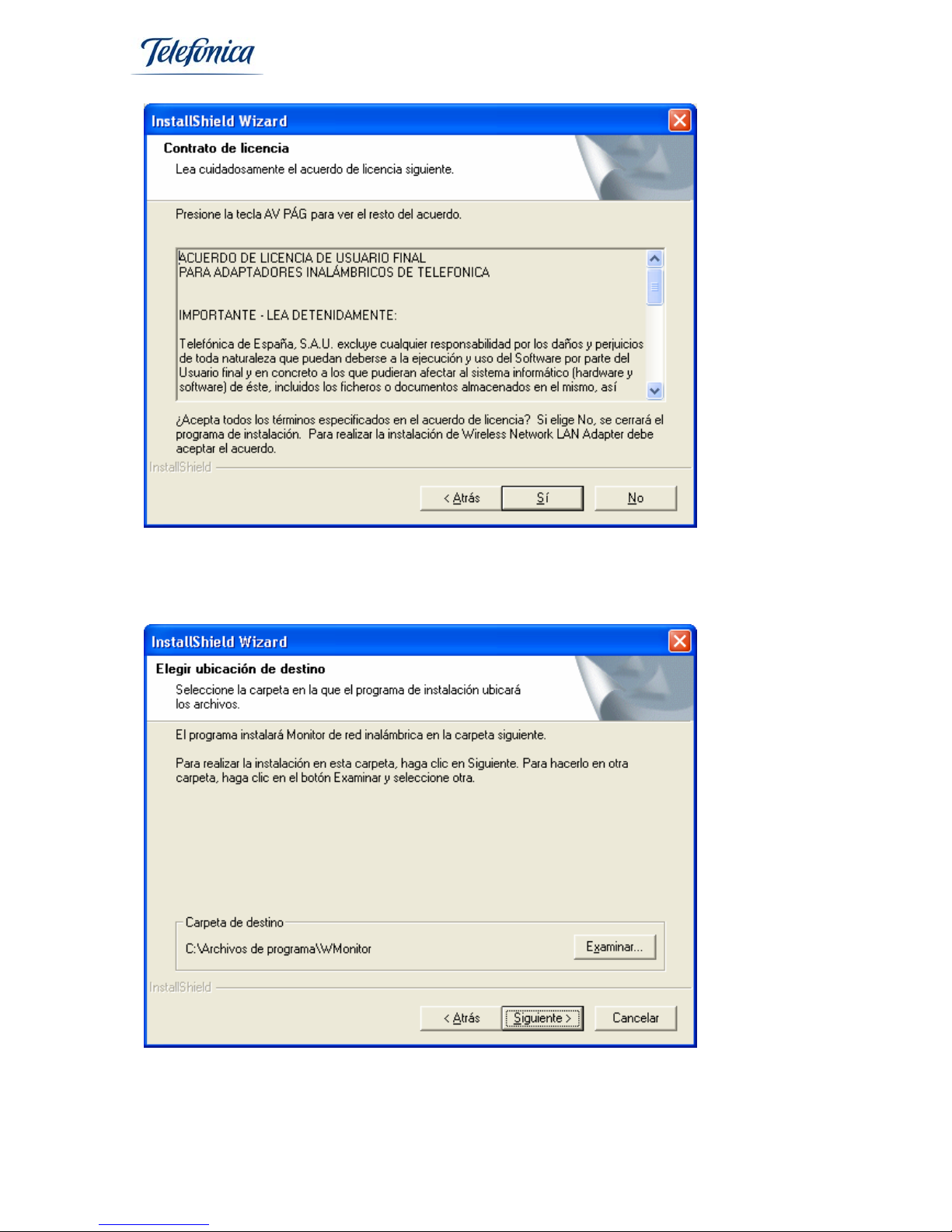
Press “Siguiente”. Read the licence agreement and press “Sí” to continue.
Page 14
Wireless USB Adapter
User Manual
Equipamiento ADSL Inalámbrico Page 14
The programme will ask for confirmation of the installation route. By default, the route
is: “C:\Program files\WMonitor”. Press “Examinar” if you wish to change the location
and select a different folder, press “Siguiente” to continue.
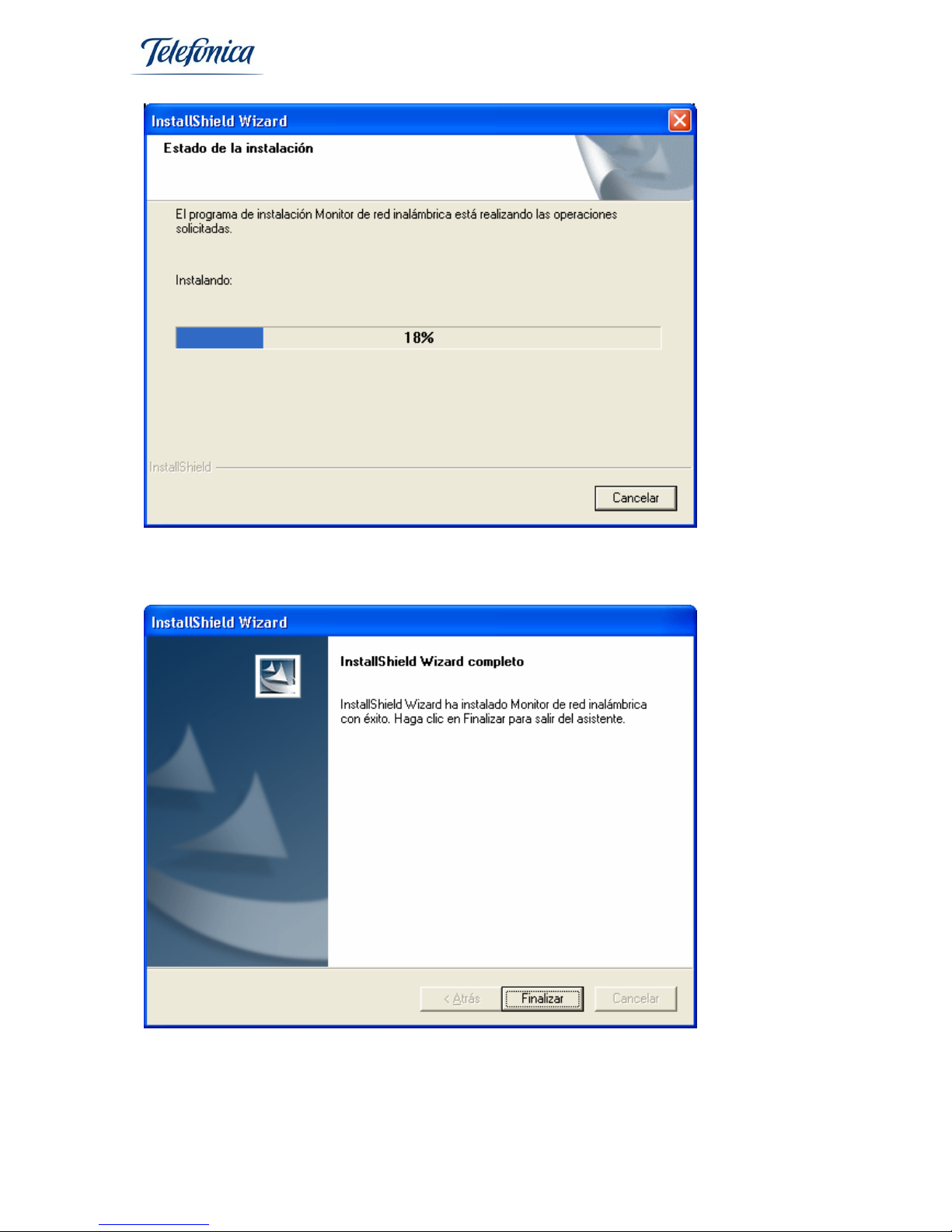
The programme will copy the necessary files to the route selected. Wait whilst the files
are copied. Below shows the status of the installation:
Page 15
Wireless USB Adapter
User Manual
Equipamiento ADSL Inalámbrico Page 15
Once the installation has finalized, the programme will inform you. Press “Finalizar” to
conclude the installation.
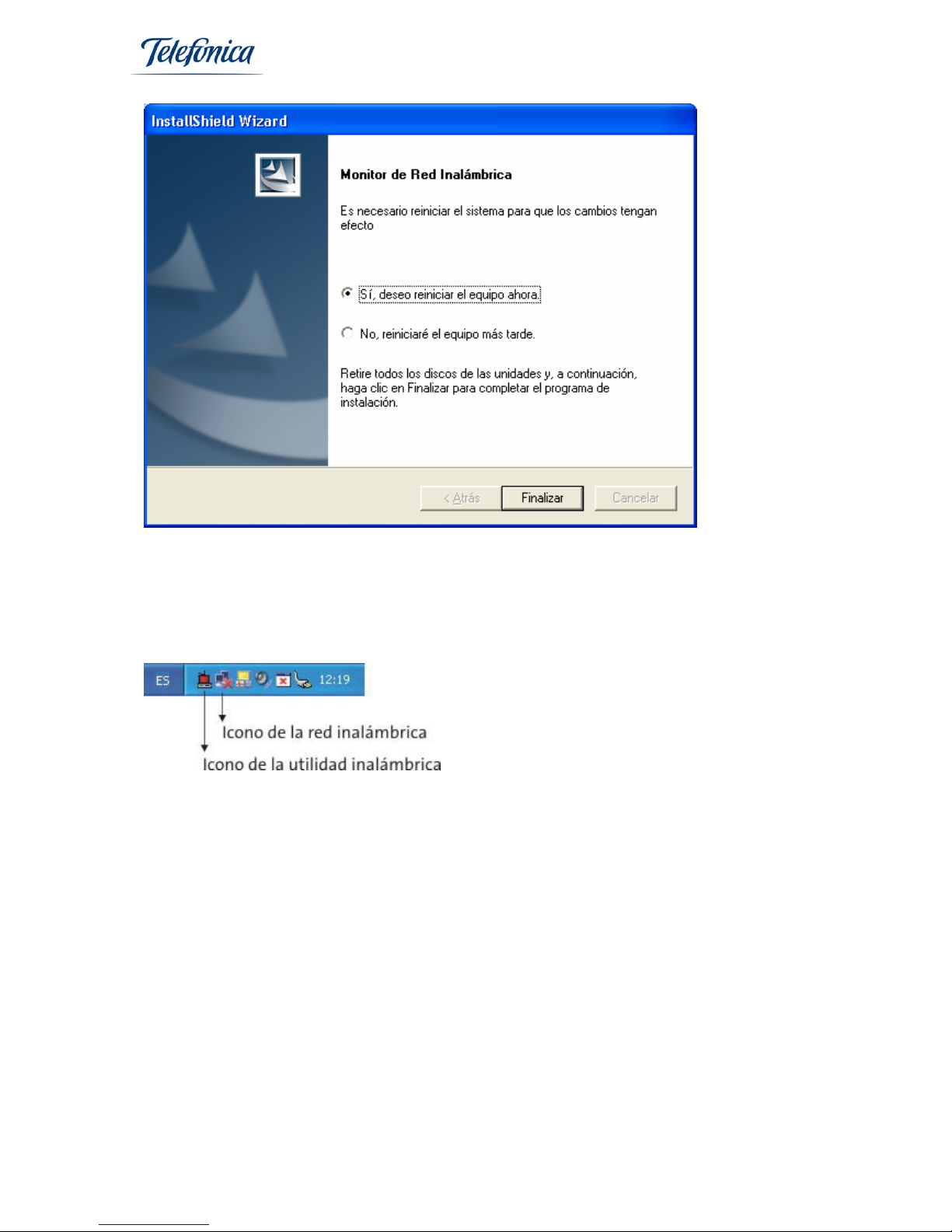
Note: In Windows 98 and Millennium a screen will appear asking you to restart the
system:
Page 16
Wireless USB Adapter
User Manual
Equipamiento ADSL Inalámbrico Page 16
Select “Sí, deseo reiniciar el equipo ahora” before you use the wireless network.
Once you have install the driver and application, make sure that at the bottom right
hand side off your tool bar, two new icons appear that correspond with your wireless
network, They should show as follows:
As you can see, the wireless network icon appears as disconnected. This is because the
connection with the Base Unit or Wireless Router has not yet been configured
(Important note: The wireless network icon will only appear on Windows 2000 and
Windows XP. The rest of the operating systems will only show the icon of the wireless
utility). You will also find the icon for the wireless network. In this case it will appear in
red, indicating that the wireless connection has not yet been configured.
The next section will explain the how to configure your wireless network connection
and Internet connection.
5. - MONITOR DE RED INALÁMBRICA CONFIGURATION:
5.1. - Configuration Options
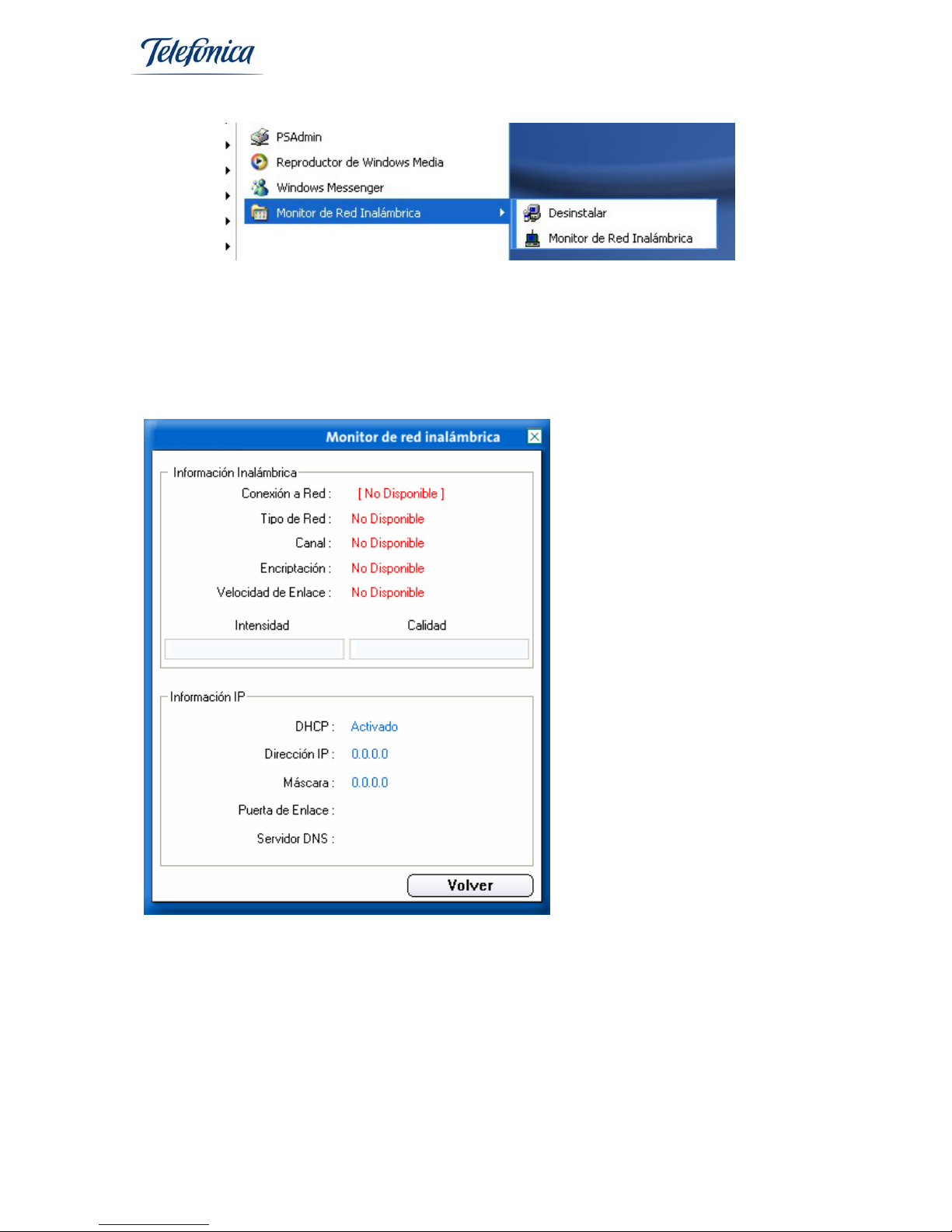
To start the Monitor de Red Inalámbrica, double click on the wireless utility icon at the
bottom right hand side of your tool bar or select Start-> Program -> Monitor de Red
Inalámbrica -> Monitor de Red Inalámbrica.
Page 17
Wireless USB Adapter
User Manual
Equipamiento ADSL Inalámbrico Page 17
The following screen is shown:
This is link information screen.
Here, you will find no link due
to not yet having configured
the connection parameters.
To start the configuration,
press “Volver”.
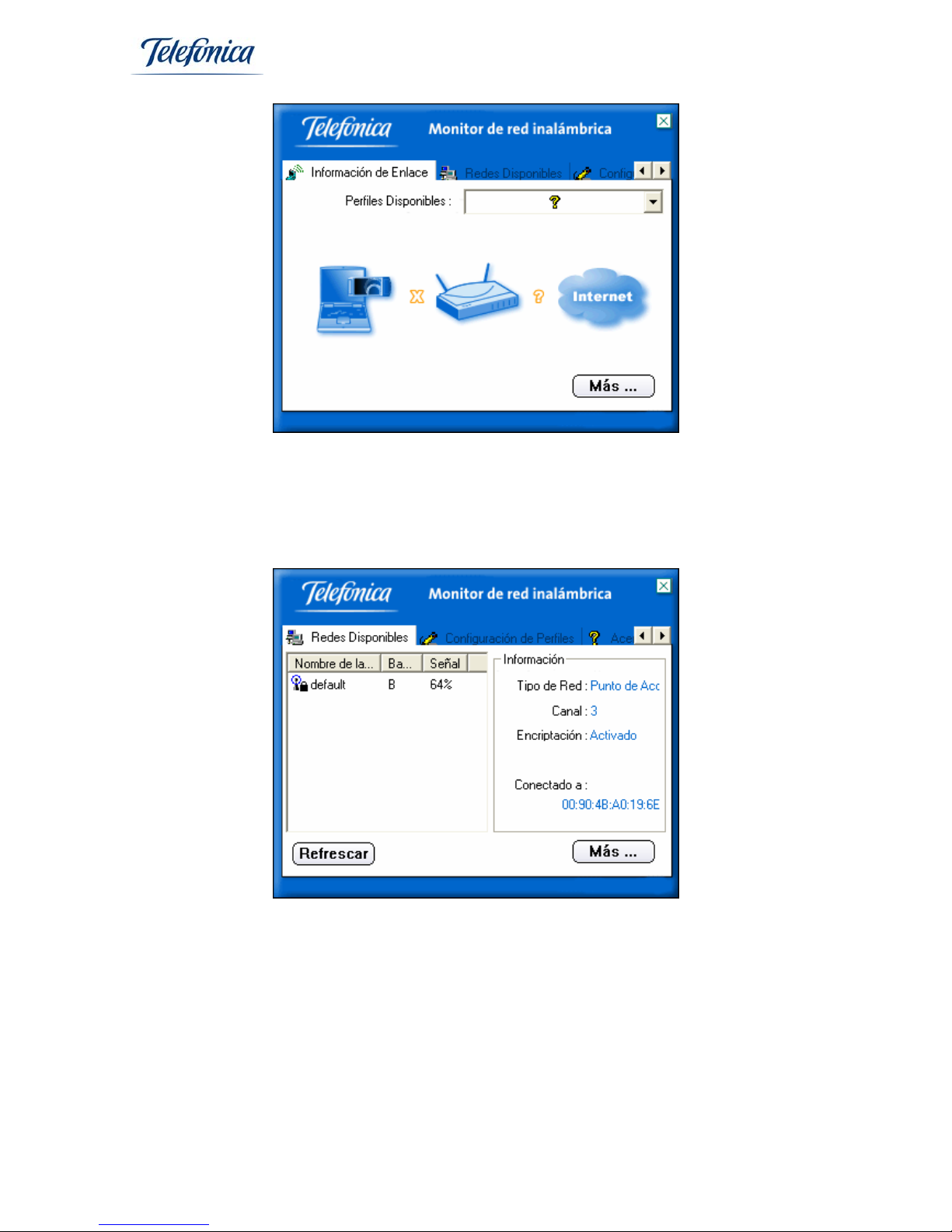
The network monitor will show
the screen “Información del
Enlace”. As you can see in the
picture on this screen, the
connection is not yet available
with the access point (“X”
between the USB Adapter and
the access point). The system
cannot determine if the
connection to the Internet is
correct or not due to there
being no link with the access
point. Once the installation is
correct, this picture will inform
the status of both connections.
Page 18
Wireless USB Adapter
User Manual
Equipamiento ADSL Inalámbrico Page 18
Click on the option “Redes Disponibles”. In this screen, you will find the wireless
networks to which we can connect.
In this example you will see a network called “default”. In this screen we can see a
network base on an access point, using the channel 3 and the data encryption
activated.
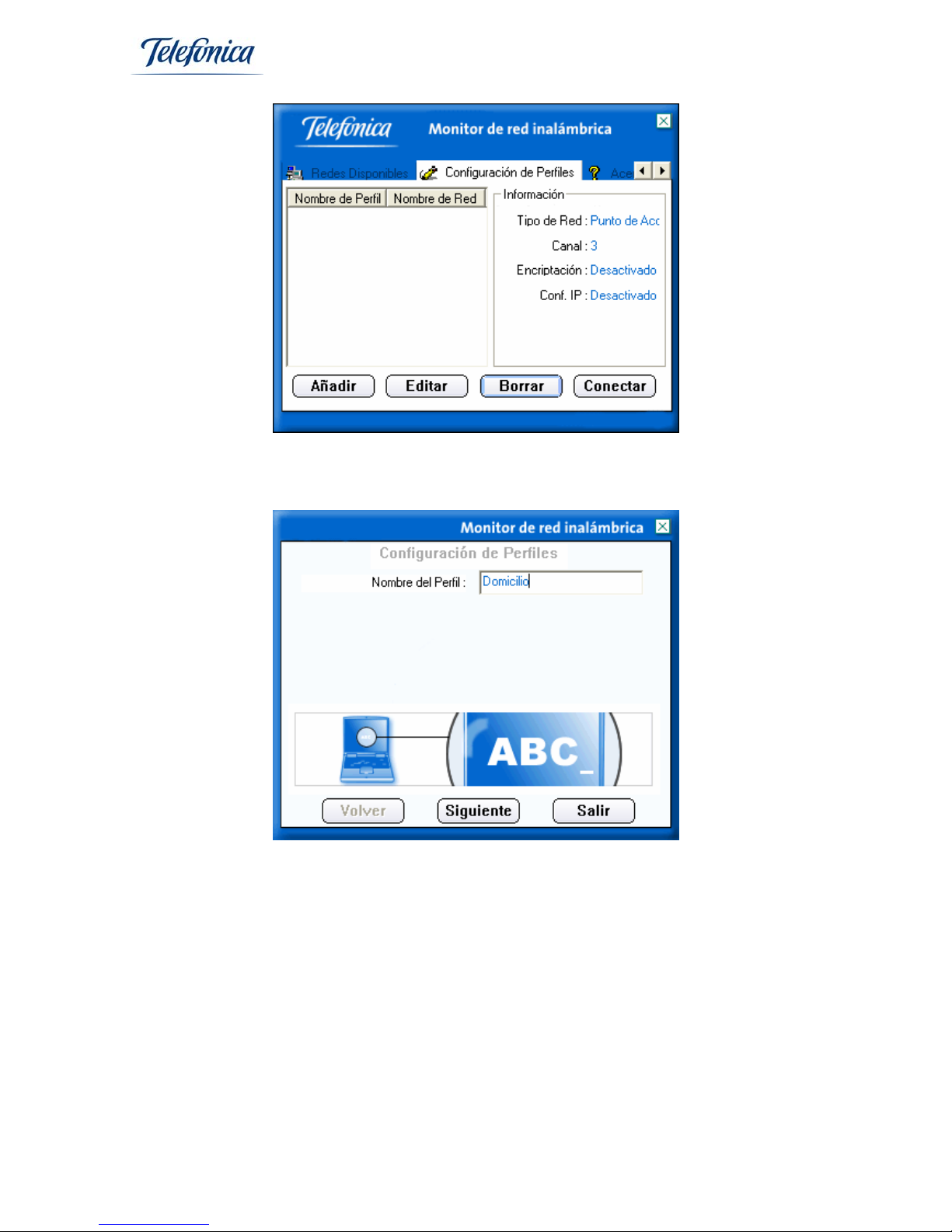
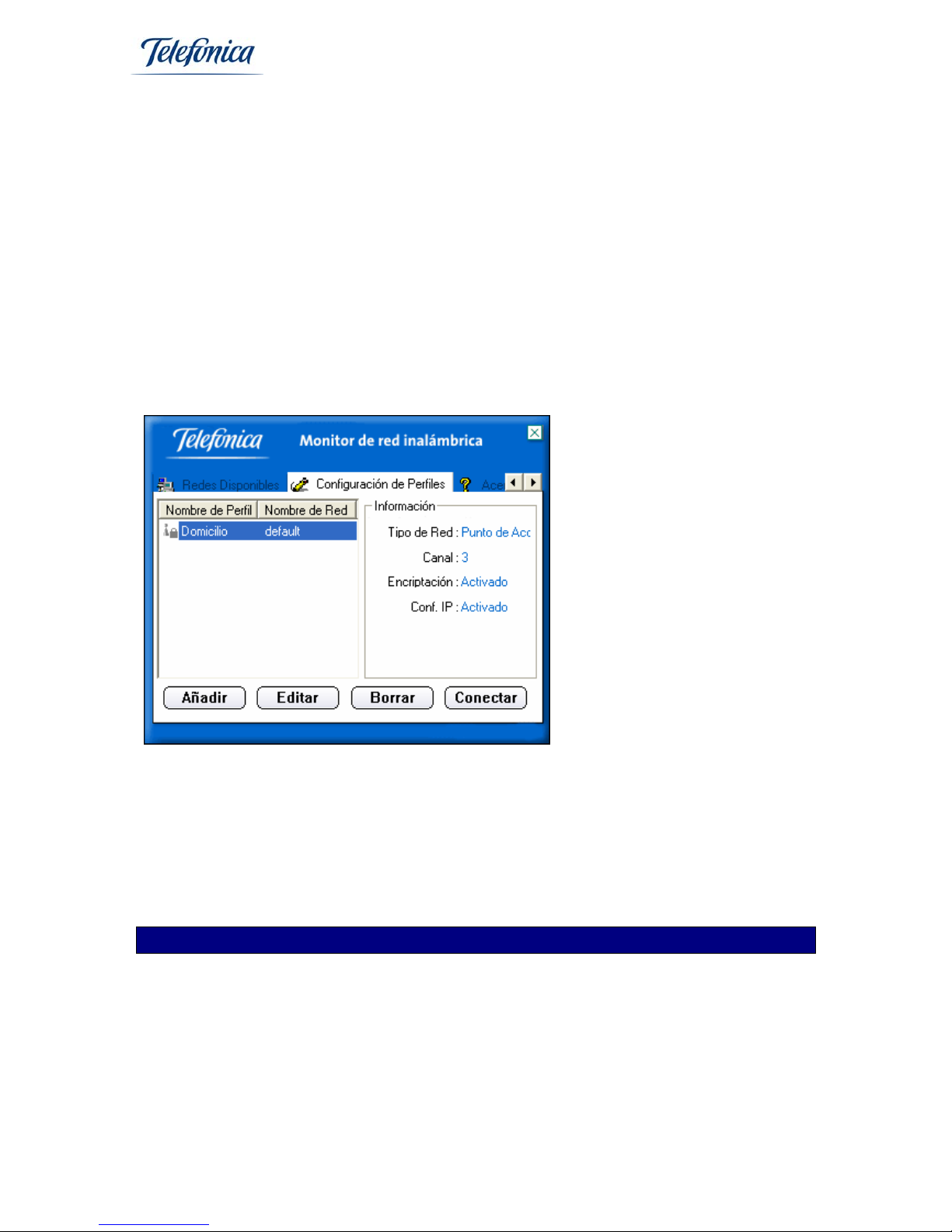
To start the configuration, click on the option called “Configuración de Perfiles”. Here
we can create a connection profile. You can create as many profiles as you wish. This
way you can have a profile for your domestic wireless network and another for your
office wireless network, for example.
Page 19
Wireless USB Adapter
User Manual
Equipamiento ADSL Inalámbrico Page 19
Click on “Añadir” to create a new profile.
The Monitor de Red Inalámbrica will ask you to key in a profile name. This name is only
informative and you can call the profile any name that you wish. We recommend that
you name each profile to remind you of the location of that network such as “Home”,
“Office”, etc.
Press “Siguiente” to go to the next parameter of the profile.
Page 20
Wireless USB Adapter
User Manual
Equipamiento ADSL Inalámbrico Page 20
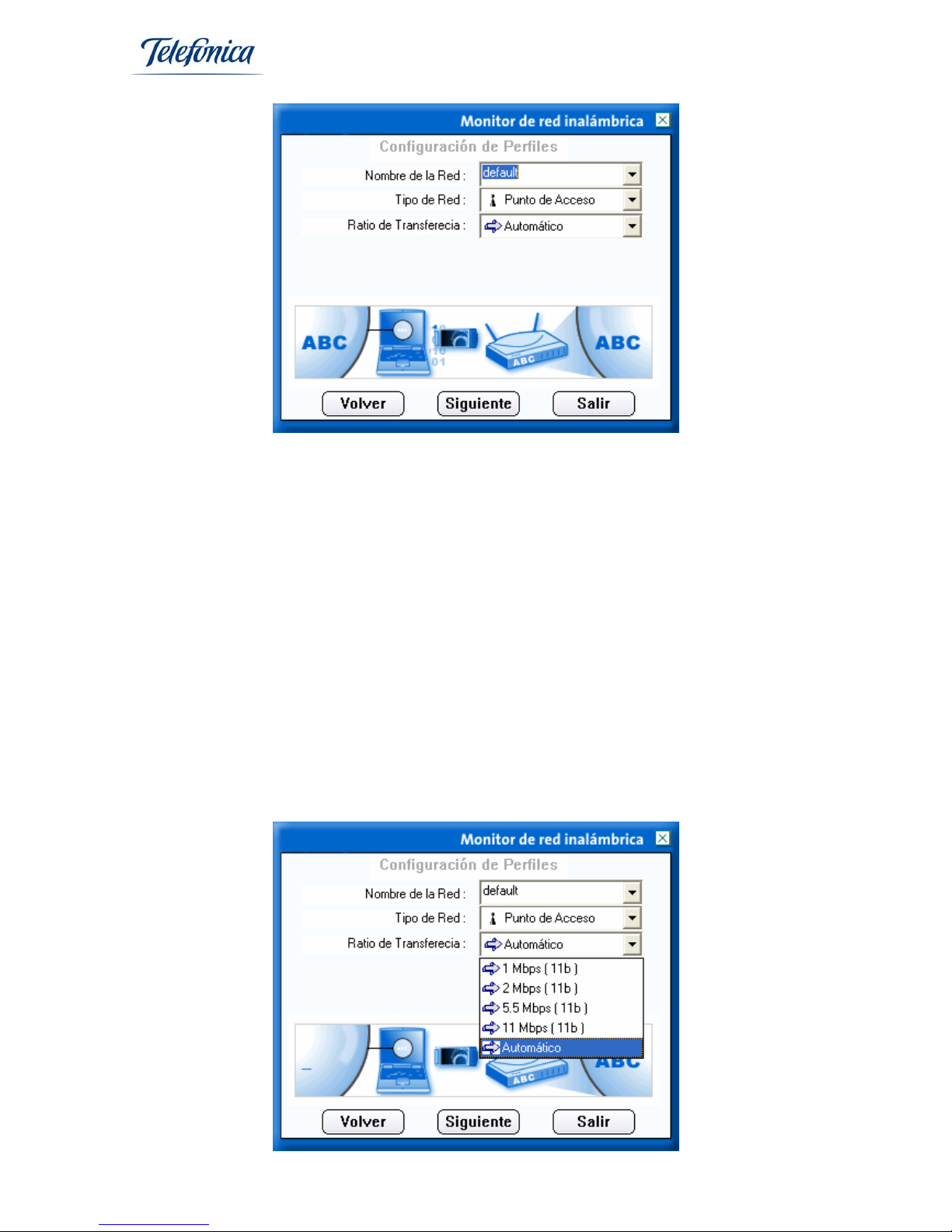
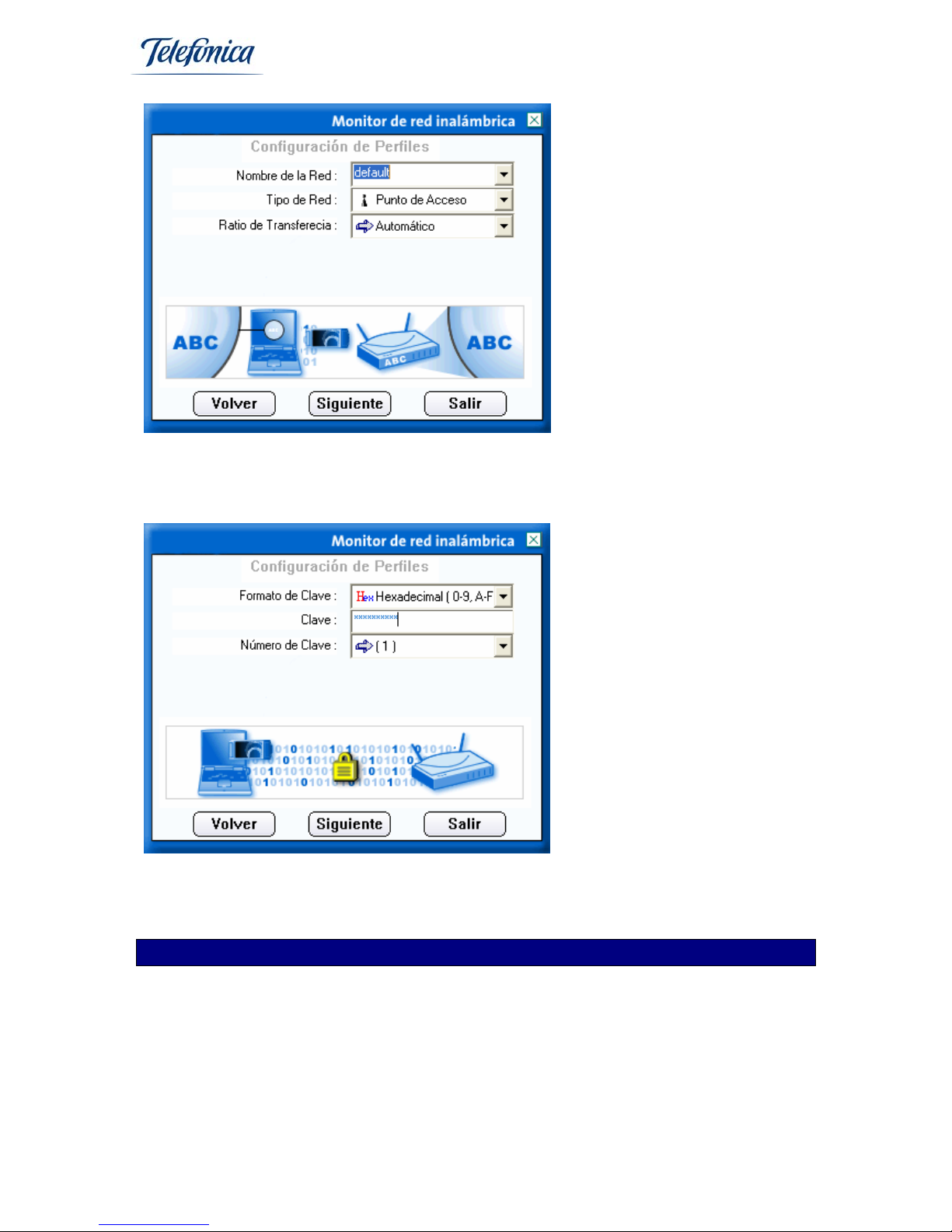
Select the network that you wish to connect to by clicking the cursor on the arrow
corresponding to “Nombre de la Red” There you will find a list of the networks
available, select the network that you wish to connect to. You can also key in the name
of the wireless network by hand. If you do choose to hand key in the network name, be
extremely careful as to not differ this name in any way as this could cause an error and
you will not be able to connect to your network.
The next parameter is to configure the network type. In a normal situation, you will
need to connect to an access point or Wireless Modem/Router. For this you click on the
“Punto de Acceso” mode. The “punto a punto” is to connect directly to another
wireless client. This will lead to a loss of connection with the Base Unit, consult chapter
2.2 “Types of Wireless Networks” for more information about the different types of
networks.
The last parameter of this screen is the operation speed. Your wireless network can
operate at four different speeds: 1Mbps, 2Mbps, 5,5Mbps and 11Mbps. You can either
specify the speed or opt for the speed to be automatic. This way the speed is always
fastest possible. In nearly all cases, it is better to select the mode “Automático”.
Page 21
Wireless USB Adapter
User Manual
Equipamiento ADSL Inalámbrico Page 21
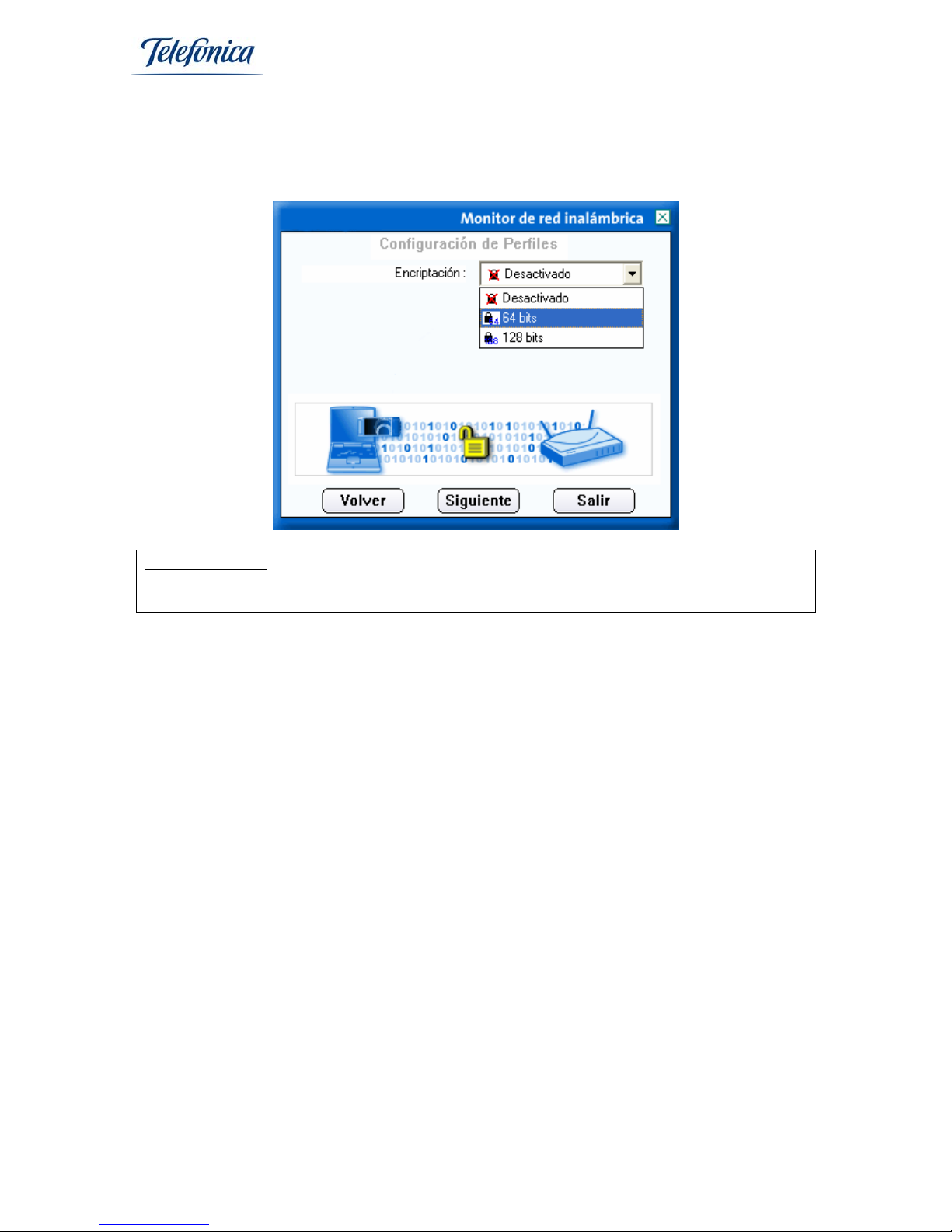
Press “Siguiente” after selecting the three parameters. Next you need to select the key
in of encryption that you wish to apply.
Important note: If you are going to use data encryption, it is necessary that you specify
the exact same key that is configured in the Base Unit or Modem/Router to which you
wish to connect. Have nearby the configuration details of your wireless network.
The encryption of the wireless networks is a very important parameter. You can select
three different values: “Desactivado” (“Disabled”), “64 bits” y “128 bits”.
If you select the encryption mode “Deshabilitado”, your connection will lack security
against other users that are not desired. Any PC with a wireless client and within the
signal range could intercept the signal and use it for your Internet connection or access
the data and programmes in your PCs. It is recommended that the encryption
parameter is activated. In this case there are two options available:
64 bits Key: Less secure but quicker.
128 bits Key: More secure, but slower.
The difference between the two is the length of the key that is used to code and
decode the data. A 64 bit key is composed of 10 hexadecimal digits, this is to say 0 to 9
and A to F.
64 bit key examples: 1020304050
ABCDEF9876
12F4A23CC0
The 128 bits keys are composed of 26 hexadecimal digits. For example:
102030405060708090AABBCCDD
72388037456272AF23987CD6876
Page 22
Wireless USB Adapter
User Manual
Equipamiento ADSL Inalámbrico Page 22
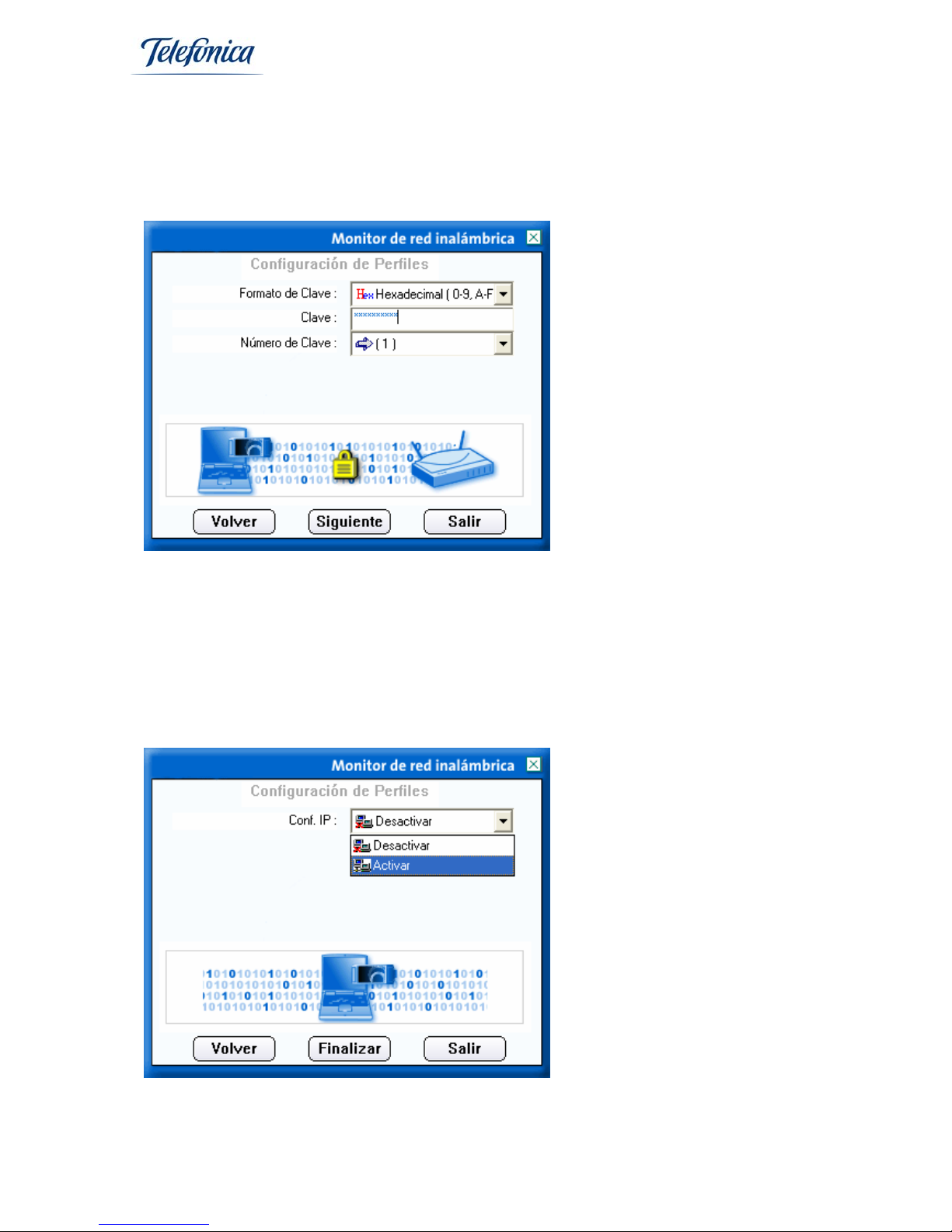
You can use any of the two types of encryption. We recommend that you use 128 bit
keys. In our example below we use a 128 bit key.
In the first parameter of the screen below, you are required to select a key format. They
are “Alfanumérico”, “Hexadecimal” o “Frase”. Select “Hexadecimal”.
In the second parameter you
must key in a coded key.
Remember this must be the
same key as the rest of the
network components. You can
choose four different keys per
profile, we will use the first.
The last part of the profile
configuration is the Internet
Protocol or IP. For an easy and
secure configuration, we
recommend that you select
“Activar” and specify the IP
parameters in the utility always
when your operating system is
not Windows 98 (In this operating system the IP configuratio n via the Monitor de Red Inalámbrica i s not supported. You can
only use the manual configuration. Consult the section “7.- Trouble shooting” to find detailed information on how to configure the IP
manually in Windows 98).
Using the IP configuration of the utility, you can have various different IP
configurations without the necessity to reconfigure the operating system every time
you change from wireless network to wireless network. If you wish to configure the
TCP/IP configuration manually, you may do so leaving the utility IP configuration
disabled. If you decide to leave the IP configuration disabled, press “Finalizar”, if you
wish to activate the IP configuration, press “Siguiente”.
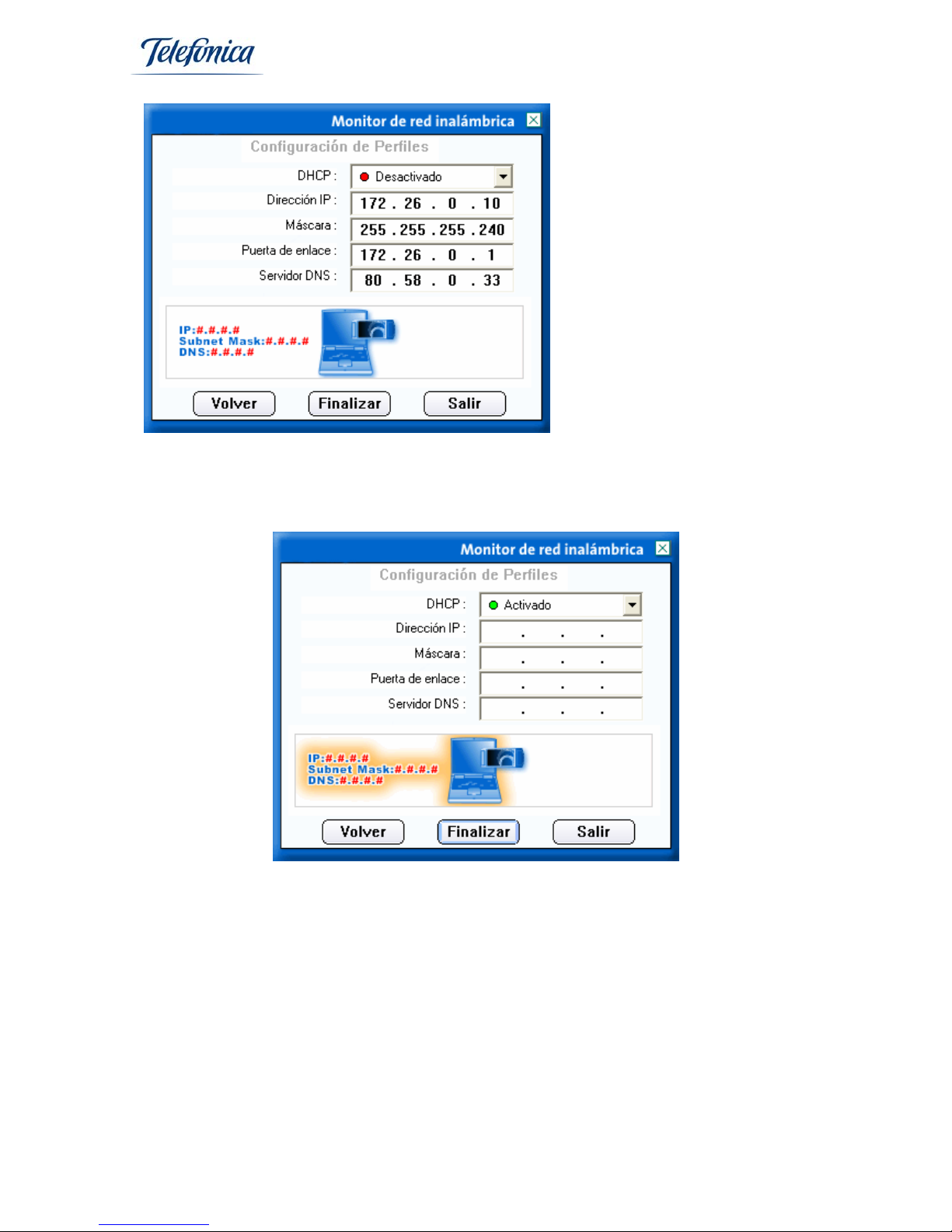
Our example is based on a fixed
IP address. For this we disable
the “DHCP” service of
automatic IP assignation and
specify a fixed IP address,
“Dirección IP” “172.26.0.10”,
subnet mask “Máscara”
“255.255.255.240”, Gateway
“Puerta de enlace” “172.26.0.1”
that corresponds with the IP
address of your Internet
Modem/Router The DNS server
“Servidor DNS” “80.58.0.33”
that you obtained from your
ADSL Service from Telefónica
documentation.
Page 23
Wireless USB Adapter
User Manual
Equipamiento ADSL Inalámbrico Page 23
Once all the parameters are
specified in the IP configuration,
you have finished creating a
wireless network profile..
Press “Finalizar” to save the
profile parameters.
The Monitor de red inalámbrica
will show the new profile in the
profile list.
If your network has a DHCP server or you are assigned automatically an IP address by
your Modem/Router, finalize the configuration of your profile with the “DHCP
activated as shown in the figure below:
Using this mode of IP addresses, your wireless client will receive your IP configuration
automatically. Before using this mode, make sure that the DHCP server is activated in
your Modem/Router. Now press the “Finalizar” button to return to the page
“Configuración de Perfiles”.
Page 24
Wireless USB Adapter
User Manual
Equipamiento ADSL Inalámbrico Page 24
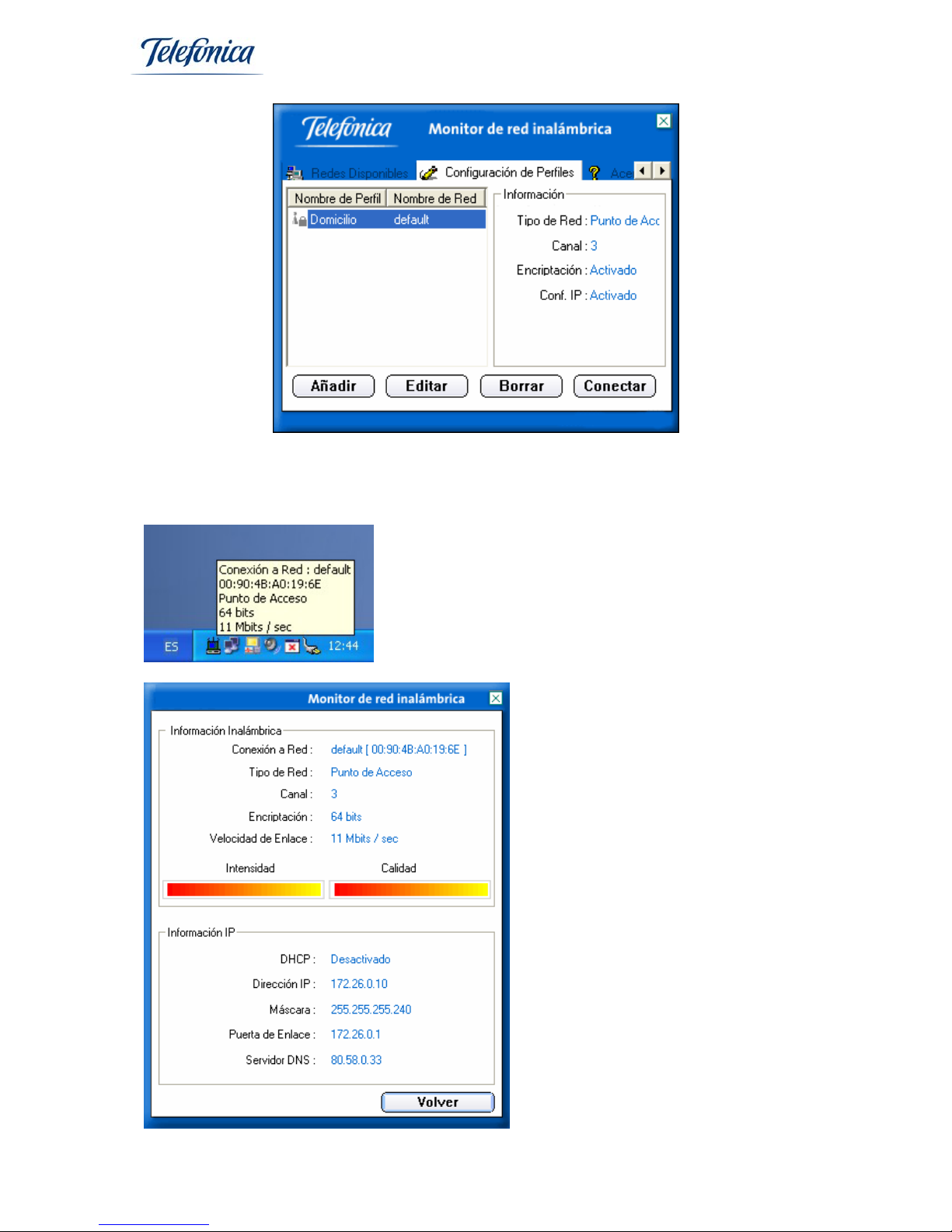
The new profile we named “Domicilio” appears in the list. Select this profile and press
the button “Conectar” this will connect your wireless client to the access point using
the parameters that we have configured.
If the connection was successful, the utilities icon will
appear as a different colour to red, informing that the
connection has been established. In the operating
systems, Windows 2000 y Windows XP, the network
icon will appear that there is a physical connection
between the USB Adapter and the Base Unit or
wireless Modem/Router.
To test the wireless connection
quality each time you open the
Monitor de Red, the following
window will appear:
In this screen you can see the
information relative to the wireless
connection such as, the channel, the
operation speed, the intensity and
quality ) of the signal (very useful to
measure the strength of your Base
Units signal to see if it reaches all the
rooms/offices of your home/work
place) encryption mode and IP
configuration.
You can access this screen from the
options “Información de Enlace”,
“Redes Disponibles” and “Acerca de”
pressing the button “Más”.
Page 25
Wireless USB Adapter
User Manual
Equipamiento ADSL Inalámbrico Page 25
5.2. - Understanding the graphical interface of the Monitor de Red Inalámbrica:
NOTE: In this chapter the connection between the USB Adapter, the access point and
the connection to Internet is mentioned. The connection to the access point could also
be a Wireless Modem/Router. For the configuration of the access point and the
Wireless Modem/Router, refer to their User manuals.
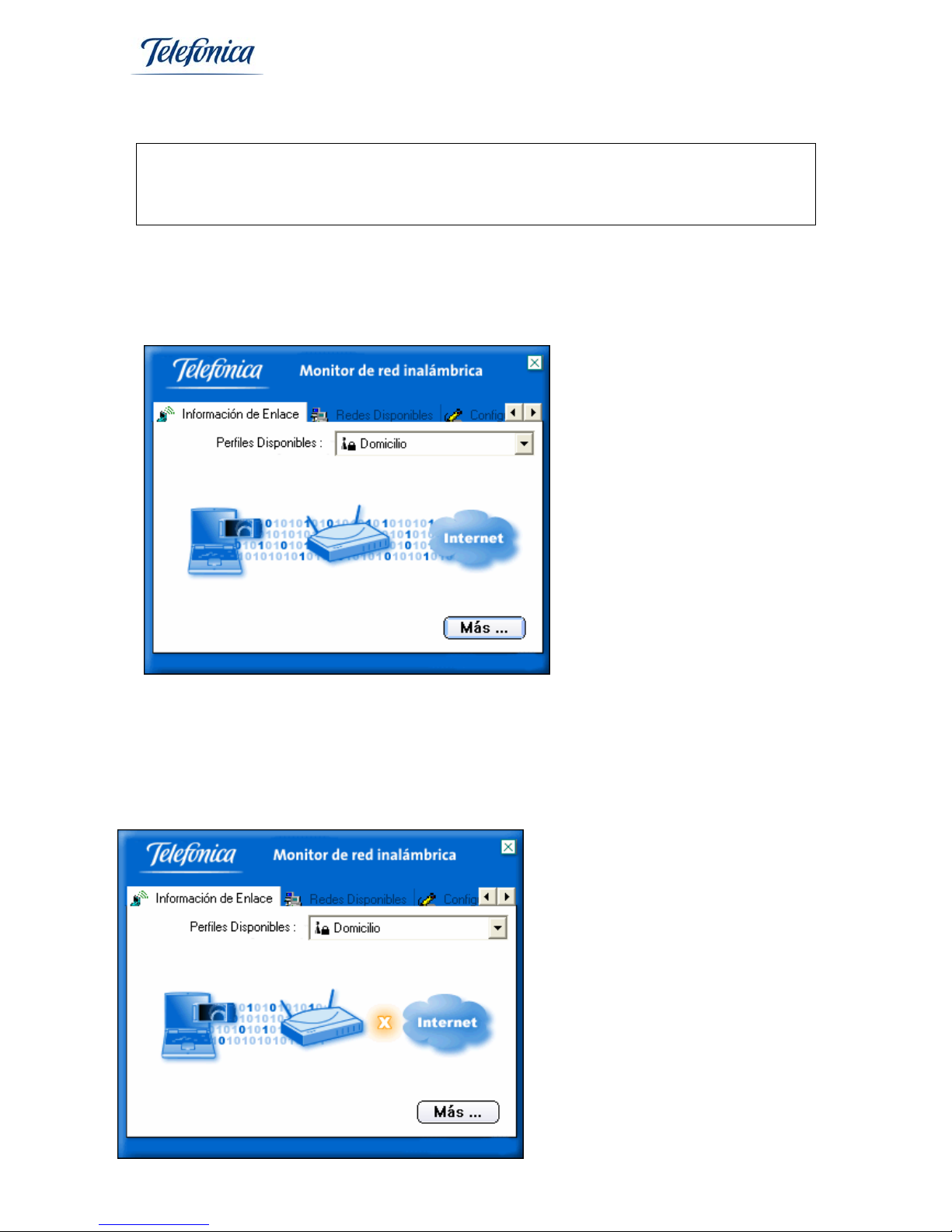
The Monitor de Red Inalámbrica will give you a great deal of information that you can
use to determine whether your network is working correctly or if it has a problem.
In normal conditions, you
should see the following
graphical information in the
option “Información del Enlace”.
Wireless Connection:
CORRECT
Internet Connection:
CORRECT
This graphical information informs that:
- The wireless connection between the PCMCIA Card and the Base Unit is correct.
- The Internet access from the Base Unit is also correct.
You could find that you have the following status:
Wireless Connection:
CORRECT
Internet Connection:
INCORRECT
Page 26
Wireless USB Adapter
User Manual
Equipamiento ADSL Inalámbrico Page 26
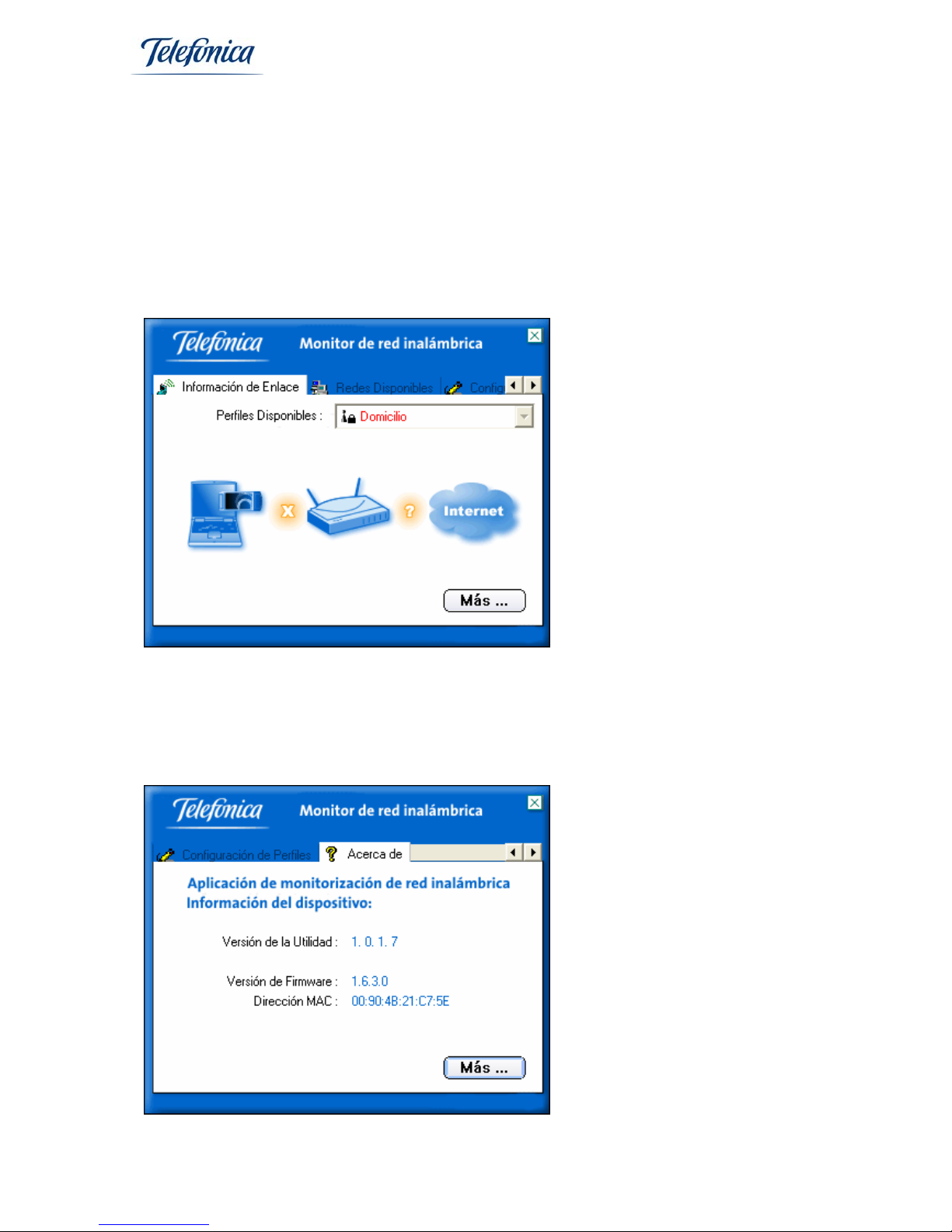
When the link between the Access Point and Internet is marked with a “X” this means
that the wireless network parameters are correct, but it is possible that the IP
parameters are not. Make sure that these parameters are correct, and the connection
between the Access Point and the Modem/Router is also correct.
Lastly, the graphical information is the following:
Wireless Connection:
INCORRECT
Internet Connection:
INCORRECT
This means that you were not able to make the connection with the Base Unit. Revise
the profile configuration and make sure that it is coherent with that of the Base Unit.
Also make sure that the Base Unit is correctly turned on and connected.
This manual documents the version 1.0.1.7 of the Monitor de red inalámbrica.
Page 27
Wireless USB Adapter
User Manual
Equipamiento ADSL Inalámbrico Page 27
Note: The Monitor de red inalámbrica is only visible if your Wireless USB Adapter is
connected. If the adapter is disconnected, the monitor will disappear and only
reappear once you have reconnected the adapter.
To share resources or access the files of other PCs connected to the wireless network,
you should take into account the following considerations:
- Make active the option in the operating system to share printers and files.
Consult the documentation of your operation system.
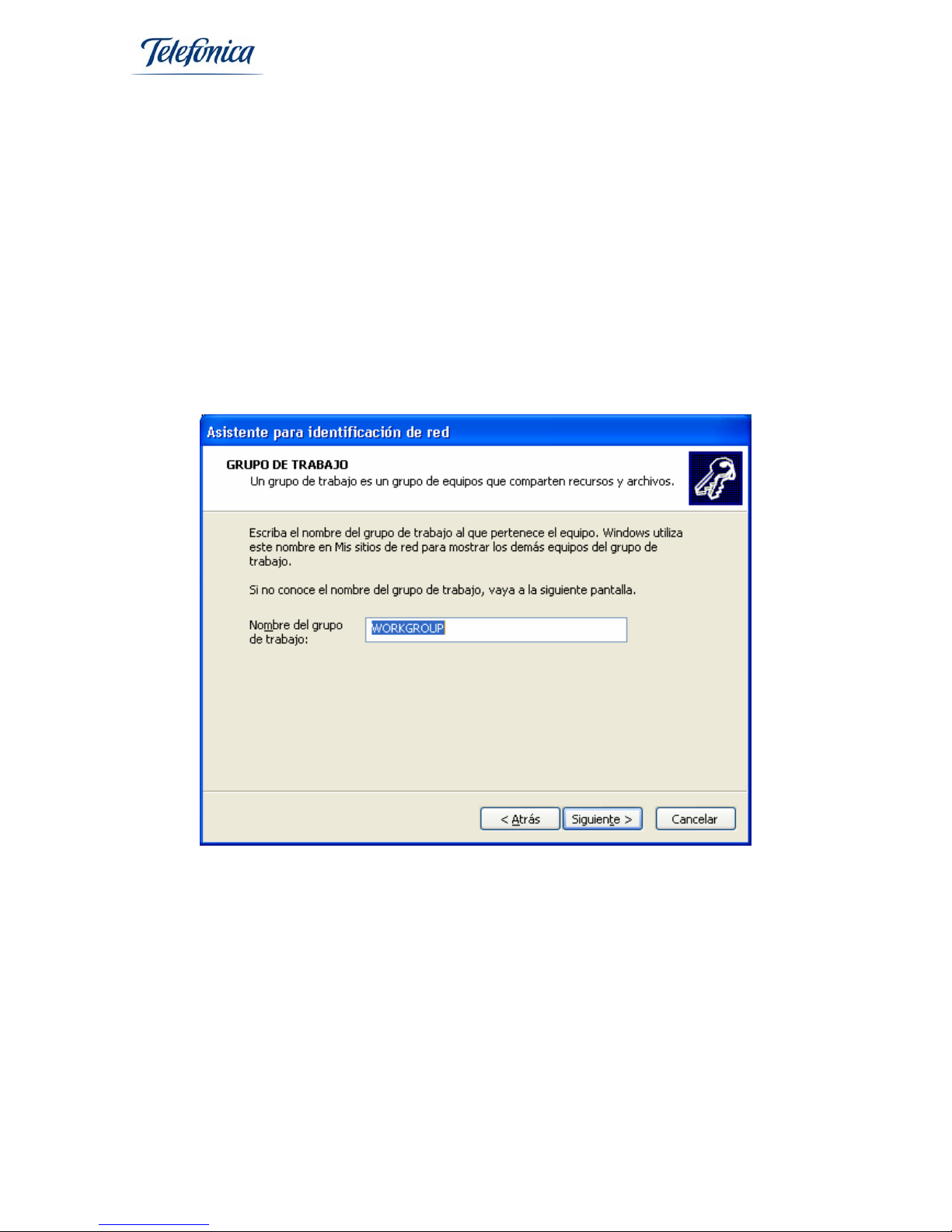
- Specify the same work group in all of the computers that are integrated in the
wireless network. Example for Windows XP
You should share a resource (one or various disk drives, one or various folders, one or
various printers, etc.). Consult the operating systems documentation to obtain more
information on how to share resources.
5.3. - De-installation of the Monitor de Red Inalámbrica.
The Monitor de Red Inalámbrica is an application that controls and supervisees the
operation of your network, although it is not strictly essential for operation of your
wireless installation. You can de-install this application easily without any problems
whilst your PCMCIA Card is still installed.
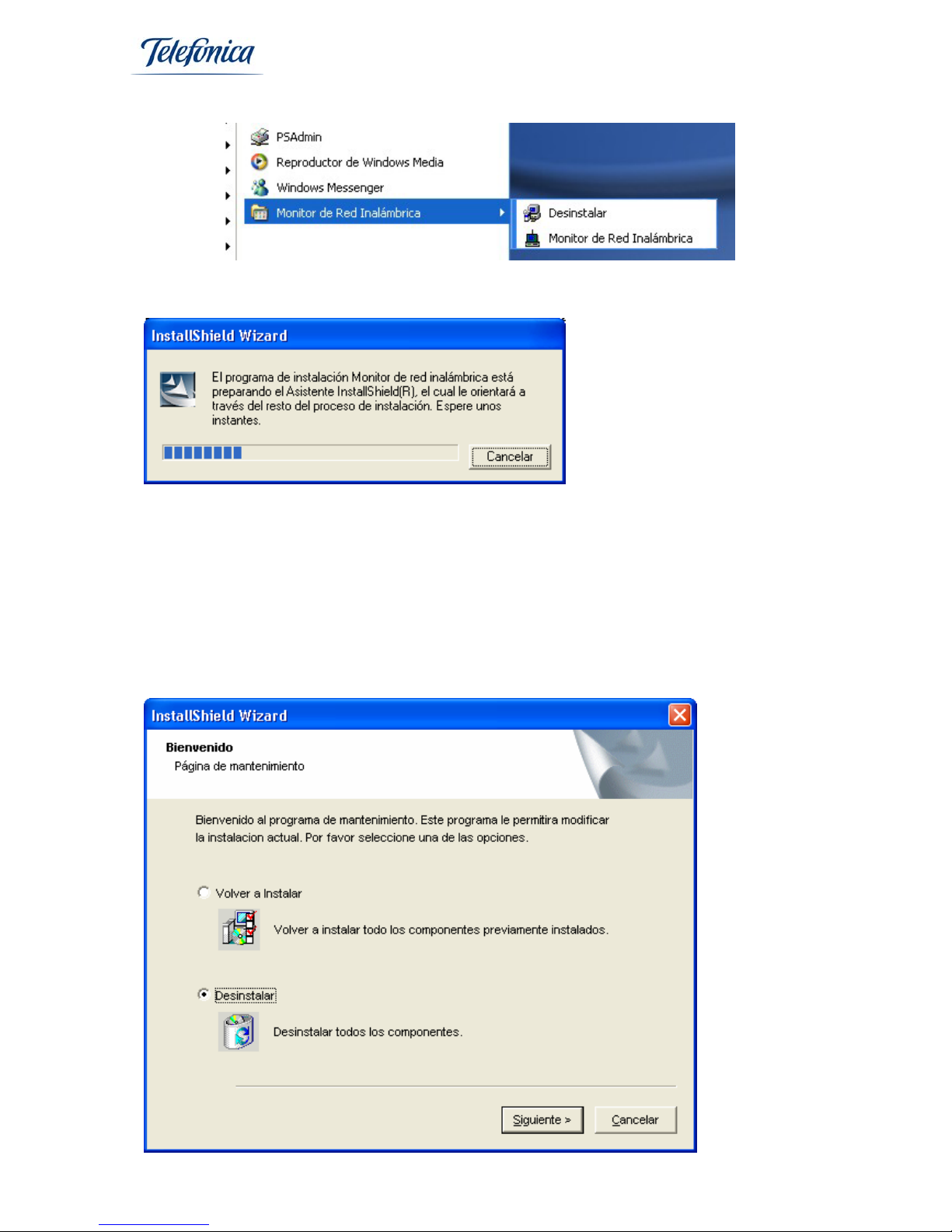
De-installation
Select: Start -> Programs -> Monitor de Red Inalámbrica -> Desinstalar
Page 28
Wireless USB Adapter
User Manual
Equipamiento ADSL Inalámbrico Page 28
The de-installation programme will start:
The programme will ask you to select one of two options:
- Volver a instalar. Use this option if you accidentally erase any of the files that
make up the Monitor de Red Inalámbrica.
- Desinstalar. Erases all of the Monitors programmes components. This does not
de-install any drivers of the USB Adapter, which will carry on working.
The aspect of the select screen:
Page 29
Wireless USB Adapter
User Manual
Equipamiento ADSL Inalámbrico Page 29
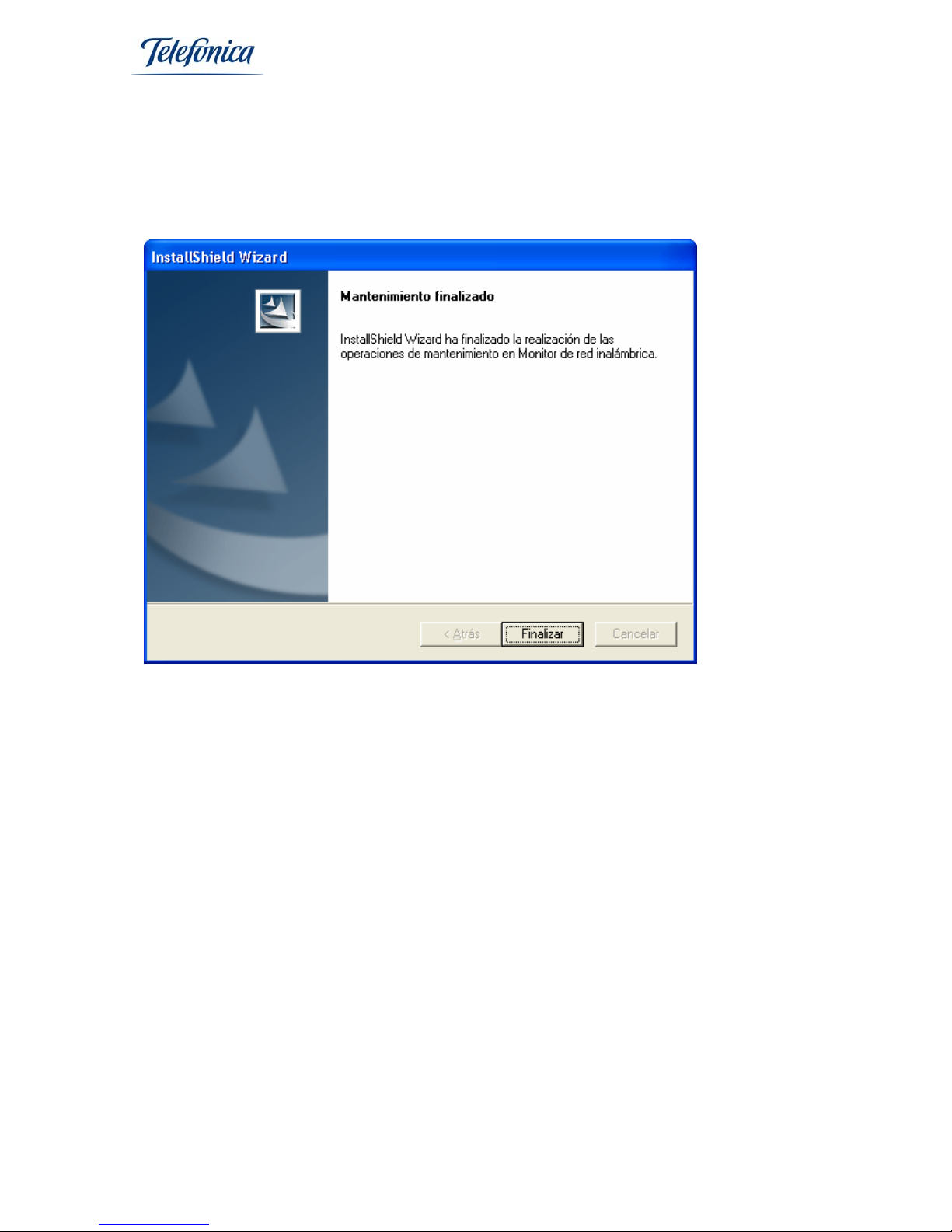
Select “Desinstalar” and press “Siguiente”. The programme will close the Monitor de
Red if it still running when you give the order and will de-install from the system,
When the de-installation has finished, the system will show a screen confirming the
conclusion of the maintenance. In Windows 98 y ME the system will ask you to restart
your PC.
Important Note: For the USB Adapter to work properly without the Monitor
Inalámbrico, it is necessary to configure the IP parameters. Consult your operating
systems manual to obtain information on how to do this.
6. - USAGE OF THE WIRELESS CONNECTION
In general the wireless Base Units are permanently switched on, this way the wireless
connection is constant.
Each time you start-up your PC that has a wireless client installed and taking into
account that your operation parameters are correctly configured, your PC will
automatically connect to your Base Unit.
Use the Monitor de Red Inalámbrica to supervise, configure and maintain your wireless
connection. Consult section “7.- Trouble shooting” if you detect an abnormality in the
functionality.
6.1 User Profiles
The Monitor de Red Inalámbrica application permits you to be able to use your wireless
PCMCIA Card with any other wireless network base on the standard 802.11b. If you
visit different wireless environments, you can create profiles for all of these networks.
Page 30
Wireless USB Adapter
User Manual
Equipamiento ADSL Inalámbrico Page 30
If or when you return to these wireless environments, you only have to connect to the
profile that you have previously configured (with the operation mode, WEP encryption,
IP configuration) and you are ready to work with this network. NOTE: If your PC has the
operating system Windows 98 first edition installed. It is necessary to configure the IP
parameters manually. For this, please consult the documentation of the operating
system.
To create a new profile:
Please consult section “5.- Monitor de Red Inalámbrica Configuration” in this user
manual. This section gives you the complete process in detail of how to create a new
profile.
To edit an existing profile:
Select the profile you wish to edit and press the button “Editar”. Here you can select all
the parameters that you wish to modify.
7. - TROUBLESHOOTING
7.1 Common Problems
Following you will find a list of the most common problems that you may find when
you use the wireless USB Adapter. Before calling the customer service centre, please
look first to see if your symptoms are explained below.
Windows cannot detect the USB Adapter.
Cause: Connection or installation problems
Solution:
- Make sure the USB Adapter is correctly connected to the USB port
- Make sure the USB is activated in the BIOS of your PC.
- If the installation was cancelled prematurely. It is possible that the device is not
activated, de-install and reinstall following step by step the process described in
this manual.
Page 31

Wireless USB Adapter
User Manual
Equipamiento ADSL Inalámbrico Page 31
The light indicator (LED) on the adapter is not lit
Cause: The USB Adapter cannot become active
Solution:
- Test the status of the driver (see section “7.2.- Driver status”). If the driver has
not been properly installed, the device can never become active. It is also
possible that the USB Adapter is causing a conflict with another device that is
installed, try changing the USB port of the USB Adapter.
The Monitor de Red Inalámbrica shows a very low connection signal
Cause: The signal is affected by obstacle and radio interference.
Solution:
- Change the direction of the antennas, both in the Base Unit and the USB
Adapter. Try moving your USB Adapter to find a better signal position.
- The proximity of other electrical equipment can affect the signals emitted by
the antennas; move the Base Unit and USB Adapter away from cell phones and
large metal objects that could influence the strength of the wireless signal.
- Interference can be caused by a wireless network in the vicinity that has the
same channel configured. You can test this by using the Monitor de Red
Inalámbrica, the option “Redes Disponibles” tells you if there is another wireless
network within your wireless signal range. If you find a wireless network within
your signal range, change the channel of the Base Unit. Refer the user manual
for the Base Unit for channel reconfiguration; also this user manual will give
you recommendation on the separation between channels.
The adapter cannot connect to the Base Unit (LED flashing)
Cause: Insufficient signal or signal interference.
Solution: See comment above.
Cause: The Base Unit is turned off.
Solution: Check the power supply of your Base Unit.
Cause: Parameter errors in the user profile.
Solution:
- One of the most common incidents is the typing error of the WEP encryption.
From the Monitor de Red Inalámbrica, make sure the parameters configured in
the user profile are correct, primarily the network name and the WEP
encryption.
Page 32
Wireless USB Adapter
User Manual
Equipamiento ADSL Inalámbrico Page 32
The wireless network works but I do not have Internet access
Cause: Incorrect IP configuration.
Solution:
- If you have installed Windows ME, Windows 2000 or Windows XP, make sure
the IP configuration within your user profile is correct. (If your operating system
is Windows 98, jump to the next comment “IP Configuration under Windows
98”). In the following way:
Page 33
Wireless USB Adapter
User Manual
Equipamiento ADSL Inalámbrico Page 33
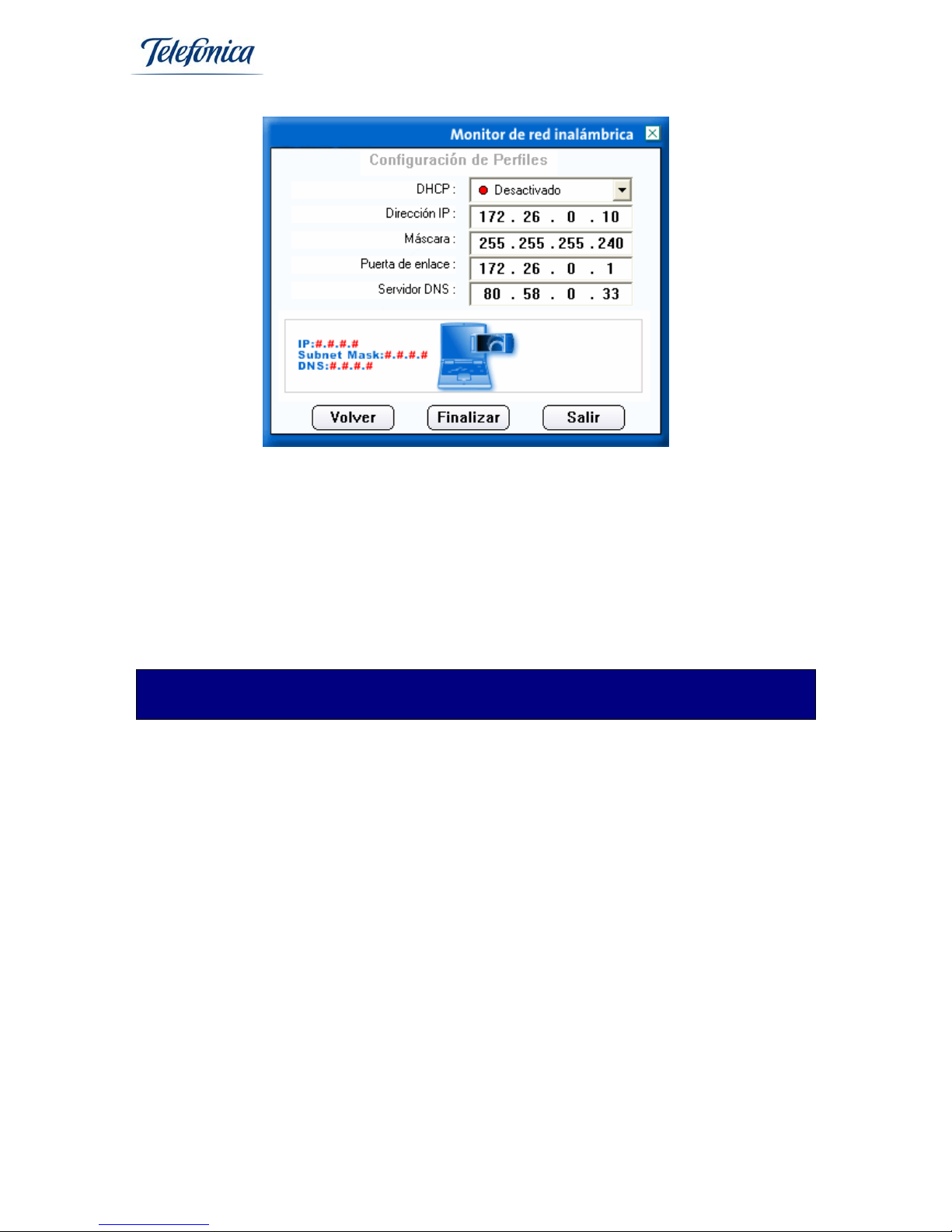
Parameters:
- DHCP: Select “Desactivado” if you want to give the address manually. Select
“Activado” if you have a DHCP server in your network. If you select
“Desactivado” you need to fill out the rest of the spaces in this screen.
- Dirección IP. The IP address of your PC. Must be within the same range as the
LAN IP address of your Modem/Router for Internet access.
- Máscara: Must be the same as your Modem/Router.
- Puerta de Enlace: The LAN IP address of your Modem/Router.
- Servidor DNS: Provided by Telefónica.
IP configuration for Windows 98
(The IP configuration screen does not appear in the network monitor)
Cause: Windows 98 does not support the automatic IP address configuration via the
“Monitor de red Inalámbrica” application, It is always necessary configure manually.
Solution: To configure the IP parameters manually, please use the following steps:
Say that we have a Modem/Router with the following network:
- IP Address: 172.26.0.1
- Subnet Mask: 255.255.255.240
And we want to configure our PC to have Internet access via this Modem/Router.
The IP addresses that we can assign to our PCs are 172.26.0.2 to 172.26.0.14 and the
subnet mask will be the same in all of them and for the router: 255.255.255.240
To way to configure the addresses in your PCs that work under Windows 98 is the
following:
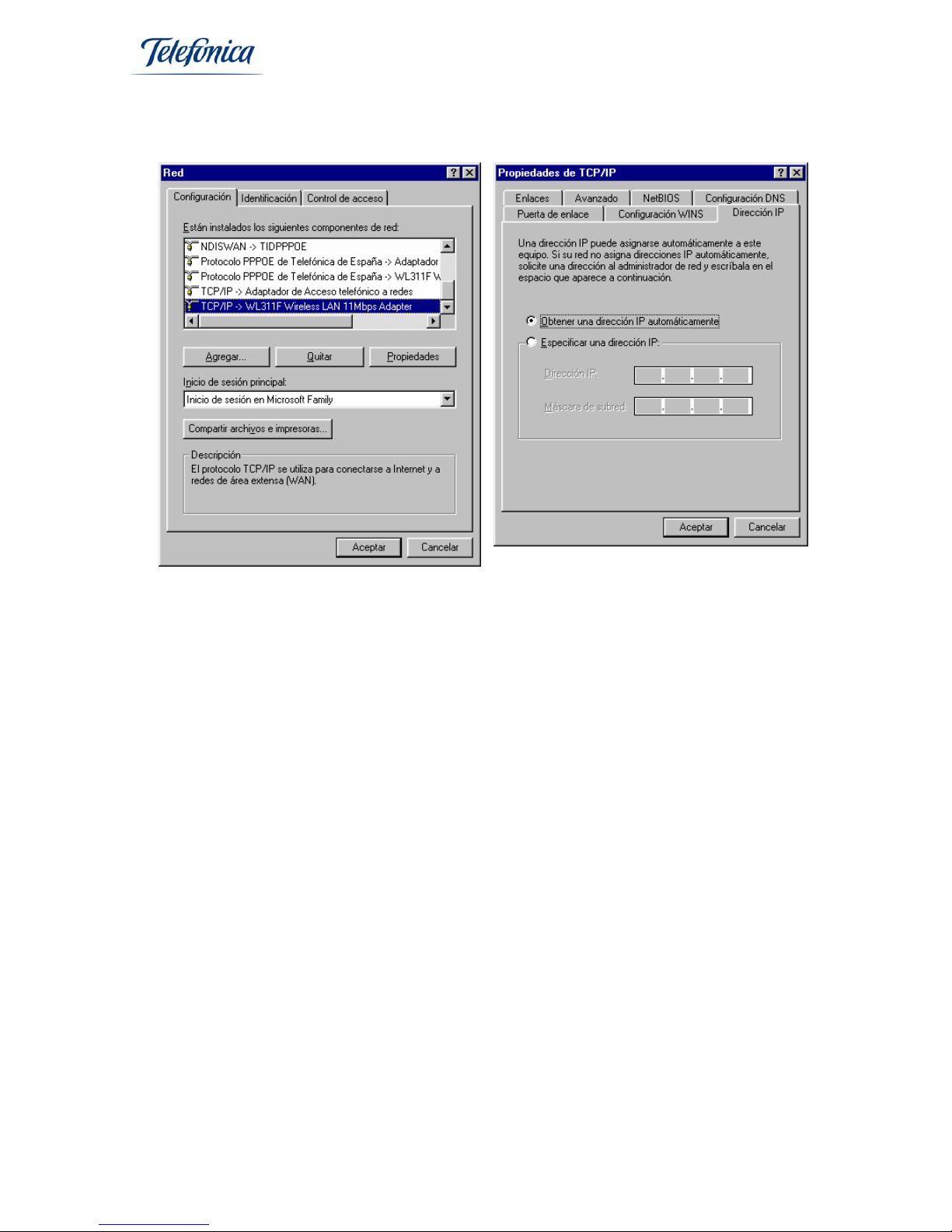
- Go to the “Control Panel” (Start-> Settings -> Control Panel).
- Select “Network”.
Page 34
Wireless USB Adapter
User Manual
Equipamiento ADSL Inalámbrico Page 34
- Locate the TCP/IP associated with your wireless USB Adapter (TCP/IP -> WL382F
Wireless LAN 11Mbps Adapter) and press “Properties”.
In this screen you can configure your IP parameters. If you have a DHCP server in your
network, such as a Modem/Router with this service activated, leave the configuration
as it is shown above. This way the PCMCIA will obtain an IP address automatically. If
you do not have a DHCP server on your network or you are not sure, consult annex A to
check your TCP/IP configuration of your PC.
If you want to configure a network base on the TCP/IP protocol using specific IP
addresses for each user, consult windows help information to obtain more information
on IP addresses and subnet masks.
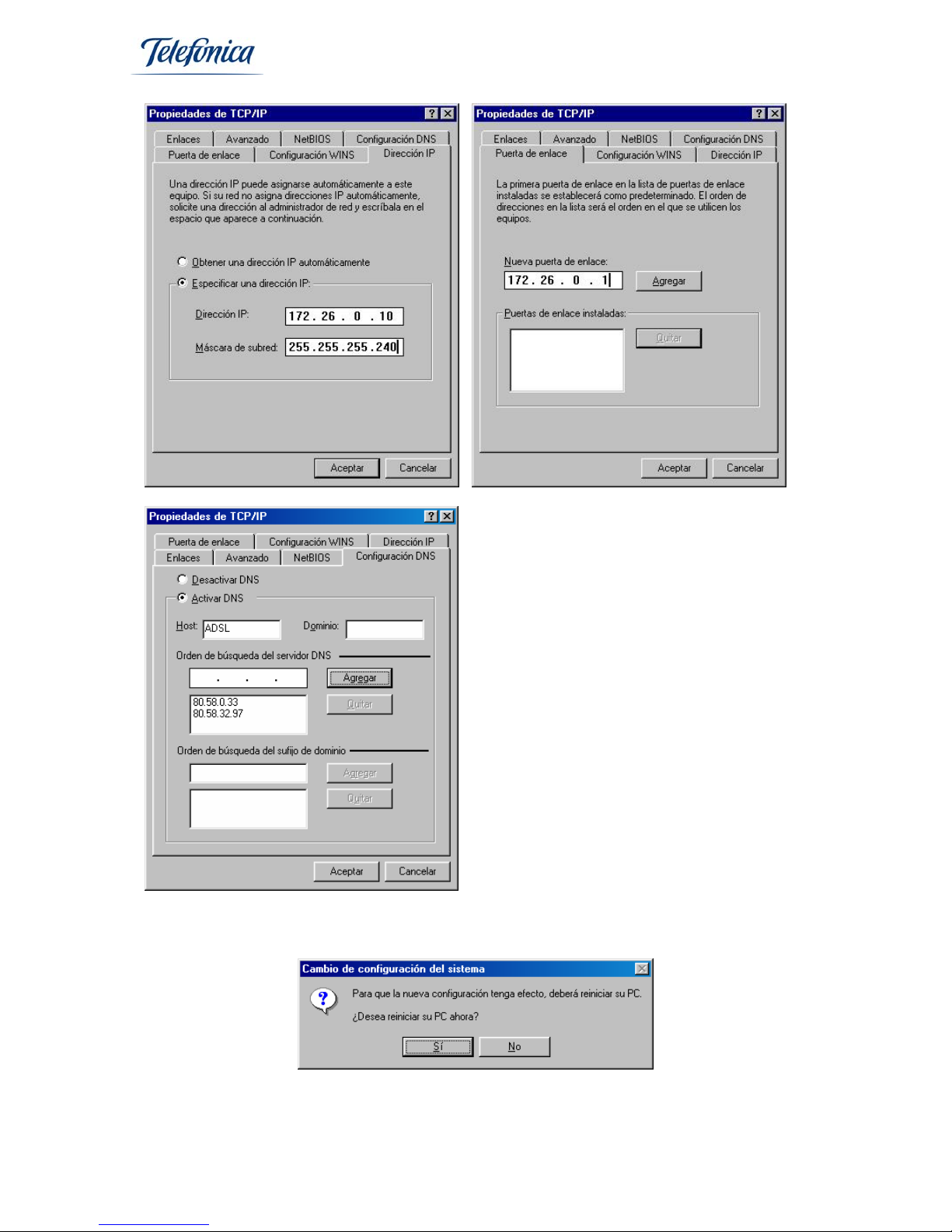
For manual TCP/IP configuration, select “Specify an IP address” in the screen that
indicates “IP address” and fill in a valid and unique IP address (for example
172.26.0.10) and a subnet mask according with one used in your network (in our
example 255.255.255.240).
Click on the option “Gateway”. In this screen you need to specify the local IP address of
your Modem/Router. Key in the IP address in the box “New Gateway” and press “Add”
(in our example the router has the IP address 172.26.0.1).
Page 35
Wireless USB Adapter
User Manual
Equipamiento ADSL Inalámbrico Page 35
We also have to configure the DNS
parameters. Click on the option “DNS
Configuration” and key in the information
required:
Select “Activate DNS” and insert the name
of your PC in the box “Host”. This name is
informative; you can use the same name as
your computer if you wish. Next insert the
name of your Domain Name Server (DNS)
given by Telefónica in the “DNS Server
search order” and press “Add”.
Once you have finished the IP
configuration, press “Accept”. Window will
ask you if you wish to restart your PC:
Press “Yes” to restart and save the changes made.
Page 36
Wireless USB Adapter
User Manual
Equipamiento ADSL Inalámbrico Page 36
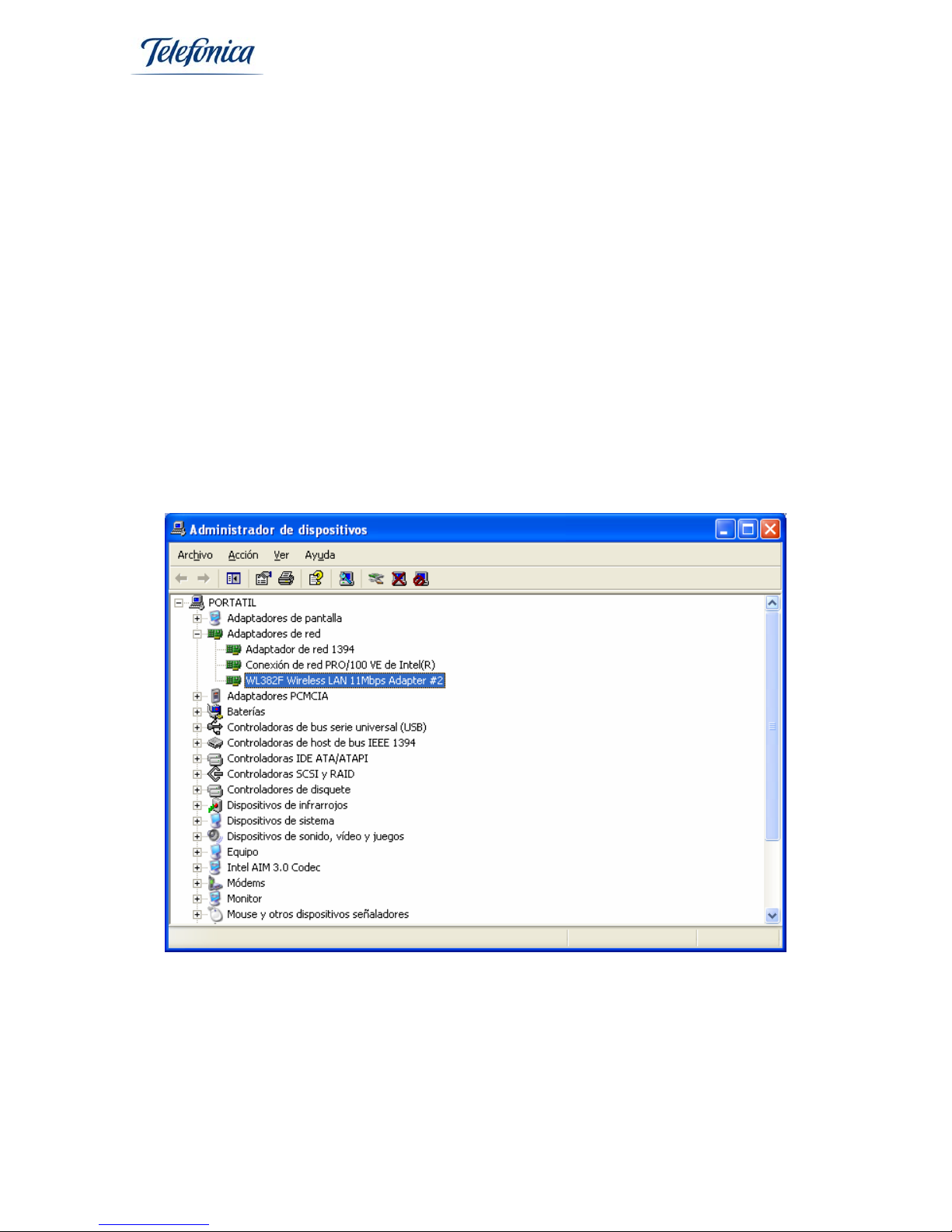
7.2. - Driver Verification
If your wireless USB Adapter does not activate (LED permanently turned off), make
sure the drivers of the device are correctly installed. To proceed with the verification
follow these steps:
- In Windows 98/ME/2000: Select Start-> Settings-> Control Panel. In the Control
Panel window, select “System”. Then “Device manager” and “Network
Adapters”.
- In Windows XP: Select “Start” and right click on “My PC”, left click on
“Properties”. Next select the option “Hardware”, press the button “Device
manager” and select “Network adapters”.
-
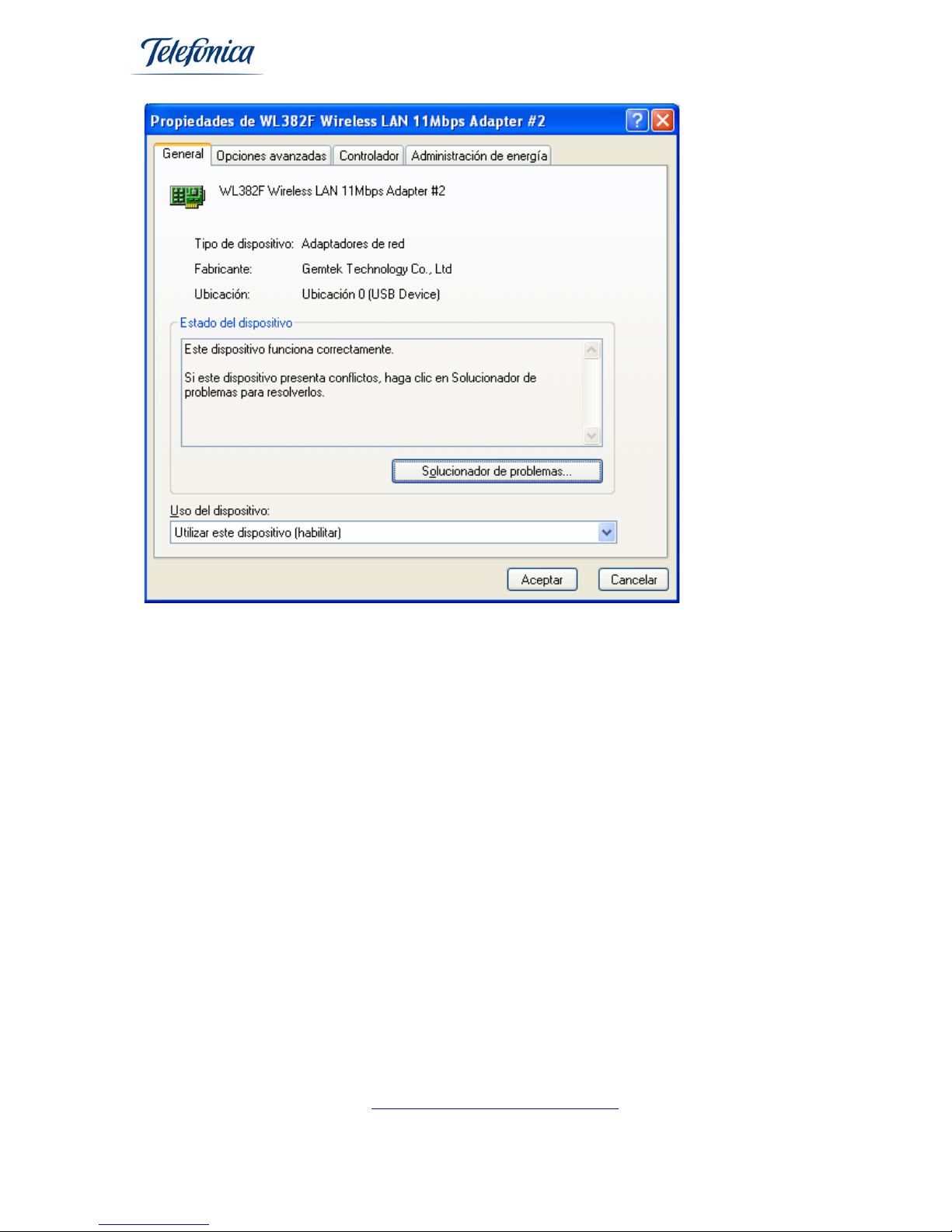
Look for the Wireless USB Adapter, identified as:
“WL382F Wireless LAN 11Mbps Adapter”
Right click on the card and select “Properties”. The status of the device should read
“This device is working properly”.
Page 37
Wireless USB Adapter
User Manual
Equipamiento ADSL Inalámbrico Page 37
In the case that this message is not given, the installation was not successful. Deinstall the device and repeat the installation process again according to this user
manual.
7.3 Customer Service
The customer service is available by telephone and the Internet.
Help line
You can call the customer service on 902 357 000 for whichever query that you may
have.
If you do not know the IP addresses that correspond with your ADSL service, call 900 50
20 10. This is an automated service that will inform you of the IP configuration
corresponding with your ADSL access.
Help on the Internet
All the information about ADSL can be found in the area: Todo ADSL in
telefonicaonline.com:
URL: www.telefonicaonline.com/adsl
Page 38

Wireless USB Adapter
User Manual
Equipamiento ADSL Inalámbrico Page 38
Other helpful addresses:
1. – Consult the IP addresses associated with your ADSL line
Description: Programme that will give you your ADSL configuration data via the
Internet.
Username and password of telefonicaonline.com needed (Free).
URL: www.telefonicaonline.com/datosadsl
2. - Guides and manuals for self install kits.
Description: Customer support for self install kits with all the guides and manuals for
all the kits.
URL: www.telefonicaonline.com/adsl/ayudakit
3. - Reconfiguration and software update area.
Description: In this area you can download the latest software upgrades and
reconfigurations for ADSL Routers, programmes and configuration manuals for ADSL
Routers, the easiest way to make the most of your broad band router.
URL: www.telefonicaonline.com/adsl/descarga
4. - ADSL expert area.
Description: Information and tutorials of the ADSL applications and utilities to make
the most of your broad band line.
URL: www.telefonicaonline.com/adsl/experto
5. - For games and applications that require single user configuration.
Description: This tool allows the user to configure their modem to single user.
URL: www.telefonicaonline.com/adsl/descargamonopuesto
CUSTOMER SERVICE CENTRE FOR TELEFÓNICAS ADSL PRODUCTS
Teléfono: 902 357 000
CUSTOMER SERVICE FOR PRODUCTS THAT ARE WITHIN THEIR GUARANTEE
Teléfono: 902 194 492
Page 39
Wireless USB Adapter
User Manual
Equipamiento ADSL Inalámbrico Page 39
8. - ACROBAT READER 5.0 INSTALLATION
Acrobat Reader is freeware application that will allow you to read and print all the
documents enclosed in the CD-ROM provided with your wireless device. You will find
the application in the directory \ACROBAT in your CD-ROM. For your comfort we have
included version 5.0 in Spanish and English. If you need a different version, you can
download it from the website www.acrobat.com.
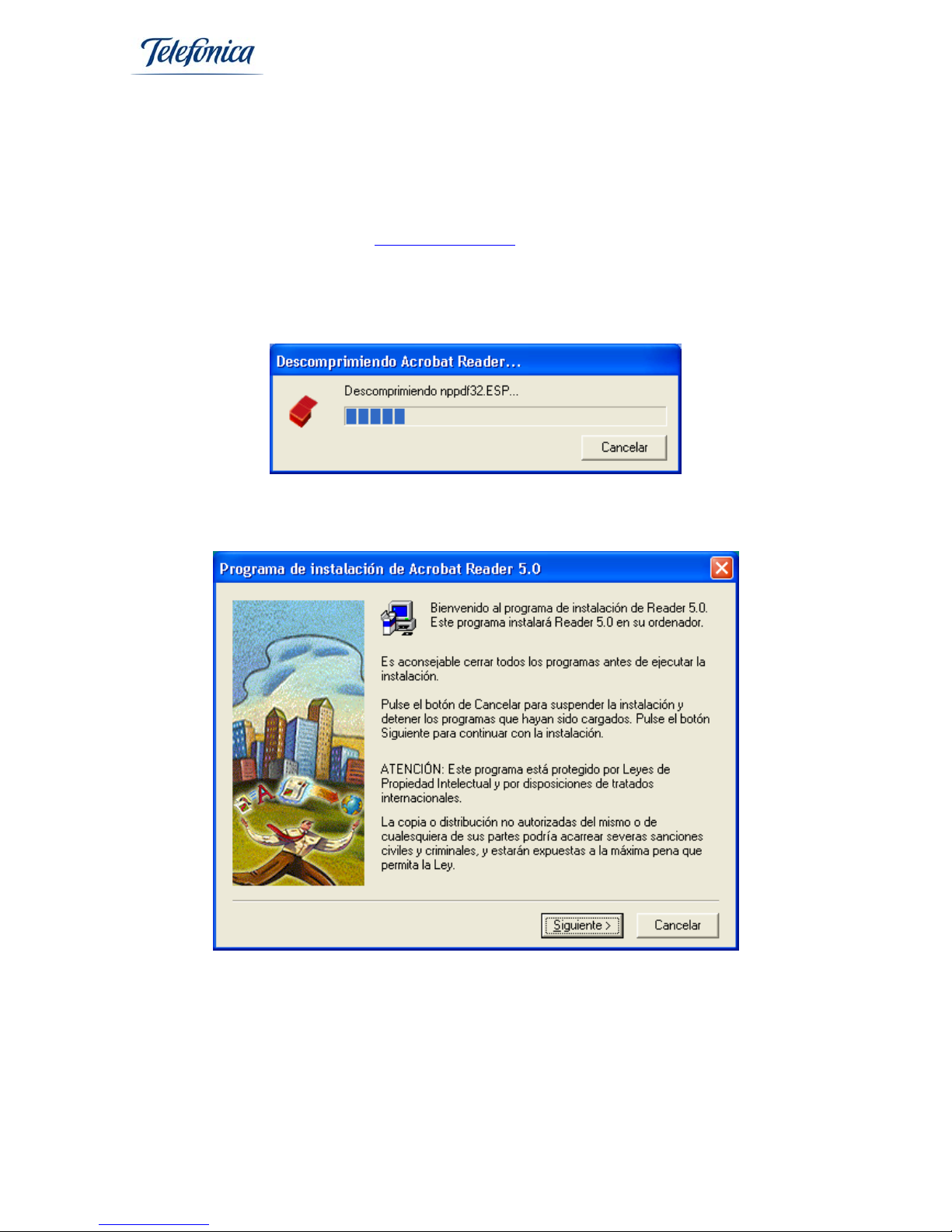
To proceed with the installation of this software, double click on the file called
“D:\ACROBAT\AR500ESP.EXE” (Presuming that your CD-ROM corresponds with the D
drive). The decompression of the file will start as shown below:
After the decompression, the installation programme of the Acrobat Reader 5.0 will
start up showing the screen below:
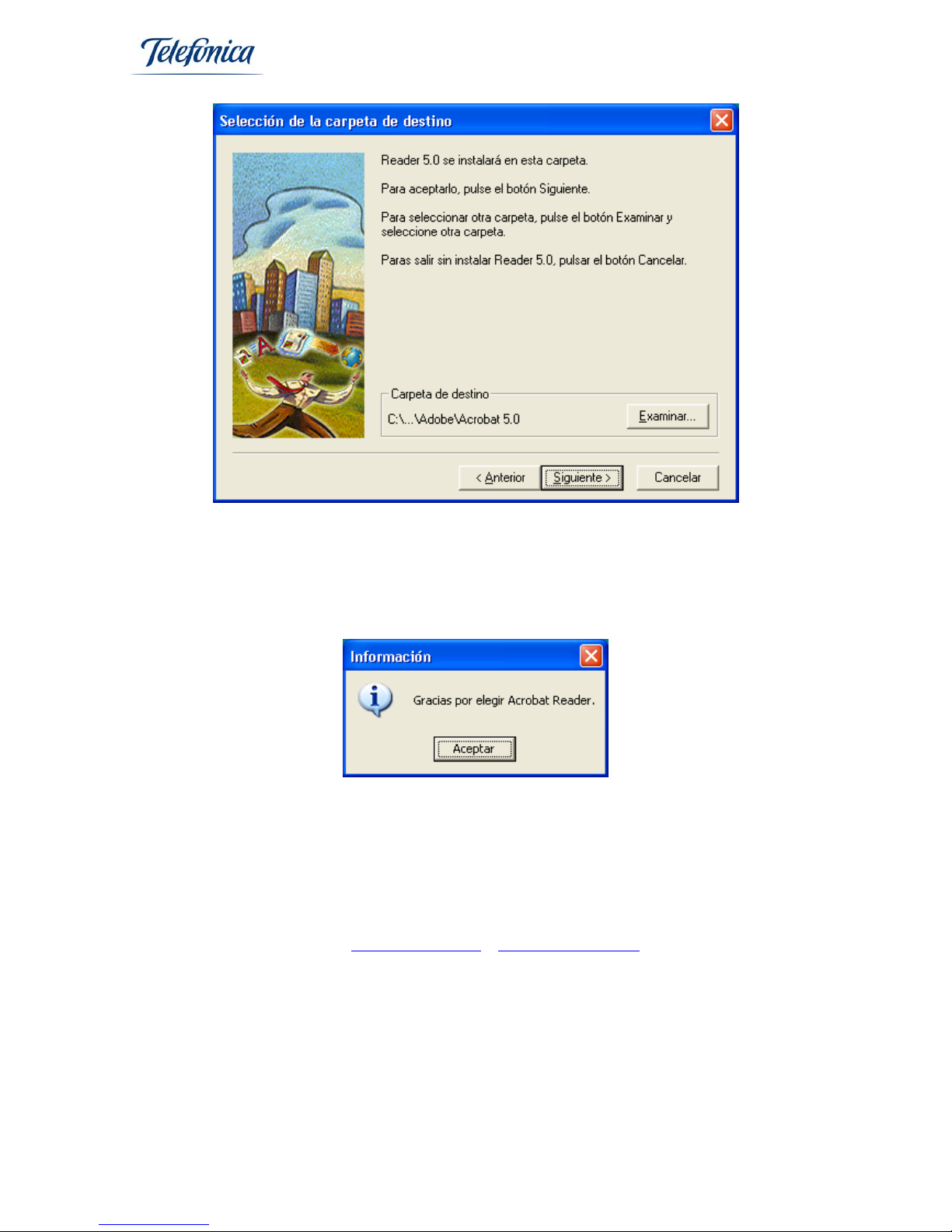
Press “Siguiente” to continue the installation. The assistant will ask you to choose a
folder to install the application:
Page 40
Wireless USB Adapter
User Manual
Equipamiento ADSL Inalámbrico Page 40
If you wish to install the application into an alternative folder, click “Examinar”, if you
want to conserve the default folder, click “Siguiente”.
The programme will copy the files into the folder specified previously, once the files
have stopped being copied, the assistant will notify you with the following message:
Press “Aceptar” to finish the installation of Acrobat Reader 5.0. The programme will
create an icon on your desktop for a quick start up of the application. Your PC is now
able to open and print documents with the file extension PDF.
For more information about this application, please consult the help website of the
manufacturer:
www.adobe.com
o www.acrobat.com
Page 41
Wireless USB Adapter
User Manual
Equipamiento ADSL Inalámbrico Page 41
ANNEX A –TCP/IP Testing
If you are not sure about the TCP/IP configuration in your PC, there are some very
simple steps that check if you have:
• DHCP server (Automatic IP assignation)
• Fixed IP address
• Connection with other devices on your local area network(LAN)
• Internet access
The following tests are made with MS-DOS, to open this window take the following
steps:
Select:
Windows 98/ME: Start -> Programs -> MS-DOS. The MS-DOS window will open.
Windows 2000/XP: Start -> Programs -> Accessories -> command prompt. The
command prompt window will open.
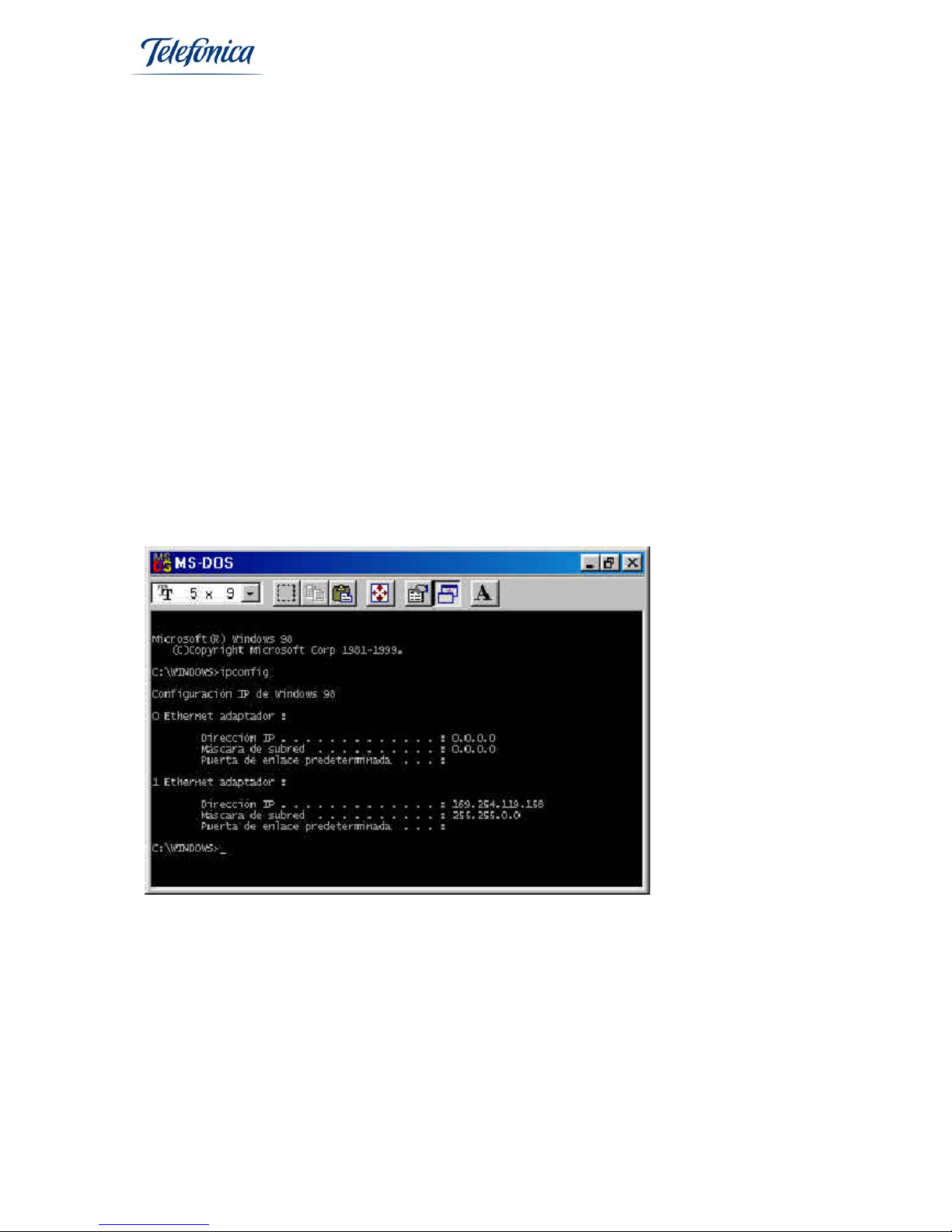
In this new window we are to key in the command “ipconfig”. This screen will show
the TCP/IP parameters of all the network adapters.
If your network adapter is configured to obtain an IP address automatically, to renew
the IP configuration, key in the following commands:
Windows 98/ME Windows 2000/XP
ipconfig /release_all
ipconfig /renew_all
ipconfig /release
ipconfig /renew
If the process fails, the screen will show the message “DHCP server not available:
renewing adapter”. In this case check that the connection with your DHCP server is
correct and that the DHCP server is activated.
Page 42
Wireless USB Adapter
User Manual
Equipamiento ADSL Inalámbrico Page 42
Check the TCP/IP connection
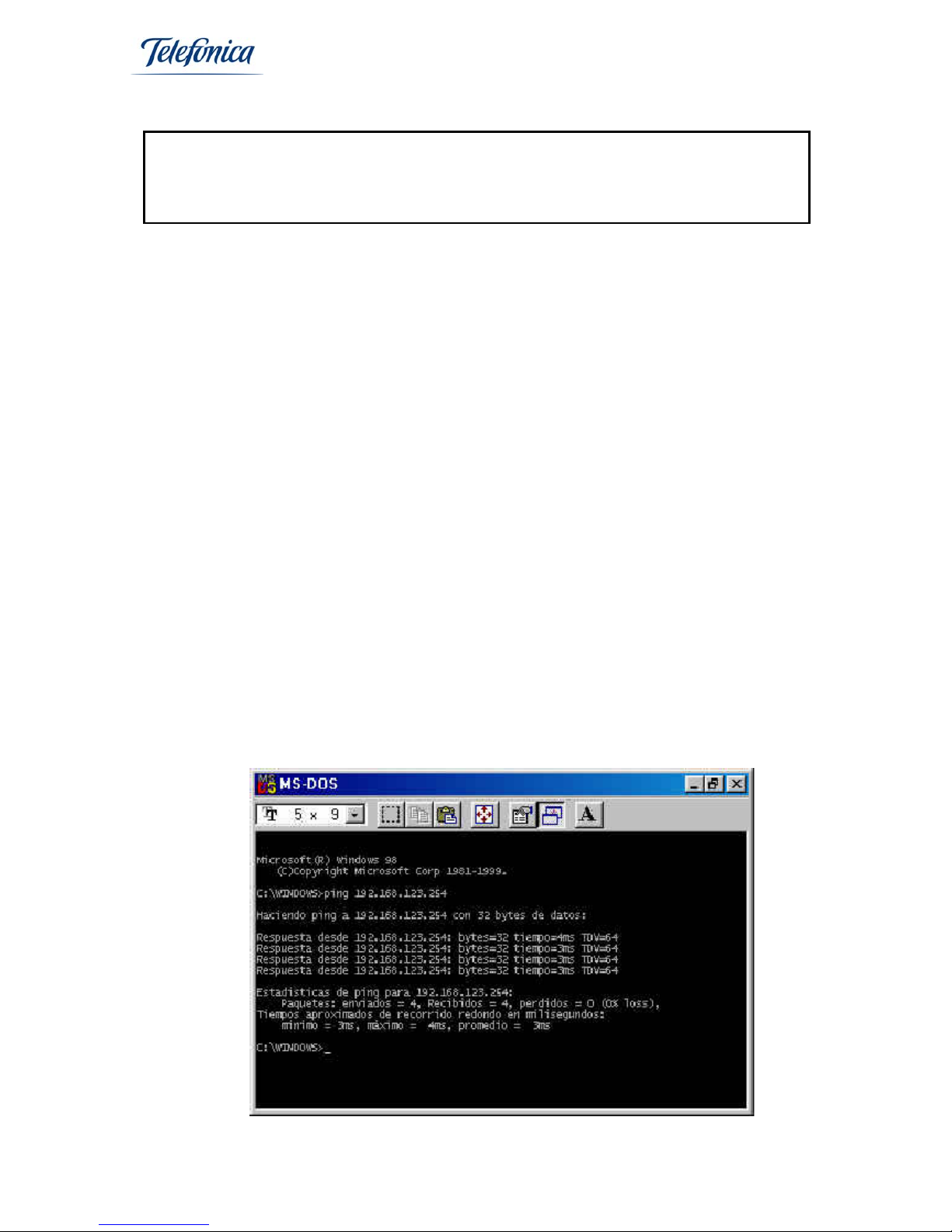
The command “ping” is used to test the TCP/IP connection with another device in the
same LAN, both for cabled and wireless connections.
To be able do this it is necessary to know the IP address of the device that you wish to
connect to.
To give the “ping” command, take the following steps:
Select:
Windows 98/ME: Start -> Programs -> MS-DOS. The MS-DOS window will open.
Windows 2000/XP: Start -> Programs -> Accessories -> command prompt. The
command prompt window will open.
In this new window key in the command “ping xxx.xxx.xxx.xxx”, xxx.xxx.xxx.xxx being
the IP address of the device to which you want to connect to.
For example, to check the connection with your Base Unit and using the default IP
address, we key in: “ping 192.168.5.100”
And to check the connection with the Wireless Modem/Router, using its default IP
address, we key in: “ping 192.168.1.1”
If the connection is correct, in very few seconds 4 messages appear with an answer
from the address called:
Attention
This command may differ in different versions of Window.
Key in ipconfig /? To see the options that corresponds with the operating system of
y
our PC.
Page 43
Wireless USB Adapter
User Manual
Equipamiento ADSL Inalámbrico Page 43
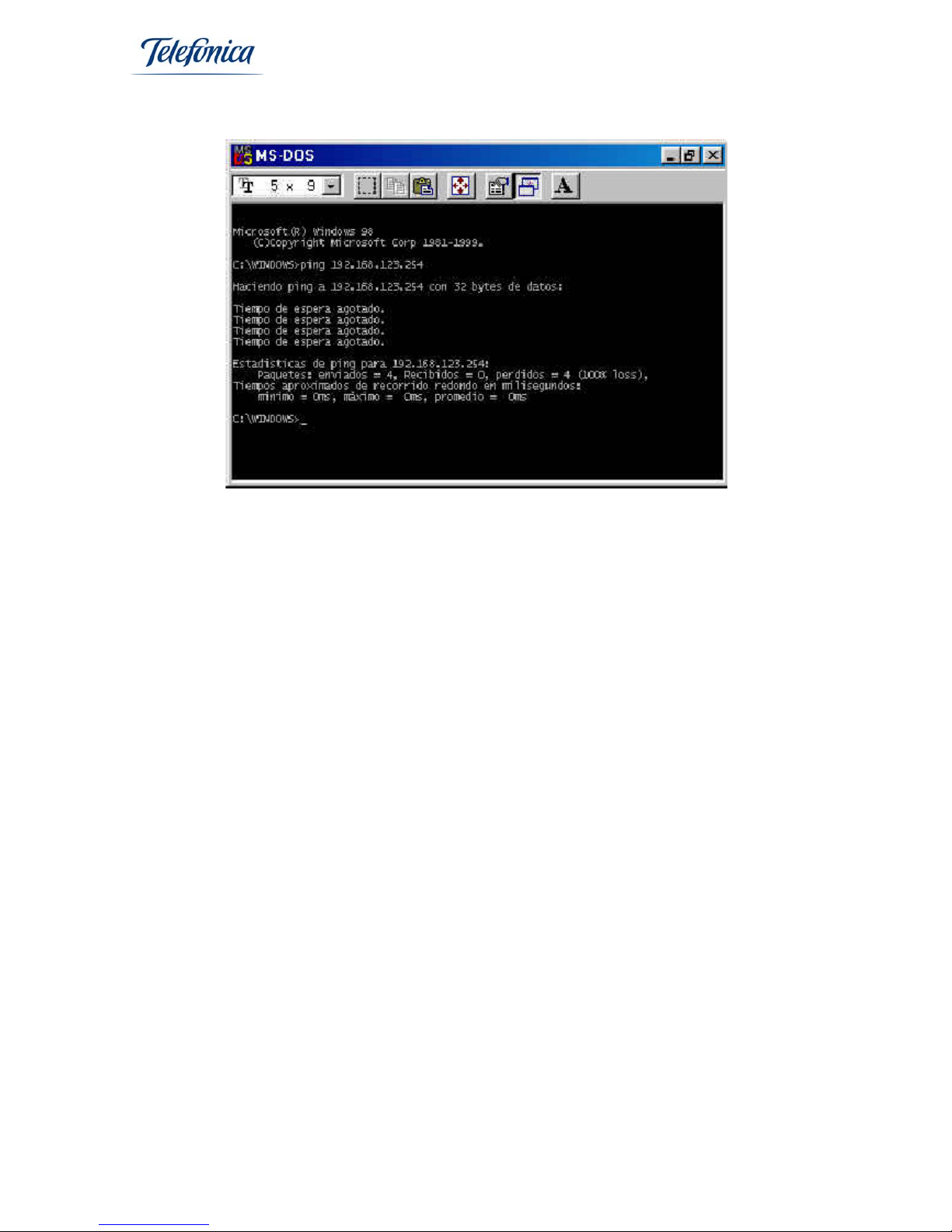
If the connection is not correct, the following messages will appear:
Page 44

Wireless USB Adapter
User Manual
Equipamiento ADSL Inalámbrico Page 44
ANNEX B – Declaration of Conformity
Product: Adaptor USB Inalámbrica
Model WL382C
Manufacturer Gemtek Technology CO., Ltd
Made in Taiwan
Spanish Representative: IDEAL TECHNOLOGY
ELECTROMAGNETIC AND IMMUNITY COMPATIBILITY
The products previously aforementioned have been tested for their
electromagnetic compatibility according to the la Directive 89/336/EEC of the
European council. The conformity of this regulation is based on the compliance
of the following standards:
EN55022:1998 limits and methods of measuring the radio interferences. This
equipment complies with class B limitations.
EN55024:1998 the generic immunity standard of electromagnetic compatibility:
residential, commercial and light industrial ecology (January 1992). With IEC
801-2 (1984); IEC 801-3 (1984); IEC 801-4 (1988).
SECURITY (Low voltage committee)
The products previously aforementioned have been tested for their electrical
security according to the Directive 72/23/EEC of the European council with the
correction 93/68/EEC on electrical equipment security. The conformity of this
regulation is based on the compliance of the following standards:
EN61558-1:1997
EN61558-2-6:1997
EN61558 A1:1998
IDEAL TECHNOLOGY
Domingo B. Téllez Rojo
Director General
C/ Vicente Caballero 10
28007 MADRID
ESPAÑA
 Loading...