

Page 1
Business
Centrex
1 888 télébec
telebec.com/business
User’s Guide
Analog Telephone
Page 2

Access Codes for Centrex Functions
Call Forward - Busy/No Answer
Call Forwarding
Call Pickup
Call Screen
Call Trace
Call Waiting
Description of Tones/Signals
External Calls
Hold
Internal Calls
Last Number Redial
Message Waiting
Per-Call Blocking
Speed Calling
Speed Calling
Code Identifiers
Long List
Speed Calling
Code Identifiers
Short List
Three-Way Conference
Consultation Hold
Transfer
7
6
5
1
5
3
4
6
1
1
1
3
4
3
2
8
8
4
Index
Page 3
External Calls
(local and long-distance)
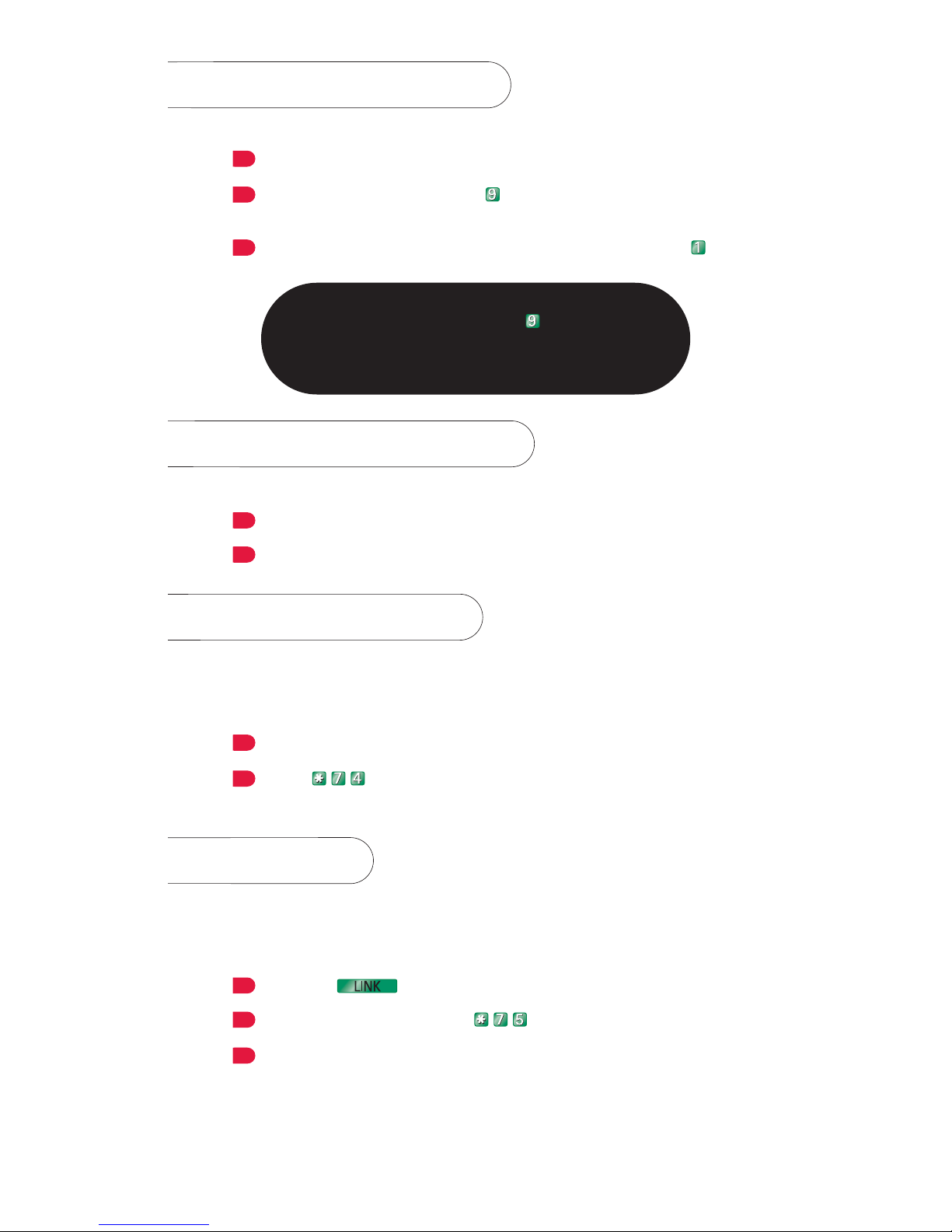
For a call via the public network.
Pick up the handset.
Enter the dial out code (usually )
Not required for Basic Business Bundle (BBB).
Dial the number you wish to call. For a long-distance call, dial
and then the area code, followed by the number.
Note:
Because a dial out code (usually ) is necessary to
access the public network, all systems or equipment that
use preprogrammed numbers must be reprogrammed
(ex.: alarm systems, fax machines, etc.).
Internal Calls
For a call within the system.
Pick up the handset.
Dial the extension you wish to call (usually 4 digits).
Call Pickup
Allows you to use your own telephone to pick up a call to another telephone in your group.
When another phone in your group rings:
Pick up the handset of your phone.
Enter .
You are on the line with the caller.
Hold
Allows you to place a call on hold from a phone that does not
have a hold button.
To place a call on hold:
Press the button (or the receiver button).
At the special dial tone, enter .
Hang up when you hear the confirmation tone.
The call is on hold at your telephone.
LINK
3
2
1
212
1
3
2
1
1
Page 4
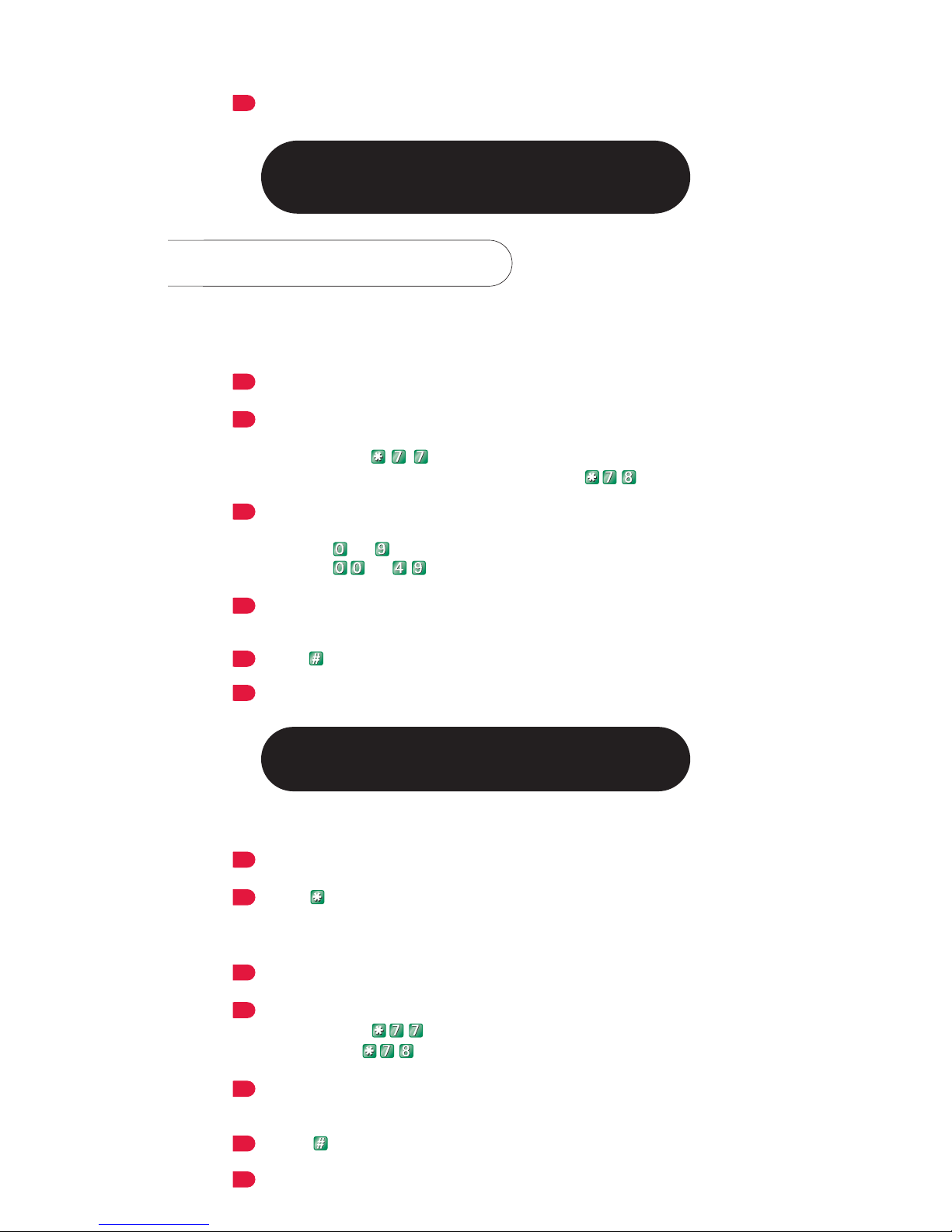
To retrieve a call on hold:
Pick up the handset.
You are back on the line.
Note:
If the call is not retrieved within three minutes,
it will automatically ring again (ring again signal).
Speed Calling
Allows you to assign a one or two-digit code to frequently called
numbers and store them in memory for easy dialing.
To store a number:
Pick up the handset.
Enter the access code for your Speed Calling list.
short list (available with Basic Business Bundle and
package A): .
long list (available with package B and C): .
At the special dial tone, enter the code identifier that you wish to
assign to the number to be stored:
Code to for the short list
Code to for the long list (maximum 30 numbers).
Dial the number you wish to store (maximum 24 digits), including
your dial out code (not required for BBB).
Press .
Hang up when you hear the confirmation tone.
The number is stored in memory.
Note:
Repeat these steps for each number you wish to store.
To call a stored number:
Pick up the handset.
Enter followed by the code identifier.
To delete a stored number:
Pick up the handset.
Enter the access code for your Speed Calling list.
short list: .
long list: .
Enter the code from your personal list assigned to the number you
wish to delete.
Press .
Hang up when you hear the confirmation tone.
5
1
4
3
2
2
1
1
2
3
4
6
5
1
2
Page 5
Last Number Redial
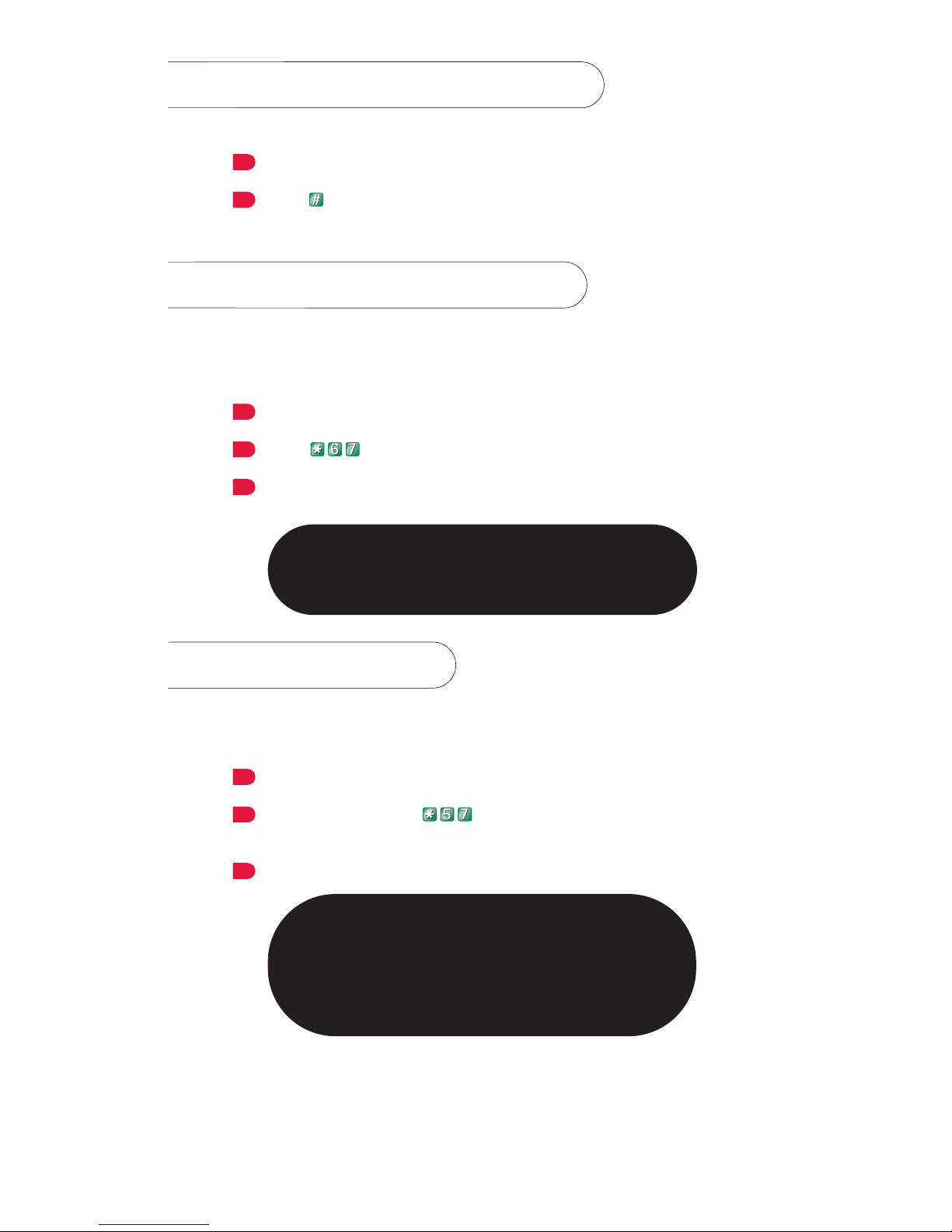
Allows you to automatically redial the last number dialed.
Pick up the handset.
Press twice.
The last number dialed is automatically redialed.
Per-Call Blocking
Prevents the person you are calling from seeing a display of your
name and number.
To block display of your name and number when you make a call:
Pick up the handset.
Enter ( (when required, dial out code -- usually 9).
When you hear the special dial tone, dial your dial out code
(if applicable) and the number you wish to call.
Note:
This prevents your name and number from displaying
for this call only. Repeat steps 1, 2 and 3 each time you
wish to block display for a call.
Call Trace
Allows you to put a trace on threatening or harassing calls.
Immediately after receiving the threatening or harassing call:
Pick up the handset.
At the dial tone, enter (when required, dial out code --
usually 9).
Hang up when you hear the confirmation tone.
Note:
The number, date and time of the call are recorded
at Télébec’s central office and can be communicated
to the proper authorities at the customer’s request.
However, Télébec is not authorized to give you
the number of the person who made the threatening
or harassing call.
3
3
222
111
3
Page 6
Message Waiting
This function lets you know when there is a new message in your
voice mailbox with a visual or audible indicator, depending on the
type of phone.
You have a new message when the light is flashing or you hear an
intermittent dial tone when you pick up the handset:
To listen to your message, follow the steps for retrieving voice mail.
Call Waiting
With this function, a special dial tone signals an incoming call while
you are already on the line. You can answer the second call without
disconnecting the first one.
The sound of 2 beeps when you are on the line means that you have
an incoming call. To answer the call:
Press (or the receiver button). This places the original call
on hold, and puts you on the line with the second caller.
To return to the first call, press (or the receiver button)
again.
Note:
Each time you press (or the receiver button)
the person you are talking to is placed on hold, and you
switch to the other call.
Three-Way Conference
Consultation Hold
Transfer
This function allows you to connect to a third party during a call.
Once you have reached the third party, you can either return to
the original call (Consultation Hold), add the third party to the
conversation in progress (Three-Way Conference) or transfer the
original call (Transfer).
To transfer a call, consult a third party or establish a three-way
conference when you are already on the line, first:
Place the first call on hold by pressing (or the receiver
button).
At the special dial tone, enter the dial out code (if applicable) and
the number you wish to reach. If the line is busy or there is no answer, press (or the receiver button) twice to return
to the original call.
When the third party answers, you have three options:
LINK2LINK1LINK
LINK2LINK
1
1
4
Page 7
Consultation Hold:
You can speak privately with the third party.
To return to the first call, press (or the receiver button)
twice.
Three-Way Conference:
Press (or the receiver button) again. The first person will be
added to the conversation.
Transfer:
Press (or the receiver button) again. This will connect the
first person.
Hang up.
Call Forwarding
This function lets you redirect all incoming calls to another
number.
To forward all incoming calls:
Pick up the handset.
Enter .
At the special dial tone, dial the extension to which you want calls
forwarded. For an outside number, enter your dial out code
(if applicable) followed by the number.
Hang up when you hear the confirmation tone.
Note:
While Call Forwarding is activated, you will hear
a short ring each time you receive a call.
To deactivate:
Pick up the handset.
Enter .
Hang up when you hear the confirmation tone.
You will receive incoming calls as usual.
Call Screen
Call Screen will divert up to 12 numbers you select to a polite
recorded message stating you are not available.
Pick up the handset.
Enter (when required, dial out code -- usually 9).
2
1
3
2
1
4
3
2
1
2
LINK1LINK
1
LINK
2
1
5
Page 8
Listen to the instructions.
Note:
If Call Forwarding has been turned on, incoming calls from
the numbers on your list wll still hear the special recorded
message and will not be automatically forwarded.
Call Forward - Busy/
No Answer
Allows you to redirect incoming calls when you are already on the
line or unable to answer (available with package A, B and C).
Call Forward-Busy / No Answer may already have been programmed
on your telephone. If necessary you can activate, deactivate and
enter the number to which you want calls forwarded at any time.
Call Forward – Busy (when you are already on the line):
To activate:
Pick up the handset.
Enter .
At the special dial tone, dial the extension to which you want calls
forwarded. For an outside number, enter your dial out code
(if applicable) followed by the number.
Hang up when you hear the confirmation tone.
To deactivate:
Pick up the handset.
Enter .
Hang up when you hear the confirmation tone.
Call Forward – No Answer (when you are unable to answer):
Follow the steps shown above, using to activate
and to deactivate.
Description of Tones/
Signals
Confirmation tone
Two beeps followed by silence.
Ring again signal
One long ring and two short ones.
Special dial tone
Three beeps followed by a regular dial tone.
3
3
2
1
4
3
2
1
6
Page 9
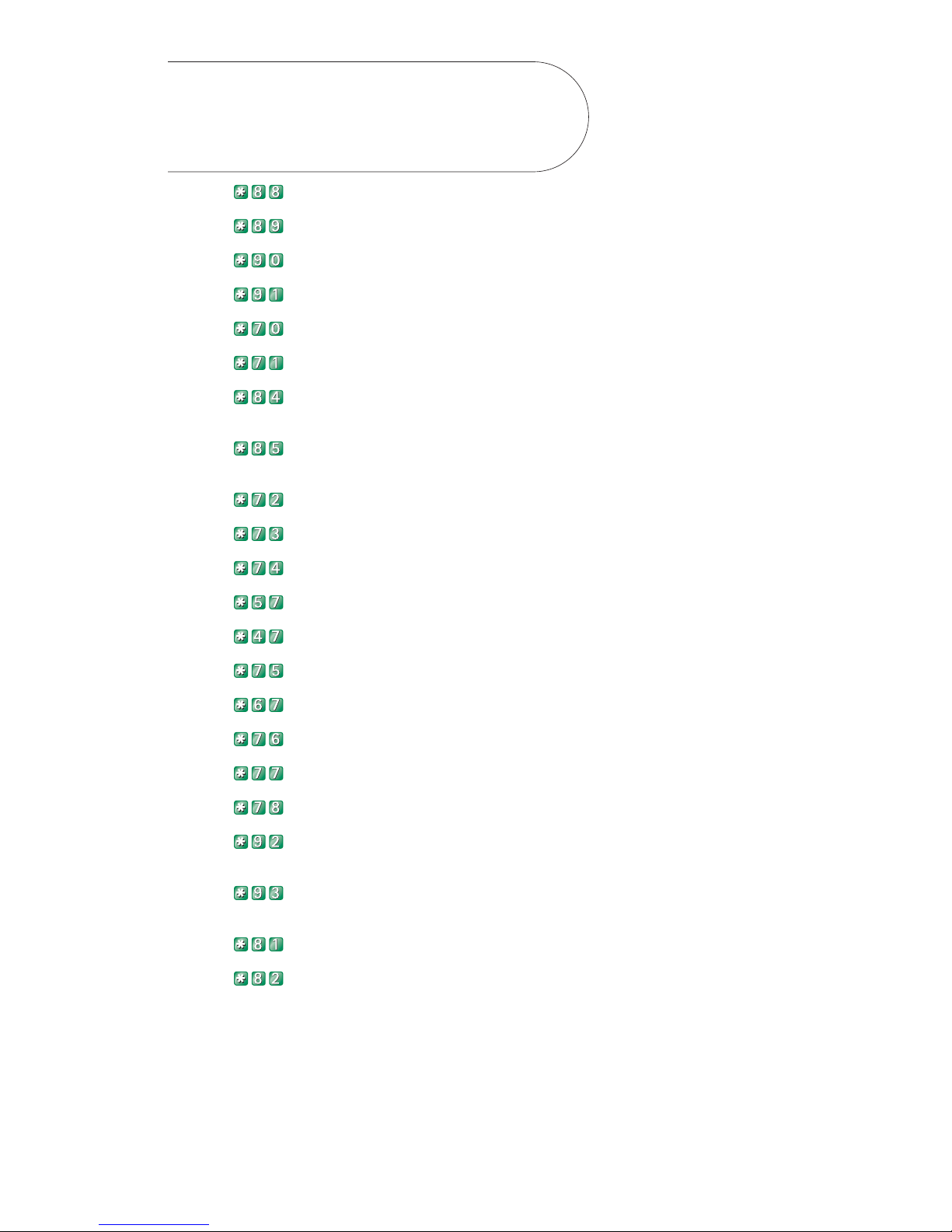
Access Codes
For CENTREX
Functions
Call Forward Busy – activation (package A, B and C)
Call Forward Busy – deactivation (package A, B and C)
Call Forward No Answer – activation (package A, B and C)
Call Forward No Answer– deactivation (package A, B and C)
Call Forwarding – activation (package A, B, C and BBB)
Call Forwarding – deactivation (package A, B, C and BBB)
Call Forwarding per key – activation (multi-line phones only)
(package A, B and C)
Call Forwarding per key – deactivation (multi-line phones only)
(package A, B and C)
Call Park – activation (package A, B and C)
Call Park – retrieve call (package A, B and C)
Call Pickup (package A, B and C)
Call Trace (package A, B, C and BBB)
Call Waiting - deactivation (package A, B, C and BBB)
Hold (package A, B and C)
Per-Call Blocking (package A, B, C and BBB)
Ring Again (internal) (package A, B and C)
Speed Calling – short list (package A, B, C and BBB)
Speed Calling – long list (package C)
Uniform Call Distribution – activation of night service
(package C)
Uniform Call Distribution – deactivation of night service
(package C)
Uniform Call Distribution – entry procedure (package C)
Uniform Call Distribution – exit procedure (package C)
* When required, dial out code -- usually 9.
7
Page 10

Speed Calling
Code Identifiers
Short List
CODE NAME NUMBER
0 ____________________________________ ___________________________________
1 ____________________________________ ___________________________________
2 ____________________________________ ___________________________________
3 ____________________________________ ___________________________________
4 ____________________________________ ___________________________________
5 ____________________________________ ___________________________________
6 ____________________________________ ___________________________________
7 ____________________________________ ___________________________________
8 ____________________________________ ___________________________________
9 ____________________________________ ___________________________________
Speed Calling
Code Identifiers
Long List
CODE NAME NUMBER
00 ____________________________________ ___________________________________
01 ____________________________________ ___________________________________
02 ____________________________________ ___________________________________
03 ____________________________________ ___________________________________
04 ____________________________________ ___________________________________
05 ____________________________________ ___________________________________
06 ____________________________________ ___________________________________
07 ____________________________________ ___________________________________
08 ____________________________________ ___________________________________
09 ____________________________________ ___________________________________
10 ____________________________________ ___________________________________
11 ____________________________________ ___________________________________
12 ____________________________________ ___________________________________
13 ____________________________________ ___________________________________
14 ____________________________________ ___________________________________
8
Page 11

15 ____________________________________ ___________________________________
16 ____________________________________ ___________________________________
17 ____________________________________ ___________________________________
18 ____________________________________ ___________________________________
19 ____________________________________ ___________________________________
20 ____________________________________ ___________________________________
21 ____________________________________ ___________________________________
22 ____________________________________ ___________________________________
23 ____________________________________ ___________________________________
24 ____________________________________ ___________________________________
25 ____________________________________ ___________________________________
26 ____________________________________ ___________________________________
27 ____________________________________ ___________________________________
28 ____________________________________ ___________________________________
29 ____________________________________ ___________________________________
30 ____________________________________ ___________________________________
31 ____________________________________ ___________________________________
32 ____________________________________ ___________________________________
33 ____________________________________ ___________________________________
34 ____________________________________ ___________________________________
35 ____________________________________ ___________________________________
36 ____________________________________ ___________________________________
37 ____________________________________ ___________________________________
38 ____________________________________ ___________________________________
39 ____________________________________ ___________________________________
40 ____________________________________ ___________________________________
41 ____________________________________ ___________________________________
42 ____________________________________ ___________________________________
43 ____________________________________ ___________________________________
44 ____________________________________ ___________________________________
45 ____________________________________ ___________________________________
46 ____________________________________ ___________________________________
47 ____________________________________ ___________________________________
48 ____________________________________ ___________________________________
49 ____________________________________ ___________________________________
9
Page 12

2008-03
 Loading...