

Page 1
122mm+-2
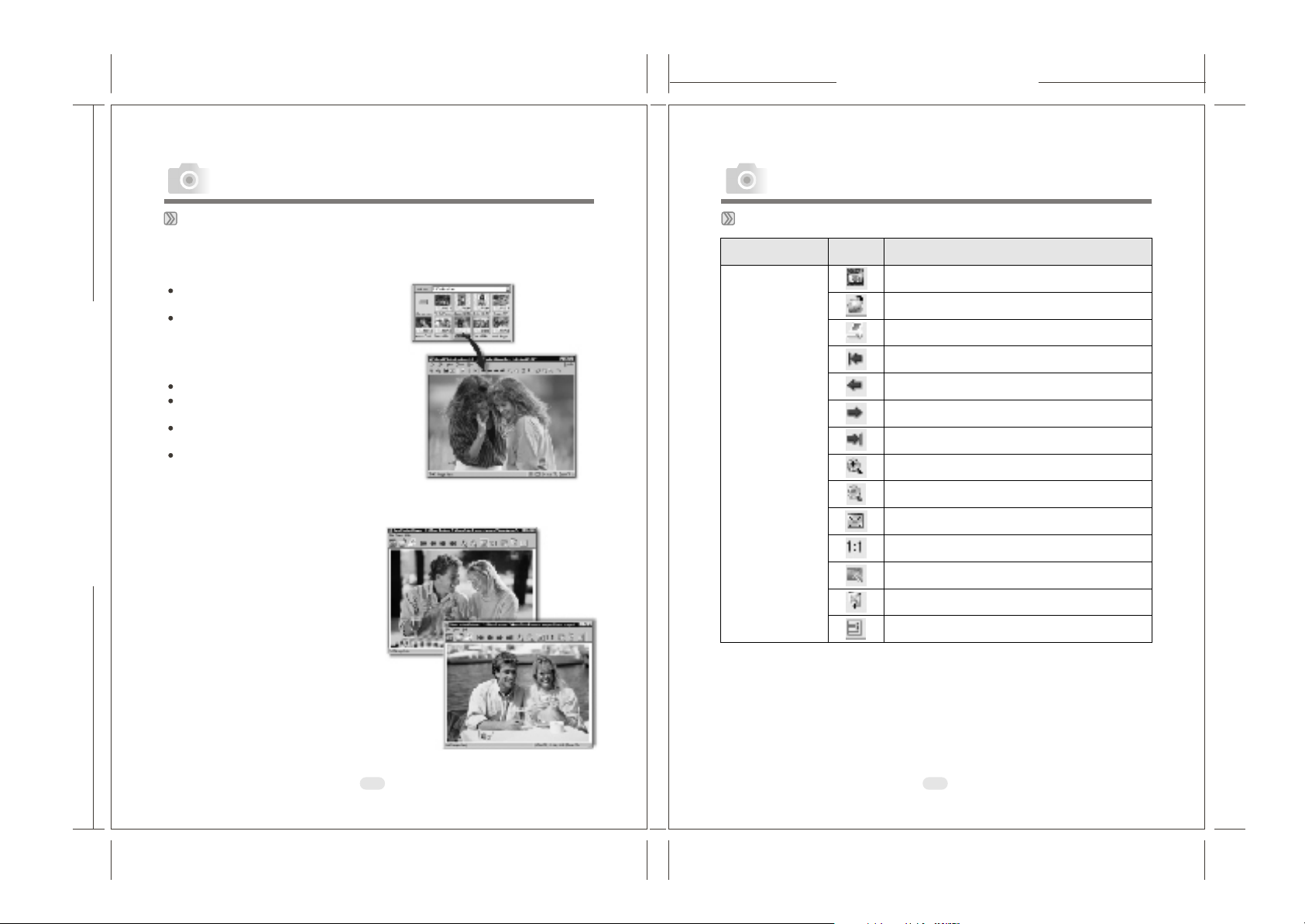
Area Icon Function Describe
Open Explorer
Open
Print Image
First image
Previous
Next
Last image
Zoom In
Zoom Out
Fit to screen
Origin al size
Auto Advance
Full Screen
Main Toolbar
Properties
PC Connection PC Connection
The Viewer
Photo Explorer has a built-in Viewer integrated with the Browser.
You can use the built-in Viewer to:
Get a full-size or full-screen view
of images.
Navigate through images using
the keyboard, toolbar buttons, or
menu commands, or let Viewer
automatically step through the
images.
Copy, rename or delete an image file.
Copy an image for pasting onto your
desired image editor.
Rotate, flip and edit images, and
then save the changes.
Create wallpapers and screen savers
using your images.
165mm+-2
A standalone image viewer, the
Ulead
Instant Viewer, also comes
with Photo Explorer. It is a
simpler, independent applic
and its sole purpose is only for
displaying images.
Use Ulead Instant Viewer when you
want to compare two or more
full-size images. Each image will
be opened in a separate window.
You can also associate file types
like JPG, GIF and BMP image files
so that they will automatically
display in the Ulead Instant
Viewer.
Using the Ulead Photo Explorer Viewer:
Photo Explorer's built-in Viewer
ation
Ulead Instant Viewer windows
50
51
Page 2
122mm+-2
PC Connection PC Connection
165mm+-2
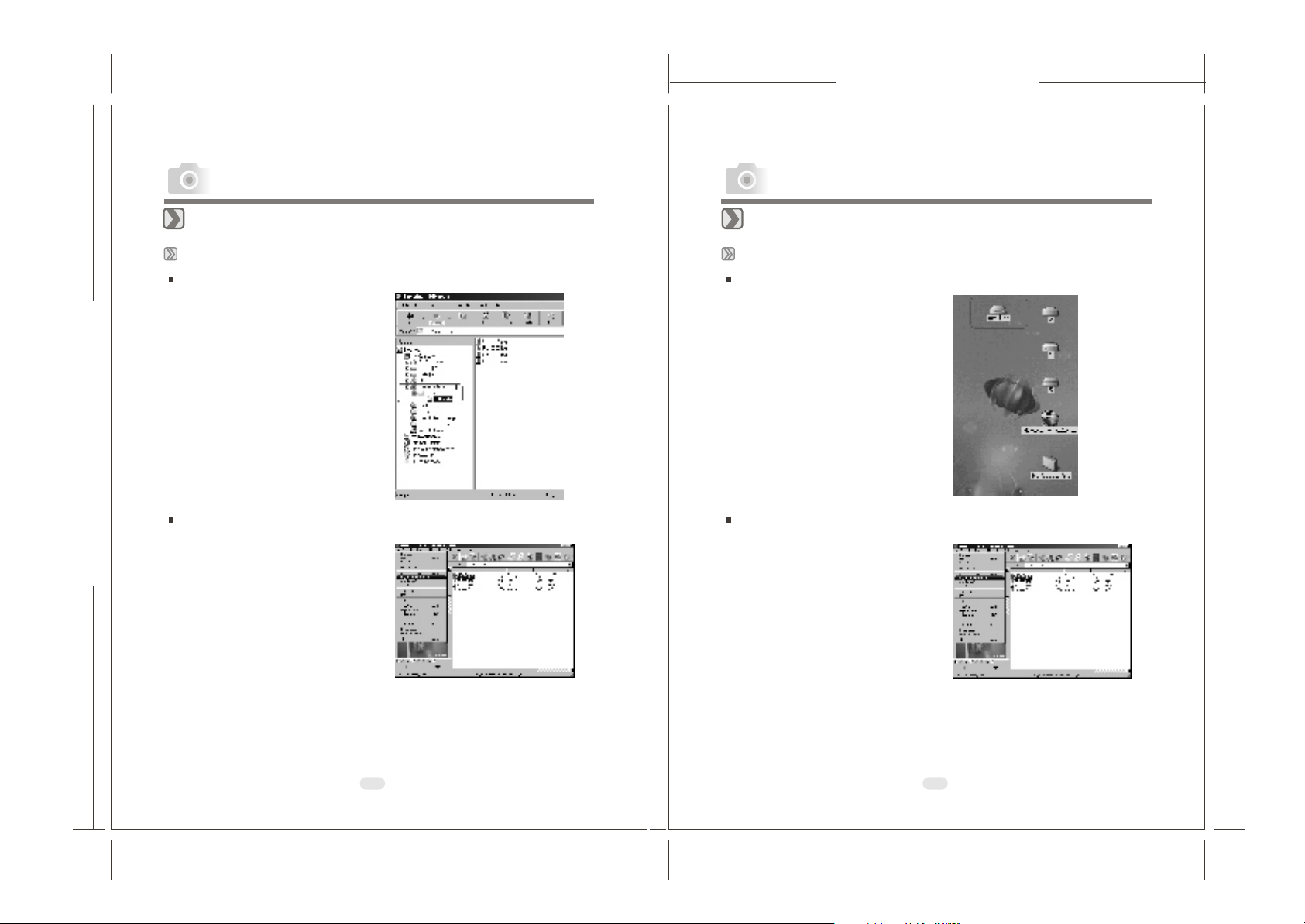
Downloading the Image(s)
Under Windows Operating System (Windows 98/98SE/2000/ME/XP)
Downloading Image(s) From Removable Disk
1. Turn on the PC.
2. Switch on the camera.
3. Connect the camera to the PC with
USB cable under any working mode.
Please make sure the USB cable is
well connected to the PC and camera.
4. When the USB cable is connected to
the PC, it will create a new hard disk
named Removable Disk .
5. The stored "image(s) can be
found in" Removable Disk\Dcim\
100media .
6. View the image with double-clicks.
Downloading Image(s) Through Ulead Photo Explorer
1. Connect the camera to the PC with
USB cable under any working mode.
Please make sure the USB cable is
well connected to the PC and camera.
2. Start Ulead Photo Explorer 7.0 SE
Platinum .
3. Click "File \Download From
Memory Card" to get the stored
image(s).
Downloading the Image(s)
Under Macintosh Operating System (Mac 9.X or later)
Downloading Image(s) From Removable Disk
1. Turn on the PC.
2. Switch on the camera.
3. Connect the camera to the PC with
USB cable under any working mode.
Please make sure the USB cable is
well connected to the PC and camera.
4. When the USB cable is connected to
the PC, it will create a new icon
named "untitled" on the desktop.
5. Double click on the icon.
6. The stored image(s) can be found in
the folder of DCIM \ 100MEDIA \.
7. View the image with double click.
D ownloading I mage(s) T hrough U lead P hoto E xplorer
1. Connect the camera to the PC with
USB cable under any working mode.
Please make sure the USB cable is
well connected to the PC and camera.
2. Start Ulead Photo Explorer 7.0 SE
Platinum .
3. Click File \Download From Memory
Card to get the stored image(s).
52
53
Page 3
122mm+-2
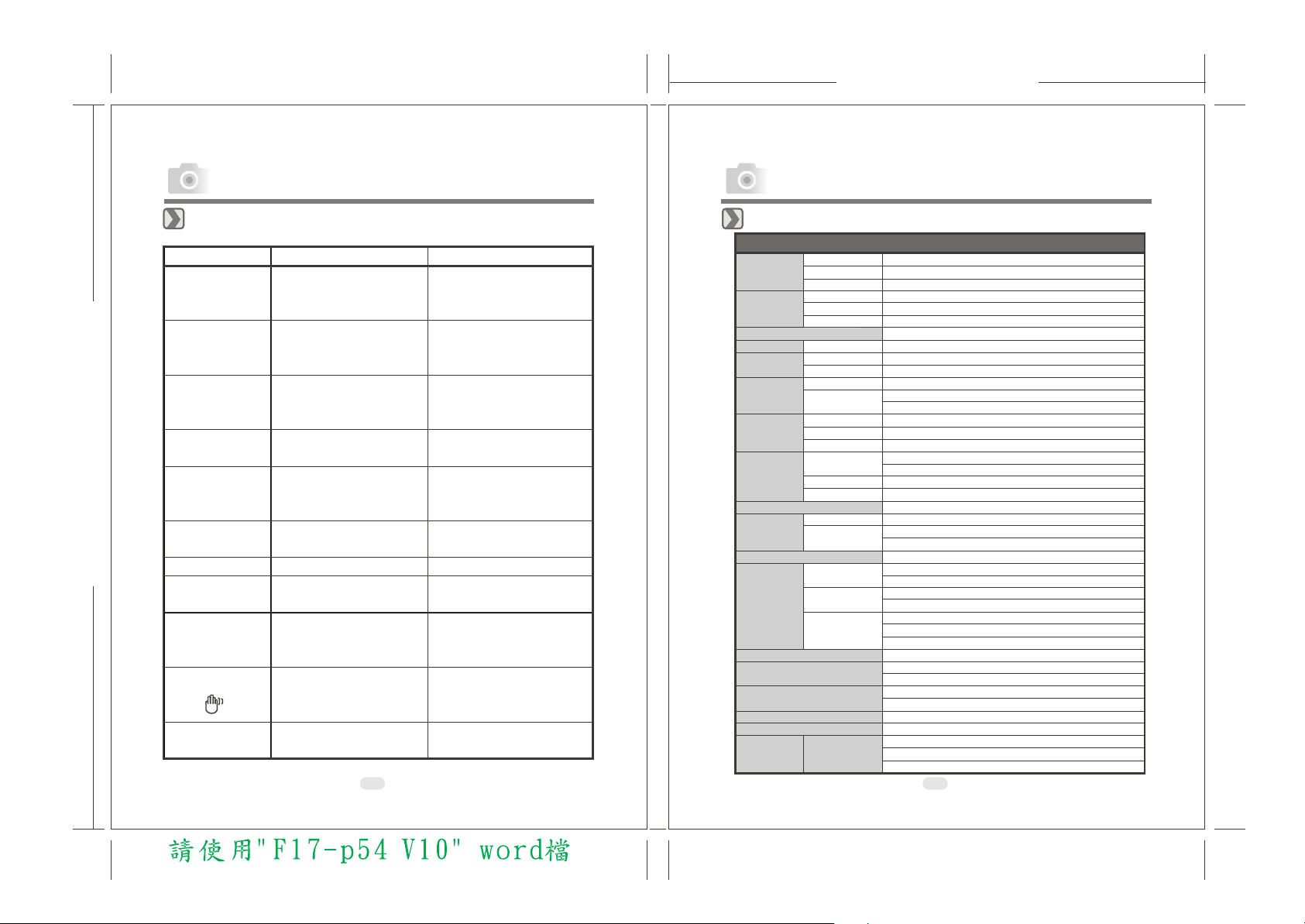
Message Cause Solution
CARD FULL
There is insufficient card
memory capacity to store an
image.
Delete the stored image(s) in the
memory card or insert a new
memory card.
MEMORY FULL
There is insufficient internal
memory capacity to store an
image.
Delete the stored image(s) in the
flash memory.
CARD LOCKED
(CARD ICON is
BLINKING)
The SD card is under
protection.
Set the card protection switch at
non-protection position.
LOCK
The Image can't be deleted
under protection.
Unlock the protected image.
NO IMAGE
There is no image stored in the
memory card or built-in flash
memory.
FILE ERROR
Delete this image and take the
picture again.
MEMORY ERROR
Format the flash memory.
CARD ERROR
Insert a new memory card or
format the card
LOW LIGHT!
The environment is too dark in
"Flash Off" or “Night Scene”
mode.
Set the flash mode at Auto Flash
or Fill-in Flash.
HAND SHAKE ICON
( )
The environment is too dark in
"Flash Off" or “Night Scene”
mode.
Set the flash mode at Auto Flash
or Fill-in Flash.
LENS COVER
The lens cover is closed.
Please open the lens cover
before taking pictures.
Appendix
Error Message Table
165mm+-2
54
Appendix
Specifications
Image
Sensor
Lens
LCD Display
Viewfinder
Focusing
Shutter
Exposure
Flash
White Balance
Shooting
Self-timer
Storage
Image Play
Interface
Power Source
Dimensions (WxHxD)
Weight
Software
Type
Effective Pixels
Total Pixels
Focal Length
F No.
Digital Zoom
Optical Viewfinder
Type
Range
Type
Speed
Control
Compensation
ISO Equivalent
Modes
Range
Recharging
Still Image
Movie Clip
Media
File Format
Image Size
Camera Driver
Application
Specifications
2.5
I/ " CCD
Approx. Mega pixels
Approx. Mega pixels
f=5.1mm (35mm film equivalent: mm)
F2.9 / F8.0
Capture Mode:4x (continuous) & Play Mode:4x (continuous)
1.6" color TFT LCD ( k pixels)
Optical virtual image viewfinder
Fixed Focus with two steps manual adjustment
Macro: 0.2m, Normal: m~infinity
Mechanical shutter and electronic shutter
1/4~1/1000 sec. Mechanical shutter
and electricals sutter
Programmed AE
+
2EV (0.5EV / steps)
-
Auto
Auto / Auto Flash with Red-eye Reduction /Slow sync / Fill-in
flash / Flash off
0.2
~ 2.5m
Approx.: sec.
Auto / Daylight / Fluorescent / Tungsten / Sunset
Modes : Single image
Size : 320x240 with Audio
Recording time : 10~30 sec. (10sec. / steps) and Manual
10 seconds with LED indicator
Internal memory: 16MB flash memory
External memory: SD Card
Still Image: JPEG EXIF , DCF , DPOF
Movie Clip: AVI with wave sound
Extra Large : via interpolation, arge:
2304x1728 2048x1536
Small: pixels
Single image / AVI play / Thumbnails / Slide show
Digital output connector : USB 1.1
DC power input connector : 3.3V / 2.0A
2 pcs of AA alkaline / 2 pcs of Ni-MH
AC adapter (Optional)
94 x 66 x 41 mm
140g
Mass Storage Driver
(Windows98/98SE/2000/ME/XP, Mac OS 9.2 or later)
Ulead PhotoExplorer 7/ PhotoExplorer 2 (MAC version)
4.07
4.23
85
6-10
3072x2048 L
pixels, Medium: pixels,
1600x1200
31
1.0
2.1 1.0 1.0
55
Page 4
122mm+-2
165mm+-2
Appendix
System Requirments
For Windows
For Macintosh
CPU:better than MMX Pentium 233MHz
XP : Pentium II 300MHz
()
Windows 98/98SE/2000/ME/XP
Minimum 32MB RAM
110MB of available hard-disk space
, CD-ROM drive
USB port
800x600 pixels,16-bit color display compatible monitor
(24-bit color display recommended)
Power Mac G3 or later
Mac OS 9.X or
Minimum 64MB RAM
110MB of available hard-disk space
USB port CD-ROM drive
QuickTime 4.0 or later for Movie Clip
later
,
MEMO
(XP: 128MB)
56
57
 Loading...