

Page 1

1
User Guide
TP3016M Series
Switching Mode DC Power Supply
Page 2

2
Introduction
I. Quick Start
1.1 Front Panel Description
1.2 Pre-Checking
1.3 Quick Start
1.4 Output Checking
II. Specifications
2.1 Major Specification
2.2 Supplementary Characteristic
III. Operation
3.1 Keypad
3.2 Front Panel
3.3 Voltage Setting
3.4 Current Setting
3.5 Output Switch
3.6 Data Saving Operation
Page 3

3
3.7 Recall Saving Operation
3.8 USB Power Charging
IV. Calibration
4.1Voltage Calibration
4.2 Current Calibration
Page 4

4
Introduction
Thank you for selecting the TP3016M Switching DC Power Supply, please read this user guide before
the operation.
Safety
This manual contains important safety and operation instructions for correct use of power supply.
Read through the manual and pay attention to the markings and labels of this unit to be connected.
Do not install the substituted spare parts or operate the modification without permission, please
send the unit back for A/S to our authorized dealers or factory for guaranty of the stability of the unit.
Pay special attention to the information of WANRINGS or CAUTIONS to avoid the damage to power
supply or connected equipment and human injured.
Please contact the trained technicians for repair service.
Safety Marks
WARNING:
Page 5

5
Failure to observe this warning may cause injury to persons and damage to power supply or
connected equipment.
CAUTION:
Failure to observe this warning may result in damage to equipment and improper functioning of
power supply.
Grounding
High Voltage
Attention on the Warning or Caution
Specification Compliance
TP3016M Switch mode DC Power Supply is compliance with the specification described in this manual.
The content or specification of this manual is subject to change, without prior notice.
Product Features
Page 6

6
TP3016M is the single output switch mode DC power supply with max. 30V output voltage, 1.6A
output current and max. output power as 50W.
TP3016M is integrating the AC/DC and DC/DC 2nd level voltage regulator technology, the AC/DC
input is adapting the worldwide voltage range. The DC/DC is using the synchronous buck mode, which
with the high efficiency and high speed dynamic response performance.
TP3016M can be set the voltage and current through the keypad of front panel and save the setting
groups for further performance.
TP3016M also has the 4 digit voltage and current meter, as well as the fantastic handheld size. The
TP3016M is perfect for solving a variety of loading conditions and applications.
Please find the following main features of TP3016M:
● Handheld design
● Without noise of fan
● 4 digits LCD display
● Output short circuit protection
● High speed dynamic response
● Once power cut-off, automatically protect under power off status
● The output has the automatic recognition of USB charging port
● Can be calibrated via software operation
Page 7

7
I. Quick Start
This chapter describes the basic check points on TP3016M for making sure the proper operation, as
well as the functions of TP3016M.
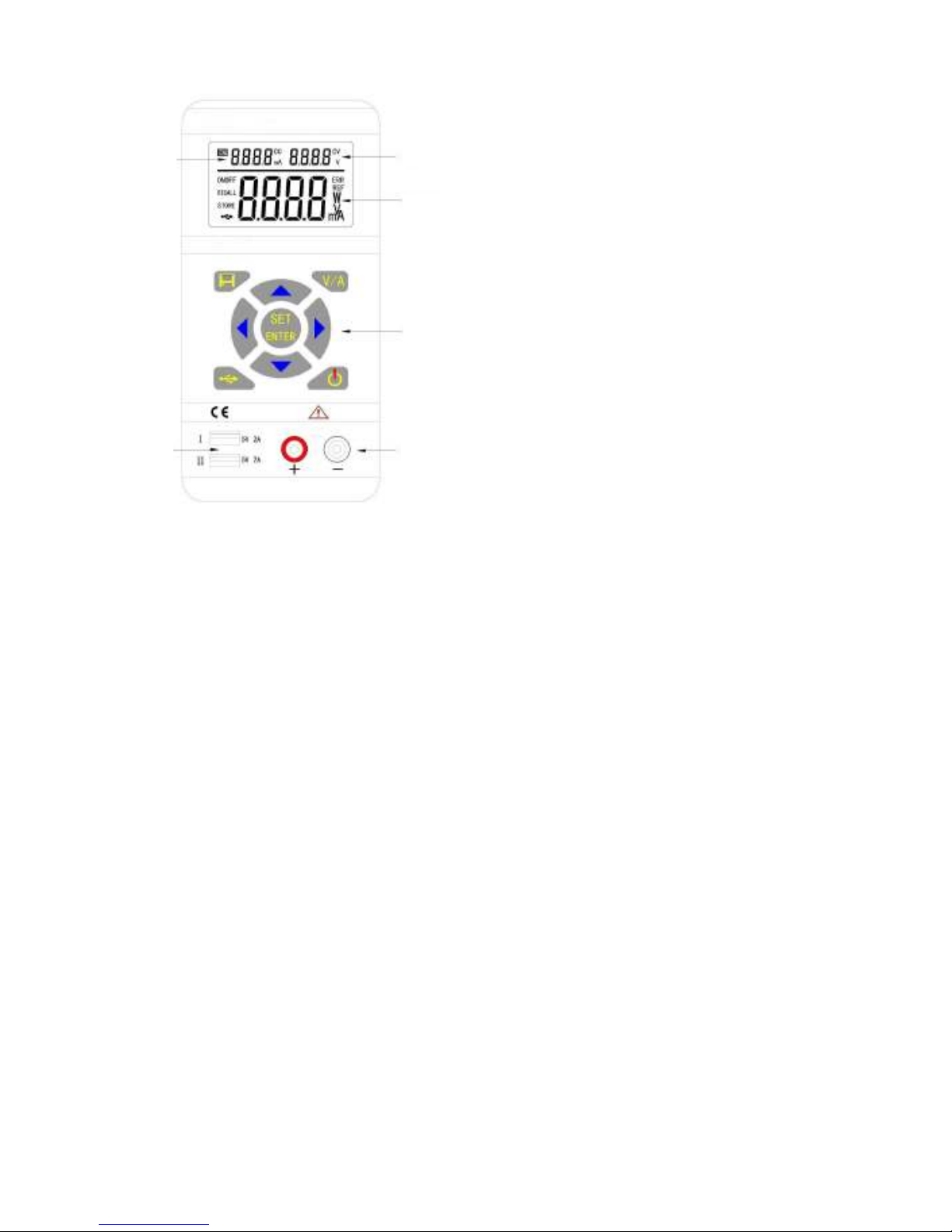
1.1 Front Panel Description
1 – Current Setting Indicator
2 – Voltage Setting Indicator
3 – Measured Value Display
4 – Keypad
5 – USB Charging Ports
6 – DC Output Terminals
Page 8
8
1
2
3
4
5
6
Page 9

9
1.2 Pre-Checking
Before the operation, please check the accessories are fully included, if any missing, please contact
the local distributor.
□
Power Cord – 1PC (Compliance with the standard voltage of the region)
□
User Guide – 1PC
Connect with power and switch on TP3016M, the unit start the self-system checking, the LCD displays
0.5s, date of manufacturing, production lot, model number version number in turn.
1.3 Quick Start
OUT Button
Press and light OUT button, the power supply is under output status and read the measuring value of
voltage or current in the display. Press again OUT button to exit output function.
Page 10

10
UP Arrow Key + DOWN Arrow Key
Press UP arrow key to activate the LCD backlit
Press DOWN arrow key to exit the LCD backlit
LEFT Arrow Key + RIGHT Arrow Key
Press LEFT arrow key to decrease the contrast of LCD
Press RIGHT arrow key to increase the contrast of LCD
V/A Key
Press the V/A key to activate voltage measurement and read the voltage value from display.
Push the V/A key again to switch current measurement and read the current value from the display
USB Button
Push and light the USB button and adjust voltage to 5.2V and the current as 3A to enter USB
Page 11

11
power charging mode; then, push and light the OUT button, the TP3016M is working as
power charger.
Push the USB button again and USB button lights out to exit USB power charging mode.
SET Button + V/A Button + Direction Arrow Keys
Push the SET button, by pressing the direction arrow keys to adjust the voltage value setting, Push
the V/A button to switch the current value setting mode, by pressing the direction arrow keys to
measured current value.
1.4 Output Checking
1.41 The output voltage regulation mode check
This is for checking the functions of power supply under non-load voltage stability.
1) Switch on the product, the power is off and the indicators of CC & CV are light off.
Page 12

12
2) Push and light the OUT button, the indicator of CV is light on at LCD display.
3) Setting the voltage of power supply
Push the V/A button and shift to voltage display mode, adjust various voltage values then, check
the voltage value displayed at LCD is approaching the settled voltage value and within the
tolerance, current value is showed as 0A.
4) Make sure the voltage can be adjusted from 0.5V to max. 30V.
1.42 The output constant current mode check
This is for checking the functions of power supply under constant current mode.
1) Switch on the product, the power is off and the indicators of CC & CV are light off.
2) Adjust voltage value as 30V.
3) Connect the resistance (3Ω/50W) between output terminals.
4) Push and light the OUT button, the indicator of CC is also light.
5) Setting the current of power supply
Push V/A button and shift to current display mode, adjust various current values, then, check the
current value displayed at LCD is approaching the settled current value and within the tolerance.
6) Make sure the current can be adjusted from 0A to the max. value.
1.43 The output short circuit protection check
This is for checking the function of short circuit protection of output.
Page 13

13
1) Switch on the product, the power is off and the indicators of CC & CV are light off.
2) Adjust voltage value is over 5V and current value is over 1A.
3) Push and light the OUT button.
4) Connect the output terminals by wire for short circuit, the light of OUT button is off and output
off.
1.44 The USB charging function check
This is for checking USB charging function.
1) Switch on the product, the power is off and the indicators of CC & CV are light off.
2) Push and light the USB button. Adjust the voltage as 5.1V and current as 2.0A.
3) Push and light OUT button.
4)
Make sure the power supply under CV mode, the CV indicator is light in LCD.
5) Setting the current value and make sure the current value can be adjusted from 0A to the max.
value of measuring range. Do not adjust voltage.
II. Specification
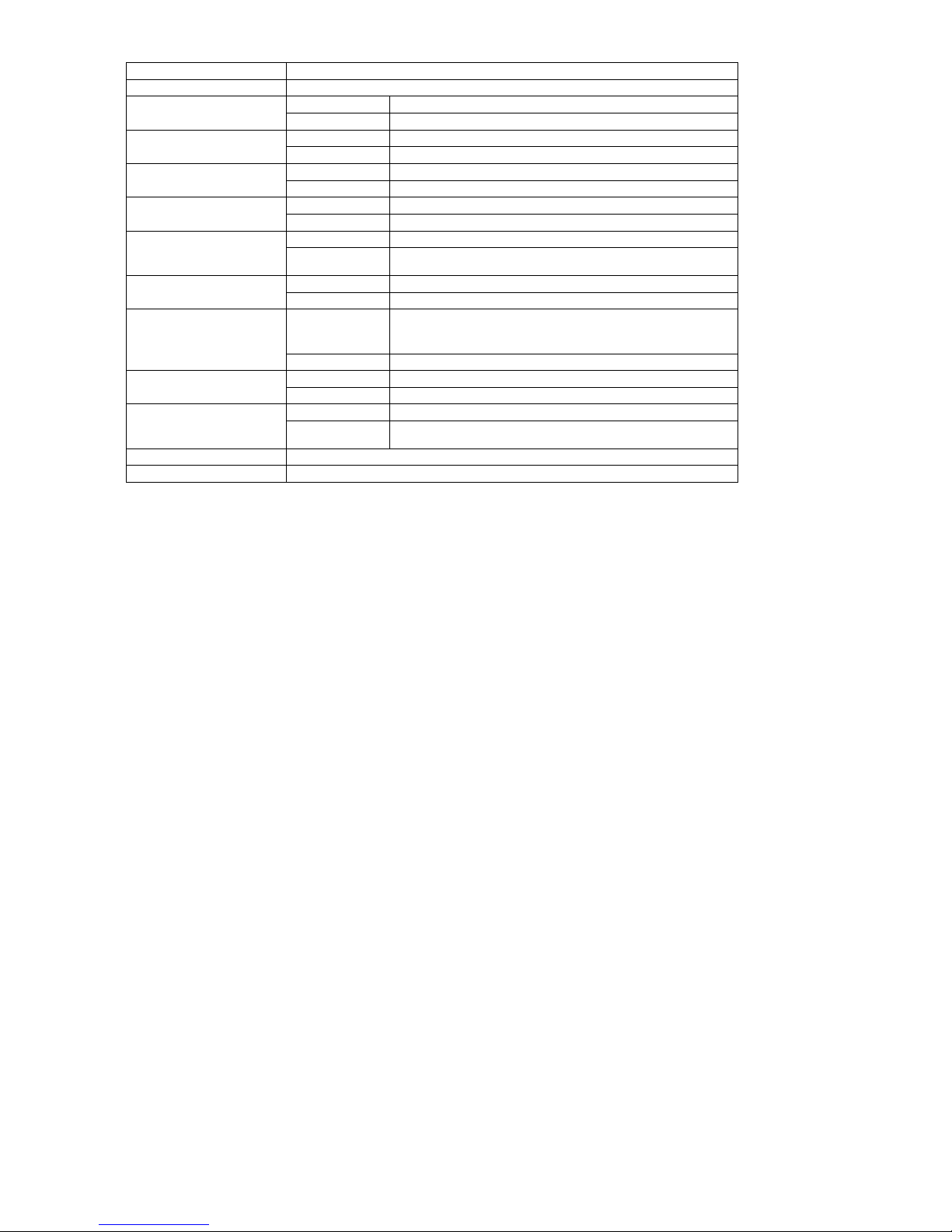
2.1 Major Specification
Page 14
14
Input Voltage 110AC~ 60Hz
Input Current 1A
Output Rating
Voltage range 0.5V~30V
Current range 0~3.75A
Line Regulation
±%of output + offset
Voltage CV≦0.01%+3mV
Current CC≦0.01%+3mA
Load Regulation
±%of output + offset
Voltage CV≦0.02%+3mV
Current CC≦0.02%+3mA
Measurement Accuracy
Voltage 10mV
Current 1mA
Measured Value Accuracy
@ 25℃℃℃℃
±%of output
+
offset
Voltage ≦0.05%+5mV
Current ≦0.05%+5mA
Measurement Speed
Voltage 100ms/ones
Current 100ms/ones
Setting Value Accuracy @
25℃℃℃℃
±%of output
+
offset
Voltage ≦0.05%+5mV
Current ≦0.05%+5mV
Ripple and Noise
20HZ-20MHZ
Voltage ≦10mVrms/100mVp-p
Current ≦10mVrms/100mVp-p
Temperature Coefficient
@ 0~40℃℃℃℃
±%of output
+
offset
Voltage ≦0.05%
Current ≦0.1%
Dimensions 185x88x38 mm
Weight (Net ) 370g
Page 15

15
2.2 Supplementary Characteristic
Build-in EEPROM
Recommended Calibration Time:1 Time/Year
AC Input Power: 110VAC, 60 Hz
Operating Temperature: 0 to 40 ℃
Storage Temperature: -20 to 70 ℃
III. Operation
Check the rating label of the power supply and ensure that it complies with the AC mains voltage that
is to be used.
Connect the power supply to the AC minas using the provided power cord.
3.1 Keypad Description
OUT
Output check
V/A
Voltage & Current Shift
USB
5V Cell Phone Charging
Page 16

16
SET/ENTER
Voltage & Current Setting/Enter
STORE/RECALL Data Saving/Recall
UP DOWN LEFT RIGHT Direction Arrow Keys
3.2 Front Panel
After power on, the panel operation mode is the default setting of power supply and all the
functional buttons can be operated.
3.3 Voltage Setting
The voltage setting range is from 0.50V to 30V; follow the setting steps as below:
1. Switch on the power supply
2. Push the OUT button to stop the output setting and light off OUT button
3. Push and light the SET/ENTER button, the max. value position is flickering of voltage setting area
4. Push the LEFT or RIGHT arrow keys to move the cursors
5. Push the UP or DOWN arrow keys to change the settings
6. Push SET/ENTER button and light off this button to exit voltage setting mode
UP ENTER
OUT SET 0 0.0 0 V ------------- >3 0.0 0 V ---------------> OK
Page 17

17
Remark:
I. It is possible to set voltage values once the outputs are valid. However, for protection of the
load, it is recommended to stop output before voltage setting.
II. Due to the total power limit, current settings might be decreased automatically once
voltage setting increasing.
3.4 Current Setting
The current setting range is from 0.000A to 1.66A, follow the setting steps as below:
1. Switch on the power supply
2. Push the OUT button to stop the output setting and light off OUT button
3. Push and light the SET/ENTER button, the max. value position is flickering of voltage setting area.
4. Push the V/A button, the max. value position of current setting is flickering and current setting is
activated
5. Push the LEFT or RIGHT arrow keys to move the cursors
6. Push the UP or DOWN arrow keys to change the settings
7. Push SET/ENTER button and light off this button to exit current setting mode
Page 18

18
UP ENTER
OUT SET V/A 0. 000 A ---------> 2.000 A ------------ > OK
Remark:
I. It is possible to set current values once the outputs are valid. However, for protection of the
load, it is recommended to stop output before current setting.
3.5 Output Switch
Under the panel operating mode, by pushing OUT button to shift output status. Once OUT button
lighted, the measured values displayed at LCD; push OUT button again to exit output mode.
3.6 Data Saving Operation
1. Under the voltage setting or current setting mode, push the STORE button to save the values of
voltage or currents into memory of power supply for future recall purpose. (as below steps)
2. Refer 3.3 or 3.4 for voltage or current setting mode.
3. Push STORE button to enter data saving mode, the min. value position is flickering and displayed
STORE icon in LCD.
4. Move UP or DOWN arrow keys to select storage group serial number.
5. Click ENTER button to confirm data saving, click STORE button to exit data saving mode.
Page 19

19
UP
SET STORE 1 2 ENTER -----> OK
3.7 Recall Saving Operation
Under the panel operating mode, push the RECALL button for getting the saved data from memory;
follow the setting steps as below:
1. Switch on the power supply
2. Push RECALL button to enter data recall mode, the min. value position is flickering and displayed
RECALL icon in LCD.
3. Move UP or DOWN arrow keys to recall the stored group serial number, the default values from
voltage or current setting mode displayed in LCD.
4. Click ENTER button to confirm data recall, click STORE button to exit data recall mode.
UP
RECALL 1 2 ENTER --------> OK
Page 20

20
3.8 USB Power Charging
Push the USB button and light the green indicator, the default setting is voltage @ 5.1V and current
@ 2.0A, the LCD will display 5.1V, current value also can be as 0A. Connect the mobile phone via USB
cable for power charging.
The USB ports are suitable for both android mobile phone and l Iphone, with automatic check
function, the product can set the proper charging current automatically.
1. Push and light the OUT button to activate output mode.
2. Push the USB button and USB indicator is off to exit USB charging mode.
USB OUT OK
Page 21
21
IV Calibration
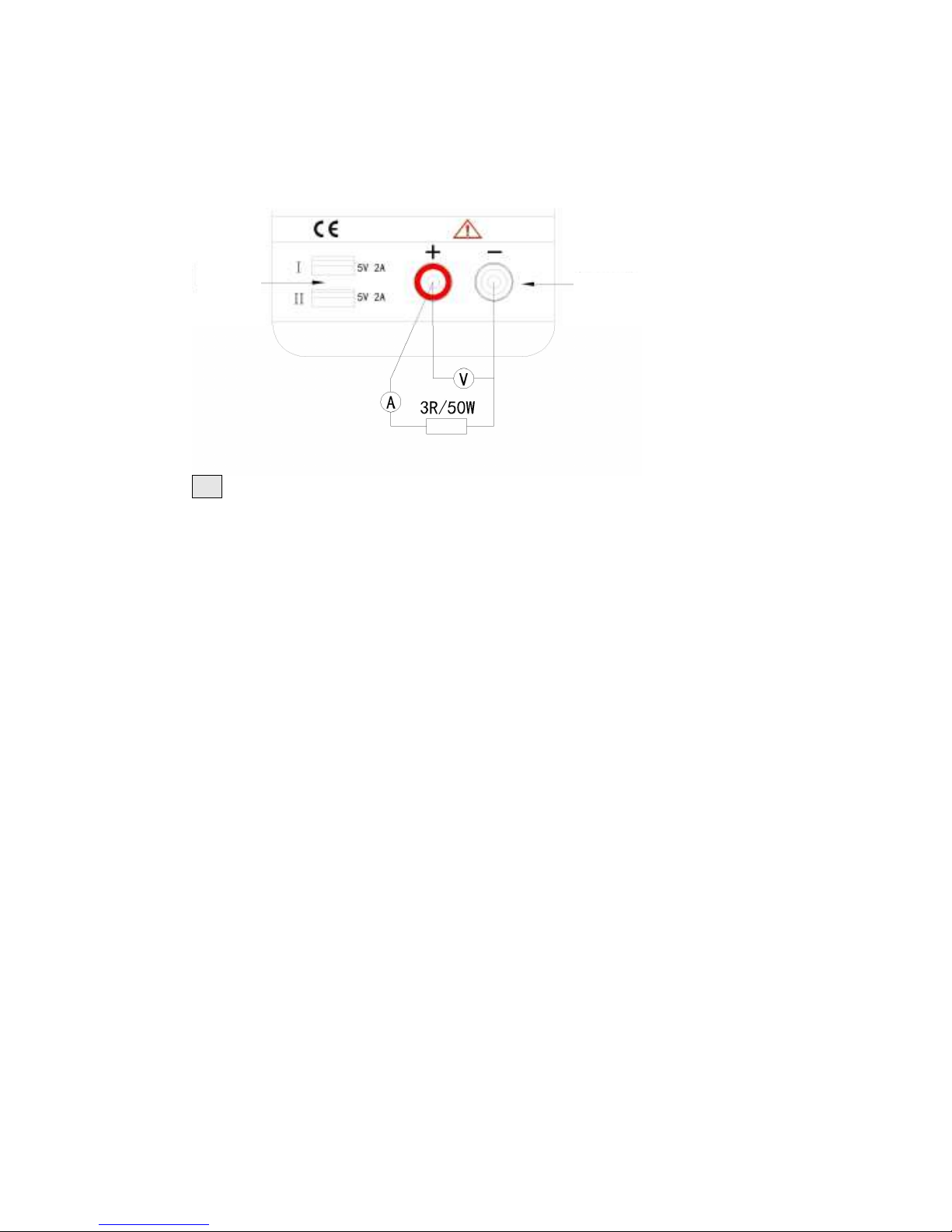
Follow the below chart, connect the 5 digit displayed volt meter, current meter, resistance
(10Ω/100W) into the output terminals, calibration follow the steps start from point of zero voltage -
voltage coefficient – current zero – current coefficient.
Hold the SET button to switch on power supply till “REF” displayed in LCD to enter calibration mode.
5
6
Page 22

22
4.1 Voltage Calibration
At the power supply displayed 2.000A & 05.00V in setting area of LCD and **.**V displayed in main
part of LCD. Connect the output terminal with an external reference voltage meter and shift to CV
mode. Hold the LEFT or RIGHT arrow keys to move the cursors to left or right and push the UP or
DOWN arrow keys to adjust the values same as readings of external reference voltage meter, then
click ENTER button to finish the voltage bias calibration.
At the power supply displayed 2.000A & 30.00V in setting area of LCD, hold the LEFT or RIGHT arrow
keys to move the cursors to left or right and push the UP or DOWN arrow keys to adjust the values
same as readings of external reference voltage meter, then click ENTER button to finish the voltage
gain calibration.
4.2 Current Calibration
Push the V/A button and power supply displayed 0.500A & 20.00V in setting area of LCD and *.***A
displayed in the main part of LCD. Connect the output terminals with the external reference current
meter and the load (6Ω/100W), shift to CC mode. Hold the LEFT or RIGHT arrow keys to move the
cursors to left or right and push the UP or DOWN arrow keys to adjust the values same as readings of
the external reference current meter, then click ENTER button to finish the current bias calibration.
Page 23

23
At the power supply displayed 3.000A & 20.00V in the setting area of LCD, hold the LEFT or RIGHT
arrow keys to move the cursors to left or right and push the UP or DOWN arrow keys to adjust the
values same as readings of external reference voltage meter, then click ENTER button to finish the
current gain calibration.
Push OUT button to exit and restart the power supply to complete the calibration function.
 Loading...