

Page 1
Page 2
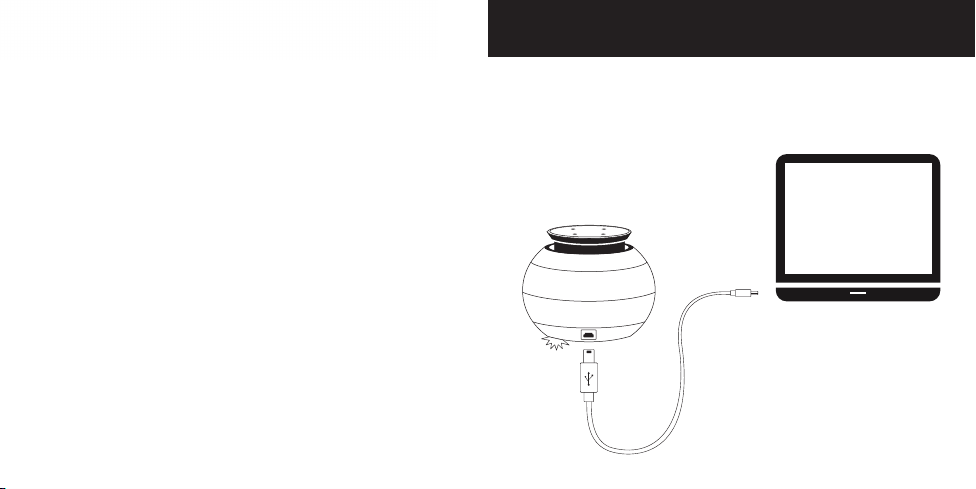
Charging Your CERA
For bes t per forma nce, full y charge b efore u se.
1. Connec t the provi ded USB ca ble to you r compute r’s USB port, o r any other
USB powe r source.
2. Whi le charg ing, a red l ight at the bas e of the CER A will i llumina te.
3. The re d light w ill tu rn off on ce full y charg ed.
It wil l take app roxim ately th ree hou rs to
full y charg e your CERA .
Page 3
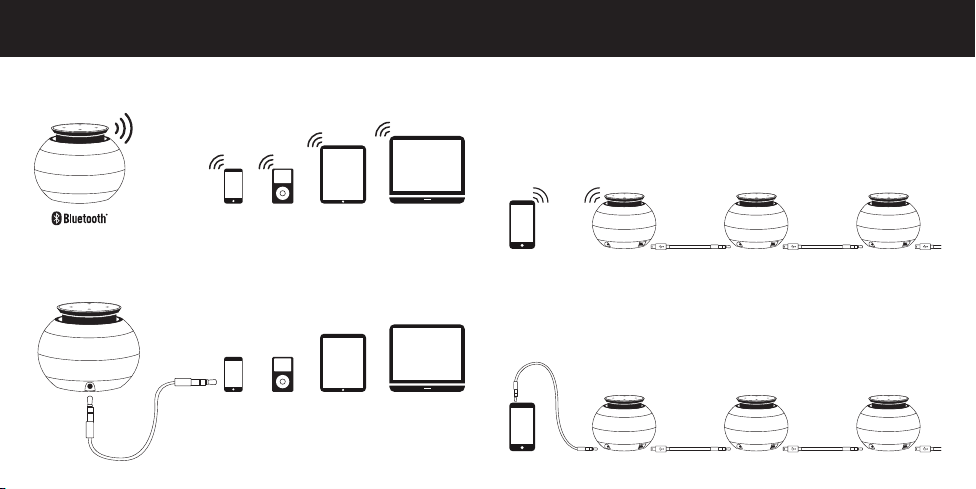
CERA Daisy Chain SoundConnectivity
Bluetooth: Strea m audio w irele ssly up t o 33 feet wit h any Blu etooth ena bled
device. (s ee next p age for pa irin g inst ructi ons)
Audio C able: Co nnect you r CERA to a ny compat ible d evice usi ng the
3.5mm audio cable.
Create b igger s ound by da isy- chain ing mu ltipl e CERA sp eakers .
Bluetooth Daisy Chain
1. Pair you r blueto oth enabl ed devic e to one CER A speake r.
2. Conn ect an inf inite numbe r of speakers u sing th e daisy c hain
mini U SB/3.5 mm audi o cable s.
3. Power o n the add itiona l speake rs.
Audio Cable Daisy Chain
1. Connec t your devi ce to one CE RA spea ker usin g the 3.5 mm aud io cable.
2. Conn ect an inf inite numbe r of speakers u sing th e daisy c hain
min i USB/3. 5mm aud io cabl es.
3. Power o n the add itiona l speake rs.
Page 4
Pairing Your CERA Pairing Your CERA (cont’d)
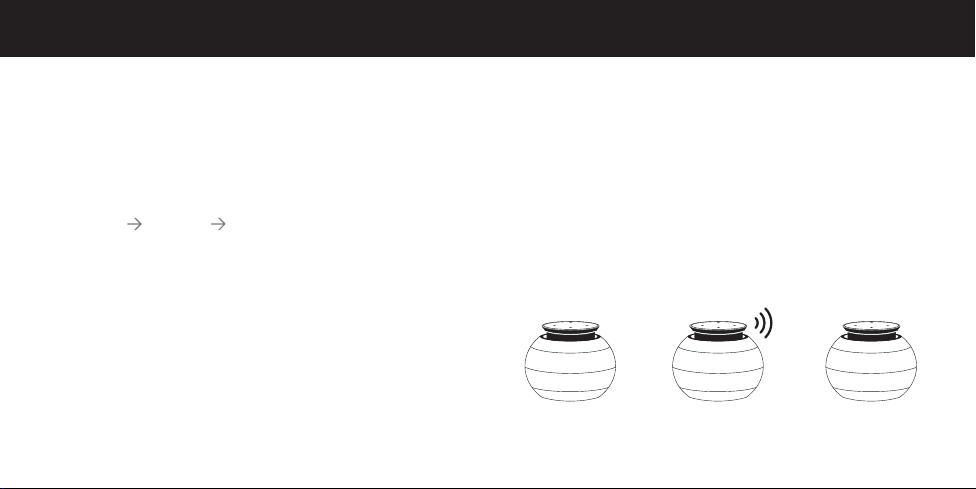
Prepa ring Your C ERA Sp eaker Fo r Pairi ng Turn o n the CER A by pushi ng down
on the ce nter of the Tou ch Contro l Panel. You w ill he ar “Power O n”
confi rming that y our CER A is on.
Appro ximate ly 30 se conds af ter the CE RA is pow ered on, yo u will h ear
“Pai ring” a ccompan ied by a fl ashin g red lig ht at the bas e of the spe aker.
The CE RA is now re ady to be pa ired wi th your Bl uetooth enabl ed device.
Prepa ring Your P hone or D evice Fo r Pairi ng For iPhone®, iPod® or iPad® :
Go to SE TTIN GS GENE RAL BLUETOOT H, and tu rn on.
For Bl uetooth pair ing wi th other ce ll phon es/devices , pleas e refer to the
device’s owner’s manual.
In the B luetooth s ettin gs of your d evice, add
or sea rch for devi ces. Onc e “Tego Aud io CERA” app ears, s elect it.
If a pas sword is r equir ed, enter “ØØØØ”
Once pa ired you w ill hear “Pa iri ng Compl eted” fol lowed by the p air ing tone.
Once you’ve p aired t he CERA w ith a devi ce, the CER A will autom atical ly
conne ct when th at device’s Bl uetooth i s enabl ed. Pair ing is co mplete
when yo u hear th e pair ing tone.
The CE RA wil l have a rang e of appro ximate ly 33 feet f rom your d evice.
If dis tort ion beg ins to occu r, place dev ice clos er to the sp eaker (or v ice vers a)
or recharge your CERA.
“POWER ON”
CERA S peaker Is
Now Powered On
“PAIRING”
CERA S peaker Is R eady
To Pair Wi th Your
Bluetooth Enabled Device
“PAIRING COMPLETED”
CERA S peaker Is N ow Paired
With Your Bluetooth Enabled
Device
Page 5
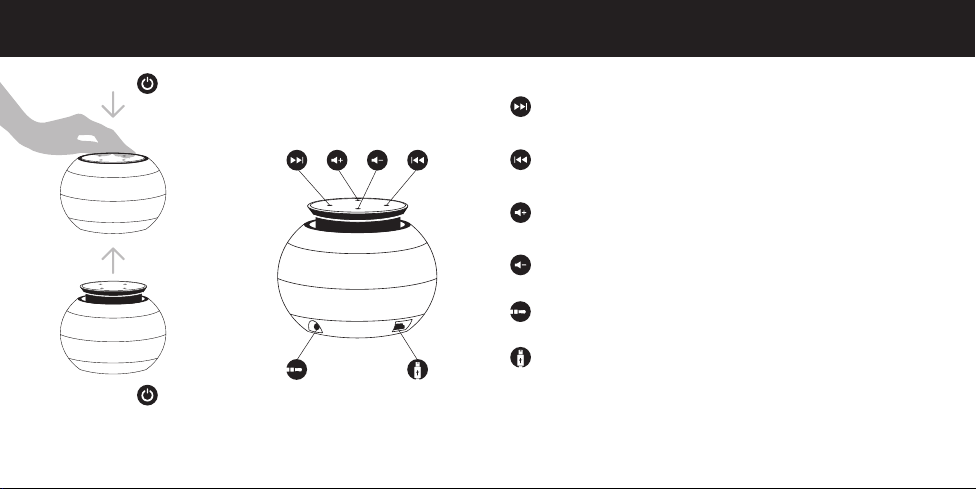
Operating Your CERA Operating Your CERA (cont’d)
To Power On
Push dow n on the center
of the Touc h Panel Cont rol
and release.
Your CERA will
automatically open.
To Power Of f
Push dow n on the center
of the Touc h Panel Cont rol
until closed.
Next So ng
On comp atibl e devices y ou can ski p to the nex t song.
Previous Song
On comp atibl e devices y ou can ski p to the prev ious so ng.
Volu me Up
For be st resul ts tur n your pho ne/device to M AX volu me and us e the
CERA to uch pane l to contro l volume .
Volume Down
You will h ear a do uble ton e when th e minim um volu me on the CE RA
has bee n reache d.
3.5m m Audio L ine Inp ut
USB Charging Port/Daisy Chain Port
It wil l take app roxima tely th ree hour s to full y charg e the CER A.
Page 6

Specifications Safety Instructions
Mode l: CERA
Dimensions: diameter = 3.625"/92mm he ight = 2.375 "/60.325mm
Net Weig ht: 100g
Speaker: 40mm
Power Ou tput: 1.5W (m axim um)
S/N: >70dB
AMP Fr equenc y Range: 10 0Hz-2 0Hz
Charg e Voltage: 5V
Li- ion Bat tery : 3.7V
Di sto rt ion: <1.0 %
Charg e Time: Ap proxi mately 3 H ours
Play T ime: App roxim ately 5 -7 Hours D epending o n Volume & Aud io Sou rce
Transmission Distance: 10m/33ft
Work Fr equenc y: 2.40 2-2.480 GHz
Blueto oth Mode l: V3.0
Transm ission Powe r: Blueto oth Clas s 2
Batte ry Cel l: Recha rgeabl e Lithi um Polym er
Capac ity: 55 00 mAh
In put : 5 V/1A
Micro U SB outp ut: 5V/1A
USB out put: 5V/2A
Dime nsion s: 4.6 x 3 x 0.7 i nches (116 x 78 x 18 mm)
The CER A uses specia l lubricant s to regulate the sp eed & smoothne ss of the
Expa nding Sound Ch amber. If the CE RA sits for an ex tended perio d of time, it may
affect th e speed of whic h the Expand ing Sound Cham ber will ope n, but will retu rn
back to no rmal after re gular use. Vari ables such as te mperature & al titude may
also af fect the unit’s op eration.
DO NOT pul l hard once open; s uch actions wi ll damage the u nit.
The CE RA wire less po rtab le spea ker by Tego Aud io
buil t to the hig hest sta ndard s to ensure y our per sonal s afety. Howeve r, improp er
use can re sult in p otentia l electr ical shock o r fire ha zards. P lease re ad all sa fety
and op eratin g instr uctions car efull y before in stall ation a nd use, and ke ep these
inst ructi ons han dy for fut ure refere nce. Take spe cial not e of all war nings lis ted in
these i nstr uction s and on th e unit.
Keep uni t away fro m water & li quids a t all tim es
•
Do not pl ace unit in a locat ion in which ve ntilation o pening wil l be blocked.
•
Keep uni t away from d irect source s of heat.
•
Only co nnect unit to th e type of power su pply descr ibed in the ope rating
•
instructions.
Do not use a ttachments n ot recomme nded by the prod uct manufa cturer.
•
Do not di spose your CER A speaker in a f ire which may c ause the b atter y to explod e;
•
a batte ry expl osion may cau se severe inju ry or dea th.
Do not di sassemble t he built-i n battery a s it may caus e electr ical shock.
•
Do not cha rge your CERA i n damp areas o r in extremel y high or low tem peratures; th is
•
may resu lt in electr ical shock.
Do not pl ace or store your C ERA speaker o n or near your a utomobiles’ a irbags; th is
•
may resu lt in serio us inju ry if you r airbag dep loys.
Do not pl ace the CERA on h igh surface s, as the CE RA may move d uring m usic
•
play back and ca use the CE RA to fall of f an edge.
Do not use a brasive clea ners on your C ERA as th is may cause dam age and/or
•
scratch es to the unit.
® has bee n desig ned and
.
Page 7

Safety Instructions (cont’d) Warranty/FCC Statement
Do not pl ace your C ERA in co ntact wit h any shar p objects as th is may result i n
•
dama ge and/or sc ratches .
Do not at tempt to rep air, mod ify or d isasse mble th e CERA , as this w ill voi d
•
your wa rrant y. The CERA d oes not con tain any co mpone nts that a re userserviceable.
Do not at tempt to rep lace the C ERA’s built- in batter y as it is no t change able.
•
Obse rve all s igns & d ispla ys that re quire a n electr ical device o r RF radio
•
produ ct to be swi tched of f in a desi gnated a rea.
Do not us e the CER A insid e an airc raft & be su re it is turne d off pr ior to boa rding .
•
Only u se your CE RA ins ide an ai rcraft if all owed by ai rlin e.
•
Do not di spose of t he CERA b atter y with regul ar hous ehold t rash. O nly dis pose
•
the CE RA batte ry in ac cordan ce with lo cal regu latio ns.
Questions?
Visit: tegoaudio.com
Email: [email protected]
Limited Warranty
For a pe riod of 12 mo nths fro m the or igina l date of pu rchase, Teg o Audio, a
divi sion of Teg o LLC, war rants th is prod uct to be fre e from defe cts in mate rial s
& workmanship, under normal use & conditions.
For wa rrant y inst ructio ns, ple ase ema il: war ranty @tegoa udio.co m
FCC Statement
This e quipm ent has be en tested & fo und to com ply wit h the lim its for a Cl ass
B digi tal devic e, pursu ant to Par t 15 of the FCC Rul es.
These L imit s are desi gned to p rovide rea sonab le protec tion ag ainst h armfu l
inter ference in a res identi al insta llati on. Th is equi pment ge nerates , uses, an d
can rad iate radi o freque ncy ene rgy and, i f not insta lled a nd used in
accord ance wit h the ins truct ions, m ay cause h armfu l inter ference t o radio
commu nicati ons. Ho wever, there i s no guar antee tha t inter ference w ill not
occur i n a part icula r insta llati on. If th is equi pment do es cause h armfu l
inter ference to radi o or telev ision re ception , which ca n be deter mine d by
tur ning th e equip ment off a nd on, the u ser is en courag ed to try to c orrec t the
inter ference by one o r more of th e follow ing mea sures:
•
Reorient or relocate the receiving antenna.
•
Incre ase the s eparat ion betw een the eq uipme nt and rece iver.
•
Conne ct the equ ipmen t into an out let on a ci rcuit dif ferent from th at to
whic h the recei ver is con nected.
Consu lt the de aler or a n exper ienced radi o/TV tec hnici an for hel p.
•
The su pplie d inter face cabl e must be us ed with t he equi pment in o rder to
compl y with th e limi ts for a dig ital device pu rsuant to S ubpar t B of Part 15
of FCC Rul es.
Page 8
FCC Statement (cont’d)
FCC Notice
This d evice com plies w ith Par t 15 of the FCC Ru les. Ope ratio n is subj ect to the
following conditions:
1. This dev ice may no t cause ha rmful i nterfe rence
2. Thi s device mu st accept a ny inter ference re ceived, i nclud ing inte rfere nce
that ma y cause un desir ed operat ion.
FCC Caution
•
Any cha nges or m odifi cation s not expre ssly a pproved by th e part y
respo nsibl e for comp lian ce could voi d the use r’s autho rity t o operate t his
equipment.
•
This d evice & its a ntenna(s) m ust not be co -located o r operat ing in
conju nctio n with any ot her ante nna or tra nsmit ter.
FCC ID: ZR CGEPBT5 080 6A
The FCC i dentif ication num ber is lo cated at th e base of th e CERA
wireless speaker.
COMPLIANT
DO NOT di spose o f unit wit h gener al waste; co ntains
lith ium pol ymer ba tter y. Please ret urn it to a ba tter y
recycl ing col lecti on center. Fo r a recycli ng center
near yo u, call 1- 877-2-RE CYCLE.
Page 9
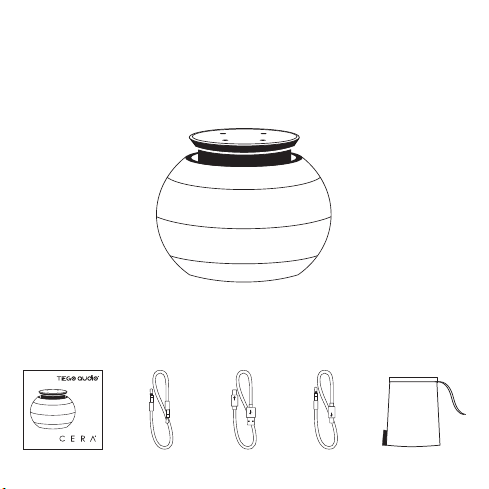
Package Contents
1x CERA Sp eaker
1x User Manual 1x 3.5mm
Audio Cable
1x Charging
Cable
1x Daisy Chain
Cable
1x Carry ing Case
 Loading...