

Page 1

SPECS
SPECS
Operation Instructions
PNCH-1
One-2-Punch Specialized Router For
Non-Linear Editing Applications
SPEC
TEC
NEC
ALWAYS
SM
Page 2

One-2-Punch Specialized Router For
Non-Linear Editing Applications
PNCH-1
4 High Street • Saugerties, NY 12477
A Division of Tower Products, Inc.
Source & Record Connections: RS422: 9pin D-sub Female
Configurations: Video: R-Y,B-Y,Y or YUV
YC and 1 Composite Video
3 Composite Video
Rear panel has 3 BNC lines which can be configured for any of the above
configurations
Configurations: Audio: Dual Channel: Balanced Neutrik XLR Connectors.
Front Panel Controls: Source/Record: RS422 Control, Video (Beta/YC/Composite), Audio
SOLO - AUTO: Control, Video, Audio
Status Indicators: LEDs: Source - Record Select
Power: For LEDs & Switch Control Only: 12VDC 500Ma Power Pack
Dimensions: 3.50" H X 7"D X 19"W EIA rackmount
Weight: 8 lb. without shipping carton
SPECIFICATIONS
• •
1
CONTROL VIDEO AUDIO
SOLO AUTO SOLO AUTO SOLO AUTO SOLO AUTO SOLO AUTO SOLO
REC-1
REC-2
12VDC
OUT
Made In USA By TecNec Div. Tower Products, Inc. ©1998, Patent Pending
INPUT SOURCE RECORD OUTPUT
21 21 2
R-Y B-Y Y R-Y B-Y Y
Specialized Router For Editing Systems
CH-1 CH-2
NEUTRIK NEUTRIK
REC-1
REC-2
CH-1 CH-2
CONTROL
AUTO
CH-1 CH-1 CH-1 CH-2
•
Push
NEUTRIK
EDITOR
OUT
NEUTRIKNEUTRIK
NEUTRIK
CH-2 CH-2 CH-1 CH-2
NEUTRIK
EDITOR
IN
Push
NEUTRIK
•
121212
AUTO
CONTROL VIDEO AUDIO
AUTO
One-2-Punch
Push
NEUTRIK
Push
NEUTRIK
SOURCE-1
SOURCE-2
Push
NEUTRIK
Push
NEUTRIK
™
SOURCE-1
SOURCE-2
IN
Page 3

One-2-Punch Specialized Router For
Non-Linear Editing Applications
PNCH-1
4 High Street • Saugerties, NY 12477
A Division of Tower Products, Inc.
You have just purchased the most innovative, flexible and powerful system interface available today.
The One-2-Punch is the ultimate product for solving all your non-linear edit system signal and device
routing needs. Designed and developed by both engineers and top video production editors, the One-
2-Punch was designed for user friendly setup & operation. If you have any questions or need additional assistance, please call our factory at 914-247-0680, Monday-Friday from 10AM to 4PM EST.
We will be happy to help you with any application questions or problems you may have.
The One-2-Punch was developed as an interface device for the new NON-LINEAR EDIT SYSTEMS. Most of the popular
Non-linear edit systems today, such as the AVID and the MEDIA 100, are designed with a single Audio/Video input-output
port and a single RS422 machine control por t. In the real world of production, it becomes necessary to use more than
one source or record VTR or signal device. This allows the editor to take advantage of footage mediums such as SVHS,
Hi-8 and other formats such as computer generated graphics. Without an interface such as the One-2-Punch, the user
would be constantly unplugging and reconnecting cables. This takes time, and is also messy and inefficient. The One-2-
Punch solves the complete interface issue in a 2 rackmount cabinet.
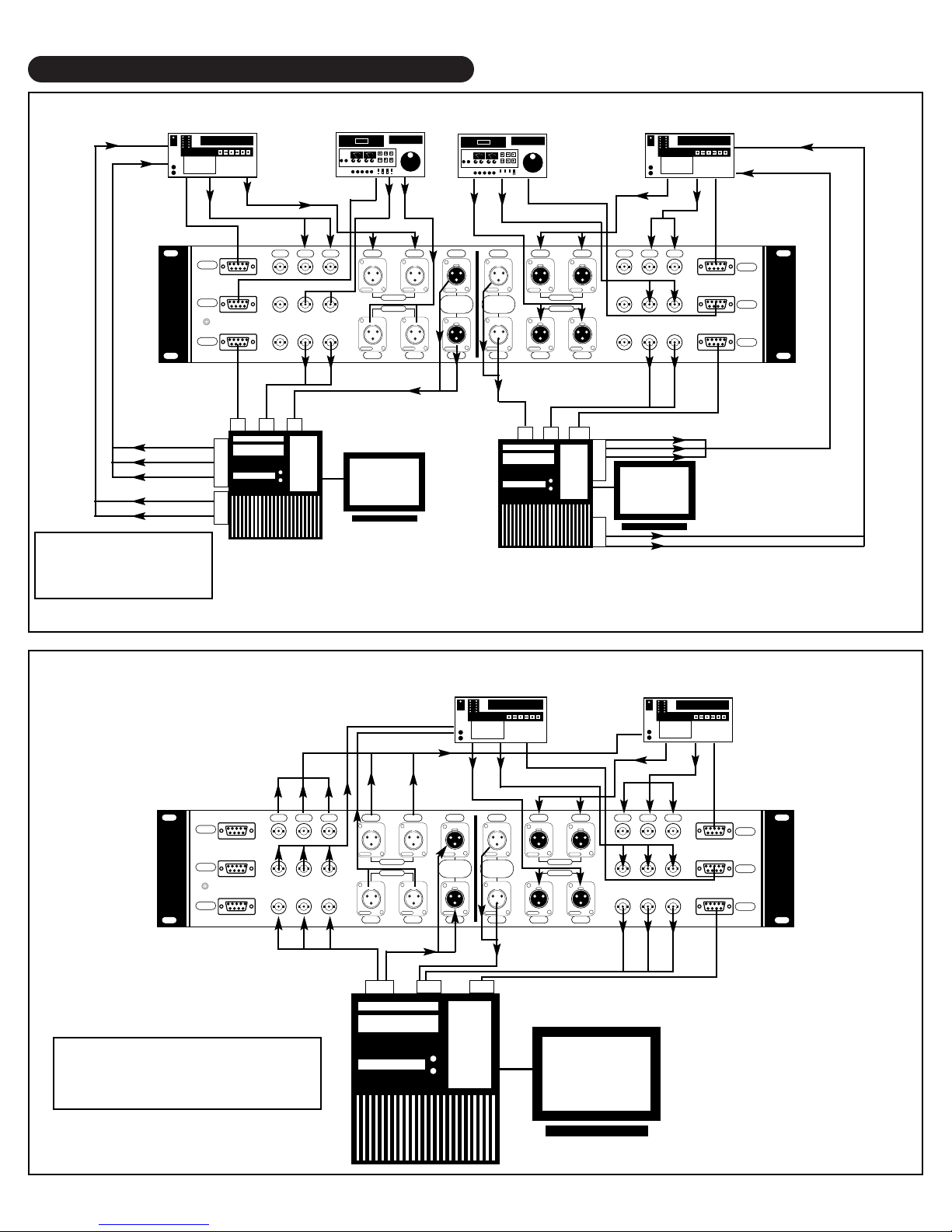
The One-2-Punch is, in all respects, a passive audio-video-RS422 2X2 router. The unit can accept 2 different and separate source devices (such as VTRs) and digitize from either source into the Non-Linear editor. After the effects and creative work is completed, the unit can send the clip to either of 2 different or separate recording devices(such as VTRs). All
audio signals(dual channel balanced) and video signals(R-Y, B-Y or SVHS or RGB) are connected into the rear panel of
the One-2-Punch. All 4 RS422 lines are also connected to the rear panel.
The audio-video I/O ports of the Non-Linear unit are also connected to the One-2-Punch. The single RS422 control cable
from the Non-Linear unit is then connected to the SOURCE RS422 9-Pin port marked “IN”.
Now all control and selection is controlled from the front panel. You are set to wor k with no fuss and cable mess. Status
LEDs on the front panel indicate all the settings in all modes of operation.
The One-2-Punch is split into 2 sections: SOURCE and RECORD. These designations are so named to keep you oriented to a system flow. The One-2-Punch accomplishes all switching of data and signals by PASSIVE means. This concept
allows the selection and switching to be performed absolutely transparent with no processing at all: What you feed is what
is returned. Another advantage of passive switching is its bi-directional path. Despite the fact that diagrams have arrows
show signal direction, the One-2-Punch por ts can be used in either SELECT or ASSIGNMENT configurations. This
makes the One-2-Punch extremely flexible and can therefore be used in many system setups to solve interface problems.
Use the diagrams provided to get an idea of the setup you may require. If you should require additional configuration information or help: CALL US. Our tech suppor t representatives are ready and able to assist you. Diagrams are also available on our WEBSITE and will be continually updated as more ideas are submitted by our customers.
BASIC SETUP
ONE-2-PUNCH NOTES
Page 4

One-2-Punch Specialized Router For
Non-Linear Editing Applications
PNCH-1
4 High Street • Saugerties, NY 12477
A Division of Tower Products, Inc.
1.
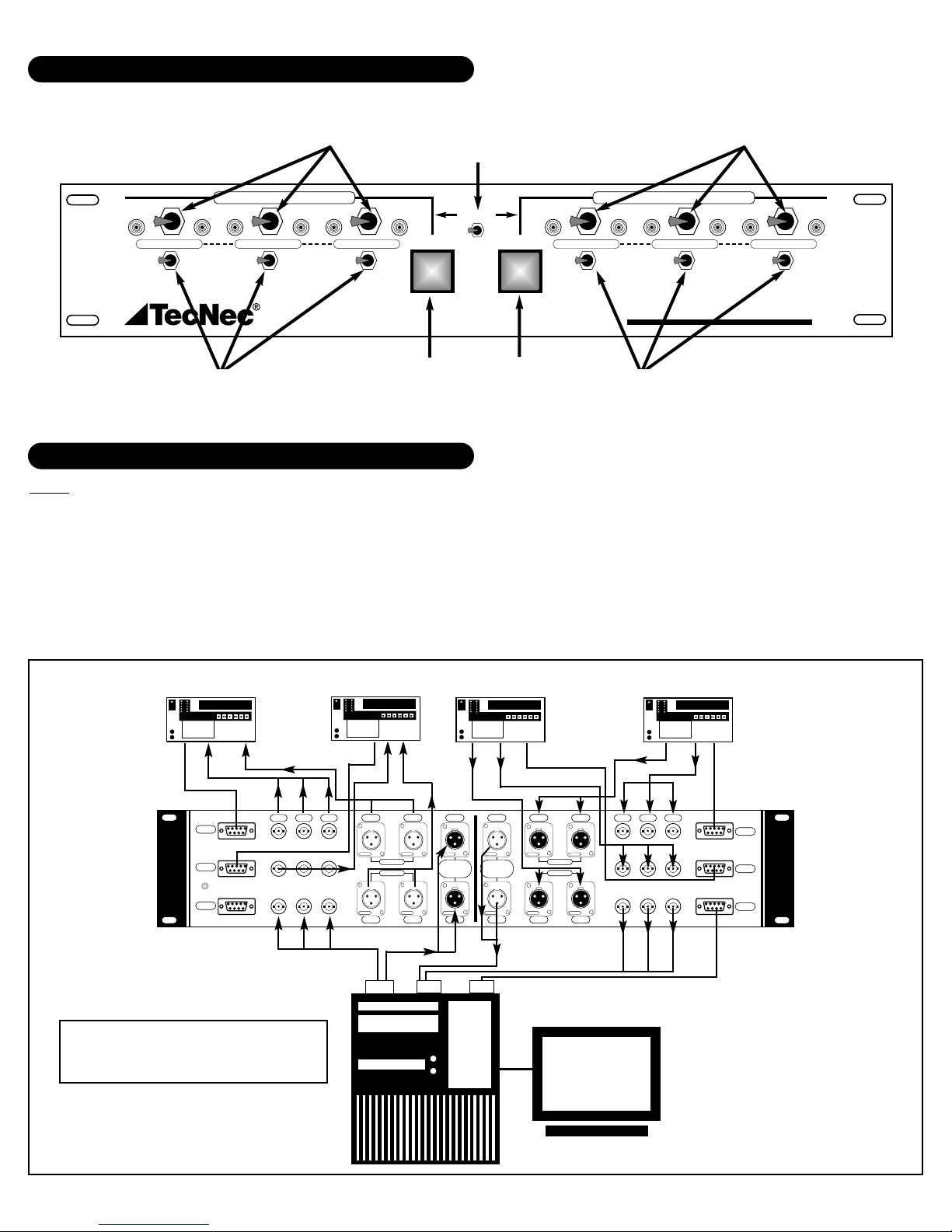
As stated, the front panel is divided into 2 identical sections designated as SOURCE and RECORD. Each section has 3
toggle switches located between 2 LEDs: one green and the other red. Located below each of these switches is another
toggle switch designated SOLO and AUTO.
1.1 1-2 SELECTOR SWITCHES
These toggle switches are only enabled when the SOLO-AUTO switch below it is in the SOLO POSITION. In this
mode the 1-2 toggle switches will select either device 1 or 2 as required. AUDIO , VIDEO , and/or RS422 can be selected for either device. This feature is useful when the need exists for previewing a clip from VTR#1 while compiling
footage from VTR#2. All three switches work independently once the SOLO feature has been enabled by the SOLO-
AUTO switch.
1.2 AUTO SWITCH
At the very center of the panel are two large square push-button switches designated:AUTO. The graphics indicate
that the left switch controls the SOURCE side and the right switch controls the RECORD side. These are PUSHLATCHING switches. Just push in to activate and push again to release. The switches are equipped with a BICOLOR illumination device which changes color to immediately indicate its position. When pushed-in (AUTO
SELECT: 2), the color is GREEN. When released (AUTO SELECT: 1), the color is RED.
1.3 SOLO-AUTO SWITCHES
In the SOLO mode, this switch allows the selection of information based on the operation described above. In the
AUTO mode, control is designated by the large AUTO push-button switches. If all three SOLO-AUTO switches are in
the AUTO position, then just pressing and releasing the AUTO switch will select either machine 1 or 2 accordingly.
You may place any of the 3 SOLO-AUTO switches in the AUTO mode as required. In this configuration, the AUTO
switch overrides the position of each 1-2 selector switch and routs either machine based on the “pushed-in” or
“release” position described in paragraph 1.1.
1.4 CONTROL TOGGLE SWITCH
Located directly above and between the two AUTO switches is the RS422 control selector switch. Since Non-Linear
Edit Systems usually only have one RS422 port, it is necessary to let the edit computer know where to look for its
controlled device. During the digitizing phase (SOURCE SELECT), the control toggle must be in the SOURCE direction. Now it will route either VTR selected to the editor RS422 port. When you are ready to output the signal to one
of the record VTRs, the switch must be in the RECORD position. This then allows the editor to control either of the
selected VTRs. This system is the answer to the multiple VTR but single RS422 port problem. In this setup, the
RS422 connection from the One-2-Punch and the Non-Linear Edit System is made via the SOURCE IN 9-Pin connector located at the bottom of the cabinet. There is no need to connect the RECORD 9-Pin bottom port, unless a
dual Non-Linear configuration is used as in DIAGRAM 1-A (NEXT PAGE).
FRONT PANEL SELECTORS
Page 5
SOLO-AUTO
SWITCHES
SOLO-AUTO
SWITCHES
SOURCE 1-2
SWITCHES
AUTO
RECORD
SWITCH
AUTO
SOURCE
SWITCH
RS422
CONTROL
SWITCH
RECORD 1-2
SWITCHES
RS422
VIDEO
VTR 1 - Sony
Beta Player
VTR 2 - Sony
Beta Player
RS422
VTR 2 - Sony Beta
Recorder
VTR 1 - Sony Beta
Recorder
RS422
VIDEO
VIDEO
AUDIO
VIDEO
RS422
AUDIO
AUDIO
AUDIO
VIDEO
RS422
VIDEO
IN I/O
OUT
TYPICAL APPLICATION DIAGRAMS
FRONT SWITCHES & CONTROLS
4 Machine System
(2-Source VTRs & 2 Record VTRs)
Diagram: 1-A
Note: The diagrams provided represent typical system applications and show a very simplified setups in order to best explain
the One-2-Punch. All cables and hook-ups may not be displayed in the diagram to reduce clutter. These diagrams are
designed to give you a guide for using the One-2-Punch. Should your requirements require a different setup or you have custom needs, please do not hesitate to call or e-mail us with your questions.
CABLES:T ecNec manufactures all cables, adapters and accessories to complete your system. Once you have determined your system needs, call your TecNec dealer for delivery of any and all cables. We also manufacture custom length cables and harnesses.
ADDITIONAL EQUIPMENT: TecNec is also your source for all your audio-video professional equipment and accessories.
• •
1
CONTROL VIDEO AUDIO
SOLO AUTO SOLO AUTO SOLO AUTO SOLO AUTO SOLO AUTO SOLO
INPUT SOURCE RECORD OUTPUT
21 21 2
Specialized Router For Editing Systems
CONTROL
AUTO
121212
AUTO
CONTROL VIDEO AUDIO
AUTO
One-2-Punch
™
00 : 00 :00 : 00
BETACAM SP
REC-1
REC-2
12VDC
OUT
Made In USA By TecNec Div.Tower Products, Inc.© 1998, Patent Pending
00 : 00 :00 : 00
BETACAM SP
R-Y B-Y Y R-Y B-Y Y
NEUTRIK NEUTRIK
CH-1 CH-2
REC-1
REC-2
NEUTRIKNEUTRIK
CH-1 CH-2
00 : 00 :00 : 00
BETACAM SP
CH-1 CH-1 CH-1 CH-2
•
Push
NEUTRIK
NEUTRIK
EDITOR
EDITOR
OUT
IN
Push
NEUTRIK
NEUTRIK
CH-2 CH-2 CH-1 CH-2
•
Push
NEUTRIK
Push
NEUTRIK
SOURCE-1
SOURCE-2
Push
NEUTRIK
Push
NEUTRIK
00 : 00 :00 : 00
BETACAM SP
SOURCE-1
SOURCE-2
IN
NLE
Page 6

RS422
VIDEO
VTR 1
Beta Player
VTR 2
S-VHS Player
RS422
VTR 2
S-VHS Recorder
VTR 1
Beta Recorder
RS422
VIDEO
AUDIO
VIDEO Via SV4-2B-6
RS422
AUDIO
S-VHS OUT
OF BETA
DECK
AUDIO
AUDIO
VIDEO
RS422
VIDEO
IN I/O
OUT
Setup Notes
This setup allows a Beta & S-VHS source to be
routed into the system via S-VHS breakout
cables (TecNec model SV4-2B-6). The output is
routed to an S-VHS recorder via the Beta
Recorder Deck’s S-VHSoutput. In essence, the
Beta Recorder is being utilized as a transcoder
for output to the S-VHS Recorder. In this configuration, the SOLO-AUTO switches on the
RECORD SIDE of the One-2-Punch should be in
SOLO mode in order to rout the RS422 and
Audio to the S-VHS Recorder and the Video to
the Beta Recorder.
4 Machine Multi-Format System
(2-Source VTRs & 2 Record VTRs)
Beta & S-VHS Source with Beta
& S-VHS Recorder (S-VHS Looped)
USING THE 1-2 PUNCH WITH MUL
TIFORMAT VIDEO: BETA, SVHS, HI8, RGB
The One-2-Punch is a passive device as far as actual signal switching is concerned. In this fashion, a variety of signals can be
used to meet your equipment needs. The rear panel graphics indicates the standard BETA(R-Y , B-Y, Y) with an overla y f or SVHS(Y
and C). This graphic is simply a guide.Simply put the One-2-Punch has 3 video path lines which switch together in an A/B method.
Therefore you can use those lines in any configuration your system requires.
COMPONENT: Connect the component lines from the VTRs to the appropriate section of the One-2-Punch.:just follow the graph-
ics and be consistent. YUV systems will use the Y channel for Y and the R-Y and B-Y channels for U and V. RGB can be used as
well. The only requirement is that sync-on-green be used. If this is not possible, then fed the sync information separately to the
appropriate destination.
SVHS:
Since the One-2-Punch has 3 video lines per device, it is simple to use SVHS equipment. A 4-Pin (SVHS) to BNC breakout cable is available: TecNec part# SV4-2B-6. With this cable simply connect the BNC labeled Y and C to the corresponding Y
and C overlay labeled connectors on the One-2-Punch. If you are using SVHS for input and output, then 2 such cables would be
required. In a system where VTR#1 is a BETA and VTR#2 is an SVHS machine the hookup must be all done is SVHS. Use the
SVHS output of the BETA machine with the breakout cable. Connect the male 4-Pin end to the SVHS output of the source VTR
and the corresponding Y and C BNCs to the One-2-Punch. Repeat in reverse the same process for the record output to the
recorders. If you are using a BETA source with an SVHS source and the recorder VTR is a single BETA recorder, then use the
breakout cables with the source side VTRs and the straight component feed to the BETA recorder, utilizing the transcoder feature
of the Non-linear edit system. (SEE DIAGRAMS 1-B THROUGH 1-B)
COMPOSITE VIDEO: As mentioned in previous chapters, the One-2-Punch handles 3 lines of video. In a composite video sys-
tem, simply chose a connector per path as required. It is possible to connect the VTR composite video outputs to the channel
labeled Y and the same VTRs monitor signal to the channel labeled R-Y, in so doing the One-2-Punch can route the video signals
to the editor and likewise route the “monitor out” signals to a video monitor.
Diagram: 1-B
TYPICAL APPLICATION DIAGRAMS
00 : 00 :00 : 00
BETACAM SP
REC-1
REC-2
12VDC
OUT
Made In USA By TecNec Div.Tower Products, Inc.© 1998, Patent Pending
R-Y B-Y Y R-Y B-Y Y
00 : 00 :00 : 00
S-VHS
3
3
5
5
0
0
.
.
.
.
.
.
.
.
.
.
.
.
.
7
.
7
.
.
.
.
0
0
3
3
1
1
.
.
.
.
0
0
.
.
2
2
1
1
0
0
0
0
5
0
5
0
%
%
0
0
+
+
-
-
VU
VU
CH-1 CH-2
NEUTRIK NEUTRIK
REC-1
REC-2
NEUTRIKNEUTRIK
CH-1 CH-2
00 : 00 :00 : 00
S-VHS
3
3
5
5
0
0
.
.
.
.
.
.
.
.
.
.
.
.
.
7
.
7
.
.
.
.
0
0
3
3
1
1
.
.
.
.
0
0
.
.
2
2
1
1
0
0
0
0
5
0
5
0
%
%
0
0
+
+
-
-
VU
VU
CH-1 CH-1 CH-1 CH-2
•
Push
NEUTRIK
NEUTRIK
EDITOR
EDITOR
OUT
IN
Push
NEUTRIK
NEUTRIK
CH-2 CH-2 CH-1 CH-2
•
Push
NEUTRIK
NEUTRIK
SOURCE-1
SOURCE-2
Push
NEUTRIK
NEUTRIK
NLE
Push
Push
00 : 00 :00 : 00
BETACAM SP
SOURCE-1
SOURCE-2
IN
Page 7

RS422
S-VIDEO
VTR 1
Beta Player
VTR 2
S-VHS Player
RS422
VTR 1
Beta Recorder
VIDEO
AUDIO
VIDEO Via SV4-2B-6
RS422
AUDIO
AUDIO
AUDIO
VIDEO
RS422
VIDEO
IN I/O
OUT
3 Machine Multi-Format System
(2-Source VTRs & 1 Record VTR)
Beta & S-VHS Source with
Single Beta Recorder
For Straight Beta-Beta:The Bypass Loop Is Used
TYPICAL APPLICATION DIAGRAMS
R-Y,B-Y,Y
R-Y,B-Y,Y
OUT
RS422
VIDEO
VTR 1
Beta Player
VTR 2
S-VHS Player
RS422
VTR 2
S-VHS Recorder
VTR 1
Beta Recorder
RS422
TO S-VIDEO IN
AUDIO
VIDEO Via SV4-2B-6
RS422
AUDIO
AUDIO
AUDIO
RS422
VIDEO
S-IN I/OS-OUT OUT IN
4 VTR System
(2-Source VTRs & 2 Record VTRs)
S-VHS Signal Primary Path
Beta Bypass Looped
VIDEO
TO S-IN
R-Y,B-Y,Y
R-Y,B-Y,Y
R-Y,B-Y,Y
IN
R-Y,B-Y,Y
OUT
Diagram: 1-C
Diagram: 1-D
00 : 00 :00 : 00
BETACAM SP
REC-1
REC-2
12VDC
OUT
Made In USA By TecNec Div.Tower Products, Inc.© 1998, Patent Pending
R-Y B-Y Y R-Y B-Y Y
S-VHS
3
5
5
0
.
.
.
.
.
.
.
.
.
7
.
7
.
.
.
0
0
3
1
1
.
.
.
0
0
.
.
2
2
1
0
0
0
5
5
0
%
0
0
+
-
-
VU
VU
CH-1 CH-2
NEUTRIK NEUTRIK
CH-1 CH-2
00 : 00 :00 : 00
3
0
.
.
.
.
.
3
.
1
0
0
%
+
00 : 00 :00 : 00
S-VHS
3
3
5
5
0
0
.
.
.
.
.
.
.
.
.
.
.
.
.
7
.
7
.
.
.
.
0
0
3
3
1
1
.
.
.
.
0
0
.
.
2
2
1
1
0
0
0
0
5
0
5
0
%
%
0
0
+
+
-
-
VU
VU
00 : 00 :00 : 00
BETACAM SP
CH-1 CH-1 CH-1 CH-2
•
REC-1
REC-2
Push
NEUTRIK
EDITOR
OUT
Push
NEUTRIKNEUTRIK
NEUTRIK
CH-2 CH-2 CH-1 CH-2
•
NEUTRIK
EDITOR
NEUTRIK
Push
Push
NEUTRIK
NEUTRIK
IN
SOURCE-1
SOURCE-2
Push
Push
NEUTRIK
NEUTRIK
SOURCE-1
SOURCE-2
IN
NLE
00 : 00 :00 : 00
BETACAM SP
REC-1
REC-2
12VDC
OUT
Made In USA By TecNec Div.Tower Products, Inc.© 1998, Patent Pending
R-Y B-Y Y R-Y B-Y Y
NEUTRIK NEUTRIK
CH-1 CH-2
REC-1
REC-2
NEUTRIKNEUTRIK
CH-1 CH-2
00 : 00 :00 : 00
S-VHS
3
3
5
5
0
0
.
.
.
.
.
.
.
.
.
.
.
.
.
7
.
7
.
.
.
.
0
0
3
3
1
1
.
.
.
.
0
0
.
.
2
2
1
1
0
0
0
0
5
0
5
0
%
%
0
0
+
+
-
-
VU
VU
CH-1 CH-1 CH-1 CH-2
•
Push
NEUTRIK
NEUTRIK
EDITOR
EDITOR
OUT
IN
Push
NEUTRIK
NEUTRIK
CH-2 CH-2 CH-1 CH-2
•
Push
NEUTRIK
Push
NEUTRIK
SOURCE-1
SOURCE-2
BETACAM SP
SOURCE-1
SOURCE-2
IN
00 : 00 :00 : 00
Push
NEUTRIK
Push
NEUTRIK
NLE
Page 8
TYPICAL APPLICATION DIAGRAMS
RS422
VIDEO
VTR 1
Beta Player
VTR 2
S-VHS Player
RS422
VTR 2
S-VHS Recorder
VTR 1
Beta Recorder
RS422
VIDEO
AUDIO
VIDEO Via SV4-2B-6
RS422
AUDIO
AUDIO
AUDIO
RS422
RS422
VIDEO
I/O
I/O ININ
Dual Editor System
(2 VTRs Each - Record
Back T o Beta)
VIDEO
R-Y,B-Y ,YAUDIO
AUDIOR-Y,B-Y,Y
R-Y,B-Y ,Y
IN
AUDIO IN
R-Y,B-Y,Y IN
AUDIO IN
IN
Diagram: 1-E
RS422
VIDEO
VIDEO & AUDIO
BACK TO VTR 1
VIDEO & AUDIO
BACK TO VTR 2
AUDIO
VIDEO
RS422
AUDIO
AUDIO
VIDEO
RS422
VIDEO
IN I/O
OUT
2 Machine System
(Record & Playback To Either VTR)
Diagram: 1-F
VTR 1 - Sony
Beta 2800
VTR 2 - Sony
Beta 2800
IN
00 : 00 :00 : 00
BETACAM SP
REC-1
REC-2
12VDC
OUT
Made In USA By TecNec Div.Tower Products, Inc.© 1998, Patent Pending
R-Y B-Y Y R-Y B-Y Y
00 : 00 :00 : 00
S-VHS
3
3
5
5
0
0
.
.
.
.
.
.
.
.
.
.
.
.
.
7
.
7
.
.
.
.
0
0
3
3
1
1
.
.
.
.
0
0
.
.
2
2
1
1
0
0
0
0
5
0
5
0
%
%
0
0
+
+
-
-
VU
VU
CH-1 CH-2
NEUTRIK NEUTRIK
REC-1
REC-2
NEUTRIKNEUTRIK
CH-1 CH-2
NLE
00 : 00 :00 : 00
S-VHS
3
3
5
5
0
0
.
.
.
.
.
.
.
.
.
.
.
.
.
7
.
7
.
.
.
.
0
0
3
3
1
1
.
.
.
.
0
0
.
.
2
2
1
1
0
0
0
0
5
0
5
0
%
%
0
0
+
+
-
-
VU
VU
CH-1 CH-1 CH-1 CH-2
•
Push
NEUTRIK
NEUTRIK
EDITOR
EDITOR
OUT
Push
NEUTRIK
NEUTRIK
CH-2 CH-2 CH-1 CH-2
•
IN
Push
NEUTRIK
SOURCE-1
SOURCE-2
Push
NEUTRIK
00 : 00 :00 : 00
BETACAM SP
Push
NEUTRIK
Push
NEUTRIK
SOURCE-1
SOURCE-2
IN
NLE
REC-1
REC-2
12VDC
OUT
Made In USA By TecNec Div.Tower Products, Inc.© 1998, Patent Pending
R-Y B-Y Y R-Y B-Y Y
CH-1 CH-2
NEUTRIK NEUTRIK
CH-1 CH-2
REC-1
REC-2
NEUTRIKNEUTRIK
00 : 00 : 00 : 00
BETACAM SP
CH-1 CH-1 CH-1 CH-2
•
Push
NEUTRIK
NEUTRIK
EDITOR
EDITOR
OUT
Push
NEUTRIK
NEUTRIK
CH-2 CH-2 CH-1 CH-2
•
Push
NEUTRIK
IN
SOURCE-1
SOURCE-2
Push
NEUTRIK
Push
NEUTRIK
Push
NEUTRIK
NLE
00 : 00 :00 : 00
BETACAM SP
SOURCE-1
SOURCE-2
IN
Page 9

Dual Editor System with
1Beta VTR & 1U-Matic
Diagram: 1-G
RS422
Video Out
RS422
To Composite Video In
Of Editor #1
RS422
Video
Audio Out
Video Out
Video Out
To Video In
Of 1st Editor
To Video In Of 2nd Editor
Audio Out
Audio Out
RS422
Sony Beta
Recorder
Audio &
Video In
TYPICAL APPLICATION DIAGRAMS
RS422
2
1
VO-9800
Dual Editor System with
One Beta VTR
Diagram: 1-H
RS422
Video Out
RS422
Video
Audio Out
Video Out
Video Out
To Video In
Of 1st Editor
To Video In Of 2nd Editor
Audio Out
Audio Out
RS422
Sony Beta
Recorder
Audio &
Video In
REC-1
REC-2
12VDC
OUT
Made In USA By TecNec Div.Tower Products, Inc.© 1998, Patent Pending
NLE
NEUTRIK
EDITOR
IN
NEUTRIK
Push
NEUTRIK
SOURCE-1
SOURCE-2
Push
NEUTRIK
NEUTRIK
NEUTRIK
Push
Push
00 : 00 :00 : 00
BETACAM SP
R-Y B-Y Y R-Y B-Y Y
CH-1 CH-2
NEUTRIK NEUTRIK
REC-1
REC-2
CH-1 CH-2
CH-1 CH-1 CH-1 CH-2
•
Push
NEUTRIK
EDITOR
OUT
Push
NEUTRIKNEUTRIK
NEUTRIK
CH-2 CH-2 CH-1 CH-2
•
SOURCE-1
SOURCE-2
IN
A
12V DC
Tally In Tally Out
100mA
NLE
00 : 00 :00 : 00
BETACAM SP
PSW-422
B
Out
REC-1
REC-2
12VDC
OUT
Made In USA By TecNec Div.Tower Products, Inc.© 1998, Patent Pending
NLE
NEUTRIK
EDITOR
IN
NEUTRIK
Push
NEUTRIK
SOURCE-1
SOURCE-2
Push
NEUTRIK
NEUTRIK
NEUTRIK
Push
Push
00 : 00 :00 : 00
BETACAM SP
R-Y B-Y Y R-Y B-Y Y
CH-1 CH-2
NEUTRIK NEUTRIK
REC-1
REC-2
CH-1 CH-2
CH-1 CH-1 CH-1 CH-2
•
Push
NEUTRIK
EDITOR
OUT
Push
NEUTRIKNEUTRIK
NEUTRIK
CH-2 CH-2 CH-1 CH-2
•
NLE
SOURCE-1
SOURCE-2
IN
Page 10
4 VTR System
(2-Source VTRs & 2 Record VTRs)
Showing Monitor Use
Note: Only Video Path Is Shown
MONITOR
AUDIO
RS422
VIDEO
VTR 1 - Sony
Beta Player
VTR 2 - Sony
Beta Player
RS422
VTR 2 - Sony Beta
Recorder
VTR 1 - Sony Beta
Recorder
RS422
VIDEO
VIDEO
AUDIO
VIDEO
RS422
AUDIO
AUDIO
AUDIO
VIDEO
RS422
VIDEO
IN I/O
OUT
IN
OUT
MONITOR
INOUT
TYPICAL APPLICATION DIAGRAMS
USING THE 1-2 PUNCH WITH MONITORS
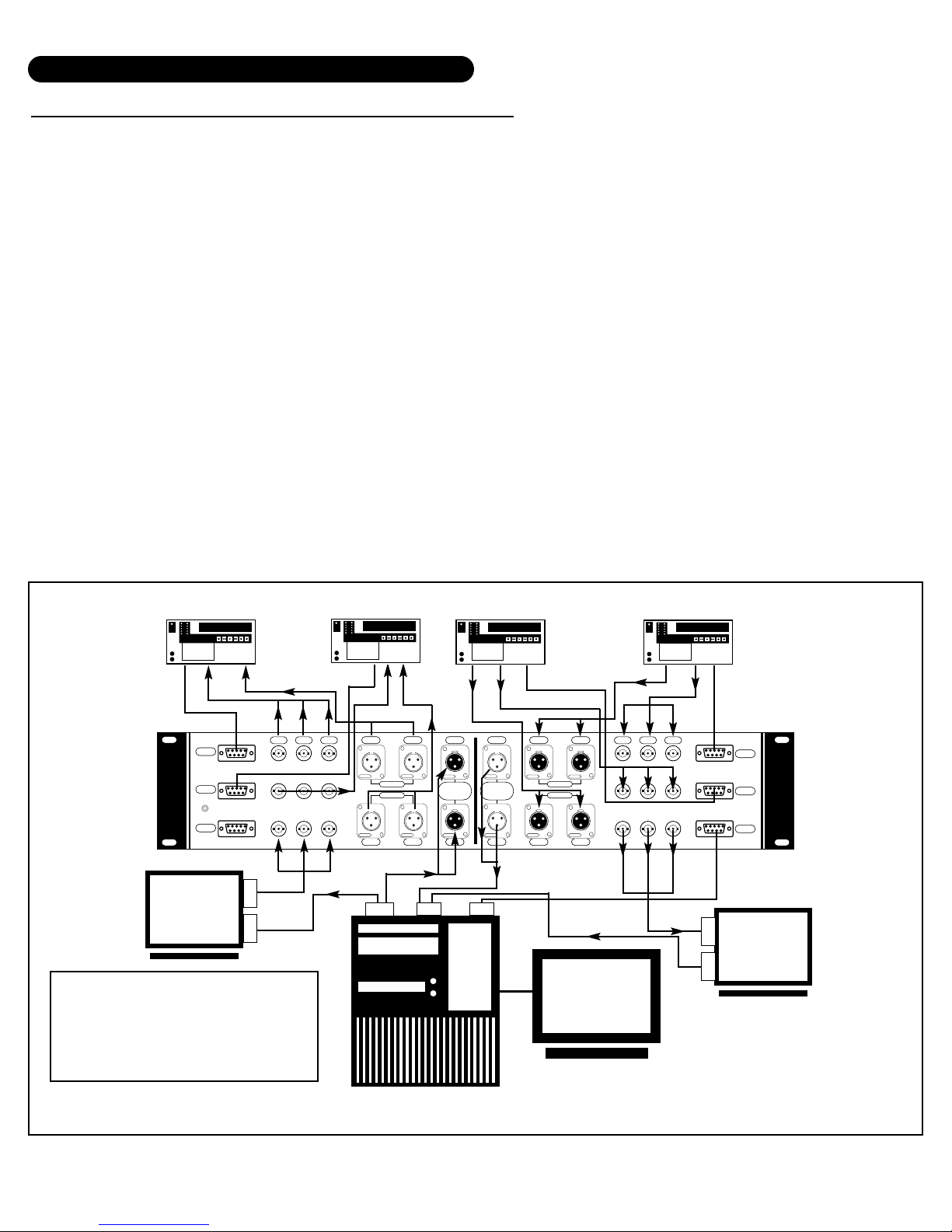
The typical Non-Linear edit system is a desktop setup where space is limited. For such setups, it is common
practice to use a single monitor setup on the source side of the system to monitor signals about to be digitized. This is a convenient place to “scan” footage from the source VTR. The One-2-Punch does not provide a special interface for monitoring. However, it is suggested that in keeping with the single monitor desktop approach to use a dual input monitor. This monitor can be connected to the “monitor” outputs of the
source and record VTRs, thereby providing both in and out signal monitoring of the edit process in addition
to viewing ability of the compiled edit information on the recorder.
To accomplish this, a dual channel composite, SVHS or component monitor may be used. Connect the “monitor out” composite video signal of the source VTR into input A of the monitor and the output of the record
VTR into monitor input B. This simple 2 VTR setup allows the utilization of the monitor’s A/B selector for monitoring both video and audio sources.
For multiple source and record setups (3 or 4 VTRs), the best method of monitoring would be to loop the signals entering and exiting the editor in conjunction with the One-2-Punch. In this format, monitor input A will
monitor the switch selector action of the source side of the One-2-Punch and monitor input B can monitor
the record assignment action. If budget and space permits, then use 2 separate monitors for source and
record signals at the same point in the signal path.
Diagram: 1-I
00 : 00 :00 : 00
BETACAM SP
REC-1
REC-2
12VDC
OUT
Made In USA By TecNec Div.Tower Products, Inc.© 1998, Patent Pending
R-Y B-Y Y R-Y B-Y Y
00 : 00 :00 : 00
BETACAM SP
CH-1 CH-2
NEUTRIK NEUTRIK
REC-1
REC-2
CH-1 CH-2
NEUTRIKNEUTRIK
00 : 00 :00 : 00
BETACAM SP
CH-1 CH-1 CH-1 CH-2
•
Push
NEUTRIK
NEUTRIK
EDITOR
EDITOR
OUT
IN
Push
NEUTRIK
NEUTRIK
CH-2 CH-2 CH-1 CH-2
•
Push
NEUTRIK
NEUTRIK
SOURCE-1
SOURCE-2
Push
NEUTRIK
NEUTRIK
NLE
Push
Push
00 : 00 :00 : 00
BETACAM SP
SOURCE-1
SOURCE-2
IN
Page 11
USING THE 1-2 PUNCH WITH AUDIO
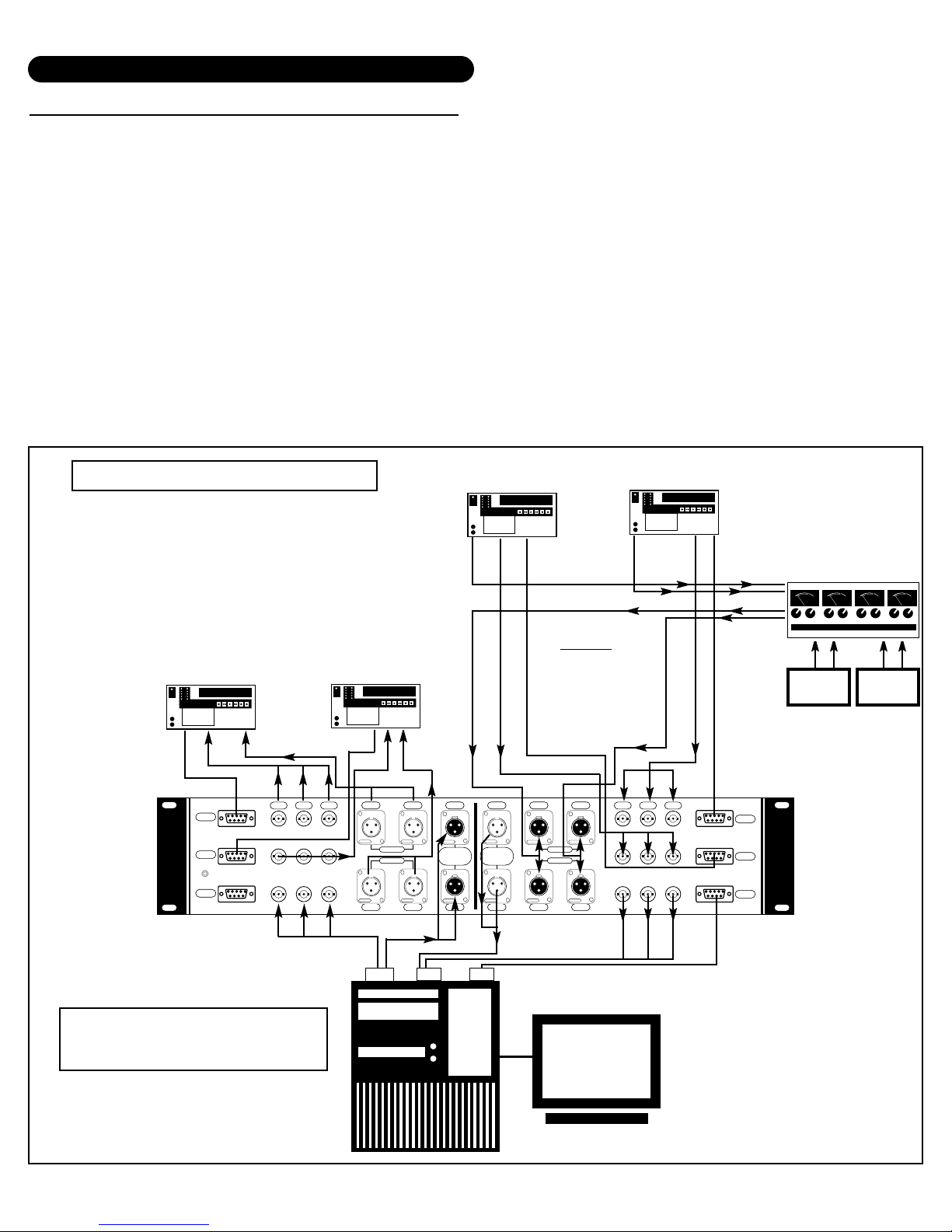
The One-2-Punch provides for dual channel balanced audio. Standard balanced audio XLR cables can be
used to interface the audio portion of your signals into the unit. The One-2-Punch switches Channels 1 and
2 of each connected device simultaneously. Since the One-2-Punch is passive, there is no processing of signals through the unit: What you feed it will be returned to you likewise.
UNBALANCED AUDIO: Should your system requirements call for unbalanced audio, you may useTecNec
cable part# SC6XR to adapt the XLR por t to RCA phono. Part# SC6XS can be used for XLR to 1/4" phone
(tip-ring).
The One-2-Punch can be used with any audio mixer or production console you may have in your system. If
your system uses a mixer upstream for production quality audio work, then the output can be fed to the audio
ports of the One-2-Punch for final access to the Non-linear editor.In this configuration, the One-2-Punch can
be used for spot VTR monitoring using the audio “monitor” outputs of the VTRs while the production mixer is
fed to the recorder input directly.
TYPICAL APPLICATION DIAGRAMS
AUDIO
RS422
VIDEO
AUDIO
AUDIO
VTR 1 - Sony
Beta Player
VTR 2 - Sony
Beta Player
RS422
VTR 2 - Sony Beta
Recorder
VTR 1 - Sony Beta
Recorder
RS422
VIDEO
VIDEO
AUDIO
AUDIO
VIDEO
RS422
AUDIO
AUDIO
AUDIO
VIDEO
RS422
VIDEO
IN I/O
OUT
4 Machine System
(2-Source VTRs & 2 Record VTRs)
MIXER
IN
OUT
NOTE
Either Selection
of 1 or 2 will
receive mixer
signal
CDCASS
Using A Mixer Upstream
Diagram: 1-J
00 : 00 :00 : 00
BETACAM SP
REC-1
REC-2
12VDC
OUT
Made In USA By TecNec Div.Tower Products, Inc.© 1998, Patent Pending
R-Y B-Y Y R-Y B-Y Y
00 : 00 :00 : 00
BETACAM SP
CH-1 CH-2
NEUTRIK NEUTRIK
CH-1 CH-2
REC-1
REC-2
CH-1 CH-1 CH-1 CH-2
•
Push
NEUTRIK
EDITOR
OUT
Push
NEUTRIKNEUTRIK
NEUTRIK
CH-2 CH-2 CH-1 CH-2
•
00 : 00 :00 : 00
BETACAM SP
NEUTRIK
NEUTRIK
EDITOR
IN
NEUTRIK
NEUTRIK
Push
Push
NEUTRIK
SOURCE-1
SOURCE-2
Push
Push
NEUTRIK
00 : 00 :00 : 00
BETACAM SP
SOURCE-1
SOURCE-2
3
3
3
3
5
5
0
0
.
.
.
.
.
.
.
.
.
.
.
.
.
.
7
7
.
.
.
.
0
0
3
3
1
1
.
.
.
0
.
2
-
.
0
.
2
1
1
0
0
0
0
5
5
0
0
%
%
0
0
+
+
-
VU
VU
5
5
0
0
.
.
.
.
.
.
.
.
.
.
.
.
.
.
7
7
.
.
.
.
0
0
3
1
0
.
2
-
3
1
.
.
.
.
0
.
2
1
1
0
0
0
0
5
5
0
0
%
%
0
0
+
+
-
VU
VU
IN
NLE
Page 12
One-2-Punch Specialized Router For
Non-Linear Editing Applications
PNCH-1
4 High Street • Saugerties, NY 12477
A Division of Tower Products, Inc.
Q:
HOW EXACTLY DOES THE FRONT PANEL "CONTROL" TOGGLE SWITCH WORK?
A:
CONTROL T OGGLE SWITCH
Located directly above and between the Two AUT O s witches is the RS422 control selector s witch. This
feature addresses the fact that Non-Linear Edit Systems usually only have one RS422 bi-directional
port. If the One-2-Punch is being used with 4 VTRs where 2 are source VTRs and another 2 are
recorder VTRs (a 4 machine system), then connect the VTR 9 pin RS422 cables from each VTR to
the properly marked port on the back of the One-2-Punch. Connect the NLE to the SOURCE RS422
9 pin connector, located directly below the Source1 and Source2 9 pins.
The following diagrams help illustrate various applications regarding this feature. Please note
that only the RS422 (9-Pin) connectors are shown on the rear panel of the One-2-Punch f or purposes of clarity.
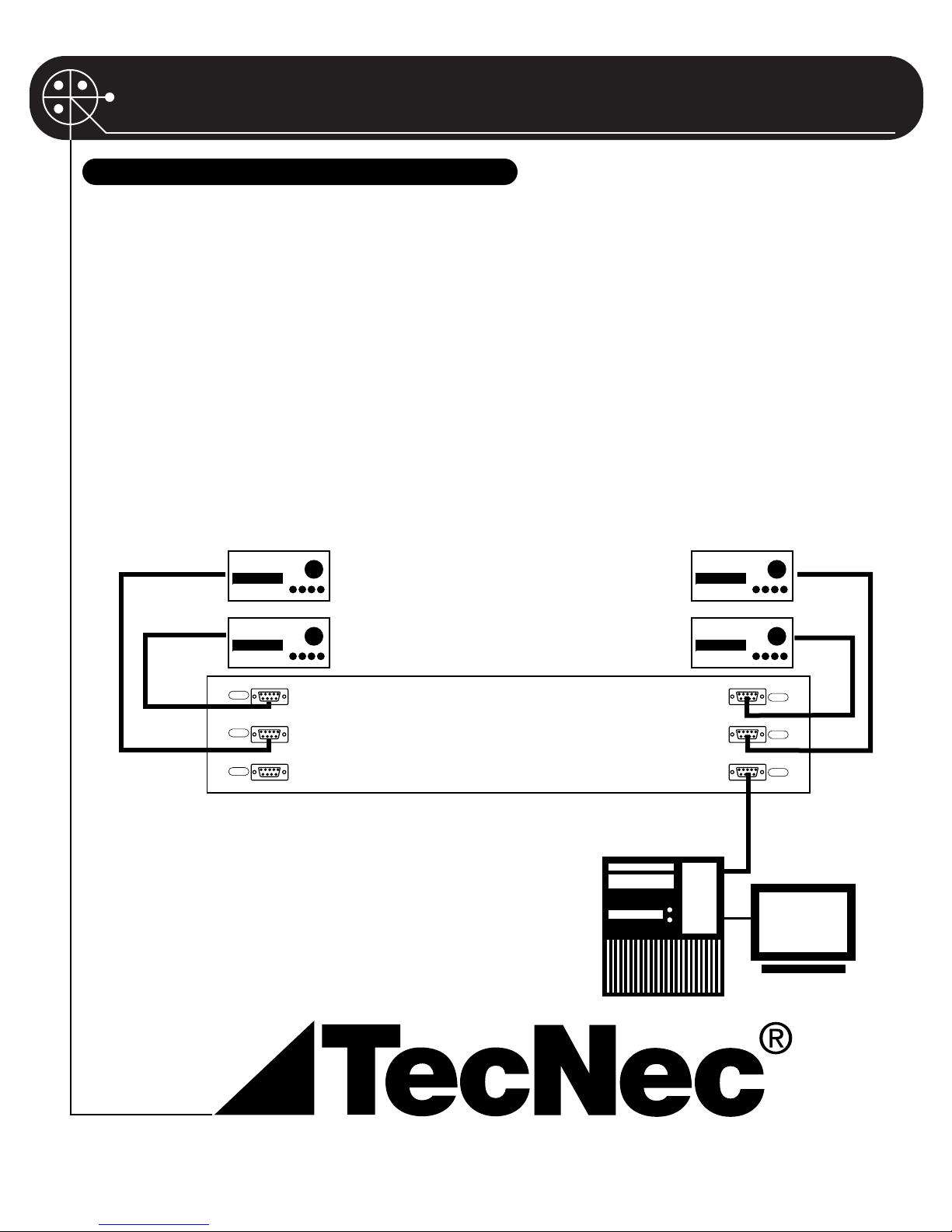
Diagram 1a:4 MACHINE SYSTEM:2 SOURCE VTRS AND 2 RECORD VTRS: ONE NON-LINEAR EDITOR
“CONTROL”TOGGLE OPERATION
During the download operation where the NLE is
controlling the source VTRs, the Control Switch
must be in the source direction (LEFT). When editing is completed and you want to control the record
VTRs, then set the switch to the output side
(RIGHT).
VTR1
Source
VTR2
Source
VTR2
Record
VTR1
Record
REC-1
REC-2
OUT
SOURCE-1
SOURCE-2
IN
NLE
Page 13

One-2-Punch Specialized Router For
Non-Linear Editing Applications
PNCH-1
4 High Street • Saugerties, NY 12477
A Division of Tower Products, Inc.
In this configuration, the One-2-Punch is
controlling 2 VTRs in total, where one or
both are recorders and will be used to
record the edited material from the NLE. As
shown, simply connect the VTR RS422
cables from each VTR to each designated
port on the source side. Connect the NLE to
the output 9 pin located directly below the
source 9 pins. Place the Control Switch in
the source position (LEFT) and leave it
there. There is no need to connect any
RS422 cables to the Record side.
VTR1
Source/Record
Diagram 2A: 2 MACHINE SYSTEM: 2 VTRS WHERE THE VTRS ARE BEING USED FOR BOTH
DOWNLOAD AND RECORDING
VTR2
Source/Record
REC-1
REC-2
OUT
SOURCE-1
SOURCE-2
IN
NLE
Page 14
One-2-Punch Specialized Router For
Non-Linear Editing Applications
PNCH-1
4 High Street • Saugerties, NY 12477
A Division of Tower Products, Inc.
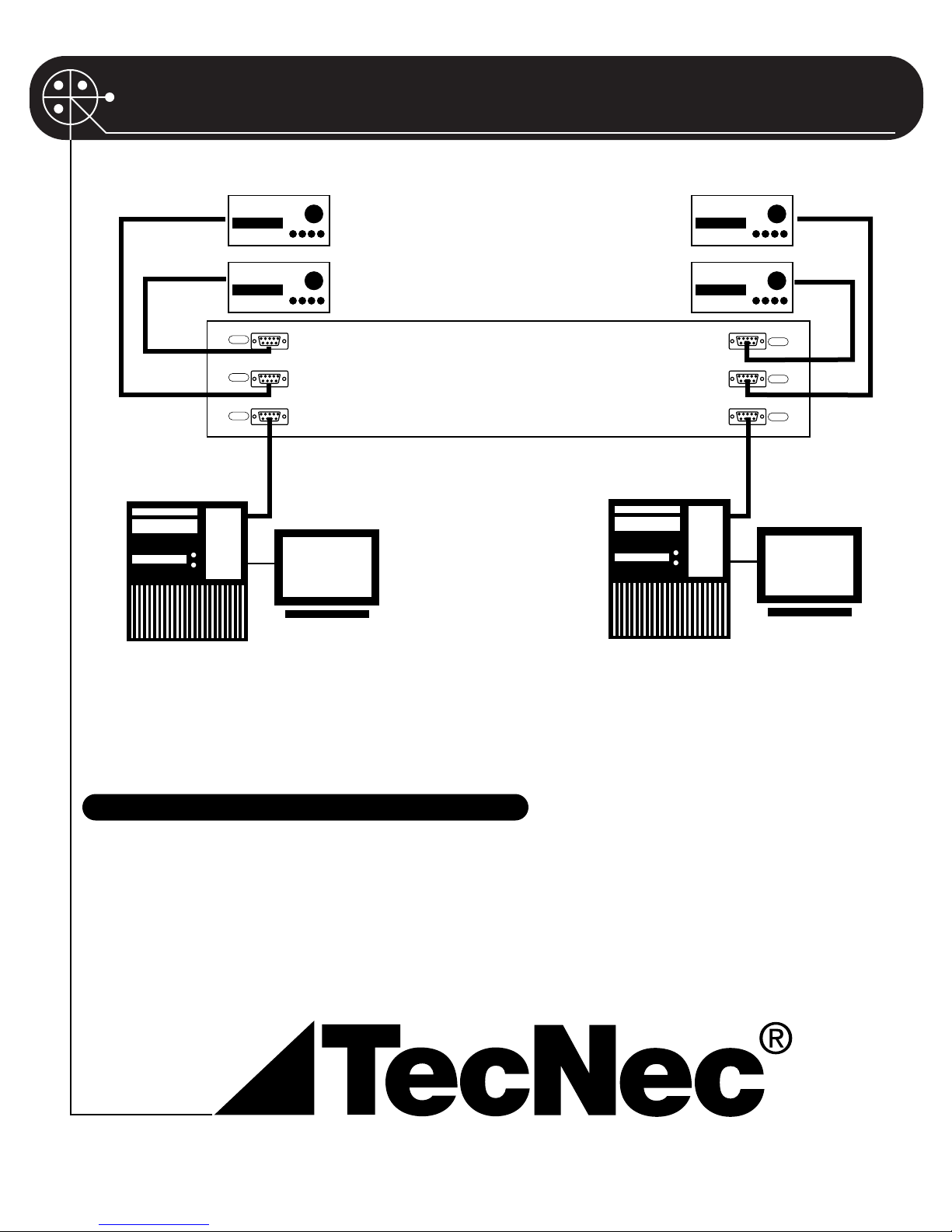
Diagram 2C: 2 Non-Linear Editors Controlling 2 VTRS Each: for Download & Recording
Here 2 NLE units are being used with 2 VTRs each. Connect the 9 pin cables from VTRs A, B to the source
RS422 ports, and NLE#1 to the source output por t located directly below the Source-1, Source-2 input 9
pin ports. Connect VTRs C, D in the same f ashion on the Record side, and NLE#2 to the port located directly below the REC-1 and REC-2 9 pin ports. Set the Control Switch to the Source side (LEFT) and leave it
there. This allows the RS422 to act independently and each NLE controls it's own pair of VTRs.
VTR A
NLE 2
NLE 1
VTR BVTR D
VTR C
PO WERING THE ONE-2-PUNCH
Although the One-2-Punch is a passive device for its signal switching functions, it still requires power
for the logic and LED displa y f eatures. A 12VDC 500mA powerpack is included with your unit.A power
jack is located on the left side rear panel of the unit. Plug the power pak into this jack and the unit will
be powered. The One-2-Punch does not have a power switch.When the unit is not being used, it is
suggested that all 1-2 selector switches be placed in position 1, and the AUTO switch set in the “out”
(RED) position.This will “relax” the onboard relays and consume very little power.
SOURCE-1
SOURCE-2
IN
NLE
REC-1
REC-2
OUT
NLE
 Loading...