

Page 1
TECMO KOEI A MERICA CO RP.
®
Page 2
For those inter ested i n compl eting o ur prod uct sur ve y, plea se access the below URL :
http://www.tecmokoeiamerica.com/survey/dw7e
CONTENTS
Battle Controls 4
Basic Controls 4
EX Attacks / Switch Weapon / Musou Attacks 6
Stratagems 7
Starting the Game 8
Beginning a Game / Main Menu / Saving & Loading 8
Online Play 9
Empire Mode 10
Empire Mode Overview / P laying Empire Mode 10
Positions & Fame 12
Stratagems 15
War Council & Strategy Phase 16
War Council 16
Strategy Phase 17
Battles 18
Battle Preparation 18
Battle Screen 20
Fighting Battles 22
Upgrading Officers 24
Officer Abilities / Weapons 24
Edit Mode / Extras Mode 26
Dolby and the double-D
symbol are trademarks of
Dolby Laboratories.
*Screenshots taken from the development version of the game.
*The game features described in this manual ar
Portions of this software utilize SpeedTree® technology (© 2013 Interactive Data Visualization, Inc.).
SpeedTree® is a registered trademark of Interactive Data Visualization, Inc. All rights reserved.
e subject to change.
DAI-ART PLANNING (Hirokazu Amano, Hiromi Sakaguchi)
DYNASTY WARRIORS 7 Empires
Manual Design:
3
Page 3
Battle Controls
Battle Controls
Basic Controls
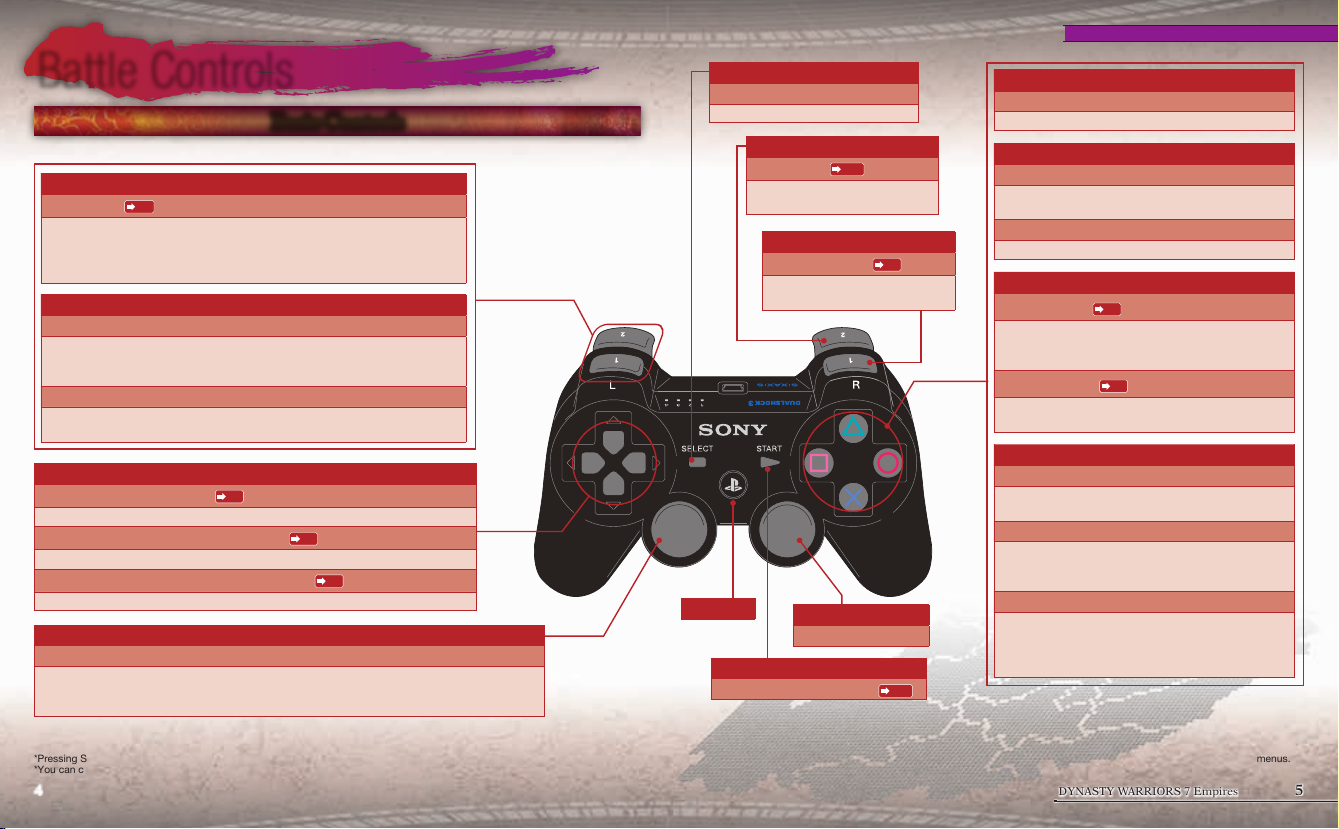
These are the basic controls for the Battle Screen.
W button
Stratagems
Turn the Stratagem display on and off. While they are displayed, you can use
the left and right buttons to select a Stratagem and press S to use it.
When the Stratagems are being shown, moving (left stick) is the only action
you can perform.
Q button
Block / Strafe
Guard against attacks from the front. If you are hit by a powerful attack from
the enemy, your guard will be broken. By holding down Q while using the
left stick, you can move while continuing to face forward.
Somersault
Press Q when knocked into the air by an enemy attack to regain your
balance.
P.7
DUALSHOCK®3
wireless controller
SELECT button
Call horse
Summon your horse to your side.
R button
Toggle map
Switch between the overview and
zoomed maps.
P.21
E button
Switch Weapon
Change weapons while in the
middle of an attack.
F button
Normal Attack
This is a rapid attack you can use against the enemy.
D button
Strong Attack
Perform a powerful attack. By using these to follow up
Normal Attacks, you can use special techniques.
Jump horse
P.6
Jump with a horse that you are riding.
A button
Musou Attack
Attack with a finishing move unique to each character.
You can perform the attack when at least 1 unit of the
Musou Gauge is full.
Use Stratagem
After pressing W to display the Stratagems, press
S to use one.
P.6
P.7
S button
Directional buttons
Use Stratagem (up button)
Use a Stratagem (you can use it without pressing W).
Select Stratagem (left or right button)
Select a Stratagem to use (you can select it without pressing W).
Weapon/Stratagem display (down button)
Switch between displaying your equipped weapon and your Stratagems.
Left stick
Move/swim
Move your character or swim when you are in water. You are unable to attack or block while
you are swimming.
If you enter the water while mounted on a horse, you can only perform mounted attacks.
*You can confirm the controls for locations such as the Pause Menu by checking the button guide at the bottom of the screen.
You can press START to skip event scenes.
*Pressing SELECT and START at the same time will exit the game and take you back to the Title Screen.
*You can change the function assigned to each button by going to "Controls" in the Options menu.
P.7
P.7
P.7
PS button
Right stick
Rotate camera
START button
Display the Pause Menu
*If you are using the DUALSHOCK®3 wireless controller, you can set whether to use the vibration function or not by going to
"Vibration" under "Controls" in the Options menu. Additionally, holding down the PS button will bring up a menu where you can
confirm whether the vibration function is enabled or not. In order to use the vibration function, it must be enabled in both menus.
P.19
4 5
Jump
Make your character jump. The height of your jump will
differ depending on how long you hold down S.
Mount/dismount horse
You can mount a horse by standing near it and
pressing S, and you can dismount a horse by pressing
S while on it.
Ladders
Climb ladders by standing near them and pressing the
button. You can block enemy attacks by pressing Q
while climbing a ladder. You can also press S while
climbing a ladder to jump down to the bottom.
DYNASTY WARRIORS 7 Empires
Page 4
EX Attack
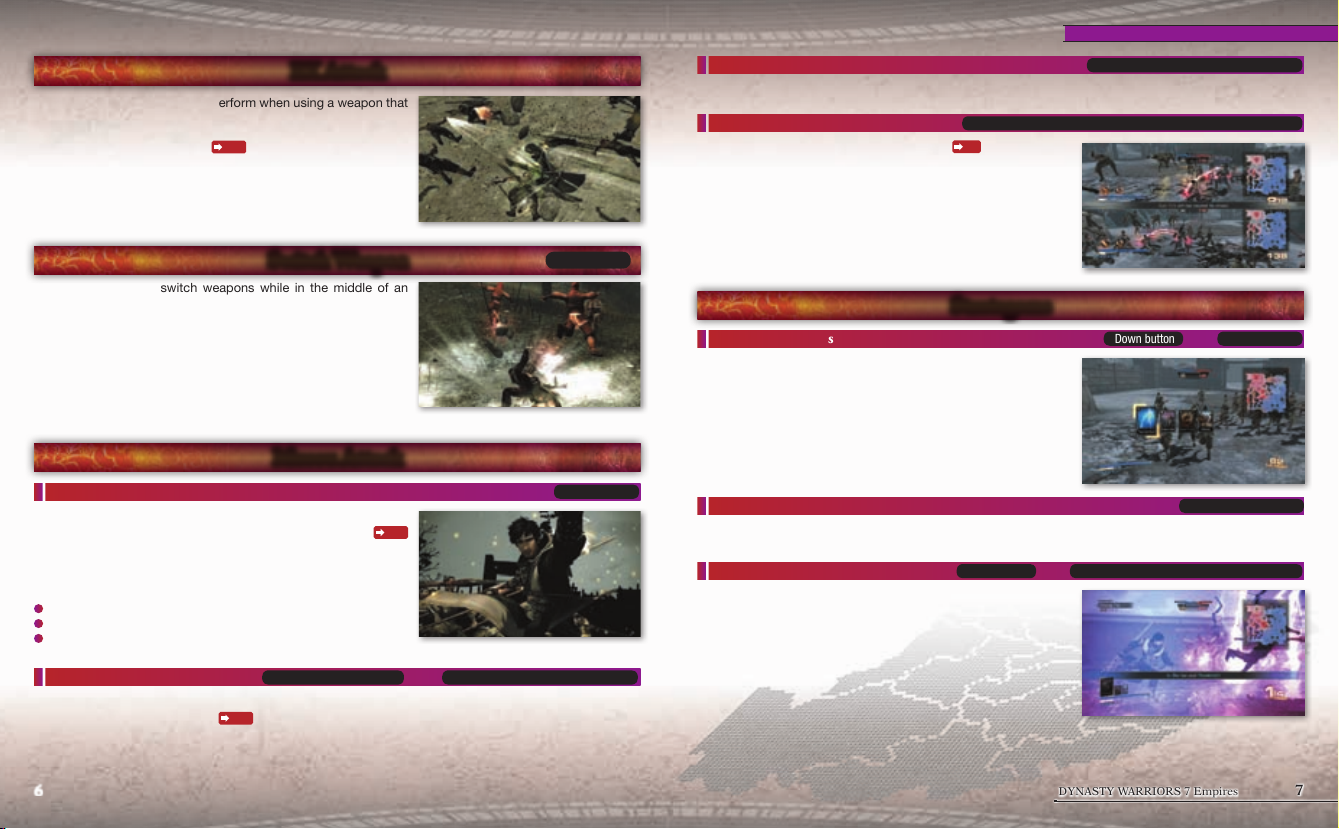
These are attacks that you can perform when using a weapon that
your officer is proficient with (denoted by an "EX" mark).
The controls will vary depending on the officer. You can confirm
them by going to "Officer Info"
P.19
on the Pause Menu.
Battle Controls
True Musou Attack
If you press A when your Health Gauge is in the red, you can perform an even more powerful Musou Attack.
Double Musou Attack
When playing with two players (online play)
Player 2 are a set distance apart from one another (shown by an
electrical bond) and trigger a Musou Attack 1 at relatively the same
time, both of them will perform an even more powerful Musou
Attack.
Player 1 and Player 2 press A while near each other
P.9
, if Player 1 and
Press A while your Life Gauge is red
Switch Weapon
These enable you to switch weapons while in the middle of an
attack.
You can press E to perform a special attack and then switch
to your other weapon. These attacks can follow a Normal Attack
or Strong Attack.
Depending on the weapon, there might be special additions after
you switch weapons.
*If you press E while on a mount, you will only switch weapons without
attacking.
Musou Attack
Musou Attack 1
Attack with a finishing move unique to each character. You can
perform this attack when at least 1 unit of the Musou Gauge
is full. Each use of the Musou Attack will deplete 1 unit of the
Musou Gauge.
The following can fill the Musou Gauge:
Inflict damage upon the enemy.
Take damage from the enemy.
Your Health Gauge is in the red.
Musou Attack 2
Attack with a finishing move different from Musou Attack 1. The controls will vary depending on the officer.
You can check the Pause Menu
Press A while in the air Press E + A while on the ground
P.19
for more details.
6 7
P.20
or
E button
A button
Stratagems
Display Stratagems
With the down button, you can switch from displaying your
equipped weapon to showing your Stratagems. Pressing the down
button again will switch the display back.
Additionally, if you press W, the Stratagems will be displayed
larger on screen. While using W to display them, moving (left
stick) is the only action you are able to perform.
You can press W again or A to return the display to normal.
Select Stratagem
Select the Stratagem you wish to use while they are being displayed.
Use Stratagem
Use the up button to use the selected Stratagem. You can also
press W to display the Stratagems and then press S to use one.
Each Stratagem can only be used once per battle. Additionally, if
you capture a specific kind of base, there are some Stratagems
that cannot be triggered unless certain conditions are met.
Up button
or
DYNASTY WARRIORS 7 Empires
Down button
W to display the Stratagems, then S
W button
or
Left and right buttons
Page 5
Starting the Game
Starting the Game
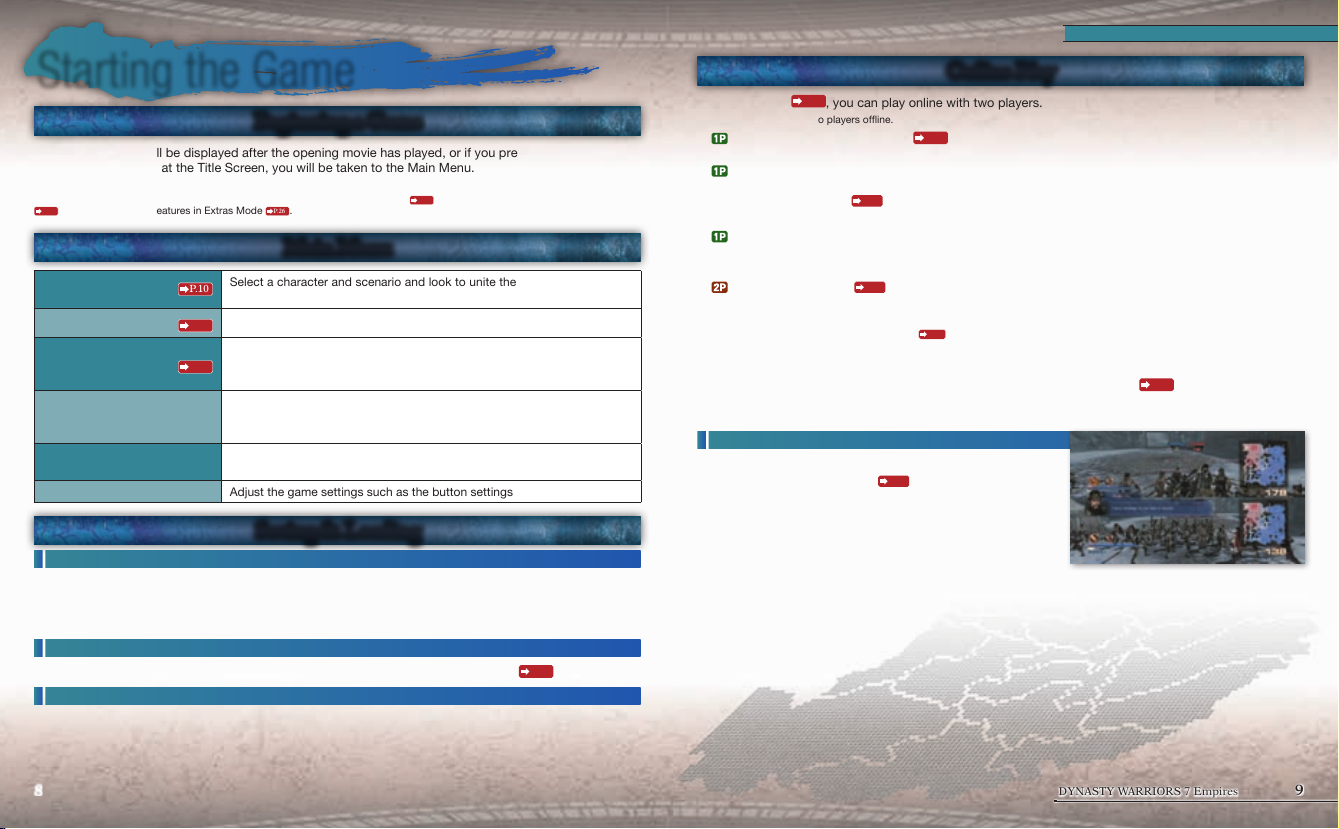
Beginning a Game
1. The Title Screen will be displayed after the opening movie has played, or if you press START.
2. If you press START at the Title Screen, you will be taken to the Main Menu.
*If you are not signed in to PlayStation®Network when starting the game, the sign-in screen for PlayStation®Network will be displayed.
When you are signed in to PlayStation®Network, you are able to select online play
P.10
, and enable various features in Extras Mode
P.26
.
Main Menu
Select a character and scenario and look to unite the land. You are able to
Empire Mode
Edit Mode
Extras
Gallery
Encyclopedia
Options Adjust the game settings such as the button settings and more.
P.10
play with two players during battles.
Create and edit your own original characters.
P.26
Purchase downloadable content, form kingdoms (teams) using your
created characters and more. You can also upload and download created
P.26
characters and teams online.
View movies and character models or listen to voice lines from each
character. As you progress through the game, the number of items you can
view will increase.
Read about the story of the Three Kingdoms and the officers and
terminology found within it.
Saving & Loading
Saving
Within Empire Mode, you can save under "System" in the Information Menu (press START) from the Strategy
Phase screen. You can also save system data within the Options menu.
*Saving uses the hard disk drive. At least 953KB of free space are required in order to save.
*While saving, the HDD access indicator will flash. Do not reset or turn off the power at this time.
Saving during battle
During battle, you can save by selecting "Save" from the Pause Menu (press START)
Loading
To resume a game in Empire Mode, select "Continue" from Empire Mode within the Main Menu and choose
the save data you wish to load. Additionally, you can also load game data during the game by going to
"System" in the Information menu.
P.9
within Empire Mode, download guest officers
P.19
.
Online Play
P.10
In Empire Mode
*You can also play with two players offline.
On the Officer Selection screen
1.
online play. Then, choose an officer and select "Confirm" to begin.
Select how you will search for Player 2. You can use "Recruit" to search for players from around the
2.
world, or "Invite" to invite a friend to play with you. Once you select your search method, you will proceed
to the Pre-battle Screen
*You can send invites to your Friends from your Friends list.
3. When you have finished your preparations on the Pre-battle Screen, select "Online Play" and follow
the search instructions to begin the matching process.
*If you are unable to find another player online to play the game with, you can return to single player play by pressing D.
4. Select "Online Play"
invite, then you will automatically join the game. If you have not received an invite, then you can select
Quick Match to quickly find a partner online, or use "Join" to find a list of games searching for players.
*Player 2 can only select created characters
5. When the matching process is complete, the battle will begin. The game will end when either Player 1 or
Player 2 is unable to rejoin the battle, or if the victory or defeat conditions for the battle are met.
6.
win the battle, both Player 1 and Player 2 will receive Bonus Points
If you
Points for use within the game can only be obtained by Player 1.
Playing with 2 players oine
You can also play with two players offline.
When selecting
1.
presses START and selects a character to control.
*If Player 1 only has one officer available to participate in the battle, then you
cannot play with two players.
2.
When you
order to start the battle. The game will end when either Player
1 or Player 2 is unable to rejoin the battle, or if the victory or defeat conditions for the battle are met.
3.
If you win the battle, the Fame Points you receive will be split evenly between Player 1 and Player 2.
, you can play online with two players.
P.18
during battle preparation, press START and you can switch to
P.19
.
P.26
from Extras Mode and choose your character. If you have received an
P.26
as their playable character.
P.18
an officer
before battle, Player 2
finish your battle preparations, select “Confirm” in
P.11
. Resources and Fame
8 9
DYNASTY WARRIORS 7 Empires
Page 6
Empire Mode
Empire Mode Overview
You assume the role of a single officer and while serving in a variety of roles and positions, look to unite the
land under one rule.
Whether you wish to expand your nation as a ruler, lead your ruler to victory as a Strategist, or simply fight
as a subordinate officer, your own personal story is waiting to be discovered.
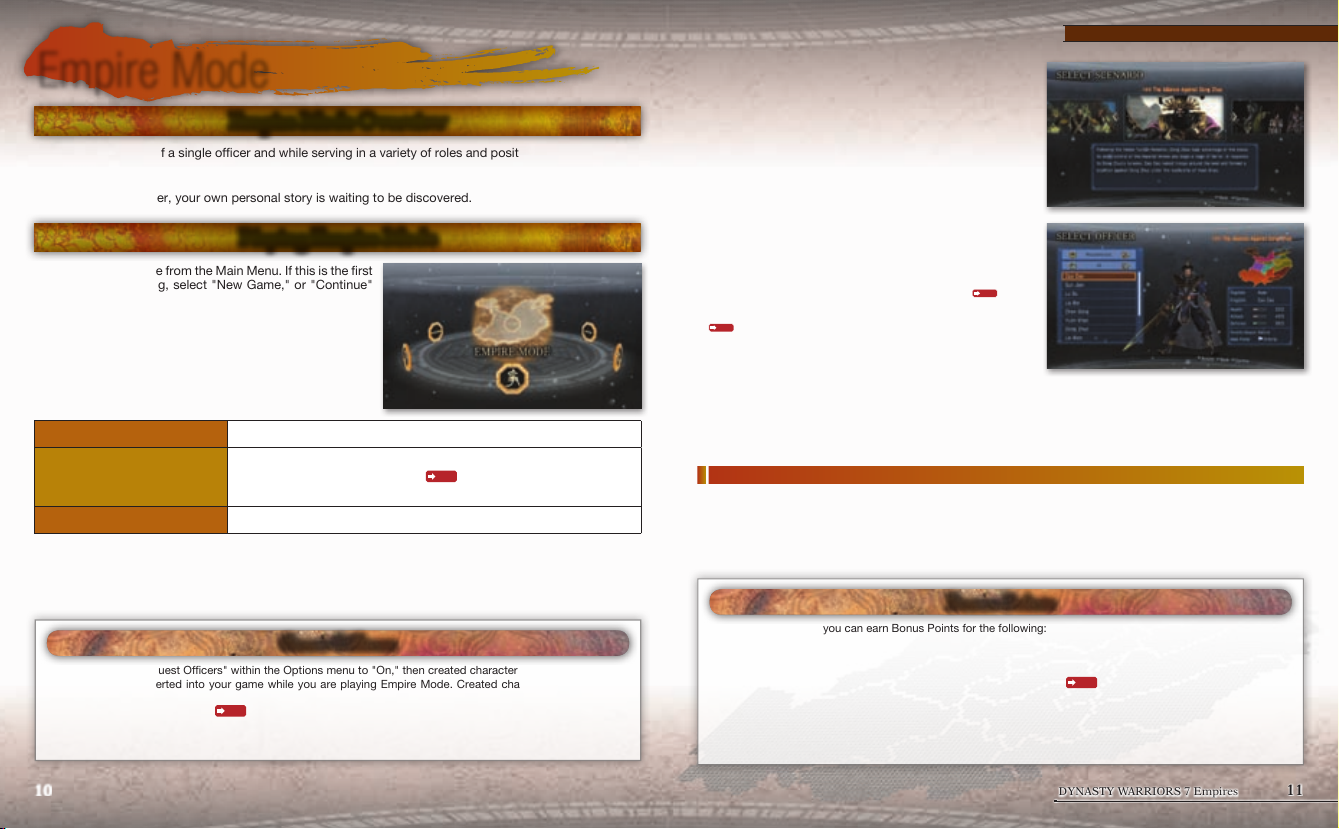
Playing Empire Mode
1. Select Empire Mode from the Main Menu. If this is the first
time you are playing, select "New Game," or "Continue"
if you wish to resume a previously saved game. If you
select "New Game," then you will be taken to the Game
Settings screen.
*You can create up to 30 save files.
2.
Decide on
you will be taken to the Scenario Selection screen.
Difficulty Choose from [Beginner/Easy/Normal/Hard/Chaos].
Created Character Settings
Officer Deaths Choose whether officers will be able to die during the game or not.
*You will be able to replace famous officers or allow for officer deaths within the "Created Character Settings" menu once you have
cleared a scenario at least once.
If you turn "Accept Guest Officers" within the Options menu to "On," then created characters will be automatically
downloaded and inserted into your game while you are playing Empire Mode. Created characters that you have
downloaded will remain within the game until you complete the scenario.
By using "Create Guest Officer"
the game settings. When you select "Next,"
Determine whether created characters or teams will appear in your game
or not. If you use “Register switch”
will be able to enable or disable the switching of officers.
Guest Ocers
P.26
from Extras Mode, you can save guest officers as created characters.
P.26
for your created characters, you
Empire Mode
3.
Select the
to confirm an explanation of the scenario as well as the
participating kingdoms.
4. Select a character to play as. You can sort the list of
officers by position with Q/E or by officer type with
W/R.
*In the scenario, "A Gathering of Heroes," you can also choose
kingdoms created through the use of "Create Team"
Extras Mode. You are able to have the teams appear as kingdoms by
going to "Created Character Settings" in the Game Settings screen
P.10
5.
Confirm the
Once you select a character, the scenario will begin.
*Within the scenario, "A Gathering of Heroes," you can freely change the officers and territories of each kingdom.
scenario you wish to play. You will be able
P.26
within
.
kingdom you are assigned to. There are some officers who are not assigned to a kingdom.
Finishing the game and Game Over
Once you unite the land, you will complete the game and view the ending movie.
Depending on your performance, you will receive Bonus Points.
Also, the game may end if your kingdom is eliminated or other conditions are met. If you lose the game, you
will be unable to receive any Bonus Points.
Bonus Points
Within Empire Mode, you can earn Bonus Points for the following:
Q
Winning battles
Q
Clearing Empire Mode and viewing a new ending movie
You can use these Bonus Points by selecting "Purchase Equipment"
new edit parts for your created characters.
Additionally, you can use Bonus Points to unlock various special features when starting a new game in Empire
Mode.
P.26
within Edit Mode in order to purchase
10 11
DYNASTY WARRIORS 7 Empires
Page 7
Empire Mode
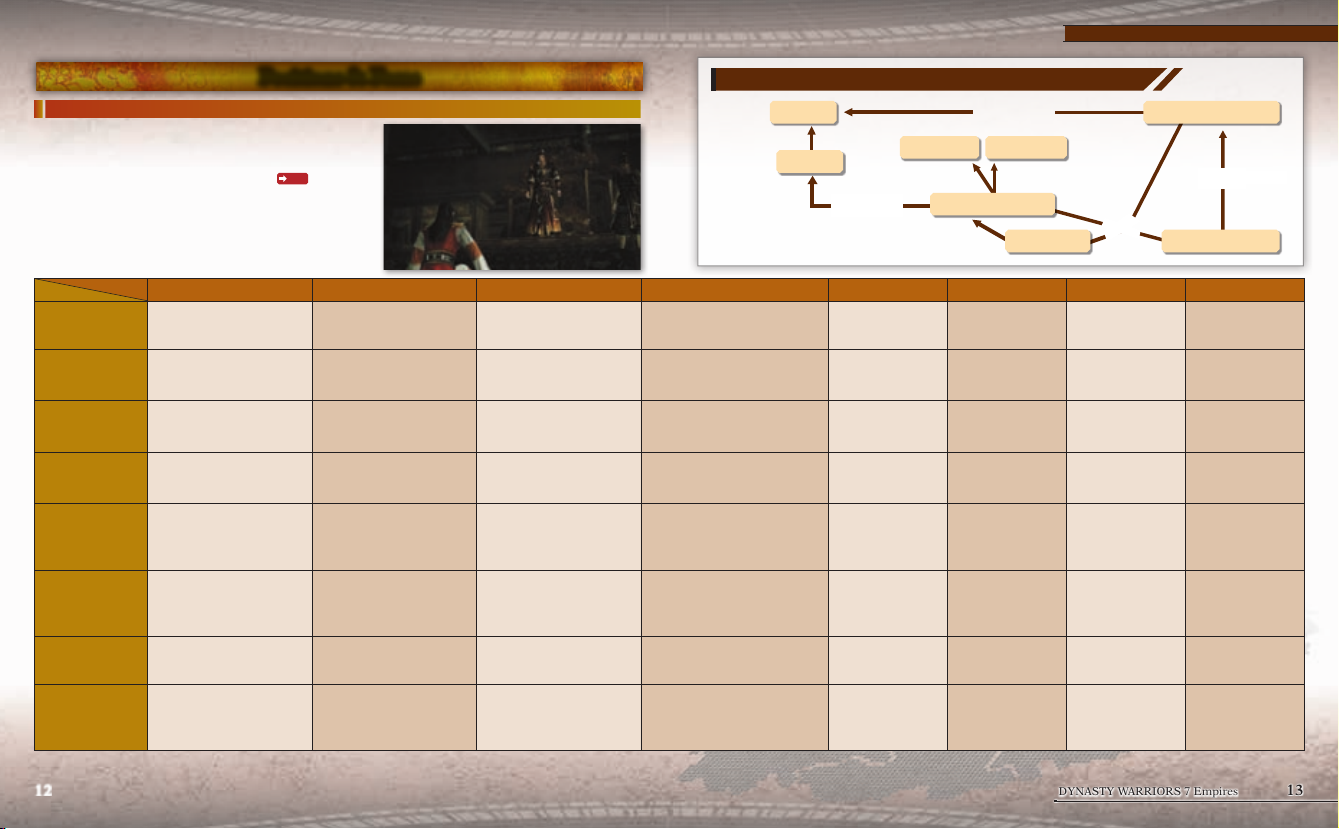
Positions & Fame
Positions
Depending on your position, the things you can do during
War Councils and strategies you can perform will differ.
Your position can change depending on the actions you
take. By increasing certain types of Fame
to be promoted to Marshal or Strategist.
X : Unable to do - : No special features
Position
Actions
War Council
Assignments
Strategy Phase
Military
Personnel
Special
Transfer
Battles
Ruler Marshal Strategist Prefect Common Officer Lieutenant Vagabond Leader Free Officer
Determine the kingdom's policy. Able to participate. Able to participate. Able to participate. Able to participate. X X X
X
Free to use the "Diplomacy"
command.
Able to restore troops to all of
your officers.
Able to use the “Employ” and
“Dismiss” commands.
Able to use the "Appoint"
command.
When your Fame Rating
increases, you are able to perform
more actions.
X X X X X X
Able to choose a territory to
invade. Able to edit and give
orders to all of your units. Able to
play as any of your allied officers.
P.14
, it is easier
Able to select from choices
proposed by your Ruler.
Able to use the "Diplomacy"
command when ordered.
Able to use the "Invite" command
when ordered.
When your Fame Rating
increases, you are able to perform
more actions.
Able to edit and give orders to all
of your units. Able to play as any
of your allied officers.
Able to select from choices
proposed by your Ruler.
Able to use the "Diplomacy"
command when ordered.
- -
Able to use the "Invite" command
when ordered.
When your Fame Rating
increases, you are able to perform
more actions.
Able to carry up to 5 Stratagems. - -
Changing Positions
Ruler
Declare independence
Prefect
Able to select from choices
proposed by your Ruler.
Able to use the "Diplomacy"
command when ordered.
Able to use the “Secede”
command to form a new
kingdom.
Able to use the "Invite"
command when ordered.
When your Fame Rating
increases, you are able to
perform more actions.
Marshal Strategist
Appointment
Able to select from
choices proposed by
your Ruler.
Able to use the
"Diplomacy" command
when ordered.
- -
Able to use the "Invite"
command when
ordered.
When your Fame Rating
increases, you are
able to perform more
actions.
Raise a banner
Promotion
Common Officer
Promotion
When your Fame Rating
increases, you are
able to perform more
actions.
Another officer can
become your Supervisor
and give you orders.
Lieutenant
X X X
-
-
Vagabond Leader
Serve
Only able to select the
"Support" command.
Unable to select
the "Weaponry" or
"Training" commands.
Able to "Serve" a
kingdom.
X X
Able to move to any
territory.
If you win the battle to
raise a banner, you can
form a new kingdom.
Invite friends
Free Officer
Only able to select the
"Support" command.
Unable to select
the "Weaponry" or
"Training" commands.
Able to "Serve" a
kingdom.
Able to move to any
territory.
-
12 13
DYNASTY WARRIORS 7 Empires
Page 8
Fame
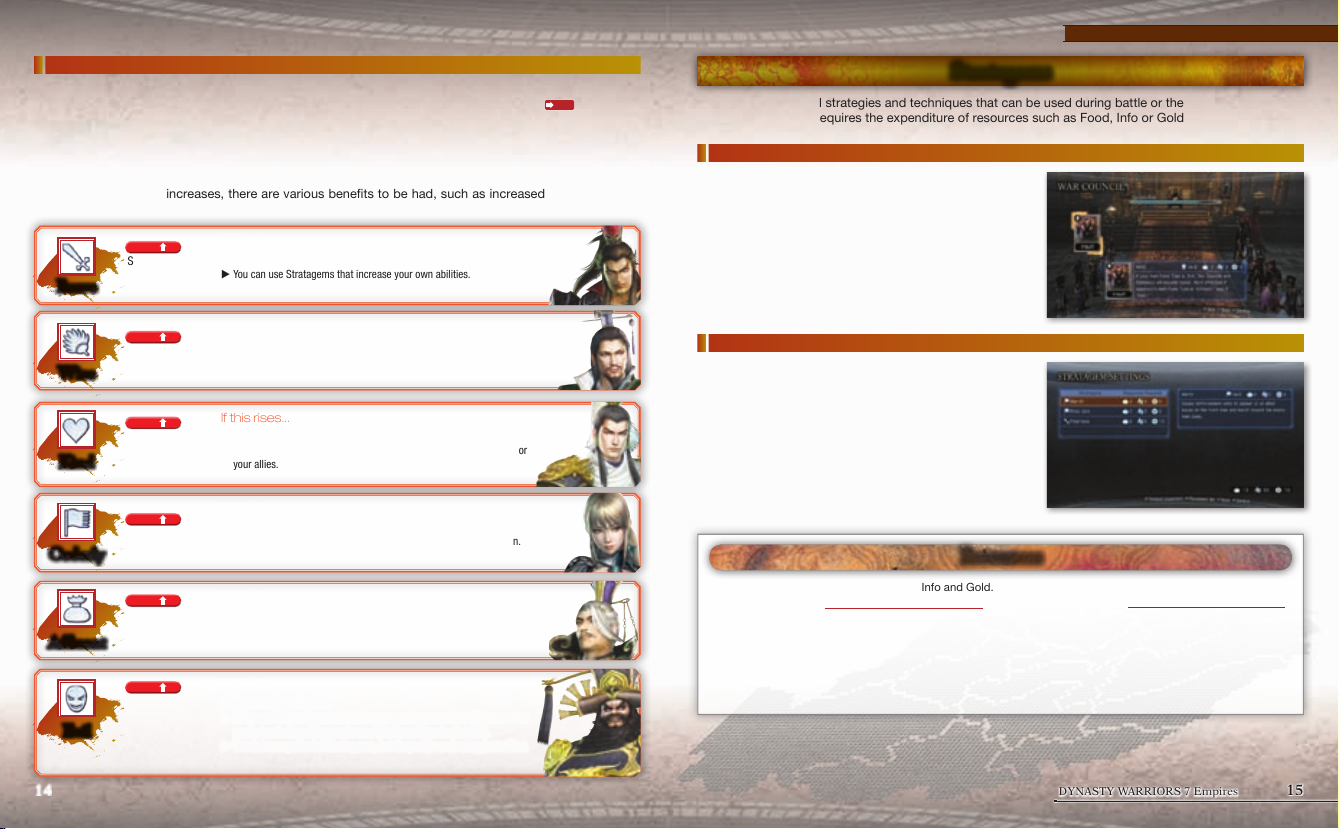
Fame is a way to show an officer's personality. There are 6 types of Fame, and you can receive Fame
Points depending on the actions you take, your results in battle, your use of Stratagems
Once you have received a certain amount of Fame Points, your Fame Rating will rise. As your Fame Rating
increases, you will be able to perform even more actions based on that Fame Type, learn Skills, and obtain
new Stratagems. You can sometimes lose Fame Points if too much time passes.
Your Fame Type with the highest Fame Rating will become the main Fame Type of your officer that serves
as a descriptor of your personality. The rating of your main Fame Type is referred to as your Overall Rating.
As your Overall Rating increases, there are various benefits to be had, such as increased abilities for your
officer.
If this rises...
E It is easier to be promoted to Marshal.
You can use Stra
E
tagems that increase your own abilities.
Brave
UP
Select [Weaponry].
P.15
, and more.
Empire Mode
Stratagems
Stratagems are useful strategies and techniques that can be used during battle or the Strategy Phase.
Using some of them requires the expenditure of resources such as Food, Info or Gold.
Using Stratagems focused on strategy
If you use a Stratagem during a War Council or diplomatic
negotiations, your proposal is more likely to be accepted.
UP
Select [Diplomacy].
Wise
UP
Select [Donate].
Kind
Release prisoners.
UP
Select [Train].
Orderly
UP
Select [Invest].
Affluent
UP
Betray your Ruler.
Evil
14 15
Select [Tax].
If this rises...
E It is easier to be promoted to Strategist.
You can use large-scale and complica
E
ted Stratagems.
If this rises...
E The length of your contract with supporters will increase.
You
E
can use more Stratagems that rely on bonds with the people or
your allies.
If this rises...
E You can command more troops.
You can use more Stra
E
tagems that rely on the power of organization.
If this rises...
E It is easier to obtain Gold.
You can use more Stra
E
tagems that rely on money.
If this rises...
E Receive higher income.
Allies and
E
subordinates will betray you or become Free Officers more
easily (excluding officers whose main Fame Type is also Evil).
E
You can use po
werful Stratagems, but they rely on abusing your allies.
Using Stratagems during battle
If you use Stratagems during battle, they can give you an
advantage over the enemy.
During battle preparations, you can select up to 4
Stratagems to take with you (5 if you are a Strategist).
If you do not have sufficient resources to use the Stratagem,
you cannot take it to battle. The resources for any unused
Stratagems will be returned after the battle is over.
*Depending on the type of battle, you may not be able to use Stratagems.
Resources
There are three kinds of resources: Food, Info and Gold.
Obtaining resources
Q
Win battles.
Q
Receive from your supporters.
Q
Receive income each month (Rulers only).
Q
You may receive resources by carrying out strategies.
Q
Complete assignments.
Spending resources
Q
Carry out strategies.
Q
Purchase items or weapons in town.
Q
Use Stratagems.
Q
Obtain supporters.
Q
Pay biannual stipends to your subordinates (Rulers
only).
DYNASTY WARRIORS 7 Empires
Page 9
War Council & Strategy Phase
War Council & Strategy Phase
War Council
Every January and July, there will be a War Council held to determine the policy for your kingdom. For
officers that are assigned to a kingdom, they will need to follow the kingdom's policy until the next War
Council. Officers of low position are unable to attend War Councils. Additionally, if you are not a Ruler, then
you will be given assignments.
*Vagabond Leaders and Free Officers cannot hold War Councils.
*If you are a Lieutenant, you are unable to participate in War Councils or be given assignments.
Kingdom Policy
Determine the policy for your kingdom to last until the next War Council. The Ruler will decide on the overall
policy, such as preparing to invade another kingdom, defending territory, or looking to increase the wealth
and power of the kingdom.
If you are a Ruler...
Determine your own policy. Officers belonging to your kingdom may voice their objections and offer
counter-proposals.
*If you accept an officer's suggestion, then your Friendship rating
If you are not a Ruler...
Follow the plan set by your Ruler. You are also able to voice your objections and propose alternate plans. If
you use a Stratagem at that time, it will make your proposal more likely to be accepted.
The Ruler will make the final decision regarding the policy.
Assignments
An assignment will be decided, and if you complete it before the next War Council, you will be given a
reward (Experience Points, Fame Points, etc.). Select one assignment from the list provided by your Ruler
that coincides with the kingdom's policy. Rulers cannot be given assignments.
By completing your assignments and winning battles, you can earn Experience Points, making it easier to
be promoted from a Common Officer to a Strategist or Marshal.
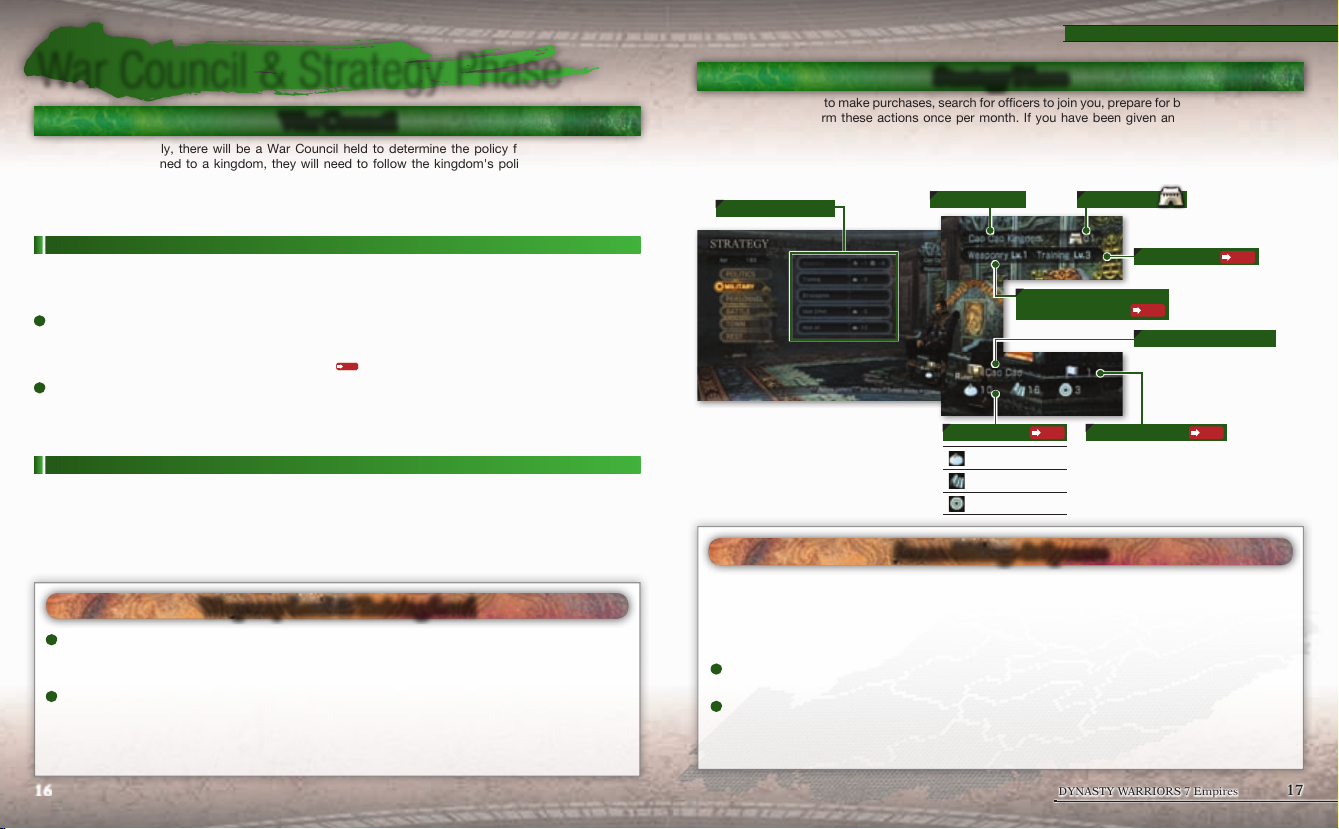
Weaponry Level & Training Level
Weaponr y Level
The higher this level is, the more weapons you are able to purchase at the Armory in town. You can increase this
level by selecting "Weaponry" from the "Military" command.
Training Level
The higher this level is, the more troops the officers in your kingdom can command. You can increase this level by
selecting "Training" from the "Military" command.
*Free Officers and Vagabond Units are unable to increase their Weaponry or Training Levels.
P.17
with them will increase.
Strategy Phase
You can visit the town to make purchases, search for officers to join you, prepare for battle, and much more.
You are able to perform these actions once per month. If you have been given an assignment, then you
should use this opportunity to try and complete it.
When you are finished making your moves, the game will proceed to the next month.
*Paying a visit to the town will not cause the game to advance to the next month.
Required resources
You can check your monthly income with D.
A
You can increase your Friendship rating with other officers by interacting with them through the "Personnel"
command. As your Friendship rating with another officer increases and you win battles together, you can become
sworn siblings with them or marry them.
When you have a sworn sibling or a spouse, you may see additional event scenes. If your kingdom changes,
then their kingdom will change as well, and you can take them to battle with you and use them as your playable
character.
Sworn Siblings (up to 2) Requirement: In the same kingdom, friends
When your Friendship rating with another officer reaches a certain level, you can become sworn siblings with them.
Spouse (1 of the opposite gender) Requirement: In the same kingdom, friends
When your Friendship rating with an officer of the opposite gender reaches a certain level, you can marry them.
*You cannot choose officers you are related to as your spouse.
*You cannot edit officers that have become a sworn sibling or spouse.
Kingdom Name # of territories
Weaponry Level
Resources
Food
Info
Gold
P.15
Sworn Siblings & Spouses
Training Level
P.16
Position / Officer Name
Overall Rating
P.16
P.14
16 17
DYNASTY WARRIORS 7 Empires
Page 10
Battles
Battle Preparation
During the Strategy Phase, if you select the "Battle" command, you can choose a type of battle to fight.
Within the battle, attempt to achieve the victory conditions.
Ocer Selection
Select the officers that will participate in the battle.
Rulers and Marshals can take a total of up to 8 officers.
Other positions are able to take a total of 2 officers, including
themselves and either a sworn sibling or spouse.
Choose your playable character from the list of officers
going to battle.
You can use F to set your equipment. Weapons, items and
animals can all be equipped.
Select "Confirm" in order to proceed to the pre-battle
screen.
*Depending on the type of battle, the number of officers able to participate may differ.
*By pressing START, you can switch to online play
*To play offline with 2 players
P.9
, Player 2 can press START to join the game.
Winning & Losing Battles
Q
Victory Conditions
R
Defeat the enemy commander.
R
Capture the enemy main camp.
R
Reach the time limit in a Defensive Battle.
*The commander will appear if you continue to attack the main camp.
*To capture the enemy main camp, you will need to link it to the allied main camp via supply lines
Officers can be injured if they are defeated in battle or lose a large number of troops.
If injured, the compatibility
by the enemy or even killed when defeated in battle. Injuries will heal themselves after a set period of time has
passed.
*When beginning Empire Mode, you can turn "Officer Deaths" to "Off" in the game settings
P.25
P.9
.
Q
Defeat Conditions
R
Your playable character is defeated, or is unable to
P.23
rejoin
R
The allied commander is defeated.
R
The allied main camp is captured.
R
The time limit is reached during an Invasion.
the battle.
P.22
Injuries
for all weapons will decrease. In addition, it will be easier for them to be captured
P.10
so officers cannot die in battle.
Battles
Pause Menu / Battle Screen
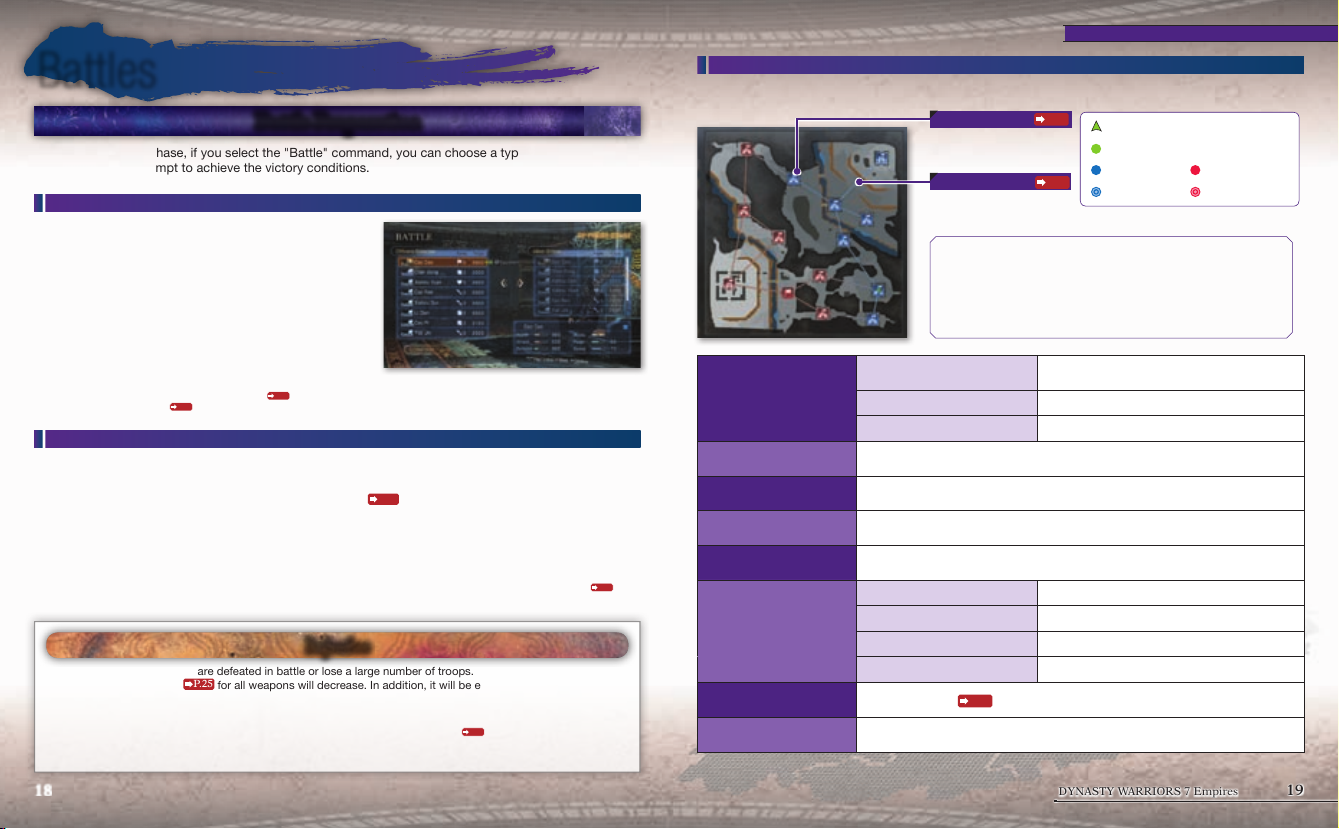
This is displayed if you press START during battle. It is also displayed before the battle starts.
Base
N: Allied Army
N: Enemy Army
Supply Lines
N: Allied Army
N: Enemy Army
A
Rivers (Blue): You can swim in these areas. You are able to use stairs
and other areas to climb up onto land.
A
Differences in elevation: The brighter the area, the higher the elevation.
A
Borders (Brown) You are unable to go beyond these areas. There are
places where you can jump down to lower elevations.
A
Stairs/Ladders (Orange)
Weapon Info / Equip Weapons
Officer Info
Item Info Confirm the items you have currently equipped.
Moves Confirm the moves your character can perform.
Stratagem Settings
/ Stratagem Info
Battlefield Info
Give Orders
(only during battle)
Withdraw (only during battle)
.
System
Select the Stratagems you will take to ba ttle. / During battle, confirm the Stratagems you have
equipped.
Confirm information on the allied and enemy armies, bases and the victory and defeat conditions.
You can check a log of the battle messages with D.
Rulers and Marshals can give orders to all of their allied officers.
Retreat from the battlefield. You will lose the battle and if it is a Defensive Battle, you will lose
your territory as well.
Settings Adjust each of the game settings.
Save (only during battle) Save your current in-battle progress.
Tutorial Learn the basic controls and flow of a battle.
Quit Exit the game and return to the Title Screen.
Online Play
(only during online play)
Begin Battle
(only before battle)
Begin the online play
Begin the battle.
P.9
P.22
Your location and direction
Your horse
Allied Army Enemy Army
P.22
Allied Officer Enemy Officer
Confirm the weapons you have currently equipped. / You
can change your weapons during battle.
matching process.
18 19
DYNASTY WARRIORS 7 Empires
Page 11
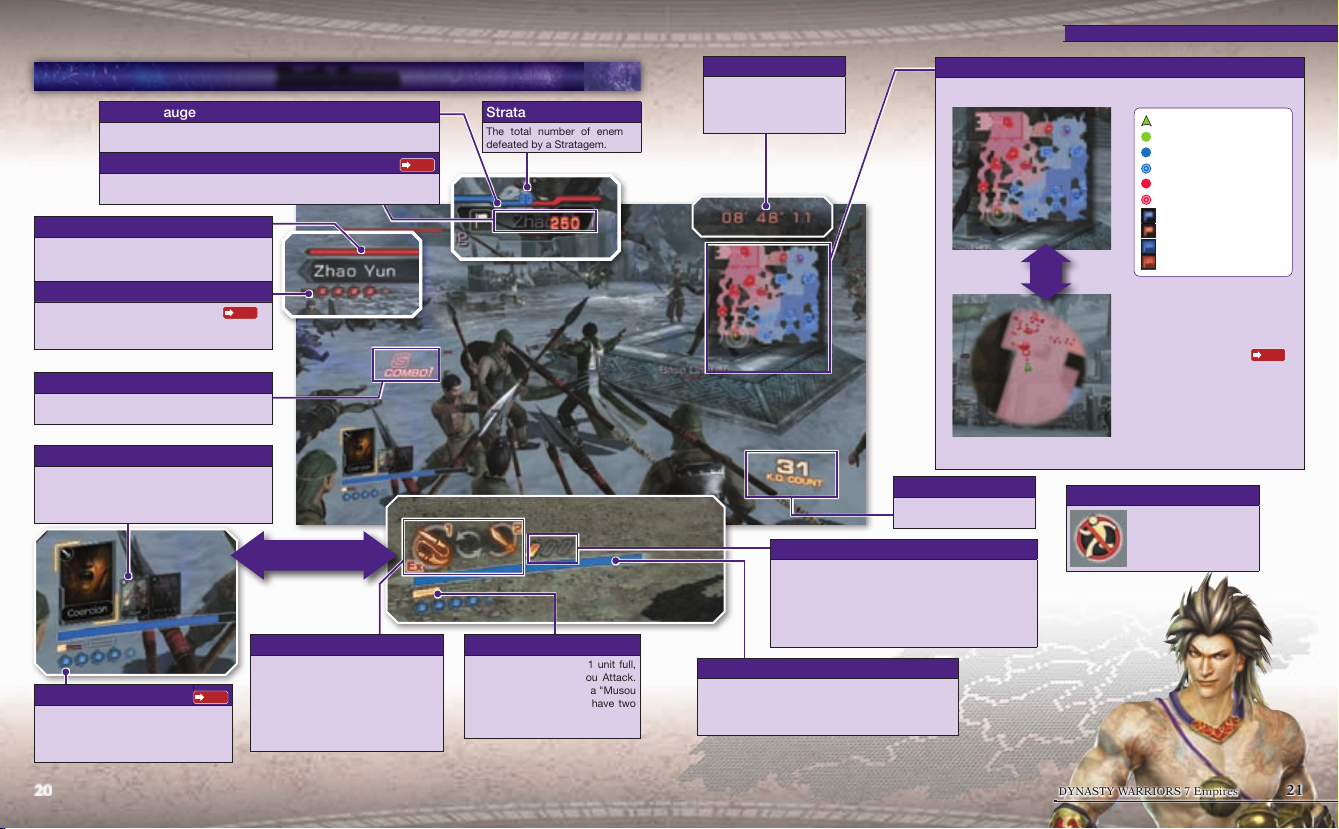
Morale Gauge
The morale of the enemy and allied forces.
Allied morale is blue and the enemy's is red.
Base Type Base Durability
When you enter a base, this will be displayed on screen.
When its Durability reaches 0, the base will be captured.
Health Gauge (Enemy)
The enemy's Health. You can go to "Health bars"
under "Display" in the Options menu to have the
enemy's health displayed over their head.
Enemy Info
The enemy's name and troop strength
The troop strength is displayed by the number
of markers.
P.23
Combo
The number of consecutive hits against the
enemy.
Stratagems
You can confirm the Stratagem to be used with
the down button. If you press the down button
again, the display will return to your equipped
weapon.
Current Weapon
You can use E to perform a Switch
Attack and change the weapon you are
Troop Strength Marker
For each 1,000 troops, 1 troop strength
marker will be displayed. If you are
defeated, you will lose 1 marker and will
rejoin the battle.
using. Your current weapon is shown
P.23
to the left.
1 = Weapon 1 2= Weapon 2
EX = The category of weapon that you
can use an EX Attack with.
Battle Screen
.
Down button
Stratagem K.O. Count
The total number of enemies
defeated by a Stratagem.
P.22
Musou Gauge
When you have at least 1 unit full,
you can perform a Musou Attack.
If you obtain an item with a "Musou
+1" effect, then you can have two
or more units. Each use of the
Musou Attack will use 1 unit.
Time remaining
If this reaches 0, you will win
a Defensive Battle.
This is displayed when only
10 minutes are remaining.
Map
You can use R to switch between the overall and zoomed maps.
K.O. Count
The number of enemies you
have defeated.
Temporary Effect Timer
When you pick up an ability boosting item, these will
light up while the item is in effect. It will flash when time
is about to run out.
Q Attack x2 (30 sec.)
Q Defense x2 (30 sec.)
Q Speed increased (30 sec.)
Health Gauge
Your playable character's current Health. It decreases
when you take damage and changes colors (Blue Yellow - Red). Once it is empty, you will be forced to
withdraw, or you will lose the battle.
Overall Map
Zoomed Map
R
button
No Entry Marker
Battles
Your location and direction
Your horse
Allied Army
Allied Officer
Enemy Army
Enemy Officer
Allied Base
Enemy Base
Allied Main Camp
Enemy Main Camp
Q
Area of Influence
The darker the color, the
stronger the influence of the
army of that color.
You cannot go beyond
this marker.
P.22
20 21
DYNASTY WARRIORS 7 Empires
Page 12
Battles
Fighting Battles
Supply Lines & Area of Inuence
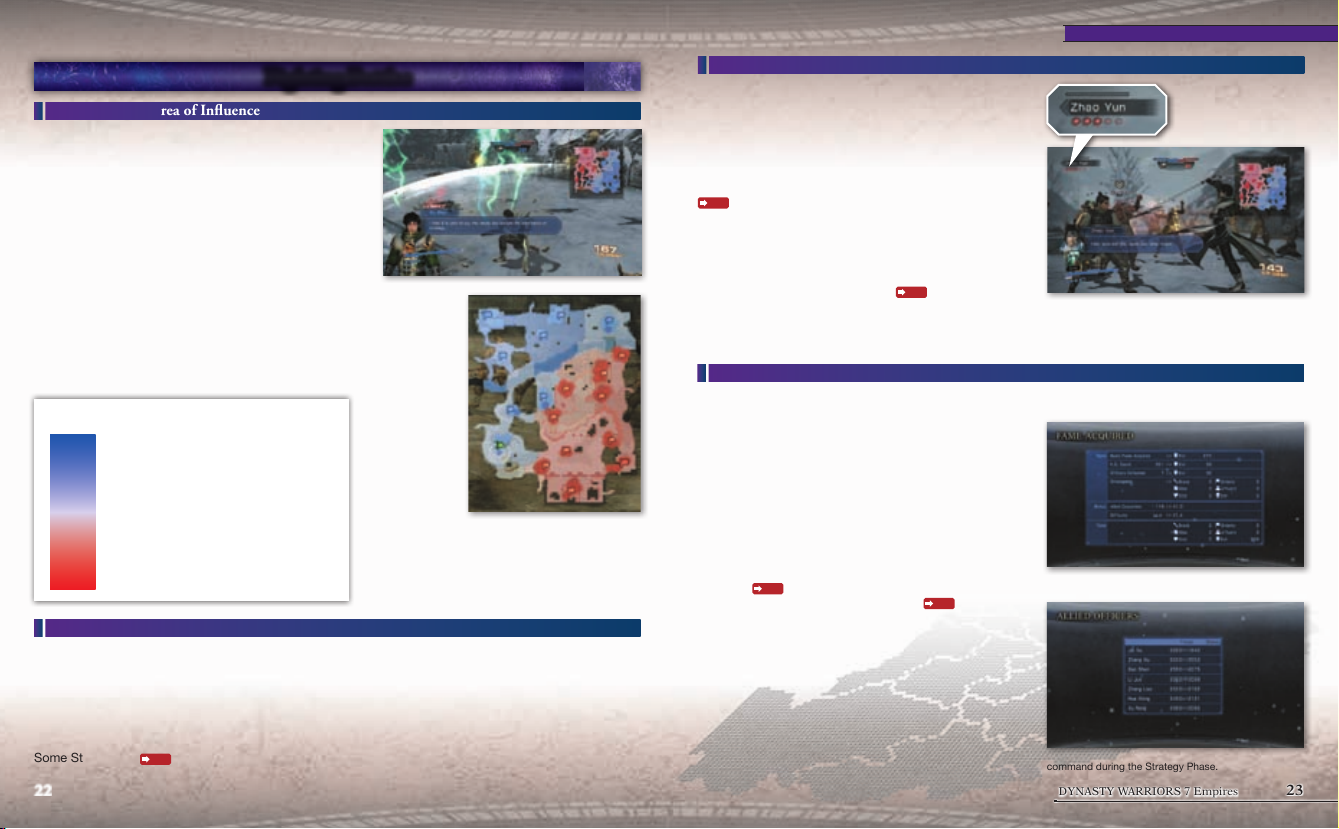
The paths that link bases together are known as supply lines
and the area around supply lines linking allied bases to the
allied main camp are known as your area of influence.
Within the area of influence, the abilities of your allies
are increased and it is easier to capture enemy officers.
Conversely, when you are in the enemy's area of influence,
the enemy's abilities in battle are increased and it is easier
for allied officers to get captured.
Also, when starting the battle, the more troops you have,
the more areas of influence and allied bases you will have.
When the enemy captures one of your bases and cuts off
the supply line between it and your allied main camp, the
supply line has been severed. When bases have been cut
off, they become isolated and lose strength.
*Bases connected by a supply line to a supply depot will not become
isolated.
Q
Viewing the area of influence
Allied influence is exceptionally strong
Allied influence is strong
Influence is even between the two sides
Enemy influence is strong
Enemy influence is exceptionally strong
Base
When a base's Durability reaches 0, it will be captured.
Defeat enemies within the base to reduce its Durability.
When you capture a base, you wil receive additional allied troops and your forces' morale will increase.
Additionally, recovery items wil appear in the center of the base (only when your forces occupy the base).
It is important to aggressively target enemy bases in order to gain the advantage in battle.
There are 8 types of bases, and the higher their level, the higher their Durability and the level at which they
function.
Some Stratagems
can change a base's type or increase its level.
P.15
22 23
*For areas where the enemy army's influence is strong, the
map will be displayed in red.
Troop Strength & Rejoining the Battle
If your officer is defeated, then you will temporarily
withdraw from the battle. However, if you have troops
remaining, then you will be able to return to the battle after
a short period of time. Each time you rejoin the battle, you
will use up one troop strength marker.
If you defeat an officer with no troops remaining, then they
will flee from the battle. Additionally, if you defeat them
within an area where your influence is exceptionally strong
P.22
, then it will be easier to capture officers with troops
remaining or get them to flee. if you are defeated within an
area where the enemy's influence is strong, then you will
be defeated and lose the battle even if you have troops
remaining.
You can check the troop strength of each officer by going
to the Pause Menu (START button)
"Battlefield Info" command.
*Capturing of officers can only occur during Invasions and Defensive
Battles.
*In Mission Battles, a single defeat will cause you to lose the battle.
P.19
and checking the
A 1 troop strength marker is displayed for every 1,000
troops.
Ending the Battle
You can obtain resources as a reward for winning battles. Additionally, you will also receive Fame
Points based on your results.
Q
Victory as a Ruler or Vagabond Leader
If you win an Invasion (or raise your own banner if you are
a Vagabond Leader), then you can increase the number
of territories under your control. If you capture a territory
where the Ruler of another kingdom resides, you will take
all of the other adjacent territories of that kingdom.
Additionally, you will need to decide how to deal with the
prisoners. By selecting the "Employ" command, you may
be able to hire them. By selecting the "Execute" command,
your Evil
officer will cause your Friendship rating
Q
When you belong to a kingdom, you will be given
Experience Points based on your performance in the
battle. If you have a "Battle" assignment, winning the
battle will give you even more Experience Points than
winning a normal battle.
P.14
Fame Rating will increase. Releasing the
P.17
Victory as a position other than the above
to increase.
G If you use a Stratagem during the battle, you will
receive Fame Points for that type.
G Be sure to restore lost troops via the "Military"
command during the Strategy Phase.
DYNASTY WARRIORS 7 Empires
Page 13
Upgrading Officers
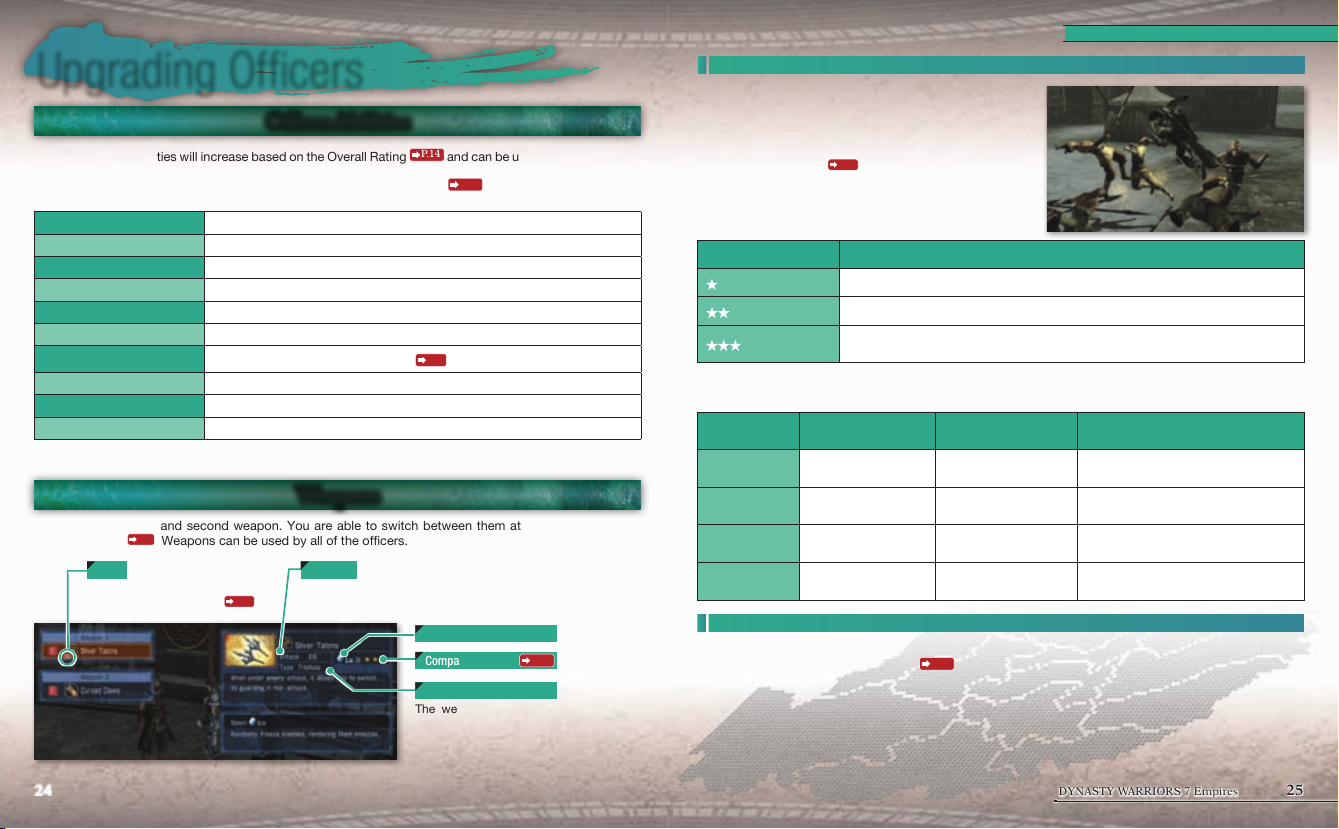
Officer Abilities
An officer's basic abilities will increase based on the Overall Rating
items. Additionally, as your position increases, your officer will grow in strength relative to the new position.
You can check your current abilities via the Pause Menu (START button)
P.14
and can be upgraded with Skills or
P.19
.
Compatibility
Every officer has a Compatibility level with each weapon
category.
Some weapons require "Power" and some require "Speed,"
so you can increase an officer's compatibility by increasing
their power and speed. Power and speed can be increased
through Fame Ratings
P.14
and items.
Upgrading Officers
Health
Attack
Defense
Musou
Power
Speed
EX Attack
Required Weapon
Weapons
Animals
You can equip a first and second weapon. You are able to switch between them at any time by using a
Switch Weapon
P.6
The officer's favored weapon.
Able to use an EX Attack
24 25
If you run out of Health, you will be forced to temporarily withdraw, or lose the battle.
The higher this is, the more damage you can inflict upon the enemy.
The higher this is, the less damage you will receive from enemy attacks.
The number of Musou Gauges you possess. You can increase this with items.
The higher this is, the better you can use weapons that require Power.
The higher this is, the better you can use weapons that require Speed.
The controls for how to perform an EX Attack
The weapon category that can enable you to perform EX Attacks.
The two weapons you currently have equipped.
The animals you are able to ride during ba ttle. You can mount or dismount the animals with S.
P.6
.
Weapons
. Weapons can be used by all of the officers.
AttackEX
P.6
The higher this is, the more damage you can inflict.
.
Elementals & Level
Compatibility
Weapon Category
The weapon's category. Each category
has its own special characteristics.
P.25
Compatibility Description
(Poor)
(Good)
(Excellent)
If you equip a weapon that you have Excellent compatibility with, you can use the following special
techniques.
Special
Technique
Whirlwind
Shadow Sprint
Dash
Dive
Not able to use the weapon very well.
Able to use the weapon quite well. Your attack speed will increase.
You are a master of the weapon. Depending on the weapon category, you will be
able to use special techniques.
Main Weapon Controls Description
Weapons that require
Power
Weapons that require
Power
Weapons that require
Speed
Weapons that require
Speed
F button (Normal
Attack)
F button during a
Strong Attack
S button while
attacking or in the air
S button while being
attacked
Follow up with a blast of wind that
attacks your surroundings.
Attack while running forward at a high
speed.
Cancel your current action and move
quickly through the air.
Perform a rapid evasion of the enemy
attack.
Equipping Weapons
You can change your equipped weapons in places such as the Info Menu (START button) during the
Strategy Phase, or the officer selection
and then choose the weapon to equip. You cannot equip the same weapon for your 1st and 2nd weapon
(although you can equip two weapons within the same category).
P.18
screen during battle preparation. Select the weapon category
DYNASTY WARRIORS 7 Empires
Page 14
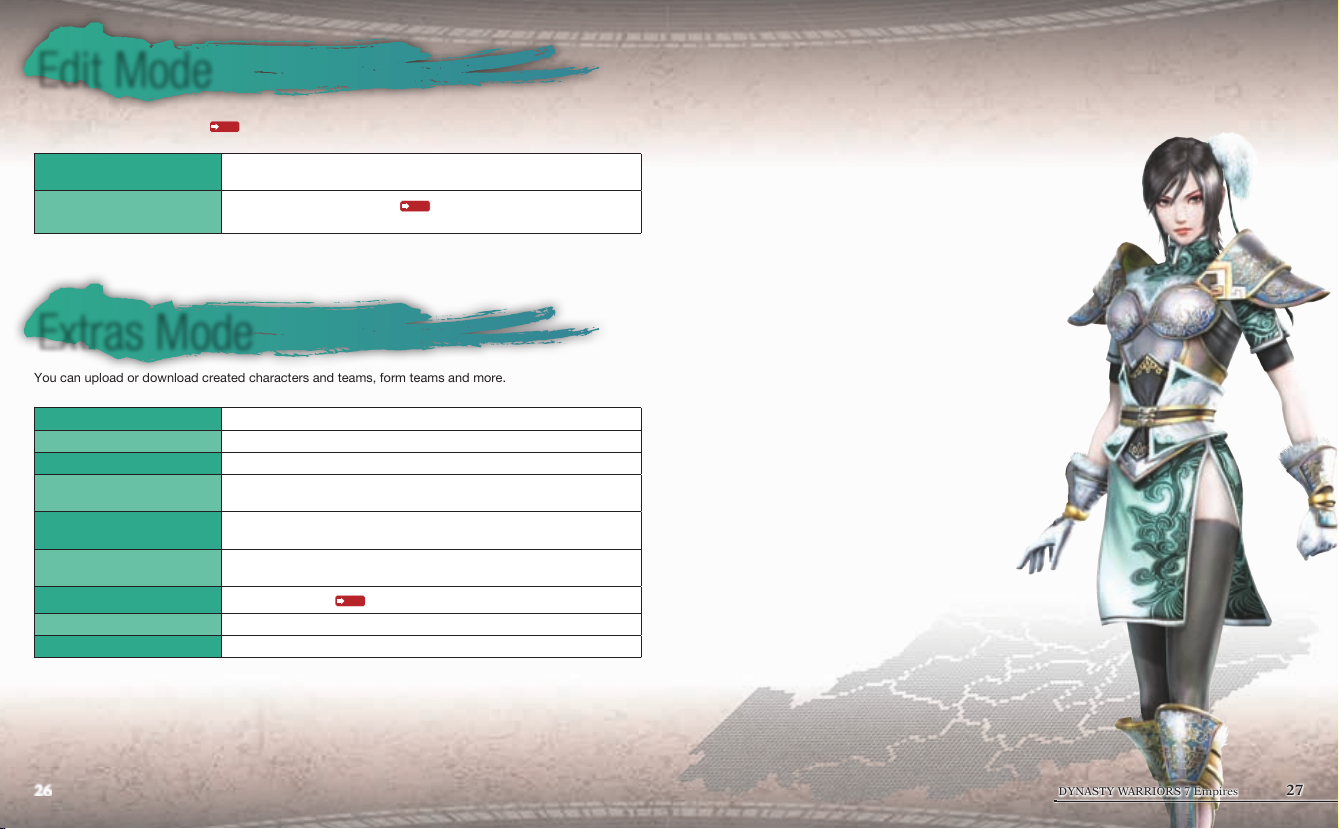
Edit Mode
Create your own unique character. You can save up to 200 characters. Characters that you have created
can be used in Empire Mode
created characters.
Officer Edit
Purchase Equipment
*For your created characters, you can select from a list and press the START button to replace officers that appear in the Empire
Mode. The name of the officer you are replacing will be highlighted in yellow. If you press the START button again, you can remove
the registration.
P.10
. Additionally, with Extras Mode, you can form teams based on your
Select a file and create an officer. Choose each of the parts and select
"Confirm" in order to save your character's data.
You can use Bonus Points
(equipment).
P.11
to purchase additional edit parts
Extras Mode
You can upload or download created characters and teams, form teams and more.
Data that you have created or downloaded can be inserted into Empire Mode.
Download Data
Upload Data
Import Data
Export Data
Create Team
Leaderboards
Online Play
Store
Create Guest Officer
Download created characters and teams.
Upload characters and teams you have created.
Save the data for created characters and teams.
Export the data for created characters and teams.
Exported data can be uploaded online.
Form a team of up to 5 created characters. Created teams can appear as
kingdoms within the Empire Mode scenario, "A Gathering of Heroes."
Compete online against other players on total K.O.s within the Empire
Mode.
Play a game online
Connect to PlayStation®Store and purchase downloadable content.
Extract created character data from your Empire Mode save data and save it.
P.9
with another player.
*Downloading and uploading data, leaderboards, online play and connecting to PlayStation®Store requires an internet connection.
*A Sony Entertainment Network account is required to connect to PlayStation®Store. For more details, please refer to the
PlayStation®Network page on the PlayStation® official site: http://www.us.playstation.com/psn/
26 27
DYNASTY WARRIORS 7 Empires
Page 15

 Loading...