

Page 1
i s tu dio2008/Nov/17Techwall Electronics
1K-1 Baby Monitor Manual_ Cover
Page 2
i s tu dio2008/Nov/17Techwall Electronics
1K-1 Baby Monitor Manual_ Page 1
1
Thank you for purchasing our IK-1 baby monitor. Your unit has been manufactured
and checked under the strictest quality c ontrol to ensure that each unit leaves the
factory in perfect condition. If in the unlikely event you find any defects or have any
problem, please contact your dealer, our branch or service center.
Please read this man ual carefully to obtain maximum performance a nd extended
service life from the unit.
Features
- Voice activated transmitter
- Indicator on receiver showing received signal loudness even when volume is turned
down
- Selectable two channels with crystal clear sound
- Low battery indicator on transmitter and receiver
- Subaudible private tone function minimize interference from other electrical devices
- Transmitter and receiver can operate with either AA size batteries or 9V AC adapter
Power Supply
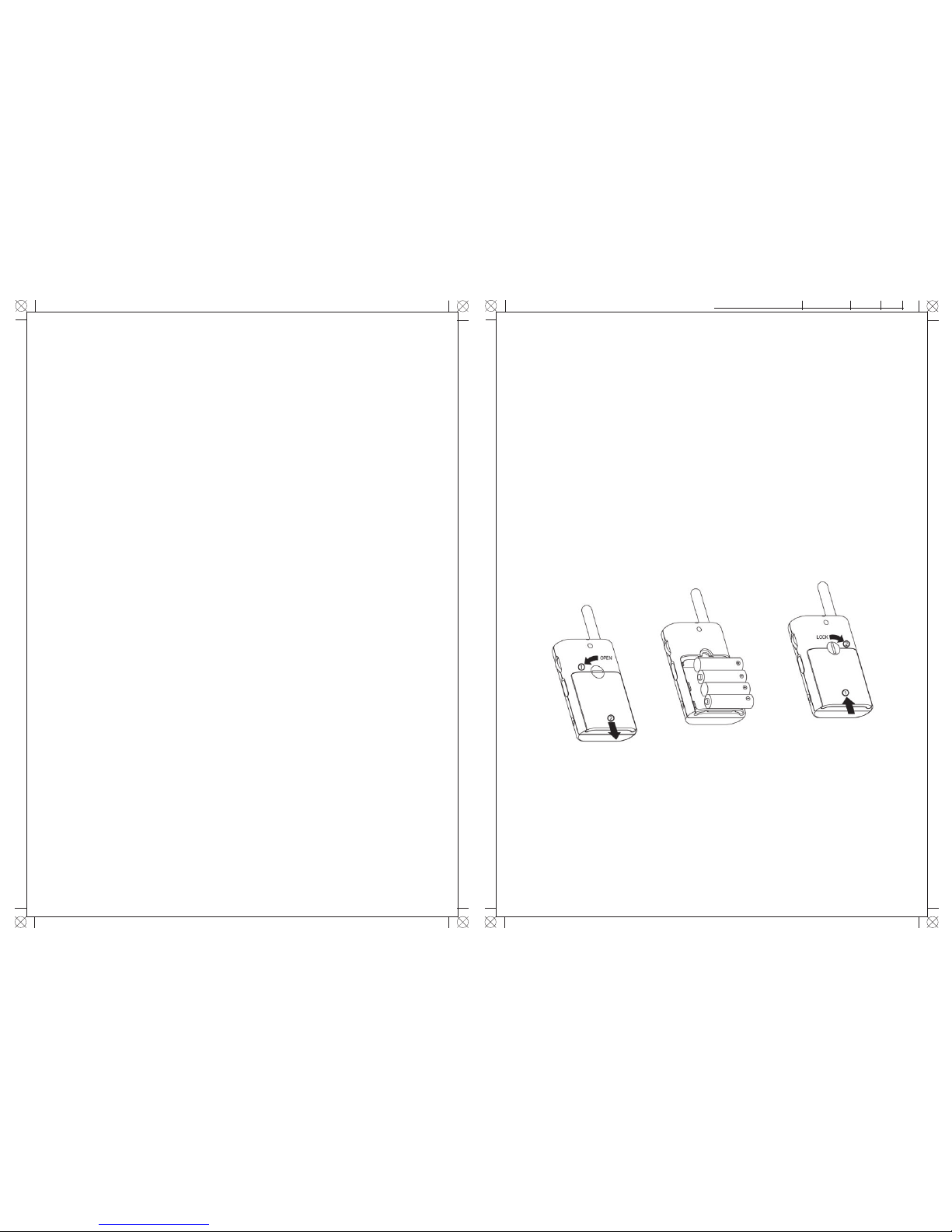
1. Operation from batteries
Turn th e lo ckin g sc rew c ou nter cl ockw is e 90° a nd s lide op en t he ba tt ery
cover in th e dir ectio n as shown . I ns ert f our UM-3 /AA s ize b atter ies, obser ve
co rr ec t po la ri ty (+/ -) i nd ic at ion. I ns ta ll back th e ba tt er y do or a nd t ur n the
loc kin g scr ew cl ock wise 90° t o loc k t he ba tte ry do or in pl ace .
N.B. Fo r b est p erf ormance, do not mix use old an d new ba tteries or alkal ine
and rechargeable batteries.
Page 3
OPERATION
1. Set the transmitter Power ON-OFF switch 1 to ON position.
2. Set the channel selector 2 to either CH1 or CH2 position .
3. The Power On ind icato r 3 will lig ht up green. I f it becomes red or dim, the
batteries have run down and need to be replaced.
4. Place the transmitter nearby the cot with the microphone 5 facing towards the
baby, preferably 1m away.
5. Once the built-in condenser microphone 5 picks up any sound from the baby,
the transmitter will automatically switches into transmit mode and the transmit
indicator 4 lights up.
6. When the baby stops making sound, the transmitter will return to standby mode
and the transmit indicator 4 goes off.
7. Using the Channel Selector 9 on receiver, set to the same channel as the transmitter.
8. Turn the Volume Control 8 to switch on the receiver at a reasonabl e distan ce
away from the transmitter. (Too close a distance will create feedback which cause
a screeching sound a t the speake r). The Power On indicator 10 will li ght up
green , if it becomes red o r di m, the batter ies have r un d own a nd n eed to be
replaced.
9. Whenever a signal is received, the receiver indicator 11 will light up. The louder
the voice, the brighter the indicator. This indicator is useful to monitor the baby
when volume of speaker is turned down.
10. In case you hear interference or static noises, change to another channel on both
the transmitter and receiver.
11. This baby monitor is incorporated with private tone feature, so static noises will
not be heard in the receiver under standby mode. However, it is necessary
that the transmitter and receiver have the same
private tone (as indicated by colour code in the
battery compartment) to communicate with
each other.
12. Both the transmitter and receiver can be carried
around using hand strap. To install hand strap
(purchased separately), follow diagram as shown.
i s tu dio2008/Nov/17Techwall Electronics
1K-1 Baby Monitor Manual_ Page 2
i s tu dio2008/Nov/17Techwall Electronics
1K-1 Baby Monitor Manual_ Page 3
2
3
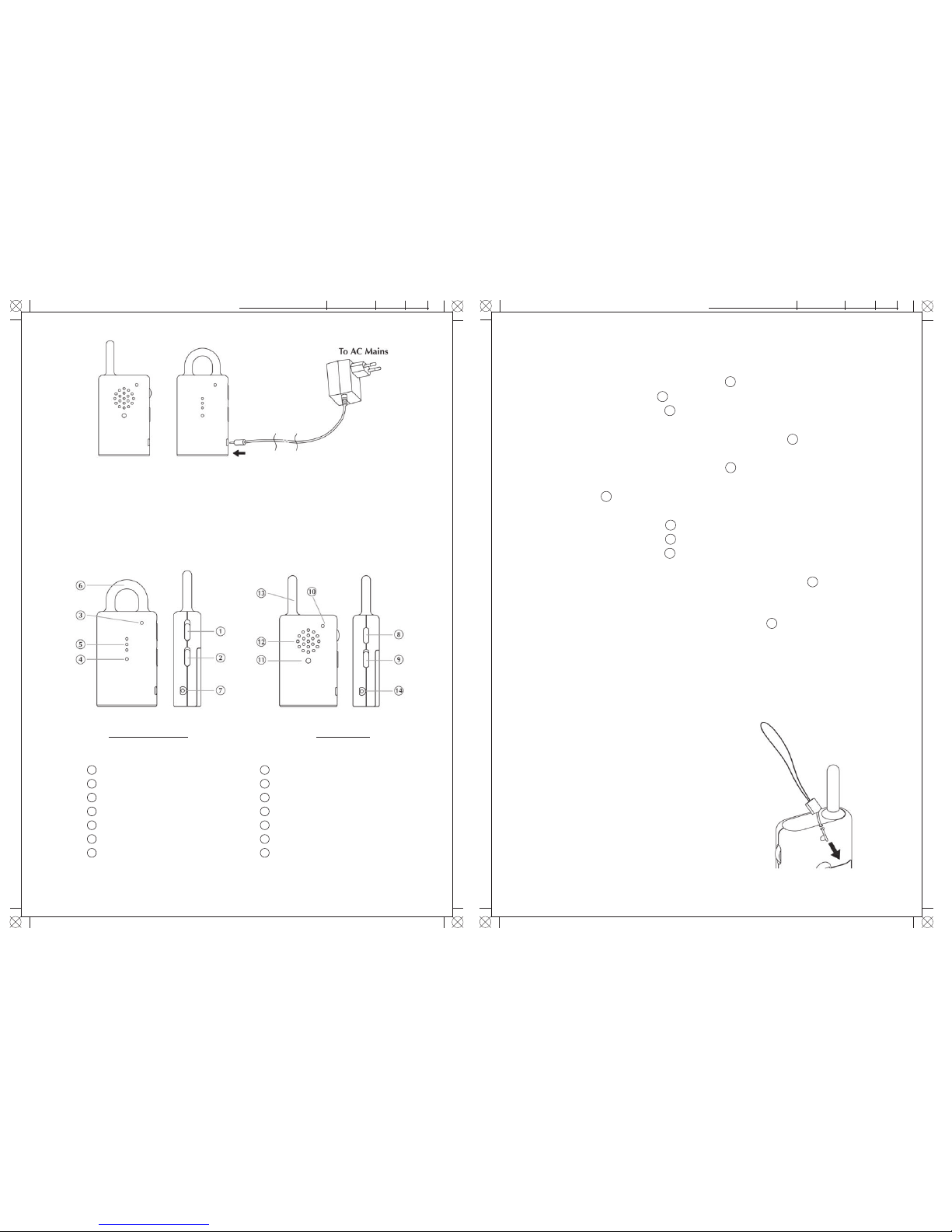
2. Operation from AC manis
The unit can be operated on AC mains using 9V 100mA type AC adapter (purchased
separately). Connect the output plug (Ø 2.35mm) of the adapter to the DC jack on
the unit, make sure the polarity is correct.
Controls Layout
Power ON/OFF switch
Channel selector
Power On and Battery Low indicator
Transmit indicator
Microphone
Antenna
DC jack
1
Volume control with ON/OFF switch
Channel selector
Power On and Battery Low indicator
Receive indicator
Speaker
Antenna
DC jack
TRANSMITTER RECEIVER
2
3
4
5
6
7
8
9
10
11
12
13
14
Page 4

i s tu dio2008/Nov/24Techwall Electronics
1K-1 Baby Monitor Manual_ Page 4
i s tu dio2008/Nov/24Techwall Electronics
1K-1 Baby Monitor Manual_ Page 5
Precautions
- Use only 9V 100mA type AC adapters. Use of other AC adapter may cause damage
to the unit.
- W hen n ot us ing the unit for a long period of time, remove all batt ery f rom the
transmitter and receiver to avoid battery leakage.
- Disconnect the AC adapter from the wall outlet when the unit is not to be operated.
- The unit is be st per formed with in a temperature range of 0 ° C to 40°C ( 22 F t o
104 F).
- D o not leave the unit expose to direct sun light for a l ong time or n ear any heat
source, moisture and excessive dust environment.
- W hen th e unit cabinet become dir ty, use detergent and c lean w ith a soft cloth.
Never use abrasive cleaner or chemical solvent.
- Do not open the cabinet, no serviceable parts inside.
Standard Accessor
a. Transm itt er Uni t … ……… ……… ……… ……… …………………………...... .. 1
b. Rece iver Un it ………… ……… ………………… ……… ………………… ….… . 1
c. User Manual ……………………………………………………………….…….. 1
The users manual or instruction manual for an intentional or unintentional radiator
shall caution the user that changes or modifications not expressly approved by the
part y respo nsible for com pliance could void the us er’s a utho rity to operat e th e
equipment. In cases where the manual is provided only in a form other than paper,
such a s on a com puter disk or over the Internet, the inf ormat ion r equir ed by this
section may be included in the manual in th at alte rnative form, provided the user
can reasonably be expected to have the capability to access information in that form.
FCC Information
This device complies with Part 15 of the FCC Results.
Operation is subject to the following two conditions :
(1) This device may not cause harmful interface, and
(2) This de vice must accept any interference received, includi ng interference tha t
may cause undesired operation.
WARNING
Change or modification not expressly approved by the manufacturer could void the
user’s authority to operate the equipment.
Transmitter has no
transmission
Transmitter always on
Static noise sometimes
heard
Many static noises and
interference
Communication distance is
too short
Receiver cannot receive
signal from transmitter
- The input sound level is
too low
- Battery has run down or
AC adapter improperly
connected
- The input sound level is
too high
- Interference from other
devices operating on
same channel
- Transmitter is located
near other electrical
appliances
- Transmitter or receiver
battery has run down
- Too many metal shielding
structures between
transmitter and receiver
- Receiver and transmitter
are set with different
private tones
- Place transmitter
closer to baby
- Replace with new battery
or check connection
- Place the
transmitter further away
from the baby
- Switch to another channel
- Remove the electrical
appliance or re-locate the
transmitter far away from
the source of interference.
- Replace with new battery
or use AC adapters as power
supply
- Re-locate the transmitter
or receiver
- Consult your dealer and
change another set with
properly matched private
tone.
TROUBLE SHOOTING GUIDE
Problem Possible Causes Solution
4
5
 Loading...